engine MERCEDES-BENZ SL ROADSTER 2016 User Guide
[x] Cancel search | Manufacturer: MERCEDES-BENZ, Model Year: 2016, Model line: SL ROADSTER, Model: MERCEDES-BENZ SL ROADSTER 2016Pages: 333, PDF Size: 11.85 MB
Page 20 of 333
Switching belt adjustment on/off
(on-board computer) ...................... 212
Seat belts
Adjusting the driver's and front-
passenger seat belt ......................... 43
Fastening ......................................... 42
Important safety guidelines ............. 41
Introduction ..................................... 41
Releasing ......................................... 43
Warning lamp ................................. 244
Warning lamp (function) ................... 43
Seats
Adjusting (electrically) ................... 102
Adjusting the head restraint .......... 103
Belt guide ...................................... 103
Correct driver's seat position ........ 101
Important safety notes .................. 101
Overview ........................................ 101
Seat heating problem .................... 105
Seat ventilation problem ................ 105
Sliding forward/back ..................... 104
Storing settings (memory func-
tion) ............................................... 111
Switching AIRSCARF on/of f.......... 105
Switching seat heating on/of f....... 104
Switching the seat ventilation on/
off .................................................. 105
Selector lever
Positions ........................................ 141
Sensors (cleaning instructions) ....... 285
Service
see ASSYST PLUS
Service Centre
see Qualified specialist workshop
Service menu (on-board com-
puter) .................................................. 208
Service message
see ASSYST PLUS
Service products
Brake fluid ..................................... 325
Coolant (engine) ............................ 325
Engine oil ....................................... 324
Fuel ................................................ 322
Important safety notes .................. 322
Washer fluid ................................... 326
Setting the air distribution ............... 126
Setting the airflow ............................ 126 Setting the date/time format
See also Digital Owner's Manua l... 253
Setting the language
See also Digital Owner's Manua l... 253
Setting the time
See also Digital Owner's Manua l... 253
Settings
Factory (on-board computer) ......... 212
On-board compute r....................... 208
SETUP (on-board computer) ............. 213
Side lamps
Switching on/of f........................... 114
Side windows
Convenience closing ........................ 91
Important safety notes .................... 89
Opening/closing (front) ................... 90
Opening/closing (rear) .................... 91
Opening/closing all ......................... 91
Overview .......................................... 89
Problem (malfunction) ..................... 93
Resetting ......................................... 92
Reversing feature ............................. 90
Sidebag ................................................ 45
SIM card
Inserting ........................................ 258
SMS
See also Digital Owner's Manua l... 253
Snow chains ...................................... 307
Socket
Front-passenger footwell ............... 268
Sockets
General notes ................................ 268
Sound
Switching on/of f........................... 254
Specialist workshop ............................ 27
Spectacles compartment ................. 263
Speed limiter
Display message ............................ 235
Important safety notes .................. 170
Selecting ........................................ 171
Speed, controlling
see Cruise control
Speedometer
Digital ............................................ 203
In the Instrument cluster ................. 32
Segments ...................................... 199
Selecting a display uni t.................. 209 Index
17
Page 21 of 333
SPORT handling mode
Deactivating/activating
(Mercedes-AMG vehicles) ................70
Warning lamp ................................. 248
Start/stop function
see ECO start/stop function
Starting (engine) ................................ 133
STEER CONTROL ..................................74
Steering
Display message ............................2 41
Steering Assist and Stop&Go Pilot
(DISTRONIC PLUS)
Activating/deactivating ................. 207
Steering assistant STEER CON-
TROL
see STEER CONTROL
Steering Pilot and Stop&Go Pilot
Display message ............................ 235
Steering wheel
Adjusting (electrically) ................... 106
Button overview ............................... 33
Buttons (on-board computer) ......... 200
Important safety notes .................. 106
Storing settings (memory func-
tion) ............................................... 111
Steering wheel gearshift paddles .... 147
Stopwatch (RACETIMER) ................... 213
Stowage areas ................................... 262
Stowage compartments
Armrest (under) ............................ .262
Centre console .............................. 263
Centre console (rear) ..................... 263
Cup holder ..................................... 266
Glove compartment ....................... 262
Important safety information ......... 262
Rear ............................................... 264
Spectacles compartment .............. .263
Stowage net ....................................... 264
Stowage space
Display message ............................ 241
Stowage net ................................... 264
Umbrella holder ............................ .263
Stowage well beneath the boot
floor .................................................... 266
Summer tyres ................................... .306
Sun visor ............................................ 267 Surround lighting (on-board com-
puter)
................................................. .210
Suspension settings
Active Body Control (ABC) (exceptMercedes-AMG vehicles) .............. .176
Active Body Control (ABC)
(Mercedes-AMG vehicles) .............. 179
SETUP (on-board computer) .......... 213
Switching on media mode
Via the device lis t.......................... 260 T
Tail lamps Display message ............................ 228
see Lights
Technical data
Capacities ...................................... 322
Emergency spare wheel ................. 318
Information .................................... 320
Tyres/wheels ................................. 317
Vehicle data ................................... 327
Telephone
Accepting a call (multifunction
steering wheel) .............................. 206
Authorising a mobile phone (con-
necting) ......................................... 256
Connecting a Mobile phone (gen-
eral information) ............................ 256
Display message ............................ 241
Menu (on-board computer) ............ 205
Number from the phone book ........ 206
Redialling ....................................... 206
Rejecting/ending a call ................. 206
See also Digital Owner's Manua l... 253
Switching between mobile
phones ........................................... 257
Telephone compartment ................ 262
Telephone module with Bluetooth ®
(SAP profile) Activating and connecting the
module ........................................... 258
Charging a mobile phone ............... 260
Connecting the mobile phone ........ 259
Connecting the module using a
USB cable ...................................... 258
Data modem mode ........................ 259
Installing the module ..................... 258 18
Index
Page 22 of 333
Introduction ................................... 257
Saving/deleting the PIN for the
SIM card ........................................ 259
Settings .........................................2 59
SIM card mode .............................. 258
Text messages ............................... 260
Transferring the phone book .......... 259
Temperature
Coolant .......................................... 200
Coolant (on-board computer,
Mercedes-AMG vehicles) .............. .213
Engine oil (on-board computer,
Mercedes-AMG vehicles) .............. .213
Outside temperature ..................... .199
Setting (climate control) ................ 125
Transmission oil (on-board com-
puter, Mercedes-AMG vehicles) ..... 213
TEMPOMAT
Function/notes ............................ .159
Text messages
Telephone module with Blue-
tooth ®
(SAP profile) ....................... 260
Timing (RACETIMER) ......................... 213
TIREFIT kit .......................................... 290
Declaration of conformity ................ 26
Important safety notes .................. 290
Storage location ............................ 288
Tyre pressure not reached ............. 291
Tyre pressure reached ................... 292
Total distance recorder .................... 202
Tow-away protection
Activating ......................................... 75
Deactivating ..................................... 75
Function .......................................... .75
Tow-starting
Emergency engine starting ............ 301
Important safety notes .................. 298
Towing
Important safety notes .................. 298
Transporting the vehicle ................ 300
With the rear axle raised ................ 300
Towing away
Fitting the towing ey e.................... 299
Removing the towing eye ............... 299
With both axles on the ground ....... 300 Traffic Sign Assist
Activating/deactivating the warn-ing function .................................... 207
Display message ............................ 232
Function/note s............................. 191
Important safety notes .................. 192
Instrument cluster display ............. 192
Transmission
Selector lever ................................ 141
see Automatic transmission
Transmission position display ......... 142
Transporting the vehicle .................. 300
Trip computer (on-board com-
puter) .................................................. 202
Trip meter
Calling up ....................................... 202
Resetting (on-board computer) ...... 203
Turn signals
Switching on/of f........................... 115
TV
Operating (on-board computer) ..... 205
see Separate operating instructions
Two-way radio
Frequencies ................................... 320
Installation ..................................... 320
Transmission output (maximum) .... 320
Type identification plate
see Vehicle identification plate
Tyre changing tool kit ....................... 288
Tyre inflation compressor
see TIREFIT kit
Tyre pressure
Calling up (on-board computer) ..... 309
Display message ............................ 237
Not reached (TIREFIT) .................... 291
Reached (TIREFIT) .......................... 292
Recommended ............................... 307
Tyre pressure loss warning
General notes ................................ 308
Important safety notes .................. 309
Restarting ...................................... 309
Tyre pressure monitor
Checking the tyre pressure elec-
tronically ........................................ 310
Function/note s............................. 309
General notes ................................ 309
Important safety notes .................. 310 Index
19
Page 26 of 333
Protection of the environment
General notes
H
Environmental note
Daimler's declared policy is one of compre-
hensive environmental protection.
Our objectives are to use the natural resour-
ces which form the basis of our existence on
this planet sparingly and in a manner which
takes the requirements of both nature and
humanity into consideration.
You too can help to protect the environment
by operating your vehicle in an environmen-
tally-responsible manner.
Fuel consumption and the rate of engine,
transmission, brake and tyre wear depend on
the following factors:
R operating conditions of your vehicle
R your personal driving style
You can influence both factors. Therefore,
please bear the following in mind:
Operating conditions:
R avoid short trips, as these increase fuel
consumption.
R observe the correct tyre pressure.
R do not carry any unnecessary weight in the
vehicle.
R remove the roof rack once you no longer
need it.
R a regularly serviced vehicle will contribute
to environmental protection. You should
therefore adhere to the service intervals.
R all maintenance work should be carried out
at a qualified specialist workshop.
Personal driving style:
R do not depress the accelerator pedal when
starting the engine.
R do not warm up the engine when the vehicle
is stationary.
R drive carefully and maintain a safe distance
from the vehicle in front.
R avoid frequent, sudden acceleration and
braking. R
change gear in good time and use each gear
only up to Ôof its maximum engine speed.
R switch off the engine in stationary traffic.
R monitor the vehicle's fuel consumption. Returning an end-of-life vehicle
EU countries only:
Mercedes-Benz will take back your old vehicle to
dispose of it in an environmentally-responsible
manner in accordance with the European Union (EU) End of Life Vehicles Directive.
There is a network of return points and disas-
sembly plants available. You can return your
vehicle to these plants free of charge. This
makes a valuable contribution to the recycling
process and the conservation of resources.
For further information on recycling old vehi-
cles, recovery and the terms of the policy, visit
the Mercedes-Benz homepage. Genuine Mercedes-Benz parts
H
Environmental note
Daimler AG also supplies reconditioned
assemblies and parts which are of the same
quality as new parts. For these, the same war-
ranty applies as for new parts.
! Airbags and seat belt tensioners, as well as
control units and sensors for these restraint
systems, may be installed in the following
areas of your vehicle:
R doors
R door pillars
R door sills
R seats
R dashboard
R instrument cluster
R centre console
Do not install accessories such as audio sys-
tems in these areas. Do not carry out repairs
or welding. You could impair the operating
efficiency of the restraint systems.
Have accessories retrofitted at a qualified
specialist workshop. Genuine Mercedes-Benz parts
23Introduction Z
Page 30 of 333
The operating instructions for the machinery/machine part are available
1 in the language of the user's country: German
In the eventuality of modifications made to the machinery/equipment after delivery which have not
been cleared with active Tools Europe GmbH, this declaration loses its validity.
Authorised representative(s) for the compilation of the technical documentation, CE commis-
sioner(s) 22.6.2015 [Name signatory] [Stamp]
Date Signatory and details of signatory Signature
Diagnostics connection
The diagnostics connection is only intended for
the connection of diagnostic equipment at a
qualified specialist workshop. G
WARNING
If you connect equipment to a diagnostics
connection in the vehicle, it may affect the
operation of vehicle systems. As a result, the operating safety of the vehicle could be affec-
ted. There is a risk of an accident.
Only connect equipment to a diagnostics con-
nection in the vehicle, which is approved for
your vehicle by Mercedes-Benz. G
WARNING
Objects in the driver's footwell may restrict
the clearance around the pedals or block a
depressed pedal. This jeopardises the oper-
ating and road safety of the vehicle. There is a risk of an accident.
Stow all objects securely in the vehicle so that
they do not get into the driver's footwell.
Always fit the floormats securely and as pre-
scribed in order to ensure that there is always sufficient room for the pedals. Do not use
loose floormats and do not place several floor- mats on top of one another.
! If the engine is switched off and equipment
on the diagnostics connection is used, the
starter battery may discharge.
Connecting equipment to the diagnostics con-
nection can lead to emissions monitoring infor-
mation being reset, for example. This may lead
to the vehicle failing to meet the requirements of the next emissions test during the main inspec-
tion. Qualified specialist workshop
A qualified specialist workshop has the neces-
sary special skills, tools and qualifications to
correctly carry out any necessary work on your
vehicle. This particularly applies to work rele-
vant to safety.
Observe the notes in the Service Booklet.
Always have the following work carried out at a
qualified specialist workshop:
R work relevant to safety
R service and maintenance work
R repair work
R modifications, installations and conversions
R work on electronic components
Mercedes-Benz recommends that you use a
Mercedes-Benz Service Centre. Vehicle registration
Mercedes-Benz may ask its Service Centres to
carry out technical inspections on certain vehi-
cles. The quality or safety of the vehicle is
improved as a result of the inspection.
Mercedes-Benz can only inform you about vehi-
cle checks if it has your registration data.
It is possible that your vehicle has not yet been
registered in your name in the following cases:
R if your vehicle was not purchased at an
authorised specialist dealer.
R if your vehicle has not yet been examined at a
Mercedes-Benz Service Centre.
It is advisable to register your vehicle with a
Mercedes-Benz Service Centre. Operating safety
27Introduction Z
Page 35 of 333
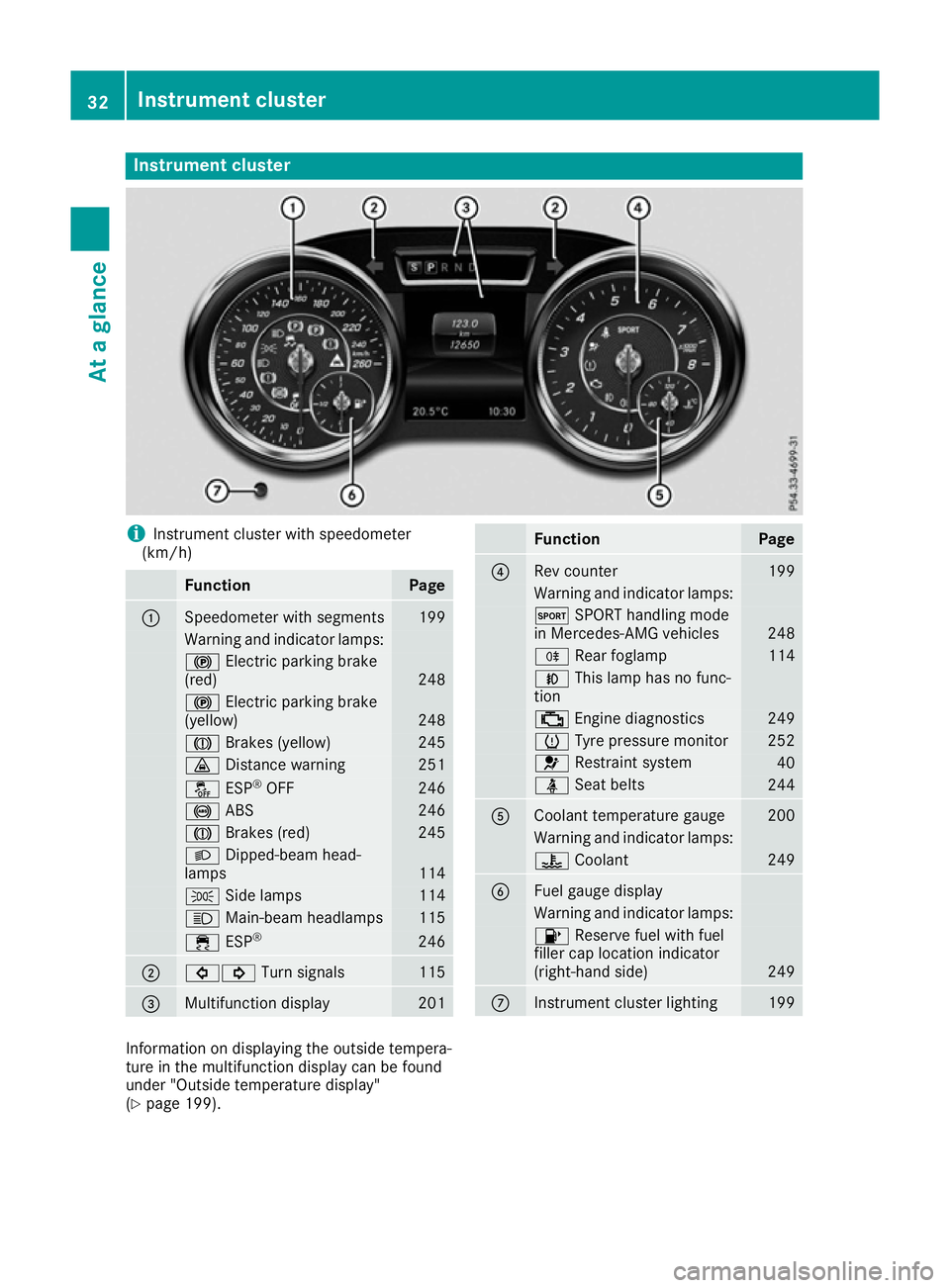
Instrument cluster
i
Instrument cluster with speedometer
(km/h) Function Page
:
Speedometer with segments 199
Warning and indicator lamps:
!
Electric parking brake
(red) 248
!
Electric parking brake
(yellow) 248
J
Brakes (yellow) 245
·
Distance warning 251
å
ESP®
OFF 246
!
ABS 246
J
Brakes (red) 245
L
Dipped-beam head-
lamps 114
T
Side lamps 114
K
Main-beam headlamps 115
÷
ESP® 246
;
#!
Turn signals 115
=
Multifunction display 201 Function Page
?
Rev counter 199
Warning and indicator lamps:
M
SPORT handling mode
in Mercedes-AMG vehicles 248
R
Rear foglamp 114
N
This lamp has no func-
tion ;
Engine diagnostics 249
h
Tyre pressure monitor 252
6
Restraint system 40
ü
Seat belts 244
A
Coolant temperature gauge 200
Warning and indicator lamps:
?
Coolant 249
B
Fuel gauge display
Warning and indicator lamps:
8
Reserve fuel with fuel
filler cap location indicator
(right-hand side) 249
C
Instrument cluster lighting 199
Information on displaying the outside tempera-
ture in the multifunction display can be found
under "Outside temperature display"
(Y
page 199). 32
Instrument clusterAt a glance
Page 43 of 333
Mercedes-Benz recommends that you use a
Mercedes-Benz Service Centre. Restraint system warning lamp
The functions of the restraint system are
checked after the ignition is switched on and at
regular intervals while the engine is running.
Therefore, malfunctions can be detected in
good time.
The 6 restraint system warning lamp in the
instrument cluster lights up when the ignition is switched on. It goes out no later than a few sec-
onds after the vehicle is started. The compo-
nents of the restraint system are in operational
readiness.
A malfunction has occurred if the 6restraint
system warning lamp:
R does not light up after the ignition is switched
on
R does not go out after a few seconds with the
engine running
R lights up again while the engine is running G
WARNING
If the restraint system is malfunctioning,
restraint system components may be trig-
gered unintentionally or may not deploy as
intended during an accident. This may affect
the seat belt tensioner or airbag, for example. This poses an increased risk of injury or even
fatal injury.
Have the restraint system checked and
repaired immediately at a qualified specialist
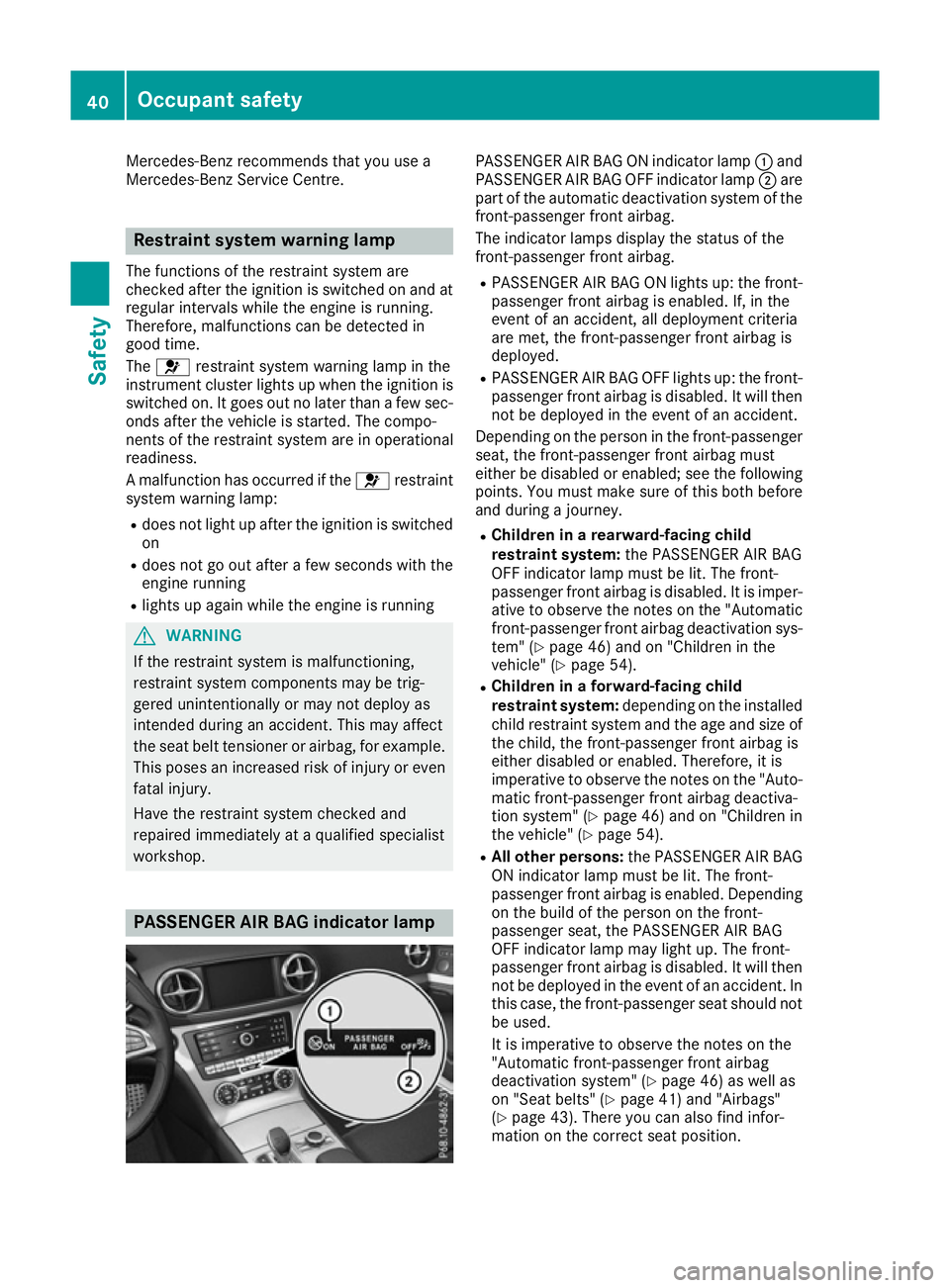
workshop. PASSENGER AIR BAG indicator lamp PASSENGER AIR BAG ON indicator lamp
:and
PASSENGER AIR BAG OFF indicator lamp ;are
part of the automatic deactivation system of the front-passenger front airbag.
The indicator lamps display the status of the
front-passenger front airbag.
R PASSENGER AIR BAG ON lights up: the front-
passenger front airbag is enabled. If, in the
event of an accident, all deployment criteria
are met, the front-passenger front airbag is
deployed.
R PASSENGER AIR BAG OFF lights up: the front-
passenger front airbag is disabled. It will then
not be deployed in the event of an accident.
Depending on the person in the front-passenger seat, the front-passenger front airbag must
either be disabled or enabled; see the following
points. You must make sure of this both before
and during a journey.
R Children in a rearward-facing child
restraint system: the PASSENGER AIR BAG
OFF indicator lamp must be lit. The front-
passenger front airbag is disabled. It is imper-
ative to observe the notes on the "Automatic front-passenger front airbag deactivation sys-
tem" (Y page 46) and on "Children in the
vehicle" (Y page 54).
R Children in a forward-facing child
restraint system: depending on the installed
child restraint system and the age and size of the child, the front-passenger front airbag is
either disabled or enabled. Therefore, it is
imperative to observe the notes on the "Auto-
matic front-passenger front airbag deactiva-
tion system" (Y page 46) and on "Children in
the vehicle" (Y page 54).
R All other persons: the PASSENGER AIR BAG
ON indicator lamp must be lit. The front-
passenger front airbag is enabled. Depending on the build of the person on the front-
passenger seat, the PASSENGER AIR BAG
OFF indicator lamp may light up. The front-
passenger front airbag is disabled. It will then
not be deployed in the event of an accident. In
this case, the front-passenger seat should not be used.
It is imperative to observe the notes on the
"Automatic front-passenger front airbag
deactivation system" (Y page 46) as well as
on "Seat belts" (Y page 41) and "Airbags"
(Y page 43). There you can also find infor-
mation on the correct seat position. 40
Occupant safetySafety
Page 57 of 333
The driver is not warned before the intervention
of PRE-SAFE ®
PLUS.
PRE-SAFE ®
PLUS does not intervene when
reversing.
When driving, or when parking or exiting a park- ing space with assistance from Active Parking
Assist, PRE-SAFE ®
PLUS will not apply the
brakes.
Function PRE-SAFE
®
PLUS intervenes in certain situa-
tions if the radar sensor system detects an
imminent head-on or rear-end collision.
PRE-SAFE ®
PLUS takes the following measures
depending on the hazardous situation detected:
R if the radar sensor system detects that a
head-on collision is imminent, the seat belts
are pre-tensioned
R if the radar sensor system detects that a rear-
end collision is imminent:
- the rear hazard warning lamps are activa-
ted and flash at a higher frequency
- the brake pressure is increased if the driver
applies the brakes when the vehicle is sta-
tionary
- the seat belts are pre-tensioned
The PRE-SAFE ®
PLUS braking application is can-
celled:
R if the accelerator pedal is depressed when a
gear is engaged
R if the risk of a collision passes or is no longer
detected
R if Distance Pilot DISTRONIC indicates an
intention to pull away
If the hazardous situation passes without result- ing in an accident, the original settings are
restored. Automatic measures after an acci-
dent
Immediately after an accident, the following
measures may be implemented, depending on
the type and severity of the impact: R the hazard warning lamps are activated
R the emergency lighting is activated
R the vehicle doors are unlocked
R the front side windows are lowered R
the electrically adjustable steering wheel is
raised
R the engine is switched off and the fuel supply
is cut off
R vehicles with the Mercedes-Benz emergency
call system: automatic emergency call Children in the vehicle
Important safety notes
If a child younger than twelve years old and
under 1.50 min height is travelling in the vehi-
cle:
R always secure the child in a child restraint
system suitable for Mercedes-Benz vehicles.
The child restraint system must be appropri-
ate to the age, weight and size of the child.
R be sure to observe the instructions and safety
notes in this section in addition to the child
restraint system manufacturer's installation
instructions.
R always pay attention to the instructions and
safety notes on the automatic front-
passenger front airbag deactivation system
(Y page 46). G
WARNING
If you leave children unattended in the vehi-
cle, they may be able to set the vehicle in
motion if, for example, they:
R release the parking brake
R shift the automatic transmission out of park
position P
R start the engine
In addition, they may operate vehicle equip-
ment and become trapped. There is a risk of
an accident and injury.
When leaving the vehicle, always take the key
with you and lock the vehicle. Never leave
children unattended in the vehicle. G
WARNING
If persons (particularly children) are exposed
to heat or cold for a prolonged period, there is a risk of serious or even fatal injuries. Never
leave persons (particularly children) unatten-
ded in the vehicle. 54
Children in the vehicleSafety
Page 65 of 333
Important safety notes
If you fail to adapt your driving style or if you are
inattentive, the driving safety systems can nei-
ther reduce the risk of an accident nor override the laws of physics. Driving safety systems are
merely aids designed to assist driving. You are
responsible for maintaining the distance to the
vehicle in front, for vehicle speed, for braking in
good time, and for staying in lane. Always adapt your driving style to suit the prevailing road and
weather conditions and maintain a safe distance from the vehicle in front. Drive carefully.
The driving safety systems described only work
as effectively as possible when there is ade-
quate contact between the tyres and the road
surface. Pay particular attention to the informa- tion regarding tyres, recommended minimum
tyre tread depths etc. in the "Wheels and tyres" section (Y page 304).
In wintry driving conditions, always use winter
tyres (M+S tyres) and, if necessary, snow
chains. Only in this way will the driving safety
systems described in this section work as effec-
tively as possible. ABS (Anti-lock Braking System)
General notes ABS regulates brake pressure in such a way that
the wheels do not lock when you brake. This
allows you to continue steering the vehicle when braking.
The ! ABS warning lamp in the instrument
cluster lights up when the ignition is switched
on. It goes out when the engine is running.
ABS works from a speed of about 8 km/h,
regardless of road-surface conditions. ABS
works on slippery surfaces, even when you only brake gently.
Important safety notes i
Observe the "Important safety notes" sec-
tion (Y page 62). G
WARNING
If ABS is faulty, the wheels could lock when
braking. The steerability and braking charac-
teristics may be severely impaired. Addition-
ally, further driving safety systems are deac- tivated. There is an increased danger of skid-
ding and accidents.
Drive on carefully. Have ABS checked imme-
diately at a qualified specialist workshop.
If ABS is malfunctioning, other systems, includ-
ing driving safety systems, will also become
inoperative. Observe the information on the ABS warning lamp (Y page 246) and display mes-
sages which may be shown in the instrument
cluster (Y page 217).
Brakes X
If ABS intervenes: continue to depress the
brake pedal with force until the braking sit-
uation is over.
X To make a full brake application: depress
the brake pedal with full force.
If ABS intervenes when braking, you will feel a
pulsing in the brake pedal.
The pulsating brake pedal can be an indication
of hazardous road conditions; this serves as a
reminder to take extra care while driving. BAS (Brake Assist)
General notes BAS operates in emergency braking situations.
If you depress the brake pedal quickly, BAS
automatically boosts the braking force, thus
shortening the stopping distance.
Important safety notes i
Observe the "Important safety notes" sec-
tion (Y page 62). G
WARNING
If BAS is malfunctioning, the braking distance
in an emergency braking situation is
increased. There is a risk of accident.
In an emergency braking situation, depress
the brake pedal with full force. ABS prevents
the wheels from locking. 62
Driving safety systemsSafety
Page 70 of 333
Due to the nature of the system, particularly
complicated but non-critical driving conditions
may also cause Brake Assist to intervene.
If Adaptive Brake Assist is not available due to a malfunction in the radar sensor system, the
brake system remains available with full brake
boosting effect and BAS. Adaptive brake lights
i Observe the "Important safety notes" sec-
tion (Y page 62).
If you brake sharply from a speed of more than
50 km/h or if braking is assisted by BAS or
Brake Assist with Cross-Traffic Assist, the brake lamps flash rapidly. In this way, traffic travelling
behind you is warned in an even more noticeable
manner.
If you brake sharply from a speed of more than
70 km/h to a standstill, the hazard warning
lamps are activated automatically. If the brakes
are applied again, the brake lamps light up con- tinuously. The hazard warning lamps switch off
automatically if you travel faster than 10 km/h. You can also switch off the hazard warning
lamps using the hazard warning button
(Y page 115). ESP
®
(Electronic Stability Program)
General notes i
Observe the "Important safety notes" sec-
tion (Y page 62).
ESP ®
monitors driving stability and traction, i.e.
power transmission between the tyres and the
road surface.
If ESP ®
detects that the vehicle is deviating from
the direction desired by the driver, one or more wheels are braked to stabilise the vehicle. The
engine output is also modified to keep the vehi-cle on the desired course within physical limits.
ESP ®
assists the driver when pulling away on
wet or slippery roads. ESP ®
can also stabilise
the vehicle during braking.
ETS (Electronic Traction System) i
Observe the "Important safety notes" sec-
tion (Y page 62). ETS traction control is part of ESP
®
.
ETS brakes the drive wheels individually if they
spin. This enables you to pull away and acceler- ate on slippery surfaces, e.g. if the road surface
is slippery on one side. In addition, more drive
torque is transferred to the wheel or wheels with traction.
ETS remains active when you deactivate ESP ®
.
i Mercedes-AMG vehicles:
your vehicle may
be equipped with 20-inch tyres on the rear
axle. If replaced with 19-inch tyres, ETS may
intervene noticeably sooner for the first few
kilometres. After approximately 10 km ETS
will function as usual again. Information on
the dimensions and types of wheels and tyres
for your vehicle can be found under "Wheel/
tyre combinations" (Y page 317).
Important safety notes G
WARNING
If ESP ®
is malfunctioning, ESP ®
is unable to
stabilise the vehicle. In addition, other driving
safety systems are switched off. This increa-
ses the risk of skidding and an accident.
Drive on carefully. Have ESP ®
checked at a
qualified specialist workshop.
When towing away your vehicle with the rear
axle raised, observe the notes on ESP ®
(Y page 300).
If the å ESP®
OFF warning lamp lights up
continuously, then ESP ®
is deactivated.
If the ÷ ESP®
warning lamp and the å
ESP ®
OFF warning lamp are lit continuously,
ESP ®
is not available due to a malfunction.
Observe the information on warning lamps
(Y page 246) and display messages which may
be shown in the instrument cluster
(Y page 217).
i Only use wheels with the recommended tyre
sizes. Only then will ESP ®
function properly.
Characteristics of ESP ® General notes
If the ÷ ESP warning lamp goes out before
beginning the journey, ESP ®
is automatically
active. Driving safety systems
67Safety Z