oil level MERCEDES-BENZ SL ROADSTER 2016 Owners Manual
[x] Cancel search | Manufacturer: MERCEDES-BENZ, Model Year: 2016, Model line: SL ROADSTER, Model: MERCEDES-BENZ SL ROADSTER 2016Pages: 333, PDF Size: 11.85 MB
Page 6 of 333
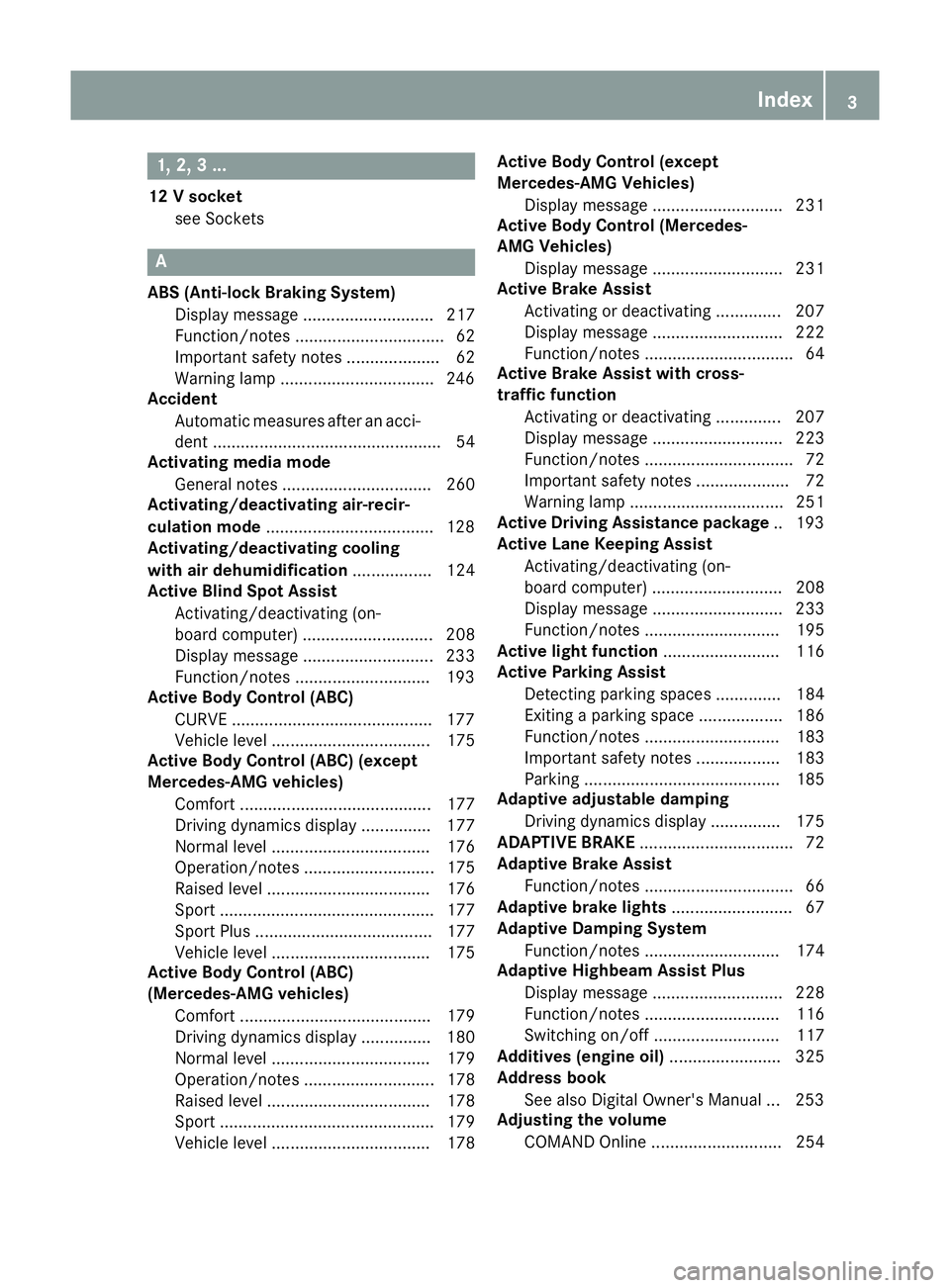
1, 2, 3 ...
12 V socket see Sockets A
ABS (Anti-lock Braking System) Display message ............................ 217
Function/notes ................................ 62
Important safety notes .................... 62
Warning lamp .................................2 46
Accident
Automatic measures after an acci-
dent ................................................. 54
Activating media mode
General notes ................................ 260
Activating/deactivating air-recir-
culation mode ................................... .128
Activating/deactivating cooling
with air dehumidification ................. 124
Active Blind Spot Assist
Activating/deactivating (on-
board computer) ............................ 208
Display message ............................ 233
Function/notes ............................ .193
Active Body Control (ABC)
CURVE .......................................... .177
Vehicle level .................................. 175
Active Body Control (ABC) (except
Mercedes-AMG vehicles)
Comfort ......................................... 177
Driving dynamics displa y............... 177
Normal level .................................. 176
Operation/note s............................ 175
Raised level ................................... 176
Sport .............................................. 177
Sport Plus ...................................... 177
Vehicle level .................................. 175
Active Body Control (ABC)
(Mercedes-AMG vehicles)
Comfort ......................................... 179
Driving dynamics display ............... 180
Normal level .................................. 179
Operation/note s............................ 178
Raised level ................................... 178
Sport .............................................. 179
Vehicle level .................................. 178 Active Body Control (except
Mercedes-AMG Vehicles)
Display message ............................ 231
Active Body Control (Mercedes-
AMG Vehicles)
Display message ............................ 231
Active Brake Assist
Activating or deactivating .............. 207
Display message ............................ 222
Function/note s................................ 64
Active Brake Assist with cross-
traffic function
Activating or deactivating .............. 207
Display message ............................ 223
Function/note s................................ 72
Important safety notes .................... 72
Warning lamp ................................. 251
Active Driving Assistance package .. 193
Active Lane Keeping Assist
Activating/deactivating (on-
board computer) ............................ 208
Display message ............................ 233
Function/note s............................. 195
Active light function ......................... 116
Active Parking Assist
Detecting parking spaces .............. 184
Exiting a parking space .................. 186
Function/note s............................. 183
Important safety notes .................. 183
Parking .......................................... 185
Adaptive adjustable damping
Driving dynamics display ............... 175
ADAPTIVE BRAKE ................................. 72
Adaptive Brake Assist
Function/note s................................ 66
Adaptive brake lights .......................... 67
Adaptive Damping System
Function/note s............................. 174
Adaptive Highbeam Assist Plus
Display message ............................ 228
Function/note s............................. 116
Switching on/of f........................... 117
Additives (engine oil) ........................ 325
Address book
See also Digital Owner's Manua l... 253
Adjusting the volume
COMAND Online ............................ 254 Index
3
Page 13 of 333
Removing ......................................
.318
Storage location ............................ 318
Technical data ............................... 318
Emergency unlocking
Vehicle ............................................. 84
Engine
Display message ............................ 229
ECO start/stop function ................ 135
Jump-starting ................................. 296
Running irregularl y......................... 138
Starting problems .......................... 138
Starting the engine with the key .... 134
Starting with KEYLESS GO ............. 134
Stopping ........................................ 153
Tow-starting (vehicle) ..................... 301
Warning lamp (engine diagnos-
tics) ............................................... 249
Engine electronics
Notes ............................................. 320
Problem (fault) ............................... 138
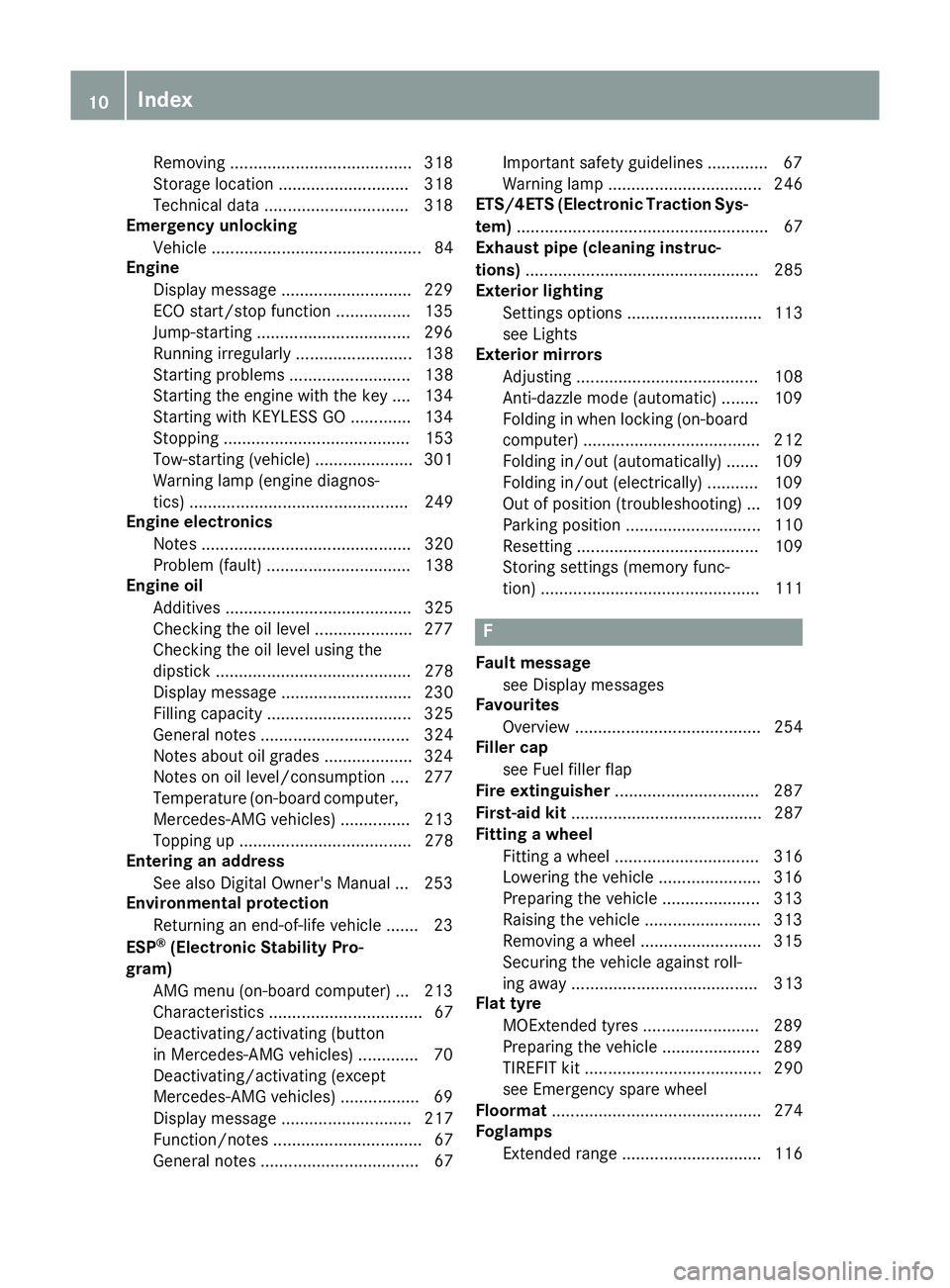
Engine oil
Additives ........................................ 325
Checking the oil level ..................... 277
Checking the oil level using the
dipstick .......................................... 278
Display message ............................ 230
Filling capacity ............................... 325
General notes ................................ 324
Notes about oil grade s................... 324
Notes on oil level/consumption .... 277
Temperature (on-board computer, Mercedes-AMG vehicles) ............... 213
Topping up ..................................... 278
Entering an address
See also Digital Owner's Manua l... 253
Environmental protection
Returning an end-of-life vehicle ....... 23
ESP ®
(Electronic Stability Pro-
gram)
AMG menu (on-board computer) ... 213
Characteristics ................................. 67
Deactivating/activating (button
in Mercedes-AMG vehicles) ............. 70
Deactivating/activating (except
Mercedes‑ AMG vehicles) ................. 69
Display message ............................ 217
Function/note s................................ 67
General notes .................................. 67 Important safety guidelines ............. 67
Warning lamp ................................. 246
ETS/4ETS (Electronic Traction Sys-
tem) ...................................................... 67
Exhaust pipe (cleaning instruc-
tions) .................................................. 285
Exterior lighting
Settings options ............................. 113
see Lights
Exterior mirrors
Adjusting ....................................... 108
Anti-dazzle mode (automatic) ........ 109
Folding in when locking (on-board computer) ...................................... 212
Folding in/out (automatically )....... 109
Folding in/out (electrically) ........... 109
Out of position (troubleshooting) ... 109
Parking position ............................. 110
Resetting ....................................... 109
Storing settings (memory func-
tion) ............................................... 111 F
Fault message see Display messages
Favourites
Overview ........................................ 254
Filler cap
see Fuel filler flap
Fire extinguisher ............................... 287
First-aid kit ......................................... 287
Fitting a wheel
Fitting a wheel ............................... 316
Lowering the vehicle ...................... 316
Preparing the vehicle ..................... 313
Raising the vehicle ......................... 313
Removing a wheel .......................... 315
Securing the vehicle against roll-
ing away ........................................ 313
Flat tyre
MOExtended tyre s......................... 289
Preparing the vehicle ..................... 289
TIREFIT kit ...................................... 290
see Emergency spare wheel
Floormat ............................................. 274
Foglamps
Extended rang e.............................. 116 10
Index
Page 233 of 333
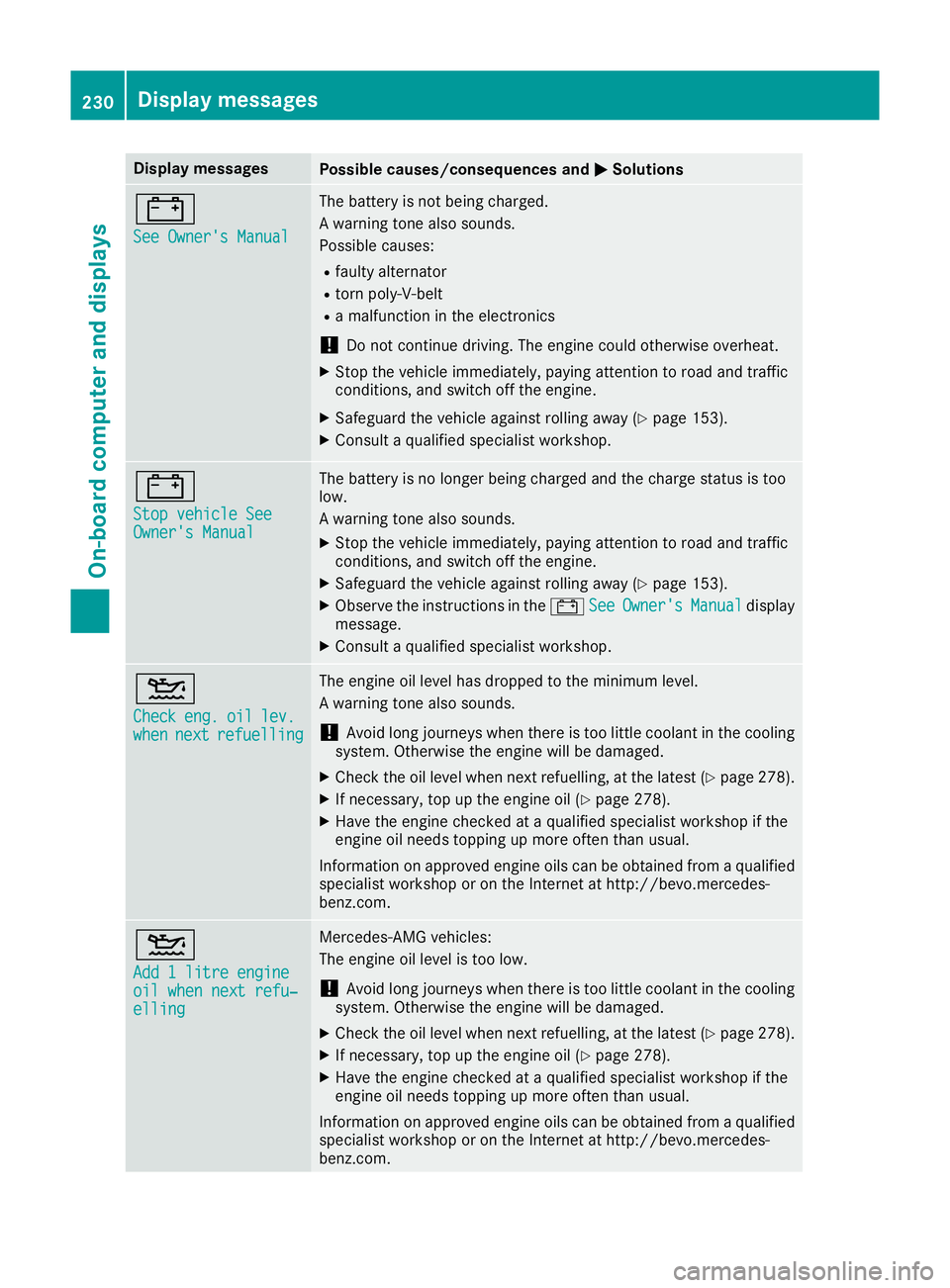
Display messages
Possible causes/consequences and
M
MSolutions #
See Owner's Manual See Owner's Manual The battery is not being charged.
A warning tone also sounds.
Possible causes:
R faulty alternator
R torn poly-V-belt
R a malfunction in the electronics
! Do not continue driving. The engine could otherwise overheat.
X Stop the vehicle immediately, paying attention to road and traffic
conditions, and switch off the engine.
X Safeguard the vehicle against rolling away (Y page 153).
X Consult a qualified specialist workshop. #
Stop vehicle See Stop vehicle See
Owner's Manual Owner's Manual The battery is no longer being charged and the charge status is too
low.
A warning tone also sounds.
X Stop the vehicle immediately, paying attention to road and traffic
conditions, and switch off the engine.
X Safeguard the vehicle against rolling away (Y page 153).
X Observe the instructions in the #See SeeOwner's
Owner's Manual
Manualdisplay
message.
X Consult a qualified specialist workshop. 4
Check Check
eng.
eng.oil
oillev.
lev.
when
when next
nextrefuelling
refuelling The engine oil level has dropped to the minimum level.
A warning tone also sounds.
! Avoid long journeys when there is too little coolant in the cooling
system. Otherwise the engine will be damaged.
X Check the oil level when next refuelling, at the latest (Y page 278).
X If necessary, top up the engine oil (Y page 278).
X Have the engine checked at a qualified specialist workshop if the
engine oil needs topping up more often than usual.
Information on approved engine oils can be obtained from a qualified
specialist workshop or on the Internet at http://bevo.mercedes-
benz.co m. 4
Add 1 litre engine Add 1 litre engine
oil when next refu‐ oil when next refu‐
elling elling Mercedes-AMG vehicles:
The engine oil level is too low.
! Avoid long journeys when there is too little coolant in the cooling
system. Otherwise the engine will be damaged.
X Check the oil level when next refuelling, at the latest (Y page 278).
X If necessary, top up the engine oil (Y page 278).
X Have the engine checked at a qualified specialist workshop if the
engine oil needs topping up more often than usual.
Information on approved engine oils can be obtained from a qualified
specialist workshop or on the Internet at http://bevo.mercedes-
benz.com. 230
Display messagesOn-board computer and displays
Page 234 of 333
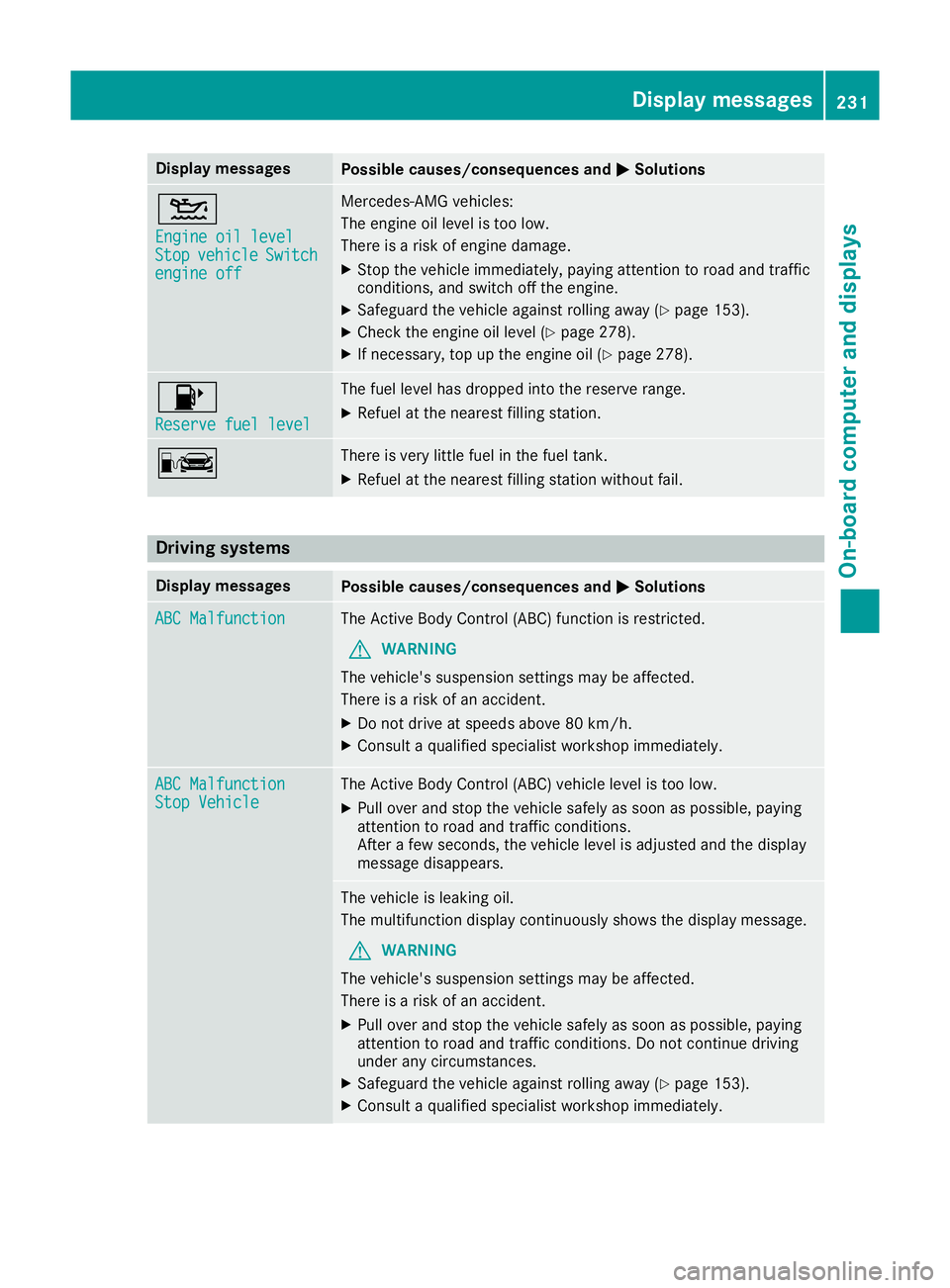
Display messages
Possible causes/consequences and
M
MSolutions 4
Engine oil level Engine oil level
Stop Stop
vehicle
vehicle Switch
Switch
engine off
engine off Mercedes-AMG vehicles:
The engine oil level is too low.
There is a risk of engine damage.
X Stop the vehicle immediately, paying attention to road and traffic
conditions, and switch off the engine.
X Safeguard the vehicle against rolling away (Y page 153).
X Check the engine oil level (Y page 278).
X If necessary, top up the engine oil (Y page 278).8
Reserve fuel level Reserve fuel level The fuel level has dropped into the reserve range.
X Refuel at the nearest filling station. C There is very little fuel in the fuel tank.
X Refuel at the nearest filling station without fail. Driving systems
Display messages
Possible causes/consequences and
M
MSolutions ABC Malfunction
ABC Malfunction The Active Body Control (ABC) function is restricted.
G WARNING
The vehicle's suspension settings may be affected.
There is a risk of an accident.
X Do not drive at speeds above 80 km/h.
X Consult a qualified specialist workshop immediately. ABC Malfunction ABC Malfunction
Stop Vehicle Stop Vehicle The Active Body Control (ABC) vehicle level is too low.
X Pull over and stop the vehicle safely as soon as possible, paying
attention to road and traffic conditions.
After a few seconds, the vehicle level is adjusted and the display
message disappears. The vehicle is leaking oil.
The multifunction display continuously shows the display message.
G WARNING
The vehicle's suspension settings may be affected.
There is a risk of an accident.
X Pull over and stop the vehicle safely as soon as possible, paying
attention to road and traffic conditions. Do not continue driving
under any circumstances.
X Safeguard the vehicle against rolling away (Y page 153).
X Consult a qualified specialist workshop immediately. Display
messages
231On-board computer and displays Z
Page 280 of 333
X
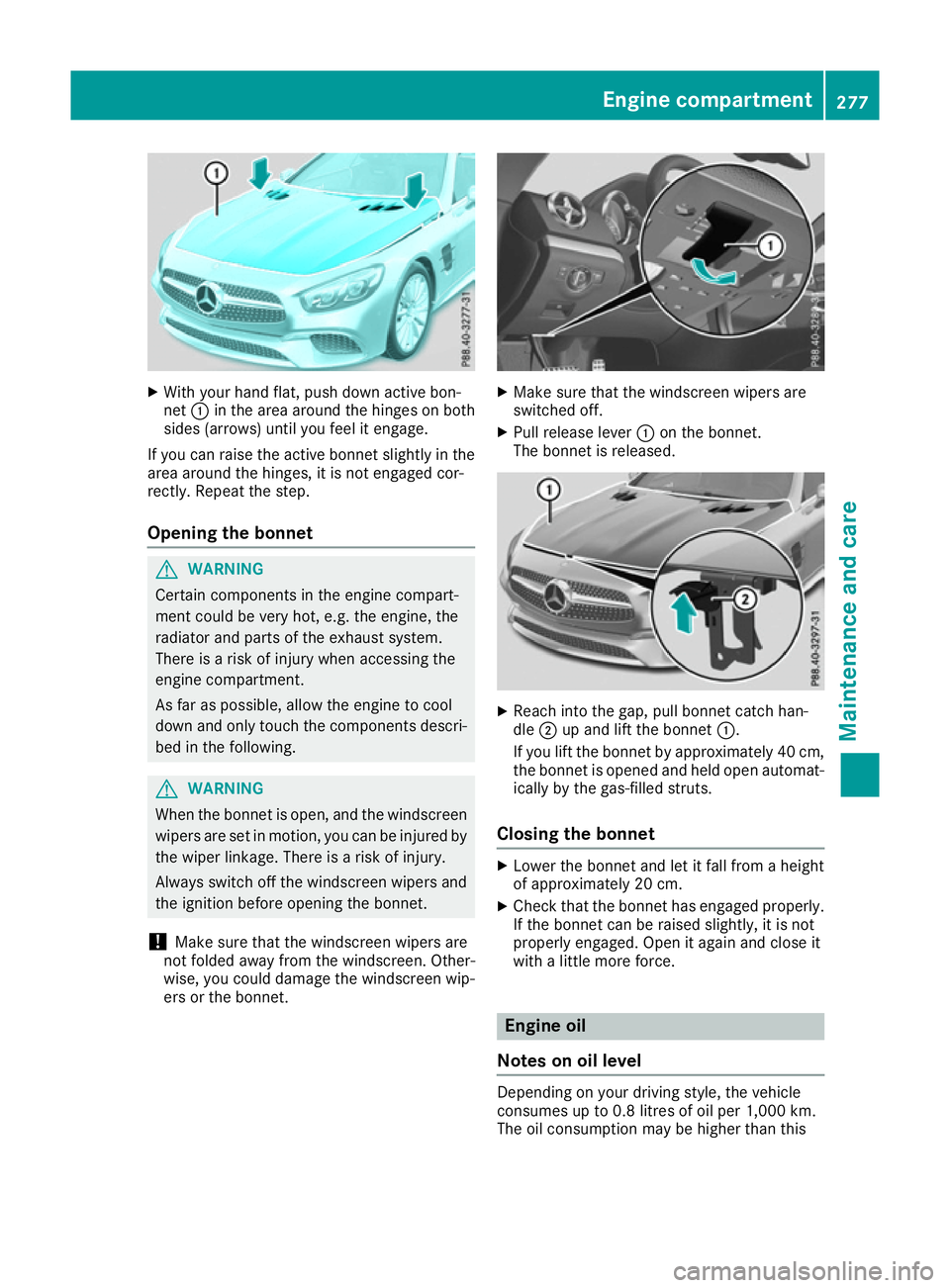
With your hand flat, push down active bon-
net :in the area around the hinges on both
sides (arrows) until you feel it engage.
If you can raise the active bonnet slightly in the
area around the hinges, it is not engaged cor-
rectly. Repeat the step.
Opening the bonnet G
WARNING
Certain components in the engine compart-
ment could be very hot, e.g. the engine, the
radiator and parts of the exhaust system.
There is a risk of injury when accessing the
engine compartment.
As far as possible, allow the engine to cool
down and only touch the components descri- bed in the following. G
WARNING
When the bonnet is open, and the windscreen wipers are set in motion, you can be injured by
the wiper linkage. There is a risk of injury.
Always switch off the windscreen wipers and
the ignition before opening the bonnet.
! Make sure that the windscreen wipers are
not folded away from the windscreen. Other-
wise, you could damage the windscreen wip-
ers or the bonnet. X
Make sure that the windscreen wipers are
switched off.
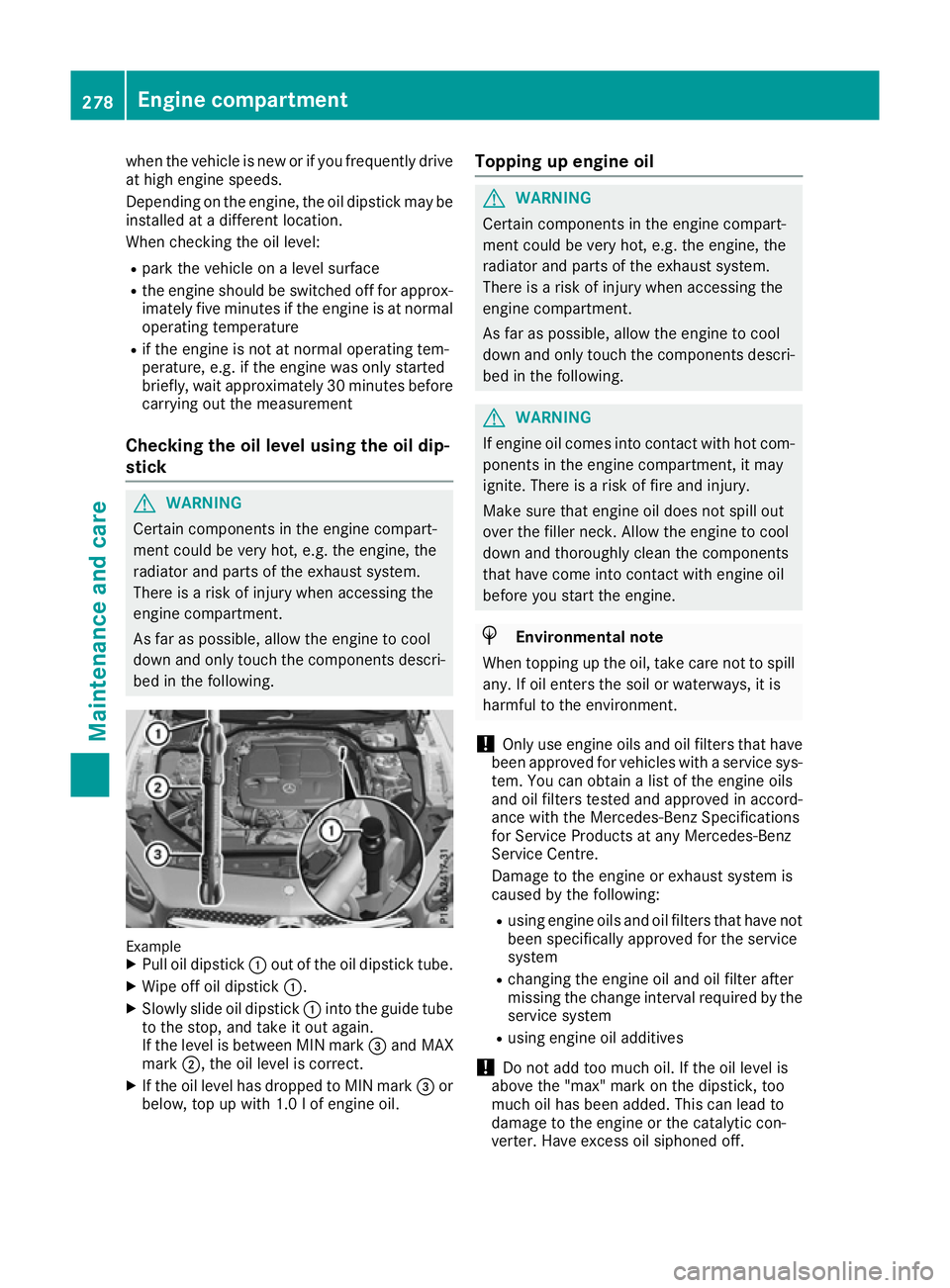
X Pull release lever :on the bonnet.
The bonnet is released. X
Reach into the gap, pull bonnet catch han-
dle ;up and lift the bonnet :.
If you lift the bonnet by approximately 40 cm, the bonnet is opened and held open automat-
ically by the gas-filled struts.
Closing the bonnet X
Lower the bonnet and let it fall from a height
of approximately 20 cm.
X Check that the bonnet has engaged properly.
If the bonnet can be raised slightly, it is not
properly engaged. Open it again and close it
with a little more force. Engine oil
Notes on oil level Depending on your driving style, the vehicle
consumes up to 0.8 litres of oil per 1,000 km.
The oil consumption may be higher than this Engine compartment
277Maintenance and care Z
Page 281 of 333
when the vehicle is new or if you frequently drive
at high engine speeds.
Depending on the engine, the oil dipstick may be
installed at a different location.
When checking the oil level:
R park the vehicle on a level surface
R the engine should be switched off for approx-
imately five minutes if the engine is at normal
operating temperature
R if the engine is not at normal operating tem-
perature, e.g. if the engine was only started
briefly, wait approximately 30 minutes before
carrying out the measurement
Checking the oil level using the oil dip-
stick G
WARNING
Certain components in the engine compart-
ment could be very hot, e.g. the engine, the
radiator and parts of the exhaust system.
There is a risk of injury when accessing the
engine compartment.
As far as possible, allow the engine to cool
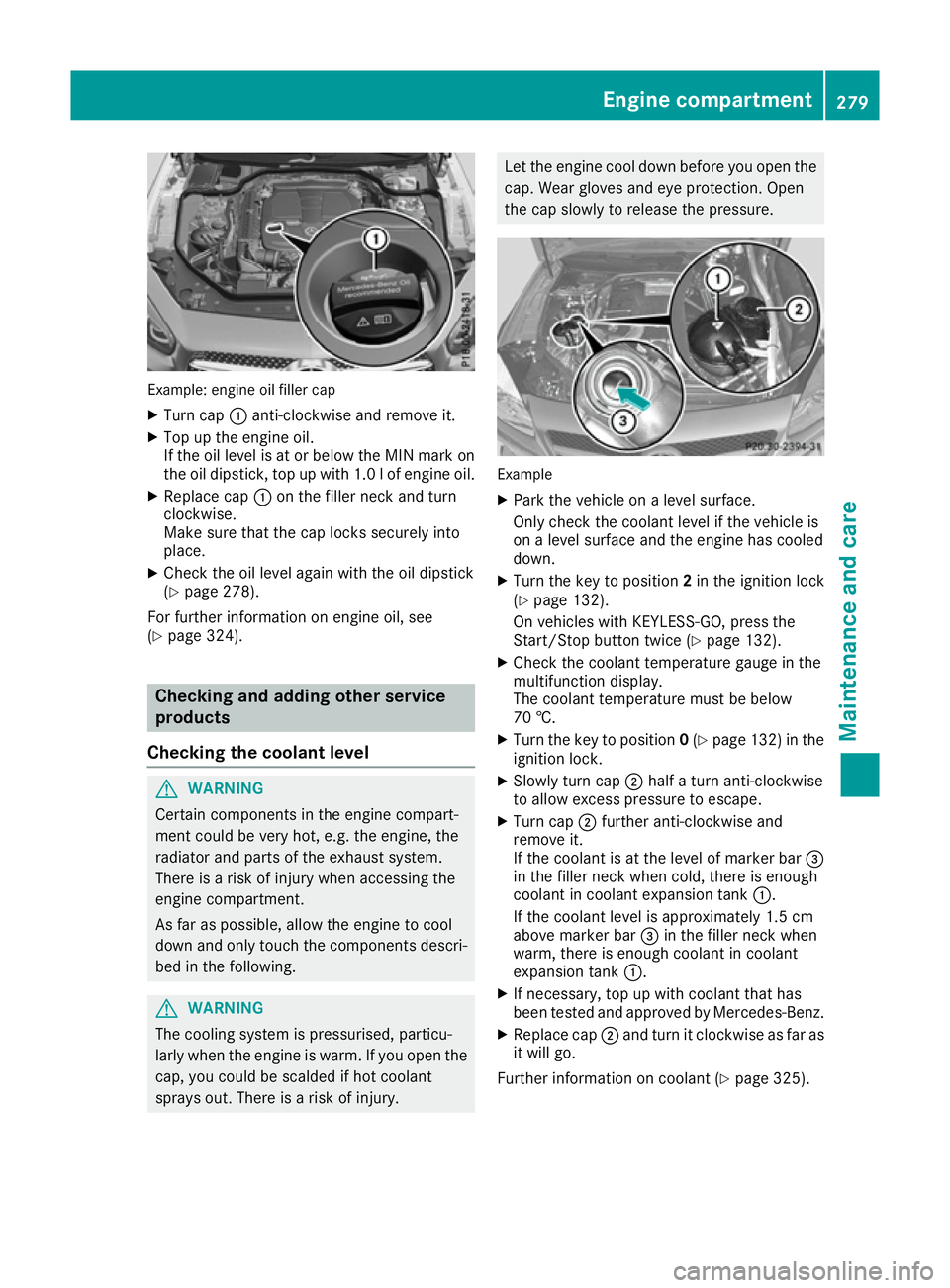
down and only touch the components descri- bed in the following. Example
X Pull oil dipstick :out of the oil dipstick tube.
X Wipe off oil dipstick :.
X Slowly slide oil dipstick :into the guide tube
to the stop, and take it out again.
If the level is between MIN mark =and MAX
mark ;, the oil level is correct.
X If the oil level has dropped to MIN mark =or
below, top up with 1.0 l of engine oil. Topping up engine oil G
WARNING
Certain components in the engine compart-
ment could be very hot, e.g. the engine, the
radiator and parts of the exhaust system.
There is a risk of injury when accessing the
engine compartment.
As far as possible, allow the engine to cool
down and only touch the components descri- bed in the following. G
WARNING
If engine oil comes into contact with hot com- ponents in the engine compartment, it may
ignite. There is a risk of fire and injury.
Make sure that engine oil does not spill out
over the filler neck. Allow the engine to cool
down and thoroughly clean the components
that have come into contact with engine oil
before you start the engine. H
Environmental note
When topping up the oil, take care not to spill
any. If oil enters the soil or waterways, it is
harmful to the environment.
! Only use engine oils and oil filters that have
been approved for vehicles with a service sys-
tem. You can obtain a list of the engine oils
and oil filters tested and approved in accord-
ance with the Mercedes-Benz Specifications
for Service Products at any Mercedes-Benz
Service Centre.
Damage to the engine or exhaust system is
caused by the following:
R using engine oils and oil filters that have not
been specifically approved for the service
system
R changing the engine oil and oil filter after
missing the change interval required by the
service system
R using engine oil additives
! Do not add too much oil. If the oil level is
above the "max" mark on the dipstick, too
much oil has been added. This can lead to
damage to the engine or the catalytic con-
verter. Have excess oil siphoned off. 278
Engine compartmentMaintenance and care
Page 282 of 333
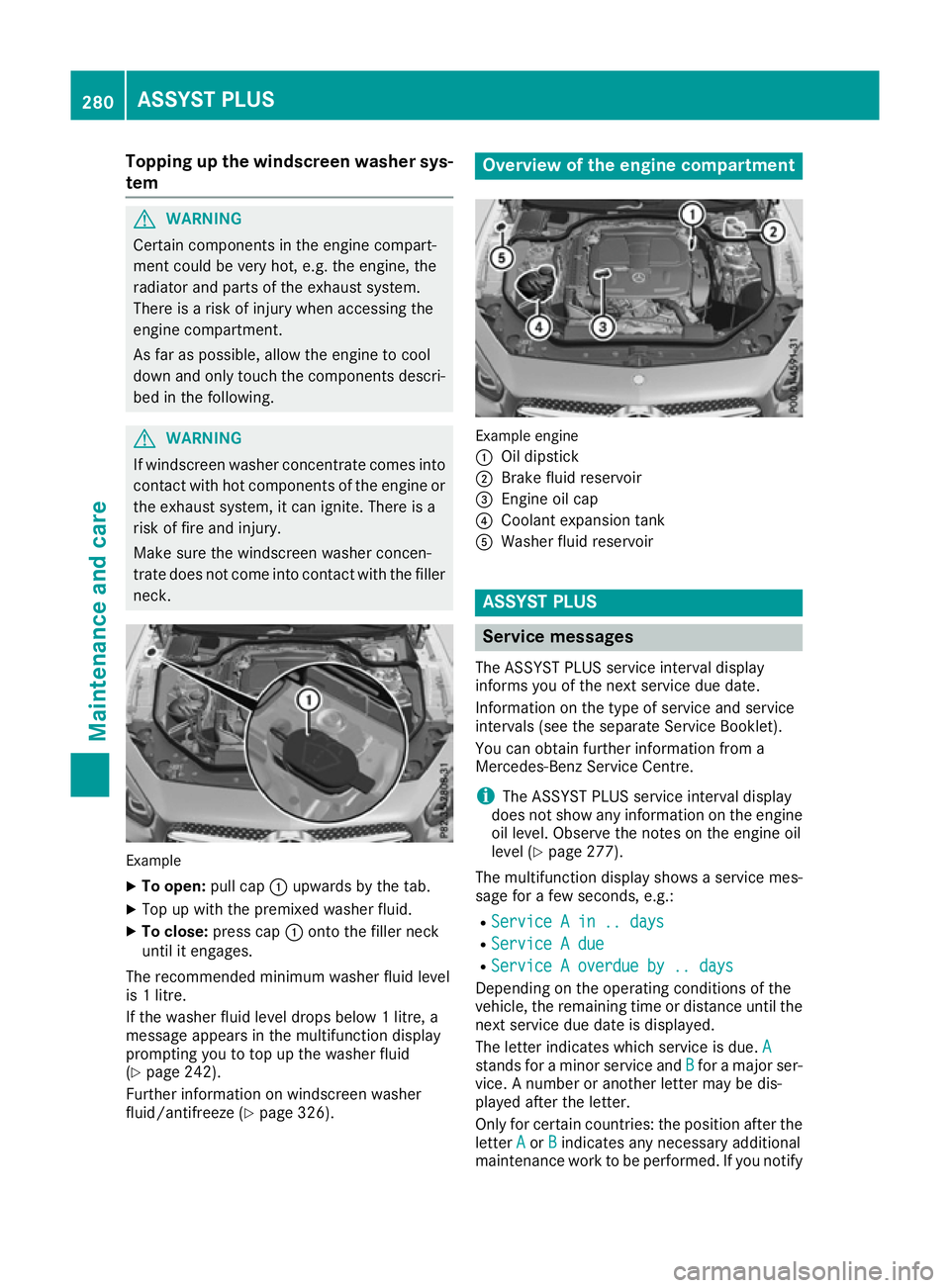
Example: engine oil filler cap
X Turn cap :anti-clockwise and remove it.
X Top up the engine oil.
If the oil level is at or below the MIN mark on
the oil dipstick, top up with 1.0 lof engine oil.
X Replace cap :on the filler neck and turn
clockwise.
Make sure that the cap locks securely into
place.
X Check the oil level again with the oil dipstick
(Y page 278).
For further information on engine oil, see
(Y page 324). Checking and adding other service
products
Checking the coolant level G
WARNING
Certain components in the engine compart-
ment could be very hot, e.g. the engine, the
radiator and parts of the exhaust system.
There is a risk of injury when accessing the
engine compartment.
As far as possible, allow the engine to cool
down and only touch the components descri- bed in the following. G
WARNING
The cooling system is pressurised, particu-
larly when the engine is warm. If you open the cap, you could be scalded if hot coolant
sprays out. There is a risk of injury. Let the engine cool down before you open the
cap. Wear gloves and eye protection. Open
the cap slowly to release the pressure. Example
X Park the vehicle on a level surface.
Only check the coolant level if the vehicle is
on a level surface and the engine has cooled
down.
X Turn the key to position 2in the ignition lock
(Y page 132).
On vehicles with KEYLESS-GO, press the
Start/Stop button twice (Y page 132).
X Check the coolant temperature gauge in the
multifunction display.
The coolant temperature must be below
70 †.
X Turn the key to position 0(Y page 132) in the
ignition lock.
X Slowly turn cap ;half a turn anti-clockwise
to allow excess pressure to escape.
X Turn cap ;further anti-clockwise and
remove it.
If the coolant is at the level of marker bar =
in the filler neck when cold, there is enough
coolant in coolant expansion tank :.
If the coolant level is approximately 1.5 cm
above marker bar =in the filler neck when
warm, there is enough coolant in coolant
expansion tank :.
X If necessary, top up with coolant that has
been tested and approved by Mercedes-Benz.
X Replace cap ;and turn it clockwise as far as
it will go.
Further information on coolant (Y page 325). Engine compartment
279Maintenance and care Z
Page 283 of 333
Topping up the windscreen washer sys-
tem G
WARNING
Certain components in the engine compart-
ment could be very hot, e.g. the engine, the
radiator and parts of the exhaust system.
There is a risk of injury when accessing the
engine compartment.
As far as possible, allow the engine to cool
down and only touch the components descri- bed in the following. G
WARNING
If windscreen washer concentrate comes into contact with hot components of the engine or
the exhaust system, it can ignite. There is a
risk of fire and injury.
Make sure the windscreen washer concen-
trate does not come into contact with the filler neck. Example
X To open: pull cap:upwards by the tab.
X Top up with the premixed washer fluid.
X To close: press cap :onto the filler neck
until it engages.
The recommended minimum washer fluid level
is 1 litre.
If the washer fluid level drops below 1 litre, a
message appears in the multifunction display
prompting you to top up the washer fluid
(Y page 242).
Further information on windscreen washer
fluid/antifreeze (Y page 326). Overview of the engine compartment
Example engine
:
Oil dipstick
; Brake fluid reservoir
= Engine oil cap
? Coolant expansion tank
A Washer fluid reservoir ASSYST PLUS
Service messages
The ASSYST PLUS service interval display
informs you of the next service due date.
Information on the type of service and service
intervals (see the separate Service Booklet).
You can obtain further information from a
Mercedes-Benz Service Centre. i The ASSYST PLUS service interval display
does not show any information on the engine oil level. Observe the notes on the engine oil
level (Y page 277).
The multifunction display shows a service mes-
sage for a few seconds, e.g.:
R Service A in .. days Service A in .. days
R Service A due
Service A due
R Service A overdue by .. days
Service A overdue by .. days
Depending on the operating conditions of the
vehicle, the remaining time or distance until the
next service due date is displayed.
The letter indicates which service is due. A A
stands for a minor service and B
Bfor a major ser-
vice. A number or another letter may be dis-
played after the letter.
Only for certain countries: the position after the
letter A
A or B Bindicates any necessary additional
maintenance work to be performed. If you notify 280
ASSYST PLUSMaintenance and care
Page 316 of 333
An arrow on the sidewall of the tyre indicates its
correct direction of rotation. Storing wheels
Store wheels that are not being used in a cool,
dry and preferably dark place. Protect the tyres
against oil, grease, petrol and diesel. Fitting a wheel
Preparing the vehicle X
Stop the vehicle on solid, non-slippery and
level ground.
X Unload the vehicle. The jack can only be used
when the vehicle is unladen.
X Apply the electric parking brake manually.
X Move the front wheels to the straight-ahead
position.
X Shift the transmission to position P.
X Switch off the engine.
X Vehicles without KEYLESS-GO: remove the
key from the ignition lock.
X Vehicles with KEYLESS-GO: open the driv-
er's door.
The vehicle electronics now have status 0.
This is the same as the key having been
removed.
X Vehicles with KEYLESS-GO: remove the
Start/Stop button from the ignition lock
(Y page 132).
X If included in the vehicle equipment, remove
the tyre-change tool kit from the vehicle.
X Safeguard the vehicle against rolling away.
i Apart from certain country-specific varia-
tions, vehicles are not equipped with a tyre-
change tool kit. For information on which
tools are required to perform a wheel change
on your vehicle, consult a Mercedes-Benz
Service Centre.
Necessary tyre-changing tools may include,
for example:
R jack
R wheel chock
R wheel wrench Securing the vehicle against rolling
away
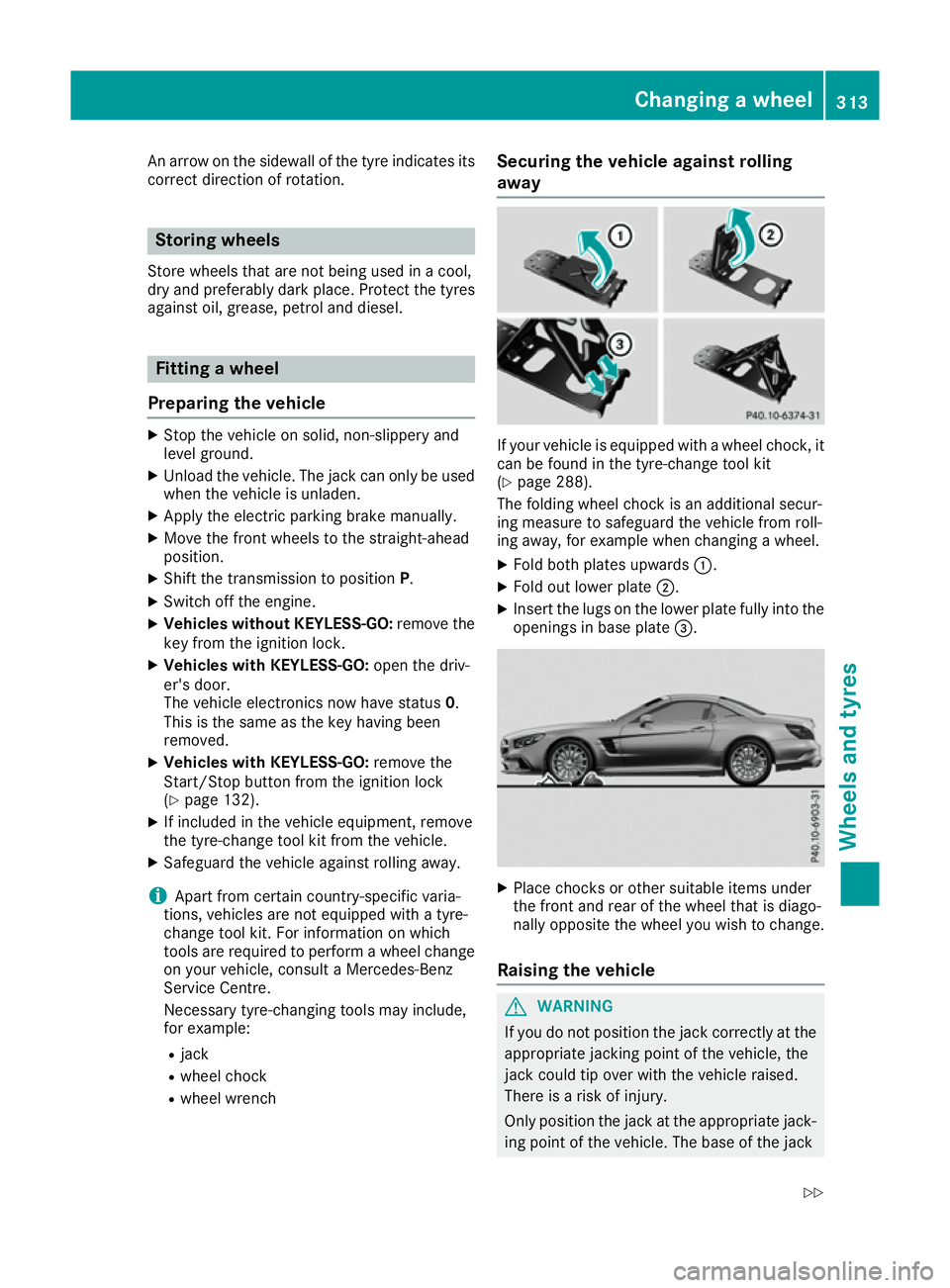
If your vehicle is equipped with a wheel chock, it
can be found in the tyre-change tool kit
(Y page 288).
The folding wheel chock is an additional secur-
ing measure to safeguard the vehicle from roll-
ing away, for example when changing a wheel.
X Fold both plates upwards :.
X Fold out lower plate ;.
X Insert the lugs on the lower plate fully into the
openings in base plate =. X
Place chocks or other suitable items under
the front and rear of the wheel that is diago-
nally opposite the wheel you wish to change.
Raising the vehicle G
WARNING
If you do not position the jack correctly at the appropriate jacking point of the vehicle, the
jack could tip over with the vehicle raised.
There is a risk of injury.
Only position the jack at the appropriate jack-
ing point of the vehicle. The base of the jack Changing a wheel
313Wheels and tyres
Z
Page 325 of 333
Vehicle identification number (VIN)
X
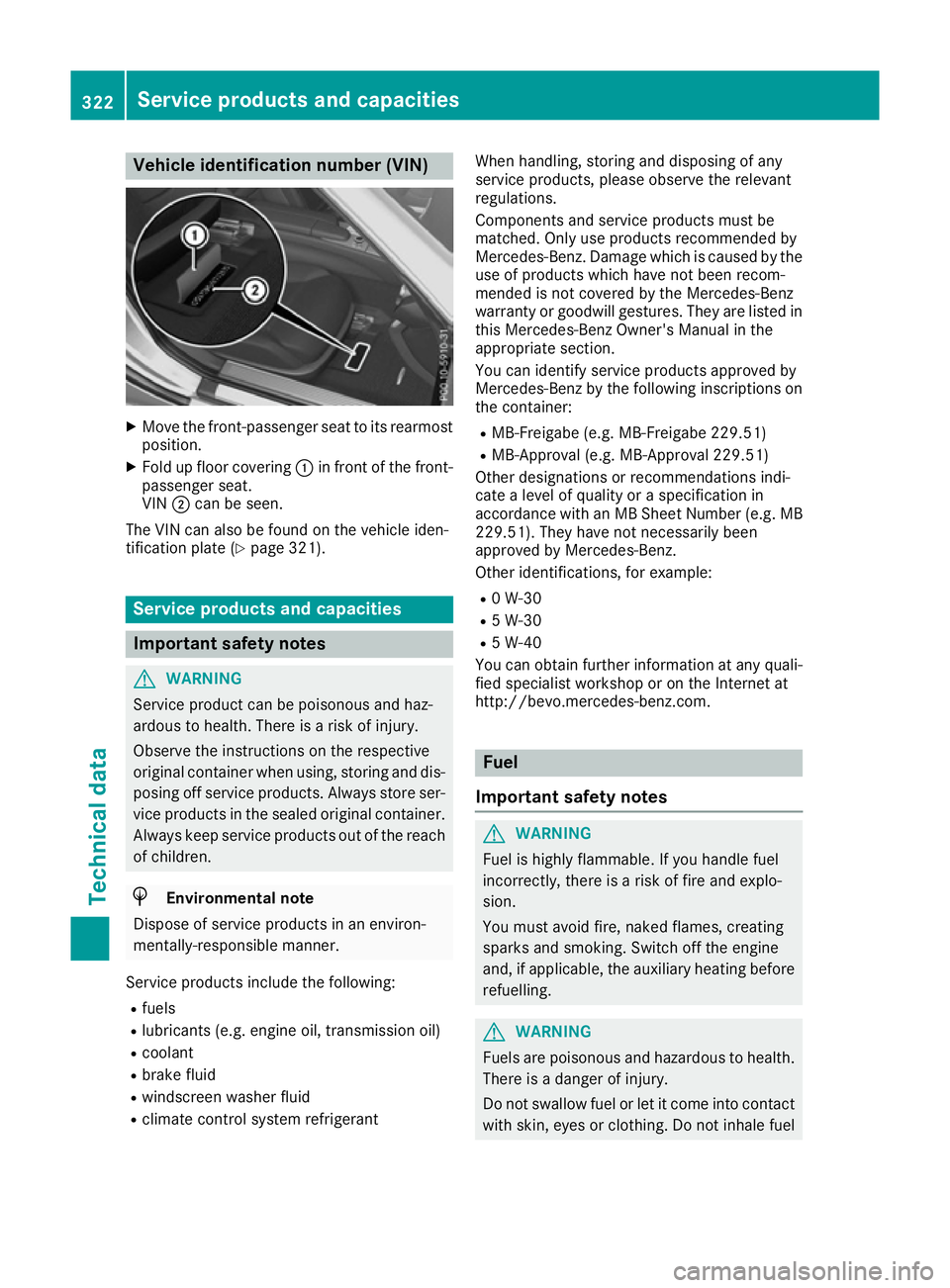
Move the front-passenger seat to its rearmost
position.
X Fold up floor covering :in front of the front-
passenger seat.
VIN ;can be seen.
The VIN can also be found on the vehicle iden-
tification plate (Y page 321). Service products and capacities
Important safety notes
G
WARNING
Service product can be poisonous and haz-
ardous to health. There is a risk of injury.
Observe the instructions on the respective
original container when using, storing and dis- posing off service products. Always store ser-
vice products in the sealed original container. Always keep service products out of the reach
of children. H
Environmental note
Dispose of service products in an environ-
mentally-responsible manner.
Service products include the following:
R fuels
R lubricants (e.g. engine oil, transmission oil)
R coolant
R brake fluid
R windscreen washer fluid
R climate control system refrigerant When handling, storing and disposing of any
service products, please observe the relevant
regulations.
Components and service products must be
matched. Only use products recommended by
Mercedes-Benz. Damage which is caused by the use of products which have not been recom-
mended is not covered by the Mercedes-Benz
warranty or goodwill gestures. They are listed inthis Mercedes-Benz Owner's Manual in the
appropriate section.
You can identify service products approved by
Mercedes-Benz by the following inscriptions on
the container:
R MB-Freigabe (e.g. MB-Freigabe 229.51)
R MB-Approval (e.g. MB-Approval 229.51)
Other designations or recommendations indi-
cate a level of quality or a specification in
accordance with an MB Sheet Number (e.g. MB
229.51). They have not necessarily been
approved by Mercedes-Benz.
Other identifications, for example:
R 0 W-30
R 5 W-30
R 5 W-40
You can obtain further information at any quali-
fied specialist workshop or on the Internet at
http://bevo.mercedes-benz.co m. Fuel
Important safety notes G
WARNING
Fuel is highly flammable. If you handle fuel
incorrectly, there is a risk of fire and explo-
sion.
You must avoid fire, naked flames, creating
sparks and smoking. Switch off the engine
and, if applicable, the auxiliary heating before refuelling. G
WARNING
Fuels are poisonous and hazardous to health. There is a danger of injury.
Do not swallow fuel or let it come into contact
with skin, eyes or clothing. Do not inhale fuel 322
Service products and capacitiesTechnical data