ECO mode MERCEDES-BENZ SL ROADSTER 2018 Owner's Manual
[x] Cancel search | Manufacturer: MERCEDES-BENZ, Model Year: 2018, Model line: SL ROADSTER, Model: MERCEDES-BENZ SL ROADSTER 2018Pages: 322, PDF Size: 5.43 MB
Page 7 of 322
Head bag ......................................... 47
Important safety notes .................... 45
Introduction .....................................45
Knee bag .......................................... 46
Occupant Classification System
(OCS) ............................................... 47
PASSENGER AIR BAG indicator
lamps ............................................... 41
Side impact air bag .......................... 46
AIR FLOW ........................................... 116
Air vents
Glove box ....................................... 120
Important safety notes .................. 119
Setting ........................................... 119
Setting the blower output of the
AIRSCARF vents .............................1 20
Setting the center air vents ........... 120
Setting the side air vents ...............1 20
Switching AIRSCARF on/off .......... 100
Air-conditioning system
see Climate control
AIRSCARF
Switching on/off ........................... 100
AIRSCARF vents
Setting the blower output .............. 120
Alarm
ATA (Anti-Theft Alarm system) ......... 72
Switching off (ATA) .......................... 72
Switching the function on/off
(ATA) ................................................ 72
Alarm system
see ATA (Anti-Theft Alarm system)
Ambient lighting
Setting the brightness (on-board
computer) ...................................... 195
Setting the color (on-board com-
puter) ............................................. 195
AMG menu (on-board computer) ..... 197
Anti-lock braking system
see ABS (Anti-lock Braking System)
Anti-skid chains
see Snow chains
Anti-theft alarm system
see ATA (Anti-Theft Alarm system)
Ashtray ............................................... 247
Assistance display (on-board com-
puter) ..................................................1 93Assistance menu (on-board com-
puter)
..................................................1 92
ASSYST PLUS
Displaying a service message ........2
62
Hi
ding a service message .............. 262
Resetting the service interval dis-
play ................................................ 262
Service message ............................ 262
Special service requirements ......... 262
ATA (Anti-Theft Alarm system)
Activating/deactivating ................... 72
Function ...........................................7 2
Switching off the alarm .................... 72
ATTENTION ASSIST
Activating/deactivating ................. 193
Display message ............................ 216
Function/notes ............................. 177
Audio menu (on-board computer) .... 190
Audio system
see Digital Operator's Manual
Authorized Mercedes-Benz Center
see Qualified specialist workshop
Authorized workshop
see Qualified specialist workshop
AUTO lights
Display message ............................ 212
see Lights
Automatic car wash (care) ............... 263
Automatic engine start (ECO start/
stop function) .................................... 126
Automatic engine switch-off (ECO
start/stop function) .......................... 125
Automatic headlamp mode .............. 106
Automatic transmission
Accelerator pedal position ............. 133
Changing gear ............................... 133
Display message ............................ 222
Drive program ................................ 134
Drive program display .................... 131
Driving tips .................................... 133
DYNAMIC SELECT button (all vehi-
cles except Mercedes-AMG vehi-
cles) ............................................... 128
DYNAMIC SELECT controller
(Mercedes-AMG vehicles) .............. 129
Emergency running mode .............. 139
Engaging drive position .................. 132
Index5
Page 8 of 322
Engaging neutral ............................ 132
Engaging park position automati-
cally ............................................... 132
Engaging reverse gear ................... 132
Engaging the park position ............ 131
Gearshift recommendation ............ 138
Kickdown ....................................... 134
Manual shifting .............................. 136
Oil temperature (on-board com-
puter, Mercedes-AMG vehicles) ..... 197
Overview ........................................ 130
Problem (malfunction) ................... 139
Pulling away ................................... 124
Selector lever ................................ 130
Starting the engine ........................ 124
Steering wheel paddle shifters ...... 136
Transmission position display ........ 131
Transmission positions .................. 133
Automatic transmission emer-
gency mode ....................................... 139
B
Back button ....................................... 237
BAS (Brake Assist System) ................. 60
Battery (SmartKey)
Checking .......................................... 76
Important safety notes .................... 75
Replacing ......................................... 76
Battery (vehicle)
Charging ........................................ 277
Display message ............................ 214
Important safety notes .................. 275
Jump starting ................................. 278
Overview ........................................ 275
Belt
see Seat belts
Belt warning ......................................... 44
Blind Spot Assist
see Active Blind Spot Assist
Bluetooth
®
Searching for a mobile phone ........ 240
see also Digital Operator's Man-
ual .................................................. 236
Telephony ...................................... 239
Brake Assist System
see BAS (Brake Assist System) Brake Assist with cross-traffic
function
Function/notes ................................ 61
Important safety notes .................... 61
Brake fluid
Display message ............................ 206
Notes ............................................. 315
Brake force distribution
see EBD (electronic brake force
distribution)
Brake lamps
Adaptive ........................................... 65
Display message ............................ 212
Brakes
ABS .................................................. 60
Adaptive Brake Assist ...................... 64
BAS .................................................. 60
Brake Assist with cross-traffic
function ........................................... 61
Brake fluid (notes) ......................... 315
Display message ............................ 201
EBD .................................................. 69
High-performance brake system .... 148
Important safety notes .................. 146
Maintenance .................................. 147
Parking brake ................................ 142
Riding tips ...................................... 146
Warning lamp ................................. 228
Breakdown
see Flat tire
see Towing away
Breakdown assistance
Reflective safety jacket .................. 269
Where will I find...? ........................ 269
Brightness control (instrument
cluster lighting) ................................... 33
C
California
Important notice for retail cus-
tomers and lessees .......................... 25
Calling up a malfunction
see Display messages
Car
see Vehicle
Care
Car wash ........................................ 263
6Index
Page 20 of 322
Overview .......................................... 73
Positions (ignition lock) ................. 122
Problem (malfunction) ..................... 77
Starting the engine ........................ 124
SMS
see also Digital Operator's Man-
ual .................................................. 236
Snow chains ...................................... 287
Sockets
Front-passenger footwell ............... 248
General notes ................................ 247
Trunk ............................................. 248
Sound
Switching on/off ........................... 237
Special seat belt retractor .................. 57
Specialist workshop ............................28
Speed, controlling
see Cruise control
Speedometer
Digital ............................................ 189
In the Instrument cluster ................. 33
Segments ...................................... 185
Selecting the display unit ............... 194
SPORT handling mode
Deactivating/activating
(Mercedes-AMG vehicles) ................6 7
Warning lamp ................................. 231
Standing lamps
Display message ............................2 12
Switching on/off ........................... 107
Start/stop function
see ECO start/stop function
Starting (engine) ................................ 123
STEER CONTROL .................................. 71
Steering
Display message ............................ 224
Steering Assist and Stop&Go Pilot
(DISTRONIC PLUS)
Activating/deactivating ................. 193
Steering assistant STEER CON-
TROL
see STEER CONTROL
Steering Pilot and Stop&Go Pilot
Display message ............................ 220
Steering wheel
Adjusting (electrically) ................... 101
Button overview ............................... 34 Buttons (on-board computer)
......... 186
Important sa
fety notes .................. 100
Storing settings (memory func-
tion) ............................................... 105
Steering wheel paddle shifters ........136
Stopwatch (RACETIMER) ................... 198
Stowage areas ................................... 242
Stowage compartments
Armrest (under) .............................2 42
Center console .............................. 243
Center console (rear) ..................... 243
Cup holders ................................... 245
Eyeglasses compartment ...............2 43
Glove box ....................................... 242
Important safety information ......... 242
Rear ............................................... 244
Stowage net ................................... 244
Stowage net ....................................... 244
Stowage space
Umbrella holder .............................2 43
Stowage well beneath the trunk
floor .................................................... 245
Summer tires ..................................... 287
Sun visor ............................................ 246
Surround lighting (on-board com-
puter) ..................................................1 95
Suspension settings
Active Body Control (ABC) (except
Mercedes-AMG vehicles) ...............1 64
Active Body Control (ABC)
(Mercedes-AMG vehicles) .............. 166
Suspension tuning
SETUP (on-board computer,
Mercedes-AMG vehicles) ...............1 98
Switching air-recirculation mode
on/off ................................................. 118
Switching on media mode
Via the device list .......................... 241
T
Tachometer ........................................ 185
Tail lamps
Display message ............................ 212
see Lights
Tank content
Fuel gauge ....................................... 33
18Index
Page 28 of 322
have directly notified Mercedes-Benz USA,
LLC in writing of the need for its repair.
(2) the same substantial defect or malfunction of a less serious nature than category (1)
has been subject to repair four or more
times and you have directly notified
Mercedes-Benz in writing of the need for its
repair.
(3) the vehicle is out of service by reason of repair of the same or different substantial
defects or malfunctions for a cumulative
total of more than 30 calendar days.
Please send your written notice to:
Mercedes-Benz USA, LLC
Customer Assistance Center
3 Mercedes Drive
Montvale, NJ 07645-0350
Maintenance
The Service and Warranty Booklet describes all
the necessary maintenance work which should
be done at regular intervals.
Always have the Service and Warranty Booklet
with you when you bring the vehicle to an
authorized Mercedes-Benz Center. The service
advisor will record every service for you in the
Service and Warranty Booklet.
Roadside Assistance
The Mercedes-Benz Roadside Assistance Pro-
gram offers technical help in the event of a
breakdown. Calls to the toll-free Roadside Assis-
tance Hotline are answered by our agents 24
hours a day, 365 days a year.
1-800-FOR-MERCedes(1-800-367-6372)
(USA)
1-800-387-0100 (Canada)
For additional information, refer to the
Mercedes-Benz Roadside Assistance Program
brochure (USA) or the "Roadside Assistance"
section in the Service and Warranty booklet
(Canada). You will find both in your vehicle lit-
erature portfolio.
Change of address or change of own-
ership
In the event of a change of address, please send us the "Notification of Address Change" in the
Service and Guarantee booklet or simply call the
Mercedes-Benz Customer Assistance Center
(USA) at the hotline number
1-800-FOR-MERCedes(1-800-367-6372) or
Customer Service Center (Canada) at
1-800-387-0100. This will assist us in contact-
ing you in a timely manner should the need arise.
If you sell your Mercedes, please leave the entire
literature in the vehicle so that it is available to
the next owner.
If you have purchased a used car, please send us the "Notification of Used Car Purchase" in the
Service and Guarantee booklet or simply call the
Mercedes-Benz Customer Assistance Center
(USA) at the hotline number
1-800-FOR-MERCedes(1-800-367-6372) or
Customer Service (Canada) at 1-800-387-0100.
Vehicle operation outside the USA
and Canada
If you plan to operate your vehicle in foreign
countries, please be aware that:
Rservice facilities or replacement parts may
not be readily available.
Runleaded fuel for vehicles with a catalytic
converter may not be available. Leaded fuel
may cause damage to the catalytic converter.
Rthe fuel may have a considerably lower octane
rating. Unsuitable fuel can cause engine dam-
age.
Some Mercedes-Benz models are available for
delivery in Europe through our European Deliv-
ery Program. For details, consult an authorized
Mercedes-Benz Center or write to one of the
following addresses.
In the USA
Mercedes-Benz USA, LLC
European Delivery Department
One Mercedes Drive
Montvale, NJ 07645-0350
In Canada
Mercedes-Benz Canada, Inc.
European Delivery Department
98 Vanderhoof Avenue
Toronto, Ontario M4G 4C9
26Service and vehicle operation
Introduction
Page 68 of 322
iOnly use wheels with the recommended tire
sizes. Only then will ESP®function properly.
Characteristics of ESP®
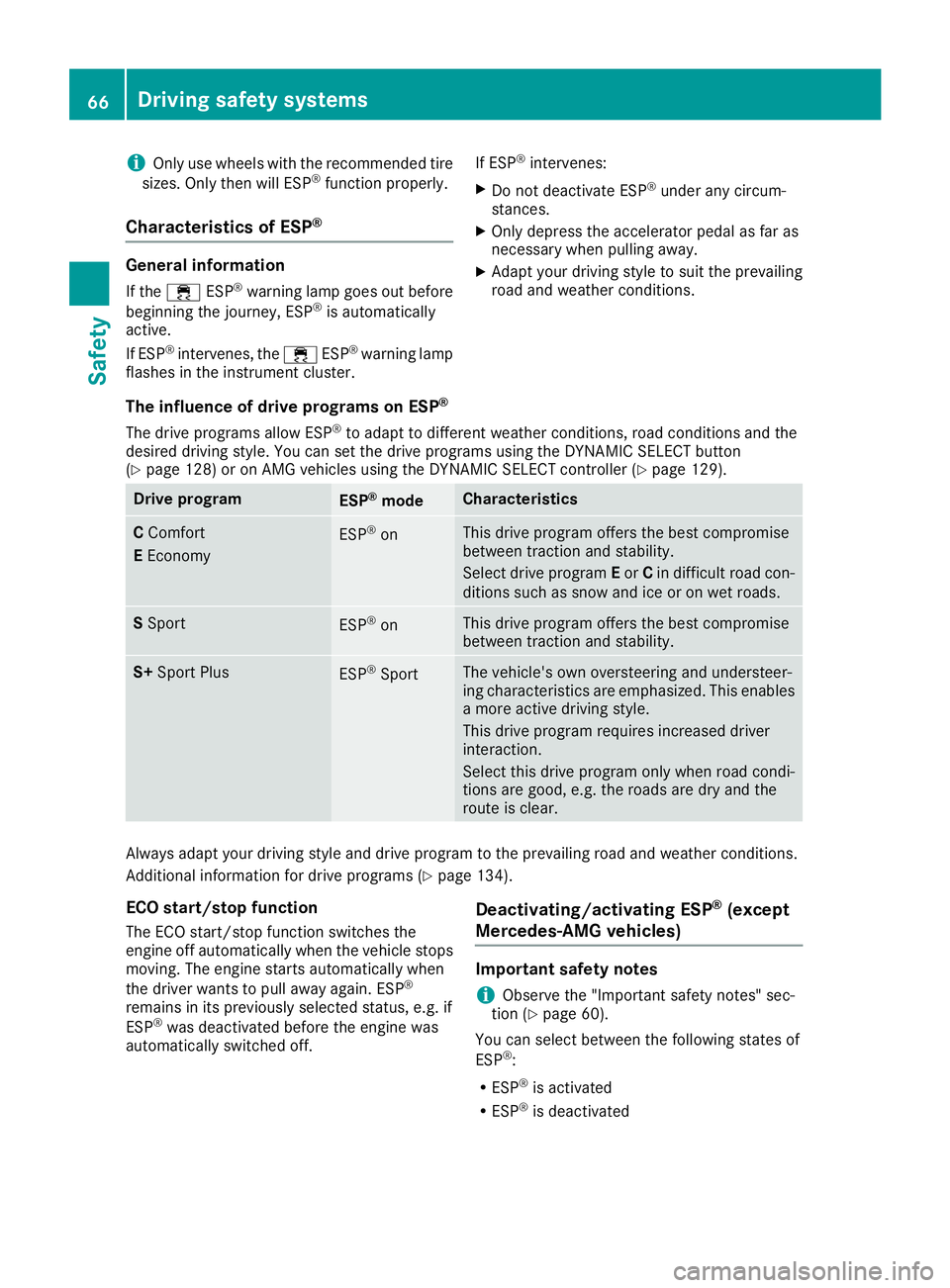
General information
If the ÷ ESP®warning lamp goes out before
beginning the journey, ESP®is automatically
active.
If ESP
®intervenes, the ÷ESP®warning lamp
flashes in the instrument cluster. If ESP
®intervenes:
XDo not deactivate ESP®under any circum-
stances.
XOnly depress the accelerator pedal as far as
necessary when pulling away.
XAdapt your driving style to suit the prevailing
road and weather conditions.
The influence of drive programs on ESP®
The drive programs allow ESP®to adapt to different weather conditions, road conditions and the
desired driving style. You can set the drive programs using the DYNAMIC SELECT button
(
Ypage 128) or on AMG vehicles using the DYNAMIC SELECT controller (Ypage 129).
Drive programESP®modeCharacteristics
C Comfort
E EconomyESP®onThis drive program offers the best compromise
between traction and stability.
Select drive program Eor Cin difficult road con-
ditions such as snow and ice or on wet roads.
S SportESP®onThis drive program offers the best compromise
between traction and stability.
S+ Sport PlusESP®SportThe vehicle's own oversteering and understeer-
ing characteristics are emphasized. This enables
a more active driving style.
This drive program requires increased driver
interaction.
Select this drive program only when road condi-
tions are good, e.g. the roads are dry and the
route is clear.
Always adapt your driving style and drive program to the prevailing road and weather conditions.
Additional information for drive programs (
Ypage 134).
ECO start/stop function
The ECO start/stop function switches the
engine off automatically when the vehicle stops
moving. The engine starts automatically when
the driver wants to pull away again. ESP
®
remains in its previously selected status, e.g. if
ESP®was deactivated before the engine was
automatically switched off.
Deactivating/activating ESP®(except
Mercedes ‑AMG vehicles)
Important safety notes
iObserve the "Important safety notes" sec-
tion (Ypage 60).
You can select between the following states of
ESP
®:
RESP®is activated
RESP®is deactivated
66Driving safety systems
Safety
Page 108 of 322
Exterior lighting
General notes
For reasons of safety, Mercedes-Benz recom-
mends that you drive with the lights switched on
even during the daytime. In some countries,
operation of the headlamps varies due to legal
requirements and self-imposed obligations.
Setting the exterior lighting
Setting options
Exterior lighting can be set using:
Rthe light switch
Rthe combination switch (Ypage 107)
Rthe on-board computer (Ypage 195)
Light switch
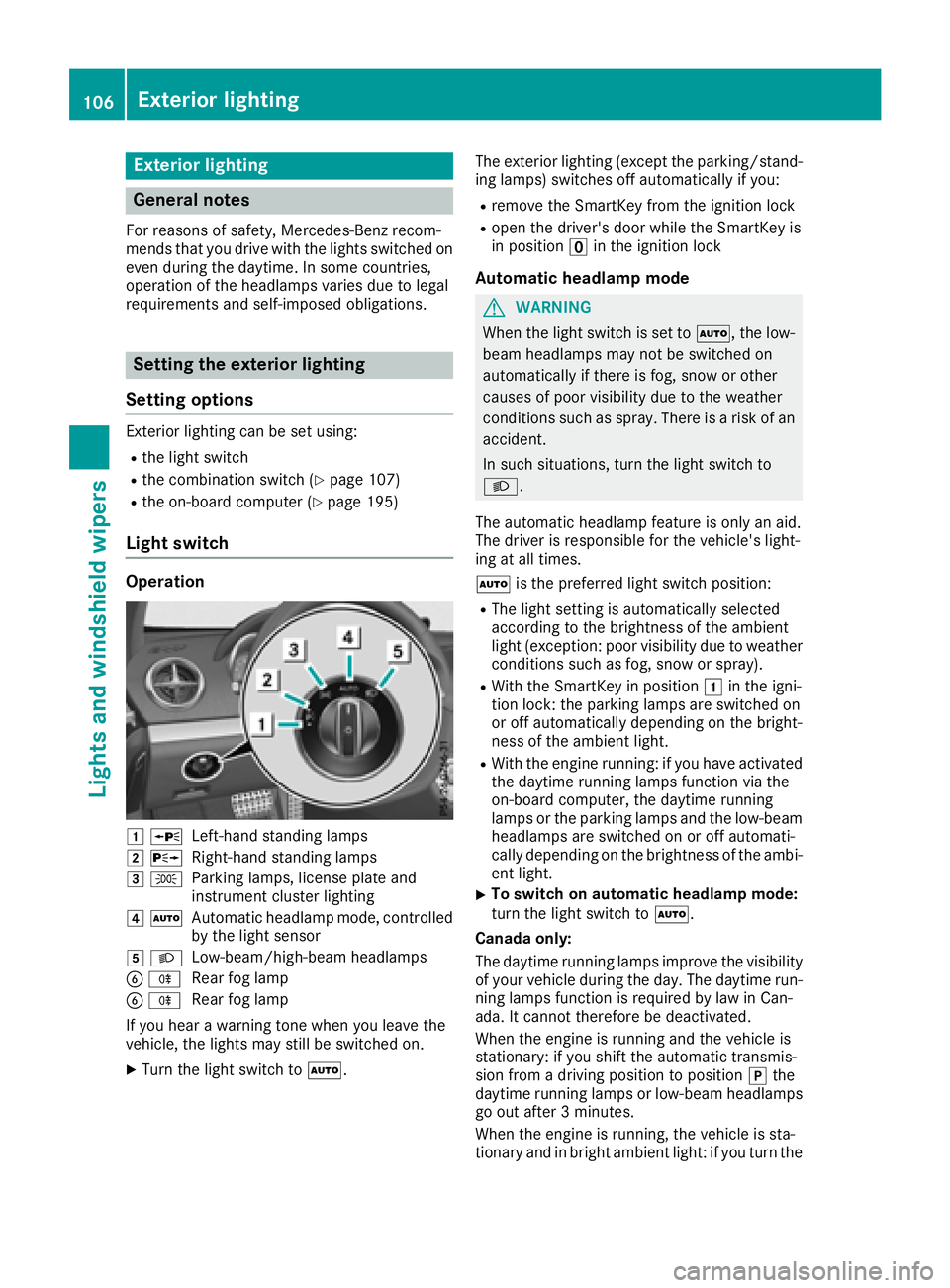
Operation
1 WLeft-hand standing lamps
2XRight-hand standing lamps
3TParking lamps, license plate and
instrument cluster lighting
4ÃAutomatic headlamp mode, controlled
by the light sensor
5 LLow-beam/high-beam headlamps
BRRear fog lamp
BRRear fog lamp
If you hear a warning tone when you leave the
vehicle, the lights may still be switched on.
XTurn the light switch to Ã. The exterior lighting (except the parking/stand-
ing lamps) switches off automatically if you:
Rremove the SmartKey from the ignition lock
Ropen the driver's door while the SmartKey is
in position uin the ignition lock
Automatic headlamp mode
GWARNING
When the light switch is set to Ã, the low-
beam headlamps may not be switched on
automatically if there is fog, snow or other
causes of poor visibility due to the weather
conditions such as spray. There is a risk of an
accident.
In such situations, turn the light switch to
L.
The automatic headlamp feature is only an aid.
The driver is responsible for the vehicle's light-
ing at all times.
à is the preferred light switch position:
RThe light setting is automatically selected
according to the brightness of the ambient
light (exception: poor visibility due to weather
conditions such as fog, snow or spray).
RWith the SmartKey in position 1in the igni-
tion lock: the parking lamps are switched on
or off automatically depending on the bright-
ness of the ambient light.
RWith the engine running: if you have activated
the daytime running lamps function via the
on-board computer, the daytime running
lamps or the parking lamps and the low-beam
headlamps are switched on or off automati-
cally depending on the brightness of the ambi-
ent light.
XTo switch on automatic headlamp mode:
turn the light switch to Ã.
Canada only:
The daytime running lamps improve the visibility of your vehicle during the day. The daytime run-
ning lamps function is required by law in Can
-
ada. It cannot therefore be deactivated.
When the engine is running and the vehicle is
stationary: if you shift the automatic transmis-
sion from a driving position to position jthe
daytime running lamps or low-beam headlamps
go out after 3 minutes.
When the engine is running, the vehicle is sta-
tionary and in bright ambient light: if you turn the
106Exterior lighting
Lights and windshield wipers
Page 115 of 322
Overview of climate control systems
General notes
Observe the settings recommended on the fol-
lowing pages. The windows could otherwise fog
up.
To prevent the windows from fogging up:
Rswitch off climate control only briefly
Rswitch on air-recirculation mode only briefly
Rswitch on the cooling with air dehumidifica-
tion function
Rswitch on the defrost windshield function
briefly, if required
Climate control regulates the temperature and
the humidity in the vehicle interior and filters
undesirable substances out of the air. Climate control can only be operated when the
engine is running. Optimum operation is only
achieved with the side windows and roof closed.
iWhen the weather is warm, ventilate the
vehicle for a brief period. This will speed up
the cooling process and the desired vehicle
interior temperature will be reached more
quickly.
iIt is possible that the dehumidification func-
tion of the climate control system may be
activated automatically an hour after the
SmartKey has been removed. The vehicle is
then ventilated for 30 minutes to dry the air-
conditioning system.
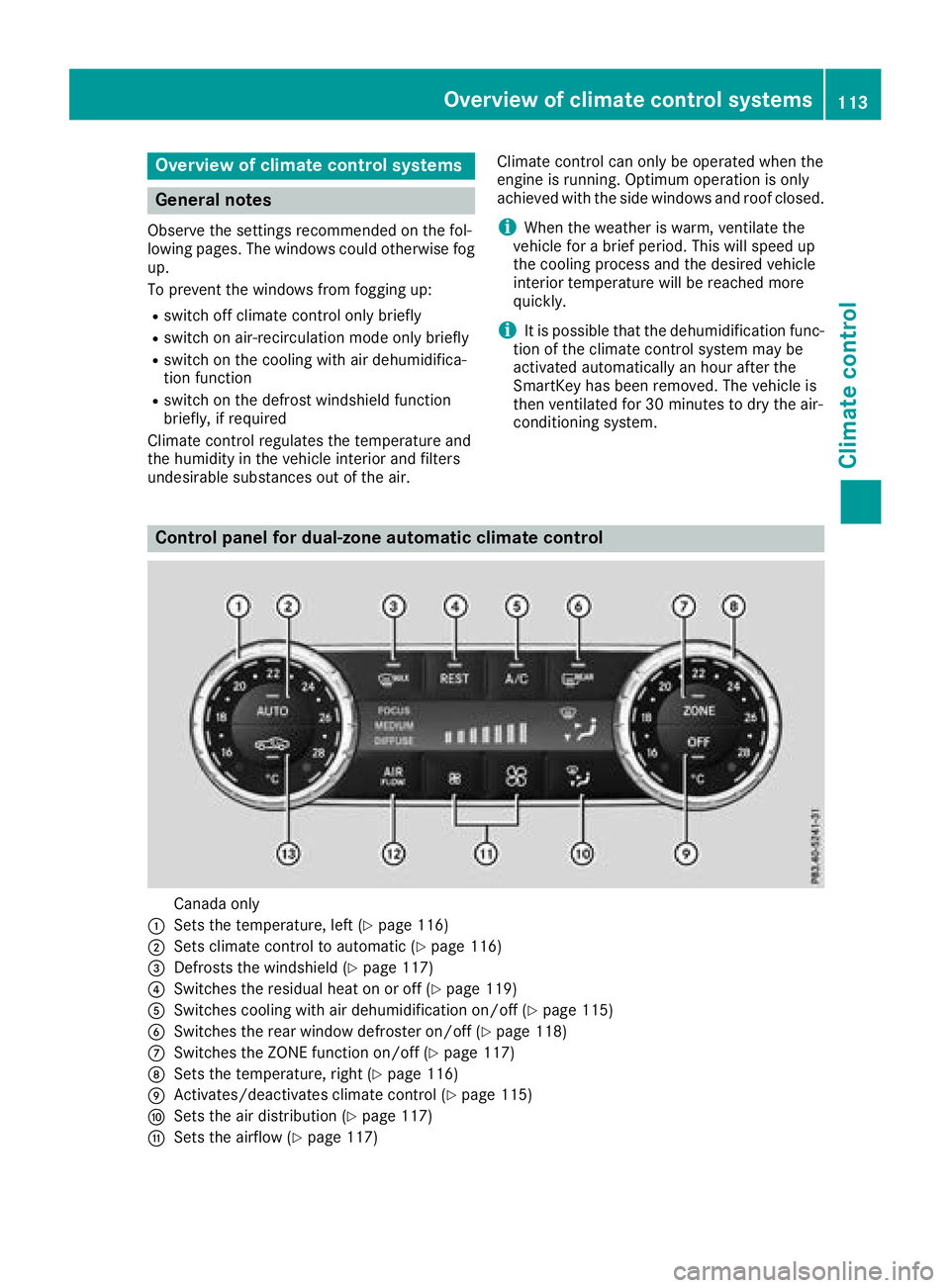
Control panel for dual-zone automatic climate control
Canada only
:Sets the temperature, left (Ypage 116)
;Sets climate control to automatic (Ypage 116)
=Defrosts the windshield (Ypage 117)
?Switches the residual heat on or off (Ypage 119)
ASwitches cooling with air dehumidification on/off (Ypage 115)
BSwitches the rear window defroster on/off (Ypage 118)
CSwitches the ZONE function on/off (Ypage 117)
DSets the temperature, right (Ypage 116)
EActivates/deactivates climate control (Ypage 115)
FSets the air distribution (Ypage 117)
GSets the airflow (Ypage 117)
Overview of climate control systems113
Climate control
Page 116 of 322
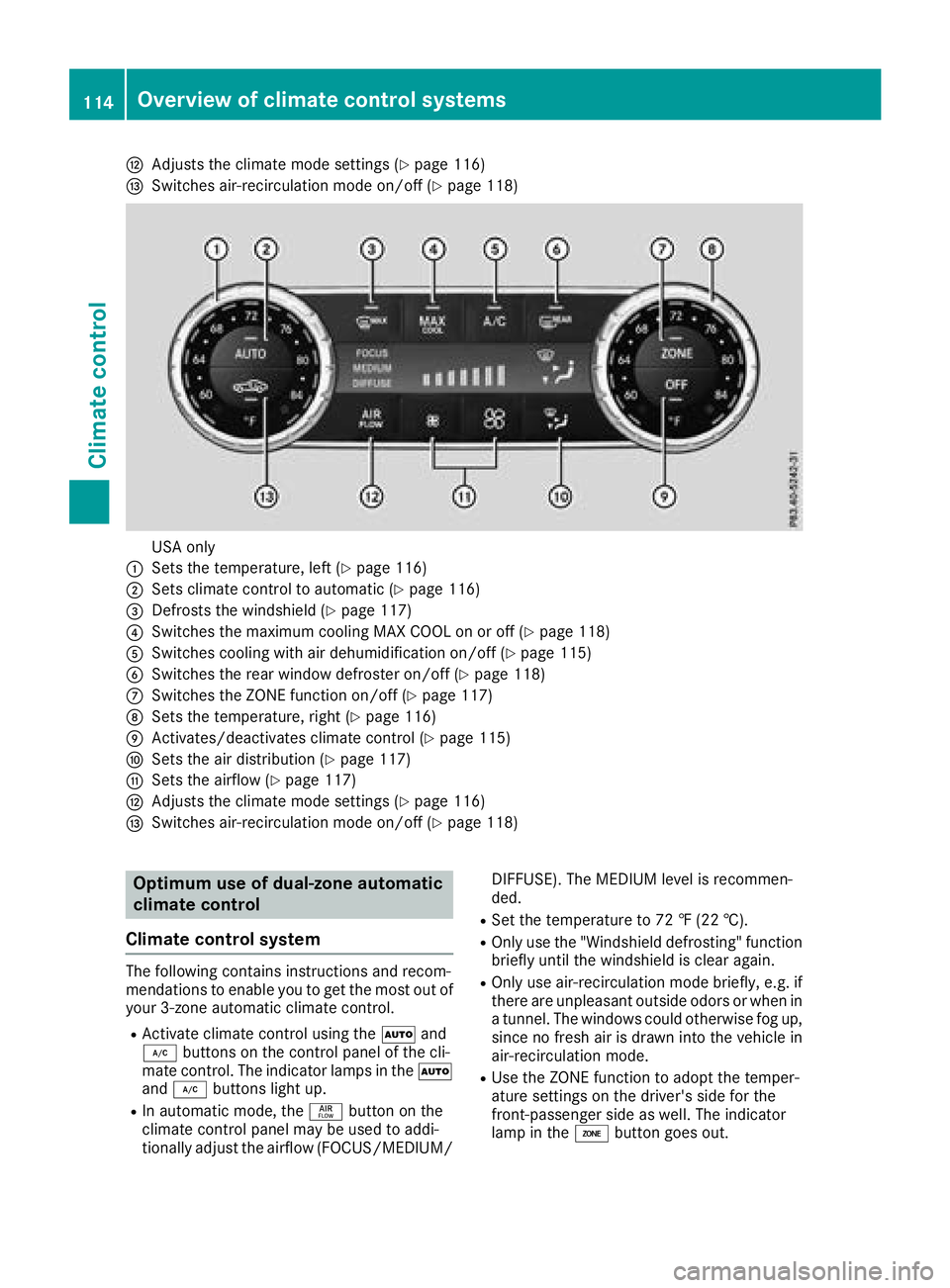
HAdjusts the climate mode settings (Ypage 116)
ISwitches air-recirculation mode on/off (Ypage 118)
USA only
:Sets the temperature, left (Ypage 116)
;Sets climate control to automatic (Ypage 116)
=Defrosts the windshield (Ypage 117)
?Switches the maximum cooling MAX COOL on or off (Ypage 118)
ASwitches cooling with air dehumidification on/off (Ypage 115)
BSwitches the rear window defroster on/off (Ypage 118)
CSwitches the ZONE function on/off (Ypage 117)
DSets the temperature, right (Ypage 116)
EActivates/deactivates climate control (Ypage 115)
FSets the air distribution (Ypage 117)
GSets the airflow (Ypage 117)
HAdjusts the climate mode settings (Ypage 116)
ISwitches air-recirculation mode on/off (Ypage 118)
Optimum use of dual-zone automatic
climate control
Climate control system
The following contains instructions and recom-
mendations to enable you to get the most out of
your 3-zone automatic climate control.
RActivate climate control using the Ãand
¿ buttons on the control panel of the cli-
mate control. The indicator lamps in the Ã
and ¿ buttons light up.
RIn automatic mode, the ñbutton on the
climate control panel may be used to addi-
tionally adjust the airflow (FOCUS/MEDIUM/ DIFFUSE). The MEDIUM level is recommen-
ded.
RSet the temperature to 72 ‡ (22 †).
ROnly use the "Windshield defrosting" function
briefly until the windshield is clear again.
ROnly use air-recirculation mode briefly, e.g. if
there are unpleasant outside odors or when in
a tunnel. The windows could otherwise fog up, since no fresh air is drawn into the vehicle in
air-recirculation mode.
RUse the ZONE function to adopt the temper-
ature settings on the driver's side for the
front-passenger side as well. The indicator
lamp in the ábutton goes out.
114Overview of climate control systems
Climate control
Page 117 of 322
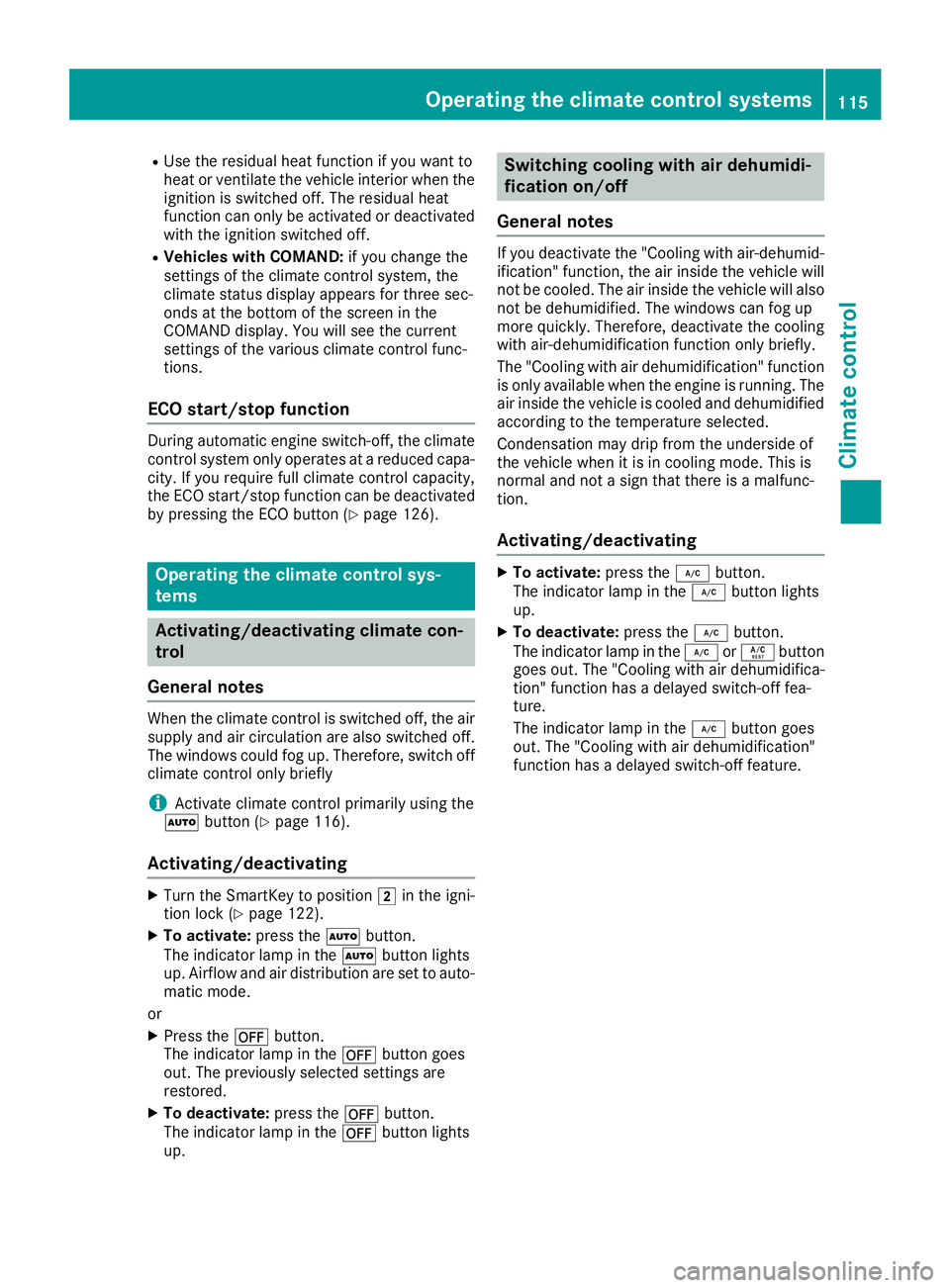
RUse the residual heat function if you want to
heat or ventilate the vehicle interior when the
ignition is switched off. The residual heat
function can only be activated or deactivated
with the ignition switched off.
RVehicles with COMAND:if you change the
settings of the climate control system, the
climate status display appears for three sec-
onds at the bottom of the screen in the
COMAND display. You will see the current
settings of the various climate control func-
tions.
ECO start/stop function
During automatic engine switch-off, the climate
control system only operates at a reduced capa-
city. If you require full climate control capacity,
the ECO start/stop function can be deactivated
by pressing the ECO button (
Ypage 126).
Operating the climate control sys-
tems
Activating/deactivating climate con-
trol
General notes
When the climate control is switched off, the air
supply and air circulation are also switched off.
The windows could fog up. Therefore, switch off
climate control only briefly
iActivate climate control primarily using the
à button (Ypage 116).
Activating/deactivating
XTurn the SmartKey to position 2in the igni-
tion lock (Ypage 122).
XTo activate: press theÃbutton.
The indicator lamp in the Ãbutton lights
up. Airflow and air distribution are set to auto-
matic mode.
or
XPress the ^button.
The indicator lamp in the ^button goes
out. The previously selected settings are
restored.
XTo deactivate: press the^button.
The indicator lamp in the ^button lights
up.
Switching cooling with air dehumidi-
fication on/off
General notes
If you deactivate the "Cooling with air-dehumid-
ification" function, the air inside the vehicle will
not be cooled. The air inside the vehicle will also
not be dehumidified. The windows can fog up
more quickly. Therefore, deactivate the cooling
with air-dehumidification function only briefly.
The "Cooling with air dehumidification" function is only available when the engine is running. The
air inside the vehicle is cooled and dehumidified
according to the temperature selected.
Condensation may drip from the underside of
the vehicle when it is in cooling mode. This is
normal and not a sign that there is a malfunc-
tion.
Activating/deactivating
XTo activate: press the¿button.
The indicator lamp in the ¿button lights
up.
XTo deactivate: press the¿button.
The indicator lamp in the ¿orÁ button
goes out. The "Cooling with air dehumidifica-
tion" function has a delayed switch-off fea-
ture.
The indicator lamp in the ¿button goes
out. The "Cooling with air dehumidification"
function has a delayed switch-off feature.
Operating the climate control systems115
Climate control
Page 121 of 322
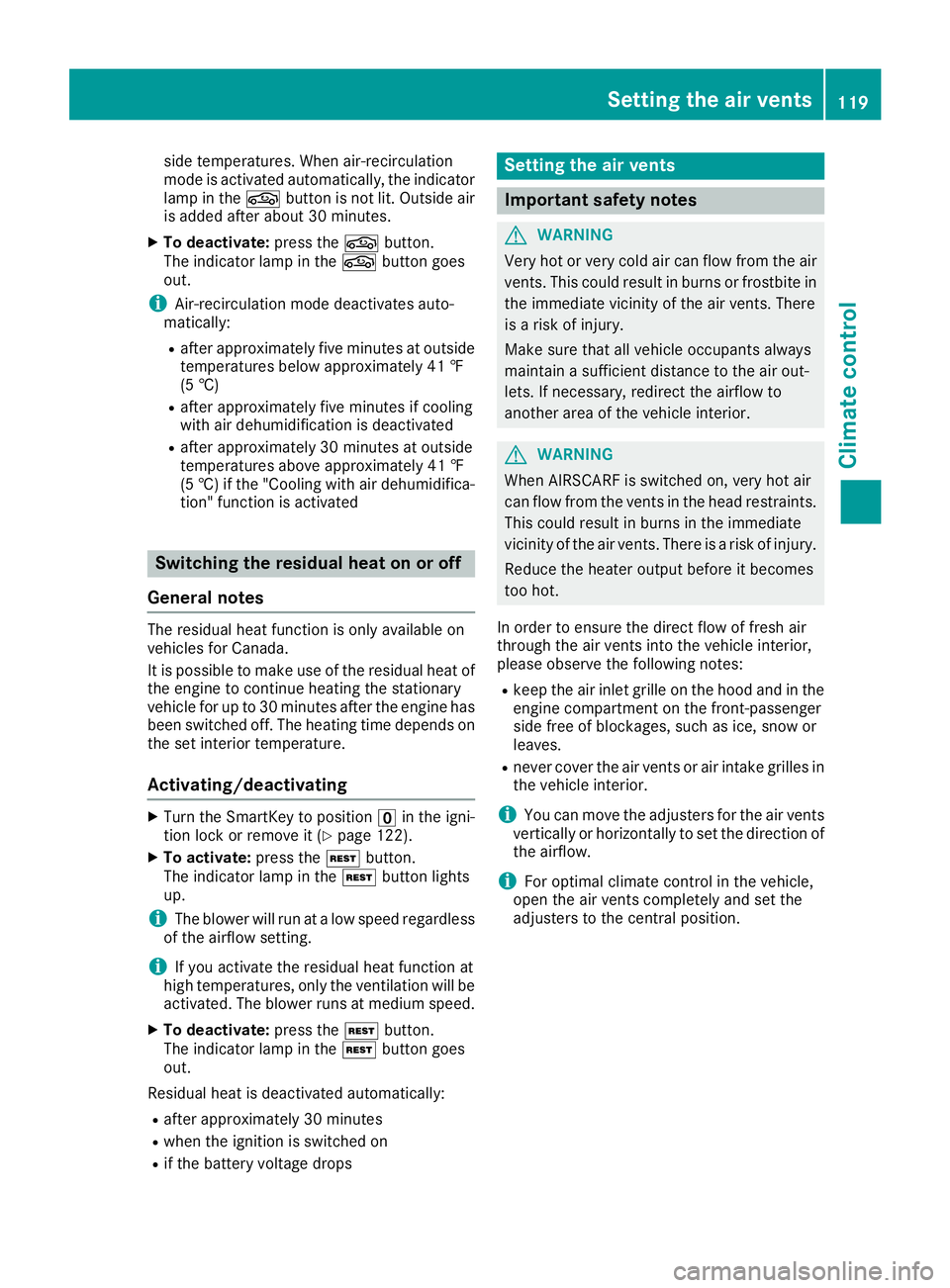
side temperatures. When air-recirculation
mode is activated automatically, the indicator
lamp in thegbutton is not lit. Outside air
is added after about 30 minutes.
XTo deactivate: press thegbutton.
The indicator lamp in the gbutton goes
out.
iAir-recirculation mode deactivates auto-
matically:
Rafter approximately five minutes at outside
temperatures below approximately 41 ‡
(5 †)
Rafter approximately five minutes if cooling
with air dehumidification is deactivated
Rafter approximately 30 minutes at outside
temperatures above approximately 41 ‡
(5 †) if the "Cooling with air dehumidifica-
tion" function is activated
Switching the residual heat on or off
General notes
The residual heat function is only available on
vehicles for Canada.
It is possible to make use of the residual heat of
the engine to continue heating the stationary
vehicle for up to 30 minutes after the engine has
been switched off. The heating time depends on
the set interior temperature.
Activating/deactivating
XTurn the SmartKey to position uin the igni-
tion lock or remove it (Ypage 122).
XTo activate: press theÌbutton.
The indicator lamp in the Ìbutton lights
up.
iThe blower will run at a low speed regardless
of the airflow setting.
iIf you activate the residual heat function at
high temperatures, only the ventilation will be
activated. The blower runs at medium speed.
XTo deactivate: press theÌbutton.
The indicator lamp in the Ìbutton goes
out.
Residual heat is deactivated automatically:
Rafter approximately 30 minutes
Rwhen the ignition is switched on
Rif the battery voltage drops
Setting the air vents
Important safety notes
GWARNING
Very hot or very cold air can flow from the air
vents. This could result in burns or frostbite in
the immediate vicinity of the air vents. There
is a risk of injury.
Make sure that all vehicle occupants always
maintain a sufficient distance to the air out-
lets. If necessary, redirect the airflow to
another area of the vehicle interior.
GWARNING
When AIRSCARF is switched on, very hot air
can flow from the vents in the head restraints. This could result in burns in the immediate
vicinity of the air vents. There is a risk of injury.
Reduce the heater output before it becomes
too hot.
In order to ensure the direct flow of fresh air
through the air vents into the vehicle interior,
please observe the following notes:
Rkeep the air inlet grille on the hood and in the engine compartment on the front-passenger
side free of blockages, such as ice, snow or
leaves.
Rnever cover the air vents or air intake grilles in
the vehicle interior.
iYou can move the adjusters for the air vents
vertically or horizontally to set the direction of
the airflow.
iFor optimal climate control in the vehicle,
open the air vents completely and set the
adjusters to the central position.
Setting the air vents119
Climate control
Z