check oil MERCEDES-BENZ SL ROADSTER 2018 Owner's Manual
[x] Cancel search | Manufacturer: MERCEDES-BENZ, Model Year: 2018, Model line: SL ROADSTER, Model: MERCEDES-BENZ SL ROADSTER 2018Pages: 322, PDF Size: 5.43 MB
Page 8 of 322
Engaging neutral ............................ 132
Engaging park position automati-
cally ............................................... 132
Engaging reverse gear ................... 132
Engaging the park position ............ 131
Gearshift recommendation ............ 138
Kickdown ....................................... 134
Manual shifting .............................. 136
Oil temperature (on-board com-
puter, Mercedes-AMG vehicles) ..... 197
Overview ........................................ 130
Problem (malfunction) ................... 139
Pulling away ................................... 124
Selector lever ................................ 130
Starting the engine ........................ 124
Steering wheel paddle shifters ...... 136
Transmission position display ........ 131
Transmission positions .................. 133
Automatic transmission emer-
gency mode ....................................... 139
B
Back button ....................................... 237
BAS (Brake Assist System) ................. 60
Battery (SmartKey)
Checking .......................................... 76
Important safety notes .................... 75
Replacing ......................................... 76
Battery (vehicle)
Charging ........................................ 277
Display message ............................ 214
Important safety notes .................. 275
Jump starting ................................. 278
Overview ........................................ 275
Belt
see Seat belts
Belt warning ......................................... 44
Blind Spot Assist
see Active Blind Spot Assist
Bluetooth
®
Searching for a mobile phone ........ 240
see also Digital Operator's Man-
ual .................................................. 236
Telephony ...................................... 239
Brake Assist System
see BAS (Brake Assist System) Brake Assist with cross-traffic
function
Function/notes ................................ 61
Important safety notes .................... 61
Brake fluid
Display message ............................ 206
Notes ............................................. 315
Brake force distribution
see EBD (electronic brake force
distribution)
Brake lamps
Adaptive ........................................... 65
Display message ............................ 212
Brakes
ABS .................................................. 60
Adaptive Brake Assist ...................... 64
BAS .................................................. 60
Brake Assist with cross-traffic
function ........................................... 61
Brake fluid (notes) ......................... 315
Display message ............................ 201
EBD .................................................. 69
High-performance brake system .... 148
Important safety notes .................. 146
Maintenance .................................. 147
Parking brake ................................ 142
Riding tips ...................................... 146
Warning lamp ................................. 228
Breakdown
see Flat tire
see Towing away
Breakdown assistance
Reflective safety jacket .................. 269
Where will I find...? ........................ 269
Brightness control (instrument
cluster lighting) ................................... 33
C
California
Important notice for retail cus-
tomers and lessees .......................... 25
Calling up a malfunction
see Display messages
Car
see Vehicle
Care
Car wash ........................................ 263
6Index
Page 12 of 322
EBD (electronic brake force distri-
bution)Display message ............................ 203
Function/notes ................................ 69
ECO display
Function/notes ............................ .145
On-board computer ....................... 188
ECO start/stop function
Automatic engine start .................. 126
Automatic engine switch-off .......... 125
Deactivating/activating ................. 126
General information ....................... 125
Important safety notes .................. 125
Introduction ................................... 125
Electronic Stability Program
see ESP
®(Electronic Stability Program)
Emergency
Automatic measures after an acci-
dent ................................................. 56
Emergency release
Driver's door ....................................8 0
Trunk ............................................... 85
Vehicle ............................................. 80
Emergency Tensioning Devices
Activation ......................................... 53
Emissions control
Service and warranty information ....2 5
Engine
Check Engine warning lamp .......... .232
Display message ............................ 213
ECO start/stop function ................ 125
Engine number ............................... 312
Irregular running ............................ 127
Jump-starting ................................. 278
Starting problems .......................... 127
Starting the engine with the
SmartKey ....................................... 124
Starting with KEYLESS-GO ............. 124
Switching off .................................. 142
Tow-starting (vehicle) ..................... 282
Engine electronics
Notes ............................................. 310
Problem (malfunction) ................... 127
Engine oil
Adding ...........................................2 59
Additives ........................................ 315
C
hecking the oil level ..................... 259 Checking the oil level using the
dipstick .......................................... 259
Display message ............................ 214
Filling capacity ............................... 315
General notes ................................ 314
Notes about oil grades ................... 314
Notes on oil level/consumption .... 259
Temperature (on-board computer,
Mercedes-AMG vehicles) ...............1
97
Entering an address
see also Digital Operator's Man-
ual ..................................................2 36
ESP
®(Electronic Stability Pro-
gram)
AMG menu (on-board computer) ... 198
Characteristics ................................. 66
Deactivating/activating (button
in Mercedes-AMG vehicles) ............. 67
Deactivating/activating (except
Mercedes‑ AMG vehicles) ................. 66
Display message ............................ 201
Function/notes ................................ 65
General notes .................................. 65
Important safety information ........... 65
Warning lamp ................................. 229
ETS/4ETS (Electronic Traction Sys-
tem) ...................................................... 65
Exhaust check ................................... 145
Exhaust pipe (cleaning instruc-
tions) ..................................................2 68
Exterior lighting
Setting options .............................. 106
see Lights
Exterior mirrors
Adjusting ....................................... 102
Dipping (automatic) ....................... 103
Folding in when locking (on-board
computer) ...................................... 197
Folding in/out (electrically) ........... 103
Out of position (troubleshooting) ... 103
Storing settings (memory func-
tion) ............................................... 105
Storing the parking position .......... 104
Eyeglasses compartment ................. 243
10Index
Page 19 of 322
SD memory cardsee also Digital Operator's Man-
ual .................................................. 236
Selecting ........................................1 91
Search & Send
see also Digital Operator's Man-
ual ..................................................2 36
Seat
Correct driver's seat position ........... 95
Seat belts
Adjusting the driver's and front-
passenger seat belt ......................... 44
Correct usage .................................. 43
Fastening ......................................... 44
Important safety guidelines ............. 42
Introduction ..................................... 41
Releasing ......................................... 44
Seat belt guide ................................. 97
Switching belt adjustment on/off
(on-board computer) ...................... 197
Warning lamp ................................. 227
Warning lamp (function) ................... 44
Seats
Adjusting (electrically) ..................... 97
Adjusting the head restraint ............ 98
Belt guide ......................................... 97
Important safety notes .................... 95
Overview .......................................... 95
Seat heating problem ...................... 99
Seat ventilation problem ................ 100
Sliding forward/back ....................... 98
Storing settings (memory func-
tion) ............................................... 105
Switching AIRSCARF on/off .......... 100
Switching seat heating on/off ......... 99
Switching seat ventilation on/off .... 99
Selector lever
Positions ........................................ 130
Sensors (cleaning instructions) ....... 267
Service menu (on-board com-
puter) .................................................. 194
Service message
see ASSYST PLUS
Service products
Brake fluid ..................................... 315
Coolant (engine) ............................ 315
Engine oil ....................................... 314
Fuel ................................................ 313 Important safety notes .................. 312
Refrigerant (air-conditioning sys-
tem) ............................................... 316
Washer fluid ................................... 316
Setting the air distribution ............... 117
Setting the airflow ............................ 117
Se
tting the date/time format
see also Digital Operator's Man-
ual .................................................. 236
Setting the language
see also Digital Operator's Man-
ual .................................................. 236
Setting the time
see also Digital Operator's Man-
ual .................................................. 236
Settings
Factory (on-board computer) ......... 197
On-board computer ....................... 194
SETUP (on-board computer,
Mercedes-AMG vehicles) .................. 198
Side impact air bag ............................. 46
Side marker lamp (display mes-
sage) ................................................... 212
Side windows
Cleaning ......................................... 266
Convenience closing feature ............ 87
Important safety information ........... 85
Opening/closing (all) ....................... 87
Opening/closing (front) ................... 86
Opening/closing (rear) .................... 86
Overview .......................................... 85
Problem (malfunction) ..................... 88
Resetting ......................................... 88
Reversing feature ............................. 86
SIRIUS services
see also Digital Operator's Man-
ual .................................................. 236
SmartKey
Changing the battery ....................... 76
Changing the programming ............. 74
Checking the battery ....................... 76
Display message ............................ 225
Door central locking/unlocking ....... 73
Important safety notes .................... 73
Loss ................................................. 77
Mechanical key ................................ 75
Opening/closing the roof ................ 90
Index17
Page 21 of 322
Technical dataCapacities ...................................... 312
Information .................................... 310
Tires/wheels ................................. 308
Vehicle data ................................... 317
TELEAID
Call priority .................................... 251
Emergency call .............................. 249
General notes ................................ 248
MB info call button ........................2 51
Roadside Assistance button .......... 250
Self-test ......................................... 248
System .......................................... 248
Vehicle Health Check .................... 251
Telephone
Accepting a call (multifunction
steering wheel) .............................. 192
Authorizing a mobile phone (con-
necting) ......................................... 240
Connecting a mobile phone (gen-
eral information) ............................ 239
Display message ............................ 224
Menu (on-board computer) ............ 191
Number from the phone book ........1 92
Redialing ........................................ 192
Rejecting/ending a call ................. 192
see also Digital Operator's Man-
ual ..................................................2 36
Temperature
Coolant .......................................... 186
Coolant (on-board computer,
Mercedes-AMG vehicles) ...............1 97
Engine oil (on-board computer,
Mercedes-AMG vehicles) ...............1 97
Outside temperature ......................1 85
Setting (climate control) ................ 116
Transmission oil (on-board com-
puter, Mercedes-AMG vehicles) ..... 197
Timing (RACETIMER) ......................... 198
Tire pressure
Calling up (on-board computer) ..... 291
Checking manually ........................ 291
Display message ............................ 221
Maximum ....................................... 290
Not reached (TIREFIT) .................... 274
Notes ............................................. 289
Reached (TIREFIT) .......................... 274
Recommended ............................... 288 Tire pressure monitor
Checking the tire pressure elec-
tronically ........................................ 292
Function/notes .............................2 91
Genera
l notes ................................ 291
Important safety notes .................. 291
Radio type approval for the tire
pressure monitor ........................... 294
Restarting ...................................... 293
Warning lamp ................................. 235
Warning message .......................... 293
Tire-change tool kit ........................... 271
TIREFIT kit .......................................... 272
Important safety notes .................. 272
Storage location ............................ 270
Tire pressure not reached .............. 274
Tire pressure reached .................... 274
Tires
Aspect ratio (definition) ................. 303
Average weight of the vehicle
occupants (definition) .................... 302
Bar (definition) ............................... 302
Changing a wheel .......................... 303
Characteristics .............................. 301
Checking ........................................ 285
Curb weight (definition) ................. 303
Definition of terms ......................... 302
Direction of rotation ...................... 304
Display message ............................ 221
Distribution of the vehicle occu-
pants (definition) ............................ 303
DOT (Department of Transporta-
tion) (definition) ............................. 302
DOT, Tire Identification Number
(TIN) ............................................... 301
GAWR (Gross Axle Weight Rating)
(definition) ..................................... 302
GVW (Gross Vehicle Weight) (def-
inition) ........................................... 302
GVWR (Gross Vehicle Weight Rat-
ing) (definition) .............................. 302
Important safety notes .................. 285
Increased vehicle weight due to
optional equipment (definition) ...... 302
Information on driving .................... 285
Kilopascal (kPa) (definition) ........... 302
Labeling (overview) ........................ 298
Load bearing index (definition) ...... 303
Index19
Page 124 of 322
GWARNING
If you switch off the ignition while driving,
safety-relevant functions are only available
with limitations, or not at all. This could affect, for example, the power steering and the brake
boosting effect. You will require considerably
more effort to steer and brake. There is a risk
of an accident.
Do not switch off the ignition while driving.
GWARNING
If the parking brake has not been fully
released when driving, the parking brake can:
Roverheat and cause a fire
Rlose its hold function.
There is a risk of fire and an accident. Release
the parking brake fully before driving off.
!Do not warm up the engine while stationary.
Pull away immediately. Avoid high engine
speeds and full throttle until the engine has
reached its operating temperature.
In vehicles with automatic transmission,
engage positions P and R only when the vehi-
cle is stationary.
Where possible, avoid spinning the drive
wheels when pulling away on slippery roads.
You could otherwise damage the drive train.
!Mercedes-AMG vehicles: at low engine oil
temperatures below 68 ‡ (+20 †), the max-
imum engine speed is restricted in order to
protect the engine. To protect the engine and
maintain smooth engine operation, avoid driv-
ing at full throttle when the engine is cold.
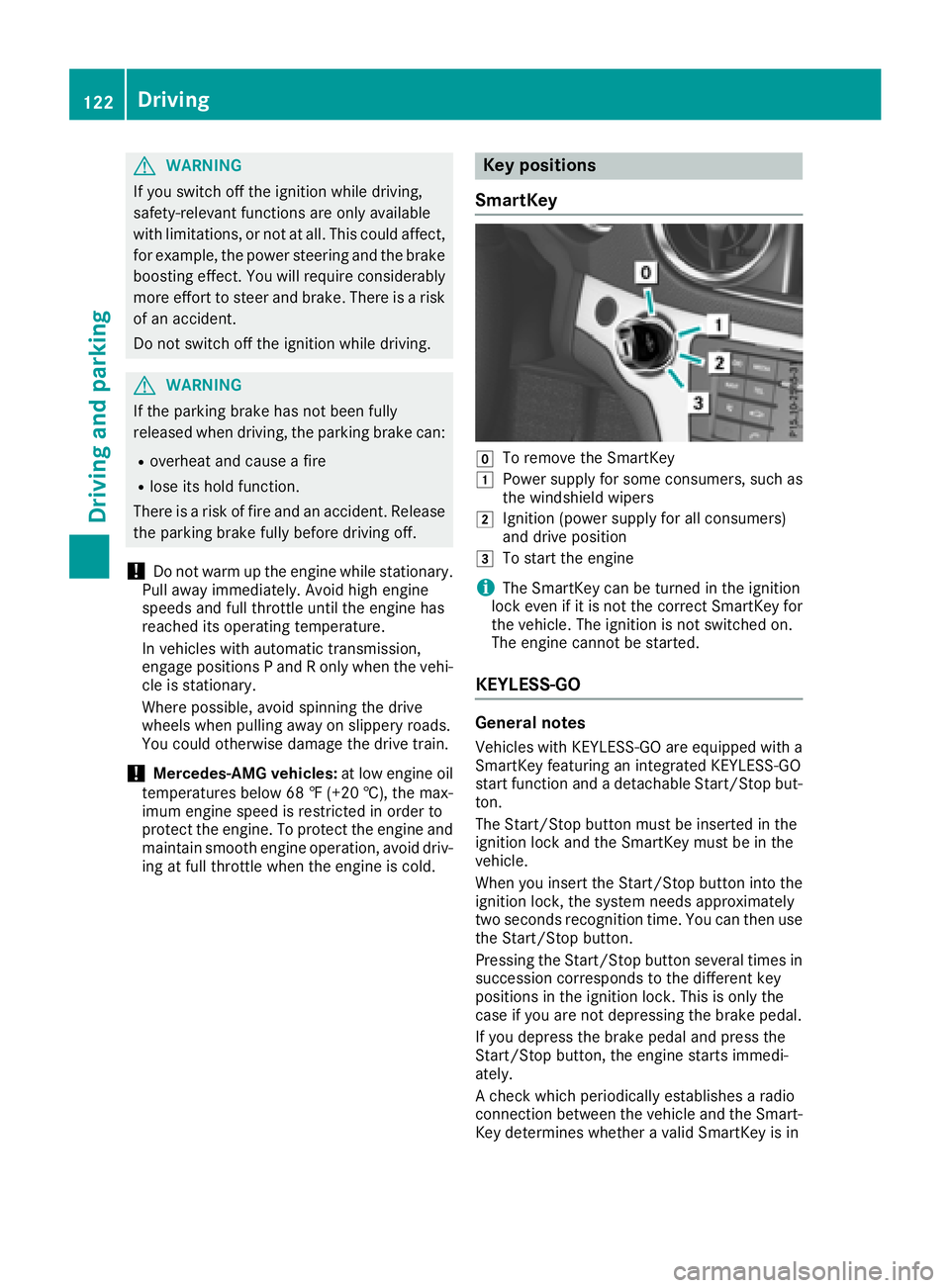
Key positions
SmartKey
gTo remove the SmartKey
1Power supply for some consumers, such as
the windshield wipers
2Ignition (power supply for all consumers)
and drive position
3To start the engine
iThe SmartKey can be turned in the ignition
lock even if it is not the correct SmartKey for
the vehicle. The ignition is not switched on.
The engine cannot be started.
KEYLESS-GO
General notes
Vehicles with KEYLESS-GO are equipped with a
SmartKey featuring an integrated KEYLESS-GO
start function and a detachable Start/Stop but-
ton.
The Start/Stop button must be inserted in the
ignition lock and the SmartKey must be in the
vehicle.
When you insert the Start/Stop button into the
ignition lock, the system needs approximately
two seconds recognition time. You can then use
the Start/Stop button.
Pressing the Start/Stop button several times in
succession corresponds to the different key
positions in the ignition lock. This is only the
case if you are not depressing the brake pedal.
If you depress the brake pedal and press the
Start/Stop button, the engine starts immedi-
ately.
A check which periodically establishes a radio
connection between the vehicle and the Smart-
Key determines whether a valid SmartKey is in
122Driving
Driving and parking
Page 141 of 322
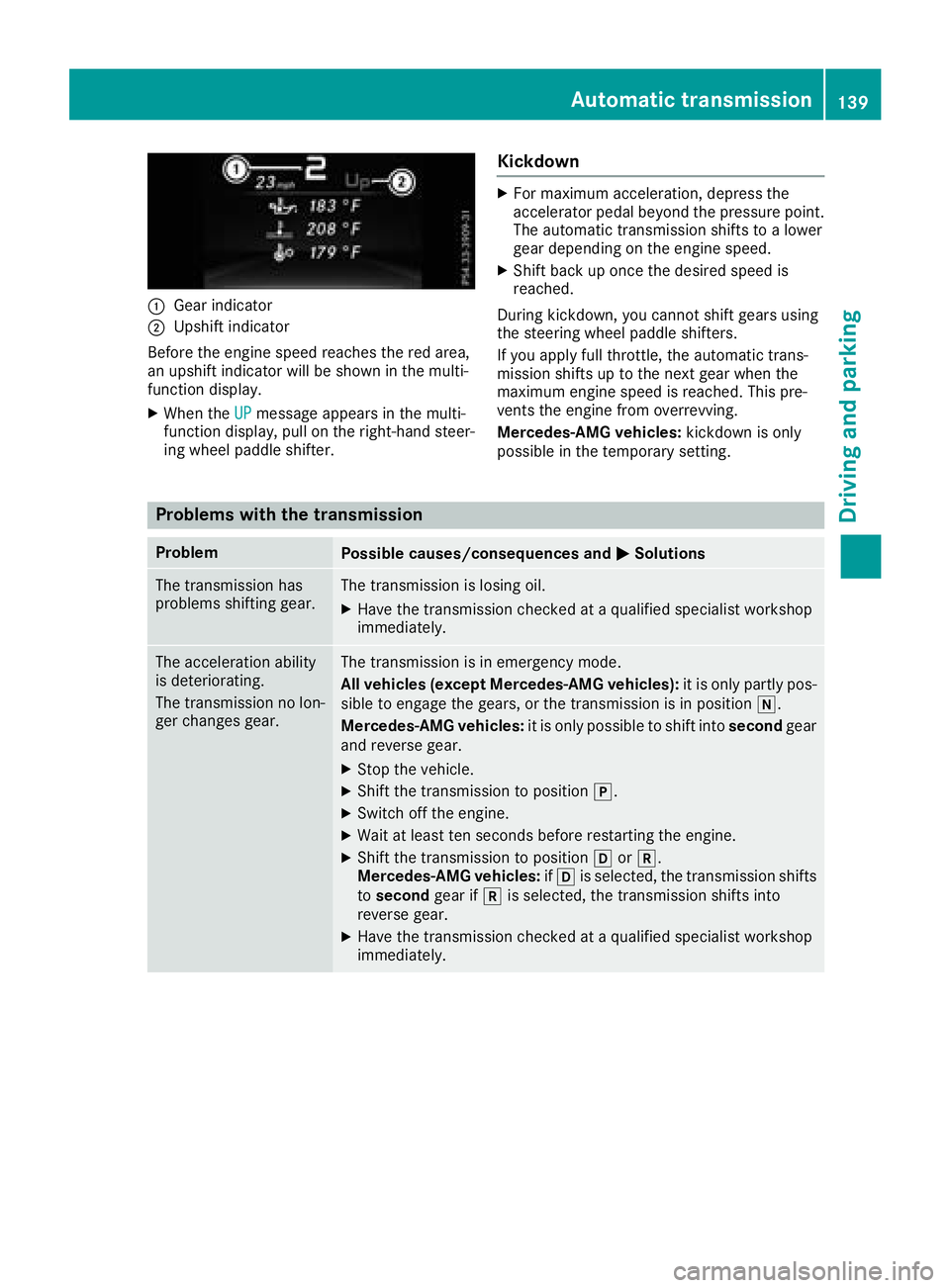
:Gear indicator
;Upshift indicator
Before the engine speed reaches the red area,
an upshift indicator will be shown in the multi-
function display.
XWhen the UPmessage appears in the multi-
function display, pull on the right-hand steer-
ing wheel paddle shifter.
Kickdown
XFor maximum acceleration, depress the
accelerator pedal beyond the pressure point. The automatic transmission shifts to a lower
gear depending on the engine speed.
XShift back up once the desired speed is
reached.
During kickdown, you cannot shift gears using
the steering wheel paddle shifters.
If you apply full throttle, the automatic trans-
mission shifts up to the next gear when the
maximum engine speed is reached. This pre-
vents the engine from overrevving.
Mercedes-AMG vehicles: kickdown is only
possible in the temporary setting.
Problems with the transmission
ProblemPossible causes/consequences and MSolutions
The transmission has
problems shifting gear.The transmission is losing oil.
XHave the transmission checked at a qualified specialist workshop
immediately.
The acceleration ability
is deteriorating.
The transmission no lon-
ger changes gear.The transmission is in emergency mode.
All vehicles (except Mercedes-AMG vehicles): it is only partly pos-
sible to engage the gears, or the transmission is in position i.
Mercedes-AMG vehicles: it is only possible to shift into secondgear
and reverse gear.
XStop the vehicle.
XShift the transmission to position j.
XSwitch off the engine.
XWait at least ten seconds before restarting the engine.
XShift the transmission to position hork.
Mercedes-AMG vehicles: ifh is selected, the transmission shifts
to second gear ifkis selected, the transmission shifts into
reverse gear.
XHave the transmission checked at a qualified specialist workshop
immediately.
Automatic transmission139
Driving and parking
Z
Page 216 of 322
Display messagesPossible causes/consequences andMSolutions
#
See Operator'sMan ‐ual
The battery is no tbein gcharged.
A warning tone also sounds.
Possibl ecauses are:
Radefective alternato r
Ratorn poly-V-belt
Ramalfunction in th eelectronics
!Do no tcontinu edriving. The engin ecould otherwise overheat.
XPull ove rand stop th evehicl esafely and switch off th eengine, pay-
ing attention to roa dand traffic conditions.
XSecur eth evehicl eagainst rollin gaway (Ypage 142).
XConsult aqualified specialist workshop .
#
StopVehicl eSeeOperator' sManual
The battery is no longer bein gcharged and th econdition of charg eis
to olow.
A warning tone also sounds.
XPull ove rand stop th evehicl esafely and switch off th eengine, pay-
ing attention to roa dand traffic conditions.
XSecur eth evehicl eagainst rollin gaway (Ypage 142).
XObserv eth einstruction sin th edisplay message #See Oper‐ator's Manual.
XConsult aqualified specialist workshop .
4
CheckEngineOilAtNextRefueling
The engin eoil level has dropped to th eminimum level.
A warning tone also sounds.
!Avoid lon gjourneys wit hto olittl eengin eoil. The engin ewill oth-
erwise be damaged.
XChec kth eoil level when next refueling, at th elatest (Ypage 259).
XIf necessary, add engin eoil (Ypage 259).
XHav eth eengin echecke dat aqualified specialist workshop if you
need to add engin eoil mor eoften than usual.
Information on approve dengin eoils can be obtained from aqualified
specialist workshop or on th eInternet at http://bevo.mercedes -
benz.com.
4
Check Engine OilLevel (Ad d 1quart)
Mercedes-AMG vehicles:
The engin eoil level is to olow.
!Avoid lon gjourneys wit hto olittl eengin eoil. The engin ewill oth-
erwise be damaged.
XChec kth eoil level when next refueling, at th elatest (Ypage 259).
XIf necessary, add engin eoil (Ypage 259).
XHav eth eengin echecke dat aqualified specialist workshop if you
need to add engin eoil mor eoften than usual.
Information on approve dengin eoils can be obtained from aqualified
specialist workshop or on th eInternet at http://bevo.mercedes -
benz.com.
214Display messages
On-board computer and displays
Page 217 of 322
Display messagesPossible causes/consequences andMSolutions
4
Engine Oil LevelLow StopVehicl eTurnEngine Off
Mercedes-AMG vehicles:
The engin eoil level is to olow.
There is aris kof engin edamage.
XPull ove rand stop th evehicl esafely and switch off th eengine, pay-
ing attention to roa dand traffic conditions.
XSecur eth evehicl eagainst rollin gaway (Ypage 142).
XCheckth eengin eoil level (Ypage 259).
XIf necessary, add engin eoil (Ypage 259).
8
Fue lLevel Low
The fuel level has dropped int oth ereserv erange.
XRefue lat th eneares tgas station .
CThere is only aver ysmall amount of fuel in th efuel tank.
XRefue lat th eneares tgas station without fail .
8
Gas Cap Loose
The fuel filler cap is notclosed correctl yor th efuel system is leaking .
XCheckthat th efuel filler cap is correctl yclosed .
If th efuel filler cap is not correctl yclosed :
XCloseth efuel filler cap .
If th efuel filler cap is correctl yclosed :
XVisitaqualified specialist workshop .
Driving systems
Display messagesPossible causes/consequences and MSolutions
ABC MalfunctionThe Active Body Control (ABC) function is restricted.
GWARNING
The vehicle's suspension setting smay be affected.
There is aris kof an accident.
XDo no tdrive at speeds abov e50 mph (80 km/h).
XVisit aqualified specialist workshop immediately.
ABC MalfunctionSto pVehicl eThe Active Body Control (ABC) vehicl elevel is to olow.
XPull ove rand stop th evehicl esafely as soo nas possible, payin g
attention to roa dand traffic conditions.
Afte r afew seconds, th evehicl elevel is adjusted and th edisplay
message disappears.
Display messages21 5
On-board computer and displays
Z
Page 261 of 322
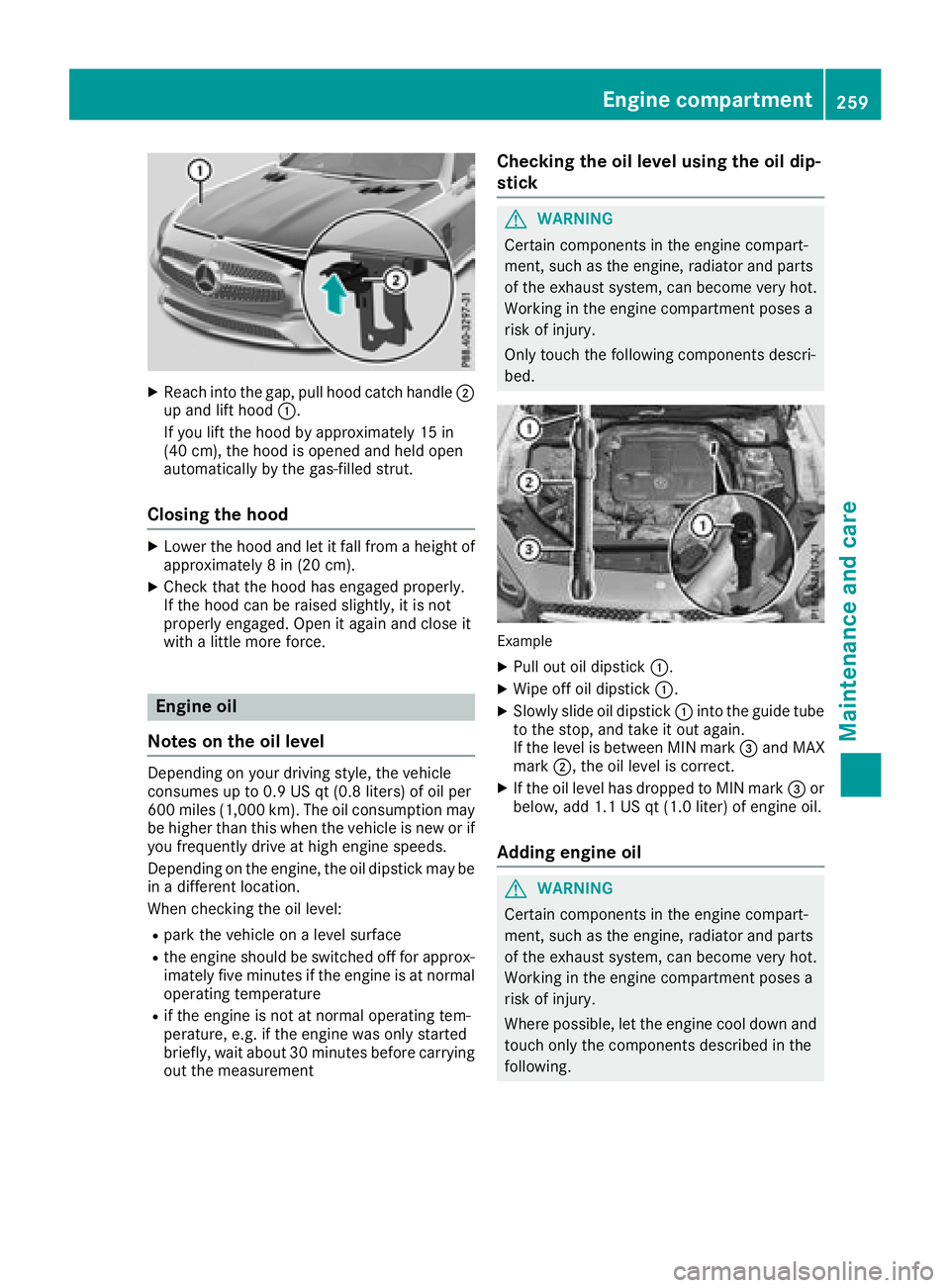
XReachint oth egap, pull hoo dcatch handle ;
up and lift hoo d:.
If you lift th ehoo dby approximately 15 in
(40 cm), th ehoo dis opened and held open
automatically by th egas-filled strut .
Closing the hood
XLowerth ehoo dand let it fall from aheight of
approximately 8in (20 cm).
XChec kthat th ehoo dhas engage dproperly.
If th ehoo dcan be raised slightly, it is no t
properly engaged. Open it again and close it
wit h a littlemor eforce .
Engine oil
Notes on the oil level
Dependin gon your driving style, th evehicl e
consumes up to 0. 9US qt (0.8 liters )of oi lpe r
60 0mile s(1,000 km). Th eoi lcons umption may
be higher than th iswhen the veh icle isnew or if
you frequently drive at high engine speeds.
Dependin g on the engine, the oil dipstick may be
in adiff erent location.
When checking the oil leve l:
Rpark the vehicleon a level surface
Rthe engine should be switched off for approx-
imately five minutes ifthe engine isat normal
operating temperature
Rif the engine isnot at normal operating tem-
perature, e.g. ifthe engine was only started
brie fly,wait about 30 minute sbefore carrying
out the measurement
Checking the oil level using the oil dip-
stick
GWARNING
Certain components in the engine compart-
ment, such as the engine, radiator and parts
of the exhaust system, can become very hot.
Working in the engine compartment poses a
risk of injury.
Only touch the following components descri-
bed.
Example
XPull out oil dipstick :.
XWipe off oil dipstick :.
XSlowly slide oil dipstick :into the guide tube
to the stop, and take it out again.
If the level is between MIN mark =and MAX
mark ;, the oil level is correct.
XIf the oil level has dropped to MIN mark =or
below, add 1.1 US qt (1.0 liter) of engine oil.
Adding engine oil
GWARNING
Certain components in the engine compart-
ment, such as the engine, radiator and parts
of the exhaust system, can become very hot.
Working in the engine compartment poses a
risk of injury.
Where possible, let the engine cool down and touch only the components described in the
following.
Engine compartment259
Maintenance and care
Z
Page 262 of 322
GWARNING
If engine oil comes into contact with hot com- ponents in the engine compartment, it may
ignite. There is a risk of fire and injury.
Make sure that engine oil is not spilled next to
the filler neck. Let the engine cool down and
thoroughly clean the engine oil off the com-
ponents before starting the engine.
HEnvironmental note
When adding oil, take care not to spill any. If
oil enters the soil or waterways, it is harmful to
the environment.
!Use only engine oils and oil filters that are
approved for vehicles with a service system. A list of the engine oils and oil filters that have
been tested and approved in accordance with
Mercedes-Benz Specifications for Service
Products is available at any authorized
Mercedes-Benz Center.
The following cause engine failure or damage
to the exhaust system:
RUse of engine oils and oil filters that have
not been expressly approved for the service
system
RReplacement of engine oil and oil filter after
the replacement interval specified by the
service system has expired
RUse of engine oil additives
!Do not add too much oil. If the oil level is
above the "max" mark on the dipstick, too
much oil has been added. This can lead to
damage to the engine or the catalytic con-
verter. Have excess oil siphoned off.
Example: engine oil cap
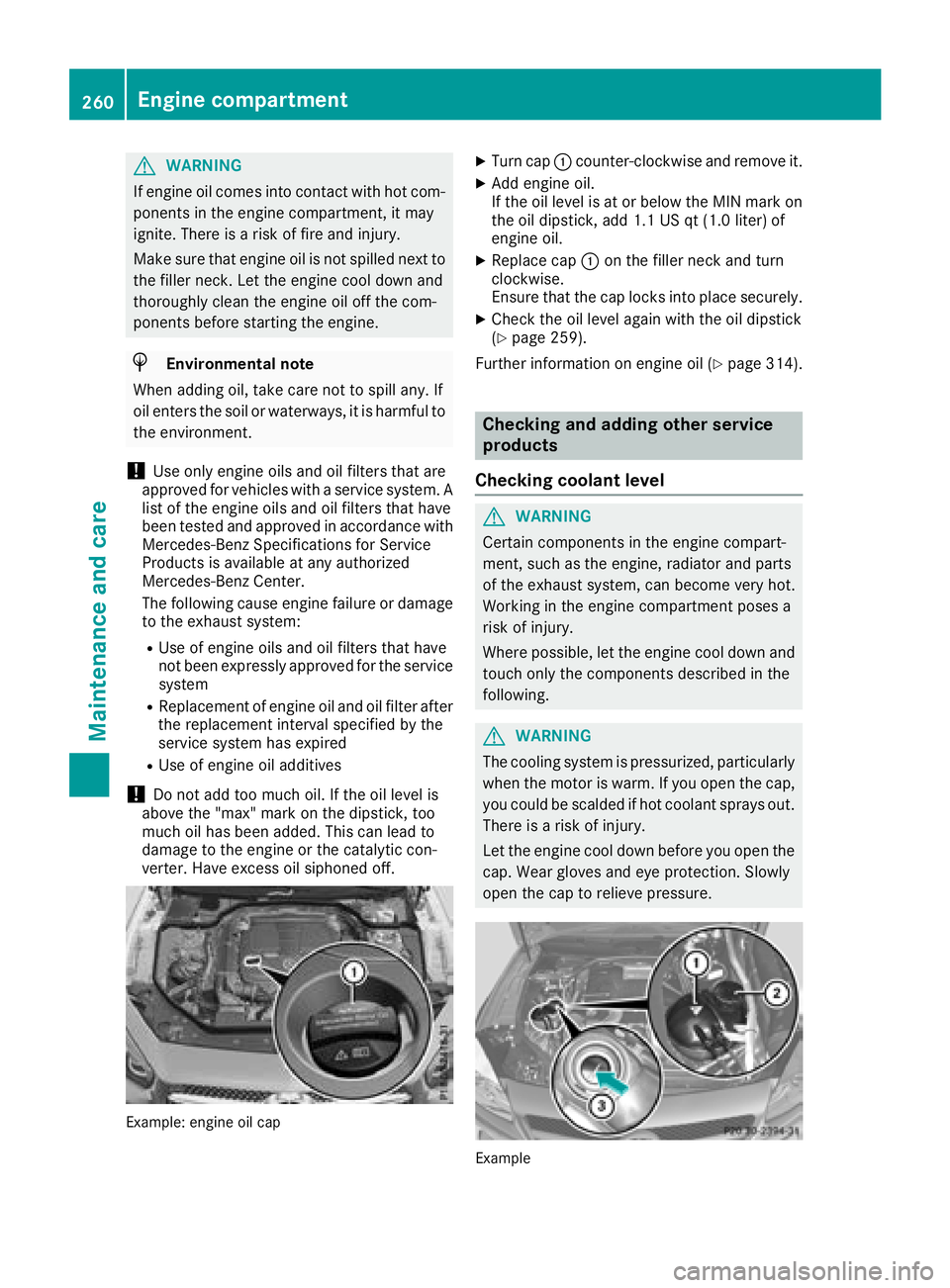
XTurn cap :counter-clockwise and remove it.
XAdd engine oil.
If the oil level is at or below the MIN mark on
the oil dipstick, add 1.1 US qt (1.0 liter) of
engine oil.
XReplace cap :on the filler neck and turn
clockwise.
Ensure that the cap locks into place securely.
XCheck the oil level again with the oil dipstick
(Ypage 259).
Further information on engine oil (
Ypage 314).
Checking and adding other service
products
Checking coolant level
GWARNING
Certain components in the engine compart-
ment, such as the engine, radiator and parts
of the exhaust system, can become very hot.
Working in the engine compartment poses a
risk of injury.
Where possible, let the engine cool down and touch only the components described in the
following.
GWARNING
The cooling system is pressurized, particularly
when the motor is warm. If you open the cap,
you could be scalded if hot coolant sprays out.
There is a risk of injury.
Let the engine cool down before you open the
cap. Wear gloves and eye protection. Slowly
open the cap to relieve pressure.
Example
260Engine compartment
Maintenance and care