interior lights MERCEDES-BENZ SL ROADSTER 2018 Owner's Manual
[x] Cancel search | Manufacturer: MERCEDES-BENZ, Model Year: 2018, Model line: SL ROADSTER, Model: MERCEDES-BENZ SL ROADSTER 2018Pages: 322, PDF Size: 5.43 MB
Page 4 of 322
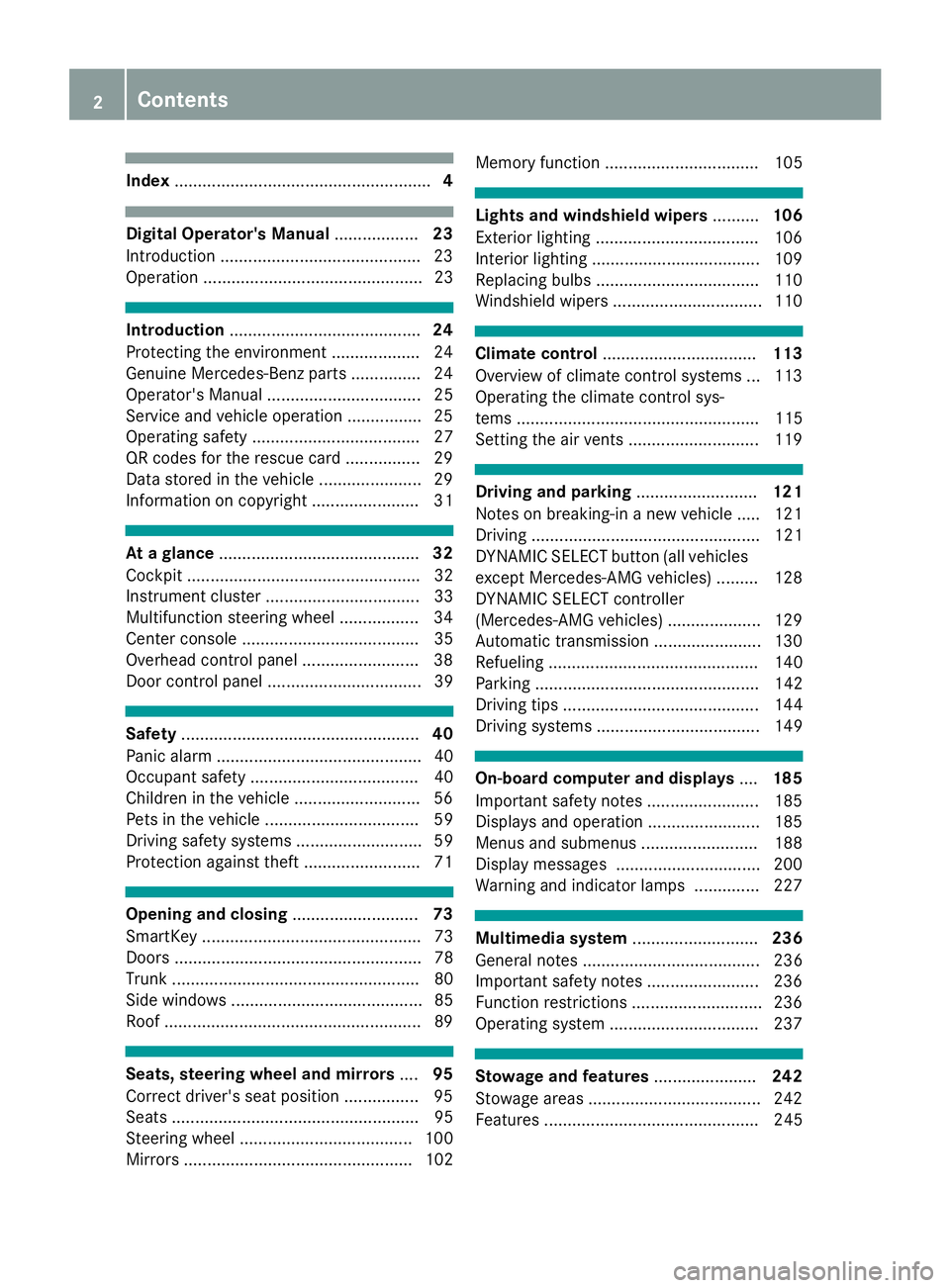
Index....................................................... 4
Digital Operator's Manual..................23
Introduction .......................................... .23
Operation ............................................... 23
Introduction ......................................... 24
Protecting the environment ...................2 4
Genuine Mercedes-Benz parts .............. .24
Operator's Manual ................................. 25
Service and vehicle operation ................2 5
Operating safety .................................... 27
QR codes for the rescue card ................2 9
Data stored in the vehicle ...................... 29
Information on copyright ....................... 31
At a glance ........................................... 32
Cockpit .................................................. 32
Instrument cluster ................................. 33
Multifunction steering wheel ................. 34
Center console ...................................... 35
Overhead control panel .........................3 8
Door control panel ................................. 39
Safety ................................................... 40
Panic alarm ............................................ 40
Occupant safety .................................... 40
Children in the vehicle ........................... 56
Pets in the vehicle ................................. 59
Driving safety systems ........................... 59
Protection against theft .........................7 1
Opening and closing...........................73
SmartKey ............................................... 73
Doors ..................................................... 78
Trunk ..................................................... 80
Side windows ......................................... 85
Roof .......................................................8 9
Seats, steering wheel and mirrors....95
Correct driver's seat position ................9 5
Seats ..................................................... 95
Steering wheel ..................................... 100
Mirrors ................................................. 102 Memory function ................................. 105
Lights and windshield wipers
..........106
Exterior lighting ................................... 106
Interior lighting .................................... 109
Replacing bulbs ................................... 110
Windshield wipers ................................ 110
Climate control ................................. 113
Overview of climate control systems ... 113
Operating the climate control sys-
tems .................................................... 115
Setting the air vents ............................ 119
Driving and parking ..........................121
Notes on breaking-in a new vehicle ..... 121
Driving ................................................. 121
DYNAMIC SELECT button (all vehicles
except Mercedes-AMG vehicles) ......... 128
DYNAMIC SELECT controller
(Mercedes-AMG vehicles) .................... 129
Automatic transmission ....................... 130
Refueling ............................................. 140
Parking ................................................ 142
Driving tips .......................................... 144
Driving systems ................................... 149
On-board computer and displays ....185
Important safety notes ........................ 185
Displays and operation ........................ 185
Menus and submenus ......................... 188
Display messages ............................... 200
Warning and indicator lamps .............. 227
Multimedia system ...........................236
General notes ...................................... 236
Important safety notes ........................ 236
Function restrictions ............................ 236
Operating system ................................ 237
Stowage and features ......................242
Stowage areas ..................................... 242
Features .............................................. 245
2Contents
Page 10 of 322
Temperature (on-board computer,
Mercedes-AMG vehicles) ............... 197
Temperature gauge ........................ 186
Warning lamp ................................. 232
Cooling
see Climate control
Copyright ............................................. 31
Cornering light function
Display message ............................2 12
Function/notes .............................1 08
Cruise control
Cruise control lever ....................... 149
Deactivating ................................... 150
Display message ............................ 220
Driving system ............................... 149
Function/notes .............................1 49
Important safety notes .................. 149
Setting a speed .............................. 150
Storing and maintaining current
speed ............................................. 150
Cup holder
Center console .............................. 246
Important safety notes .................. 245
Customer Assistance Center
(CAC) ..................................................... 28
Customer Relations Department ....... 28
D
Data
see Technical data
Data carrier
Selecting ........................................ 191
Daytime running lamps
Display message ............................ 212
Function/notes .............................1 06
Switching on/off (on-board com-
puter) ............................................. 195
Declarations of conformity ................. 27
Decorative film
Cleaning instructions ..................... 265
Delayed switch-off
Exterior lighting (on-board com-
puter) ............................................. 195
Interior lighting .............................. 196
Diagnostics connection ......................28
Digital Operator's Manua l
Help ................................................ .23 Introduction .....................................2
3
Digital speedomete r........................ .189
Display messages
ASSYST PLUS ................................ 262
Calling up (on-board computer) ..... 200
Driving systems .............................2 15
Engine ............................................ 213
General notes ................................ 200
Hiding (on-board computer) ........... 200
KEYLESS-GO .................................. 226
Lights ............................................. 212
Safety systems .............................. 201
SmartKey ....................................... 225
Tires ............................................... 221
Vehicle ...........................................2 22
Distance Pilot DISTRONIC
Activating ....................................... 153
Calling up a speed ......................... 153
Cruise control lever ....................... 153
Display Message ............................ 218
Displays in the instrument cluster .. 155
Driving tips .................................... 157
Function/notes ............................. 151
Important safety notes .................. 151
Setting the specified minimum
distance ......................................... 155
Stopping ........................................ 154
Storing a speed .............................. 153
Swi tching off .................................. 156
Warning lamp ................................. 234
Distance recorder
see Odometer
see Trip odometer
Distance warning (warning lamp) .... 234
Distance warning function
Function/notes ................................ 63
Doors
Automatic locking (on-board com-puter) ............................................. 196
Automatic locking (switch) ............... 79
Central locking/unlocking
(SmartKey) ....................................... 73
Control panel ................................... 39
Display message ............................ 224
Emergency locking ........................... 80
Emergency unlocking ....................... 80
Important safety notes .................... 78
Opening (from inside) ...................... 79
8Index
Page 14 of 322
General notes ................................ 159
Home address
see also Digital Operator's Man-
ual .................................................. 236
Hood
Closing .......................................... .259
Display message ............................ 224
Important safety notes .................. 258
Opening ......................................... 258
Horn ...................................................... 32
Hydroplaning ..................................... 148
I
Ignition lock
see Key positions
Immobilizer .......................................... 71
Indicator lamps
see Warning and indicator lamps
Indicators
see Turn signals
Instrument cluster
Overview .......................................... 33
Instrument cluster lighting .............. 185
Interior lighting
Automatic control .......................... 110
Delayed switch-off (on-board
computer) ...................................... 196
Overview ........................................ 109
Reading lamp ................................. 109
Setting the brightness of the
ambient lighting (on-board com-
puter) ............................................. 195
Setting the color of the ambient
lighting (on-board computer) ......... 195
iPod
®
see also Digital Operator's Man-
ual ..................................................2 36
J
Jack
Storage location ............................ 271
Using ............................................. 305
Jump starting (engine) ......................278
K
Key positions
KEYLESS-GO .................................. 122
SmartKey ....................................... 122
KEYLESS-GO
Activating ......................................... 73
Convenience closing feature ............ 87
Deactivation ..................................... 73
Display message ............................ 226
Locking ............................................ 73
Removing the Start/Stop button ... 123
Start/Stop button .......................... 122
Starting the engine ........................ 124
Unlocking ......................................... 73
Kickdown
Driving tips ....................................1 34
Manual gearshifting ....................... 139
Knee bag .............................................. 46
L
Lamps
see Warning and indicator lamps
Lane Keeping Assist
see Active Lane Keeping Assist
Lap time (RACETIMER) ......................198
License plate lamp (display mes-
sage) ................................................... 212
Light function, active
Display message ............................ 212
Light sensor (display message) ....... 212
Lights
Activating/deactivating the inte-
rior lighting delayed switch-off ....... 196
Active light function ....................... 108
Automatic headlamp mode ............ 106
Cornering light function ................. 108
Hazard warning lamps ................... 108
High beam flasher .......................... 107
High-beam headlamps ................... 107
Light switch ................................... 106
Low-beam headlamps .................... 107
Parking lamps ................................ 107
Setting the brightness of the
ambient lighting (on-board com-
puter) ............................................. 195
12Index
Page 43 of 322
regular intervals while the engine is running.
Therefore, malfunctions can be detected in
good time.
The6 restraint system warning lamp on the
instrument cluster lights up when the ignition is
switched on. It goes out no later than a few sec-
onds after the vehicle is started. The compo-
nents of the restraint system are in operational
readiness.
A malfunction has occurred if the 6restraint
system warning lamp:
Rdoes not light up after the ignition is switched
on
Rdoes not go out after a few seconds with the
engine running
Rlights up again while the engine is running
GWARNING
If the restraint system is malfunctioning,
restraint system components may be trig-
gered unintentionally or may not deploy as
intended during an accident. This can affect
for example the Emergency Tensioning
Device or the air bag. This poses an increased
risk of injury or even fatal injury.
Have the restraint system checked and
repaired in a qualified specialist workshop as
soon as possible.
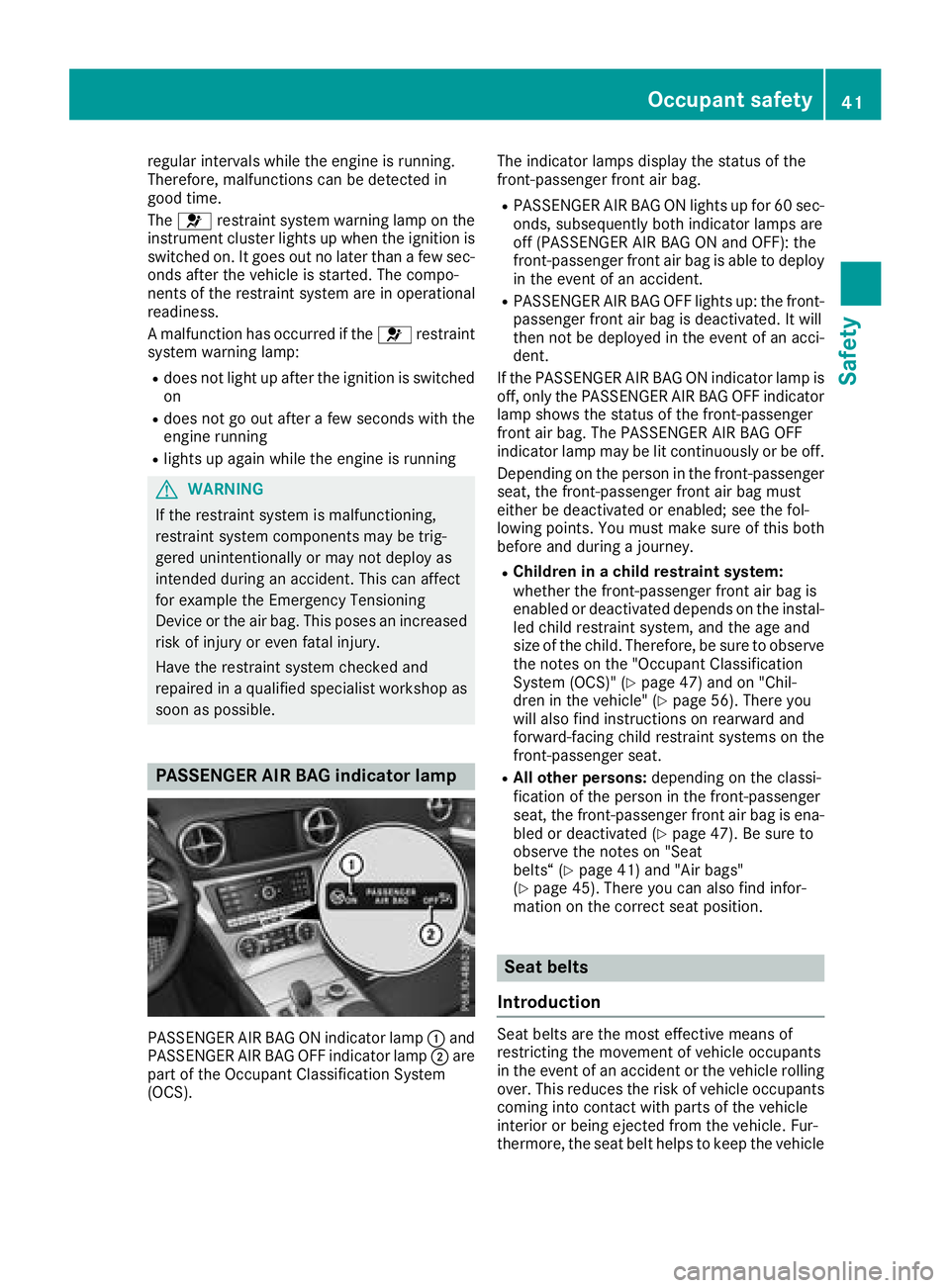
PASSENGER AIR BAG indicator lamp
PASSENGER AIR BAG ON indicator lamp :and
PASSENGER AIR BAG OFF indicator lamp ;are
part of the Occupant Classification System
(OCS). The indicator lamps display the status of the
front-passenger front air bag.
RPASSENGER AIR BAG ON lights up for 60 sec-
onds, subsequently both indicator lamps are
off (PASSENGER AIR BAG ON and OFF): the
front-passenger front air bag is able to deploy
in the event of an accident.
RPASSENGER AIR BAG OFF lights up: the front-
passenger front air bag is deactivated. It will
then not be deployed in the event of an acci-
dent.
If the PASSENGER AIR BAG ON indicator lamp is
off, only the PASSENGER AIR BAG OFF indicator lamp shows the status of the front-passenger
front air bag. The PASSENGER AIR BAG OFF
indicator lamp may be lit continuously or be off.
Depending on the person in the front-passenger
seat, the front-passenger front air bag must
either be deactivated or enabled; see the fol-
lowing points. You must make sure of this both
before and during a journey.
RChildren in a child restraint system:
whether the front-passenger front air bag is
enabled or deactivated depends on the instal-led child restraint system, and the age and
size of the child. Therefore, be sure to observe
the notes on the "Occupant Classification
System (OCS)" (
Ypage 47) and on "Chil-
dren in the vehicle" (Ypage 56). There you
will also find instructions on rearward and
forward-facing child restraint systems on the
front-passenger seat.
RAll other persons: depending on the classi-
fication of the person in the front-passenger
seat, the front-passenger front air bag is ena-
bled or deactivated (
Ypage 47). Be sure to
observe the notes on "Seat
belts“ (
Ypage 41) and "Air bags"
(Ypage 45). There you can also find infor-
mation on the correct seat position.
Seat belts
Introduction
Seat belts are the most effective means of
restricting the movement of vehicle occupants
in the event of an accident or the vehicle rolling over. This reduces the risk of vehicle occupants
coming into contact with parts of the vehicle
interior or being ejected from the vehicle. Fur-
thermore, the seat belt helps to keep the vehicle
Occupant safety41
Safety
Z
Page 51 of 322
GWARNING
If the PASSENGER AIR BAG OFF indicator
lamp is lit, the front-passenger front air bag is
disabled. It will not be deployed in the event of
an accident and cannot perform its intended
protective function. A person in the front-
passenger seat could then, for example, come
into contact with the vehicle's interior, espe-
cially if the person is sitting too close to the
dashboard. This poses an increased risk of
injury or even fatal injury.
When the front-passenger seat is occupied,
always ensure that:
Rthe classification of the person in the front- passenger seat is correct and the front-
passenger front air bag is enabled or disa-
bled in accordance with the person in the
front-passenger seat
Rthe front-passenger seat has been moved
back as far back as possible.
Rthe person is seated correctly.
Make sure, both before and during the jour-
ney, that the status of the front-passenger
front air bag is correct.
GWARNING
If you secure a child in a rearward-facing child
restraint system on the front-passenger seat
and the PASSENGER AIR BAG OFF indicator
lamp is off, the front-passenger front air bag
can deploy in the event of an accident. The
child could be struck by the air bag. This poses an increased risk of injury or even fatal injury.
Make sure that the front-passenger front air
bag has been deactivated. The PASSENGER
AIR BAG OFF indicator lamp must be lit.
NEVER use a rearward-facing child restraint
on a seat protected by an ACTIVE FRONT AIR-
BAG in front of it; DEATH or SERIOUS INJURY
to the child can occur.
If the PASSENGER AIR BAG OFF indicator lamp
stays off, do not install a rearward-facing child
restraint system on the front-passenger seat.
You can find more information on OCS under
"Problems with the Occupant Classification Sys-
tem" (
Ypage 51).
GWARNING
If you secure a child in a forward-facing child
restraint system on the front-passenger seat
and you position the front-passenger seat too close to the dashboard, in the event of an
accident, the child could:
Rcome into contact with the vehicle's inte-
rior if the PASSENGER AIR BAG OFF indi-
cator lamp is lit, for example
Rbe struck by the air bag if the PASSENGER
AIR BAG OFF indicator lamp is off
This poses an increased risk of injury or even fatal injury.
Always move the front-passenger seat as far
back as possible and fully retract the seat
cushion length. Always make sure that the
shoulder belt strap is correctly routed from
the vehicle seat belt guide to the shoulder belt
guide on the child restraint system. The shoul-
der belt strap must be routed forwards and
downwards from the seat belt guide. Always
observe the child restraint system manufac-
turer's installation instructions.
If OCS determines that:
RThe front-passenger seat is unoccupied, the
PASSENGER AIR BAG OFF indicator lamp
lights up after the system self-test and
remains lit. This indicates that the front-
passenger front air bag is deactivated.
RThe front-passenger seat is occupied by a
child of up to twelve months old, in a standard
child restraint system, the PASSENGER AIR
BAG OFF indicator lamp lights up after the
system self-test and remains lit. This indi-
cates that the front-passenger front air bag is
deactivated.
But even in the case of a twelve-month-old
child, in a standard child restraint system, the
PASSENGER AIR BAG OFF indicator lamp can
go out after the system self-test. This indi-
cates that the front-passenger front air bag is
activated. The result of the classification is
dependent on, among other factors, the child
restraint system and the child's stature. Make
sure that the conditions for a correct classi-
fication are met. If the PASSENGER AIR BAG
OFF indicator lamp remai ns off, do not i
nstall
Occupant safety49
Safety
Z
Page 52 of 322
a child restraint system on the front-
passenger seat.
RThe front-passenger seat is occupied by a
person of smaller stature (e.g. a teenager or
small adult), the PASSENGER AIR BAG OFF
indicator lamp lights up and remains lit after
the system self-test depending on the result
of the classification or, alternatively, goes out.
-If the PASSENGER AIR BAG OFF indicator
lamp is off, move the front-passenger seat
as far back as possible.
-If the PASSENGER AIR BAG OFF indicator
lamp is lit, a person of smaller stature
should not use the front-passenger seat.
RThe front-passenger seat is occupied by an
adult or a person of adult stature, the
PASSENGER AIR BAG OFF indicator lamp
goes out after the system self-test. This indi-
cates that the front-passenger front air bag is
activated.
If children are traveling in the vehicle, be sure to observe the notes on "Children in the vehicle"
(
Ypage 56).
When the Occupant Classification System
(OCS) is malfunctioning, the red 6restraint
system warning lamp on the instrument cluster
and the PASSENGER AIR BAG OFF indicator
lamp light up simultaneously. The front-
passenger front air bag is deactivated in this
case and does not deploy during an accident.
Have t
he Occupant Classification System (OCS)
checked and repaired immediately at a qualified
specialist workshop. Mercedes-Benz recom-
mends that you use an authorized Mercedes-
Benz Center for this purpose.
If the front-passenger seat, the seat cover or the seat cushion are damaged, have the necessary
repair work carried out at a qualified specialist
workshop. Mercedes-Benz recommends that
you use an authorized Mercedes-Benz Center
for this purpose.
For safety reasons, Mercedes-Benz recom-
mends that you only use seat accessories that
have been approved by Mercedes-Benz.
If the driver's air bag deploys, this does not
mean that the front-passenger front air bag will
also deploy. The Occupant Classification Sys-
tem (OCS) categorizes the occupant on the
front-passenger seat. Depending on that result, the front-passenger front air bag is either ena-
bled or deactivated.
System self-test
GDANGER
If both the PASSENGER AIR BAG OFF and
PASSENGER AIR BAG ON indicator lamps do
not light up during the system self-test, the
system is malfunctioning. The front-
passenger front air bag might be triggered
unintentionally or might not be triggered at all
in the event of an accident with high deceler-
ation. This poses an increased risk of injury or
even fatal injury.
In this case the front-passenger seat may not
be used. Do not install a child restraint system
on the front-passenger seat. Have the Occu-
pant Classification System (OCS) checked
and repaired immediately at a qualified spe-
cialist workshop.
GWARNING
If the PASSENGER AIR BAG OFF indicator
lamp remains lit after the system self-test, the
front-passenger front air bag is disabled. It will
not be deployed in the event of an accident. In
this case, the front-passenger front air bag
cannot perform its intended protective func-
tion, e.g. when a person is seated in the front-
passenger seat.
That person could, for example, come into
contact with the vehicle's interior, especially
if the person is sitting too close to the dash-
board. This poses an increased risk of injury or
even fatal injury.
When the front-passenger seat is occupied,
always ensure that:
Rthe classification of the person in the front-
passenger seat is correct and the front-
passenger front air bag is enabled or disa-
bled in accordance with the person in the
front-passenger seat
Rthe person is seated properly with a cor-
rectly fastened seatbelt
Rthe front-passenger seat has been moved
as far back as possible
If the PASSENGER AIR BAG OFF indicator
lamp remains lit when it should not, the front-
50Occupant safety
Safety
Page 82 of 322
XTo deactivate:press and hold button :for
about five seconds until a tone sounds.
XTo activate: press and hold button ;for
about five seconds until a tone sounds.
If you press one of the two buttons and do not
hear a tone, the relevant setting has already
been selected.
The vehicle is locked automatically when the
ignition is switched on and the wheels are turn-
ing.
You could therefore lock yourself out if:
Rthe vehicle is being pushed.
Rthe vehicle is being towed.
Rthe vehicle is on a roller dynamometer.
You can also switch the automatic locking func-
tion on and off using the on-board computer
(
Ypage 196).
Power closing
Power closing pulls the doors and trunk lid into
their locks automatically even if they are only
partly closed.
XPower closing feature (doors): push the
door past the first detent position into the
lock.
Power closing will pull the door fully closed.
XTo power close the trunk lid: lightly push
the trunk lid closed.
The power closing function pulls the trunk lid
closed.
Unlocking/locking the driver's door
using the mechanical key
i
If you want to centrally lock the vehicle using
the mechanical key, begin by pressing the
locking button for the interior locking mech-
anism while the driver's door is open. Then
lock the driver's door using the mechanical
key.
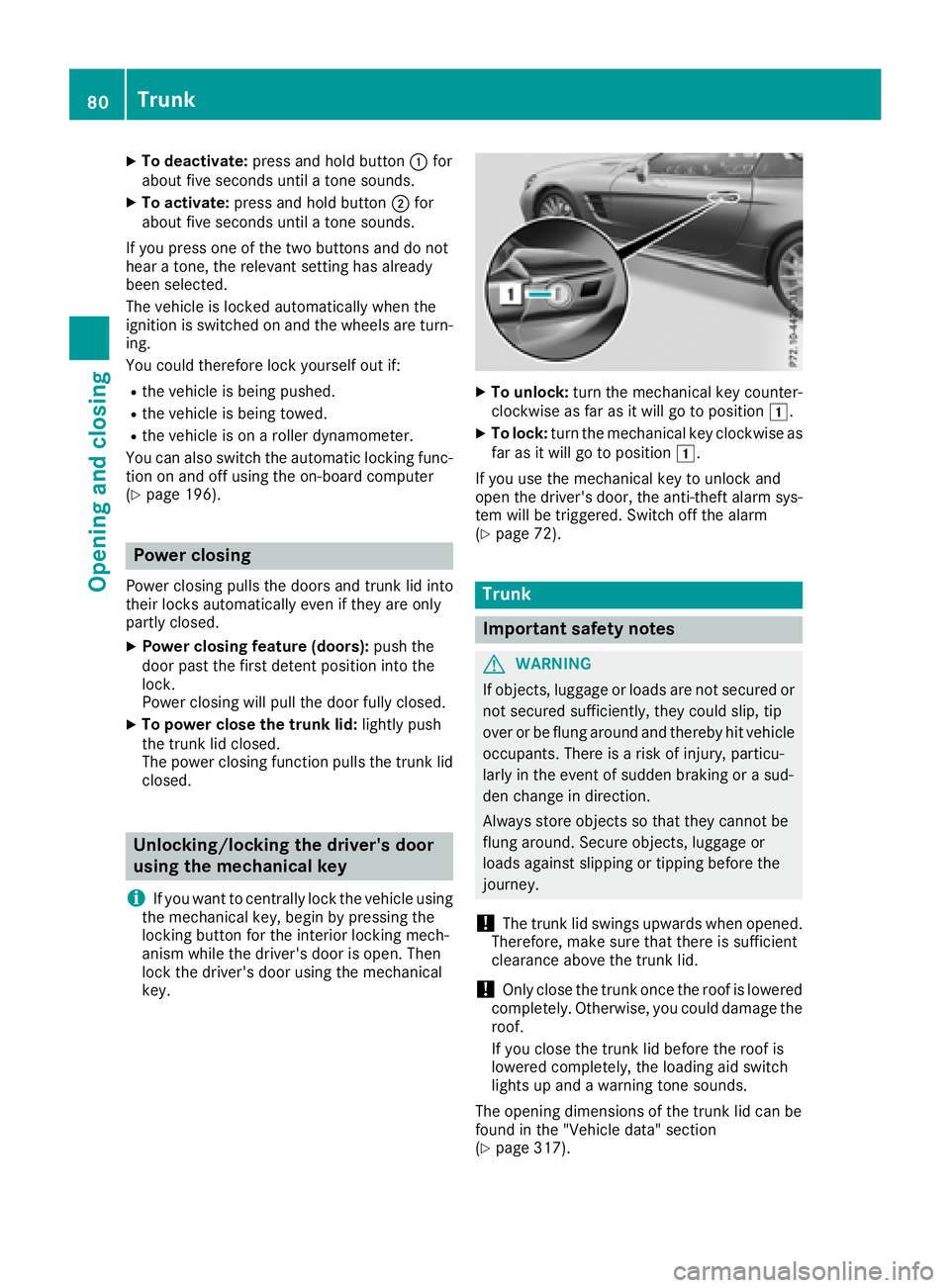
XTo unlock: turn the mechanical key counter-
clockwise as far as it will go to position 1.
XTo lock:turn the mechanical key clockwise as
far as it will go to position 1.
If you use the mechanical key to unlock and
open the driver's door, the anti-theft alarm sys-
tem will be triggered. Switch off the alarm
(
Ypage 72).
Trunk
Important safety notes
GWARNING
If objects, luggage or loads are not secured or
not secured sufficiently, they could slip, tip
over or be flung around and thereby hit vehicle
occupants. There is a risk of injury, particu-
larly in the event of sudden braking or a sud-
den change in direction.
Always store objects so that they cannot be
flung around. Secure objects, luggage or
loads against slipping or tipping before the
journey.
!The trunk lid swings upwards when opened.
Therefore, make sure that there is sufficient
clearance above the trunk lid.
!Only close the trunk once the roof is lowered
completely. Otherwise, you could damage the
roof.
If you close the trunk lid before the roof is
lowered completely, the loading aid switch
lights up and a warning tone sounds.
The opening dimensions of the trunk lid can be
found in the "Vehicle data" section
(
Ypage 317).
80Trunk
Opening and closing
Page 111 of 322
detects any other vehicles, it reactivates the
high-beam headlamps.
The system's optical sensor is located behind
the windshield near the overhead control panel.
Important safety notes
GWARNING
Adaptive Highbeam Assist does not recognize
road users:
Rwho have no lights, e.g. pedestrians
Rwho have poor lighting, e.g. cyclists
Rwhose lighting is blocked, e.g. by a barrier
On very rare occasions, Adaptive Highbeam
Assist may fail to recognize other road users
that have lights, or may recognize them too
late. In this, or in similar situations, the auto-
matic high-beam headlamps will not be deac-
tivated or will be activated regardless. There is a risk of an accident.
Always carefully observe the traffic conditions
and switch off the high-beam headlamps in
good time.
Adaptive Highbeam Assist cannot take into
account road, weather or traffic conditions.
Adaptive Highbeam Assist is only an aid. You are responsible for adjusting the vehicle's lighting
to the prevailing light, visibility and traffic con-
ditions.
In particular, the detection of obstacles can be
restricted if there is:
Rpoor visibility, e.g. due to fog, heavy rain or
snow
Rdirt on the sensors or the sensors are
obscured
Switching Adaptive Highbeam Assist
on/off
XTo switch on: turn the light switch to Ã.
XPress the combination switch beyond the
pressure point in the direction of arrow :.
The _ indicator lamp in the multifunction
display lights up when it is dark and the light
sensor activates the low-beam headlamps.
If you are driving at speeds above approx-
imately 16 mph (25 km/h): The headlamp range is set automatically
depending on the distance between the vehi-
cle and other road users.
If you are driving at speeds above approx-
imately 19 mph (30 km/
h)and no other road
users have been detected:
The high-beam headlamps are switched on
automatically. The Kindicator lamp in the
instrument cluster also lights up.
If you are driving at speeds below approx-
imately 16 mph (25 km/h) or other road users
have been detected or the roads are ade-
quately lit:
The high-beam headlamps are switched off
automatically. The Kindicator lamp in the
instrument cluster goes out. The _indi-
cator lamp in the multifunction display
remains lit.
XTo switch off: move the combination switch
back to its normal position or move the light
switch to another position.
The _ indicator lamp in the multifunction
display goes out.
Interior lighting
Overview of interior lighting
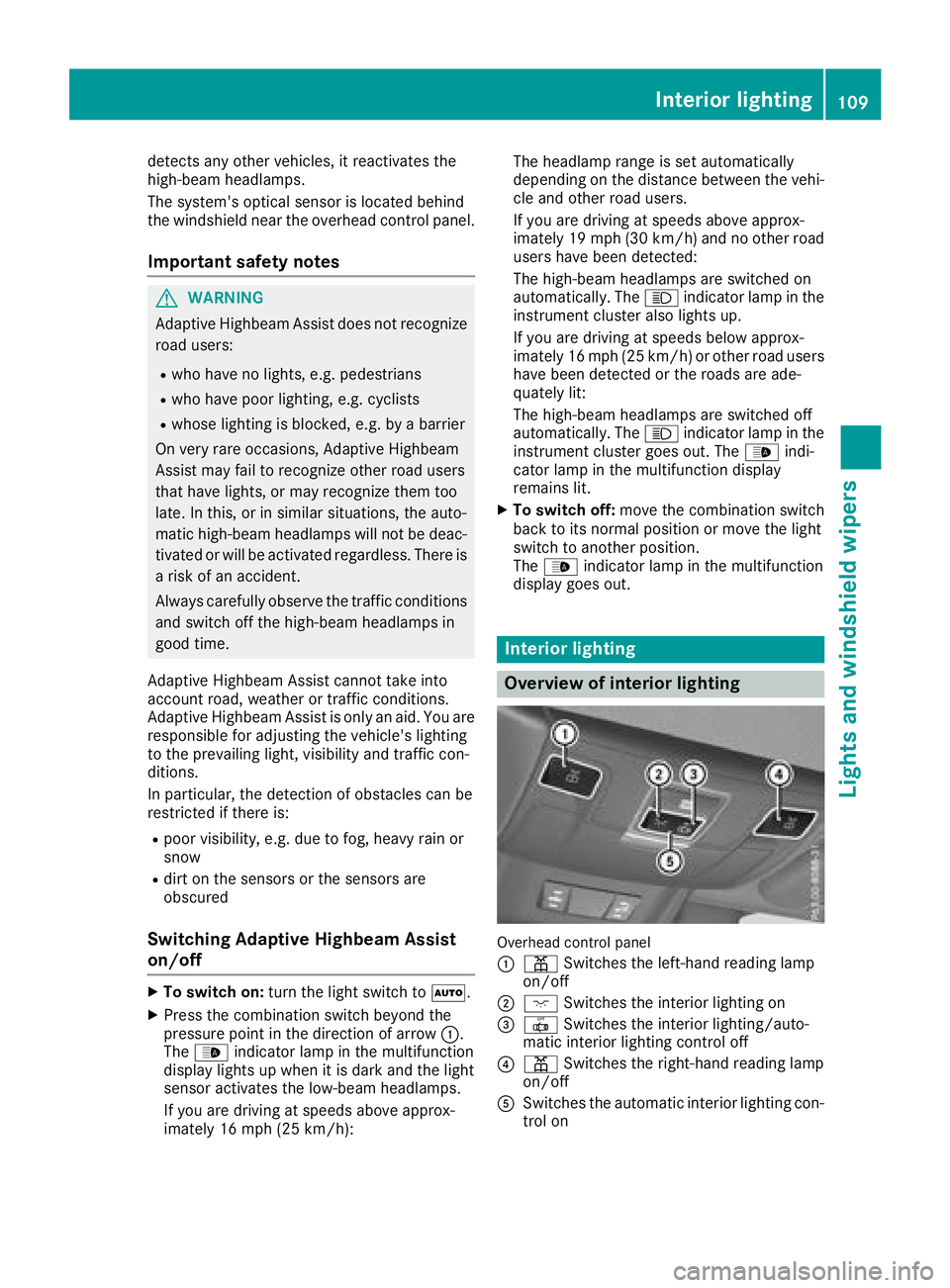
Overhead control panel
:
p Switches the left-hand reading lamp
on/off
;c Switches the interior lighting on
=|Switches the interior lighting/auto-
matic interior lighting control off
?p Switches the right-hand reading lamp
on/off
ASwitches the automatic interior lighting con-
trol on
Interior lighting109
Lights and windshield wipers
Z
Page 112 of 322
Interior lighting control
General notes
In order to preven tth evehicle's battery from
discharging ,th einterio rlighting function sare
automatically deactivated after som etime,
unless th eSmartKey is in position 2in th e
ignition lock.
The color and brightness of th eambien tlighting
are set via th emultimedia system
(
Ypage 195).
Automatic interior lighting control
XTo switch on: set theswitch to center posi-
tion A.
XTo switch off :set th eswitch to th e|
position .
The interio rlighting automatically switches on if
you:
Runlock th evehicl e
Ropenadoor
Rremove th eSmartKey from th eignition loc k
The interio rlighting is switched on for aset time
when th eSmartKey is remove dfrom th eignition
lock. You can activat ethis delaye dswitch-off
usin gth eon-board computer (
Ypage 196).
Replacing bulbs
The frontand rear lamp sof your vehicl eare
equipped wit hLE Dbulbs .Do no treplace th e
bulbs yourself .Contac t aqualified specialist
workshop whic hhas th enecessar yspecialist
knowledge and tools to carry out th ewor k
required.
Bulb sand lamp sare an important aspect of
vehicl esafety. You must therefor emak esur e
that these function correctl yat all times .Hav e
th eheadlamp setting checke dregularly.
Windshield wipers
Switching the windshield wipers
on/off
!
Do no toperate th ewindshield wiper swhen
th ewindshield is dry, as this could damag e
th ewiper blades. Moreover, dust that has col- lecte
don th ewindshield can scratch th eglass
if wipin gtakes plac ewhen th ewindshield is
dry.
If it is necessar yto switch on th ewindshield
wiper sin dry weather conditions, always use
washe rfluid when operating th ewindshield
wipers.
!If th ewindshield wiper sleav esmears on th e
windshield after th evehicl ehas been washe d
in an automatic car wash, wax or other resi-
dues may be th ereason for this. Clean th e
windshield usin gwashe rfluid after washing
th evehicl ein an automatic car wash.
!Intermittent wipin gwit hrain sensor :due to
optical influence sand th ewindshield becom-
ing dirt yin dry weather conditions, th ewind-
shield wiper smay be activated inadvertently.
This could then damag eth ewindshield wiper
blade sor scratch th ewindshield.
Fo rthis reason ,you should always switch off
th ewindshield wiper sin dry weather .
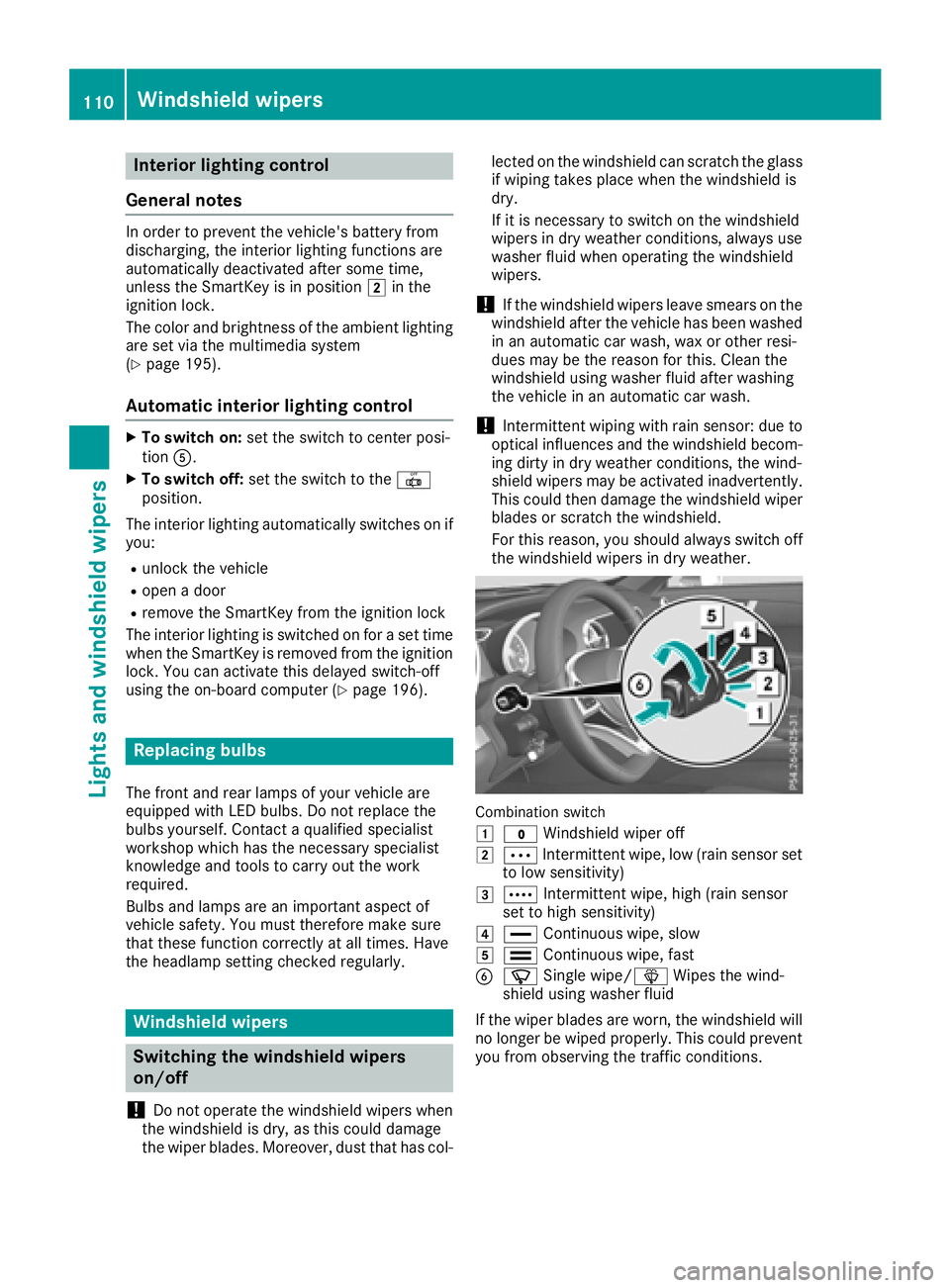
Combination switch
1
$Windshield wiper off
2ÄIntermittent wipe, low (rain sensor set
to low sensitivity)
3Å Intermittent wipe, high (rain sensor
set to high sensitivity)
4° Continuous wipe, slow
5¯Continuous wipe, fas t
BíSingle wipe/ îWipes th ewind-
shield usin gwashe rfluid
If th ewiper blade sare worn, th ewindshield will
no longer be wiped properly. This could preven t
you from observing th etraffic conditions.
110Windshield wipers
Lights and windshield wipers
Page 117 of 322
RUse the residual heat function if you want to
heat or ventilate the vehicle interior when the
ignition is switched off. The residual heat
function can only be activated or deactivated
with the ignition switched off.
RVehicles with COMAND:if you change the
settings of the climate control system, the
climate status display appears for three sec-
onds at the bottom of the screen in the
COMAND display. You will see the current
settings of the various climate control func-
tions.
ECO start/stop function
During automatic engine switch-off, the climate
control system only operates at a reduced capa-
city. If you require full climate control capacity,
the ECO start/stop function can be deactivated
by pressing the ECO button (
Ypage 126).
Operating the climate control sys-
tems
Activating/deactivating climate con-
trol
General notes
When the climate control is switched off, the air
supply and air circulation are also switched off.
The windows could fog up. Therefore, switch off
climate control only briefly
iActivate climate control primarily using the
à button (Ypage 116).
Activating/deactivating
XTurn the SmartKey to position 2in the igni-
tion lock (Ypage 122).
XTo activate: press theÃbutton.
The indicator lamp in the Ãbutton lights
up. Airflow and air distribution are set to auto-
matic mode.
or
XPress the ^button.
The indicator lamp in the ^button goes
out. The previously selected settings are
restored.
XTo deactivate: press the^button.
The indicator lamp in the ^button lights
up.
Switching cooling with air dehumidi-
fication on/off
General notes
If you deactivate the "Cooling with air-dehumid-
ification" function, the air inside the vehicle will
not be cooled. The air inside the vehicle will also
not be dehumidified. The windows can fog up
more quickly. Therefore, deactivate the cooling
with air-dehumidification function only briefly.
The "Cooling with air dehumidification" function is only available when the engine is running. The
air inside the vehicle is cooled and dehumidified
according to the temperature selected.
Condensation may drip from the underside of
the vehicle when it is in cooling mode. This is
normal and not a sign that there is a malfunc-
tion.
Activating/deactivating
XTo activate: press the¿button.
The indicator lamp in the ¿button lights
up.
XTo deactivate: press the¿button.
The indicator lamp in the ¿orÁ button
goes out. The "Cooling with air dehumidifica-
tion" function has a delayed switch-off fea-
ture.
The indicator lamp in the ¿button goes
out. The "Cooling with air dehumidification"
function has a delayed switch-off feature.
Operating the climate control systems115
Climate control