audio MERCEDES-BENZ SL ROADSTER 2020 User Guide
[x] Cancel search | Manufacturer: MERCEDES-BENZ, Model Year: 2020, Model line: SL ROADSTER, Model: MERCEDES-BENZ SL ROADSTER 2020Pages: 334, PDF Size: 53.2 MB
Page 263 of 334
You
canobtain further informat ionfrom your
Merc edes meconnectmanual.
i The syste mhas notbeen abletoinit iate a
Roadside Assistan cecall, if:
R the indic atorlamp forRoadside Assis-
tan cecall button0043 isflashin gcon tinu-
ously.
R no voic econ nection tothe Merc edes-
Ben zCustom erAss istan ceCent erhas
been established.
R
This canoccurifthe relevan tmobile phone
net work isnot available, forexamp le.
The Call Failed Call
Failedmessag eappears inthe
multif unction display.
X To end acall: press the0076 buttononthe
multif unction steerin gwheel.
or X Press thecorrespon dingbuttonfor endin ga
phon ecall onCOMAN D.
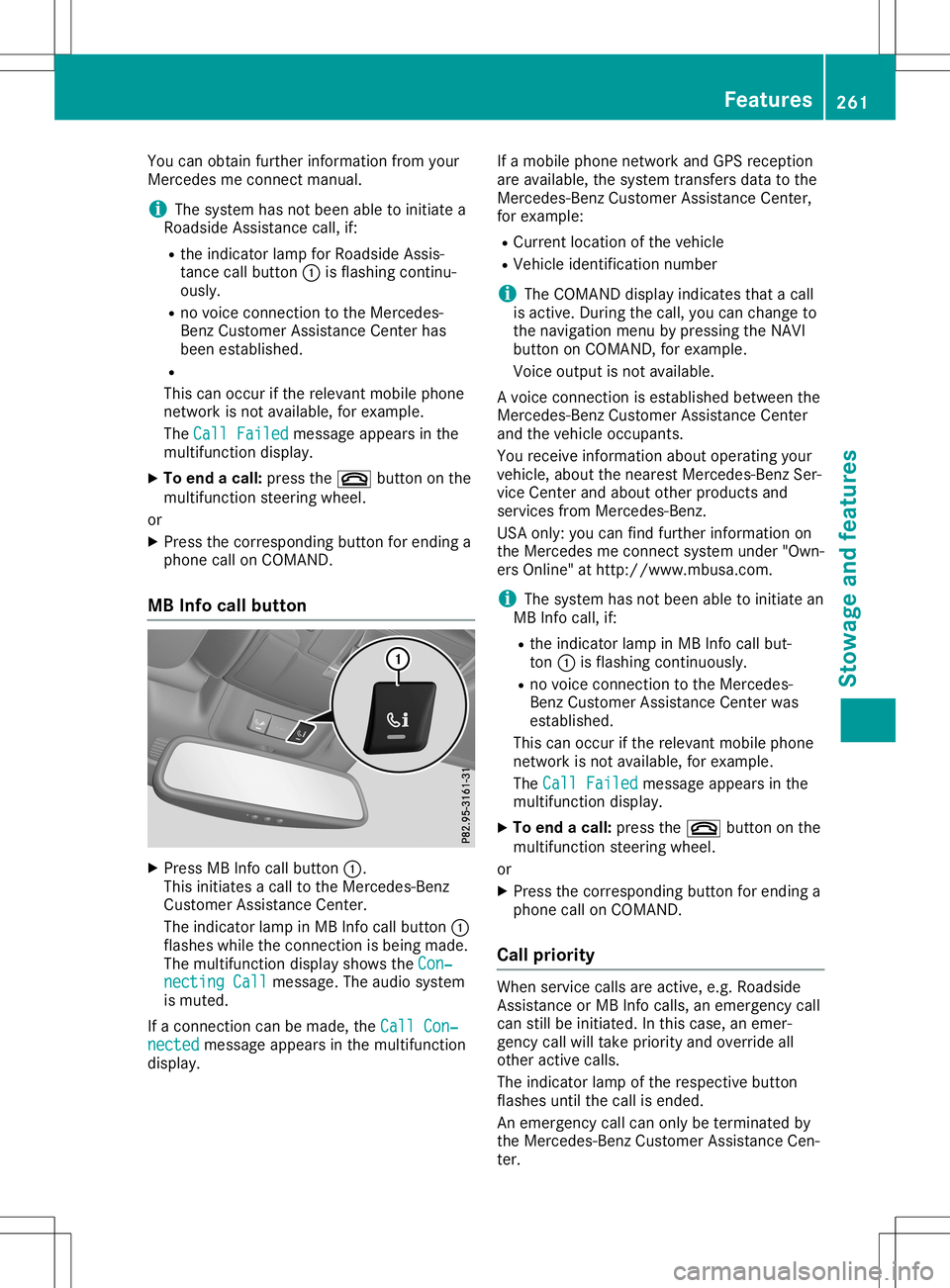
MB Info callbutton X
Press MBInfocall button0043.
This initiates acall tothe Merc edes- Benz
Custom erAss istan ceCent er.
The indic atorlamp inMB Infocall button0043
flashes whiletheconnection isbeing made.
The multif unction display showstheCon‐ Con‐
nect ingCall nect
ingCall messag e.The audio system
is mute d.
If acon nection canbemade, theCall Con‐ Call
Con‐
nect ed nect
edmessag eappears inthe multif unction
display. If
amobile phonenet work andGPS receptio n
are available, thesyste mtransf ersdata tothe
Merc edes- BenzCustom erAss istan ceCent er,
for examp le:
R Curren tlocat ionofthe vehic le
R Vehic leident ificationnumbe r
i The
COMAN Ddisplay indicates thatacall
is act ive. Durin gthe call, youcan chan geto
the navig ation menuby press ingthe NAV I
butt ononCOMAN D,for examp le.
Voice output isnot available.
A voic econ nection isest ablished betweenthe
Merc edes- BenzCustom erAss istan ceCent er
and thevehic leocc upant s.
You receive informat ionabout operat ingyour
vehic le,about thenear estMerc edes- BenzSer -
vice Cent erand about otherproduc tsand
serv ices from Mercedes- Benz.
USA only: youcan findfurt her informat ionon
the Merc edes meconnectsyste munder "Own-
ers Onlin e"athtt p:/ /www.m busa.com.
i The syste mhas notbeen abletoinit iate an
MB Infocall, if:
R the indic atorlamp inMB Infocall but-
ton 0043isflashin gcon tinuously.
R no voic econ nection tothe Merc edes-
Ben zCustom erAss istan ceCent erwas
est ablished.
This canoccurifthe relevan tmobile phone
net work isnot available, forexamp le.
The Call Failed Call
Failedmessag eappears inthe
multif unction display.
X To end acall: press the0076 buttononthe
multif unction steerin gwheel.
or X Press thecorrespon dingbuttonfor endin ga
phon ecall onCOMAN D.
Call priorit y When
servicecalls areactive, e.g. Roadside
Ass istan ceorMB Infocalls, anemerg encycall
can stillbeinit iated. Inthis case, anemer-
genc ycall willtakeprior ityand over ride all
oth eract ive calls.
The indic atorlamp ofthe respec tivebutt on
flashes untilthe call isended .
An emerg encycall can only beterminat edby
the Merc edes- BenzCustom erAss istan ceCen-
ter . Featu
res
261Stowage andfeatures Z
Page 264 of 334
All
othe rcal lscan beend edbypre ssing:
R the 0076 button onthe multifu nctio nstee r-
ing wheel
R or the corr espond ingCOMAND button for
end ingatel ephone call
i Whe
nacal lis ini tia ted ,the audio sy stem
is mu ted .The mob ile pho neisno longe r
conne ctedtoCO MAND. However,ifyo u
wa ntto useyo ur mob ile pho ne,dosoonl y
wh en the vehicleis sta tionar yand inasa fe
lo cati on.
Vehi cle Hea lthChe ck Wi
th the VehicleHea lthCheck, theCustom er
Assi stance Center canprovideimp rove dsu p-
po rtfor problems with your veh icle. Dur ing an
exi sting call,veh icleda ta istrans ferred tothe
Cu stom erAssi stance Center. Thecustome r
ser vice representa tivecanusethe rece ived
da ta to decid ewh atkind ofassista nce is
req uired .Yo uar ethen, forexa mpl e,gu ided to
the nearestMer cedes-B enzServ iceCenter or
a reco veryveh icleis cal led.
If veh icleda ta nee dstobe trans ferred during
an MB Info callor aRo adside Assi stance call,
thi sis ini tia ted bythe Custom erAssi stance
Ce nter. Youwi llsee theRoadsideAssis‐ Roa
dsideAssis‐
tan ceConnected tan
ceConnected message inthe COMAND
di spl ay.If the VehicleHea lthCheck can be
sta rted ,the Requestfor vehicledia gno‐ Req
uestfor vehicledia gno‐
sis received. Startvehicledia gno‐ sis
received. Startvehicledia gno‐
sis ? sis
?mes sage appe arsin the displ ay.
X Co nfir mthe mes sage with Yes Yes
.
X Whe nthe VehicleDia gnosis:Ple ase Veh
icleDia gnosis:Ple ase
sta rtignition. sta
rtignition. message appe ars, turn
the Sma rtKeyto positio n0048 inthe igniti on
lo ck (Ypage 126 ).
X Whe nthe Please follow theinstruc‐ Ple
ase follow theinstruc‐
tio nsreceivedbyphoneand move tio
nsreceivedbyphoneand move
you rveh icleto asaf epos ition you
rveh icleto asaf epos itionmes -
sa ge appe ars, fol low the custome rser vice
rep resenta tive'sins truc tions.
The message inthe displ aydisa pp ears.
If yo usel ect Cancel Can
cel theVehicleHea lth
Ch eck iscance led comp letel y.
The vehicleop era ting stateche ckbegins.
Yo uwi llsee theVehicledia gnosis Veh
icledia gnosis
act ivated. act
ivated.mes sage.
Whe nthe checkiscomp leted ,the Send Sen
d
veh icledia gno sticsdata(Vo ice con‐ veh
icledia gno sticsdata(Vo ice con‐
nec tionmay beinterruptedduring nec
tionmay beinterruptedduring dat
atra nsfer) dat
atra nsfer) message appe ars. The vehi-
cle data can now besent tothe Custom er
Assi stance Center.
X Pre ssOK OK
toconfi rmthe mes sage.
The voice conne ctionwi th the Custom er
Assi stance Center isterm inated .
Yo uwi llsee theVehicleDia gnosis: Veh
icleDia gnosis:
Tra nsferring data... Tra
nsferring data...mes sage .
The vehicleda ta issent tothe Custom er
Assi stance Center.
Dep endingonwhatthe custome rser vice rep-
res enta tiveagree dwi th you, the voice conne c-
tio nis re-e stablished afterthe trans feriscom-
pl ete .If nece ssary,yo uwi llbe conta ctedata
la ter time byano ther means,e.g.by e-ma ilor
pho ne.
Anothe rfu nctio nof the VehicleHea lthCheck
is the trans ferofser vice data to the Custom er
Assi stance Center. Ifaser vice isove rdue,the
CO MAND displ aysho wsames sage abou tva ri-
ou sspe cialoffe rsat your wo rksh op.
USA only:thi sinfo rma tioncan also be called
up und er"Owne rsOnl ine"at http:/ /
ww w.m busa.com.
Info rma tionon the data stor edinthe vehicle
(Y page 29) .
Info rma tionon Roadside Assi stance
(Y page 26). Garag
edoo rope ner
Ge neral notes The
Home Link®
ga rage door opene rinte grated
in the rear-view mirror allo ws youto opera te
up tothre ediffer ent door and gate system s.
Use theintegrated garage door opene ronl yon
ga rage doors that:
R ha ve safety stop andrevers efea ture sand
R mee tcur rent U.S. federa lsa fety standa rds
Once programed ,the integrated garage door
op ene rin the rear-view mirror willas su me the
fu nctio nof the garage door system 'srem ote
contro l.Pl ea se also rea dthe opera ting instruc -
tio ns for the garage door system .
Whe npro grammi ngaga rage door opene r,
pa rk the vehicleou tside the garage. Donot
ru nthe enginewhile pro grammi ng.
Ce rtai nga rage door drives areinco mpa tible
wi th the integrated garage door opene r.Ifyo u
ha ve diffi cul typro graming theintegrated 26
2 Fe
aturesSto wag ean dfe ature s