door lock MERCEDES-BENZ SL500 2002 R129 User Guide
[x] Cancel search | Manufacturer: MERCEDES-BENZ, Model Year: 2002, Model line: SL500, Model: MERCEDES-BENZ SL500 2002 R129Pages: 302, PDF Size: 7.21 MB
Page 39 of 302
35 Central locking system
Te ch n ica l
data Instruments
and controlsOperationDrivingInstrument
cluster displayPractical hints Car care Index When you lock the vehicle, both door lock buttons
should move down. If any one stays up, the respective
door is not properly closed.
You should then unlock the vehicle, open and reclose
this door, and lock the vehicle again. Each individual
door can be locked with door lock button – the driver’s
door can only be locked when it is closed.
If the vehicle has previously been locked from the
outside, only the door being opened from the inside will
unlock, and the alarm will come on. The other door, the
trunk, the interior storage compartments, and fuel filler
flap remain locked.Notes:
In case of a malfunction in the central locking system
the doors can be locked and unlocked individually.
To lock, turn key in driver’s door lock to position 3 or
push down lock buttons.
To unlock, turn key in driver’s door lock to position 2 or
pull inside door handles.
Page 40 of 302
36 Central locking system
Te ch n ica l
data Instruments
and controlsOperationDrivingInstrument
cluster displayPractical hints Car care Index
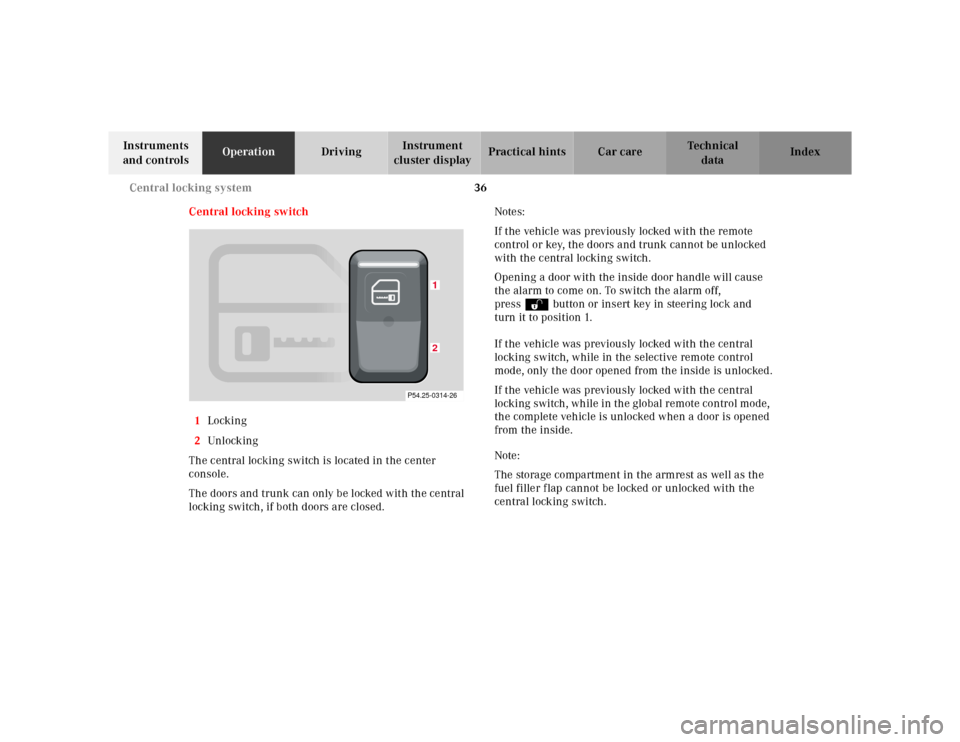
Central locking switch
1Locking
2Unl ock ing
The central locking switch is located in the center
console.
The doors and trunk can only be locked with the central
locking switch, if both doors are closed.Notes:
If the vehicle was previously locked with the remote
control or key, the doors and trunk cannot be unlocked
with the central locking switch.
Opening a door with the inside door handle will cause
the alarm to come on. To switch the alarm off,
pressΠbutton or insert key in steering lock and
turn it to position 1.
If the vehicle was previously locked with the central
locking switch, while in the selective remote control
mode, only the door opened from the inside is unlocked.
If the vehicle was previously locked with the central
locking switch, while in the global remote control mode,
the complete vehicle is unlocked when a door is opened
from the inside.
Note:
The storage compartment in the armrest as well as the
fuel filler flap cannot be locked or unlocked with the
central locking switch.
12
P54.25-0314-26
Page 41 of 302
37 Central locking system
Te ch n ica l
data Instruments
and controlsOperationDrivingInstrument
cluster displayPractical hints Car care Index Automatic central locking
The central locking switch also operates the automatic
central locking.
With the automatic central locking system activated, the
doors and trunk are locked at vehicle speeds of approx.
9 mph (15 km/h) or more. The fuel filler flap remains
unlocked.
To a ctiva te:
With key in steering lock position 2 hold upper portion
of switch (1) for a minimum of 5 seconds.
To deactivate:
With key in steering lock position 2 hold lower portion
of switch (2) for a minimum of 5 seconds.
Notes:
If doors are unlocked with the central locking switch
after activating the automatic central locking, and
neither door is opened, then the doors remain unlocked
even at vehicle speeds of approx. 9 mph (15 km/h) or
more.If a door is opened from the inside at speeds of approx.
9 mph (15 km/h) or less with the automatic central
locking activated, the door will again be automatically
locked at speeds of approx. 9 mph (15 km/h) or more.
Important!
When towing the vehicle, or with the vehicle on a
dynamometer test stand, please, note the following:
With the automatic central locking activated and the
key in steering lock position 2, the vehicle doors will
lock if the left front wheel as well as the right rear
wheel spin are turning at vehicle speeds of approx.
9mph (15km/h) or more.
To prevent the vehicle door locks from locking,
deactivate the automatic central locking.
Emergency unlocking in case of accident
The doors unlock automatically a short time after a
strong deceleration is detected, such as in a collision
(this is intended to aid rescue and exit). Driving on
rough roads may cause the vehicle to unlock. If
necessary, the vehicle can be locked again with the
interior central locking switch.
Page 44 of 302
40 Central locking system
Te ch n ica l
data Instruments
and controlsOperationDrivingInstrument
cluster displayPractical hints Car care Index
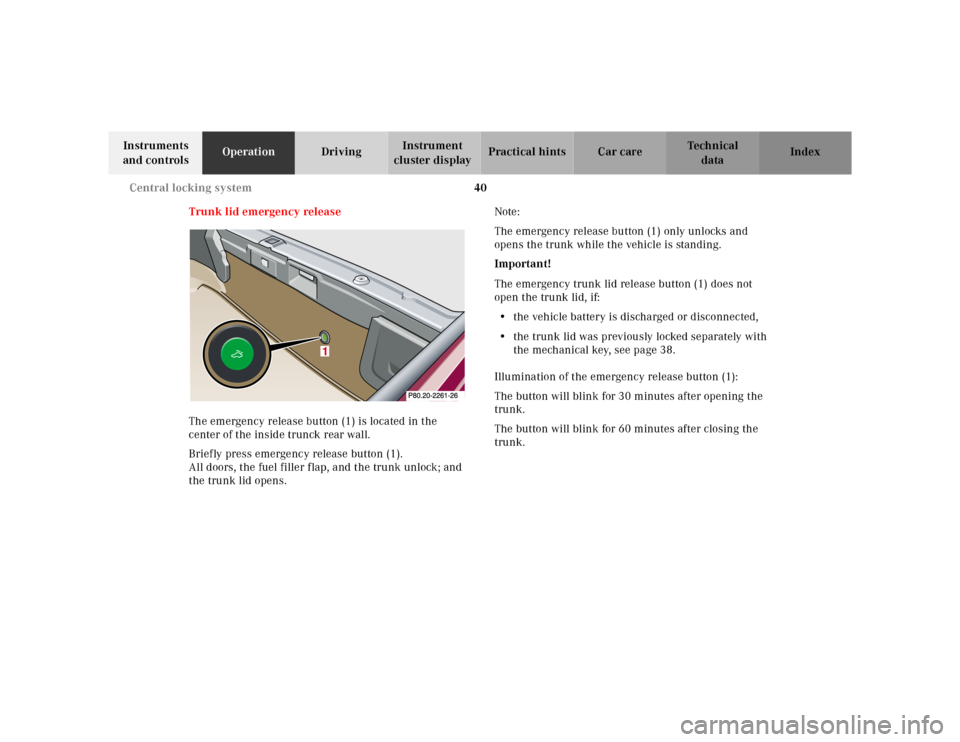
Trunk lid emergency release
The emergency release button (1) is located in the
center of the inside trunck rear wall.
Briefly press emergency release button (1).
All doors, the fuel filler flap, and the trunk unlock; and
the trunk lid opens.Note:
The emergency release button (1) only unlocks and
opens the trunk while the vehicle is standing.
Important!
The emergency trunk lid release button (1) does not
open the trunk lid, if:
• the vehicle battery is discharged or disconnected,
• the trunk lid was previously locked separately with
the mechanical key, see page 38.
Illumination of the emergency release button (1):
The button will blink for 30 minutes after opening the
trunk.
The button will blink for 60 minutes after closing the
trunk.
1
Page 45 of 302
41 Central locking system
Te ch n ica l
data Instruments
and controlsOperationDrivingInstrument
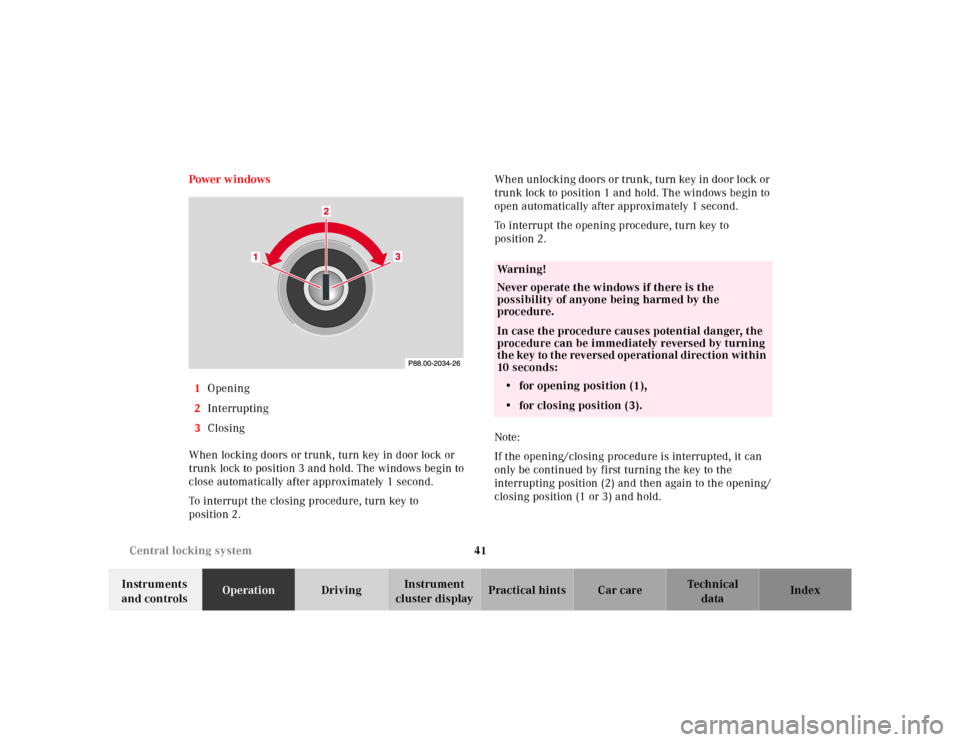
cluster displayPractical hints Car care Index Power w indows
1Opening
2Interrupting
3Closing
When locking doors or trunk, turn key in door lock or
trunk lock to position 3 and hold. The windows begin to
close automatically after approximately 1 second.
To interrupt the closing procedure, turn key to
position 2.Wh en unlocking d oors or tru nk, turn key in door l ock or
trunk lock to position 1 and hold. The windows begin to
open automatically after approximately 1 second.
To interrupt the opening procedure, turn key to
position 2.
Note:
If the opening/closing procedure is interrupted, it can
only be continued by first turning the key to the
interrupting position (2) and then again to the opening/
closing position (1 or 3) and hold.
Wa r n i n g !
Never operate the windows if there is the
possibility of anyone being harmed by the
procedure.In case the procedure causes potential danger, the
procedure can be immediately reversed by turning
the key to the reversed operational direction within
10 seconds:
• for opening position (1),
• for closing position (3).
Page 46 of 302
42 Antitheft alarm system
Te ch n ica l
data Instruments
and controlsOperationDrivingInstrument
cluster displayPractical hints Car care Index
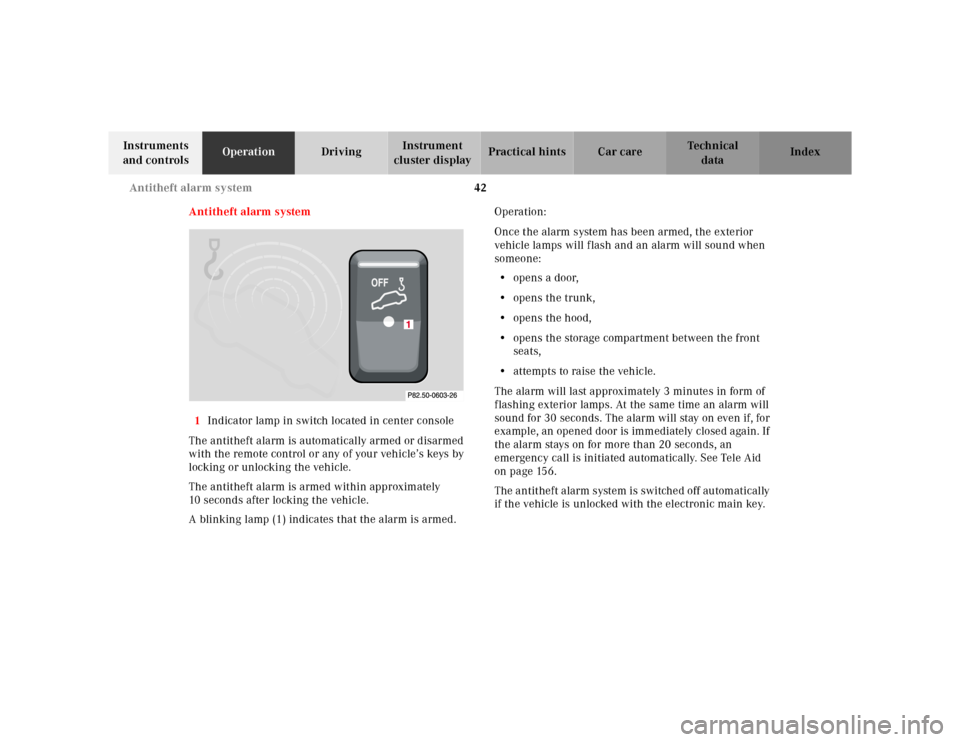
Antitheft alarm system
1Indicator lamp in switch located in center console
The antitheft alarm is automatically armed or disarmed
with the remote control or any of your vehicle’s keys by
locking or unlocking the vehicle.
The antitheft alarm is armed within approximately
10 seconds after locking the vehicle.
A blinking lamp (1) indicates that the alarm is armed.Operation:
Once the alarm system has been armed, the exterior
vehicle lamps will flash and an alarm will sound when
someone:
• opens a door,
• opens the trunk,
•opens the hood,
• opens the storage compartment between the front
seats,
• attempts to raise the vehicle.
The alarm will last approximately 3 minutes in form of
flashing exterior lamps. At the same time an alarm will
sound for 30 seconds. The alarm will stay on even if, for
example, an opened door is immediately closed again. If
the alarm stays on for more than 20 seconds, an
emergency call is initiated automatically. See Tele Aid
on page 156.
The antitheft alarm system is switched off automatically
if the vehicle is unlocked with the electronic main key.
Page 48 of 302
44 Seats
Te ch n ica l
data Instruments
and controlsOperationDrivingInstrument
cluster displayPractical hints Car care Index
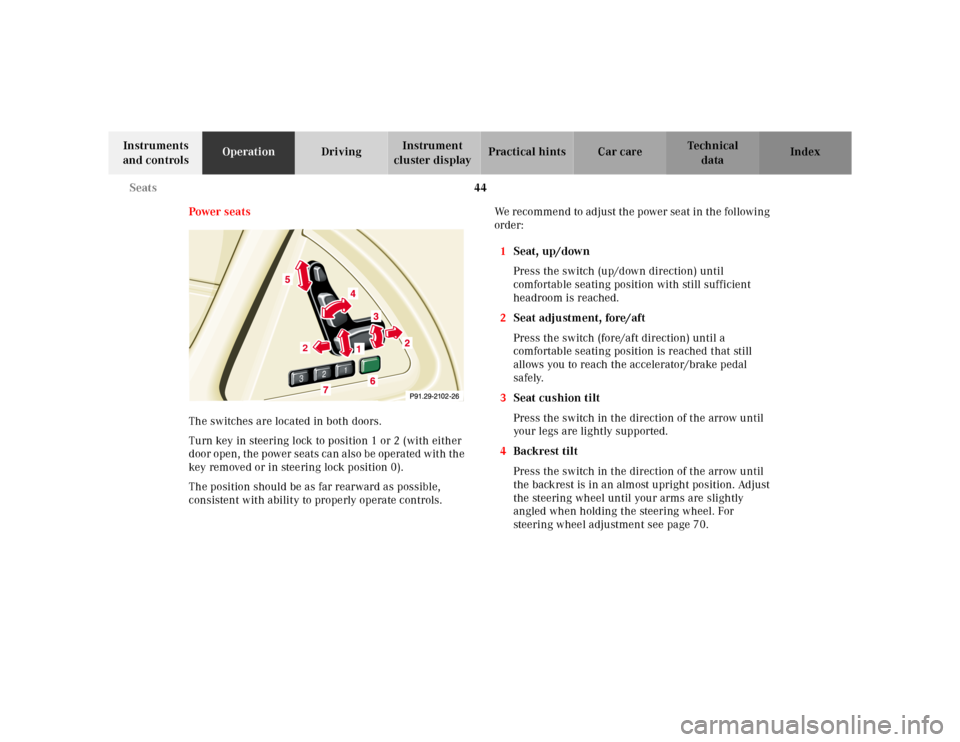
Power seats
The switches are located in both doors.
Turn key in steering lock to position 1 or 2 (with either
door open, the power seats can also be operated with the
key removed or in steering lock position 0).
The position should be as far rearward as possible,
consistent with ability to properly operate controls.We recommend to adjust the power seat in the following
order:
1Seat, up/down
Press the switch (up/down direction) until
comfortable seating position with still sufficient
headroom is reached.
2Seat adjustment, fore/aft
Press the switch (fore/aft direction) until a
comfortable seating position is reached that still
allows you to reach the accelerator/brake pedal
safely.
3Seat cushion tilt
Press the switch in the direction of the arrow until
your legs are lightly supported.
4Backrest tilt
Press the switch in the direction of the arrow until
the backrest is in an almost upright position. Adjust
the steering wheel until your arms are slightly
angled when holding the steering wheel. For
steering wheel adjustment see page 70.
3
2
1
2
1
2
Page 49 of 302
45 Seats
Te ch n ica l
data Instruments
and controlsOperationDrivingInstrument
cluster displayPractical hints Car care Index 5Head restraint
(with shoulder belt height adjustment)
Adjust the head restraint so that the upper portion
of the shoulder belt is located as close as possible to
the middle of the shoulder. The head restraint can
be tilted forward by hand.
Note:
To prevent the backrest from touching the soft top
storage compartment cover when the seat is moved
back, the backrest will automatically move to a more
upright position.
When reclining the backrest, the seat will automatically
move forward to prevent the backrest from touching the
soft top storage compartment cover.
Wa r n i n g !
When leaving the vehicle always remove the key
from the steering lock, and lock the vehicle.The power seats can also be operated with a door
open. Do not leave children unattended in the
vehicle, or with access to an unlocked vehicle.
Unsupervised use of vehicle equipment may cause
serious personal injury.
Do not adjust the driver’s seat while driving.
Adjusting the seat while driving could cause the
driver to lose control of the vehicle.Never ride in a moving vehicle with the backrest
reclined.
Sitting in an excessively reclined position can be
dangerous. You could slide under the seat belt in a
collision. If you slide under it, the belt would apply
force at the abdomen or neck. That could cause
serious or even fatal injuries. The backrest and seat
belt provide the best restraint when the wearer is
in an upright position and the belt is properly
positioned on the body.The rear storage area should never be occupied by
passengers since the vehicle is a 2 seater.
Furthermore, there is a risk of injury in the rear by
adjusting the power assisted front seats.Never place hands under seat or near any moving
parts while a seat is being adjusted.
Page 62 of 302
58 Restraint systems
Te ch n ica l
data Instruments
and controlsOperationDrivingInstrument
cluster displayPractical hints Car care Index
BabySmart
TM airbag deactivation system
Special BabySmart
TM compatible child seats, designed
for use with the Mercedes-Benz system and available at
any authorized Mercedes-Benz Center are required for
use with the BabySmart
TM airbag deactivation system.
With the special child seat properly installed, the
passenger side front airbag will not deploy. The 7
indicator lamp located in the dashboard will be
illuminated, except with key removed or in steering lock
position 0. The system does not deactivate the door
mounted side impact airbag.Self-test BabySmart
TM
without special child seat installed
After turning key in steering lock to position 1 or 2, the
7 indicator lamp located in the dashboard comes on
for approx. 6 seconds and then extinguishes.
If the indicator lamp should not come on or is
continuously lit, the system is not functioning. You must
see an authorized Mercedes-Benz Center before seating
any child on the front passenger seat.BabySmart
TM is a trademark of Siemens Automotive Corp.
Wa r n i n g !
The BabySmart
TM airbag deactivation system will
ONLY work with a special child seat designed to
operate with it. It will not work with child seats
which are not BabySmart
TM compatible.
Never place anything between seat cushion and
child seat (e.g. pillow), since it reduces the
effectiveness of the deactivation system.Follow the manufacturer’s instructions for
installation of special child seats.The passenger front airbag will not deploy only if
the 7 indicator lamp remains illuminated.
Please be sure to check the indicator every time
you use the special system child seat.
Should the light go out while the restraint is
installed, please check installation. If the light
remains out, do not use the BabySmart
TM restraint
to transport children on the front passenger seat
until the system has been repaired.
Page 64 of 302
60 Restraint systems
Te ch n ica l
data Instruments
and controlsOperationDrivingInstrument
cluster displayPractical hints Car care Index
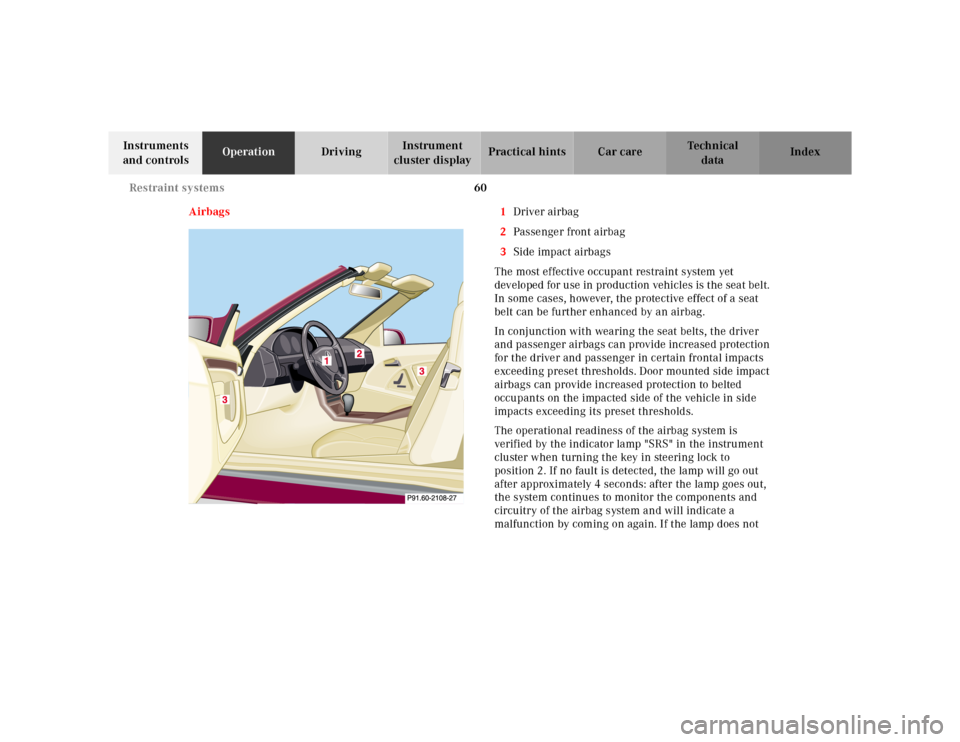
Airbags 1Driver airbag
2Passenger front airbag
3Side impact airbags
The most effective occupant restraint system yet
developed for use in production vehicles is the seat belt.
In some cases, however, the protective effect of a seat
belt can be further enhanced by an airbag.
In conjunction with wearing the seat belts, the driver
and passenger airbags can provide increased protection
for the driver and passenger in certain frontal impacts
exceeding preset thresholds. Door mounted side impact
airbags can provide increased protection to belted
occupants on the impacted side of the vehicle in side
impacts exceeding its preset thresholds.
The operational readiness of the airbag system is
verified by the indicator lamp "SRS" in the instrument
cluster when turning the key in steering lock to
position 2. If no fault is detected, the lamp will go out
after approximately 4 seconds: after the lamp goes out,
the system continues to monitor the components and
circuitry of the airbag system and will indicate a
malfunction by coming on again. If the lamp does not