ignition MERCEDES-BENZ SLC 2017 User Guide
[x] Cancel search | Manufacturer: MERCEDES-BENZ, Model Year: 2017, Model line: SLC, Model: MERCEDES-BENZ SLC 2017Pages: 294, PDF Size: 9.12 MB
Page 75 of 294
Make sure that no body parts are in close
proximity during the closing procedure. If
someone becomes trapped, press the switch
to open the side window again.
Opening and closing the side win-
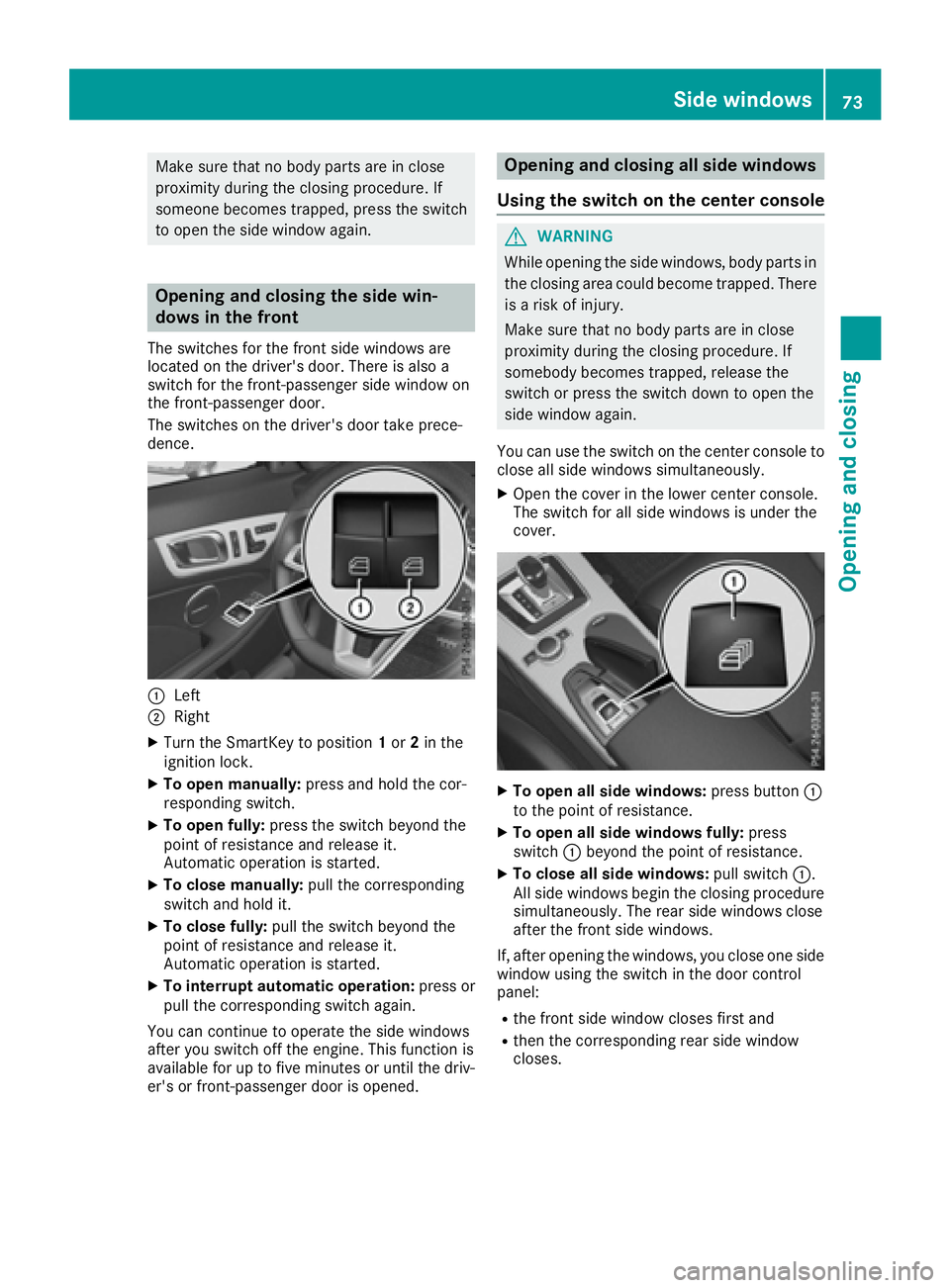
dows in the front The switches for the front side windows are
located on the driver's door. There is also a
switch for the front-passenger side window on
the front-passenger door.
The switches on the driver's door take prece-
dence.
C
LeftD
Right X
Turn the SmartKey to position 1 or 2 in the
ignition lock. X
To open manually: press and hold the cor-
responding switch. X
To open fully: press the switch beyond the
point of resistance and release it.
Automatic operation is started. X
To close manually: pull the corresponding
switch and hold it. X
To close fully: pull the switch beyond the
point of resistance and release it.
Automatic operation is started. X
To interrupt automatic operation: press or
pull the corresponding switch again.
You can continue to operate the side windows
after you switch off the engine. This function is
available for up to five minutes or until the driv-
er's or front-passenger door is opened. Opening and closing all side windows
Using the switch on the center console
G WARNING
While opening the side windows, body parts in
the closing area could become trapped. There
is ar isk of injury.
Make sure that no body parts are in close
proximity during the closing procedure. If
somebody becomes trapped, release the
switch or press the switch down to open the
side window again.
You can use the switch on the center console to
close all side windows simultaneously. X
Open the cover in the lower center console.
The switch for all side windows is under the
cover.
X
To open all side windows: press button C
to the point of resistance. X
To open all side windows fully: press
switch C beyond the point of resistance. X
To close all side windows: pull switch C .
All side windows begin the closing procedure
simultaneously .T he rear side windows close
after the front side windows.
If, after opening the windows, you close one side
window using the switch in the door control
panel: R
the front side window closes first and R
then the corresponding rear side window
closes.Side windows 73
Opening and closing Z
Page 76 of 294
Convenience closing with KEYLESS-GO
G WARNING
When usin gt he convenience closin gf eature,
part soft he body coul dbet ra pped in th ec los-
ing area when as ide window is bein gc losed.
Ther eisar is kofi njury.
Observ et he complet ec losin gp rocedure
when th ec onvenience closin gf eature is oper-
ating. Mak es ure that no body part sa re in
close proximity durin gt he closin gp rocedure.
Procee dasf ollows if someon eist ra pped:X
Release th er ecessed sensor surface on the
door handle. X
Immediately pull and hold th ed oor handle
and keep th ed oor handle pulled.
The side windows open.
Wit hK EY LESS-GO you can close all side win-
dows simultaneously. The KEYLESS-GO key
must be outside th ev ehicle .A ll th ed oor sm ust
be closed.
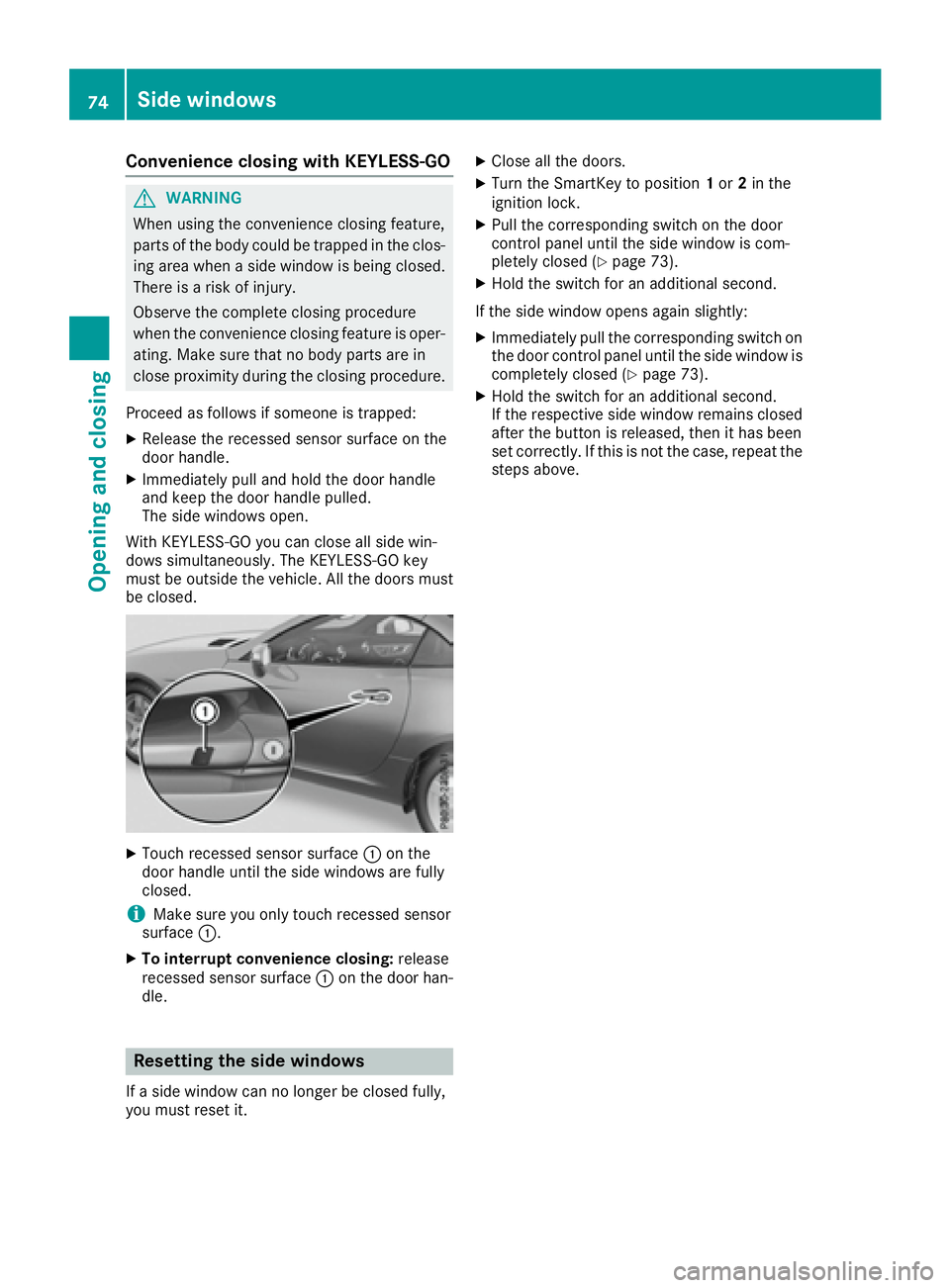
X
Touc hr ecessed sensor surface C on the
door handle until th es ide windows are fully
closed.
i Mak es ure you only touch recessed sensor
surface C .X
To interrup tc onvenience closing: release
recessed sensor surface C on th ed oor han-
dle.
Resetting th es id ew indows
If as ide window can no longer be closed fully,
you must reset it. X
Close all th ed oors. X
Turn th eS ma rtKey to position 1 or 2 in the
ignition lock. X
Pull th ec orrespondin gs witch on th ed oor
control panel until th es ide window is com-
pletely closed ( Y
page 73).X
Hol dt he switch for an additional second.
If th es ide window open sa gain slightly:X
Immediately pull th ec orrespondin gs witch on
th ed oor control panel until th es ide window is
completely closed ( Y
page 73).X
Hol dt he switch for an additional second.
If th er espectiv es ide window remains closed
after th eb utto nisr eleased, then it has been
set correctly. If this is no tt he case, repeat the
steps above.74
Sid ew indows
Opening and closing
Page 79 of 294
Opening/closing using the SmartKey
Important safet yn otes
G WARNING
When opening or closing the roof, body parts
could be trapped by, for example, the roof
mechanism, trun kl id or side windows. There
is ar isk of injury.
When raising or lowering the roof, make sure
that no body parts are in the vicinity of moving
components. If someon eb ecomes trapped,
release the button.
Opening and closing This function is only available on vehicles with
KEYLESS-GO or with roof comfort operation. X
Close the trun kl id ( Y
page 70).X
Vehicles with comfort operation: point the
tip of the SmartKey at the driver's door han-
dle. X
Vehicles with KEYLESS-GO: the SmartKey
must be within 6ft(2m )o ft he vehicle.X
To open: press and hold the 6 button on
the SmartKey until the roof is fully opened.
The roof and the rear side windows open. The
fron ts ide windows close.X
To interrupt the opening procedure:
release the 6 button.X
To open the front side windows: press the
6 button on the SmartKey again.X
To close: press and hold the 7 button on
the SmartKey until the roof is fully closed.
The roof and the side windows close. X
To interrupt the closing procedure: release
the 7 button.
Locking the roof again
Important safet yn otes
G WARNING
If you do not fully open/close the soft top, the
soft-top hydraulics depressuriz ea fter as hort
time. This causes the soft top to lower unex-
pectedly and may cause you or other stob e
trapped. There is ar isk of injury. Always open or close the soft top completely.
The roof is not locked if: R
the Y symbol and the Vario-Roof in
Operation message appear in the multifunc-
tion display R
the Y symbol and the Open/Close
Vario-Roof Completely message appear in
the multifunction display and you hear aw arn-
ing tone R
you hear aw arning ton ef or up to ten seconds
when pulling away or while driving
Locking You can lock the roof again if it is not locked
fully. X
Pull over and stop the vehicle safely as soon
as possible, paying attention to road and traf-
fic conditions. X
Make sure that the SmartKey is in position 2
in the ignition lock. X
Press the roof switch ( Y
page 76).
Trunk partition
General notes
! To avoid damaging the roof or luggage when
folding back the roof, you should: R
only load the trun ktob elow the trun kp ar-
tition R
not place any objects on or in fron toft he
trun kp artition R
not place any objects on the cover behind
the roll bars R
not allow the cargo to push the trun kp ar-
tition upwards
The trun kp artition can be used to cover luggage
and loads in the trunk. Roof 77
Opening and closing Z
Page 82 of 294
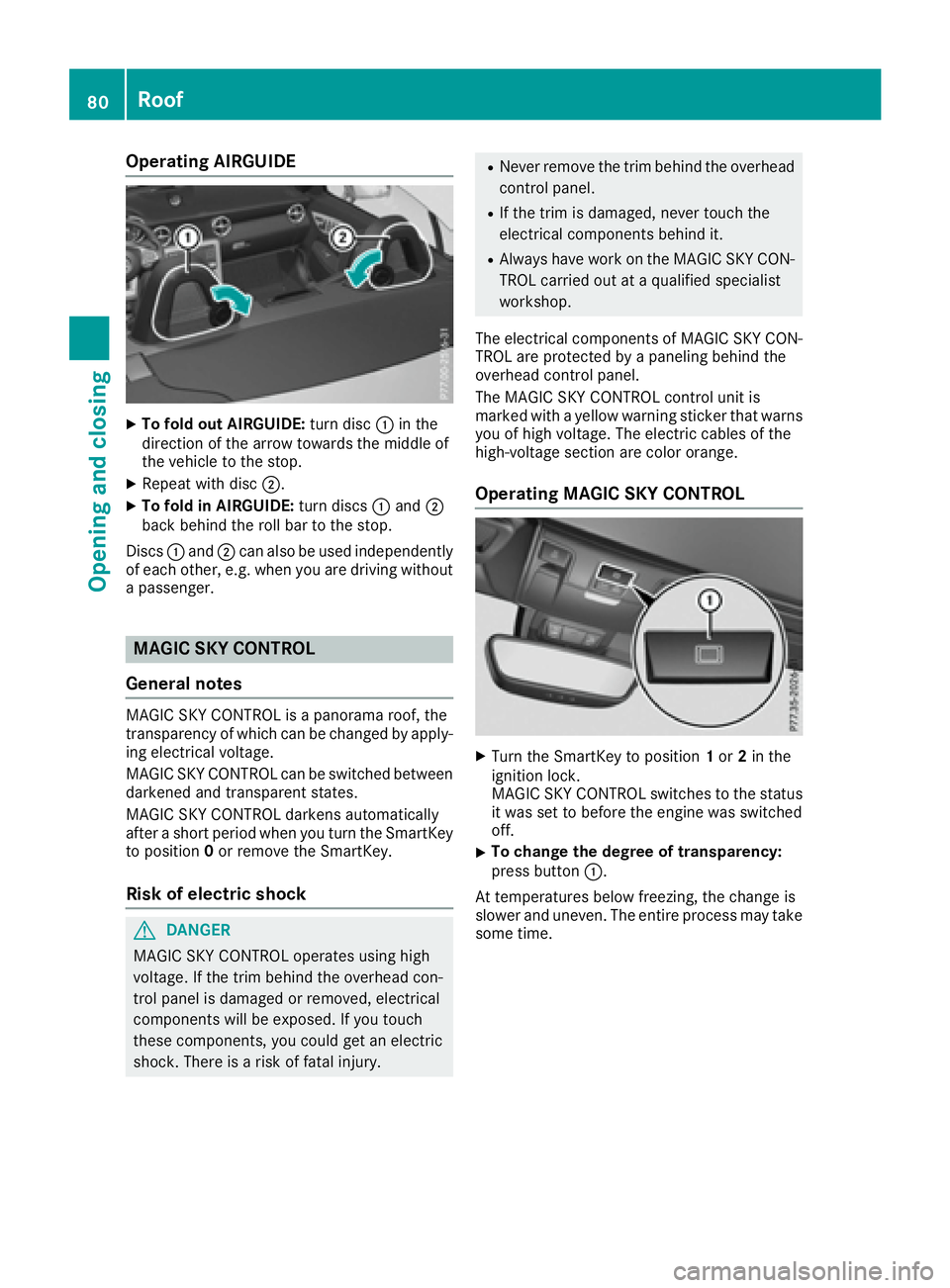
Operating AIRGUIDE X
To fold out AIRGUIDE: turn disc C in the
direction of the arrow towards the middle of
the vehicle to the stop. X
Repeat with disc D .X
To fold in AIRGUIDE: turn discs C and D
back behind the roll bar to the stop.
Discs C and D can also be used independently
of each other ,e .g. when you are driving without
ap assenger.
MAGIC SKY CONTROL
General notes MAGIC SKY CONTROL is ap anorama roof, the
transparenc yofw hich can be changed by apply-
ing electrical voltage.
MAGIC SKY CONTROL can be switched between
darkened and transparent states.
MAGIC SKY CONTROL darken sa utomatically
after as hort period when you turn the SmartKey
to position 0 or remove the SmartKey.
Risk of electric shock
G DANGER
MAGIC SKY CONTROL operates using high
voltage. If the trim behind the overhead con-
trol panel is damaged or removed, electrical
component sw ill be exposed. If you touch
these components, you could get an electric
shock .T here is ar isk of fatal injury. R
Never remove the trim behind the overhead
control panel. R
If the trim is damaged, never touch the
electrical component sb ehind it.R
Always have work on the MAGIC SKY CON-
TROL carried out at aq ualified specialist
workshop.
The electrical component sofM AGIC SKY CON-
TROL are protected by ap aneling behind the
overhead control panel.
The MAGIC SKY CONTROL control unit is
marked with ay ellow warning sticker that warns
you of high voltage. The electric cables of the
high-voltage section are color orange.
Operating MAGIC SKY CONTROL
X
Turn the SmartKey to position 1 or 2 in the
ignition lock.
MAGIC SKY CONTROL switches to the status
it was set to before the engin ew as switched
off. X
To change the degree of transparency:
press button C .
At temperatures below freezing, the change is
slower and uneven .T he entire process may take
some time.80
Roof
Opening and closing
Page 83 of 294
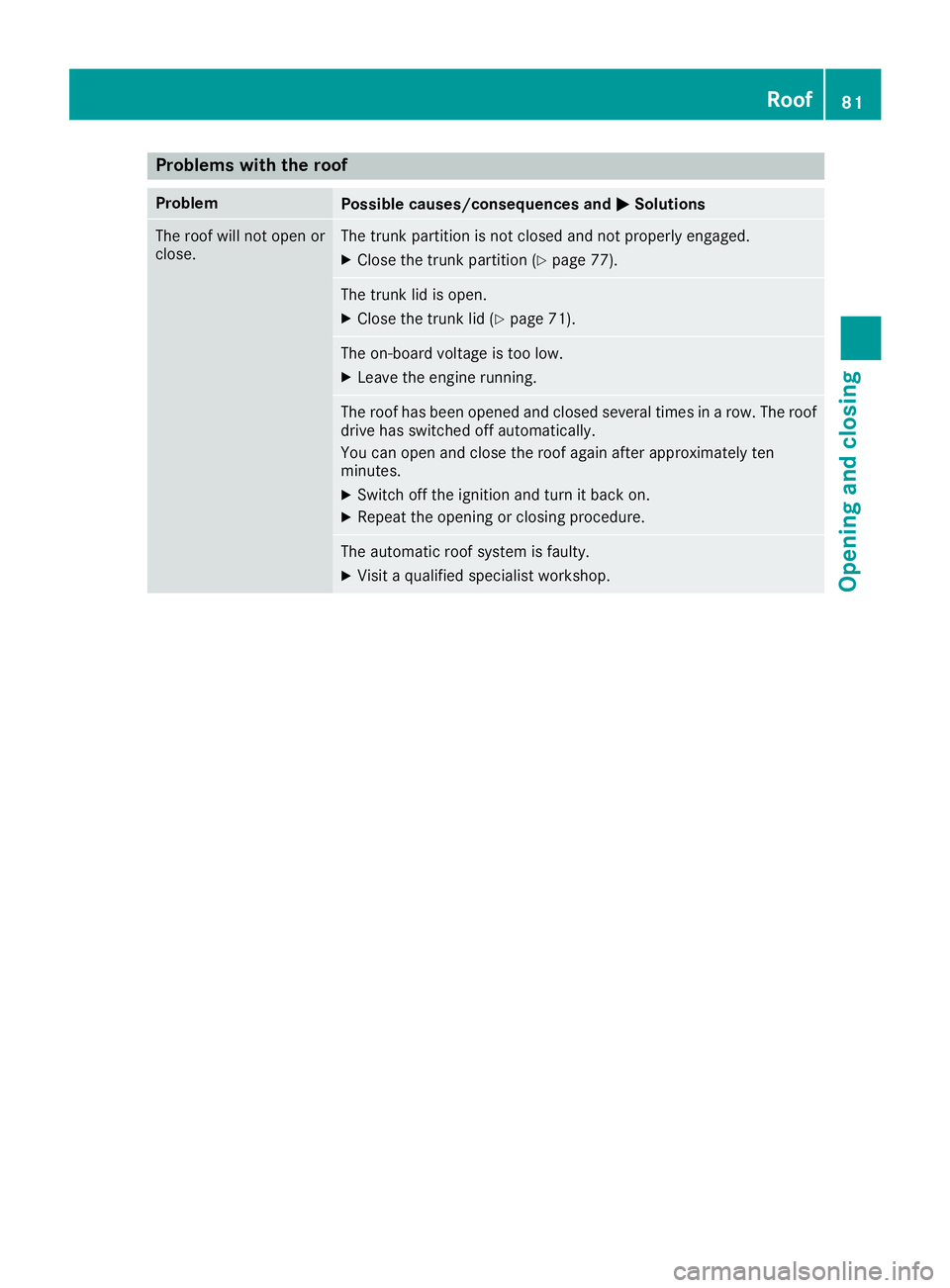
Problems with the roof Problem
Possible causes/consequences and P Solutions
The roof will not open or
close. The trunk partition is not closed and not properly engaged. X
Close the trunk partition ( Y
page 77).
The trunk lid is open. X
Close the trunk lid ( Y
page 71).
The on-board voltage is too low. X
Leave the engine running.
The roof has been opened and closed several times in ar ow. The roof
drive has switched off automatically.
You can open and close the roof again after approximately ten
minutes. X
Switch off the ignition and turn it back on. X
Repeat the opening or closing procedure.
The automatic roof system is faulty. X
Visit aq ualified specialist workshop. Roof 81
Opening and closing Z
Page 85 of 294
The seats can still be adjusted when there is no
SmartKey in the ignition lock.
G WARNING
When you adjust as eat, you or other vehicle
occupant sc ould become trapped, e.g. on the
seat guide rail. There is ar isk of injury.
Make sure when adjusting as eat that no one
has any body parts in the sweep of the seat.
Observe the safety notes on "Air bags"
( Y
page 42) and "Children in the vehicle"
( Y
page 51).
G WARNING
If the driver's seat is not engaged, it could
move unexpectedly while the vehicle is in
motion .T his could cause you to lose control of
the vehicle. There is ar isk of an accident.
Always make sure that the driver's seat is
engaged before starting the vehicle.
G WARNING
If you adjust the seat height carelessly, you or
other vehicle occupant sc ould be trapped and
thereby injured. Children in particular could
accidentally press the electrical seat adjust-
ment button sa nd become trapped. There is a
risk of injury.
While moving the seats, make sure that your
hands or other body parts do not get under the
lever assembly of the seat adjustmen ts ys-
tem.
G WARNING
If the head restraints are not installed or not
adjusted correctly, they cannot provide pro-
tection as intended. There is an increased risk
of injury in the head and neck area, e.g. in the
event of an accident or when braking.
Always drive with the head restraints instal-
led. Before driving off, make sure for every
vehicle occupant that the center of the head
restraint supports the back of the head at
about eye level. G WARNING
You could lose control of your vehicle if you do
the following while driving: R
adjust the driver's seat, head restraint,
steerin gw heel or mirrors R
fasten the seat belt
There is ar isk of an accident.
Adjust the driver's seat, head restraint, steer-
ing wheel and mirror and fasten your seat belt
before starting the engine.
! To avoid damage to the seats and the seat
heating, observe the following information: R
keep liquids from spilling on the seats. If
liquid is spilled on the seats, dry them as
soon as possible. R
if the seat covers are damp or wet, do not
switch on the seat heating. The seat heat-
ing should also not be used to dry the seats. R
clean the seat covers as recommended;
see the "Interior care" section. R
do not transport heavy loads on the seats.
Do not place sharp object sont he seat
cushions, e.g. knives, nails or tools. The
seats should only be occupied by passen-
gers, if possible. R
when the seat heating is in operation, do
not cover the seats with insulating materi-
als, e.g. blankets ,c oats, bags, seat covers,
child seats or booster seats.
! Make sure that there are no object sint he
footwell under or behind the seats when mov-
ing the seats back. There is ar isk that the
seats and/or the object sc ould be damaged.
i The head restraints are equipped with the
NECK-PRO system ( Y
page 50). For this rea-
son, it is not possible to remove the head
restraints from the seats.
For more information, contact aq ualified spe-
cialist workshop. Seats 83
Seats, steering wheel and mirrors Z
Page 87 of 294
You can adjust the contour of the seat backrests
individually to provide optimum support for your
back.
Switching th es eat heating on/off
Switching on/off
G WARNING
Repeatedly switching on the seat heatin gc an
cause the seat cushio na nd backrest pads to
becom ev ery hot .T he health of person sw ith
limited temperature sensitivity or al imited
ability to react to excessively high tempera-
ture sm ay be affected or the ym ay even suffer
burn-like injuries. There is ar isk of injury.
Therefore, do not switc ht he seat heatin go n
repeatedly.
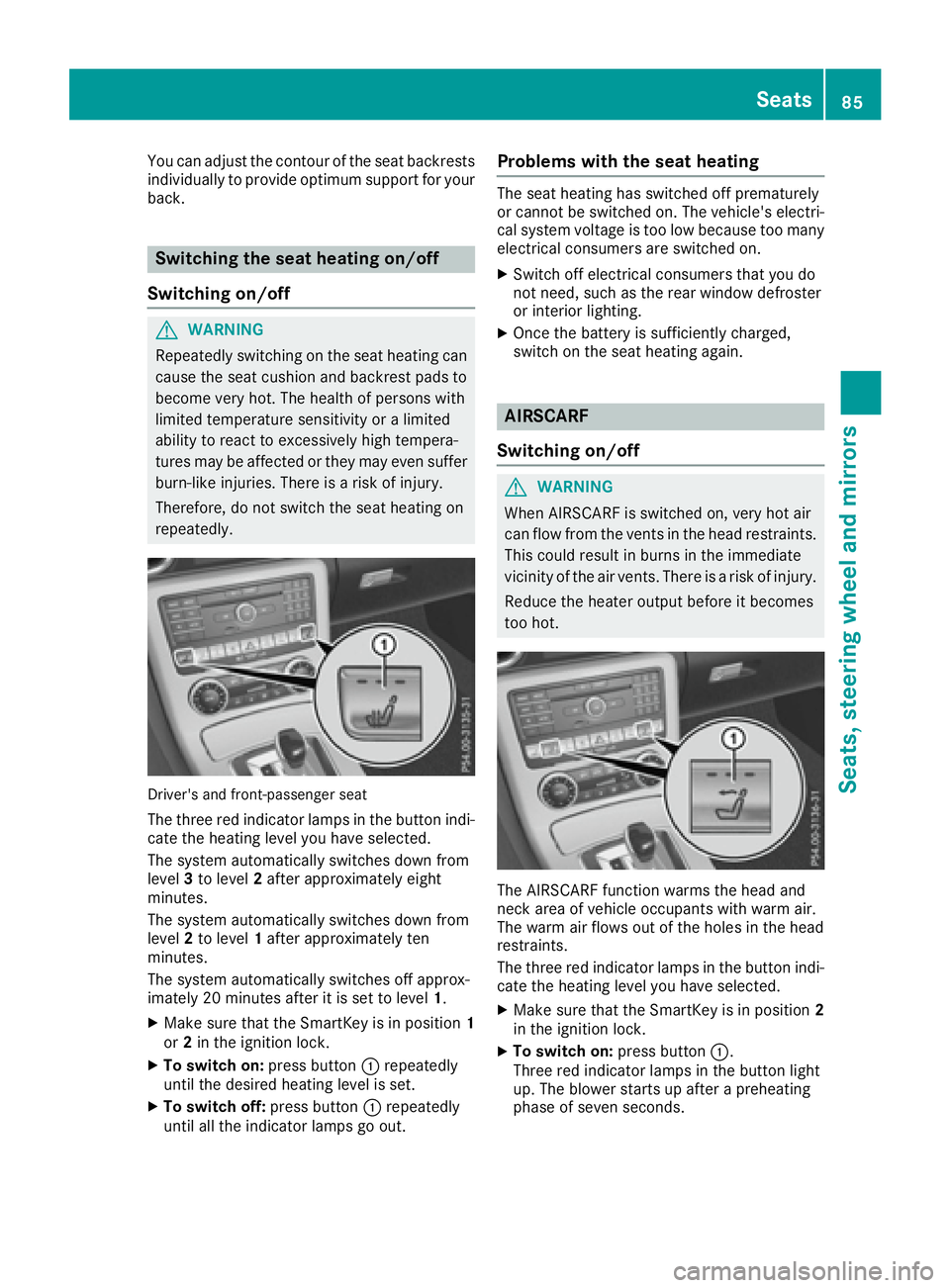
Driver' sa nd front-passenger seat
The three red indicator lamps in the button indi-
cat et he heatin gl evel you have selected.
The syste ma utomatically switches down from
level 3 to level 2 afte ra pproximately eight
minutes.
The syste ma utomatically switches down from
level 2 to level 1 afte ra pproximately ten
minutes.
The syste ma utomatically switches off approx-
imately 20 minutes afte ritiss et to level 1 .X
Make sure that the SmartKey is in position 1
or 2 in the ignition lock.X
To switch on: press button C repeatedly
until the desired heatin gl evel is set.X
To switch off: press button C repeatedly
until all the indicator lamps go out. Problem sw ith th es eat heatingThe seat heatin gh as switched off prematurely
or cannot be switched on. The vehicle's electri-
cal syste mv oltage is too low because too many
electrical consumers are switched on. X
Switch off electrical consumers that you do
not need, such as the rear window defroster
or interior lighting. X
Onc et he battery is sufficiently charged,
switc hont he seat heatin ga gain.
AIRSCARF
Switching on/off
G WARNING
When AIRSCARF is switched on, very hot air
can flow from the vents in the head restraints.
This could result in burns in the immediate
vicinity of the air vents. There is ar isk of injury.
Reduce the heater output befor eitb ecomes
too hot.
The AIRSCARF function warms the head and
nec ka rea of vehicle occupant sw ith warm air.
The warm air flows out of the holes in the head
restraints.
The three red indicator lamps in the button indi-
cat et he heatin gl evel you have selected. X
Make sure that the SmartKey is in position 2
in the ignition lock. X
To switch on: press button C .
Three red indicator lamps in the button light
up. The blower starts up afte rap reheating
phase of seven seconds. Seats 85
Seats, steering wheel and mirrors Z
Page 88 of 294
X
Press button C repeatedly until the desired
heating level is set. X
To switch off: press button C repeatedly
until all the indicator lamps go out.
i The blower continues runnin gf or seven sec-
onds to cool down the heating elements.
i If the battery voltage is too low, AIRSCARF
may switch off.
Problems with AIRSCARF AIRSCARF has switched off prematurely or will
not switch on. The vehicle's electrical system
voltage is too low because too many electrical
consumers are switched on. X
Switc ho ff electrical consumers that you do
not need, such as the rear window defroster
or interior lighting. X
Switc honA IRSCARF again.
Steering wheel
Important safety notes
G WARNING
You could lose control of your vehicle if you do
the following while driving: R
adjust the driver's seat, head restraint,
steerin gw heel or mirrorsR
fasten the seat belt
There is ar isk of an accident.
Adjust the driver's seat, head restraint, steer-
ing wheel and mirror and fasten your seat belt
before starting the engine.
G WARNING
Children could injure themselves if they
adjust the steerin gw heel. There is ar isk of
injury.
When leaving the vehicle, alway st ake the
SmartKey with you and lock the vehicle. Never
leave children unsupervised in the vehicle.
The electrically adjustable steerin gw heel can
still be adjusted when there is no SmartKey in
the ignition lock. Adjusting the steering wheel man-
ually
G WARNING
If the steerin gw heel is unlocked while the
vehicle is in motion ,itc ould change position
unexpectedly. This could cause you to lose
control of the vehicle. There is ar isk of an
accident.
Before starting off, make sure the steering
wheel is locked. Never unlock the steering
wheel while the vehicle is in motion.
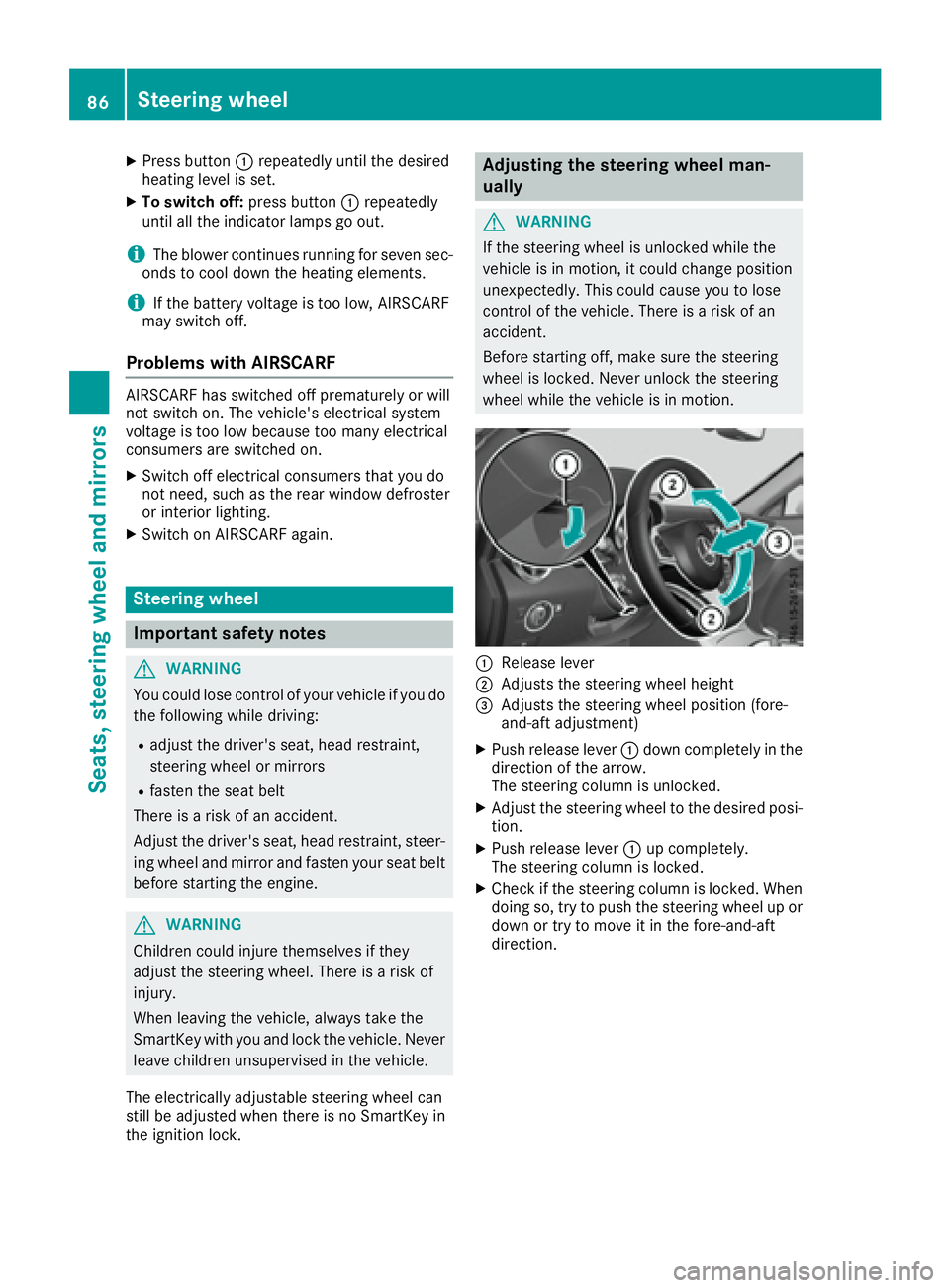
C
Release lever D
Adjust st he steerin gw heel height
Page 90 of 294
Position of the steering wheel when the
EASY-ENTRY/EXIT featur eisa ctiveThe steering wheel swings upwards when you: R
remove the SmartKey from the ignition lock R
open the driver's door with KEYLESS-GO in
position 1R
open the driver's door and the SmartKey is in
position 0 or 1 in the ignition lock
i The steering wheel only moves upwards if it
has not already reached the upper end stop.
Position of the steering wheel for driv-
ing The steering wheel is moved to the last selected
position when: R
the driver's door is closed R
you insert the SmartKey into the ignition lock
or R
you press the Start/Stop button once on vehi-
cles with KEYLESS-GO
When you close the driver's door with the igni-
tion switched on, the steering wheel is also
automatically moved to the previously set posi-
tion.
The last position of the steering wheel is stored
when you switch off the ignition or when you
store the settin gw ith the memory function
( Y
page 91).
Crash-responsive EASY-EXIT feature If the crash-responsive EASY-EXIT feature is trig-
gered in an accident, the steering column will
move upwards when the driver's door is opened.
This occurs irrespective of the position of the
SmartKey in the ignition lock. This makes it eas-
ier to exit the vehicle and rescue the occupants.
The crash-responsive EASY-EXIT feature is only
operational if the EASY-EXIT/ENTRY feature is
activated in the on-board computer
( Y
page 174). Mirrors
Rear-view mirror X
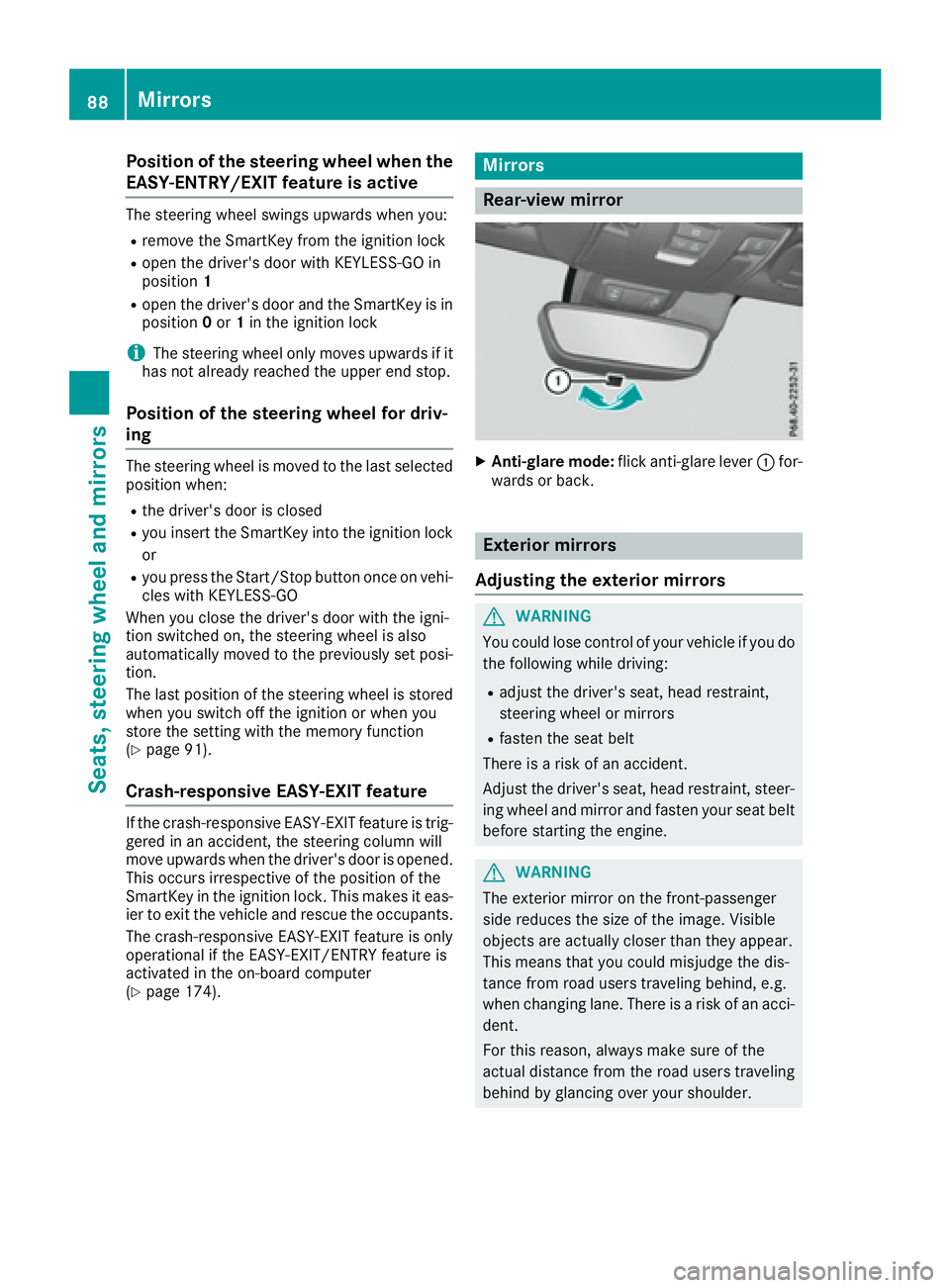
Anti-glare mode: flick anti-glare lever C for-
wards or back.
Exterior mirrors
Adjusting the exterior mirrors
G WARNING
You could lose control of your vehicle if you do
the following while driving: R
adjust the driver's seat, head restraint,
steering wheel or mirrors R
fasten the seat belt
There is ar isk of an accident.
Adjust the driver's seat, head restraint ,s teer-
ing wheel and mirror and fasten your seat belt
before startin gt he engine.
G WARNING
The exterior mirror on the front-passenger
side reduces the size of the image. Visible
object sa re actually closer than they appear.
This means that you could misjudge the dis-
tance from road users traveling behind, e.g.
when changing lane. There is ar isk of an acci-
dent.
For this reason, always make sure of the
actual distance from the road users traveling
behind by glancing over your shoulder.88
Mirrors
Seats, steering whee la nd mirrors
Page 91 of 294
X
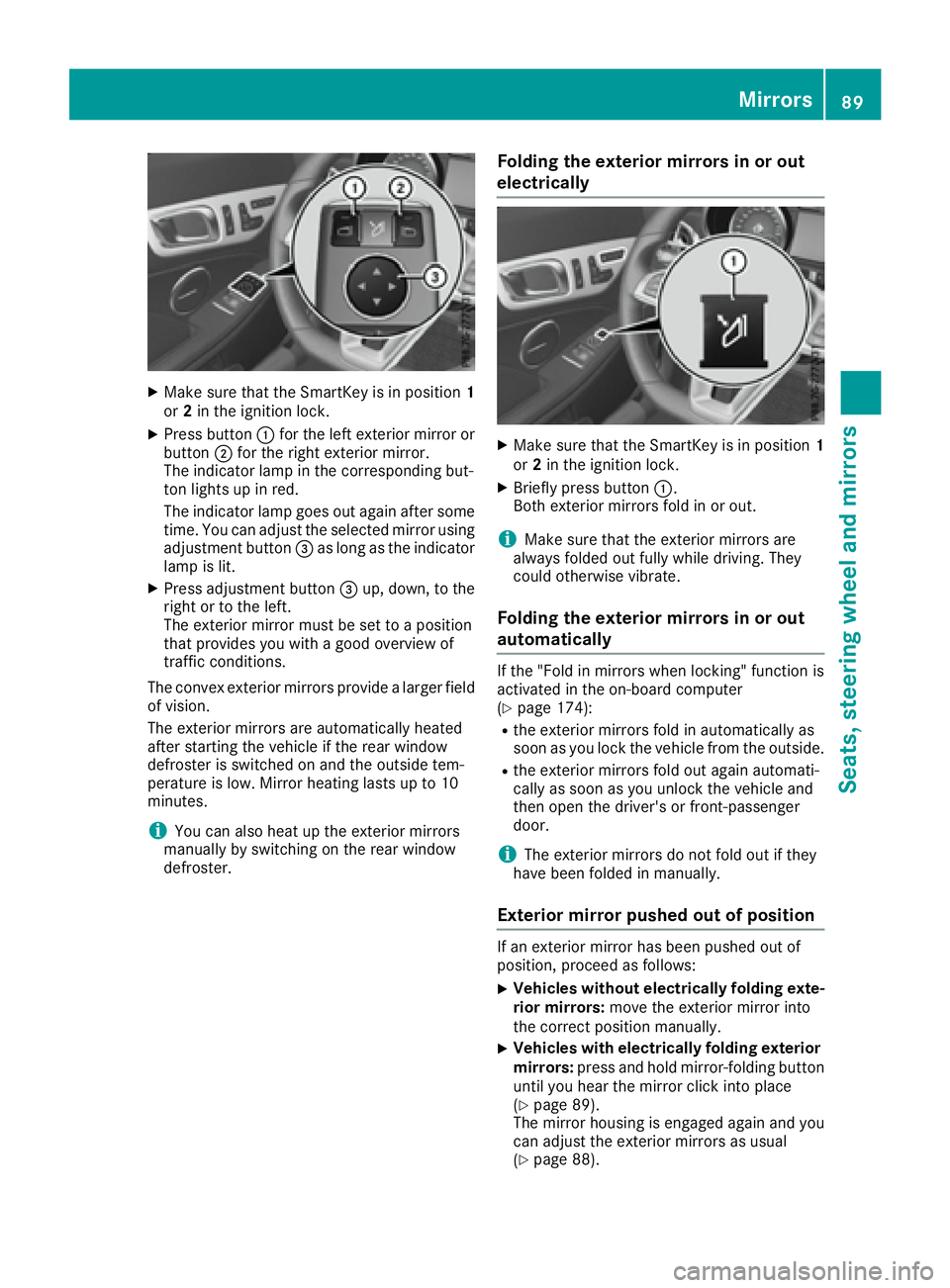
Make sure that the SmartKey is in position 1
or 2 in the ignition lock.X
Press button C for the left exterior mirror or
button D for the right exterior mirror.
The indicator lamp in the corresponding but-
ton lights up in red.
The indicator lamp goes out again after some
time. You can adjust the selected mirror using
adjustment button