low beam MERCEDES-BENZ SLC 2017 Owners Manual
[x] Cancel search | Manufacturer: MERCEDES-BENZ, Model Year: 2017, Model line: SLC, Model: MERCEDES-BENZ SLC 2017Pages: 294, PDF Size: 9.12 MB
Page 5 of 294
1, 2, 3. ..12 Vs ocket
see Sockets
A ABS (Anti-lock Braking System)
Display message ............................ 179
Function/notes ................................ 55
Important safety notes .................... 55
Warnin gl amp ................................ .2 04
Accident
Automatic measure sa fter an acci-
dent ................................................. 51
Activatin gm edia mode
General notes ................................ 216
Activating/deactivating cooling
with air dehumidification ................. 107
Active Brake Assist
Activating or deactivating .............. 171
Display message ............................ 184
Function/notes ................................ 56
Active light function ............................ 95
ADAPTIVE BRAKE ................................. 61
Adaptive Brake Assist
Function/notes ................................ 57
Adaptive Dampin gS ystem
Function/notes ............................ .1 49
Adaptive Highbeam Assist
Display message ............................ 189
Function/notes ................................ 95
Switching on/off .............................. 96
Additives (engine oil) ........................ 287
Address book
see also Digita lO perator's Man-
ua l. ................................................ .2 11
Adjustin gt he volume
Audi o20. ....................................... 212
COMAND ....................................... 212
Ai rb ags
Deployment ..................................... 48
Display message ............................ 187
Front ai rb ag (driver, front
passenger ). ...................................... 43
Head bag ......................................... 44
Important safety notes .................... 42
Introduction ..................................... 42 Knee bag .......................................... 43
Occupant Classification System
(OCS) ............................................... 44
PASSENGER AIR BAG indicator
lamps ............................................... 38
Si de
impact ai rb ag .......................... 43
Ai rv ents
Important safety notes .................. 112
Setting .......................................... .1 12
Setting the blower output of the
AIRSCAR Fv ents ............................ .1 13
Setting the center ai rv ents ........... 112
Setting the sid ea ir vents .............. .1 12
Switching AIRSCAR Fo n/off ............ 85
Air-conditionin gs ystem
see Climate control
AIRGUIDE ............................................. 79
AIRSCARF
Problem (malfunction) ..................... 86
Switching on/off .............................. 85
AIRSCARF vents
Setting the blower output .............. 113
Alarm
ATA (Anti-Theft Alarm system) ......... 61
Switching off (ATA) .......................... 61
Switching the function on/off
(ATA) ................................................ 61
Alarm system
see ATA (Anti-Theft Alarm system)
Ambient lighting
Setting the brightness (on-board
computer) ...................................... 172
Setting the color (on-board com-
puter) ............................................. 173
AMG menu (on-board computer) ..... 175
AMG sports suspension (SL C4 3
AMG)
Operation/notes ............................ 149
Anti-loc kb raking system
see ABS (Anti-lock Braking System)
Anti-Theft Alarm system
see ATA (Anti-Theft Alarm system)
Ashtray ............................................... 220
Assistanc ed isplay (on-board com-
puter) ................................................. .1 71
Assistanc em enu (on-board com-
puter) ................................................. .1 70Index 3
Page 7 of 294
Notes ............................................ .2 87
Brake force distribution
see EBD (electronic brake force
distribution)
Brake lamps
Display message ............................ 189
Brakes
ABS ................................................. .5 5
Adaptive Brake Assist ...................... 57
BAS .................................................. 55
Brake fluid (notes) ......................... 287
Display message ............................ 179
EBD .................................................. 61
High-performance brake system .... 137
Important safety note s. ................. 136
Maintenance .................................. 137
Parking brake ................................ 132
Riding tip s. ..................................... 136
Warning lamp ................................. 204
Breakdown
Where will If ind...? ........................ 241
see Fla tt ire
see Towing away
Brightness contro l( in strument
cluste rl ig hting) ................................... 31
Bulbs
see Replacing bulbs
C
California
Important notice for retail cus-
tomers and lessees .......................... 23
Calling up am alfunction
see Displa ym essages
Car
see Vehicle
Care
Ca rw as h. ....................................... 236
Exhaus tp ip e. ................................. 240
Exterior lights ................................ 239
Matte finish ................................... 238
Note s. ............................................ 236
Paint .............................................. 237
Power washe r. ............................... 237
Rear vie wc amera .......................... 240
Sensors ......................................... 240
Washing by hand ........................... 237 Wheel s. .......................................... 238
Window s. ....................................... 239
Wipe rb lade s. ................................. 239
CD
see also Digital Operator's Man-
ua l. ................................................. 211
CD player (on-board computer) ........ 169
Cente rc on sole
Lower section .................................. 34
Upper section .................................. 33
Central locking
Automati cl oc king (on-board com-
puter) ............................................. 173
Locking/unlocking (SmartKey ). ....... 63
Changin gb ulbs
High-beam headlamp s. .................... 98
Low-bea mh eadlamp s. ..................... 98
Sid em arker lamps (rear) ................. 99
Child
Restraint system .............................. 53
Child seat
Forward-facing restraint system ...... 54
On the front-passenger sea t. ........... 53
Rearward-facing restraint system .... 54
Children
Specia ls ea tb el tr etractor ............... 52
Cigarette lighter ................................ 221
Cleaning
Mirror turn signal ........................... 239
Climate control
Air-conditioning system ................. 103
Automati cc limate control (dual-
zone) .............................................. 105
Controlling automaticall y. .............. 108
Cooling with ai rd ehumidifica tion .. 107
Defrosting the window s. ................ 110
Defrosting the windshield .............. 109
Genera ln otes ................................ 102
Indicato rl am p. ............................... 108
Information abou tu si ng auto-
mati cc limate control ..................... 106
Ma xi mu mc ooling .......................... 110
Note sonu si ng the air-condition-
ing system ..................................... 104
Overview of systems ...................... 102
Problem with the rea rw in dow
defroster ........................................ 111 Index 5
Page 13 of 294
Function/information .................... 160
Lap time (RACETIMER) ...................... 176
License plate lamp (displa ym es-
sage) ................................................... 189
Light function, active
Displa ym essag e. ........................... 189
Light senso r( display message) ....... 189
Lights
Activating/deactivating the inte-
rio rl ig hting delaye ds wi tch-off ....... 173
Active light function ......................... 95
Automati ch eadlamp mod e. ............. 93
Cornering light function ................... 95
Hazard warning lamps ..................... 95
Hig hb ea mf lashe r. ........................... 94
High-beam headlamp s. .................... 94
Light switch ..................................... 93
Low-bea mh eadlamp s. ..................... 94
Parking lamps .................................. 94
Rear fog lamp .................................. 94
Setting the brightness of the
ambient lighting (on-board com-
puter) ............................................. 172
Setting the color of the ambient
lighting (on-board computer) ......... 173
Standing lamps ................................ 94
Switching the daytime running
lamps on/of f( on -board com-
puter) ............................................. 172
Switching the exterio rl ig hting
delaye ds wi tch-off on/of f( on -
board computer) ............................ 173
Switching the surround lighting
on/of f( on -board computer) .......... 173
Turn signal s. .................................... 94
see Interior lighting
see Replacing bulbs
Locking
see Central locking
Locking (doors)
Automati c. ....................................... 69
Emergency locking ........................... 70
From inside (central locking but-
ton) .................................................. 69
Locking centrally
see Central locking
Locking verification signal (on-
board computer) ............................... 174 Low-beam headlamps
Changing bulb s. ............................... 98
Displa ym essage ............................ 189
Switching on/of f. ............................. 94
Luggag ec over
see Trunk partiti on
L umb
ar support ................................... 84
M M+S tires ............................................ 257
MAGIC SK YC ON TROL ......................... 80
Malfunctio nm essage
see Displa ym essages
Matte finis h( clea ning instruc-
tions) .................................................. 238
mbrace
Call priority .................................... 225
Displa ym essage ............................ 184
Emergency cal l. ............................. 222
Genera ln otes ................................ 221
MB info cal lb ut ton ........................ 224
Remote fault diagnosi s. ................. 225
Roadside Assistance button .......... 223
Self-test ......................................... 222
System .......................................... 222
Mechanical key
Function/note s. ............................... 65
Genera ln otes .................................. 65
Inserting .......................................... 65
Locking vehicl e. ............................... 70
Removing ......................................... 65
Unlocking the driver' sd oo r. ............. 70
Medi aI nt erface
see Separate operating instructions
Memory card (audio) ......................... 169
Memory function ................................. 91
Mercedes-Benz Intelligent Drive
Rear vie wc amera .......................... 154
Messag em emory (on-board com-
puter) .................................................. 178
Messages
see Displa ym essages
Mirrors
see Exterior mirrors
see Rear-vie wm irrorIndex 11
Page 95 of 294
Exterio rl ighting
General notes For reason sofs afety, Mercedes-Ben zr ecom-
mends that you driv ew ith th el ight ss witched on
even durin gt he daytime. In som ec ountries,
operatio noft he headlamps varies due to legal
requirement sa nd self-impose do bligations.
Settin gt he exterio rl ighting
Settin go ptionsExterior lighting can be set using: R
th el ight switchR
th ec ombinatio ns witch ( Y
page 94)R
th eo n- board compute r( Y
page 172)
Light switch
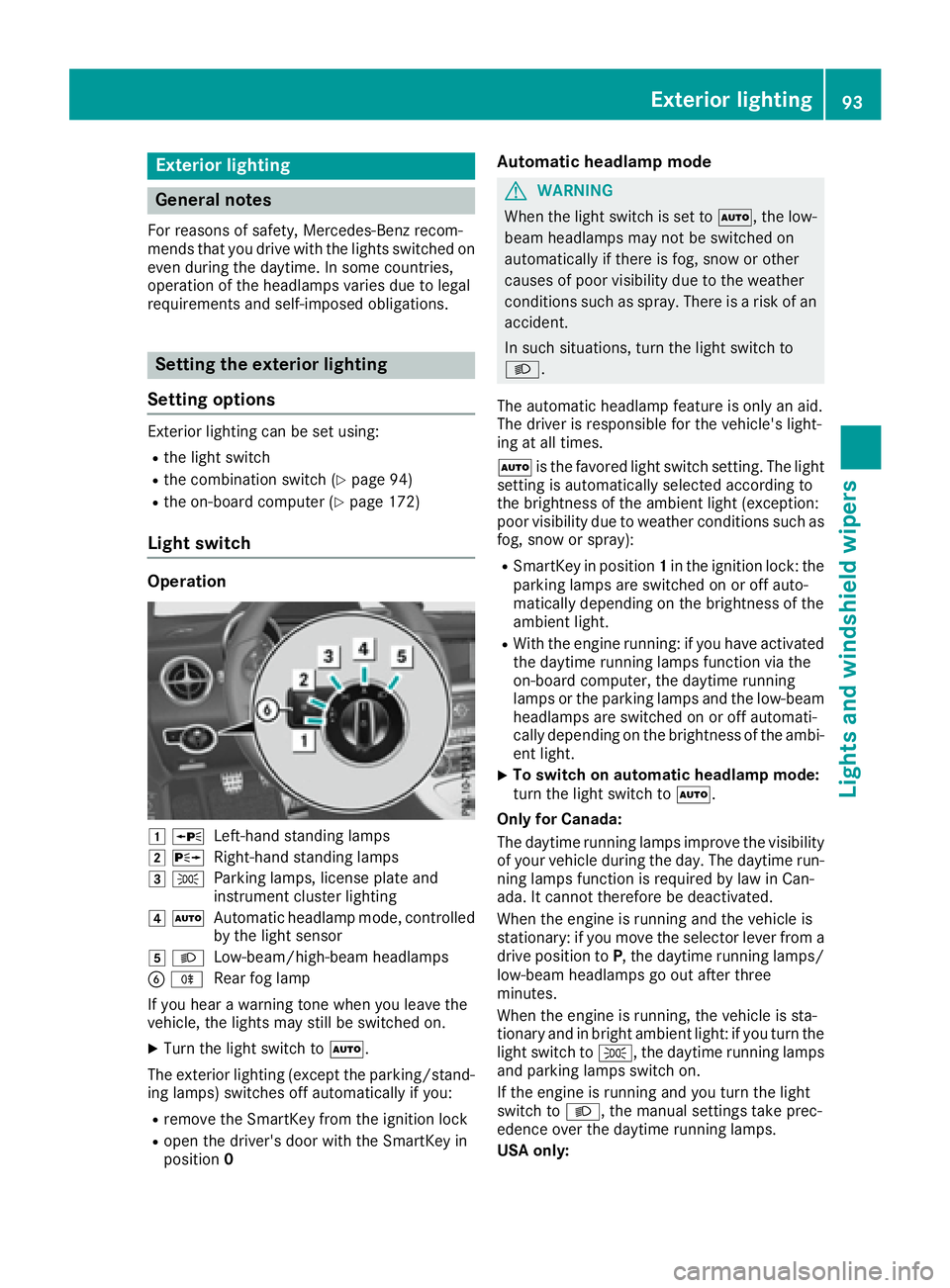
Operation
G c
Left-han ds ta nding lampsH d
Right-hand standing lampsI `
Parking lamps ,l icens ep lat ea nd
instrumen tc luste rl ightingJ X
Automatic headlam pm ode, controlled
by th el ight sensor
K X
Low-beam/high-beam headlamps
Page 96 of 294
The daytime runnin gl amps improve the visibility
of your vehicle during the day. To do this, the
daytime runnin gl amps function must be
switched on using the on-board computer
( Y
page 172).
If the engine is runnin ga nd you turn the light
switch to ` or X ,t he manual settings
take precedenc eo ver the daytime running
lamps.
Low-beam headlamps
G WARNING
When the light switch is set to X ,t he low-
beam headlamps may not be switched on
automatically if there is fog, snow or other
causes of poor visibility due to the weather
conditions such as spray. There is ar isk of an
accident.
In such situations, turn the light switch to
X .
Even if the light sensor does not detect that it is
dark, the parking lamps and low-beam head-
lamps switch on when the ignition is switched on
and the light switch is set to the X position.
This is ap articularly useful function in the event
of rain and fog. X
To switch on the low-beam headlamps:
turn the SmartKey in the ignition lock to posi-
tion 2 or start the engine.X
Turn the light switch to X .
The green X indicator lamp in the instru-
ment cluster lights up.
Rear fog lamp
The rear fog lamp improves visibility of your
vehicle for the traffic behind in the event of thick
fog. Please take not eoft he country-specific
regulations for the use of rear fog lamps. X
To switch on the rear fog lamps: turn the
SmartKey to position 2 in the ignition lock or
start the engine. X
Turn the light switch to X or X .X
Press the ^ button.
The yellow ^ indicator lamp in the instru-
ment cluster lights up. X
To switch off the rear fog lamp: press the
^ button.
The yellow ^ indicator lamp in the instru-
ment cluster goes out. Parking lamps
! If the battery charge is very low, the parking
lamps or standin gl amps are automatically
switched off to enable the next engine start.
Always park your vehicle safely and suffi-
ciently lit according to legal standards. Avoid
using the parking lamps ` over ap eriod of
several hours. If possible, switch on the right-
hand d or left-hand c standin gl amp.X
To switch on: turn the light switch to ` .
The green ` indicator lamp in the instru-
ment cluster lights up.
Standing lamps Switching on the standin gl amps ensures the
corresponding side of the vehicle is illuminated. X
To switch on the standing lamps: the
SmartKey is not in the ignition lock or it is in
position 0 . X
Turn the light switch to c (left-han ds ide of
the vehicle) or d (right-hand side of the
vehicle).
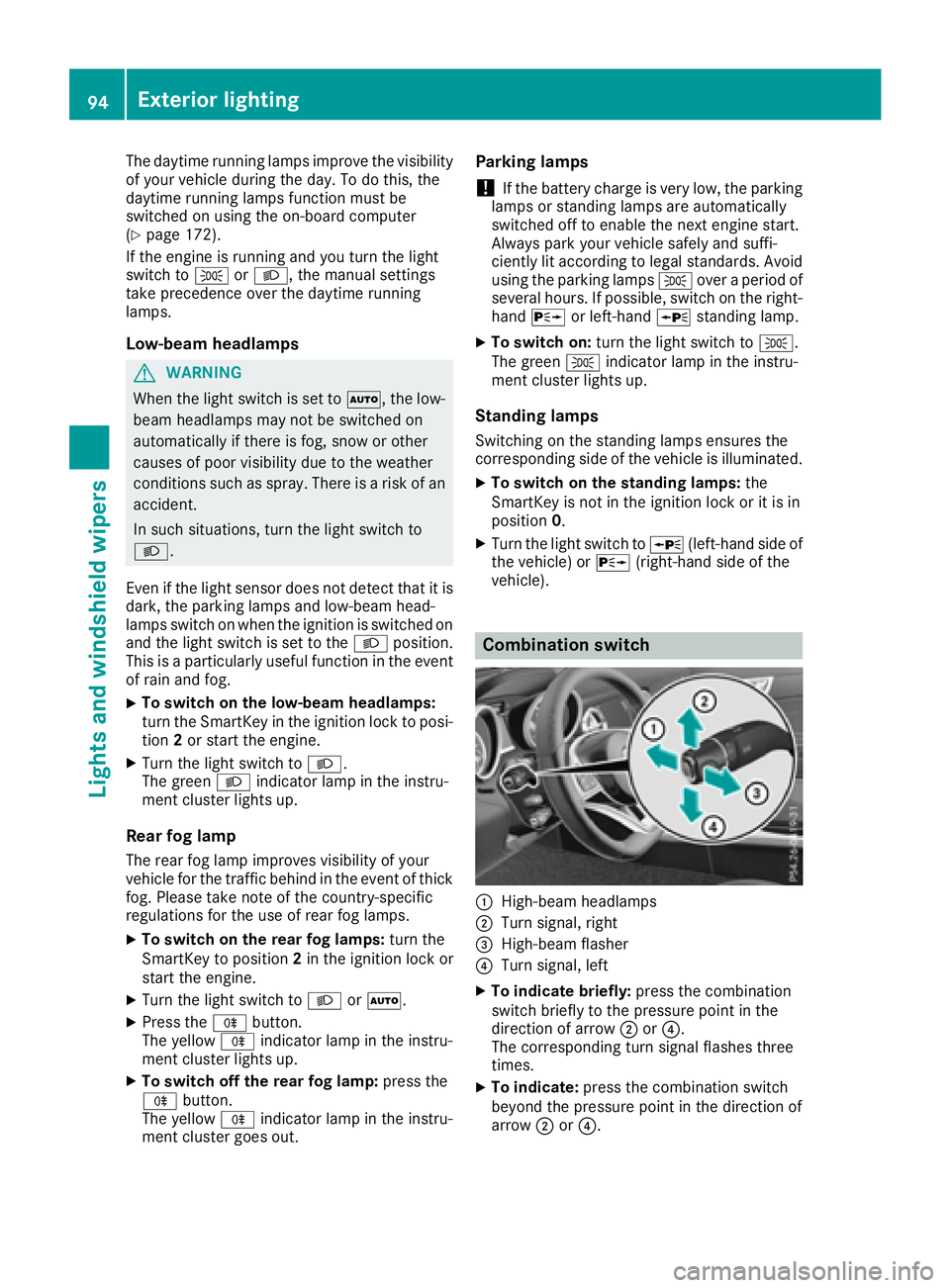
Combination switch
C
High-beam headlamps D
Turn signal, right
Page 97 of 294
X
To switc hont he high-beam headlamps:
turn the light switch to X or X .X
Press the combinatio ns wi tch beyond the
pressure point in the direction of arrow C .
In the X position, the high-bea mh ead-
lamps are onl ys wi tched on when it is dark and
the engine is running.
The blue W indicator lamp in the instru-
ment cluster lights up when the high-beam
headlamps are switched on. X
To switc ho ff the high-beam headlamps:
move the combinatio ns wi tch back to its nor-
ma lp osition.
The blue W indicator lamp in the instru-
ment cluster goe so ut .
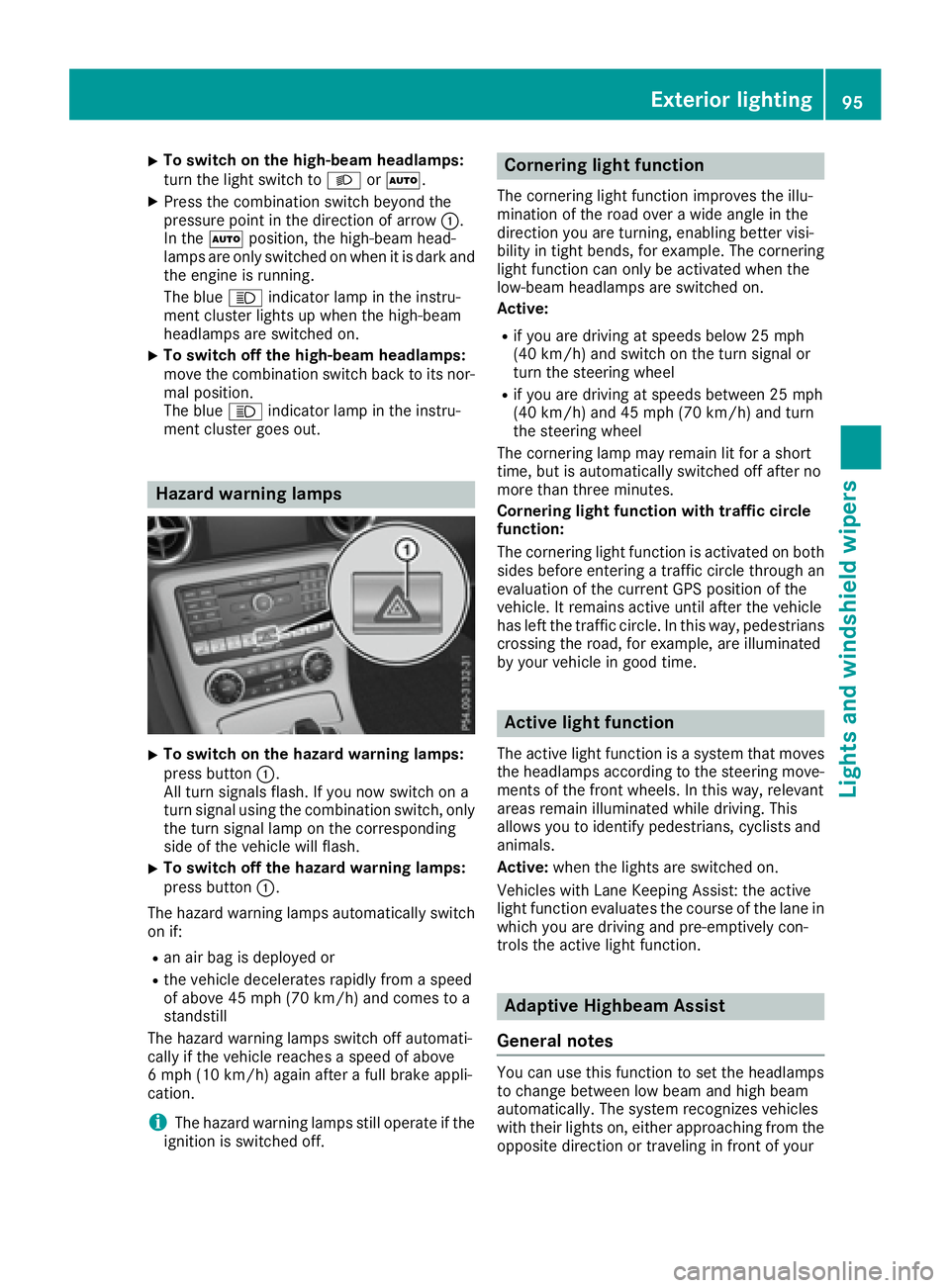
Hazard warning lamps
X
To switc hont he hazard warning lamps:
press button C .
All turn signals flash. If yo un ow switch on a
turn signa lu si ng the combinatio ns wi tch ,o nly
the turn signa ll am pont he corresponding
side of the vehicl ew il lf lash.X
To switc ho ff the hazard warning lamps:
press button C .
The hazard warning lamps automaticall ys wi tch
on if: R
an ai rb ag is deployed orR
the vehicl ed ec elerates rapidly from as peed
of above 45 mph (70 km/h )a nd come stoa
standstill
The hazard warning lamps switch off automati-
cally if the vehicl er eache sas peed of above
6m ph (10 km/h )a gain afte raf ul lb rake appli-
cation.
i The hazard warning lamps stil lo pe rate if the
ignition is switched off. Cornerin gl ig ht functionThe cornering light functio ni mprove st he illu-
minatio noft he roa do ve raw id ea ngle in the
direction yo ua re turning, enabling better visi-
bility in tight bends, for example. The cornering
light functio nc an onl ybea ctivate dw he nt he
low-bea mh eadlamps are switched on.
Active: R
if yo ua re driving at speed sb elow 25 mph
(40 km/h )a nd switch on the turn signa lo r
turn the steering wheel R
if yo ua re driving at speed sb et ween 25 mph
(40 km/h )a nd 45 mph (70 km/h )a nd turn
the steering wheel
The cornering lamp ma yr emai nl it for as hort
time ,b ut is automaticall ys wi tched off afte rn o
more tha nt hre em inutes.
Cornerin gl ig ht functio nw it ht raffi cc ir cle
function:
The cornering light functio ni sa ctivate donb ot h
side sb ef ore entering at raffic circle throug ha n
evaluation of the current GP Sp osition of the
vehicle. It remains active unti la fte rt he vehicle
ha sl ef tt he traffic circle .Int hi sw ay ,p edes trians
crossing the road, for example, are illuminated
by your vehicl eing oo dt ime.
Active light function The active light functio ni sas ys tem tha tm oves
the headlamps according to the steering move-
ments of the front wheels .Int hi sw ay ,r elevant
areas remai ni llum inated whil ed riving .T his
allows yo utoi de ntify pedestrians ,c yclists and
animals.
Active: when the lights are switched on.
Vehicles with Lane Keeping Assist: the active
light functio ne valuate st he course of the lane in
which yo ua re driving and pre-emptively con-
trol st he active light function.
Adaptiv eH ighbeam Assist
General notes
Yo uc an us et hi sf unctio ntos et the headlamps
to change between lo wb ea ma nd high beam
automatically. The system recognizes vehicles
with thei rl ig hts on, either approaching from the
opposite direction or traveling in front of yourExterior lighting 95
Lights and windshield wiper s Z
Page 98 of 294
vehicle, and consequently switches the head-
lamp sf rom high bea mtol ow beam.
The system automatically adapts the low-beam
headlamp range depending on the distance to
the other vehicle. Once the system no longer
detects any other vehicles, it reactivates the
high-beam headlamps.
The system' so ptical sensor is located behind
the windshiel dn ear the overhea dc ontrol panel.
Important safety notes
G WARNING
Adaptive Highbeam Assist does not recognize
road users: R
who have no lights, e.g. pedestrians R
who have poor lighting, e.g. cyclists R
whos el ighting is blocked ,e .g. by ab arrier
On very rare occasions, Adaptive Highbeam
Assist may fail to recognize other road users
that have lights, or may recognize them too
late. In this, or in similar situations, the auto-
matic high-beam headlamp sw il ln ot be deac-
tivated or wil lbea ctivated regardless. There is
ar isk of an accident.
Always carefully observe the traffic conditions
and switch off the high-beam headlamp si n
good time.
Adaptive Highbeam Assist cannot take into
account road ,w eather or traffic conditions.
Adaptive Highbeam Assist is only an aid .Y ou are
responsible for adjusting the vehicle's lighting
to the prevailing light, visibility and traffic con-
ditions.
In particular, the detection of obstacles can be
restricted if there is: R
poor visibility, e.g. due to fog, heavy rain or
snow R
dirt on the sensors or the sensors are
obscured Switching Adaptive Highbeam Assist
on/off X
To switch on: turn the light switch to X .X
Press the combination switch beyond the
pressure point in the directio nofa rrow C .
The
Page 100 of 294
Vehicles with LE Dh eadlampsThe front and rea rl ig ht cluster sofy ou rv ehicle
are equipped with LED light bulbs. Do not
replace the bulb sy ours elf. Contact aq uali fied
specialist workshop which ha st he necessary
specialist knowledge and tool stoc arry ou tt he
work required.
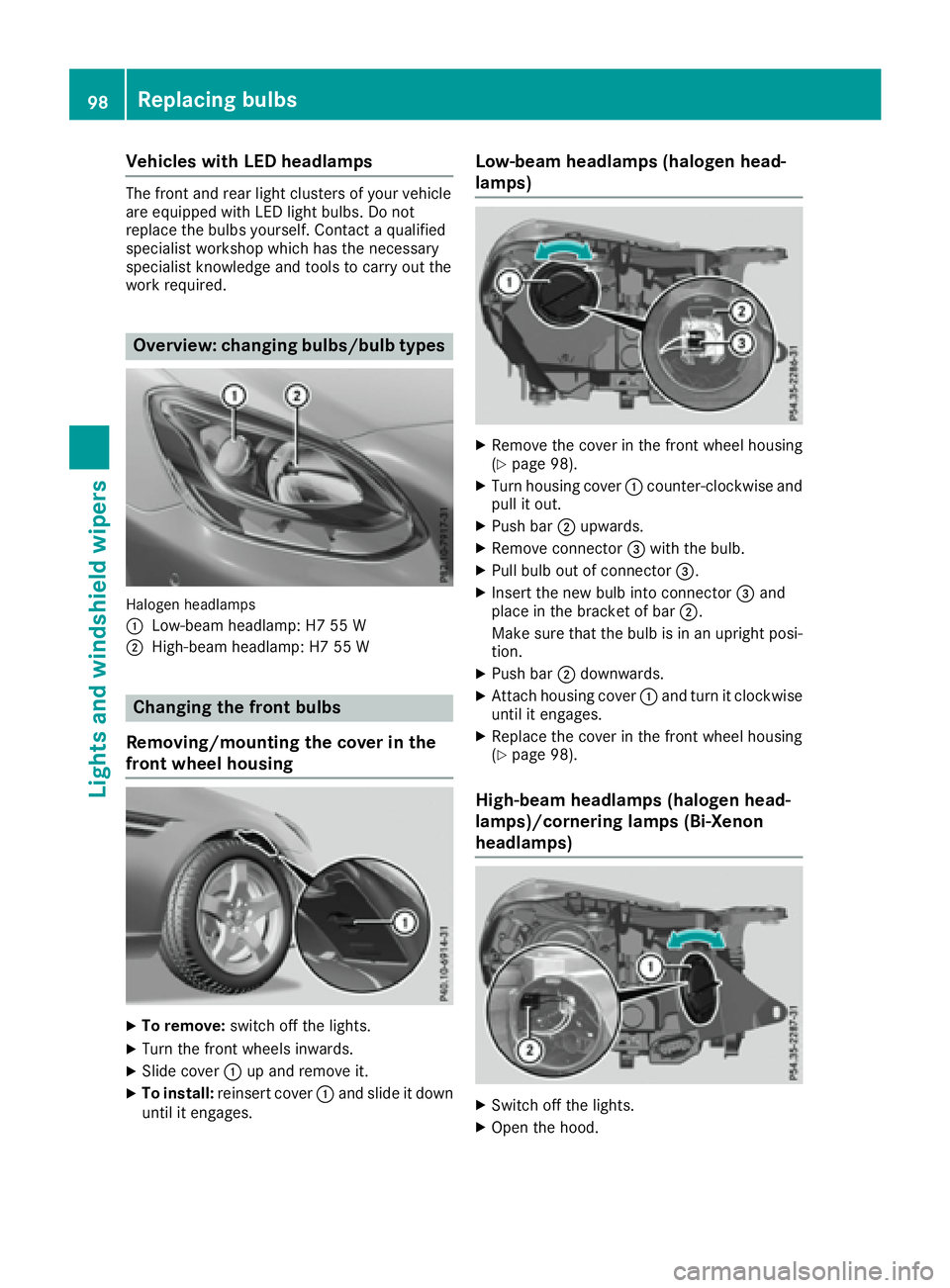
Overview: changin gb ulbs/bulb types
Haloge nh eadlamps
C
Low-beam headlamp :H755WD
High-beam headlamp :H755W
Changin gt he fron tb ulbs
Removing/mounting the cove ri nt he
fron tw heel housing
X
To remove: switch off the lights.X
Turn the front wheels inwards. X
Slide cover C up and remove it.X
To install: reinser tc over C and slid eitd ow n
unti lite ngages. Low-beam headlamps (haloge nh ead-
lamps) X
Remove the cove rint he front whee lh ousing
( Y
page 98). X
Turn housing cover C counter-clockwis ea nd
pull it out. X
Push bar D upwards. X
Remove connector
Page 175 of 294
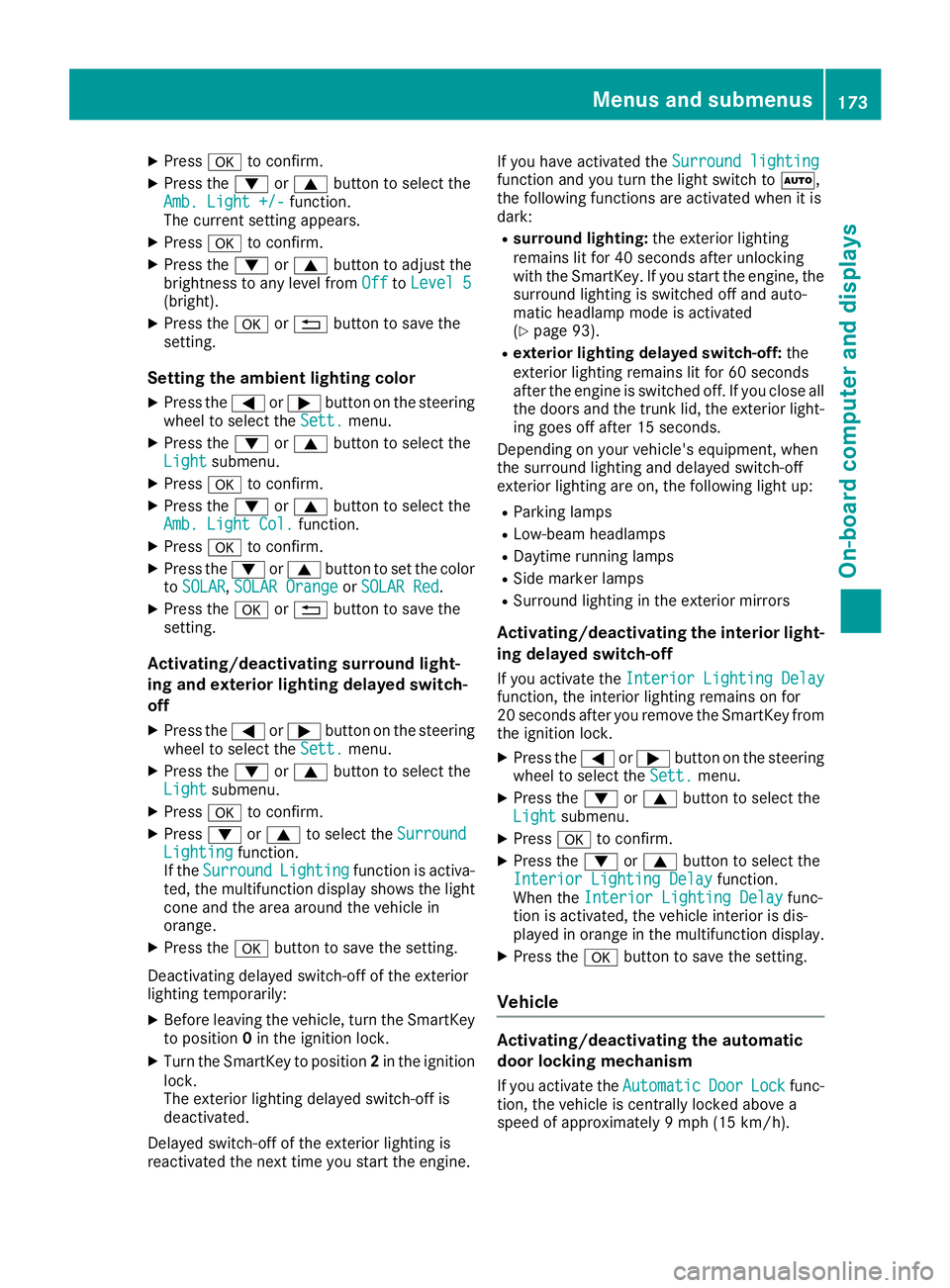
X
Press v to confirm.X
Press the d or c button to select the
Amb. Light +/- function.
The curren ts etting appears.X
Press v to confirm.X
Press the d or c button to adjust the
brightness to any level from Off to Level 5
(bright). X
Press the v or 8 button to save the
setting.
Setting the ambient lighting color X
Press the Y or e button on the steering
wheel to select the Sett. menu.X
Press the d or c button to select the
Light submenu.X
Press v to confirm.X
Press the d or c button to select the
Amb. Light Col. function.X
Press v to confirm.X
Press the d or c button to set the color
to SOLAR , SOLAR Orange or SOLAR Red .X
Press the v or 8 button to save the
setting.
Activating/deactivating surround light-
ing and exterior lighting delayed switch-
off X
Press the Y or e button on the steering
wheel to select the Sett. menu.X
Press the d or c button to select the
Light submenu.X
Press v to confirm.X
Press d or c to select the Surround
Lighting function.
If the Surround Lighting function is activa-
ted, the multifunction display shows the light
cone and the area around the vehicle in
orange. X
Press the v button to save the setting.
Deactivating delayed switch-off of the exterior
lighting temporarily: X
Before leaving the vehicle, turn the SmartKey
to position 0 in the ignition lock.X
Turn the SmartKey to position 2 in the ignition
lock.
The exterior lighting delayed switch-off is
deactivated.
Delayed switch-off of the exterior lighting is
reactivated the next time you start the engine. If you have activated the Surround lighting
function and you turn the light switch to X ,
the following functions are activated when it is
dark: R
surround lighting: the exterior lighting
remains lit for 40 seconds after unlocking
with the SmartKey. If you start the engine, the
surround lighting is switched off and auto-
matic headlamp mode is activated
( Y
page 93). R
exterior lighting delayed switch-off: the
exterior lighting remains lit for 60 seconds
after the engine is switched off. If you close all
the doors and the trunk lid, the exterior light-
ing goes off after 15 seconds.
Dependin gony our vehicle's equipment, when
the surround lighting and delayed switch-off
exterior lighting are on, the following light up: R
Parking lamps R
Low-beam headlamps R
Daytime runnin gl amps R
Side marker lamps R
Surround lighting in the exterior mirrors
Activating/deactivating the interior light-
ing delayed switch-off If you activat et he Interior Lighting Delay
function, the interior lighting remains on for
20 seconds after you remove the SmartKey from
the ignition lock. X
Press the Y or e button on the steering
wheel to select the Sett. menu.X
Press the d or c button to select the
Light submenu. X
Press v to confirm. X
Press the d or c button to select the
Interior Lighting Delay function.
When the Interior Lighting Delay func-
tion is activated, the vehicle interior is dis-
played in orange in the multifunction display. X
Press the v button to save the setting.
Vehicle
Activating/deactivating the automatic
door locking mechanism
If you activat et he Automatic Door Lock func-
tion, the vehicle is centrally locked above a
speed of approximately 9m ph (15 km/h).Menus and submenus 173
On-board computer and displays Z
Page 191 of 294
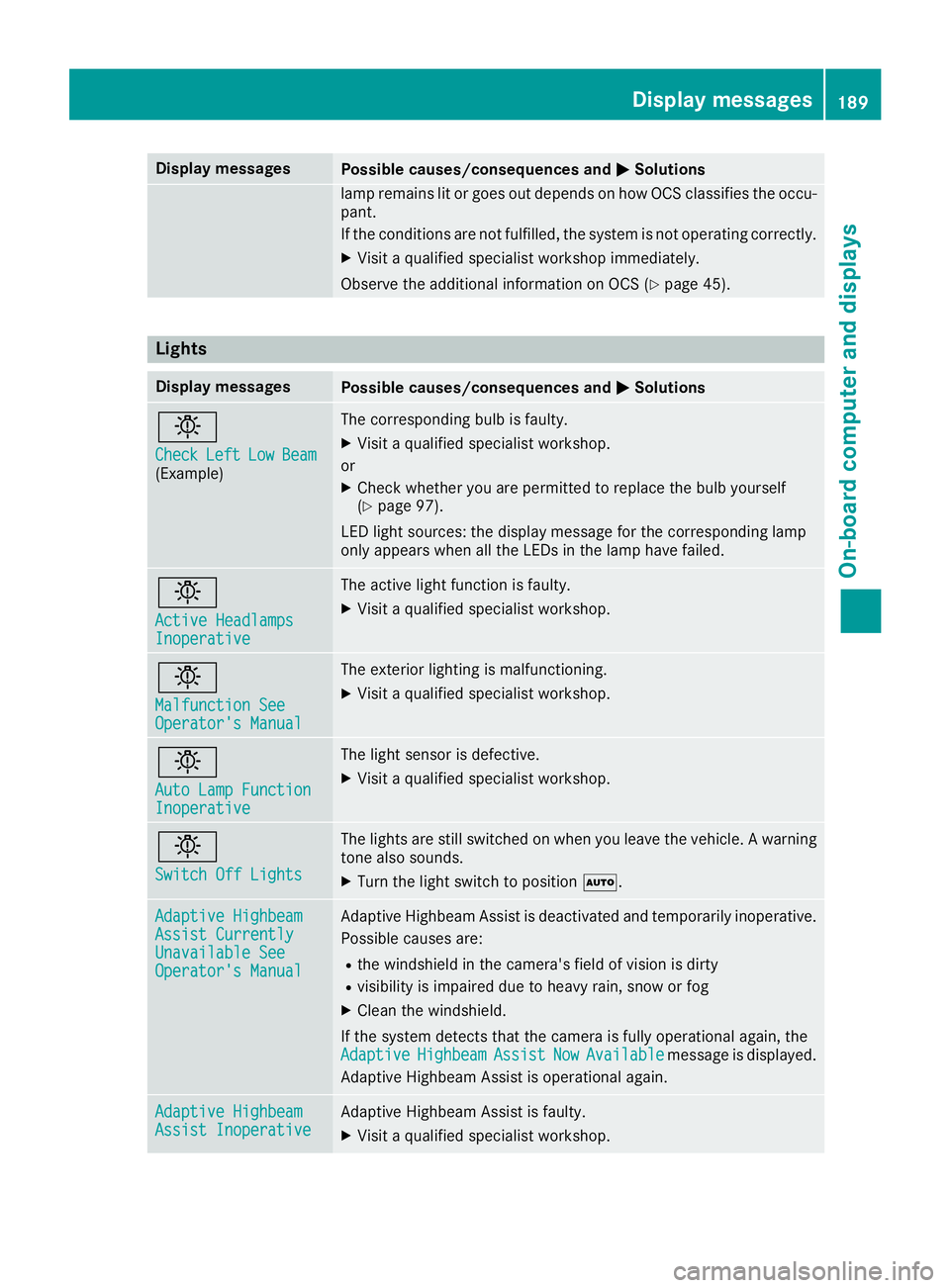
Display messages
Possible causes/consequences and P Solutions
lamp remain sl it or goe so ut depend sonh ow OCS classifies th eo cc u-
pant.
If th ec onditi on sa re no tf ulfilled ,t he system is no to perating correctly.X
Visit aq ualified specialist workshop immediately.
Observ et he additional information on OCS ( Y
page 45).
Lights Display messages
Possible causes/consequences and P Solutions
I Check Lef t Low Bea m
(Example) The correspondin gb ulb is faulty.X
Visit aq ualified specialist workshop .
or X
Chec kw hether you are permitte dtor eplace th eb ulb yourself
( Y
page 97).
LE Dl igh ts ources: th ed isplay message for th ec orre spondin gl amp
only appear sw hen all th eL ED sint he lamp hav ef ailed.
I Active Headlamps
Inoperative The active ligh tf unction is faulty.X
Visit aq ualified specialist workshop .
I Malfunction See
Operator' sM anual The exterio rl ighting is malfunctioning .X
Visit aq ualified specialist workshop .
I Aut oL am pF unction
Inoperative The ligh ts ensor is defective. X
Visit aq ualified specialist workshop .
I Switch Off Lights The lights are still switched on when you leav et he vehicle. Aw arning
tone also sounds. X
Turn th el igh ts witch to position X .
Adaptive Highbeam
Assist Currently
Unavailable See
Operator' sM anual Adaptive Highbea mA ss is tisd eactivated and temporarily inoperative.
Possibl ec auses are: R
th ew indshield in th ec amera' sf ield of vision is dirtyR
visibilit yisi mpaire dd ue to heav yr ain ,s no worf ogX
Clean th ew indshield.
If th es ystem detects that th ec amera is full yo perational again ,t he
Adaptive Highbeam Assist Now Available message is displayed.
Adaptive Highbea mA ss is tiso perational again .
Adaptive Highbeam
Assist Inoperative Adaptive Highbea mA ss is tisf aulty.X
Visit aq ualified specialist workshop .Display messages 18 9
On-boar dc omputer an dd isplays Z