change time MERCEDES-BENZ SLC 2018 User Guide
[x] Cancel search | Manufacturer: MERCEDES-BENZ, Model Year: 2018, Model line: SLC, Model: MERCEDES-BENZ SLC 2018Pages: 298, PDF Size: 4.54 MB
Page 147 of 298
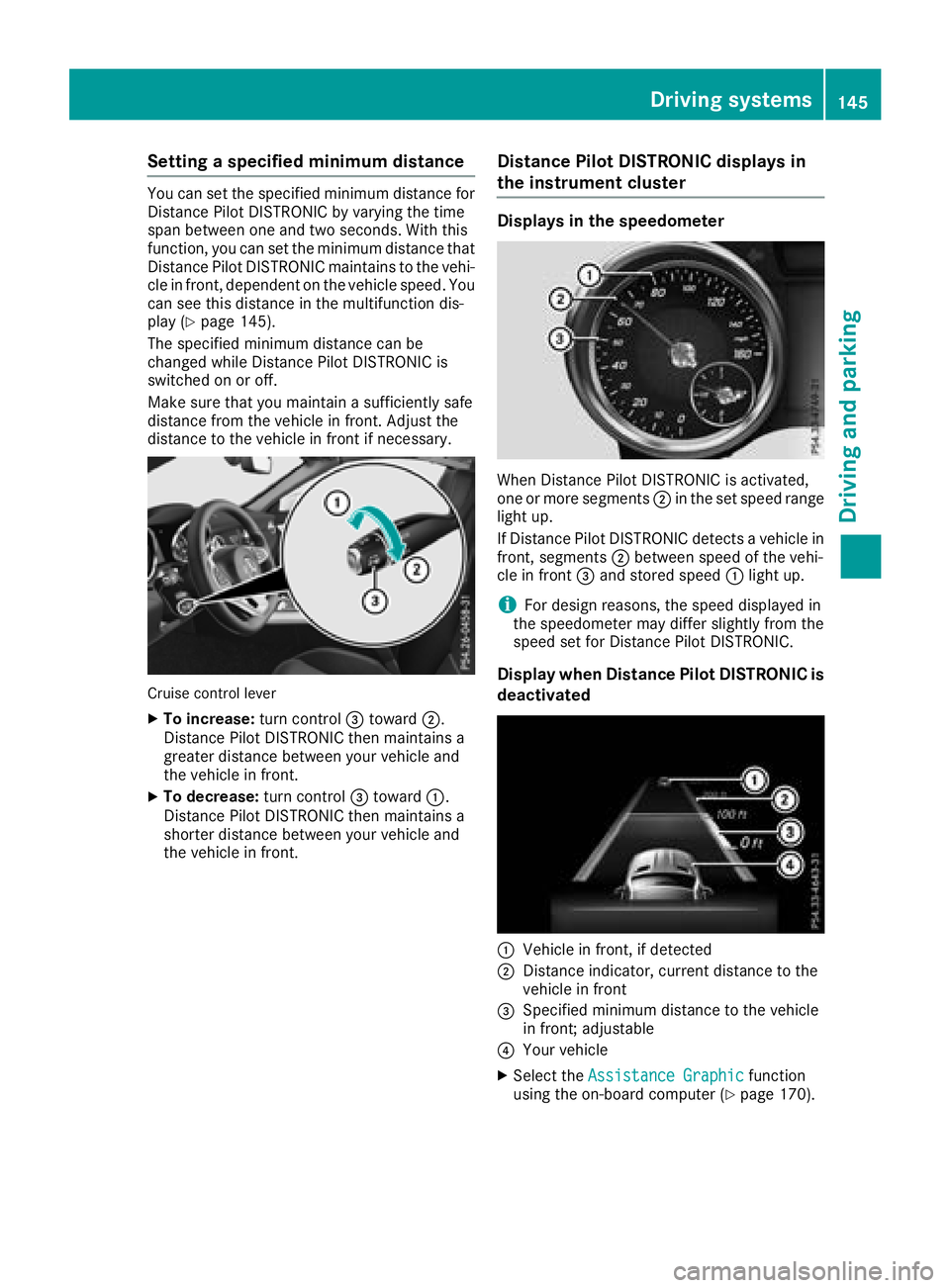
Setting as pecified minimum distanceYou can set the specified minimum distance for
Distanc eP ilot DISTRONIC by varying the time
span between one and two seconds. With this
function, you can set the minimum distance that
Distanc eP ilot DISTRONIC maintains to the vehi-
cle in front ,d ependent on the vehicle speed. You
can see this distance in the multifunction dis-
play ( Y
page 145).
The specified minimum distance can be
changed while Distanc eP ilot DISTRONIC is
switched on or off.
Make sure that you maintain as ufficiently safe
distance from the vehicle in front .A djust the
distance to the vehicle in front if necessary.
Cruise control lever X
To increase: turn control
Page 164 of 298
Standard If Standard is selected, no warning vibration
occurs if: R
you switch on the turn signals. In this event,
the warnings are suppressed for ac ertain
period of time R
ad riving safety system intervenes, such as
ABS ,B AS or ESP ®
Adaptive When Adaptive is selected, no warning vibra-
tion occurs if: R
you switch on the turn signals. In this event,
the warnings are suppressed for ac ertain
period of time R
ad riving safety system intervenes, e.g. ABS,
BAS or ESP ®
R
you accelerate hard, e.g. kickdown R
you brake hard R
you steer actively, e.g. swerve to avoid an
obstacle or change lanes quickly R
you cut the corner on as harp bend
In order that you are warned only when neces-
sary and in good time if you cross the lane mark-
ing, the system recognizes certain conditions
and warns you accordingly.
The warning vibration occurs earlier if: R
you approach the outer lane marking on a
bend R
the road has very wide lanes, e.g. af reewayR
the system recognizes solid lane markings
The warning vibration occurs later if: R
the road has narrow lanes R
you cut the corner on ab end162
Driving systems
Driving and parking
Page 174 of 298
Settings menu
Introduction Depending on the equipment installed in the
vehicle, in the Sett. menu you have the follow-
ing options: R
Changing the instrumen tc luster settings
( Y
page 172)R
Changing the light settings ( Y
page 172)R
Changing the vehicle settings ( Y
page 173)R
Changing the convenience settings
( Y
page 174)R
Restoring the factory settings ( Y
page 175)
Instrument cluster Selecting the distance unit The Display Unit Speed-/Odometer: func-
tion allow sy ou to choose whether certain dis-
play sa ppear in kilometers or miles in the mul-
tifunction display. X
Press the Y or e button on the steering
wheel to select the Sett. menu.X
Press the d or c button to select the
Instrument Cluster submenu.X
Press v to confirm.X
Press the d or c button to select the
Display Unit Speed-/Odometer: func-
tion.
The current setting km or miles appears.X
Press the v button to save the setting.
The selected unit of measurement for distance
applie st o:R
the digital speedometer in the Trip menuR
the odometer and trip odometer R
the trip computer R
the current consumption and the range R
navigation instructions in the Navi menuR
cruise control R
Distanc eA ssist DISTRONICR
ASSYST PLUS service interval display
Selecting permanent display
The Permanent Display: function allow sy ou
to choose whether the multifunction display
always shows the outside temperature or the
speed.
The speed display is inverse to the speedome-
ter. X
Press the Y or e button on the steering
wheel to select the Sett. menu.X
Press the d or c button to select the
Instrument Cluster submenu.X
Press v to confirm. X
Press the d or c button to select the
Permanent Display: function.
The current setting, Outside Temperature
or Speedometer [km/h] or Speedometer
[mph] ,a ppears. X
To change the setting: press v again.
Lights Setting the daytime running lamps This function is not available in Canada. X
Press the Y or e button on the steering
wheel to select the Sett. menu.X
Press the d or c button to select the
Light submenu. X
Press v to confirm. X
Press the d or c button to select the
Daytime Running Lights function.
If the Daytime Running Lights function has
been switched on, the cone of light and the
Page 213 of 298
General notes The multimedia system section in this Opera-
tor's Manua ld escribes the basi cp rinciples for
operation. More information can be found in the
Digital Operator's Manual.
Important safety notes
G WARNING
If you operate information systems and com-
municatio ne quipment integrated in the vehi-
cle when driving, you may be distracted from
the traffic situation. You could also lose con-
trol of the vehicle .T here is ar isk of an acci-
dent.
Only operate this equipment when the traffic
situation permits. If you are not sure that this
is possible, park the vehicle paying attention
to traffic conditions and operate the equip-
ment when the vehicle is stationary.
You must observe the lega lr equirements for the
country in which you are currently driving when
operating the multimedia system.
The multimedia system calculates the route to
the destination withou tt aking the following into
account, for example: R
traffic lights R
stop and yield signs R
parking or stopping restrictions R
road narrowing R
other road and traffic rule sa nd regulations
The multimedia system may give incorrect nav-
igation recommendations if the actual street/
traffic situation does not correspond with the
digital map's data.
For example: R
ad iverted route R
the road layout or the direction of ao ne-way
street has been changed
For this reason, you must alway so bserve road
and traffic rule sa nd regulations during your
journey. Roa da nd traffic rule sa nd regulations
alway sh ave priority over multimedia system
driving recommendations. Navigation announcements are intended to
direct you whil ed riving withou td iverting your
attention from the road and driving.
Please alway su se this feature instead of con-
sulting the map display for directions. Looking
at the icons or map display can distract you from
traffic conditions and driving, and increase the
risk of an accident.
This equipment complies with FCC radiation
exposure limits set forth for uncontrolled equip-
ment and meets the FCC radi of requency (RF)
Exposure Guidelines in Supplement CtoO ET65.
This equipment has very low level sofRFe nergy
that is deeme dtoc omply withou tm aximum
permissive exposure evaluation (MPE). How-
ever, it is recommended to insta l l it at ad istance
of at least 8i nches (approx. 20 cm) betwee nt he
radiation source and ap erson's body (not
including limb ss uch as hands, wrists, feet and
legs).
G WARNING
Modifications to electronic components, their
software as wel lasw iring can impair their
function and/or the function of other net-
worked components. In particular, systems
relevant to safety could also be affected. As a
result, these may no longer function as inten-
ded and/or jeopardize the operating safety of
the vehicle .T here is an increase dr isk of an
accident and injury.
Never tamper with the wiring as wel lase lec-
tronic components or their software .Y ou
shoul dh ave all work to electrica la nd elec-
tronic equipment carried out at aq ualified
specialist workshop.
Function restrictions
For safety reasons, some functions are restric-
ted or unavailable whil et he vehicle is in motion.
You wil ln otice this, for example, because either
you wil ln ot be abl etos elect certain menu items
or am essag ew il la ppear to this effect.Function restrictions 211
Multimedia system Z
Page 214 of 298
Operating system
Overview
General notes
! Do not use the space in fron toft he display
for storage. Objects placed here could dam-
age the display or impair its function .A void
any direct contact with the display surface.
Pressure on the display surface may result in
impairment stot he display, which could be
irreversible.
Wearing polarized sunglasses may impair your
ability to read the display.
The display has an automatic temperature-con-
trolled switch-off feature. The brightness is
automatically reduced if the temperature is too
high. The display may temporarily switch off
completely.
Cleaning instructions
! Do not touch the display. The display has a
very sensitive high-gloss surface; there is a
risk of scratching .Ify ou have to clean the
screen ,h owever, use am ild cleanin ga gent
and as oft ,l int-free cloth.
The display must be switched off and have
cooled down before you start cleaning. Do not
apply pressure to the display surface when
cleanin gi t, as this could cause irreversible dam-
age to the display.
Switching the multimedia system
on/off X
Press the C control knob.
Adjusting the volume X
Turn the C control knob.
The volume is adjusted: R
for the currently selected media source R
during traffic or navigation announcements R
in hands-free mode during an active call
Switching the sound on or off X
Press the c button on the control panel.
If the audio output is switched off, the status
line will show the c symbol. If you switch the media source or set the volume, the sound
is automatically switched on.
i Navigation announcements will be heard
even if the sound is muted.
Functions The multimedia system has the following func-
tions: R
Radio mode R
Media mode with media search R
Sound systems R
Navigation system
COMAND :n avigation via the hard drive
Audio 20: navigation via SD card R
Communication functions R
SIRIUS Weather (COMAND) R
Vehicle function sw ith system settingsR
Favorites functions
Controller The controller in the center console lets you: R
select menu items on the display R
enter characters R
select ad estination on the map R
save entries
The controller can be: R
turned 3 R
slid left or right 1 R
slid forwards or back 4R
slid diagonally 2 R
pressed briefly or pressed and held 7
Back button You can use the 8 button to exit am enu or to
call up the main menu of the curren to perating
mode. X
To exit the menu: briefly press the 8
button.
The multimedia system changes to the next
higher menu level in the curren to perating
mode. X
To call up the main menu: press the 8
button for longer than two seconds.
The multimedia system changes to the main
menu of the curren to peratin gm ode.212
Operating system
Multimedia system
Page 218 of 298
Authorization by entering ap as ske y( pass code):X
Select the Bluetooth ®
nam eoft he mobile
phone.
The input menu for the passke yisd is played.X
Choos eao ne to sixteen-digi tn umbe rc ombi-
nation as ap as skey.X
Enter the passke yont he multimedia system.X
Press T to confirm.X
Enter and confirm the passke yont he mobile
phone. Depending on the mobil ep hone used,
confirm the connectio ntot he multimedia sys-
tem and for the PBAP and MAP Bluetooth ®
profiles. The prompt to confirm ma yt ake up
to two minutes to be displayed (se et he man-
ufacturer's operating instructions).
Connectin gam obil ep hon e( Au dio 20)
Requirements For telephony via the Bluetooth ®
interface, you
require at leas to ne Bluetooth ®
-capable mobile
phone depending on us eo f one-telephone
mode or two-telephon em ode .T he mobile
phone must support Hands-Fre eP rofil e1 .0 or
above.
In two-telephon em ode yo uc an us ea ll the
functions of the multimedia system with the
main telephone .W it ht he additional tele-
phone ,y ou can receive incoming calls.
Multimedia system: X
Select Vehicle { Sy stem Set‐
tings { Activate Bluetooth .X
Activate Bluetooth ®
s .
Mobil ep hone:X
Activate Bluetooth ®
and ,ifn ecessary ,B lue-
tooth ®
visibility for othe rd ev ice s( se et he
manufacturer's operating instructions).
The Bluetooth ®
device names for al lofo ne man-
ufacturer's products might be identical .T o
make it possibl etoc learly identify your mobile
phone, change the device nam e( se et he man-
ufacturer's operating instructions). If the mobil ep hone supports the PBAP ( P hone
B ook A ccess P rofile )a nd MAP ( M es sage
A ccess P rofile) Bluetooth ®
profiles, the follow-
ing informatio ni st ransmitte da fte ry ou connect
the main telephone: R
Phone book R
Call lists R
Text messages and e-mail
i Further informatio nons ui tabl em obile
phones can be found at: http://
www.mercedes-benz.com/connect
i In the USA, yo uc an ge tint ouch with the
Mercedes-Benz Customer Assistance Center
on 1-800-FOR-MERCedes (1-800-367-6372).
In Canada, yo uc an ge tint ouch with the Cus-
tome rR elat ions Center on 1-800-387-010 0.
Searching for and authorizing (connect-
ing) am obile phoneBefore using your mobile phone with the multi-
media system for the first time, you will need to
search for the phone and then authorize (con-
nect )i t. Depending on the mobile phone, author-
ization either takes place by means of Secure
Simple Pairing or by enterin gap asskey. The
multimedia system automatically makes the
procedure that is relevant for your mobile phone
available. The mobile phone is always connec-
ted automatically after authorization. Further
information on using am obile phone with the
multimedia system (see the Digital Operator's
Manual).
If the multimedia system does not detect your
mobile phone, this may be due to particular
security settings on your mobile phone (see the
manufacturer's operating instructions).
Searching for am obile phone
Multimedia system: X
Select Tel/
Page 219 of 298
X
Authorizatio nu sin gS ecur eS imple Pai r-
ing:
Ac od eisd ispl ayed in th em ultimed ia system
and on th em ob ile phone.X
Confir mc od eont he mob ile phone. Depen d-
ing on th em ob ile phon eu sed, confirm the
connection to th em ultimed ia system and for
th eP BA Pa nd MA PB luetooth ®
pro file s. The
prompt to confirm may tak euptot wo
minute stobed ispl ayed (see th em anufactur-
er' so peratin gi nstructions).X
If th ec od es are diff erent :s elect No on the
multimed ia system.
The proces sisc anceled.
Repeat authorization.
or X
Authorizatio nbye ntering ap as skey
(passcode): ente ra ny one- to sixteen-digit
number sequenc ew hic hy ou have chosen
yourself int ot he passke yi nput menu.X
Press T to confirm.X
Ente ra nd confirm th ep asske yo nt he mob ile
phone. Depen din gont he mob ile phon eu sed,
confirm th ec onnectio ntot he multimed ia sys-
te ma nd for th eP BA Pa nd MA PB luetooth ®
pro file s. The prompt to confirm may tak eu p
to two minute stobed ispl ayed (see th em an-
ufacturer' so peratin gi nstructions).
Symbols in th ed evice managerThe symbols are sho wn in color depen din go n
their use.
Symbol Explanation
Mobi le phon ec onnected to the
multimed ia system
Main telephone wit hf ull range of
functions
Ad dit ional telephone for incoming
calls in two telephone mode
Media mode
General notes
If you wish to play external medi as ources ,t he
appropriat em edi am od em ust alread ybet urned
on .F urther informatio nonm edi am od e( see the
Digital Operator's Manual). The followin ge xterna lm edi as ources can be
used: R
Apple ®
device s( e.g. iPhone ®
)R
US Bd evice s( e.g. US Bs ti ck ,M P3 player)
( Y
page 218) R
CD R
DV D( COMAND) R
SD cards R
via device sc onnected by Bluetooth ®
i In formation on single CD/DV Dd riv eorD VD
changer (see th eD ig ital Operator's Manual).
Selecting usin gt he device listMultimed ia system: X
Select Media { Devices .
The available medi as ources will be shown.
The ; dot indicates th ec urren ts etting.X
Select th em edi as ource.
Playable file sa re played.
Inserting/removing an SD card
Important safety notes
G WARNING
SD car ds are smal lp arts. They can be swal-
lowed and caus ec hoking. This pose sa n
increased ris kofi njury or eve nf atal injury.
Keep th eS Dc ar do ut of th er eac hofc hi ldren.
If aS Dc ar diss wallo wed, seek medical atten-
tio ni mmediately.
! If you are no longer usin gt he SD car d, you
should remove it and store it out side th ev eh i-
cle .H ig ht em peratures can damag et he card.
Insertin ganSDc ard
The SD car ds lot is locate dont he control panel.X
In ser tt he SD car di nt ot he SD car ds lot until
th eS Dc ar de ng ages .T he side wit ht he con-
tacts must fac ed own.
Removing an SD card X
Press th eS Dc ard.
The SD car dise je cted.X
Remo ve th eS Dc ar d.Operatin gs ystem 217
Multimedia system Z
Page 228 of 298
X
To initiate an emergenc yc al lm anually:
press cover C briefl ytoo pe n.X
Press SOS button D briefly.
The indicator lamp in SOS button D flashes
unti lt he emergency cal lisc oncluded.X
Wait for av oice connectio ntot he Mercedes-
Benz Customer Assistance Center. X
After the emergency call, close cover C .
i If the mobil ep hone network is unavailable,
mbrace will not be able to make the emer-
genc yc all. If yo ul ea ve the vehicl ei mmedi-
ately afte rp ressing the SOS button, yo uw il l
not know whethe rm brace place dt he emer-
genc yc all. In thi sc ase, always summon assis-
tance by othe rm eans.
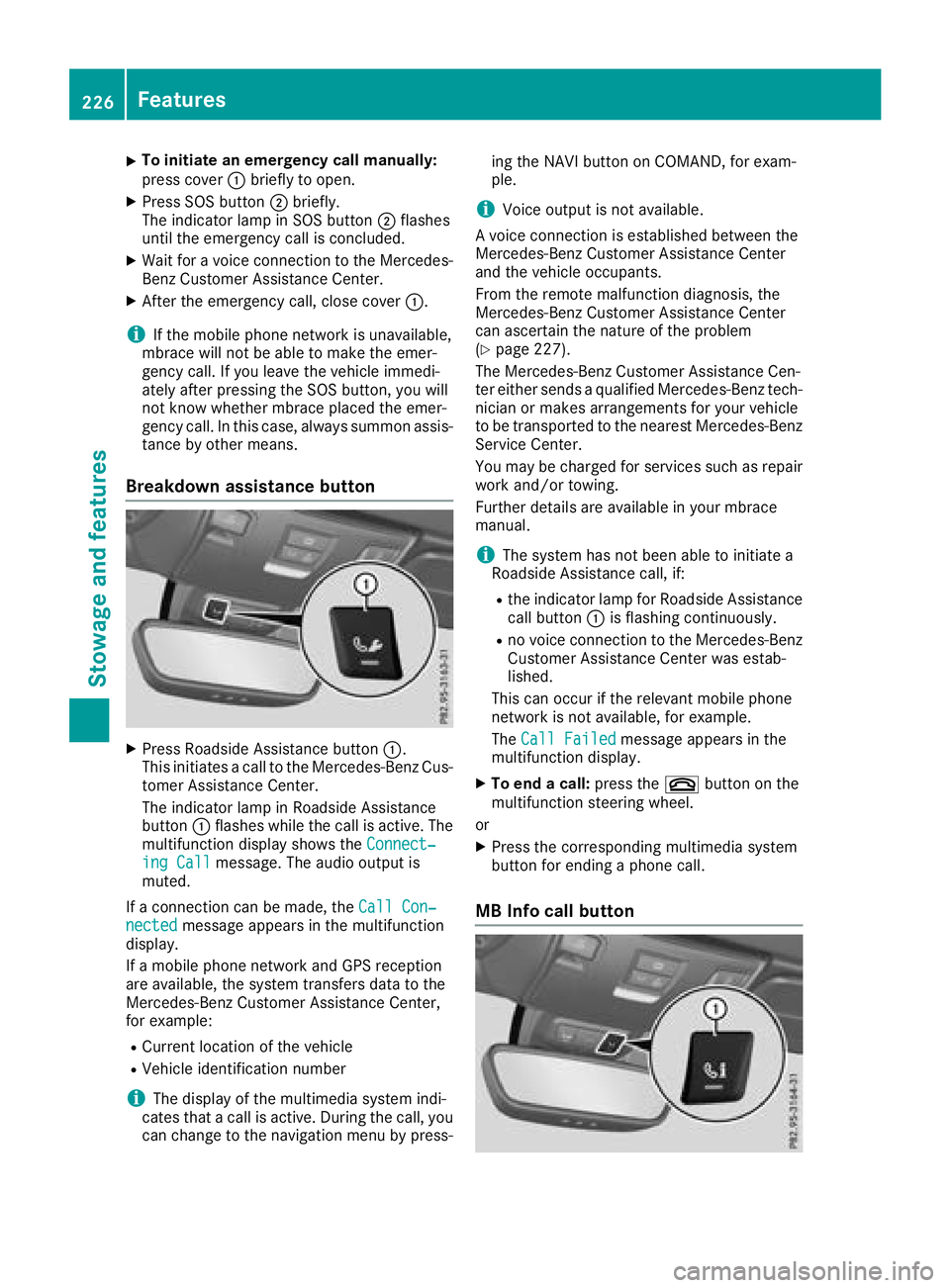
Breakdow na ssistanc eb utton
X
Press Roadside Assistance button C .
Thi si nitiates ac al ltot he Mercedes-Benz Cus-
tome rA ssistance Center.
The indicator lamp in Roadside Assistance
button C flashe sw hile the cal lisa ctive. The
multifunctio nd is play shows the Connect‐
ing Call message. The audi oo ut pu ti s
muted.
If ac onnectio nc an be made ,t he Cal lC on‐
nected message appears in the multifunction
display.
If am obil ep hone network and GP Sr eception
are available ,t he system transfers data to the
Mercedes-Benz Customer Assistance Center,
for example: R
Current location of the vehicle R
Vehicl ei de ntificatio nn umber
i The display of the multimedia system indi-
cate st ha tac al lisa ctive. During the call, you
can change to the navigatio nm enu by press- ing the NAVI button on COMAND, for exam-
ple.
i Voice outpu ti sn ot available.
Av oice connectio ni se stablished between the
Mercedes-Benz Customer Assistance Center
and the vehicl eo ccupants.
From the remote malfunctio nd iagn osis, the
Mercedes-Benz Customer Assistance Center
can ascertain the nature of the problem
( Y
page 227).
The Mercedes-Benz Customer Assistance Cen-
ter either send saq uali fied Mercedes-Benz tech-
nician or makes arrangements for your vehicle
to be transported to the neares tM ercedes-Benz
Service Center.
Yo um ay be charge df or service ss uc hasr epair
work and/or towing.
Further details are available in your mbrace
manual.
i The system ha sn ot been able to initiate a
Roadside Assistance call, if: R
the indicator lamp for Roadside Assistance
cal lb ut ton C is flashing continuously. R
no voice connectio ntot he Mercedes-Benz
C ustomer Assistance Center wa se stab-
lished.
Thi sc an occu rift he relevant mobil ep hone
network is not available ,f or example.
The Cal lF ailed message appears in the
multifunctio nd is play. X
To en dac all: press the v button on the
multifunctio ns teering wheel.
or X
Press the corresponding multimedia system
button for ending ap hone call.
MB Info cal lb utton226
Features
Sto wag ea nd featur es
Page 229 of 298
X
Press MB Info call button C .
This initiates ac all to the Mercedes-Benz Cus-
tomer Assistance Center.
The indicator lamp in MB Info call button C
flashes while the connection is being made.
The multifunction display shows the Con‐
necting Call message. The audio system is
muted.
If ac onnection can be made, the Call Con‐
nected message appears in the multifunction
display.
If am obile phone networ ka nd GPS reception
are available, the system transfers data to the
Mercedes-Benz Customer Assistance Center,
for example: R
curren tl ocation of the vehicleR
vehicle identification number
i The display of the multimedia system indi-
cates that ac all is active. During the call, you
can change to the navigation menu by press-
ing the NAVI button on COMAND ,f or exam-
ple.
Voice output is not available.
Av oice connection is established between the
Mercedes-Benz Customer Assistance Center
and the vehicle occupants.
You receive information about operating your
vehicle, about the nearest authorized
Mercedes-Benz Center and about other prod-
ucts and services from Mercedes-Benz.
USA only: you can find further information on
the mbrace system under "Owners Online" at
http://www.mbusa.com.
i The system has not been able to initiate an
MB Info call, if: R
the indicator lamp in MB Info call button C
is flashing continuously. R
no voice connection to the Mercedes-Benz
Customer Assistance Center was estab-
lished.
This can occur if the relevant mobile phone
networ kisn ot available, for example.
The Call Failed message appears in the
multifunction display. X
To end ac all: press the v button on the
multifunction steerin gw heel.
or X
Press the corresponding multimedia system
button for ending ap hone call. Call priority When service calls are active, e.g. Roadside
Assistance or MB Info calls, an emergenc yc all
can still be initiated. In this case, an emergency
call will take priority and override all other active
calls.
The indicator lamp of the respective button
flashes until the call is ended.
An emergenc yc all can only be terminated by the
Mercedes-Benz Customer Assistance Center.
All other calls can be ended by pressing: R
the v button on the multifunction steering
wheel R
the corresponding button on the audio sys-
tem or on COMAND for ending at elephone
call
i When ac all is initiated, the audio system is
muted. The mobile phone is no longer con-
nected to COMAND .H owever, if you want to
use your mobile phone, do so only when the
vehicle is stationary and in as afe location.
Vehicle Health Check With the Vehicle Health Check, the Customer
Assistance Center can provide improved sup-
port for problems with your vehicle. During an
existin gc all, vehicle data is transferred to the
Customer Assistance Center. The customer ser-
vice representative can use the received data to
decide what kind of assistanc eisr equired. You
are then ,f or example, guided to the nearest
Mercedes-Benz Servic eC enter or ar ecovery
vehicle is called.
If vehicle data needs to be transferred during an
MB Info call or aR oadside Assistance call, this is
initiated by the Customer Assistance Center.
You will see the Roadside Assistance Con‐
nected message in the COMAND display. If the
vehicle remot em alfunction diagnosis can be
started, the Request for vehicle diagno‐
sis received. Start vehicle diagnosis?
message appears in the display. X
Confirm the message with Yes .X
When the Vehicle diagnosis: Please
start ignition message appears, turn the
SmartKey to position H in the ignition lock
( Y
page 116). X
When the Please follow the instruc‐
tions received by phone and move
your vehicle to as afe position mes-Features 227
Stowage and features Z
Page 240 of 298
lead to increased wear and damage to the
majo ra ssemblies or the vehicle.
Aq ualified specialist workshop, e.g. an author-
ized Mercedes-Ben zC enter, will reset the
ASSYS TP LUS service interval display after the
service work has been carried out. You can also
obtain further information on maintenance
work ,f or example.
Specia ls ervice requirementsThe specified maintenance interval takes only
the normal operation of the vehicle into
account .U nder arduous operating condition so r
increased load on the vehicle, maintenance
work must be carried out more frequently, for
example: R
regular cit yd rivin gw ith frequent intermediate
stops R
if the vehicle is primarily used to travel short
distances R
use in mountainous terrain or on poor road
surfaces R
if the engin eiso ften left idling for long periods
Under these or similar conditions, have, for
example, the air filter, engin eo il and oil filter
replaced or changed more frequently. Under
arduous operating conditions, the tires must be
checked more often. Further information can be
obtained at aq ualified specialist workshop, e.g.
an authorized Mercedes-Ben zC enter.
Driving abroad An extensive Mercedes-Ben zS ervice network is
also available in other countries. You can obtain
further information fro ma ny authorized
Mercedes-Ben zC enter.
Care
Notes on care
H Environmental note
Dispose of empt yp ackaging and cleaning
cloths in an environmentally responsible man-
ner.
! When cleaning your car, do not use: R
dry, coarse or hard cloths R
abrasive cleaning agents R
solvents R
cleaning agent sc ontaining solvents
Do not scrub.
Do not touc ht he surfaces and films with hard
objects, e.g. rings or ice scrapers. Otherwise,
you may scratc hord amage the surfaces and
films.
! Do not park your vehicle for al ong period of
tim ed irectly after cleaning, particularly after
cleaning the wheel rim with wheel cleaner.
Wheel cleaner can lead to the increased cor-
rosio noft he brak ed iscs and pads. Therefore,
drive for af ew minutes after cleaning. By
heatin gupt he brakes, the brak ed iscs and
pads dry. The vehicle can the nbep arked for a
long period of time.
Regular care of your vehicle is ac ondition for
retainin gt he quality in the long term.
Use care products and cleaning agent sr ecom-
mended and approved by Mercedes-Benz.
Washing th ev ehicle and cleaning the
paintwork
Automatic car wash
G WARNING
Braking efficienc yisr educed after washing
the vehicle. There is ar isk of an accident.
After the vehicle has been washed, brake
carefully while paying attention to the traffic
condition su ntil full braking power is restored.
! When DISTRONIC PLUS or the HOL Df unc-
tion is activated, the vehicle brakes automat-
ically in certain situations.
To avoid damage to the vehicle, deactivate
DISTRONIC PLUS and the HOL Df unction in
the followin gors imilar situations: R
when towin gt he vehicle R
in the car wash
! It is preferable to use car washes with
adjustable high-pressure pre-cleaning that
corresponds to the specification for the Cab-
riolet program. In car washes that use high
water pressures, there is ar isk that as mall
amount of water may leak int ot he vehicle.238
Care
Maintenance and care