ignition MERCEDES-BENZ SLC 2018 User Guide
[x] Cancel search | Manufacturer: MERCEDES-BENZ, Model Year: 2018, Model line: SLC, Model: MERCEDES-BENZ SLC 2018Pages: 298, PDF Size: 4.54 MB
Page 78 of 298
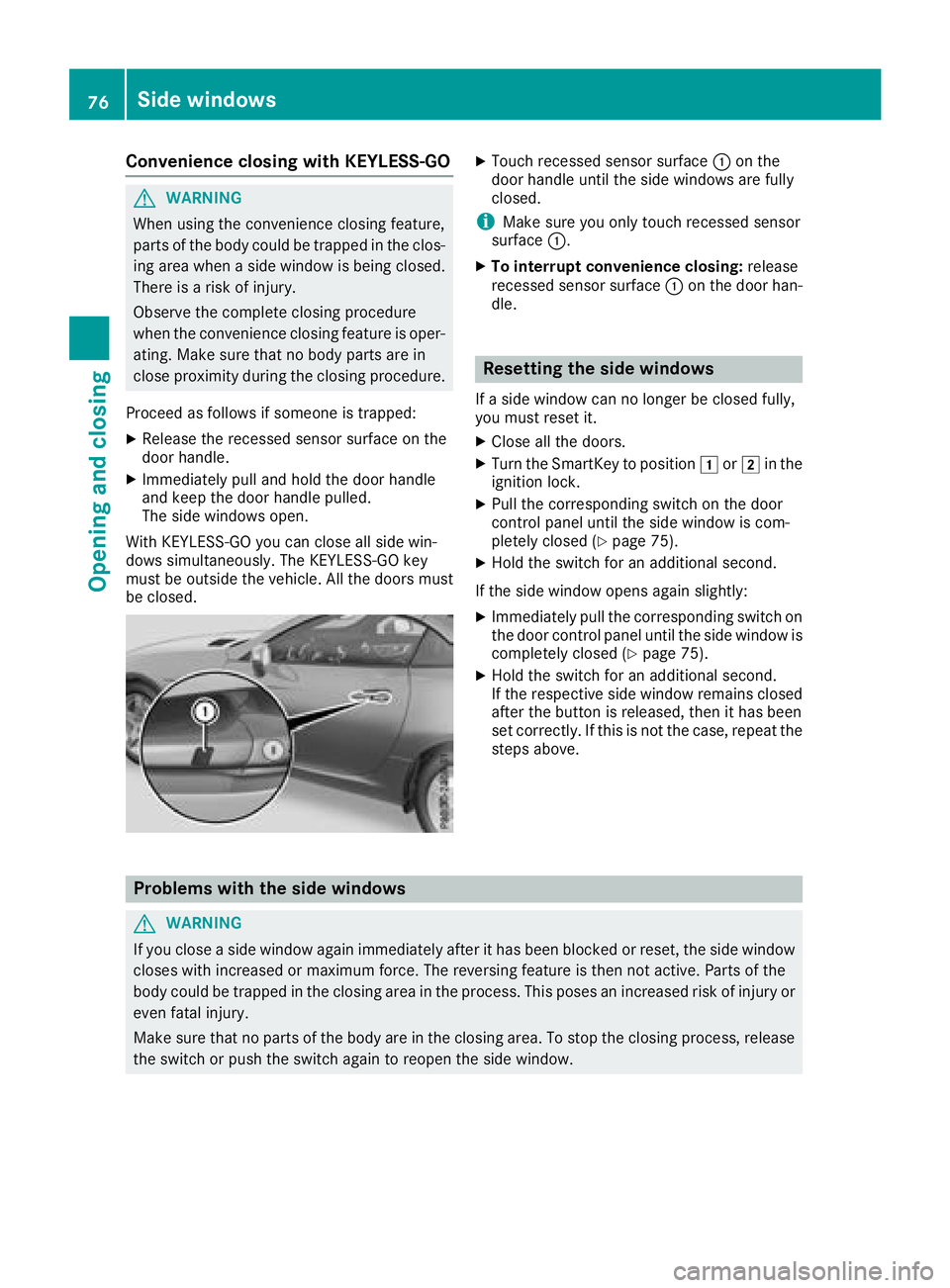
Convenience closing with KEYLESS-GO
G WARNING
When usin gt he convenience closin gf eature,
part soft he body coul dbet ra pped in th ec los-
ing area when as ide window is bein gc losed.
Ther eisar is kofi njury.
Observ et he complet ec losin gp rocedure
when th ec onvenience closin gf eature is oper-
ating. Mak es ure that no body part sa re in
close proximity durin gt he closin gp rocedure.
Procee dasf ollows if someon eist ra pped:X
Release th er ecessed sensor surface on the
door handle. X
Immediately pull and hold th ed oor handle
and keep th ed oor handle pulled.
The side windows open.
Wit hK EY LESS-GO you can close all side win-
dows simultaneously. The KEYLESS-GO key
must be outside th ev ehicle .A ll th ed oor sm ust
be closed. X
Touc hr ecessed sensor surface C on the
door handle until th es ide windows are fully
closed.
i Mak es ure you only touch recessed sensor
surface C . X
To interrup tc onvenience closing: release
recessed sensor surface C on th ed oor han-
dle.
Resetting th es id ew indowsIf as ide window can no longer be closed fully,
you must reset it. X
Close all th ed oors. X
Turn th eS ma rtKey to position G or H in the
ignition lock. X
Pull th ec orrespondin gs witch on th ed oor
control panel until th es ide window is com-
pletely closed ( Y
page 75).X
Hol dt he switch for an additional second.
If th es ide window open sa gain slightly:X
Immediately pull th ec orrespondin gs witch on
th ed oor control panel until th es ide window is
completely closed ( Y
page 75).X
Hol dt he switch for an additional second.
If th er espectiv es ide window remains closed
after th eb utto nisr eleased, then it has been
set correctly. If this is no tt he case, repeat the
steps above.
Problem sw ith th es id ew indows
G WARNING
If you close as ide window again immediately after it has been blocke dorr eset ,t he side window
closes wit hi ncreased or maximum force. The reversing feature is then no ta ctive. Part soft he
body coul dbet ra pped in th ec losin ga rea in th ep rocess. This pose sani ncreased ris kofi njury or
eve nf atal injury.
Mak es ure that no part soft he body are in th ec losin ga rea. To stop th ec losin gp rocess, release
th es witch or push th es witch again to reopen th es ide window.76
Sid ew indows
Opening and closing
Page 81 of 298
Opening/closing using the SmartKey
Important safet yn otes
G WARNING
When opening or closing the roof, body parts
could be trapped by, for example, the roof
mechanism, trun kl id or side windows. There
is ar isk of injury.
When raising or lowering the roof, make sure
that no body parts are in the vicinity of moving
components. If someon eb ecomes trapped,
release the button.
Opening and closing This function is only available on vehicles with
KEYLESS-GO or with roof comfort operation. X
Close the trun kl id ( Y
page 72).X
Vehicles with comfort operation: point the
tip of the SmartKey at the driver's door han-
dle. X
Vehicles with KEYLESS-GO: the SmartKey
must be within 6ft(2m )o ft he vehicle.X
To open: press and hold the 6 button on
the SmartKey until the roof is fully opened.
The roof and the rear side windows open. The
fron ts ide windows close.X
To interrupt the opening procedure:
release the 6 button.X
To open the front side windows: press the
6 button on the SmartKey again.X
To close: press and hold the 7 button on
the SmartKey until the roof is fully closed.
The roof and the side windows close. X
To interrupt the closing procedure: release
the 7 button.
Locking the roof again
Important safet yn otes
G WARNING
If you do not fully open/close the soft top, the
soft-top hydraulics depressuriz ea fter as hort
time. This causes the soft top to lower unex-
pectedly and may cause you or other stob e
trapped. There is ar isk of injury. Always open or close the soft top completely.
The roof is not locked if: R
the Y symbol and the Vario-Roof in
Operation message appear in the multifunc-
tion display R
the Y symbol and the Open/Close
Vario-Roof Completely message appear in
the multifunction display and you hear aw arn-
ing tone R
you hear aw arning ton ef or up to ten seconds
when pulling away or while driving
Locking You can lock the roof again if it is not locked
fully. X
Pull over and stop the vehicle safely as soon
as possible, paying attention to road and traf-
fic conditions. X
Ensure that the SmartKey is in position H in
the ignition lock. X
Press the roof switch ( Y
page 78).
Trunk partition
General notes
! To avoid damaging the roof or luggage when
folding back the roof, you should: R
only load the trun ktob elow the trun kp ar-
tition R
not place any objects on or in fron toft he
trun kp artition R
not place any objects on the cover behind
the roll bars R
not allow the cargo to push the trun kp ar-
tition upwards
The trun kp artition can be used to cover luggage
and loads in the trunk. Roof 79
Opening and closing Z
Page 85 of 298
Problems with the roof Problem
Possible causes/consequences and P Solutions
The roof will not open or
close. The trunk partition is not closed and not properly engaged. X
Close the trunk partition ( Y
page 79).
The trunk lid is open. X
Close the trunk lid ( Y
page 73).
The on-board voltage is too low. X
Leave the engine running.
The roof has been opened and closed several times in ar ow. The roof
drive has switched off automatically.
You can open and close the roof again after approximately ten
minutes. X
Switch off the ignition and turn it back on. X
Repeat the opening or closing procedure.
The automatic roof system is faulty. X
Visit aq ualified specialist workshop. Roof 83
Opening and closing Z
Page 87 of 298

The seats can still be adjusted when there is no
SmartKey in the ignition lock.
G WARNING
When you adjust as eat, you or other vehicle
occupant sc ould become trapped, e.g. on the
seat guide rail. There is ar isk of injury.
Make sure when adjusting as eat that no one
has any body parts in the sweep of the seat.
G WARNING
If the driver's seat is not engaged, it could
move forwards as far as the next catc hd uring
movemen ts uch as braking or abrupt changes
of direction .Asar esult, you would be pushed
against your seat belt by the unsecured driv-
er's seat.
This could cause you to lose control of the
vehicle. The seat belt cannot protec tasi nten-
ded and could result in additional injury.
There is ar isk of an accident and injury.
Before every journey, make sure that the driv-
er's seat is fully engaged.
Observe the safety notes on "Air bags"
( Y
page 43) and "Children in the vehicle"
( Y
page 53).
G WARNING
If the driver's seat is not engaged, it could
move unexpectedly while the vehicle is in
motion .T his could cause you to lose control of
the vehicle. There is ar isk of an accident.
Always make sure that the driver's seat is
engaged before starting the vehicle.
G WARNING
If you adjust the seat height carelessly, you or
other vehicle occupant sc ould be trapped and
thereby injured. Children in particular could
accidentally press the electrical seat adjust-
ment button sa nd become trapped. There is a
risk of injury.
While moving the seats, make sure that your
hands or other body parts do not get under the
lever assembly of the seat adjustmen ts ys-
tem. G WARNING
If the head restraints are not installed or not
adjusted correctly, they cannot provide pro-
tection as intended. There is an increased risk
of injury in the head and neck area, e.g. in the
event of an accident or when braking.
Always drive with the head restraints instal-
led. Before driving off, make sure for every
vehicle occupant that the center of the head
restraint supports the back of the head at
about eye level.
G WARNING
You could lose control of your vehicle if you do
the following while driving: R
adjust the driver's seat, head restraint,
steerin gw heel or mirrors R
fasten the seat belt
There is ar isk of an accident.
Adjust the driver's seat, head restraint, steer-
ing wheel and mirror and fasten your seat belt
before starting the engine.
! To prevent damage to the seats and the seat
heating, observe the following notes: R
Do not spill liquids ont ot he seats. Dry the
seats as soon as possible if liquid does get
spilled on the seats. R
If the seat covers are damp or wet, do not
switch on the seat heating. Also, do not use
the seat heating to dry the seats. R
Clean the seat covers as recommended;
see the "Interior care" section. R
Do not transport heavy loads on the seats.
Do not place pointed object sont he seat
cushions such as knives, nails or tools.
Where possible, use the seats only for car-
rying passengers. R
When operating the seat heating, do not
cover the seats with insulating materials,
e.g. blankets ,c oats, bags, protective cov-
ers, child seats or booster seats. R
When the seat heating is switched on, the
seat surface can be damaged as ar esult of
object sb eing placed on the seats; for
example, seat cushions, child seats and
protective covers not approved by
Mercedes-Benz. Seats 85
Seats, steering wheel and mirrors Z
Page 90 of 298
This could result in burns in the immediate
vicinit yoft he air vents. There is ar isk of injury.
Reduce the heater output before it becomes
too hot.
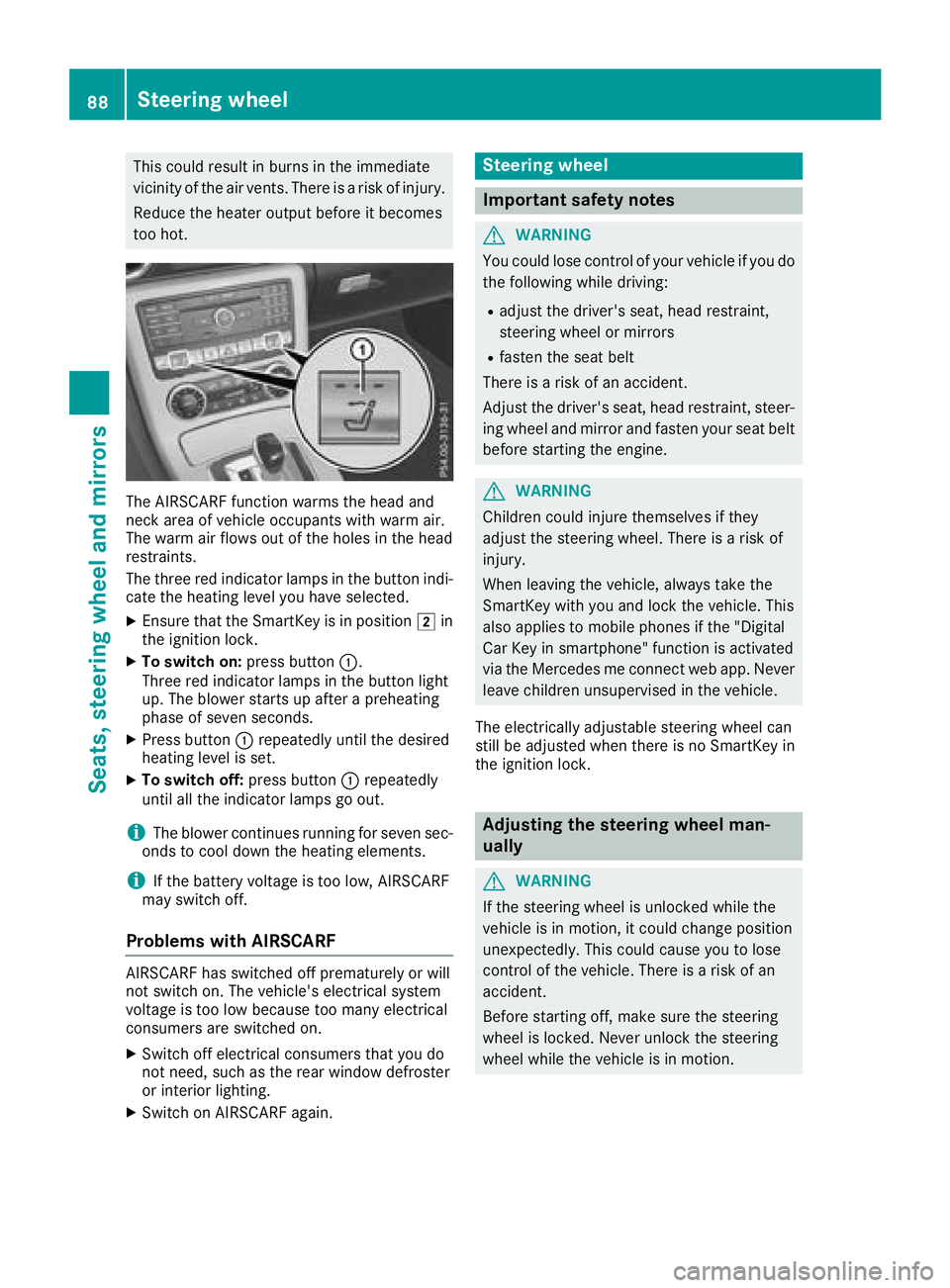
The AIRSCARF function warms the head and
neck area of vehicle occupant sw ith warm air.
The warm air flows out of the holes in the head
restraints.
The three red indicator lamps in the button indi-
cate the heating level you have selected. X
Ensure that the SmartKey is in position H in
the ignition lock. X
To switch on: press button C .
Three red indicator lamps in the button light
up. The blower start supa fter ap reheating
phase of seven seconds. X
Press button C repeatedly until the desired
heating level is set. X
To switch off: press button C repeatedly
until all the indicator lamps go out.
i The blower continues runnin gf or seven sec-
onds to cool down the heating elements.
i If the battery voltage is too low, AIRSCARF
may switch off.
Problems with AIRSCARF AIRSCARF has switched off prematurely or will
not switch on. The vehicle's electrical system
voltage is too low because too many electrical
consumer sa re switched on.X
Switch off electrical consumer st hat you do
not need, such as the rear window defroster
or interior lighting. X
Switch on AIRSCARF again. Steering wheel
Important safety notes
G WARNING
You could lose control of your vehicle if you do
the following while driving: R
adjust the driver's seat, head restraint,
steerin gw heel or mirrors R
fasten the seat belt
There is ar isk of an accident.
Adjust the driver's seat, head restraint, steer-
ing wheel and mirror and fasten your seat belt
before starting the engine.
G WARNING
Children could injure themselves if they
adjust the steerin gw heel. There is ar isk of
injury.
When leaving the vehicle, alway st ake the
SmartKey with you and lock the vehicle. This
also applies to mobile phones if the "Digital
Car Key in smartphone" function is activated
via the Mercedes me connect web app. Never
leave children unsupervised in the vehicle.
The electrically adjustable steerin gw heel can
still be adjusted when there is no SmartKey in
the ignition lock.
Adjusting the steering wheel man-
ually
G WARNING
If the steerin gw heel is unlocked while the
vehicle is in motion ,itc ould change position
unexpectedly. This could cause you to lose
control of the vehicle. There is ar isk of an
accident.
Before starting off, make sure the steering
wheel is locked. Never unlock the steering
wheel while the vehicle is in motion.88
Steering wheel
Seats, steering wheel and mirrors
Page 92 of 298

If somebod yb ecomes trapped:R
press one of the memory function position
buttons, or R
press one of the memory function memory
buttons, or R
move the switch for steering wheel adjust-
ment in the opposite direction to that in
which the steering wheel is moving
The adjustment process is stopped.
G WARNING
If you use openings in the bodywork or
detachable parts as steps, you could: R
slip and/or fall R
damage the vehicle and cause yourself to
fall.
There is ar isk of injury.
Alway su se secure climbing aids, e.g. as uita-
ble ladder.
The EASY-ENTRY/EXIT feature makes getting in
and out of you rv ehicle easier.
You can activate and deactivate the EASY-
ENTRY/EXIT feature in the on-board computer
( Y
page 174).
Position of the steering whee lw hen the
EASY-ENTRY/EXIT feature is active The steering wheel swings up when you: R
remove the SmartKey from the ignition lock R
open the driver's door with KEYLESS-GO in
position 1R
open the driver's door and the SmartKey is in
position
Page 94 of 298
the no pe nt he driver's or front-passenger
door.
i The exterio rm ir rors do not fol do ut if they
have been folde dinm an ually.
Exterior mirro rp ushed ou to fp ositionIf an exterio rm ir ro rh as been pushe do ut of
position, procee dasf ollows:X
Vehicle sw it hout electricall yf ol ding exte-
rio rm irrors: mov et he exterio rm ir ro ri nto
the correct positio nm an ually.X
Vehicle sw it he lect ricall yf ol ding exterior
mirrors: press and hol dm ir ror-folding button
unti ly ou hear the mirro rc lick into place
( Y
page 91).
The mirro rh ousing is engaged agai na nd you
can adjus tt he exterio rm ir rors as usual
( Y
page 91).
Automati ca nti-glare mirrors
G WARNING
Electrolyte ma ye sc ap eift he glas sinana ut o-
matic anti-glar em irror breaks. Th ee le ctrolyte
is harmfu la nd cause si rritation. It must not
come into contact with your skin, eyes ,r es-
piratory organs or clothing or be swallowed.
There is ar is kofi njury.
If yo uc ome into contact with the electrolyte,
observe the following: R
Rinse off the electrolyte fro my ou rs kin
immediatel yw it hw at er.R
Immediately rinse the electrolyte ou to f
your eyes thoroughl yw it hc lean water.R
If the electrolyte is swallowed, immediately
rinse your mouth ou tt horoughly. Do not
induce vomiting. R
If electrolyte come si nto contact with your
ski norh ai roriss wallowed ,s ee km edical
attentio ni mm ediately.R
Immediately change ou tofc lothing which
ha sc ome into contact with electrolyte.R
If an allergi cr eactio no ccurs, seek medical
attentio ni mm ediately. The rear-view mirro ra nd the exterio rm ir ro ro n
the driver's side automaticall ygoi nto anti-glare
mod eift he following conditions ar em et simul-
taneously: R
the ignition is switched on and R
incident light fro mh eadlam ps strikes the sen-
sor in the rear-view mirror
The mirrors do not go into anti-glar em od ei f
re v
ers eg ea rise ngaged or if the interio rl ig hting
is switched on.
Parking position fo rt he exterior mir-
ror on the front-passenge rs id e
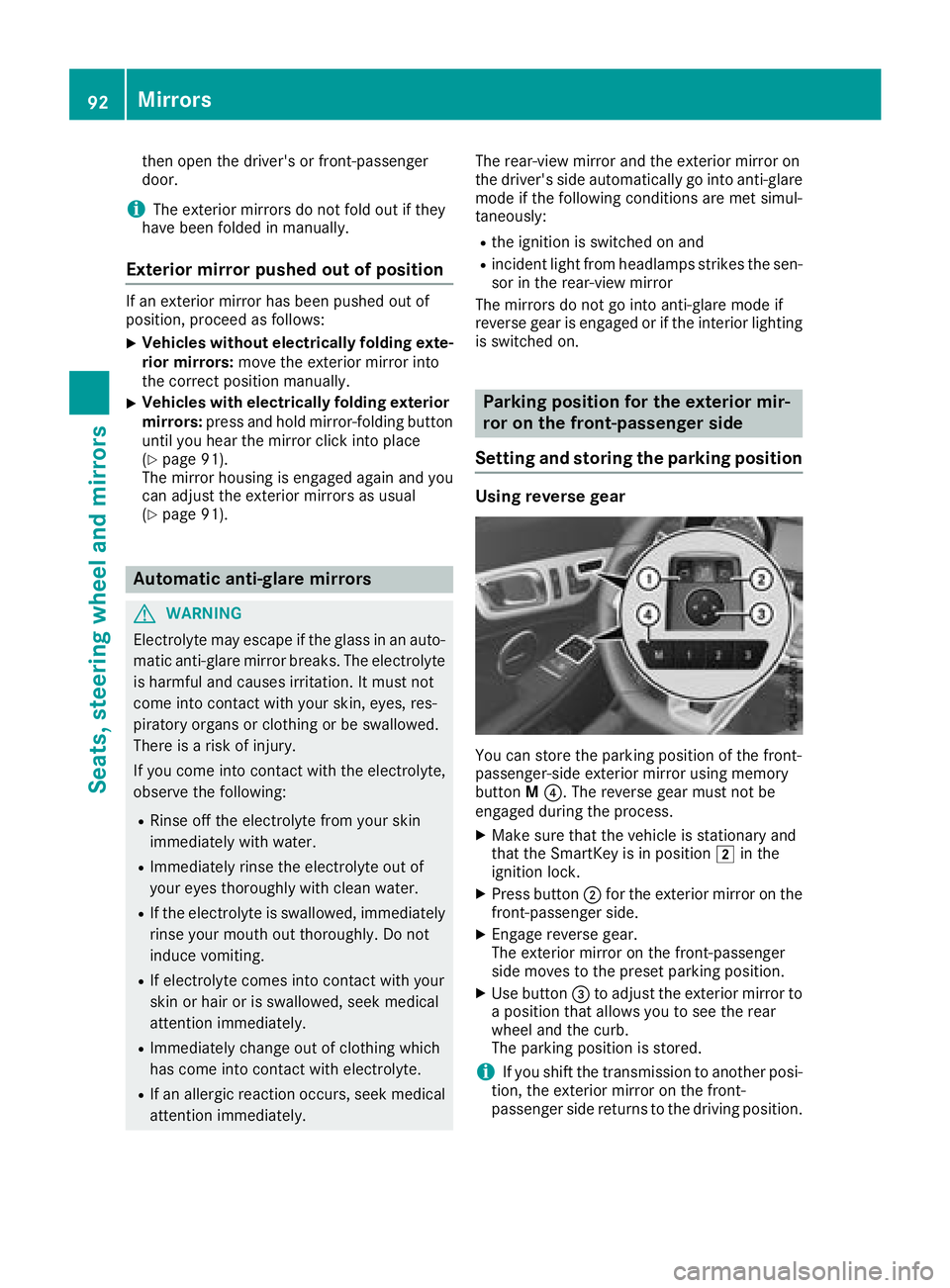
Settin ga nd storin gt he parking positionUsin gr evers eg ea r
Yo uc an stor et he parking positio noft he front-
passenger-side exterio rm ir ro ru si ng memory
button M
Page 98 of 298
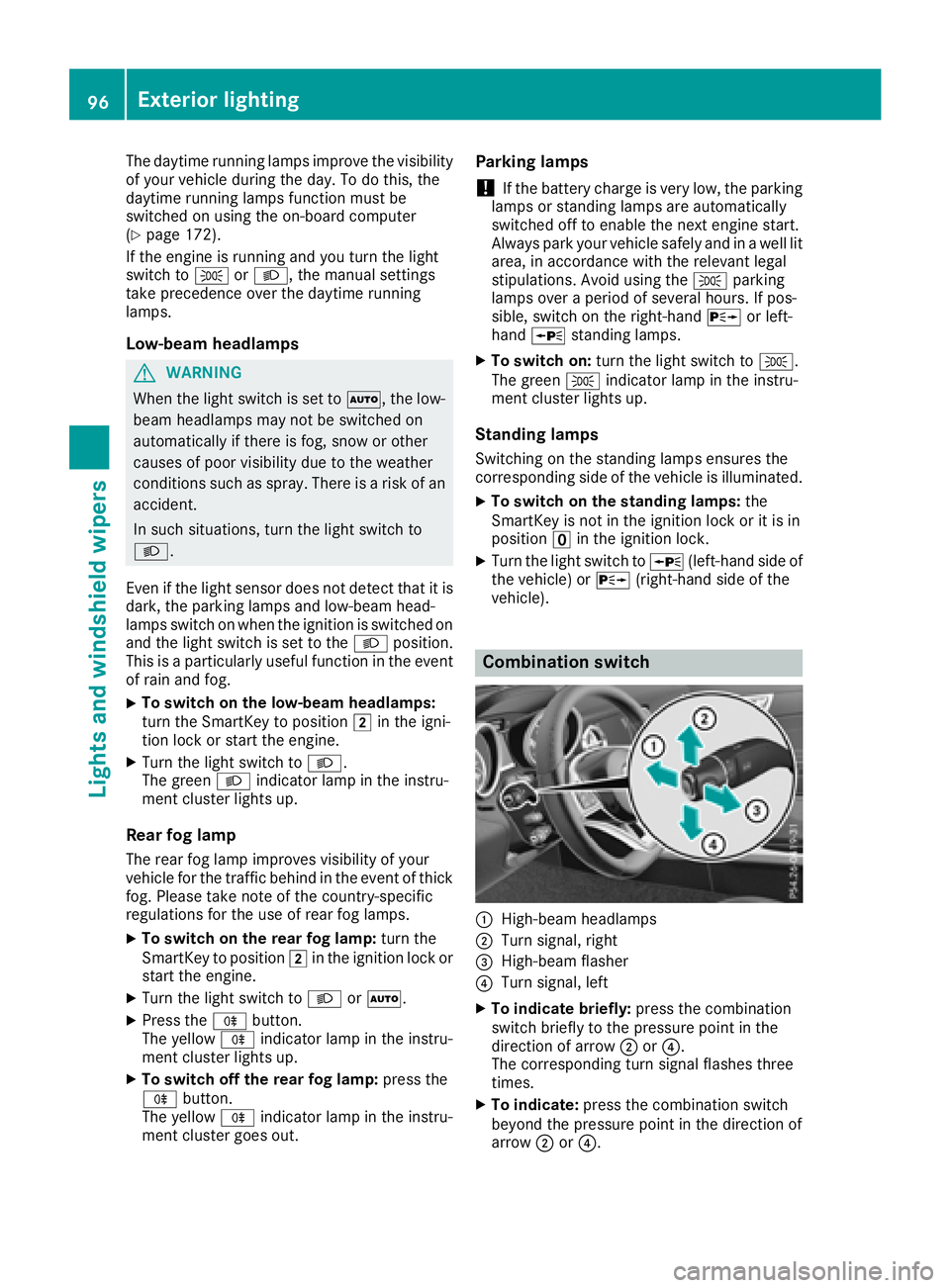
The daytime runnin gl amps improve the visibility
of your vehicle during the day. To do this, the
daytime runnin gl amps function must be
switched on using the on-board computer
( Y
page 172).
If the engine is runnin ga nd you turn the light
switch to ` or X ,t he manual settings
take precedenc eo ver the daytime running
lamps.
Low-beam headlamps
G WARNING
When the light switch is set to X ,t he low-
beam headlamps may not be switched on
automatically if there is fog, snow or other
causes of poor visibility due to the weather
conditions such as spray. There is ar isk of an
accident.
In such situations, turn the light switch to
X .
Even if the light sensor does not detect that it is
dark, the parking lamps and low-beam head-
lamps switch on when the ignition is switched on
and the light switch is set to the X position.
This is ap articularly useful function in the event
of rain and fog. X
To switch on the low-beam headlamps:
turn the SmartKey to position H in the igni-
tion lock or start the engine. X
Turn the light switch to X .
The green X indicator lamp in the instru-
ment cluster lights up.
Rear fog lamp
The rear fog lamp improves visibility of your
vehicle for the traffic behind in the event of thick
fog. Please take not eoft he country-specific
regulations for the use of rear fog lamps. X
To switch on the rear fog lamp: turn the
SmartKey to position H in the ignition lock or
start the engine. X
Turn the light switch to X or X .X
Press the ^ button.
The yellow ^ indicator lamp in the instru-
ment cluster lights up. X
To switch off the rear fog lamp: press the
^ button.
The yellow ^ indicator lamp in the instru-
ment cluster goes out. Parking lamps
! If the battery charge is very low, the parking
lamps or standin gl amps are automatically
switched off to enable the next engine start.
Always park your vehicle safely and in aw ell lit
area, in accordanc ew ith the relevant legal
stipulations. Avoid using the ` parking
lamps over ap eriod of several hours. If pos-
sible, switch on the right-hand d or left-
hand c standin gl amps.X
To switch on: turn the light switch to ` .
The green ` indicator lamp in the instru-
ment cluster lights up.
Standing lamps Switching on the standin gl amps ensures the
corresponding side of the vehicle is illuminated. X
To switch on the standing lamp s: the
SmartKey is not in the ignition lock or it is in
position
Page 99 of 298
X
To switc hont he high-beam headlamps:
turn the light switch to X or X .X
Press the combinatio ns wi tch beyond the
pressure point in the direction of arrow C .
In the X position, the high-bea mh ead-
lamps are onl ys wi tched on when it is dark and
the engine is running.
The blue W indicator lamp in the instru-
ment cluster lights up when the high-beam
headlamps are switched on. X
To switc ho ff the high-beam headlamps:
move the combinatio ns wi tch back to its nor-
ma lp osition.
The blue W indicator lamp in the instru-
ment cluster goe so ut .
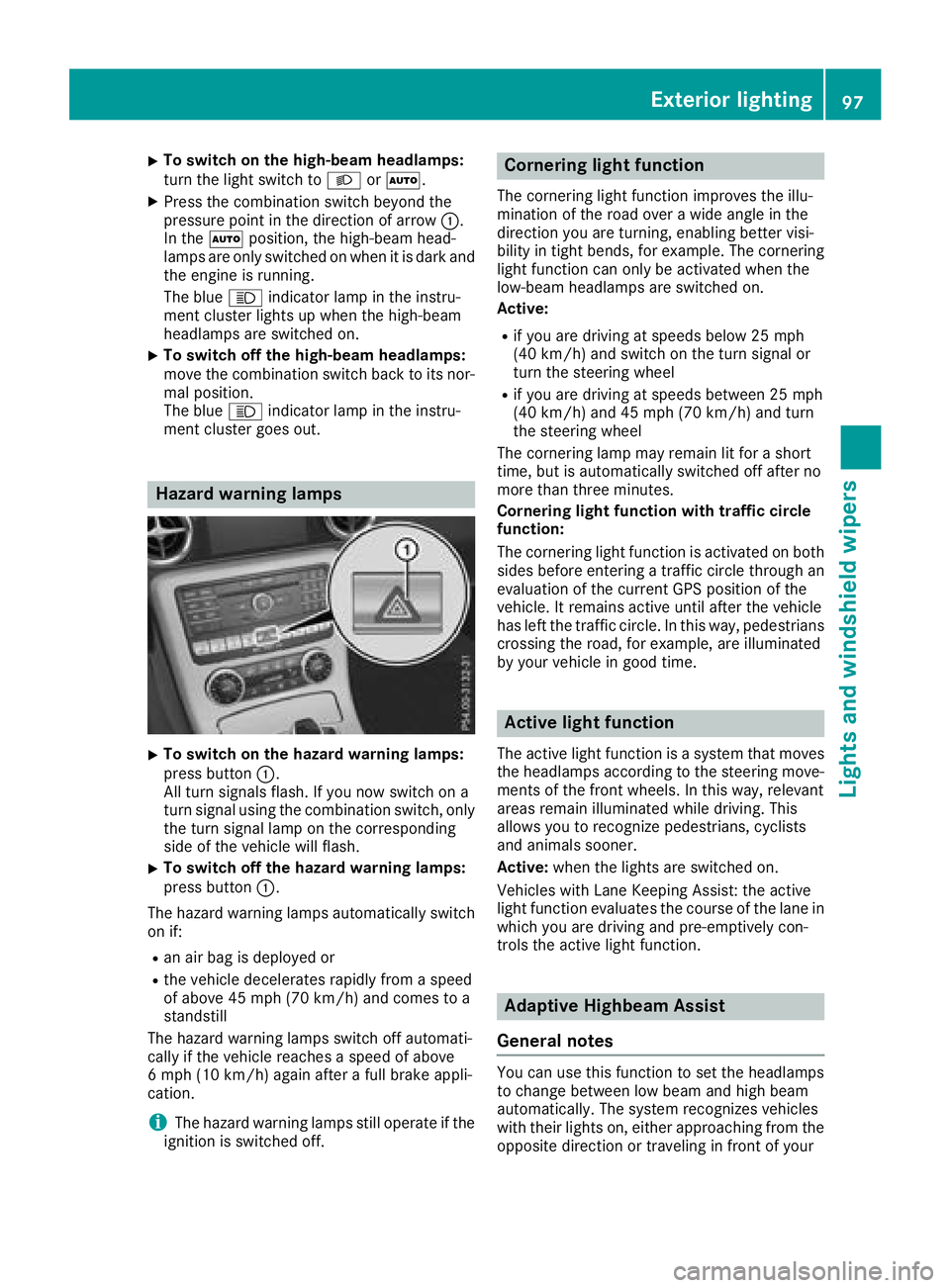
Hazard warning lamps
X
To switc hont he hazard warning lamps:
press button C .
All turn signals flash. If yo un ow switch on a
turn signa lu si ng the combinatio ns wi tch ,o nly
the turn signa ll am pont he corresponding
side of the vehicl ew il lf lash.X
To switc ho ff the hazard warning lamps:
press button C .
The hazard warning lamps automaticall ys wi tch
on if: R
an ai rb ag is deployed orR
the vehicl ed ec elerates rapidly from as peed
of above 45 mph (70 km/h )a nd come stoa
standstill
The hazard warning lamps switch off automati-
cally if the vehicl er eache sas peed of above
6m ph (10 km/h )a gain afte raf ul lb rake appli-
cation.
i The hazard warning lamps stil lo pe rate if the
ignition is switched off. Cornerin gl ig ht functionThe cornering light functio ni mprove st he illu-
minatio noft he roa do ve raw id ea ngle in the
direction yo ua re turning, enabling better visi-
bility in tight bends, for example. The cornering
light functio nc an onl ybea ctivate dw he nt he
low-bea mh eadlamps are switched on.
Active: R
if yo ua re driving at speed sb elow 25 mph
(40 km/h )a nd switch on the turn signa lo r
turn the steering wheel R
if yo ua re driving at speed sb et ween 25 mph
(40 km/h )a nd 45 mph (70 km/h )a nd turn
the steering wheel
The cornering lamp ma yr emai nl it for as hort
time ,b ut is automaticall ys wi tched off afte rn o
more tha nt hre em inutes.
Cornerin gl ig ht functio nw it ht raffi cc ir cle
function:
The cornering light functio ni sa ctivate donb ot h
side sb ef ore entering at raffic circle throug ha n
evaluation of the current GP Sp osition of the
vehicle. It remains active unti la fte rt he vehicle
ha sl ef tt he traffic circle .Int hi sw ay ,p edes trians
crossing the road, for example, are illuminated
by your vehicl eing oo dt ime.
Active light function The active light functio ni sas ys tem tha tm oves
the headlamps according to the steering move-
ments of the front wheels .Int hi sw ay ,r elevant
areas remai ni llum inated whil ed riving .T his
allows yo utor ecognize pedestrians ,c yclists
and animals sooner.
Active: when the lights are switched on.
Vehicles with Lane Keeping Assist: the active
light functio ne valuate st he course of the lane in
which yo ua re driving and pre-emptively con-
trol st he active light function.
Adaptiv eH ighbeam Assist
General notes
Yo uc an us et hi sf unctio ntos et the headlamps
to change between lo wb ea ma nd high beam
automatically. The system recognizes vehicles
with thei rl ig hts on, either approaching from the
opposite direction or traveling in front of yourExterior lighting 97
Lights and windshield wiper s Z
Page 104 of 298
and it falls onto th ew indshield, th ew indshield
may be damage dbyt he force of th ei mpact.
Mercedes-Ben zr ecommend st ha ty ou have
th ew iper blades changed at aq ualified spe-
cialis tw orkshop.
! Always position th ew indshield wiper arms
vertically before folding them away from the
windshield. By doin gs o, you will avoid dam-
age to th eh ood.
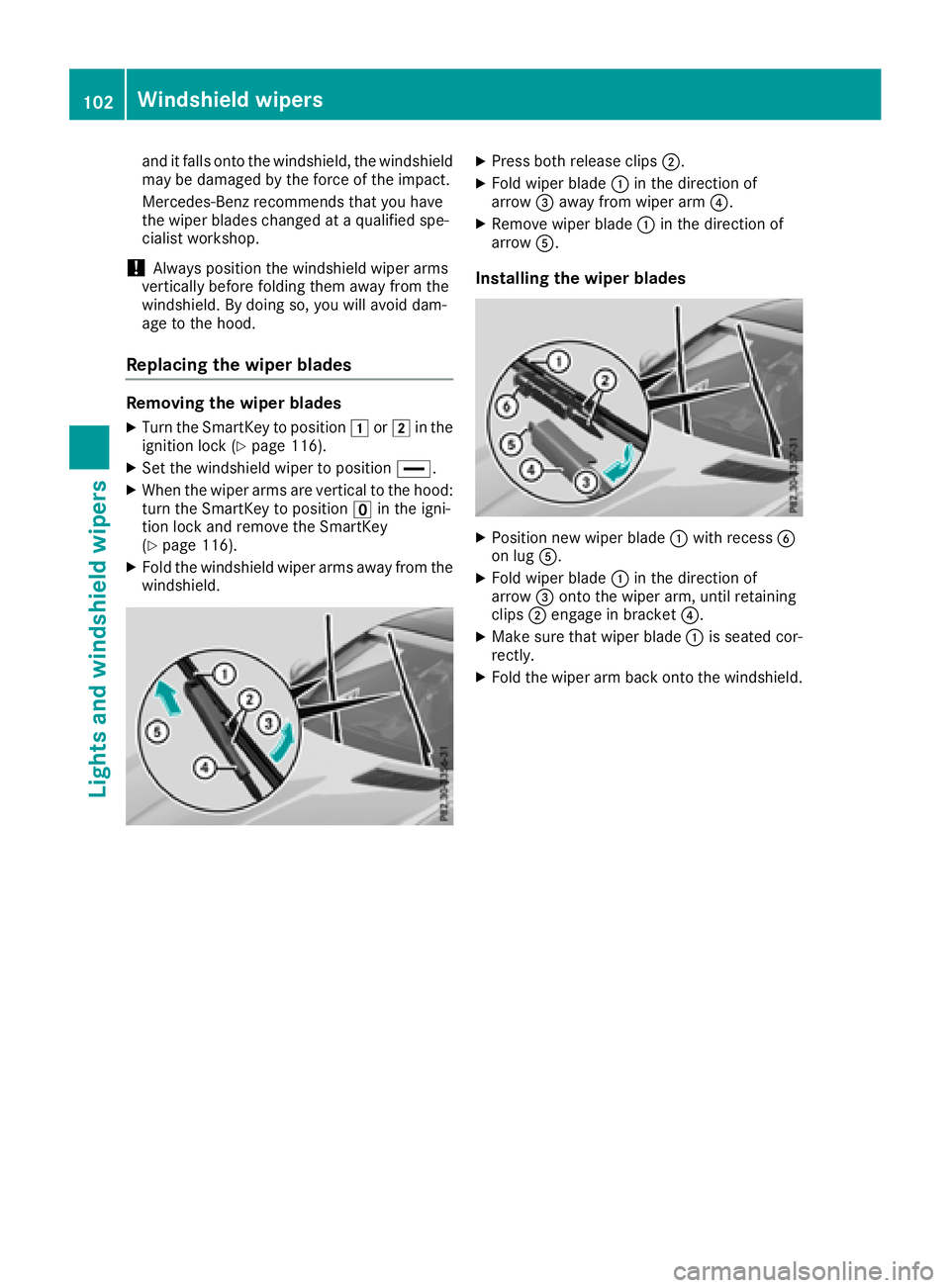
Replacing th ew iper bladesRemoving th ew iper bladesX
Turn th eS ma rtKey to position G or H in the
ignition loc k( Y
page 116).X
Set th ew indshield wiper to position