cruise control MERCEDES-BENZ SLC 2019 User Guide
[x] Cancel search | Manufacturer: MERCEDES-BENZ, Model Year: 2019, Model line: SLC, Model: MERCEDES-BENZ SLC 2019Pages: 306, PDF Size: 15 MB
Page 150 of 306
Rif the battery is disconnected
Rif the vehicle is accelerated, e.g. by a vehi-
cle occupant
There is a risk of an accident.
Always deactivate Active Distance Assist
DISTRONIC and secure the vehicle against
rolling away before you leave it.
Further information on deactivating Active Dis-tance Assist DISTRONIC (Ypage 149).
If Active Distance Assist DISTRONIC detectsthat the vehicle in front is stopping, it brakesyour vehicle until it is stationary.
Once your vehicle is stationary, it remains sta-tionary and you do not need to depress thebrake.
iAfter a time, the electric parking brakesecures the vehicle and relieves the servicebrake.
iDepending on the specified minimum dis-tance, your vehicle will come to a standstillat a sufficient distance behind the vehicle infront. The specified minimum distance is setusing the control on the cruise control lever.
When Active Distance Assist DISTRONIC isactivated, the transmission is shifted automati-cally to position]if:
Rthe driver's seat belt is not fastened and thedriver's door is open
Rthe engine is switched off, unless it is auto-matically switched off by the ECO start/stop function.
The electric parking brake is applied automati-cally if Active Distance Assist DISTRONIC isactive when the vehicle is stationary and:
Ra system malfunction occurs
Rthe power supply is not sufficient
If a malfunction occurs, the transmission mayalso shift to position]automatically.
Setting a speed
Keep in mind that it may take a brief momentuntil the vehicle has accelerated or braked tothe speed set.
XTo adjust the set speed in 1 mph incre-ments (1 km/h increments):briefly pressthe cruise control lever upCto the pres-
sure point for a higher speed, or downDfor a lower speed.Every time the cruise control lever ispressed up or down, the last speed stored isincreased or reduced.
XTo adjust the set speed in 5 mph incre-ments (10 km/h increments):brieflypress the cruise control lever upCpast thepressure point for a higher speed, ordownDfor a lower speed.Every time the cruise control lever ispressed up or down, the last speed stored isincreased or reduced.
Setting a specified minimum distance
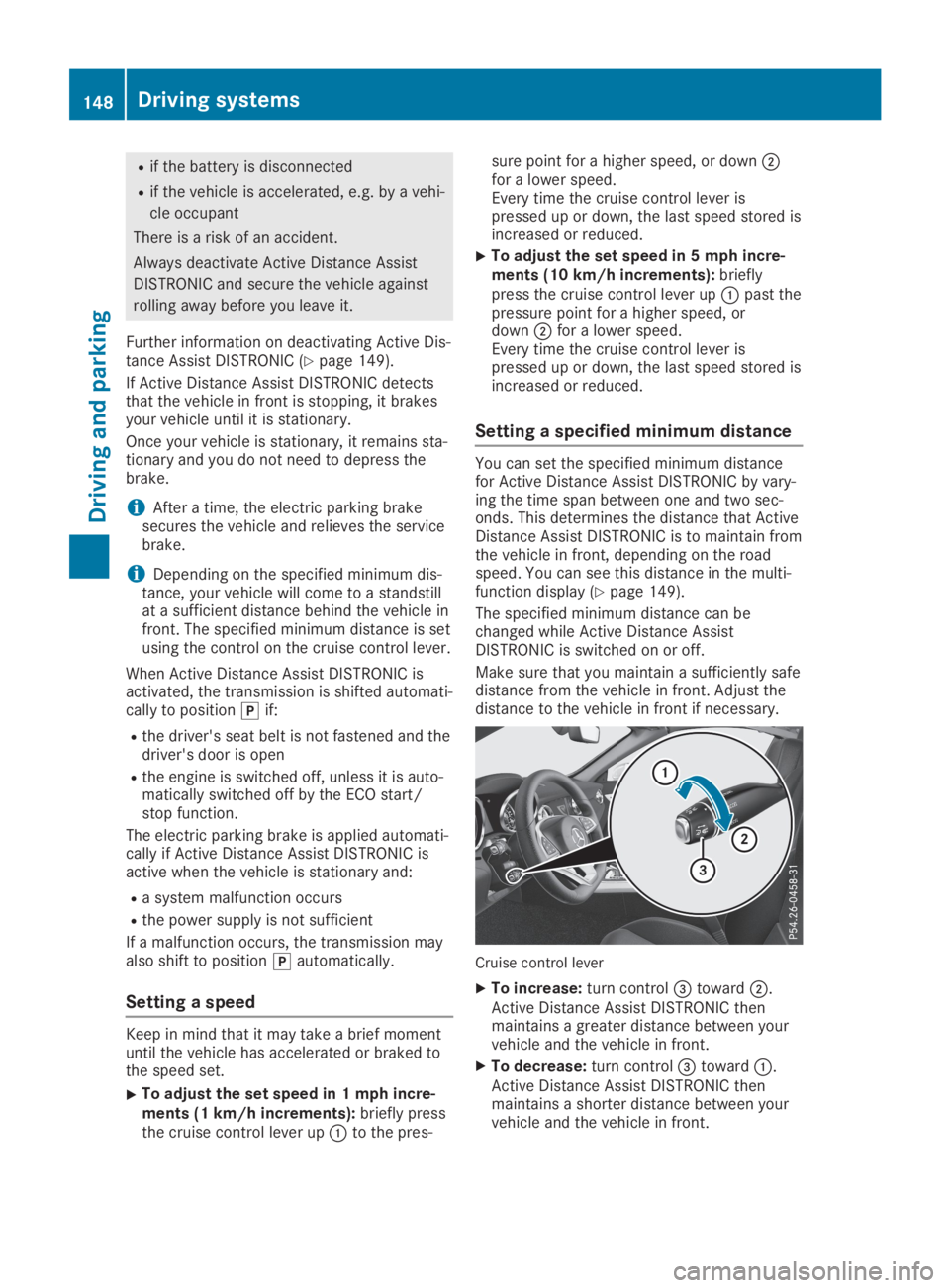
You can set the specified minimum distancefor Active Distance Assist DISTRONIC by vary-ing the time span between one and two sec-onds. This determines the distance that ActiveDistance Assist DISTRONIC is to maintain fromthe vehicle in front, depending on the roadspeed. You can see this distance in the multi-function display (Ypage 149).
The specified minimum distance can bechanged while Active Distance AssistDISTRONIC is switched on or off.
Make sure that you maintain a sufficiently safedistance from the vehicle in front. Adjust thedistance to the vehicle in front if necessary.
Cruise control lever
XTo increase:turn control
Page 152 of 306
iThe last speed stored remains stored untilyou switch off the engine.
iActive Distance Assist DISTRONIC is notdeactivated if you depress the acceleratorpedal. If you accelerate to overtake, ActiveDistance Assist DISTRONIC adjusts the vehi-cle's speed to the last speed stored afteryou have finished overtaking.
Active Distance Assist DISTRONIC is automati-cally deactivated if:
Ryou engage the electric parking brake or ifthe vehicle is automatically secured with theelectric parking brake
RESP®intervenes or you deactivate ESP®
Rthe transmission is in position],^or\\
Ryou pull the cruise control lever towards youin order to pull away and the front-passenger door is open
Ryou activate Active Parking Assist
Rthe vehicle is skidding
If Active Distance Assist DISTRONIC is deacti-vated automatically, you will hear a warningtone. TheActive Distance Assist OffActive Distance Assist Offmessage will appear on the multifunction dis-play for approximately five seconds.
Tips for driving with Active Distance
Assist DISTRONIC
General notes
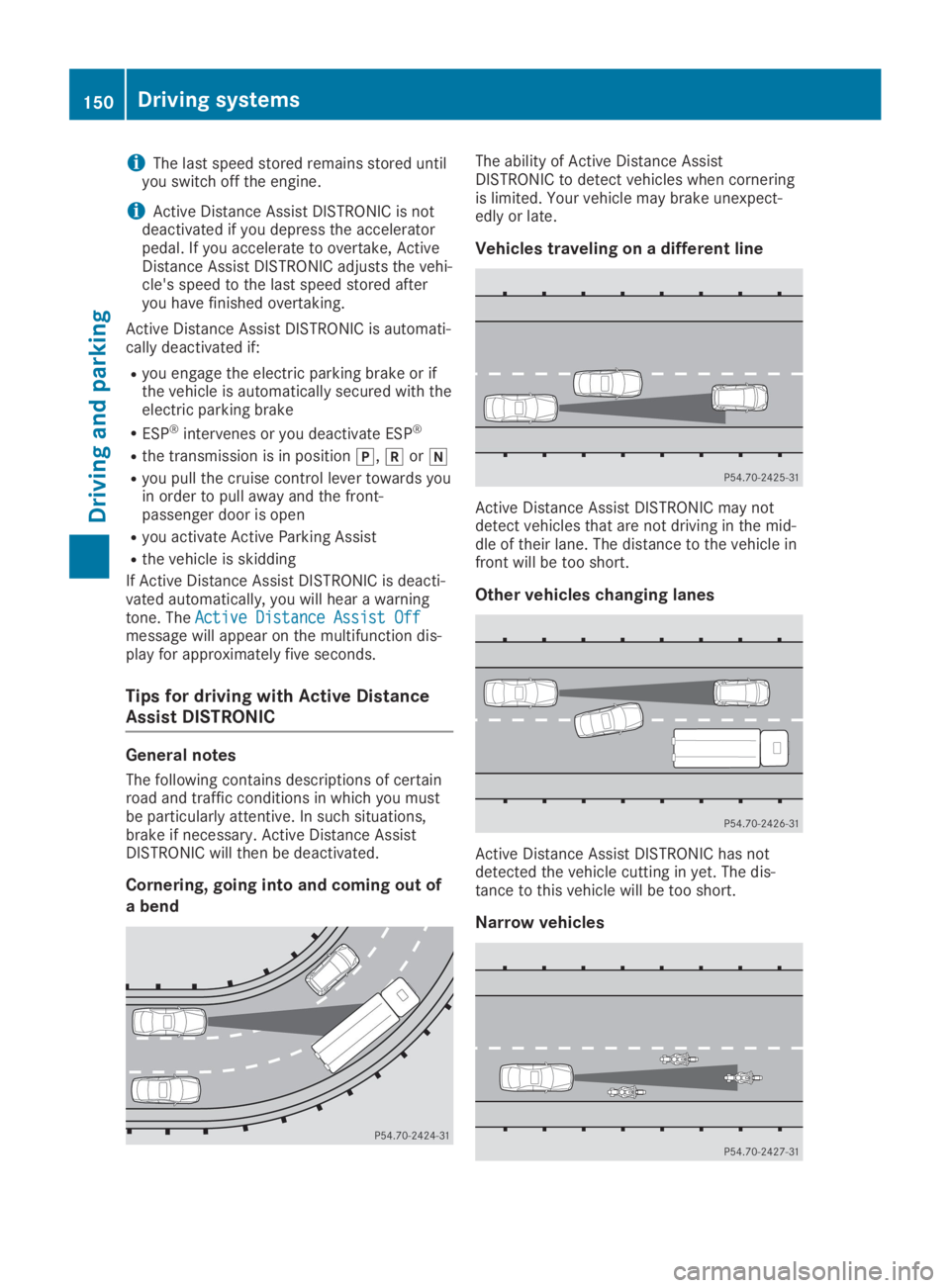
The following contains descriptions of certainroad and traffic conditions in which you mustbe particularly attentive. In such situations,brake if necessary. Active Distance AssistDISTRONIC will then be deactivated.
Cornering, going into and coming out of
a bend
The ability of Active Distance AssistDISTRONIC to detect vehicles when corneringis limited. Your vehicle may brake unexpect-edly or late.
Vehicles traveling on a different line
Active Distance Assist DISTRONIC may notdetect vehicles that are not driving in the mid-dle of their lane. The distance to the vehicle infront will be too short.
Other vehicles changing lanes
Active Distance Assist DISTRONIC has notdetected the vehicle cutting in yet. The dis-tance to this vehicle will be too short.
Narrow vehicles
150Driving systems
Driving and parking
Page 169 of 306
Important safety notes
GWARNING
If you operate information systems and com-
munication equipment integrated in the
vehicle when driving, you may be distracted
from the traffic situation. You could also
lose control of the vehicle. There is a risk of
an accident.
Only operate this equipment when the traffic
situation permits. If you are not sure that
this is possible, park the vehicle paying
attention to traffic conditions and operate
the equipment when the vehicle is station-
ary.
You must observe the legal requirements forthe country in which you are currently drivingwhen operating the on-board computer.
GWARNING
If the instrument cluster has failed or mal-
functioned, you may not recognize function
restrictions in systems relevant to safety.
The operating safety of your vehicle may be
impaired. There is a risk of an accident.
Drive on carefully. Have the vehicle checked
at a qualified specialist workshop immedi-
ately.
The on-board computer only shows messagesor warnings from certain systems in the multi-function display. You should therefore makesure your vehicle is operating safely at alltimes.
If the operating safety of your vehicle isimpaired, pull over as soon as it is safe to doso. Contact a qualified specialist workshop.
For an overview, see the instrument panelillustration (Ypage 32).
Displays and operation
Instrument cluster lighting
The lighting in the instrument cluster, in thedisplays and the controls in the vehicle interiorcan be adjusted using the brightness controlknob.
The brightness control knob is located on thebottom left of the instrument cluster(Ypage 32).
XTurn the brightness control knob clockwiseor counter-clockwise.If you turn the light switch (Ypage 97) totheX,`orXposition, the bright-ness will depend upon the brightness of theambient light.
The light sensor in the instrument clusterautomatically controls the brightness of themultifunction display. In daylight, the dis-plays in the instrument cluster are not illu-minated.
Speedometer with segments
The segments in the speedometer indicatewhich speed range is available.
RCruise control activated (Ypage 142):
The segments light up from the storedspeed to the maximum speed.
RActive Distance Assist DISTRONIC activated(Ypage 144):
One or two segments in the set speed rangelight up.
RActive Distance Assist DISTRONIC detects avehicle in front moving more slowly than thestored speed:
The segments between the speed of thevehicle in front and the stored speed lightup.
Tachometer
!Do not drive in the overrevving range, asthis could damage the engine.
The red band in the tachometer indicates theengine's overrevving range.
The fuel supply is interrupted to protect theengine when the red band is reached.
Outside temperature display
You should pay special attention to road con-ditions when temperatures are around freezingpoint.
Displays and operation167
On-board computer and displays
Z
Page 178 of 306
XPressdorcto setOffOff,StandardStandardorAdaptiveAdaptive.
XPress thevbutton to save the setting.When Lane Keeping Assist is activated, themultifunction display shows the lane mark-ings as bright lines in the assistancegraphic.
Further information on Lane Keeping Assist(Ypage 165).
Service menu
Depending on the equipment installed in thevehicle, you have the following options in theServ.Serv.menu:
RCalling up display messages (Ypage 182)
RRestarting the tire pressure loss warningsystem (Ypage 274)
RChecking the tire pressure electronically(Ypage 274)
RCalling up the service due date(Ypage 245)
Settings menu
Introduction
Depending on the equipment installed in thevehicle, in theSett.Sett.menu you have the fol-lowing options:
RChanging the instrument cluster settings(Ypage 176)
RChanging the light settings (Ypage 176)
RChanging the vehicle settings (Ypage 178)
RChanging the convenience settings(Ypage 178)
RRestoring the factory settings (Ypage 179)
Instrument cluster
Selecting the distance unit
TheDisplay Unit Speed-/Odometer:Display Unit Speed-/Odometer:func-tion allows you to choose whether certain dis-plays appear in kilometers or miles in the mul-tifunction display.
XPress theYorebutton on the steer-ing wheel to select theSett.Sett.menu.
XPress thedorcbutton to select theInstrument ClusterInstrument Clustersubmenu.
XPressvto confirm.
XPress thedorcbutton to select theDisplay Unit Speed-/Odometer:Display Unit Speed-/Odometer:func-tion.The current settingkmkmormilesmilesappears.
XPress thevbutton to save the setting.
The selected unit of measurement for distanceapplies to:
Rthe digital speedometer in theTripTripmenu
Rthe odometer and trip odometer
Rthe trip computer
Rthe current consumption and the range
Rnavigation instructions in theNaviNavimenu
Rcruise control
RDISTRONIC
RASSYST PLUS
Selecting permanent display
ThePermanent Display:Permanent Display:function allows youto choose whether the multifunction displayalways shows the outside temperature or thespeed.
The speed display is inverse to the speedome-ter.
XPress theYorebutton on the steer-ing wheel to select theSett.Sett.menu.
XPress thedorcbutton to select theInstrument ClusterInstrument Clustersubmenu.
XPressvto confirm.
XPress thedorcbutton to select thePermanent Display:Permanent Display:function.The current setting,Outside TemperatureOutside TemperatureorSpeedometer [km/h]Speedometer [km/h]orSpeedometerSpeedometer[mph][mph], appears.
XTo change the setting:pressvagain.
Lights
Setting the daytime running lamps
This function is not available in Canada.
XPress theYorebutton on the steer-ing wheel to select theSett.Sett.menu.
XPress thedorcbutton to select theLightLightsubmenu.
XPressvto confirm.
XPress thedorcbutton to select theDaytime Running LightsDaytime Running Lightsfunction.If theDaytime Running LightsDaytime Running Lightsfunctionhas been switched on, the cone of light and
176Menus and submenus
On-board computer and displays
Page 202 of 306
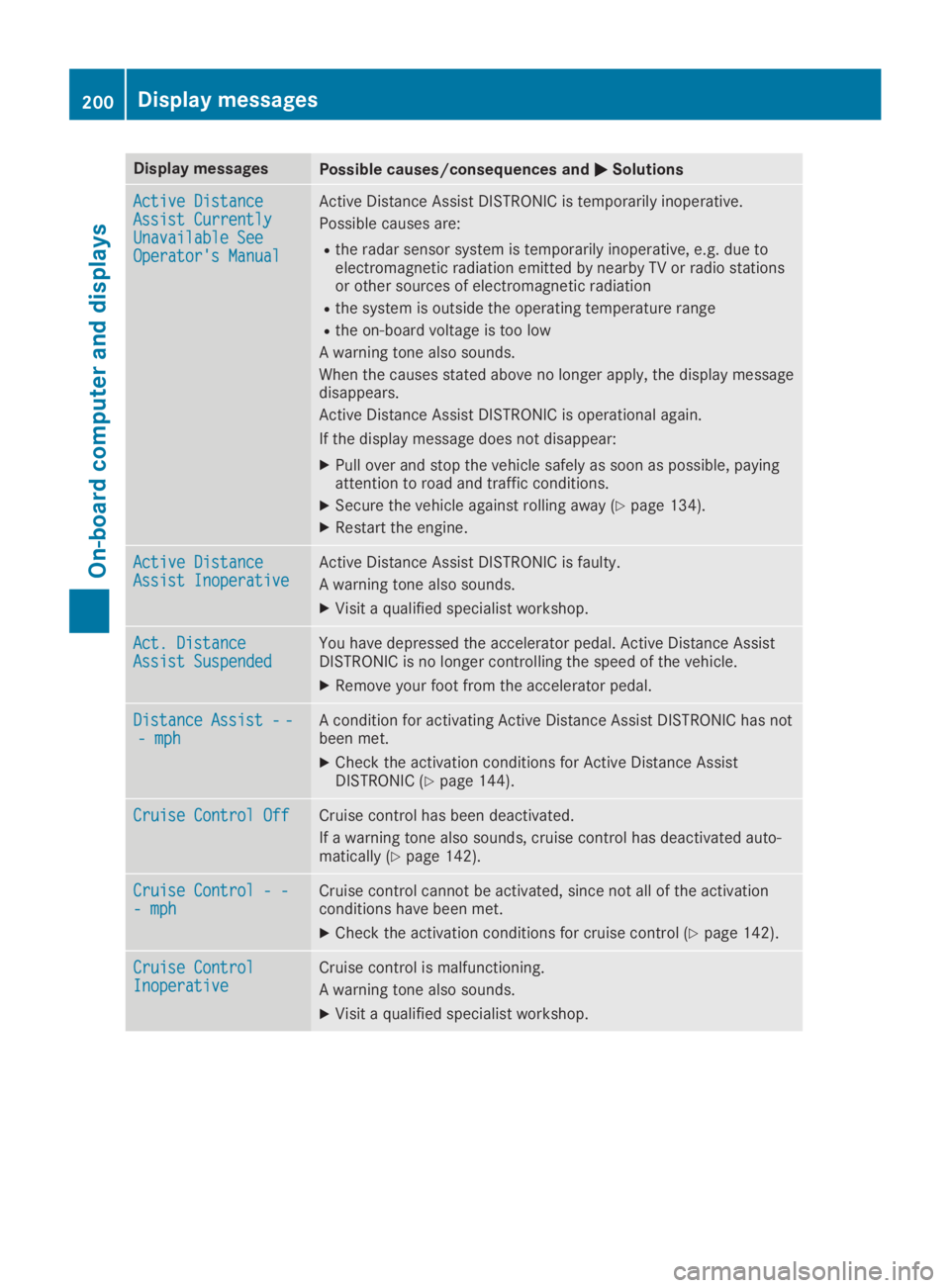
Display messagesPossible causes/consequences andPPSolutions
Active DistanceActive DistanceAssist CurrentlyAssist CurrentlyUnavailable SeeUnavailable SeeOperator's ManualOperator's Manual
Active Distance Assist DISTRONIC is temporarily inoperative.
Possible causes are:
Rthe radar sensor system is temporarily inoperative, e.g. due toelectromagnetic radiation emitted by nearby TV or radio stationsor other sources of electromagnetic radiation
Rthe system is outside the operating temperature range
Rthe on-board voltage is too low
A warning tone also sounds.
When the causes stated above no longer apply, the display messagedisappears.
Active Distance Assist DISTRONIC is operational again.
If the display message does not disappear:
XPull over and stop the vehicle safely as soon as possible, payingattention to road and traffic conditions.
XSecure the vehicle against rolling away (Ypage 134).
XRestart the engine.
Active DistanceActive DistanceAssist InoperativeAssist InoperativeActive Distance Assist DISTRONIC is faulty.
A warning tone also sounds.
XVisit a qualified specialist workshop.
Act. DistanceAct. DistanceAssist SuspendedAssist SuspendedYou have depressed the accelerator pedal. Active Distance AssistDISTRONIC is no longer controlling the speed of the vehicle.
XRemove your foot from the accelerator pedal.
Distance Assist--Distance Assist--- mph- mphA condition for activating Active Distance Assist DISTRONIC has notbeen met.
XCheck the activation conditions for Active Distance AssistDISTRONIC (Ypage 144).
Cruise Control OffCruise Control OffCruise control has been deactivated.
If a warning tone also sounds, cruise control has deactivated auto-matically (Ypage 142).
Cruise Control - -Cruise Control - -- mph- mphCruise control cannot be activated, since not all of the activationconditions have been met.
XCheck the activation conditions for cruise control (Ypage 142).
Cruise ControlCruise ControlInoperativeInoperativeCruise control is malfunctioning.
A warning tone also sounds.
XVisit a qualified specialist workshop.
200Display messages
On-board computer and displays