sensor MERCEDES-BENZ SLC 2019 Owner's Manual
[x] Cancel search | Manufacturer: MERCEDES-BENZ, Model Year: 2019, Model line: SLC, Model: MERCEDES-BENZ SLC 2019Pages: 306, PDF Size: 15 MB
Page 166 of 306
Important safety notes
GWARNING
Blind Spot Assist does not react to:
Rvehicles overtaken too closely on the side,
placing them in the blind spot area
Rvehicles which approach with a large
speed differential and overtake your vehi-
cle
As a result, Blind Spot Assist may not give
warnings in such situations. There is a risk
of an accident.
Always observe the traffic conditions care-
fully, and maintain a safe lateral distance.
Blind Spot Assist is only an aid. It may fail todetect some vehicles and is no substitute forattentive driving. Always ensure that there issufficient distance to the side for other roadusers and obstacles.
iUSA only:
This device has been approved by the FCCas a "Vehicular Radar System". The radarsensor is intended for use in an automotiveradar system only. Removing, tamperingwith, or altering the device will void any war-ranties, and is not permitted by the FCC. Donot tamper with, alter, or use in any non-approved way.
Any unauthorized modification to this devicecould void the user’s authority to operatethe equipment.
Radar sensors
The radar sensors for Blind Spot Assist areintegrated into the rear bumper. Make surethat the bumpers are free from dirt, ice orslush. The sensors must not be covered, forexample by cycle racks or overhanging loads.Following a severe impact or in the event ofdamage to the bumpers, have the function ofthe radar sensors checked at a qualified spe-cialist workshop. Blind Spot Assist may no lon-ger work properly.
Monitoring range of the sensors
In particular, the detection of obstacles can beimpaired if:
Rthere is dirt on the sensors or anything elsecovering the sensors
Rthere is poor visibility, e.g. due to fog, heavyrain, snow or spray
Rthere are narrow vehicles, e.g. motorcyclesor bicycles
Rthe road has very wide lanes
Rthe road has narrow lanes
Ryou are not driving in the middle of the lane
Rthere are barriers or other road boundaries
Vehicles in the monitoring range are then notindicated.
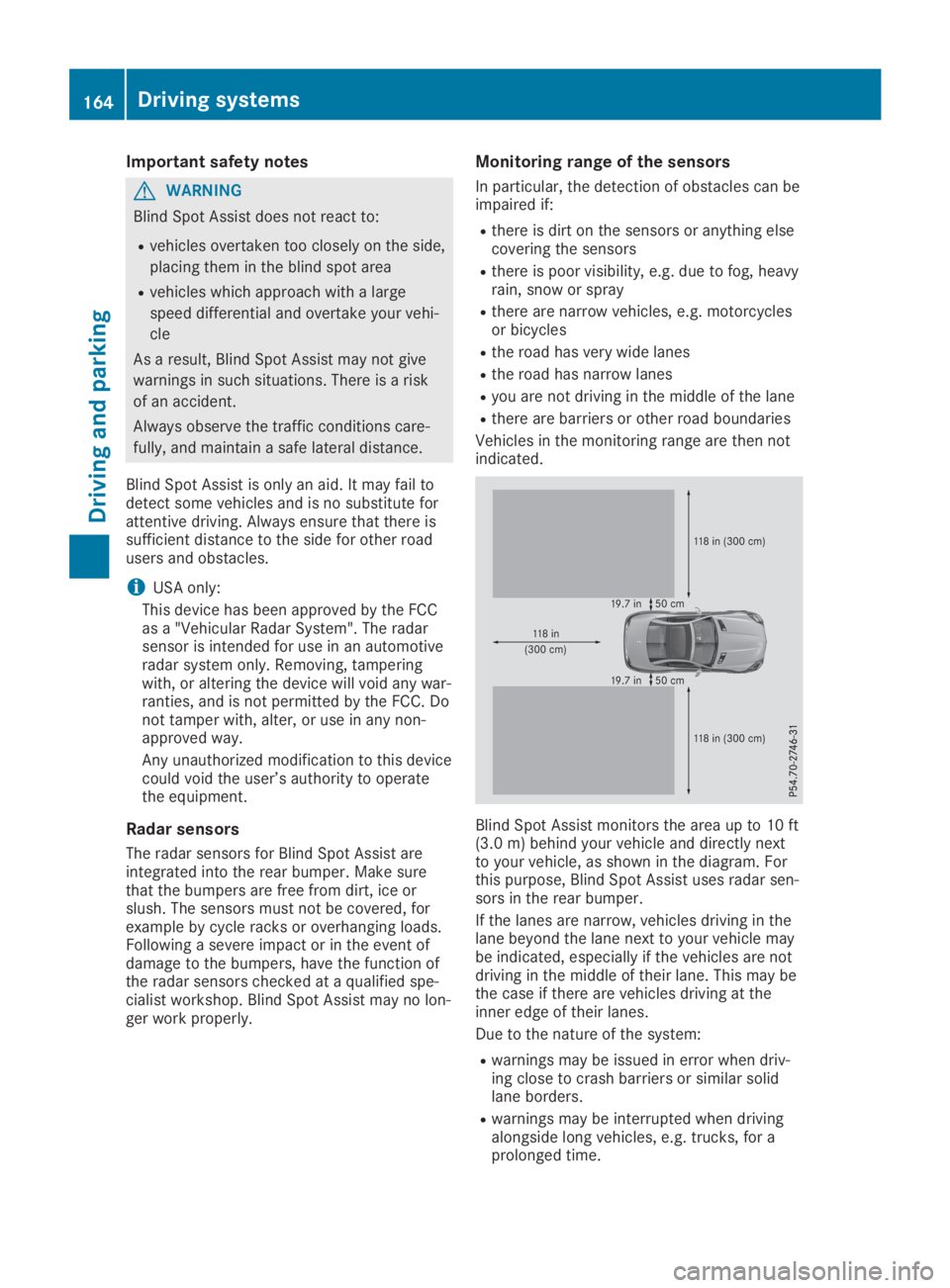
Blind Spot Assist monitors the area up to 10 ft(3.0 m) behind your vehicle and directly nextto your vehicle, as shown in the diagram. Forthis purpose, Blind Spot Assist uses radar sen-sors in the rear bumper.
If the lanes are narrow, vehicles driving in thelane beyond the lane next to your vehicle maybe indicated, especially if the vehicles are notdriving in the middle of their lane. This may bethe case if there are vehicles driving at theinner edge of their lanes.
Due to the nature of the system:
Rwarnings may be issued in error when driv-ing close to crash barriers or similar solidlane borders.
Rwarnings may be interrupted when drivingalongside long vehicles, e.g. trucks, for aprolonged time.
164Driving systems
Driving and pa rking
Page 169 of 306
Important safety notes
GWARNING
If you operate information systems and com-
munication equipment integrated in the
vehicle when driving, you may be distracted
from the traffic situation. You could also
lose control of the vehicle. There is a risk of
an accident.
Only operate this equipment when the traffic
situation permits. If you are not sure that
this is possible, park the vehicle paying
attention to traffic conditions and operate
the equipment when the vehicle is station-
ary.
You must observe the legal requirements forthe country in which you are currently drivingwhen operating the on-board computer.
GWARNING
If the instrument cluster has failed or mal-
functioned, you may not recognize function
restrictions in systems relevant to safety.
The operating safety of your vehicle may be
impaired. There is a risk of an accident.
Drive on carefully. Have the vehicle checked
at a qualified specialist workshop immedi-
ately.
The on-board computer only shows messagesor warnings from certain systems in the multi-function display. You should therefore makesure your vehicle is operating safely at alltimes.
If the operating safety of your vehicle isimpaired, pull over as soon as it is safe to doso. Contact a qualified specialist workshop.
For an overview, see the instrument panelillustration (Ypage 32).
Displays and operation
Instrument cluster lighting
The lighting in the instrument cluster, in thedisplays and the controls in the vehicle interiorcan be adjusted using the brightness controlknob.
The brightness control knob is located on thebottom left of the instrument cluster(Ypage 32).
XTurn the brightness control knob clockwiseor counter-clockwise.If you turn the light switch (Ypage 97) totheX,`orXposition, the bright-ness will depend upon the brightness of theambient light.
The light sensor in the instrument clusterautomatically controls the brightness of themultifunction display. In daylight, the dis-plays in the instrument cluster are not illu-minated.
Speedometer with segments
The segments in the speedometer indicatewhich speed range is available.
RCruise control activated (Ypage 142):
The segments light up from the storedspeed to the maximum speed.
RActive Distance Assist DISTRONIC activated(Ypage 144):
One or two segments in the set speed rangelight up.
RActive Distance Assist DISTRONIC detects avehicle in front moving more slowly than thestored speed:
The segments between the speed of thevehicle in front and the stored speed lightup.
Tachometer
!Do not drive in the overrevving range, asthis could damage the engine.
The red band in the tachometer indicates theengine's overrevving range.
The fuel supply is interrupted to protect theengine when the red band is reached.
Outside temperature display
You should pay special attention to road con-ditions when temperatures are around freezingpoint.
Displays and operation167
On-board computer and displays
Z
Page 190 of 306
Display messagesPossible causes/consequences andPPSolutions
The yellow$warning lamp lights up and the redI(USAonly) or$(Canada only) indicator lamp flashes.
It is not possible to apply the electric parking brake manually.
XShift the transmission to position].
XVisit a qualified specialist workshop.
'(USA only)
M(Canada only)
Check Brake FluidCheck Brake FluidLevelLevel
There is not enough brake fluid in the brake fluid reservoir.
In addition, the'(USA only) orM(Canada only) warninglamp lights up in the instrument cluster and a warning tone sounds.
GWARNING
The braking effect may be impaired.
There is a risk of an accident.
XPull over and stop the vehicle safely as soon as possible, payingattention to road and traffic conditions. Do not continue drivingunder any circumstances.
XSecure the vehicle against rolling away (Ypage 134).
XConsult a qualified specialist workshop.
XDo not add brake fluid. This does not correct the malfunction.
&
Check Brake PadCheck Brake PadWearWear
The brake pads/linings have reached their wear limit.
XVisit a qualified specialist workshop.
PRE-SAFE Inopera‐PRE-SAFE Inopera‐tive See Opera‐tive See Opera‐tor's Manualtor's Manual
Important functions of PRE-SAFE®have failed. All other occupantsafety systems, e.g. air bags, remain available.
XVisit a qualified specialist workshop immediately.
Active BrakeActive BrakeAssist FunctionsAssist FunctionsCurrently LimitedCurrently LimitedSee Operator's Man‐See Operator's Man‐ualual
Active Brake Assist is temporarily inoperative.
Possible causes are:
Rthe radar sensor system is temporarily inoperative, e.g. due toelectromagnetic radiation emitted by nearby TV or radio stationsor other sources of electromagnetic radiation
Rthe system is outside the operating temperature range
Rthe on-board voltage is too low
When the causes stated above no longer apply, the display messagedisappears.
Active Brake Assist is operational again.
If the display message does not disappear:
XPull over and stop the vehicle safely as soon as possible, payingattention to road and traffic conditions.
XSecure the vehicle against rolling away (Ypage 134).
XRestart the engine.
188Displaymessages
On-b oard computer and displays
Page 191 of 306
Display messagesPossible causes/consequences andPPSolutions
Active BrakeActive BrakeAssist FunctionsAssist FunctionsLimited See Opera‐Limited See Opera‐tor's Manualtor's Manual
Active Brake Assist is unavailable due to a malfunction.
XVisit a qualified specialist workshop.
Radar SensorsRadar SensorsDirty See Opera‐Dirty See Opera‐tor's Manualtor's Manual
The radar sensor system is malfunctioning.
Possible causes are:
Rdirt on sensors
Rheavy rain or snow
Rwhen driving on inter-urban roads without traffic or infrastructure,e.g. in desert-like areas
At least one driving system or driving safety system is malfunction-ing or is temporarily unavailable:
RActive Brake Assist
RActive Distance Assist DISTRONIC
Once the cause of the problem is no longer present, the driving anddrive safety systems will be available again. The display messagedisappears.
If the display message does not disappear:
XPull over and stop the vehicle safely as soon as possible, payingattention to road and traffic conditions.
XSecure the vehicle against rolling away (Ypage 134).
XSwitch off the engine.
XClean all sensors (Ypage 250).
XRestart the engine.The display message disappears.
u
SRS MalfunctionSRS MalfunctionService RequiredService Required
The restraint system is malfunctioning. Theuwarning lamp alsolights up in the instrument cluster.
GWARNING
The air bags or Emergency Tensioning Devices may either be trig-gered unintentionally or, in the event of an accident, may not betriggered.
There is an increased risk of injury.
XVisit a qualified specialist workshop immediately.
Further information about the restraint system (Ypage 39).
Displaymessages189
On-b oard computer and displays
Z
Page 195 of 306
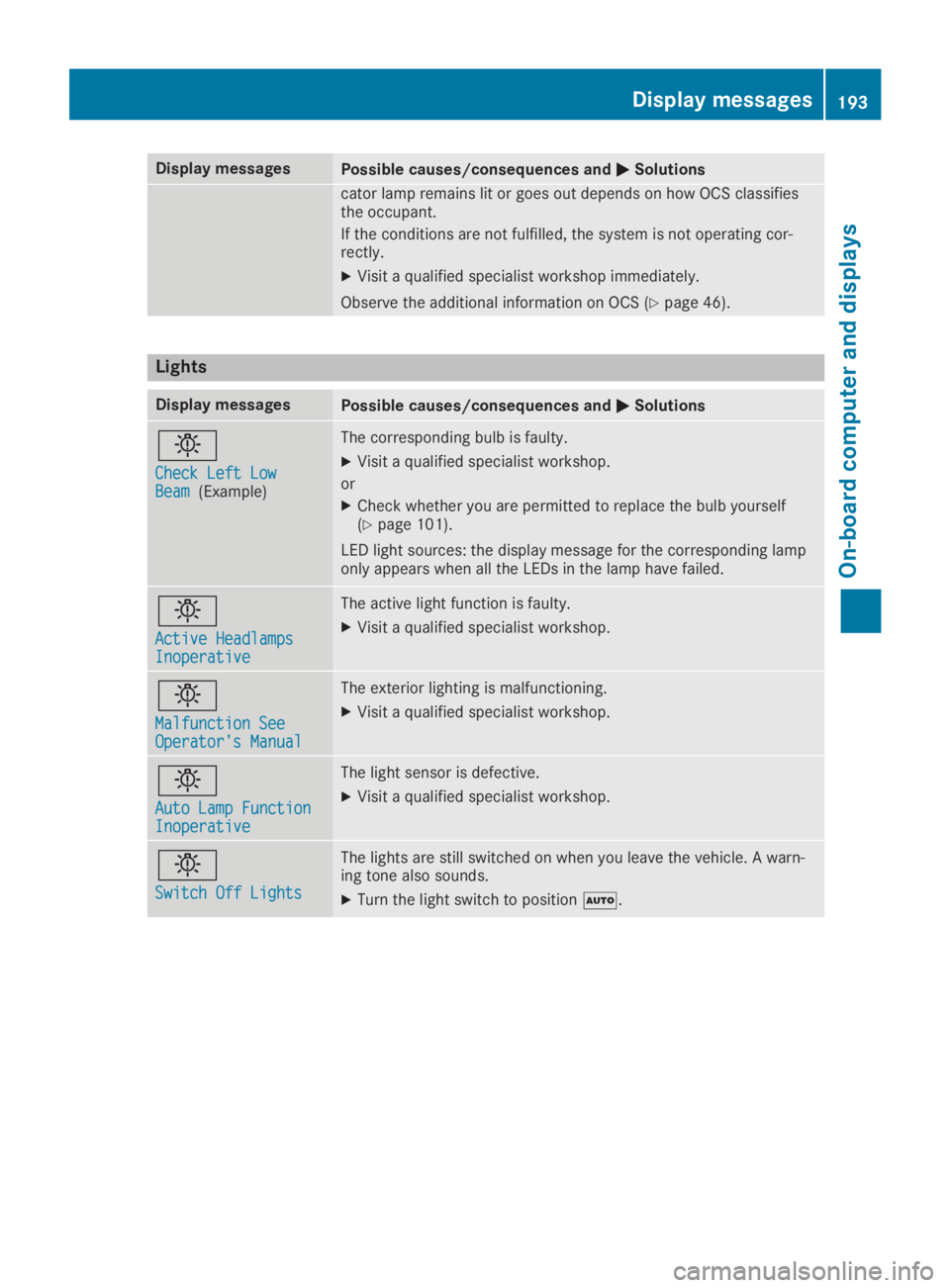
Display messagesPossible causes/consequences andPPSolutions
cator lamp remains lit or goes out depends on how OCS classifiesthe occupant.
If the conditions are not fulfilled, the system is not operating cor-rectly.
XVisit a qualified specialist workshop immediately.
Observe the additional information on OCS (Ypage 46).
Lights
Display messagesPossible causes/consequences andPPSolutions
I
Check Left LowCheck Left LowBeamBeam(Example)
The corresponding bulb is faulty.
XVisit a qualified specialist workshop.
or
XCheck whether you are permitted to replace the bulb yourself(Ypage 101).
LED light sources: the display message for the corresponding lamponly appears when all the LEDs in the lamp have failed.
I
Active HeadlampsActive HeadlampsInoperativeInoperative
The active light function is faulty.
XVisit a qualified specialist workshop.
I
Malfunction SeeMalfunction SeeOperator's ManualOperator's Manual
The exterior lighting is malfunctioning.
XVisit a qualified specialist workshop.
I
Auto Lamp FunctionAuto Lamp FunctionInoperativeInoperative
The light sensor is defective.
XVisit a qualified specialist workshop.
I
Switch Off LightsSwitch Off Lights
The lights are still switched on when you leave the vehicle. A warn-ing tone also sounds.
XTurn the light switch to positionX.
Displaymessages193
On-b oard computer and displays
Z
Page 200 of 306
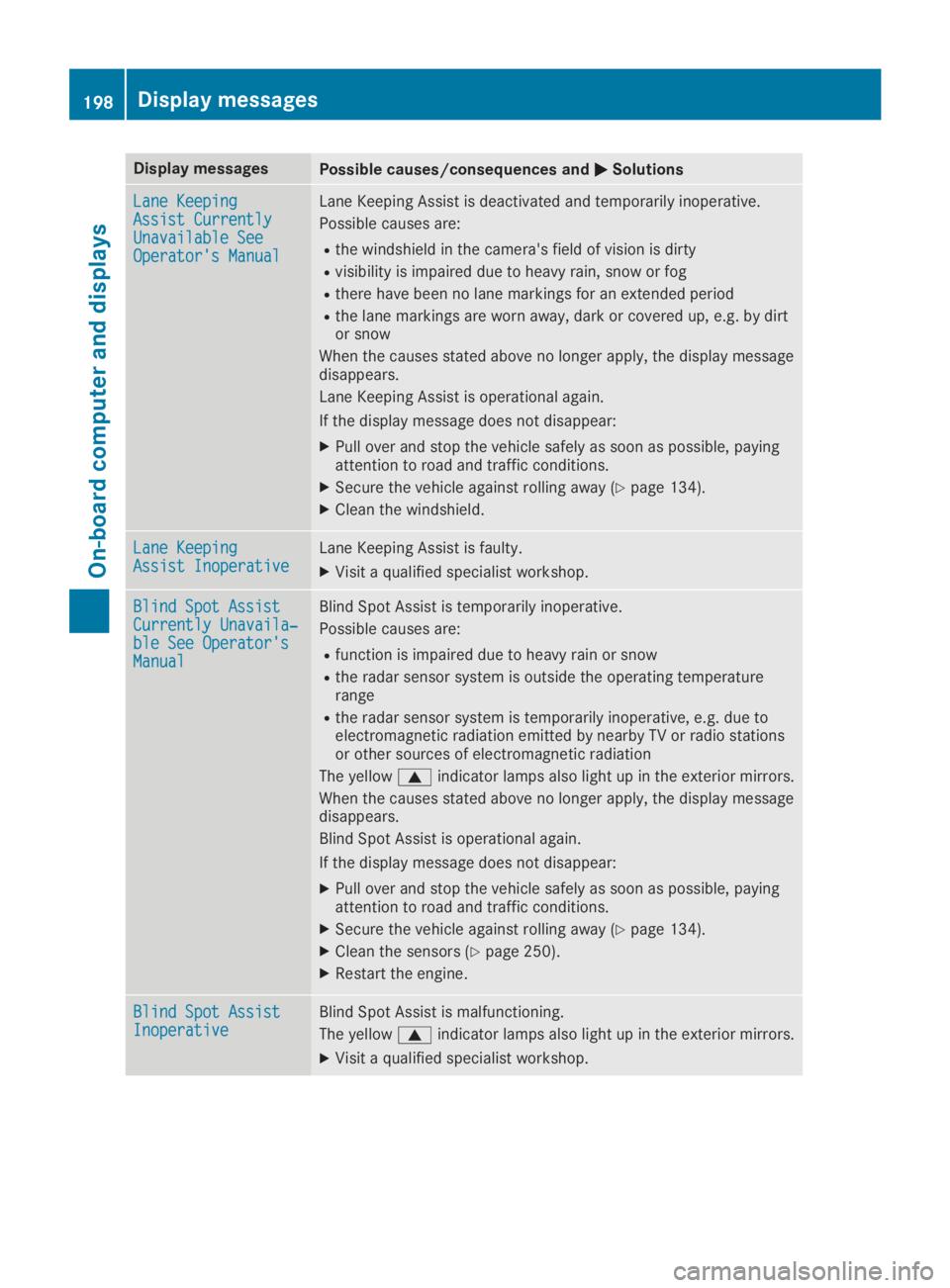
Display messagesPossible causes/consequences andPPSolutions
Lane KeepingLane KeepingAssist CurrentlyAssist CurrentlyUnavailable SeeUnavailable SeeOperator's ManualOperator's Manual
Lane Keeping Assist is deactivated and temporarily inoperative.
Possible causes are:
Rthe windshield in the camera's field of vision is dirty
Rvisibility is impaired due to heavy rain, snow or fog
Rthere have been no lane markings for an extended period
Rthe lane markings are worn away, dark or covered up, e.g. by dirtor snow
When the causes stated above no longer apply, the display messagedisappears.
Lane Keeping Assist is operational again.
If the display message does not disappear:
XPull over and stop the vehicle safely as soon as possible, payingattention to road and traffic conditions.
XSecure the vehicle against rolling away (Ypage 134).
XClean the windshield.
Lane KeepingLane KeepingAssist InoperativeAssist InoperativeLane Keeping Assist is faulty.
XVisit a qualified specialist workshop.
Blind Spot AssistBlind Spot AssistCurrently Unavaila‐Currently Unavaila‐ble See Operator'sble See Operator'sManualManual
Blind Spot Assist is temporarily inoperative.
Possible causes are:
Rfunction is impaired due to heavy rain or snow
Rthe radar sensor system is outside the operating temperaturerange
Rthe radar sensor system is temporarily inoperative, e.g. due toelectromagnetic radiation emitted by nearby TV or radio stationsor other sources of electromagnetic radiation
The yellowcindicator lamps also light up in the exterior mirrors.
When the causes stated above no longer apply, the display messagedisappears.
Blind Spot Assist is operational again.
If the display message does not disappear:
XPull over and stop the vehicle safely as soon as possible, payingattention to road and traffic conditions.
XSecure the vehicle against rolling away (Ypage 134).
XClean the sensors (Ypage 250).
XRestart the engine.
Blind Spot AssistBlind Spot AssistInoperativeInoperativeBlind Spot Assist is malfunctioning.
The yellowcindicator lamps also light up in the exterior mirrors.
XVisit a qualified specialist workshop.
198Displaymessages
On-b oard computer and displays
Page 201 of 306
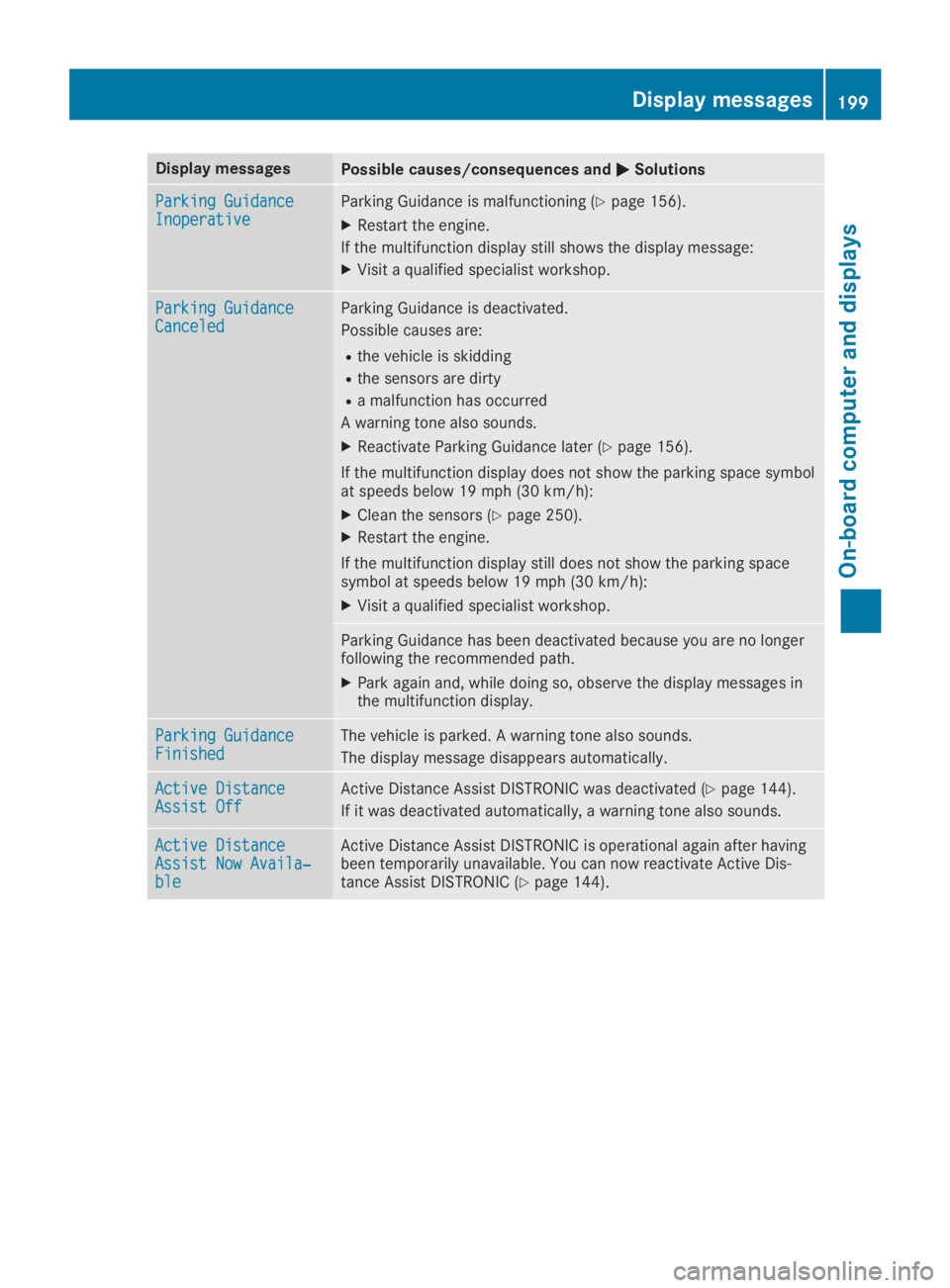
Display messagesPossible causes/consequences andPPSolutions
Parking GuidanceParking GuidanceInoperativeInoperativeParking Guidance is malfunctioning (Ypage 156).
XRestart the engine.
If the multifunction display still shows the display message:
XVisit a qualified specialist workshop.
Parking GuidanceParking GuidanceCanceledCanceledParking Guidance is deactivated.
Possible causes are:
Rthe vehicle is skidding
Rthe sensors are dirty
Ra malfunction has occurred
A warning tone also sounds.
XReactivate Parking Guidance later (Ypage 156).
If the multifunction display does not show the parking space symbolat speeds below 19 mph (30 km/h):
XClean the sensors (Ypage 250).
XRestart the engine.
If the multifunction display still does not show the parking spacesymbol at speeds below 19 mph(30 km/h):
XVisit a qualified specialist workshop.
Parking Guidance has been deactivated because you are no longerfollowing the recommended path.
XPark again and, while doing so, observe the display messages inthe multifunction display.
Parking GuidanceParking GuidanceFinishedFinishedThe vehicle is parked. A warning tone also sounds.
The display message disappears automatically.
Active DistanceActive DistanceAssist OffAssist OffActive Distance Assist DISTRONIC was deactivated (Ypage 144).
If it was deactivated automatically, a warning tone also sounds.
Active DistanceActive DistanceAssist Now Availa‐Assist Now Availa‐bleble
Active Distance Assist DISTRONIC is operational again after havingbeen temporarily unavailable. You can now reactivate Active Dis-tance Assist DISTRONIC (Ypage 144).
Display messages199
On-board computer and displays
Z
Page 202 of 306
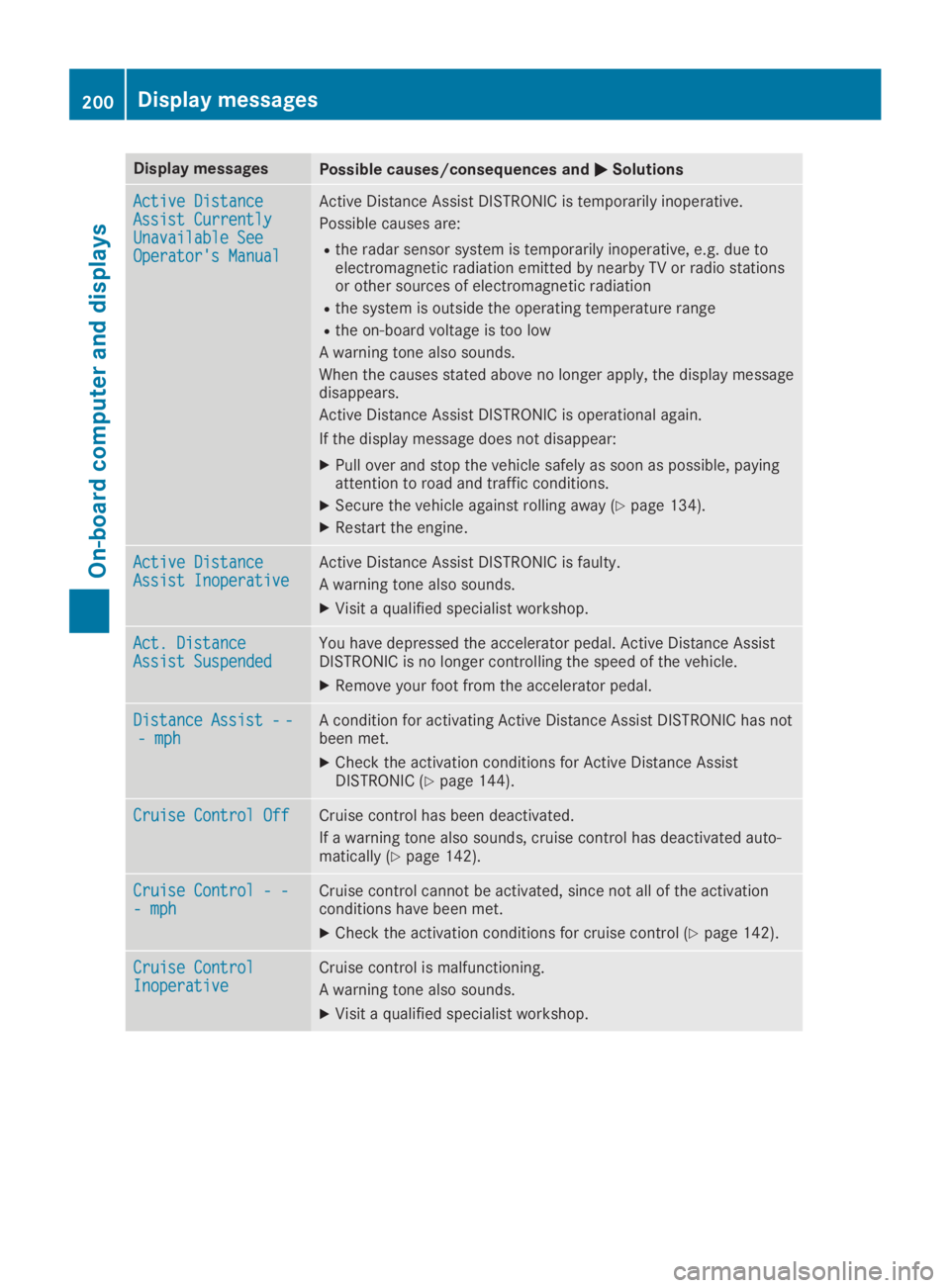
Display messagesPossible causes/consequences andPPSolutions
Active DistanceActive DistanceAssist CurrentlyAssist CurrentlyUnavailable SeeUnavailable SeeOperator's ManualOperator's Manual
Active Distance Assist DISTRONIC is temporarily inoperative.
Possible causes are:
Rthe radar sensor system is temporarily inoperative, e.g. due toelectromagnetic radiation emitted by nearby TV or radio stationsor other sources of electromagnetic radiation
Rthe system is outside the operating temperature range
Rthe on-board voltage is too low
A warning tone also sounds.
When the causes stated above no longer apply, the display messagedisappears.
Active Distance Assist DISTRONIC is operational again.
If the display message does not disappear:
XPull over and stop the vehicle safely as soon as possible, payingattention to road and traffic conditions.
XSecure the vehicle against rolling away (Ypage 134).
XRestart the engine.
Active DistanceActive DistanceAssist InoperativeAssist InoperativeActive Distance Assist DISTRONIC is faulty.
A warning tone also sounds.
XVisit a qualified specialist workshop.
Act. DistanceAct. DistanceAssist SuspendedAssist SuspendedYou have depressed the accelerator pedal. Active Distance AssistDISTRONIC is no longer controlling the speed of the vehicle.
XRemove your foot from the accelerator pedal.
Distance Assist--Distance Assist--- mph- mphA condition for activating Active Distance Assist DISTRONIC has notbeen met.
XCheck the activation conditions for Active Distance AssistDISTRONIC (Ypage 144).
Cruise Control OffCruise Control OffCruise control has been deactivated.
If a warning tone also sounds, cruise control has deactivated auto-matically (Ypage 142).
Cruise Control - -Cruise Control - -- mph- mphCruise control cannot be activated, since not all of the activationconditions have been met.
XCheck the activation conditions for cruise control (Ypage 142).
Cruise ControlCruise ControlInoperativeInoperativeCruise control is malfunctioning.
A warning tone also sounds.
XVisit a qualified specialist workshop.
200Display messages
On-board computer and displays
Page 204 of 306
Display messagesPossible causes/consequences andPPSolutions
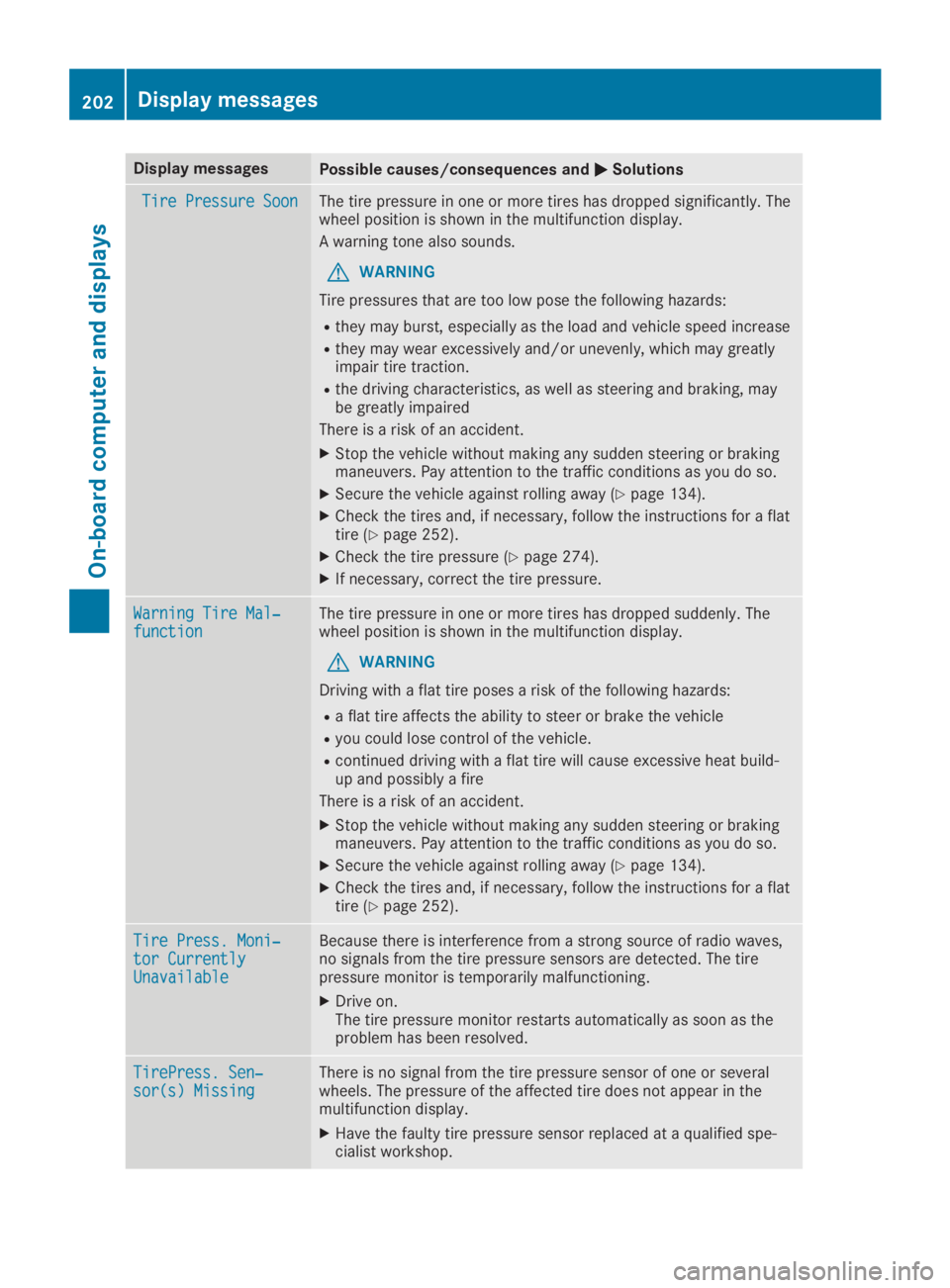
Tire Pressure SoonTire Pressure SoonThe tire pressure in one or more tires has dropped significantly. Thewheel position is shown in the multifunction display.
A warning tone also sounds.
GWARNING
Tire pressures that are too low pose the following hazards:
Rthey may burst, especially as the load and vehicle speed increase
Rthey may wear excessively and/or unevenly, which may greatlyimpair tire traction.
Rthe driving characteristics, as well as steering and braking, maybe greatly impaired
There is a risk of an accident.
XStop the vehicle without making any sudden steering or brakingmaneuvers. Pay attention to the traffic conditions as you do so.
XSecure the vehicle against rolling away (Ypage 134).
XCheck the tires and, if necessary, follow the instructions for a flattire (Ypage 252).
XCheck the tire pressure (Ypage 274).
XIf necessary, correct the tire pressure.
Warning Tire Mal‐Warning Tire Mal‐functionfunctionThe tire pressure in one or more tires has dropped suddenly. Thewheel position is shown in the multifunction display.
GWARNING
Driving with a flat tire poses a risk of the following hazards:
Ra flat tire affects the ability to steer or brake the vehicle
Ryou could lose control of the vehicle.
Rcontinued driving with a flat tire will cause excessive heat build-up and possibly a fire
There is a risk of an accident.
XStop the vehicle without making any sudden steering or brakingmaneuvers. Pay attention to the traffic conditions as you do so.
XSecure the vehicle against rolling away (Ypage 134).
XCheck the tires and, if necessary, follow the instructions for a flattire (Ypage 252).
Tire Press. Moni‐Tire Press. Moni‐tor Currentlytor CurrentlyUnavailableUnavailable
Because there is interference from a strong source of radio waves,no signals from the tire pressure sensors are detected. The tirepressure monitor is temporarily malfunctioning.
XDrive on.The tire pressure monitor restarts automatically as soon as theproblem has been resolved.
TirePress. Sen‐TirePress. Sen‐sor(s) Missingsor(s) MissingThere is no signal from the tire pressure sensor of one or severalwheels. The pressure of the affected tire does not appear in themultifunction display.
XHave the faulty tire pressure sensor replaced at a qualified spe-cialist workshop.
202Displaymessages
On-b oard computer and displays
Page 205 of 306
Display messagesPossible causes/consequences andPPSolutions
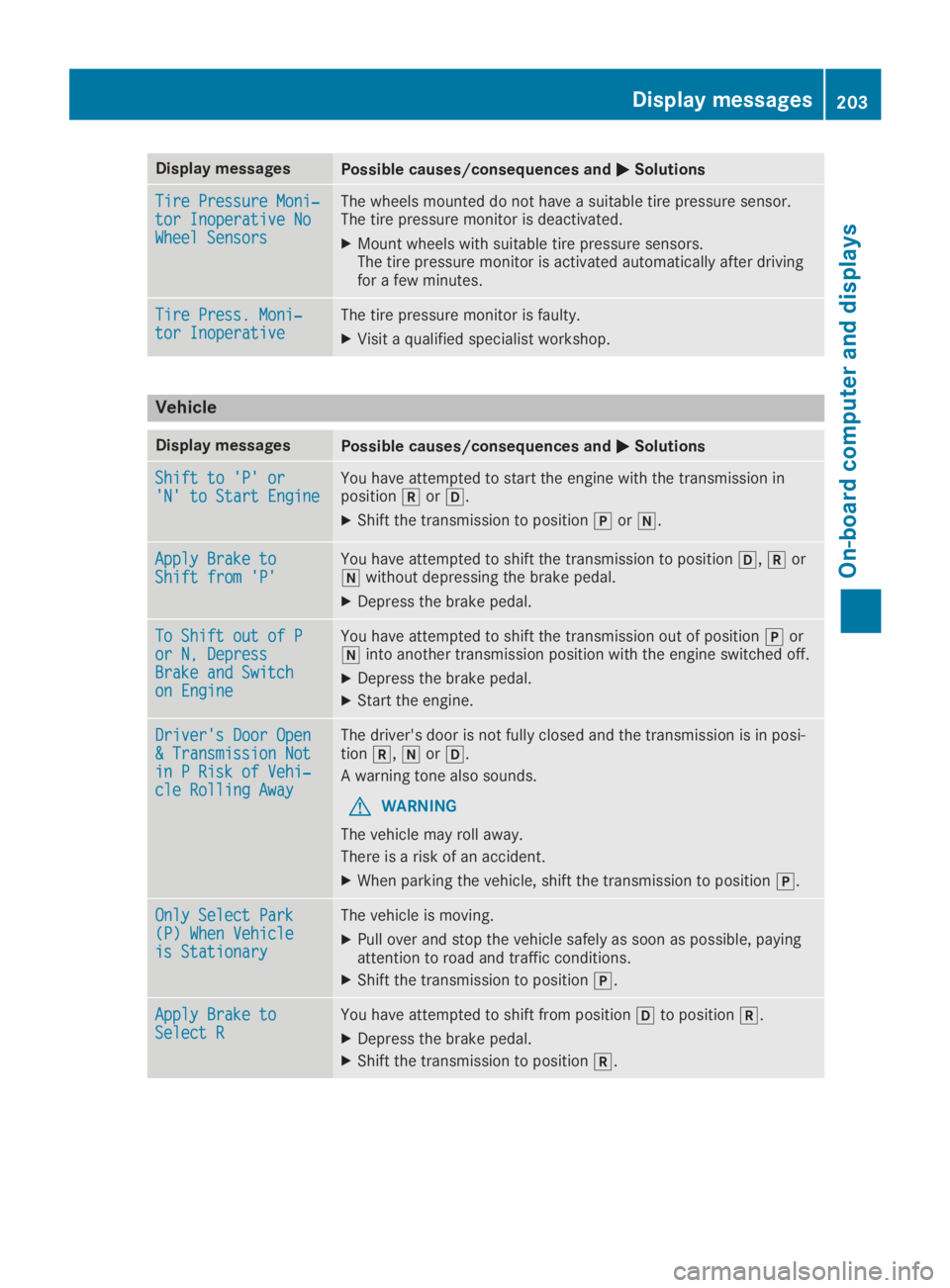
Tire Pressure Moni‐Tire Pressure Moni‐tor Inoperative Notor Inoperative NoWheel SensorsWheel Sensors
The wheels mounted do not have a suitable tire pressure sensor.The tire pressure monitor is deactivated.
XMount wheels with suitable tire pressure sensors.The tire pressure monitor is activated automatically after drivingfor a few minutes.
Tire Press. Moni‐Tire Press. Moni‐tor Inoperativetor InoperativeThe tire pressure monitor is faulty.
XVisit a qualified specialist workshop.
Vehicle
Display messagesPossible causes/consequences andPPSolutions
Shift to 'P' orShift to 'P' or'N' to Start Engine'N' to Start EngineYou have attempted to start the engine with the transmission inposition^or[.
XShift the transmission to position]or\\.
Apply Brake toApply Brake toShift from 'P'Shift from 'P'You have attempted to shift the transmission to position[,^or\\without depressing the brake pedal.
XDepress the brake pedal.
To Shift out of PTo Shift out of Por N, Depressor N, DepressBrake and SwitchBrake and Switchon Engineon Engine
You have attempted to shift the transmission out of position]or\\into another transmission position with the engine switched off.
XDepress the brake pedal.
XStart the engine.
Driver's Door OpenDriver's Door Open& Transmission Not& Transmission Notin P Risk of Vehi‐in P Risk of Vehi‐cle Rolling Awaycle Rolling Away
The driver's door is not fully closed and the transmission is in posi-tion^,\\or[.
A warning tone also sounds.
GWARNING
The vehicle may roll away.
There is a risk of an accident.
XWhen parking the vehicle, shift the transmission to position].
Only Select ParkOnly Select Park(P) When Vehicle(P) When Vehicleis Stationaryis Stationary
The vehicle is moving.
XPull over and stop the vehicle safely as soon as possible, payingattention to road and traffic conditions.
XShift the transmission to position].
Apply Brake toApply Brake toSelect RSelect RYou have attempted to shift from position[to position^.
XDepress the brake pedal.
XShift the transmission to position^.
Displaymessages203
On-b oard computer and displays
Z