steering MERCEDES-BENZ SLC 2019 Owner's Guide
[x] Cancel search | Manufacturer: MERCEDES-BENZ, Model Year: 2019, Model line: SLC, Model: MERCEDES-BENZ SLC 2019Pages: 306, PDF Size: 15 MB
Page 162 of 306
![MERCEDES-BENZ SLC 2019 Owners Guide The image from the rear view camera isavailable throughout the maneuvering proc-ess.
To deactivate:the rear view camera deacti-vates if you shift the transmission to position], or after driving forwa](/img/4/59131/w960_59131-161.png "MERCEDES-BENZ SLC 2019 Owners Guide The image from the rear view camera isavailable throughout the maneuvering proc-ess.
To deactivate:the rear view camera deacti-vates if you shift the transmission to position], or after driving forwa")
The image from the rear view camera isavailable throughout the maneuvering proc-ess.
To deactivate:the rear view camera deacti-vates if you shift the transmission to position], or after driving forwards a short distance.
The inner segments of the warning indicatorare displayed in red if there is a complete sys-tem failure. The indicator lamp in thePARKTRONIC button lights up.
If the system fails at the rear of the vehicle:
Rthe rear segments are shown in red whenbacking up.
Rthe rear segments are hidden when drivingforwards.
Displays in the multimedia system
The rear view camera may show a distortedview of obstacles, show them incorrectly ornot at all. The rear view camera does not showobjects in the following positions:
Rvery close to the rear bumper
Runder the rear bumper
Rin close range above the handle on the trunklid
!Objects not at ground level may appear tobe further away than they actually are, e.g.:
Rthe bumper of a parked vehicle
Rthe drawbar of a trailer
Rthe ball coupling of a trailer tow hitch
Rthe rear section of an HGV
Ra slanted post
Use the guidelines only for orientation.Approach objects no further than the bot-tom-most guideline.
CYellow guide line at a distance of approx-imately 13 ft (4.0 m) from the rear area
DWhite guide line without steering input –vehicle width including the exterior mirrors(static)
Page 164 of 306
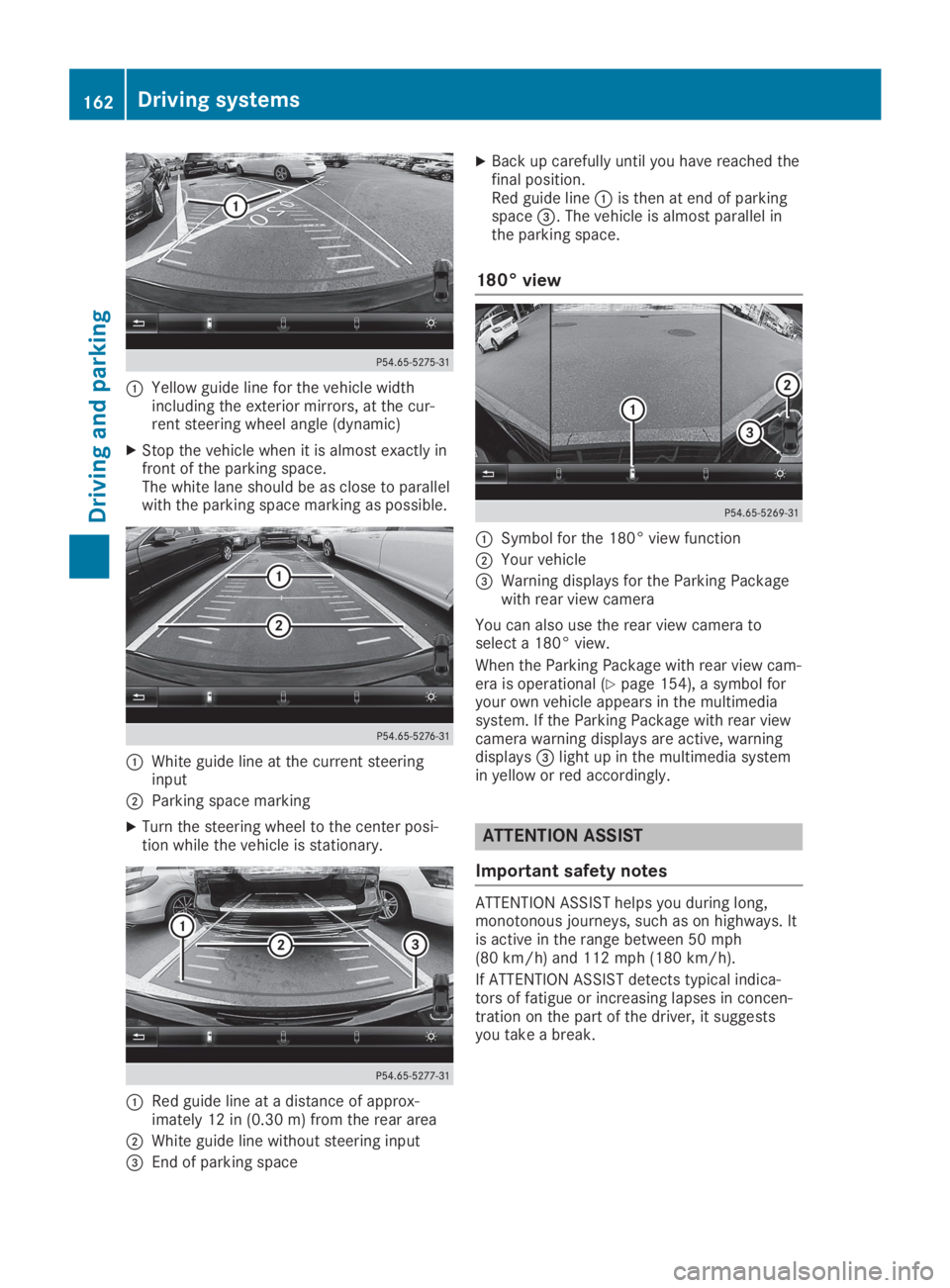
CYellow guide line for the vehicle widthincluding the exterior mirrors, at the cur-rent steering wheel angle (dynamic)
XStop the vehicle when it is almost exactly infront of the parking space.The white lane should be as close to parallelwith the parking space marking as possible.
CWhite guide line at the current steeringinput
DParking space marking
XTurn the steering wheel to the center posi-tion while the vehicle is stationary.
CRed guide line at a distance of approx-imately 12 in (0.30 m) from the rear area
DWhite guide line without steering input
Page 165 of 306
ATTENTION ASSIST assesses your level of fati-gue or lapses in concentration by taking thefollowing criteria into account:
Ryour personal driving style, e.g. steeringcharacteristics
Rjourney details, e.g. time of day and lengthof journey
The functionality of ATTENTION ASSIST isrestricted and warnings may be delayed or notoccur at all:
Rif the road condition is poor, e.g. if the sur-face is uneven or if there are potholes
Rif there is a strong side wind
Rif you have adopted a sporty driving stylewith high cornering speeds or high rates ofacceleration
Rif you are predominantly driving slower than50 mph (80 km/h) or faster than 112 mph(180 km/h)
Rif you are currently using COMAND or mak-ing a telephone call with it
Rif the time has been set incorrectly
Rin active driving situations, such as whenyou change lanes or change your speed
ATTENTION ASSIST is only an aid to the driver.It might not always recognize fatigue orincreasing inattentiveness in time or fail torecognize them at all. The system is not a sub-stitute for a well-rested and attentive driver.
Warning and display messages in the
multifunction display
XActivate ATTENTION ASSIST using the on-board computer (Ypage 175).
If ATTENTION ASSIST is active, you will bewarned no sooner than 20 minutes afteryour journey has begun. You then hear anintermittent warning tone twice and theATTENTION ASSIST: Take a Break!ATTENTION ASSIST: Take a Break!mes-sage appears in the multifunction display.
XIf necessary, take a break.
XPress thevor8button to confirmthe message.
On long journeys, take regular breaks in goodtime to allow yourself to rest properly. If youdo not take a break and ATTENTION ASSISTstill detects increasing lapses in concentra-tion, you will be warned again after 15 minutesat the earliest.
ATTENTION ASSIST is reset when you continueyour journey and starts assessing your tired-ness again if:
Ryou switch off the engine
Ryou take off your seat belt and open thedriver's door, e.g. for a change of drivers orto take a break
When ATTENTION ASSIST is deactivated, the
Page 167 of 306
Indicator and warning display
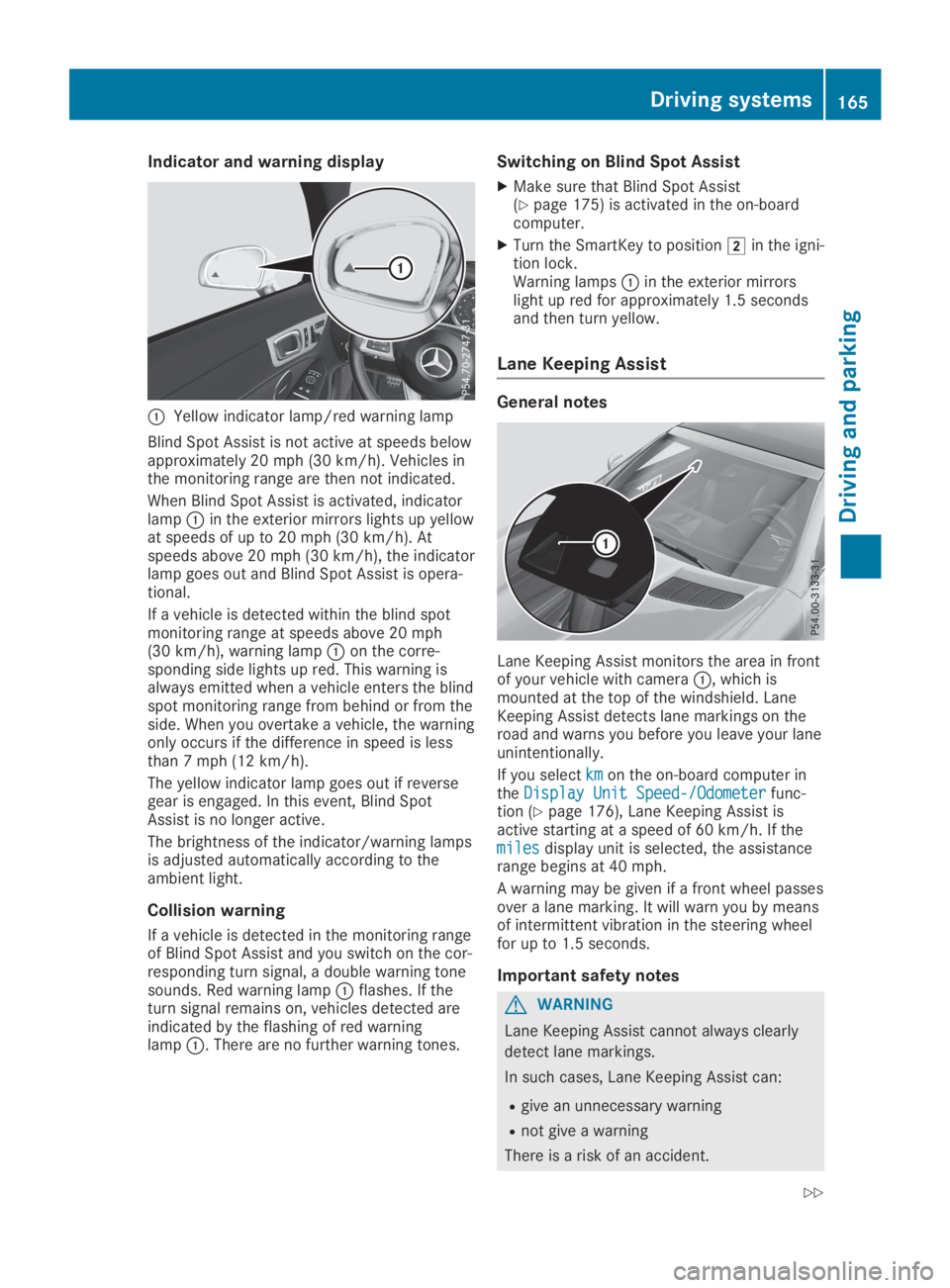
CYellow indicator lamp/red warning lamp
Blind Spot Assist is not active at speeds belowapproximately 20 mph (30 km/h). Vehicles inthe monitoring range are then not indicated.
When Blind Spot Assist is activated, indicatorlampCin the exterior mirrors lights up yellowat speeds of up to 20 mph(30 km/h). Atspeeds above 20 mph (30 km/h), the indicatorlamp goes out and Blind Spot Assist is opera-tional.
If a vehicle is detected within the blind spotmonitoring range at speeds above 20 mph(30 km/h), warning lampCon the corre-sponding side lights up red. This warning isalways emitted when a vehicle enters the blindspot monitoring range from behind or from theside. When you overtake a vehicle, the warningonly occurs if the difference in speed is lessthan 7 mph (12 km/h).
The yellow indicator lamp goes out if reversegear is engaged. In this event, Blind SpotAssist is no longer active.
The brightness of the indicator/warning lampsis adjusted automatically according to theambient light.
Collision warning
If a vehicle is detected in the monitoring rangeof Blind Spot Assist and you switch on the cor-responding turn signal, a double warning tonesounds. Red warning lampCflashes. If theturn signal remains on, vehicles detected areindicated by the flashing of red warninglampC. There are no further warning tones.
Switching on Blind Spot Assist
XMake sure that Blind Spot Assist(Ypage 175) is activated in the on-boardcomputer.
XTurn the SmartKey to positionHin the igni-tion lock.Warning lampsCin the exterior mirrorslight up red for approximately 1.5 secondsand then turn yellow.
Lane Keeping Assist
General notes
Lane Keeping Assist monitors the area in frontof your vehicle with cameraC, which ismounted at the top of the windshield. LaneKeeping Assist detects lane markings on theroad and warns you before you leave your laneunintentionally.
If you selectkmkmon the on-board computer intheDisplay Unit Speed-/OdometerDisplay Unit Speed-/Odometerfunc-tion (Ypage 176), Lane Keeping Assist isactive starting at a speed of 60 km/h. If themilesmilesdisplay unit is selected, the assistancerange begins at 40 mph.
A warning may be given if a front wheel passesover a lane marking. It will warn you by meansof intermittent vibration in the steering wheelfor up to 1.5 seconds.
Important safety notes
GWARNING
Lane Keeping Assist cannot always clearly
detect lane markings.
In such cases, Lane Keeping Assist can:
Rgive an unnecessary warning
Rnot give a warning
There is a risk of an accident.
Driving systems165
Driving and parking
Z
Page 176 of 306
attention to traffic conditions and operate
the equipment when the vehicle is station-
ary.
When telephoning, you must observe the legalrequirements for the country in which you arecurrently driving.
XSwitch on the mobile phone (see the manu-facturer’s operating instructions).
XSwitch on the multimedia system (see theDigital Operator's Manual)
XEstablish a Bluetooth®connection to themultimedia system (Ypage 221).
XPress theYorebutton on the steer-ing wheel to select theTelTelmenu.
You will see one of the following display mes-sages in the multifunction display:
RPhone READYPhone READYor the name of the networkprovider: the mobile phone has found a net-work and is ready to receive.
RPhone No ServicePhone No Service: there is no networkavailable or the mobile phone is searchingfor a network.
Accepting a call
If someone calls you when you are in theTelTelmenu, a display message appears in the multi-function display.
You can accept a call at any time regardless ofthe menu selected.
XPress theabutton on the steering wheelto accept an incoming call.
Rejecting or ending a call
XPress thevbutton on the steering wheelto reject or end a call.
Selecting an entry in the phone book
XPress theYorebutton on the steer-ing wheel to select theTelTelmenu.
XPress thec,dorvbutton toswitch to the phone book.
XAuthorize access to the phone book on thephone.
XPressdorcto select the names oneafter the other.
or
XTo start rapid scrolling:press and holdthedorcbutton for longer than onesecond.The names in the phone book are displayedquickly one after the other.
Rapid scrolling stops when you release thebutton or reach the end of the list.
XIf only one telephone number is storedfor a name:press theaorvbuttonto start dialing.
or
XIf there is more than one number for aparticular name:press theaorvbutton to display the numbers.
XPress thecordbutton to select thenumber you want to dial.
XPress theaorvbutton to start dial-ing.
or
XTo exit the telephone book:press thevor8button.
Redialing
The on-board computer saves the last namesor numbers dialed in the redial memory.
XPress theYorebutton on the steer-ing wheel to select theTelTelmenu.
XPress theabutton to switch to theredial memory.
XPress thecordbutton to select thedesired name or number.
XPress theaorvbutton to start dial-ing.
or
XTo exit the redial memory:press thevor8button.
Assistance menu
Introduction
Depending on your vehicle's equipment, in theDriveAssistDriveAssistmenu, you have the followingoptions:
174Menus and submenus
On-board computer and displays
Page 180 of 306
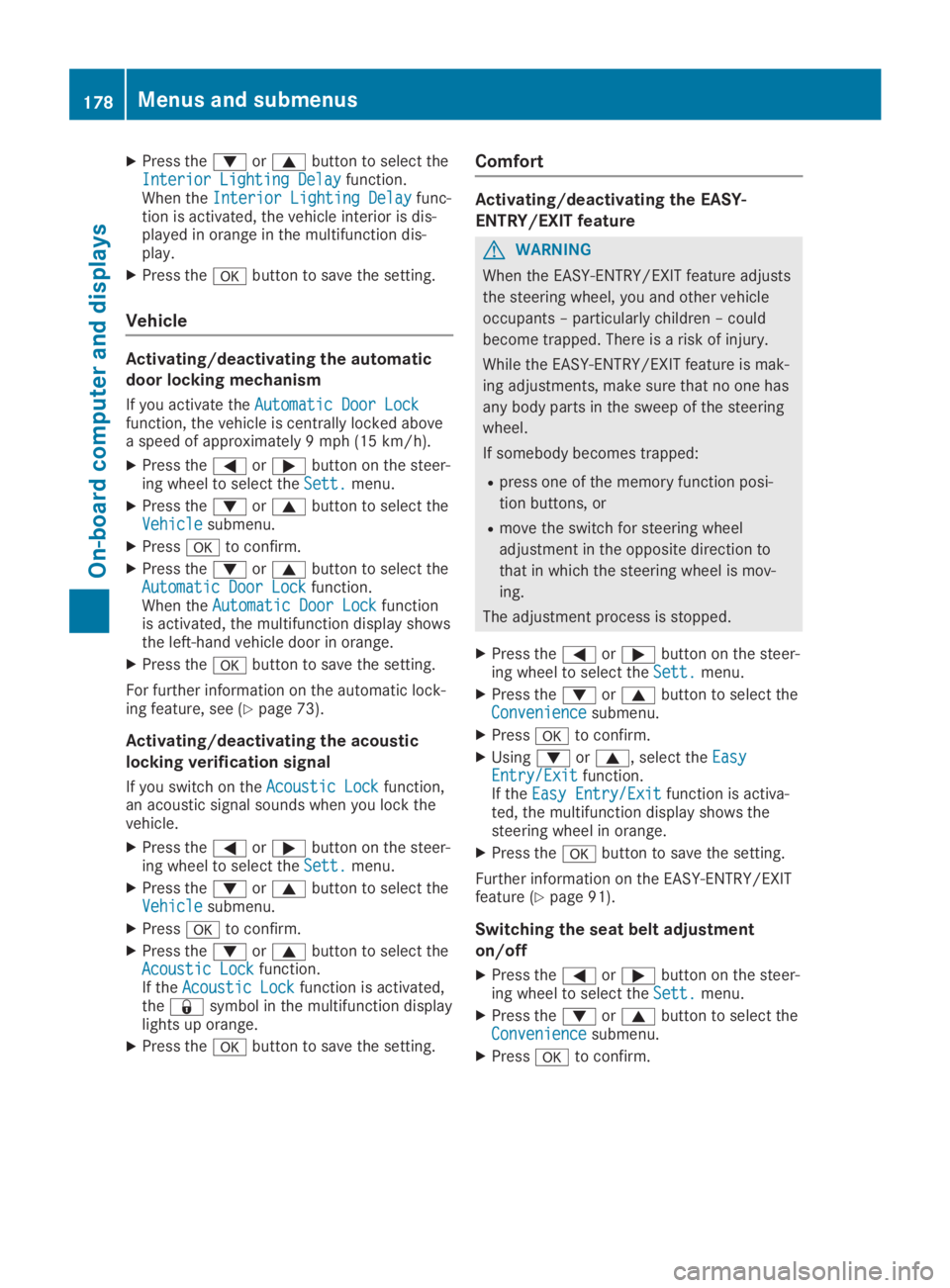
XPress thedorcbutton to select theInterior Lighting DelayInterior Lighting Delayfunction.When theInterior Lighting DelayInterior Lighting Delayfunc-tion is activated, the vehicle interior is dis-played in orange in the multifunction dis-play.
XPress thevbutton to save the setting.
Vehicle
Activating/deactivating the automatic
door locking mechanism
If you activate theAutomatic Door LockAutomatic Door Lockfunction, the vehicle is centrally locked abovea speed of approximately 9 mph (15 km/h).
XPress theYorebutton on the steer-ing wheel to select theSett.Sett.menu.
XPress thedorcbutton to select theVehicleVehiclesubmenu.
XPressvto confirm.
XPress thedorcbutton to select theAutomatic Door LockAutomatic Door Lockfunction.When theAutomatic Door LockAutomatic Door Lockfunctionis activated, the multifunction display showsthe left-hand vehicle door in orange.
XPress thevbutton to save the setting.
For further information on the automatic lock-ing feature, see (Ypage 73).
Activating/deactivating the acoustic
locking verification signal
If you switch on theAcoustic LockAcoustic Lockfunction,an acoustic signal sounds when you lock thevehicle.
XPress theYorebutton on the steer-ing wheel to select theSett.Sett.menu.
XPress thedorcbutton to select theVehicleVehiclesubmenu.
XPressvto confirm.
XPress thedorcbutton to select theAcoustic LockAcoustic Lockfunction.If theAcoustic LockAcoustic Lockfunction is activated,the7symbol in the multifunction displaylights up orange.
XPress thevbutton to save the setting.
Comfort
Activating/deactivating the EASY-
ENTRY/EXIT feature
GWARNING
When the EASY-ENTRY/EXIT feature adjusts
the steering wheel, you and other vehicle
occupants – particularly children – could
become trapped. There is a risk of injury.
While the EASY-ENTRY/EXIT feature is mak-
ing adjustments, make sure that no one has
any body parts in the sweep of the steering
wheel.
If somebody becomes trapped:
Rpress one of the memory function posi-
tion buttons, or
Rmove the switch for steering wheel
adjustment in the opposite direction to
that in which the steering wheel is mov-
ing.
The adjustment process is stopped.
XPress theYorebutton on the steer-ing wheel to select theSett.Sett.menu.
XPress thedorcbutton to select theConvenienceConveniencesubmenu.
XPressvto confirm.
XUsingdorc, select theEasyEasyEntry/ExitEntry/Exitfunction.If theEasy Entry/ExitEasy Entry/Exitfunction is activa-ted, the multifunction display shows thesteering wheel in orange.
XPress thevbutton to save the setting.
Further information on the EASY-ENTRY/EXITfeature (Ypage 91).
Switching the seat belt adjustment
on/off
XPress theYorebutton on the steer-ing wheel to select theSett.Sett.menu.
XPress thedorcbutton to select theConvenienceConveniencesubmenu.
XPressvto confirm.
178Menus and submenus
On-board computer and displays
Page 182 of 306
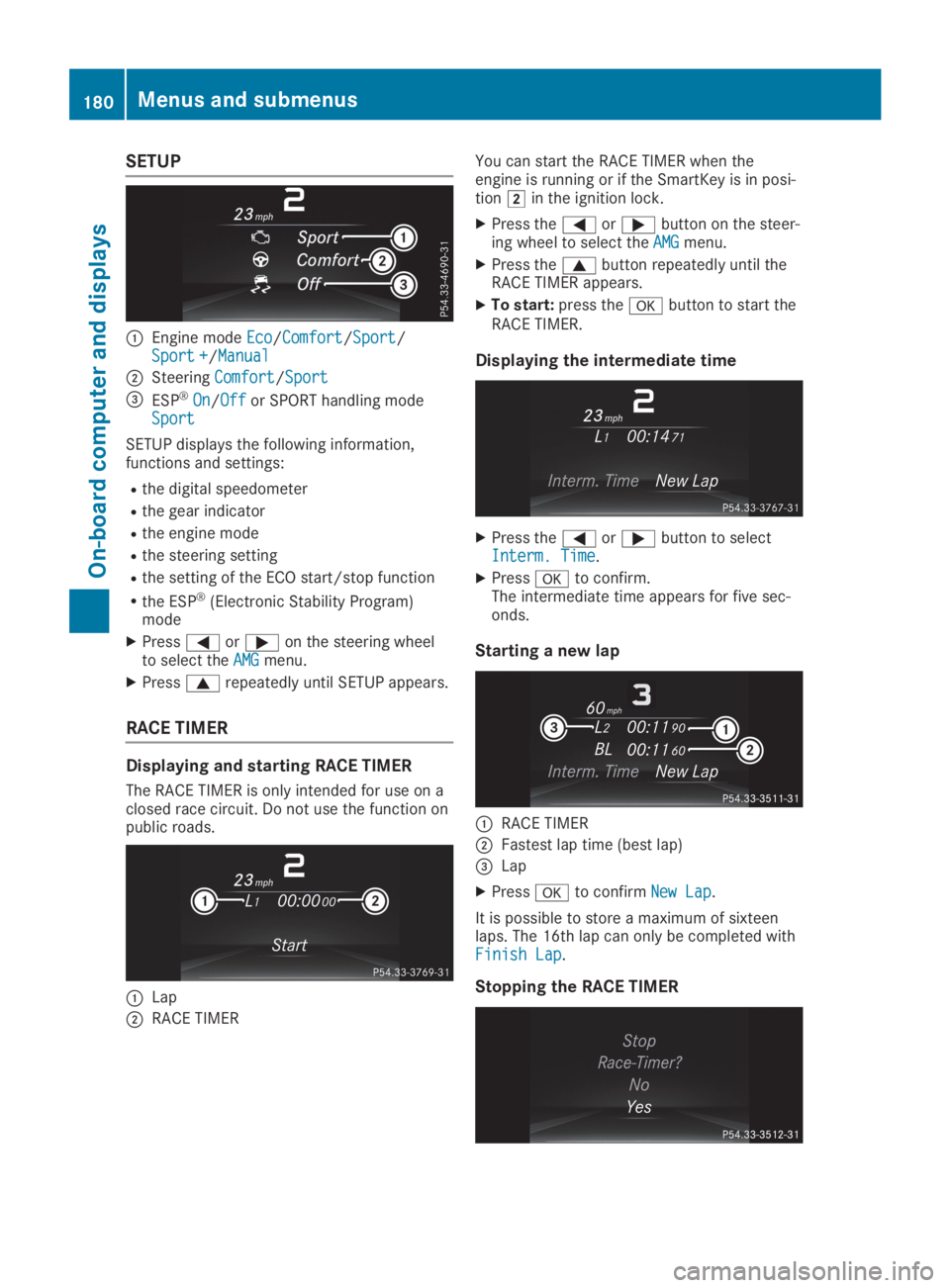
SETUP
CEngine modeEcoEco/ComfortComfort/SportSport/Sport +Sport +/ManualManual
DSteeringComfortComfort/SportSport
Page 183 of 306
XPress the8button on the steeringwheel.
XConfirmYesYeswithv.
The RACE TIMER interrupts timing if you stopthe vehicle and turn the SmartKey to positionGin the ignition lock. If you turn the Smart-Key to position3and then pressvto con-
firmStartStart, timing is continued.
Resetting the current lap
XStop the RACE TIMER.
XPress theYorebutton to selectReset LapReset Lap.
XPressvto reset the lap time to "0".
Deleting all laps
If you switch off the engine, the RACE TIMER isreset to "0" after 30 seconds. All laps aredeleted.
You cannot delete individual stored laps. If youhave stopped 16 laps, the current lap does nothave to be reset.
XReset the current lap.
XPressvto confirmResetReset.Reset Race-Timer?Reset Race-Timer?appears in the multi-function display.
XPress thedbutton to selectYesYesandpress thevbutton to confirm.All laps are deleted.
Overall statistics
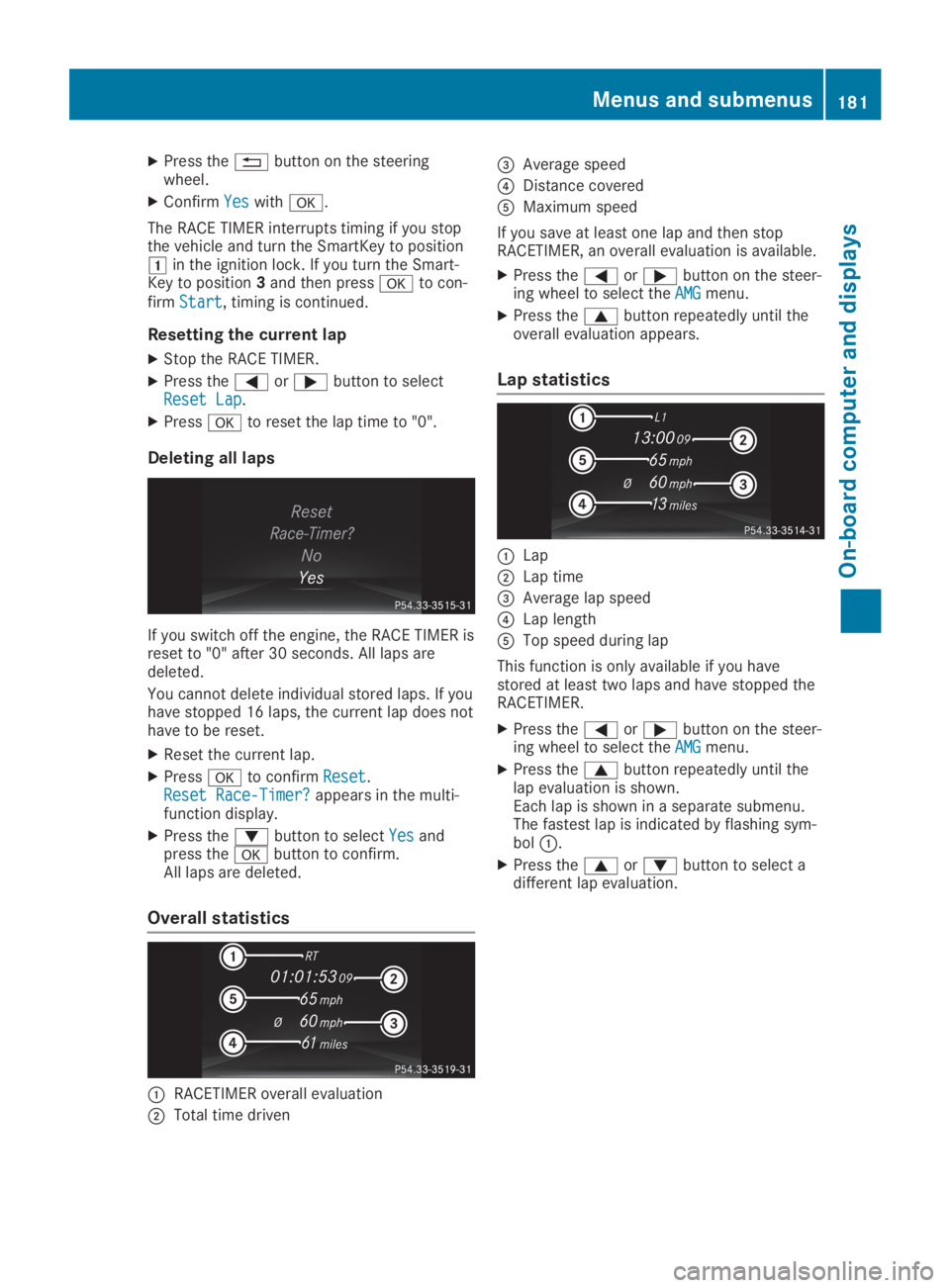
CRACETIMER overall evaluation
DTotal time driven
Page 184 of 306
Display messages
Introduction
General notes
Display messages appear in the multifunction display.
Display messages with graphic displays may be shown in simplified form in the Operator's Man-ual and may therefore differ from the multifunction display.
Please respond in accordance with the display messages and follow the additional notes in thisOperator's Manual.
Certain display messages are accompanied by an audible warning tone or a continuous tone.
When you stop and park the vehicle, please observe the notes on:
RHOLD function (Ypage 151)
RParking (Ypage 134)
Hiding display messages
XPress thevor8button on the steering wheel.The multifunction display hides the display message.
High-priority display messages are shown in red in the multifunction display. Some high-prioritydisplay messages cannot be hidden.
The multifunction display shows these messages continuously until the causes for the messageshave been remedied.
Message memory
The on-board computer saves certain display messages in themessage memory. You can callup the display messages:
XPress theYorebutton on the steering wheel to select theServ.Serv.menu.If there are display messages, the multifunction display shows2 Messages2 Messages, for example.
XPress thecordbutton to select the entry, e.g.2 Messages2 Messages.
XPressvto confirm.
XPress thecordbutton to scroll through the display messages.
When the ignition is switched off, all display messages are deleted, apart from some high-prioritydisplay messages. Once the causes of the high-priority display messages have been rectified, thecorresponding display messages are also deleted.
182Displaymessages
On-b oard computer and displays
Page 203 of 306
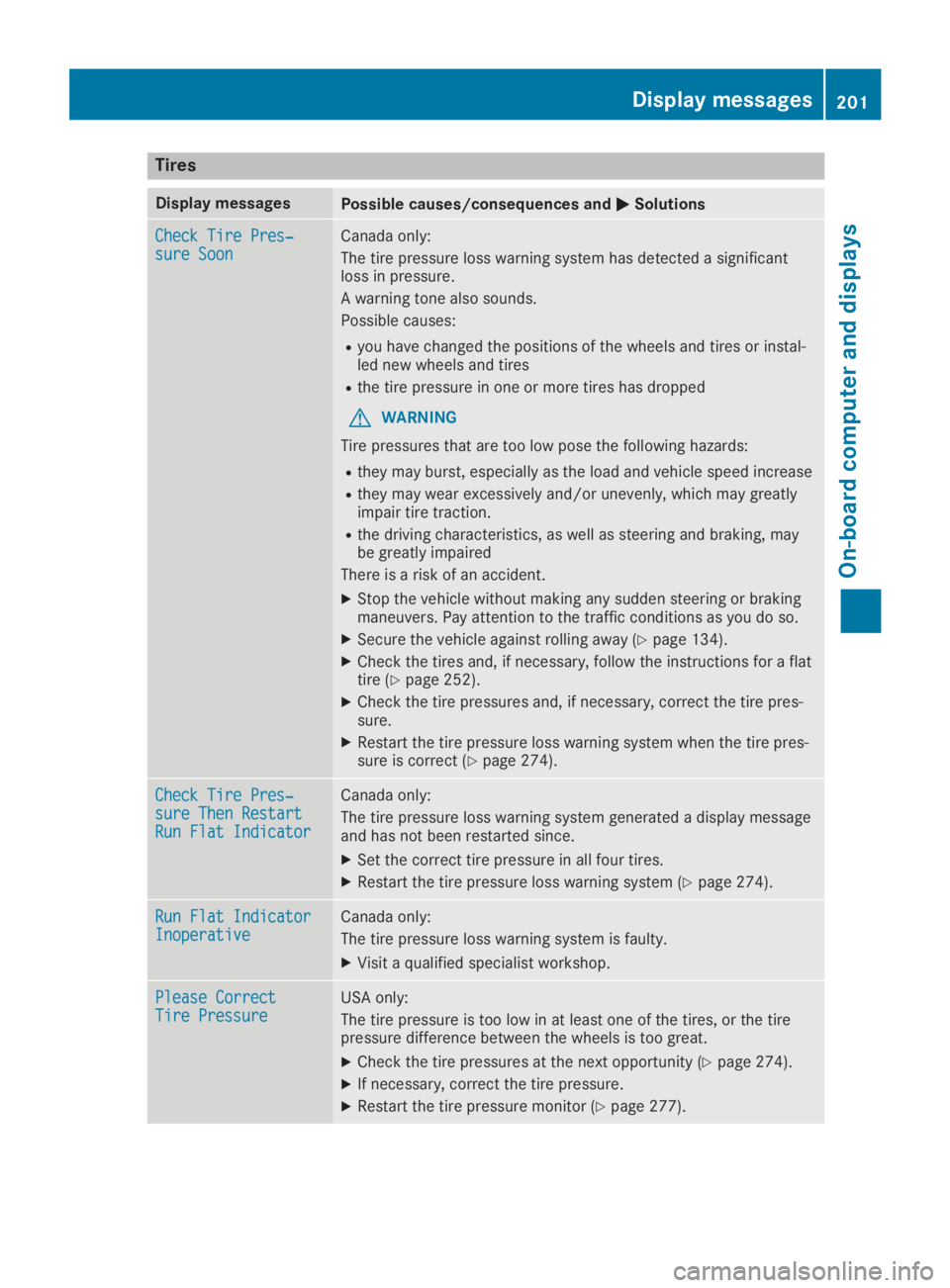
Tires
Display messagesPossible causes/consequences andPPSolutions
Check Tire Pres‐Check Tire Pres‐sure Soonsure SoonCanada only:
The tire pressure loss warning system has detected a significantloss in pressure.
A warning tone also sounds.
Possible causes:
Ryou have changed the positions of the wheels and tires or instal-led new wheels and tires
Rthe tire pressure in one or more tires has dropped
GWARNING
Tire pressures that are too low pose the following hazards:
Rthey may burst, especially as the load and vehicle speed increase
Rthey may wear excessively and/or unevenly, which may greatlyimpair tire traction.
Rthe driving characteristics, as well as steering and braking, maybe greatly impaired
There is a risk of an accident.
XStop the vehicle without making any sudden steering or brakingmaneuvers. Pay attention to the traffic conditions as you do so.
XSecure the vehicle against rolling away (Ypage 134).
XCheck the tires and, if necessary, follow the instructions for a flattire (Ypage 252).
XCheck the tire pressures and, if necessary, correct the tire pres-sure.
XRestart the tire pressure loss warning system when the tire pres-sure is correct (Ypage 274).
Check Tire Pres‐Check Tire Pres‐sure Then Restartsure Then RestartRun Flat IndicatorRun Flat Indicator
Canada only:
The tire pressure loss warning system generated a display messageand has not been restarted since.
XSet the correct tire pressure in all four tires.
XRestart the tire pressure loss warning system (Ypage 274).
Run Flat IndicatorRun Flat IndicatorInoperativeInoperativeCanada only:
The tire pressure loss warning system is faulty.
XVisit a qualified specialist workshop.
Please CorrectPlease CorrectTire PressureTire PressureUSA only:
The tire pressure is too low in at least one of the tires, or the tirepressure difference between the wheels is too great.
XCheck the tire pressures at the next opportunity (Ypage 274).
XIf necessary, correct the tire pressure.
XRestart the tire pressure monitor (Ypage 277).
Displaymessages201
On-b oard computer and displays
Z