buttons MERCEDES-BENZ SLC 2020 User Guide
[x] Cancel search | Manufacturer: MERCEDES-BENZ, Model Year: 2020, Model line: SLC, Model: MERCEDES-BENZ SLC 2020Pages: 310, PDF Size: 16.05 MB
Page 172 of 310
0063
0064 Press
andhold:
R In the Audio Audio
menu: selects apre-
set listoras tation listinthe
desired frequency range,selects
an audio trackorvideo scene
using rapidscrolling
R In the Tel Tel
(Telephone) menu:
starts rapidscrolling ifthe phone
book isopen 0076 R
Confirms theselection ordisplay
message
R In the Tel Tel
(Telephone) menu:
switches tothe telephone book
and starts dialingthe selected
number 0038 Press
briefly:
R Back
R Switches offvoice-operated con-
trol fornavigation orthe Voice
Control System
R Hides display messages orcalls
up the last Trip Trip
menu function
used
R Exit sthe telephone book/redial
memory 0038 Press
andhold:
R Call supthe standard displayin
the Trip Trip
menu Right
control panel 0076 R
Rejects orends acall
R Exit sthe telephone book/redial
memory 0061 R
Makes oraccepts acall
R Switches tothe redial memory 0081
0082 R
Adjusts thevolume 0063 R
Mute 0059 R
Switches onvoice-operated con-
trol fornavigation orthe Voice
Control System You
canfind further information onvoice-oper-
ated controlfor navigation inthe manufactur- er's
operating instructionsinvehicles withan
Audio 20multimedia system.
Vehicles withtheCOMAND multimedia sys-
tem: youcan find further information onthe
Voice Control System inthe separate operat-
ing instruct ions. Multifunction
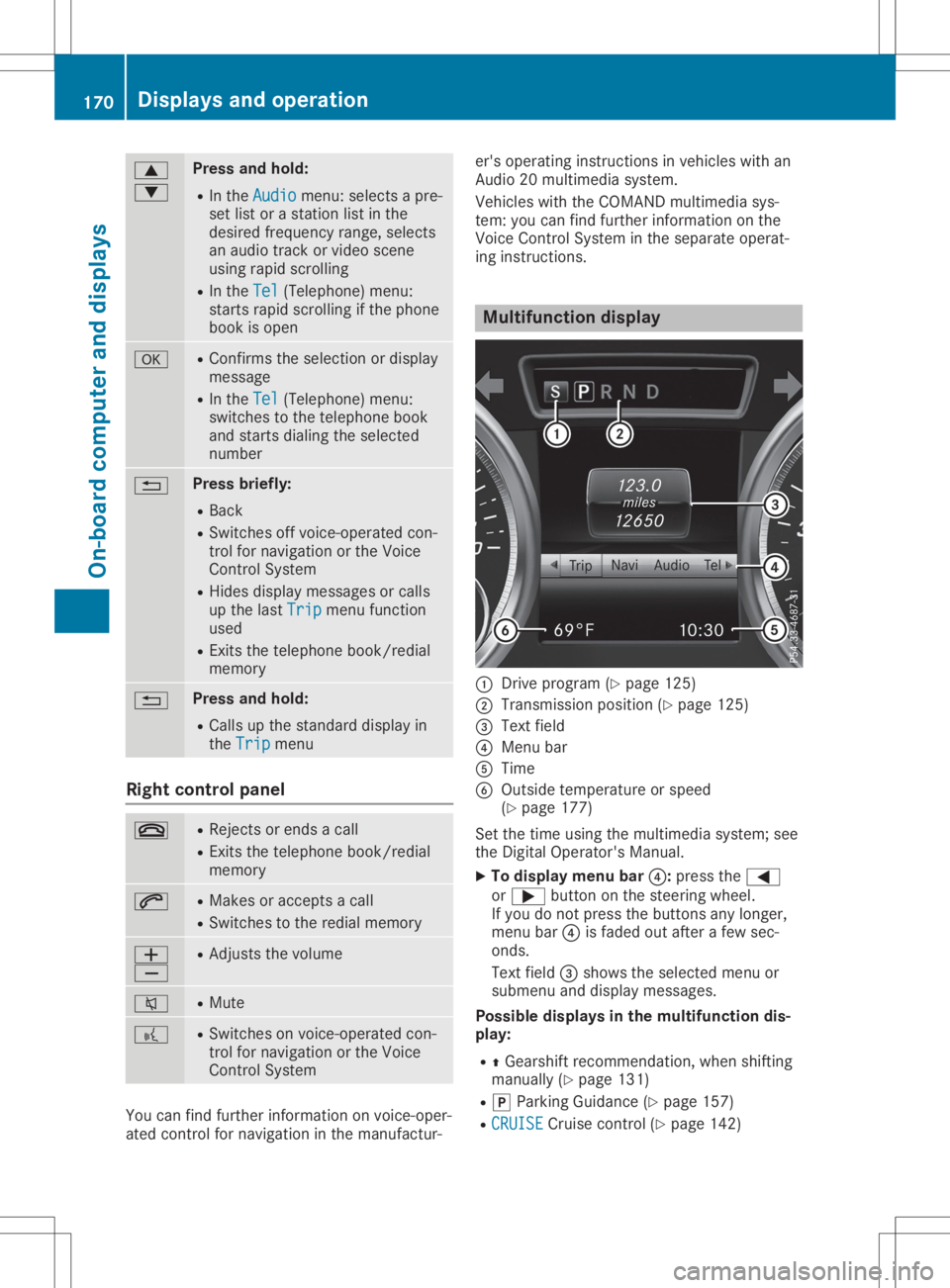
display 0043
Drive program (Ypage 125)
0044 Transmission position(Ypage 125)
0087 Text field
0085 Menu bar
0083 Time
0084 Outside temperature orspeed
(Y page 177)
Set thetime using themultimedia system;see
the Digital Operator's Manual.
X To display menubar0085:press the0059
or 0065 button onthe steering wheel.
If you donot press thebuttons anylonger,
menu bar0085isfaded outafter afew sec-
onds.
Text field 0087shows theselected menuor
submenu anddisplay messages.
Possible displaysinthe multifu nctiondis-
play:
R 0097Gearshift recommen dation,whenshifting
manually (Ypage 131)
R 005D Parking Guidance(Ypage 157)
R CRUISE CRUISE
Cruisecontrol(Ypage 142) 170
Displays
andoperat ionOn-board computerand displays
Page 233 of 310
Socket
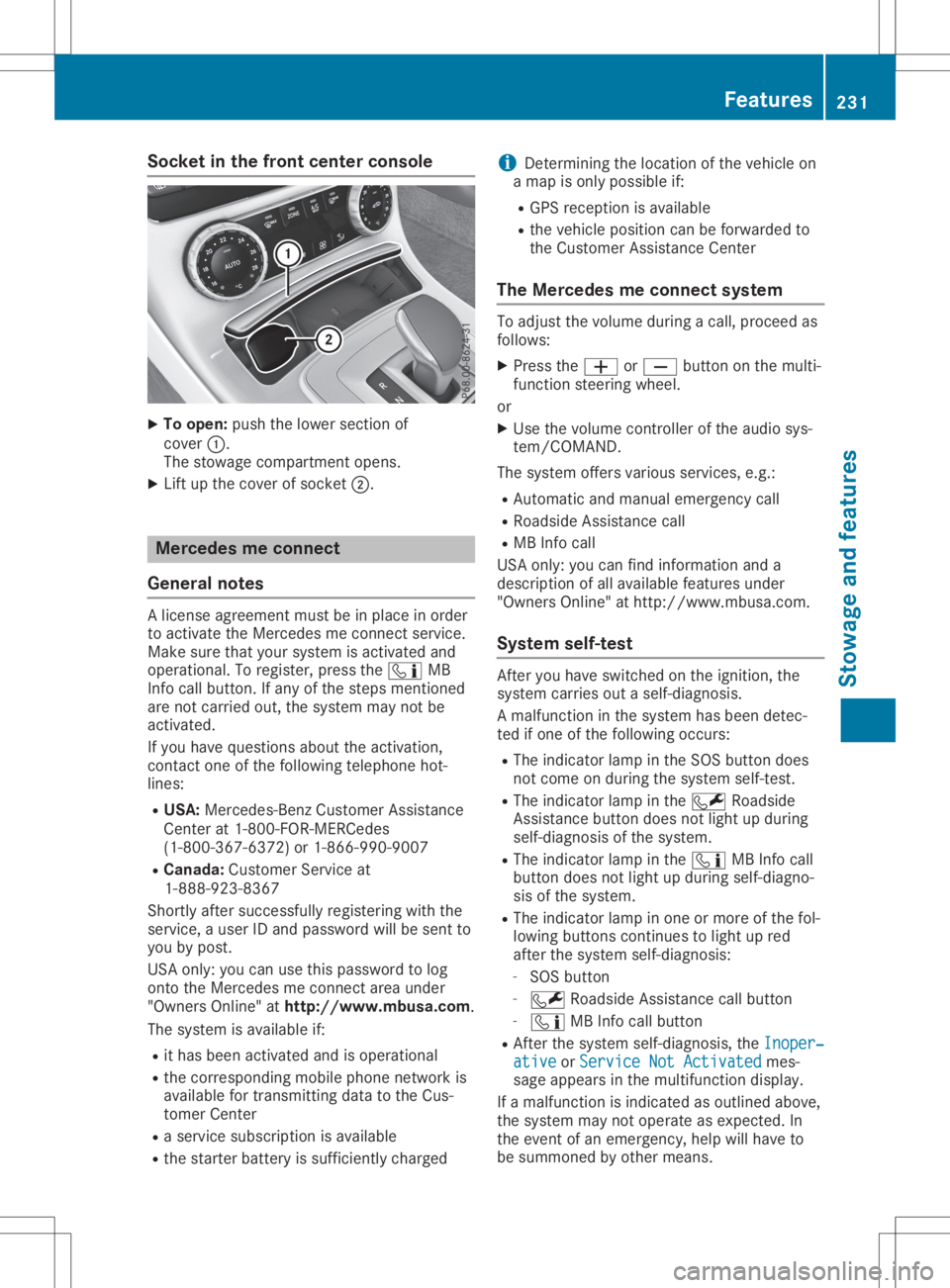
inthe front center console X
To open: pushthelower section of
cover 0043.
The stowage compartmen topens.
X Lift upthe cover ofsocket 0044. Mercedes
meconne ct
General notes Al
icense agreement mustbeinplace inorder
to activate theMercedes meconn ectservice.
Make surethatyour system isactivated and
operational. Toregister, pressthe00D9 MB
Info callbutton. Ifany ofthe steps mentioned
are not carried out,thesystem maynotbe
activated.
If you have questions abouttheactivation,
cont actone ofthe following telephone hot-
lines:
R USA: Mercedes-B enzCustomer Assistance
Center at1-80 0-FOR-MERCedes
(1-80 0-367-6372)or1-86 6-990-9007
R Canada: Customer Serviceat
1-88 8-92 3-8367
Short lyafter successfully registeringwiththe
service, auser IDand password willbesent to
you bypost.
USA only: youcan usethis password tolog
onto theMercedes meconn ectarea under
"Owners Online"athtt <0053001D00120012005A005A005A001100500045005800560044001100460052
0050>.
The system isavaila bleif:
R ithas been activated andisoperational
R the correspondin gmobile phone network is
availa blefortransm ittingdatatothe Cus-
tomer Center
R as ervice subscription isavaila ble
R the starter battery issufficiently charged i
Determ iningthelocation ofthe vehicle on
am apisonly possible if:
R GPS reception isavaila ble
R the vehicle position canbeforwarded to
the Customer AssistanceCenter
The Mercedes meconne ctsystem To
adjust thevolume duringacall, proceed as
follows:
X Press the0081 or0082 button onthe multi-
funct ionsteering wheel.
or X Use thevolume controller ofthe audio sys-
tem/COMA ND.
The system offersvarious services, e.g.:
R Automatic andmanual emergency call
R Roadsid eAssistanc ecall
R MB Info call
USA only: youcan find information anda
description ofall availa blefeatures under
"Owners Online"athttp: //www.mbusa.com.
System self-test Aft
eryou have switched onthe ignition, the
system carriesoutaself-diagnosis.
Am alfunction inthe system hasbeen detec-
ted ifone ofthe following occurs:
R The indicator lampinthe SOS button does
not come onduring thesystem self-test .
R The indicator lampinthe 0052 Roadsid e
Assistanc ebutton doesnotlight upduring
self-diagnosis ofthe system.
R The indicator lampinthe 00D9 MBInfo call
button doesnotlight upduring self-diagno-
sis ofthe system.
R The indicator lampinone ormore ofthe fol-
lowing buttons continues tolight upred
after thesystem self-diagnosis:
- SOS button
- 0052 Roadsid eAssistanc ecallbutton
- 00D9 MBInfo callbutton
R Aft erthe system self-diagnosis, theInoper‐ Inoper‐
ative ative
orService NotActivated Service
NotActivated mes-
sage appears inthe multifunct iondisplay .
If am alfunction isindicated asoutlined above,
the system maynotoperate asexpected. In
the event ofan emergency, helpwillhave to
be summoned byother means. Features
231Stowageandfeatu res Z
Page 240 of 310
make
surethatnew batterie shave been
install edingara gedoor drive remote control
0083.
R Note thatsome remote controls onlytrans-
mit foralimi ted amou ntoftime (theindica -
tor lamp onthe remote controlgoesout).
Press button 0084onremote control0083aga in
before transmissi onends.
R Align theantenna cableofthe gara gedoor
opener unit.Thiscanimprove signalrecep-
tion/transmissio n.
Openi ng/closing thegarage door After
ithas been progra mmed, theintegrated
gara gedoor opener performs thefunction of
the gara gedoor system remote control. Please
als oread theopera tinginstructions forthe
gara gedoor system.
X Turn theSmartKey toposi tion 0048inthe igni-
tion lock (Ypage 118).
X Press either button 0044,0087or0085 whi chyou
have progra mmed toopera tethe gara ge
door.
Gara gedoor system withafixed code: indi-
cator lamp0043ligh tsup green.
Gara gedoor system witharolli ng code: indi-
cator lamp0043flash esgreen.
The transmitter willtransmit asignal aslong
as the button ispresse d.The transmissi on
is hal ted after amaximu moften seconds
and indica torlamp 0043ligh tsup yellow .
X Press button 0044,0087or0085 aga inifneces-
sary .
Cle aring thememory Make
surethatyouclear thememory ofthe
integrated garagedoor opener beforeselling
the vehicl e.
X Turn theSmartKey toposi tion 0048inthe igni-
tion lock (Ypage 118).
X Press andhold buttons 0044and 0085.
The indica torlamp initiallyligh tsup yellow
and then green.
X Rel ease buttons 0044and 0085.
The memory ofthe integrated garagedoor
opener inthe rear-vie wmirror iscleare d. Compass
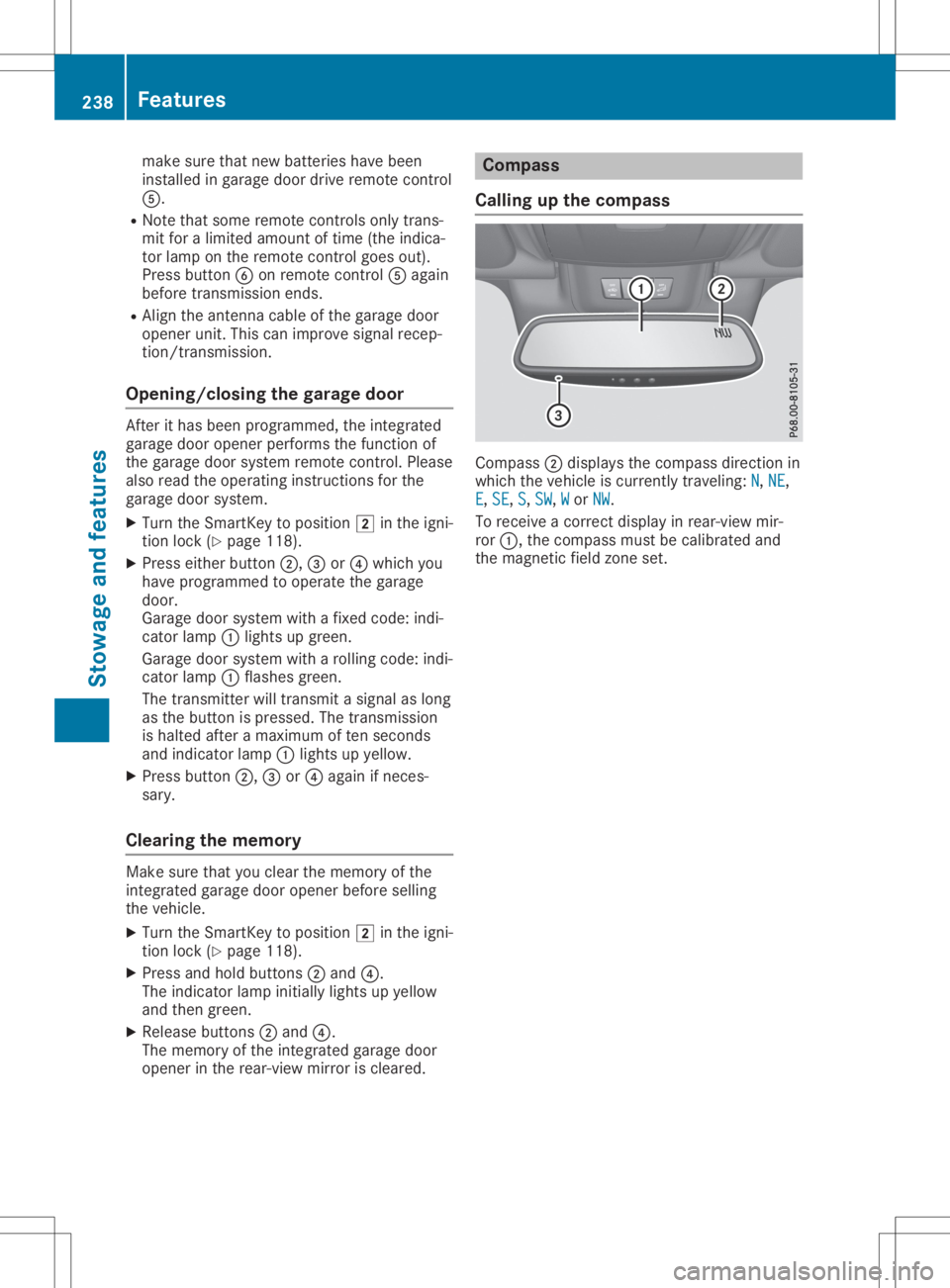
Call ingupthe compass Comp
ass0044disp laysthe compass directionin
which thevehicl eisc urrently traveling:N N,
NE NE,
E E,
SE SE,
S S,
SW SW,
W W
or NW NW.
To receive acorrect displayinrear-vie wmir-
ror 0043,t hecompass mustbecali brated and
the magnetic fieldzone set. 238
Fe
atur esStow ageand features