change time MERCEDES-BENZ SLC 2020 User Guide
[x] Cancel search | Manufacturer: MERCEDES-BENZ, Model Year: 2020, Model line: SLC, Model: MERCEDES-BENZ SLC 2020Pages: 310, PDF Size: 16.05 MB
Page 141 of 310
The
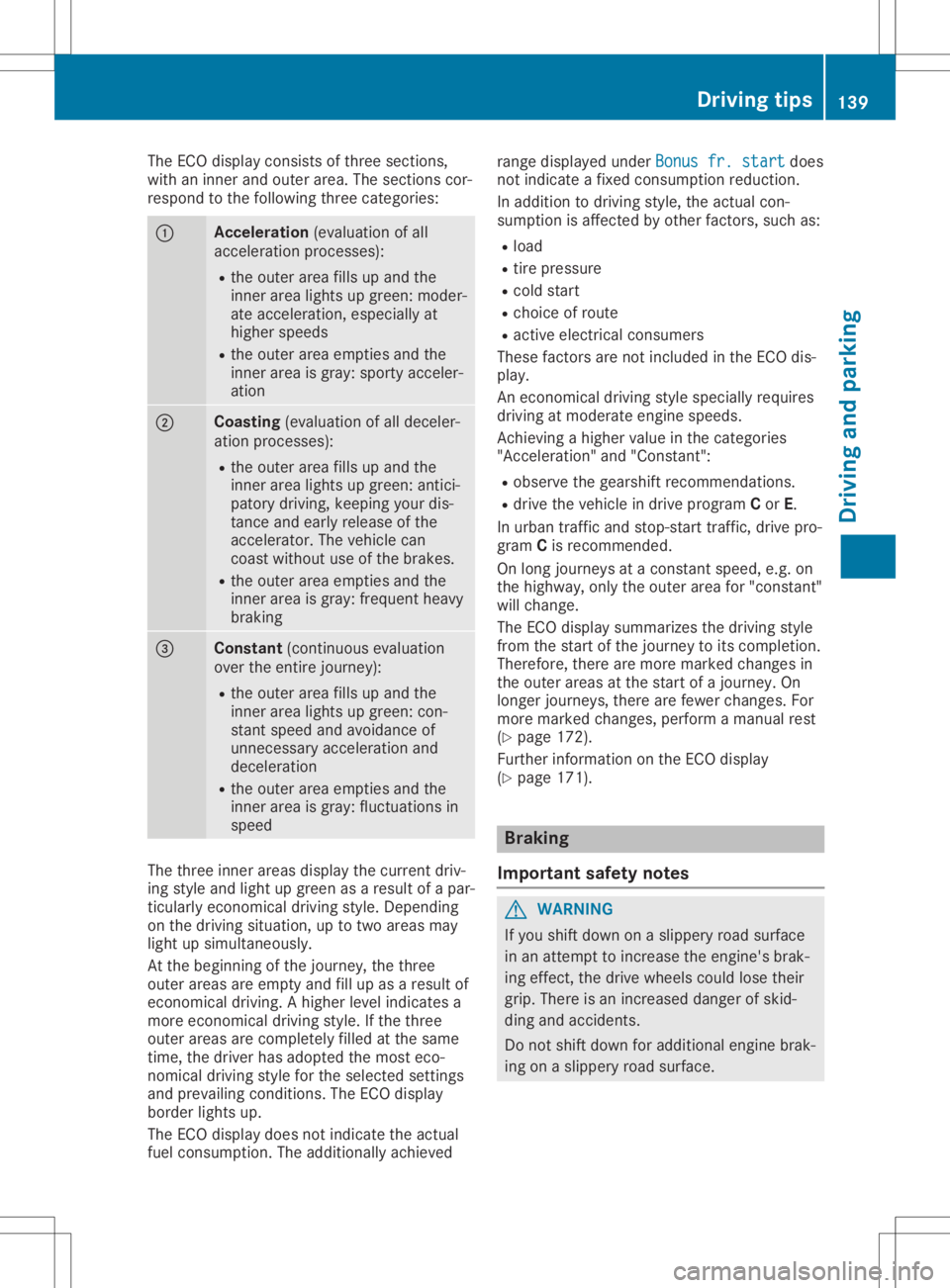
ECO display consistsofthree section s,
with aninner andouter area.Thesection scor-
respond tothe following threecategories: 0043
Acce
leration (evaluation ofall
acceleration processes):
R the outer areafillsupand the
inner arealights upgreen: moder-
ate acceleration ,especially at
higher speeds
R the outer areaempties andthe
inner areaisgray: sporty acceler-
ation 0044
Coasting
(evaluation ofall deceler-
ation processes):
R the outer areafillsupand the
inner arealights upgreen: antici-
patory driving, keeping yourdis-
tanc eand early release ofthe
accelerator. Thevehicle can
coast without useofthe brakes.
R the outer areaempties andthe
inner areaisgray: frequent heavy
braking 0087
Constant
(continuous evaluation
over theentir ejourney):
R the outer areafillsupand the
inner arealights upgreen: con-
stant speed andavoidance of
unnecessary accelerationand
deceleration
R the outer areaempties andthe
inner areaisgray: fluctuations in
speed The
three innerareas display thecurrent driv-
ing style andlight upgreen asaresult ofap ar-
ticularly economicaldriving style.Dependin g
on the driving situation, uptotwo areas may
light upsimultaneously.
At the beginning ofthe journey, thethree
outer areas areempty andfillup asaresult of
econom icaldriving. Ahigher levelindicates a
more econom icaldriving style.Ifthe three
outer areas arecompletely filledatthe same
time, thedriver hasadopted themost eco-
nomical drivingstyleforthe selected settings
and prevailing conditions.TheECO display
border lightsup.
The ECO display doesnotindicate theactual
fuel consumpt ion.Theadditionally achieved range
display edunder Bonus fr.start Bonus
fr.start does
not indicate afixed consumpt ionreduction .
In addition todriving style,theactual con-
sumption isaffect edbyother factors,such as:
R load
R tire pressure
R cold start
R choice ofroute
R active electric alconsumer s
These factorsarenot included inthe ECO dis-
play.
An econom icaldriving stylespecially requires
driving atmoderate enginespeeds.
Achievin gahigher value inthe categories
"Accelerat ion"and"Constant ":
R observe thegearshift recommendations .
R drive thevehicle indrive program Cor E.
In urban trafficand stop- start traffic,drive pro-
gram Cis recomm ended.
On long journeys atac onst antspeed, e.g.on
the highway, onlytheouter areafor"const ant"
will change.
The ECO display summarizes thedriving style
from thestart ofthe journey toits completion .
Therefore, therearemore marked changes in
the outer areas atthe start ofajourney. On
longer journeys, therearefewer changes. For
more marked changes, performamanual rest
(Y page 172).
Further informationonthe ECO display
(Y page 171). Br
aking
Import antsafety notes G
WARNIN
G
If you shift down onaslippery roadsurface
in an attempt toincrease theengine's brak-
ing effect ,the drive wheels couldlosetheir
grip. There isan increased dangerofskid-
ding andaccident s.
Do not shift down foradditional enginebrak-
ing onaslippery roadsurface. Driving
tips
139Driving andparking Z
Page 144 of 310
To
ensure anadequa tesupply offresh air,
open awindow onthe side ofthe vehicle
that isnot facing intothewind.
Have yourvehicle winter-proofed ataq ualified
specialist workshop atthe onset ofwinter.
Drive particularly carefullyonslippery road
surfaces. Avoidsudden acceleration ,steerin g
and braking maneuvers. Donot use cruise
cont rol.
If the vehicle threatenstoskid orcann otbe
stopped whenmoving atlow speed:
X Shift thetrans mission toposition 005C.
The outside temperat ureindicator isnot
designed toserve asan ice-warnin gdevice
and istherefor eunsuitable forthat purpose.
Changes inthe outside temperat urearedis-
played afterashort delay.
Indicat edtemperat uresjustabove thefreezin g
point donot guarantee thattheroad surface is
free ofice. The road maystillbeicy, especially
in wooded areasoron bridges. Thevehicle
could skidifyou failtoadapt yourdriving
style. Always adaptyourdriving styleanddrive
at as peed tosuit theprevailing weathercondi-
tions.
You should payspecial attentiontoroad con-
ditions whentemperat uresarearound freezing
point.
For more inform ationondriving withsnow
chains, see(Ypage 271).
For more inform ationondriving withsummer
tires, see(Ypage 270).
Observe thenotesinthe "Winter operation"
section (Ypage 270). Driving
systems Cruise
control
General notes Cruise
controlmaintains aconst antroad
speed foryou. Itbrakes automatically inorder
to avoid exceeding thesetspeed. Onlong and
steep downhill gradients, especiallyifthe vehi-
cle isladen, youmust select alower gearin
good time. Bydoing so,you willmake useof
the braking effectofthe engine. Thisrelieves
the load onthe brake system andprevent sthe brakes
fromoverheating andwearing too
quickly.
Use cruise controlonly ifroad andtrafficcon-
ditions makeitappropriate tomaintain a
steady speedforaprolonged period.Youcan
store anyroad speed above20mph
(30 km/ h).
Import antsafety notes If
you failtoadapt yourdriving style,cruise
cont rolcan neither reducetherisk ofan acci-
dent noroverride thelaws ofphysics. Cruise
cont rolcann ottake intoaccount theroad,
traff icand weather conditions.Cruise control
is only anaid. You areresponsible forthe dis-
tanc etot he vehicle infront ,for vehicle speed,
for braking ingood timeandforstaying in
lane.
Do not use cruise control:
R in road andtrafficcondit ionswhich donot
allow youtomaintain aconst antspeed e.g.
in heavy trafficor on winding roads
R on slippery roadsurfaces. Brakingoraccel-
erating couldcause thedrive wheels tolose
tract ionand thevehicle couldthenskid
R when thereispoor visibility, e.g.due tofog,
heavy rainorsnow
If there isac hange ofdrivers, advisethenew
driver ofthe speed stored.
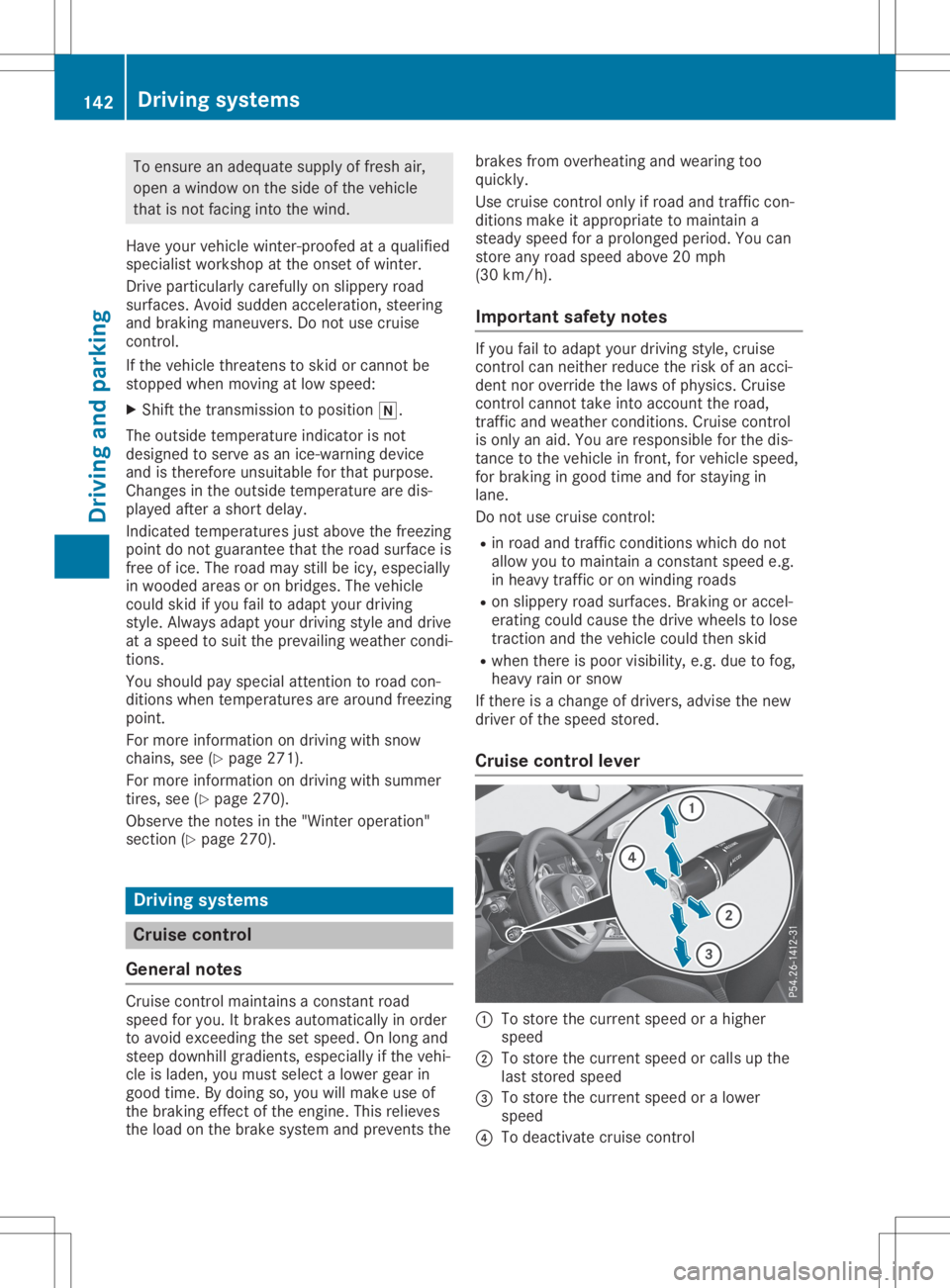
Cruise control lever 0043
Tostore thecurrent speedorah igher
speed
0044 Tostore thecurrent speedorcalls upthe
last stored speed
0087 Tostore thecurrent speedoralower
speed
0085 Todeactivate cruisecontrol 142
Driving
systemsDriving andparking
Page 150 of 310
Selec
tingthedrive progra m
Act ive Distanc eAssist DISTRONIC supportsa
sporty driving stylewhen youhave selected
the Sor S+ drive program (Ypage 124).
Acc eleration behindthevehicle infront orto
the setspeed isthen noticeably more
dynamic. Ifyou have selected theCor Edriv-
ing program, thevehicle accelerates more
gently. Incity traffic andstop-st arttraffic,
drive program Cis recommen ded.
Changing lanes
If you want tochange tothe overtakin glane
on multi-lane roads,Active Distanc eAssist
DISTRONIC supportsyouif:
R you aredriving fasterthan45mph
(70 km/h)
R Act ive Distanc eAssist DISTRONIC ismain-
taining thedistance toav ehicle infront
R you switch onthe appropriate turnsignal
R Act ive Distanc eAssist DISTRONIC doesnot
current lydetect adanger ofcollision
If these condition sarefulfilled, yourvehicle is
accelerated. Acceleration willbeinterrupt edif
changing lanestakes toolong orifthe dis-
tance between yourvehicle andthevehicle in
front becomes toosmall.
i When
youchange lanes,Active Distanc e
Assist DISTRONIC monitorsthe left lane on
left-hand- drivevehicles orthe right laneon
right-han d-drivevehicles.
Stopping G
WARNING
If you leave thedriver's seatwhen thevehi-
cle isonly being braked byAct ive Distanc e
Assist DISTRONIC, itcould rollaway :
R ifthere isam alfunction inthe system or
in the voltage supply
R ifAct ive Distanc eAssist DISTRONIC is
deactivated usingthecruise controllever,
for example byavehicle occupant orfrom
outside thevehicle
R ifthe electrical systeminthe engine com-
partment ,the battery orthe fuses are
tampered with R
ifthe battery isdisconnec ted
R ifthe vehicle isaccelerated, e.g.byavehi-
cle occupant
There isar isk ofan accident.
Always deactivate Active Distanc eAssist
DISTRONIC andsecure thevehicle against
rolling awaybefore youleave it.
Further information ondeactivating Active Dis-
tance Assist DISTRONIC (Ypage 150).
If Act ive Distanc eAssist DISTRONIC detects
that thevehicle infront isstopping, itbrakes
your vehicle untilitis stationary.
Once yourvehicle isstationary, itremains sta-
tionary andyoudonot need todepress the
brake.
i Aft
eratime, theelectric parking brake
secures thevehicle andrelieves theservice
brake.
i Depending
onthe specified minimum dis-
tance, yourvehicle willcome toas tandst ill
at as ufficient distance behindthevehicle in
front .The specified minimum distanceisset
using thecont rolonthe cruise controllever.
When Active Distanc eAssist DISTRONIC is
activated, thetransm issionisshifted automati-
cally toposition 005Dif:
R the driver's seatbeltisnot fastened andthe
driver's doorisopen
R the engine isswitched off,unless itis auto-
matically switchedoffbythe ECO start/
stop funct ion.
The electric parking brakeisapplie dautomati-
cally ifAct ive Distanc eAssist DISTRONIC is
active whenthevehicle isstationary and:
R as ystem malfunction occurs
R the power supply isnot sufficient
If am alfunction occurs,thetransm issionmay
also shift toposition 005Dautomatically.
Setting aspeed Keep
inmind thatitmay take abrief moment
until thevehicle hasaccelerated orbraked to
the speed set.
X To
adj ust the setspeed in1m phincre-
ments (1km/h increments): brieflypress
the cruise controllever up0043 tothe pres- 148
Driving
systemsDriving andparking
Page 151 of 310
sure
point forahigher speed, ordown 0044
for alower speed.
Every timethecruise controllever is
pressed upordown, thelast speed stored is
increased orreduced.
X To
adju stthe setspeed in5m phincre-
ments (10km/h increments): briefly
press thecruise controllever up0043 past the
pressure pointforahigher speed, or
down 0044for alower speed.
Every timethecruise controllever is
pressed upordown, thelast speed stored is
increased orreduced.
Setting aspecifie dminimum distance You
cansetthe specified minimum distance
for Active Distance AssistDISTRONIC byvary-
ing the time span between oneandtwosec-
onds. Thisdetermines thedistance thatActive
Distance AssistDISTRONIC isto maintain from
the vehicle infront ,depending onthe road
speed. Youcanseethis distance inthe multi-
function display(Ypage 149).
The specified minimum distancecanbe
changed whileActive Distance Assist
DISTRONIC isswitched onoroff.
Make surethatyoumaintain asufficiently safe
distance fromthevehicle infront .Adjust the
distance tothe vehicle infront ifnecessary. Cruise
controllever
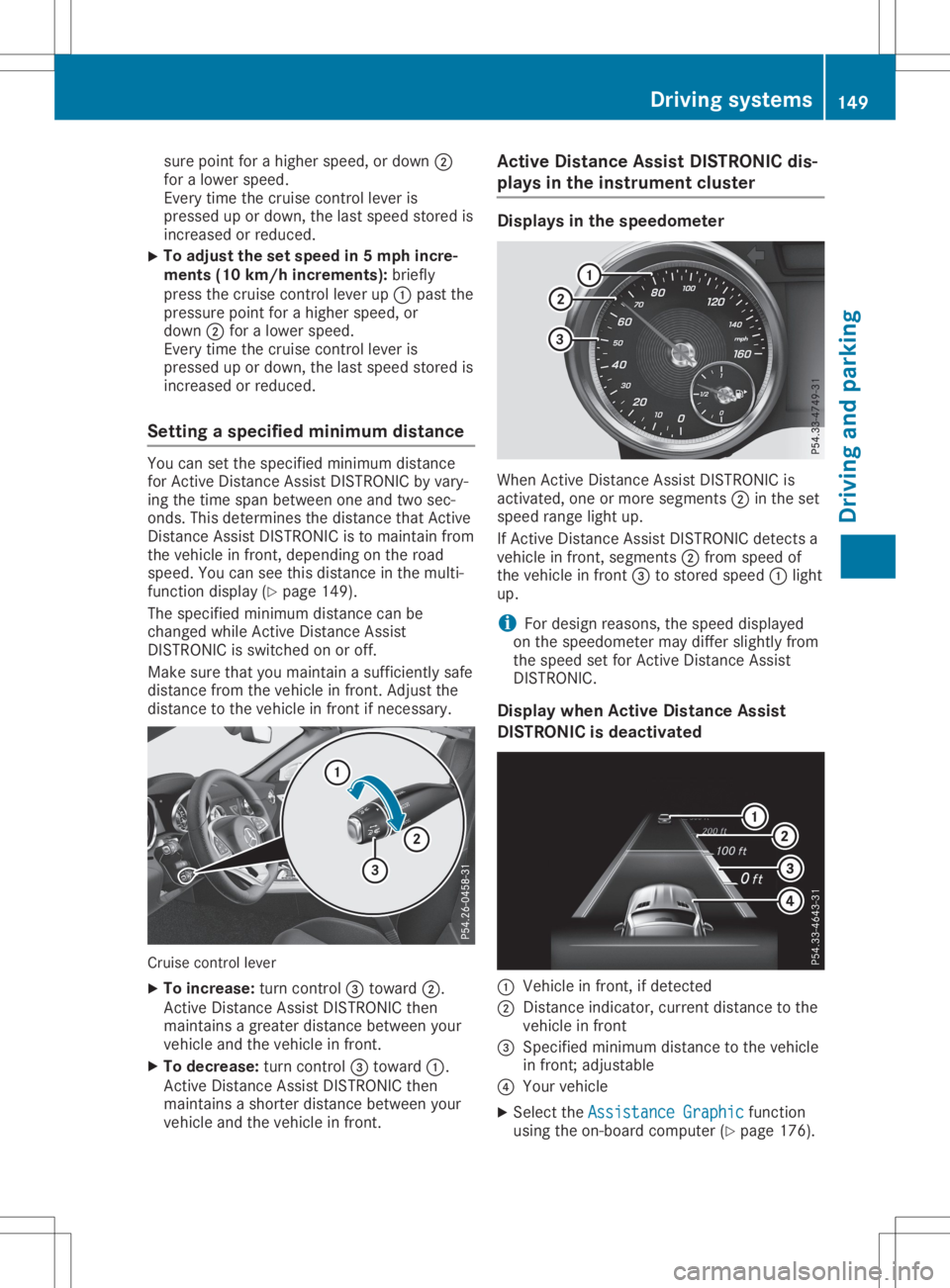
X To increase: turncontrol0087 toward 0044.
Act ive Distance AssistDISTRONIC then
maintains agreater distance between your
vehicle andthevehicle infront .
X To decrease: turncontrol0087 toward 0043.
Act ive Distance AssistDISTRONIC then
maintains ashorter distance between your
vehicle andthevehicle infront . Active
Distance AssistDISTRONIC dis-
plays inthe instrum entcluster Displays
inthe speedometer When
Active Distance AssistDISTRONIC is
activated, oneormore segments 0044inthe set
speed rangelightup.
If Act ive Distance AssistDISTRONIC detectsa
vehicle infront ,segments 0044from speed of
the vehicle infront 0087tostored speed0043light
up.
i For
design reasons, thespeed displayed
on the speedometer maydiffer slightly from
the speed setforActive Distance Assist
DISTRONIC.
Display whenActive Distance Assist
DISTRONIC isdeactivated 0043
Vehicle infront ,ifd etected
0044 Distance indicator, currentdistance tothe
vehicle infront
0087 Specified minimum distancetothe vehicle
in front ;adjustable
0085 Your vehicle
X Select theAssistance Graphic Assistance
Graphicfunction
using theon-board computer (Ypage 176). Driving
systems
149Drivingandparking Z
Page 169 of 310
Alw
aysp ayparticu lara tte ntio ntot he traf fic
si tua tiona nd kee pwithi nt he lane, espe-
cia llyi fL aneK eeping Assi stalerts you. G
WA
RNING
The Lane Kee ping Assi stwa rning does not
retu rnthe vehiclet ot he original lane. There
is ar isko fana ccident.
Yo us houlda lway ss tee r,bra keoracce lera te
yo ursel f,in pa rticu lari fw arned byLane
Kee ping Assi st.
If yo uf ailt oa dapt your driving style,L an e
Kee ping Assi stcan neither reduce therisko f
an acci dent nor override the laws ofphy sics.
La ne Kee ping Assi stcanno ttake into acco unt
the road,traf ficand weath ercond itions. Lane
Kee ping Assi stismer elya na id.Y ou are
res ponsi blef or the dista nce tothe vehiclei n
front, forveh icles peed,for bra king ingoo d
time andforstaying inyour lane.
The Lane Kee ping Assi stdo es not keepthe
veh iclei nt he lane.
The system maybeimp aired orma ynotfunc-
tio nif:
R ther eisp oorv isib ility ,e .g.d ue toins uffi-
cie ntillu mina tiono fthe roa d,or duet o
snow ,rain, fog orspr ay
R ther eisg lare ,e .g.f rom onco ming traffic,
the suno rreflectio ns(e.g. when the road
su rfa ce iswe t)
R the windsh ield isdirty ,fog ged up,dam aged
or cove red,for ins tance byasticker, inthe
vici nity ofthe cam era
R ther eareno, severaloru ncl earlan em ark-
ing sfor alan e,e.g .ina reas with roa dcon-
stru ctionwork
R the lane ma rking sarewo rnaw ay,d arko r
cove redup,e.g.b yd irto rsnow
R the dista nce tothe vehiclei nf ront istoo
sma lland thelane ma rking sthusc anno tbe
de tecte d
R the lane ma rking schange quickl y,e.g .lan es
bra nch off,cros sone ano ther ormer ge
R the roadisn arrow andwindi ng
R ther earestro ngsha dows cas tont he roa d Sw
itchin gonLaneK eeping Assist
X Swi tch onLane Kee ping Assi stusing the on-
bo ardc omp uter;to do so, select Standard Sta
ndard
or Ada ptive Ada
ptive(Ypage 176 ).
If yo ud rive atspe edsa bove 40 mph
(60 km/h )and lane ma rking saredetecte d,
the lines inthe assista nce graphicsdispl ay
(Y page 176 )are sho wningre en. Lane
Kee ping Assi stisrea dyfor use.
Stan dard
If Sta ndard Sta
ndardissel ecte d,no warning vibratio n
occu rsif:
R yous witch onthe turn signa ls.I nt hise vent,
the warning saresupp res sed foracerta in
pe rio do ftime
R ad riving safety system intervenes, such as
ABS, BASorESP ®
Ada ptiv e
Whe nAda ptive Ada
ptiveissel ecte d,no warning vibra-
tio no ccu rsif:
R yous witch onthe turn signa ls.I nt hise vent,
the warning saresupp res sed foracerta in
pe rio do ftime
R ad riving safety system intervenes, e.g.ABS,
BAS orESP ®
R youa cce lera te hard, e.g.kickd own
R youb rake hard
R yous tee ractivel y,e.g .swe rvet oa void an
ob sta cle orcha nge lanes quickl y
R youc utthe corne ronas harp bend
In ord ertha tyou arew arned onlyw henn ece s-
sa ry and ingoo dtime ifyo uc ros sthe lane
ma rking ,the system recognizes certa incond i-
tio ns and warns youa cco rdingl y.
The warning vibratio no ccu rsearlier if:
R youa pproach theouter lane ma rking ona
be nd
R the roadhasver yw idel an es, e.g.af reew ay
R the system recognizes solidlane ma rking s
The warning vibratio no ccu rslater if:
R the roadhasnar row lanes
R youc utthe corne ronab end Dri
ving sys tems
167Dr ivi ng andp arki ng Z
Page 179 of 310
X
Press 0064or0063 toset Off Off,
Standard Standard
or
Adaptive Adaptive.
X Press the0076 button tosave thesetting.
When LaneKeeping Assistisactivat ed,the
multifunc tiondisplay showsthelane mark-
ings asbright linesinthe assistanc e
graphic.
Further informationonLane Keeping Assist
(Y page 166). Service
menu
Dependin gonthe equipment installedinthe
vehicle, youhave thefollowing optionsinthe
Serv. Serv.
menu:
R Calli ngup display messages (Ypage 183)
R Restartin gthe tire pressure losswarning
system (Ypage 275)
R Checking thetire pressure electronically
(Y page 275)
R Calli ngup the service duedate
(Y page 246) Settings
menu
Introdu ction Dependin
gonthe equipment installedinthe
vehicle, inthe Sett. Sett.
menuyouhave thefol-
lowing options:
R Changing theinstr ument cluster settings
(Y page 177)
R Changing thelight settings (Ypage 177)
R Changing thevehicle settings (Ypage 179)
R Changing theconv enienc esettings
(Y page 179)
R Restoring thefactor ysettings (Ypage 180)
Instru mentcluster Selecting
thedista nceunit
The Display UnitSpeed-/Odo meter: Display
UnitSpeed-/Odo meter:func-
tion allows youtochoose whether certaindis-
plays appear inkilometer sorm iles inthe mul-
tifunc tiondisplay.
X Press the0059 or0065 button onthe steer-
ing wheel toselect theSett. Sett.
menu.
X Press the0064 or0063 button toselect the
Instrument Cluster Instrument
Clustersubmenu. X
Press 0076toconf irm.
X Press the0064 or0063 button toselect the
Display UnitSpeed-/Odo meter: Display
UnitSpeed-/Odo meter:func-
tion.
The curren tsett ing km km
ormiles miles
appears.
X Press the0076 button tosave thesetting.
The selected unitofmeasurement fordistanc e
applies to:
R the digital speedometer inthe Trip Trip
menu
R the odometer andtripodometer
R the trip computer
R the curren tcons umption andtherange
R navigation instruction sint he Navi Navi
menu
R cruise control
R DIS TRONIC
R ASS YST PLUS
Selecting permanent display
The Permanent Display: Permanent
Display:functionallows you
to choose whether themultifunc tiondisplay
alway sshows theoutside temperat ureorthe
speed.
The speed display isinverse tothe speedome-
ter.
X Press the0059 or0065 button onthe steer-
ing wheel toselect theSett. Sett.
menu.
X Press the0064 or0063 button toselect the
Instrument Cluster Instrument
Clustersubmenu.
X Press 0076toconf irm.
X Press the0064 or0063 button toselect the
Permanent Display: Permanent
Display:function.
The curren tsett ing, Outside Temperatur e Outside
Temperatur e
or Speedomete r[km/h] Speedomete
r[km/h] orSpeedomete r Speedomete
r
[mph] [mph],a
ppears.
X To change thesetting: press0076again.
Lights Setting
thedayt imerunning lamps
This funct ionisnot availabl einC anada.
X Press the0059 or0065 button onthe steer-
ing wheel toselect theSett. Sett.
menu.
X Press the0064 or0063 button toselect the
Light Light
submenu.
X Press 0076toconf irm.
X Press the0064 or0063 button toselect the
Daytime RunningLights Daytime
RunningLightsfunction.
If the Daytime RunningLights Daytime
RunningLightsfunction
has been switched on,the cone oflight and Menus
andsubmenus
177On-boardcomputerand display s Z
Page 220 of 310
Gene
ralnotes
The multime diasystem section inthis Opera -
tor's Manua ldescrib esthe basi cprincipl esfor
opera tion.More information canbefound in
the Digital Operator'sManua l. Important
safetynotes G
WARNING
If you opera teinformation systemsandcom-
municatio nequipment integrated inthe
vehicle whendriving, youmay bedistracted
from thetraffic situation. Youcould also
lose control ofthe vehicle .There isar isk of
an accide nt.
Only opera tethis equipment whenthetraffic
situa tionpermits. Ifyou arenot sure that
this ispossi ble,park thevehicle paying
attention totraffic conditions andopera te
the equipment whenthevehicle isstation-
ary .
You must observe thelega lrequ irements for
the country inwhich youarecurrently driving
when operatingthemultime diasystem.
The multime diasystem calculates theroute to
the destinati onwithou ttaking thefollo wing
into account, forexampl e:
R traffic lights
R stop andyieldsigns
R parking orstopping restrictions
R road narrowi ng
R other roadandtraffic rulesand regul ations
The multime diasystem maygiveincorrect nav-
iga tion recommendati onsifthe actual street/
traffic situationdoes notcorrespond withthe
digi talmap's data.
For exampl e:
R ad iverted route
R the road layout orthe direction ofao ne-way
street hasbeen changed
For this reaso n,you must alwayso bserve road
and traffic rulesand regul ations duringyou r
journey. Roadand traffic rulesand regul ations
alw aysh ave priori tyover multime diasystem
driving recommendati ons. Navig
ation announcements areintended to
direct youwhiledriving withou tdiverting your
attention fromtheroad anddriving.
Plea sealw aysu sethis feature instead ofcon-
sul ting themap displayfordirections. Looking
at the icons ormap displaycan distract you
from traffic conditions anddriving, and
increase therisk ofan accide nt.
This equipment complieswith FCCradiation
exposu relimi tsset forth foruncontrolled
equ ipment andmeets theFCC radiofreque ncy
(RF) Exposure Guideli nes inSuppl ement Cto
OET65.
This equipment hasvery lowlevel sofRF
energy thatisdeeme dtoc omply withou tmaxi-
mum permis siveexposu reeval uation(MPE).
However, itis recommended toinstall itat a
distance ofat lea st8i nches (approx. 20cm)
betwee nthe radi ation source andaperson's
body (notinclud inglimb ssuch ashands,
wrists, feetandlegs) . G
WARNING
Modi fications toelectronic components,
their software aswel lasw iring can impa ir
their function and/orthefunction ofother
networked components. Inparticu lar,sys-
tems releva ntto safety couldalsobeaffec-
ted. Asaresul t,these maynolonger func-
tion asintended and/orjeopardizethe oper-
ating safety ofthe vehicle .There isan
increase drisk ofan accide ntand injury.
Never tamper withthewiringaswel lase lec-
tronic components ortheir software .You
shoul dhave allwork toelectrica land elec-
tronic equipment carried outataq ualified
specia listworkshop . Func
tionrestrictio ns
For safety reasons,some functions arerestric-
ted orunava ilable whil ethe vehicle isin
motion. Youwillnotice this,forexampl e,
becau seeither youwillnot be abletos ele ct
certain menuitemsoram essag ewilla pp ear
to this effect. 218
Func
tionrestrictio nsMultimedia system
Page 221 of 310
Opera
tingsystem Overview
General notes !
Do
not use thespace infron tofthe dis-
play forstor age. Objec tsplaced herecould
damage thedisplay orimpair itsfunc tion.
Avoid anydirect contact with thedisplay
surface. Pressure onthe display surface
may result inimpairment stot he display,
which couldbeirrever sible.
Wearing polarized sunglasses mayimpair your
ability toread thedisplay.
The display hasanautomatic temperature-
con trolled switch- offfeature. Thebrightn essis
automatic allyreduced ifthe temper atureis
too high. Thedisplay maytempor arilyswitch
off complet ely.
Cleaning instructions !
Do
not touch thedisplay. Thedisplay hasa
very sensit ivehigh-gloss surface;thereisa
risk ofscrat ching .Ify ou have toclean the
screen ,however, useamildcleanin gagent
and asoft,lint- free cloth .
The display mustbeswitched offand have
cooled downbefore youstart cleanin g.Do not
apply pressure tothe display surface when
cleanin git,as this could cause irreversible
damage tothe display.
Switching themult imedia system
on/off X
Press the0043con trol knob.
Adju sting thevolume X
Turn the0043con trol knob.
The volume isadjusted:
R for the curren tlyselect edmedia source
R during trafficor navigation announcements
R in hands- freemode during anactive call
Switching thesound onoroff X
Press the0063 button onthe control panel.
If the audio output isswitched off,thesta-
tus line willshow the0063 symbol. Ifyou switch
themedia source orset the volume,
the sound isautomatic allyswitched on.
i Navigation
announcementswill beheard
even ifthe sound ismuted.
Functions The
multimedia systemhasthefollowing func-
tion s:
R Radio mode
R Media modewithmedia search
R Sound systems
R Navigation system
COMAND :navigation viathe hard drive
Audio 20:navigation viaSD card
R Communicat ionfunc tions
R SIRIUS Weather (COMAND )
R Vehicle functionswithsystem settings
R Favorit esfunc tions
Controller The
controller inthe cent ercon sole letsyou:
R select menuitemsonthe display
R ent ercharact ers
R select adestin ation onthe map
R save entries
The controller canbe:
R turn ed3
R slid leftorright 1
R slid forwards orback 4
R slid diagonally 2
R pressed brieflyorpressed andheld7
Back button You
canusethe0038 button toexit amenu or
to call upthe main menu ofthe curren toperat-
ing mode.
X To exit themenu: brieflypressthe0038
button .
The multimedia systemchanges tothe next
higher menulevelinthe curren toperatin g
mode.
X To call upthe main menu: pressthe0038
button forlonger thantwosecon ds.
The multimedia systemchanges tothe main
menu ofthe curren toperatin gmode. Opera
tingsystem
219Multimedia system Z
Page 225 of 310
Auth
orizati onbyente ringapasske y(pa ss-
cod e):
X Sel ect the Bluetoo th®
nam eofthe mob ile
pho ne.
The inputmenu forthe passke yisd ispl ay ed .
X Ch oos eao netosixtee n-digitn um berc om-
bi nati onasap asske y.
X Enter thepasske yonthe mu ltimed iasys-
tem.
X Pre ss0054 toconfi rm.
X Enter andconfi rmthe passke yonthe
mob ilep hone. Dep endingonthe mob ile
pho neused ,confi rmthe conne ctiontot he
mu ltimed iasystem andforthe PBAP and
MAP Bluetoo th®
pro files. The prompt to
confi rmmaytake uptotwo minu testobe
di spl ayed (seethe ma nuf actu rer'sop era ting
ins truc tions) . Co
nnectin gam obilep hon e(Au dio
20 )
Requ iremen ts For
telephony viathe Bluetoo th®
inte rface, you
req uire atleas to ne Blu etoo th®
-cap ablemob ile
pho nedependi ng on useo fone-te lepho ne
mode ortwo -teleph onem ode.T hemob ile
pho nemu stsupp ort Hand s-FreeProfile1 .0or
ab ove .
In two -teleph onem ode youc an usea llthe
fu nctio nsofthe multimed iasystem with the
main teleph one.W itht he additi onaltel e-
pho ne,you can rece iveinco ming calls.
Mu ltimed iasystem :
X Sel ect Vehicle Veh
icle007BSy stem Set‐ Sys
tem Set‐
tin gs tin
gs007B ActivateBluetooth Act
ivateBluetooth.
X Activa teBlu etoo th®
0073.
Mob ilep hone:
X Activa teBlu etoo th®
and ,ifn ece ssary,B lue-
tooth ®
vis ibility for othe rdevice s(seet he
ma nuf actu rer'sop era ting instruc tions) .
The Bluetoo th®
de vice namesfor allo fo ne
ma nuf actu rer'spro ducts mig htbe identi cal.To
ma keitpo ssi blet oc lear ly identi fyyour mob ile
pho ne,change thedevice name(seet he ma n-
uf actu rer'sop era ting instruc tions) . If
the mob ilep hone supp orts thePBAP (Phone
Boo kAcce ssPro file) and MAP (Mess age
Acce ssPro file) Blu etoo th®
pro files, the follow-
ing info rma tionist rans mitte dafteryou con-
nect themaintel ephone :
R Pho nebook
R Ca lllists
R Te xt mes sages and e-ma il
i Fur
ther informa tiono nsuita blem obile
pho nes can befou ndat: http:/ /
ww w.me rcedes -benz.c om/ conn ect
i In
the USA, youc an getint ouch with the
Mer cedes-B enzCustom erAssi stance Center
on 1-800-FO R-MERC edes
(1-8 00-367 -6372).
In Ca nad a,youc an getint ouch with the
Cu stom erRelatio ns Center on
1-800-3 87-0100.
Searching forand auth orizing (con-
necting) amobile phone Before
usingyourmobile phonewiththemulti-
media system forthe first time, youwillneed
to search forthe phone andthen authorize
(conn ect)it.Depending onthe mobile phone,
authorization eithertakesplacebymeans of
Secure SimplePairing orby enterin gapass-
key. Themultimedia systemautomatically
makes theprocedure thatisrelevant foryour
mobile phoneavailable.Themobile phoneis
alwa ysconn ected automatically afterauthori-
zation. Further information onusing amobile
phone withthemultimedia system(seethe
Digital Operator's Manual).
If the multimedia systemdoesnotdetect your
mobile phone, thismay bedue toparticular
security settingson your mobile phone(see
the manufacturer's operatinginstructions).
Searching foram obile phone
Multimedia system:
X Select Tel/ Tel/00A7007BConn.
Device Conn.
Device007BCon‐ Con‐
nect NewDevice nect
NewDevice.
X Select Connect viaVehicle Connect
viaVehicle.
X Select mobile phone. Operat
ingsystem
223Multimediasystem Z
Page 248 of 310
Maintaining
thetime-dependent servicesched-
ule:
X Note down theservice duedate display edin
the multifunction displaybeforedisconnec t-
ing the battery.
or X Aft erreconn ectingthebattery, subtract the
battery disconnec tionperiods fromtheser-
vice date shown onthe display . Hiding
service displays
X Press the0076 or0038 button onthe steer-
ing wheel. Showing
servicedisplays
X Switch onthe ignition.
X Press 0059or0065 onthe steering wheel
to select theServ. Serv.
menu.
X Press 0063or0064 toselect theASSYST ASSYST
PLUS PLUS
submenu andconfirm bypressing the
0076 button.
The service duedate appears inthe multi-
funct iondisplay . Informat
ionabout Service
Resetting theASSYST PLUSservice
interval display !
If
the ASS YST PLUS service interval dis-
play hasbeen inadvertent lyreset, thisset-
ting canbecorrect edataq ualified special-
ist workshop.
Have service workcarried outasdescribed
in the Maintenanc eBooklet. Thismay other-
wise leadtoincreased wearanddamage to
the major assemblies orthe vehicle.
Aq ualified specialist workshop, e.g.anauthor-
ized Mercedes-Ben zCenter, willreset the
ASS YST PLUS service interval displayafterthe
service workhasbeen carried out.Youcan
also obtain further information onmainte-
nance work,forexample. Special
servicerequirements The
specified maintenanc einterval takesonly
the normal operation ofthe vehicle into
account. Serviceworkwillneed tobe per-
formed moreoften ifthe vehicle isoperated
under arduou scondition sorincreased loads.
The ASSYST PLUS service interval displayis
only anaid. Thedriver ofthe vehicle isrespon-
sible forwhether serviceworkwillneed tobe
performed morefrequently thanrequired asa
result ofthe actual operating conditions
and/or loads.
Examples ofarduou soperating condition s:
R regular citydriving withfrequent intermedi-
ate stops
R the vehicle isprimarily usedtotravel short
distances
R frequent useinmountainous terrainoron
poor roadsurfaces
R the engine isoften leftidling forlong peri-
ods
R particularly dustycondition s,or ifair-recir-
culation modeisfrequently used
In these orsimilar operating conditions,have
the interior filter,airfilter, engine oiland oilfil-
ter, forexample, changedmorefrequently.
Under arduou soperating condition s,the tires
must becheck edmore often. Further informa-
tion canbeobtained ataq ualified specialist
workshop.
Driving abroad An
exten siveMercedes-Ben zService network
is also availa bleinother countr ies.You can
obtain further information fromanyauthorized
Mercedes-Ben zService Center. Care
Notes
oncare H
Environmental
note
Dispose ofempty packaging andcleaning
cloths inan environm entallyresponsible
manner.
! When
cleaning yourcar,donot use:
R dry, coarse orhard cloths
R abrasive cleaningagents 246
CareMaintenance
andcare