warning light MERCEDES-BENZ SLC 2020 Owner's Manual
[x] Cancel search | Manufacturer: MERCEDES-BENZ, Model Year: 2020, Model line: SLC, Model: MERCEDES-BENZ SLC 2020Pages: 310, PDF Size: 16.05 MB
Page 78 of 310
one
ofthe front sidewindows duringtheclos-
ing process, theside window opensagain
automatically. Duringthemanual closingproc-
ess, theside window onlyopens againauto-
matically afterthecorrespon dingswitch is
released. However, theautomatic reversing
feature isonly anaid and does notrelieve you
of the responsibility ofpaying attentionwhen
closing aside window. G
WARNING
The reversing featuredoesnotrespond:
R to soft, lightandthin object s,e.g. fingers
R over thelast 1/6 in(4 mm) ofthe closing
movement
R while adjusting
R when closing theside window againman-
ually immediately afterautomatic revers-
ing
This means thatthereversing featurecan-
not prevent someone beingtrapped inthese
situations. Thereisar isk ofinjury.
Make surethatnobody parts areinclose
proximity duringtheclosing procedure. If
someone becomestrapped,pressthe
switch toopen theside window again. Opening
andclosi ngthe side win-
dows inthe front
The switches forthe front sidewindows are
located onthe driver's door.There isalso a
switch forthe front -passenger sidewindow on
the front -passenger door.
The switches onthe driver's doortakeprece-
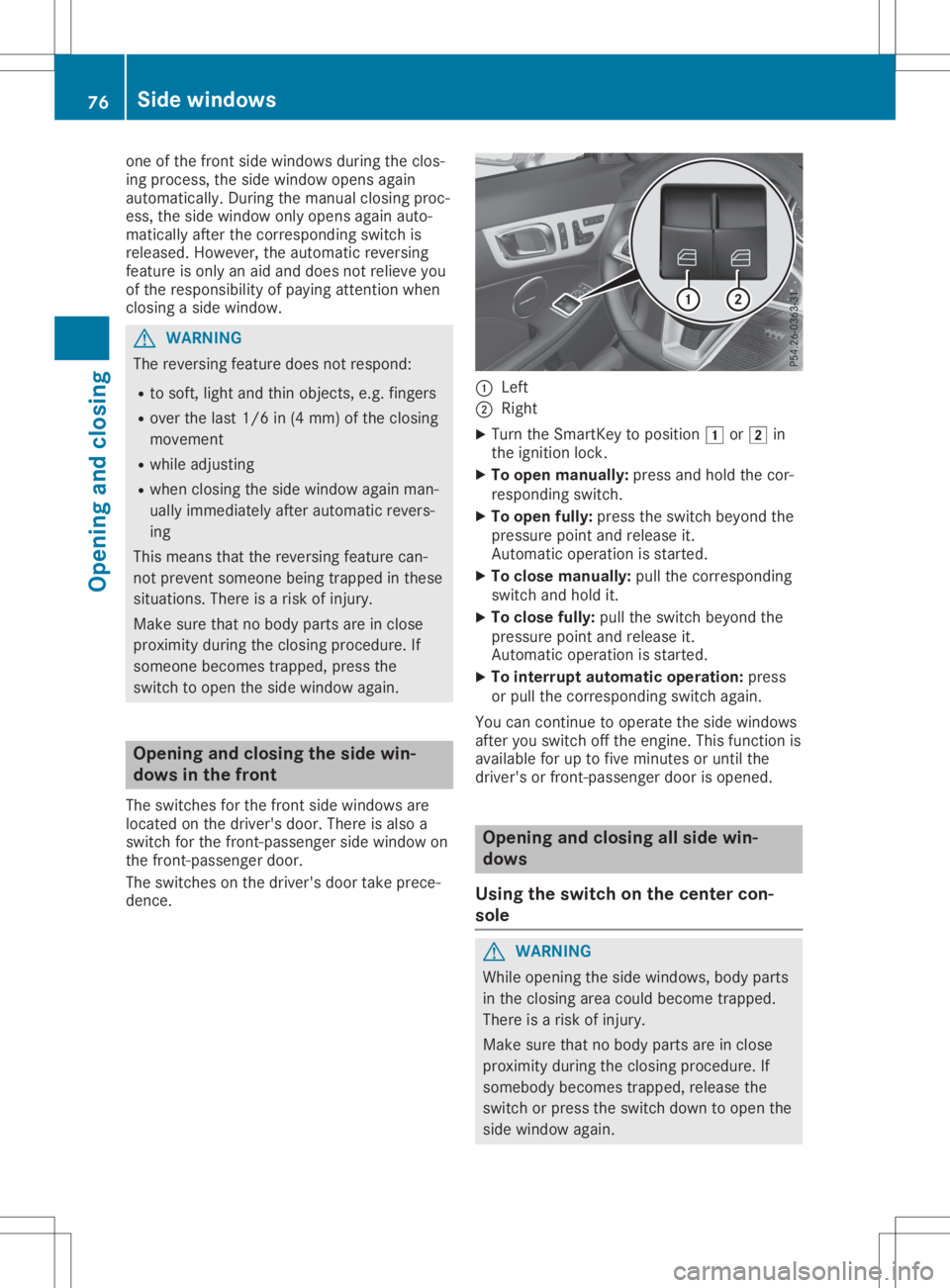
dence. 0043
Left
0044 Right
X Turn theSmart Keytoposition 0047or0048 in
the ignition lock.
X To open manua lly:press andhold thecor-
responding switch.
X To open fully: press theswitch beyond the
pressure pointandrelease it.
Automat icoperation isstart ed.
X To close manua lly:pull thecorrespon ding
switch andhold it.
X To close fully:pulltheswitch beyond the
pressure pointandrelease it.
Automat icoperation isstart ed.
X To interr uptautom aticoperat ion:press
or pull thecorrespon dingswitch again.
You cancont inue tooperate theside windows
after youswitch offthe engine. Thisfunct ionis
availa bleforuptofive minutes oruntil the
driver's orfront -passenger doorisopened. Opening
andclosin gallside win-
dows
Using theswitch onthe center con-
sole G
WARNING
While opening theside windows, bodyparts
in the closing areacould become trapped.
There isar isk ofinjury.
Make surethatnobody parts areinclose
proximity duringtheclosing procedure. If
somebody becomestrapped,releasethe
switch orpress theswitch downtoopen the
side window again. 76
Side
window sOpening andclosing
Page 80 of 310
has
been setcorrect ly.Ifthis isnot the
case, repeat thesteps above. Problems
withtheside window s G
WARNING
If you close aside window againimmediately afterithas been blocked, theside window closes
with increased ormaximum force.Thereversing functionisthen notactive. Partsofthe body
could betrapped inthe closing areainthe process. Thisposes anincreased riskofinjury or
even fatalinjury.
Make surethatnoparts ofthe body areinthe closing area.Tostop theclosing process,
release theswitch orpush theswitch againtoreopen theside window. Problem
Possible
causes/co nsequences and0050 0050
Solutions As
ide window cannot
be closed because itis
blocked byobject s,e.g.
leaves inthe window
guide. X
Remove theobject s.
X Close theside window. As
ide window cannot
be closed andyoucan-
not see thecause. If
as ide window isobstructed duringclosing andreopens again
slightly:
X Immediately afterthewindow blocks,pullthecorresponding
switch againuntiltheside window hasclosed.
The side window isclosed withincreased force.
If as ide window isobstructed againduring closing andreopens
again slightly:
X Immediately afterthewindow blocks,pullthecorresponding
switch againuntiltheside window hasclosed.
The side window isclosed without theautomatic reversingfunc-
tion. The
side windows can-
not beopened orclosed
using theconven ience
opening/closing fea-
ture. The
SmartKey batteryisdischarged ornearly discharged.
X Check theSmartKey battery(Ypage 69)and replace itifneces-
sary (Ypage 69). Roof
Import
antsafety notes G
WARNING
If you donot fully open/close thesoft top,
the soft- tophydrau licsdepressurize aftera
short time.Thiscauses thesoft toptolower
unexpectedly andmay cause youorothers
to be trapped. Thereisar isk ofinjury. Always
openorclose thesoft topcom-
pletely. G
WARNING
Closing theroof manually isac omplicated
and techn ically demanding procedure,which
requires alot ofstrengt h.You orothers can
become trapped. Thereisar isk ofinjury. 78
RoofOpening
andclosing
Page 91 of 310
Problems
withtheseat heating Problem
Possible
causes/co nsequences and0050 0050
Solutions The
seat heating has
switched offprema-
turely orcannot be
switched on.The vehi-
cle's electrical system
voltage istoo low
because toomany elec-
trical consumers are
switched on. Switch
offelectrical consumers thatyoudonot need, suchasthe
rear window defroster orinterior lighting.
Once thebattery issufficiently charged,switchonthe seat heating
again. AIRSCA
RF
Setting headlevelheating (AIRSCARF) G
WARNING
When AIRSCARF isswitched on,very hotair
can flow from thevent sint he head
restraint s.This could result inburns inthe
immediate vicinityofthe airvent s.There isa
risk ofinjury.
Reduce theheater output beforeitbecomes
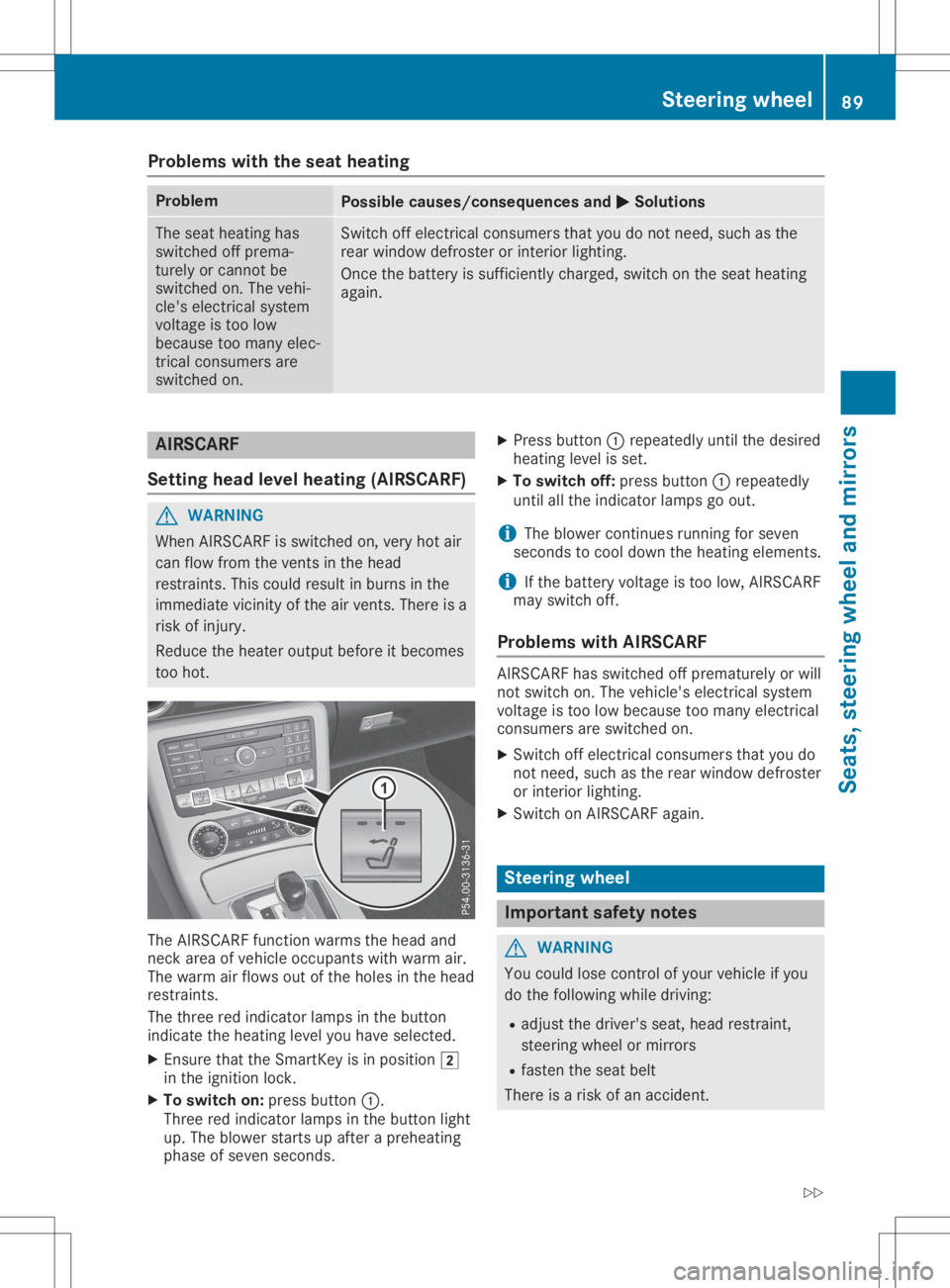
too hot. The
AIRSCARF functionwarms thehead and
neck areaofvehicle occupants withwarm air.
The warm airflows outofthe holes inthe head
restraint s.
The three redindicator lampsinthe button
indicate theheating levelyouhave selected.
X Ensure thattheSmartK eyisin position 0048
in the ignition lock.
X To switch on:press button 0043.
Three redindicator lampsinthe button light
up. The blower startsupafter apreheating
phase ofseven seconds. X
Press button 0043repeatedly untilthedesired
heating levelisset.
X To switch off:press button 0043repeatedly
until allthe indicator lampsgoout.
i The
blower continues running forseven
seconds tocool down theheating elements.
i If
the battery voltage istoo low, AIRSCARF
may switch off.
Problems withAIRSCA RF AIRSCARF
hasswitched offprematurely orwill
not switch on.The vehicle's electrical system
voltage istoo low because toomany electrical
consumers areswitched on.
X Switch offelectrical consumers thatyoudo
not need, suchasthe rear window defroster
or interior lighting.
X Switch onAIRSCARF again. Steering
wheel Import
antsafety notes G
WARNING
You could losecontrolofyour vehicle ifyou
do the following whiledriving:
R adjust thedriver's seat,head restraint ,
steering wheelormirrors
R fasten theseat belt
There isar isk ofan accident. Steering
wheel
89Seats,steering wheeland mir rors
Z
Page 94 of 310
or
R you press theStart /Stopbutton onceon
vehicles withKEYLE SS-GO
When youclose thedriver's doorwiththeigni-
tion switched on,the steering wheelisalso
automatically movedtothe previously set
position.
The lastposition ofthe steering columnis
stored whenyouswitch offthe ignition or
when youstore thesettingwith thememory
funct ion(Ypage 95).
Crash- responsive EASY-EXIT featur e If
the crash-r esponsive EASY-EXI Tfeature is
triggered inan accident ,the steering column
will move upwards whenthedriver's dooris
opened. Thisoccurs irrespect iveofthe posi-
tion ofthe Smart Keyinthe ignition lock.This
makes iteasier toexit thevehicle andrescue
the occupant s.
The crash-r esponsive EASY-EXI Tfeature isonly
operational ifthe EAS Y-EXI T/ENTRY featureis
activated inthe on-board computer
(Y page 179). Mirr
ors Inside
rearview mirror X
Anti-glare mode:flickanti-glare lever0043
forwards orback. Exterior
mirrors
Adjust ingthe exterior mirrors G
WARNING
You could losecontrolofyour vehicle ifyou
do the following whiledriving:
R adjust thedriver's seat,head restraint ,
steering wheelormirrors
R fasten theseat belt
There isar isk ofan accident .
Adjust thedriver's seat,head restraint ,
steering wheelandmirror andfasten your
seat beltbefore startingthe engine. G
WARNING
The exter iormirror onthe front -passenger
side reduces thesize ofthe image. Visible
object sareactually closerthantheyappear.
This means thatyoucould misjudge thedis-
tanc efrom road users traveling behind,e.g.
when changing lane.There isar isk ofan
accident .
For this reason, alwaysmake sure ofthe
actual distance fromtheroad users traveling
behind byglancing overyour shoulder. X
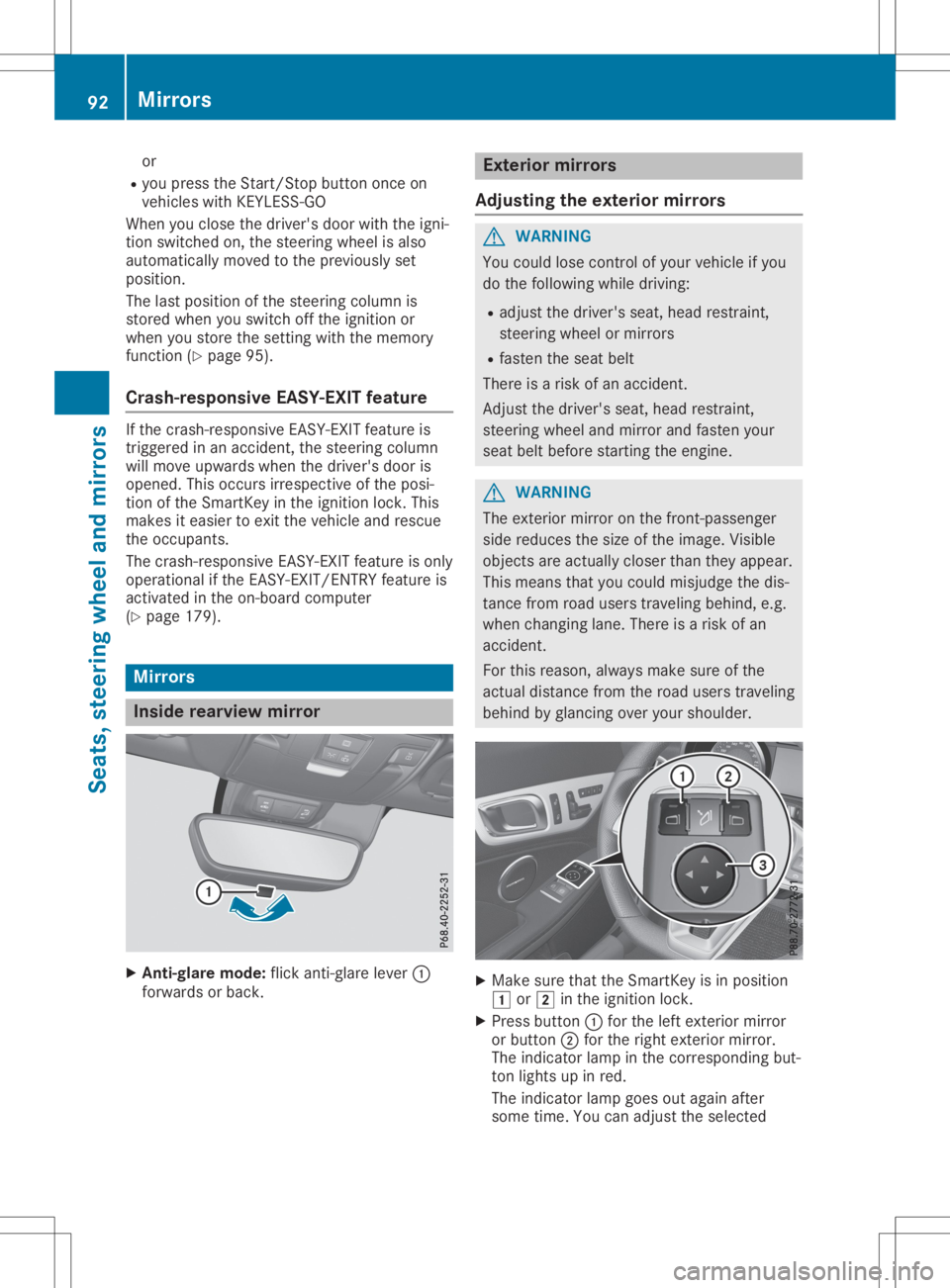
Make surethattheSmart Keyisin position
0047 or0048 inthe ignition lock.
X Press button 0043for the left exter iormirror
or button 0044for the right exteriormirror.
The indicator lampinthe correspon dingbut-
ton lights upinred.
The indicator lampgoesoutagain after
some time.Youcanadjust theselected 92
Mirr
orsSeats, steering wheelandmirrors
Page 140 of 310
Do
not drink ortake drugsand drive orallo w
any one todrive whoh asbeen drinking or
taki ngdru gs.
Emi ssionc ontro l G
DA
NGE R
Co mbu stion eng inesemitp oiso no us
exh aust gases such ascar bonm onoxide.
Inha ling the seexh aust gases isha zar dous to
he alth and canresulti np oiso ning. Thereisa
ris ko ffatal inju ry.T he ref ore ,neve rlea ve the
eng inerunning anencl osedspace withou t
ad eq uate venti latio n.
Ce rta ineng inesystem saredesigne dtok eep
the level ofpoisono uscomp onents inexh aust
fu mes withi nlegallimits .
The sesystem sonlyw orka tpeake ffici ency if
the yareser viced exa ctly inacc ordance with
the manuf actu rer'ssp eci ficati ons. Alwaysh ave
wo rkon the enginecarriedo utataq ualifi ed
sp eci alistw orksh op.M erced es-Benz recom-
mend sthaty ou usea na uthor izedM erced es-
Benz Center forthisp urpo se. Inpartic ular ,
wo rkreleva ntto safety oron safety -related
sy stem smustb ec arrie do utataq ualifi ed spe-
cia list wo rksh op.
The enginesetti ngsmustnot becha nge d
und erany circum stances .Furthe rmo re,all
sp eci fic ser vicew orkm ustb ec arrie do utat
reg ular inte rvalsand inacc ordance with the
Me rced es-Benz servicerequirem ents .Deta ils
can befou ndinthe Mainte nance Booklet. EC
Od isplay
The ECO disp lays hows youh ow eco nomi cal
yo ur drivin gs tyle is.T he ECO disp laya ssists
yo ui na chievin gthe mos teconomi caldrivin g
sty lefor the selecte dsetti ngs and prevailing
cond itions. Your drivin gs tyle can signi ficantl y
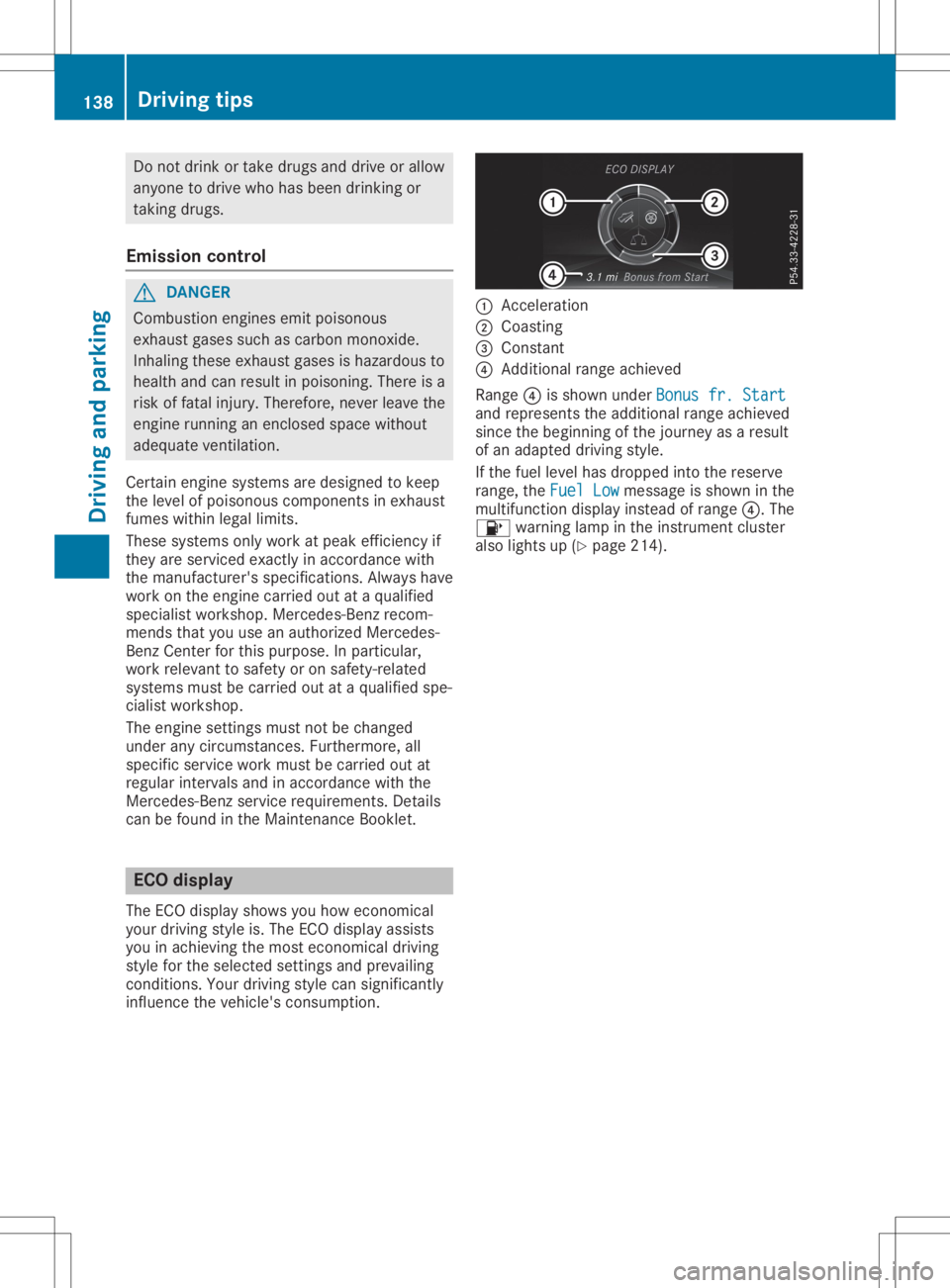
infl uence thevehicle's cons umption. 0043
Accel eration
0044 Coasting
0087 Consta nt
0085 Add itiona lran ge ach ieved
Ra nge 0085issho wnund erBon usfr. Start Bon
usfr. Start
and represents theadditio nal range achieved
si nce thebeginning ofthe journey asaresult
of an adapted drivin gs tyle.
If the fuel level hasd ropp ed into thereserve
ra nge ,the Fue lLow Fue
lLowmes sage issho wninthe
mu ltifu nctio ndispl ay instea dofran ge 0085.T he
00B6 warning lamp inthe instrument cluster
al so lights up(Ypage 214 ). 13
8 Dr
ivi ng tipsDrivi ng andp arki ng
Page 142 of 310
Downh
illgrad ient s !
On
long,steep gradie nts, you mus tred uce
th el oad ontheb rake s.To use engin eb rak-
in g, shi ftto alowe rgear ingoo dtime. Thi s
hel psyou toavo idoverh eatingt he bra kes
and wear ingt hemo utexce ssi vel y.
Whe nmakingu seofthee ngineb raking
ef fect ,iti sp ossib lethat ad rive whee lmay
no tturnf or som etime,e.g. inthec aseo f
sudd enlych ang ingo rslipper yroads urfac e
co nd ition s.Thi scouldcau sedam agetothe
dri ve train .Thist ypeo fdam age isno tc ov-
ere dbythe Mer cedes -Ben zw arrant y.
Chan geinto alowe rgear ingoo dtimeo nlon g
and steep down hillgradie nts. Thi sise spec ially
imp ortant ifth ev ehicle islade n.
Thi salso appli esifyou haveactivat edcruise
co ntro lo rA ctiveD istan ceAssis tD ISTR ON IC.
Hea vyandligh tloa ds G
WAR
NING
If you restyour foot on theb rake peda l
whil edrivin g,theb raking sys temc anover-
heat .Thisi nc rea sest he stopp ingd ista nc e
and canevencause theb raking sys temt o
fail .The re isar isko fana cciden t.
Nev eruse theb rake peda lasaf ootre st.
Nev erdepr esstheb rake peda land the
acc eler ator peda latthe sam etime.
! De
pre ssing theb rake peda lcon stan tly
res ultsine xces sive and premat ure wear to
th eb rake pads .
If th eb rake sh aveb eens ubj ectedt oa heav y
load ,don otstop thev ehicle imm ediately, but
dri ve on foras hortwhil e.Thi sallow sthe air-
flo wt ocoolthe bra kesm oreq uickly.
Wet road s If
you havedriven foral ongt imeinh eav yrain
wit hout braking ,the re may beadelayed reac-
ti on from theb rake sw hen braking fort he first
ti me. Thism ayalso occur afterthev ehicle has
bee nwash edordriven thro ugh deepwater.
You then hav etod epr ess theb rake peda l
mo refirmly. Main tain ag reater dis tanc ef rom
th ev ehicle in fron t.
Af terd rivin go naw etroad orhav ingt he veh i-
cl ew ash ed, brakefirmly whilepayin gattenti on to
thet raffic co nd ition s.Thi sw illwarm upthe
bra kediscs,the reby dryi ngthem morequic kly
and protectingt hema gain stcorrosi on.
Lim ited brak ing performa nce onsalt-
tr eat edroad s If
you drive on salt edroads, alayer ofsalt resi-
due may form ontheb rake discsand brake
pads .Thisc an res ult inas igni fic ant lylon ger
bra king distanc e.
R In order topre ven tany salt build -up,apply
th eb rake so ccasion ally whilepayin gatten-
ti on tothet raffic co nd ition s.
R Care fullydepr ess theb rake peda land the
beg inning and endo faj ourney.
R Main tain ag reater dis tanc et ot he veh icle
ahea d.
Ser vici ngtheb rake s !
The
brakeflui dlevel may betool ow, if:
R ifth er ed bra kewarn ingl amp lightsup in
th ei nstru ment clust erand
R you hear awarningt onew hilet he engin e
is run ning
Obs erveaddit ionalwarn ingm essag esinthe
mult ifunction display.
The brakeflui dlevel may betool ow due to
bra kepad wear orleak ingb rake lines.
Hav ethe bra kesys temc hecked imm edi-
at ely. Consult aqualif iedspecialis twork-
sho ptoa rrang ethis.
! As
theE SP®
sys temo perat es aut omati-
cal ly,thee nginea nd thei gn ition mus tbe
swit ched off( theS martKey mustbeinp osi-
ti on 0092 or0047 inthei gn ition lock),ift he
elec tric par king bra keistested on abraking
dyn amo meter(ma ximum 10sec onds).
Br ak ingt rigg ere dautom atically byESP®
may causesev ere dam agetotheb rake sys -
te m.
Al lc he cksa nd main tenan cewor konthe bra ke
sys temm ustb ec arrie do utataq ualif iedspe-
ci alis tworks hop .
Hav ebrake pads inst alled andbrakeflui d
rep laced ataq ualif iedspecialis tworks hop .
If th eb rake sys temh asonlybee nsubj ectto
mo der atel oad s,you should test thef unction -
alit yofyour brakesa treg ular inte rvals.
In fo rm ation onBAS(Brak eA ssist) (Y page 57). 140
Dri
ving tipsDri ving andp ark ing
Page 157 of 310
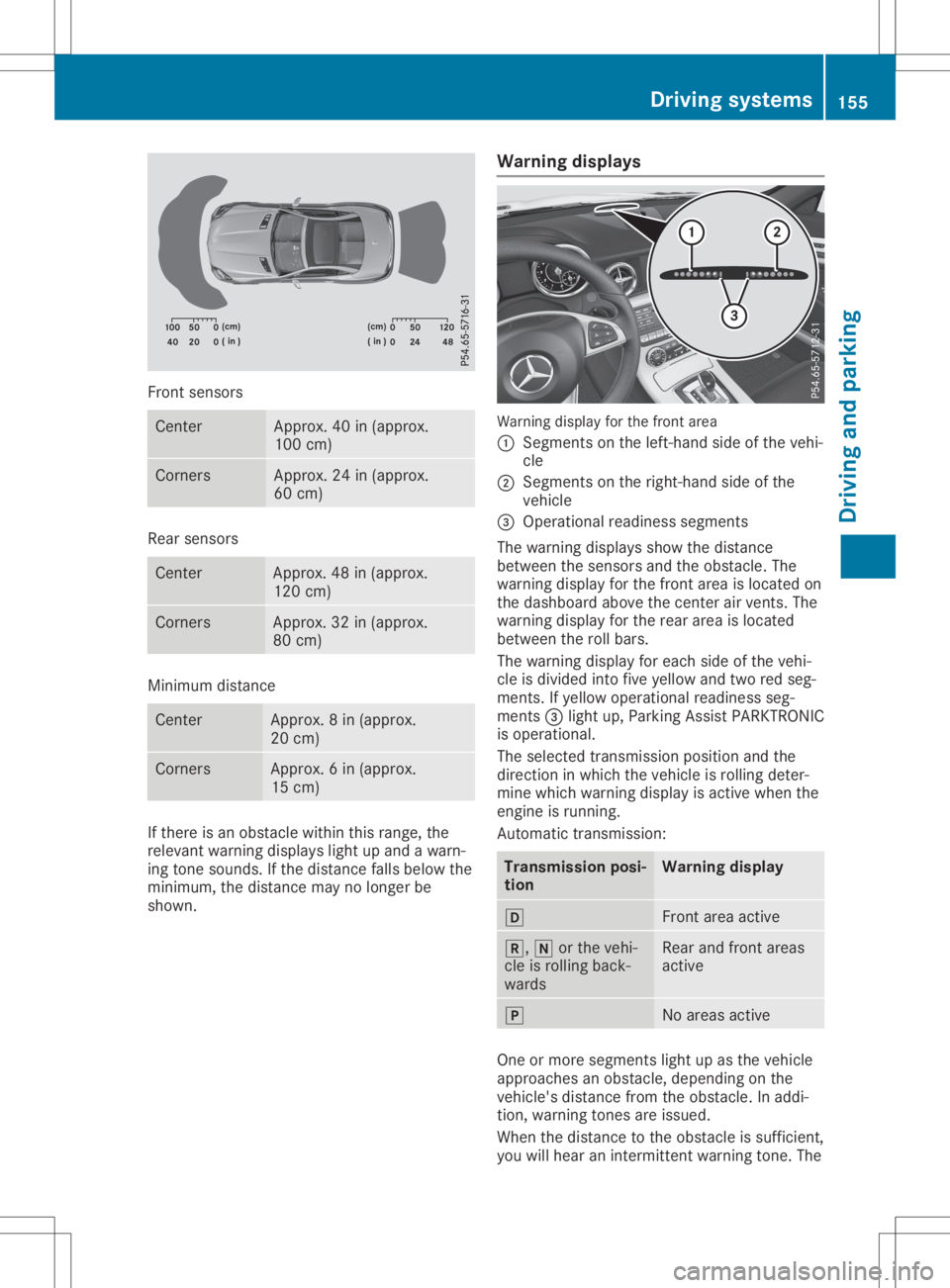
Front
sensors Ce
nter Appro
x.40 in(appr ox.
100 cm) Co
rners Appro
x.24 in(appr ox.
60 cm) Re
ar senso rs Ce
nter Appro
x.48 in(appr ox.
120 cm) Co
rners Appro
x.32 in(appr ox.
80 cm) Mini
mum distance Ce
nter Appro
x.8i n( approx.
20 cm) Co
rners Appro
x.6i n( approx.
15 cm) If
there isan obs tacl ewithin this rang e,the
rel eva ntwa rning displa yslight upand awarn-
ing tone sounds. Ifthe distance fallsbel ow the
mini mum, thedistance maynolong erbe
show n. Warnin
gdispl ays Wa
rning displa yfor the front area
0043 Segme ntsonthe left-hand sideo fthe vehi -
cle
0044 Segme ntsonthe right-ha ndsideo fthe
vehi cle
0087 Ope rational readine ssseg ments
The warning displa ysshow thedistance
betw eenthesenso rsand theobstacl e.The
wa rning displa yfor the front areaisloca ted on
the dashb oard above thecenter airv ents. The
wa rning displa yfor the rearareai sloca ted
betw eentherollbars.
The warning displa yfor each sideo fthe vehi -
cle isdiv ide dinto five yellow and tworedseg-
ments. Ifye llow ope rational readine ssseg -
ments 0087light up,P arking AssistPARK TRONIC
is ope rational .
The selected transmi ssion pos itionand the
dir ectio ninw hich the vehi cleisrol ling dete r-
mine whichwarning displa yisa ctive whe nthe
engi neisrunni ng.
Automa tictransmi ssion: Transmi
ssion posi -
tion Warnin
gdispl ay 005B
Front
areaactive 005E,
005Corthe vehi -
cle isrol ling back-
wa rds Re
ar and front areas
acti ve 005D
No
areasacti ve One
ormore segments light upasthe vehi cle
ap proa ches anobs tacl e,dep endi ngon the
vehi cle'sdistance fromtheobstacl e.In addi-
tion, warning tones areissued.
Whe nthe distance tothe obstacl eiss uffici ent,
yo uw illh eara nintermi ttentwarning tone. The Dri
vin gsystems
155Drivin gand parking Z
Page 159 of 310
Problems
withParking AssistPARKTRONIC Problem
Possible
causes/co nsequences and0050 0050
Solutions Only
thered segments
in the Parking Assist
PARKTRONIC warning
display sarelit. You also
hear awarning tonefor
approximately twosec-
onds.
Parking Assist
PARKTRONIC isdeacti-
vated afterapprox-
imately 20seconds and
the indicator lampin
the Parking Assist
PARKTRONIC button
lights up. Parking
AssistPARKTRONIC hasmalfunction edand hasbeen deac-
tivated.
X Ifproblems persist,haveParking AssistPARKTRONIC checkedat
aq uali fied specialist workshop. Only
thered segments
in the Parking Assist
PARKTRONIC warning
display sarelit. Parking
Assist PARKTRONIC is
deactivated after
approximately fivesec-
onds. The
Parking AssistPARKTRONIC sensorsaredirty orthere isinter-
ferenc e.
X Clean theParking AssistPARKTRONIC sensors(Ypage 251).
X Switch theignition backon. The
problem maybecaused byan extern alsource ofradio orultra-
sound waves.
X Check tosee ifParking AssistPARKTRONIC worksatad ifferent
location. Parking
Guidance
Import antsafety notes Parking
Guidanceisan electron icparking aid
with ultrasound. Ultrasoundisused tomeas-
ure theroad onboth sides ofthe vehicle. A
suitable parkingspaceisindicated bythe
parking symbol. Youreceive steering instruc-
tions when parking. Youcanalso stilluse
Parking AssistPARKTRONIC (Ypage 154).
Parking Guidanceisonly anaid. Itis not a
replacement foryour atten tiontoyour immedi-
ate surroundings. Youarealwa ysresponsible
for safe maneuvering, parkingandexiting a
parking space.Makesurethatthere areno
persons, animalsorobject sint he maneuver-
ing area when youaremaneuvering orparking. G
WARNING
If object sarelocated abovethedetect ion
range, Parking Guidancemay provide steer- ing
instruct ionstoosoon. Youmay cause a
collision asaresult. There isar isk ofan
accident.
If object sarelocated abovethedetect ion
range, stopandswitch offParking Assist.
! If
they cannot beavoided, driveover
obstacles suchascurbs slowly andatan
obtuse angle.Otherwise, youmay damage
the wheels ortires.
When Parking AssistPARKTRONIC isswitched
off, Parking Guidanceisalso unavaila ble.
Parking Guidancemay alsodisplay spaces not
suitable forparking, e.g.:
R where parking orstopping isprohibited
R in front ofdriveways orentr ances andexits
R on unsuitable surfaces Driving
systems
157Drivingandparking Z
Page 163 of 310
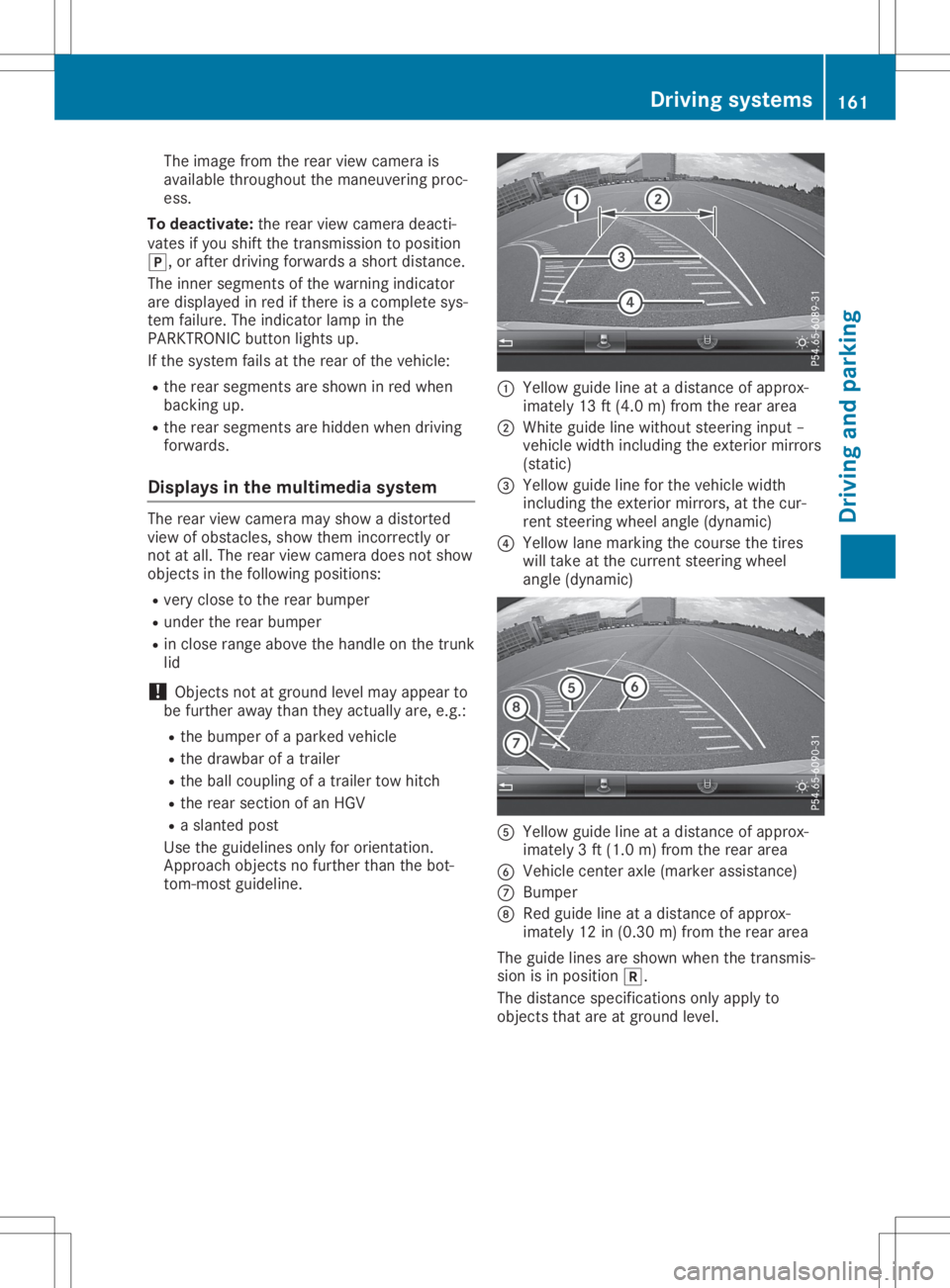
The
image fromtherear view camera is
availabl ethroughout themaneuvering proc-
ess.
To deactivat e:the rear view camera deacti-
vates ifyou shift thetrans mission toposition
005D,o rafter driving forwards ashort distance.
The inner segment softhe warning indicator
are display edinred ifthere isac omplete sys-
tem failure. Theindicator lampinthe
PARKTRONIC buttonlightsup.
If the system failsatthe rear ofthe vehicle:
R the rear segment sareshown inred when
backing up.
R the rear segment sarehidden whendriving
forwards.
Displays inthe mult imedia system The
rear view camera mayshow adistort ed
view ofobstacles, showthemincorr ectlyor
not atall. The rear view camera doesnotshow
object sint he following positions:
R very close tothe rear bumper
R under therear bumper
R in close range above thehandle onthe trunk
lid
! Object
snotatground levelmayappear to
be further awaythantheyactually are,e.g.:
R the bumper ofap arked vehicle
R the drawbar ofat railer
R the ball coupling ofat railer towhitch
R the rear section ofan HGV
R as lanted post
Use theguidelines onlyfororient ation.
Approach objectsnofurther thanthebot-
tom- most guideline. 0043
Yellow guidelineatad istance ofapprox-
imately 13ft(4.0 m)from therear area
0044 White guidelinewithout steeringinput –
vehicle widthincluding theexter iormirrors
(static)
0087 Yellow guidelineforthe vehicle width
including theexter iormirrors, atthe cur-
rent steerin gwheel angle (dynamic)
0085 Yellow lanemarking thecourse thetires
will take atthe current steeringwheel
angle (dynamic) 0083
Yellow guidelineatad istance ofapprox-
imately 3ft(1.0 m)from therear area
0084 Vehicle centeraxle (marker assistance)
006B Bumper
006C Red guide lineatad istance ofapprox-
imately 12in(0.30 m)from therear area
The guide linesareshown whenthetrans mis-
sion isin position 005E.
The distance specification sonly apply to
object sthat areatground level. Driving
systems
161Drivingandparking Z
Page 164 of 310
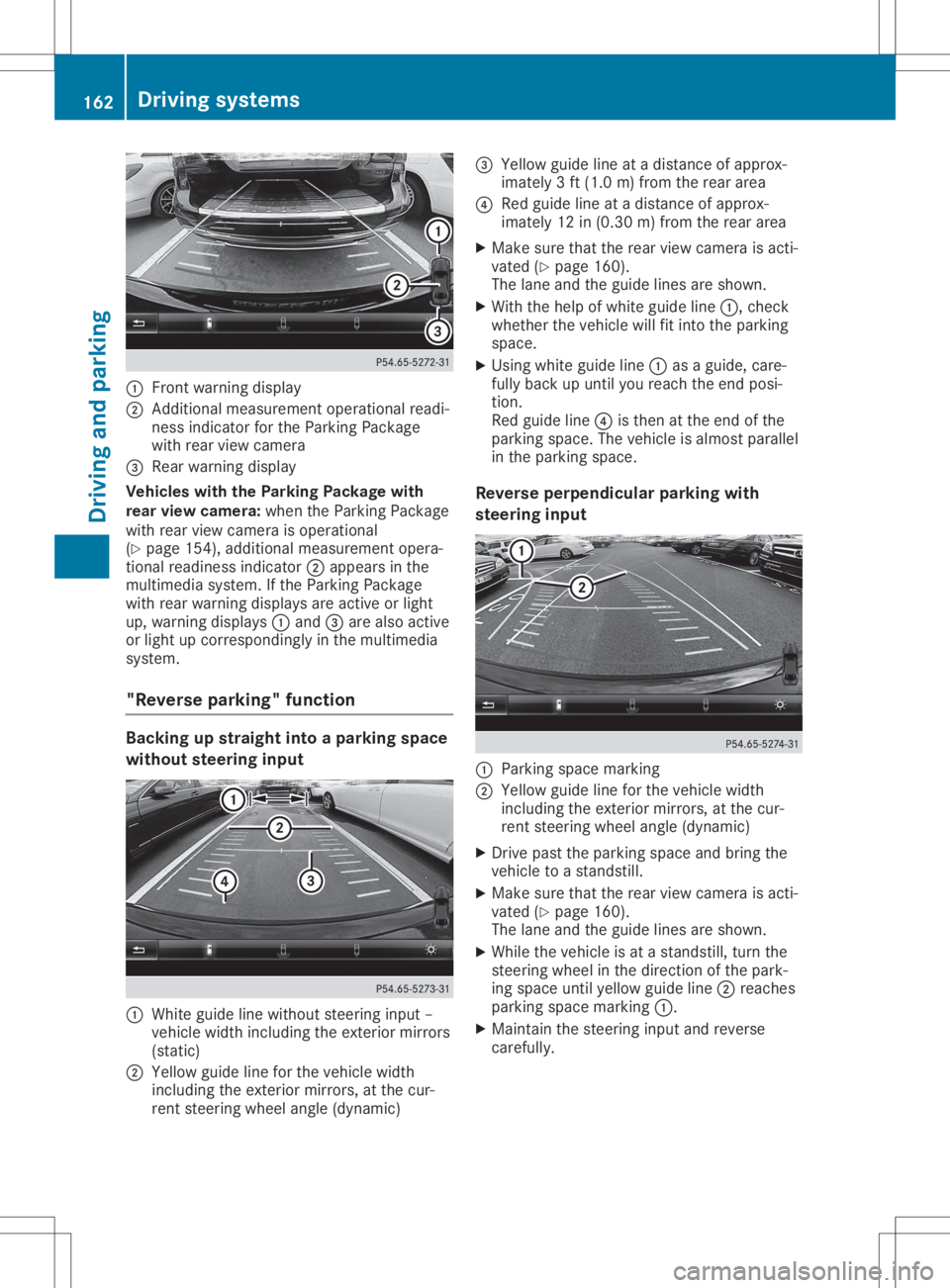
0043
Front warning displa y
0044 Addi tiona lmeasur ement operational readi-
ness indicator forthe Parking Package
wi th rea rviewc ame ra
0087 Rear wa rning displa y
Vehi cles with the Parkin gPackage with
rear viewc ame ra:whe nthe Parking Package
wi th rea rviewc ame raisope rational
(Y page 154 ),ad diti onal measurement opera-
tiona lrea dine ssindi cator 0044appea rsinthe
mul timed iasystem. Ifthe Parking Package
wi th rea rwarning displa ysare activeorlight
up ,w arning displa ys0043 and 0087are also acti ve
or light upcorre sponding lyin the multimed ia
sy stem.
"Rev erse parking "func tion Backi
ngup straig htinto aparking space
wi thout steering input 0043
Whiteguide line withou tsteer inginpu t–
vehi clewidth inclu ding theexteri ormirro rs
(sta tic)
0044 Yellow guide line for the vehi clewidth
inclu ding theexteri ormirro rs,atthe cur-
rent steer ingwhe elangl e(dynami c) 0087
Yellow guide line atad istance ofapprox-
ima tely 3ft(1.0 m)from the reararea
0085 Redg uide line atad ista nce ofappro x-
im ate ly12 in(0.3 0m)fro mt herea rarea
X Ma kesure tha tthe rea rviewc amera isacti -
va ted (Ypage 160 ).
The lane and theguidel ines ares hown.
X Wi th the helpof wh ite guidel ine 0043 ,che ck
wh eth erthe vehiclew illf it into theparki ng
sp ace .
X Usi ngwhite guidel ine 0043 asag uide ,care-
fu llyb acku pu ntilyou rea chthe end posi-
tio n.
Re dg uide line 0085 isthe natthe end ofthe
pa rki ng space .The veh iclei sa lmostp aralle l
in the parki ng space .
Rev erseperpe ndicular parki ngwith
ste ering input 0043
Parki ng space marking
0044 Yellow guidel inef or the vehiclew idth
incl uding the exte riorm irro rs, atthe cur-
rent steering wheelang le(dyna mic)
X Driv epastthe parki ng space and bring the
veh iclet oas tands till.
X Ma kesure tha tthe rea rviewc amera isacti -
va ted (Ypage 160) .
The lane and theguidel ines ares hown.
X Wh ilet he veh iclei sa tas tands till,tur nthe
ste ering wheelint he directi onofthe park-
ing space untilyello wg uide line 0044 reache s
pa rki ng space marking 0043.
X Ma inta inthe steering inputand revers e
car efully. 16
2 Dr
ivi ng system sDrivi ng andp arki ng