ignition MERCEDES-BENZ SLC 2020 Owner's Guide
[x] Cancel search | Manufacturer: MERCEDES-BENZ, Model Year: 2020, Model line: SLC, Model: MERCEDES-BENZ SLC 2020Pages: 310, PDF Size: 16.05 MB
Page 185 of 310
Disp
laymessa ges Int
rodu cti on
Gen eral not es Di
spl aymes sagesappe arinthem ultifun ction display.
Di spl aymes sageswit hg raphi cdisplays maybesho wninsim plified form intheO perat or's Man -
ual and may there fore differf romt hemult ifunction display.
Plea seres pon dina ccordan cewiththe display messagesand follow thea ddit ionalno tesi nt his
Ope rator's Man ual.
Cer tain dis play messagesare accompan iedbyan audib lewarn ingt oneo ra continuous tone .
Whe nyou stop and parkthe veh icle, plea seobs ervethe noteso n:
R HO LD function (Ypage 152)
R Par king (Ypage 134)
Hid ing disp lay messa ges X
Press the0076 or0038 buttono nthe steer ingw hee l.
The mult ifunction display hidesthe display message.
Hig h-pri orityd isplay messagesare showninred inthem ultifun ction display. Some high-pri ority
dis play messagescan notb eh idden.
The mult ifunction display showsthese mes sagescontinuous lyunt ilth ec auses fort he mes sages
hav ebeenr em edie d.
Mes sage me mo ry The
on-boar dcom puters aves certain display messagesintheme ssa geme mo ry.Y ou can call
up thed isplay messages:
X Press the0059 or0065 buttono nthe steer ingw hee ltos elec tthe Ser v. Ser
v.men u.
If th ere aredisplay messages, them ultifun ction display shows2M essag es 2M
essag es,f orexamp le.
X Press the0063 or0064 buttont os elec tthe entry, e.g. 2M essag es 2M
essag es.
X Press 0076 toconfirm .
X Press the0063 or0064 buttont os crollt hr ou gh thed isplay messages.
Whe nthe ignition isswit ched off,all display messagesare dele ted, apar tfroms omehigh- pri ority
dis play messages. Once thec auses oftheh igh- pri orityd isplay messageshav ebeenr ectifie d, the
co rresp ondin gd isplay messagesare also deleted. Disp
laymes sage s
183On -boar dcomp uter andd ispla ys Z
Page 188 of 310
Disp
laymes sages Poss
iblecauses/co nsequences and 0050 0050
Solu tions 007A
0025
00E5 Ino perativeSee Ino
perativeSee
Ope rator'sM anual Ope
rator'sM anual EB
D( elec tron icbrak eforce dist ribution),AB Sa ndESP®
are mal-
fun ction ing.
Ot her drivin gs yst ems anddrivin gs afet ys yst ems mayalsomalfunc-
ti on .
In addit ion,the 00E5 ,00BB and0025 warninglamp sligh tupint he
ins trumen tclus tera nd aw arning tone soun ds.
G WAR
NING
The brak esyst em continu estofun ction norm ally, butwithout the
fun ction slist ed abov e.The fron ta nd rear whee lsco uld there fore
loc kify ou per formaf ullbrak eapplic ation,for exampl e.
The steer abilit yand brak ingcharac teris tics may besev erelyaff ec-
te d. The brak ingdist anceina ne me rge ncyb rak ing situati oncan
inc reas e.
If ES P®
is no to per ational, ESP®
is unab leto stabiliz ethe veh icle.
The reisan increas edrisko fskiddin gand anacc iden t.
X Dr ive oncar eful ly.
X Vis itaq ualif iedspecialistwor kshop immediat ely. 0049
(USA
on ly) 0024 (Canada
on ly)
Tur nO ntheIgn i‐ Tur
nO ntheIgn i‐
tio nt oReleas e tio
nt oReleas e
the ParkingB rake the
ParkingB rake The
red0049 (USAonly) or 0024 (Canadaonly) ind icat orlamp lights
up.
You attemp tedt or elease thee lectric park ingbrak ewhile thei gn i-
ti on was switched off.
X Sm artKey :tur nthe Sm artKey topos ition 0047inthei gn ition lock.
X KEYLESS -GO: swit chon thei gn ition . 0049
(USA
on ly) 0024 (Canada
on ly)
Ple ase Release Ple
ase Release
Par kingB rake Par
kingB rake The
red0049 (USAonly) or 0024 (Canadaonly) ind icat orlamp
flas hes and awarning tone soun ds.Acondition for auto matic
rel ease ofthee lectric park ingbrak eisn otfulf illed (Ypage 135).
You aredrivin gw itht he elec tric park ingbrak eapplie d.
X Releas ethe elec tric park ingbrak emanually. The
red0049 (USAonly) or 0024 (Canadaonly) ind icat orlamp
flas hes and awarning tone soun ds.
You areusin gthe elec tric park ingbrak efor eme rgencyb rak ing
(Y page 135). 0049
(USA
on ly) 0024 (Canada
on ly)
Par kingB rake See Par
kingB rake See
Ope rator'sM anual Ope
rator'sM anual The
yellow 0024warninglamp lightsup.
The electric park ingbrak eism alfunc tion ing .
To apply :
X Swi tcht he ignition off.
X Pre ssthee lectric park ingbrak ehandle foratleast tens econ ds.
X Sh ift thet rans mis sion topos ition 005D.
X Con sult aqualif iedspecialistwor kshop . 186
Disp
laymes sage sOn -boar dcomp uter andd ispla ys
Page 194 of 310
Disp
laymes sages Poss
iblecauses/co nsequences and 0050 0050
Solu tions Fro
nt-passenger Fro
nt-passenger
Air BagDisabled Air
BagDisabled
See Operator'sM an‐ See
Operator'sM an‐
ual ual The
fron t-pass enger fron ta irbag and fron t-pass enger knee air bag
are disab ledduri ngthej ou rney, althoug h:
R an adult
or
R ap erson ofthec orresp on din gstatur eiso nthe fron t-pass enger
seat
If addit ionalfor cesa reapplie dtothe seat ,the syst emmay interp ret
th eo ccup ant 'sweigh taslower than itact ually is.
G WAR
NING
The fron t-pass enger fron ta irbag and fron t-pass enger knee air bag
may notb etrigge red inthee vent ofan acc iden t.
The reisan increas edrisko finjury.
X Pull overand stop thev ehicles afely assoo naspossibl e,payin g
att ention toroa dand traff icco nd ition s.
X Se cur ethe veh iclea gain strol linga way (Ypage 134).
X Swi tcht he ignition off.
X Hav ethe occup ant onthef ront-pa ssen ger seat getout ofthe
veh icle.
X Kee pthe seat unoccupied ,close thef ront-pa ssen ger door and
swit chon thei gn ition .
X Obs ervethe PASS EN GER AIRB AG indicat orlamp sint he center
co nsole and them ultifun ction disp layand checkt he followin g:
Se at uno ccupied andignition swit ched on:
R as elf-diagn osis iscar riedo ut.T he PASS EN GER AIRB AG OFF
and PASS EN GER AIRB AG ON indicat orlamp smustligh tup
sim ultane ousl yfor appr oximat elysixsec onds.
R theP ASSENG ERAIRB AG OFFind icat orlamp mustthe nligh t
up and remainlitaft erthes elf-diagn osis.Ift he indicat orlamp
is on ,O CS has disab ledthef ront-pa ssen ger fron ta irbag and
fr on t-pass enger knee bag (Ypage 46)
R theFro nt-passenger AirBagEnabledS eeOpe rator's Fro
nt-passenger AirBagEnabledS eeOpe rator's
Man ual Man
ual orFro nt-passenger AirBagDisabledSee Oper‐ Fro
nt-passenger AirBagDisabledSee Oper‐
ato r's Manual ato
r's Manual displaymes sage smustn otappear inthem ul-
ti fun ction disp lay
X Wait foraperiod ofat least 60sec onds unt ilth en ecessar ysys-
te mc hecksh aveb een compl eted.
X Mak esuret hatthe disp laymes sage sdon otappear inthem ulti-
fun ction disp lay.
If th ese cond ition sarefulf illed ,the fron t-pass enger seat canbe
oc cup iedagain .Whether theP ASSENG ERAIRB AG OFFo rONindi-
cat orlamp remainslitor goe soutdepe ndso nh ow OCS classifies
th eo ccup ant .
If th ec ondition sa renotfulf illed ,the syst emisno to per ating cor-
rec tly.
X Vis itaq ualif iedspecialistwor kshop immediat ely.
Obs ervethe addit ionalinf orm ation onOCS (Ypage 46). 192
Disp
laymes sage sOn -boar dcomp uter andd ispla ys
Page 195 of 310
Disp
laymes sages Poss
iblecauses/co nsequences and 0050 0050
Solu tions Fro
nt-passenger Fro
nt-passenger
Air BagEnable d Air
BagEnable d
See Operator'sM an‐ See
Operator'sM an‐
ual ual The
fron t-pass enger fron ta irbag and fron t-pass enger knee air bag
are enabled duringthej ou rney, althoug h:
R ac hild, asma lladult oran obj ectw eigh ingless than thes yst em' s
weigh tthres hold isloc ate donthe fron t-pass enger seat
or
R thef ront-pa ssen ger seat isuno ccupied
The systemmay detecto bjec ts or for cesa pplyin gaddit ionalweigh t
on thes eat .
G WAR
NING
The fron t-pass enger fron ta irbag and thef ront-pa ssen ger knee bag
may bedepl oyed uninten tion ally.
The reisan increas edrisko finjury.
X Pull overand stop thev ehicles afely assoo naspossibl e,payin g
att ention toroa dand traff icco nd ition s.
X Se cur ethe veh iclea gain strol linga way (Ypage 134).
X Swi tcht he ignition off.
X Ope nthe fron t-pass enger door .
X Remo vethec hild and thec hild res train tsyst em from thef ront-
pass enger seat .
X Mak esuret hatthe re are noobj ects on thes eat addin gtot he
weigh t.
The systemmightother wise detectthe addit ionalweigh tand
int erp ret thes eat occup ant'sweigh tasg reate rtha nita ctually is.
X Kee pthe seat unoccupied ,close thef ront-pa ssen ger door and
swit chon thei gn ition .
X Obs ervethe PASS EN GER AIRB AG indicat orlamp sint he center
co nsole and them ultifun ction disp layand checkt he followin g:
Se at uno ccupied andignition swit ched on:
R as elf-diagn osis iscar riedo ut.T he PASS EN GER AIRB AG OFF
and PASS EN GER AIRB AG ON indicat orlamp smustligh tup
sim ultane ousl yfor appr oximat elysixsec onds.
R theP ASSENG ERAIRB AG OFFind icat orlamp mustthe nligh t
up and remainlitaft erthes elf-diagn osis.Ift he indicat orlamp
is on ,O CS (Occup ant Class ification Sys tem) has disab ledthe
fr on t-pass enger fron ta irbag and fron t-pass enger knee air bag
(Y page 46)
R theFro nt-passen ger AirBagEnabledS eeOpe rator's Fro
nt-passen ger AirBagEnabledS eeOpe rator's
Man ual Man
ual orFro nt- passenger AirBagDisabledSee Oper‐ Fro
nt- passenger AirBagDisabledSee Oper‐
ato r's Manual ato
r's Manual displaymes sage smustn otappear inthem ul-
ti fun ction disp lay
X Wait foraperiod ofat least 60sec onds unt ilth en ecessar ysys-
te mc hecksh aveb een compl eted.
X Mak esuret hatthe disp laymes sage sdon otappear inthem ulti-
fun ction disp lay.
If th ese cond ition sarefulf illed ,the fron t-pass enger seat canbe
oc cup iedagain .Whether theP ASSENG ERAIRB AG OFFo rONindi- Disp
laymes sage s
193On -boar dcomp uter andd ispla ys Z
Page 210 of 310
Disp
laymes sages Poss
iblecauses/co nsequences and 0050 0050
Solu tions 00AF
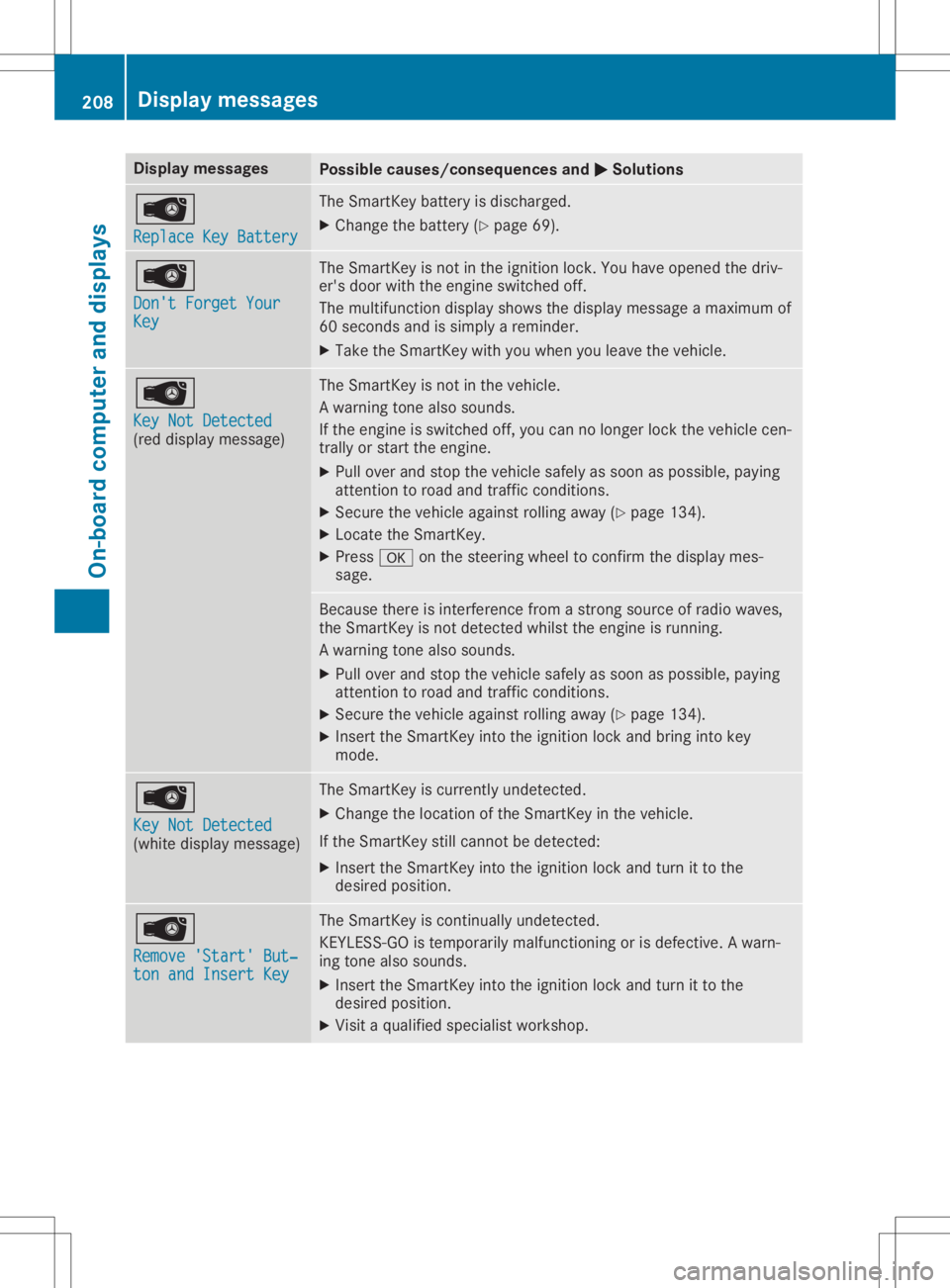
Rep laceK eyBat ter y Rep
laceK eyBat ter y The
SmartKey battery isdisc harged.
X Chan getheb atte ry (Y page 69). 00AF
Don 'tForget Your Don
'tForget Your
Key Key The
SmartKey isno tint he ignition lock.You haveopen edthed riv-
er' sd oor withthe engin eswit ched off.
The mult ifunction disp laysho wsthed isplay mes sage amaximum of
60 sec onds and issim plyarem inder.
X Tak ethe Sm artKey withyou when youleavethe veh icle. 00AF
Key NotDetected Key
NotDetected
(re dd isplay mes sage ) The
SmartKey isno tint he veh icle.
Aw arning tone also soun ds.
If th ee nginei ss wit ched off,you can nolonger lockthe veh iclec en-
tr ally orstart thee ngine.
X Pull overand stop thev ehicles afely assoo naspossibl e,payin g
att ention toroa dand traff icco nd ition s.
X Se cur ethe veh iclea gain strol linga way (Ypage 134).
X Loc ate theS martKey.
X Pre ss0076 onthes teer ing whee ltoc onfirmt hedisp laymes -
sage . Be
caus ethere isint erf ere ncef romas tron gs our ceofradi owaves,
th eS martKey isno td etec tedw hilstthe engin eisr unnin g.
Aw arning tone also soun ds.
X Pull overand stop thev ehicles afely assoo naspossibl e,payin g
att ention toroa dand traff icco nd ition s.
X Se cur ethe veh iclea gain strol linga way (Ypage 134).
X Inser tthe Sm artKey intot he ignition locka nd bring intok ey
mod e. 00AF
Key NotDetected Key
NotDetected
(whit edisplay mes sage ) The
SmartKey iscur ren tlyu ndetec ted.
X Chan gethel oc ati on oftheS martKey inthev ehicle.
If th eS martKey still can notb ed etec ted:
X Inser tthe Sm artKey intot he ignition locka nd turnittot he
des iredp osition . 00AF
Rem ove 'Start'B ut‐ Rem
ove 'Start'B ut‐
ton andInsert Key ton
andInsert Key The
SmartKey isco ntinu ally undetec ted.
KE YLE SS-GO istempo rarily malf unction ing orisdef ective. Aw arn-
ing tone also soun ds.
X Inser tthe Sm artKey intot he ignition locka nd turnittot he
des iredp osition .
X Vis itaq ualif iedspecialistwor kshop . 208
Disp
laymes sage sOn -boar dcomp uter andd ispla ys
Page 233 of 310
Socket
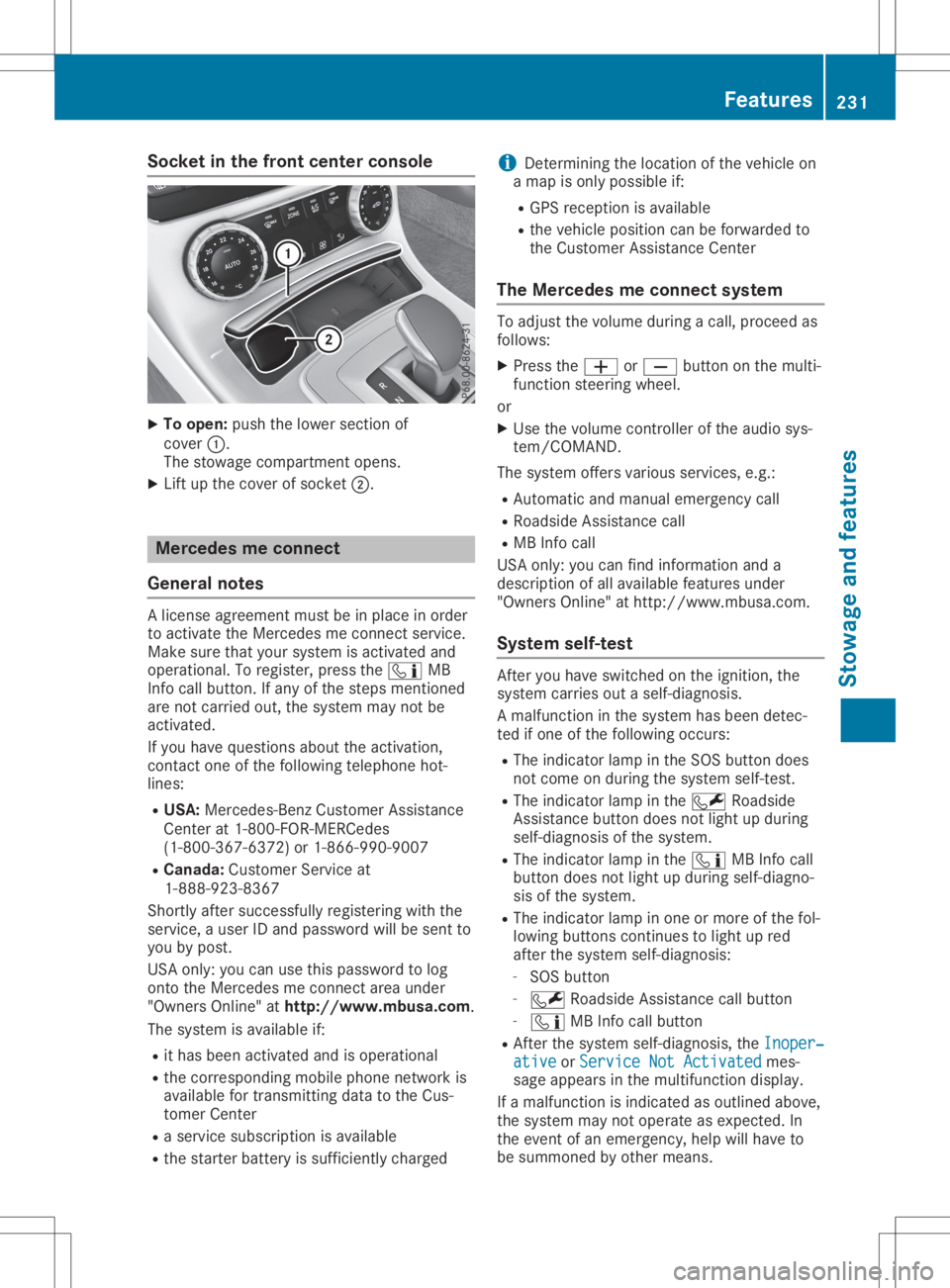
inthe front center console X
To open: pushthelower section of
cover 0043.
The stowage compartmen topens.
X Lift upthe cover ofsocket 0044. Mercedes
meconne ct
General notes Al
icense agreement mustbeinplace inorder
to activate theMercedes meconn ectservice.
Make surethatyour system isactivated and
operational. Toregister, pressthe00D9 MB
Info callbutton. Ifany ofthe steps mentioned
are not carried out,thesystem maynotbe
activated.
If you have questions abouttheactivation,
cont actone ofthe following telephone hot-
lines:
R USA: Mercedes-B enzCustomer Assistance
Center at1-80 0-FOR-MERCedes
(1-80 0-367-6372)or1-86 6-990-9007
R Canada: Customer Serviceat
1-88 8-92 3-8367
Short lyafter successfully registeringwiththe
service, auser IDand password willbesent to
you bypost.
USA only: youcan usethis password tolog
onto theMercedes meconn ectarea under
"Owners Online"athtt <0053001D00120012005A005A005A001100500045005800560044001100460052
0050>.
The system isavaila bleif:
R ithas been activated andisoperational
R the correspondin gmobile phone network is
availa blefortransm ittingdatatothe Cus-
tomer Center
R as ervice subscription isavaila ble
R the starter battery issufficiently charged i
Determ iningthelocation ofthe vehicle on
am apisonly possible if:
R GPS reception isavaila ble
R the vehicle position canbeforwarded to
the Customer AssistanceCenter
The Mercedes meconne ctsystem To
adjust thevolume duringacall, proceed as
follows:
X Press the0081 or0082 button onthe multi-
funct ionsteering wheel.
or X Use thevolume controller ofthe audio sys-
tem/COMA ND.
The system offersvarious services, e.g.:
R Automatic andmanual emergency call
R Roadsid eAssistanc ecall
R MB Info call
USA only: youcan find information anda
description ofall availa blefeatures under
"Owners Online"athttp: //www.mbusa.com.
System self-test Aft
eryou have switched onthe ignition, the
system carriesoutaself-diagnosis.
Am alfunction inthe system hasbeen detec-
ted ifone ofthe following occurs:
R The indicator lampinthe SOS button does
not come onduring thesystem self-test .
R The indicator lampinthe 0052 Roadsid e
Assistanc ebutton doesnotlight upduring
self-diagnosis ofthe system.
R The indicator lampinthe 00D9 MBInfo call
button doesnotlight upduring self-diagno-
sis ofthe system.
R The indicator lampinone ormore ofthe fol-
lowing buttons continues tolight upred
after thesystem self-diagnosis:
- SOS button
- 0052 Roadsid eAssistanc ecallbutton
- 00D9 MBInfo callbutton
R Aft erthe system self-diagnosis, theInoper‐ Inoper‐
ative ative
orService NotActivated Service
NotActivated mes-
sage appears inthe multifunct iondisplay .
If am alfunction isindicated asoutlined above,
the system maynotoperate asexpected. In
the event ofan emergency, helpwillhave to
be summoned byother means. Features
231Stowageandfeatu res Z
Page 237 of 310
Cust
omerAssist anc eCenter. The customer
ser vicerepres entat ive can usether eceive d
dat atod ecide what kindo fassis tanceis
req uired .You are then ,for example ,guided to
th en eares tM erced es-Ben zServic eC entero r
ar ecove ryveh icle iscalle d.
If veh icle dataneeds tobe trans ferred durin g
an MB Info call oraR oadsi deAssist anc ecall,
th is isini tiat edbytheC ustome rAssist anc e
Cen ter. You willsee theRoa dsideAssis‐ Roa
dsideAssis‐
tan ceConnected tan
ceConnected message intheC OMA ND
displ ay.Ifth eV ehicle Heal thChec kcan be
st art ed, theReq uestf orveh icled iagno ‐ Req
uestf orveh icled iagno ‐
sis received. Startvehicled iagno ‐ sis
received. Startvehicled iagno ‐
sis ? sis
?mes sage appear sint he displ ay.
X Con firmt hemes sage withYes Yes
.
X When theVeh icleD iagno sis:P lease Veh
icleD iagno sis:P lease
sta rtignition. sta
rtignition. message appear s,tur n
th eS martKey toposi tion0048 inthei gn ition
loc k(Ypage 118).
X When thePle ase follow theinstruc‐ Ple
ase follow theinstruc‐
tio nsreceivedbyphoneand move tio
nsreceivedbyphoneand move
you rv ehicl et oas afep ositi on you
rv ehicl et oas afep ositi onmes -
sage appear s,foll ow thec ustomer service
rep resentat ive' sins truct ions.
The message inthed ispl aydisapp ears.
If you selectCan cel Can
cel theV ehicle Heal th
Chec kisc ancel ed comple tely.
The vehicle oper atingstate check begin s.
You willsee theVeh icled iagno sis Veh
icled iagno sis
act ivated. act
ivated.mes sage.
When thec heck isco mple ted, theSen d Sen
d
veh icled iagno sticsdata( Voice con‐ veh
icled iagno sti csdata( Voice con‐
nec tionm aybe interruptedduring nec
tionm aybe interruptedduring
dat at ransf er) dat
at ransf er) message appear s.The vehi-
cle datacan nowb esenttot he Cust omer
As sist anc eCenter.
X Pre ssOK OK
toconfirm them essage.
The voiceconnec tionw itht he Cust omer
As sist anc eCenterist ermi nat ed.
You willsee theVeh icleD iagno sis: Veh
icleD iagno sis:
Tra nsferring data... Tra
nsferring data...mes sage.
The vehicle dataiss enttot he Cust omer
As sist anc eCenter.
De pen dingo nw hat thec ustomer servicerep-
res entat ive agre edwithyou, thev oic ec onnec -
tio nisr e-est ablish edafterthet rans fer isco m-
plet e.Ifne ces sary, youwillbecontact edata
late rtim eb yanother mean s,e.g .bye -mail or
phon e.
An other function oftheV ehicle Heal thChec k
is thet rans fer ofser viced atat ot he Cust omer As
sist anc eCenter. Ifas ervic eiso verdue, the
COMA NDdispl aysho wsam essage about vari-
ous spec ialoffers atyour workshop.
US Ao nly: this inf orm ationcan also becalle d
up unde r"Own ersOnline" athttp :/ /
www.m busa.com.
In fo rm atio nonthe dat astoredi nt he veh icle
(Y page 28).
In for mat iononRoadsid eAssist anc e
(Y page 25). Ga
rage door opener
Gener alnot es The
Hom eLink®
garag edoor open erintegr ated
in ther ear -view mirror allows youtooper ate
up tothree differen tdoor and gatesyst ems .
Use thei ntegr atedgarag edoor open eronlyon
garag edoor sthat:
R have safetystop and revers efeat ures and
R meet curren tU.S.fede ralsafe tystandar ds
On ce prog ramed,thei ntegr atedgarag edoor
open erinther ear -view mirror will assum ethe
fun ction oftheg arag edoor syst em'srem ote
con trol. Please alsoread theo per atin ginstruc-
tio ns for theg arag edoor syst em.
When programmingag aragedoor open er,
park thev ehicle outside theg arag e.Do not
run thee ngine while programming.
Cert aingarag edoor drivesare incompat ible
with thei ntegr atedgarag edoor open er.Ifyou
have difficult yprog ram ingthei ntegr ated
garag edoor open er,con tactana uth oriz ed
Mer cedes-Ben zCent er.
Alt ern ativ ely, you can callthef ollowin gtele-
phon eassis tanceser vices:
R USA: Mercedes-Ben zCust ome rAssist anc e
Cent erat1-80 0-FO R-M ERCed es
R Cana da:Cust omerServic ea t
1- 80 0-38 7-01 00
R Hom eLink®
hot line 1-80 0-35 5-35 15 (free of
ch arge )
Mor einform ationonH omeLin k®
and/ orcom -
pat ible prod uctsisa lso availabl eonline at
ht tp :/ /www. homelink.com.
Not eson thed eclarat ionofcon formit y
(Y page 27).
US A:FCC ID:C B2HMI HL4
Canada: IC:279B -HMIH L4 Feat
ures
235Stowage andfeatures Z
Page 241 of 310
Setting
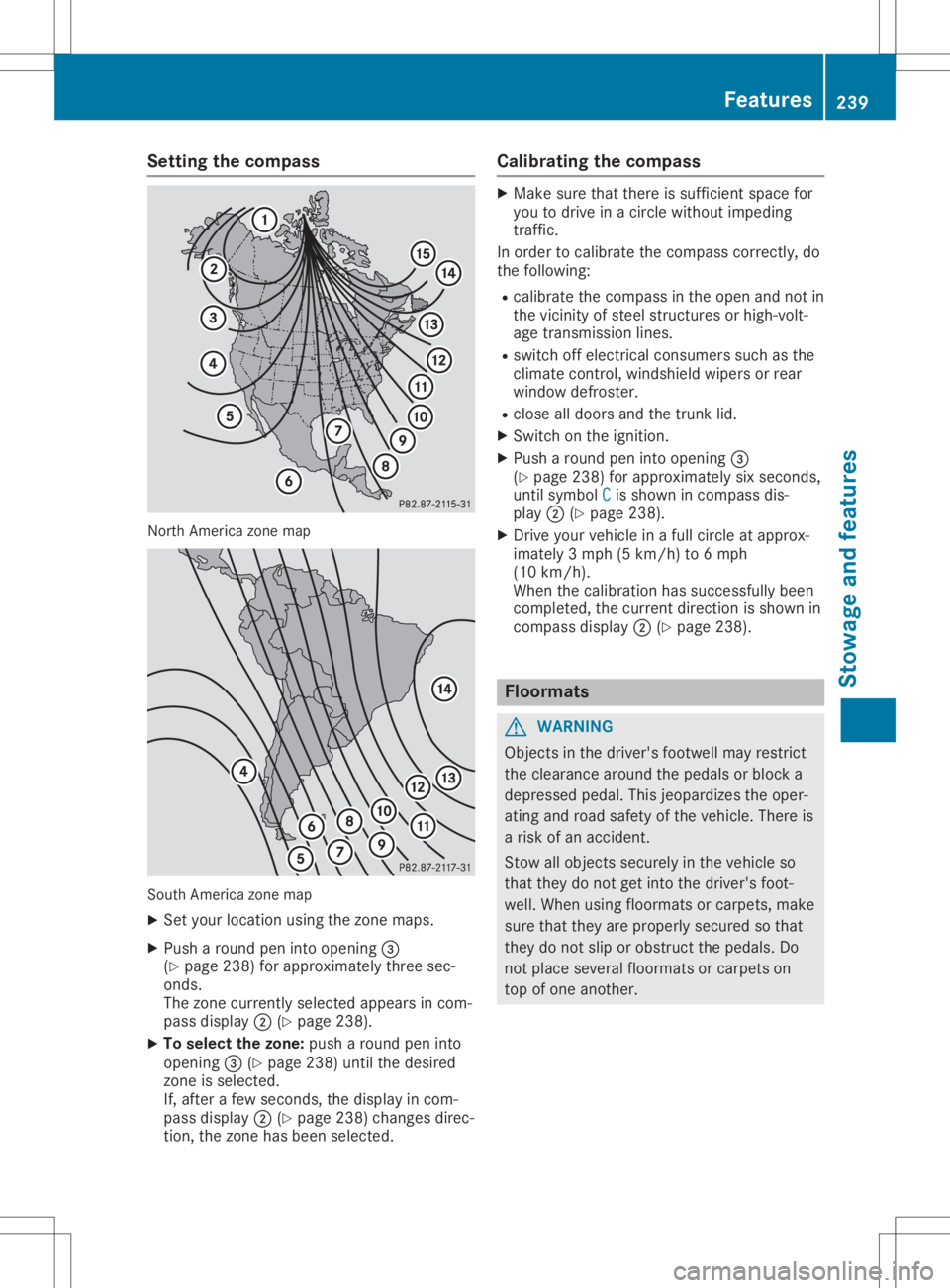
thecompass North
America zonemap South
America zonemap
X Set your location usingthezone maps.
X Push around peninto opening 0087
(Y page 238)forapproximately threesec-
onds.
The zone current lyselected appearsincom-
pass display 0044(Ypage 238).
X To selec tthe zone: pusharound peninto
opening 0087(Ypage 238)untilthedesired
zone isselected.
If, after afew seconds, thedisplay incom-
pass display 0044(Ypage 238)changes direc-
tion, thezone hasbeen selected. Calibrating
thecompass X
Make surethatthere issufficient spacefor
you todrive inac ircle without impeding
traffic.
In order tocalibrate thecompass correctly,do
the following:
R calibrate thecompass inthe open andnotin
the vicinity ofsteel struct uresorhigh-volt-
age transm issionlines.
R switch offelectrical consumers suchasthe
climate control,windshield wipersorrear
window defroster.
R close alldoors andthetrunk lid.
X Switch onthe ignition.
X Push around peninto opening 0087
(Y page 238)forapproximately sixseconds,
until symbol C C
is shown incompass dis-
play 0044(Ypage 238).
X Drive yourvehicle inaf ull circle atapprox-
imately 3mph(5km/h) to6m ph
(10 km/h).
When thecalibration hassuccessfully been
completed, thecurrent direction isshown in
compass display0044(Ypage 238). Floo
rmats G
WARNING
Object sint he driver's footwell mayrestrict
the clearance aroundthepedals orblock a
depressed pedal.Thisjeopardizes theoper-
ating androad safety ofthe vehicle. Thereis
ar isk ofan accident.
Stow allobject ssecurely inthe vehicle so
that they donot getinto thedriver's foot-
well. When usingfloormats orcarpets, make
sure thatthey areproperly securedsothat
they donot slip orobstruct thepedals. Do
not place several floormats orcarpets on
top ofone another. Features
239Stowageandfeatu res Z
Page 246 of 310
If
you need todo any work inside theengine
compartment:
R switch offthe ignition
R never reach intothearea where thereisa
risk ofdanger frommoving components,
such asthe fanrotation area
R remove jewelryandwatches
R keep items ofclothing andhair, forexam-
ple, awayfrom moving parts G
WARNING
The cooling systemispressu rized,particu-
larl yw hen themotor iswarm. Ifyou open
the cap, youcould bescalde difh ot coolant
spray sout. There isar isk ofinjury.
Let the engine cooldown before youopen
the cap. Wear protective glovesandprotec-
tive eyew earwhen opening. Openthecap
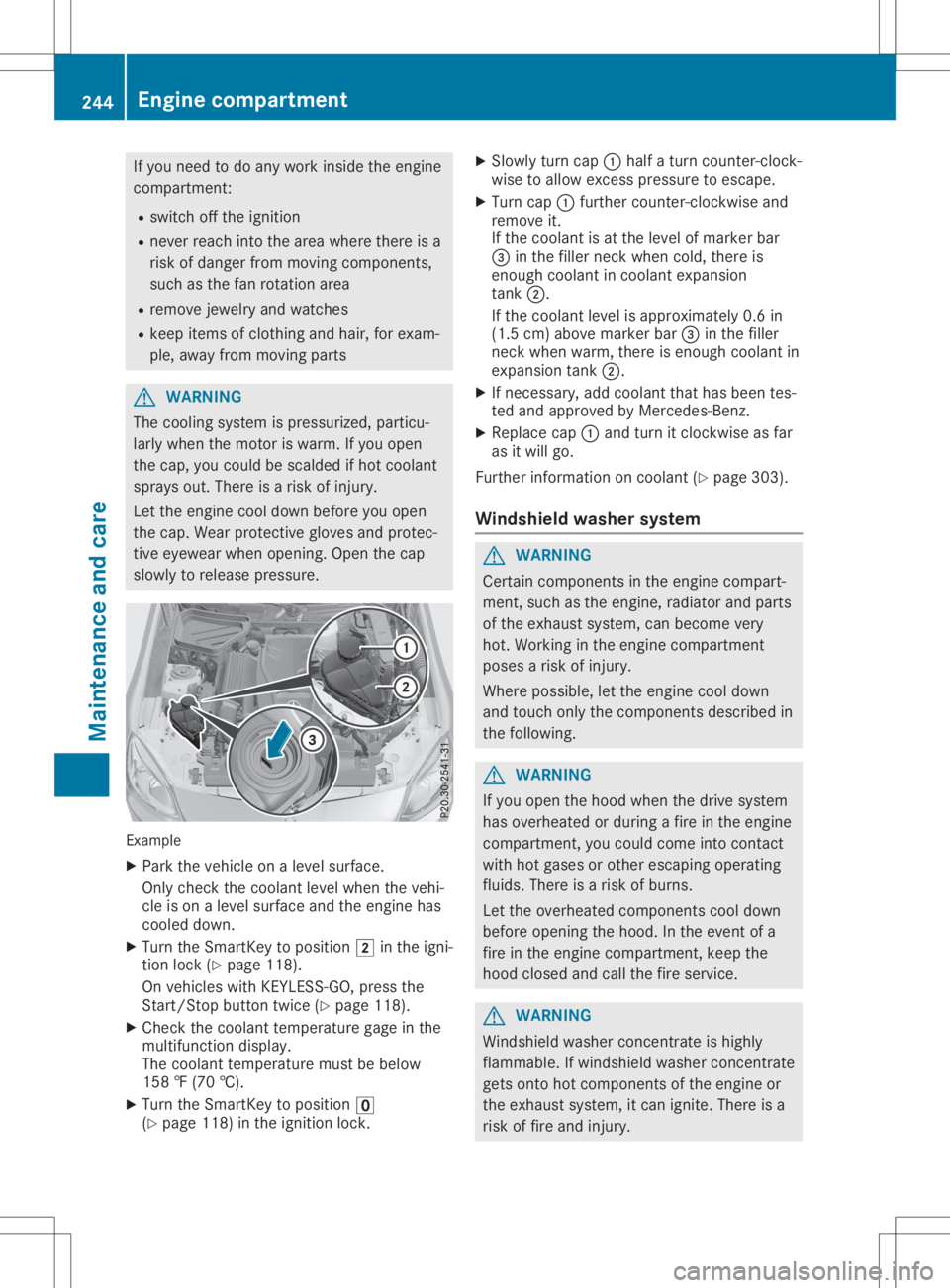
slow lyto relea sepressu re. Example
X Park thevehicle onalevel surface.
Only check thecoolant levelwhen thevehi-
cle ison alevel surface andtheengine has
cooled down.
X Turn theSmartKey topositio n0048 inthe igni-
tion lock (Ypage 118).
On vehicle swithKEYLESS- GO,press the
Start/St opbutton twice(Ypage 118).
X Check thecoolant temperature gageinthe
multifu nctiondisplay.
The coolant temperature mustbebelow
158 ‡(70 †).
X Turn theSmartKey topositio n0092
(Y page 118)inthe ignition lock. X
Slowl yturn cap 0043half aturn counter-clock-
wise toallow excess pressureto escape .
X Turn cap0043further <004600520058005100570048005500100046004F00520046004E005A004C0056
0048[ and
remove it.
If the coolant isat the level ofmarker bar
0087 inthe fillerneck when cold,there is
enough coolant incoolant expansion
tank 0044.
If the coolant levelisappro ximately 0.6in
(1.5 cm)above marker bar0087inthe filler
neck when warm, thereisenough coolant in
expansion tank0044.
X Ifnecessary ,add coolant thathasbeen tes-
ted and appro vedbyMercedes-Benz.
X Repl acecap 0043and turn itclockwise asfar
as itwil lgo.
Further information oncoolant (Ypage 303).
Windshie ldwashe rsystem G
WARNING
Certai ncomponents inthe engine compart-
ment, suchasthe engine, radiator andparts
of the exhau stsystem, canbecome very
hot. Working inthe engine compartment
poses arisk ofinjury.
Where possible,let the engine cooldown
and touch onlythecomponents describedin
the follow ing. G
WARNING
If you open thehood when thedrive system
has overhea tedorduri ngafire inthe engine
compartment, youcould come intocontact
with hotgases orother escapi ngopera ting
flui ds. There isar isk ofburns.
Let the overhea tedcomponents cooldown
before opening thehood. Inthe event ofa
fire inthe engine compartment, keepthe
hood closed andcallthefire service. G
WARNING
Windshi eldwash erconcentrate ishighl y
flamma ble.Ifwindshi eldwash erconcentrate
gets onto hotcomponents ofthe engine or
the exhau stsystem, itcan ignite. Thereisa
risk offire and injury. 244
Eng
inecompar tmentMaintenanc eand care
Page 248 of 310
Maintaining
thetime-dependent servicesched-
ule:
X Note down theservice duedate display edin
the multifunction displaybeforedisconnec t-
ing the battery.
or X Aft erreconn ectingthebattery, subtract the
battery disconnec tionperiods fromtheser-
vice date shown onthe display . Hiding
service displays
X Press the0076 or0038 button onthe steer-
ing wheel. Showing
servicedisplays
X Switch onthe ignition.
X Press 0059or0065 onthe steering wheel
to select theServ. Serv.
menu.
X Press 0063or0064 toselect theASSYST ASSYST
PLUS PLUS
submenu andconfirm bypressing the
0076 button.
The service duedate appears inthe multi-
funct iondisplay . Informat
ionabout Service
Resetting theASSYST PLUSservice
interval display !
If
the ASS YST PLUS service interval dis-
play hasbeen inadvertent lyreset, thisset-
ting canbecorrect edataq ualified special-
ist workshop.
Have service workcarried outasdescribed
in the Maintenanc eBooklet. Thismay other-
wise leadtoincreased wearanddamage to
the major assemblies orthe vehicle.
Aq ualified specialist workshop, e.g.anauthor-
ized Mercedes-Ben zCenter, willreset the
ASS YST PLUS service interval displayafterthe
service workhasbeen carried out.Youcan
also obtain further information onmainte-
nance work,forexample. Special
servicerequirements The
specified maintenanc einterval takesonly
the normal operation ofthe vehicle into
account. Serviceworkwillneed tobe per-
formed moreoften ifthe vehicle isoperated
under arduou scondition sorincreased loads.
The ASSYST PLUS service interval displayis
only anaid. Thedriver ofthe vehicle isrespon-
sible forwhether serviceworkwillneed tobe
performed morefrequently thanrequired asa
result ofthe actual operating conditions
and/or loads.
Examples ofarduou soperating condition s:
R regular citydriving withfrequent intermedi-
ate stops
R the vehicle isprimarily usedtotravel short
distances
R frequent useinmountainous terrainoron
poor roadsurfaces
R the engine isoften leftidling forlong peri-
ods
R particularly dustycondition s,or ifair-recir-
culation modeisfrequently used
In these orsimilar operating conditions,have
the interior filter,airfilter, engine oiland oilfil-
ter, forexample, changedmorefrequently.
Under arduou soperating condition s,the tires
must becheck edmore often. Further informa-
tion canbeobtained ataq ualified specialist
workshop.
Driving abroad An
exten siveMercedes-Ben zService network
is also availa bleinother countr ies.You can
obtain further information fromanyauthorized
Mercedes-Ben zService Center. Care
Notes
oncare H
Environmental
note
Dispose ofempty packaging andcleaning
cloths inan environm entallyresponsible
manner.
! When
cleaning yourcar,donot use:
R dry, coarse orhard cloths
R abrasive cleaningagents 246
CareMaintenance
andcare