belt MERCEDES-BENZ SLC-Class 2017 R172 Owner's Guide
[x] Cancel search | Manufacturer: MERCEDES-BENZ, Model Year: 2017, Model line: SLC-Class, Model: MERCEDES-BENZ SLC-Class 2017 R172Pages: 294, PDF Size: 7.28 MB
Page 150 of 294
HOLD function
General notes
The HOLD function can assist the driverint he
following situations:
Rwhen pulling away, especially on steep slopes
Rwhen maneuvering on steep slopes
Rwhen waiting in traffic
The vehicleisk ept stationary without the driver
having to depress the brake pedal.
The braking effect is cancele dand the HOLD
function deactivated when you depress the
accelerator pedaltop ulla way.
Important safety notes
GWARNING
When leaving the vehicle, it can still roll away despite being braked by the HOLD function if:
Rthere is amalfunction in the system or in
the voltag esupply.
Rthe HOLD function has been deactivated by
pressing the accelerator pedalort he brake
pedal, e.g. by avehicl eoccupant.
Rthe electrical system in the engine com-
partment, the battery or the fuse shave
been tampere dwith.
Rthe battery is disconnected
There is arisk of an accident.
If you wis htoexit the vehicle, alway sturn off
the HOLD function and secure the vehicle
against rolling away.
!When Distance Pilot DISTRONIC or the
HOLD function is activated, the vehicle
brakes automatically in certain situations.
To avoi ddamage to the vehicle, deactivate
Distance Pilot DISTRONIC and the HOLD
function in the following or similar situations:
Rwhen towing the vehicle
Rin the car wash
Deactivating the HOLD function (
Ypag e148).
Activation conditions
You can activate the HOLD function if all of the
following conditions are fulfilled:
Rthe vehicleiss tationary.
Rthe engine is running or if it has been auto-
matically switched off by the ECO start/stop
function.
Rthe driver's door is closed or you rseat belti s
fastened.
Rthe electric parking brake is released.
Rthe transmission is in position D,R or N.
RDistance Pilot DISTRONIC is deactivated
Activating the HOLD function
XMake sure that the activation conditions are
met.
XDepress the brake pedal.
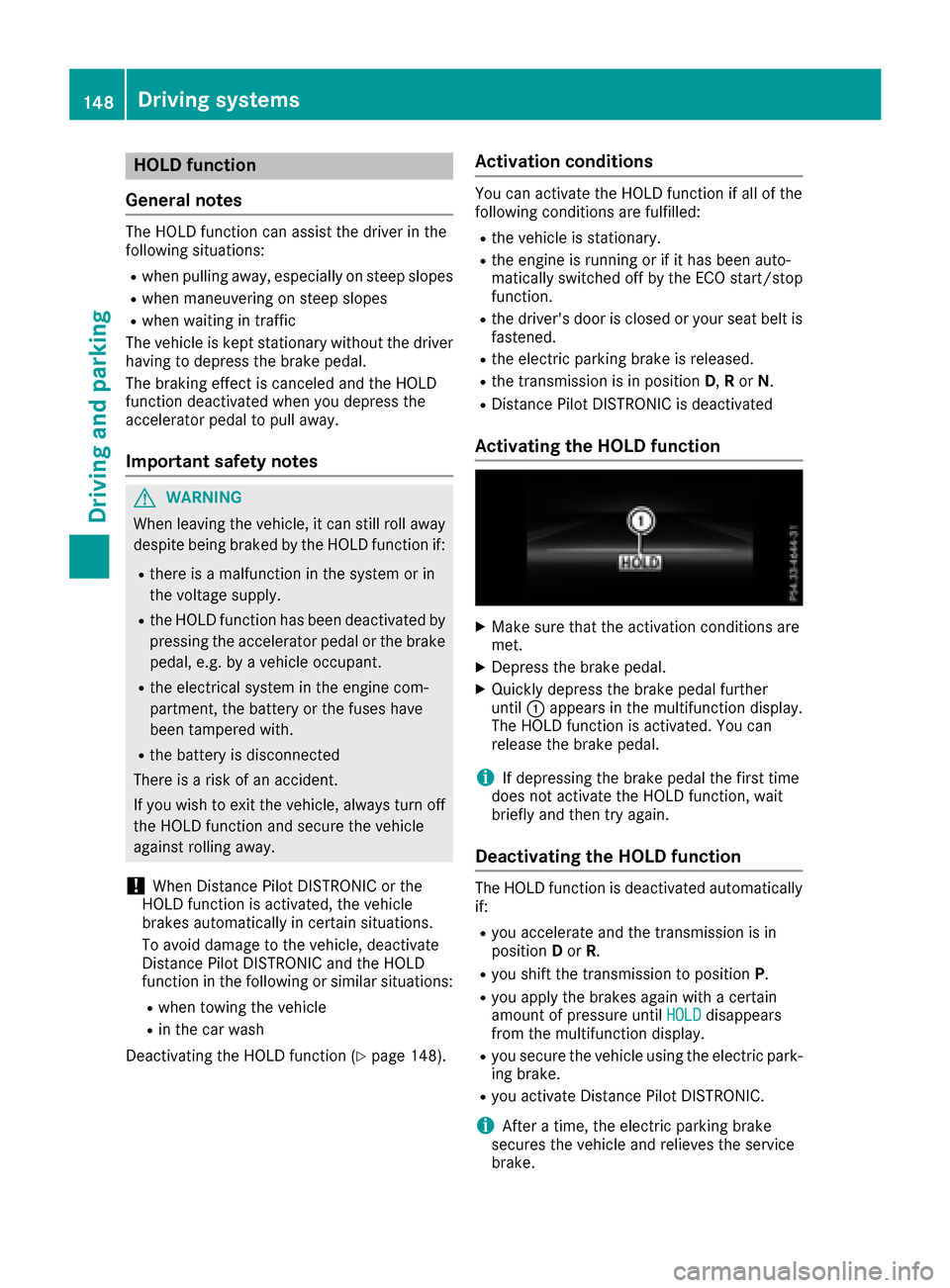
XQuickly depress the brake pedalf urther
until :appears in the multifunction display.
The HOLD function is activated. You can
release the brake pedal.
iIf depressing the brake pedalt he first time
does not activate the HOLD function, wait
briefly and then try again.
Deactivatin gthe HOLD function
The HOLD function is deactivated automatically
if:
Ryou accelerate and the transmission is in
position Dor R.
Ryou shift the transmission to position P.
Ryou apply the brakes again withacertain
amount of pressure until HOLDdisappears
from the multifunction display.
Ryou secure the vehicleu sing the electric park-
ing brake.
Ryou activate Distance Pilot DISTRONIC.
iAfter atime, the electric parking brake
secure sthe vehiclea nd relieves the service
brake.
148Driving systems
Driving and parking
Page 151 of 294
When the HOLD function is activated, the trans-
mission is shifted automatically to positionPif:
Rthe driver's seat belt is not fastened and the
driver's door is open.
Rthe engine is switched off, unless it is auto-
matically switched off by the ECO start/stop
function.
The electric parking brake secures the vehicle
automatically if the HOLD function is activated
when the vehicle is stationary and:
Ras ystem malfunction occurs.
Rthe power supply is not sufficient.
If am alfunction in the electric parking brake
occurs,t hen the transmission may also be shif-
ted into position Pautomatically.
Adaptive Damping System
General notes
iMercedes-Benz SLC 43 AMG: the adap-
tive adjustable damping is called AMG sports
suspension.
As uspension with the Adaptive Damping Sys-
tem provides improved driving comfort and con-
tinuously controls the calibration of the damp-
ers. The damping characteristic sadapt to the
currento perating and driving situation.
The damping is tuned individually to each wheel
and depends on:
Ryour driving style, e.g. sporty
Rthe road surface conditions
Rthe selected drive program (Ypage 121).
Selecting the Comfort or Economy drive
programs
In the Comfort andEconomy drive programs,
the driving characteristic sofyour vehicle are
more comfortable. Select one of these drive
programs if you favor amore comfortable driv-
ing style. Also select these drive programs when
driving fast on straight roads, e.g. on straight
stretches of highway.
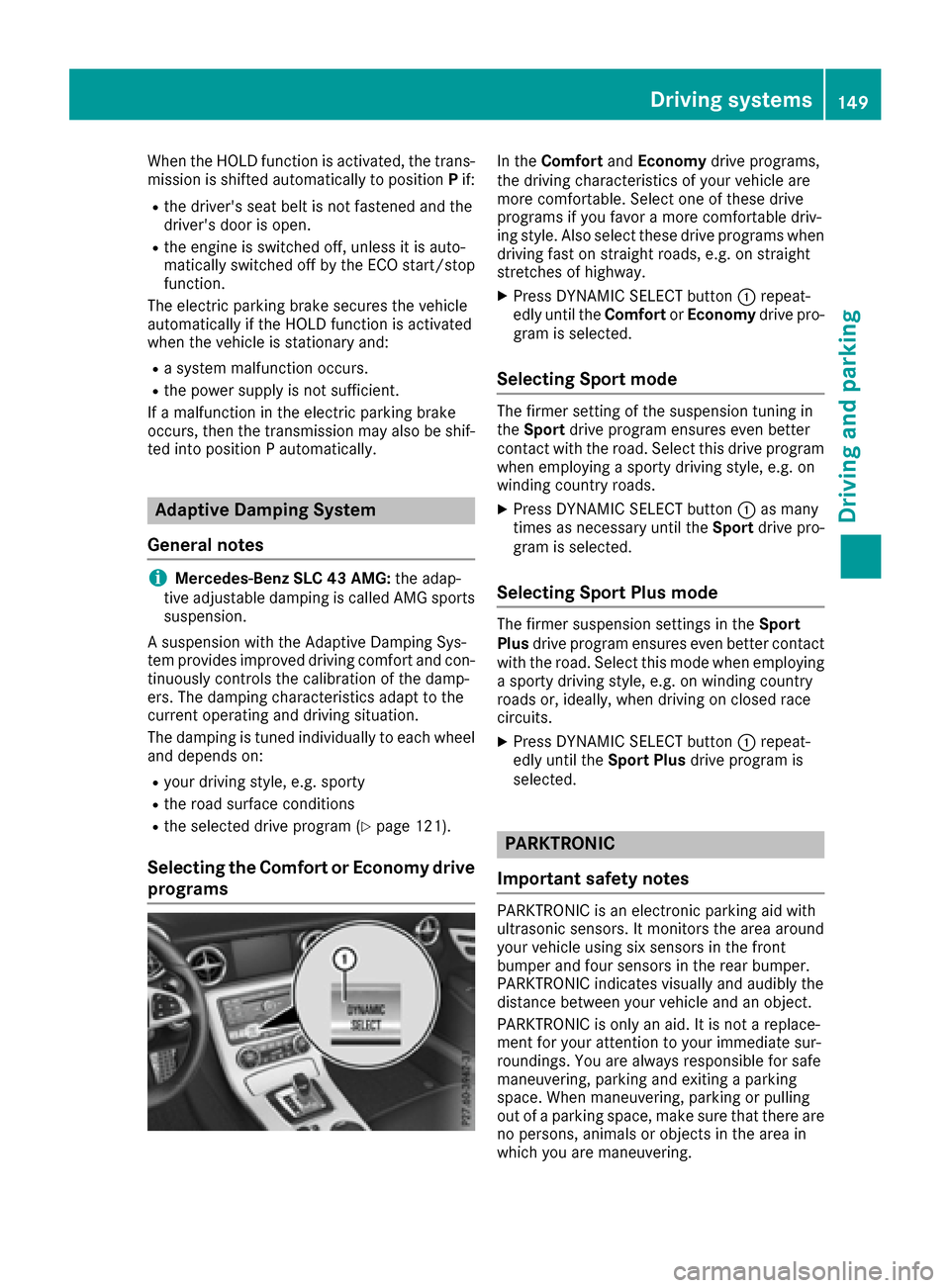
XPress DYNAMIC SELECT button :repeat-
edly until the ComfortorEconomy drive pro-
gram is selected.
Selecting Sport mode
The firmer setting of the suspension tunin gin
the Sport drive program ensures even better
contact with the road. Select this drive program
when employing asporty driving style, e.g. on
winding country roads.
XPress DYNAMIC SELECT button :as many
times as necessary until the Sportdrive pro-
gram is selected.
Selecting Sport Plus mode
The firmer suspension settings in the Sport
Plus drive program ensures even better contact
with the road. Select this mode when employing
as porty driving style, e.g. on winding country
roads or, ideally,w hen driving on closed race
circuits.
XPress DYNAMIC SELECT button :repeat-
edly until the Sport Plusdrive program is
selected.
PARKTRONIC
Important safety notes
PARKTRONIC is an electronic parking aid with
ultrasonic sensors. It monitors the area around
your vehicle using six sensor sinthe front
bumper and four sensor sinthe rear bumper.
PARKTRONIC indicates visually and audibly the
distanc ebetween your vehicle and an object.
PARKTRONIC is only an aid. It is not areplace-
ment for your attention to your immediate sur-
roundings .You are alwaysr esponsible for safe
maneuvering, parking and exitin gaparking
space. When maneuvering, parking or pulling
out of aparking space, make sure that there are
no persons,a nimals or object sinthe area in
which you are maneuvering.
Driving systems149
Driving and parking
Z
Page 160 of 294
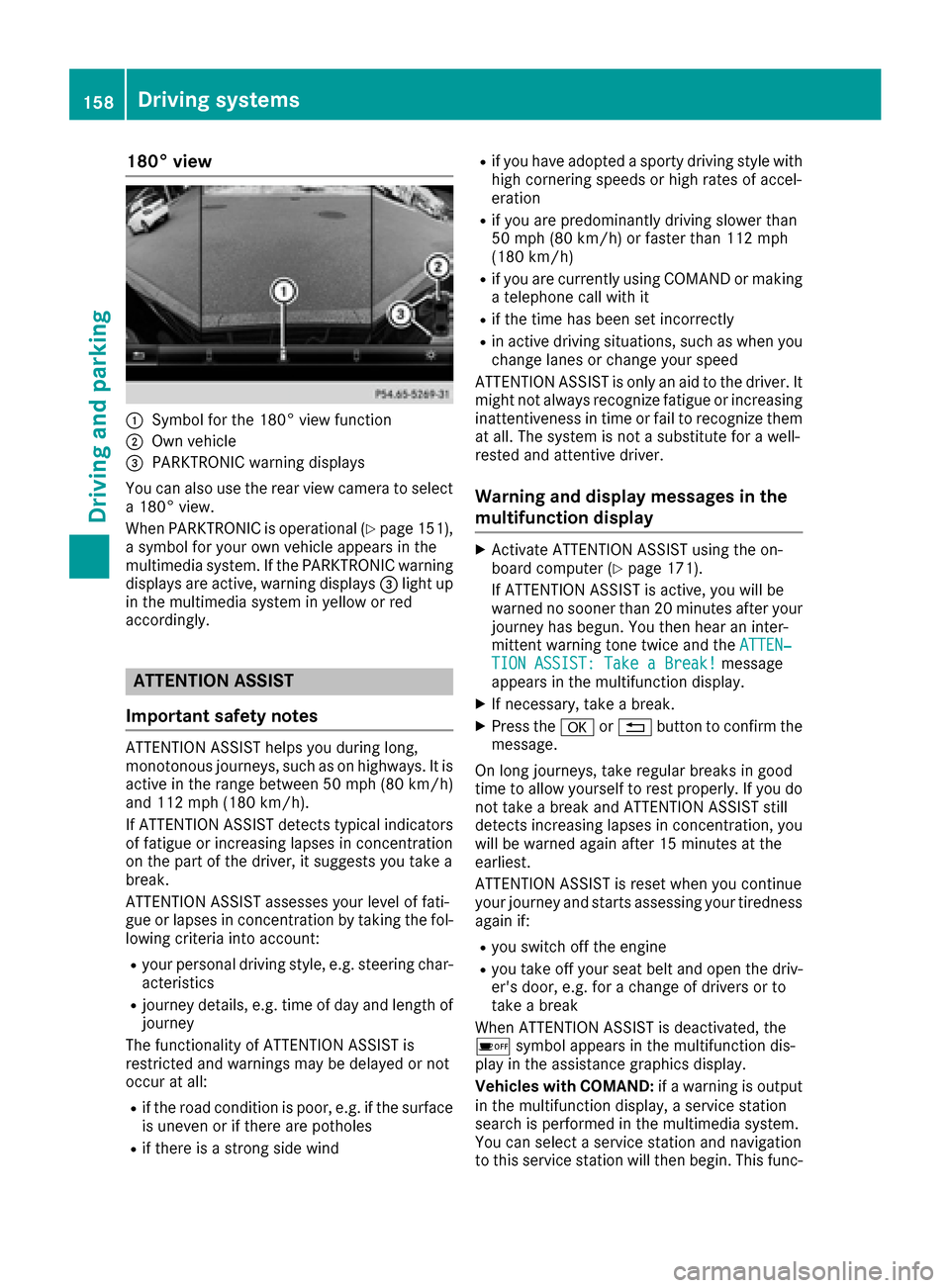
180° view
:Symbol for the 180°view function
;Own vehicle
=PARKTRONICwarning displays
You can also use the rear view camera to select
a1 80°v iew.
When PARKTRONI Ciso perational (
Ypage 151),
as ymbol for your own vehicle appears in the
multimedia system. If the PARKTRONI Cwarning
displays are active, warning displays =light up
in the multimedia system in yellow or red
accordingly.
ATTENTION ASSIST
Importan tsafetyn otes
ATTENTION ASSIS Thelps you during long,
monotonous journeys, such as on highways. It is
activ eint he range between 50 mph (80 km/ h)
and 11 2mph (18 0km/ h).
If ATTENTION ASSIST detect stypical indicators
of fatigue or increasing lapses in concentration
on th epart of th edriver, it suggestsy ou takea
break.
ATTENTION ASSIST assesses your leveloff ati-
gue or lapses in concentratio nbytaking th efol-
lowingc riteria int oaccount:
Ryour personal driving style, e.g .steering char-
acteristics
Rjourney details, e.g .tim eofd ay and lengtho f
journey
The functionalityofA TTENTION ASSIST is
restricted and warning smay be delayed or not
occur at all:
Rif th eroad condition is poor,e .g.ift hesurface
is uneven or if there are potholes
Rif there is astron gs ide wind
Rif you have adopted asporty driving style with
high cornering speeds or high rates of accel-
eration
Rif you are predominantly driving slowert han
50 mph (80 km/h) or faster than 11 2mph
(18 0km/ h)
Rif you are currently using COMAND or making
atelephonec all with it
Rif the timehas been set incorrectly
Rin active drivings ituations,such as when you
change lanes or change your speed
ATTENTIONA SSISTiso nly an aid to the driver. It
might not always recognize fatigue or increasing
inattentivenes sintimeorf ail to recognize them
at all. The system is not
asubstit
utef or aw ell-
rested and attentive driver.
Warning and display messages in the
multifunction display
XActivate ATTENTIONA SSISTu sing the on-
board computer (Ypage 171).
If ATTENTIONA SSISTisa ctive, you will be
warne dnosooner than 20 minutes after your
journey has begun. You the nhear an inter-
mitten twarnin gtonet wic eand the ATTEN‐
TION ASSIST: Take aBreak!message
appears in the multifunction display.
XIf necessary, tak eabreak.
XPress the aor% button to confirm the
message.
On long journeys, tak eregular breaksing ood
tim etoa llow yourself to rest properly. If you do
not tak eabreak and ATTENTIONA SSISTs till
detect sincreasingl apses in concentration ,you
will be warne dagain after 15 minutes at the
earliest.
ATTENTIONA SSISTisr eset when you continue
your journey and starts assessing your tiredness
again if:
Ryou switc hoff the engine
Ryou tak eoff your seat belt and open the driv-
er's door, e.g. for achange of drivers or to
tak eab reak
When ATTENTIONA SSISTisd eactivated, the
é symbol appears in the multifunction dis-
play in the assistanc egraphicsd isplay.
Vehicles with COMAND: ifaw arnin giso utput
in the multifunction display, aservice station
searchisp erformedint he multimedia system.
You can selectas ervice station and navigation
to this service station will the nbegin.T his func-
158Driving systems
Driving and parking
Page 176 of 294
XPress the=or; button on the steering
wheel to select the Sett.menu.
XPress the:or9 button to select the
Vehiclesubmenu.
XPress ato confirm.
XPress the :or9 button to select the
Automatic Door Lockfunction.
When the Automatic Door Lockfunction is
activated, the multifunction display shows the
left-hand vehicle door in orange.
XPress the abutton to save the setting.
For further information on the automatic locking
feature, see (
Ypage 69).
Activating/deactivating the acoustic
locking verification signal
If you switch on the AcousticLockfunction, an
acoustic signal sounds when you lock the vehi-
cle.
XPress the =or; button on the steering
wheel to select the Sett.menu.
XPress the:or9 button to select the
Vehiclesubmenu.
XPress ato confirm.
XPress the :or9 button to select the
Acoustic Lockfunction.
If the Acoustic Lockfunction is activated,
the & symbol in the multifunction display
lights up orange.
XPress the abutton to save the setting.
Convenience
Activating/deactivating the EASY-
ENTRY/EXITf eature
GWARNING
When the EASY-ENTRY/EXIT feature adjusts
the steerin gwheel, you and other vehicle
occupants–p articularly children –could
become trapped. There is arisk of injury.
While the EASY-ENTRY/EXIT feature is mak-
ing adjustments, make sure that no one has
any body parts in the sweep of the steering
wheel.
If somebody becomes trapped:
Rpress one of the memory function position
buttons, or
Rmove the switch for steerin gwheel adjust-
ment in the opposite direction to that in
which the steerin gwheel is moving.
The adjustmen tprocess is stopped.
XPress the =or; button on the steering
wheel to select the Sett.menu.
XPress the:or9 button to select the
Conveniencesubmenu.
XPress ato confirm.
XUsing :or9,s elect the EasyEntry/Exitfunction.
If the EasyEntry/Exitfunction is activated,
the multifunction display shows the steering
wheel in orange.
XPress the abutton to save the setting.
Further information on the EASY-ENTRY/EXIT
feature (
Ypage 87).
Switching the belt adjustment on/off
XPress the =or; button on the steering
wheel to select the Sett.menu.
XPress the:or9 button to select the
Conveniencesubmenu.
XPress ato confirm.
XPress the :or9 button to select the
Belt Adjustmentfunction.
When the Belt Adjustmentfunction is acti-
vated, the seat belt is displayed in orange in
the multifunction display.
XPress the abutton to save the setting.
For further information on belt adjustment, see
(
Ypage 41).
Switching the fold-in mirrors when lock-
ing feature on/off
This function is only availablew hen the vehicle is
equipped with the electrical fold-in function.
This function is only availableinC anada.
When you activat ethe Auto.
MirrorFoldingfunction, the exterior mirrors are folded in when
the vehicle is locked.
If you have switched on the Auto. Mirror
Foldingfunction and you fold in the exterior
mirrors using the button on the door
(
Ypage 89), they will not fold out automatically.
174Menus and submenus
On-board computer and displays
Page 193 of 294
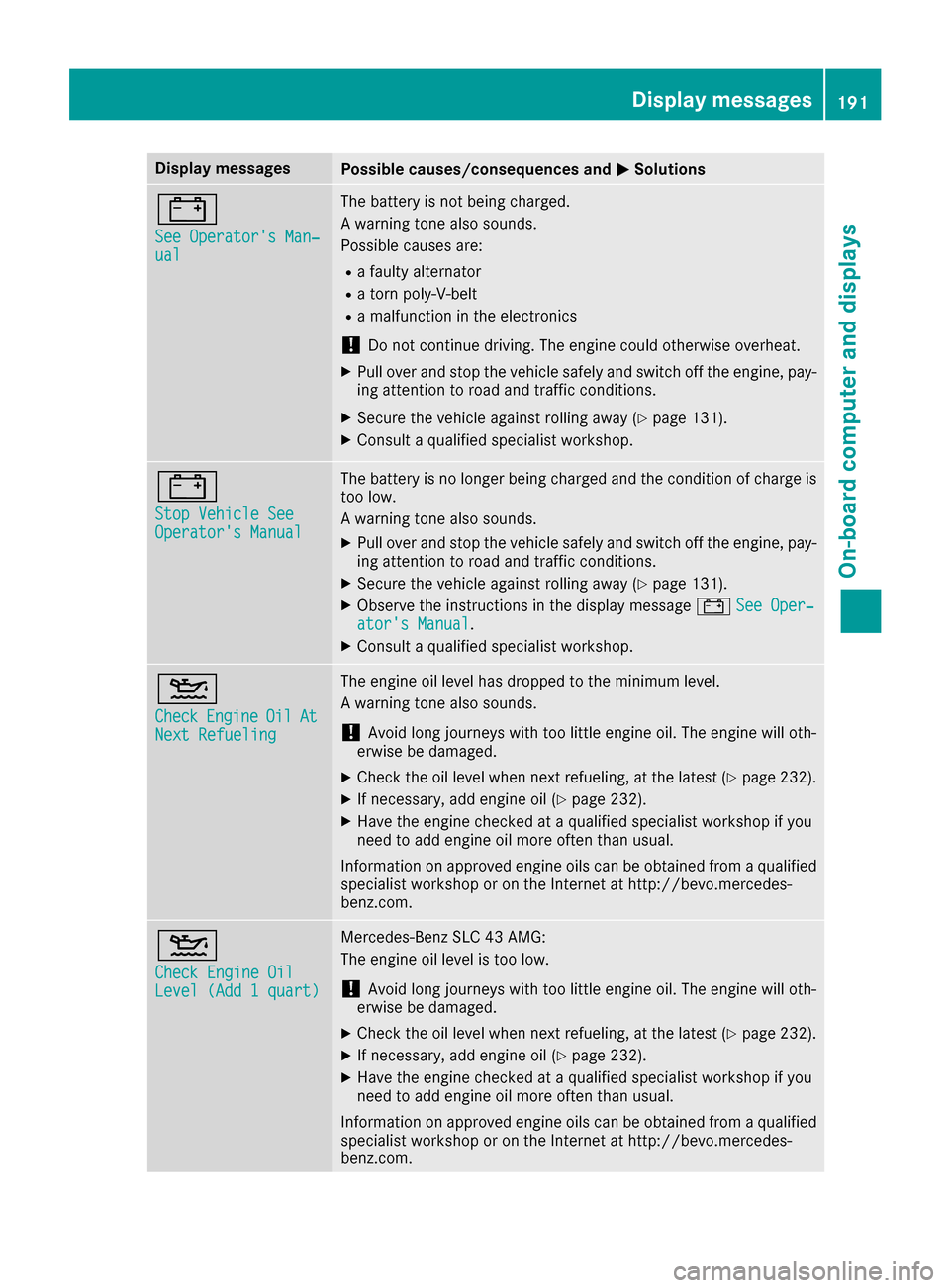
Display messagesPossible causes/consequences andMSolutions
#
See Operator'sMan‐ual
The battery is no tbein gcharged.
Aw arning tone also sounds.
Possibl ecauses are:
Rafault yalternato r
Ratornp oly-V-belt
Ram alfunction in th eelectronics
!Do no tcontinue driving. The engin ecould otherwise overheat.
XPull ove rand stop th evehicl esafely and switch off th eengine, pay-
ing attention to roa dand traffic conditions.
XSecur ethe vehicl eagainst rollin gaway (Ypage 131).
XConsult aqualified specialist workshop .
#
StopVehicl eSeeOperator' sManual
The battery is no longer bein gcharged and th econditi on of charg eis
to ol ow.
Aw arning tone also sounds.
XPull ove rand stop th evehicl esafely and switch off th eengine, pay-
ing attention to roa dand traffic conditions.
XSecur ethe vehicl eagainst rollin gaway (Ypage 131).
XObserv ethe instruction sinthedisplay message #See Oper‐ator's Manual.
XConsult aqualified specialist workshop .
4
CheckEngineOilAtNextRefueling
The engin eoil level has dropped to th eminimum level.
Aw arning tone also sounds.
!Avoid lon gjou rneys wit htoo littl eengineo il. The engin ewill oth-
erwise be damaged.
XChec kthe oil level when next refueling, at th elatest (Ypage 232).
XIf necessary, add engin eoil(Ypage 232).
XHav ethe engin echecked ataq ualified specialist workshop if you
need to add engin eoil mor eoften than usual.
Information on approve dengineo ils can be obtained from aqualified
specialist workshop or on th eInterne tath ttp:// bevo.mercedes -
benz.com.
4
Check Engine OilLevel (Ad d1quart)
Mercedes-Ben zSLC 43 AMG:
The engin eoil level is to olow.
!Avoid lon gjou rneys wit htoo littl eengineo il. The engin ewill oth-
erwise be damaged.
XChec kthe oil level when next refueling, at th elatest (Ypage 232).
XIf necessary, add engin eoil(Ypage 232).
XHav ethe engin echecked ataq ualified specialist workshop if you
need to add engin eoil mor eoften than usual.
Information on approve dengineo ils can be obtained from aqualified
specialist workshop or on th eInterne tath ttp:// bevo.mercedes -
benz.com.
Display messages19 1
On-boardc omputer andd isplays
Z
Page 205 of 294
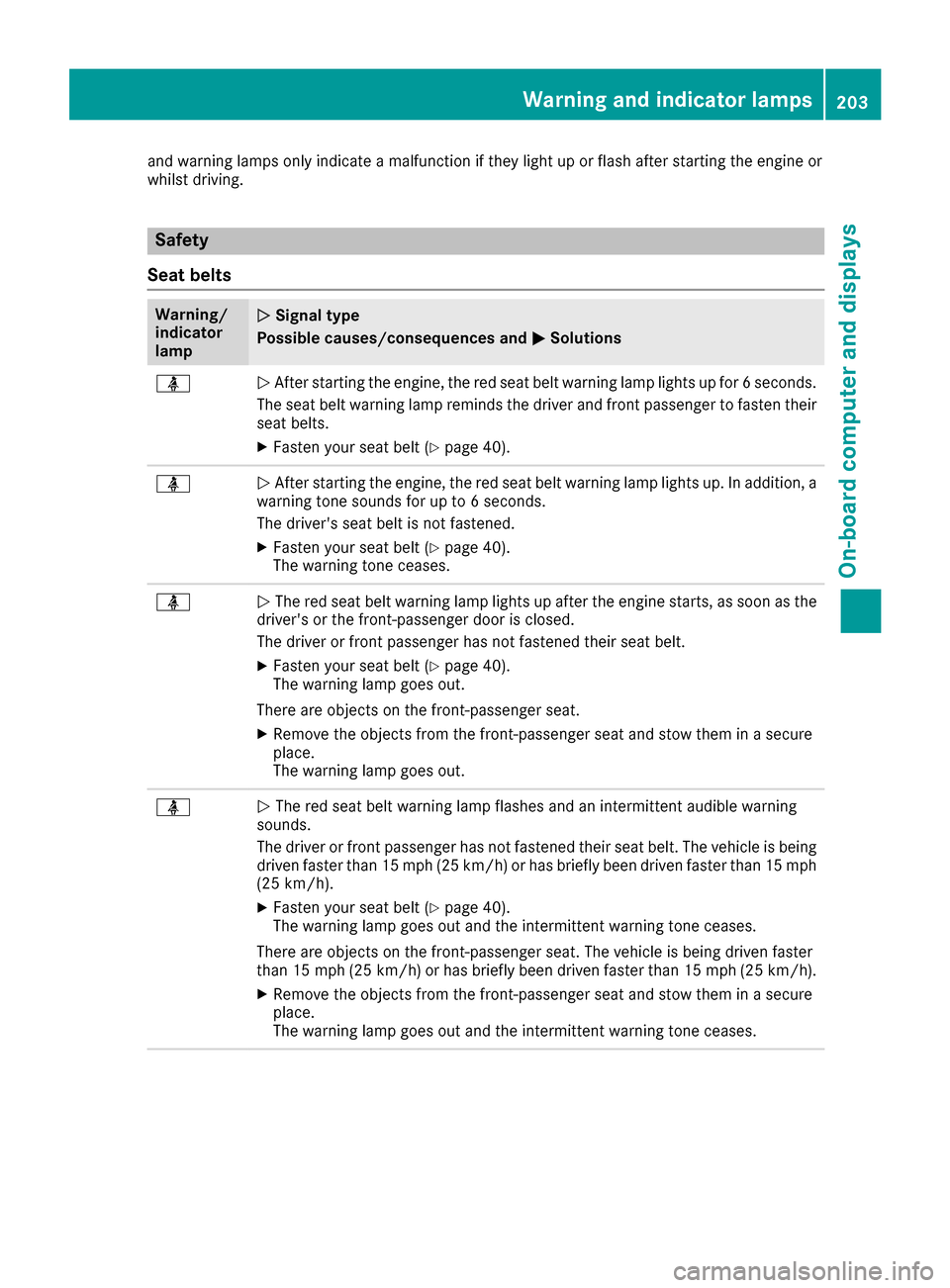
and warning lamps only indicateamalfunctio niftheylight up or flas hafter starting th eengine or
whilst driving.
Safety
Seat belts
Warning/
indicator
lampNSignalt ype
Possible causes/consequences and M
Solutions
üNAfte rstarting th eengine ,the red seat belt warning lamp lightsupf or6s econds.
The seat belt warning lamp remind sthe driver and frontp assenger to fasten their
seat belts.
XFaste nyour seat belt (Ypage 40).
üNAfte rstarting th eengine ,the red seat belt warning lamp lightsu p. In addition,a
warning tone sounds for up to 6seconds.
The driver'ss eat belt is notfastened.
XFaste nyour seat belt (Ypage 40).
The warning tone ceases.
üN The red seat belt warning lamp lightsupa fter theengine starts, as soon as the
driver'sort hefront-passenger door is closed.
The driver or frontp assenger has notfastene dtheir seat belt.
XFaste nyour seat belt (Ypage 40).
The warning lamp goes out.
Therea re object sonthefront-passenger seat.
XRemovet heobject sfromt hefront-passenger seat and stow them in asecure
place.
The warning lamp goes out.
üN The red seat belt warning lamp flashes and an intermittent audible warning
sounds.
The driver or frontp assenger has notfastene dtheir seat belt.T he vehicle is being
driven faster than 15 mph (25 km/h)or has briefly been driven faster than 15 mph
(25 km/h).
XFasten your seat belt (Ypage 40).
The warning lamp goes out and the intermitten twarning tone ceases.
There are object sonthe front-passenger seat. The vehicle is being driven faster
than 15 mph (2 5km/ h)or has briefly been driven faster than 15 mph (2 5km/ h).
XRemove th eobjects from th efront-pa ssenger seat and stow them in asecure
place.
The warning lamp goes out and th eintermittent warning tone ceases .
Warning and indicator lamps203
On-boardcomputer and displays
Z