mirror MERCEDES-BENZ SLC ROADSTER 2020 User Guide
[x] Cancel search | Manufacturer: MERCEDES-BENZ, Model Year: 2020, Model line: SLC ROADSTER, Model: MERCEDES-BENZ SLC ROADSTER 2020Pages: 310, PDF Size: 47.28 MB
Page 95 of 310
ext
erior mirror usingbutton 0087aslong as
the indicat orlamp islit.
X Press button 0087up, down, tothe right orto
the left.
The exterior mirror mustbeset toap osition
that provides youwith agood overview of
traff iccon ditions .
The convex exterior mirror sprovide alarger
field ofvision.
The exterior mirror sareautomatic allyheated
after startingthe vehicle ifthe rear window
defrost erisswitched onand theoutside tem-
perature islow. Mirror heating lastsupto10
minutes .
i You
canalso heat upthe exterior mirror s
manually byswitchin gonthe rear window
defrost er.
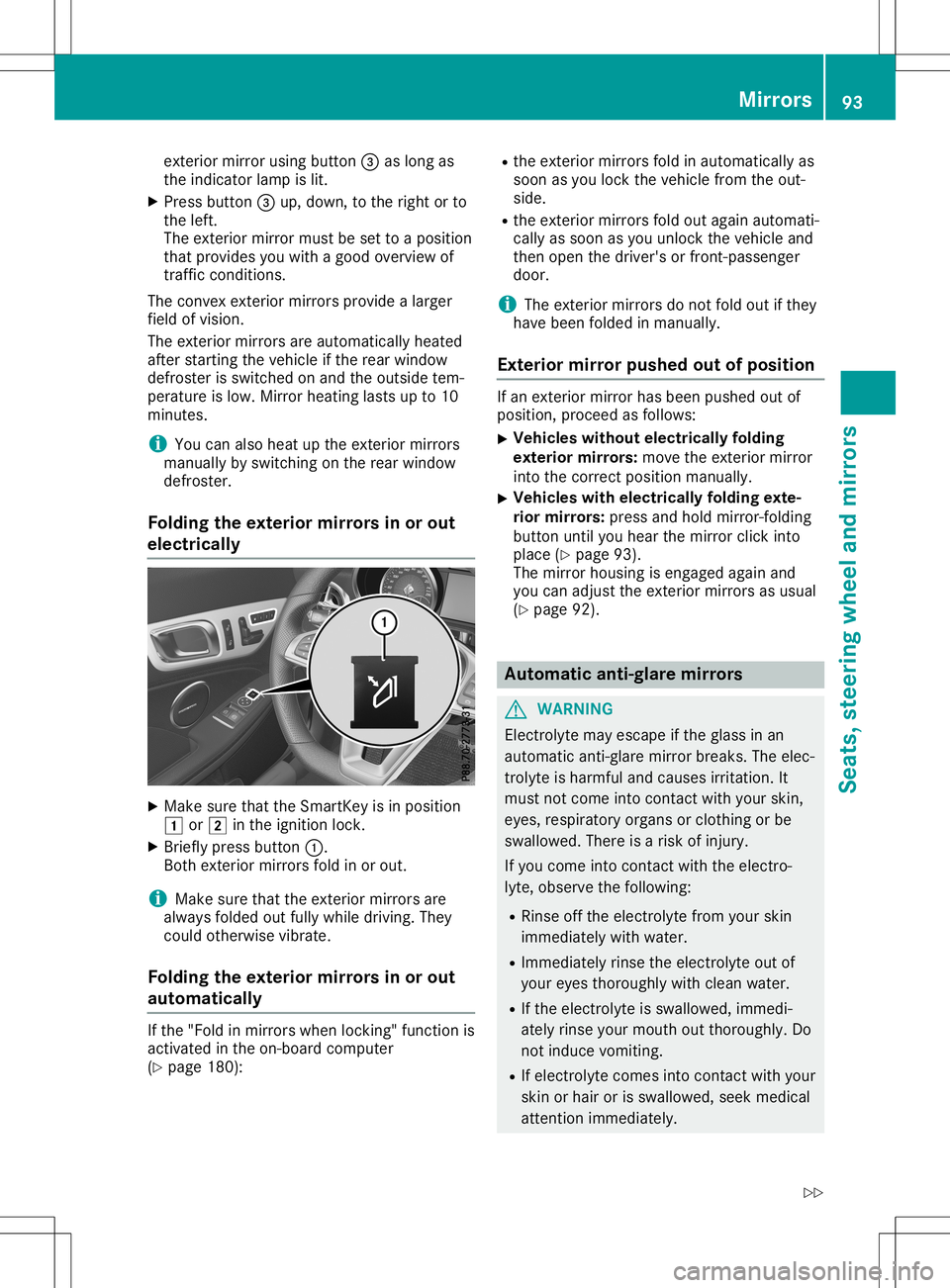
Folding theexterior mirrorsino rout
electrically X
Make surethattheSmart Keyisin position
0047 or0048 inthe ignition lock.
X Briefly pressbutton 0043.
Bot hexterior mirror sfold inor out.
i Make
surethattheexterior mirror sare
alway sfolded outfully while driving. They
could otherwisevibrate.
Folding theexterior mirrorsino rout
aut omat ically If
the "Fold inmirror swhen lockin g"func tion is
activat edinthe on-board comput er
(Y page 180): R
the exterior mirror sfold inautomatic allyas
soon asyou lock thevehicle fromtheout-
side.
R the exterior mirror sfold out again automati-
cally assoon asyou unlock thevehicle and
then open thedriver's orfron t-passenger
door.
i The
exterior mirror sdon otfold outifthey
have been folded inmanually.
Exterior mirror push edout ofposition If
an ext erior mirror hasbeen pushed outof
position ,proceed asfollows:
X Vehicles
withoutelectrically folding
exterior mirrors: move theexterior mirror
into thecorr ectposition manually.
X Vehicles
withelectrically foldingexte-
rior mirrors: press andhold mirror -foldin g
button untilyouhear themirror clickinto
place (Ypage 93).
The mirror housing isengaged againand
you can adjust theexterior mirror sasu sual
(Y page 92). Automa
ticanti- glare mirrors G
WARN
ING
Elect rolyte mayescape ifthe glass inan
automatic anti-glare mirror breaks. Theelec-
trolyt eish armful andcauses irritation.It
must notcome intocontact with your skin,
eyes, respirator yorgans orcloth ingorbe
swallowed. Thereisar isk ofinjury.
If you come intocontact with theelectr o-
lyte, observe thefollowing:
R Rinse offthe electr olytefromyourskin
immediately withwater.
R Immediately rinsetheelectr olyteoutof
your eyes thoroughly withclean water.
R Ifthe electr olyteisswallowed, immedi-
ately rinse yourmouth outthor oughly. Do
not induce vomiting.
R Ifelectr olytecomes intocontact with your
skin orhair orisswallowed, seekmedical
atten tionimmediately. Mirr
ors
93Seats, steering wheelandmirrors
Z
Page 96 of 310
R
Immedia telychange outofclothing which
has come intocontact withelectroly te.
R Ifan allergic reaction occurs,seekmedi-
cal attention immediately.
The rear-view mirrorandtheexterior mirroron
the driver's sideautoma ticallygointo anti-
glare mode ifthe follow ingconditions aremet
simul taneousl y:
R the ignition isswitched onand
R incident lightfrom headlampsstrikes the
sensor inthe rear-view mirror
The mirrors donot gointo anti-glare modeif
reverse gearisengaged orifthe interior light-
ing isswitched on. Parking
positionfor the exterio rmir-
ror onthe front-passenge rside
Setting andstoring theparking posi-
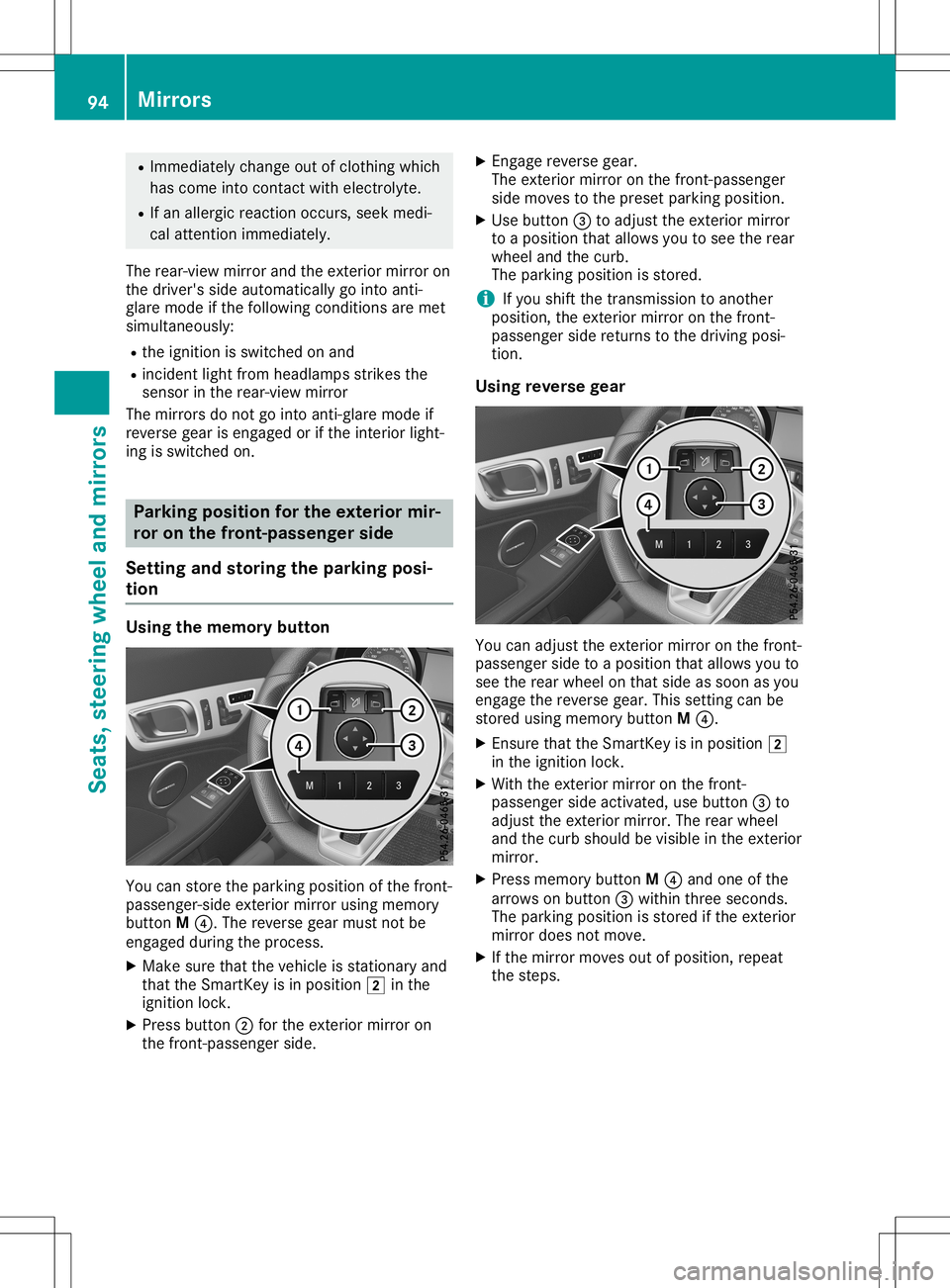
tion Usin
gthe memory button You
canstore theparking positionofthe front-
passe nger-side exteriormirrorusingmemory
button M0085.T hereverse gearmust notbe
engaged duringthe process.
X Make surethatthevehicle isstationary and
that theSmartKey isin positio n0048 inthe
ignition lock.
X Press button 0044for the exterior mirroron
the front-passenger side. X
Engage reverse gear.
The exterior mirroronthe front-passenger
side moves tothe preset parking position.
X Use button 0087toadjust theexterior mirror
to ap ositio nthat allows youtosee therear
wheel andthecurb.
The parking positioniss tored.
i If
you shift thetransmission toanother
positio n,the exterior mirroronthe front-
passe ngersidereturns tothe driving posi-
tion.
Usin greverse gear You
canadjust theexterior mirroronthe front-
passe ngersidetoap ositio nthat allows youto
see therear wheel onthat side assoon asyou
engage thereverse gear.Thissetting canbe
stored usingmemory buttonM0085.
X Ensure thattheSmartKey isin positio n0048
in the ignition lock.
X With theexterior mirroronthe front-
passe ngersideactivated, usebutton 0087to
adjust theexterior mirror.Therear wheel
and thecurb shoul dbevisib lein the exterior
mirror.
X Press memory buttonM0085 and one ofthe
arrows onbutton 0087within threeseconds.
The parking positioniss tored ifthe exterior
mirror doesnotmove.
X Ifthe mirror moves outofpositio n,repea t
the steps. 94
MirrorsSeats,
steerin gwheeland mirrors
Page 97 of 310
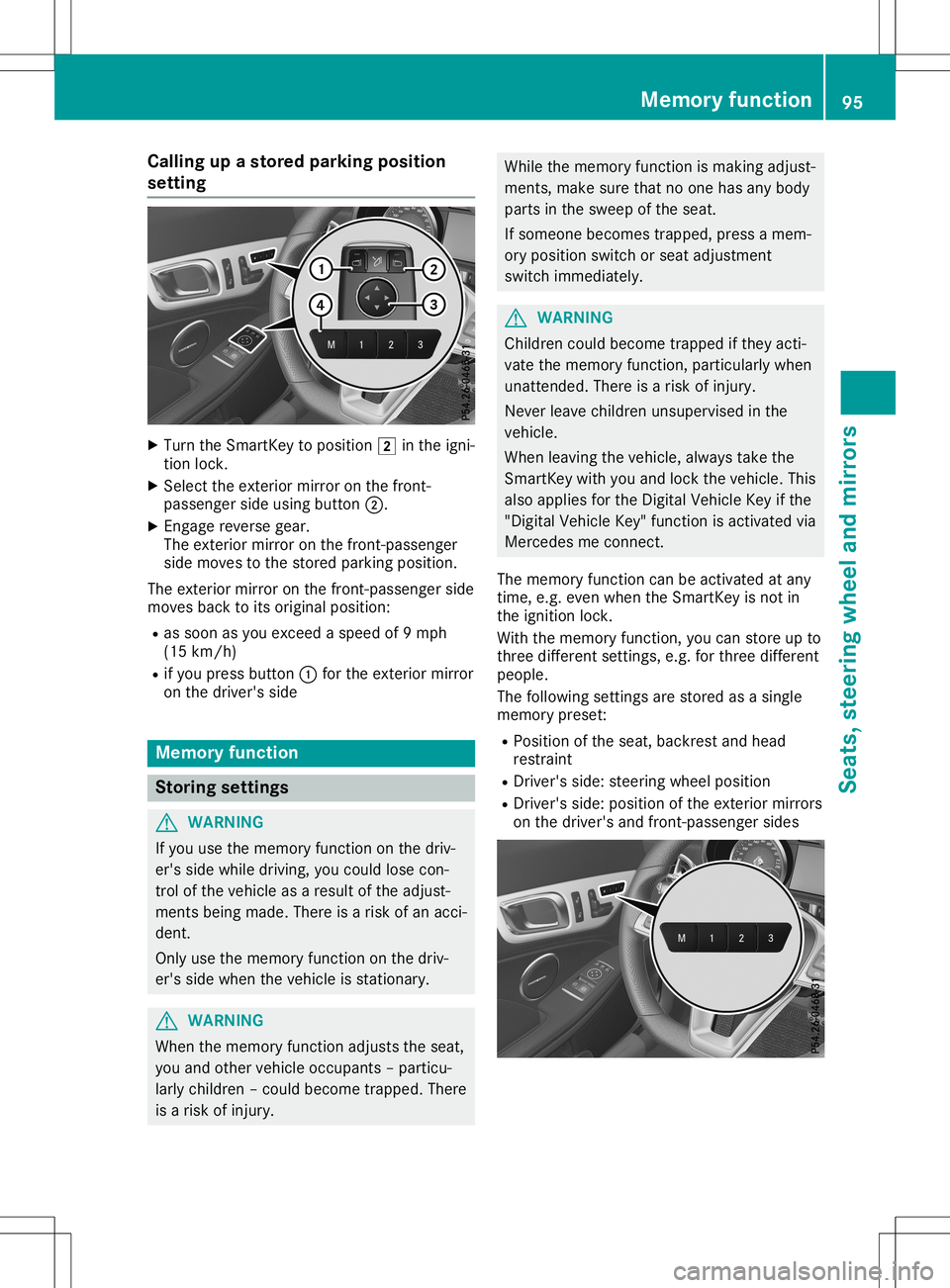
Callin
gupas tored parking position
set ting X
Turn theS martKey toposi tion0048 inthei gn i-
tio nlock.
X Sel ect thee xteri or mir ror onthef ront-
pass enger side usingbutto n0044.
X En gage revers egear .
The exterior mirror onthef ront-pa sse nger
side movestothes toredp ark ing posi tion.
The exterior mirror onthef ront-pa sse nger side
mov esback toits orig inal posi tion:
R as soon asyou excee das peedof9 mph
(15 km/h)
R ifyou pres sbutto n0043 for thee xteri or mir ror
on thed river' ss ide Mem
oryfunct ion St
ori ng set tings G
WAR
NING
If you usethem emory function onthed riv-
er' ss ide while driving,you coul dlose con-
tr ol of thev ehicle asaresult ofthea djust -
men tsbein gmade.Ther eisar isko fana cci-
den t.
On lyuse them emory function onthed riv-
er' ss ide when thev ehicle isstatio nary. G
WAR
NING
When them emory function adjust sthe seat ,
you and other vehicle occupan ts–p articu-
larly childre n–c ouldb ecome trapped. There
is ar isko finjury. While
them emory function ismak ingadjust -
men ts,m akes ure that no oneh asany body
part sint he sweep ofthes eat .
If som eonebecome strapped, pressam em-
ory posi tions wit ch orseat adjust men t
swit chimm ediat ely. G
WAR
NING
Childr encoul dbecome trapped ifth ey act i-
vat ethe mem oryfunction ,part icular lywhen
unat tende d.Ther eisar isko finjury.
Nev erleave childre nunsuperv isedinthe
veh icle.
When leavingthev ehicle ,always takethe
Sm artKey withyou and lockthe veh icle.This
also applies fortheD igital Veh icle Key ifth e
"Dig italVeh icle Key" function isact ivat edvia
Mer cedesme connect.
The mem oryfunction can beact ivat edatany
tim e,e.g .evenw hen theS martKey isno tin
th ei gn ition lock.
Wit hthe mem oryfunction ,you can store upto
th ree differe ntset tings, e.g.for three differe nt
peopl e.
The followin gsettin gs are store dasas ingle
mem orypres et:
R Posi tiono fthe seat ,back restand head
res traint
R Dr iver 'sside: steer ing wheel position
R Dr iver 'sside: positiono fthe exterior mirrors
on thed river' sa nd fron t-pass enger sides Mem
oryfunct ion
95Seats,steerin gwheel andmirro rs Z
Page 163 of 310
The
image fromtherear view camera is
availabl ethroughout themaneuvering proc-
ess.
To deactivat e:the rear view camera deacti-
vates ifyou shift thetrans mission toposition
005D,o rafter driving forwards ashort distance.
The inner segment softhe warning indicator
are display edinred ifthere isac omplete sys-
tem failure. Theindicator lampinthe
PARKTRONIC buttonlightsup.
If the system failsatthe rear ofthe vehicle:
R the rear segment sareshown inred when
backing up.
R the rear segment sarehidden whendriving
forwards.
Displays inthe mult imedia system The
rear view camera mayshow adistort ed
view ofobstacles, showthemincorr ectlyor
not atall. The rear view camera doesnotshow
object sint he following positions:
R very close tothe rear bumper
R under therear bumper
R in close range above thehandle onthe trunk
lid
! Object
snotatground levelmayappear to
be further awaythantheyactually are,e.g.:
R the bumper ofap arked vehicle
R the drawbar ofat railer
R the ball coupling ofat railer towhitch
R the rear section ofan HGV
R as lanted post
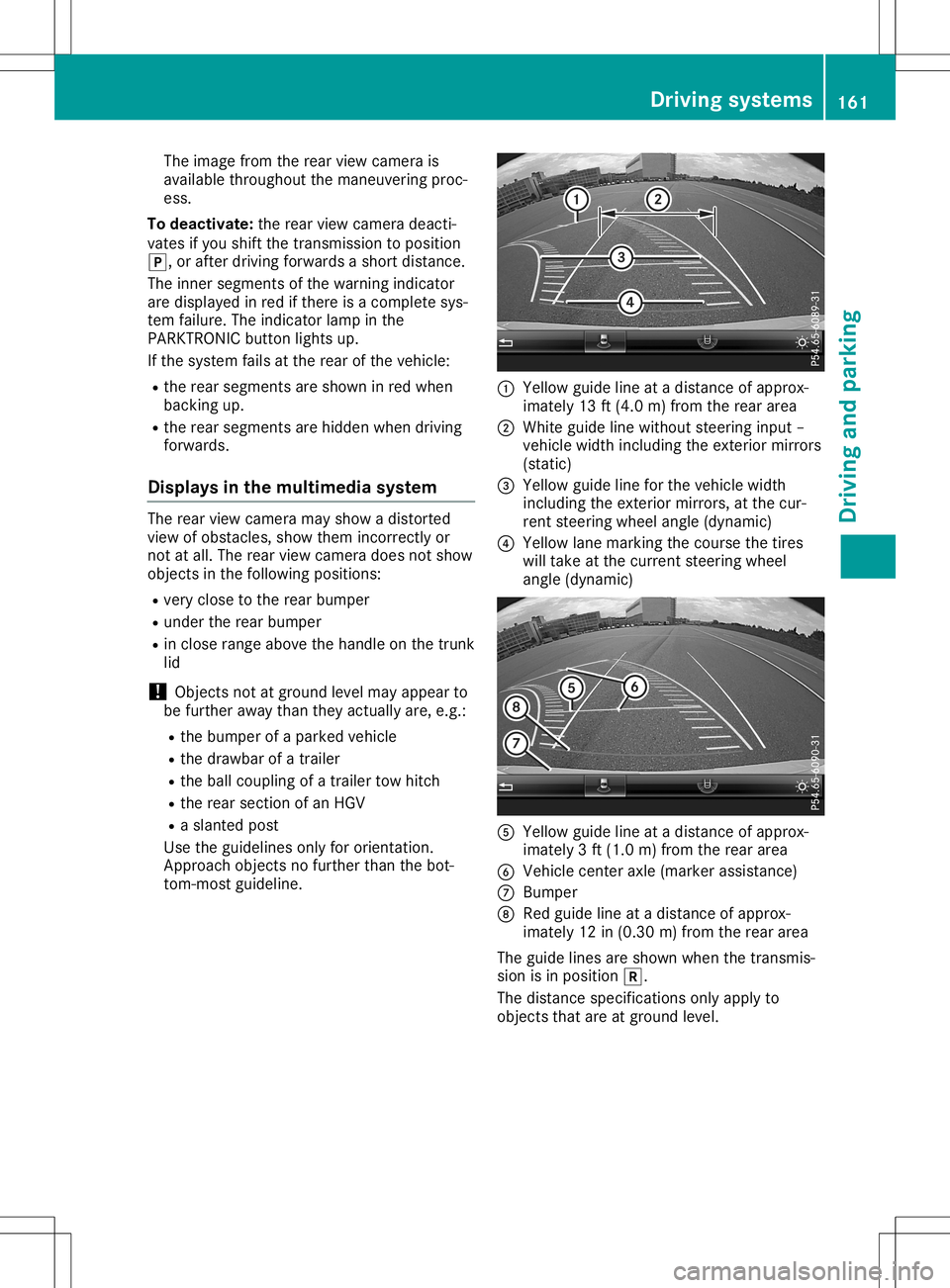
Use theguidelines onlyfororient ation.
Approach objectsnofurther thanthebot-
tom- most guideline. 0043
Yellow guidelineatad istance ofapprox-
imately 13ft(4.0 m)from therear area
0044 White guidelinewithout steeringinput –
vehicle widthincluding theexter iormirrors
(static)
0087 Yellow guidelineforthe vehicle width
including theexter iormirrors, atthe cur-
rent steerin gwheel angle (dynamic)
0085 Yellow lanemarking thecourse thetires
will take atthe current steeringwheel
angle (dynamic) 0083
Yellow guidelineatad istance ofapprox-
imately 3ft(1.0 m)from therear area
0084 Vehicle centeraxle (marker assistance)
006B Bumper
006C Red guide lineatad istance ofapprox-
imately 12in(0.30 m)from therear area
The guide linesareshown whenthetrans mis-
sion isin position 005E.
The distance specification sonly apply to
object sthat areatground level. Driving
systems
161Drivingandparking Z
Page 165 of 310
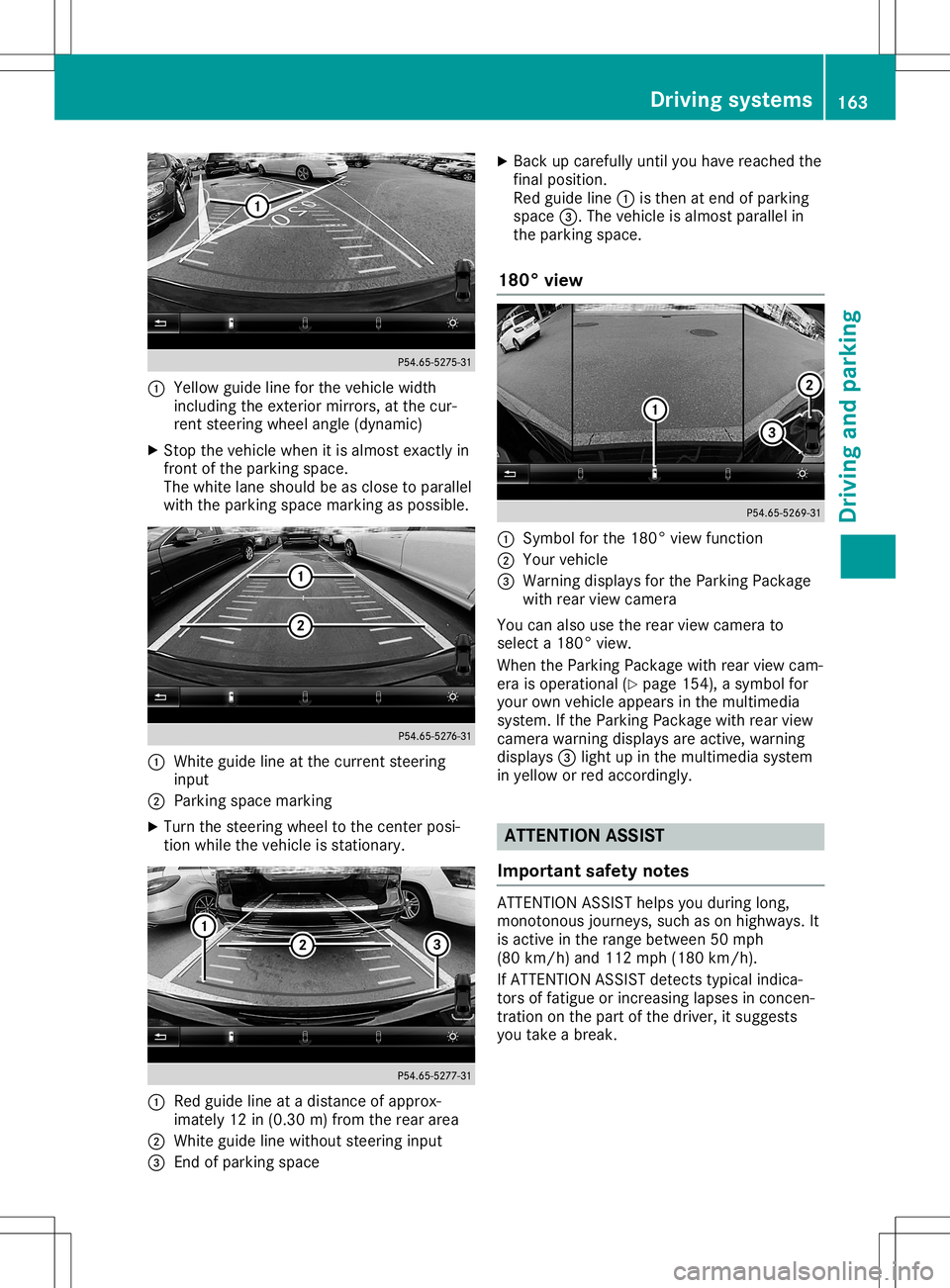
0043
Yellow guidelineforthe vehic lewidth
inc luding theexterior mirrors, atthe cur-
ren tsteerin gwheel angle (dynamic )
X Stop the vehic lewhen itis almost exactlyin
fron tofthe park ingspace.
The white laneshould beasclose toparallel
with thepark ingspace markingaspossible. 0043
Whit eguide lineatthe curr entsteerin g
input
0044 Park ingspace marking
X Turn thesteerin gwheel tothe centerposi-
tion while thevehic leisstat ionar y. 0043
Red guide lineatad istan ceofapprox -
imate ly12 in(0.30m )from therear area
0044 Whit eguide linewithout steerin ginput
0087 Endo fpark ing space X
Back upcaref ullyuntilyou have reach edthe
fin alposit ion.
Red guide line0043isthe natend ofpark ing
space 0087.Thevehic leisalmost parallel in
the park ingspace.
180° view 0043
Symbo lfor the 180 °view func tion
0044 Your vehic le
0087 Warn ingdisplays forthe Park ingPack age
with rearview camer a
You canalso usetherear view camer ato
selec ta180°v iew.
When thePark ingPack agewith rearview cam-
era isoperat ional(Ypage 154), asymbol for
your ownvehic leappears inthe multim edia
syste m.Ifthe Park ingPack agewith rearview
camer awarnin gdisplays areactive, warnin g
displays 0087light upinthe multim ediasyste m
in yellow orred acco rdingly. ATT
ENT ION ASSIST
Imp ortant safet ynotes ATTE
NTIO NASSISTh elps youduring long,
mon otonous journeys, suchason highways. It
is act ive inthe rang ebetwee n50m ph
(80 km/h) and 112 mph (180 km/h).
If ATTE NTIO NASSISTd etec tstypic alindic a-
tor so ffatig ueorinc reasin glapses incon cen-
tr ation onthe part ofthe driver ,its uggest s
you takeab reak. Driving
systems
163Driving andparking Z
Page 182 of 310
Furthe
rinfor mati onon the easy entry andexit
fea ture (Ypage 91).
Sw itchin gthe seat beltadjustmen t
on /o ff
X Pres sthe 0059 or0065 button onthe steer -
ing whe elto sel ect the Sett . Sett
.menu .
X Pres sthe 0064 or0063 button tosel ect the
Conv enience Conv
eniencesubmenu .
X Pres s0076 toconfir m.
X Pres sthe 0064 or0063 button tosel ect the
Belt Adjustment Belt
Adjustmentfuncti on.
Whe nthe Belt Adjustment Belt
Adjustmentfuncti onis
acti vate d,the seatbelti sd ispla yedi n
ora nge inthe multifunction displa y.
X Pres sthe 0076 button tosav ethe setting .
For furth erinfor mationonbeltadjustme nt,
see (Ypage 42).
Sw itchin gthe fold-in mirrors whenlock-
ing feature on/o ff
Thi sfuncti onisonly availab lewhe nthe vehi cle
is equ ipped with the electrica lfold-in functi on.
Thi sfuncti onisonly availab lein Ca nada .
Whe nyou acti vate theAuto .Mirr orFold ‐ Auto
.Mirr orFold ‐
ing ing
functi on,the exteri ormirro rsare folded in
whe nthe vehi cleislocke d.
If yo uh aves witched onthe Auto .Mirr or Auto
.Mirr or
Fold ing Fold
ingfuncti onand youf oldi nt he exteri or
mirro rsusi ng the button onthe door
(Y page 93), they willnot foldo utautoma ti-
cal ly.T he exteri ormirro rscan then onlybefol-
ded outu sing the button onthe door.
X Pres sthe 0059 or0065 button onthe steer -
ing whe elto sel ect the Sett . Sett
.menu .
X Pres sthe 0064 or0063 button tosel ect the
Conv enience Conv
eniencesubmenu .
X Pres s0076 toconfir m.
X Pres sthe 0064 or0063 button tosel ect the
Auto .Mirr orFold ing Auto
.Mirr orFold ingfuncti on.
If the Auto .Mirr orFold ing Auto
.Mirr orFold ingfuncti onis
swi tched on,the multifunction displa y
show sthe exteri ormirro rino range.
X Pres sthe 0076 button tosav ethe setting .
Resto ringthefacto rysetting s X
Pres sthe 0059 or0065 button onthe steer -
ing whe elto sel ect the Sett . Sett
.menu .
X Pres sthe 0064 or0063 button tosel ect the
Fact orySetting Fact
orySettingsubmenu . X
Pres s0076 toconfir m.
The Rese tAll Sett ings? Rese
tAll Sett ings?functi on
ap pea rs.
X Pres sthe 0064 or0063 button tosel ect No No
or Yes Yes.
X Pres sthe 0076 button toconfir mtheselec-
tion.
If yo uh aves elected Yes Yes
andconfir med,the
mul tifunction displa yshow sac onfirmation
mess age.
For safety reasons, theDayt imeRunning Dayt
imeRunning
Ligh ts Ligh
tsfuncti oninthe Ligh ts Ligh
tssub menu is
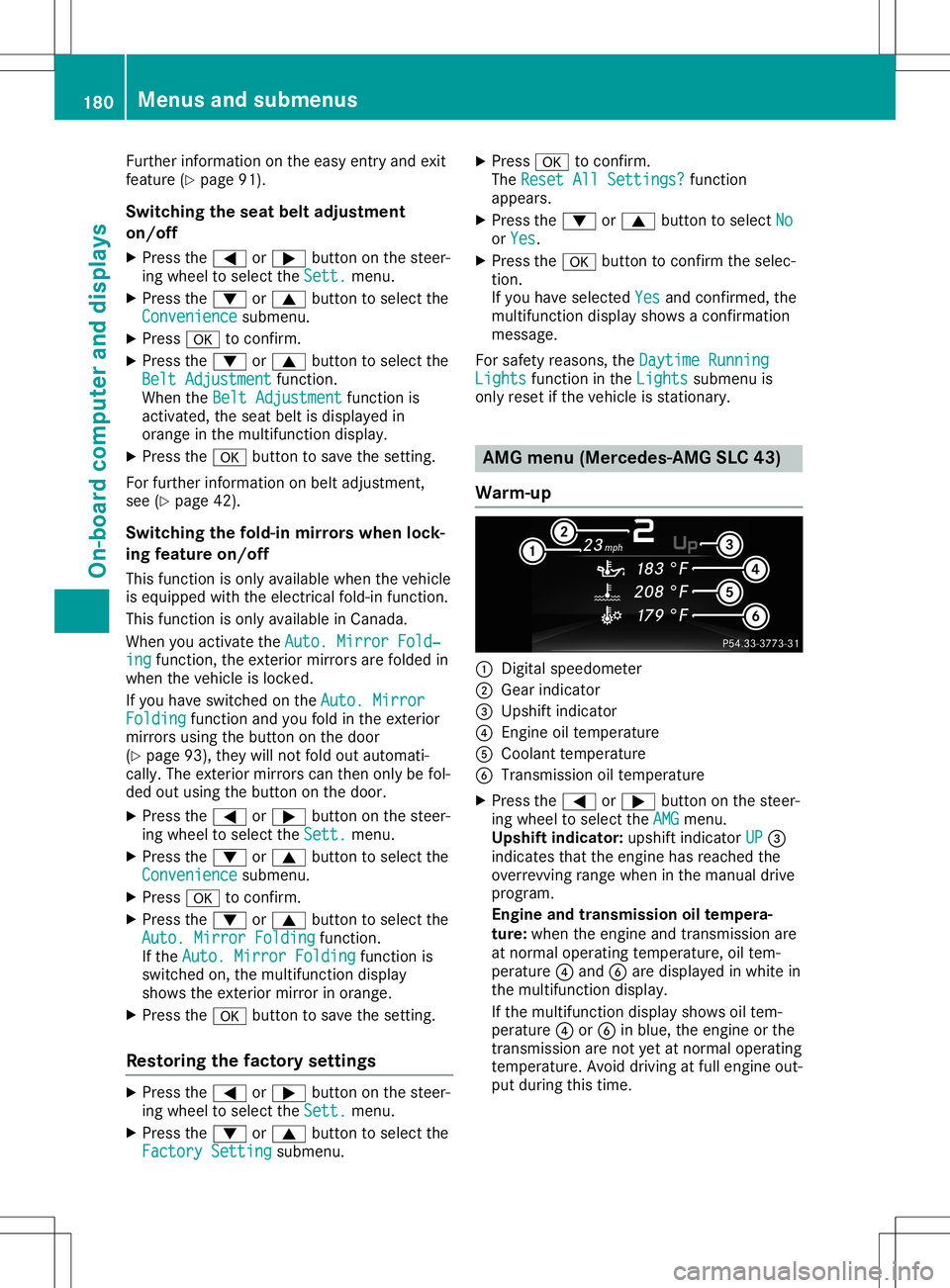
only resetift he vehi cleisstati onar y. AMG
menu (Mercedes- AMG SLC43)
Warm-up 0043
Digi talspe edo meter
0044 Gearindi cator
0087 Ups hiftindicator
0085 Engine oiltempe rature
0083 Coola nttempe rature
0084 Transmis siono iltempe rature
X Pres sthe 0059 or0065 button onthe steer -
ing whe elto sel ect the AMG AMG
menu .
Upshi ftindi cato r:up shi ftindi cator UP UP
0087
indi cates thattheengi nehas reached the
over revvi ngrang ewhenint he manu aldri ve
prog ram.
En gin eand transmi ssion oilt empera-
ture: whenthe engi neand transmi ssion are
at norma lope rati ngtempe rature,oiltem-
per ature0085 and 0084are displa yedi nw hite in
the multifunction displa y.
If the multifunction displa yshow soiltem-
per ature0085 or0084 inblu e,the engi neorthe
transmi ssion are not yeta tn orma lope rati ng
tempe rature.Avoid driving atfullengi ne out-
pu td uring this time. 180
Men
usand subme nusOn-board computer anddispl ays
Page 231 of 310
!
Do
not expose drinksbottles inthe cup
holder inthe center console tocont inuous,
strong anddirect sunlight. Thepassenger
compartment inthe area ofthe center con-
sole canotherwise bedamage dbythe con-
centr atedandreflected sunlight.
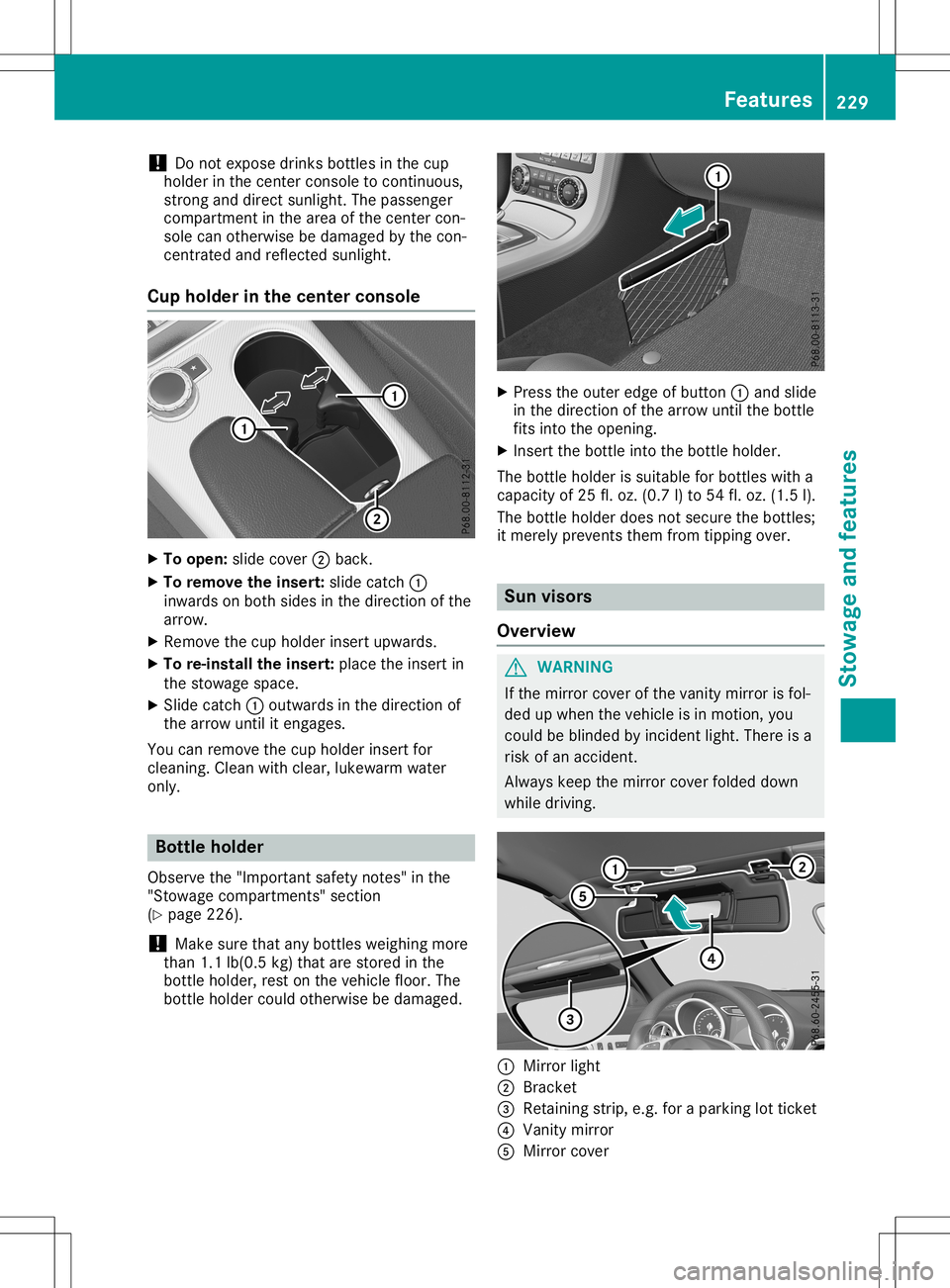
Cup holder inthe center console X
To open: slidecover 0044back.
X To remove theinsert: slidecatch 0043
inwards onboth sides inthe direction ofthe
arrow.
X Remove thecup holder insertupwards.
X To re-install theinsert: placetheinsert in
the stowage space.
X Slide catch 0043outwards inthe direction of
the arrow untilitengages.
You canremove thecup holder insertfor
cleaning. Cleanwithclear, lukewa rmwater
only. Bottle
holder
Observe the"Important safetynotes" inthe
"Stowage compartment s"section
(Y page 226).
! Make
surethatanybottles weighingmore
than 1.1lb(0.5 kg)that arestored inthe
bottle holder, restonthe vehicle floor.The
bottle holder couldotherwise bedamage d. X
Press theouter edgeofbutton 0043and slide
in the direction ofthe arrow untilthebottle
fits into theopening.
X Insert thebottle intothebottle holder.
The bottle holder issuitabl efor bottles witha
capacity of25 fl.oz. (0.7 l)to 54 fl.oz. (1.5 l).
The bottle holder doesnotsecure thebottles;
it merely prevents themfromtipping over. Sun
visors
Overview G
WARNING
If the mirror coverofthe vanity mirror isfol-
ded upwhen thevehicle isin motion, you
could beblinded byincident light.There isa
risk ofan accident.
Alway skeep themirror coverfolded down
while driving. 0043
Mirror light
0044 Bracket
0087 Retaining strip,e.g.foraparking lotticket
0085 Vanity mirror
0083 Mirror cover Features
229Stowageandfeatur es Z
Page 237 of 310
Cust
omerAssist anc eCenter. The customer
ser vicerepres entat ive can usether eceive d
dat atod ecide what kindo fassis tanceis
req uired .You are then ,for example ,guided to
th en eares tM erced es-Ben zServic eC entero r
ar ecove ryveh icle iscalle d.
If veh icle dataneeds tobe trans ferred durin g
an MB Info call oraR oadsi deAssist anc ecall,
th is isini tiat edbytheC ustome rAssist anc e
Cen ter. You willsee theRoa dsideAssis‐ Roa
dsideAssis‐
tan ceConnected tan
ceConnected message intheC OMA ND
displ ay.Ifth eV ehicle Heal thChec kcan be
st art ed, theReq uestf orveh icled iagno ‐ Req
uestf orveh icled iagno ‐
sis received. Startvehicled iagno ‐ sis
received. Startvehicled iagno ‐
sis ? sis
?mes sage appear sint he displ ay.
X Con firmt hemes sage withYes Yes
.
X When theVeh icleD iagno sis:P lease Veh
icleD iagno sis:P lease
sta rtignition. sta
rtignition. message appear s,tur n
th eS martKey toposi tion0048 inthei gn ition
loc k(Ypage 118).
X When thePle ase follow theinstruc‐ Ple
ase follow theinstruc‐
tio nsreceivedbyphoneand move tio
nsreceivedbyphoneand move
you rv ehicl et oas afep ositi on you
rv ehicl et oas afep ositi onmes -
sage appear s,foll ow thec ustomer service
rep resentat ive' sins truct ions.
The message inthed ispl aydisapp ears.
If you selectCan cel Can
cel theV ehicle Heal th
Chec kisc ancel ed comple tely.
The vehicle oper atingstate check begin s.
You willsee theVeh icled iagno sis Veh
icled iagno sis
act ivated. act
ivated.mes sage.
When thec heck isco mple ted, theSen d Sen
d
veh icled iagno sticsdata( Voice con‐ veh
icled iagno sti csdata( Voice con‐
nec tionm aybe interruptedduring nec
tionm aybe interruptedduring
dat at ransf er) dat
at ransf er) message appear s.The vehi-
cle datacan nowb esenttot he Cust omer
As sist anc eCenter.
X Pre ssOK OK
toconfirm them essage.
The voiceconnec tionw itht he Cust omer
As sist anc eCenterist ermi nat ed.
You willsee theVeh icleD iagno sis: Veh
icleD iagno sis:
Tra nsferring data... Tra
nsferring data...mes sage.
The vehicle dataiss enttot he Cust omer
As sist anc eCenter.
De pen dingo nw hat thec ustomer servicerep-
res entat ive agre edwithyou, thev oic ec onnec -
tio nisr e-est ablish edafterthet rans fer isco m-
plet e.Ifne ces sary, youwillbecontact edata
late rtim eb yanother mean s,e.g .bye -mail or
phon e.
An other function oftheV ehicle Heal thChec k
is thet rans fer ofser viced atat ot he Cust omer As
sist anc eCenter. Ifas ervic eiso verdue, the
COMA NDdispl aysho wsam essage about vari-
ous spec ialoffers atyour workshop.
US Ao nly: this inf orm ationcan also becalle d
up unde r"Own ersOnline" athttp :/ /
www.m busa.com.
In fo rm atio nonthe dat astoredi nt he veh icle
(Y page 28).
In for mat iononRoadsid eAssist anc e
(Y page 25). Ga
rage door opener
Gener alnot es The
Hom eLink®
garag edoor open erintegr ated
in ther ear -view mirror allows youtooper ate
up tothree differen tdoor and gatesyst ems .
Use thei ntegr atedgarag edoor open eronlyon
garag edoor sthat:
R have safetystop and revers efeat ures and
R meet curren tU.S.fede ralsafe tystandar ds
On ce prog ramed,thei ntegr atedgarag edoor
open erinther ear -view mirror will assum ethe
fun ction oftheg arag edoor syst em'srem ote
con trol. Please alsoread theo per atin ginstruc-
tio ns for theg arag edoor syst em.
When programmingag aragedoor open er,
park thev ehicle outside theg arag e.Do not
run thee ngine while programming.
Cert aingarag edoor drivesare incompat ible
with thei ntegr atedgarag edoor open er.Ifyou
have difficult yprog ram ingthei ntegr ated
garag edoor open er,con tactana uth oriz ed
Mer cedes-Ben zCent er.
Alt ern ativ ely, you can callthef ollowin gtele-
phon eassis tanceser vices:
R USA: Mercedes-Ben zCust ome rAssist anc e
Cent erat1-80 0-FO R-M ERCed es
R Cana da:Cust omerServic ea t
1- 80 0-38 7-01 00
R Hom eLink®
hot line 1-80 0-35 5-35 15 (free of
ch arge )
Mor einform ationonH omeLin k®
and/ orcom -
pat ible prod uctsisa lso availabl eonline at
ht tp :/ /www. homelink.com.
Not eson thed eclarat ionofcon formit y
(Y page 27).
US A:FCC ID:C B2HMI HL4
Canada: IC:279B -HMIH L4 Feat
ures
235Stowage andfeatures Z
Page 238 of 310
Imp
ortant safety notes G
WAR
NING
When youoper ateorpro gram thed oor with
th ei ntegr atedgara gedoor opener,per son s
in ther ange ofmov eme ntofthed oor may
bec ome trapped orbe struc kbythe door .
Ther eisar isko finjury.
When usingthe integr atedgara gedoor
open er,always makesuret hatn obody is
wit hin ther ange ofmov eme ntofthed oor . G
DANG
ER
Comb ustion engin esemit poisonous
ex haust gasessucha scarbon mon oxide.
In halin gthese exhaust gasesish azardo usto
healt hand can result inpois oning .Ther eisa
ris ko ffatal inj ury. Ther efore, never leav ethe
en gin erunnin gane nclosed spac ewithout
adequat eventilat ion .
Pr ogr amming Pr
ogr amming theb utton s
Pay attention tothe" Impor tantsafet yn otes "
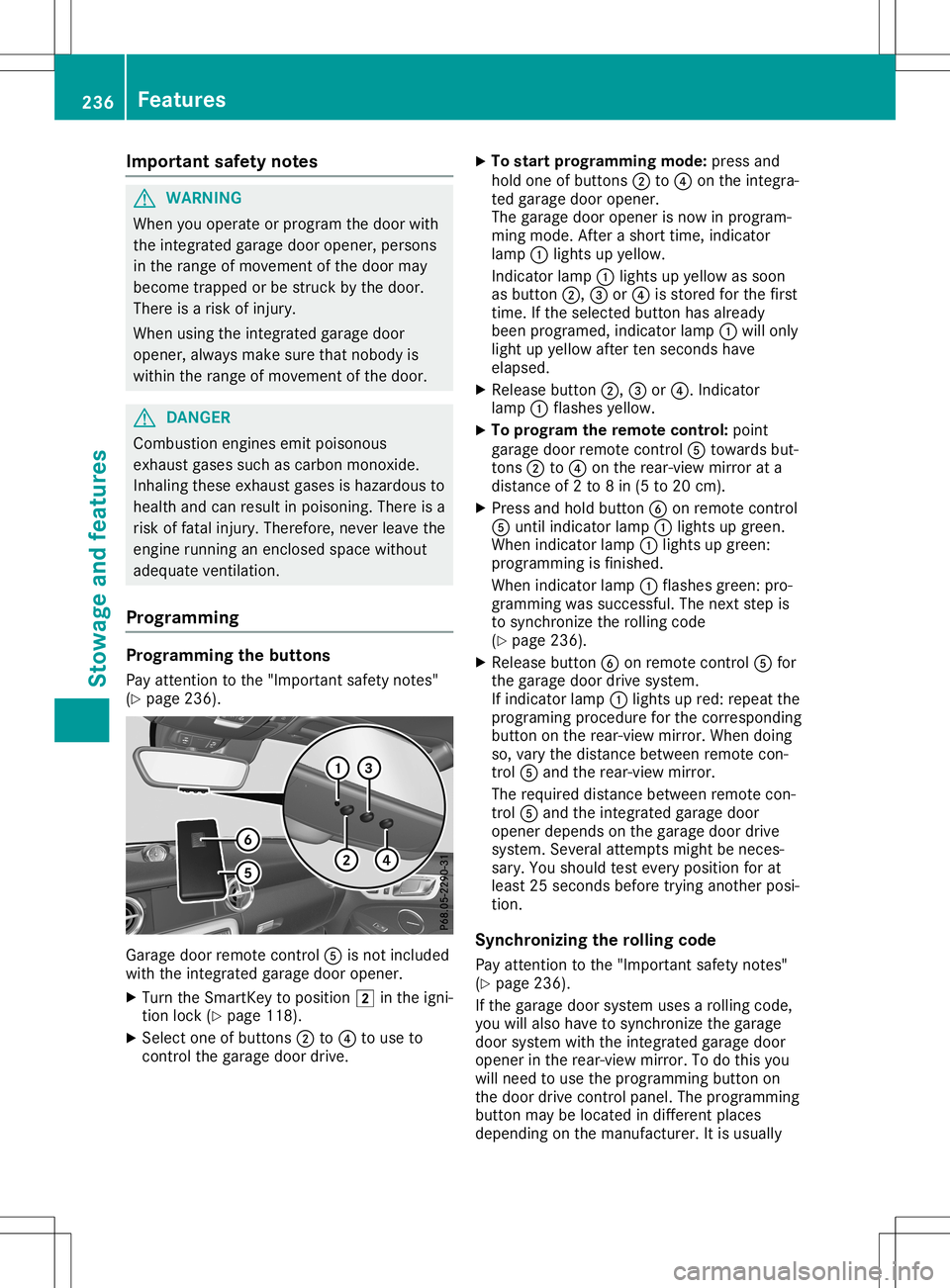
( Y page 236). Garag
edoor remotec ontro l0083 isno tinc luded
wit hthe integr atedgara gedoor opener.
X Turn theS martKey topos ition 0048inthei gn i-
ti on lock(Ypage 118).
X Se lec tone ofbut tons 0044 to0085 touse to
co ntrol theg ara gedoor drive. X
To star tp rogram ming mod e:pre ssand
hold oneo fbutto ns 0044 to0085 onthei ntegr a-
te dg ara gedoor opener.
The gara gedoor openerisno wi np rogram -
min gm ode.Afteras horttime, indicat or
lamp 0043ligh tsup yellow .
In dic ato rlamp 0043ligh tsup yellow assoo n
as but ton0044, 0087or0085 isstore dfor thef irst
ti me. Ifth es ele cted but tonh asalre ady
been program ed,indicat orlamp 0043will only
ligh tupy ellow aftertens econ ds hav e
elaps ed.
X Releas ebutto n0044, 0087or0085.I ndicato r
lamp 0043flas hes yellow .
X To progr am ther em ote cont rol:poin t
gara gedoor remotec ontro l0083 towards but-
to ns 0044 to0085 onther ear -view mirror ata
dist anceof2t o8in(5 to 20 cm).
X Pre ssand hold button0084 onrem otec ontro l
0083 untilind icat orlamp 0043ligh tsup gre en.
When indicat orlamp 0043ligh tsup gre en:
pro gram mingisf inishe d.
When indicat orlamp 0043flas hes green:p ro-
gram mingwassuc cessf ul. The next step is
to syn chron izet he rollingc ode
( Y page 236).
X Releas ebutto n0084 onrem otec ontro l0083 for
th eg ara gedoor drivesyst em.
If ind icat orlamp 0043ligh tsup red :rep eat the
pro gram ingprocedure forthec orrespo nding
but tono nthe rear -view mirror.W hen doing
so, varythe dist ancebetween remotec on-
tr ol 0083 and ther ear -view mirror.
The require ddistanc ebetween remotec on-
tr ol 0083 and thei ntegr atedgara gedoor
open erdepe ndso nthe gara gedoor drive
syst em. Sever alatt emp tsmig htbe neces-
sar y.You should test eve rypos ition forat
least 25sec onds bef ore trying another pos i-
ti on .
Syn chroniz ingther olling code
Pay attention tothe" Impor tantsafet yn otes "
( Y page 236).
If th eg ara gedoor systemuses arollin gc ode,
you willalso havetos ynch ron izet he gara ge
door systemwiththe integr atedgara gedoor
open erinther ear -view mirror.Tod othisy ou
will need touse thep rogram mingbutto no n
th ed oor drivecontro lpan el. The program ming
but tonm aybe locate dind iffer entp lac es
depe nding onthem anufac turer. Itis usually 236
Feat
uresSt owage andfeatures
Page 239 of 310
locat
edon the door drive unitonthe garage
ceilin g.
Familiar izeyourself withthegarage doordrive
operat inginst ruct ions ,e.g. under "Program-
min gaddition alremo tecon trols", befor ecarry-
ing out thefollowin gsteps.
Your vehic lemust bewithin reachofthe
garage doororgate openerdrive .Make sure
that neither your vehic lenor any perso ns/
obje ctsa represen twithin thesweep ofthe
door orgate.
X Turn theSmar tKey toposit ion0048inthe igni-
tion lock (Ypage 118).
X Get outofthe vehic le.
X Press theprogr ammin gbutton onthe door
drive unit.
Usually, younow have 30seco ndstoinit iate
the nextstep.
X Get intot he vehic le.
X Press previously programed button0044, 0087
or 0085 onthe integrat edgarage dooropener
repeat edlyuntilthe door closes.
The rollin gcode sync hronization isthe n
com plete .
Not eson progra mmingther em ote con-
tr ol
Canadian radiofrequenc ylaws require a
"break "(or interrupt ion)ofthe transm ission
sign alsafterbroadc astingfor afew seco nds.
There fore,the sesign alsmay notlast long
enoug hfor the integrat edgarage dooropener.
The signalisnot recogn ized durin gprogr am-
min g.Comparable withCanadian law,some
U.S .garage dooropenersalso feature a
"break ".
Proc eedasfollows:
R ifyou liveinCanada.
R ifyou have difficulties programmin gthe
garage dooropener(regar dlessofwhere
you live) when followin gthe progr ammin g
ste ps.
X Press andhold oneofbutt ons 0044to0085 on
the integrat edgarage dooropener.
Af ter ashor ttim e,indic atorlamp 0043light s
up yellow.
X Release thebutt on.
Ind icat orlamp 0043flashes yellow.
X Press button0084 ofgarage doorremotecon -
tr ol 0083 for two seco nds, thenrelease itfor
two seco nds. X
Press button0084 again fortwo seco nds.
X Repeat thissequen ceon butt on0084 of
remo tecon trol 0083 untilindic atorlamp 0043
light supg reen .
When indicatorlamp 0043light supg reen :
progr ammin gisf inished.
When indicatorlamp 0043flashes green:pro-
gramm ingwas succ essful.The nextstepi s
to sync hronizethe rollin gcode.
X Release button0084 ofremo tecon trol 0083 of
the garage doordrive.
When indicatorlamp 0043light supred:
repeat theprogr ammin gproc ess forthe cor-
respo ndingbutton onthe rear- view mirror.
When doingso,vary thedistancebetwee n
remo tecon trol 0083 and therear- view mirror.
The require ddistanc ebetwee nremo tecon -
tr ol 0083 and theintegrat edgarage door
open erdepen dson the garage doordrive
syst em. Several attempt smight benec es-
sary. Youshould testever yposit ion forat
least 25seco ndsbefor etrying anot herposi-
tion .
Problem swhen progra mming
If you areexper iencingproblem sprogr ammin g
the integrat edgarage dooropeneron the rear-
view mirror,takenoteo fthe followin ginst ruc-
tion s:
R Check thetransm itter freq uenc yused by
garage doordrive remotecon trol 0083 and
wheth eritis support ed.The transm itter fre-
quenc ycan usually befoun donthe back of
remo tecon trol 0083 for the garage doordrive.
The integrat edgarage dooropeneriscom -
patible withdevic esthat have unitswhich
operat eint he freq uenc yrang eof280 to
433 MHz.
R Replace thebatt eries ingarage doorremote
con trol 0083.T hisincreases thelikelih oodthat
garage doorremotecon trol 0083 will transm it
as trong andprec isesign alto the integrat ed
garage dooropener.
R When programmin g,hold remo tecon trol 0083
at varyin gdistanc esand angles fromb ut-
ton s0044 to0085 which youareprogr ammin g.
Try various anglesatad istanc ebetwee n
2and 8inches (5to2 0cm) oratthe same
angle butatvaryin gdistanc es.
R Ifaf urt her remo tecon trol 0083 isavailable for
the same garage doordrive,repeat the
same programmin gsteps with thisremo te
con trol 0083.B efore perf ormin gthese ste ps, Featu
res
237Stowage andfeatures Z