remote control MERCEDES-BENZ SLK CLASS 2002 User Guide
[x] Cancel search | Manufacturer: MERCEDES-BENZ, Model Year: 2002, Model line: SLK CLASS, Model: MERCEDES-BENZ SLK CLASS 2002Pages: 290, PDF Size: 18.21 MB
Page 40 of 290
37 Tow-away alarm
Te ch n i c a l
data Instruments
and controlsOperationDrivingInstrument
cluster displayPractical hints Car care Index Tow-away alarm
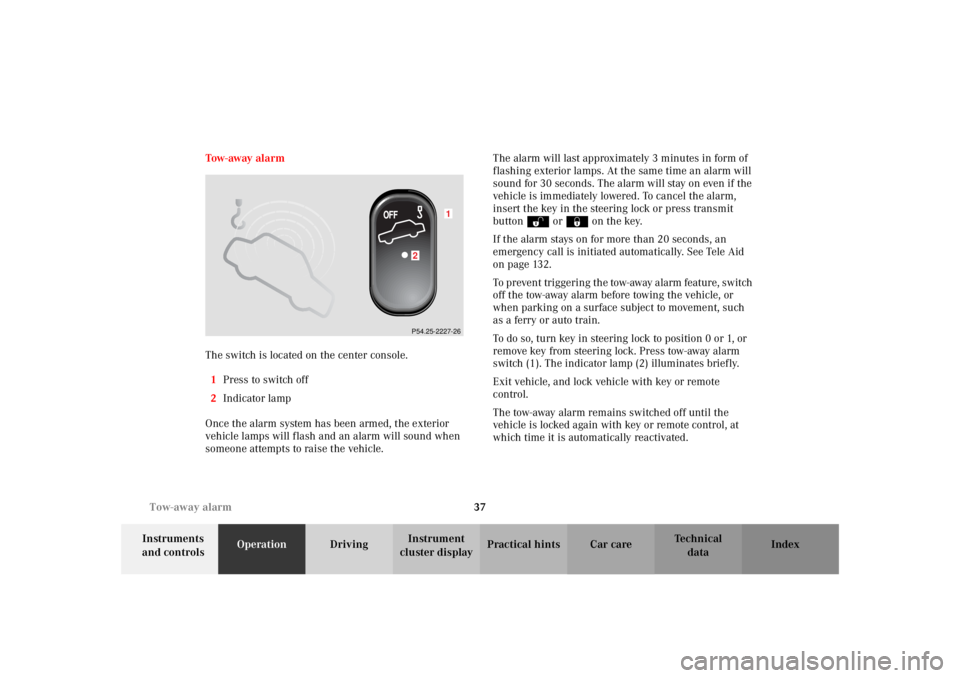
The switch is located on the center console.
1Press to switch off
2Indicator lamp
Once the alarm system has been armed, the exterior
vehicle lamps will flash and an alarm will sound when
someone attempts to raise the vehicle.The alarm will last approximately 3 minutes in form of
flashing exterior lamps. At the same time an alarm will
sound for 30 seconds. The alarm will stay on even if the
vehicle is immediately lowered. To cancel the alarm,
insert the key in the steering lock or press transmit
buttonŒ or‹ on the key.
If the alarm stays on for more than 20 seconds, an
emergency call is initiated automatically. See Tele Aid
on page 132.
To prevent triggering the tow-away alarm feature, switch
off t he tow-away alarm b efor e towin g the vehic le, or
when parking on a surface subject to movement, such
as a ferry or auto train.
To do so, turn key in steering lock to position 0 or 1, or
remove key from steering lock. Press tow-away alarm
switch (1). The indicator lamp (2) illuminates briefly.
Exit vehicle, and lock vehicle with key or remote
control.
The tow-away alarm remains switched off until the
vehicle is locked again with key or remote control, at
which time it is automatically reactivated.
1
2P54.25-2227-26
Page 114 of 290
111 Interior equipment
Te ch n i c a l
data Instruments
and controlsOperationDrivingInstrument
cluster displayPractical hints Car care Index Power windows
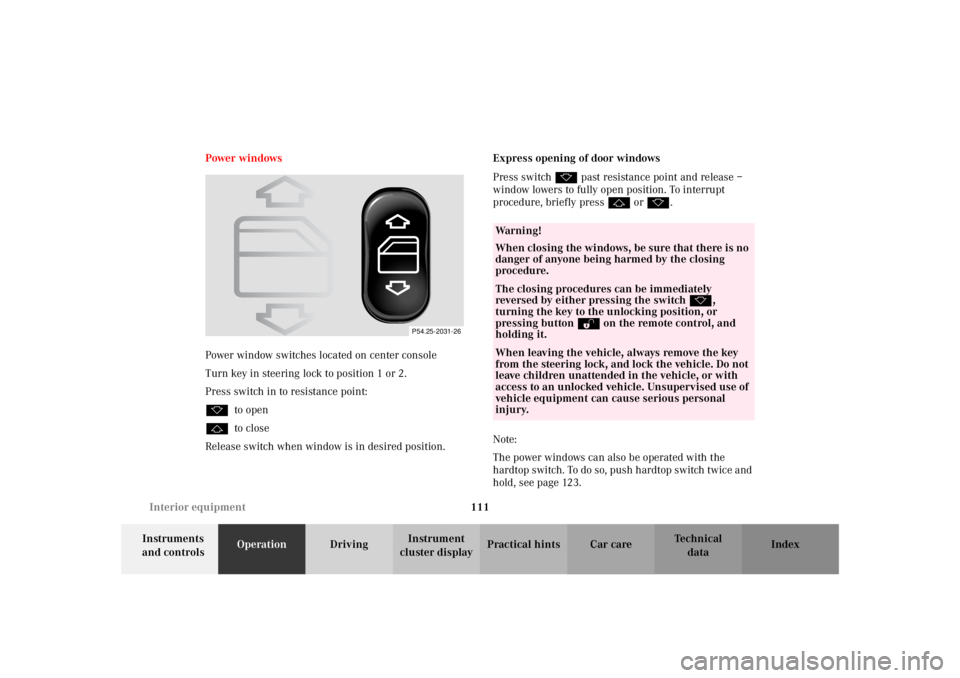
Power window switches located on center console
Turn key in steering lock to position 1 or 2.
Press switch in to resistance point:
kto open
jto close
Release switch when window is in desired position.Express opening of door windows
Press switch k past resistance point and release –
window lowers to fully open position. To interrupt
procedure, briefly press j or k.
Note:
The power windows can also be operated with the
hardtop switch. To do so, push hardtop switch twice and
hold, see page 123.
P54.25-2031-26
Wa r n i n g !
When closing the windows, be sure that there is no
danger of anyone being harmed by the closing
procedure.The closing procedures can be immediately
reversed by either pressing the switch k,
turning the key to the unlocking position, or
pressing button Πon the remote control, and
holding it.When leaving the vehicle, always remove the key
from the steering lock, and lock the vehicle. Do not
leave children unattended in the vehicle, or with
access to an unlocked vehicle. Unsupervised use of
vehicle equipment can cause serious personal
injury.
Page 122 of 290
119 Garage door opener
Te ch n i c a l
data Instruments
and controlsOperationDrivingInstrument
cluster displayPractical hints Car care Index Garage door opener
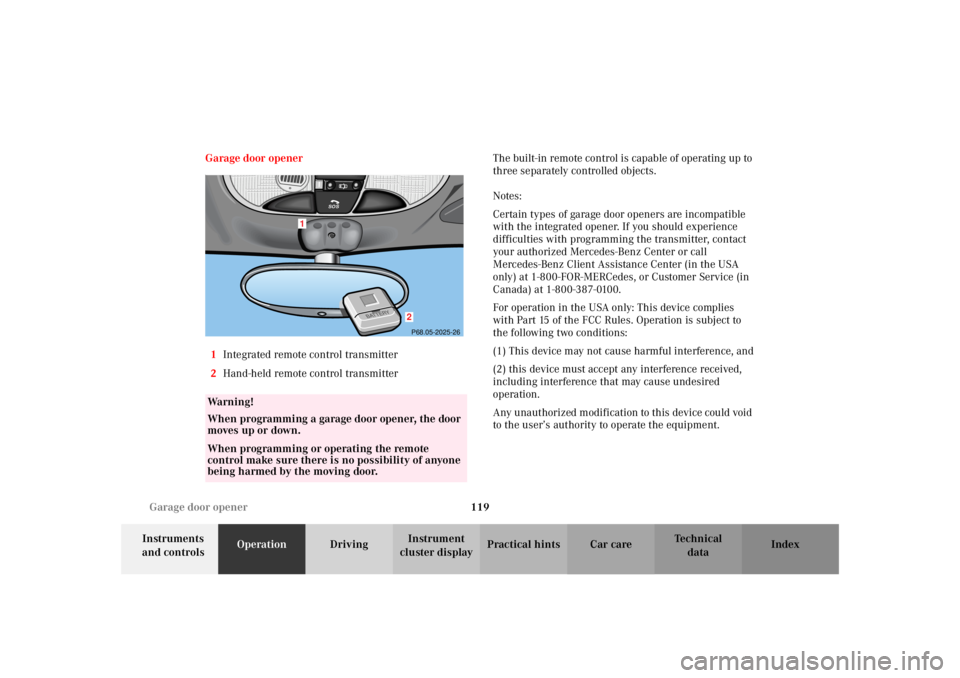
1Integrated remote control transmitter
2Hand-held remote control transmitterThe built-in remote control is capable of operating up to
three separately controlled objects.
Notes:
Certain types of garage door openers are incompatible
with the integrated opener. If you should experience
difficulties with programming the transmitter, contact
your authorized Mercedes-Benz Center or call
Mercedes-Benz Client Assistance Center (in the USA
only) at 1-800-FOR-MERCedes, or Customer Service (in
Canada) at 1-800-387-0100.
For operation in the USA only: This device complies
with Part 15 of the FCC Rules. Operation is subject to
the following two conditions:
(1) This device may not cause harmful interference, and
(2) this device must accept any interference received,
including interference that may cause undesired
operation.
Any unauthorized modification to this device could void
to the user’s authority to operate the equipment.
Wa r n i n g !
When programming a garage door opener, the door
moves up or down.When programming or operating the remote
control make sure there is no possibility of anyone
being harmed by the moving door.
1
2P68.05-2025-26
SO
S
Page 123 of 290
120 Garage door opener
Te ch n i c a l
data Instruments
and controlsOperationDrivingInstrument
cluster displayPractical hints Car care Index
Programming or reprogramming the integrated
remote control:
1. Turn key in starter switch to position 1 or 2.
2. Hold the end of the hand-held transmitter of the
device you wish to train approximately 2 to 5 inches
(5 cm to 12 cm) away from the surface of the
integrated remote control located on the inside rear
view mirror, keeping the indicator lamp in view.
3. Using both hands, simultaneously push the hand-
held transmitter button and the desired integrated
remote control button. Do not release the buttons
until completing step 4.
4. The indicator lamp on the integrated remote control
will flash, first slowly and then rapidly. When the
indicator lamp flashes rapidly, both buttons may be
released (the rapid flashing lamp indicates
successful programming of the new frequency
signal). To program the remaining two buttons,
follow steps 1 through 4.Note:
If, after repeated attempts, you do not successfully
program the integrated remote control device to learn
the signal of the hand-held transmitter, the garage door
opener could be equipped with the “rolling code
feature”.
Rolling code programming:
To train a garage door opener (or other rolling code
devices) with the rolling code feature, follow these
instructions after completing the “Programming”
portion of this text. (A second person may make the
following training procedures quicker and easier.)
1. Locate training button on the garage door opener
motor head unit. Exact location and color of the
button may vary by garage door opener brand. If
there is difficulty locating the transmitting button,
reference to garage door opener operator’s manual.
2. Press “training” button on the garage door opener
motor head unit (which activates the “training
light”).
Page 124 of 290
121 Garage door opener
Te ch n i c a l
data Instruments
and controlsOperationDrivingInstrument
cluster displayPractical hints Car care Index Note:
Following step 2, there are 30 seconds to initiate
step 3.
3. Firmly press and release the programmed
integrated remote control transmit button. Press
and release same button a second time to complete
the training process. (Some garage door openers
may require you to do this procedure a third time to
complete the training.)
4. Confirm the garage door operation by pressing the
programmed button on the integrated remote
control transmitter.
Canadian programming:
During programming, your hand-held transmitter may
automatically stop transmitting. Continue to press and
hold the integrated remote control transmitter button
(note steps 2 through 4 in the “Programming” portion)
while you press and re-press (“cycle”) your hand-held
transmitter every two seconds until the frequency
signal has been learned. The indicator lamp will flash
slowly and then rapidly after several seconds upon
successful training.Operation of remote control:
1. Turn key in starter switch to position 1 or 2.
2. Select and press the appropriate button to activate
the remote controlled device. The integrated remote
control transmitter continues to send the signal as
long as the button is pressed – up to 20 seconds.
Erasing the remote control memory:
1. Turn key in starter switch to position 1 or 2.
2. Simultaneously holding down the left and right side
buttons for approximately 20 seconds, or until the
control lamp blinks rapidly, will erase the codes of
all three channels.
Page 135 of 290
132 Tele Aid
Te ch n i c a l
data Instruments
and controlsOperationDrivingInstrument
cluster displayPractical hints Car care Index
Te l e A i d
Important!
The initial activation of the Tele Aid system may only be
performed by completing the subscriber agreement and
placing an acquaintance call using the “SOS” button.
Failure to complete either of these steps will result in a
system that is not activated. If the system is not
activated the indicator lamp in the “SOS” button stays
on after turning electronic key in starter switch to
position 2.
If you have any questions regarding activation, please
call the Response Center at 1-800-756-9018 (in the USA)
or 1-888-923-8367 (in Canada).
(Te l ematic Alarm Identification on Demand)
The Tele Aid system consists of three types of response;
automatic and manual emergency, roadside assistance
and information.
The Tele Aid system is operational providing that the
vehicle’s battery is charged and properly connected, not
damaged and cellular and GPS coverage is available. To
activate, press the “SOS” button, the Roadside
Assistance button• or the Information button¡,
depending on the type of response required.Shortly after the completion of your Acquaintance Call,
you will receive a user ID and password via first call
mail. By visiting www.mbusa.com and selecting
“Tele Aid” (USA only), you will have access to account
information, remote door unlock and more.
System self-check
Initially, after turning the key in steering lock to
position 2, malfunctions are detected and indicated (the
indicator lamps in the “SOS” button, the Roadside
Assistance button• and the Information
button¡ stay on longer than 10 seconds or do not
come on).
Important!
Always make sure that the indicator lamps in the
“SOS” button, in the “Roadside Assistance” button and
in the “Information” button do not remain illuminated
constantly in red after the system self check.
If a malfunction is indicated as outlined above, have the
system checked at the nearest Mercedes-Benz Center as
soon as possible.
Page 138 of 290
135 Tele Aid
Te ch n i c a l
data Instruments
and controlsOperationDrivingInstrument
cluster displayPractical hints Car care Index Roadside Assistance button •
Located below the center armrest cover is the Roadside
Assistance button•. Pressing and holding the
button (for longer than 2 seconds), will initiate a call to
a Mercedes-Benz Roadside Assistance dispatcher. The
button will flash while the call is in progress. The
Tele Aid system will transmit data generating the
vehicle identification number, model, color and location
(subject to availability of cellular and GPS signals).
A voice connection between the Roadside Assistance
dispatcher and the occupants of the vehicle will be
established. The nature of the need for assistance can
then be described. The Mercedes-Benz Roadside assistance dispatcher will
either dispatch a qualified Mercedes-Benz technician or
arrange to tow your vehicle to the nearest
Mercedes-Benz Center. For services such as labor and/
or towing charges may apply. Refer to the Roadside
Assistance manual for more information.
These programs are only available in the USA:
•Sign and Drive services: Services such as jump start,
a few gallons of fuel or the replacement of a flat tire
with the vehicle spare tire are obtainable,
•Remote Vehicle Diagnostics: This function permits
the Mercedes-Benz Roadside Assistance dispatcher
to download malfunction codes and actual vehicle
data.
Notes:
The indicator lamp in the Roadside Assistance
button• remains illuminated in red for
approximately 10 seconds during the system self-check
after turning key in steering lock to position 2 (together
with the “SOS” button and the Information
button¡).
Wa r n i n g !
If you feel at any way in jeopardy when in the
vehicle (e.g. smoke or fire in the vehicle, vehicle in
a dangerous road location), please do not wait for
voice contact after you have pressed the emergency
button. Carefully leave the vehicle and move to a
safe location. The Response Center will
automatically contact local emergency officials
with the vehicle’s approximate location if they
receive an automatic “SOS” signal and cannot make
voice contact with the vehicle occupants.
Page 141 of 290
138 Tele Aid
Te ch n i c a l
data Instruments
and controlsOperationDrivingInstrument
cluster displayPractical hints Car care Index
Remote door unlock
In the case you have your vehicle locked unintentionally
(e.g. key inside vehicle), and the reserve key is not
handy, contact the Mercedes-Benz Response Center at
1-800-756-9018 (in the USA) or 1-888-923-8367 (in
Canada). You will be asked to provide your password
which you provided when you completed the subscriber
agreement.
Then return to your vehicle and pull outside trunk
handle for a minimum of 20 seconds.
The Response Center will then unlock your vehicle with
the remote door unlocking feature.
Note:
The remote door unlock feature is available if the
relevant cellular phone network is available.
The SOS button will flash to indicate receipt of the door
unlock command. Once the vehicle is unlocked, a
Response Center specialist will attempt to establish
voice contact with the vehicle occupants.
If the trunk handle was pulled for more than 20 seconds
before door unlock authorization was received by the
Response Center, you must wait 15 minutes before
pulling the trunk handle again.Stolen vehicle tracking services
In the event your vehicle was stolen, report the incident
to the police who will issue numbered incident report.
Pass this number on to the Mercedes-Benz Response
Center.
The Response Center will then attempt to covertly
contact the vehicle’s Tele Aid system. Once the vehicle
is located, the Response Center will contact the local
Law Enforcement and you. The vehicle’s location will
only be provided to Law Enforcement.
Page 194 of 290
191 Contents - Practical hints
Te ch n i c a l
data Instruments
and controlsOperation DrivingInstrument
cluster displayPractical hintsCar care Index
Practical hintsFirst aid kit ..................................... 192
Stowing items in the vehicle ........ 192
Fuses ................................................ 192
Hood ................................................. 194
Automatic transmission
fluid level ................................... 196
Checking engine oil level ............. 197
Coolant level ................................... 198
Adding coolant ........................... 198
Windshield and
headlamp washer system ........ 199
Air pump, spare wheel,
vehicle tools,
storage compartment
(except SLK 32 AMG) ...............200Ve h i c l e j a c k
(except SLK 32 AMG) .............. 201
Storage box, TIREFIT-Kit,
air pump, Vehicle tools
(SLK 32 AMG only) .................. 202
Wheels ............................................ 203
Tire replacement ....................... 203
Rotating wheels ......................... 204
Spare wheel .................................... 205
Spare wheel bolts ...................... 206
Changing wheels ........................... 207
Inflating the collapsible
spare tire ......................................212
Storing spare wheel in
wheel well ....................................213
TIREFIT ............................................214
Tire inflation pressure .................. 219Battery .............................................220
Jump starting ..................................222
Towing the vehicle .........................224
Transmission selector lever,
manually unlocking ..................229
Exterior lamps ................................230
Headlamp assembly ................... 231
Taillamp assemblies ..................234
Changing batteries in
the remote control ....................236
Synchronizing
remote control ............................237
Raising hardtop manually ............238
Replacing wiper blade insert .......243
Antenna ...........................................244
Manual release
of fuel filler flap ........................244
Page 239 of 290
236 Remote control
Te ch n i c a l
data Instruments
and controlsOperation DrivingInstrument
cluster displayPractical hintsCar care Index
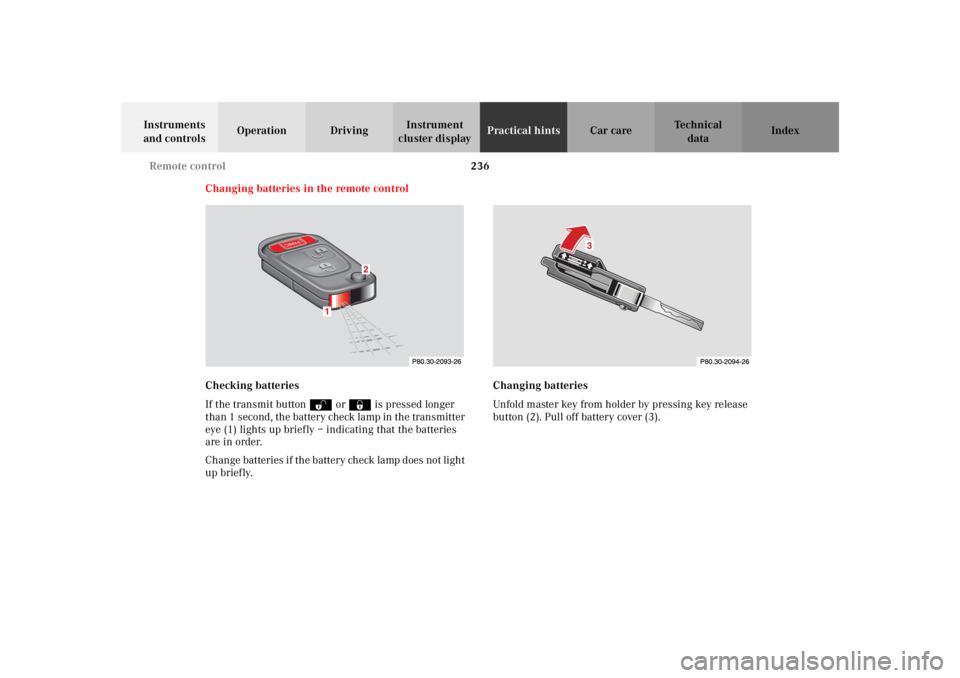
Changing batteries in the remote control
Checking batteries
If the transmit buttonŒ or‹ is pressed longer
than 1 second, the battery check lamp in the transmitter
eye (1) lights up briefly – indicating that the batteries
are in order.
Change batteries if the battery check lamp does not light
up briefly.Changing batteries
Unfold master key from holder by pressing key release
button (2). Pull off battery cover (3).