roof MERCEDES-BENZ SLK-Class 2013 R172 User Guide
[x] Cancel search | Manufacturer: MERCEDES-BENZ, Model Year: 2013, Model line: SLK-Class, Model: MERCEDES-BENZ SLK-Class 2013 R172Pages: 358, PDF Size: 4.61 MB
Page 91 of 358

Install or remove the wind screen only when
the vehicle is stationary. G
WARNING
If the wind screen is not correctly engaged, it
may break free and thus obstruct traffic
behind you or lead to an accident.
Each time before driving with the roof down,
check that the wind screen is properly
engaged.
! Install or remove the wind screen only
when the roof is open. You could otherwise
damage the wind screen or the vehicle
interior.
The wind screen offers protection from the
wind when driving with the roof down.
The wind screen can be installed or removed
from the driver's side or passenger side.
Perform operations involving the wind screen
preferably on the side facing away from
traffic, after you have stopped the vehicle,
paying attention to road and traffic
conditions.
Installing and removing the winds creenPreparing for installation
Preparing for installation from the lef
tside of the
vehicle (example)
0003 Wind screen
0004 Locked latch
0024 Unlocked latch
X The following conditions must be fulfilled
for installation: R
unlocking buttons Rand Lpoint in the
direction of travel.
R latch 0024facing you is unlocked.
R latch 0004facing away from you is locked.
X To unlock the latch: press unlocking
button Ror Lon the locked latch.
X To lock th elatch: push the unlocked latch
upwards by hand until it engages.
Installing Installatio
nfrom the left side of the vehicle
(example)
X Stop the vehicle, paying attention to road
and traffic conditions.
X Take the wind screen out of the trunk.
X Prepare for installing (Y page 89).
X Hold wind screen 0003at an angle and slide
it with locked latch 0004in the direction of
arrow 0023into the bracket of the opposite
roll bar.
X Press wind screen 0003on the side of the
vehicle facing you downwards in the
directio nofarrow0021until it engages.
Make sure that studs 0022and latch 0024fit
into the respective brackets.
X Check whethe rwind screen 0003is fully
inserted into all four brackets and is sitting
securely.
X If this is not the case, remove wind
screen 0003again and repeat the steps
above. Roof
89Opening/closing Z
Page 92 of 358

Removing
Removing from the left side of the vehicle
(example)
X
Stop the vehicle, paying attention to road
and traffic conditions.
X Press unlocking button L0003.M eanwhile,
pull wind screen 0004on the side of the
vehicle facing you upwards and tilt it. Removing from the left side of the vehicle
(example)
X
Pull wind screen 0004out of the bracket of
the opposite roll bar in the direction of the
arrow.
X Secure wind screen 0004to the trun kfloor by
the rubber strips (Y page 258). AIRGUIDE
Important safety notes G
WARNING
You could lose control of the vehicle and
injure yourself or others if you operate
AIRGUIDE while driving.
Only fold the AIRGUIDE discs out or in when
the vehicle is stationary.
! AIRGUID Ecan only be positioned
correctly by folding it in or out. AIRGUIDE
canno tbe dismantled. Do not try to remove
AIRGUIDE from its anchorage. Otherwise,
you could damage AIRGUID Eorthe vehicle.
AIRGUIDE can be folded out or back in from
the driver's side or passenger side.
Perform operations involving AIRGUIDE
preferably on the side facing away from
traffic, after you have stopped the vehicle,
paying attention to road and traffic
conditions.
Operating AIRGUIDE Example: folding out from the left side of the
vehicle
X Stop the vehicle, paying attention to road
and traffic conditions.
X To fold out AIRGUIDE: turn disc0003in the
direction of the arrow towards the middle
of the vehicle to the stop.
X Repeatw ith disc0004.
X To fold in AIRGUIDE: turn discs0003
and 0004back behind the roll bar to the stop. 90
RoofOpening/closing
Page 93 of 358
i
Discs 0003and 0004can also be used
independently of each other, e.g .when you
are driving without a passenger. MAGIC SKY CONTROL
General notes MAGIC SKY CONTROL is a glass roof, the
transparency of which can be changed by
applying electrical voltage.
MAGIC SKY CONTROL can be switched
between darkened and transparent states.
i MAGIC SKY CONTROL darkens
automatically when you turn the SmartKey
to position 0in the ignition lock or remove
the SmartKey.
Risk of electric shock G
DANGER
The MAGIC SKY CONTROL electrical system
works at high voltage.
If the cover behind the overhead control unit
is damaged or is removed, electrical
components of MAGIC SKY CONTROL are
exposed. These may be live. If you touch these
components, you may get an electric shock
and could be seriously or even fatally injured.
For this reason, never remove the cover
behind the overhead control unit. Never touch
parts of the electrical system (control unit,
cables or cable connections).
Have all work on MAGIC SKY CONTROL
carried out at a qualified specialist workshop.
The electrical components of MAGIC SKY
CONTROL are protected by a paneling behind
the overhead control panel.
The MAGIC SKY CONTROL control unit is
marked with a yellow warning sticker that
warns you of high voltage. The high-voltage
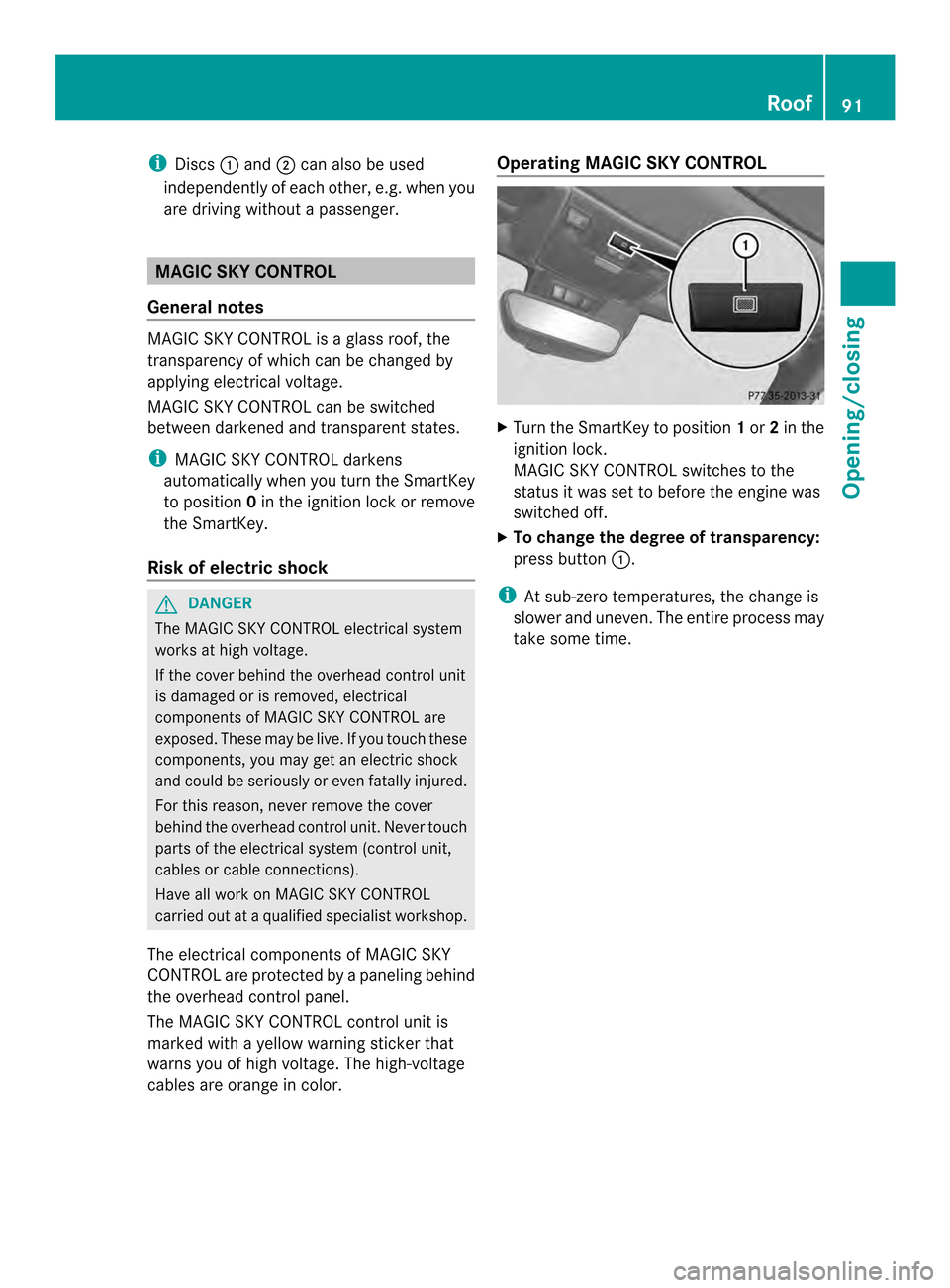
cables are orange in color. Operating MAGIC SKY CONTROL
X
Turn the SmartKey to position 1or 2in the
ignition lock.
MAGIC SKY CONTROL switches to the
status it was set to before the engine was
switched off.
X To change the degree of transparency:
press button 0003.
i At sub-zero temperatures, the change is
slower and uneven. The entire process may
take some time. Roof
91Opening/closing Z
Page 94 of 358
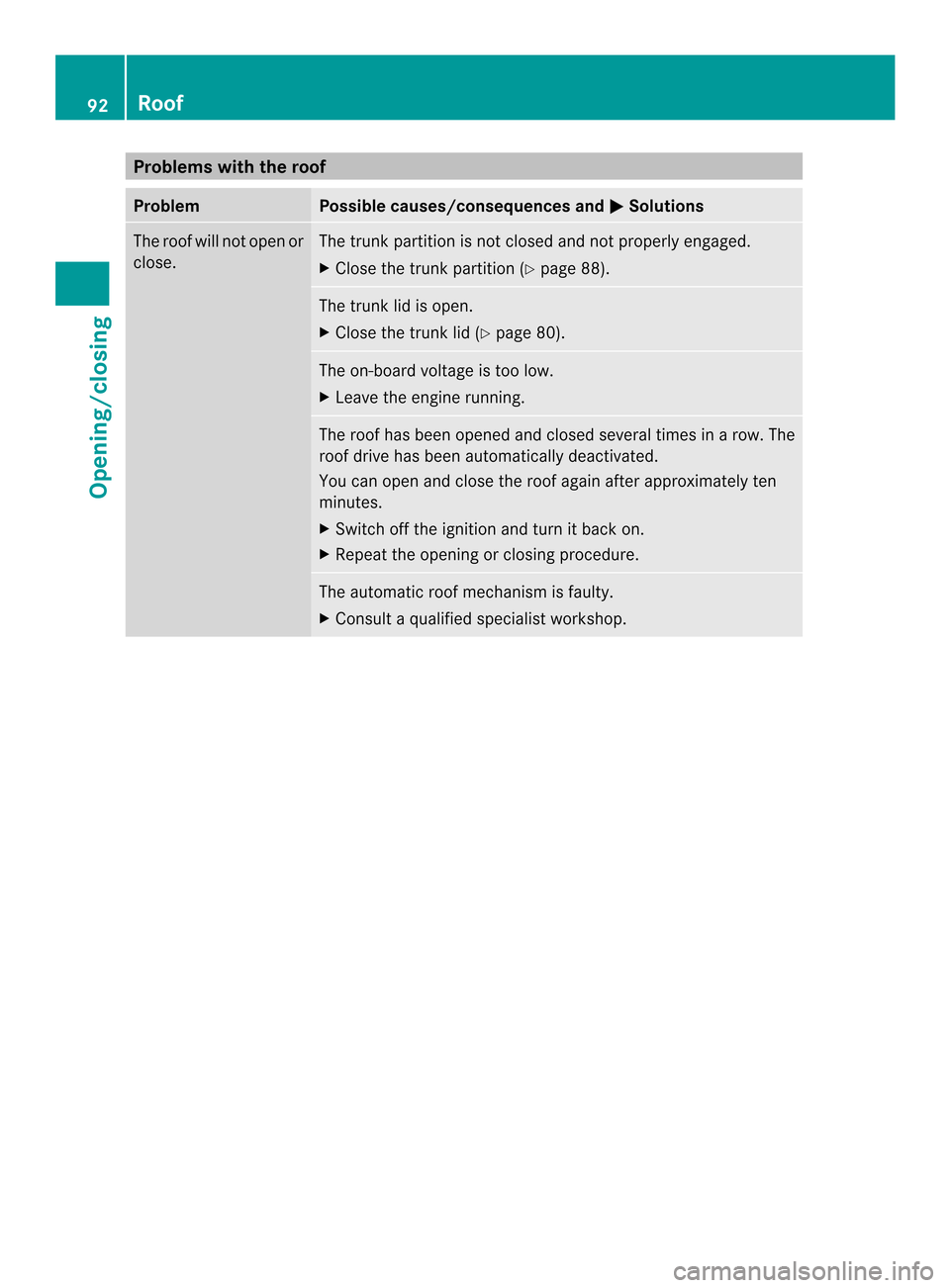
Problems with the roof
Problem Possible causes/consequences and
0001 Solutions
The roof will not open or
close. The trunk partition is not closed and not properly engaged.
X
Close the trunk partition (Y page 88). The trunk lid is open.
X
Close the trunk lid (Y page 80). The on-board voltage is too low.
X
Leave the engine running. The roof has been opened and closed several times in
arow. The
roof drive has been automatically deactivated.
You can open and close the roof again after approximately ten
minutes.
X Switch off the ignition and turn it back on.
X Repeat the opening or closing procedure. The automatic roof mechanism is faulty.
X
Consult a qualified specialist workshop. 92
RoofOpening/closing
Page 117 of 358

Turn signal lamp (halogen headlamps)
X
Switch off the lights.
X Open the hood.
X Turn bulb holder 0003counter-clockwise and
pull it out.
X Take the bulb ou tofbulb holder 0003.
X Inser tthe new bulb into bulb holder 0003.
X Insert bulb holder 0003and turn it clockwise
until it engages. Changing the rear bulbs
Backup lamp X
Switch off the lights.
X Make sure that the roof is closed.
X Open the trunk.
X Turn and pull out buffer stop 0004.
X Unclip catch 0003for side paneling 0024. X
Reach upwards into side paneling 0024,
loosen and pull downwards until
holder 0023of the backup lamp is easily
accessible.
X Pull out bulb holder 0023.
X Pull out the bulb.
X Insert the new bulb into bulb holder 0023.
X Insert holder 0023until it engages.
X re-install side paneling 0024precisely.
X Clip in catch 0003for side paneling 0024.
X Push in and tighten buffer stop 0004. Windshield wipers
Switching the windshield wipers on/
off
G
WARNING
The windshield will no longer be wiped
properly if the wiper blades are worn. This
could prevent you from observing the traffic
conditions, thereby causing an accident.
Replace the wiper blades twice a year, ideally
in spring and fall.
! Do not operate the windshield wipers
when the windshield is dry, as this could
damage the wiper blades. Moreover, dust
that has collected on the windshield can
scratch the glass if wiping takes place when
the windshield is dry.
If it is necessary to switch on the windshield
wipers in dry weather conditions, always Windshield wipers
115Lights and windshield wipers Z
Page 122 of 358
Useful information
i This Operator's Manual describes all
models and all standard and optional
equipment of your vehicle available at the
time of publication of the Operator's
Manual. Country-specific differences are
possible. Please note that your vehicle may
not be equipped with all features
described. This also applies to safety-
related systems and functions.
i Read the information on qualified
specialist workshops: (Y page 23).Overview of climate control systems
Important safety notes
G
WARNING
Observe the settings recommended on the
following pages. The windows could
otherwise fog up. This could preven tyou from
observing the traffic conditions, thereby
causing an accident. G
WARNING
Severe conditions (e.g. strong air pollution)
may require replacement of the filter before
its scheduled replacement interval. Aclogged
filter will reduce the air volume to the interior
and the windows could fog up, impairing
visibility and endangering you and others.
Have a clogged filter replaced as soon as
possible at a qualified specialist workshop.
Climate control regulates the temperature
and the humidity in the vehicle interior and
filters undesirable substances out of the air.
Climate control is only operational when the
engine is running. The system only works
optimally when the side windows and the roof
are closed.
The residual heat function can only be
activated or deactivated with the ignition
switched off (Y page 129). i
Ventilate the vehicle for a brief period
during warm weather .This will speed up the
cooling process and the desired vehicle
interior temperature will be reached more
quickly.
i The integrated filter can filter out most
particles of dust, and completely filters out
pollen. Aclogged filter reduces the amount
of air supplied to the vehicle interior .For
this reason, you should always observe the
interval for replacing the filter, which is
specified in the Maintenance Booklet.
Since the replacement interval depends on
environmental conditions, e.g. heavy air
pollution, the interval may be shorter than
stated in the Maintenance Booklet. 120
Overview of climate control systemsClimate control
Page 127 of 358
activated or deactivated with the ignition
switched off. Operating the climate control
systems
Activating/deactivating climate
control
General notes G
WARNING
When the climate control system is switched
off, the outside air supply and circulation are
also switched off .Only choose this setting for
a short time when the retractable hardtop
(vario-roof) is closed .Otherwise, the windows
could fog up, impairing visibility and
endangering you and others.
i Switch on climate control primarily using
the 0005 button ( Ypage 126).
Air-conditioning system X
To activate: turn airflow control
0015(Y page 121) clockwise to the desired
positio n(except position 0).
X To deactivate: turn airflow control
0015(Y page 121) counter-clockwise to
position 0. 3-zone automatic climate control X
Turn the SmartKey to position 2in the
ignition lock.
X To switch on: press the0005button.
The indicator lamp in the 0005button lights
up. Airflow and air distribution are set to
automatic mode.
or
X Press the 000Cbutton.
The indicator lamp in the 000Cbutton goes
out. The previously selected settings are
restored.
X To switch off: press the000Cbutton.
The indicator lamp in the 000Cbutton lights
up. Activating/deactivating cooling with
air dehumidification
General notes G
WARNING
If you switch off the cooling function, the
vehicle will not be cooled when weather
conditions are warm. The windows can fog up
more quickly. This may preven tyou from
observing the traffic conditions, thereby
causing an accident.
The cooling with air dehumidification function
is only available when the engine is running.
The air inside the vehicle is cooled and
dehumidified according to the temperature
selected.
Condensation may drip from the underside of
the vehicle when it is in cooling mode. This is
normal and not a sign that there is a
malfunction. Operating the climate control systems
125Climate control Z
Page 131 of 358
the rea
rwindow defroster switches off
automatically after several minutes.
If the battery voltage is too low, the rear
window defroster may switc hoff.
X Turn the SmartKey to position 2in the
ignition lock.
X Press the 000Ebutton.
The indicator lamp in the 000Ebutton lights
up or goes out.
Problems with the rear window
defroster If the indicator lamp in the
000Erear window
defroster button flashes, the on-board
voltage is too low or the roof is open. The rear
window defroster has deactivated
prematurely or cannot be activated.
X Switch off any consumers that are not
required, e.g. reading lamps or interior
lighting.
When the battery is sufficiently charged,
the rear window defroster is activated
again automatically.
or
X Close the roof.
The rear window defroster can be activated
again. Activating/deactivating air-
recirculation mode
G
WARNING
At low outside temperatures, only switch over
to air-recirculation mode for brie fperiods.
Otherwise, the windows could fog up, thus
impairing visibility and endangering yourself
and others. This may preven tyou from
observing the traffic conditions and thereby
cause an accident. X
Turn the SmartKey to position 2in the
ignition lock.
X To activate: press the0014button.
The indicator lamp in the 0014button lights
up.
i Air-recirculation mode is automatically
activated at high levels of pollution or at
high outside temperatures. When air-
recirculation mode is activated
automatically, the indicator lamp in the
0014 button is not lit.
Outside air is added after about
30 minutes.
X To deactivate: press the0014button.
The indicator lamp in the 0014button goes
out.
i Air-recirculation mode deactivates
automatically:
R after approximately five minutes at
outside temperatures below
approximately 41 ‡ (5 †)
R after approximately five minutes if
cooling with air dehumidification is
deactivated
R after approximately 30 minutes at
outside temperatures above
approximately 41 ‡ (5 †) Activating/deactivating the residual
heat function
The residual heat function is only available on
vehicles for Canada.
It is possible to make use of the residual heat
of the engine to continue heating the
stationary vehicle for up to 30 minutes after
the engine has been switched off. The heating
time depends on the temperature that has
been set.
Depending on the equipment level, the
control panel has either the 0002button or
the 0004 button. Operating the climate control systems
129Climate control Z
Page 165 of 358
by the engine's air suction nozzles and this
can cause engine damage. Winter driving
Important safety notes G
WARNING
If you shift down on a slippery road surface in
an attempt to increase the engine's braking
effect, the drive wheels could lose their grip.
There is an increased danger of skidding and
accidents.
Do not shift down for additional engine
braking on a slippery road surface. G
DANGER
If the exhaust pipe is blocked or adequate
ventilation is not possible, poisonous gases
such as carbon monoxide (CO) may enter the
vehicle. This is the case, e.g. if the vehicle
becomes trapped in snow. There is a risk of
fatal injury.
If you leave the engin eorthe auxiliary heating
running, make sure the exhaust pipe and area
around the vehicle are clear of snow. To
ensure an adequate supply of fresh air, open
a window on the side of the vehicle that is not
facing into the wind.
Have your vehicle winterproofed at a qualified
specialist workshop at the onset of winter.
Observe the notes in the "Winter operation"
section (Y page 310).
Driving with summer tires Observe the notes in the "Winter operation"
section (Y
page 310).
Slippery road surfaces G
WARNING
If you shift down on a slippery road surface in
an attempt to increase the engine's braking
effect, the drive wheels could lose their grip. There is an increased danger of skidding and
accidents.
Do not shift down for additional engine
braking on a slippery road surface.
G
WARNING
The outside temperature indicator is not
designed to serve as an ice-warning device
and is therefore unsuitable for that purpose.
Indicated temperatures just above the
freezing point do not guarantee that the road
surface is free of ice. The road may still be icy,
especially in wooded areas or on bridges.
If the vehicle threatens to skid or cannot be
stopped when moving at low speed:
X Vehicles with manual transmission:
shift to neutral.
X Vehicles with automatic transmission:
shift the transmission to position N.
Drive particularly carefully on slippery road
surfaces. Avoid sudden acceleration, steering
and braking maneuvers. Do not use cruise
control.
i For more information on driving with
snow chains, see (Y page 311). Driving systems
Cruise control
Important safety notes G
WARNING
The cruise control is a convenience system
designed to assist the driver during vehicle
operation. The driver is and must always
remain responsible for the vehicle's speed
and for safe brake operation.
Only use the cruise control if the road, traffic,
and weather conditions make it advisable to
travel at a constant speed.
R The use of the cruise control can be
dangerous on winding roads or in heavy Driving systems
163Driving and parking
Z
Page 241 of 358
Display messages Possible causes/consequences and
0001 Solutions
0013 The trunk lid is open.
X
Close the trunk lid. 0012 The hood is open.
G WARNING
The open hood may bloc kyour view when the vehicle is in motion.
There is a risk of an accident.
X Pull over and stop the vehicle safely as soon as possible, paying
attention to road and traffic conditions.
X Secure the vehicle against rolling away (Y page 155).
X Close the hood. 0005 At least one door is open.
Awarning tone also sounds.
X Close all the doors. 0003
Power Steering
Malfunction See
Operator's Manual The power steering is malfunctioning.
Aw
arning tone also sounds.
G WARNING
You will need to use more force to steer.
There is a ris kofanaccident.
X Check whethe ryou are able to apply the extra force required.
X If you are able to steer safely: carefully drive on to a qualified
specialist workshop.
X If you are unable to steer safely: do not drive on. Contact the
nearest qualified specialist workshop. 0007
Trunk Partition
Open The trunk partition is open.
X
Close the trunk partition (Y page 88).Phone No Service Your vehicle is outside the network provider's transmitter/
receiver range.
X Wait until the mobile phone operational readiness symbol
appears in the multifunction display. 0008
Decrease Speed You wanted to open the roof while the vehicle was in motion.
X
Pull over and stop the vehicle safely as soon as possible, paying
attention to road and traffic conditions.
X Open the roof (Y page 86). Display messages
239On-board computer and displays Z