air condition MERCEDES-BENZ SLK-Class 2014 R172 Owner's Guide
[x] Cancel search | Manufacturer: MERCEDES-BENZ, Model Year: 2014, Model line: SLK-Class, Model: MERCEDES-BENZ SLK-Class 2014 R172Pages: 354, PDF Size: 4.02 MB
Page 132 of 354
Setting the air distribution
Air-conditioning system X
Turn the SmartKey to position 2in the
ignition lock (Y page 139).
X Press one or more of the 009C,009B,
0061 buttons.
The corresponding indicator lamp lights up
briefly.
The following air distribution settings can be
selected:
0061 Directs air through the defroster vents
009B Directs air through the footwell air
vents
009C Directs air through the center and side
air vents
i You can also activate several air
distribution settings simultaneously. To do
this, press multiple air distribution buttons.
The air is then directed through various
vents.
Dual-zone automatic climate control X
Turn the SmartKey to position 2in the
ignition lock (Y page 139).
X Press the 008Fbutton repeatedly until the
desired symbol appears in the display.
The following air distribution settings can be
selected:
009C Directs air through the center and side
air vents
009B Directs air through the footwell air
vents
009F Directs air through the center, side and
footwell vents
0061 Directs air through the defroster vents
0087 Directs the airflow through the
defroster, center and side air vents 20086
Directs air through the defroster and
footwell vents
008F Directs the airflow through the
defroster, center, side and footwell air
vents3
i Regardless of the air distribution setting,
airflow is always directed through the side
air vents. You can only close the side air
vents, by fully closing the adjuster on the
side air vents (Y page 135). Setting the airflow
Air-conditioning system X
Turn the SmartKey to position 2in the
ignition lock (Y page 139).
X To increase/reduce: turn control006B
clockwise or counter-clockwise
(Y page 123).
Dual-zone automatic climate control X
Turn the SmartKey to position 2in the
ignition lock (Y page 139).
X To increase/reduce: press the0097or
0095 button. Switching the ZONE function on/off
This function is only available with dual-zone
automatic climate control on vehicles for
Canada.
X To switch on: press the00D6button.
The indicator lamp in the 00D6button lights
up. The temperature setting for the driver's
side is not adopted for the front-passenger
side.
X To switch off: press button00D6.
The indicator lamp in the 00D6button goes
out. The temperature setting for the
2 Canada only.
3 Canada only. 130
Operating the climate control systemsClimate control
Page 146 of 354

If cylinder shut-off is not active, the engine
will operate with all eight cylinders. In this
case, the number of active cylinders 8is
shown in the 00A7symbol.
Automatic engine switch-off Method of operation
The ECO start/stop function is operational
and the 00A7symbol is displayed in green in
the multifunction display, if:
R the indicator lamp in the ECO button is lit
green.
R the outside temperature is within the
comfort range.
R the engine is at normal operating
temperature.
R the set temperature for the vehicle interior
has been reached.
R the battery is sufficiently charged.
R the system detects that the windshield is
not fogged up when the air-conditioning
system is switched on.
R the hood is closed.
R the driver's door is closed and the driver's
seat belt is fastened.
If not all conditions for automatic engine
switch-off are fulfilled, the 00A7symbol is
shown in yellow.
i All of the vehicle's systems remain active
when the engine has been stopped
automatically.
i All vehicles (apart from AMG
vehicles): automatic engine switch-off can
take place a maximum of four times
consecutively (initial stop then repeated
three times). The 00A7symbol is shown in
yellow in the multifunction display after the
engine has been started automatically for
the fourth time. When the 00A7symbol is
shown in green in the multifunction display,
automatic engine switch-off is again
possible. i
AMG vehicles: times which the engine
can be automatically switched off.
i The HOLD function can be activated if the
engine has been switched off
automatically. It is then not necessary to
continue applying the brakes during the
automatic stop phase. When you depress
the accelerator pedal, the engine starts
automatically and the braking effect of the
HOLD function is deactivated.
Vehicles with manual transmission The ECO start/stop function switches off the
engine automatically at low speeds.
X Brake the vehicle.
X Engage neutral N(follow gearshift
instruction 0043to engage neutral N, if
necessary).
X Release the clutch pedal.
The engine is switched off automatically.
Vehicles with automatic transmission
If the vehicle is braked to a standstill in Dor
N, the ECO start/stop function switches off
the engine automatically.
Automatic engine start Method of operation
The engine starts automatically if:
R
you switch off the ECO start/stop function
by pressing the ECO button.
R you engage reverse gear R.
R you switch to drive program Sor M(AMG
vehicles).
R you unfasten your seat belt or open the
driver's door.
R the vehicle starts to roll. 144
DrivingDriving and parking
Page 147 of 354

R
the brake system requires this.
R the temperature in the vehicle interior
deviates from the set range.
R the system detects moisture on the
windshield when the air-conditioning
system is switched on.
R the charge level of the battery is too low.
Vehicles with manual transmission
! Only engage gear when the clutch pedal
is depressed.
The engine is started automatically if you:
R fully depress the clutch pedal.
R depress the accelerator pedal.
Vehicles with automatic transmission
The engine is started automatically if you:
R release the brake pedal when HOLD is not
activated and the transmission is in
position Dor N.
R depress the accelerator pedal.
R move the transmission out of position P.
i Shifting the transmission to position P
does not start the engine.
i If you shift the transmission from Rto D,
the ECO start/stop function is available
again once the 00A7symbol reappears in
green in the multifunction display.
Deactivating/activating the ECO start/
stop function ECO button Deactivating (except for AMG vehicles)
X
Press button 0043.
Indicator lamp 0044and the 00A7symbol in
the multifunction display go out.
Activating (except for AMG vehicles)
X Press button 0043.
Indicator lamp 0044lights up.
If all conditions for automatic engine
switch-off ( Ypage 144) are fulfilled, the
00A7 symbol is shown in green in the
multifunction display.
If not all conditions for automatic engine
switch-off ( Ypage 144) are fulfilled, the
00A7 symbol is shown in yellow in the
multifunction display. If this is the case, the
ECO start/stop function is not available.
Deactivating (AMG vehicles)
X Press button 0043in drive program C.
or
X Switch to drive program Sor M
(Y page 151).
Indicator lamp 0044and the 00A7symbol in
the multifunction display go out.
Activating (AMG vehicles)
X Press button 0043.
Indicator lamp 0044lights up. If drive
program Sor Mis active, the automatic
transmission switches to drive program C.
If all conditions for automatic engine
switch-off ( Ypage 144) are fulfilled, the
00A7 symbol is shown in green in the
multifunction display.
If not all conditions for automatic engine
switch-off ( Ypage 144) are fulfilled, the
00A7 symbol is shown in yellow in the
multifunction display. If this is the case, the
ECO start/stop function is not available.
i If indicator lamp 0044is off, the ECO start/
stop function has been deactivated
manually or as the result of a malfunction.
The engine will then not be switched off
automatically when the vehicle stops. Driving
145Driving an d parking Z
Page 167 of 354
If the brakes have been subjected to a heavy
load, do not stop the vehicle immediately, but
drive on for a short while. This allows the
airflow to cool the brakes more quickly.
Wet roads If you have driven for a long time in heavy rain
without braking, there may be a delayed
reaction from the brakes when braking for the
first time.
This may also occur after driving through
water deep enough to wet brake
components.
You have to depress the brake pedal more
firmly. Maintain a greater distance from the
vehicle in front.
After driving on a wet road or having the
vehicle washed, brake firmly while paying
attention to the traffic conditions. This will
warm up the brake discs, thereby drying them
more quickly and protecting them against
corrosion.
Limited braking performance on salt-
treated roads If you drive on salted roads, a layer of salt
residue may form on the brake discs and
brake pads. This can result in a significantly
longer braking distance.
R Brake occasionally to remove any possible
salt residue. Make sure that you do not
endanger other road users when doing so.
R Carefully depress the brake pedal and the
beginning and end of a journey.
R Maintain a greater distance to the vehicle
ahead.
High performance and ceramic brake
system for AMG vehicles The high-performance brake system is
installed only on the SLK 55 AMG. The AMG brake systems are designed for
heavy loads. This may lead to noise when
braking. This will depend on:
R speed
R braking force
R ambient conditions, e.g. temperature and
humidity
The wear of individual components of the
brake system, such as the brake pads/linings
or brake discs, depends on the individual
driving style and operating conditions.
For this reason, it is impossible to state a
mileage that will be valid under all
circumstances. An aggressive driving style
will lead to high wear. You can obtain more
information on this from a qualified specialist
workshop.
New and replaced brake pads and discs only
reach their optimum braking effect after
several hundred kilometers of driving.
Compensate for this by applying greater force
to the brake pedal. Keep this in mind, and
adapt your driving and braking accordingly
during this break-in period.
Excessive heavy braking results in
correspondingly high brake wear. Observe
the brake system warning lamp in the
instrument cluster and note any brake status
messages in the multifunction display. For
high-performance driving in particular, it is
important to maintain and have the brake
system checked regularly.
Servicing the brakes !
If the red brake warning lamp lights up in
the instrument cluster and you hear a
warning tone while the engine is running,
the brake fluid level may be too low.
Observe additional warning messages in
the multifunction display.
The brake fluid level may be too low due to
brake pad wear or leaking brake lines.
Have the brake system checked
immediately. This work should be carried
out at a qualified specialist workshop. Driving tips
165Driving and parking Z
Page 168 of 354
!
As the ESP ®
system operates
automatically, the engine and the ignition
must be switched off (SmartKey in position
0 or 1in the ignition lock) if the electric
parking brake is being tested on a brake
dynamometer (maximum 10 seconds).
Braking triggered automatically by ESP ®
may seriously damage the brake system.
All checks and maintenance work on the
brake system must be carried out at a
qualified specialist workshop. Have this work
carried out at an authorized Mercedes-Benz
Center.
Have the brake pads replaced and the brake
fluid renewed at a qualified specialist
workshop, e.g. an authorized Mercedes-Benz
Center.
If the brake system has only been subject to
moderate loads, you should test the
functionality of your brakes at regular
intervals. To do so, press firmly on the brake
pedal when driving at a high speed. This
improves the grip of the brake pads.
A description of Brake Assist (BAS):
(Y page 60)
Mercedes-Benz recommends that you only
have brake pads/linings installed on your
vehicle which have been approved for
Mercedes-Benz vehicles or which correspond
to an equivalent quality standard. Brake
pads/linings which have not been approved
for Mercedes-Benz vehicles or which are not
of an equivalent quality could affect your
vehicle's operating safety.
Mercedes-Benz recommends that you only
use brake fluid that has been specially
approved for your vehicle by Mercedes-Benz,
or which corresponds to an equivalent quality
standard. Brake fluid which has not been
approved for Mercedes-Benz vehicles or
which is not of an equivalent quality could
affect your vehicle's operating safety. Driving on wet roads
Hydroplaning If water has accumulated to a certain depth
on the road surface, there is a danger of
hydroplaning occurring, even if:
R you drive at low speeds.
R the tires have adequate tread depth.
For this reason, in the event of heavy rain or
in conditions in which hydroplaning may
occur, you must drive in the following
manner:
R lower your speed.
R avoid ruts.
R brake carefully.
Driving on flooded roads !
Do not drive through flooded areas.
Check the depth of any water before driving
through it. Drive slowly through standing
water. Otherwise, water may enter the
vehicle interior or the engine compartment.
This can damage the electronic
components in the engine or the automatic
transmission. Water can also be drawn in
by the engine's air suction nozzles and this
can cause engine damage. Winter driving
Important safety notes G
WARNING
If you shift down on a slippery road surface in
an attempt to increase the engine's braking
effect, the drive wheels could lose their grip.
There is an increased danger of skidding and
accidents.
Do not shift down for additional engine
braking on a slippery road surface. G
DANGER
If the exhaust pipe is blocked or adequate
ventilation is not possible, poisonous gases 166
Driving tipsDriving and parking
Page 169 of 354
such as carbon monoxide (CO) may enter the
vehicle. This is the case, e.g. if the vehicle
becomes trapped in snow. There is a risk of
fatal injury.
If you leave the engine or the auxiliary heating
running, make sure the exhaust pipe and area
around the vehicle are clear of snow. To
ensure an adequate supply of fresh air, open
a window on the side of the vehicle that is not
facing into the wind.
Have your vehicle winterproofed at a qualified
specialist workshop at the onset of winter.
Observe the notes in the "Winter operation"
section (Y page 308).
Driving with summer tires Observe the notes in the "Winter operation"
section (Y
page 308).
Slippery road surfaces G
WARNING
If you shift down on a slippery road surface in
an attempt to increase the engine's braking
effect, the drive wheels could lose their grip.
There is an increased danger of skidding and
accidents.
Do not shift down for additional engine
braking on a slippery road surface.
If the vehicle threatens to skid or cannot be
stopped when moving at low speed:
X Vehicles with manual transmission:
shift to neutral.
X Vehicles with automatic transmission:
shift the transmission to position N.
Drive particularly carefully on slippery road
surfaces. Avoid sudden acceleration, steering
and braking maneuvers. Do not use cruise
control.
The outside temperature indicator is not
designed to serve as an ice-warning device
and is therefore unsuitable for that purpose.
Changes in the outside temperature are
displayed after a short delay. Indicated temperatures just above the
freezing point do not guarantee that the road
surface is free of ice. The road may still be icy,
especially in wooded areas or on bridges. You
should pay special attention to road
conditions when temperatures are around
the freezing point.
i
For more information on driving with
snow chains, see (Y page 309). Driving systems
Cruise control
General notes Cruise control maintains a constant road
speed for you. It brakes automatically in order
to avoid exceeding the set speed. On long and
steep downhill gradients, especially if the
vehicle is laden, you must select a lower gear
in good time. By doing so, you will make use
of the braking effect of the engine. This
relieves the load on the brake system and
prevents the brakes from overheating and
wearing too quickly.
Use cruise control only if road and traffic
conditions make it appropriate to maintain a
steady speed for a prolonged period. You can
store any road speed above 20 mph
(30 km/h).
Important safety notes
If you fail to adapt your driving style, cruise
control can neither reduce the risk of an
accident nor override the laws of physics.
Cruise control cannot take into account the
road, traffic and weather conditions. Cruise
control is only an aid. You are responsible for
the distance to the vehicle in front, for vehicle
speed, for braking in good time and for
staying in lane. Driving systems
167Driving and parking Z
Page 173 of 354

There is a risk of an accident.
Continue to drive carefully and be ready to
brake, in particular when warned to do so by
DISTRONIC PLUS. G
WARNING
DISTRONIC PLUS brakes your vehicle with up
to 40% of the maximum braking force. If this
braking force is insufficient, DISTRONIC PLUS
warns you visually and audibly. There is a risk
of an accident.
In such cases, apply the brakes yourself and
try to take evasive action.
! If DISTRONIC PLUS or the HOLD function
is activated, the vehicle brakes
automatically in certain situations. To
prevent damage to the vehicle, deactivate
DISTRONIC PLUS and the HOLD function in
the following or other similar situations:
R when towing the vehicle
R in the car wash
If you fail to adapt your driving style,
DISTRONIC PLUS can neither reduce the risk
of accident nor override the laws of physics.
DISTRONIC PLUS cannot take into account
the road, traffic and weather conditions.
DISTRONIC PLUS is only an aid. You are
responsible for the distance to the vehicle in
front, for vehicle speed, for braking in good
time and for staying in lane.
Do not use DISTRONIC PLUS:
R in road and traffic conditions which do not
allow you to maintain a constant speed e.g.
in heavy traffic or on winding roads
R on slippery road surfaces. Braking or
accelerating could cause the drive wheels
to lose traction and the vehicle could then
skid
R when there is poor visibility, e.g. due to fog,
heavy rain or snow
DISTRONIC PLUS may not detect narrow
vehicles driving in front, e.g. motorcycles, or
vehicles driving on a different line. In particular, the detection of obstacles can
be impaired if:
R
there is dirt on the sensors or anything else
covering the sensors
R snow or heavy rain
R interference by other radar sources
R strong radar reflections, for example, in
parking garages
If DISTRONIC PLUS no longer detects a
vehicle in front, DISTRONIC PLUS may
unexpectedly accelerate the vehicle to the
stored speed.
This speed may:
R be too high if you are driving in a filter lane
or an exit lane
R be so high when driving in the right-hand
lane that you overtake vehicles in the left-
hand lane
R be so high when driving in the left-hand lane
that you overtake vehicles in the right-hand
lane
If there is a change of drivers, advise the new
driver of the speed stored.
Cruise control lever Cruise control lever
0043
To store the current speed or a higher
speed
0044 To set the specified minimum distance
0087 To store the current speed or calling up
the last stored speed Driving systems
171Driving and parking Z
Page 191 of 354
road and warns you before you leave your
lane unintentionally.
If you select km
km on the on-board computer in
the Display Unit Speed-/Odometer
Display Unit Speed-/Odometer
function ( Ypage 202), Lane Keeping Assist
is active starting at a speed of 60 km/h. If the
miles miles display unit is selected, the assistance
range begins at 40 mph.
A warning may be given if a front wheel
passes over a lane marking. It will warn you
by means of intermittent vibration in the
steering wheel for up to 1.5 seconds.
Important safety notes G
WARNING
Lane Keeping Assist may not always clearly
recognize lane markings.
In this case, Lane Keeping Assist may:
R give an unnecessary warning
R not give a warning
There is a risk of an accident.
Always pay particular attention to the traffic
situation and stay in lane, in particular if
warned by Lane Keeping Assist. G
WARNING
The Lane Keeping Assist warning does not
return the vehicle to the original lane. There
is a risk of an accident.
You should always steer, brake or accelerate
yourself, in particular if warned by Lane
Keeping Assist.
If you fail to adapt your driving style, Lane
Keeping Assist can neither reduce the risk of
an accident nor override the laws of physics.
Lane Keeping Assist cannot take into account
the road, traffic and weather conditions. Lane
Keeping Assist is merely an aid. You are
responsible for the distance to the vehicle in
front, for vehicle speed, for braking in good
time and for staying in your lane.
The Lane Keeping Assist does not keep the
vehicle in the lane. The system may be impaired or may not
function if:
R
there is poor visibility, e.g. due to
insufficient illumination of the road, or due
to snow, rain, fog or spray
R there is glare, e.g. from oncoming traffic,
the sun or reflections (e.g. when the road
surface is wet)
R the windshield is dirty, fogged up, damaged
or covered, for instance by a sticker, in the
vicinity of the camera
R there are no, several or unclear lane
markings for a lane, e.g. in areas with road
construction work
R the lane markings are worn away, dark or
covered up, e.g. by dirt or snow
R the distance to the vehicle in front is too
small and the lane markings thus cannot be
detected
R the lane markings change quickly, e.g.
lanes branch off, cross one another or
merge
R the road is narrow and winding
R there are strong shadows cast on the lane
Switching on Lane Keeping Assist
X Switch on Active Lane Keeping Assist using
the on-board computer; to do so, select
Standard Standard orAdaptive
Adaptive (Ypage 201).
If you drive at speeds above 40 mph
(60 km/h) and lane markings are detected,
the lines in the assistance graphics display
(Y page 200) are shown in green. Lane
Keeping Assist is ready for use.
Standard
If Standard Standard is selected, no warning vibration
occurs if:
R you switch on the turn signals. In this event,
the warnings are suppressed for a certain
period of time.
R a driving safety system intervenes, such as
ABS, BAS or ESP ®
. Driving systems
189Driving and parking Z
Page 194 of 354
Useful information
i This Operator's Manual describes all
models and all standard and optional
equipment of your vehicle available at the
time of publication of the Operator's
Manual. Country-specific differences are
possible. Please note that your vehicle may
not be equipped with all features
described. This also applies to safety-
related systems and functions.
i Read the information on qualified
specialist workshops: (Y page 24).Important safety notes
G
WARNING
If you operate information systems and
communication equipment integrated in the
vehicle while driving, you will be distracted
from traffic conditions. You could also lose
control of the vehicle. There is a risk of an
accident.
Only operate the equipment when the traffic
situation permits. If you are not sure that this
is possible, park the vehicle paying attention
to traffic conditions and operate the
equipment when the vehicle is stationary. G
WARNING
If the instrument cluster has failed or
malfunctioned, you may not recognize
function restrictions in systems relevant to
safety. The operating safety of your vehicle
may be impaired. There is a risk of an
accident.
Drive on carefully. Have the vehicle checked
at a qualified specialist workshop
immediately.
You must observe the legal requirements for
the country in which you are currently driving
when operating the on-board computer.
The on-board computer only shows messages
or warnings from certain systems in the multifunction display. You should therefore
make sure your vehicle is operating safely at
all times. Otherwise, a vehicle that is not
operating safely may cause an accident.
For an overview, see the instrument panel
illustration (Y
page 29). Displays and operation
Instrument cluster lighting
The lighting in the instrument cluster, in the
displays and the controls in the vehicle
interior can be adjusted using the brightness
control knob.
The brightness control knob is on the bottom
left of the instrument cluster (Y page 29).
X Turn the brightness control knob counter-
clockwise or clockwise.
If the light switch is set to 0058,0060or
0058, the brightness is dependent upon
the brightness of the ambient light.
i The light sensor in the instrument cluster
automatically controls the brightness of
the multifunction display.
In daylight, the displays in the instrument
cluster are not lit. Coolant temperature display
G
WARNING
Opening the hood when the engine is
overheated or when there is a fire in the
engine compartment could expose you to hot
gases or other service products. There is a
risk of injury.
Let an overheated engine cool down before
opening the hood. If there is a fire in the
engine compartment, keep the hood closed
and contact the fire department.
! A display message is shown if the coolant
temperature is too high. 192
Displays and operationOn-board computer and displays
Page 218 of 354
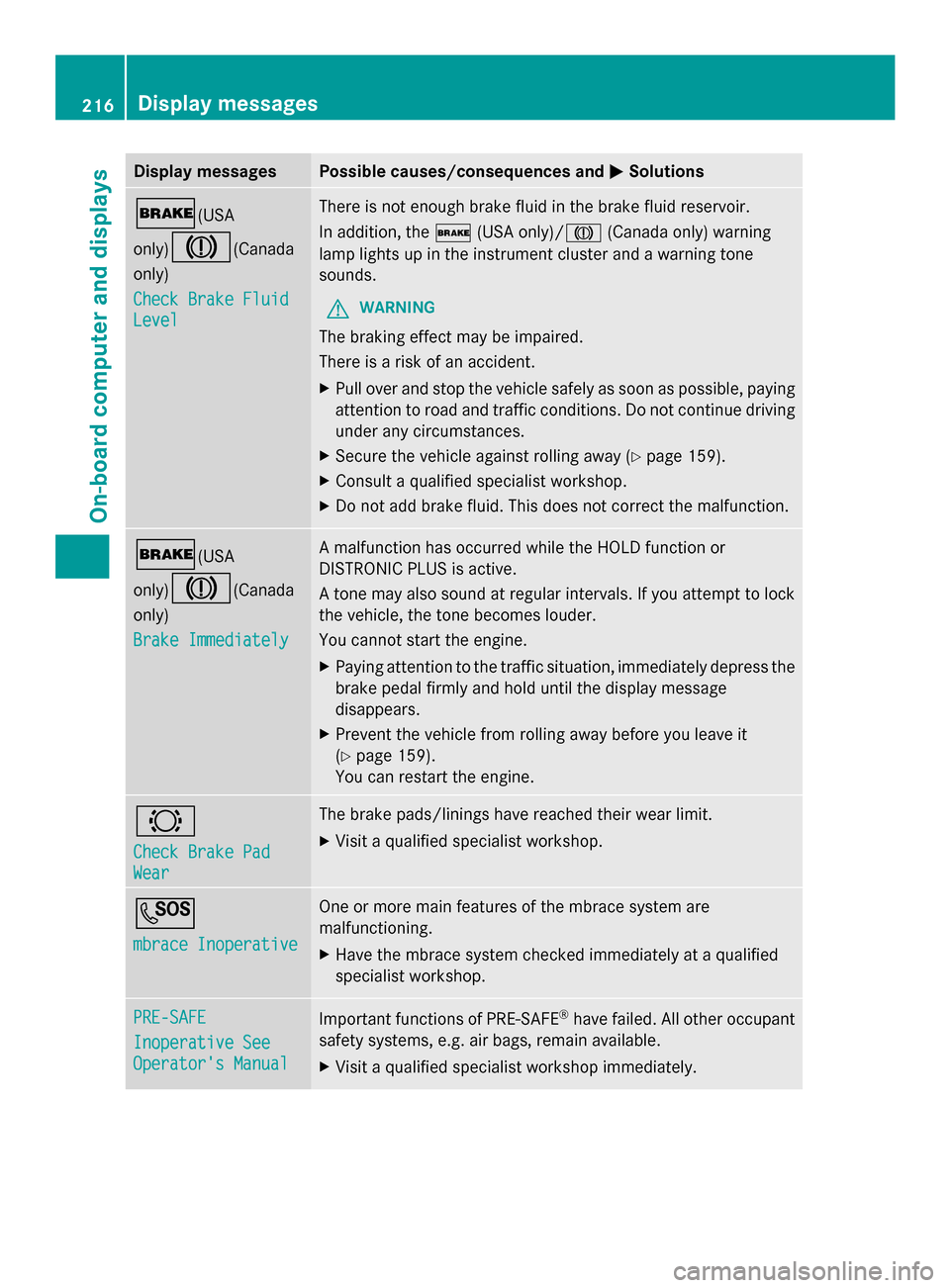
Display messages Possible causes/consequences and
0050
0050Solutions 0027(USA
only)
004D(Canada
only)
Check Brake Fluid Check Brake Fluid
Level Level There is not enough brake fluid in the brake fluid reservoir.
In addition, the
0027(USA only)/ 004D(Canada only) warning
lamp lights up in the instrument cluster and a warning tone
sounds.
G WARNING
The braking effect may be impaired.
There is a risk of an accident.
X Pull over and stop the vehicle safely as soon as possible, paying
attention to road and traffic conditions. Do not continue driving
under any circumstances.
X Secure the vehicle against rolling away ( Ypage 159).
X Consult a qualified specialist workshop.
X Do not add brake fluid. This does not correct the malfunction. 0027(USA
only)
004D(Canada
only)
Brake Immediately Brake Immediately A malfunction has occurred while the HOLD function or
DISTRONIC PLUS is active.
A tone may also sound at regular intervals. If you attempt to lock
the vehicle, the tone becomes louder.
You cannot start the engine.
X
Paying attention to the traffic situation, immediately depress the
brake pedal firmly and hold until the display message
disappears.
X Prevent the vehicle from rolling away before you leave it
(Y page 159).
You can restart the engine. 0026
Check Brake Pad Check Brake Pad
Wear Wear The brake pads/linings have reached their wear limit.
X
Visit a qualified specialist workshop. 0053
mbrace Inoperative mbrace Inoperative One or more main features of the mbrace system are
malfunctioning.
X
Have the mbrace system checked immediately at a qualified
specialist workshop. PRE-SAFE PRE-SAFE
Inoperative See Inoperative See
Operator's Manual Operator's Manual
Important functions of PRE-SAFE
®
have failed. All other occupant
safety systems, e.g. air bags, remain available.
X Visit a qualified specialist workshop immediately. 216
Display
messagesOn-board computer and displays