COMAND MERCEDES-BENZ SLK-Class 2015 R172 Owner's Manual
[x] Cancel search | Manufacturer: MERCEDES-BENZ, Model Year: 2015, Model line: SLK-Class, Model: MERCEDES-BENZ SLK-Class 2015 R172Pages: 358, PDF Size: 6.18 MB
Page 2 of 358
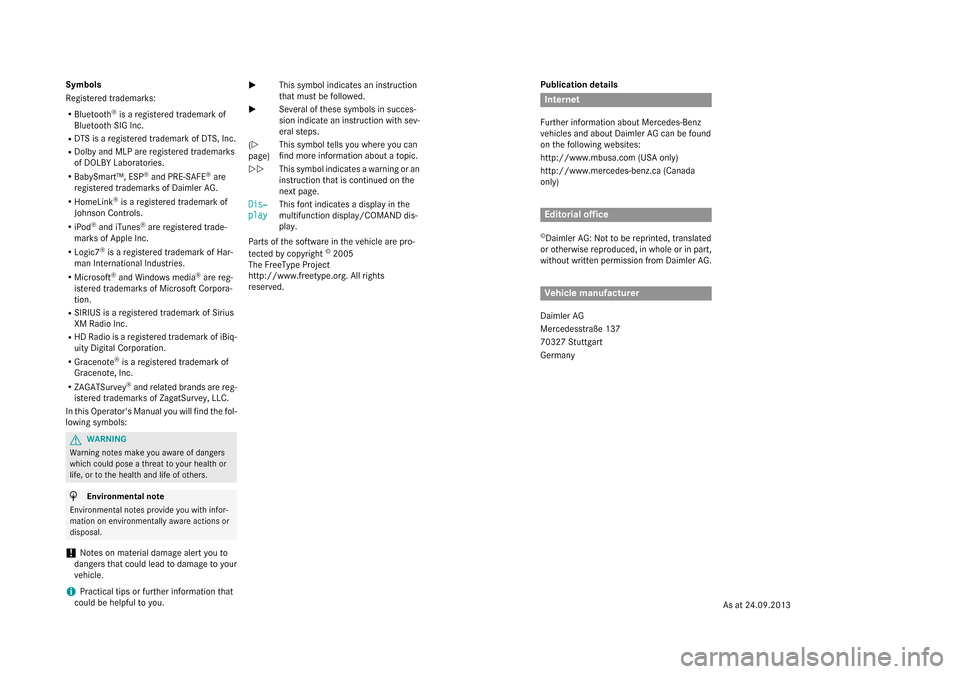
Publication details
Internet
Further information about Mercedes-Benz
vehicles and about Daimler AG can be found
on the following websites:
http://www.mbusa.com (USA only)
http://www.mercedes-benz.ca (Canada
only) Editorial office
© Daimler AG: Not to be reprinted, translated
or otherwise reproduced, in whole or in part,
without written permission from Daimler AG. Vehicle manufacturer
Daimler AG
Mercedesstraße 137
70327 Stuttgart
Germany
Symbols
Registered trademarks:
R Bluetooth ®
is a registered trademark of
Bluetooth SIG Inc.
R DTS is a registered trademark of DTS, Inc.
R Dolby and MLP are registered trademarks
of DOLBY Laboratories.
R BabySmart™, ESP ®
and PRE-SAFE ®
are
registered trademarks of Daimler AG.
R HomeLink ®
is a registered trademark of
Johnson Controls.
R iPod ®
and iTunes ®
are registered trade-
marks of Apple Inc.
R Logic7 ®
is a registered trademark of Har-
man International Industries.
R Microsoft ®
and Windows media ®
are reg-
istered trademarks of Microsoft Corpora-
tion.
R SIRIUS is a registered trademark of Sirius
XM Radio Inc.
R HD Radio is a registered trademark of iBiq-
uity Digital Corporation.
R Gracenote ®
is a registered trademark of
Gracenote, Inc.
R ZAGATSurvey ®
and related brands are reg-
istered trademarks of ZagatSurvey, LLC.
In this Operator's Manual you will find the fol-
lowing symbols: G
WARNING
Warning notes make you aware of dangers
which could pose a threat to your health or
life, or to the health and life of others. H
Environmental note
Environmental notes provide you with infor-
mation on environmentally aware actions or
disposal.
! Notes on material damage alert you to
dangers that could lead to damage to your
vehicle.
i Practical tips or further information that
could be helpful to you. X
This symbol indicates an instruction
that must be followed.
X Several of these symbols in succes-
sion indicate an instruction with sev-
eral steps.
(Y
page) This symbol tells you where you can
find more information about a topic.
YY This symbol indicates a warning or an
instruction that is continued on the
next page.
Dis‐
Dis‐
play play This font indicates a display in the
multifunction display/COMAND dis-
play.
Parts of the software in the vehicle are pro-
tected by copyright ©
2005
The FreeType Project
http://www.freetype.org. All rights
reserved.
As at 24.09.2013
Page 9 of 358
COMAND display
Cleaning ........................................ .288
Combination switch .......................... 110
Compass Calibrating ..................................... 274
Calling up ....................................... 273
Setting .......................................... .274
Consumption statistics (on-board
computer) .......................................... 197
Convenience closing feature .............. 85
Convenience opening feature see Side windows
Coolant (engine)
Checking the level ......................... 281
Display message ............................ 228
Filling capacity ............................... 351
Important safety notes .................. 351
Temperature (on-board com-
puter) ............................................. 208
Temperature gauge ........................ 194
Warning lamp ................................. 251
Cooling
see Climate control
Copyright ............................................. 28
Cornering light function Display message ............................ 225
Function/notes ............................ .111
Crash-responsive emergency light-
ing ....................................................... 114
Cruise control Cruise control lever ....................... 170
Deactivating ................................... 171
Display message ............................ 235
Driving system ............................... 169
Function/notes ............................ .169
Important safety notes .................. 169
Setting a speed .............................. 171
Storing and maintaining current
speed ............................................. 170
Cup holder
Center console .............................. 259
Important safety notes .................. 258
Customer Assistance Center
(CAC) ..................................................... 26
Customer Relations Department ....... 26 D
Dashboard see Instrument cluster
Data
see Technical data
Daytime running lamps
Display message ............................ 227
Function/notes ............................ .109
Switching on/off (on-board com-
puter) ............................................. 205
Declarations of conformity ................. 25
Delayed switch-off Exterior lighting (on-board com-
puter) ............................................. 206
Interior lighting .............................. 206
Diagnostics connection ......................25
Digital speedometer .........................198
Display messages ASSYST PLUS ................................ 282
Calling up (on-board computer) ..... 212
Driving systems ............................ .231
Engine ............................................ 228
General notes ................................ 212
Hiding (on-board computer) ........... 212
KEYLESS-GO .................................. 242
Lights ............................................. 225
Safety systems .............................. 213
SmartKey ....................................... 242
Tires ............................................... 236
Vehicle .......................................... .238
Distance recorder
see Trip odometer
Distance warning (warning lamp) .... 253
DISTRONIC PLUS Cruise control lever ....................... 173
Deactivating ................................... 178
Display message ............................ 233
Displays in the multifunction dis-
pla y................................................ 177
Driving tips .................................... 179
Function/note s............................. 171
Important safety notes .................. 172
Setting the specified minimum
distance ......................................... 177
Warning lamp ................................. 253 Index
7
Page 14 of 358
Locking
see Central locking
Locking (doors)
Automatic ........................................ 79
Emergency locking .......................... .80
From inside (central locking but-
ton) .................................................. 79
Locking centrally
see Central locking
Locking verification signal (on-
board computer) ............................... 207
Low-beam headlamps Changing bulb s.............................. 116
Display message ............................ 225
Setting for driving abroad (sym-
metrical) ........................................ 108
Switching on/of f........................... 109
Luggage cover
see Trunk partition
Lumbar support ................................... 99 M
M+S tires ............................................ 312
MAGIC SKY CONTROL ......................... 92
Malfunction message see Display messages
Manual transmission
Engaging reverse gear ................... 150
Gear lever ...................................... 150
Pulling away ................................... 142
Shift recommendation ................... 151
Starting the engine ........................ 142
Matte finish (cleaning instruc-
tions) .................................................. 286
mbrace Call priority .................................... 265
Display message ............................ 220
Downloading destinations
(COMAND) ..................................... 266
Downloading routes ....................... 269
Emergency call .............................. 263
General notes ................................ 261
Geo fencing ................................... 269
Locating a stolen vehicle ............... 268
MB info call button ........................ 265
Remote vehicle locking .................. 267
Roadside Assistance button .......... 264 Search & Send ............................... 266
Self-test ......................................... 262
Speed alert .................................... 269
System .......................................... 262
Triggering the vehicle alarm ........... 270
Vehicle remote malfunction diag-
nosis .............................................. 268
Vehicle remote unlocking .............. 267
Mechanical key
Function/note s................................ 74
Locking vehicle ................................ 80
Unlocking the driver's door .............. 80
Media Interface
see Separate operating instructions
Memory card (audio) ......................... 201
Memory function ............................... 106
Message memory (on-board com-
puter) .................................................. 212
Messages see Display messages
Mirrors
see Exterior mirrors
see Rear-view mirror
see Vanity mirror (in the sun visor)
Mobile phone
Menu (on-board computer) ............ 201
Modifying the programming
(SmartKey) ........................................... 73
MOExtended tires .............................. 293
Mounting wheels Lowering the vehicle ...................... 336
Mounting a new whee l................... 336
Preparing the vehicle ..................... 333
Raising the vehicl e......................... 334
Removing a whee l.......................... 335
Securing the vehicle against roll-
ing away ........................................ 333
MP3
see separate operating instructions
Multifunction display
Function/note s............................. 196
Permanent display ......................... 205
Multifunction steering wheel
Operating the on-board compute r..1 95
Overview .......................................... 33 12
Index
Page 19 of 358
Technical data
Capacities ...................................... 347
Emergency spare wheel ................. 344
Information .................................... 346
Tires/wheels ................................. 337
Vehicle data ................................... 353
TELEAID
Call priority .................................... 265
Downloading destinations
(COMAND) ..................................... 266
Downloading routes ....................... 269
Emergency call .............................. 263
General notes ................................ 261
Geo fencing ................................... 269
Locating a stolen vehicle ............... 268
MB info call button ....................... .265
Remote vehicle locking .................. 267
Roadside Assistance button .......... 264
Search & Send ............................... 266
Self-test ......................................... 262
Speed alert ................................... .269
System .......................................... 262
Triggering the vehicle alarm ........... 270
Vehicle remote malfunction diag-
nosis .............................................. 268
Vehicle remote unlocking .............. 267
Telephone
Accepting a call ............................ .202
Display message ............................ 241
Menu (on-board computer) ............ 201
Number from the phone book ....... .202
Redialing ........................................ 202
Rejecting/ending a call ................. 202
Temperature
Coolant .......................................... 194
Coolant (on-board computer) ......... 208
Engine oil (on-board computer) ...... 208
Outside temperature ..................... .195
Setting (climate control) ................ 129
Time
see separate operating instructions
Timing (RACETIMER) ......................... 209
TIREFIT kit .......................................... 294
Tire pressure Calling up (on-board computer) ..... 318
Checking manually ........................ 317
Display message ............................ 236 Important safety notes .................. 318
Maximum ....................................... 316
Notes ............................................. 315
Not reached (TIREFIT) .................... 295
Reached (TIREFIT) .......................... 296
Recommended ............................... 314
Tire pressure loss warning sys-
tem
General notes ................................ 317
Important safety notes .................. 317
Restarting ...................................... 318
Tire pressure monitor
Radio type approval for the tire
pressure monitor ........................... 321
Tire pressure monitoring system
Checking the tire pressure elec-
tronically ........................................ 320
Function/notes ............................ .318
General notes ................................ 318
Important safety notes .................. 319
Restarting ...................................... 321
Warning lamp ................................. 254
Warning message .......................... 320
Tires
Aspect ratio (definition) ................. 331
Average weight of the vehicle
occupants (definition) .................... 330
Bar (definition) ............................... 330
Changing a wheel .......................... 332
Characteristics .............................. 329
Checking ........................................ 311
Curb weight (definition) ................. 331
Definition of terms ......................... 329
Direction of rotatio n...................... 332
Display message ............................ 236
Distribution of the vehicle occu-
pants (definition) ............................ 332
DOT, Tire Identification Number
(TIN) ............................................... 329
DOT (Department of Transporta-
tion) (definition) ............................. 330
GAWR (Gross Axle Weight Rating)
(definition) ..................................... 330
GVW (Gross Vehicle Weight) (def-
inition) ........................................... 330
GVWR (Gross Vehicle Weight Rat-
ing) (definition) .............................. 330
Important safety notes .................. 310 Index
17
Page 29 of 358
Limited Warranty
! Follow the instructions in this manual
about the proper operation of your vehicle
as well as about possible vehicle damage.
Damage to your vehicle that arises from
culpable contraventions against these
instructions is not covered either by the
Mercedes-Benz Limited Warranty or by the New or Used-Vehicle Warranty. Data stored in the vehicle
Data recording
This vehicle is capable of recording diagnostic
information relating to vehicle operation, mal- functions, and user settings. This may include
information about the performance or status
of various systems, including but not limited
to, engine, throttle, steering or brake sys-
tems, that is stored and can be read out with suitable devices, particularly when the vehi-
cle is serviced. The data obtained is used to
properly diagnose and service your vehicle or
to further optimize and develop vehicle func-
tions. COMAND/mbrace (Canada: TELEAID)
If the vehicle is equipped with COMAND or
mbrace, additional data about the vehicle’s
operation, the use of the vehicle in certain
situations, and the location of the vehicle may
be compiled through COMAND or the mbrace system.
For additional information please refer to the
COMAND User Manual and/or the mbrace
Terms and Conditions. Event data recorders
This vehicle is equipped with an event data
recorder (EDR). The main purpose of an EDR
is to record data that will assist in under-
standing how a vehicle’s systems performed
in certain crash or near crash-like situations, such as during air bag deployment or when
hitting a road obstacle. The EDR is designed
to record data related to vehicle dynamics
and safety systems for a short period of time, typically 30 seconds or less.
The EDR in this vehicle is designed to record
such data as:
R how various systems in your vehicle are
operating
R whether or not the driver and passenger
seat belts are fastened
R how far (if at all) the driver is depressing the
accelerator and/or brake pedal and
R how fast the vehicle is traveling
This data can help provide a better under-
standing of the circumstances in which
crashes and injuries occur. NOTE: EDR data is recorded by your vehicle only if a non-trivial
crash situation occurs; no data is recorded by
the EDR under normal driving conditions and no personal data (e.g., name, gender, age,
and crash location) are recorded. However,
other parties, such as law enforcement, can
combine the EDR data with the type of per-
sonal identification data routinely acquired
during a crash investigation.
Access to the vehicle and/or the EDR is nee-
ded to read data that is recorded by an EDR,
and special equipment is required. In addition to the vehicle manufacturer, other parties
that have the special equipment, such as law
enforcement, can read the information by
accessing the vehicle or the EDR.
EDR data may be used in civil and criminal
matters as a tool in accident reconstruction,
accident claims, and vehicle safety. Since the Crash Data Retrieval CDR tool that is used to extract data from the EDR is commercially
available, Mercedes-Benz USA, LLC
("MBUSA") expressly disclaims any and all lia-bility arising from the extraction of this infor-
mation by unauthorized Mercedes-Benz per-
sonnel.
MBUSA will not share EDR data with others
without the consent of the vehicle owners or,
if the vehicle is leased, without the consent of Introduction
27 Z
Page 35 of 358
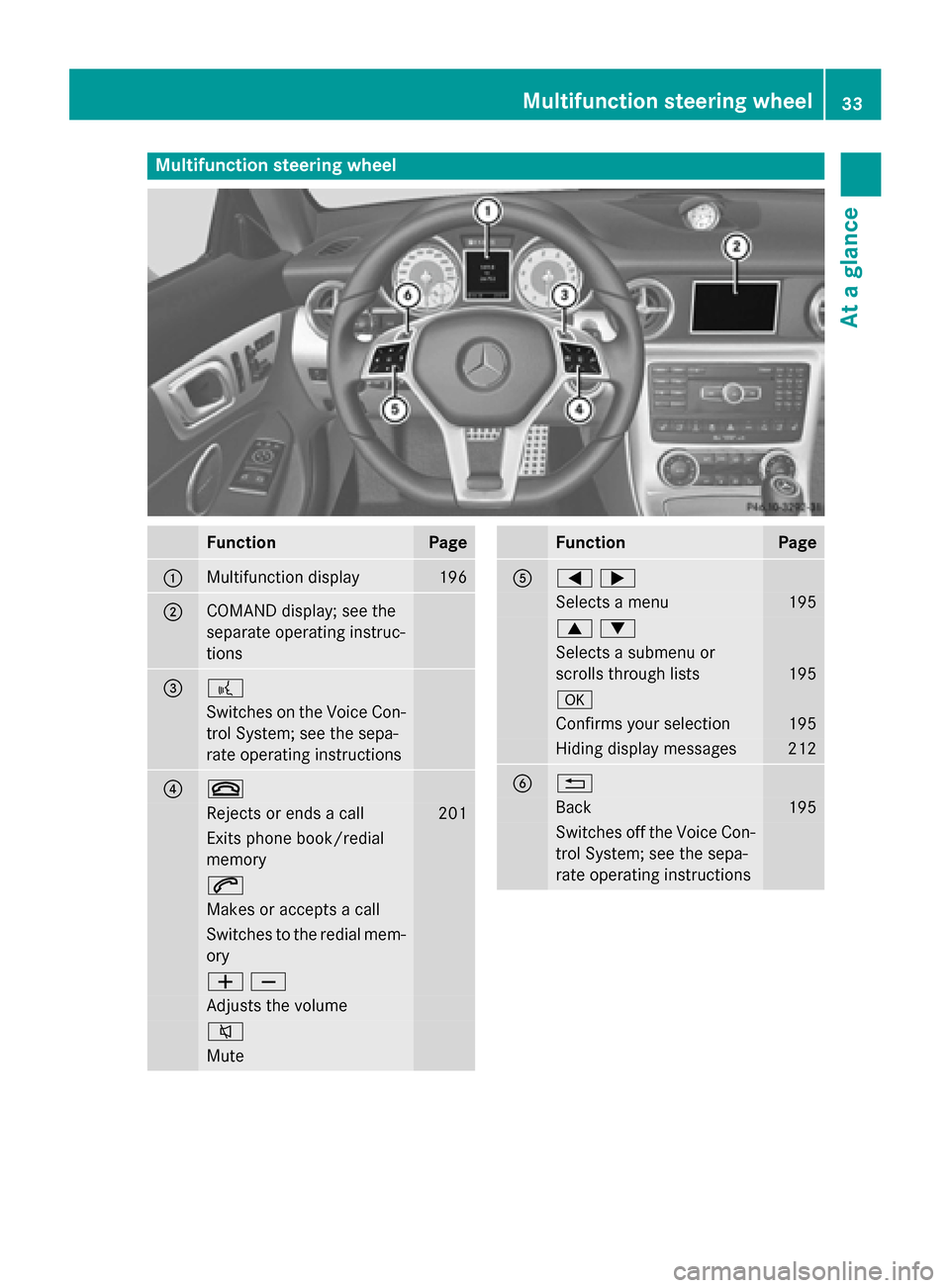
Multifunction steering wheel
Function Page
0043
Multifunction display 196
0044
COMAND display; see the
separate operating instruc-
tions
0087 0059
Switches on the Voice Con-
trol System; see the sepa-
rate operating instructions 0085 0076
Rejects or ends a call 201
Exits phone book/redial
memory
0061
Makes or accepts a call
Switches to the redial mem-
ory 00810082
Adjusts the volume
0063
Mute Function Page
0083
00590065
Selects a menu 195
00630064
Selects a submenu or
scrolls through lists
195
0076
Confirms your selection 195
Hiding display messages 212
0084 0038
Back 195
Switches off the Voice Con-
trol System; see the sepa-
rate operating instructions Multifunction steering wheel
33At a glance
Page 36 of 358
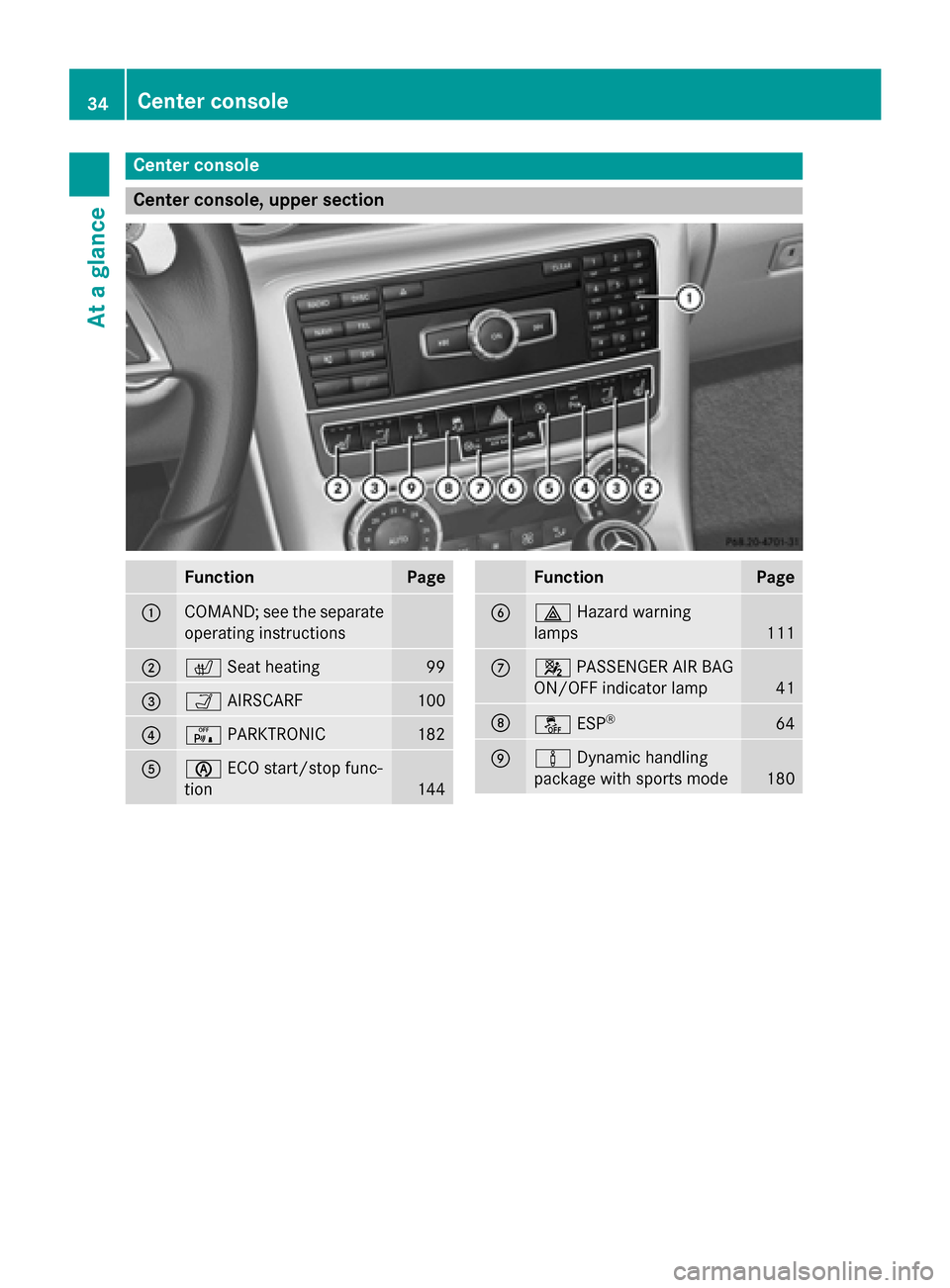
Center console
Center console, upper section
Function Page
0043
COMAND; see the separate
operating instructions 0044
0072
Seat heating 99
0087
00CE
AIRSCARF 100
0085
008F
PARKTRONIC 182
0083
00D6
ECO start/stop func-
tion 144 Function Page
0084
002F
Hazard warning
lamps 111
006B
0073
PASSENGER AIR BAG
ON/OFF indicator lamp 41
006C
00BB
ESP® 64
006D
00CC
Dynamic handling
package with sports mode 18034
Center consoleAt a glance
Page 37 of 358
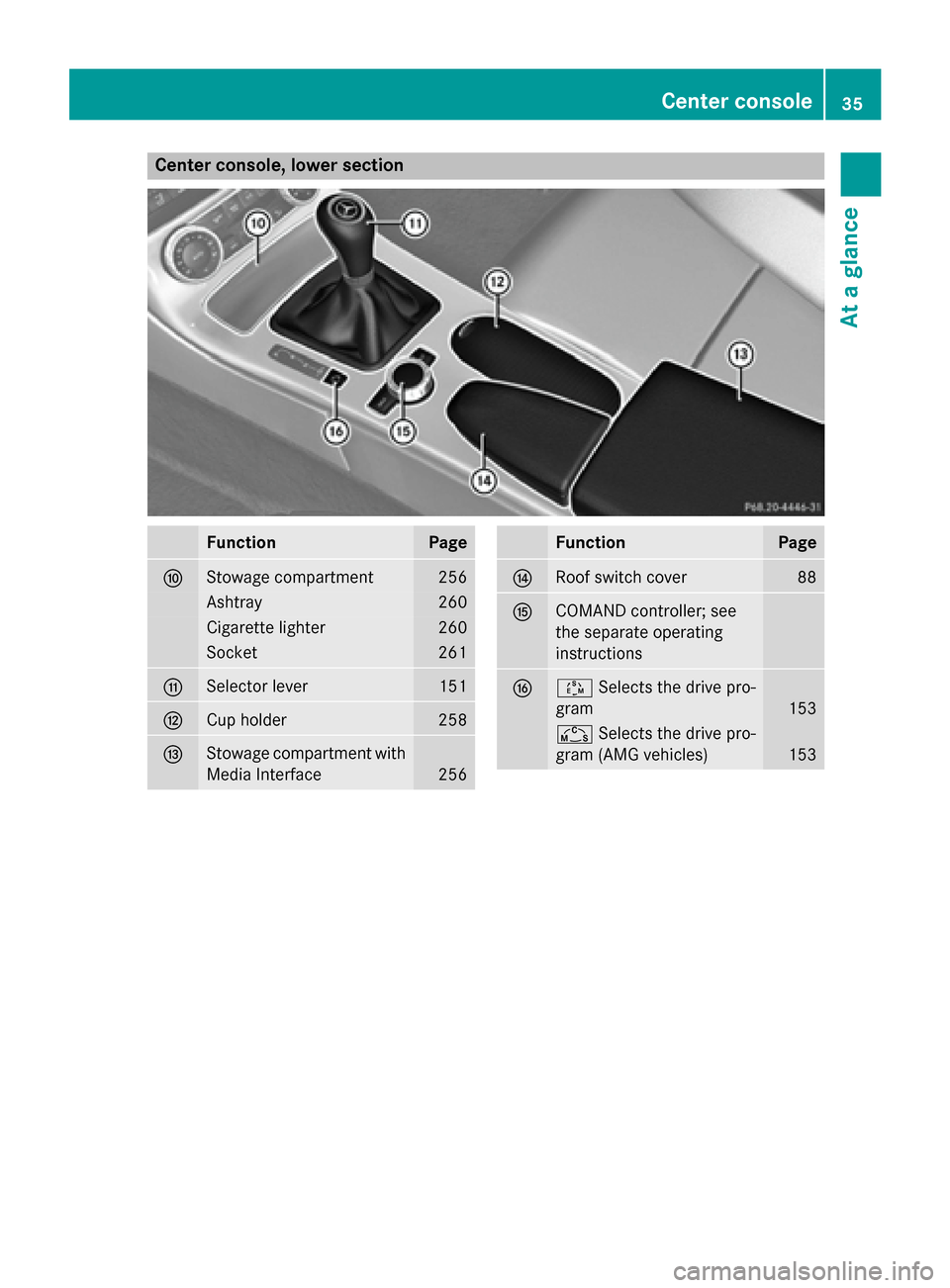
Center console, lower section
Function Page
006E
Stowage compartment 256
Ashtray 260
Cigarette lighter 260
Socket 261
006F
Selector lever 151
0070
Cup holder 258
0071
Stowage compartment with
Media Interface 256 Function Page
0072
Roof switch cover 88
0073
COMAND controller; see
the separate operating
instructions
0074
00C8
Selects the drive pro-
gram 153
00CD
Selects the drive pro-
gram (AMG vehicles) 153Center console
35At a glance
Page 190 of 358
X
Maneuver if necessary.
X Always observe the warning messages dis-
played by PARKTRONIC (Y page 184).
Canceling Parking Guidance X
Press the PARKTRONIC button on the cen-
ter console (Y page 184).
Parking Guidance is canceled immediately
and PARKTRONIC is deactivated.
Parking Guidance is canceled automatically if it is no longer possible to guide you into the
parking space, or if a malfunction occurs.
The parking space symbol goes out and a
warning tone sounds. The Parking Guid‐
Parking Guid‐
ance
ance Canceled Canceled message appears in the mul-
tifunction display. ATTENTION ASSIST
Important safety notes ATTENTION ASSIST helps you during long,
monotonous journeys, such as on highways.
It is active in the range between 50 mph
(80 km/h) and 112 mph (180 km/h).
If ATTENTION ASSIST detects typical indica-
tors of fatigue or increasing lapses in con-
centration on the part of the driver, it sug-
gests you take a break.
ATTENTION ASSIST assesses your level of
fatigue or lapses in concentration by taking
the following criteria into account:
R your personal driving style, e.g. steering
characteristics
R journey details, e.g. time of day and length
of journey
The functionality of ATTENTION ASSIST is
restricted and warnings may be delayed or
not occur at all:
R if the road condition is poor, e.g. if the sur-
face is uneven or if there are potholes
R if there is a strong side wind R
if you have adopted a sporty driving style
with high cornering speeds or high rates of
acceleration
R if you are predominantly driving slower
than 50 mph (80 km/h) or faster than
112 mph (180 km/h)
R if you are currently using COMAND or mak-
ing a telephone call with it
R if the time has been set incorrectly
R in active driving situations, such as when
you change lanes or change your speed
ATTENTION ASSIST is only an aid to the
driver. It might not always recognize fatigue
or increasing inattentiveness in time or fail to recognize them at all. The system is not a
substitute for a well-rested and attentive
driver.
Warning and display messages in the
multifunction display X
Activate ATTENTION ASSIST using the on-
board computer (Y page 203).
If ATTENTION ASSIST is active, you will be
warned no sooner than 20 minutes after
your journey has begun. You then hear an
intermittent warning tone twice and the
Attention Assist: Take a Break! Attention Assist: Take a Break!
message appears in the multifunction dis-
play.
X If necessary, take a break.
X Press the 0076or0038 button to confirm
the message.
On long journeys, take regular breaks in good
time to allow yourself to rest properly. If you
do not take a break and ATTENTION ASSIST
still detects increasing lapses in concentra-
tion, you will be warned again after
15 minutes at the earliest.
ATTENTION ASSIST is reset when you con-
tinue your journey and starts assessing your
tiredness again if:
R you switch off the engine.
R you take off your seat belt and open the
driver's door, e.g. for a change of drivers or
to take a break. 188
Driving systemsDriving and parking
Page 199 of 358
0083
Time
0084 Outside temperature or speed
(Ypage 205)
Text field 0087shows the selected menu or
submenu as well as display messages.
X To show menu bar 0085:press the 0059
or 0065 button on the steering wheel.
Menu bar 0085disappears after a few sec-
onds of inactivity.
i You can set the time using COMAND; see
the separate operating instructions.
Vehicles with manual transmission:
instead of transmission position 0043and drive
program 0044, the time and the outside tem-
perature or speed are shown.
The following messages may appear in the
multifunction display:
0097 Gearshift recommendation for man-
ual transmission (Y page 151) or
when shifting manually (automatic
transmission) (Y page 154)
0095005D0096 Parking Guidance (Y page 185)
CRUISE CRUISE Cruise control (Y
page 169)
00CE Adaptive Highbeam Assist
(Ypage 113)
00D6 ECO start/stop function
(Ypage 143)
00D9 HOLD function (Y page 181) Menus and submenus
Menu overview
Press the 0059or0065 button on the steer-
ing wheel to call up the menu bar and select a
menu.
Operating the on-board computer
(Y page 195).
Depending on the equipment installed in the
vehicle, you can call up the following menus:
R Trip Trip menu (Y page 197)
R Navi
Navi menu (navigation instructions)
(Y page 199) R
Audio
Audio menu (Y page 200)
R Tel
Tel menu (telephone) (Y page 201)
R DriveAssist
DriveAssist menu (assistance)
(Y page 203)
R Serv
Serv menu (Y page 204)
R Sett
Sett menu (settings) (Y page 204)
R AMG
AMG menu in AMG vehicles (Y page 208) Trip menu
Standard display X
Press and hold the 0038button on the
steering wheel until the Trip
Tripmenu with
trip odometer 0043and odometer 0044is
shown.
Trip computer "From Start" or "From
Reset" Example: trip computer "From Start"
0043 Distance
0044 Time
0087 Average speed
0085 Average fuel consumption
X Press the 0059or0065 button on the steer-
ing wheel to select the Trip
Trip menu.
X Press the 0063or0064 button to select
From Start From Start orFrom Reset
From Reset.
The values in the From Start
From Startsubmenu are
calculated from the start of a journey whilst Menus and submenus
197On-board computer and displays Z