camera MERCEDES-BENZ SLK-CLASS ROADSTER 2016 Owners Manual
[x] Cancel search | Manufacturer: MERCEDES-BENZ, Model Year: 2016, Model line: SLK-CLASS ROADSTER, Model: MERCEDES-BENZ SLK-CLASS ROADSTER 2016Pages: 358, PDF Size: 7.24 MB
Page 191 of 358
bumper. Make sure that the bumper is free of
dirt, ice or slush in the vicinity of the sensors.
The sensors must not be covered, for exam-
ple by cycle racks or overhanging loads. Fol-
lowing a severe impact or in the event of dam-
age to the bumpers, have the function of the
sensors checked at a qualified specialist
workshop. Blind Spot Assist may otherwise
not work properly.
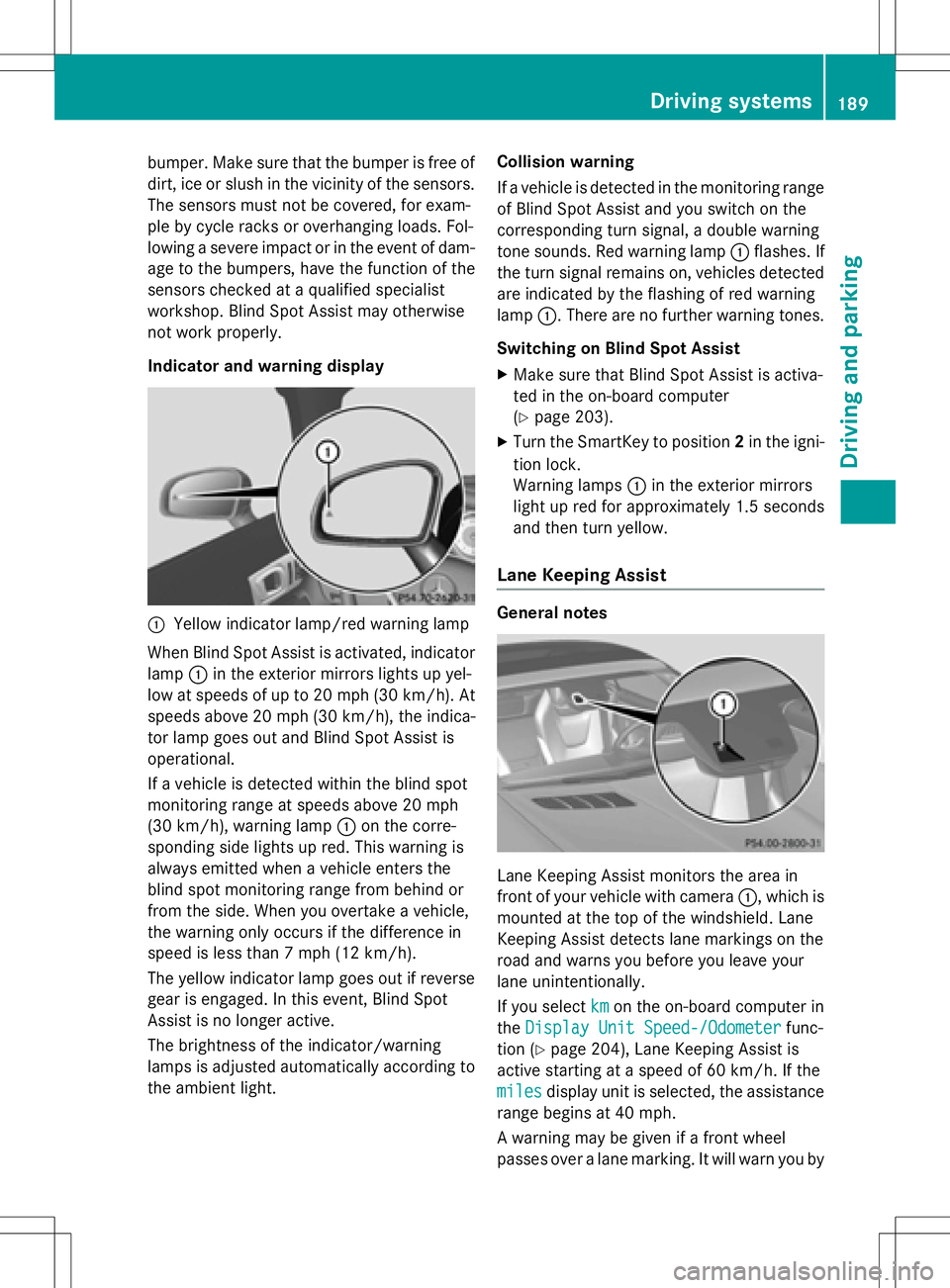
Indicator and warning display
:Yellow indicator lamp/red warning lamp
When Blind Spot Assist is activated, indicator
lamp :in the exterior mirrors lights up yel-
low at speeds of up to 20 mph (30 km/ h). At
speeds above 20 mph (30 km/h), the indica-
tor lamp goes out and Blind Spot Assist is
operational.
If a vehicle is detected within the blind spot
monitoring range at speeds above 20 mph
(30 km/h), warning lamp :on the corre-
sponding side lights up red. This warning is
always emitted when a vehicle enters the
blind spot monitoring range from behind or
from the side. When you overtake a vehicle,
the warning only occurs if the difference in
speed is less than 7 mph (12 km/h).
The yellow indicator lamp goes out if reverse
gear is engaged. In this event, Blind Spot
Assist is no longer active.
The brightness of the indicator/warning
lamps is adjusted automatically according to
the ambient light. Collision warning
If a vehicle is detected in the monitoring range
of Blind Spot Assist and you switch on the
corresponding turn signal, a double warning
tone sounds. Red warning lamp
:flashes. If
the turn signal remains on, vehicles detected
are indicated by the flashing of red warning
lamp :. There are no further warning tones.
Switching on Blind Spot Assist
XMake sure that Blind Spot Assist is activa-
ted in the on-board compu
ter
(
Ypage 203).
XTurn the SmartKey to position 2in the igni-
tion lock.
Warning lamps :in the exterior mirrors
light up red for approximately 1.5 seconds
and then turn yellow.
Lane Keeping Assist
General notes
Lane Keeping Assist monitors the area in
front of your vehicle with camera :, which is
mounted at the top of the windshield. Lane
Keeping Assist detects lane markings on the
road and warns you before you leave your
lane unintentionally.
If you select km
on the on-board computer in
the Display Unit Speed-/Odometer
func-
tion (
Ypage 204), Lane Keeping Assist is
active starting at a speed of 60 km/h. If the
miles
display unit is selected, the assistance
range begins at 40 mph.
A warning may be given if a front wheel
passes over a lane marking. It will warn you by
Driving systems189
Driving and parking
Z
Page 192 of 358
means of intermittent vibration in the steer-
ing wheel for up to 1.5 seconds.
Important safety notes
GWARNING
Lane Keeping Assist may not always clearly
recognize lane markings.
In this case, Lane Keeping Assist may:
Rgive an unnecessary warning
Rnot give a warning
There is a risk of an accident.
Always pay particular attention to the traffic
situation and stay in lane, in particular if
warned by Lane Keeping Assist.
GWARNING
The Lane Keeping Assist warning does not
return the vehicle to the original lane. There is
a risk of an accident.
You should always steer, brake or accelerate
yourself, in particular if warned by Lane Keep-
ing Assist.
If you fail to adapt your driving style, Lane
Keeping Assist can neither reduce the risk of
an accident nor override the laws of physics.
Lane Keeping Assist cannot take into account
the road, traffic and weather conditions. Lane
Keeping Assist is merely an aid. You are
responsible for the distance to the vehicle in
front, for vehicle speed, for braking in good
time and for staying in your lane.
The Lane Keeping Assist does not keep the
vehicle in the lane.
The system may be impaired or may not func- tion if:
Rthere is poor visibility, e.g. due to insuffi-
cient illumination of the road, or due to
snow, rain, fog or spray
Rthere is glare, e.g. from oncoming traffic,
the sun or reflections (e.g. when the road
surface is wet)
Rthe windshield is dirty, fogged up, damagedor covered, for instance by a sticker, in the
vicinity of the camera
Rthere are no, several or unclear lane mark-
ings for a lane, e.g. in areas with road con-
struction work
Rthe lane markings are worn away, dark or
covered up, e.g. by dirt or snow
Rthe distance to the vehicle in front is too
small and the lane markings thus cannot be
detected
Rthe lane markings change quickly, e.g.
lanes branch off, cross one another or
merge
Rthe road is narrow and winding
Rthere are strong shadows cast on the lane
Switching on Lane Keeping Assist
XSwitch on Active Lane Keeping Assist using
the on-board computer; to do so, select
Standard
or Adaptive(Ypage 204).
If you drive at speeds above 40 mph
(60 km/h) and lane markings are detected, the lines in the assistance graphics display
(
Ypage 203) are shown in green. Lane
Keeping Assist is ready for use.
Standard
If Standard
is selected, no warning vibration
occurs if:
Ryou switch on the turn signals. In this event, the warnings are suppressed for a certain
period of time.
Ra driving safety system intervenes, such as
ABS, BAS or ESP®.
Adaptive
When Adaptive
is selected, no warning vibra-
tion occurs if:
Ryou switch on the turn signals. In this event,
the warnings are suppressed for a certain
period of time.
Ra driving safety system intervenes, e.g.
ABS, BAS or ESP®.
Ryou accelerate hard, e.g. kickdown.
Ryou brake hard.
190Driving systems
Driving and parking
Page 229 of 358
Display messagesPossible causes/consequences andMSolutions
b
AutoLampFunction
Inoperative
The ligh tsensor is defective.
XVisit aqualified specialist workshop .
b
Switch Off Lights
You leaveth evehicl eand th eligh tis still switched on . Awarnin g
tone also sounds.
XTur nth eligh tswitch to position Ã.
Adaptive Highbeam
Assist Inoperative
Adaptive Highbeam Assis tis faulty.
XVisit aqualified specialist workshop .
Adaptive Highbeam
Assist Currently
Unavailable See
Operator'sManual
Adaptive Highbeam Assis tis deactivated and temporarily inoper -
ative. Possibl ecauses are:
Rth ewindshield in th ecamera' sfield of vision is dirty.
Rvisibility is impaire ddue to heav yrain ,snow or fog.
XClean th ewindshield.
If th esystem detects that th ecamera is full yoperational again ,th e
Adaptive
HighbeamAssistNowAvailablemessage appears .
Adaptive Highbeam Assis tis operational again .
Engine
Display messagesPossible causes/consequences and MSolutions
+
Check Coolant
Level See Opera‐
tor's Manual
The coolantlevel is to olow.
!Avoid makin glon gjourneys wit hto olittl ecoolan tin th eengin e
coolin gsystem. The engin ewill otherwise be damaged.
XAd dcoolant, observin gth ewarnin gnote sbefore doin gso
(
Ypage 279).
XIf you need to add coolan tmor eofte nthan usual, hav eth e
engin ecoolan tsystem checke dat aqualified specialist work-
shop.
?The fan motor is faulty.
XAt coolan ttemperatures belo w24 8 ‡ (120†), drive to th e
neares tqualified specialist workshop .
XAvoid subjecting theengin eto heav yloads ,e.g. drivin gin moun-
tainous terrain ,and stop-and-g otraffic.
Display messages22 7
On-board computer and displays
Z
Page 233 of 358
Display messagesPossible causes/consequences andMSolutions
LaneKeepin g
Assist Currently
Unavailable See
Operator' sManual
Lan eKeepin gAssis tis deactivated and temporarily inoperative.
Possibl ecauses are:
Rth ewindshield in th ecamera' sfield of vision is dirty.
Rvisibility is impaire ddue to heav yrain ,snow or fog.
Rthere hav ebeen no lan emarking sfo ran extended period.
Rth elan emarking sare worn, dark or covered, e.g. by dir tor snow.
Whe nth ecauses state dabov eno longer apply, th edisplay mes -
sage disappears.
Lan eKeepin gAssis tis operational again .
If th edisplay message does no tdisappear :
XPull overand stop th evehicl esafely as soo nas possible, payin g
attention to roa dand traffic conditions.
XSecur eth evehicl eagainst rollin gaway (Ypage 160).
XClean th ewindshield.
Lan eKeepin g
Assist Inoperative
LaneKeepin gAssis tis faulty.
XVisit aqualified specialist workshop .
Blind SpotAssist
Currently Unavail‐
abl eSee Opera‐
tor's Manual
Blind Spot Assis tis temporarily inoperative. Possibl ecauses are:
Rth esensor sare dirty.
Rfunction is impaire ddue to heav yrain or snow.
Rth erada rsensor system is outside th eoperating temperature
range.
Rth erada rsensor system is temporarily inoperative, e.g. due to
electromagnetic radiation emitted by nearby TV or radi osta-
tion sor other source sof electromagnetic radiation .
The yello w9 indicato rlamp salso ligh tup in th eexterio rmir -
rors.
Whe nth ecauses state dabov eno longer apply, th edisplay mes -
sage disappears.
Blind Spot Assis tis operational again .
If th edisplay message does no tdisappear :
XPull overand stop th evehicl esafely as soo nas possible, payin g
attention to roa dand traffic conditions.
XSecur eth evehicl eagainst rollin gaway (Ypage 160).
XClean th esensor s (Ypage 285).
XRestart th eengine.
Display messages23 1
On-board computer and displays
Z