ignition MERCEDES-BENZ SLK-CLASS ROADSTER 2016 Owners Manual
[x] Cancel search | Manufacturer: MERCEDES-BENZ, Model Year: 2016, Model line: SLK-CLASS ROADSTER, Model: MERCEDES-BENZ SLK-CLASS ROADSTER 2016Pages: 358, PDF Size: 7.24 MB
Page 13 of 358
Opening ......................................... 276
Horn ...................................................... 30
Hydroplaning .....................................1 67
I
Ignition lock
see Key positions
Immobilizer .......................................... 69
Indicator and warning lamps
COLLISION PREVENTION ASSIST
PLUS .............................................. 251
Indicator lamps
see Warning and indicator lamps
Indicators
see Turn signals
Instrument cluster
Overview .......................................... 31
Warning and indicator lamps ........... 32
Instrument cluster lighting .............. 194
Interior lighting
Automatic control .......................... 113
Delayed switch-off (on-board
computer) ...................................... 206
Emergency lighting ........................ 114
Manual control ............................... 114
Overview ........................................ 113
Reading lamp ................................. 113
Setting the brightness of the
ambient lighting (on-board com-
puter) ............................................. 205
J
JackStorage location ............................ 290
Using ............................................. 332
Jump starting (engine) ......................299
K
Key positions
KEYLESS-GO .................................. 140
SmartKey ....................................... 139
KEYLESS-GO
Convenience closing feature ............ 85
Deactivation ..................................... 73
Display message ............................ 240
Locking ............................................ 73 Removing the Start/Stop button ... 141
Start/Stop button .......................... 140
Starting the engine ........................ 142
Unlocking ......................................... 73
Kickdown
Driving tips ....................................1 52
Manual drive program .................... 156
Knee bag .............................................. 47
L
Lamps
see Warning and indicator lamps
Lane Keeping Assist
Activating/deactivating ................. 204
Display message ............................ 231
Function/information .................... 189
Lap time (RACETIMER) ...................... 208
License plate lamp (display mes-
sage) ................................................... 225
Light function, active
Display message ............................ 226
Light sensor (display message) ....... 227
Lights
Activating/deactivating the inte-
rior lighting delayed switch-off ....... 206
Active light function ....................... 111
Automatic headlamp mode ............ 108
Cornering light function ................. 111
Fogged up headlamps .................... 113
Hazard warning lamps ................... 111
High beam flasher .......................... 110
High-beam headlamps ................... 110
Light switch ................................... 108
Low-beam headlamps .................... 109
Parking lamps ................................ 110
Rear fog lamp ................................ 109
Setting the brightness of the
ambient lighting (on-board com-
puter) ............................................. 205
Standing lamps .............................. 110
Switching the daytime running
lamps on/off (on-board com-
puter) ............................................. 205
Switching the exterior lighting
delayed switch-off on/off (on-
board computer) ............................ 205
Index11
Page 18 of 358
Opening/closing (front) ...................83
Overview .......................................... 83
Problem (malfunction) ..................... 86
Resetting ......................................... 85
Reversing feature ............................. 83
SmartKey
Changing the battery ....................... 75
Changing the programming .............7 4
Checking the battery ...................... .75
Convenience opening feature .......... 84
Dis play message ............................ 240
Door central locking/unlocking ...... .72
Important safety notes .................... 72
Loss .................................................7 7
Mechanical key ................................ 74
Opening/closing the roof ................8 8
Overview .......................................... 72
Positions (ignition lock) ................. 139
Problem (malfunction) ..................... 77
Starting the engine ........................ 142
Snow chains ...................................... 311
Sockets
Center console .............................. 259
General notes ................................ 259
Under the armrest .........................2 59
Spare wheel
Stowing .......................................... 340
Special seat belt retractor .................. 58
Specialist workshop ............................ 25
Speed, controlling
see Cruise control
Speedometer
Digital ............................................ 198
In the Instrument cluster ................. 31
Segments ...................................... 194
Selecting the display unit ...............2 04
SPORT handling mode
Deactivating/activa ting
(Mercedes-AMG vehicl
es) ................ 67
Warning lamp ................................. 246
Standing lamps
Display message ............................ 226
Switching on/off ........................... 110
Start/stop function
see ECO start/stop function
Starting (engine) ................................ 141
Steering (display message) .............. 238Steering wheel
Adjusting (electrically) ................... 101
Adjusting (manually) ...................... 101
Button overview ............................... 33
Buttons (on-board computer) ......... 195
Cleaning ......................................... 286
Important safety notes .................. 100
Paddle shifters ............................... 152
Storing settings (memory func-
tion) ............................................... 106
Steering wheel paddle shifters ........ 152
Stopwatch (RACETIMER) ................... 208
Stowage areas ................................... 254
Stowage compartments
Armrest (under) ............................. 255
Center console .............................. 255
Cup holders ................................... 256
Door ............................................... 255
Eyeglasses compartment ............... 255
Glove box ....................................... 254
Important safety information ......... 254
Rear wall ........................................ 255
Stowage net ................................... 256
Stowage net ....................................... 256
Summer tires ..................................... 310
Sun visor ............................................ 257
Surround lighting (on-board com-
puter) .................................................. 205
Switching air-recirculation mode
on/off ................................................. 133
T
Tachometer ........................................ 195
Tail lamps
Display message ............................ 225
see Lights
Tank content
Fuel gauge ....................................... 31
Technical data
Capacities ...................................... 347
Emergency spare wheel ................. 342
Information .................................... 344
Tires/wheels ................................. 335
Vehicle data ................................... 352
TELEAID
Call priority .................................... 263
16Index
Page 32 of 358
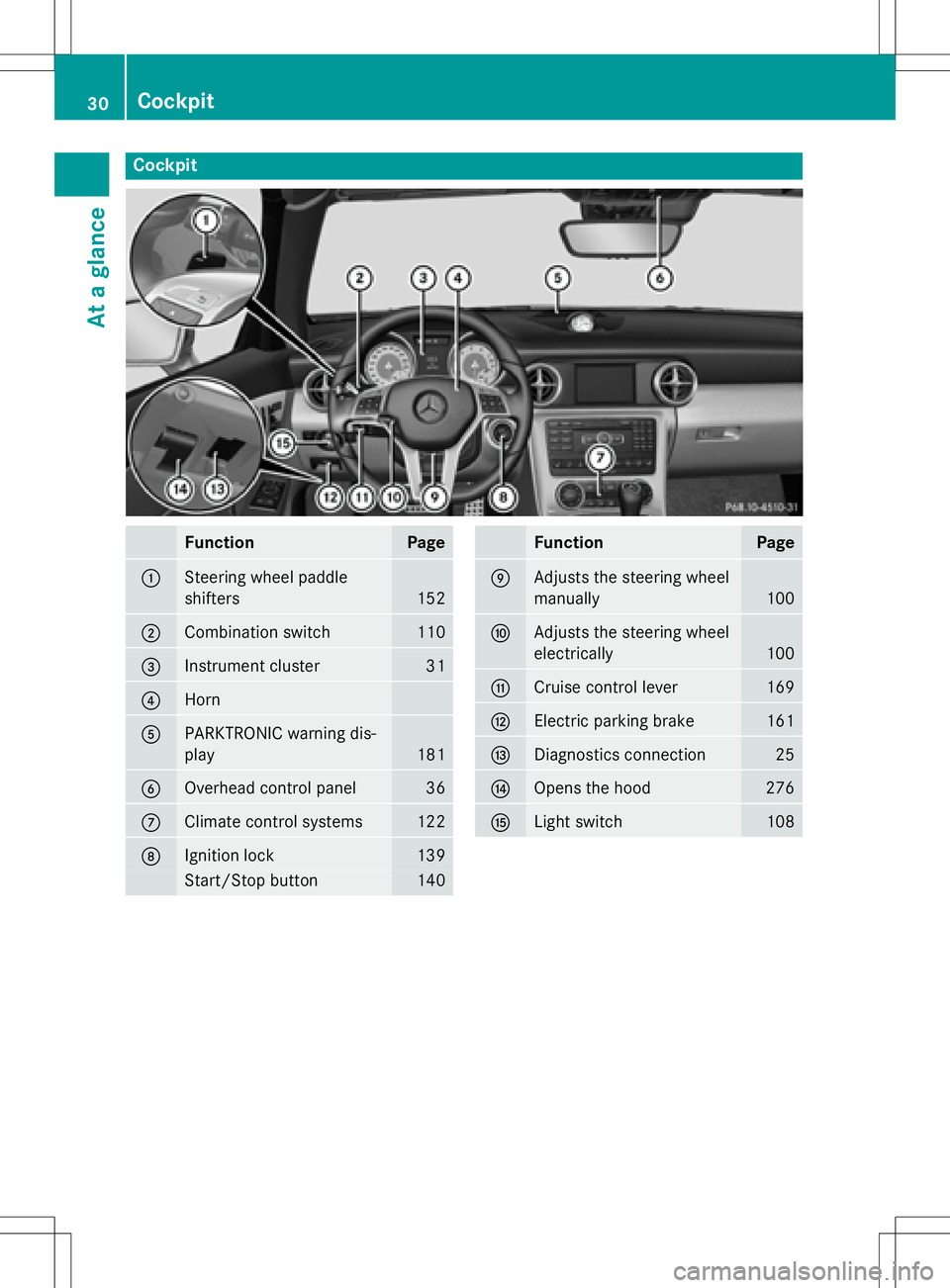
Cockpit
FunctionPage
:Steering wheel paddle
shifters
152
;Combination switch110
=Instrument cluster31
?Horn
APARKTRONIC warning dis-
play
181
BOverhead control panel36
CClimate control systems122
DIgnition lock139
Start/Stop button140
FunctionPage
EAdjusts the steering wheel
manually
100
FAdjusts the steering wheel
electrically
100
GCruise control lever169
HElectric parking brake161
IDiagnostics connection25
JOpens the hood276
KLight switch108
30Cockpit
At a glance
Page 42 of 358

Useful information
i
This Operator's Manual describes all
models and all standard and optional equip-
ment of your vehicle available at the time of
publication of the Operator's Manual.
Country-specific differences are possible.
Please note that your vehicle may not be
equipped with all features described. This
also applies to safety-related systems and
functions.
iRead the information on qualified special-
ist workshops (
Ypage 25).
Panic alarm
XTo activate: press!button :for at
least one second.
A visual and audible alarm is triggered if the
alarm system is armed.
XTo deactivate: press!button :
again.
or
XInsert the SmartKey into the ignition lock.
or
XPress the KEYLESS-GO Start/Stop button.
The KEYLESS-GO key must be in the vehi-
cle.
Occupant safety
Introduction to the restraint system
The restraint system can reduce the risk of
vehicle occupants coming into contact with
parts of the vehicle's interior in the event of
an accident. The restraint system can also
reduce the forces to which vehicle occupants
are subjected during an accident.
The restraint system comprises:
RSeat belt system
RAir bags
The components of the restraint system work in conjunction with each other. They can only
deploy their protective function if, at all times,
all vehicle occupants:
Rhave fastened their seat belts correctly
(
Ypage 43)
Rhave adjusted their seat and head restraint
properly (
Ypage 97).
As the driver, you also have to make sure that
the steering wheel is adjusted correctly.
Observe the information relating to the cor-
rect driver's seat position (
Ypage 96).
You also have to make sure that an air bag can
inflate properly if deployed (
Ypage 46).
An air bag supplements a correctly worn seat
belt. As an additional safety device, the air
bag increases the level of protection for vehi-
cle occupants in the event of an accident. For
example, if, in the event of an accident, the
protection offered by the seat belt is suffi-
cient, the air bags are not deployed. When an
accident occurs, only the air bags that
increase protection in that particular accident
situation are deployed. However, seat belts
and air bags generally do not protect against
objects penetrating the vehicle from the out-
side.
Information on restraint system operation
can be found under "Triggering of the Emer-
gency Tensioning Devices and air bags"
(
Ypage 54).
For more information about children traveling
with you in the vehicle and on child restraint
40Occupant safety
Safety
Page 43 of 358
systems, see "Children in the vehicle"
(
Ypage 57).
Important safety notes
GWARNING
Modifications to the restraint system may
cause it to no longer work as intended. The
restraint system may then not perform its
intended protective function and may fail in an
accident or trigger unexpectedly, for example.
This poses an increased risk of injury or even fatal injury.
Never modify parts of the restraint system.
Never tamper with the wiring, the electronic
components or their software.
If it is necessary to modify an air bag system to
accommodate a person with disabilities, con-
tact an authorized Mercedes-Benz Center for
details. USA only: for further information con-
tact our Customer Assistance Center at
1-800-FOR-MERCedes (1‑800‑367‑6372).
Restraint system warning lamp
The functions of the restraint system are
checked after the ignition is switched on and
at regular intervals while the engine is run-
ning. Therefore, malfunctions can be detec-
ted in good time.
The 6 restraint system warning lamp in
the instrument cluster lights up when the igni-
tion is switched on. It goes out no later than a
few seconds after the vehicle is started. The
components of the restraint system are in
operational readiness.
A malfunction has occurred if the 6
restraint system warning lamp:
Rdoes not light up after the ignition is
switched on
Rdoes not go out after a few seconds with
the engine running
Rlights up again while the engine is running
GWARNING
If restraint system is malfunctioning, restraint
system components may be triggered unin-
tentionally or might not be triggered at all in
the event of an accident with a high rate of
vehicle deceleration. This can affect the Emer- gency Tensioning Device or air bag, for exam-
ple. This poses an increased risk of injury or
even fatal injury.
Have the restraint system checked and
repaired in a qualified specialist workshop as
soon as possible.
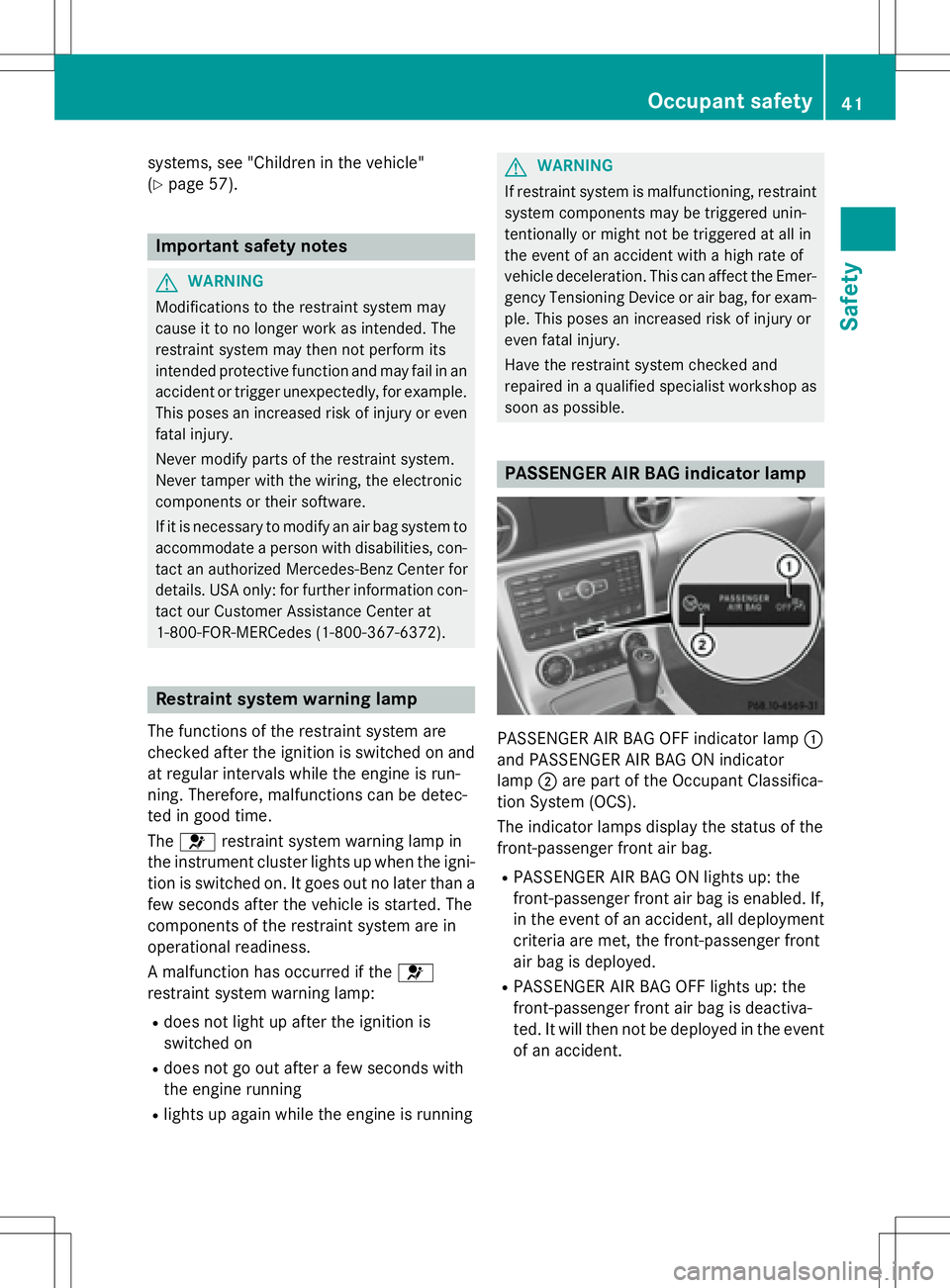
PASSENGER AIR BAG indicator lamp
PASSENGER AIR BAG OFF indicator lamp :
and PASSENGER AIR BAG ON indicator
lamp ;are part of the Occupant Classifica-
tion System (OCS).
The indicator lamps display the status of the
front-passenger front air bag.
RPASSENGER AIR BAG ON lights up: the
front-passenger front air bag is enabled. If,
in the event of an accident, all deployment
criteria are met, the front-passenger front
air bag is deployed.
RPASSENGER AIR BAG OFF lights up: the
front-passenger front air bag is deactiva-
ted. It will then not be deployed in the event of an accident.
Occupant safety41
Safety
Z
Page 47 of 358

Releasing seat belts
!Make sure that the seat belt is fully rolled
up. Otherwise, the seat belt or belt tongue
will be trapped in the door or in the seat
mechanism. This could damage the door,
the door trim panel and the seat belt. Dam-
aged seat belts can no longer fulfill their
protective function and must be replaced.
Visit a qualified specialist workshop.
Basic illustration
XPress release button :, hold belt
tongue ;firmly and guide back towards
belt loop =.
Seat belt adjustment
AMG vehicles: the "seat-belt adjustment"
function is not available.
The seat-belt adjustment is an integral part of
the PRE-SAFE
®convenience function. This
function adjusts the driver's and front-
passenger seat belt to the upper body of the
occupants.
The belt strap is tightened slightly when:
Rthe belt tongue is engaged in the buckle
and
Rthe ignition is switched on
The seat-belt adjustment will apply a certain
retraction force if any slack is detected between the vehicle occupant and the seat
belt. Do not hold on to the seat belt tightly
while it is adjusting.
You can switch the seat-belt adjustment on
and off in the on-board computer
(
Ypage 207).
Belt warning for the driver and front
passenger
The
7 seat belt warning lamp in the instru-
ment cluster is a reminder that all vehicle
occupants must wear their seat belts. It may
light up continuously or flash. In addition,
there may be a warning tone.
Regardless of whether the driver's seat belt
has already been fastened, the 7seat belt
warning lamp lights up for six seconds each
time the engine is started. If, after
six seconds, the driver or front-passenger
seat belt has not been fastened and the doors
are closed, the 7seat belt warning lamp
lights up. As soon as the driver's and front-
passenger seat belts are fastened or a front
door is opened again, the 7seat belt
warning lamp goes out.
If the driver's seat belt is not fastened after
the engine is started, an additional warning
tone will sound. This warning tone stops after
six seconds or when the driver's seat belt is
fastened.
If the vehicle's speed exceeds 15 mph
(25 km/h) once and the driver's and front-
passenger seat belts are not fastened, a
warning tone sounds. A warning tone also
sounds with increasing intensity for
60 seconds or until the driver or front
passenger have fastened their seat belts.
If the driver or front passenger unfasten their
seat belts during the journey, the seat belt
warning is activated again.
iFor more information on the 7seat
belt warning lamp, see "
Warning and indi-
cator lamps in the instrument cluster, seat belts" (
Ypage 242).
Occupant safety45
Safety
Z
Page 51 of 358
Occupant Classification System
(OCS)
Introduction
The Occupant Classification System (OCS)
categorizes the person in the front-passenger
seat. Depending on that result, the front-
passenger front air bag and front-passenger
knee bag are either enabled or deactivated.
The system does not deactivate:
Rthe side impact air bag
Rthe front-passenger head bag
Rthe Emergency Tensioning Devices
Prerequisites
To be classified correctly, the front passenger
must sit:
Rwith the seat belt fastened correctly
Rin an almost upright position with their
back against the seat backrest
Rwith their feet resting on the floor, if possi-
ble
If the front passenger does not observe these
conditions, OCS may produce a false classi-
fication, e.g. because the front passenger:
Rtransfers their weight by supporting them-
selves on a vehicle armrest
Rsits in such a way that their weight is raised from the seat cushion
If you install a child restraint system on the
front-passenger seat, be sure to observe the
correct positioning of the child restraint sys-
tem. Never place objects under or behind the
child restraint system, e.g. cushions. The
entire base of the child restraint system must always rest on the seat cushion of the front-
passenger seat. The backrest of the forward-
facing child restraint system must lie as flat as
possible against the backrest of the front-
passenger seat.
The child restraint system must not touch the
roof or be subjected to a load by the head
restraint. Adjust the angle of the seat back- rest and the head restraint position accord-
ingly.
Only then can OCS be guaranteed to function
correctly. Always observe the child restraint
system manufacturer's installation instruc-
tions.
Occupant Classification System opera-
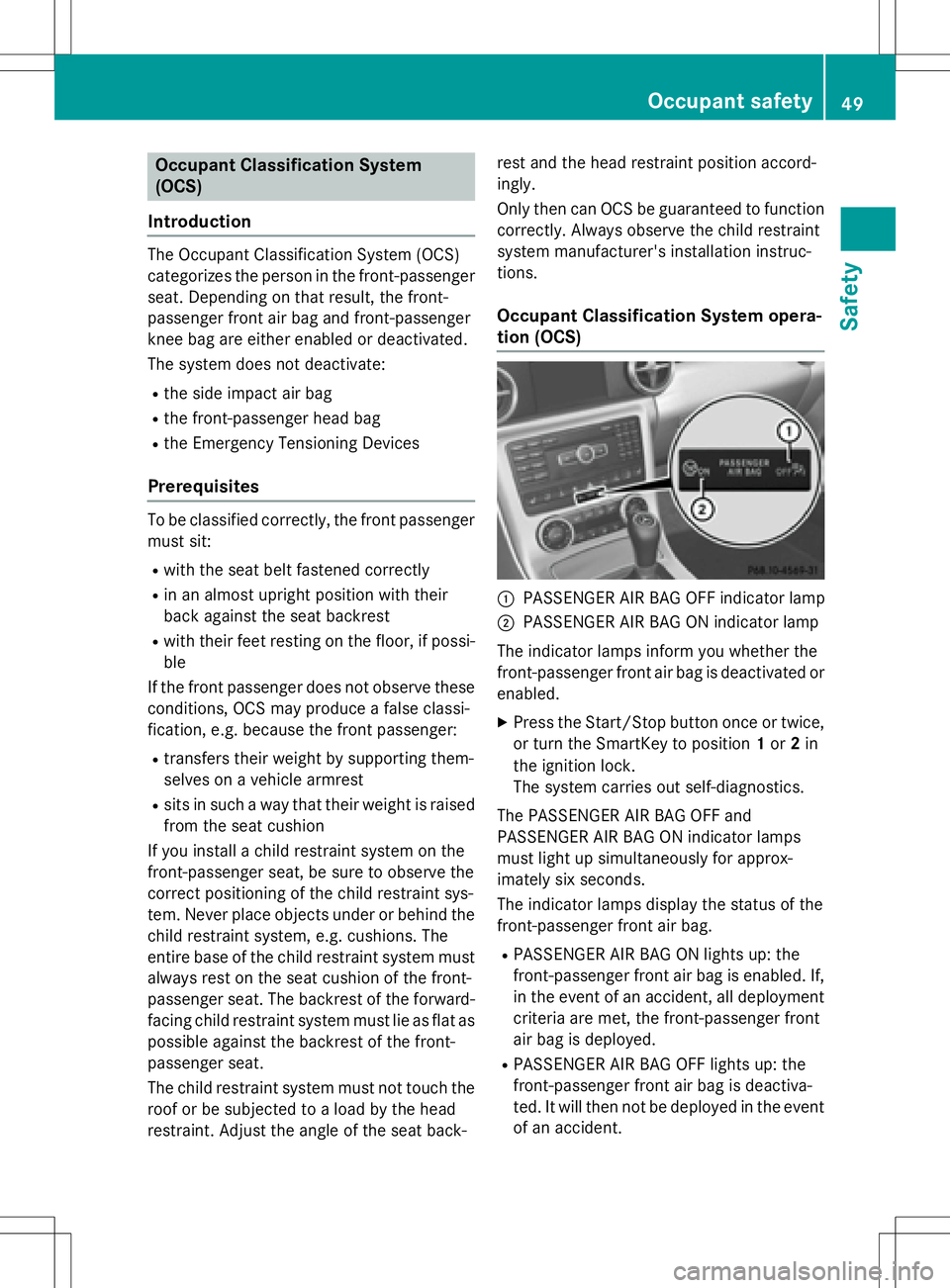
tion (OCS)
:PASSENGER AIR BAG OFF indicator lamp
;PASSENGER AIR BAG ON indicator lamp
The indicator lamps inform you whether the
front-passenger front air bag is deactivated or
enabled.
XPress the Start/Stop button once or twice,
or turn the SmartKey to position 1or 2in
the ignition lock.
The system carries out self-diagnostics.
The PASSENGER AIR BAG OFF and
PASSENGER AIR BAG ON indicator lamps
must light up simultaneously for approx-
imately six seconds.
The indicator lamps display the status of the
front-passenger front air bag.
RPASSENGER AIR BAG ON lights up: the
front-passenger front air bag is enabled. If,
in the event of an accident, all deployment
criteria are met, the front-passenger front
air bag is deployed.
RPASSENGER AIR BAG OFF lights up: the
front-passenger front air bag is deactiva-
ted. It will then not be deployed in the event
of an accident.
Occupant safety49
Safety
Z
Page 56 of 358
Deployment of Emergency Tensioning
Devicesan dair bags
Important safet ynotes
GWARNING
The air bag parts are hot after an air bag has
bee ndeployed .There is aris kof injury.
Do no ttouch th eair bag parts .Hav e a
deployed air bag replaced at aqualified spe -
cialis tworkshop as soo nas possible.
GWARNING
A deployed air bag no longer offers any pro -
tection and canno tprovid eth eintended pro -
tection in an accident. There is an increase d
ris kof injury.
Hav eth evehicle towed to aqualified special-
ist workshop in order to hav e adeployed air
bag replaced.
Fo ryour own safet yand that of your fron t
passenger ,it is important that you hav e
deployed air bags replaced and faulty air bags
repaired. Thi swill help to mak esur eth eair
bags continue to perform their protective
function fo rth evehicle occupant sin th e
event of acrash .
GWARNING
Pyrotechnic Emergency Tensioning Devices
that hav ebee ndeployed are no longer opera-
tional and are unable to perform their inten-
ded protective function .Thi sposes an
increase dris kof injury or eve nfatal injury.
Therefore, hav epyrotechni cEmergency Ten -
sioning Devices whic hhav ebee ntriggere d
immediately replaced at aqualified specialis t
workshop .
An electric moto ris used by PRE-SAF E®to
trigger th etightenin gof th eseat belt in haz -
ardous situations. Thi sprocedur eis reversi-
ble.
If Emergency Tensioning Devices are trig-
gered or air bags are deployed ,you will hear a
bang, and asmall amount of powder may also be released. The
6restrain tsystem warn -
in g lamp lights up.
Only in rar ecases will th eban gaffec tyour
hearing. The powder that is release dgener-
ally doe sno tconstitute ahealth hazard ,but it
may caus eshort-term breathin gdifficulties in
people wit hasthm aor other respirator yprob-
lems. To avoid this, you may wish to get out of
th evehicle or ope nth ewindows as soo nas it
is saf eto do so.
Ai rbags and pyrotechni cEmergency Tension-
in gDevices (ETDs) contain perchlorat emate-
rial ,whic hma
y require special handlin gand
regard fo rth eenvironment. National guide-
lines mus tbe observed durin gdisposal. In
California, see www.dtsc.ca.gov/
HazardousWaste/Perchlorate/
index.cfm .
Method of operation
Duringth efirst stage of acollision ,th e
restrain tsystem contro luni tevaluates impor -
tant physical dat arelatin gto vehicle deceler -
ation or acceleration ,suc has:
Rduration
Rdirection
Rintensit y
Based on th eevaluation of this data, th e
restrain tsystem contro luni ttriggers th e
Emergency Tensioning Devices durin g afron -
ta lor rea rcollision .
An Emergency Tensioning Devic ecan only be
triggered, if:
Rth eignition is switched on
Rth ecomponent sof th erestrain tsystem are
operational; see "Restrain tsystem warnin g
lamp " (
Ypage 41)
Rthebelt tongue has engage din th ebelt
buckl eof th erespective seat
If th erestrain tsystem contro luni tdetects a
more severe accident, further component sof
th erestrain tsystem are activated independ -
54Occupant safety
Safety
Page 63 of 358
Drivingsafet ysystems
Overview of drivin gsafet ysystems
In this section ,you will fin dinformation about
th efollowing drivin gsafet ysystems :
RABS (Anti-loc kBrakin gSystem)
(
Ypage 61)
RBA S (B rake Assist System) (Ypage 62)
RCOLLISION PREVENTION ASSIST PLU S
(distanc ewarnin gfunction and Adaptive
Brak eAssist) (
Ypage 62)
RESP®(Electronic StabilityProgram)
(
Ypage 65)
REB D (Electroni cBrak eforc eDi stribution )
(
Ypage 69)
RADAPTIV EBRAKE (Ypage 69 )
Important safet ynotes
If you fail to adapt your drivin gstyle or if you
are inattentive ,th edrivin gsafet ysystems can
neither reduce th eris kof an acciden tno r
override th elaws of physics. Driving safet y
systems are merely aids designed to assist
driving. You are responsible fo rmaintainin g
th edistanc eto th evehicle in front, fo rvehicle
speed, fo rbraking in goo dtime, and fo rstay-
in gin lane. Always adapt your drivin gstyle to
suit th eprevailin groad and weather condi-
tion sand maintain asaf edistanc efrom th e
vehicle in front. Drive carefully.
The drivin gsafet ysystems described only
wor kas effectively as possible when there is
adequat econtact between th etires and th e
road surface. Please pay special attention to
th enote son tires ,recommended minimum
tire tread depths, etc. (
Ypage 308).
In wintr ydrivin gconditions, always use winte r
tires (M+ Stires )and if necessary, snow
chains. Only in this way will th edrivin gsafet y
systems described in this section wor kas
effectively as possible.
ABS (Anti-lock Braking System)
General information
AB Sregulates brake pressure in suc h away
that th ewheels do no tloc kwhen you brake .
Thi sallow syou to continue steerin gth evehi-
cl e when braking .
The ! ABSwarnin glamp in th einstrumen t
cluster lights up when th eignition is switched
on .It goe sout when th eengin eis running .
AB Sworks from aspeed of about 5mph
(8 km/h), regardles sof road-surfac econdi-
tions. AB Sworks on slipper ysurfaces, eve n
when you only brake gently.
Important safet ynotes
iObserv eth e"Important safet ynotes" sec -
tion (
Ypage 61).
GWARNING
If AB Sis faulty, th ewheels could loc kwhen
braking .The steerability and braking charac -
teristics may be severely impaired. Addition -
ally, further drivin gsafet ysystems are deac -
tivated. There is an increase ddanger of skid-
din gand accidents .
Drive on carefully. Hav eAB Schecke dimme-
diately at aqualified specialis tworkshop .
WhenAB Sis malfunctioning, other systems ,
includin gdrivin gsafet ysystems ,will also
becom einoperative .Observ eth einformation
on th eAB Swarnin glamp (
Ypage 243) and
display message swhic hmay be shown in th e
instrumen tcluster (
Ypage 212).
Braking
XIf ABS intervenes: continue to depress th e
brake peda lvigorousl yuntil th ebraking sit -
uation is over.
XTo make afull brak eapplication:
depress th ebrake peda lwit hfull force.
If AB Sintervenes when braking ,you will feel a
pulsin gin th ebrake pedal.
Driving safety systems61
Safety
Z
Page 64 of 358
The pulsating brake pedal can be an indica-
tion of hazardous road conditions, and func-
tions as a reminder to take extra care while
driving.
BAS (Brake Assist System)
General information
BAS operates in emergency braking situa-
tions. If you depress the brake pedal quickly,
BAS automatically boosts the braking force,
thus shortening the stopping distance.
Important safety notes
iObserve the "Important safety notes" sec-
tion (
Ypage 61).
GWARNING
If BAS is malfunctioning, the braking distance
in an emergency braking situation is
increased. There is a risk of an accident.
In an emergency braking situation, depress
the brake pedal with full force. ABS prevents
the wheels from locking.
Braking
XKeep the brake pedal firmly depressed until
the emergency braking situation is over.
ABS prevents the wheels from locking.
The brakes will function as usual once you
release the brake pedal. BAS is deactivated.
COLLISION PREVENTION ASSIST
PLUS
General information
COLLISION PREVENTION ASSIST PLUS con-
sists of a distance warning function with an
autonomous braking function and Adaptive
Brake Assist.
COLLISION PREVENTION ASSIST PLUS can
help you to minimize the risk of a front-end collision with a vehicle ahead or reduce the
effects of such a collision.
If COLLISION PREVENTION ASSIST PLUS
detects that there is a risk of a collision, you
will be warned visually and acoustically. If you
do not react to the visual and audible collision
warning, autonomous braking can be initiated
in critical situations. If you apply the brake
yourself in a critical situation, the COLLISION
PREVENTION ASSIST PLUS adaptive Brake
Assist assists you.
Important safety notes
In particular, the detection of obstacles can
be impaired if:
Rthere is dirt on the sensors or anything else
covering the sensors
Rthere is snow or heavy rain
Rthere is interference by other radar sources
Rthere are strong radar reflections, for
example in parking garages
Ra narrow vehicle traveling in front, e.g. a
motorbike
Ra vehicle traveling in front on a different line
Rnew vehicles or after a service on the COL-
LISION PREVENTION ASSIST PLUS system
Observe the notes in the section on break-
ing-in (
Ypage 138).
Following damage to the front end of the vehi- cle, have the configuration and operation of
the radar sensor checked at a qualified spe-
cialist workshop. This also applies to colli-
sions at low speeds where there is no visible
damage to the front of the vehicle.
Activating or deactivating
COLLISION PREVENTION ASSIST PLUS is
activated after every ignition cycle. You can
activate or deactivate COLLISION PREVEN-
TION ASSIST PLUS in the on-board computer(
Ypage 203). When deactivated, the dis-
tance warning function and the autonomous
braking function are also deactivated.
62Driving safety systems
Safety