display MERCEDES-BENZ SLK ROADSTER 2012 Owners Manual
[x] Cancel search | Manufacturer: MERCEDES-BENZ, Model Year: 2012, Model line: SLK ROADSTER, Model: MERCEDES-BENZ SLK ROADSTER 2012Pages: 321, PDF Size: 6.9 MB
Page 213 of 321
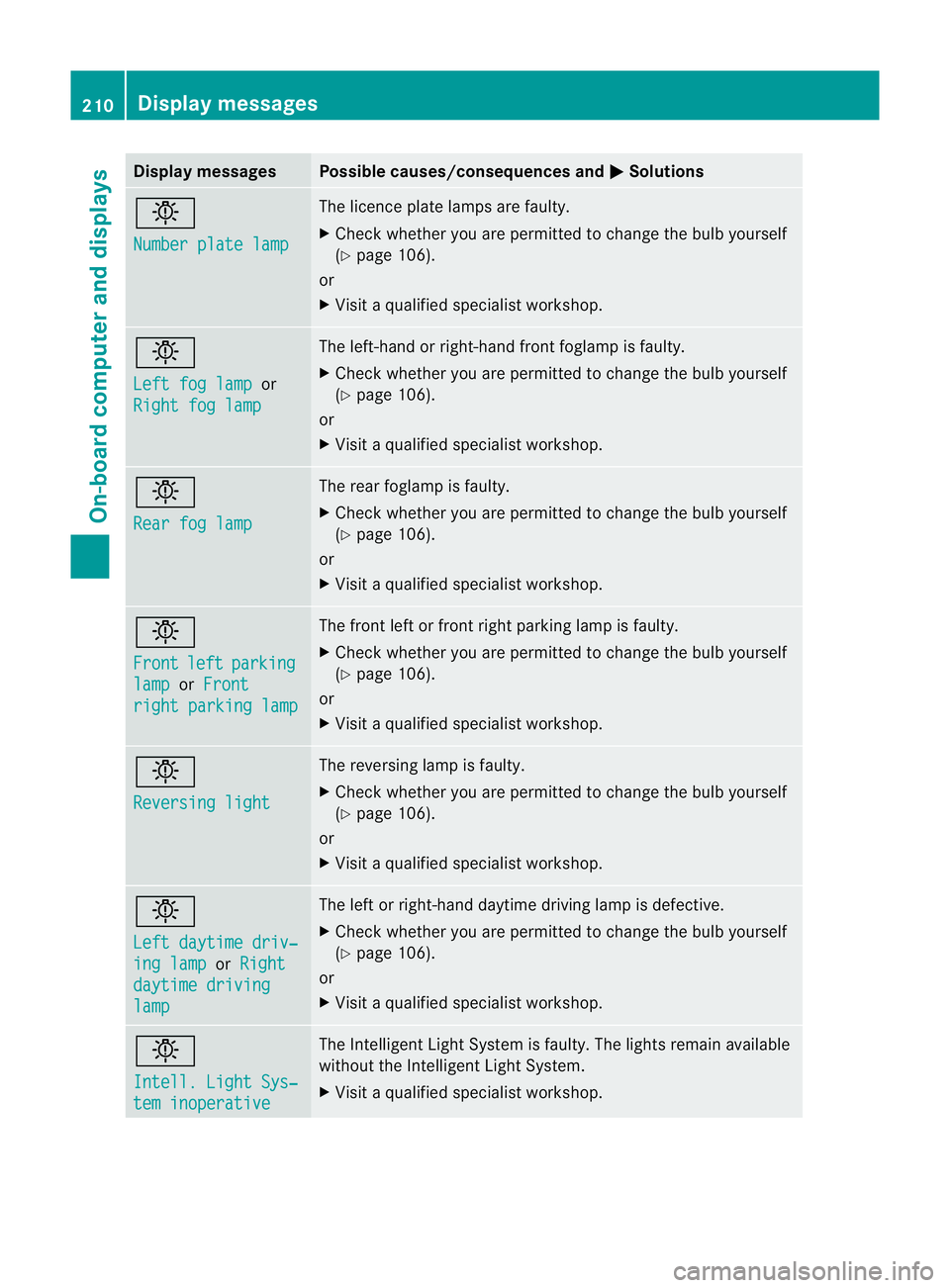
Display messages Possible causes/consequences and
M Solutions
b
Number plate lamp The licence plate lamps are faulty.
X
Chec kwhether you are permitted to change the bulb yourself
(Y page 106).
or
X Visit a qualified specialist workshop. b
Left fog lamp
or
Right fog lamp The left-hand or right-hand front foglamp is faulty.
X
Check whether you are permitted to change the bulb yourself
(Y page 106).
or
X Visit a qualified specialist workshop. b
Rear fog lamp The rear foglamp is faulty.
X
Check whether you are permitted to change the bulb yourself
(Y page 106).
or
X Visit a qualified specialist workshop. b
Front
left parking
lamp or
Front right parking lamp The front left or front right parking lamp is faulty.
X
Check whether you are permitted to change the bulb yourself
(Y page 106).
or
X Visit a qualified specialist workshop. b
Reversing light The reversing lamp is faulty.
X
Check whether you are permitted to change the bulb yourself
(Y page 106).
or
X Visit a qualified specialist workshop. b
Left daytime driv‐
ing lamp or
Right daytime driving
lamp The left or right-hand daytime driving lamp is defective.
X
Check whether you are permitted to change the bulb yourself
(Y page 106).
or
X Visit a qualified specialist workshop. b
Intell. Light Sys‐
tem inoperative The Intelligent Light System is faulty. The lights remain available
without the Intelligent Light System.
X
Visit a qualified specialist workshop. 210
Display messagesOn-board computer and displays
Page 214 of 321
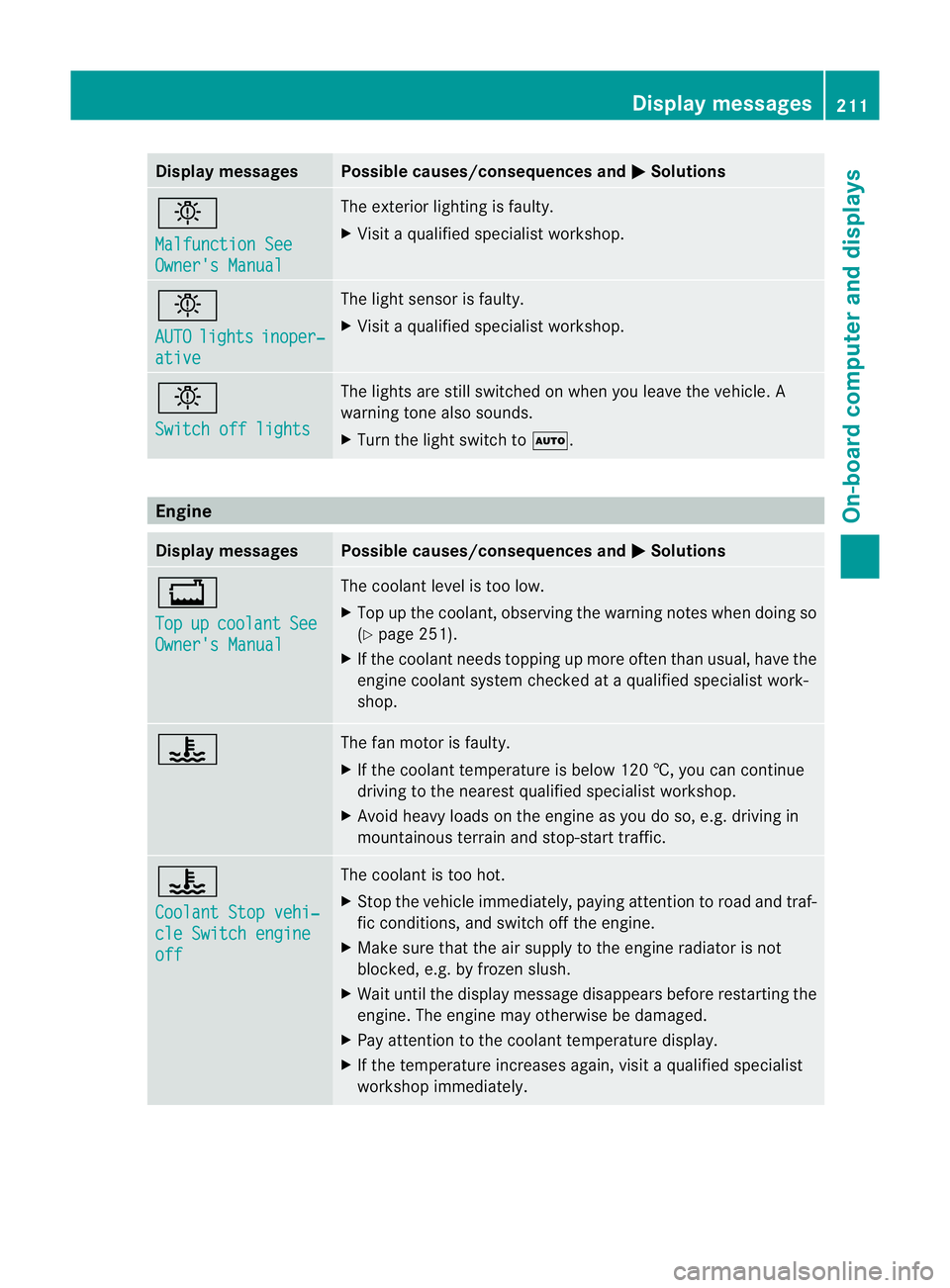
Display messages Possible causes/consequences and
M Solutions
b
Malfunction See
Owner's Manual The exterio
rlighting is faulty.
X Visit a qualified specialist workshop. b
AUTO
lights inoper‐
ative The light sensor is faulty.
X
Visit a qualified specialist workshop. b
Switch off lights The lights are still switched on when you leave the vehicle. A
warning tone also sounds.
X
Turn the light switch to Ã.Engine
Displa
ymessages Possible causes/consequences and
M Solutions
+
Top
up coolant See
Owner's Manual The coolant level is too low.
X
Top up the coolant, observing the warning notes when doing so
(Y page 251).
X If the coolant needs topping up more often than usual, have the
engine coolant system checked at a qualified specialist work-
shop. ? The fan motor is faulty.
X
If the coolant temperature is below 120 †, you can continue
driving to the nearest qualified specialist workshop.
X Avoid heavy loads on the engine as you do so, e.g .driving in
mountainous terrain and stop-start traffic. ?
Coolant Stop vehi‐
cle Switch engine
off The coolant is too hot.
X
Stop the vehicle immediately, paying attention to road and traf-
fic conditions, and switch off the engine.
X Make sure that the air supply to the engine radiator is not
blocked, e.g. by frozen slush.
X Waitu ntil the display message disappears before restarting the
engine .The engine may otherwise be damaged.
X Pay attention to the coolant temperature display.
X If the temperature increases again, visit a qualified specialist
workshop immediately. Display messages
211On-board computer and displays Z
Page 215 of 321
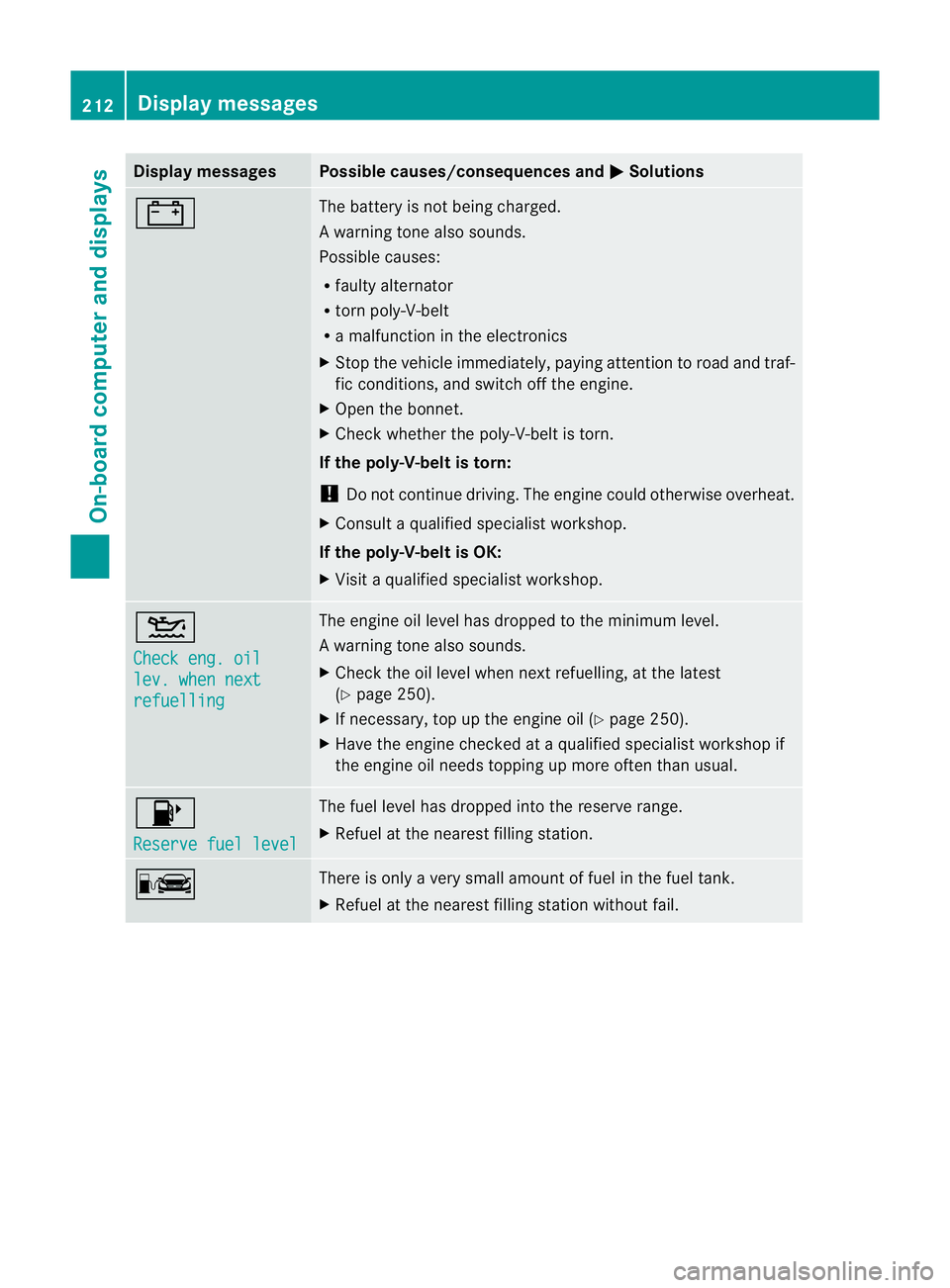
Display messages Possible causes/consequences and
M Solutions
# The battery is no
tbeing charged.
Aw arning tone also sounds.
Possible causes:
R faulty alternator
R torn poly-V-belt
R a malfunction in the electronics
X Stop the vehicle immediately, paying attentio ntoroad and traf-
fic conditions, and switch off the engine.
X Open the bonnet.
X Check whether the poly-V-belt is torn.
If the poly-V-belt is torn:
! Do not continue driving. The engine could otherwise overheat.
X Consult a qualified specialist workshop.
If the poly-V-belt is OK:
X Visit a qualified specialist workshop. 4
Check eng. oil
lev. when next
refuelling The engine oil level has dropped to the minimum level.
Aw
arning tone also sounds.
X Chec kthe oil level when next refuelling, at the latest
(Y page 250).
X If necessary, top up the engine oil (Y page 250).
X Have the engine checked at a qualified specialist workshop if
the engine oil needs topping up more often than usual. 8
Reserve fuel level The fuel level has dropped into the reserve range.
X
Refuel at the nearest filling station. C There is only a very small amount of fuel in the fuel tank.
X
Refuel at the nearest filling station without fail. 212
Display messagesOn-board computer and displays
Page 216 of 321
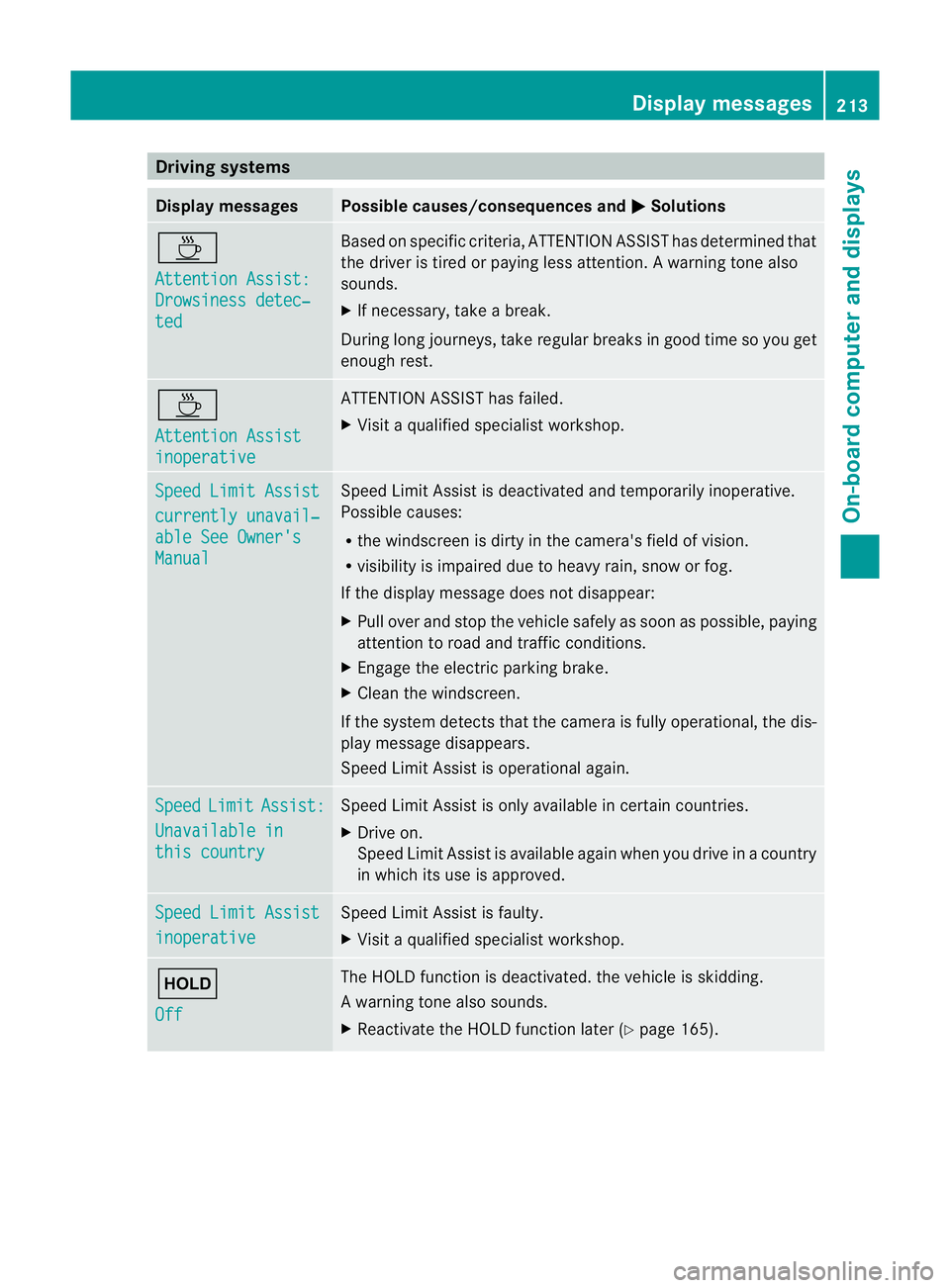
Driving systems
Display messages Possible causes/consequences and
M Solutions
À
Attention Assist:
Drowsiness detec‐
ted Based on specific criteria, ATTENTION ASSIST has determined that
the driver is tired or paying less attention
.Awarning tone also
sounds.
X If necessary, take a break.
During long journeys, take regular breaks in good time so you get
enough rest. À
Attention Assist
inoperative ATTENTION ASSIST has failed.
X
Visi taqualified specialist workshop. Speed Limit Assist
currently unavail‐
able See Owner's
Manual Speed Limit Assist is deactivated and temporarily inoperative.
Possible causes:
R
the windscreen is dirty in the camera's field of vision.
R visibility is impaired due to heavy rain, snow or fog.
If the display message does not disappear:
X Pull over and stop the vehicle safely as soon as possible, paying
attention to road and traffic conditions.
X Engage the electric parking brake.
X Clean the windscreen.
If the system detects that the camera is fully operational, the dis-
play message disappears.
Speed Limit Assist is operational again. Speed Limit Assist:
Unavailable in
this country Speed Limit Assist is only available in certain countries.
X
Drive on.
Speed Limit Assist is available again when you drive in a country
in which its use is approved. Speed Limit Assist
inoperative Speed Limit Assist is faulty.
X
Visit a qualified specialist workshop. ë
Off The HOLD function is deactivated. the vehicle is skidding.
Aw
arning tone also sounds.
X Reactivate the HOLD function later (Y page 165). Display messages
213On-board computer and displays Z
Page 217 of 321
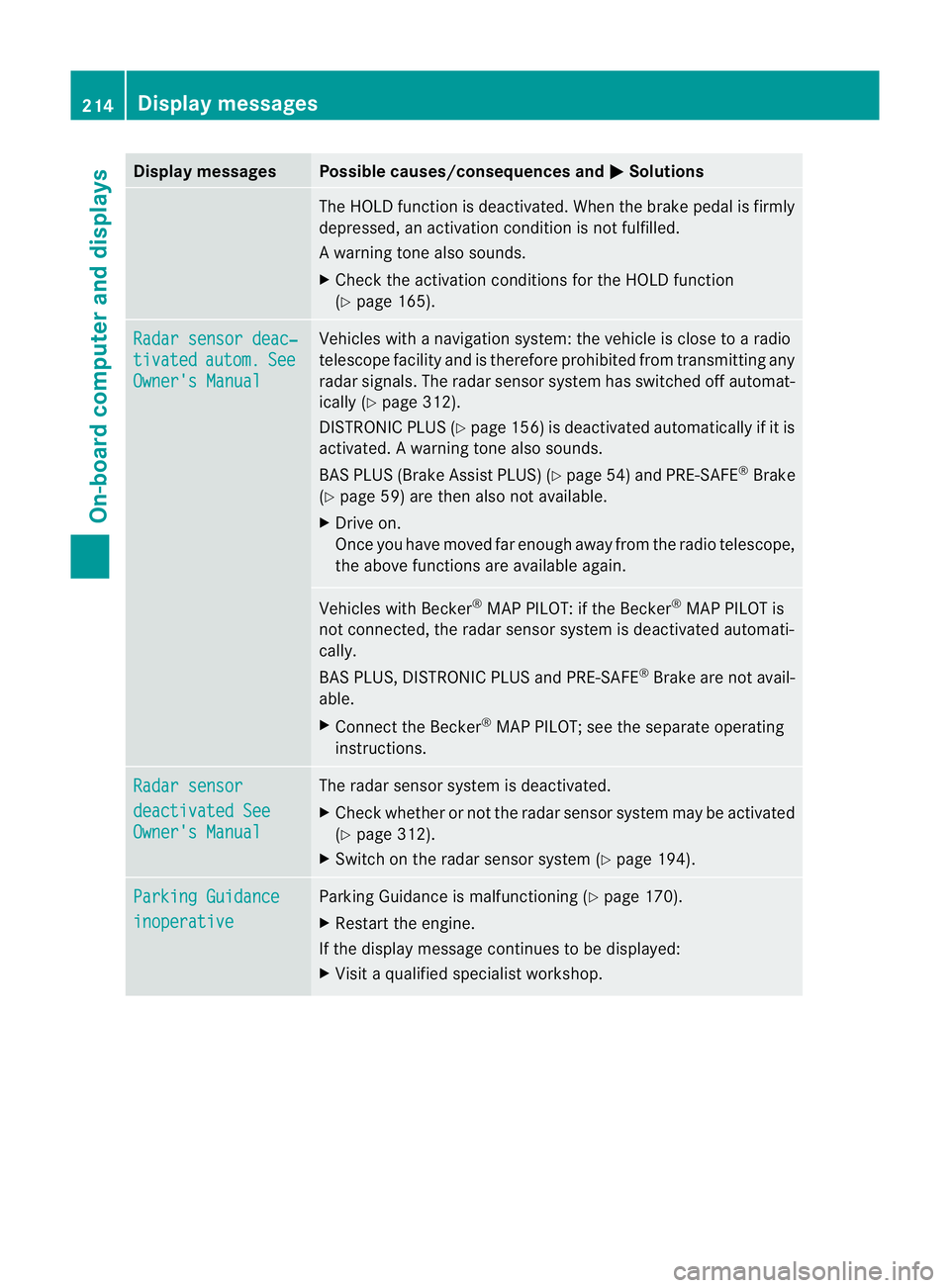
Display messages Possible causes/consequences and
M Solutions
The HOLD function is deactivated. Whe
nthe brake pedal is firmly
depressed, an activation condition is not fulfilled.
Aw arning tone also sounds.
X Check the activation conditions for the HOLD function
(Y page 165). Radar sensor deac‐
tivated autom. See
Owner's Manual Vehicles with a navigation system: the vehicle is close to a radio
telescope facility and is therefore prohibited from transmitting any
radar signals. The radar sensor system has switched off automat-
ically (Y
page 312).
DISTRONI CPLUS (Y page 156) is deactivated automatically if it is
activated. Awarning tone also sounds.
BAS PLUS (Brake Assist PLUS) (Y page 54)and PRE-SAFE ®
Brake
(Y page 59) are then also not available.
X Drive on.
Once you have moved fa renough away from the radio telescope,
the above functions are available again. Vehicles with Becker
®
MAP PILOT: if the Becker ®
MAP PILOT is
not connected, the rada rsensor system is deactivated automati-
cally.
BAS PLUS, DISTRONIC PLUS and PRE-SAFE ®
Brake are not avail-
able.
X Connect the Becker ®
MAP PILOT; see the separate operating
instructions. Radar sensor
deactivated See
Owner's Manual The radar sensor system is deactivated.
X
Check whether or not the radar sensor system may be activated
(Y page 312).
X Switch on the radar sensor system (Y page 194).Parking Guidance
inoperative Parking Guidance is malfunctioning (
Ypage 170).
X Restart the engine.
If the display message continues to be displayed:
X Visit a qualified specialist workshop. 214
Display messagesOn-board computer and displays
Page 218 of 321
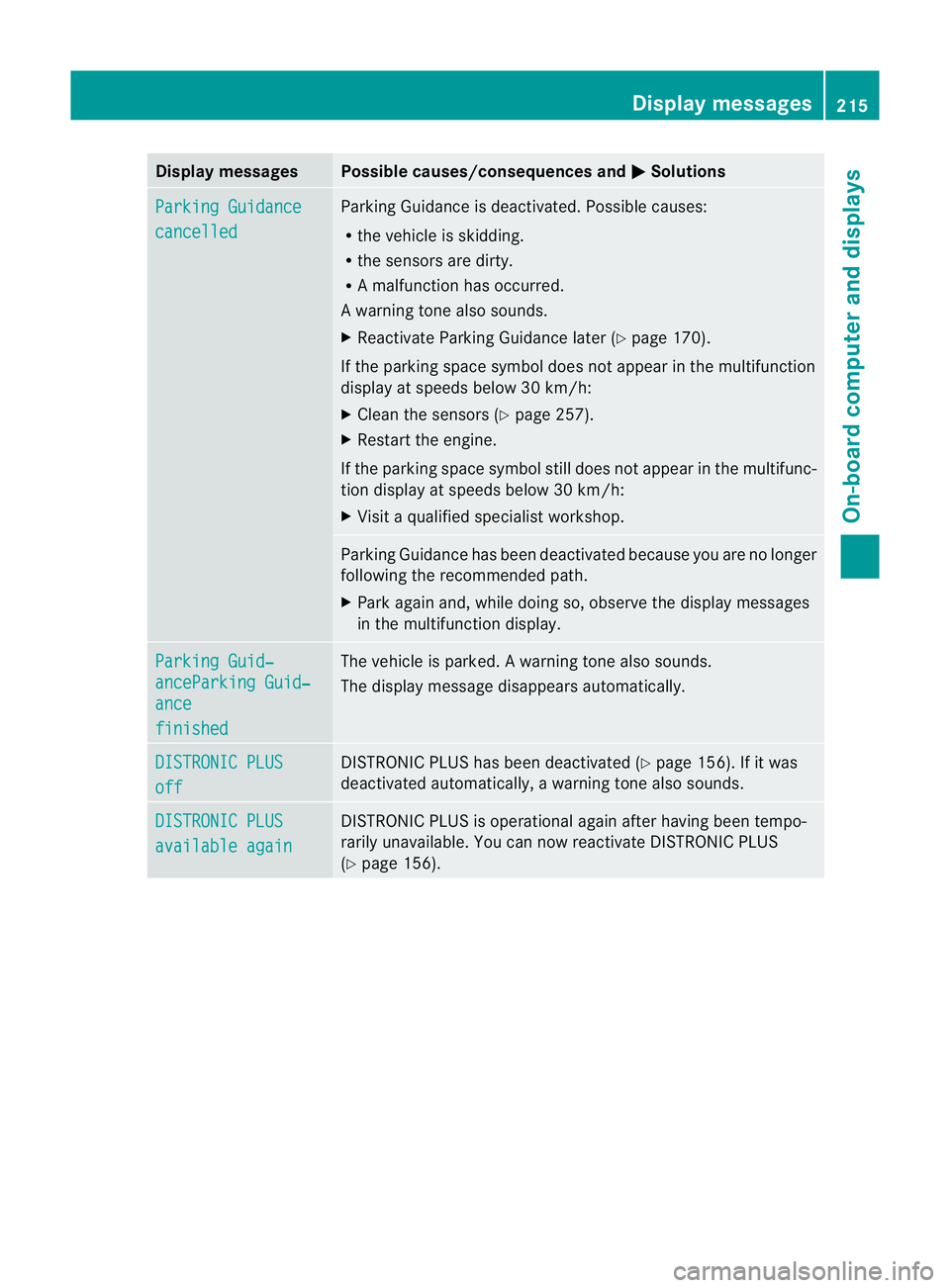
Display messages Possible causes/consequences and
M Solutions
Parking Guidance
cancelled Parking Guidance is deactivated. Possible causes:
R
the vehicle is skidding.
R the sensors are dirty.
R A malfunction has occurred.
Aw arning tone also sounds.
X Reactivate Parking Guidance late r(Y page 170).
If the parking space symbol does not appear in the multifunction
display at speeds below 30 km/h:
X Clean the sensors (Y page 257).
X Restart the engine.
If the parking space symbol still does not appear in the multifunc-
tion display at speeds below 30 km/h:
X Visit a qualified specialist workshop. Parking Guidance has been deactivated because you are no longer
following the recommended path.
X Park again and, while doing so, observe the display messages
in the multifunction display. Parking Guid‐
anceParking Guid‐
ance
finished The vehicle is parked.
Awarning tone also sounds.
The display message disappears automatically. DISTRONIC PLUS
off DISTRONIC PLU
Shas been deactivated (Y page 156). If it was
deactivated automatically, a warning tone also sounds. DISTRONIC PLUS
available again DISTRONIC PLU
Sis operational againa fter having been tempo-
rarily unavailable .You can now reactivate DISTRONIC PLUS
(Y page 156). Display messages
215On-board computer and displays Z
Page 219 of 321
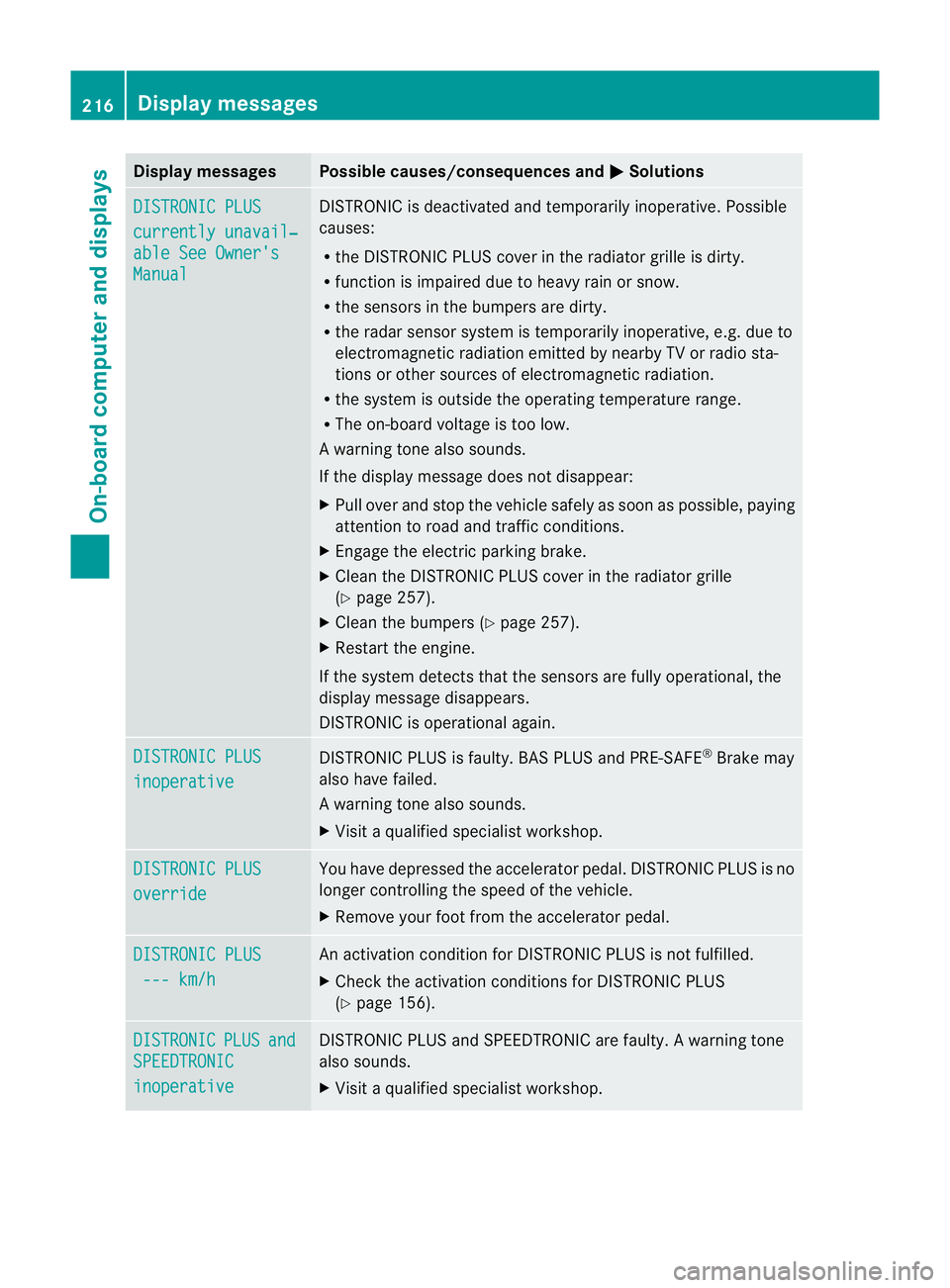
Display messages Possible causes/consequences and
M Solutions
DISTRONIC PLUS
currently unavail‐
able See Owner's
Manual DISTRONIC is deactivated and temporarily inoperative. Possible
causes:
R
the DISTRONIC PLUS cover in the radiator grille is dirty.
R function is impaired due to heavy rain or snow.
R the sensors in the bumpers are dirty.
R the rada rsensor system is temporarily inoperative, e.g. due to
electromagnetic radiation emitted by nearby TV or radio sta-
tions or other sources of electromagnetic radiation.
R the system is outside the operating temperature range.
R The on-board voltage is too low.
Aw arning tone also sounds.
If the display message does no tdisappear:
X Pull over and stop the vehicle safely as soon as possible, paying
attention to road and traffic conditions.
X Engage the electric parking brake.
X Clean the DISTRONIC PLUS cover in the radiator grille
(Y page 257).
X Clean the bumpers (Y page 257).
X Restar tthe engine.
If the system detects that the sensors are fully operational, the
display message disappears.
DISTRONIC is operational again. DISTRONIC PLUS
inoperative DISTRONIC PLUS is faulty. BAS PLUS and PRE-SAFE
®
Brake may
also have failed.
Aw arning tone also sounds.
X Visi taqualified specialist workshop. DISTRONIC PLUS
override You have depressed the accelerator pedal. DISTRONIC PLUS is no
longer controlling the speed of the vehicle.
X
Remove your foot from the accelerator pedal. DISTRONIC PLUS
--- km/h An activation condition for DISTRONIC PLUS is not fulfilled.
X
Check the activation conditions for DISTRONIC PLUS
(Y page 156). DISTRONIC PLUS and
SPEEDTRONIC
inoperative DISTRONIC PLUS and SPEEDTRONIC are faulty. A warning tone
also sounds.
X
Visit a qualified specialist workshop. 216
Display messagesOn-board computer and displays
Page 220 of 321
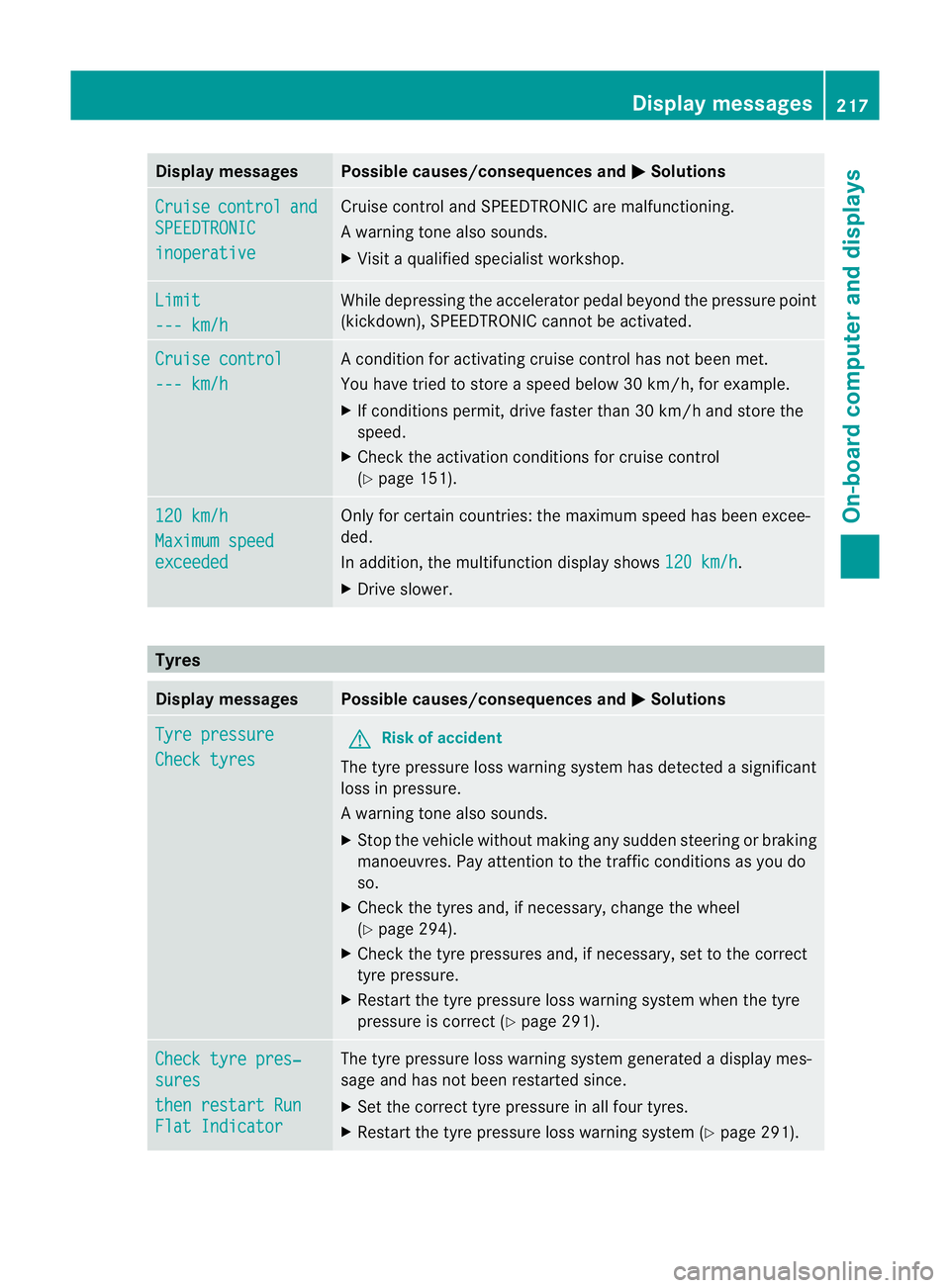
Display messages Possible causes/consequences and
M Solutions
Cruise control and
SPEEDTRONIC
inoperative Cruise control and SPEEDTRONIC are malfunctioning.
Aw
arning tone also sounds.
X Visi taqualified specialist workshop. Limit
--- km/h While depressing the accelerator pedal beyond the pressure point
(kickdown), SPEEDTRONIC cannot be activated.
Cruise control
--- km/h A condition for activating cruise control has not been met.
You have tried to store
aspeed below 30 km/h, for example.
X If conditions permit, drive faster than 30 km/h and store the
speed.
X Check the activation conditions for cruise control
(Y page 151). 120 km/h
Maximum speed
exceeded Only for certain countries: the maximum speed has been excee-
ded.
In addition, the multifunction display shows
120 km/h .
X Drive slower. Tyres
Display messages Possible causes/consequences and
M Solutions
Tyre pressure
Check tyres G
Risk of accident
The tyre pressure loss warning system has detected a significant
loss in pressure.
Aw arning tone also sounds.
X Stop the vehicle without making any sudde nsteering or braking
manoeuvres .Pay attentio nto the traffic conditions as you do
so.
X Check the tyres and, if necessary, change the wheel
(Y page 294).
X Check the tyre pressures and, if necessary, set to the correct
tyre pressure.
X Restart the tyre pressure loss warning system when the tyre
pressure is correc t(Ypage 291). Check tyre pres‐
sures
then restart Run
Flat Indicator The tyre pressure loss warning system generated a display mes-
sage and has not been restarted since.
X
Set the correct tyre pressure in all four tyres.
X Restart the tyre pressure loss warning system (Y page 291). Display messages
217On-board computer and displays Z
Page 221 of 321
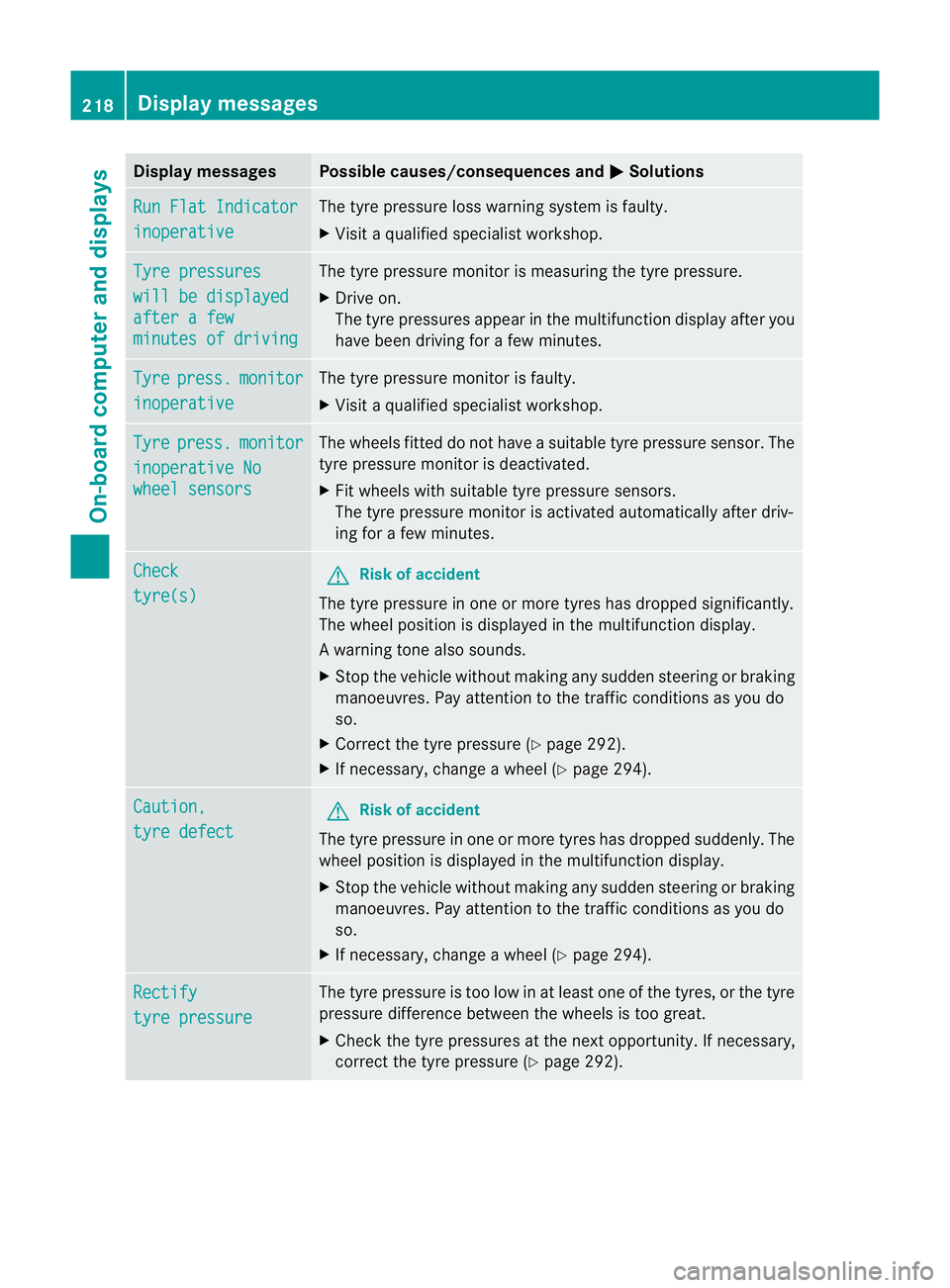
Display messages Possible causes/consequences and
M Solutions
Run Flat Indicator
inoperative The tyre pressure loss warning system is faulty.
X
Visit a qualified specialist workshop. Tyre pressures
will be displayed
after a few
minutes of driving The tyre pressure monitor is measuring the tyre pressure.
X
Drive on.
The tyre pressures appea rinthe multifunction displaya fter you
have been driving for a few minutes. Tyre press. monitor
inoperative The tyre pressure monitor is faulty.
X
Visi taqualified specialist workshop. Tyre press. monitor
inoperative No
wheel sensors The wheels fitted do not have a suitable tyre pressure sensor. The
tyre pressure monitor is deactivated.
X
Fit wheels with suitable tyre pressure sensors.
The tyre pressure monitor is activated automatically after driv-
ing for a few minutes. Check
tyre(s) G
Risk of accident
The tyre pressure in one or more tyres has dropped significantly.
The wheel position is displayed in the multifunction display.
Aw arning tone also sounds.
X Stop the vehicle without making any sudde nsteering or braking
manoeuvres .Pay attentio nto the traffic conditions as you do
so.
X Correct the tyre pressure (Y page 292).
X If necessary, change a wheel (Y page 294).Caution,
tyre defect G
Risk of accident
The tyre pressure in one or more tyres has dropped suddenly. The
wheel position is displayed in the multifunction display.
X Stop the vehicle without making any sudden steering or braking
manoeuvres. Pay attention to the traffic conditions as you do
so.
X If necessary, change a wheel (Y page 294).Rectify
tyre pressure The tyre pressure is too low in at least one of the tyres, or the tyre
pressure difference between the wheels is too great.
X
Check the tyre pressures at the next opportunity. If necessary,
correct the tyre pressure (Y page 292).218
Display messagesOn-board computer and displays
Page 222 of 321
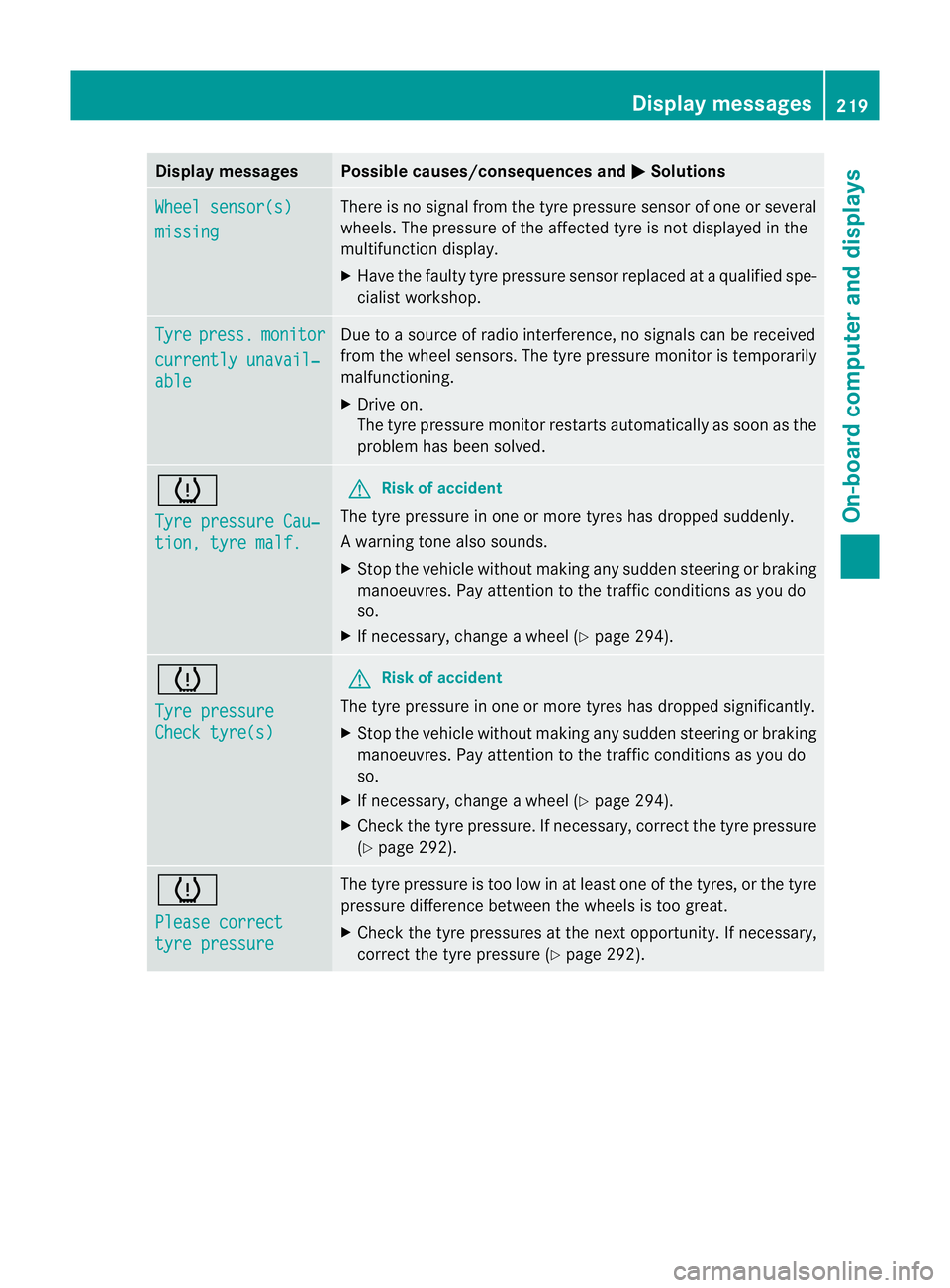
Display messages Possible causes/consequences and
M Solutions
Wheel sensor(s)
missing There is no signal from the tyre pressure sensor of one or several
wheels. The pressure of the affected tyre is no
tdisplayed in the
multifunction display.
X Have the faulty tyre pressure sensor replaced at a qualified spe-
cialist workshop. Tyre press. monitor
currently unavail‐
able Due to a source of radio interference, no signals can be received
fro
mt he wheel sensors. The tyre pressure monitor is temporarily
malfunctioning.
X Drive on.
The tyre pressure monitor restarts automatically as soon as the
problem has been solved. h
Tyre pressure Cau‐
tion, tyre malf. G
Risk of accident
The tyre pressure in one or more tyres has dropped suddenly.
Aw arning tone also sounds.
X Stop the vehicle without making any sudde nsteering or braking
manoeuvres .Pay attentio nto the traffic conditions as you do
so.
X If necessary, change a wheel (Y page 294).h
Tyre pressure
Check tyre(s) G
Risk of accident
The tyre pressure in one or more tyres has dropped significantly.
X Stop the vehicle without making any sudden steering or braking
manoeuvres. Pay attention to the traffic conditions as you do
so.
X If necessary, change a wheel (Y page 294).
X Check the tyre pressure. If necessary, correc tthe tyre pressure
(Y page 292). h
Please correct
tyre pressure The tyre pressure is too low in at least one of the tyres, or the tyre
pressure difference between the wheels is too great.
X
Check the tyre pressures at the next opportunity. If necessary,
correct the tyre pressure (Y page 292). Display messages
219On-board computer and displays Z