instrument cluster MERCEDES-BENZ SLS AMG 2013 Owner's Manual
[x] Cancel search | Manufacturer: MERCEDES-BENZ, Model Year: 2013, Model line: SLS AMG, Model: MERCEDES-BENZ SLS AMG 2013Pages: 286, PDF Size: 3.26 MB
Page 124 of 286
i
If you do not depress the accelerator
pedal within a few seconds, RACE START is
canceled. The multifunction display shows
the RACE START Canceled
RACE START Canceled message.
X Fully depress the accelerator pedal.
The engine speed is increased.
The RACE START Release brake to
RACE START Release brake to
start start message appears in the
multifunction display.
i If you do not release the brake pedal
within a few seconds, RACE START is
canceled. The multifunction display shows
the RACE START Canceled
RACE START Canceled message.
X Take your foot off the brake pedal while
keeping the accelerator pedal fully
depressed.
The vehicle pulls away at maximum
acceleration.
The RACE
RACE START START Active
Active message appears
in the multifunction display.
RACE START is deactivated when the vehicle
reaches a speed of approximately 50 km/h.
Drive program S+is activated. SPORT
handling mode remains switched on.
RACE START is deactivated immediately if
you release the accelerator pedal during
RACE START or if any of the activation
conditions are no longer fulfilled. The RACE RACE
START Not Possible
START Not Possible orRACE START
RACE START
Canceled
Canceled message appears in the
multifunction display.
i If RACE START is used repeatedly within
a short period of time, it is only available
again after the vehicle has been driven a
certain distance. Automatic drive program
Drive program Cis characterized by the
following:
R comfort-oriented engine and transmission
settings
R optimal fuel consumption resulting from
the transmission shifting up sooner R
the vehicle pulling away more gently in
forward and reverse gears, unless the
accelerator pedal is depressed fully
R increased sensitivity. This improves driving
stability on slippery road surfaces, for
example
R the transmission shifting up sooner; This
results in the vehicle being driven at lower
engine speeds and the wheels being less
likely to spin
Drive programs Sand S+are characterized
by the following:
R sporty engine and transmission settings
R the transmission shifting up later and
shifting down dynamically
R as a result of the later transmission
upshifts, the fuel consumption may be
higher
R if a period of dynamic driving is followed by
an extended phase with a constant
accelerator pedal position, the vehicle
shifts up to a higher gear. This optimizes
fuel consumption
If a gentle driving style is adopted in
automatic drive programs C/S/S+, the drive
program settings are adjusted to optimize
fuel consumption. Depending on the
operating conditions, the transmission shifts
to a higher gear. Shift ranges
Introduction In certain driving situations, it is
recommended that you restrict the shift
range. The set shift range appears in the
instrument cluster's multifunction display
(Y
page 119). The transmission only shifts to
the gear displayed in the instrument cluster.
When the maximum engine speed is reached,
the transmission shifts up a gear in the
automatic programs C/S/S+. Gear
restriction is correspondingly increased by
one gear. 122
AMG SPEEDSHIFT DCT 7-speed sports transmissionDriving and parking
Page 125 of 286
Driving situation
0040
The braking effect of the engine can
be utilized in this position
0038
You can use the braking effect of
the engine on downhill gradients
and for driving:
R
on steep mountain roads
R in mountainous terrain
R in arduous conditions 0037
To use the braking effect of the
engine on extremely steep downhill
gradients and on long downhill
stretches Derestricting the shift range/shifting
up
X
Pull the right steering wheel paddle (UP).
The shift range is derestricted. If you are
driving in manual drive program M, the
transmission shifts up to the next gear.
Restricting the shift range/shifting
down X
Pull the left steering wheel paddle (DOWN).
The transmission shifts down one gear and
restricts the shift range to this gear.
If the engine speed in manual drive
program Mis too high, it is not possible to
shift down. If you pull the left-hand steering
wheel paddle shifter (DOWN)
(Y page 124), the two red segments in the
instrument cluster flash.
Clearing the shift range restriction X
Pull the right-hand steering wheel paddle
shifter (UP) until the number for the gear
disappears from the multifunction display.
or
X Use the E-SELECT lever to shift the
transmission to position D.
The transmission shifts from the current
shift range directly to D. Selecting the ideal shift range X
Pull the left-hand steering wheel paddle
shifter repeatedly until the function is
activated.
Depending on the selected drive program,
the transmission shifts to a gear which
allows ideal acceleration and deceleration.
To do this, the transmission shifts down
one or more gears. Manual drive program
i GT model: in manual drive program M,
the transmission shift and response times
are significantly shorter with sportier and
more aggressive gear changes.
In manual drive program M, you need to
change gear yourself using the steering wheel
paddle shifters (Y page 121). The
transmission only shifts down automatically
at low engine speeds depending on the
respective gear.
! In manual drive program M, the
transmission does not shift up
automatically even when the engine
limiting speed for the current gear is
reached. When the engine limiting speed is
reached, the fuel supply is cut to prevent
the engine from overrevving. Always make
sure that the engine speed does not reach
the red area of the tachometer and observe
the upshift indicator. There is otherwise a
risk of engine damage.
X To activate the manual drive program:
turn the drive program selector switch until
M appears in the instrument cluster's
multifunction display.
M lights up in red on the drive program
selector switch.
X To deactivate the manual drive
program: turn the drive program selector
switch and select another drive program. AMG SPEEDSHIFT DCT 7-speed sports transmission
123Driving and parking Z
Page 127 of 286
clean water. Seek medical assistance
without delay.
R If fuel is swallowed, seek medical
assistance without delay. Do not induce
vomiting.
R Immediately change out of clothing which
has come into contact with fuel. G
WARNING
Electrostatic buildup can create sparks and
ignite fuel vapors. There is a risk of fire and
explosion.
Touch the vehicle body immediately before
opening the fuel filler cap. Any existing
electrostatic buildup is thereby discharged.
! Do not use diesel to refuel vehicles with a
gasoline engine. Do not switch on the
ignition if you accidentally refuel with the
wrong fuel. Otherwise, the fuel will enter
the fuel system. Even small amounts of the
wrong fuel could result in damage to the
fuel system and the engine. The repair
costs are high. Notify a qualified specialist
workshop and have the fuel tank and fuel
lines drained completely.
! Overfilling the fuel tank could damage the
fuel system.
! Take care not to spill any fuel on painted
surfaces. You could otherwise damage the
paintwork.
! Use a filter when refueling from a fuel can.
Otherwise, the fuel lines and/or injection
system could be blocked by particles from
the fuel can.
If you overfill the fuel tank, fuel could spray
out when the fuel pump nozzle is removed.
Further information on fuel and on fuel grades
can be found in the "Fuel" section
(Y page 277). Refueling
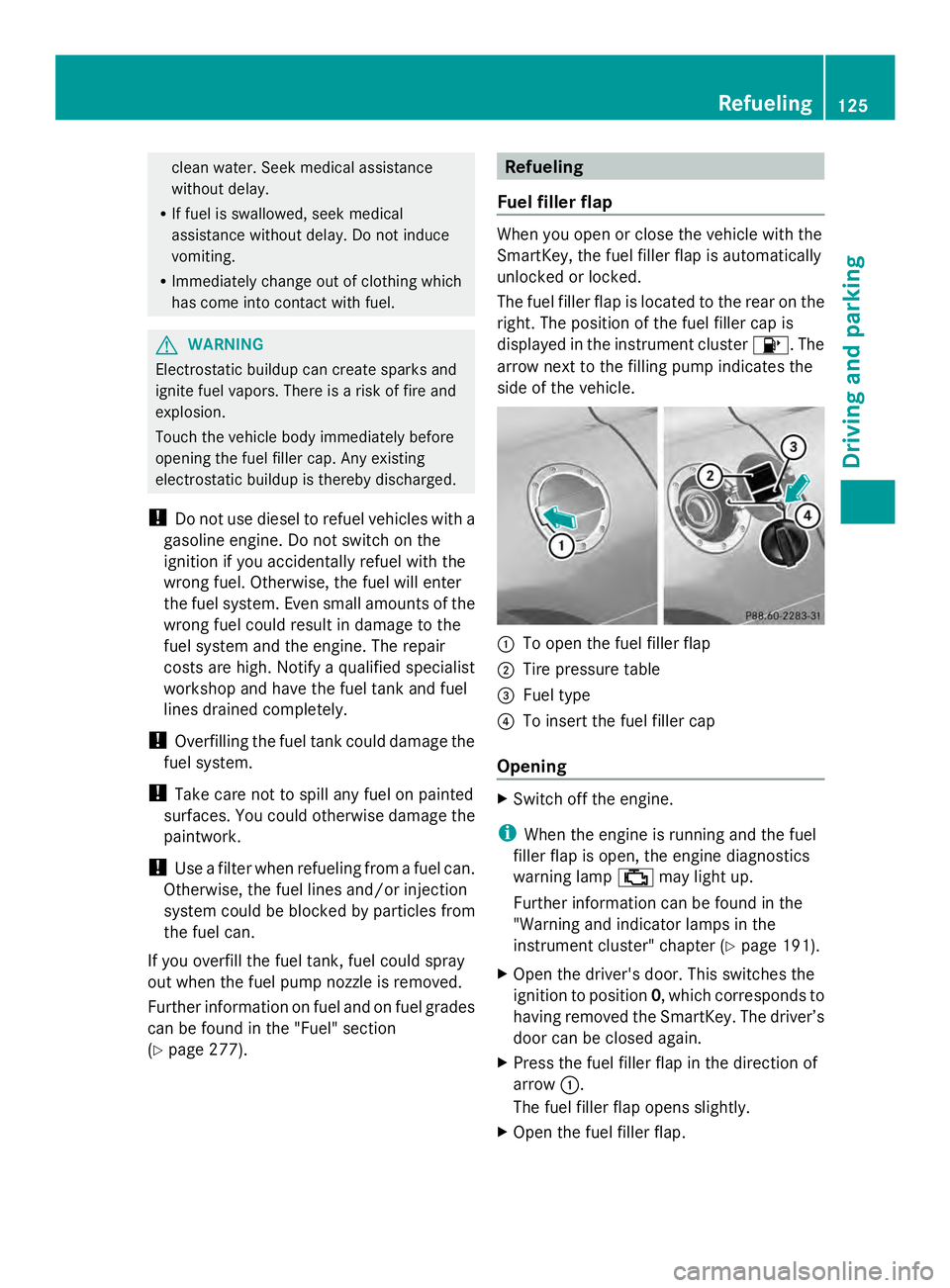
Fuel filler flap When you open or close the vehicle with the
SmartKey, the fuel filler flap is automatically
unlocked or locked.
The fuel filler flap is located to the rear on the
right. The position of the fuel filler cap is
displayed in the instrument cluster
00B6. The
arrow next to the filling pump indicates the
side of the vehicle. 0043
To open the fuel filler flap
0044 Tire pressure table
0087 Fuel type
0085 To insert the fuel filler cap
Opening X
Switch off the engine.
i When the engine is running and the fuel
filler flap is open, the engine diagnostics
warning lamp 00B9may light up.
Further information can be found in the
"Warning and indicator lamps in the
instrument cluster" chapter ( Ypage 191).
X Open the driver's door. This switches the
ignition to position 0, which corresponds to
having removed the SmartKey. The driver’s
door can be closed again.
X Press the fuel filler flap in the direction of
arrow 0043.
The fuel filler flap opens slightly.
X Open the fuel filler flap. Refueling
125Driving and parking Z
Page 130 of 286
To ensure that the vehicle is secured against
rolling away unintentionally:
R the electric parking brake must be applied.
R the transmission must be in position P.
R the SmartKey must be in position 0in the
ignition lock and then removed from the
ignition lock, or the Start/Stop button must
be pressed.
R on steep uphill or downhill gradients, turn
the front wheels towards the curb.
R on steep uphill or downhill gradients, the
front axle of an empty vehicle must be
secured, for example with a wheel chock.
R on steep uphill or downhill gradients, the
rear axle of a laden vehicle must be
additionally secured, for example with a
wheel chock. Switching off the engine
Important safety notes G
WARNING
When the engine is switched off, the
transmission shifts into neutral position N.
The vehicle may roll away. There is a risk of
an accident.
After switching off the engine, always switch
to parking position P. Prevent the parked
vehicle from rolling away by applying the
parking brake.
! Do not open the driver's door while the
vehicle is in motion. At low speeds in
transmission position Dor R, park position
P is otherwise engaged automatically. This
can damage the transmission.
i Observe the display messages in the
instrument cluster.
AMG SPEEDSHIFT DCT 7-speed sports
transmission X
Shift the transmission to Pwith the button
in the center console. Using the Start/Stop button
X
Press the Start/Stop button (Y page 113).
The engine stops and all the indicator
lamps in the instrument cluster go out.
X Apply the electric parking brake.
i If you switch the engine off with the
transmission in position Ror D, the
transmission automatically shifts to N.
If you move the E-SELECT lever to Nbefore
switching off the engine, the transmission
remains for approximately 30 minutes
in N.
If you open the driver's or front-passenger
door during this period, the transmission
automatically shifts to P.
i The engine can be turned off while the
vehicle is in motion by pressing and holding
the Start/Stop button for about three
seconds.
Using the SmartKey
! Do not remove the SmartKey while the
vehicle is in motion. At low speeds, park
position Pwill otherwise be engaged
automatically.
Do not open the driver's door while the
vehicle is in motion. At low speeds,
transmission position Pis engaged
automatically.
This can damage the transmission.
X Turn the SmartKey to position 0in the
ignition lock and remove it.
The parking lock is activated.
X Apply the electric parking brake.
i If you move the E-SELECT lever to N
before switching off the engine, the
transmission remains for approximately
30 minutes in N. If you open the driver's or
front-passenger door during this period,
the transmission automatically shifts to P.128
ParkingDriving and parking
Page 131 of 286
The transmission remains in
Nif:
R the SmartKey is in the ignition lock and
R you use the E-SELECT lever to shift the
transmission to Nbefore switching the
engine off
This still applies if you open the driver's or
front-passenger door.
Further information on transmission
position Nwhen operating with a SmartKey
is available in the "Car wash" section
(Y page 219). Electric parking brake
General notes G
WARNING
If you leave children unsupervised in the
vehicle, they could set it in motion by, for
example:
R releasing the parking brake
R shifting the automatic transmission out of
the parking position P
R starting the engine.
They could also operate the vehicle's
equipment. There is a risk of an accident and
injury.
When leaving the vehicle, always take the
SmartKey with you and lock the vehicle. Never
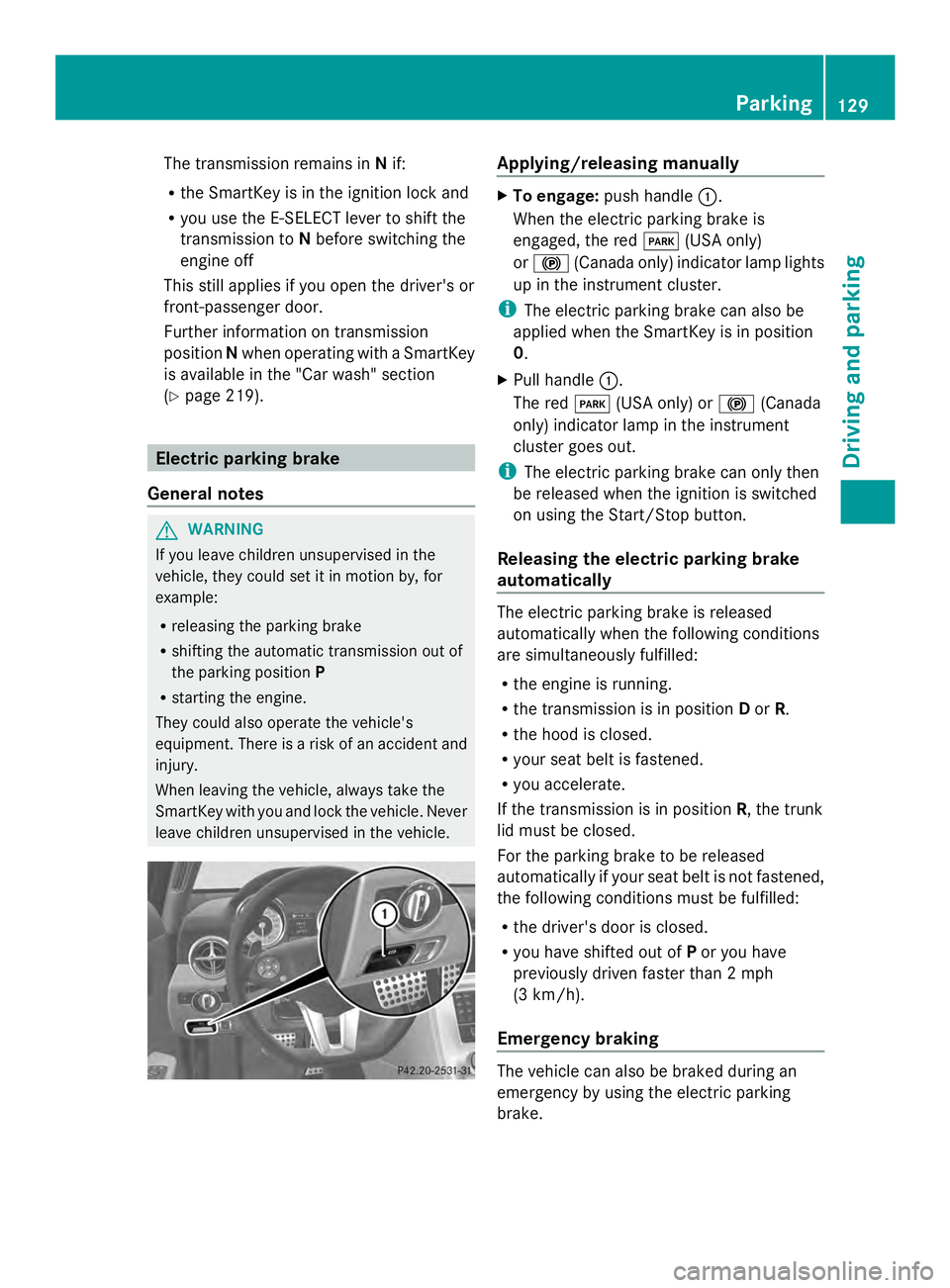
leave children unsupervised in the vehicle. Applying/releasing manually
X
To engage: push handle 0043.
When the electric parking brake is
engaged, the red 0049(USA only)
or 0024 (Canada only) indicator lamp lights
up in the instrument cluster.
i The electric parking brake can also be
applied when the SmartKey is in position
0.
X Pull handle 0043.
The red 0049(USA only) or 0024(Canada
only) indicator lamp in the instrument
cluster goes out.
i The electric parking brake can only then
be released when the ignition is switched
on using the Start/Stop button.
Releasing the electric parking brake
automatically The electric parking brake is released
automatically when the following conditions
are simultaneously fulfilled:
R
the engine is running.
R the transmission is in position Dor R.
R the hood is closed.
R your seat belt is fastened.
R you accelerate.
If the transmission is in position R, the trunk
lid must be closed.
For the parking brake to be released
automatically if your seat belt is not fastened,
the following conditions must be fulfilled:
R the driver's door is closed.
R you have shifted out of Por you have
previously driven faster than 2 mph
(3 km/h).
Emergency braking The vehicle can also be braked during an
emergency by using the electric parking
brake. Parking
129Driving and parking Z
Page 132 of 286
X
While driving, push handle 0043of the electric
parking brake (Y page 129).
i The vehicle is braked as long as you keep
the handle of the electric parking brake
pressed. The longer the electric parking
brake handle is depressed, the greater the
braking force.
During braking:
R a warning tone sounds.
R the Release Parking Brake
Release Parking Brake message
appears
R the red 0049(USA only) or 0024(Canada
only) indicator lamp in the instrument
cluster appears.
When the vehicle has been braked to a
standstill, the electric parking brake is
engaged. Parking the vehicle for a long period
If you leave the vehicle parked for longer than
four weeks, the battery may be damaged by
exhaustive discharging.
If you leave the vehicle parked up for longer
than six weeks, the vehicle may suffer
damage as a result of lack of use.
X Visit a qualified specialist workshop and
seek advice.
i You can obtain information about trickle
chargers from a qualified specialist
workshop. Driving tips
General driving tips
Important safety notes G
WARNING
If you switch off the ignition while driving,
safety-relevant functions are only available
with limitations, or not at all. This could affect, for example, the power steering and the brake
boosting effect. You will require considerably
more effort to steer and brake. There is a risk
of an accident.
Do not switch off the ignition while driving. G
WARNING
Please do not forget that your primary
responsibility is to drive the vehicle. A driver's
attention to the road must always be his/her
primary focus when driving. For your safety
and the safety of others, we recommend that
you pull over to a safe location and stop
before placing or taking a telephone call.
If you choose to use the telephone 5
while
driving, please use the hands-free device and
only use the telephone when road, weather
and traffic conditions permit. Some
jurisdictions prohibit the driver from using a
mobile telephone while driving a vehicle.
Only operate the COMAND 5
(Cockpit
Management and Data System) if road,
weather and traffic conditions permit.
Otherwise, you may not be able to observe
traffic conditions and could endanger yourself
and others.
Bear in mind that at a speed of just 30 mph
(approximately 50 km/h), your vehicle is
covering a distance of 44 feet (approximately
14 m) every second.
Drive sensibly – save fuel Observe the following tips to save fuel:
X
The tires should always be inflated to the
recommended tire pressure.
X Remove unnecessary loads.
X Warm up the engine at low engine speeds.
X Avoid frequent acceleration or braking.
X Have all maintenance work carried out
according to the service intervals listed in
the Maintenance Booklet or the service
interval display.
5 Observe all legal requirements. 130
Driving tipsDriving and parking
Page 134 of 286
Wet roads
If you have driven for a long time in heavy rain
without braking, there may be a delayed
reaction from the brakes when braking for the
first time. This may also occur after the
vehicle has been washed or driven through
deep water.
You have to depress the brake pedal more
firmly. Maintain a greater distance from the
vehicle in front.
After driving on a wet road or having the
vehicle washed, brake firmly while paying
attention to the traffic conditions. This will
warm up the brake discs, thereby drying them
more quickly and protecting them against
corrosion.
Limited braking performance on salt-
treated roads If you drive on salted roads, a layer of salt
residue may form on the brake discs and
brake pads. This can result in a significantly
longer braking distance.
R Brake occasionally to remove any possible
salt residue. Make sure that you do not
endanger other road users when doing so.
R Carefully depress the brake pedal and the
beginning and end of a journey.
R Maintain a greater distance to the vehicle
ahead.
Servicing the brakes !
If the red brake warning lamp lights up in
the instrument cluster and you hear a
warning tone while the engine is running,
the brake fluid level may be too low.
Observe additional warning messages in
the multifunction display.
The brake fluid level may be too low due to
brake pad wear or leaking brake lines.
Have the brake system checked
immediately. This work should be carried
out at an authorized Mercedes-Benz
Center. !
As the ESP ®
system operates
automatically, the engine and the ignition
must be switched off (the SmartKey must
be in position 0or 1in the ignition lock or
the Start/Stop button must be in position
0 or 1) if:
R the electric parking brake is tested using
a brake dynamometer.
R the vehicle is towed with one axle raised.
Braking triggered automatically by ESP ®
may seriously damage the brake system.
All checks and maintenance work on the
brake system must be carried out at a
qualified specialist workshop. Have this work
carried out at an authorized Mercedes-Benz
Center.
Have the brake pads replaced and the brake
fluid renewed at a qualified specialist
workshop, e.g. an authorized Mercedes-Benz
Center.
If the brake system has only been subject to
moderate loads, you should test the
functionality of your brakes at regular
intervals. To do so, press firmly on the brake
pedal when driving at a high speed. This
improves the grip of the brake pads.
You can find a description of Brake Assist
(BAS) on ( Ypage 55).
Mercedes-Benz recommends that you only
have brake pads/linings installed on your
vehicle which have been approved for
Mercedes-Benz vehicles or which correspond
to an equivalent quality standard. Brake
pads/linings which have not been approved
for Mercedes-Benz vehicles or which are not
of an equivalent quality could affect your
vehicle's operating safety.
Mercedes-Benz recommends that you only
use brake fluid that has been specially
approved for your vehicle by Mercedes-Benz,
or which corresponds to an equivalent quality
standard. Brake fluid which has not been
approved for Mercedes-Benz vehicles or
which is not of an equivalent quality could
affect your vehicle's operating safety. 132
Driving tipsDriving and parking
Page 135 of 286
AMG high-performance composite
brake system The AMG high-performance compound brake
system and the AMG ceramic high-
performance compound brake system are
designed for high loads. This may lead to
noise when braking. This will depend on:
R Speed
R Braking force
R Environmental conditions, such as
temperature and humidity
The wear of individual components of the
brake system, such as the brake pads/linings
or brake discs, depends on the individual
driving style and operating conditions.
For this reason, it is impossible to state a
mileage that will be valid under all
circumstances. An aggressive driving style
will lead to high wear. You can obtain further
information about this from your authorized
Mercedes-Benz Center.
New and replaced brake pads and discs only
reach their optimum braking effect after
several hundred kilometers of driving.
Compensate for this by applying greater force
to the brake pedal. Keep this in mind, and
adapt your driving and braking accordingly
during this break-in period.
Excessive heavy braking results in
correspondingly high brake wear. Observe
the brake wear warning lamp in the
instrument cluster and note any brake status
messages in the multifunction display.
Especially for high performance driving, it is
important to maintain and have the brake
system checked regularly. Driving on wet roads
Hydroplaning If water has accumulated to a certain depth
on the road surface, there is a danger of
hydroplaning occurring, even if:
R
you drive at low speeds.
R the tires have adequate tread depth.
For this reason, in the event of heavy rain or
in conditions in which hydroplaning may
occur, you must drive in the following
manner:
R lower your speed.
R avoid ruts.
R brake carefully.
Driving on flooded roads !
Do not drive through flooded areas.
Check the depth of any water before driving
through it. Drive slowly through standing
water. Otherwise, water may enter the
vehicle interior or the engine compartment.
This can damage the electronic
components in the engine or the automatic
transmission. Water can also be drawn in
by the engine's air suction nozzles and this
can cause engine damage. Winter driving
Points to remember G
WARNING
If you shift down on a slippery road surface in
an attempt to increase the engine's braking
effect, the drive wheels could lose their grip.
There is an increased danger of skidding and
accidents.
Do not shift down for additional engine
braking on a slippery road surface. G
DANGER
If the exhaust pipe is blocked or adequate
ventilation is not possible, poisonous gases Driving tips
133Driving and pa rking
Z
Page 148 of 286
Useful information
i This Operator's Manual describes all
models and all standard and optional
equipment of your vehicle available at the
time of publication of the Operator's
Manual. Country-specific differences are
possible. Please note that your vehicle may
not be equipped with all features
described. This also applies to safety-
related systems and functions.
i Please read the information on qualified
specialist workshops (Y page 22).Important safety notes
You will find an illustration of the instrument
cluster in the "At a glance" section
(Y page 27). G
WARNING
A driver's attention to the road and traffic
conditions must always be his/her primary
focus when driving.
For your safety and the safety of others,
selecting features through the multifunction
steering wheel should only be done by the
driver when traffic and road conditions permit
it to be done safely.
Bear in mind that at a speed of just 30 mph
(approximately 50 km/h ), your vehicle is
covering a distance of 44 feet (approximately
14 m) every second. G
WARNING
No messages will be displayed if either the
instrument cluster or the multifunction
display is inoperative.
As a result, you will not be able to see
information about your driving conditions,
such as
R speed
R outside temperature
R warning/indicator lamps R
malfunction/warning messages
R failure of any systems
Driving characteristics may be impaired.
If you must continue to drive, do so with added
caution. Contact an authorized Mercedes-
Benz Center as soon as possible. G
WARNING
Malfunction and warning messages are only
indicated for certain systems and are
intentionally not very detailed. The
malfunction and warning messages are
simply a reminder with respect to the
operation of certain systems. They do not
replace the owner's and/or driver's
responsibility to maintain the vehicle's
operating safety. Have all required
maintenance and safety checks performed on
the vehicle. Bring the vehicle to an authorized
Mercedes-Benz Center to address the
malfunction and warning messages. Displays and operation
Engine oil temperature display
The engine oil temperature gauge is in the
instrument cluster on the right-hand side.
Under normal operating conditions, the
temperature may rise to 140 †.
The transmission fluid temperature and the
coolant temperature are displayed in the
AMG menu (Y page 157). Tachometer
The red band in the tachometer indicates the
engine's overrevving range.
! Do not drive in the overrevving range, as
this could damage the engine.
The fuel supply is interrupted to protect the
engine when the red band is reached. 146
Displays and operationOn-board computer and displays
Page 155 of 286
X
If only one telephone number is stored
for a name: press the006Aor0076 button
to start dialing.
or
X If there is more than one number for a
particular name: press the006Aor0076
button to display the numbers.
X Press the 0063or0064 button to select the
number you want to dial.
X Press the 006Aor0076 button to start
dialing.
or
X If you do not want to make a call: press
the 007F button.
Redialing
The on-board computer saves the last names
or numbers dialed in the redial memory.
X Press the 0059or0065 button on the
steering wheel to select the Tel Telmenu.
X Press the 006Abutton to switch to the
redial memory.
X Press the 0063or0064 button to select the
desired name or number.
X Press the 006Aor0076 button to start
dialing.
Assistance menu Activating/deactivating Blind Spot Assist
You can use the Blind
Blind Spot SpotAsst.
Asst. function
to activate or deactivate Blind Spot Assist
(Y page 141).
X Press the 0059or0065 button on the
steering wheel to select the DriveAssist
DriveAssist
menu.
X Press 0076.
The current selection is displayed.
X To activate/deactivate: press0076
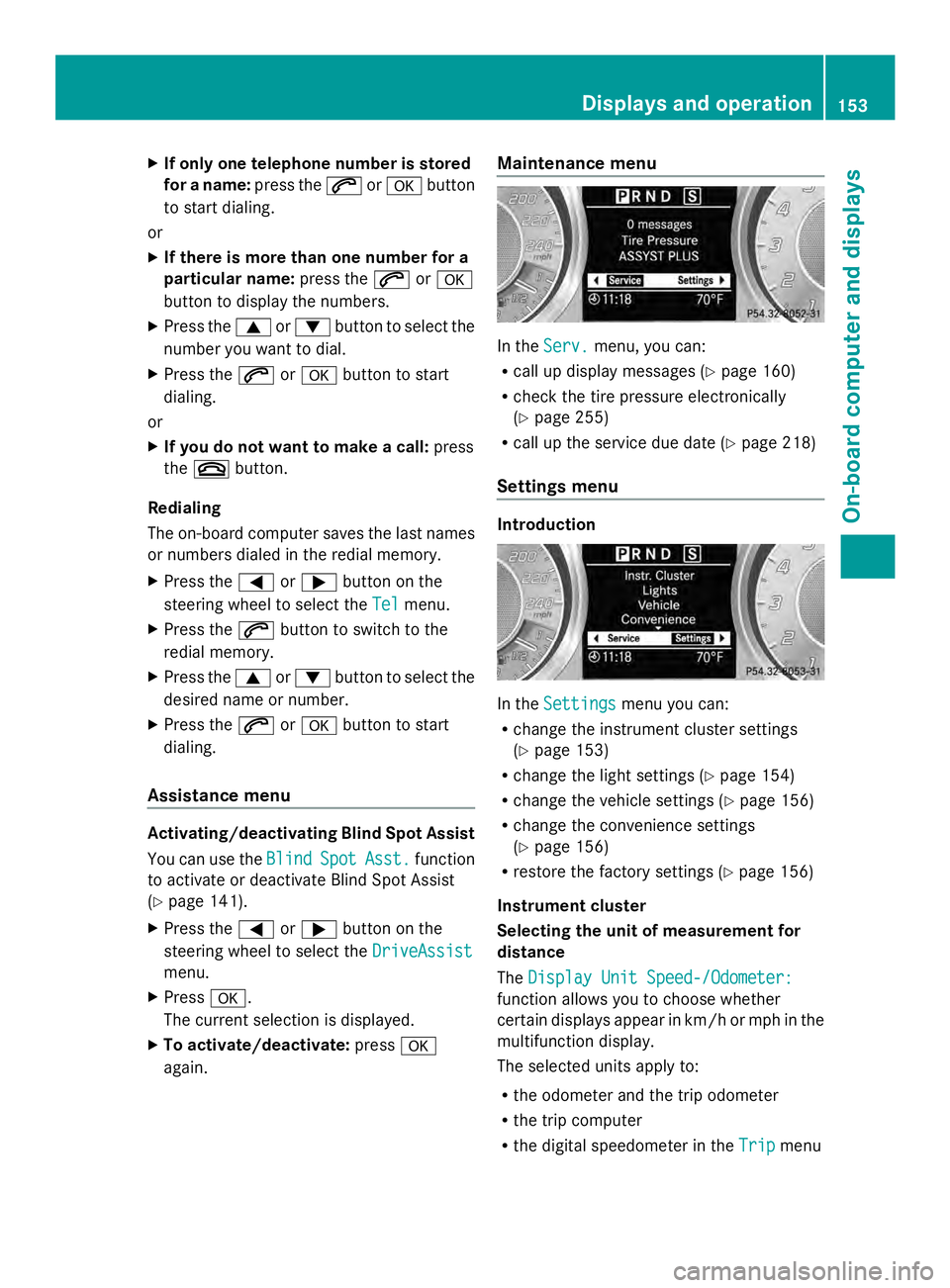
again. Maintenance menu In the
Serv.
Serv. menu, you can:
R call up display messages ( Ypage 160)
R check the tire pressure electronically
(Y page 255)
R call up the service due date (Y page 218)
Settings menu Introduction
In the
Settings Settings menu you can:
R change the instrument cluster settings
(Y page 153)
R change the light settings (Y page 154)
R change the vehicle settings (Y page 156)
R change the convenience settings
(Y page 156)
R restore the factory settings (Y page 156)
Instrument cluster
Selecting the unit of measurement for
distance
The Display Unit Speed-/Odometer: Display Unit Speed-/Odometer:
function allows you to choose whether
certain displays appear in km/h or mph in the
multifunction display.
The selected units apply to:
R the odometer and the trip odometer
R the trip computer
R the digital speedometer in the Trip Tripmenu Displays and operation
153On-board computer and displays Z