light MERCEDES-BENZ SLS AMG 2013 Manual PDF
[x] Cancel search | Manufacturer: MERCEDES-BENZ, Model Year: 2013, Model line: SLS AMG, Model: MERCEDES-BENZ SLS AMG 2013Pages: 286, PDF Size: 3.26 MB
Page 155 of 286
X
If only one telephone number is stored
for a name: press the006Aor0076 button
to start dialing.
or
X If there is more than one number for a
particular name: press the006Aor0076
button to display the numbers.
X Press the 0063or0064 button to select the
number you want to dial.
X Press the 006Aor0076 button to start
dialing.
or
X If you do not want to make a call: press
the 007F button.
Redialing
The on-board computer saves the last names
or numbers dialed in the redial memory.
X Press the 0059or0065 button on the
steering wheel to select the Tel Telmenu.
X Press the 006Abutton to switch to the
redial memory.
X Press the 0063or0064 button to select the
desired name or number.
X Press the 006Aor0076 button to start
dialing.
Assistance menu Activating/deactivating Blind Spot Assist
You can use the Blind
Blind Spot SpotAsst.
Asst. function
to activate or deactivate Blind Spot Assist
(Y page 141).
X Press the 0059or0065 button on the
steering wheel to select the DriveAssist
DriveAssist
menu.
X Press 0076.
The current selection is displayed.
X To activate/deactivate: press0076
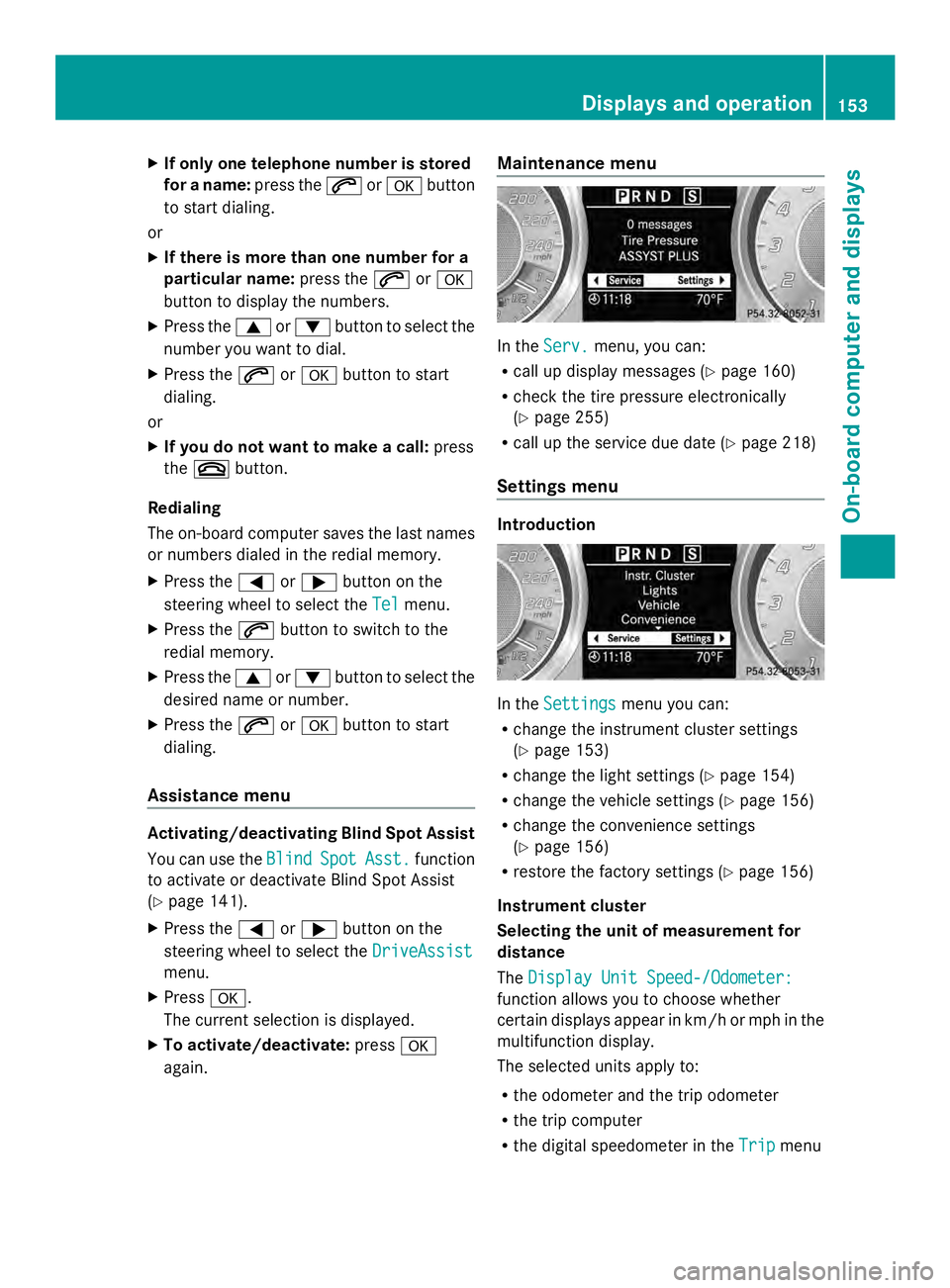
again. Maintenance menu In the
Serv.
Serv. menu, you can:
R call up display messages ( Ypage 160)
R check the tire pressure electronically
(Y page 255)
R call up the service due date (Y page 218)
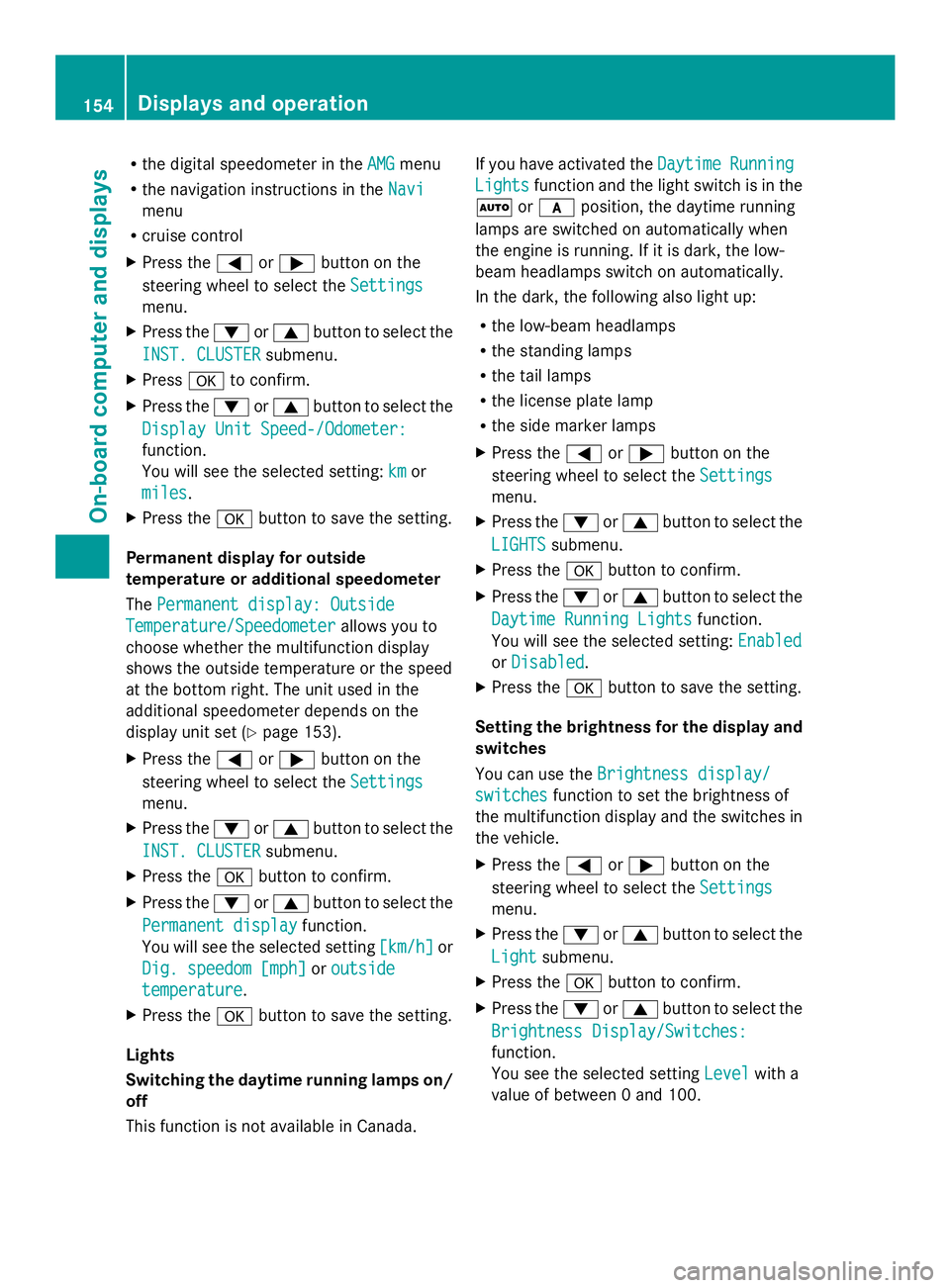
Settings menu Introduction
In the
Settings Settings menu you can:
R change the instrument cluster settings
(Y page 153)
R change the light settings (Y page 154)
R change the vehicle settings (Y page 156)
R change the convenience settings
(Y page 156)
R restore the factory settings (Y page 156)
Instrument cluster
Selecting the unit of measurement for
distance
The Display Unit Speed-/Odometer: Display Unit Speed-/Odometer:
function allows you to choose whether
certain displays appear in km/h or mph in the
multifunction display.
The selected units apply to:
R the odometer and the trip odometer
R the trip computer
R the digital speedometer in the Trip Tripmenu Displays and operation
153On-board computer and displays Z
Page 156 of 286
R
the digital speedometer in the AMG
AMGmenu
R the navigation instructions in the Navi
Navi
menu
R cruise control
X Press the 0059or0065 button on the
steering wheel to select the Settings
Settings
menu.
X Press the 0064or0063 button to select the
INST. CLUSTER
INST. CLUSTER submenu.
X Press 0076to confirm.
X Press the 0064or0063 button to select the
Display Unit Speed-/Odometer:
Display Unit Speed-/Odometer:
function.
You will see the selected setting: km kmor
miles
miles .
X Press the 0076button to save the setting.
Permanent display for outside
temperature or additional speedometer
The Permanent display: Outside Permanent display: Outside
Temperature/Speedometer
Temperature/Speedometer allows you to
choose whether the multifunction display
shows the outside temperature or the speed
at the bottom right. The unit used in the
additional speedometer depends on the
display unit set (Y page 153).
X Press the 0059or0065 button on the
steering wheel to select the Settings
Settings
menu.
X Press the 0064or0063 button to select the
INST. CLUSTER
INST. CLUSTER submenu.
X Press the 0076button to confirm.
X Press the 0064or0063 button to select the
Permanent display
Permanent display function.
You will see the selected setting [km/h]
[km/h]or
Dig. speedom [mph]
Dig. speedom [mph] oroutside
outside
temperature
temperature .
X Press the 0076button to save the setting.
Lights
Switching the daytime running lamps on/
off
This function is not available in Canada. If you have activated the
Daytime
Daytime Running Running
Lights
Lights function and the light switch is in the
0058 or0071 position, the daytime running
lamps are switched on automatically when
the engine is running. If it is dark, the low-
beam headlamps switch on automatically.
In the dark, the following also light up:
R the low-beam headlamps
R the standing lamps
R the tail lamps
R the license plate lamp
R the side marker lamps
X Press the 0059or0065 button on the
steering wheel to select the Settings
Settings
menu.
X Press the 0064or0063 button to select the
LIGHTS LIGHTS submenu.
X Press the 0076button to confirm.
X Press the 0064or0063 button to select the
Daytime Running Lights
Daytime Running Lights function.
You will see the selected setting: Enabled
Enabled
or Disabled
Disabled .
X Press the 0076button to save the setting.
Setting the brightness for the display and
switches
You can use the Brightness display/ Brightness display/
switches
switches function to set the brightness of
the multifunction display and the switches in
the vehicle.
X Press the 0059or0065 button on the
steering wheel to select the Settings Settings
menu.
X Press the 0064or0063 button to select the
Light
Light submenu.
X Press the 0076button to confirm.
X Press the 0064or0063 button to select the
Brightness Display/Switches:
Brightness Display/Switches:
function.
You see the selected setting Level Levelwith a
value of between 0 and 100. 154
Displays and operationOn-boa
rdcompu ter and displays
Page 157 of 286
X
Press the 0076button to save the setting.
X Press the 0064or0063 button to increase
or decrease the brightness.
Activating/deactivating surround
lighting and exterior lighting delayed
switch-off
The Locator lighting
Locator lighting function allows you
to set whether the exterior lighting should
come on when it is dark:
R for 40 seconds after unlocking the vehicle
with the SmartKey
The exterior lighting switches off if you
open the driver’s door.
R for 15 seconds after switching off the
engine and closing the doors
If the engine is switched off and then none
of the doors are opened, or if an open door
is not closed, the exterior lighting goes out
after 60 seconds.
If you activate the Locator Lighting
Locator Lighting
function, the following light up:
R the parking lamps
R the low-beam headlamps
R the license plate lamp
R the surround lighting in the exterior mirrors
X Press the 0059or0065 button on the
steering wheel to select the Settings
Settings
menu.
X Press the 0064or0063 button to select the
Light
Light submenu.
X Press the 0076button to confirm.
X Press the 0064or0063 button to select the
Locator Lighting
Locator Lighting function.
You will see the selected setting: on onor
off
off.
X Press the 0076button to save the setting. Deactivating the delayed switch-off
temporarily:
X
Select key position 0with the Start/Stop
button before leaving the vehicle.
X Select key position 2and then key position
0 again with the Start/Stop button
The delayed switch-off is deactivated.
Delayed switch-off is reactivated the next
time you start the engine.
Activating/deactivating the interior
lighting delayed switch-off
If you select key position 0with the Start/
Stop button when the Light. Delay
Light. Delay
function is activated, the interior lighting
lights up for approximately 20 seconds if it is
dark.
X Press the 0059or0065 button on the
steering wheel to select the Settings
Settings
menu.
X Press the 0064or0063 button to select the
Light Light submenu.
X Press the 0076button to confirm.
X Press the 0064or0063 button to select the
Interior lighting delay sw. off
Interior lighting delay sw. off
function.
You will see the selected setting: Enabled Enabled
or Disabled
Disabled .
X Press the 0076button to save the setting.
Vehicle
Activating/deactivating the automatic
door locking mechanism
If you select the Automatic Door Lock: Automatic Door Lock:
function, the vehicle is centrally locked above
a speed of around 9 mph(15 km/h).
i For further information on the automatic
locking feature, see (Y page 69).
X Press the 0059or0065 button on the
steering wheel to select the Settings
Settings
menu.
X Press the 0064or0063 button to select the
Vehicle Vehicle submenu.
X Press the 0076button to confirm. Displays and operation
155On-board computer and displays Z
Page 158 of 286
X
Press the 0064or0063 button to select the
Automatic door locks
Automatic door locks function.
You will see the selected setting: Enabled
Enabled
or Disabled
Disabled .
X Press the 0076button to save the setting.
Activating/deactivating the acoustic
locking verification signal
You can use the Acoustic Lock
Acoustic Lock function to
determine whether there is an acoustic
confirmation when locking and unlocking the
vehicle.
X Press the 0059or0065 button on the
steering wheel to select the Settings
Settings
menu.
X Press the 0064or0063 button to select the
VEHICLE
VEHICLE submenu.
X Press the 0076button to confirm.
X Press the 0064or0063 button to select the
Acoustic Lock
Acoustic Lock function.
You will see the selected setting:
Activated Activated orDeactivated
Deactivated.
X Press the 0076button to save the setting.
Convenience
Activating/deactivating the EASY-
ENTRY/EXIT feature G
WARNING
You must make sure no one can become
trapped or injured by the moving steering
wheel when the easy-entry/exit feature is
activated.
To stop steering wheel movement, move
steering wheel adjustment lever or press one
of the memory position buttons.
Do not leave children unattended in the
vehicle, or with access to an unlocked vehicle.
Children could open the driver's door and
unintentionally activate the easy-entry/exit
feature, which could result in an accident
and/or serious personal injury.
You can use the Easy EasyEntry/Exit:
Entry/Exit: function
to activate or deactivate the EASY-ENTRY/
EXIT feature (Y page 86). X
Press the 0059or0065 button on the
steering wheel to select the Settings Settings
menu.
X Press the 0064or0063 button to select the
Convenience
Convenience submenu.
X Press 0076to confirm.
X Press the 0064or0063 button to select the
Easy Entry/Exit
Easy Entry/Exit function.
You will see the selected setting:
Activated Activated orDeactivated
Deactivated.
X Press the 0076button to save the setting.
Switching the fold-in mirrors when
locking feature on/off
If you switch on the Fold FoldMirrors
Mirrors in
inwhen
when
Locking:
Locking: function, the exterior mirrors fold
in when you lock the vehicle. If you unlock the
vehicle and then open the driver's or front-
passenger door, the exterior mirrors fold out
again.
If you have switched the function on and you
fold the exterior mirrors in using the button
on the door (Y page 88), they will not fold out
automatically. The exterior mirrors can then
only be folded out using the button on the
door.
X Press the 0059or0065 button on the
steering wheel to select the Settings
Settings
menu.
X Press the 0064or0063 button to select the
CONVENIENCE CONVENIENCE submenu.
X Press the 0076button to confirm.
X Press the 0064or0063 button to select the
Fold mirrors in when locking:
Fold mirrors in when locking:
function.
You will see the selected setting: on
on or
off off.
X Press the 0076button to save the setting.
Restoring the factory settings
For safety reasons, the Day Lights Day Lightsfunction
in the Lights
Lights submenu is only reset if the
vehicle is stationary. 156
Displays and operationOn-board computer and displays
Page 163 of 286
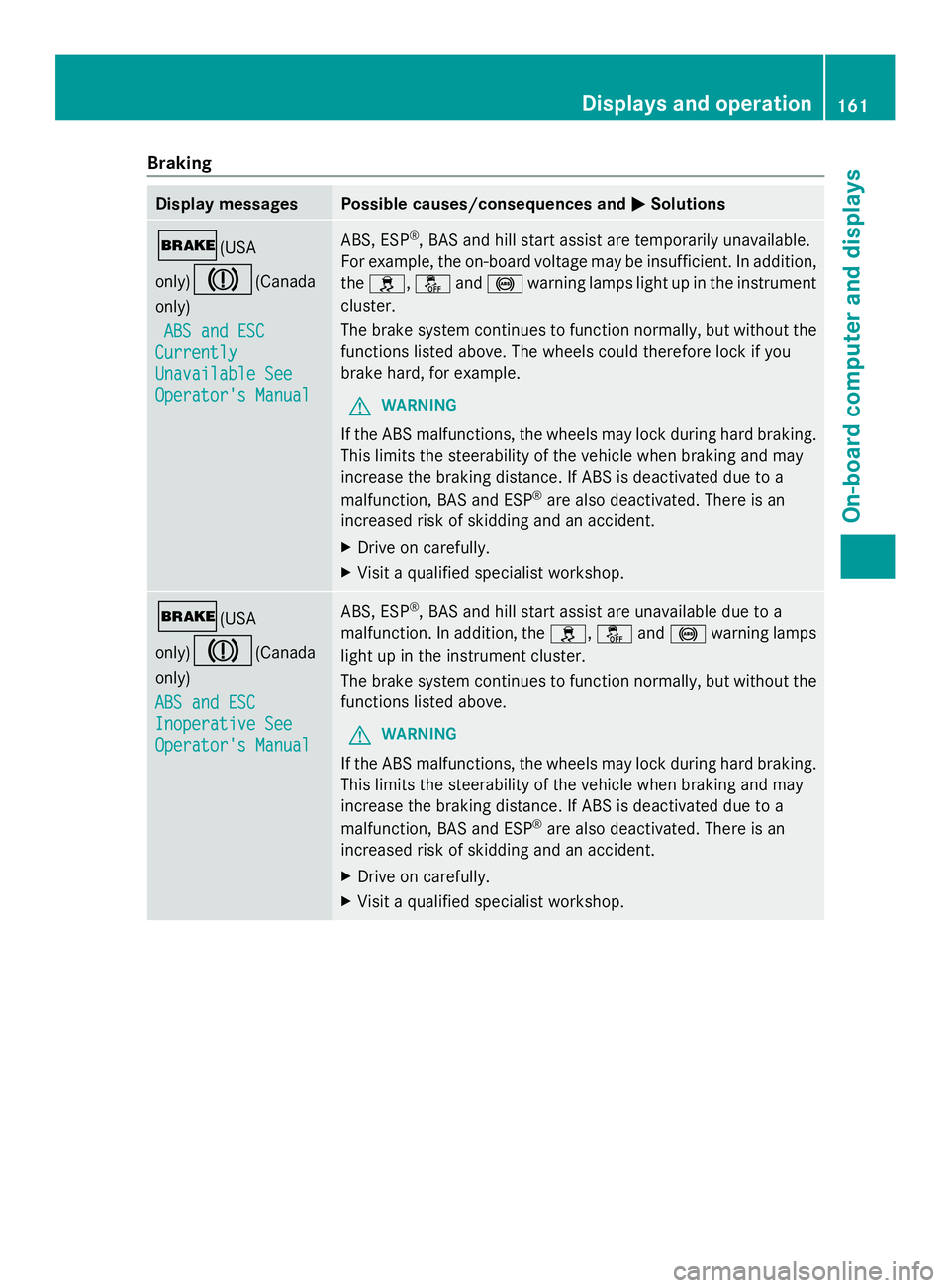
Braking
Display messages Possible causes/consequences and
0050
0050Solutions 0027(USA
only)004D(Canada
only)
ABS and ESC ABS and ESC
Currently
Currently
Unavailable See Unavailable See
Operator's Manual Operator's Manual ABS, ESP
®
, BAS and hill start assist are temporarily unavailable.
For example, the on-board voltage may be insufficient. In addition,
the 0089, 00BBand0025 warning lamps light up in the instrument
cluster.
The brake system continues to function normally, but without the
functions listed above. The wheels could therefore lock if you
brake hard, for example.
G WARNING
If the ABS malfunctions, the wheels may lock during hard braking.
This limits the steerability of the vehicle when braking and may
increase the braking distance. If ABS is deactivated due to a
malfunction, BAS and ESP ®
are also deactivated. There is an
increased risk of skidding and an accident.
X Drive on carefully.
X Visit a qualified specialist workshop. 0027(USA
only)004D(Canada
only)
ABS and ESC ABS and ESC
Inoperative See Inoperative See
Operator's Manual Operator's Manual ABS, ESP
®
, BAS and hill start assist are unavailable due to a
malfunction. In addition, the 0089,00BBand0025 warning lamps
light up in the instrument cluster.
The brake system continues to function normally, but without the
functions listed above.
G WARNING
If the ABS malfunctions, the wheels may lock during hard braking.
This limits the steerability of the vehicle when braking and may
increase the braking distance. If ABS is deactivated due to a
malfunction, BAS and ESP ®
are also deactivated. There is an
increased risk of skidding and an accident.
X Drive on carefully.
X Visit a qualified specialist workshop. Displays and operation
161On-board computer and displays Z
Page 164 of 286
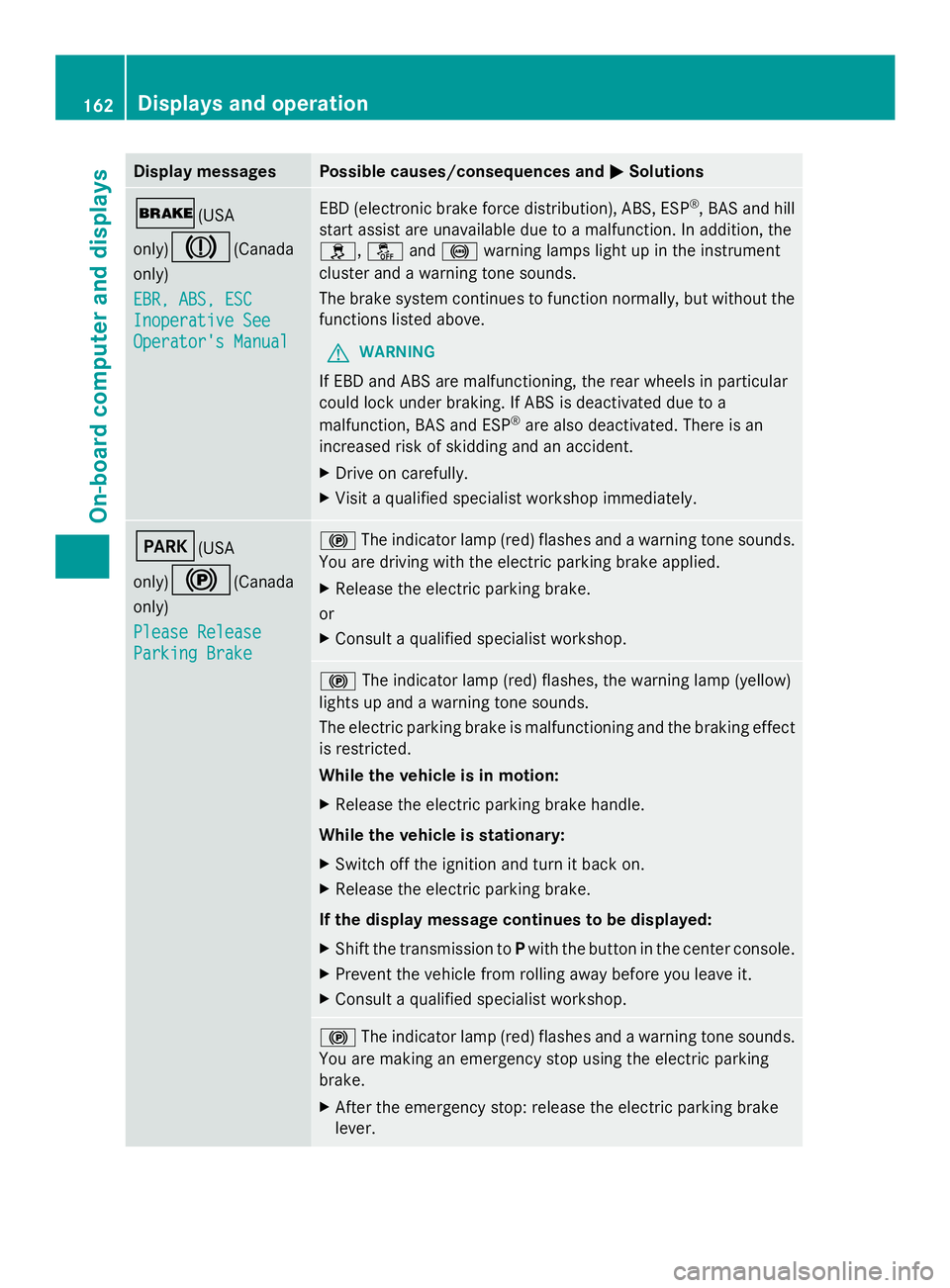
Display messages Possible causes/consequences and
0050
0050Solutions 0027(USA
only)
004D(Canada
only)
EBR, ABS, ESC EBR, ABS, ESC
Inoperative See Inoperative See
Operator's Manual Operator's Manual EBD (electronic brake force distribution), ABS, ESP
®
, BAS and hill
start assist are unavailable due to a malfunction. In addition, the
0089, 00BBand0025 warning lamps light up in the instrument
cluster and a warning tone sounds.
The brake system continues to function normally, but without the
functions listed above.
G WARNING
If EBD and ABS are malfunctioning, the rear wheels in particular
could lock under braking. If ABS is deactivated due to a
malfunction, BAS and ESP ®
are also deactivated. There is an
increased risk of skidding and an accident.
X Drive on carefully.
X Visit a qualified specialist workshop immediately. 0049(USA
only)
0024(Canada
only)
Please Release Please Release
Parking Brake Parking Brake 0024
The indicator lamp (red) flashes and a warning tone sounds.
You are driving with the electric parking brake applied.
X Release the electric parking brake.
or
X Consult a qualified specialist workshop. 0024
The indicator lamp (red) flashes, the warning lamp (yellow)
lights up and a warning tone sounds.
The electric parking brake is malfunctioning and the braking effect
is restricted.
While the vehicle is in motion:
X Release the electric parking brake handle.
While the vehicle is stationary:
X Switch off the ignition and turn it back on.
X Release the electric parking brake.
If the display message continues to be displayed:
X Shift the transmission to Pwith the button in the center console.
X Prevent the vehicle from rolling away before you leave it.
X Consult a qualified specialist workshop. 0024
The indicator lamp (red) flashes and a warning tone sounds.
You are making an emergency stop using the electric parking
brake.
X After the emergency stop: release the electric parking brake
lever. 162
Displays and operationOn-board compu
ter and displays
Page 165 of 286
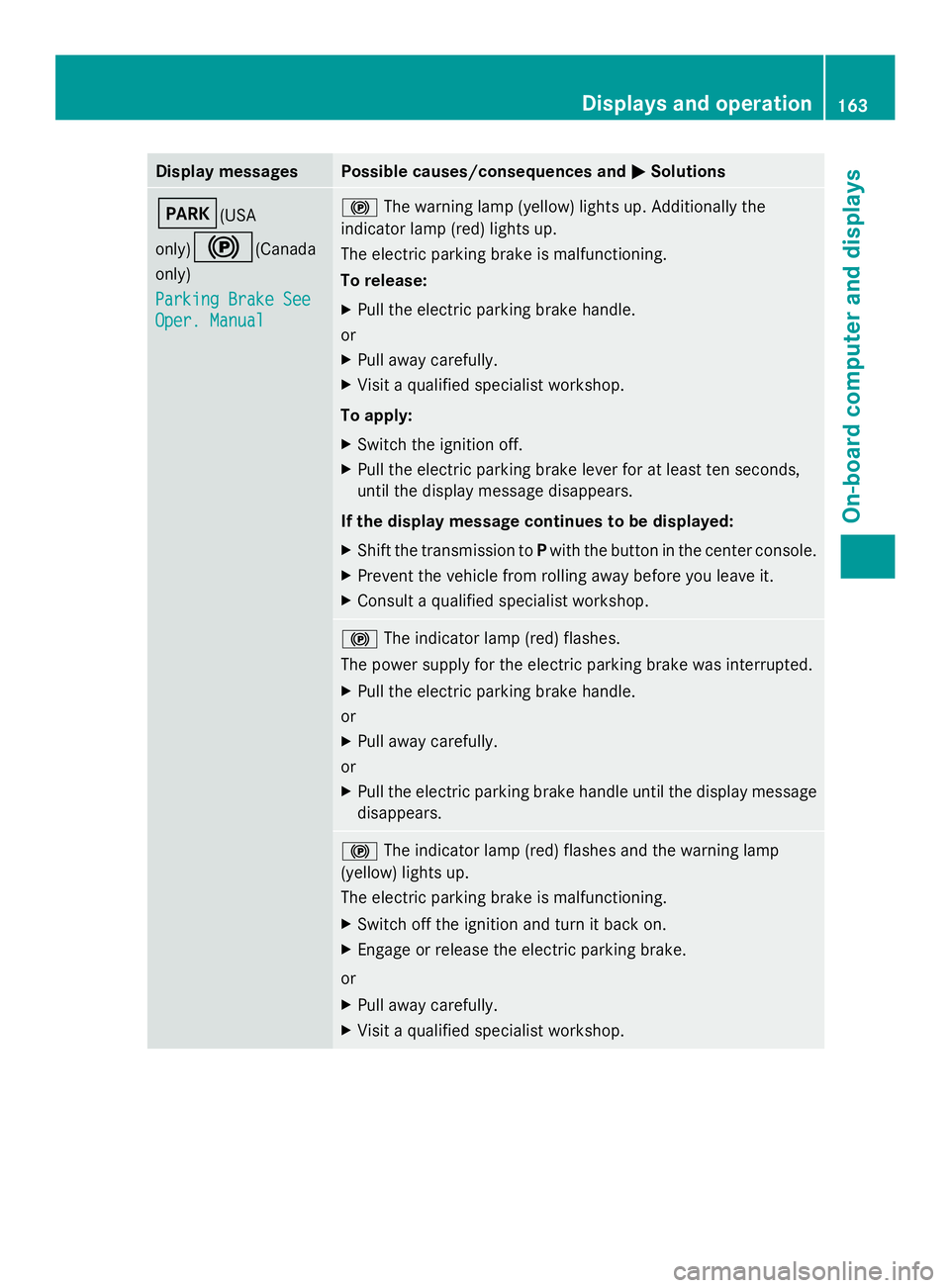
Display messages Possible causes/consequences and
0050
0050Solutions 0049(USA
only)
0024(Canada
only)
Parking Brake See Parking Brake See
Oper. Manual Oper. Manual 0024
The warning lamp (yellow) lights up. Additionally the
indicator lamp (red) lights up.
The electric parking brake is malfunctioning.
To release:
X Pull the electric parking brake handle.
or
X Pull away carefully.
X Visit a qualified specialist workshop.
To apply:
X Switch the ignition off.
X Pull the electric parking brake lever for at least ten seconds,
until the display message disappears.
If the display message continues to be displayed:
X Shift the transmission to Pwith the button in the center console.
X Prevent the vehicle from rolling away before you leave it.
X Consult a qualified specialist workshop. 0024
The indicator lamp (red) flashes.
The power supply for the electric parking brake was interrupted.
X Pull the electric parking brake handle.
or
X Pull away carefully.
or
X Pull the electric parking brake handle until the display message
disappears. 0024
The indicator lamp (red) flashes and the warning lamp
(yellow) lights up.
The electric parking brake is malfunctioning.
X Switch off the ignition and turn it back on.
X Engage or release the electric parking brake.
or
X Pull away carefully.
X Visit a qualified specialist workshop. Displays and operation
163On-board computer and displays Z
Page 166 of 286
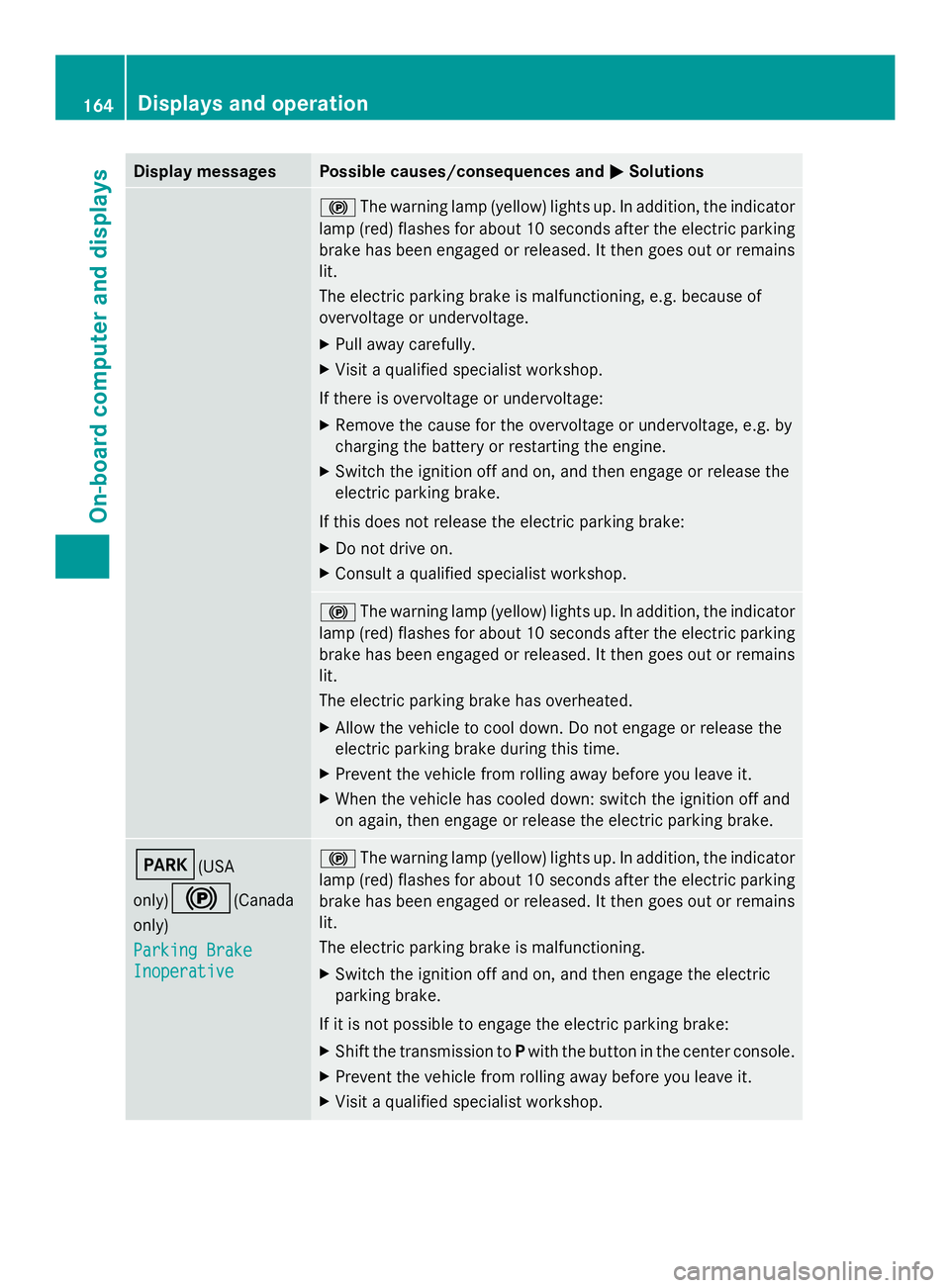
Display messages Possible causes/consequences and
0050
0050Solutions 0024
The warning lamp (yellow) lights up. In addition, the indicator
lamp (red) flashes for about 10 seconds after the electric parking
brake has been engaged or released. It then goes out or remains
lit.
The electric parking brake is malfunctioning, e.g. because of
overvoltage or undervoltage.
X Pull away carefully.
X Visit a qualified specialist workshop.
If there is overvoltage or undervoltage:
X Remove the cause for the overvoltage or undervoltage, e.g. by
charging the battery or restarting the engine.
X Switch the ignition off and on, and then engage or release the
electric parking brake.
If this does not release the electric parking brake:
X Do not drive on.
X Consult a qualified specialist workshop. 0024
The warning lamp (yellow) lights up. In addition, the indicator
lamp (red) flashes for about 10 seconds after the electric parking
brake has been engaged or released. It then goes out or remains
lit.
The electric parking brake has overheated.
X Allow the vehicle to cool down. Do not engage or release the
electric parking brake during this time.
X Prevent the vehicle from rolling away before you leave it.
X When the vehicle has cooled down: switch the ignition off and
on again, then engage or release the electric parking brake. 0049(USA
only)
0024(Canada
only)
Parking Brake Parking Brake
Inoperative Inoperative 0024
The warning lamp (yellow) lights up. In addition, the indicator
lamp (red) flashes for about 10 seconds after the electric parking
brake has been engaged or released. It then goes out or remains
lit.
The electric parking brake is malfunctioning.
X Switch the ignition off and on, and then engage the electric
parking brake.
If it is not possible to engage the electric parking brake:
X Shift the transmission to Pwith the button in the center console.
X Prevent the vehicle from rolling away before you leave it.
X Visit a qualified specialist workshop. 164
Displays and operationOn-board compu
ter and displays
Page 167 of 286
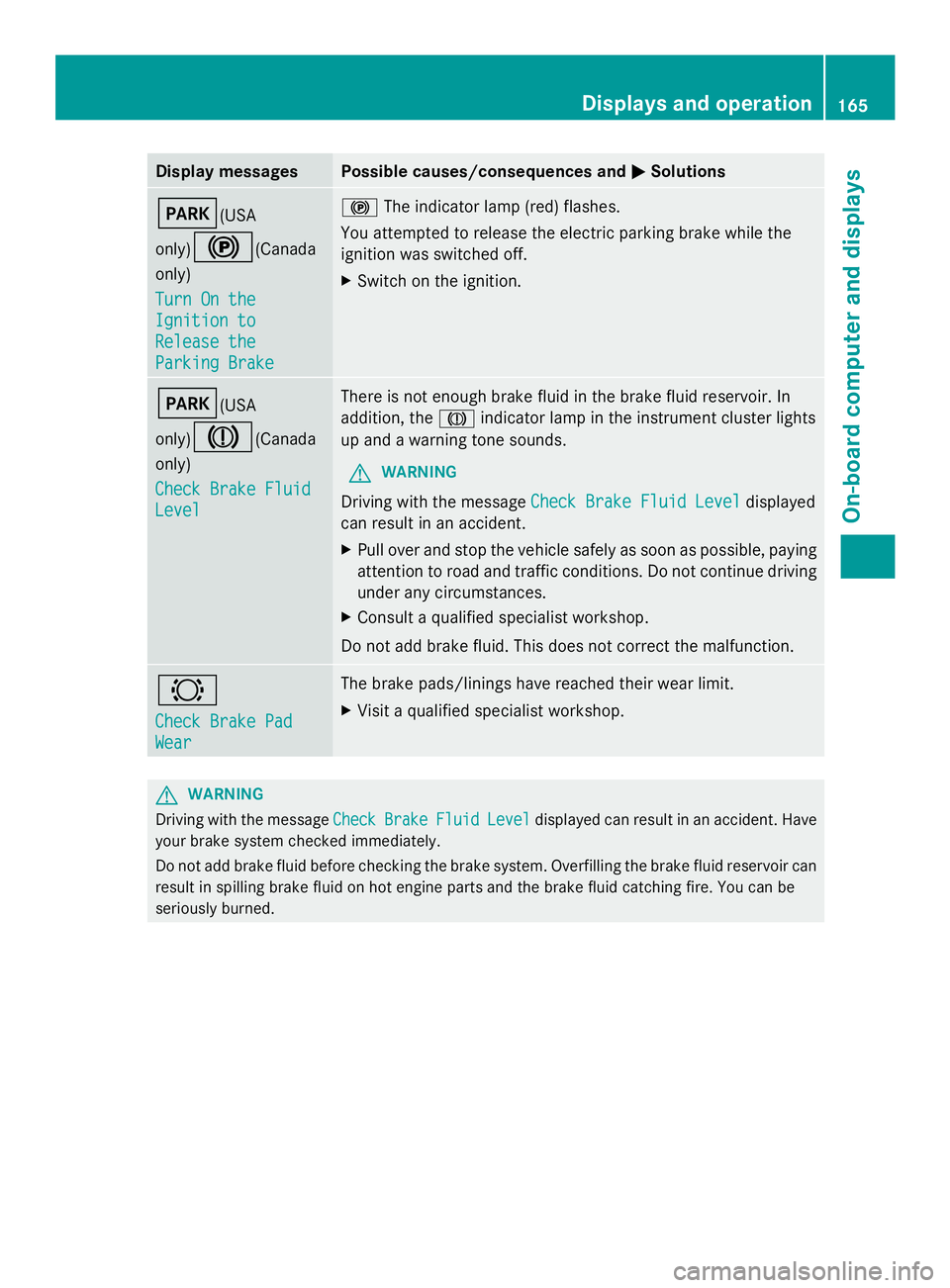
Display messages Possible causes/consequences and
0050
0050Solutions 0049(USA
only)
0024(Canada
only)
Turn On the Turn On the
Ignition to Ignition to
Release the Release the
Parking Brake Parking Brake 0024
The indicator lamp (red) flashes.
You attempted to release the electric parking brake while the
ignition was switched off.
X Switch on the ignition. 0049(USA
only)
004D(Canada
only)
Check Brake Fluid Check Brake Fluid
Level Level There is not enough brake fluid in the brake fluid reservoir. In
addition, the
004Dindicator lamp in the instrument cluster lights
up and a warning tone sounds.
G WARNING
Driving with the message Check Brake Fluid Level Check Brake Fluid Level displayed
can result in an accident.
X Pull over and stop the vehicle safely as soon as possible, paying
attention to road and traffic conditions. Do not continue driving
under any circumstances.
X Consult a qualified specialist workshop.
Do not add brake fluid. This does not correct the malfunction. 0026
Check Brake Pad Check Brake Pad
Wear Wear The brake pads/linings have reached their wear limit.
X
Visit a qualified specialist workshop. G
WARNING
Driving with the message Check CheckBrake
BrakeFluid
FluidLevel
Leveldisplayed can result in an accident. Have
your brake system checked immediately.
Do not add brake fluid before checking the brake system. Overfilling the brake fluid reservoir can
result in spilling brake fluid on hot engine parts and the brake fluid catching fire. You can be
seriously burned. Displays and operation
165On-board computer and displays Z
Page 168 of 286
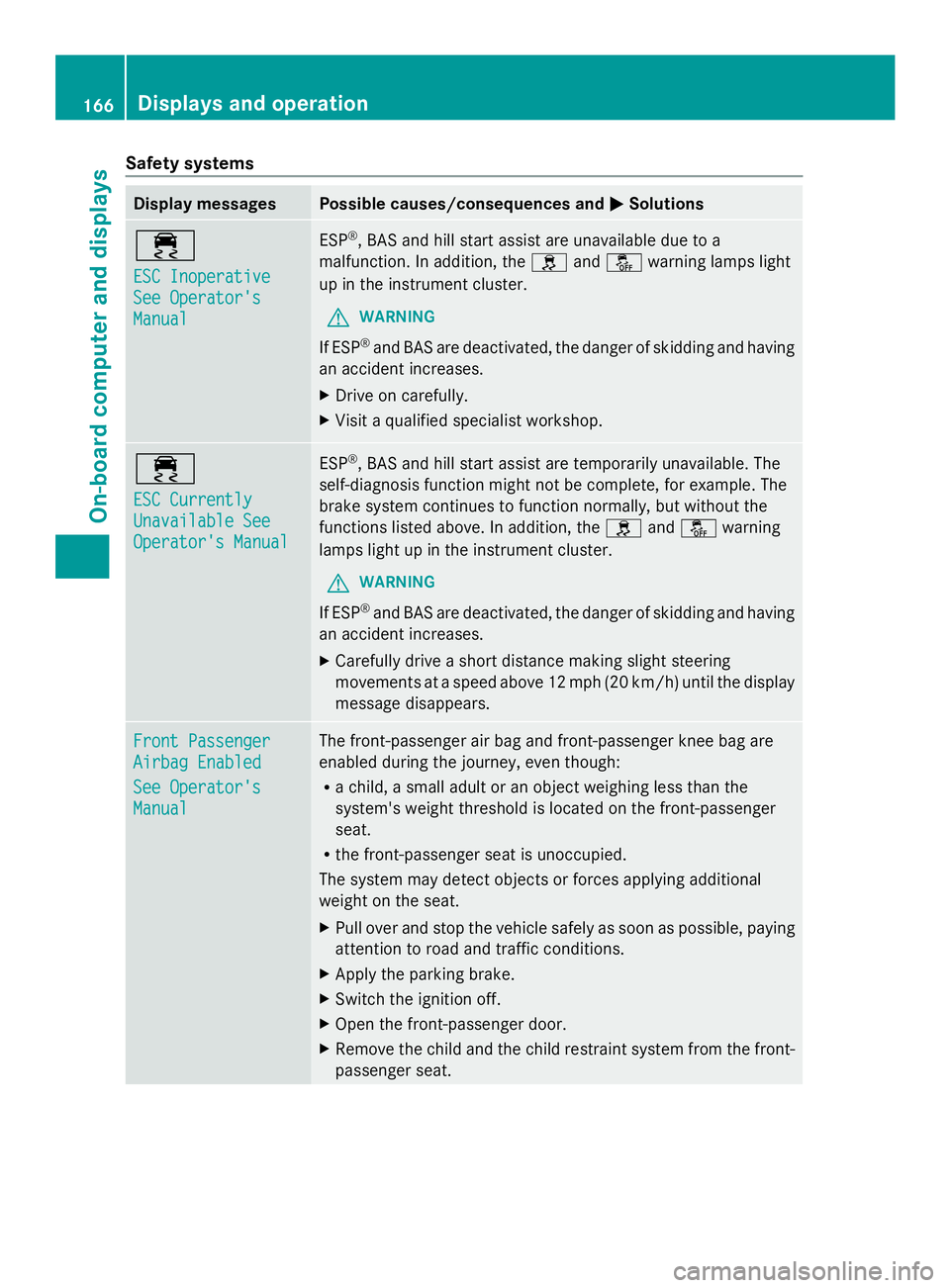
Safety systems
Display messages Possible causes/consequences and
0050
0050Solutions 00E5
ESC Inoperative ESC Inoperative
See Operator's See Operator's
Manual Manual ESP
®
, BAS and hill start assist are unavailable due to a
malfunction. In addition, the 0089and00BB warning lamps light
up in the instrument cluster.
G WARNING
If ESP ®
and BAS are deactivated, the danger of skidding and having
an accident increases.
X Drive on carefully.
X Visit a qualified specialist workshop. 00E5
ESC Currently ESC Currently
Unavailable See Unavailable See
Operator's Manual Operator's Manual ESP
®
, BAS and hill start assist are temporarily unavailable. The
self-diagnosis function might not be complete, for example. The
brake system continues to function normally, but without the
functions listed above. In addition, the 0089and00BB warning
lamps light up in the instrument cluster.
G WARNING
If ESP ®
and BAS are deactivated, the danger of skidding and having
an accident increases.
X Carefully drive a short distance making slight steering
movements at a speed above 12 mph (20 km/h) until the display
message disappears. Front Passenger Front Passenger
Airbag Enabled Airbag Enabled
See Operator's See Operator's
Manual Manual The front-passenger air bag and front-passenger knee bag are
enabled during the journey, even though:
R
a child, a small adult or an object weighing less than the
system's weight threshold is located on the front-passenger
seat.
R the front-passenger seat is unoccupied.
The system may detect objects or forces applying additional
weight on the seat.
X Pull over and stop the vehicle safely as soon as possible, paying
attention to road and traffic conditions.
X Apply the parking brake.
X Switch the ignition off.
X Open the front-passenger door.
X Remove the child and the child restraint system from the front-
passenger seat. 166
Displays and operationOn-board computer and displays