sensor MERCEDES-BENZ SLS AMG COUPE 2012 User Guide
[x] Cancel search | Manufacturer: MERCEDES-BENZ, Model Year: 2012, Model line: SLS AMG COUPE, Model: MERCEDES-BENZ SLS AMG COUPE 2012Pages: 288, PDF Size: 18.46 MB
Page 142 of 288
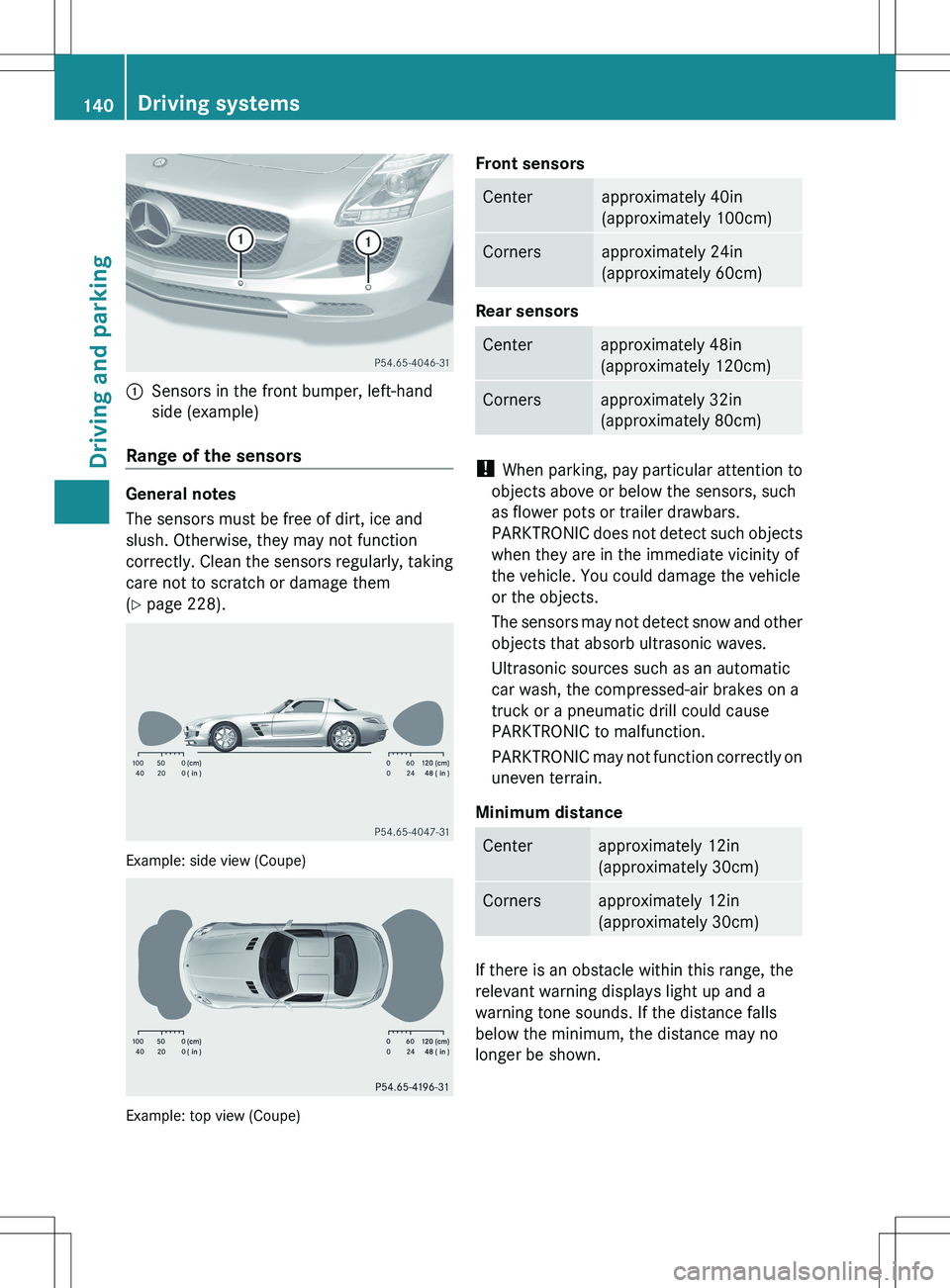
:Sensors in the front bumper, left-hand
side (example)
Range of the sensors
General notes
The sensors must be free of dirt, ice and
slush. Otherwise, they may not function
correctly. Clean the sensors regularly, taking
care not to scratch or damage them
( Y page 228).
Example: side view (Coupe)
Example: top view (Coupe)
Front sensorsCenterapproximately 40in
(approximately 100cm)Cornersapproximately 24in
(approximately 60cm)
Rear sensors
Centerapproximately 48in
(approximately 120cm)Cornersapproximately 32in
(approximately 80cm)
! When parking, pay particular attention to
objects above or below the sensors, such
as flower pots or trailer drawbars.
PARKTRONIC does not detect such objects
when they are in the immediate vicinity of
the vehicle. You could damage the vehicle
or the objects.
The sensors may not detect snow and other
objects that absorb ultrasonic waves.
Ultrasonic sources such as an automatic
car wash, the compressed-air brakes on a
truck or a pneumatic drill could cause
PARKTRONIC to malfunction.
PARKTRONIC may not function correctly on
uneven terrain.
Minimum distance
Centerapproximately 12in
(approximately 30cm)Cornersapproximately 12in
(approximately 30cm)
If there is an obstacle within this range, the
relevant warning displays light up and a
warning tone sounds. If the distance falls
below the minimum, the distance may no
longer be shown.
140Driving systemsDriving and parking
Page 143 of 288
Warning displays
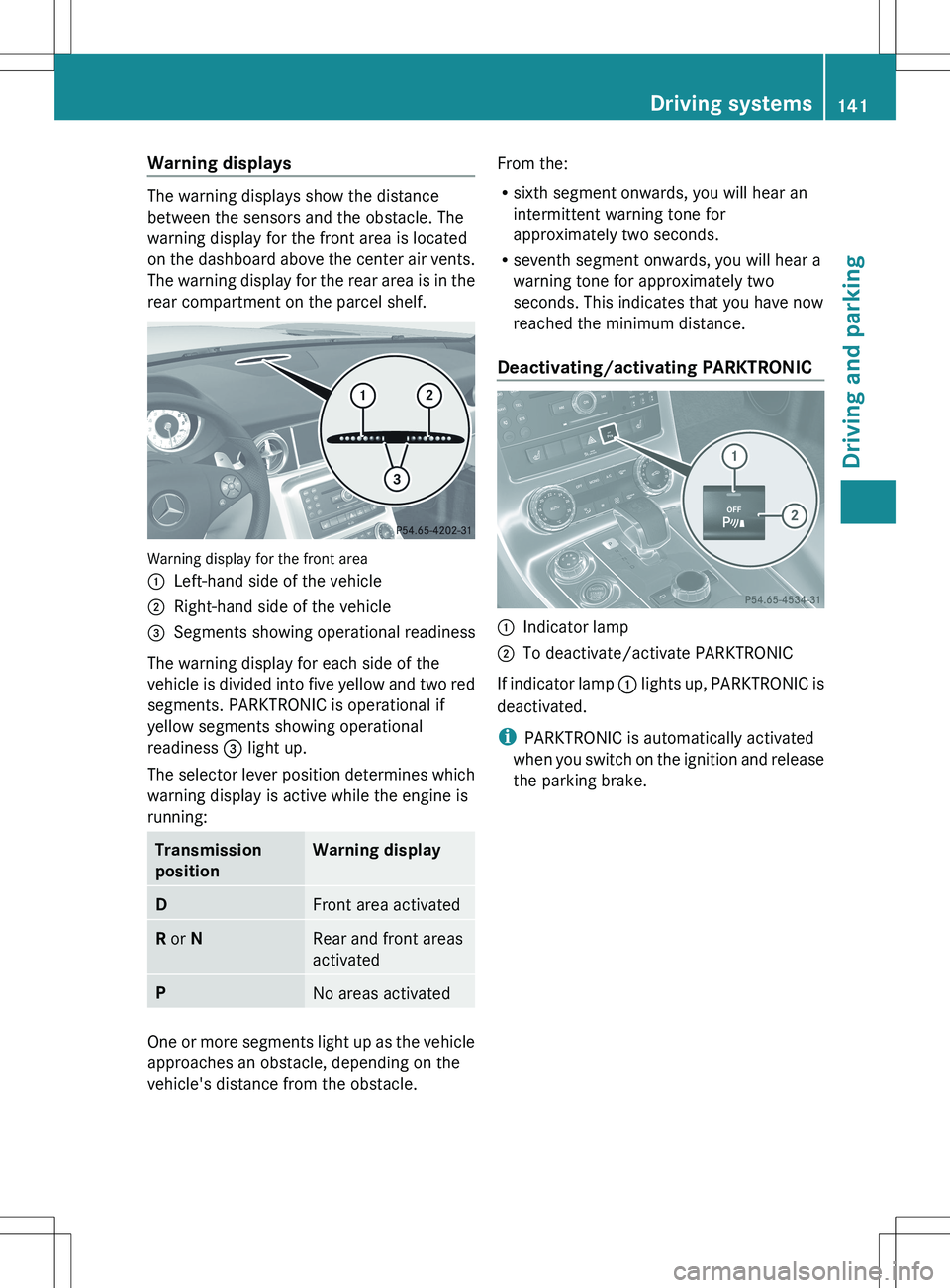
The warning displays show the distance
between the sensors and the obstacle. The
warning display for the front area is located
on the dashboard above the center air vents.
The warning display for the rear area is in the
rear compartment on the parcel shelf.
Warning display for the front area
:Left-hand side of the vehicle;Right-hand side of the vehicle=Segments showing operational readiness
The warning display for each side of the
vehicle is divided into five yellow and two red
segments. PARKTRONIC is operational if
yellow segments showing operational
readiness = light up.
The selector lever position determines which
warning display is active while the engine is
running:
Transmission
positionWarning displayDFront area activatedR or NRear and front areas
activatedPNo areas activated
One or more segments light up as the vehicle
approaches an obstacle, depending on the
vehicle's distance from the obstacle.
From the:
R sixth segment onwards, you will hear an
intermittent warning tone for
approximately two seconds.
R seventh segment onwards, you will hear a
warning tone for approximately two
seconds. This indicates that you have now
reached the minimum distance.
Deactivating/activating PARKTRONIC:Indicator lamp;To deactivate/activate PARKTRONIC
If indicator lamp : lights up, PARKTRONIC is
deactivated.
i PARKTRONIC is automatically activated
when you switch on the ignition and release
the parking brake.
Driving systems141Driving and parkingZ
Page 144 of 288
Problems with PARKTRONICProblemPossible causes/consequences and M SolutionsOnly the red segments
in the PARKTRONIC
warning displays are lit.
You also hear a warning
tone for approximately
two seconds.
PARKTRONIC is
deactivated after
approximately
20 seconds, and the
indicator lamp in the
PARKTRONIC button
lights up.PARKTRONIC has malfunctioned and has switched off.XIf problems persist, have PARKTRONIC checked at a qualified
specialist workshop.Only the red segments
in the PARKTRONIC
warning displays are lit.
PARKTRONIC is
deactivated after
approximately 20
seconds.The PARKTRONIC sensors are dirty or there is interference.XClean the PARKTRONIC sensors ( Y page 228).XSwitch the ignition back on.The problem may be caused by an external source of radio or
ultrasound waves.XSee if PARKTRONIC functions in a different location.Rear view camera
Important safety notes
The rear view camera is an optical parking aid.
It shows the area behind your vehicle in the
COMAND display.
GWARNING
Make sure no persons or animals are in or
near the area in which you are parking/
maneuvering. Otherwise, they could be
injured.
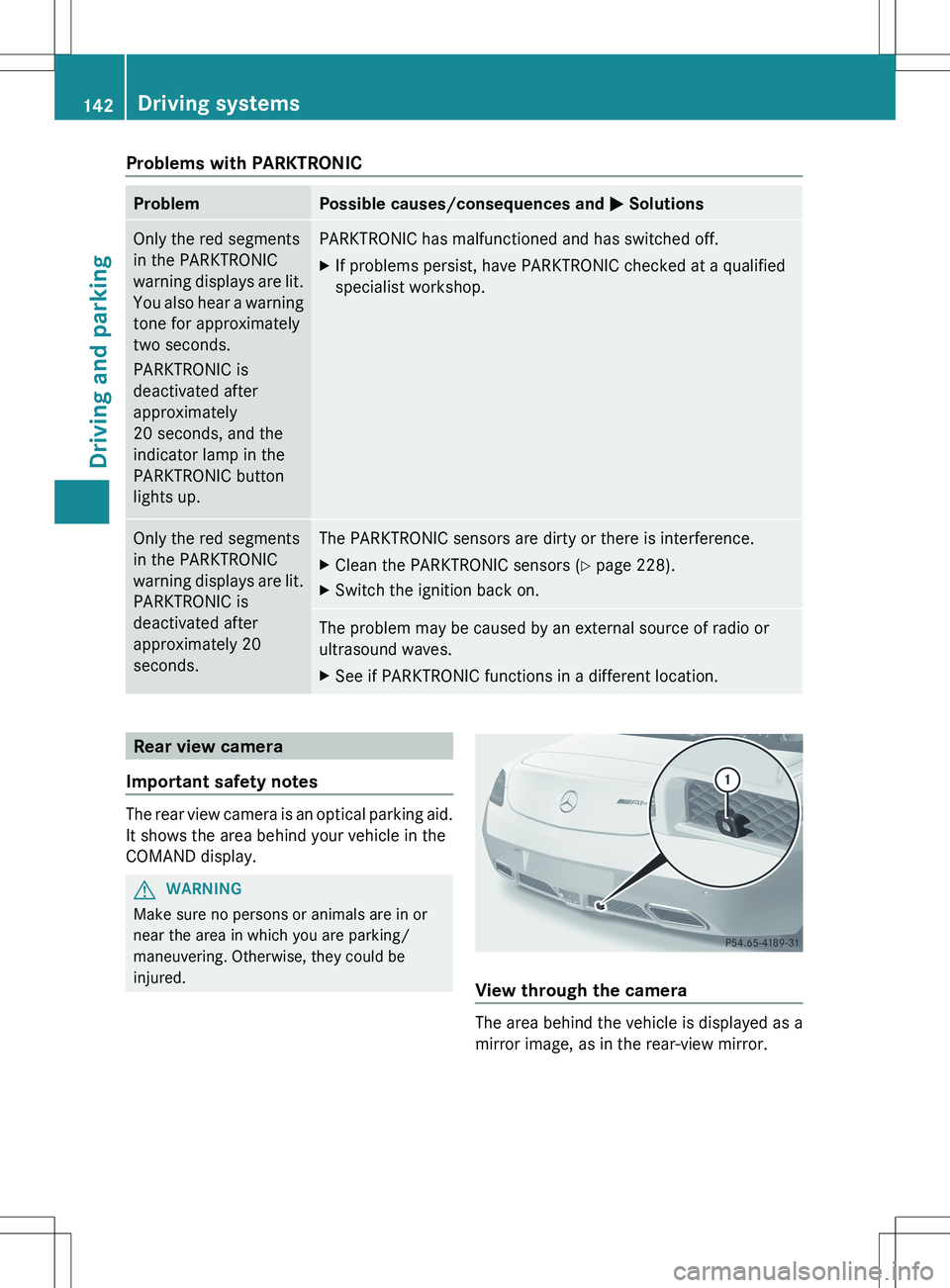
View through the camera
The area behind the vehicle is displayed as a
mirror image, as in the rear-view mirror.
142Driving systemsDriving and parking
Page 145 of 288
GWARNING
The rear view camera is only an aid, and may
display obstacles:
R from a distorted perspective
R incorrectly
R not at all.
The rear view camera does not relieve you of
the responsibility to take care. Take all
necessary care and pay particular attention to
the traffic conditions. The rear view camera
may not show objects that:
R are very near to the rear bumper
R are underneath the rear bumper
You are responsible for safety at all times and
must continue to pay attention to your
immediate surroundings when parking and
maneuvering. This includes the area behind,
in front of, and next to the vehicle. You could
otherwise put yourself and/or others in
danger.
GWARNING
The rear view camera does not work or does
not work properly if:
R it is raining heavily or if it is snowing or
foggy.
R it is night or if you are parking/
maneuvering your vehicle in a very dark
area.
R very bright white light is shining on the
camera.
R the immediate vicinity is illuminated with
fluorescent light (the display of the
COMAND system can flicker).
R the temperature changes abruptly, for
example if you drive out of the cold into a
heated garage (condensation on the lens).
R the camera lens is dirty or covered.
R the rear of your vehicle is damaged.
In this case, have the position and the
setting of the camera checked at a
specialist workshop. Mercedes-Benz
recommends that you consult a Mercedes-
Benz Center for this purpose.
Do not use the rear view camera in these
situations. You could otherwise injure
yourself and other people and/or cause
damage - including damage to your vehicle -
while parking/maneuvering.
Activating the rear view cameraXEnsure that key position 2 has been
selected with the Start/Stop button.XMake sure that the "rear view camera"
function is selected in COMAND (see the
separate operating instructions for
COMAND).XEngage reverse gear.
The COMAND display shows the area
behind the vehicle.
You can also switch off the display of the area
behind the vehicle in the COMAND display.
Blind Spot Assist
Important safety notes
Blind Spot Assist uses a radar sensor system
to monitor the areas on both sides of your
vehicle. It assists you from a speed of
approximately 20 mph(30 km/h). A warning
display in the exterior mirrors draws your
attention to vehicles detected in the
monitored area. If you then switch on the
corresponding turn signal to change lane, you
will also receive an optical and audible
collision warning. For this purpose, Blind Spot
Assist uses sensors in the rear bumper.
GWARNING
Blind Spot Assist is only an aid designed to
assist driving. It may fail to detect some
vehicles and is no substitute for attentive
driving.
Blind Spot Assist cannot detect road and
traffic conditions. It may fail to detect narrow
vehicles, such as motorcycles or bicycles, or
may only detect them too late.
Monitoring may be affected by dirty sensors,
strong spray or poor visibility caused by snow,
Driving systems143Driving and parkingZ
Page 146 of 288
rain or mist, for example. In this case, vehicles
are detected late or not at all.
Always pay attention to traffic conditions and
your surroundings. Otherwise, you may fail to
recognize dangers in time, cause an accident
and injure yourself and others.
i USA only:
This device has been approved by the FCC
as a “Vehicular Radar System”. The radar
sensor is intended for use in an automotive
radar system only. Removal, tampering, or
altering of the device will void any
warranties, and is not permitted by the
FCC. Do not tamper with, alter, or use in
any non-approved way.
Any unauthorized modification to this
device could void the user’s authority to
operate the equipment.
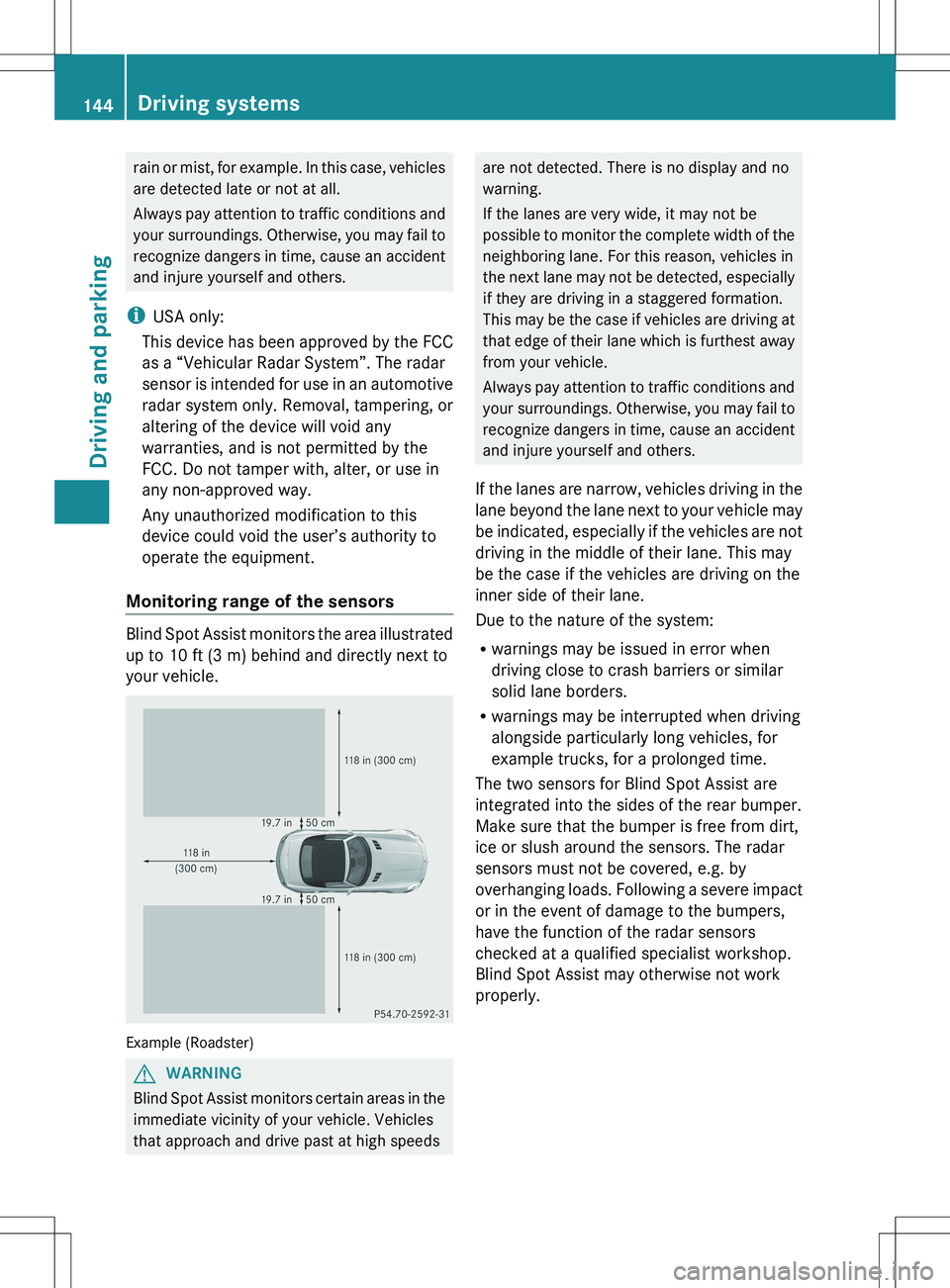
Monitoring range of the sensors
Blind Spot Assist monitors the area illustrated
up to 10 ft (3 m) behind and directly next to
your vehicle.
Example (Roadster)
GWARNING
Blind Spot Assist monitors certain areas in the
immediate vicinity of your vehicle. Vehicles
that approach and drive past at high speeds
are not detected. There is no display and no
warning.
If the lanes are very wide, it may not be
possible to monitor the complete width of the
neighboring lane. For this reason, vehicles in
the next lane may not be detected, especially
if they are driving in a staggered formation.
This may be the case if vehicles are driving at
that edge of their lane which is furthest away
from your vehicle.
Always pay attention to traffic conditions and
your surroundings. Otherwise, you may fail to
recognize dangers in time, cause an accident
and injure yourself and others.
If the lanes are narrow, vehicles driving in the
lane beyond the lane next to your vehicle may
be indicated, especially if the vehicles are not
driving in the middle of their lane. This may
be the case if the vehicles are driving on the
inner side of their lane.
Due to the nature of the system:
R warnings may be issued in error when
driving close to crash barriers or similar
solid lane borders.
R warnings may be interrupted when driving
alongside particularly long vehicles, for
example trucks, for a prolonged time.
The two sensors for Blind Spot Assist are
integrated into the sides of the rear bumper.
Make sure that the bumper is free from dirt,
ice or slush around the sensors. The radar
sensors must not be covered, e.g. by
overhanging loads. Following a severe impact
or in the event of damage to the bumpers,
have the function of the radar sensors
checked at a qualified specialist workshop.
Blind Spot Assist may otherwise not work
properly.144Driving systemsDriving and parking
Page 176 of 288
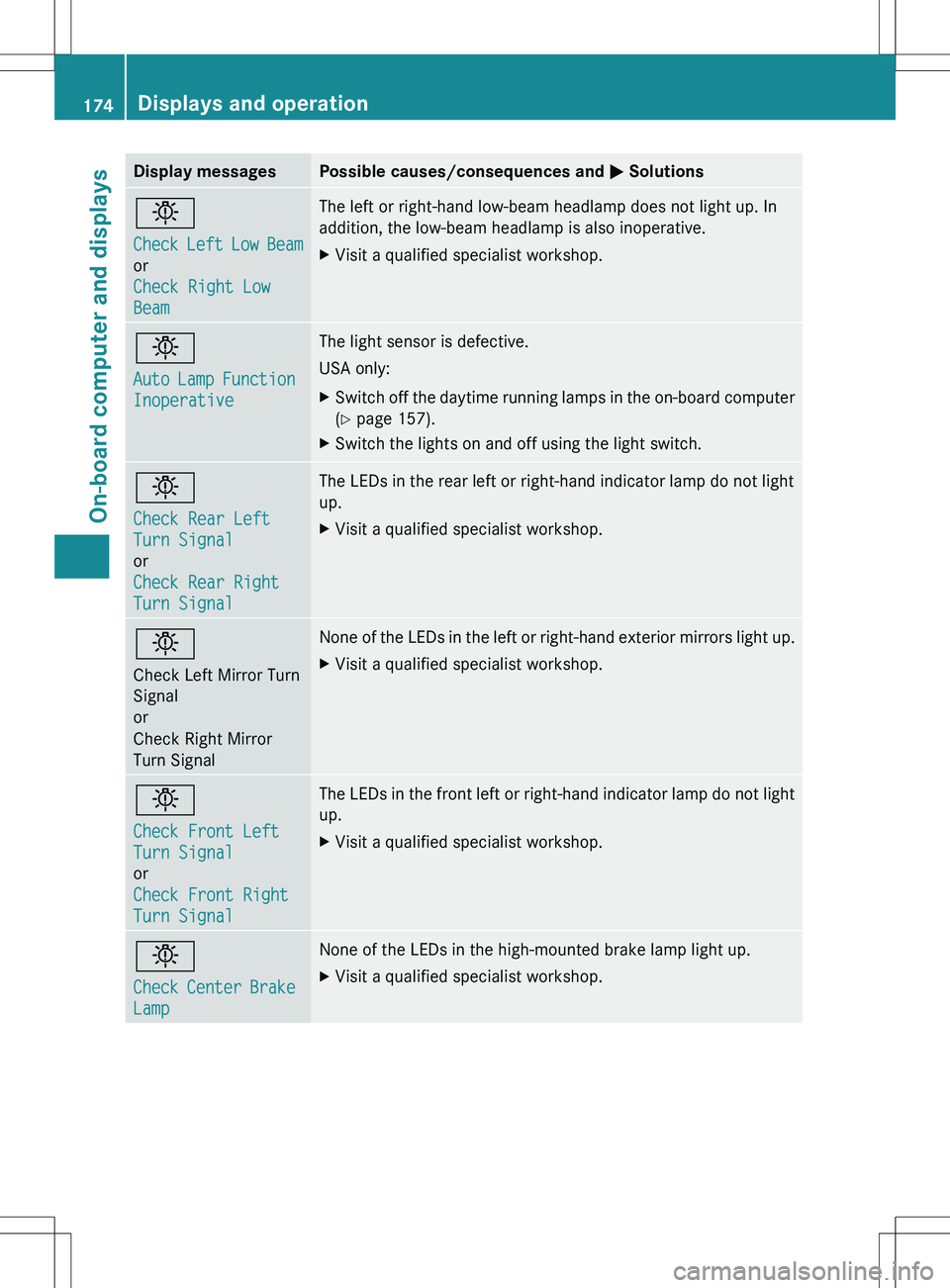
Display messagesPossible causes/consequences and M Solutionsb
Check Left Low Beam
or
Check Right Low
BeamThe left or right-hand low-beam headlamp does not light up. In
addition, the low-beam headlamp is also inoperative.XVisit a qualified specialist workshop.b
Auto Lamp Function
InoperativeThe light sensor is defective.
USA only:XSwitch off the daytime running lamps in the on-board computer
( Y page 157).XSwitch the lights on and off using the light switch.b
Check Rear Left
Turn Signal
or
Check Rear Right
Turn SignalThe LEDs in the rear left or right-hand indicator lamp do not light
up.XVisit a qualified specialist workshop.b
Check Left Mirror Turn
Signal
or
Check Right Mirror
Turn SignalNone of the LEDs in the left or right-hand exterior mirrors light up.XVisit a qualified specialist workshop.b
Check Front Left
Turn Signal
or
Check Front Right
Turn SignalThe LEDs in the front left or right-hand indicator lamp do not light
up.XVisit a qualified specialist workshop.b
Check Center Brake
LampNone of the LEDs in the high-mounted brake lamp light up.XVisit a qualified specialist workshop.174Displays and operationOn-board computer and displays
Page 181 of 288
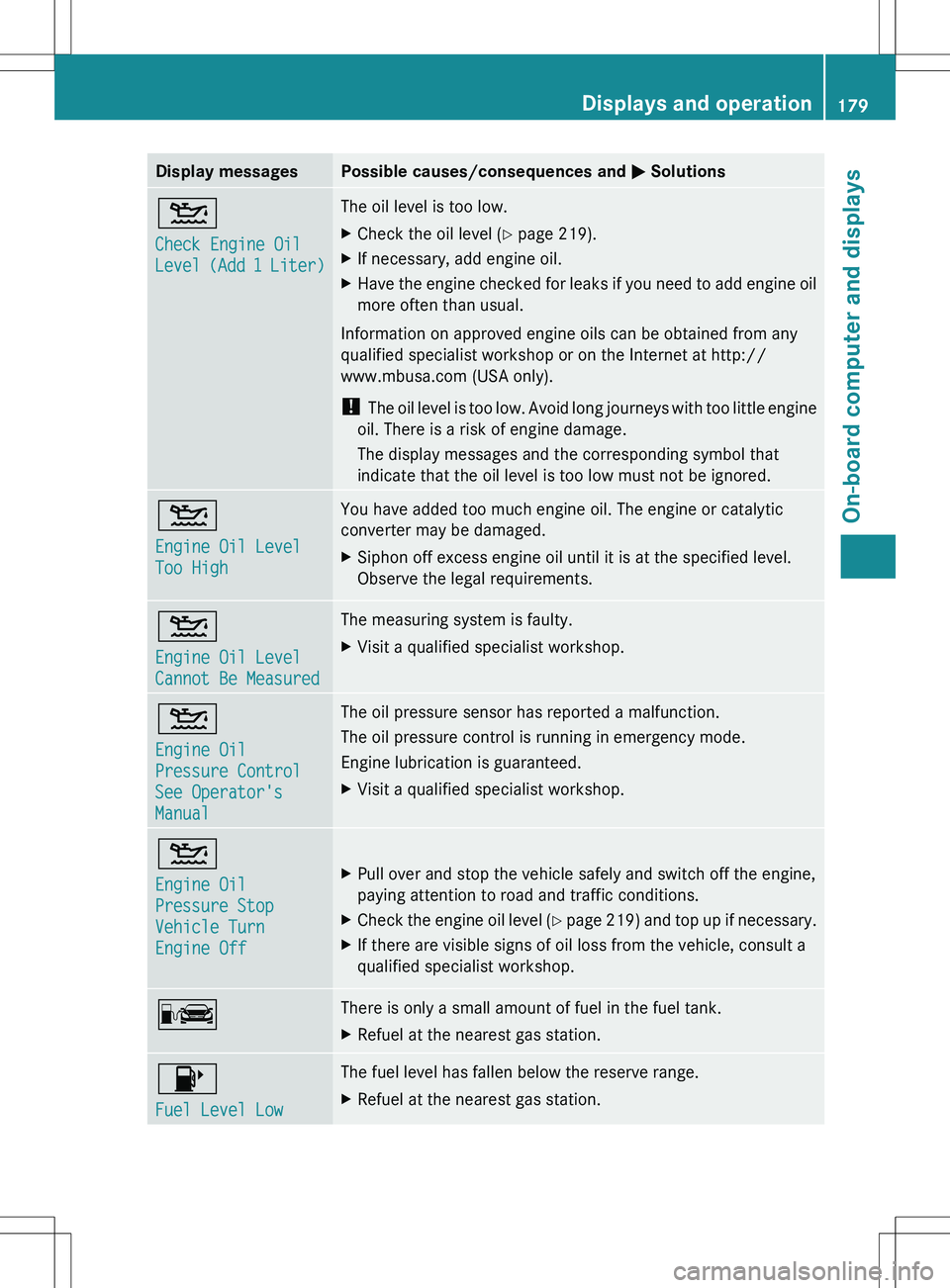
Display messagesPossible causes/consequences and M Solutions4
Check Engine Oil
Level (Add 1 Liter)The oil level is too low.XCheck the oil level ( Y page 219).XIf necessary, add engine oil.XHave the engine checked for leaks if you need to add engine oil
more often than usual.
Information on approved engine oils can be obtained from any
qualified specialist workshop or on the Internet at http://
www.mbusa.com (USA only).
! The oil level is too low. Avoid long journeys with too little engine
oil. There is a risk of engine damage.
The display messages and the corresponding symbol that
indicate that the oil level is too low must not be ignored.
4
Engine Oil Level
Too HighYou have added too much engine oil. The engine or catalytic
converter may be damaged.XSiphon off excess engine oil until it is at the specified level.
Observe the legal requirements.4
Engine Oil Level
Cannot Be MeasuredThe measuring system is faulty.XVisit a qualified specialist workshop.4
Engine Oil
Pressure Control
See Operator's
ManualThe oil pressure sensor has reported a malfunction.
The oil pressure control is running in emergency mode.
Engine lubrication is guaranteed.XVisit a qualified specialist workshop.4
Engine Oil
Pressure Stop
Vehicle Turn
Engine Off XPull over and stop the vehicle safely and switch off the engine,
paying attention to road and traffic conditions.XCheck the engine oil level (Y page 219) and top up if necessary.XIf there are visible signs of oil loss from the vehicle, consult a
qualified specialist workshop.CThere is only a small amount of fuel in the fuel tank.XRefuel at the nearest gas station.8
Fuel Level LowThe fuel level has fallen below the reserve range.XRefuel at the nearest gas station.Displays and operation179On-board computer and displaysZ
Page 183 of 288
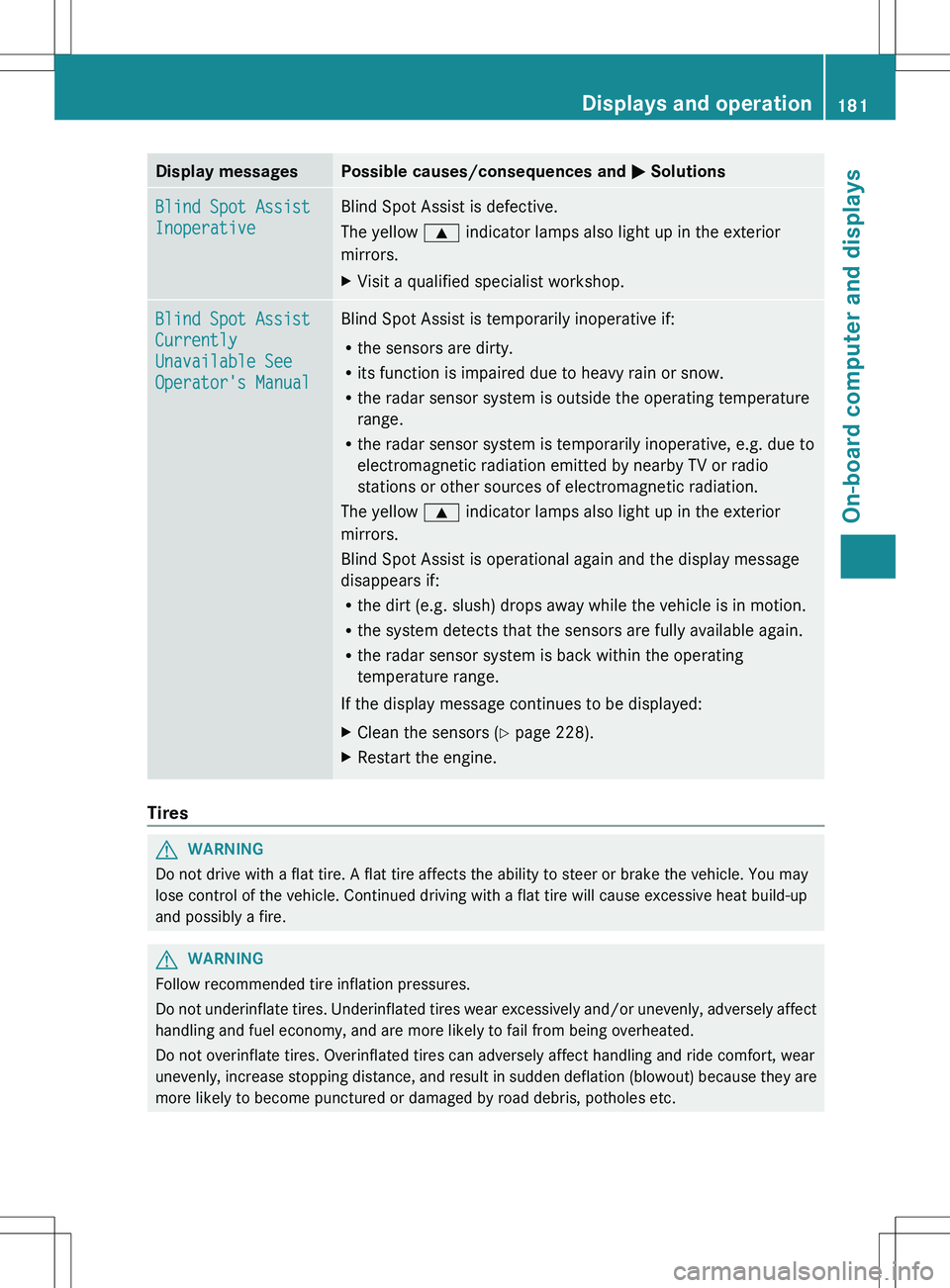
Display messagesPossible causes/consequences and M SolutionsBlind Spot Assist
InoperativeBlind Spot Assist is defective.
The yellow 9 indicator lamps also light up in the exterior
mirrors.XVisit a qualified specialist workshop.Blind Spot Assist
Currently
Unavailable See
Operator's ManualBlind Spot Assist is temporarily inoperative if:
R the sensors are dirty.
R its function is impaired due to heavy rain or snow.
R the radar sensor system is outside the operating temperature
range.
R the radar sensor system is temporarily inoperative, e.g. due to
electromagnetic radiation emitted by nearby TV or radio
stations or other sources of electromagnetic radiation.
The yellow 9 indicator lamps also light up in the exterior
mirrors.
Blind Spot Assist is operational again and the display message
disappears if:
R the dirt (e.g. slush) drops away while the vehicle is in motion.
R the system detects that the sensors are fully available again.
R the radar sensor system is back within the operating
temperature range.
If the display message continues to be displayed:XClean the sensors ( Y page 228).XRestart the engine.
Tires
GWARNING
Do not drive with a flat tire. A flat tire affects the ability to steer or brake the vehicle. You may
lose control of the vehicle. Continued driving with a flat tire will cause excessive heat build-up
and possibly a fire.
GWARNING
Follow recommended tire inflation pressures.
Do not underinflate tires. Underinflated tires wear excessively and/or unevenly, adversely affect
handling and fuel economy, and are more likely to fail from being overheated.
Do not overinflate tires. Overinflated tires can adversely affect handling and ride comfort, wear
unevenly, increase stopping distance, and result in sudden deflation (blowout) because they are
more likely to become punctured or damaged by road debris, potholes etc.
Displays and operation181On-board computer and displaysZ
Page 184 of 288
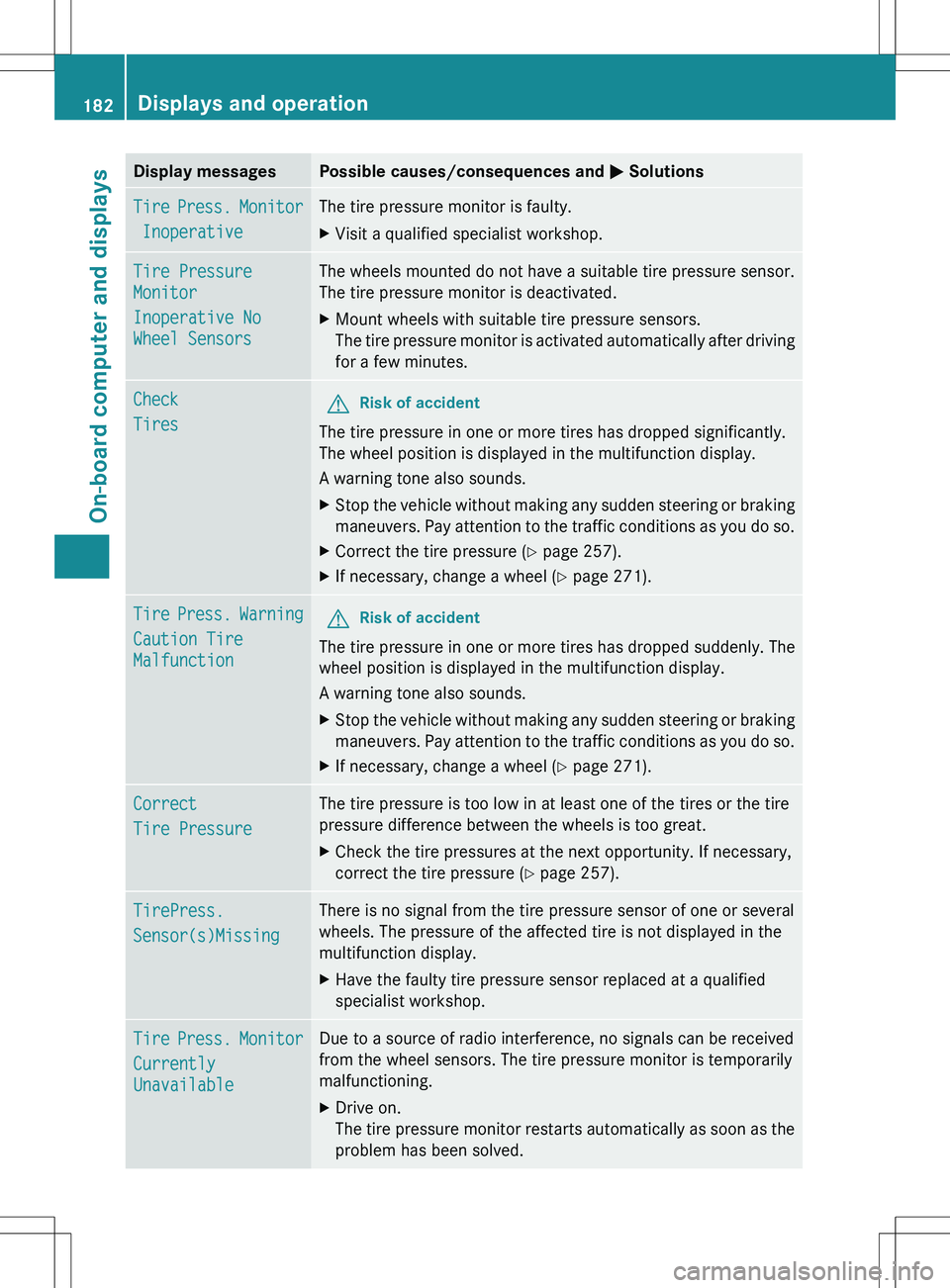
Display messagesPossible causes/consequences and M SolutionsTire Press. Monitor
InoperativeThe tire pressure monitor is faulty.XVisit a qualified specialist workshop.Tire Pressure
Monitor
Inoperative No
Wheel SensorsThe wheels mounted do not have a suitable tire pressure sensor.
The tire pressure monitor is deactivated.XMount wheels with suitable tire pressure sensors.
The tire pressure monitor is activated automatically after driving
for a few minutes.Check
TiresGRisk of accident
The tire pressure in one or more tires has dropped significantly.
The wheel position is displayed in the multifunction display.
A warning tone also sounds.
XStop the vehicle without making any sudden steering or braking
maneuvers. Pay attention to the traffic conditions as you do so.XCorrect the tire pressure ( Y page 257).XIf necessary, change a wheel ( Y page 271).Tire Press. Warning
Caution Tire
MalfunctionGRisk of accident
The tire pressure in one or more tires has dropped suddenly. The
wheel position is displayed in the multifunction display.
A warning tone also sounds.
XStop the vehicle without making any sudden steering or braking
maneuvers. Pay attention to the traffic conditions as you do so.XIf necessary, change a wheel ( Y page 271).Correct
Tire PressureThe tire pressure is too low in at least one of the tires or the tire
pressure difference between the wheels is too great.XCheck the tire pressures at the next opportunity. If necessary,
correct the tire pressure ( Y page 257).TirePress.
Sensor(s)MissingThere is no signal from the tire pressure sensor of one or several
wheels. The pressure of the affected tire is not displayed in the
multifunction display.XHave the faulty tire pressure sensor replaced at a qualified
specialist workshop.Tire Press. Monitor
Currently
UnavailableDue to a source of radio interference, no signals can be received
from the wheel sensors. The tire pressure monitor is temporarily
malfunctioning.XDrive on.
The tire pressure monitor restarts automatically as soon as the
problem has been solved.182Displays and operationOn-board computer and displays
Page 223 of 288

XSlowly turn cap : half a turn counter-
clockwise and allow excess pressure to
escape.XTurn cap : further counter-clockwise and
remove it.
If the coolant is at the level of the marker
bar in the filler neck when cold, there is
enough coolant in coolant expansion
tank ;.
If the coolant is approximately 0.6 in
(1.5 cm) above the marker bar in the filler
neck when warm, there is enough coolant
in coolant expansion tank ;.XIf necessary, add coolant that has been
tested and approved by Mercedes-Benz.XReplace cap : and turn it clockwise as far
as it will go.
You will find further information about coolant
in the "Technical data" section
( Y page 283).
Windshield washer system and
headlamp cleaning system
The washer fluid reservoir is used for both the
windshield washer system and the headlamp
cleaning system.
i Vehicle components and their service
products must match. You should,
therefore, only use products that have been
tested and approved by Mercedes-Benz.
Information on tested and approved
products can be obtained at any authorized
Mercedes-Benz Center or on the Internet at
http://www.mbusa.com (USA only).
GWARNING
Washer solvent/antifreeze is highly
flammable. Do not spill washer solvent/
antifreeze on hot engine parts, because it may
ignite and burn. You could be seriously
burned.
! At temperatures below freezing: always
fill the washer fluid reservoir with a mix of
water and windshield washer concentrate
(e.g. MB WinterFit). There is otherwise a
risk of damaging the windshield washer
system/headlamp cleaning system.
! Only use washer fluid concentrate which
is suitable for plastic lenses. Unsuitable
washer fluid concentrate could damage the
plastic lenses of the headlamps.
! Do not add distilled or de-ionized water to
the washer fluid container. Otherwise, the
level sensor may be damaged.
i Add windshield washer concentrate, e.g.
MB SummerFit, to the washer fluid all year
round.
XMix the windshield washer fluid in a
container beforehand.XAt temperatures above freezing: fill the
washer fluid reservoir with a mix of water
and windshield washer concentrate (e.g.
MB SummerFit).XAt temperatures below freezing: fill the
washer fluid reservoir with a mix of water
and windshield washer concentrate (e.g.
MB WinterFit). Adapt the mixing ratio to theEngine compartment221Maintenance and careZ