steering MERCEDES-BENZ SLS AMG GT COUPE 2015 C197 Comand Manual
[x] Cancel search | Manufacturer: MERCEDES-BENZ, Model Year: 2015, Model line: SLS AMG GT COUPE, Model: MERCEDES-BENZ SLS AMG GT COUPE 2015 C197Pages: 202, PDF Size: 5.18 MB
Page 109 of 202
Phone
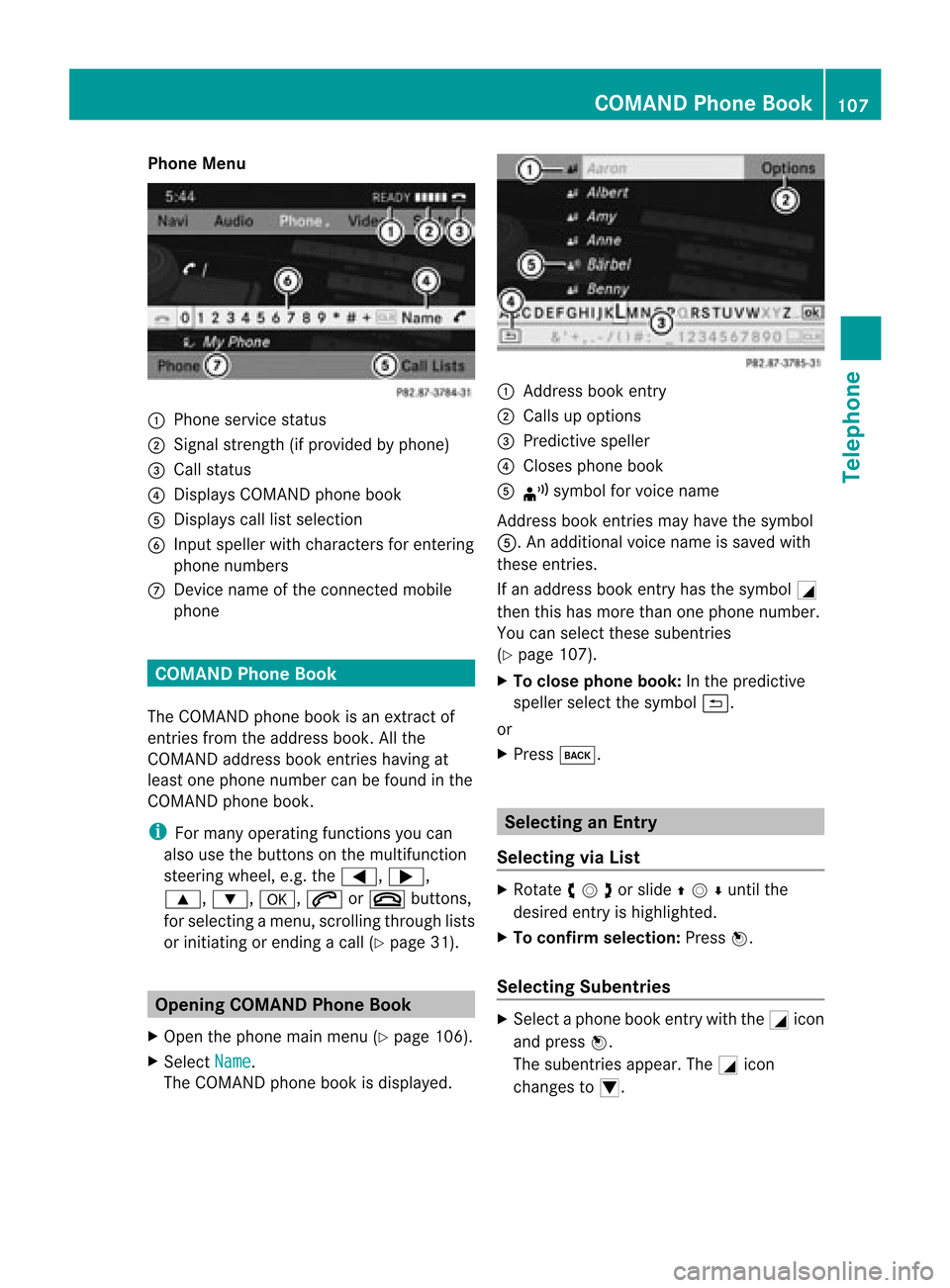
Menu 1
Phone service status
2 Signal strength(ifprovided byphone)
3 Call status
4 Displays COMAND phonebook
5 Displays calllistselection
6 Input speller withcharacters forenterin g
phone numbers
7 Device nameofthe conn ected mobile
phone COMAND
PhoneBook
The COMAND phonebookisan extr actof
entr iesfrom theaddress book.Allthe
COMAND addressbookentrieshaving at
least onephone number canbefound inthe
COMAND phonebook.
i For many operating functionsyoucan
also usethebuttons onthe multifunct ion
steering wheel,e.g.the=, ;,
9, :,a, 6or~ buttons ,
for selecting amenu, scrolling throughlists
or initiating orending acall(Y page 31). Ope
ning COMAN DPhon eBook
X Open thephon emain menu(Y page 106).
X Sel ect Name .
The COMA NDphon ebook isdispl ayed. 1
Addres sbook entry
2 Calls upopt ions
3 Predictivespell er
4 Close sphon ebook
5 ¦ symb olfor voic enam e
Ad dres sbook entries may have thesymb ol
5.A naddition alvoice name issaved with
these entries.
If an address bookentryhas thesymbol +
then thishasmore thanonephone number.
You canselect thesesubent ries
(Y page 107).
X To close phone book:Inthe predict ive
speller selectthesymbol á.
or
X Press k. Selecting
anEntr y
Selecting viaList X
Rotate ymzor slideqmrunt ilth e
desi redentry is high light ed.
X To confi rmselect ion:Pressn.
Select ingSub entries X
Se lec taphone bookentrywith the+icon
and press n.
The subent riesappear. The+icon
chang esto/. COMAND
PhoneBook
107Telephone Z
Page 176 of 202
If
it is not possi bletodia l,voice control issues
a messag eto this effect.
i You canstillopera teyou rphone using the
keypad. Commands
“Phone” Use
the“Phone” command toselect the
phone application. Usethiscommand ifyou
wish thedigits entered tobe shown onthe
displa y.
“Help Phone” Voice
controlhas anexten sivehelp funct ion.
Using the“Help Phone” command, youcan
have allthe essential commands forthe
phone readout(Ypage 190).
“Dial number” You
canusethe“Dial number” command to
dial aphone number.
The digits 0to9a nd the word“Pl us”ar e
pe rmi tted .
“Pl us”rep laces theinte rnational dialing cod e,
e.g .“00” .
Say thephone num berin the form ofa
conti nuousstri ngofdigits or as blocks of
di gits, e.g.three tofive digits.
Voice controlrepeats thedigits itrecogniz es
after each block ofdigits (withapause of
about halfasecond between eachblock of
digits) andwaits foryou tocont inue speaking.
Example ofdialog :
s Dialnumber
t Please saythenumber
s Zeroonethree zero
t Zeroonethree zero
s Fivezero zero five
t Fivezero zero five
s Okay
t Dialing number i
You canalso dialthespecified numberif
you press the6 button onthe multi-
funct ionsteering wheelinstead ofthe
conc luding command “Okay”.
“Confirm” While
youareenterin ganumber, youcan use
the “Confirm” command tohave allthe
spoken digitsrepeated byvoice control.
Voice controlwill then prompt youto
cont inue withtheentr y.
Example ofdialog :
s Dialnumber
t Please saythenumber
s Zeroonethree zero
t Zeroonethree zero
s Confirm
t Zeroonethree zero.Please continue.
s Fivezero zero five
t Fivezero zero five
s Okay
t Dialing number
i You canalso dialthespecified numberif
you press the6 button onthe multi-
funct ionsteering wheelinstead ofthe
conc luding command Okay .
“Correction” While
youareenterin ganumber, youcan use
the “Correction” commandtocorrect the
block ofdigits lastspoken. Whenyouinput
this command, voicecontroldeletes thelast
block ofdigits andrepeats thedigits inputup
to this point. Voicecontrolwill then prompt
you tocont inue withtheentr y.
Example ofdialog :
s Dialnumber
t Please saythenumber
s Zeroonethree zero
t Zeroonethree zero
s Fivezero zero five
t Fivezero zero five 174
PhoneVoice
Control
Page 178 of 202

X
Press the? button whileaphone callis
in progress.
An acoustic signalconfirms thatthesystem
is activat ed.
X Say therequired digits(“zero” to“nine”).
or
X Say therequired words“Star” or“Hash”.
X Say theconc luding comman d“Okay”.
The system dialsthenumber entered. Naviga
tion G
WARNIN
G
For safety reasons, youshould onlyselect a
destinat ionwhen thevehicle isstation ary.
While thenavigation systemprovides
direction alassistanc e,the driver mustremain
focused onsafe driving behavior, especially
pay atten tiontotraff icand street signs,and
should utilizethesystem's audiocueswhile
driving.
The navigation systemdoesnotsupply any
inform ationonstop signs, yieldsigns, traffic
regulations ortraff icsafety rules.Their
observanc ealway sremains inthe driver's
personal responsibility. DVDmaps donot
cover allareas norallroutes withinanarea.
Traffic regulations alwayshave priority over
any route recomm endation sgiven. Bearin
mind thatataspeed ofjust 30mph
(approximately 50km/ h),your vehicle is
coverin gadistanc eof 44 feet (approximately
14 m)every second.
During routeguidance, youwillnotreceive
inform ationon:
R traff iclights
R stop andyield signs
R parking orstopping zones
R one-way streets
R narrow bridges
R other trafficregulation data
You should thereforealway sstric tlyobserve
traff icregulations whiledriving. Drive carefully
andalway sobey trafficlaws and
road signs, evenifthey contradict navigation
system instruction s. G
WARNIN
G
Please donot use theVoice ControlSystem
in an emergenc y,as the toneof your voice
may change inastress fulsituation. Thiscould
cause adelay incomplet ingyour phone call
in atimely manner .This could distract youin
an emergency situationandcause youtobe
involved inan accident. Operat
ion
You canusevoice controlto:
R enter astate
R enter aprovince
R enter acity
R enter adistrict (center)
R enter astreet
R enter anintersec tion
R enter ahouse number
R enter anentire address
R enter azip code
R find address
R enter apoint ofinterest
R select oneofyour previous destinations
R call uproute information
R store adestination
R displa ythe map
R enlarge/reduce thesize ofthe map
R listen tothe destination memory
R start andstop route guidance
R switch theguida nceinstruct ionsonand off
X To select thenavigation application press
the ? button onthe multifunction
steering wheel.
X Give the“Navigation” command.
X Press the? button.
X Give oneofthe navigation commands
explained below. 176
Navigat
ionVoiceControl