stop start MERCEDES-BENZ SLS-CLASS 2013 Service Manual
[x] Cancel search | Manufacturer: MERCEDES-BENZ, Model Year: 2013, Model line: SLS-CLASS, Model: MERCEDES-BENZ SLS-CLASS 2013Pages: 286, PDF Size: 3.6 MB
Page 175 of 286
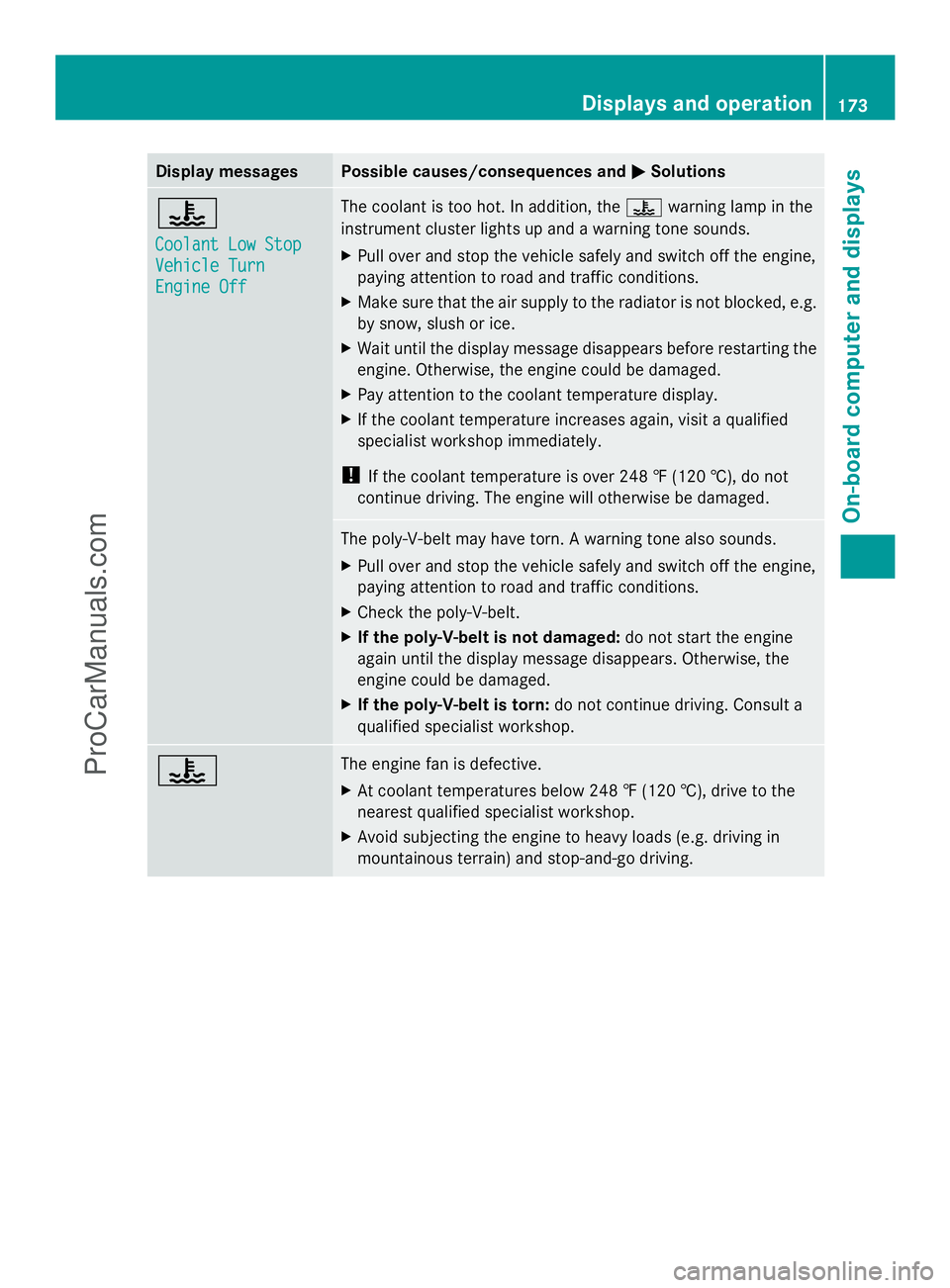
Display messages Possible causes/consequences and
M
MSolutions ?
Coolant Low Stop Coolant Low Stop
Vehicle Turn Vehicle Turn
Engine Off Engine Off The coolant is too hot. In addition, the
?warning lamp in the
instrument cluster lights up and a warning tone sounds.
X Pull over and stop the vehicle safely and switch off the engine,
paying attention to road and traffic conditions.
X Make sure that the air supply to the radiator is not blocked, e.g.
by snow, slush or ice.
X Wait until the display message disappears before restarting the
engine. Otherwise, the engine could be damaged.
X Pay attention to the coolant temperature display.
X If the coolant temperature increases again, visit a qualified
specialist workshop immediately.
! If the coolant temperature is over 248 ‡ (120 †), do not
continue driving. The engine will otherwise be damaged. The poly-V-belt may have torn. A warning tone also sounds.
X
Pull over and stop the vehicle safely and switch off the engine,
paying attention to road and traffic conditions.
X Check the poly-V-belt.
X If the poly-V-belt is not damaged: do not start the engine
again until the display message disappears. Otherwise, the
engine could be damaged.
X If the poly-V-belt is torn: do not continue driving. Consult a
qualified specialist workshop. ? The engine fan is defective.
X
At coolant temperatures below 248 ‡ (120 †), drive to the
nearest qualified specialist workshop.
X Avoid subjecting the engine to heavy loads (e.g. driving in
mountainous terrain) and stop-and-go driving. Displays and operation
173On-board computer and displays Z
ProCarManuals.com
Page 181 of 286
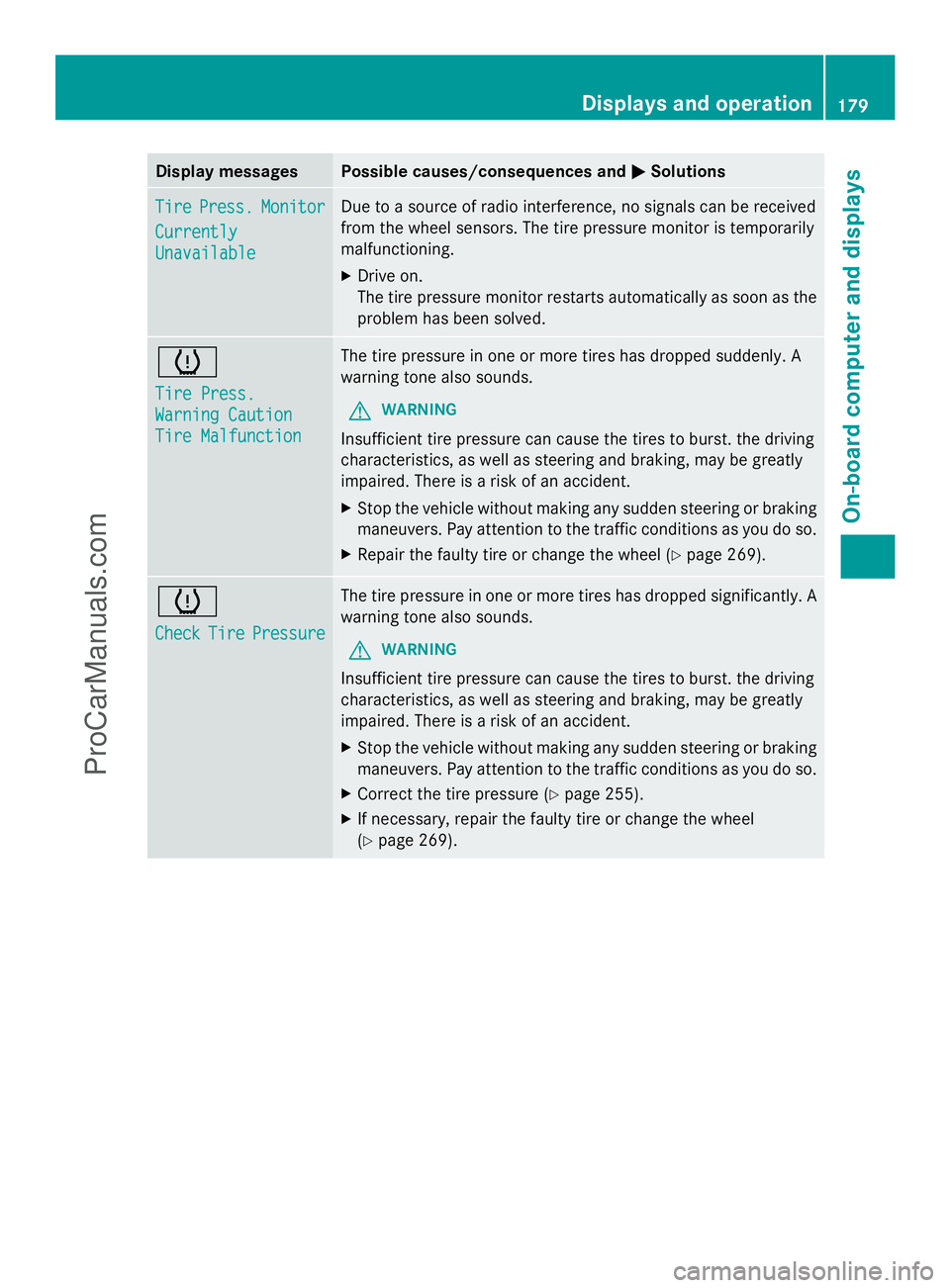
Display messages Possible causes/consequences and
M
MSolutions Tire
Tire
Press.
Press. Monitor
Monitor
Currently
Currently
Unavailable Unavailable Due to a source of radio interference, no signals can be received
from the wheel sensors. The tire pressure monitor is temporarily
malfunctioning.
X
Drive on.
The tire pressure monitor restarts automatically as soon as the
problem has been solved. h
Tire Press. Tire Press.
Warning Caution Warning Caution
Tire Malfunction Tire Malfunction The tire pressure in one or more tires has dropped suddenly. A
warning tone also sounds.
G WARNING
Insufficient tire pressure can cause the tires to burst. the driving
characteristics, as well as steering and braking, may be greatly
impaired. There is a risk of an accident.
X Stop the vehicle without making any sudden steering or braking
maneuvers. Pay attention to the traffic conditions as you do so.
X Repair the faulty tire or change the wheel ( Ypage 269). h
Check Check
Tire
TirePressure
Pressure The tire pressure in one or more tires has dropped significantly. A
warning tone also sounds.
G WARNING
Insufficient tire pressure can cause the tires to burst. the driving
characteristics, as well as steering and braking, may be greatly
impaired. There is a risk of an accident.
X Stop the vehicle without making any sudden steering or braking
maneuvers. Pay attention to the traffic conditions as you do so.
X Correct the tire pressure (Y page 255).
X If necessary, repair the faulty tire or change the wheel
(Y page 269). Displays and operation
179On-board computer and displays Z
ProCarManuals.com
Page 182 of 286
Vehicle
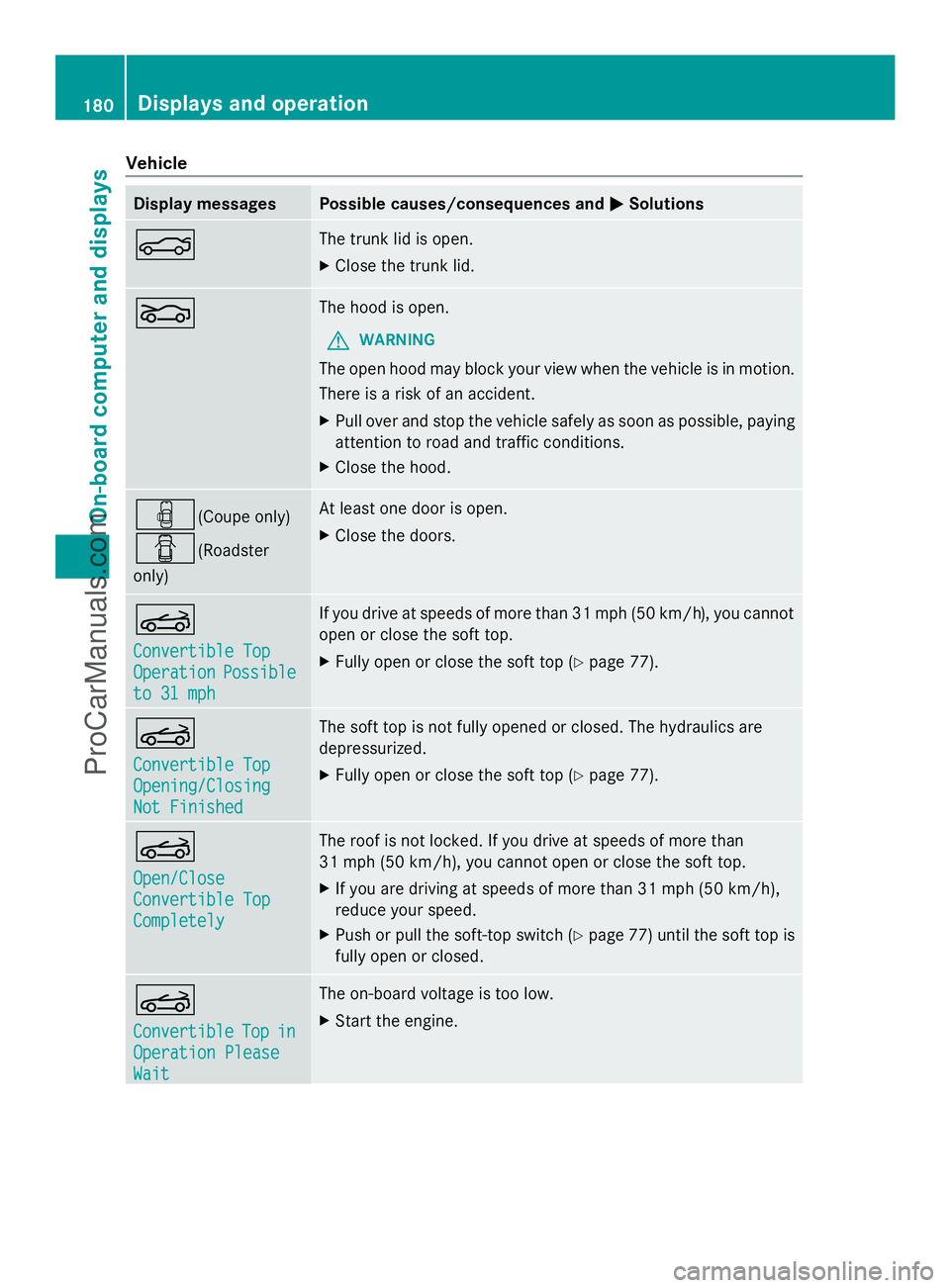
Display messages Possible causes/consequences and
M
MSolutions N The trunk lid is open.
X
Close the trunk lid. L The hood is open.
G WARNING
The open hood may block your view when the vehicle is in motion.
There is a risk of an accident.
X Pull over and stop the vehicle safely as soon as possible, paying
attention to road and traffic conditions.
X Close the hood. ´(Coupe only)
C(Roadster
only) At least one door is open.
X
Close the doors. K
Convertible Top Convertible Top
Operation Operation
Possible
Possible
to 31 mph
to 31 mph If you drive at speeds of more than 31 mph (50 km/h), you cannot
open or close the soft top.
X
Fully open or close the soft top (Y page 77).K
Convertible Top Convertible Top
Opening/Closing Opening/Closing
Not Finished Not Finished The soft top is not fully opened or closed. The hydraulics are
depressurized.
X Fully open or close the soft top (Y page 77).K
Open/Close Open/Close
Convertible Top Convertible Top
Completely Completely The roof is not locked. If you drive at speeds of more than
31 mph (50 km/h), you cannot open or close the soft top.
X
If you are driving at speeds of more than 31 mph (50 km/h),
reduce your speed.
X Push or pull the soft-top switch (Y page 77) until the soft top is
fully open or closed. K
Convertible Convertible
Top
Topin
in
Operation Please
Operation Please
Wait Wait The on-board voltage is too low.
X Start the engine. 180
Displays and operationOn-board computer and displays
ProCarManuals.com
Page 183 of 286
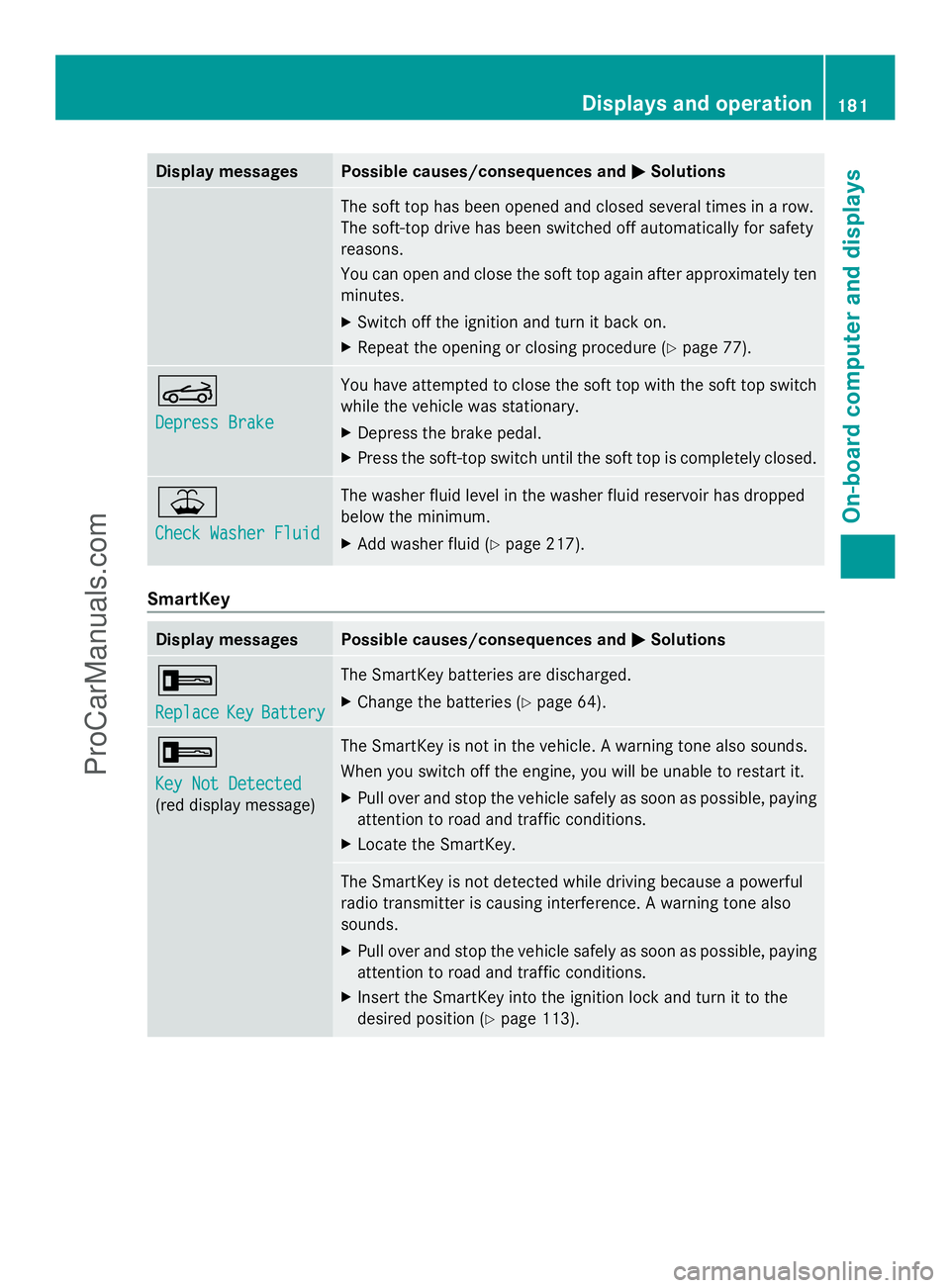
Display messages Possible causes/consequences and
M
MSolutions The soft top has been opened and closed several times in a row.
The soft-top drive has been switched off automatically for safety
reasons.
You can open and close the soft top again after approximately ten
minutes.
X
Switch off the ignition and turn it back on.
X Repeat the opening or closing procedure (Y page 77).K
Depress Brake Depress Brake You have attempted to close the soft top with the soft top switch
while the vehicle was stationary.
X
Depress the brake pedal.
X Press the soft-top switch until the soft top is completely closed. ¥
Check Washer Fluid Check Washer Fluid The washer fluid level in the washer fluid reservoir has dropped
below the minimum.
X
Add washer fluid ( Ypage 217). SmartKey
Display messages Possible causes/consequences and
M MSolutions +
Replace Replace
Key
KeyBattery
Battery The SmartKey batteries are discharged.
X
Change the batteries ( Ypage 64). +
Key Not Detected Key Not Detected
(red display message) The SmartKey is not in the vehicle. A warning tone also sounds.
When you switch off the engine, you will be unable to restart it.
X
Pull over and stop the vehicle safely as soon as possible, paying
attention to road and traffic conditions.
X Locate the SmartKey. The SmartKey is not detected while driving because a powerful
radio transmitter is causing interference. A warning tone also
sounds.
X
Pull over and stop the vehicle safely as soon as possible, paying
attention to road and traffic conditions.
X Insert the SmartKey into the ignition lock and turn it to the
desired position ( Ypage 113). Displays and operation
181On-board computer and displays Z
ProCarManuals.com
Page 185 of 286
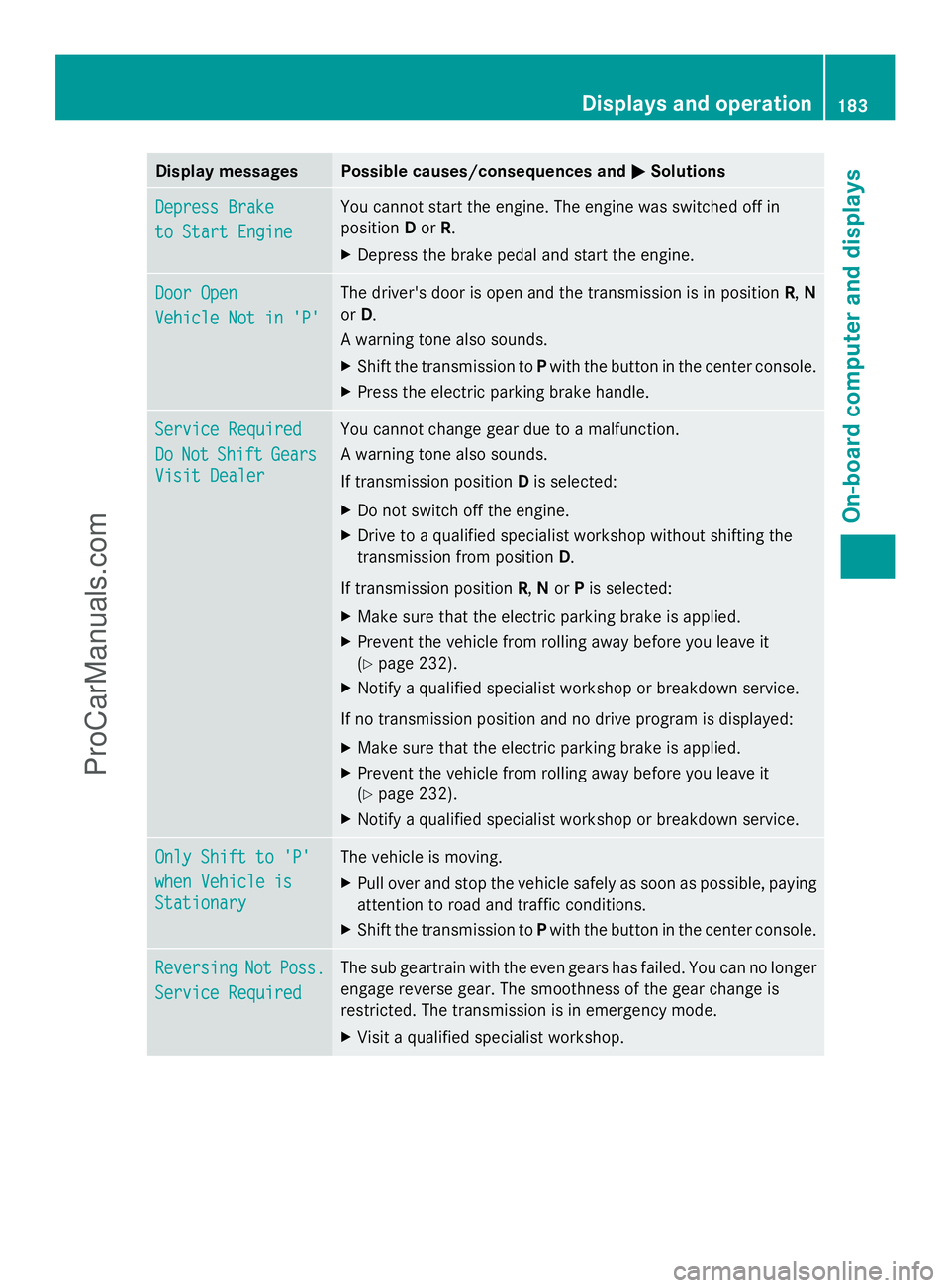
Display messages Possible causes/consequences and
M
MSolutions Depress Brake
Depress Brake
to Start Engine to Start Engine You cannot start the engine. The engine was switched off in
position
Dor R.
X Depress the brake pedal and start the engine. Door Open Door Open
Vehicle Not in 'P' Vehicle Not in 'P' The driver's door is open and the transmission is in position
R,N
or D.
A warning tone also sounds.
X Shift the transmission to Pwith the button in the center console.
X Press the electric parking brake handle. Service Required Service Required
Do Do
Not
Not Shift
Shift Gears
Gears
Visit Dealer
Visit Dealer You cannot change gear due to a malfunction.
A warning tone also sounds.
If transmission position
Dis selected:
X Do not switch off the engine.
X Drive to a qualified specialist workshop without shifting the
transmission from position D.
If transmission position R,Nor Pis selected:
X Make sure that the electric parking brake is applied.
X Prevent the vehicle from rolling away before you leave it
(Y page 232).
X Notify a qualified specialist workshop or breakdown service.
If no transmission position and no drive program is displayed:
X Make sure that the electric parking brake is applied.
X Prevent the vehicle from rolling away before you leave it
(Y page 232).
X Notify a qualified specialist workshop or breakdown service. Only Shift to 'P' Only Shift to 'P'
when Vehicle is when Vehicle is
Stationary Stationary The vehicle is moving.
X
Pull over and stop the vehicle safely as soon as possible, paying
attention to road and traffic conditions.
X Shift the transmission to Pwith the button in the center console. Reversing Reversing
Not
NotPoss.
Poss.
Service Required
Service Required The sub geartrain with the even gears has failed. You can no longer
engage reverse gear. The smoothness of the gear change is
restricted. The transmission is in emergency mode.
X
Visit a qualified specialist workshop. Displays and operation
183On-board computer and displays Z
ProCarManuals.com
Page 202 of 286
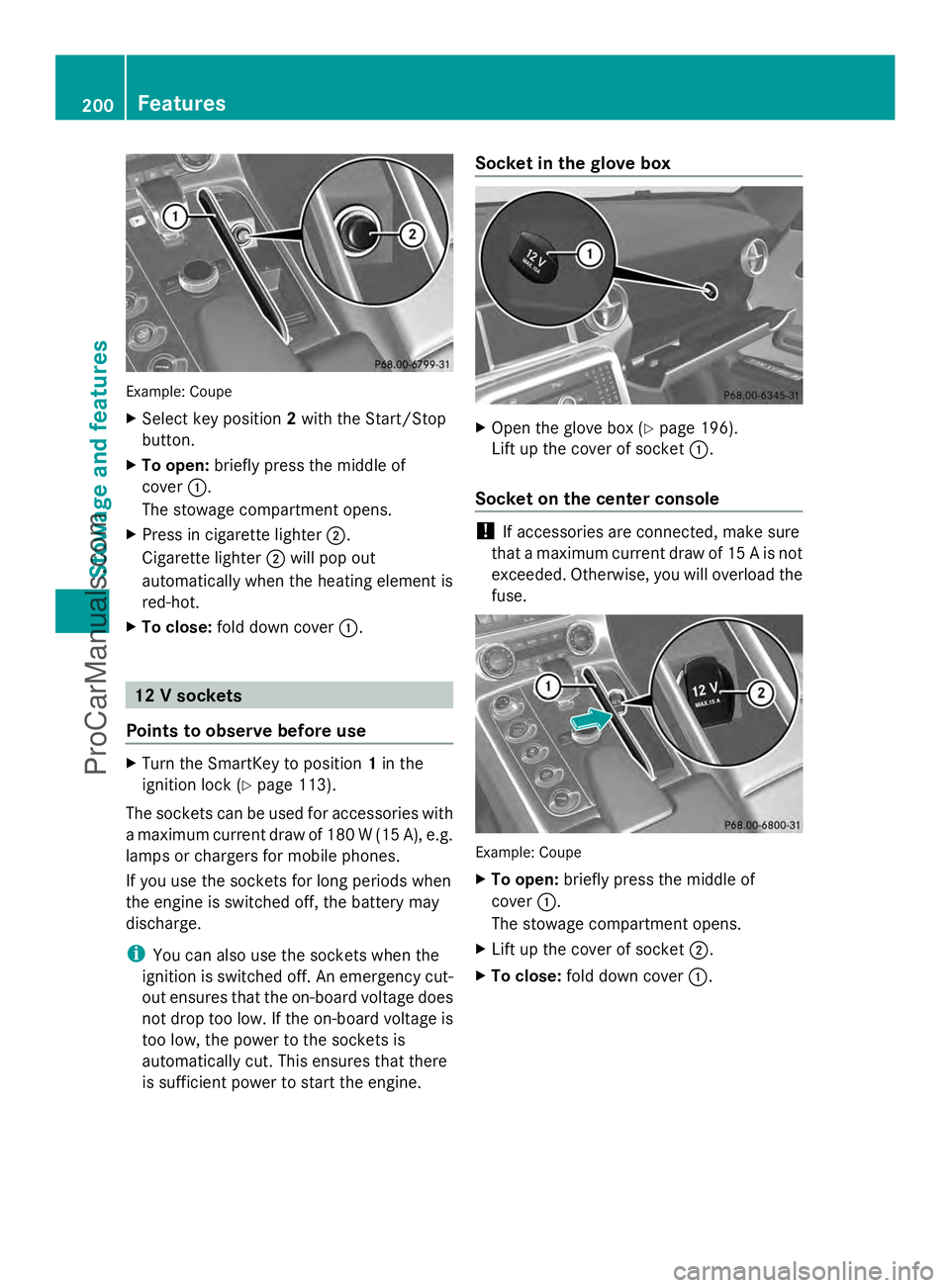
Example: Coupe
X
Select key position 2with the Start/Stop
button.
X To open: briefly press the middle of
cover :.
The stowage compartment opens.
X Press in cigarette lighter ;.
Cigarette lighter ;will pop out
automatically when the heating element is
red-hot.
X To close: fold down cover :. 12 V sockets
Points to observe before use X
Turn the SmartKey to position 1in the
ignition lock (Y page 113).
The sockets can be used for accessories with
a maximum current draw of 180 W (15 A), e.g.
lamps or chargers for mobile phones.
If you use the sockets for long periods when
the engine is switched off, the battery may
discharge.
i You can also use the sockets when the
ignition is switched off. An emergency cut-
out ensures that the on-board voltage does
not drop too low. If the on-board voltage is
too low, the power to the sockets is
automatically cut. This ensures that there
is sufficient power to start the engine. Socket in the glove box
X
Open the glove box (Y page 196).
Lift up the cover of socket :.
Socket on the center console !
If accessories are connected, make sure
that a maximum current draw of 15 A is not
exceeded. Otherwise, you will overload the
fuse. Example: Coupe
X
To open: briefly press the middle of
cover :.
The stowage compartment opens.
X Lift up the cover of socket ;.
X To close: fold down cover :.200
FeaturesSto
wage an d features
ProCarManuals.com
Page 209 of 286

pause retraction. The rear spoiler is then
extended again.
Never leave children unsupervised in the
vehicle. They could unintentionally retract the
extended rear spoiler. Someone could then
become trapped and seriously injured.
! Do not enter an automatic car wash with
the rear spoiler extended. Otherwise, the
rear spoiler may be damaged.
Only extend the rear spoiler in order to
clean it by hand. Retract it again when you
have finished cleaning it.
X Close the trunk lid.
X Select key position 2with the Start/Stop
button.
X To extend: press button :.
The rear spoiler is extended.
Button :flashes until the rear spoiler has
extended and then lights up in red.
X To retract: press and hold button :until
the rear spoiler is completely retracted.
Button :flashes until the rear spoiler has
retracted and then goes out.
Rear Spoiler retracts manually
Rear Spoiler retracts manually
appears in the display.
i If you release button :while retracting
the rear spoiler, it extends again
automatically. Features
207Stowage and features Z
ProCarManuals.com
Page 211 of 286
Do not run the engine while programming the
integrated remote control. Inhalation of
exhaust gas is hazardous to your health. All
exhaust gas contains carbon monoxide (CO),
and inhaling it can cause unconsciousness
and possible death. All exhaust gas contains
carbon monoxide (CO), and inhaling it can
cause unconsciousness and possible death.
i Notes about the declaration of conformity
can be found here (Y page 21).
Programming the integrated garage
door opener on the rear-view mirror Programming buttons
G
WARNING
Only press the button on the integrated
garage door opener if there are no persons or
objects present within the sweep of the
garage door. Persons could otherwise be
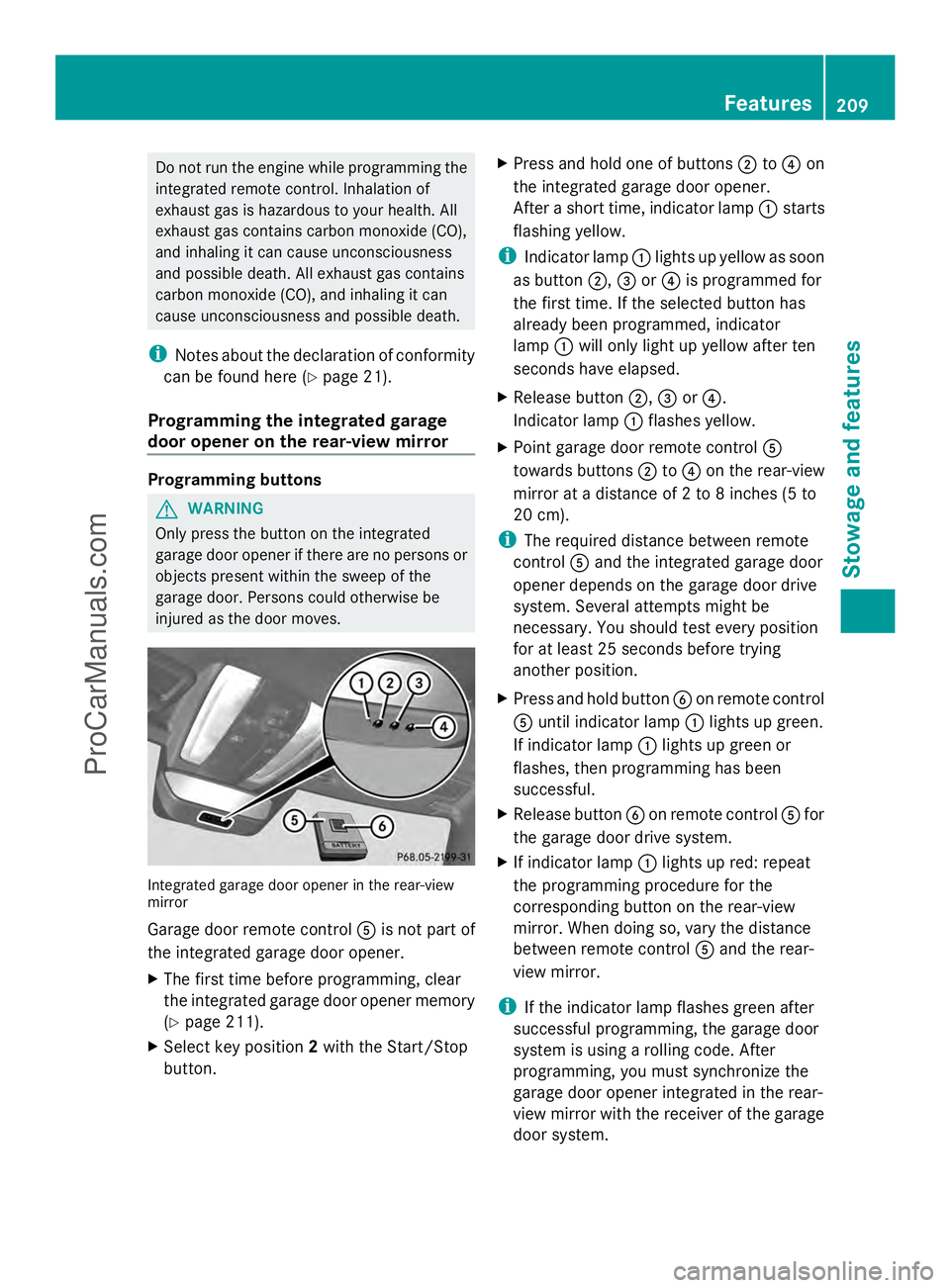
injured as the door moves. Integrated garage door opener in the rear-view
mirror
Garage door remote control
Ais not part of
the integrated garage door opener.
X The first time before programming, clear
the integrated garage door opener memory
(Y page 211).
X Select key position 2with the Start/Stop
button. X
Press and hold one of buttons ;to? on
the integrated garage door opener.
After a short time, indicator lamp :starts
flashing yellow.
i Indicator lamp :lights up yellow as soon
as button ;,=or? is programmed for
the first time. If the selected button has
already been programmed, indicator
lamp :will only light up yellow after ten
seconds have elapsed.
X Release button ;,=or?.
Indicator lamp :flashes yellow.
X Point garage door remote control A
towards buttons ;to? on the rear-view
mirror at a distance of 2 to 8 inches (5 to
20 cm).
i The required distance between remote
control Aand the integrated garage door
opener depends on the garage door drive
system. Several attempts might be
necessary. You should test every position
for at least 25 seconds before trying
another position.
X Press and hold button Bon remote control
A until indicator lamp :lights up green.
If indicator lamp :lights up green or
flashes, then programming has been
successful.
X Release button Bon remote control Afor
the garage door drive system.
X If indicator lamp :lights up red: repeat
the programming procedure for the
corresponding button on the rear-view
mirror. When doing so, vary the distance
between remote control Aand the rear-
view mirror.
i If the indicator lamp flashes green after
successful programming, the garage door
system is using a rolling code. After
programming, you must synchronize the
garage door opener integrated in the rear-
view mirror with the receiver of the garage
door system. Features
209Stowage an d features Z
ProCarManuals.com
Page 212 of 286
Synchronizing the rolling code
Your vehicle must be within reach of the
garage door or exterior gate drive. Make sure
that neither your vehicle nor any persons/
objects are present within the sweep of the
door or gate.
Observe the safety notes when performing
the rolling code synchronization
(Y page 208).
X Select key position 2with the Start/Stop
button.
X Press the programming button of the door
or gate drive (see the door or gate drive
operating instructions, e.g. under
"Programming of additional remote
controls").
i Usually, you now have 30seconds to
initiate the next step.
X Press previously programmed button ;,
= or? of the integrated garage door
opener until the door starts to move.
The rolling code synchronization is then
complete.
Notes on programming the remote
control
Canadian radio frequency laws require a
"break" (or interruption) of the transmission
signals after broadcasting for a few seconds.
Therefore, these signals may not last long
enough for the integrated garage door
opener. The signal is not recognized during
programming. Comparable with Canadian
law, some U.S. garage door openers also
feature a "break".
Proceed as follows:
R if you live in Canada
R if you have difficulties programming the
garage door opener (regardless of where
you live) when using the programming
steps X
Press and hold one of buttons ;to? on
the integrated garage door opener.
After a short time, indicator lamp :lights
up yellow.
X Release the button.
Indicator lamp :flashes yellow.
X Press button Bof garage door remote
control Afor two seconds, then release it
for two seconds.
X Press button Bagain for two seconds.
X Repeat this sequence on button Bof
remote control Auntil indicator lamp :
lights up green.
If indicator lamp :turns red, repeat the
process.
X Continue with the other programming
steps (see above).
Problems when programming
If you are experiencing problems
programming the integrated garage door
opener on the rear-view mirror, take note of
the following instructions:
R Check the transmitter frequency of garage
door drive remote control A. This can
usually be found on the back of the remote
control.
The integrated garage door opener is
compatible with devices that have units
which operate in the frequency range of
280to 433MHz.
R Replace the batteries in garage door
remote control A. This increases the
likelihood that garage door remote control
A will transmit a strong and precise signal
to the integrated garage door opener in the
rear-view mirror.
R When programming, hold remote control
A at varying distances and angles from the
button that you are programming. Try
various angles at a distance between 2and
12 inches (5to 30 cm) or at the same angle
but at varying distances.
R If another remote control for the same
garage door drive is available, repeat the 210
FeaturesStowage and features
ProCarManuals.com
Page 213 of 286

same programming steps with this remote
control. Before performing these steps,
make sure that new batteries have been
installed in garage door drive remote
control
A.
R Note that some remote controls only
transmit for a limited amount of time (the
indicator lamp on the remote control goes
out). Press button Bon remote control
A again before transmission ends.
R Align the antenna cable of the garage door
opener unit. This can improve signal
reception/transmission.
Opening/closing the garage door Once programmed, the integrated garage
door opener Awill assume the function of
the garage door system's remote control.
Please also read the operating instructions
for the garage door system.
X Select key position 2with the Start/Stop
button.
X Press button ;,=or? which you have
programmed to operate the garage door.
Garage door system with a fixed code:
indicator lamp :lights up green.
Garage door system with a rolling code:
indicator lamp :flashes green.
i The transmitter will transmit a signal as
long as the button is pressed. The
transmission is halted after a maximum of
ten seconds and indicator lamp :lights
up yellow. Press button ;,=or? again
if necessary.
Clearing the memory of the integrated
garage door opener on the rear-view
mirror X
Select key position 2with the Start/Stop
button.
X Press buttons ;and ?.
The indicator lamp lights up yellow.
X Press and hold buttons ;and ?until the
indicator lamp turns green. i
Make sure that you clear the memory of
the integrated garage door opener before
selling the vehicle. Charge maintenance socket
The battery may drain if the vehicle is left
stationary for long periods. In this case,
Mercedes-Benz recommends attaching the
trickle charger to the charge maintenance
socket.
The charge maintenance socket is designed
solely for connecting a trickle charger. A
trickle charger can be obtained from an
authorized Mercedes-Benz Center, for
example. X
Switch the ignition off.
X Open the trunk lid.
X Connect the cable provided in the trunk to
the trickle charger.
X Connect the trickle charger to charge
maintenance socket :. Consult the
manufacturer's operating instructions on
how to do so.
i A trickle charger connected to charge
maintenance socket :only maintains the
current charge level of the vehicle's
electrical system battery. If the vehicle's
electrical system battery is discharged, it
needs to be charged with a battery charger.
You will find further information on
charging the battery on (Y page 236). Features
211Stowage and features Z
ProCarManuals.com