ESP MERCEDES-BENZ SLS-CLASS 2013 Workshop Manual
[x] Cancel search | Manufacturer: MERCEDES-BENZ, Model Year: 2013, Model line: SLS-CLASS, Model: MERCEDES-BENZ SLS-CLASS 2013Pages: 286, PDF Size: 3.6 MB
Page 149 of 286
Outside temperature display
G
WARNING
The outside temperature indicator is not
designed to serve as an ice-warning device
and is therefore unsuitable for that purpose.
Indicated temperatures just above the
freezing point do not guarantee that the road
surface is free of ice. The road may still be icy,
especially in wooded areas or on bridges.
The outside temperature display is in the
multifunction display (Y page 147).
Changes in the outside temperature are
displayed after a short delay. Operating the on-board computer
The on-board computer is activated as soon
as you turn the SmartKey to position 1in the
ignition lock.
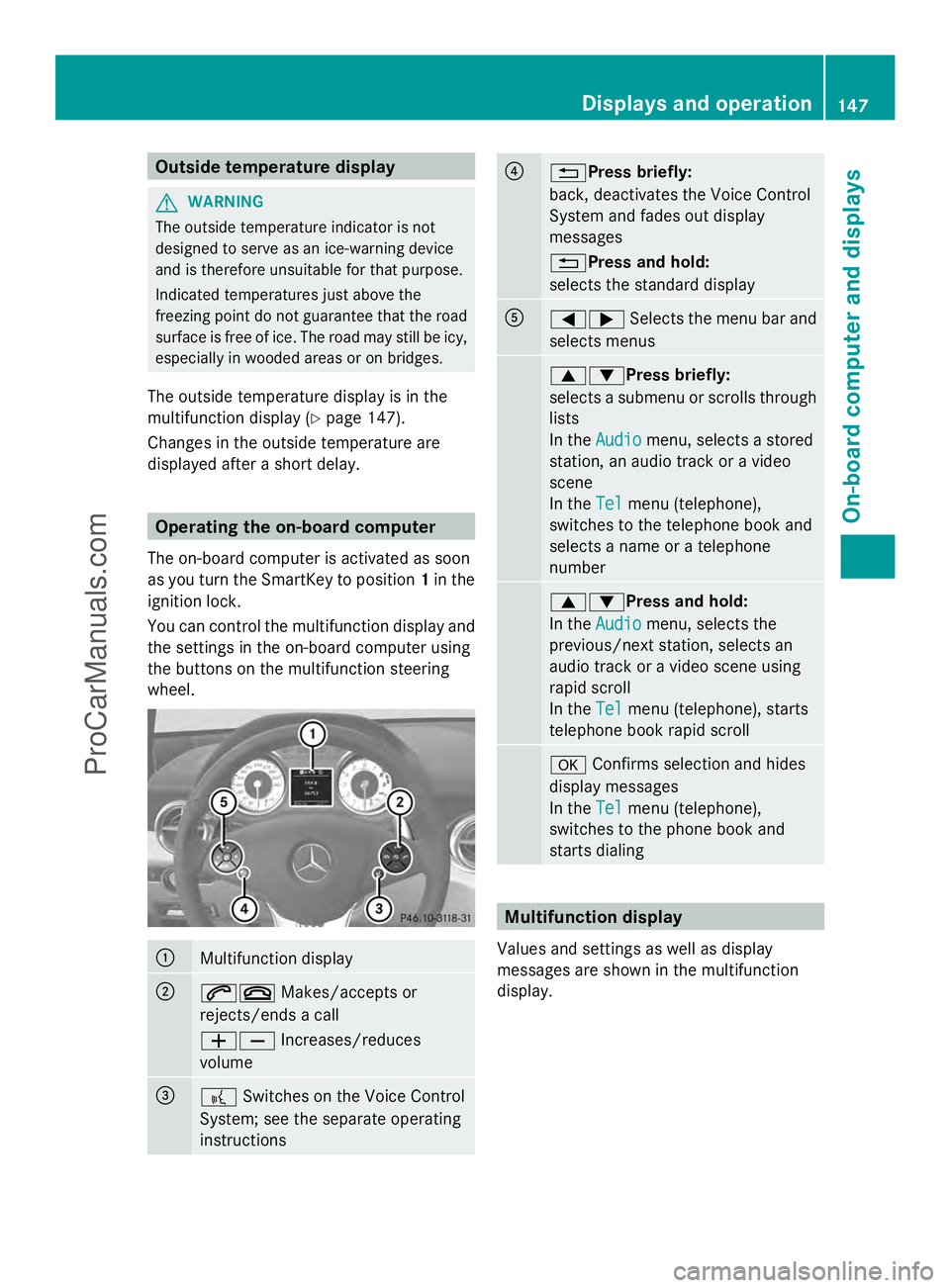
You can control the multifunction display and
the settings in the on-board computer using
the buttons on the multifunction steering
wheel. :
Multifunction display
;
6~
Makes/accepts or
rejects/ends a call
WX Increases/reduces
volume =
?
Switches on the Voice Control
System; see the separate operating
instructions ?
%Press briefly:
back, deactivates the Voice Control
System and fades out display
messages
%Press and hold:
selects the standard display
A
=;
Selects the menu bar and
selects menus 9:Press briefly:
selects a submenu or scrolls through
lists
In the
Audio Audio menu, selects a stored
station, an audio track or a video
scene
In the Tel Telmenu (telephone),
switches to the telephone book and
selects a name or a telephone
number 9:Press and hold:
In the
Audio Audio menu, selects the
previous/next station, selects an
audio track or a video scene using
rapid scroll
In the Tel Telmenu (telephone), starts
telephone book rapid scroll a
Confirms selection and hides
display messages
In the Tel
Tel menu (telephone),
switches to the phone book and
starts dialing Multifunction display
Values and settings as well as display
messages are shown in the multifunction
display. Displays and operation
147On-board computer and displays Z
ProCarManuals.com
Page 159 of 286
X
Press the =or; button on the
steering wheel to select the Settings
Settings
menu.
X Press the :or9 button to select the
Factory Settings
Factory Settings submenu.
X Press ato confirm.
The Reset All Settings?
Reset All Settings? message
appears.
X Press the :or9 button to select
Yes
Yes orNo
No.
X Press the abutton to confirm the
selection.
If you have selected Yes
Yes, the multifunction
display shows a confirmation message.
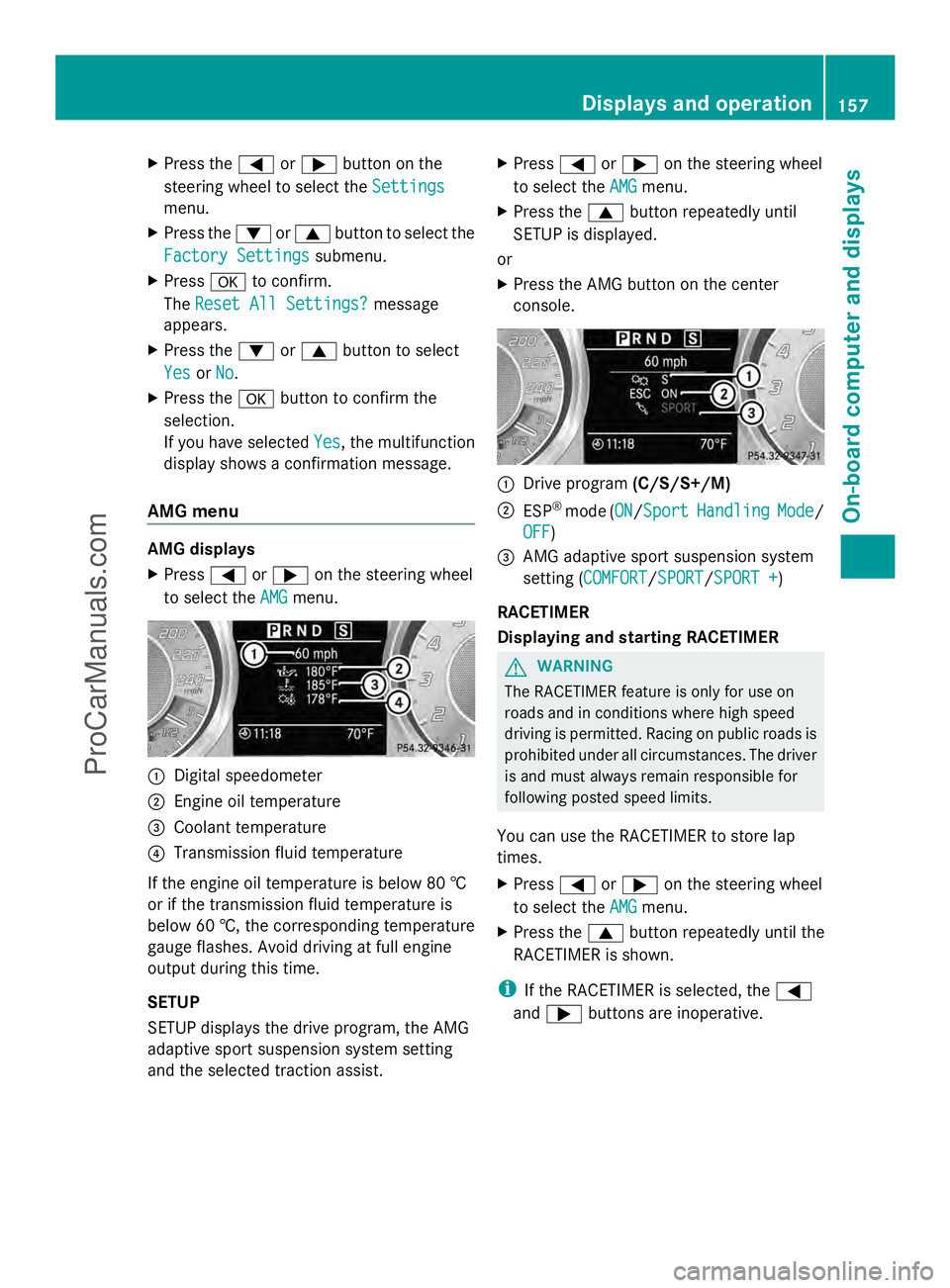
AMG menu AMG displays
X
Press =or; on the steering wheel
to select the AMG AMGmenu. :
Digital speedometer
; Engine oil temperature
= Coolant temperature
? Transmission fluid temperature
If the engine oil temperature is below 80 †
or if the transmission fluid temperature is
below 60 †, the corresponding temperature
gauge flashes. Avoid driving at full engine
output during this time.
SETUP
SETUP displays the drive program, the AMG
adaptive sport suspension system setting
and the selected traction assist. X
Press =or; on the steering wheel
to select the AMG
AMG menu.
X Press the 9button repeatedly until
SETUP is displayed.
or
X Press the AMG button on the center
console. :
Drive program (C/S/S+/M)
; ESP ®
mode (ON ON/SportSport Handling Handling Mode
Mode/
OFF
OFF)
= AMG adaptive sport suspension system
setting (COMFORT COMFORT /SPORTSPORT /SPORT +SPORT +)
RACETIMER
Displaying and starting RACETIMER G
WARNING
The RACETIMER feature is only for use on
roads and in conditions where high speed
driving is permitted. Racing on public roads is
prohibited under all circumstances. The driver
is and must always remain responsible for
following posted speed limits.
You can use the RACETIMER to store lap
times.
X Press =or; on the steering wheel
to select the AMG
AMG menu.
X Press the 9button repeatedly until the
RACETIMER is shown.
i If the RACETIMER is selected, the =
and ; buttons are inoperative. Displays and operation
157On-board computer and displays Z
ProCarManuals.com
Page 162 of 286
Display messages
Hiding display messages G
WARNING
All categories of messages contain important information which should be taken note of and,
where a malfunction is indicated, addressed as soon as possible at an authorized Mercedes-Benz
Center.
Failure to repair the condition noted may cause damage not covered by the Mercedes-Benz
Limited Warranty, or result in property damage or personal injury.
Display messages appear in the multifunction display.
X Press the aor% button on the steering wheel to hide the display message.
The display message is cleared.
The multifunction display shows high-priority display messages in red.
You cannot hide display messages of the highest priority. The multifunction display shows
these messages continuously until the causes for the messages have been remedied.
Certain display messages are accompanied by an audible warning tone or a continuous tone.
Please respond in accordance with the display messages and follow the additional notes in
this Operator's Manual.
Message memory The on-board computer saves certain display messages. You can call up the display messages
in the message memory .
X Press =or; on the steering wheel to select the Serv.
Serv. menu.
If there are display messages, the multifunction display shows 2 Messages
2 Messages , for example.
X Press the 9or: button to select the entry, e.g. 2 Messages
2 Messages .
X Confirm with a.
X Press the 9or: button to scroll through the display messages.
When the ignition is switched off, all display messages are deleted apart from some high-
priority display messages. Once the causes of the high-priority display messages have been
rectified, the corresponding display messages are also deleted. 160
Displays and ope
rationOn-board computer and displays
ProCarManuals.com
Page 163 of 286
Braking
Display messages Possible causes/consequences and
M
MSolutions $(USA
only)J(Canada
only)
ABS and ESC ABS and ESC
Currently
Currently
Unavailable See Unavailable See
Operator's Manual Operator's Manual ABS, ESP
®
, BAS and hill start assist are temporarily unavailable.
For example, the on-board voltage may be insufficient. In addition,
the h, åand! warning lamps light up in the instrument
cluster.
The brake system continues to function normally, but without the
functions listed above. The wheels could therefore lock if you
brake hard, for example.
G WARNING
If the ABS malfunctions, the wheels may lock during hard braking.
This limits the steerability of the vehicle when braking and may
increase the braking distance. If ABS is deactivated due to a
malfunction, BAS and ESP ®
are also deactivated. There is an
increased risk of skidding and an accident.
X Drive on carefully.
X Visit a qualified specialist workshop. $(USA
only)J(Canada
only)
ABS and ESC ABS and ESC
Inoperative See Inoperative See
Operator's Manual Operator's Manual ABS, ESP
®
, BAS and hill start assist are unavailable due to a
malfunction. In addition, the h,åand! warning lamps
light up in the instrument cluster.
The brake system continues to function normally, but without the
functions listed above.
G WARNING
If the ABS malfunctions, the wheels may lock during hard braking.
This limits the steerability of the vehicle when braking and may
increase the braking distance. If ABS is deactivated due to a
malfunction, BAS and ESP ®
are also deactivated. There is an
increased risk of skidding and an accident.
X Drive on carefully.
X Visit a qualified specialist workshop. Displays and operation
161On-board computer and displays Z
ProCarManuals.com
Page 164 of 286
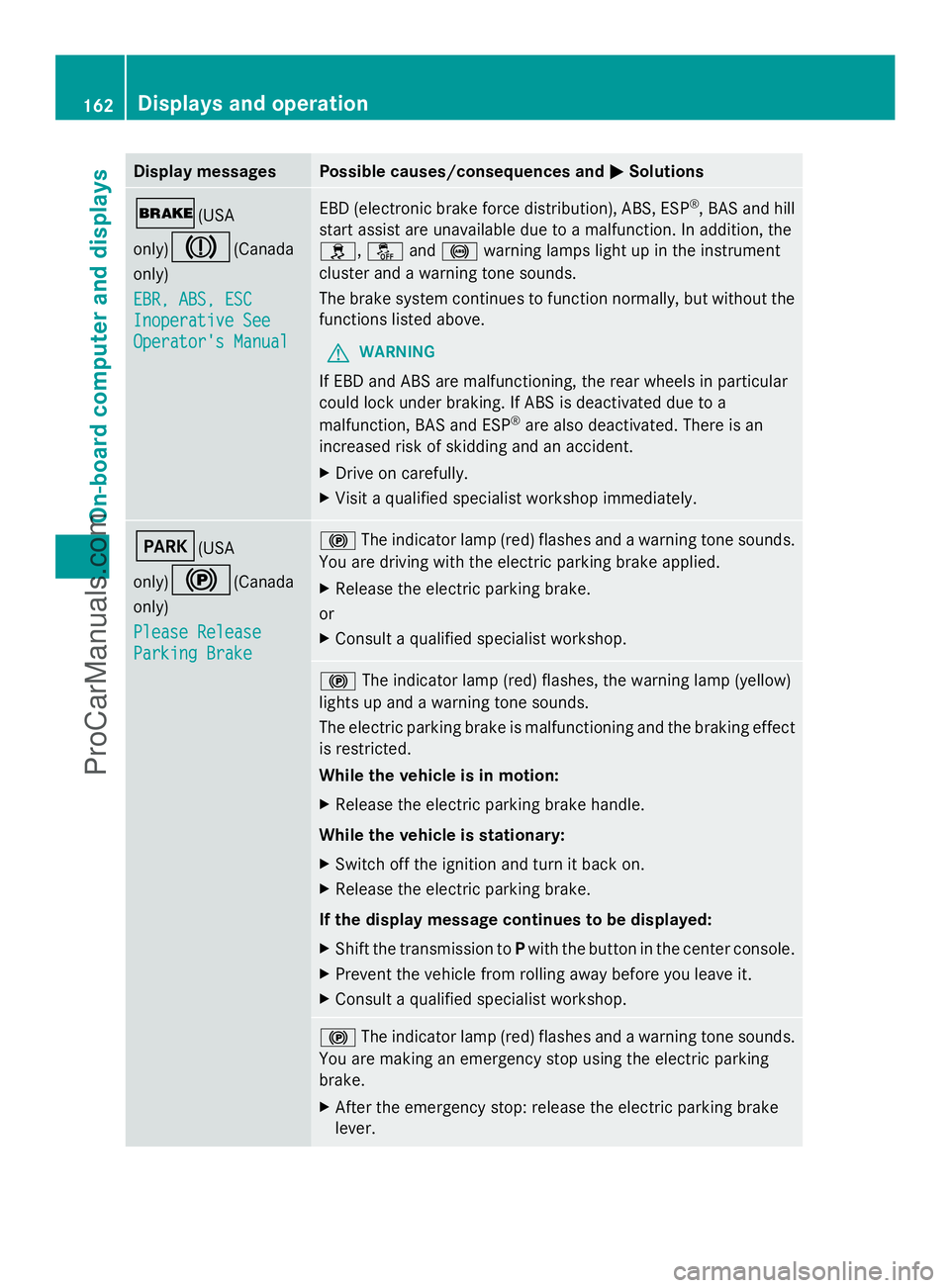
Display messages Possible causes/consequences and
M
MSolutions $(USA
only)
J(Canada
only)
EBR, ABS, ESC EBR, ABS, ESC
Inoperative See Inoperative See
Operator's Manual Operator's Manual EBD (electronic brake force distribution), ABS, ESP
®
, BAS and hill
start assist are unavailable due to a malfunction. In addition, the
h, åand! warning lamps light up in the instrument
cluster and a warning tone sounds.
The brake system continues to function normally, but without the
functions listed above.
G WARNING
If EBD and ABS are malfunctioning, the rear wheels in particular
could lock under braking. If ABS is deactivated due to a
malfunction, BAS and ESP ®
are also deactivated. There is an
increased risk of skidding and an accident.
X Drive on carefully.
X Visit a qualified specialist workshop immediately. F(USA
only)
!(Canada
only)
Please Release Please Release
Parking Brake Parking Brake !
The indicator lamp (red) flashes and a warning tone sounds.
You are driving with the electric parking brake applied.
X Release the electric parking brake.
or
X Consult a qualified specialist workshop. !
The indicator lamp (red) flashes, the warning lamp (yellow)
lights up and a warning tone sounds.
The electric parking brake is malfunctioning and the braking effect
is restricted.
While the vehicle is in motion:
X Release the electric parking brake handle.
While the vehicle is stationary:
X Switch off the ignition and turn it back on.
X Release the electric parking brake.
If the display message continues to be displayed:
X Shift the transmission to Pwith the button in the center console.
X Prevent the vehicle from rolling away before you leave it.
X Consult a qualified specialist workshop. !
The indicator lamp (red) flashes and a warning tone sounds.
You are making an emergency stop using the electric parking
brake.
X After the emergency stop: release the electric parking brake
lever. 162
Displays and operationOn-board compu
ter and displays
ProCarManuals.com
Page 168 of 286
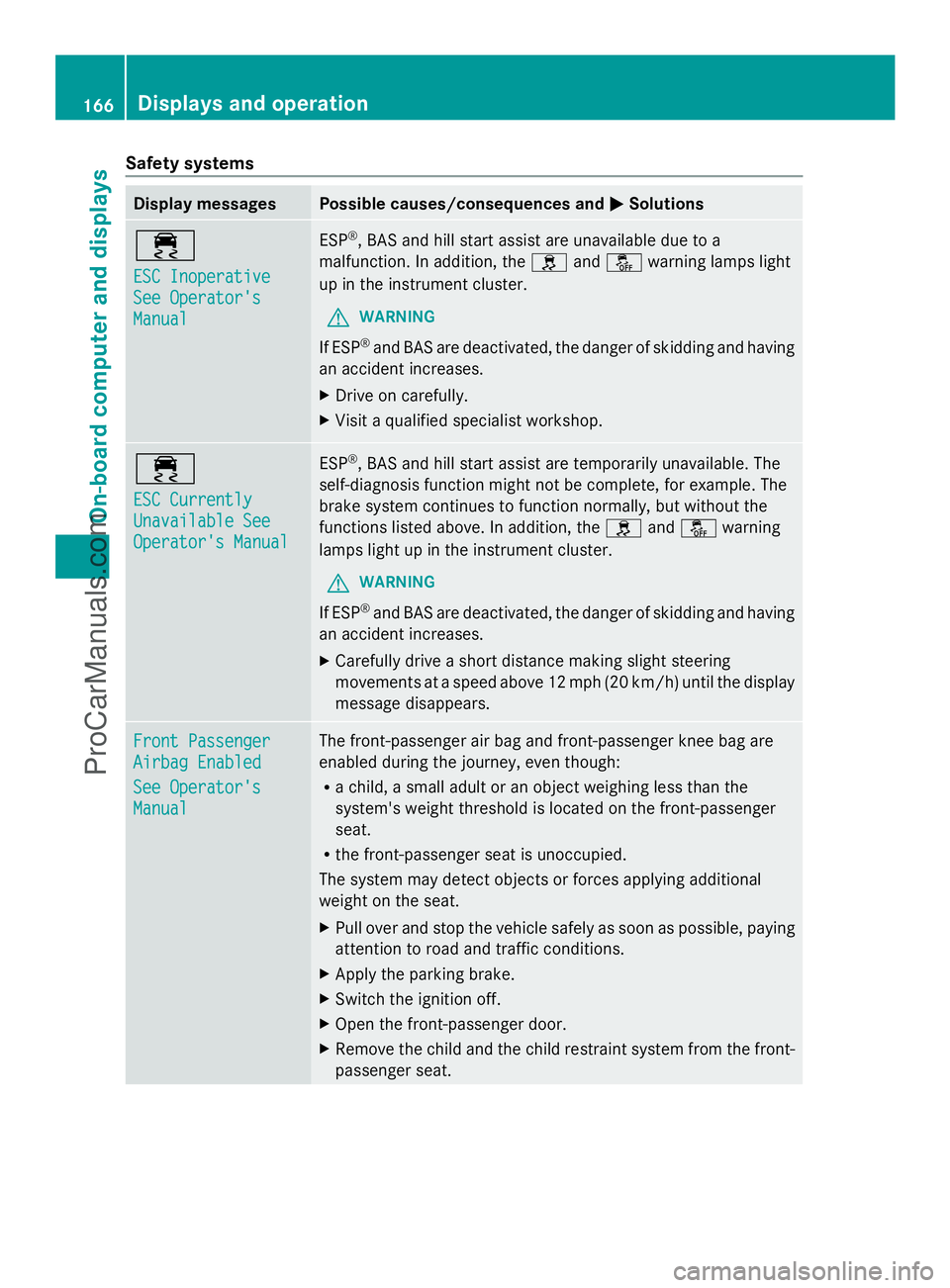
Safety systems
Display messages Possible causes/consequences and
M
MSolutions ÷
ESC Inoperative ESC Inoperative
See Operator's See Operator's
Manual Manual ESP
®
, BAS and hill start assist are unavailable due to a
malfunction. In addition, the handå warning lamps light
up in the instrument cluster.
G WARNING
If ESP ®
and BAS are deactivated, the danger of skidding and having
an accident increases.
X Drive on carefully.
X Visit a qualified specialist workshop. ÷
ESC Currently ESC Currently
Unavailable See Unavailable See
Operator's Manual Operator's Manual ESP
®
, BAS and hill start assist are temporarily unavailable. The
self-diagnosis function might not be complete, for example. The
brake system continues to function normally, but without the
functions listed above. In addition, the handå warning
lamps light up in the instrument cluster.
G WARNING
If ESP ®
and BAS are deactivated, the danger of skidding and having
an accident increases.
X Carefully drive a short distance making slight steering
movements at a speed above 12 mph (20 km/h) until the display
message disappears. Front Passenger Front Passenger
Airbag Enabled Airbag Enabled
See Operator's See Operator's
Manual Manual The front-passenger air bag and front-passenger knee bag are
enabled during the journey, even though:
R
a child, a small adult or an object weighing less than the
system's weight threshold is located on the front-passenger
seat.
R the front-passenger seat is unoccupied.
The system may detect objects or forces applying additional
weight on the seat.
X Pull over and stop the vehicle safely as soon as possible, paying
attention to road and traffic conditions.
X Apply the parking brake.
X Switch the ignition off.
X Open the front-passenger door.
X Remove the child and the child restraint system from the front-
passenger seat. 166
Displays and operationOn-board computer and displays
ProCarManuals.com
Page 173 of 286
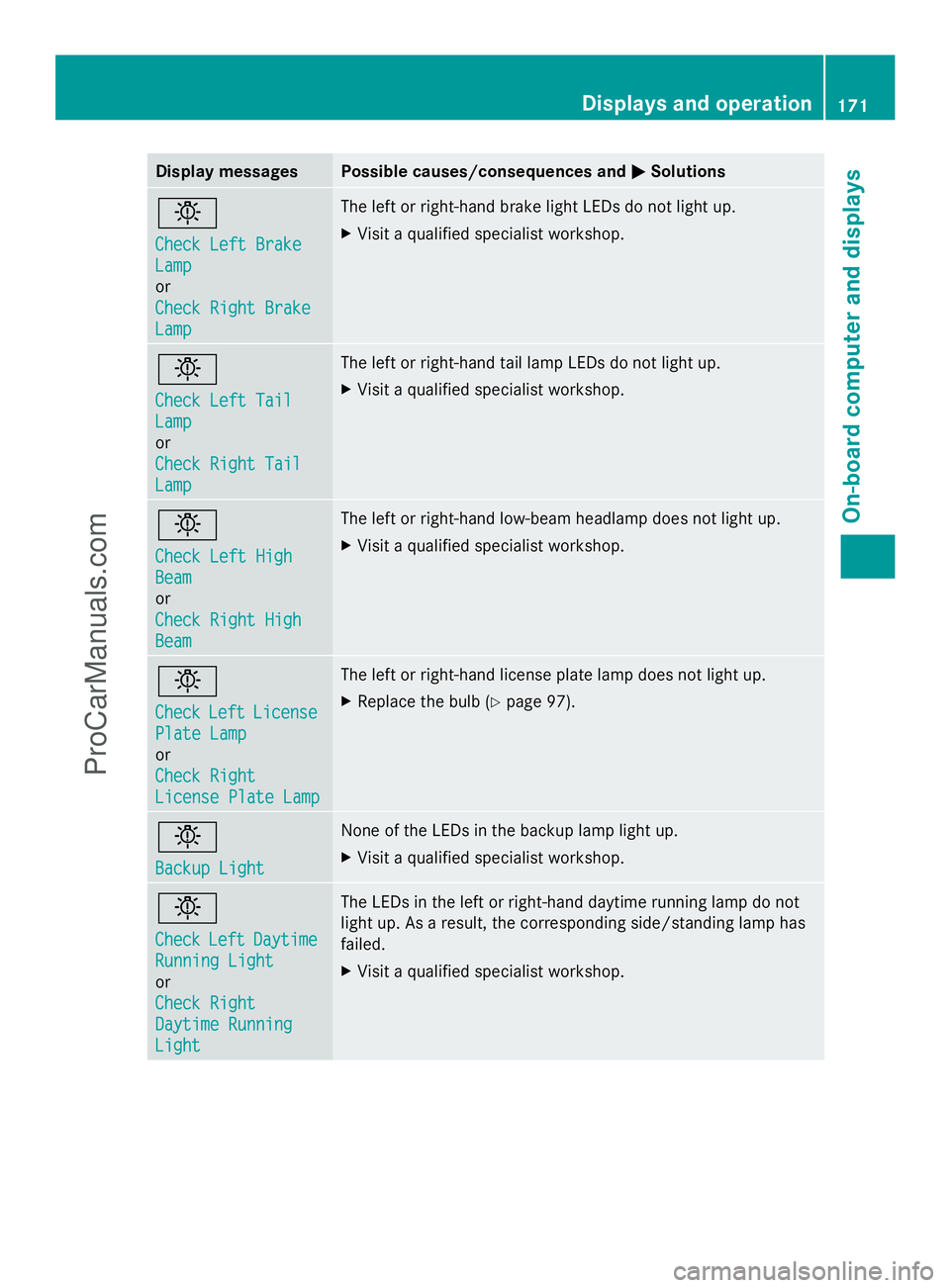
Display messages Possible causes/consequences and
M
MSolutions b
Check Left Brake Check Left Brake
Lamp Lamp
or
Check Right Brake Check Right Brake
Lamp Lamp The left or right-hand brake light LEDs do not light up.
X
Visit a qualified specialist workshop. b
Check Left Tail Check Left Tail
Lamp Lamp
or
Check Right Tail Check Right Tail
Lamp Lamp The left or right-hand tail lamp LEDs do not light up.
X
Visit a qualified specialist workshop. b
Check Left High Check Left High
Beam Beam
or
Check Right High Check Right High
Beam Beam The left or right-hand low-beam headlamp does not light up.
X
Visit a qualified specialist workshop. b
Check Check
Left
LeftLicense
License
Plate Lamp
Plate Lamp
or
Check Right Check Right
License Plate Lamp License Plate Lamp The left or right-hand license plate lamp does not light up.
X
Replace the bulb (Y page 97). b
Backup Light Backup Light None of the LEDs in the backup lamp light up.
X
Visit a qualified specialist workshop. b
Check Check
Left
LeftDaytime
Daytime
Running Light
Running Light
or
Check Right Check Right
Daytime Running Daytime Running
Light Light The LEDs in the left or right-hand daytime running lamp do not
light up. As a result, the corresponding side/standing lamp has
failed.
X
Visit a qualified specialist workshop. Displays and operation
171On-board computer and displays Z
ProCarManuals.com
Page 176 of 286
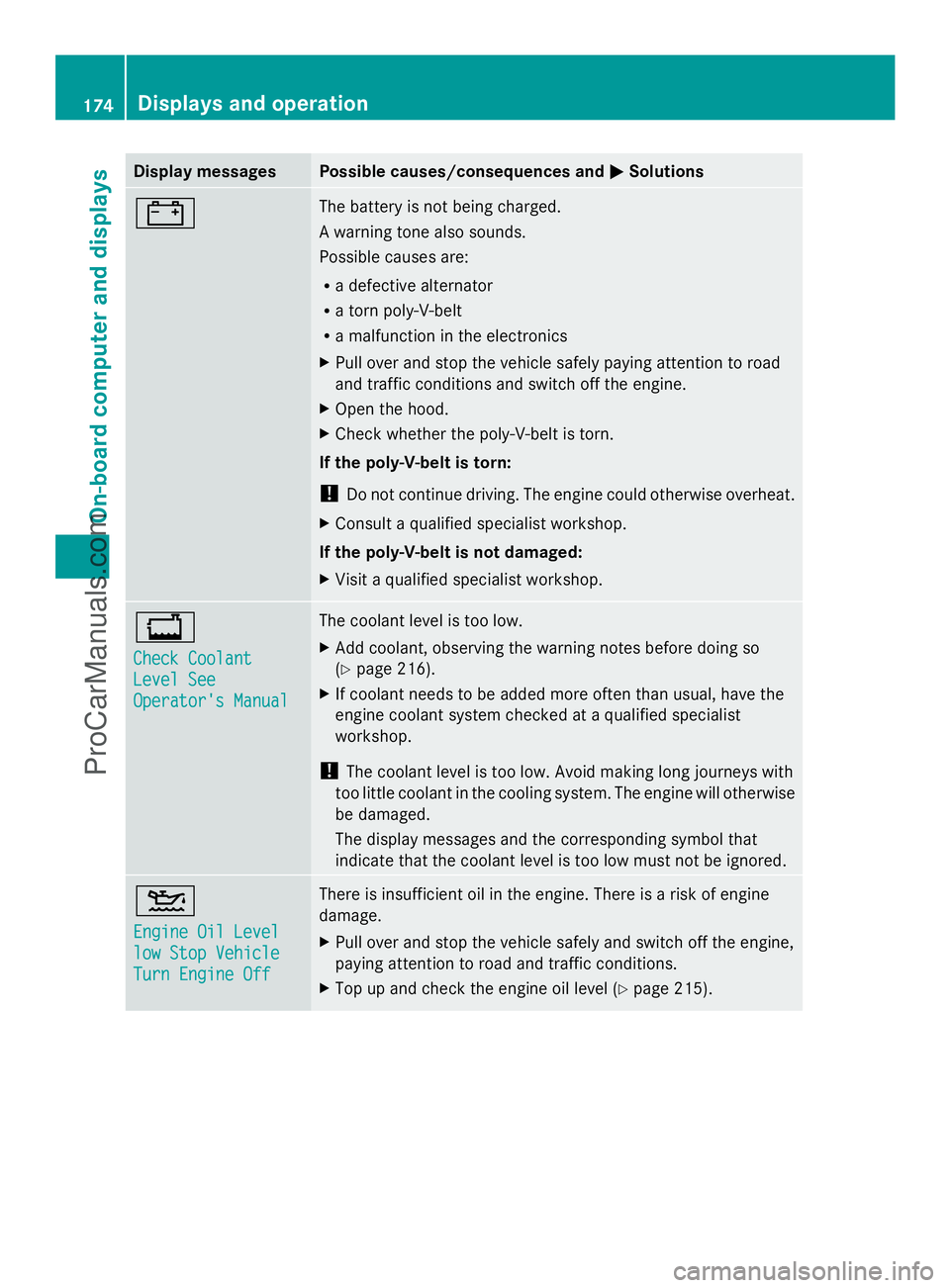
Display messages Possible causes/consequences and
M
MSolutions # The battery is not being charged.
A warning tone also sounds.
Possible causes are:
R
a defective alternator
R a torn poly-V-belt
R a malfunction in the electronics
X Pull over and stop the vehicle safely paying attention to road
and traffic conditions and switch off the engine.
X Open the hood.
X Check whether the poly-V-belt is torn.
If the poly-V-belt is torn:
! Do not continue driving. The engine could otherwise overheat.
X Consult a qualified specialist workshop.
If the poly-V-belt is not damaged:
X Visit a qualified specialist workshop. +
Check Coolant Check Coolant
Level See Level See
Operator's Manual Operator's Manual The coolant level is too low.
X
Add coolant, observing the warning notes before doing so
(Y page 216).
X If coolant needs to be added more often than usual, have the
engine coolant system checked at a qualified specialist
workshop.
! The coolant level is too low. Avoid making long journeys with
too little coolant in the cooling system. The engine will otherwise
be damaged.
The display messages and the corresponding symbol that
indicate that the coolant level is too low must not be ignored. 4
Engine Oil Level Engine Oil Level
low Stop Vehicle low Stop Vehicle
Turn Engine Off Turn Engine Off There is insufficient oil in the engine. There is a risk of engine
damage.
X
Pull over and stop the vehicle safely and switch off the engine,
paying attention to road and traffic conditions.
X Top up and check the engine oil level (Y page 215).174
Displays and operationOn-board compu
ter and displays
ProCarManuals.com
Page 177 of 286
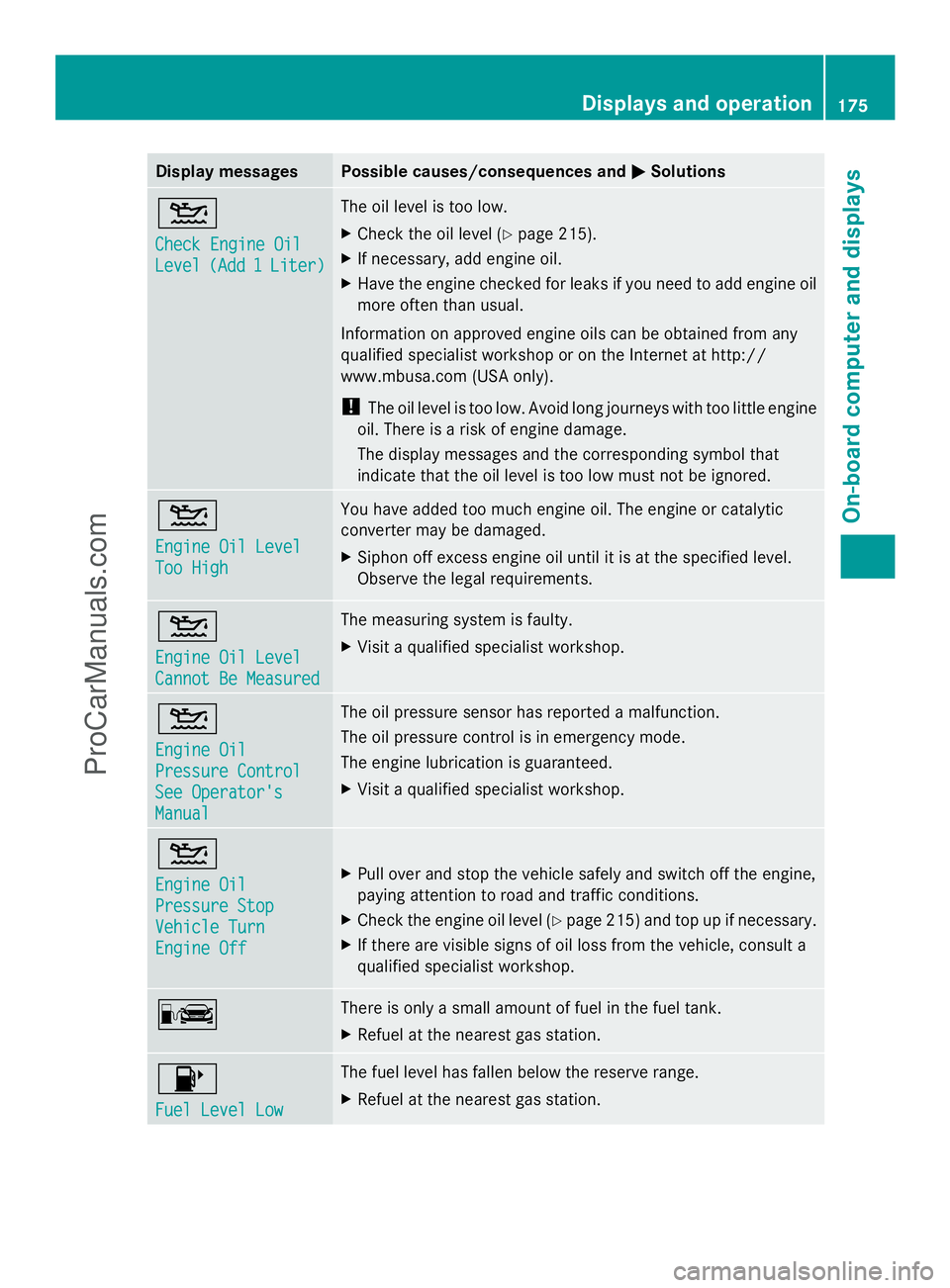
Display messages Possible causes/consequences and
M
MSolutions 4
Check Engine Oil Check Engine Oil
Level Level
(Add 1
(Add 1 Liter)
Liter) The oil level is too low.
X
Check the oil level (Y page 215).
X If necessary, add engine oil.
X Have the engine checked for leaks if you need to add engine oil
more often than usual.
Information on approved engine oils can be obtained from any
qualified specialist workshop or on the Internet at http://
www.mbusa.com (USA only).
! The oil level is too low. Avoid long journeys with too little engine
oil. There is a risk of engine damage.
The display messages and the corresponding symbol that
indicate that the oil level is too low must not be ignored. 4
Engine Oil Level Engine Oil Level
Too High Too High You have added too much engine oil. The engine or catalytic
converter may be damaged.
X
Siphon off excess engine oil until it is at the specified level.
Observe the legal requirements. 4
Engine Oil Level Engine Oil Level
Cannot Be Measured Cannot Be Measured The measuring system is faulty.
X
Visit a qualified specialist workshop. 4
Engine Oil Engine Oil
Pressure Control Pressure Control
See Operator's See Operator's
Manual Manual The oil pressure sensor has reported a malfunction.
The oil pressure control is in emergency mode.
The engine lubrication is guaranteed.
X
Visit a qualified specialist workshop. 4
Engine Oil Engine Oil
Pressure Stop Pressure Stop
Vehicle Turn Vehicle Turn
Engine Off Engine Off
X
Pull over and stop the vehicle safely and switch off the engine,
paying attention to road and traffic conditions.
X Check the engine oil level (Y page 215) and top up if necessary.
X If there are visible signs of oil loss from the vehicle, consult a
qualified specialist workshop. C There is only a small amount of fuel in the fuel tank.
X
Refuel at the nearest gas station. 8
Fuel Level Low Fuel Level Low The fuel level has fallen below the reserve range.
X
Refuel at the nearest gas station. Displays and operation
175On-board computer and displays Z
ProCarManuals.com
Page 178 of 286
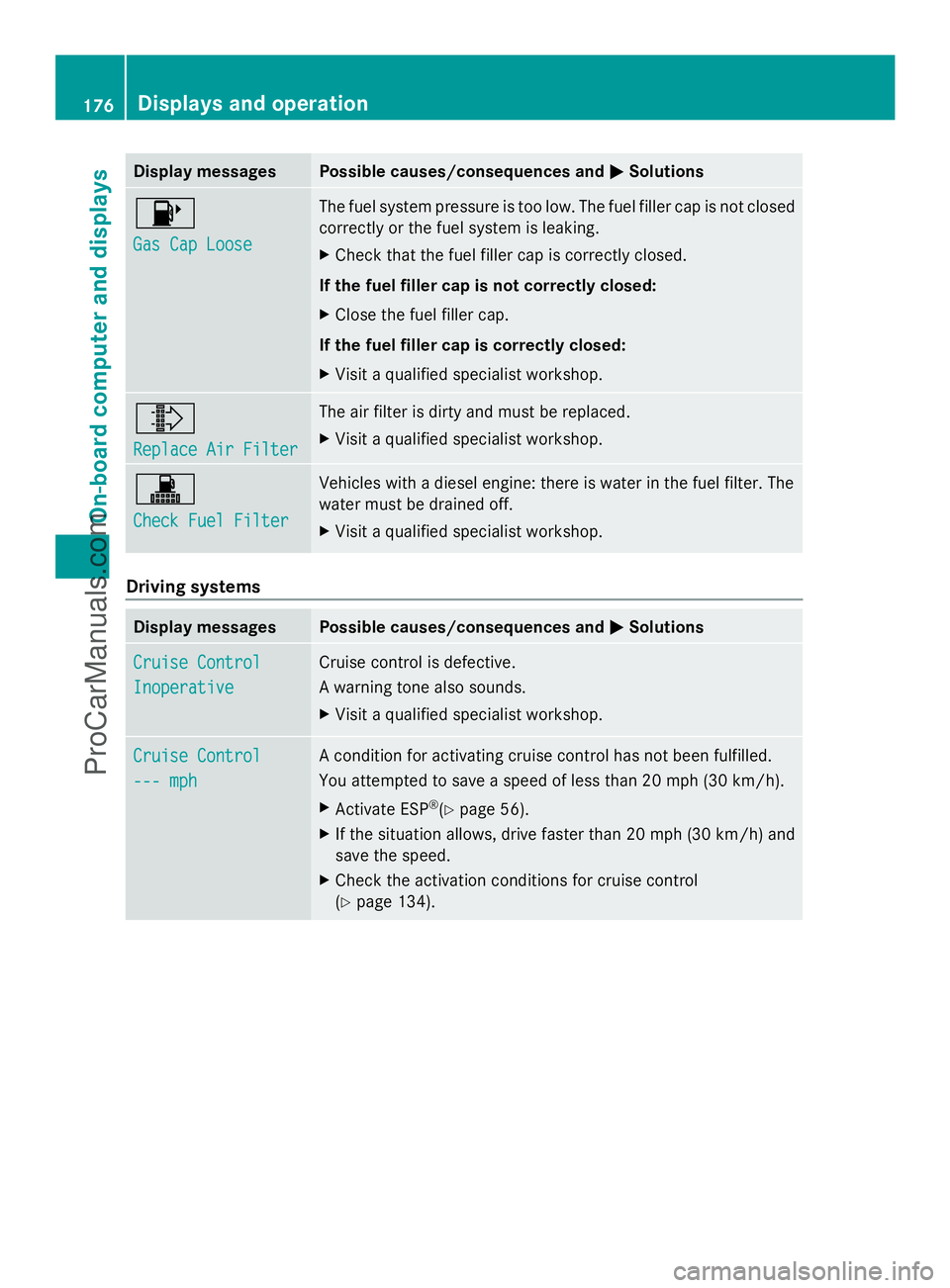
Display messages Possible causes/consequences and
M
MSolutions 8
Gas Cap Loose Gas Cap Loose The fuel system pressure is too low. The fuel filler cap is not closed
correctly or the fuel system is leaking.
X
Check that the fuel filler cap is correctly closed.
If the fuel filler cap is not correctly closed:
X Close the fuel filler cap.
If the fuel filler cap is correctly closed:
X Visit a qualified specialist workshop. ¸
Replace Air Filter Replace Air Filter The air filter is dirty and must be replaced.
X
Visit a qualified specialist workshop. !
Check Fuel Filter Check Fuel Filter Vehicles with a diesel engine: there is water in the fuel filter. The
water must be drained off.
X
Visit a qualified specialist workshop. Driving systems
Display messages Possible causes/consequences and
M MSolutions Cruise Control
Cruise Control
Inoperative Inoperative Cruise control is defective.
A warning tone also sounds.
X
Visit a qualified specialist workshop. Cruise Control Cruise Control
--- mph --- mph A condition for activating cruise control has not been fulfilled.
You attempted to save a speed of less than 20 mph
(30 km/h).
X Activate ESP ®
(Y page 56).
X If the situation allows, drive faster than 20 mph (30 km/h) and
save the speed.
X Check the activation conditions for cruise control
(Y page 134). 176
Displays and operationOn-board computer and displays
ProCarManuals.com