lock MERCEDES-BENZ SLS-CLASS 2013 Manual PDF
[x] Cancel search | Manufacturer: MERCEDES-BENZ, Model Year: 2013, Model line: SLS-CLASS, Model: MERCEDES-BENZ SLS-CLASS 2013Pages: 286, PDF Size: 3.6 MB
Page 157 of 286
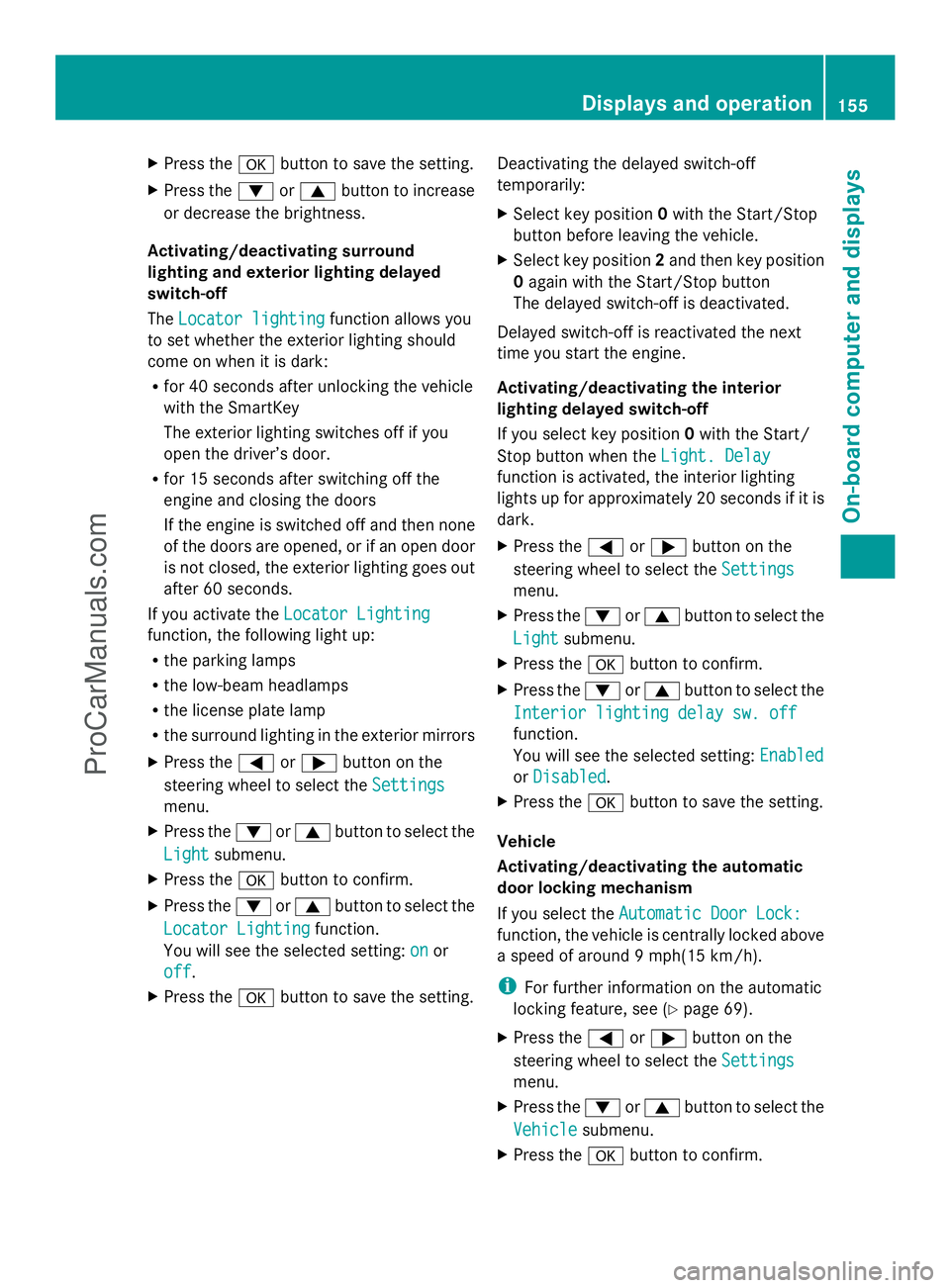
X
Press the abutton to save the setting.
X Press the :or9 button to increase
or decrease the brightness.
Activating/deactivating surround
lighting and exterior lighting delayed
switch-off
The Locator lighting
Locator lighting function allows you
to set whether the exterior lighting should
come on when it is dark:
R for 40 seconds after unlocking the vehicle
with the SmartKey
The exterior lighting switches off if you
open the driver’s door.
R for 15 seconds after switching off the
engine and closing the doors
If the engine is switched off and then none
of the doors are opened, or if an open door
is not closed, the exterior lighting goes out
after 60 seconds.
If you activate the Locator Lighting
Locator Lighting
function, the following light up:
R the parking lamps
R the low-beam headlamps
R the license plate lamp
R the surround lighting in the exterior mirrors
X Press the =or; button on the
steering wheel to select the Settings
Settings
menu.
X Press the :or9 button to select the
Light
Light submenu.
X Press the abutton to confirm.
X Press the :or9 button to select the
Locator Lighting
Locator Lighting function.
You will see the selected setting: on onor
off
off.
X Press the abutton to save the setting. Deactivating the delayed switch-off
temporarily:
X
Select key position 0with the Start/Stop
button before leaving the vehicle.
X Select key position 2and then key position
0 again with the Start/Stop button
The delayed switch-off is deactivated.
Delayed switch-off is reactivated the next
time you start the engine.
Activating/deactivating the interior
lighting delayed switch-off
If you select key position 0with the Start/
Stop button when the Light. Delay
Light. Delay
function is activated, the interior lighting
lights up for approximately 20 seconds if it is
dark.
X Press the =or; button on the
steering wheel to select the Settings
Settings
menu.
X Press the :or9 button to select the
Light Light submenu.
X Press the abutton to confirm.
X Press the :or9 button to select the
Interior lighting delay sw. off
Interior lighting delay sw. off
function.
You will see the selected setting: Enabled Enabled
or Disabled
Disabled .
X Press the abutton to save the setting.
Vehicle
Activating/deactivating the automatic
door locking mechanism
If you select the Automatic Door Lock: Automatic Door Lock:
function, the vehicle is centrally locked above
a speed of around 9 mph(15 km/h).
i For further information on the automatic
locking feature, see (Y page 69).
X Press the =or; button on the
steering wheel to select the Settings
Settings
menu.
X Press the :or9 button to select the
Vehicle Vehicle submenu.
X Press the abutton to confirm. Displays and operation
155On-board computer and displays Z
ProCarManuals.com
Page 158 of 286
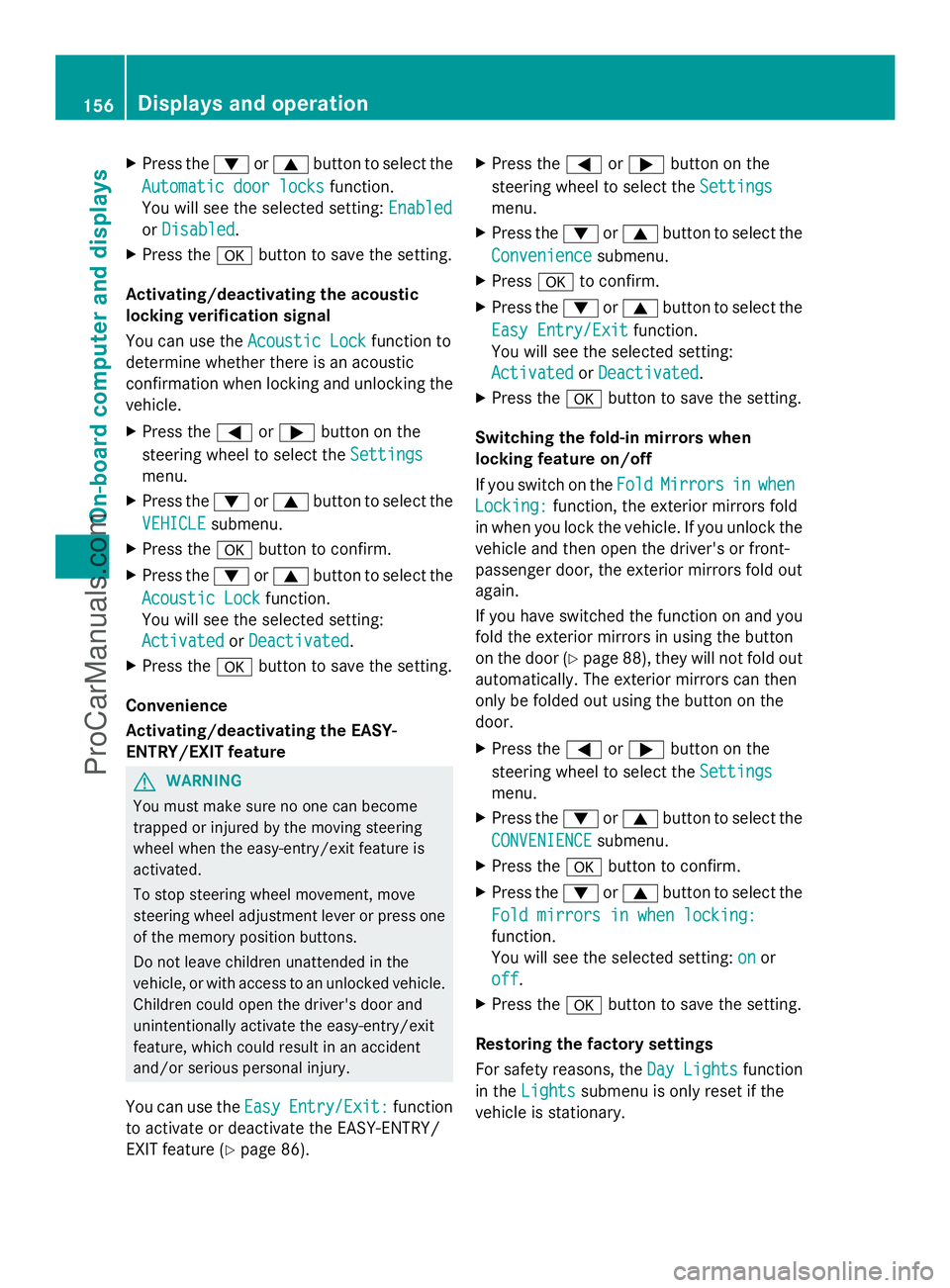
X
Press the :or9 button to select the
Automatic door locks
Automatic door locks function.
You will see the selected setting: Enabled
Enabled
or Disabled
Disabled .
X Press the abutton to save the setting.
Activating/deactivating the acoustic
locking verification signal
You can use the Acoustic Lock
Acoustic Lock function to
determine whether there is an acoustic
confirmation when locking and unlocking the
vehicle.
X Press the =or; button on the
steering wheel to select the Settings
Settings
menu.
X Press the :or9 button to select the
VEHICLE
VEHICLE submenu.
X Press the abutton to confirm.
X Press the :or9 button to select the
Acoustic Lock
Acoustic Lock function.
You will see the selected setting:
Activated Activated orDeactivated
Deactivated.
X Press the abutton to save the setting.
Convenience
Activating/deactivating the EASY-
ENTRY/EXIT feature G
WARNING
You must make sure no one can become
trapped or injured by the moving steering
wheel when the easy-entry/exit feature is
activated.
To stop steering wheel movement, move
steering wheel adjustment lever or press one
of the memory position buttons.
Do not leave children unattended in the
vehicle, or with access to an unlocked vehicle.
Children could open the driver's door and
unintentionally activate the easy-entry/exit
feature, which could result in an accident
and/or serious personal injury.
You can use the Easy EasyEntry/Exit:
Entry/Exit: function
to activate or deactivate the EASY-ENTRY/
EXIT feature (Y page 86). X
Press the =or; button on the
steering wheel to select the Settings Settings
menu.
X Press the :or9 button to select the
Convenience
Convenience submenu.
X Press ato confirm.
X Press the :or9 button to select the
Easy Entry/Exit
Easy Entry/Exit function.
You will see the selected setting:
Activated Activated orDeactivated
Deactivated.
X Press the abutton to save the setting.
Switching the fold-in mirrors when
locking feature on/off
If you switch on the Fold FoldMirrors
Mirrors in
inwhen
when
Locking:
Locking: function, the exterior mirrors fold
in when you lock the vehicle. If you unlock the
vehicle and then open the driver's or front-
passenger door, the exterior mirrors fold out
again.
If you have switched the function on and you
fold the exterior mirrors in using the button
on the door (Y page 88), they will not fold out
automatically. The exterior mirrors can then
only be folded out using the button on the
door.
X Press the =or; button on the
steering wheel to select the Settings
Settings
menu.
X Press the :or9 button to select the
CONVENIENCE CONVENIENCE submenu.
X Press the abutton to confirm.
X Press the :or9 button to select the
Fold mirrors in when locking:
Fold mirrors in when locking:
function.
You will see the selected setting: on
on or
off off.
X Press the abutton to save the setting.
Restoring the factory settings
For safety reasons, the Day Lights Day Lightsfunction
in the Lights
Lights submenu is only reset if the
vehicle is stationary. 156
Displays and operationOn-board computer and displays
ProCarManuals.com
Page 163 of 286
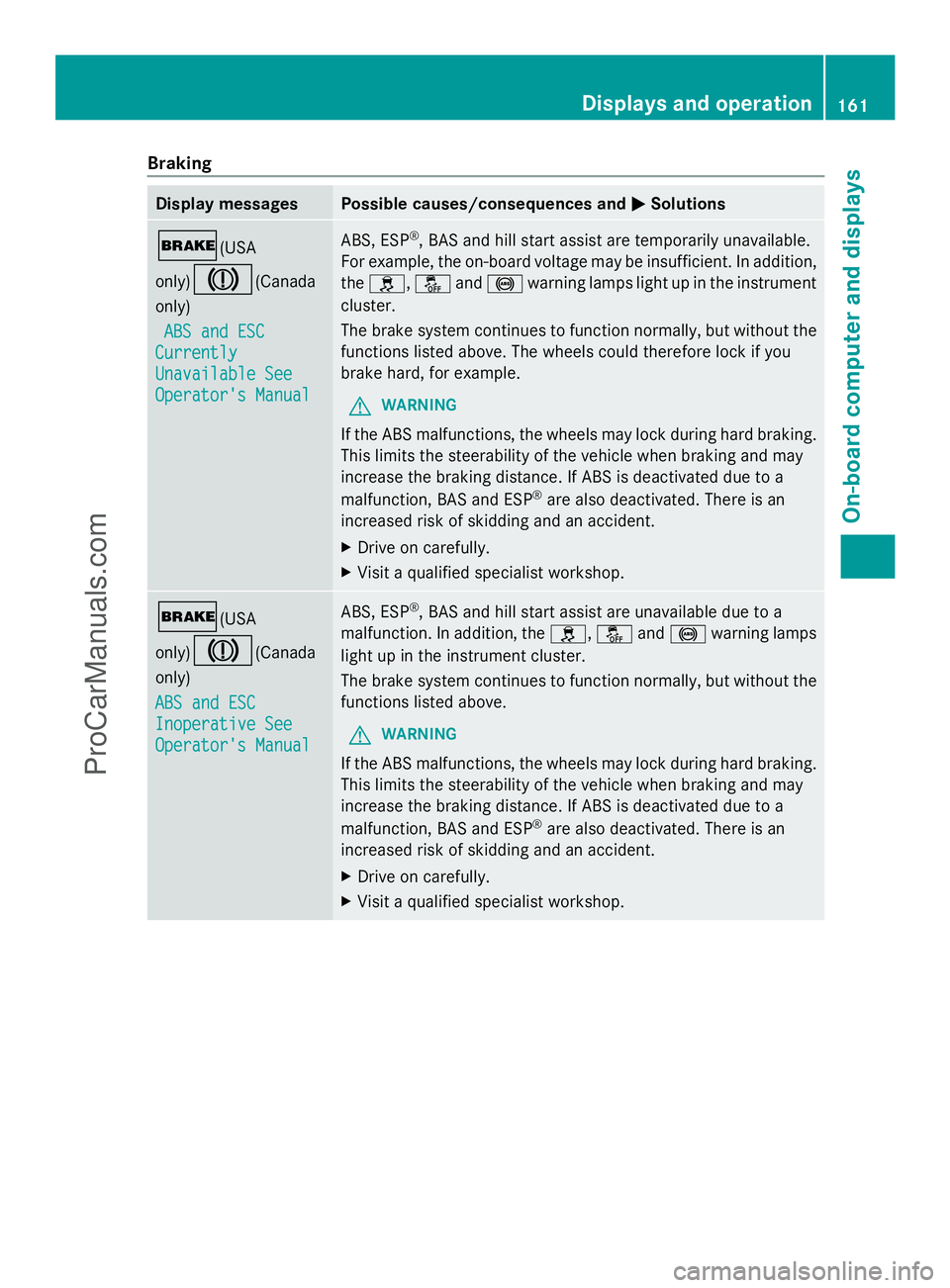
Braking
Display messages Possible causes/consequences and
M
MSolutions $(USA
only)J(Canada
only)
ABS and ESC ABS and ESC
Currently
Currently
Unavailable See Unavailable See
Operator's Manual Operator's Manual ABS, ESP
®
, BAS and hill start assist are temporarily unavailable.
For example, the on-board voltage may be insufficient. In addition,
the h, åand! warning lamps light up in the instrument
cluster.
The brake system continues to function normally, but without the
functions listed above. The wheels could therefore lock if you
brake hard, for example.
G WARNING
If the ABS malfunctions, the wheels may lock during hard braking.
This limits the steerability of the vehicle when braking and may
increase the braking distance. If ABS is deactivated due to a
malfunction, BAS and ESP ®
are also deactivated. There is an
increased risk of skidding and an accident.
X Drive on carefully.
X Visit a qualified specialist workshop. $(USA
only)J(Canada
only)
ABS and ESC ABS and ESC
Inoperative See Inoperative See
Operator's Manual Operator's Manual ABS, ESP
®
, BAS and hill start assist are unavailable due to a
malfunction. In addition, the h,åand! warning lamps
light up in the instrument cluster.
The brake system continues to function normally, but without the
functions listed above.
G WARNING
If the ABS malfunctions, the wheels may lock during hard braking.
This limits the steerability of the vehicle when braking and may
increase the braking distance. If ABS is deactivated due to a
malfunction, BAS and ESP ®
are also deactivated. There is an
increased risk of skidding and an accident.
X Drive on carefully.
X Visit a qualified specialist workshop. Displays and operation
161On-board computer and displays Z
ProCarManuals.com
Page 164 of 286
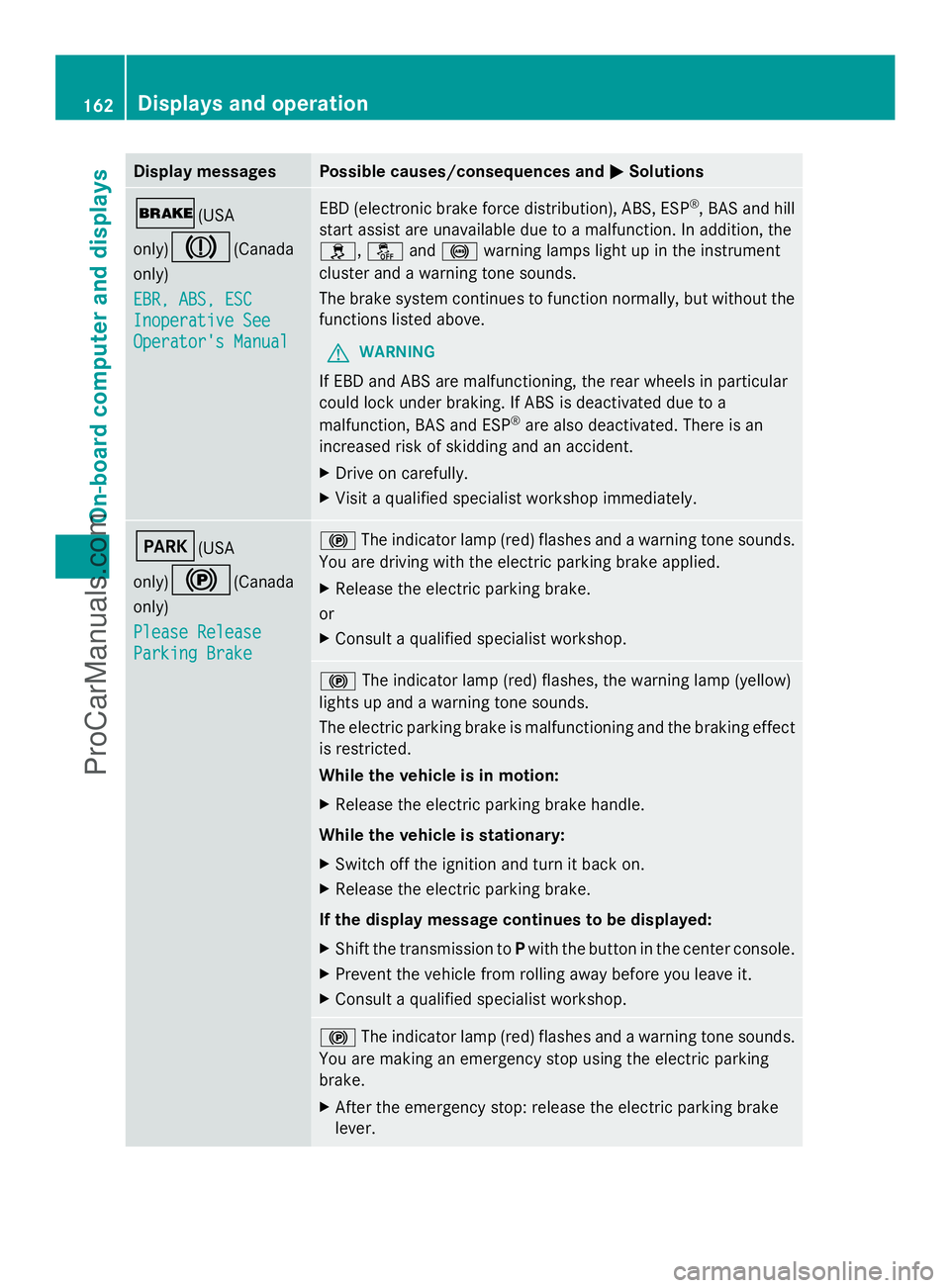
Display messages Possible causes/consequences and
M
MSolutions $(USA
only)
J(Canada
only)
EBR, ABS, ESC EBR, ABS, ESC
Inoperative See Inoperative See
Operator's Manual Operator's Manual EBD (electronic brake force distribution), ABS, ESP
®
, BAS and hill
start assist are unavailable due to a malfunction. In addition, the
h, åand! warning lamps light up in the instrument
cluster and a warning tone sounds.
The brake system continues to function normally, but without the
functions listed above.
G WARNING
If EBD and ABS are malfunctioning, the rear wheels in particular
could lock under braking. If ABS is deactivated due to a
malfunction, BAS and ESP ®
are also deactivated. There is an
increased risk of skidding and an accident.
X Drive on carefully.
X Visit a qualified specialist workshop immediately. F(USA
only)
!(Canada
only)
Please Release Please Release
Parking Brake Parking Brake !
The indicator lamp (red) flashes and a warning tone sounds.
You are driving with the electric parking brake applied.
X Release the electric parking brake.
or
X Consult a qualified specialist workshop. !
The indicator lamp (red) flashes, the warning lamp (yellow)
lights up and a warning tone sounds.
The electric parking brake is malfunctioning and the braking effect
is restricted.
While the vehicle is in motion:
X Release the electric parking brake handle.
While the vehicle is stationary:
X Switch off the ignition and turn it back on.
X Release the electric parking brake.
If the display message continues to be displayed:
X Shift the transmission to Pwith the button in the center console.
X Prevent the vehicle from rolling away before you leave it.
X Consult a qualified specialist workshop. !
The indicator lamp (red) flashes and a warning tone sounds.
You are making an emergency stop using the electric parking
brake.
X After the emergency stop: release the electric parking brake
lever. 162
Displays and operationOn-board compu
ter and displays
ProCarManuals.com
Page 175 of 286
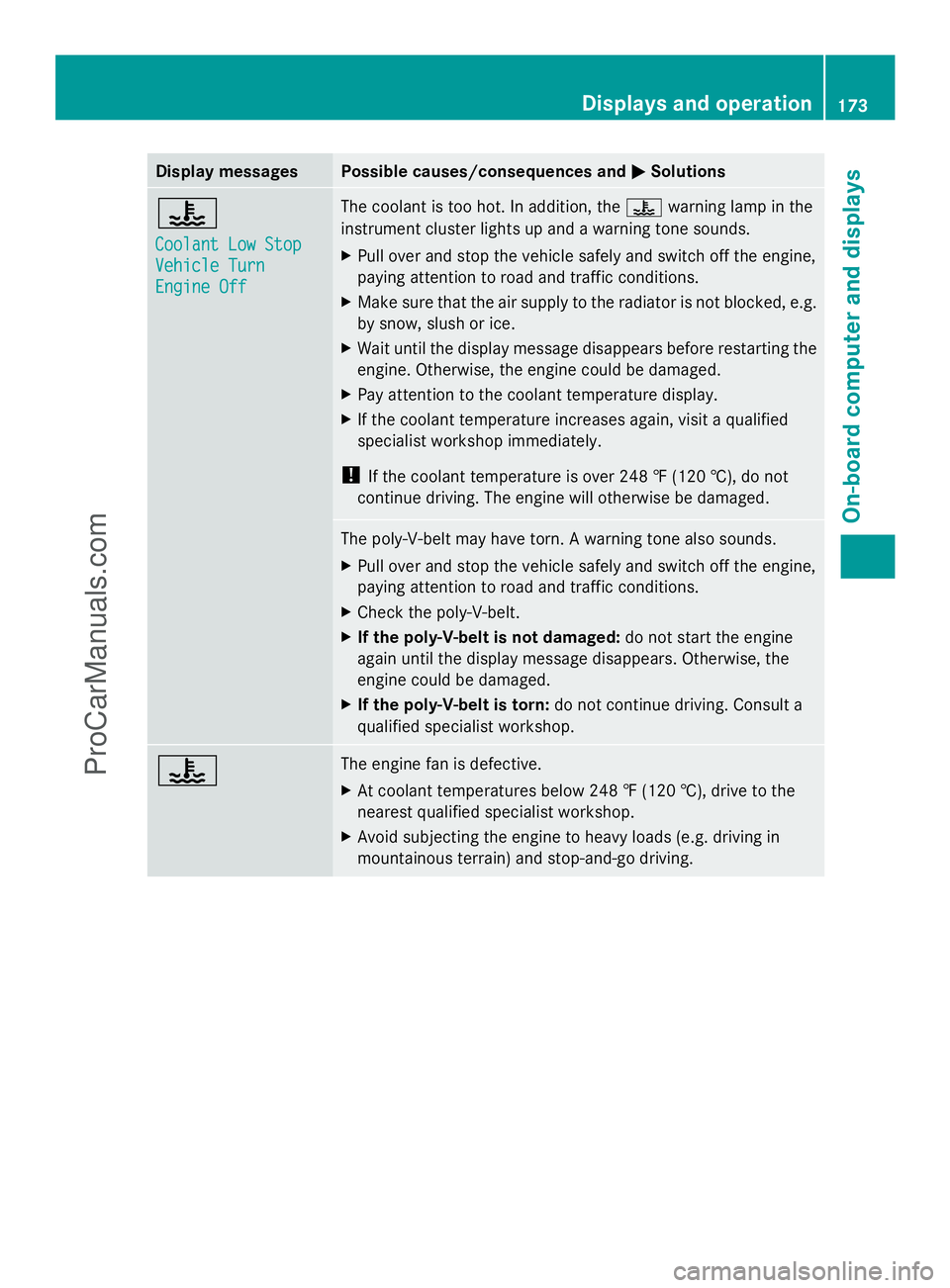
Display messages Possible causes/consequences and
M
MSolutions ?
Coolant Low Stop Coolant Low Stop
Vehicle Turn Vehicle Turn
Engine Off Engine Off The coolant is too hot. In addition, the
?warning lamp in the
instrument cluster lights up and a warning tone sounds.
X Pull over and stop the vehicle safely and switch off the engine,
paying attention to road and traffic conditions.
X Make sure that the air supply to the radiator is not blocked, e.g.
by snow, slush or ice.
X Wait until the display message disappears before restarting the
engine. Otherwise, the engine could be damaged.
X Pay attention to the coolant temperature display.
X If the coolant temperature increases again, visit a qualified
specialist workshop immediately.
! If the coolant temperature is over 248 ‡ (120 †), do not
continue driving. The engine will otherwise be damaged. The poly-V-belt may have torn. A warning tone also sounds.
X
Pull over and stop the vehicle safely and switch off the engine,
paying attention to road and traffic conditions.
X Check the poly-V-belt.
X If the poly-V-belt is not damaged: do not start the engine
again until the display message disappears. Otherwise, the
engine could be damaged.
X If the poly-V-belt is torn: do not continue driving. Consult a
qualified specialist workshop. ? The engine fan is defective.
X
At coolant temperatures below 248 ‡ (120 †), drive to the
nearest qualified specialist workshop.
X Avoid subjecting the engine to heavy loads (e.g. driving in
mountainous terrain) and stop-and-go driving. Displays and operation
173On-board computer and displays Z
ProCarManuals.com
Page 182 of 286
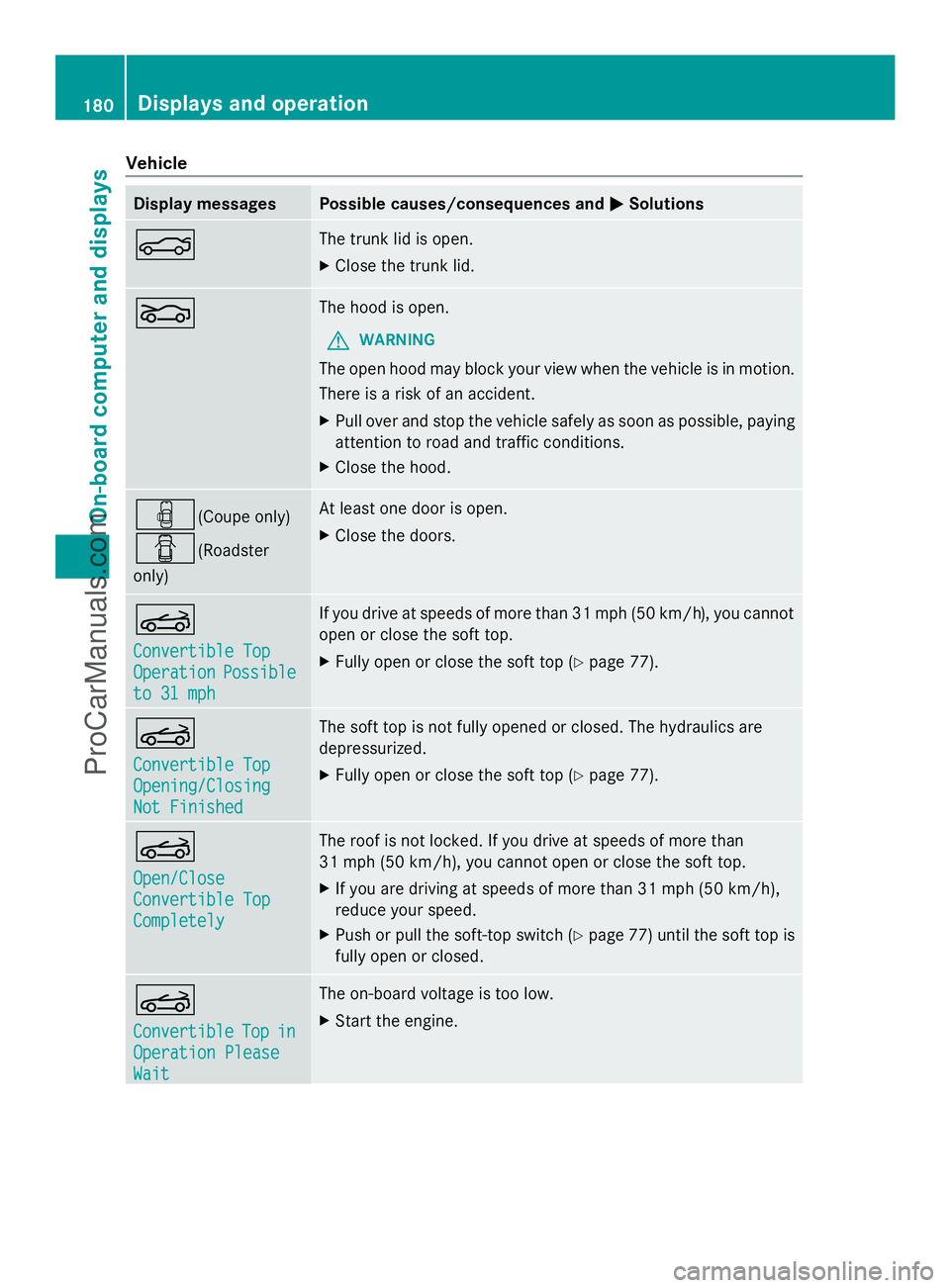
Vehicle
Display messages Possible causes/consequences and
M
MSolutions N The trunk lid is open.
X
Close the trunk lid. L The hood is open.
G WARNING
The open hood may block your view when the vehicle is in motion.
There is a risk of an accident.
X Pull over and stop the vehicle safely as soon as possible, paying
attention to road and traffic conditions.
X Close the hood. ´(Coupe only)
C(Roadster
only) At least one door is open.
X
Close the doors. K
Convertible Top Convertible Top
Operation Operation
Possible
Possible
to 31 mph
to 31 mph If you drive at speeds of more than 31 mph (50 km/h), you cannot
open or close the soft top.
X
Fully open or close the soft top (Y page 77).K
Convertible Top Convertible Top
Opening/Closing Opening/Closing
Not Finished Not Finished The soft top is not fully opened or closed. The hydraulics are
depressurized.
X Fully open or close the soft top (Y page 77).K
Open/Close Open/Close
Convertible Top Convertible Top
Completely Completely The roof is not locked. If you drive at speeds of more than
31 mph (50 km/h), you cannot open or close the soft top.
X
If you are driving at speeds of more than 31 mph (50 km/h),
reduce your speed.
X Push or pull the soft-top switch (Y page 77) until the soft top is
fully open or closed. K
Convertible Convertible
Top
Topin
in
Operation Please
Operation Please
Wait Wait The on-board voltage is too low.
X Start the engine. 180
Displays and operationOn-board computer and displays
ProCarManuals.com
Page 183 of 286
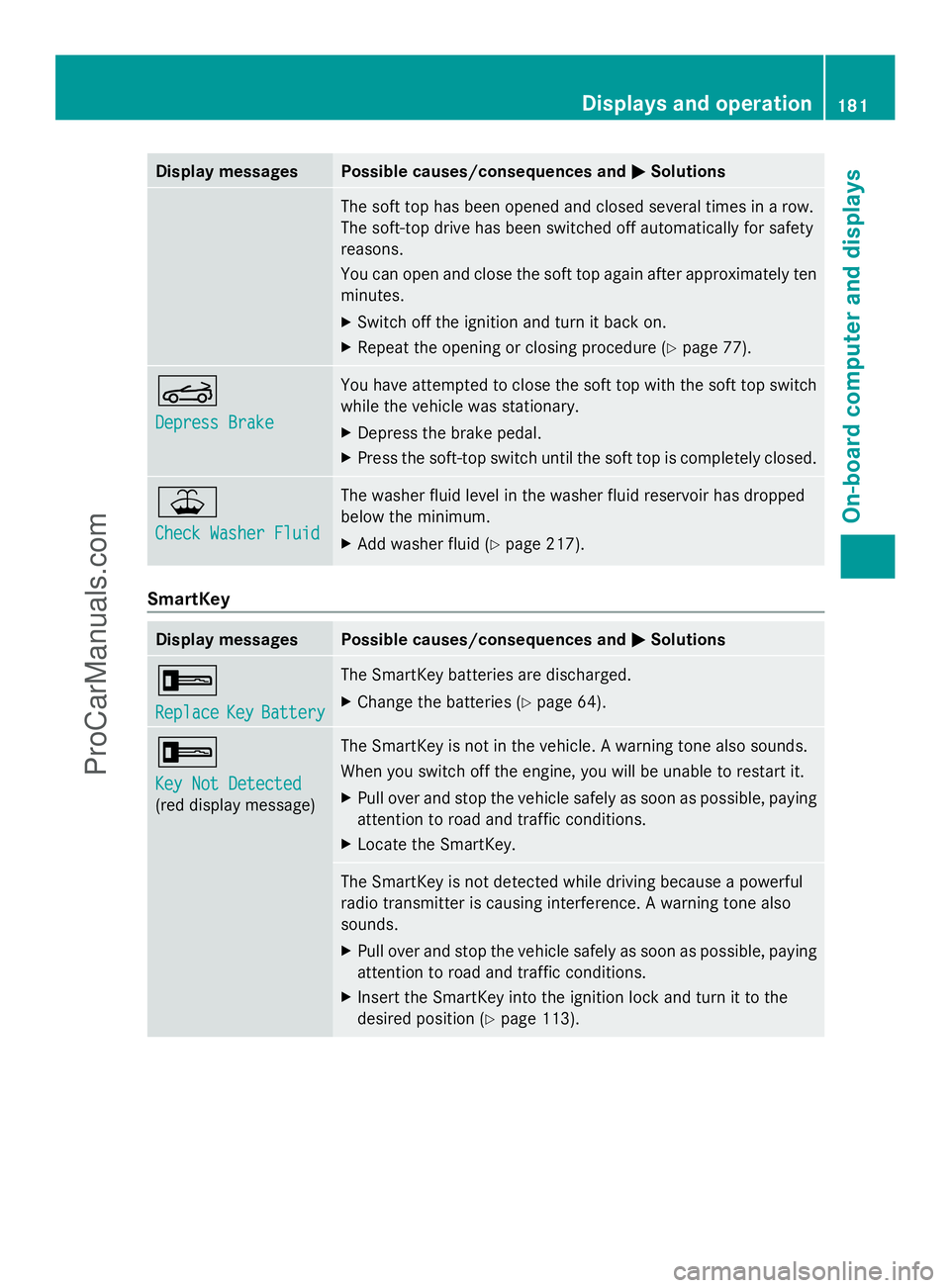
Display messages Possible causes/consequences and
M
MSolutions The soft top has been opened and closed several times in a row.
The soft-top drive has been switched off automatically for safety
reasons.
You can open and close the soft top again after approximately ten
minutes.
X
Switch off the ignition and turn it back on.
X Repeat the opening or closing procedure (Y page 77).K
Depress Brake Depress Brake You have attempted to close the soft top with the soft top switch
while the vehicle was stationary.
X
Depress the brake pedal.
X Press the soft-top switch until the soft top is completely closed. ¥
Check Washer Fluid Check Washer Fluid The washer fluid level in the washer fluid reservoir has dropped
below the minimum.
X
Add washer fluid ( Ypage 217). SmartKey
Display messages Possible causes/consequences and
M MSolutions +
Replace Replace
Key
KeyBattery
Battery The SmartKey batteries are discharged.
X
Change the batteries ( Ypage 64). +
Key Not Detected Key Not Detected
(red display message) The SmartKey is not in the vehicle. A warning tone also sounds.
When you switch off the engine, you will be unable to restart it.
X
Pull over and stop the vehicle safely as soon as possible, paying
attention to road and traffic conditions.
X Locate the SmartKey. The SmartKey is not detected while driving because a powerful
radio transmitter is causing interference. A warning tone also
sounds.
X
Pull over and stop the vehicle safely as soon as possible, paying
attention to road and traffic conditions.
X Insert the SmartKey into the ignition lock and turn it to the
desired position ( Ypage 113). Displays and operation
181On-board computer and displays Z
ProCarManuals.com
Page 184 of 286
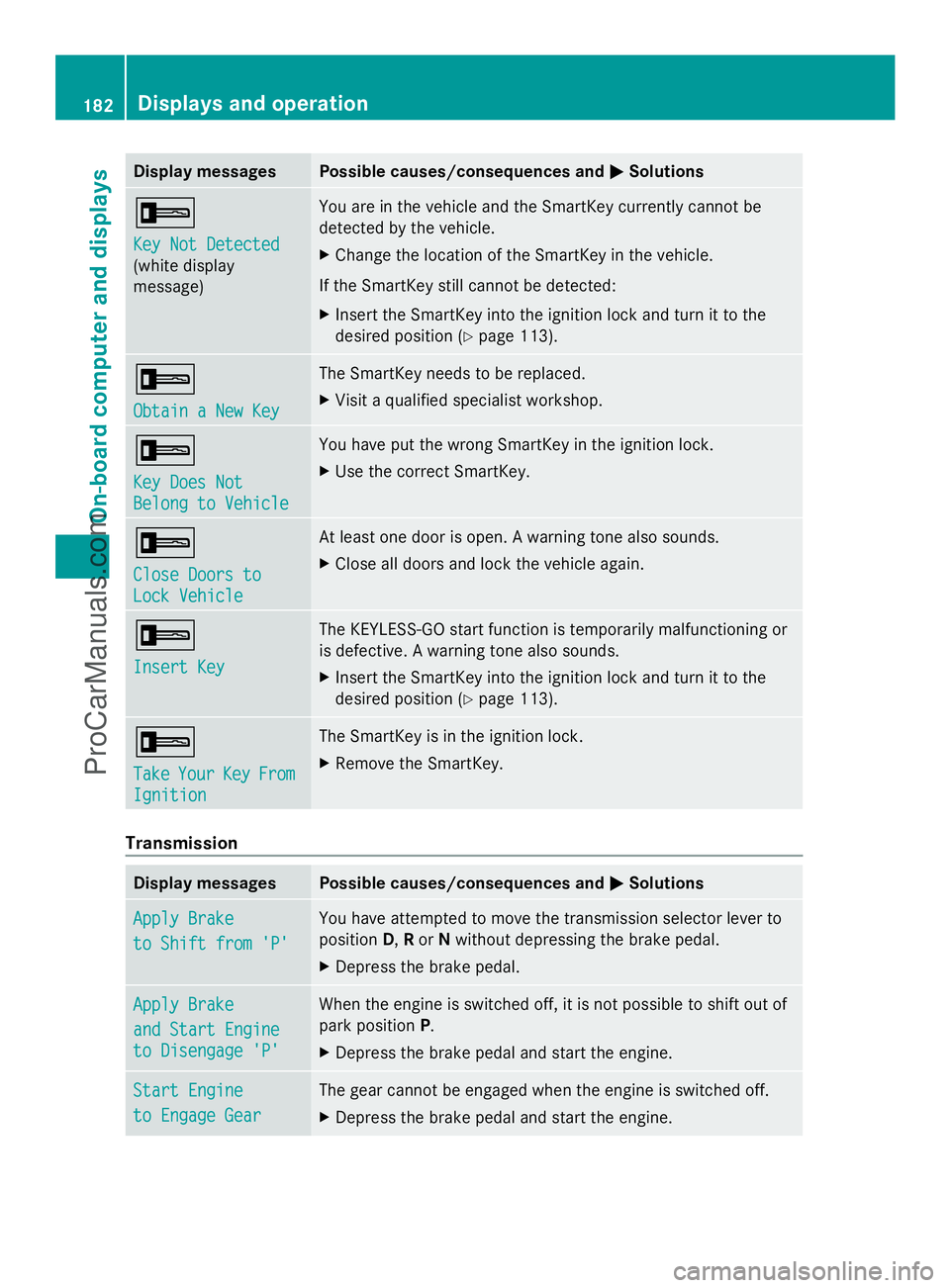
Display messages Possible causes/consequences and
M
MSolutions +
Key Not Detected Key Not Detected
(white display
message) You are in the vehicle and the SmartKey currently cannot be
detected by the vehicle.
X
Change the location of the SmartKey in the vehicle.
If the SmartKey still cannot be detected:
X Insert the SmartKey into the ignition lock and turn it to the
desired position ( Ypage 113). +
Obtain a New Key Obtain a New Key The SmartKey needs to be replaced.
X
Visit a qualified specialist workshop. +
Key Does Not Key Does Not
Belong to Vehicle Belong to Vehicle You have put the wrong SmartKey in the ignition lock.
X
Use the correct SmartKey. +
Close Doors to Close Doors to
Lock Vehicle Lock Vehicle At least one door is open. A warning tone also sounds.
X
Close all doors and lock the vehicle again. +
Insert Key Insert Key The KEYLESS-GO start function is temporarily malfunctioning or
is defective. A warning tone also sounds.
X
Insert the SmartKey into the ignition lock and turn it to the
desired position ( Ypage 113). +
Take Take
Your
YourKey
KeyFrom
From
Ignition
Ignition The SmartKey is in the ignition lock.
X
Remove the SmartKey. Transmission
Display messages Possible causes/consequences and
M MSolutions Apply Brake
Apply Brake
to Shift from 'P' to Shift from 'P' You have attempted to move the transmission selector lever to
position
D,Ror Nwithout depressing the brake pedal.
X Depress the brake pedal. Apply Brake Apply Brake
and Start Engine and Start Engine
to Disengage 'P' to Disengage 'P' When the engine is switched off, it is not possible to shift out of
park position
P.
X Depress the brake pedal and start the engine. Start Engine Start Engine
to Engage Gear to Engage Gear The gear cannot be engaged when the engine is switched off.
X
Depress the brake pedal and start the engine. 182
Displays and operationOn-board compu
ter and displays
ProCarManuals.com
Page 186 of 286
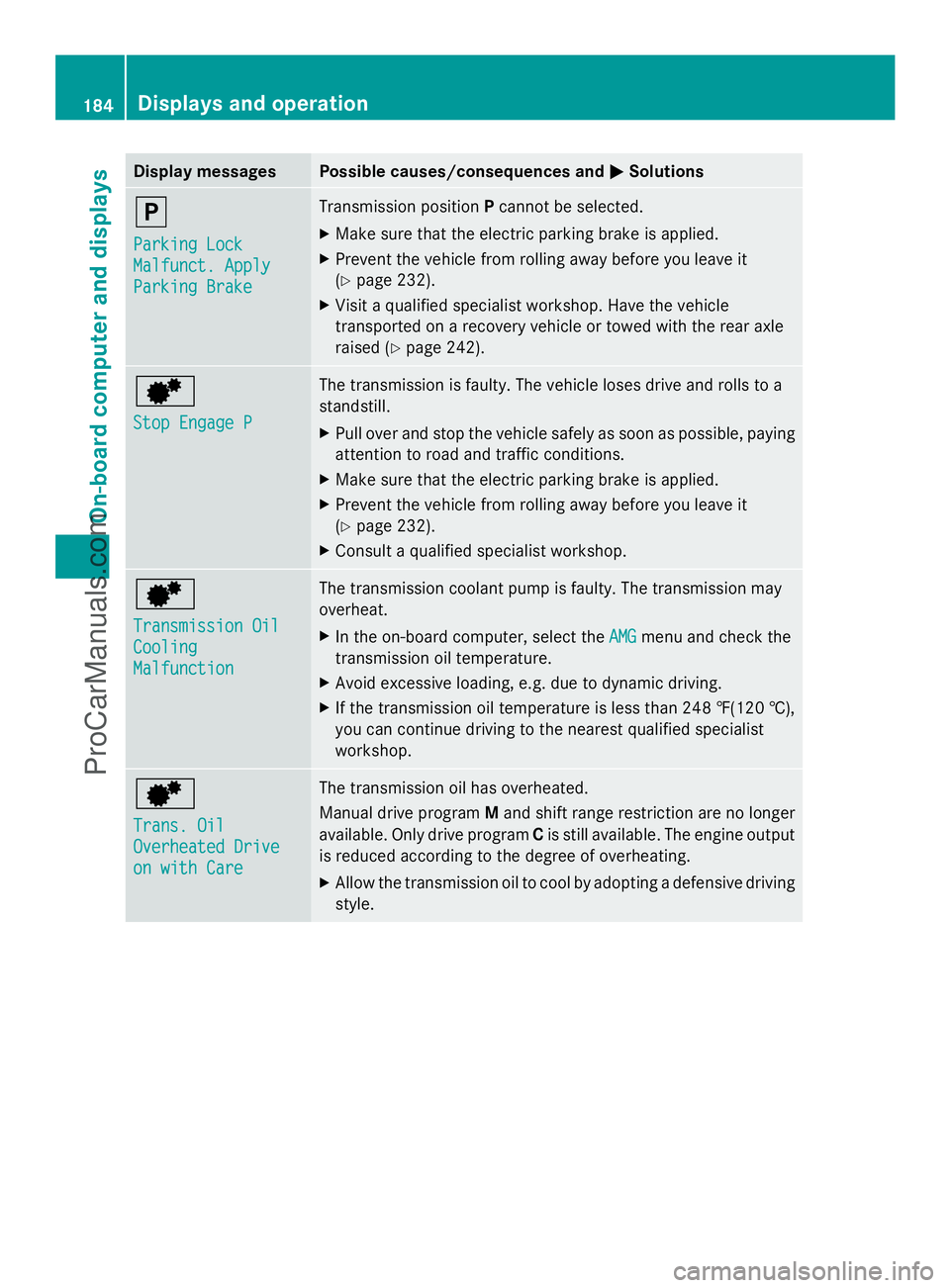
Display messages Possible causes/consequences and
M
MSolutions j
Parking Lock Parking Lock
Malfunct. Apply Malfunct. Apply
Parking Brake Parking Brake Transmission position
Pcannot be selected.
X Make sure that the electric parking brake is applied.
X Prevent the vehicle from rolling away before you leave it
(Y page 232).
X Visit a qualified specialist workshop. Have the vehicle
transported on a recovery vehicle or towed with the rear axle
raised ( Ypage 242). d
Stop Engage P Stop Engage P The transmission is faulty. The vehicle loses drive and rolls to a
standstill.
X
Pull over and stop the vehicle safely as soon as possible, paying
attention to road and traffic conditions.
X Make sure that the electric parking brake is applied.
X Prevent the vehicle from rolling away before you leave it
(Y page 232).
X Consult a qualified specialist workshop. d
Transmission Oil Transmission Oil
Cooling Cooling
Malfunction Malfunction The transmission coolant pump is faulty. The transmission may
overheat.
X
In the on-board computer, select the AMG AMGmenu and check the
transmission oil temperature.
X Avoid excessive loading, e.g. due to dynamic driving.
X If the transmission oil temperature is less than 248 ‡(120 †),
you can continue driving to the nearest qualified specialist
workshop. d
Trans. Oil Trans. Oil
Overheated Drive Overheated Drive
on with Care on with Care The transmission oil has overheated.
Manual drive program
Mand shift range restriction are no longer
available. Only drive program Cis still available. The engine output
is reduced according to the degree of overheating.
X Allow the transmission oil to cool by adopting a defensive driving
style. 184
Displays and operationOn-board compu
ter and displays
ProCarManuals.com
Page 187 of 286
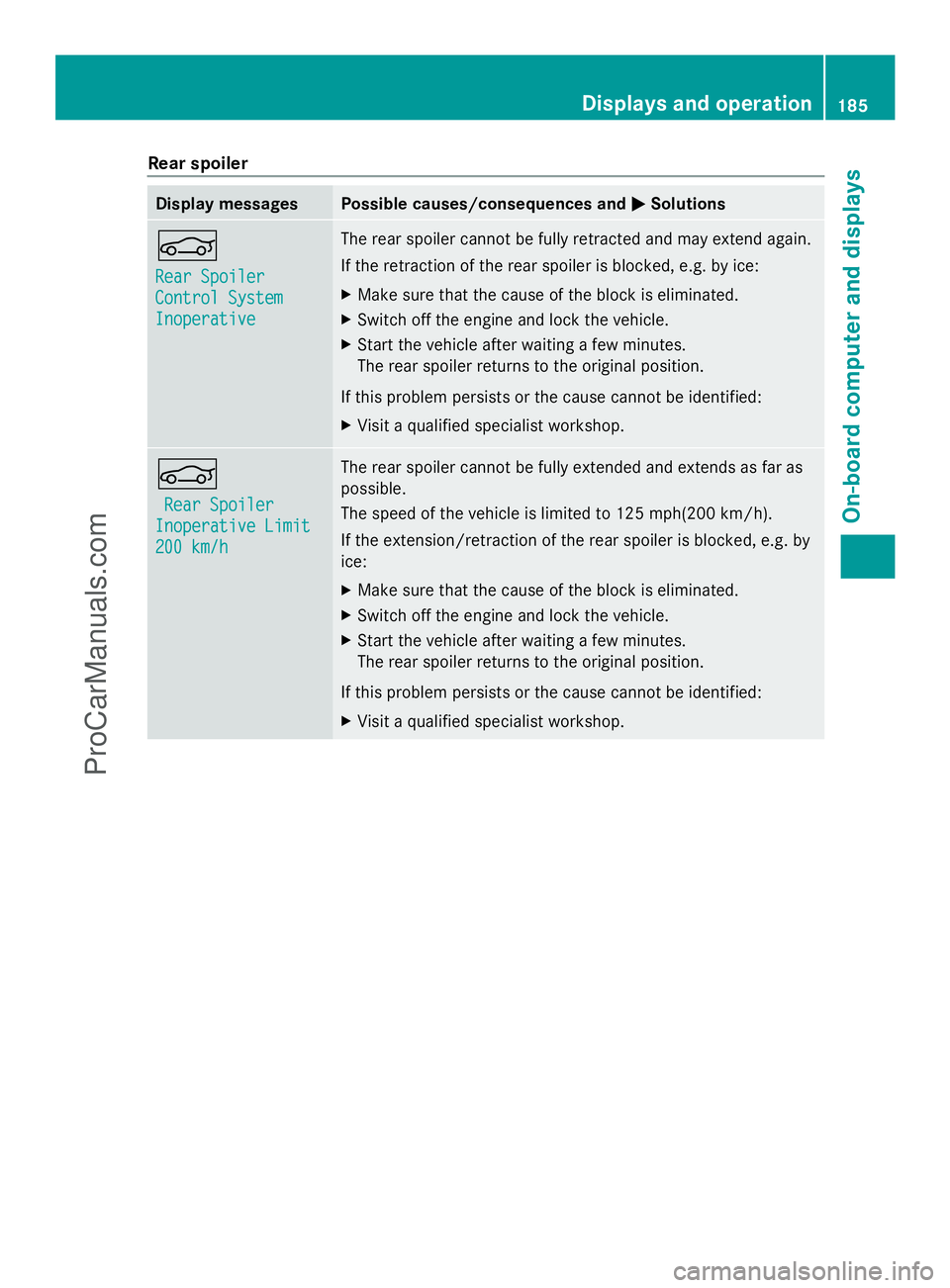
Rear spoiler
Display messages Possible causes/consequences and
M
MSolutions Ñ
Rear Spoiler Rear Spoiler
Control System Control System
Inoperative Inoperative The rear spoiler cannot be fully retracted and may extend again.
If the retraction of the rear spoiler is blocked, e.g. by ice:
X
Make sure that the cause of the block is eliminated.
X Switch off the engine and lock the vehicle.
X Start the vehicle after waiting a few minutes.
The rear spoiler returns to the original position.
If this problem persists or the cause cannot be identified:
X Visit a qualified specialist workshop. Ñ
Rear Spoiler Rear Spoiler
Inoperative Limit
Inoperative Limit
200 km/h 200 km/h The rear spoiler cannot be fully extended and extends as far as
possible.
The speed of the vehicle is limited to 125 mph(200 km/h).
If the extension/retraction of the rear spoiler is blocked, e.g. by
ice:
X
Make sure that the cause of the block is eliminated.
X Switch off the engine and lock the vehicle.
X Start the vehicle after waiting a few minutes.
The rear spoiler returns to the original position.
If this problem persists or the cause cannot be identified:
X Visit a qualified specialist workshop. Displays and operation
185On-board computer and displays Z
ProCarManuals.com