lock MERCEDES-BENZ SLS COUPE 2010 User Guide
[x] Cancel search | Manufacturer: MERCEDES-BENZ, Model Year: 2010, Model line: SLS COUPE, Model: MERCEDES-BENZ SLS COUPE 2010Pages: 361, PDF Size: 6.32 MB
Page 33 of 361
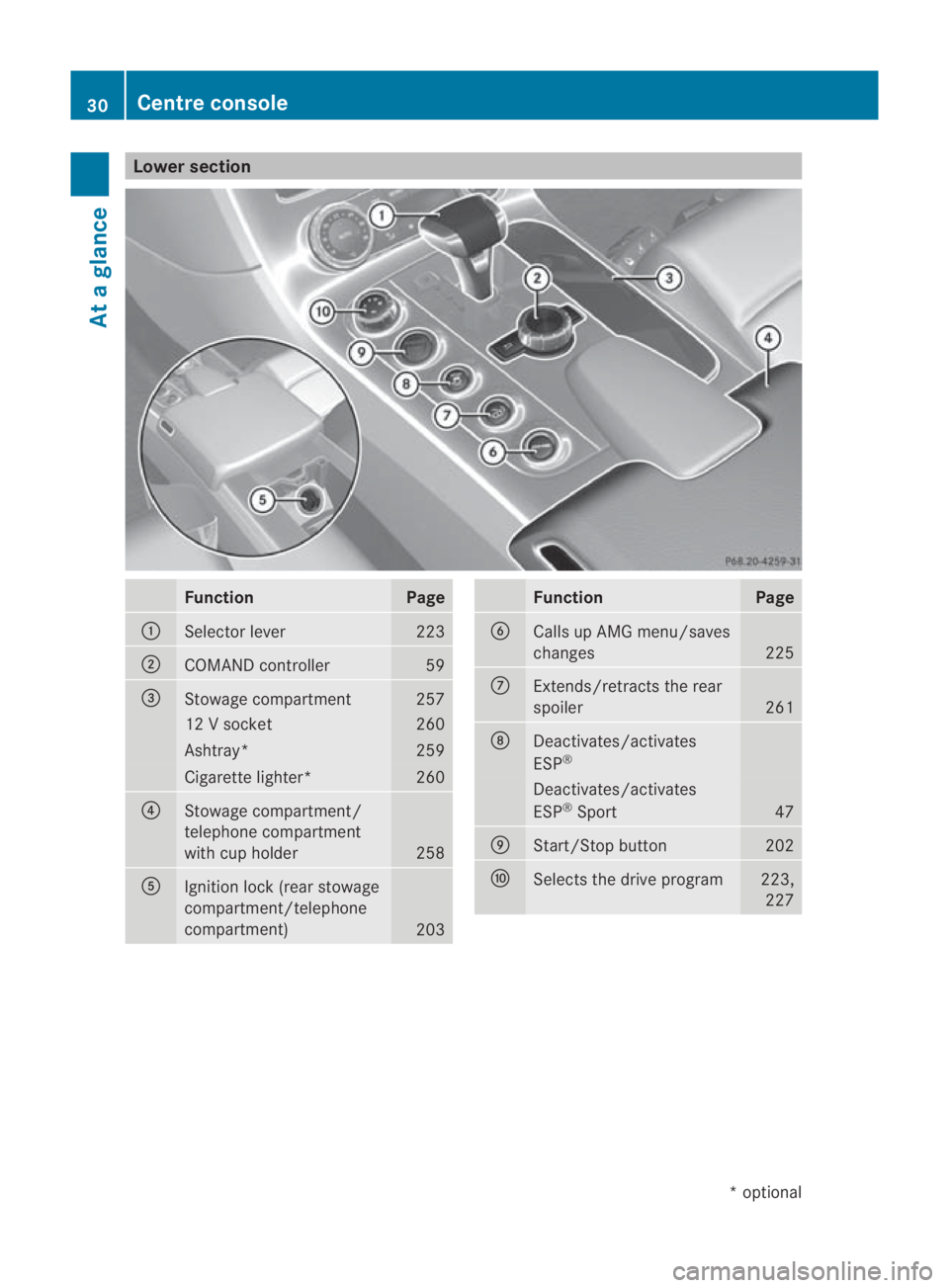
Lower section
Function Page
0001
Selector lever 223
0002
COMAND controller 59
0015
Stowage compartment 257
12 V socket 260
Ashtray* 259
Cigarette lighter* 260
0014
Stowage compartment/
telephone compartment
with cup holder
258
0012
Ignitio
nlock (rear stowage
compartment/telephone
compartment) 203 Function Page
0013
Calls up AMG menu/saves
changes
225
000A
Extends/retracts the rear
spoiler
261
000B
Deactivates/activates
ESP
® Deactivates/activates
ESP
®
Sport 47
000C
Start/Stop button 202
000D
Selects the drive program 223,
227 30
Centre consoleAt a glance
*o
ptional
BA 197 ECE RE 2010/6a; 1; 2, en-GB
sabbaeu
Version: 3.0.3.6 2010-05-07T14:19:43+02:00 - Seite 30
Page 35 of 361
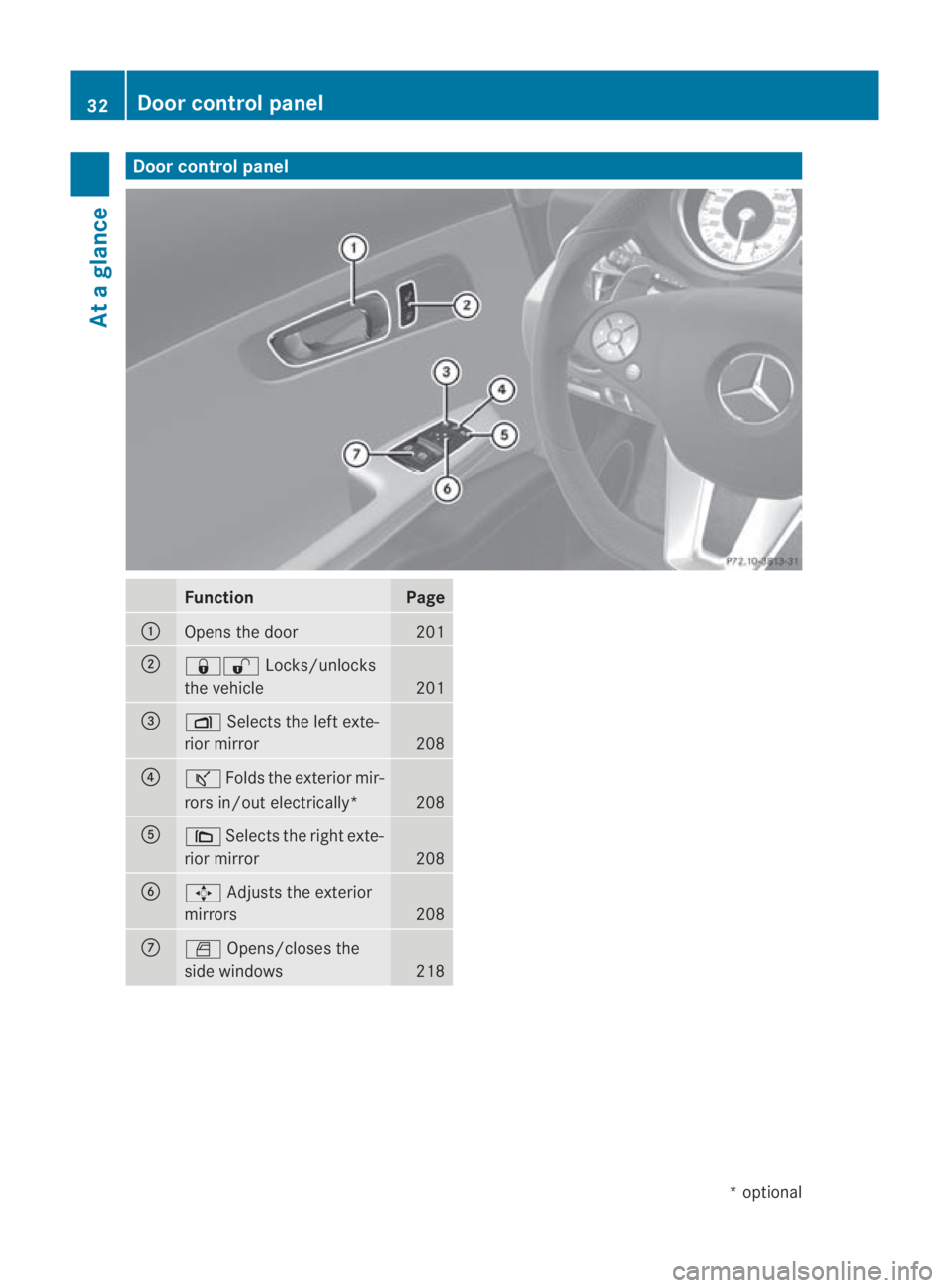
Door control panel
Function Page
0001
Opens the door 201
0002
0009000B
Locks/unlocks
the vehicle 201
0015
0006
Selects the left exte-
rior mirror 208
0014
000A
Folds the exterio rmir-
rors in/out electrically* 208
0012
0008
Selects the right exte-
rior mirror 208
0013
001D
Adjusts the exterior
mirrors 208
000A
0004
Opens/closes the
side windows 21832
Door control panelAt a glance
*o
ptional
BA 197 ECE RE 2010/6a; 1; 2, en-GB
sabbaeu
Version: 3.0.3.6 2010-05-07T14:19:43+02:00 - Seite 32
Page 43 of 361
They are deployed:
R
on the side on which an impact occurs
R at the start of an accident with a high rate
of lateral vehicle deceleration or accelera-
tion, e.g. in a side impact
R independently of seat belt use
R independently of the fronta irbags
R independently of the belt tensioners
R on the front-passenger side if the seat
occupancy recognition detects that the
front-passenger seat is occupied
Headbags
The purpose of the headbags is to enhance
the level of protection for the head (but not
the ches torarms) of the vehicle occupants
on the side of the vehicle on which the impact
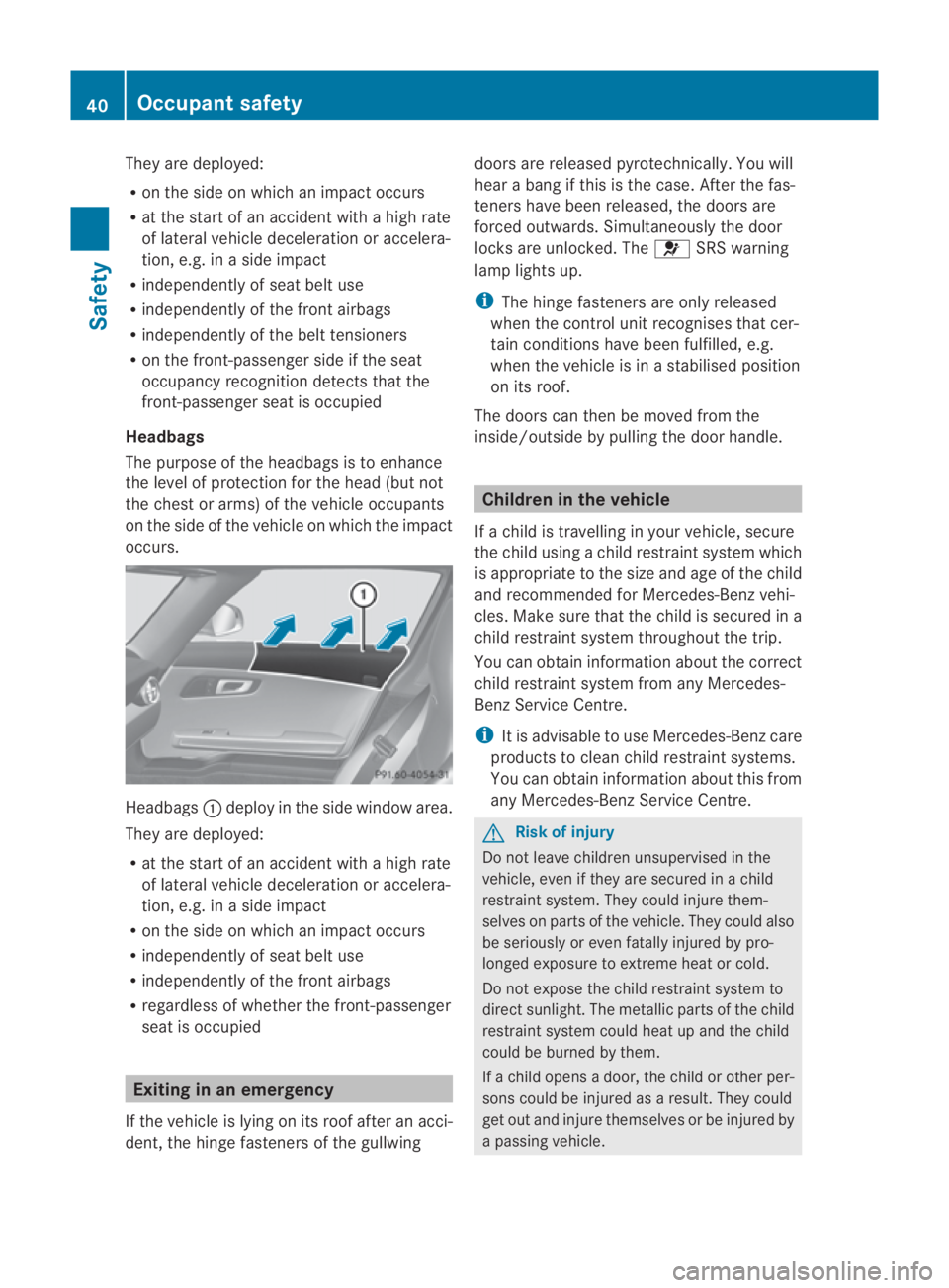
occurs. Headbags
0001deploy in the side windo warea.
They are deployed:
R at the start of an accident with a high rate
of lateral vehicle deceleratio noraccelera-
tion, e.g. in a side impact
R on the side on which an impact occurs
R independently of sea tbelt use
R independently of the fron tairbags
R regardless of whether the front-passenger
seat is occupied Exiting in an emergency
If the vehicle is lying on its roof after an acci-
dent, the hinge fasteners of the gullwing doors are released pyrotechnically. You will
hear a bang if this is the case. After the fas-
teners have been released, the doors are
forced outwards. Simultaneously the door
locks are unlocked. The
0018SRS warning
lamp lights up.
i The hinge fasteners are only released
when the control unit recognises that cer-
tain conditions have been fulfilled, e.g.
when the vehicle is in a stabilised position
on its roof.
The doors can then be moved from the
inside/outside by pulling the door handle. Children in the vehicle
If a child is travelling in your vehicle, secure
the child using a child restraint system which
is appropriate to the size and age of the child
and recommended for Mercedes-Ben zvehi-
cles. Make sure that the child is secured in a
child restraint system throughout the trip.
You can obtain information about the correct
child restraint system from any Mercedes-
Benz Service Centre.
i It is advisable to use Mercedes-Benzc are
products to clean child restraint systems.
You can obtain informatio nabout this from
any Mercedes-Benz Service Centre. G
Risk of injury
Do not leave children unsupervised in the
vehicle, even if they are secured in a child
restraint system. They could injure them-
selves on parts of the vehicle. They could also
be seriously or even fatally injured by pro-
longed exposure to extreme heat or cold.
Do not expose the child restraint system to
direct sunlight .The metallic parts of the child
restraint system could heat up and the child
could be burned by them.
If a child opens a door, the child or other per-
sons could be injured as a result. They could
get out and injure themselves or be injured by
a passing vehicle. 40
Occupant safetySafety
BA 197 ECE RE 2010/6a; 1; 2, en-GB
sabbaeu
Version: 3.0.3.6 2010-05-07T14:19:43+02:00 - Seite 40
Page 48 of 361
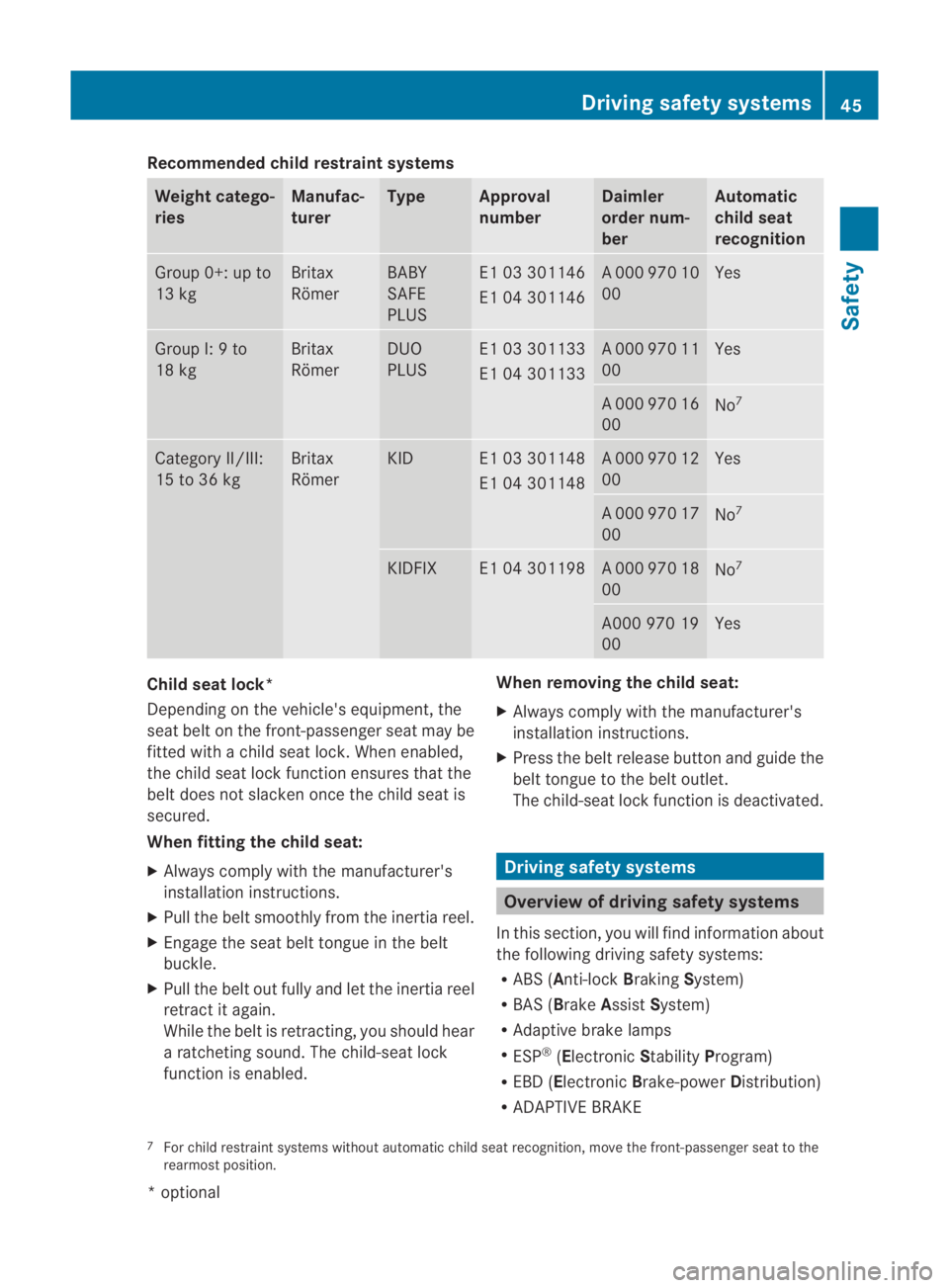
Recommended child restraint systems
Weight catego-
ries Manufac-
turer Type Approval
number Daimler
order num-
ber Automatic
child seat
recognition
Group 0+: up to
13 kg Britax
Römer BABY
SAFE
PLUS E1 03 301146
E1 04 301146 A 000 970 10
00 Yes
Group I: 9 to
18 kg Britax
Römer DUO
PLUS E1 03 301133
E1 04 301133 A 000 970 11
00 Yes
A 000 970 16
00
No
7 Category II/III:
15 to 36 kg Britax
Römer KID E1 03 301148
E1 04 301148 A 000 970 12
00 Yes
A 000 970 17
00
No
7 KIDFIX E1 04 301198 A 000 970 18
00
No
7 A000 970 19
00 Yes
Child seat lock*
Depending on the vehicle's equipment, the
sea
tbelt on the front-passenger seat may be
fitted with a child seat lock. When enabled,
the child seat lock function ensures that the
belt does not slacken oncet he child seat is
secured.
When fitting the child seat:
X Always comply with the manufacturer's
installation instructions.
X Pull the belt smoothly from the inertia reel.
X Engage the seat belt tongue in the belt
buckle.
X Pull the belt out fully and let the inertia reel
retract it again.
While the belt is retracting, you should hear
a ratcheting sound. The child-seat lock
function is enabled. When removing the child seat:
X
Always comply with the manufacturer's
installation instructions.
X Press the belt release button and guide the
belt tongue to the belt outlet.
The child-seat lock function is deactivated. Driving safety systems
Overview of driving safety systems
In this section, you will find information about
the following driving safety systems:
R ABS ( Anti-lock BrakingSystem)
R BAS ( Brake Assist System)
R Adaptive brake lamps
R ESP ®
(Electronic StabilityProgram)
R EBD ( Electronic Brake-power Distribution)
R ADAPTIVE BRAKE
7 For child restraint systems without automatic child seat recognition, move the front-passenger seat to the
rearmost position. Driving safety systems
45Safety
*optional
BA 197 ECE RE 2010/6a; 1; 2, en-GB
sabbaeu
Version: 3.0.3.6 2010-05-07T14:19:43+02:00 - Seite 45 Z
Page 49 of 361
i
In wintry driving conditions, always use
winter tyres (M+S tyres) and if necessary,
snow chains. Only in this way will the driv-
ing safety systems described in this section
work as effectively as possible. G
Risk of accident
The risk of an accident is significantly
increased by driving too fast. This is particu-
larly the case when cornering as well as on
wet or slippery roads or when driving too close
to the vehicle in front.
The driving safety systems described in this
section can neither reduce this risk nor over-
ride the laws of physics.
For this reason, always adapt yourd riving
style to the prevailing road and weather con-
ditions. Maintain sufficient distance from
other road users and objects on the road. ABS (Anti-lock Braking System)
ABS regulates brake pressure in such a way
that the wheels do not lock when you brake.
This allows you to continue steering the vehi-
cle when braking.
ABS works from a speed of about 8 km/h
upwards, regardless of road-surface condi-
tions. ABS works on slippery surfaces, even
when you only brake gently. G
Risk of accident
Do not depress the brake pedal several times
in quick succession (pumping) .Depress the
brake firmly and evenly. Pumping the brake
pedal reduces the braking effect.
Braking If ABS intervenes when braking, you will feel
a pulsing in the brake pedal.
X If ABS intervenes: continue to depress the
brake pedal with force until the braking sit-
uation is over.
X To make a full brake application:
depress the brake pedal with full force. G
Risk of accident
If ABS is faulty, the wheels could lock when
braking .This limits the steerability of the vehi-
cle when braking and the braking distance
may increase.
If ABS is deactivated due to a malfunction,
then BAS and ESP are also deactivated. There
is an increased risk of your vehicle skidding in
certain situations.
You should always adapt your driving style to
suit the prevailing road and weather condi-
tions. BAS (Brake Assist)
BAS operates in emergency braking situa-
tions. If you depress the brake pedal quickly,
BAS automatically boosts the braking force,
thus shortening the stopping distance.
X Keep the brake pedal firmly depressed until
the emergency braking situation is over.
ABS prevents the wheels from locking.
The brakes will function as usual once you
release the brake pedal. BAS is deactivated. G
Risk of accident
If BAS has malfunctioned, the braking system
remains available with full brake boosting
effect. However, braking force is not auto-
matically increased in emergency braking sit-
uations and the stopping distance may
increase. Adaptive brake lamps
i Adaptive brake lamps are only available in
certain countries.
If you brake sharply from a speed of more
than 50 km/h or if braking is assisted by BAS,
the brake lamps flash rapidly.Int his way,
traffic travelling behind you is warned in an
even more noticeable manner.
If you brake sharply from a speed of more
than 70 km/h to a standstill, the hazard warn-
ing lamps are activated automatically .Ifthe 46
Driving safety systemsSafety
BA 197 ECE RE 2010/6a; 1; 2, en-GB
sabbaeu
Version: 3.0.3.6 2010-05-07T14:19:43+02:00 - Seite 46
Page 52 of 361
EBD (Electronic Brake-force Distribu-
tion)
EBD monitors and controls the brake pres-
sure on the rear wheels to improve driving
stability while braking. G
Ris
kofa ccident
If EBV is malfunctioning, the brake system is
still available with full brak eboosting effect.
However, the rear wheels can still lock, e.g.
under full braking. This could cause you to
lose control of your vehicle and cause an acci-
dent. You should therefore adapt your driving
style to the different handling characteristics. ADAPTIVE BRAKE
ADAPTIVE BRAKE enhances braking safety
and offers increased braking comfort. In addi-
tion to the braking function, ADAPTIVE BRAKE
also features the hill start assist function
(Y page 221). For further information, see
Driving tips (Y page 277). Anti-theft systems
Immobiliser
The immobiliser prevents your vehicle from
being started without the correc tkey.
Activating the immobiliser X
While the engine is running turn the Start/
Stop button to key position 0
(Y page 202).
The engine switches off.
or
X Remove the key from the ignition lock.
Deactivating the immobiliser X
Turn the Start/Stop button to key position
2without depressing the brake pedal.
i The immobiliser is always deactivated
when you start the engine. ATA (Anti-Theft Alarm system)
Av isual and audible alarm is triggered if the
alarm system is primed and you open:
R a door
R a door using the emergency key element
R the boot lid
R the bonnet
The alarm is not switched off even if you close
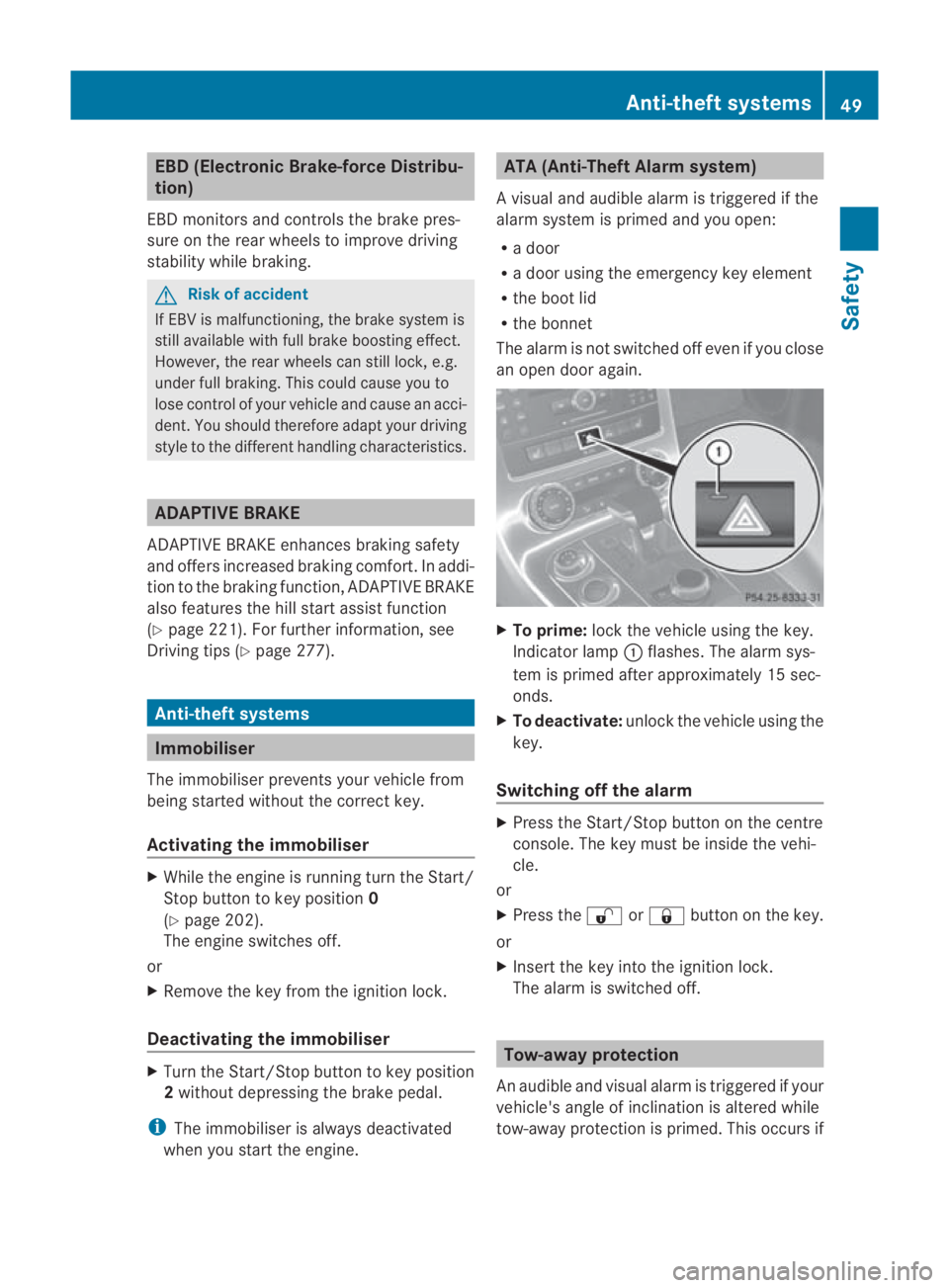
an open door again. X
To prime: lock the vehicle using the key.
Indicator lamp 0001flashes .The alarm sys-
tem is primed after approximately 15 sec-
onds.
X To deactivate: unlock the vehicle using the
key.
Switching off the alarm X
Press the Start/Stop button on the centre
console. The key must be inside the vehi-
cle.
or
X Press the 000Bor0009 button on the key.
or
X Insert the key into the ignition lock.
The alarm is switched off. Tow-away protection
An audible and visual alarm is triggered if your
vehicle's angle of inclination is altered while
tow-away protection is primed. This occurs if Anti-theft systems
49Safety
BA 197 ECE RE 2010/6a; 1; 2, en-GB
sabbaeu Version: 3.0.3.6 2010-05-07T14:19:43+02:00 - Seite 49 Z
Page 53 of 361
the vehicle is jacked up on one side, for exam-
ple.
Priming tow-away protection X
Loc kthe vehicle using the key.
Tow-away protection is primed after
approximately 30 seconds.
Deactivating tow-away protection Tow-away protection is automatically deacti-
vated when you unlock your vehicle using the
key.
To prevent a false alarm, deactivate tow-away
protection manually if your vehicle:
R is being transported
R is being loaded, e.g. onto a ferry or car
transporter
R is parked on a movable surface, e.g. in a
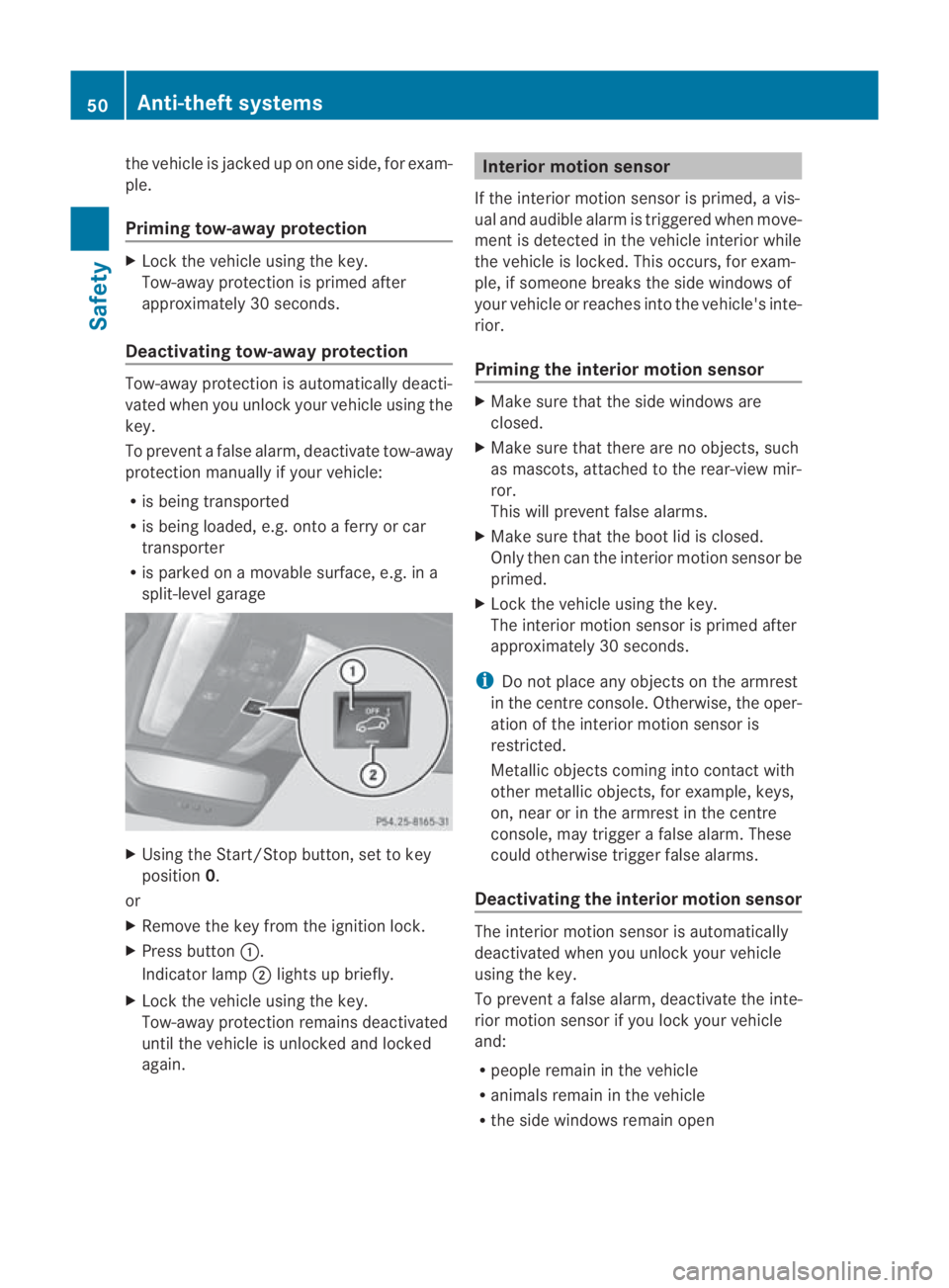
split-level garage X
Using the Start/Stop button, set to key
position 0.
or
X Remove the key from the ignition lock.
X Press button 0001.
Indicator lamp 0002lights up briefly.
X Lock the vehicle using the key.
Tow-away protection remains deactivated
until the vehicle is unlocked and locked
again. Interior motion sensor
If the interior motion sensor is primed, a vis-
ual and audible alarm is triggered when move-
ment is detected in the vehicle interior while
the vehicle is locked. This occurs, for exam-
ple, if someone breaks the side windows of
your vehicle or reaches into the vehicle's inte-
rior.
Priming the interior motion sensor X
Make sure that the side windows are
closed.
X Make sure that there are no objects, such
as mascots, attached to the rear-view mir-
ror.
This will prevent false alarms.
X Make sure that the boot lid is closed.
Only then can the interior motion sensor be
primed.
X Lock the vehicle using the key.
The interior motion sensor is primed after
approximately 30 seconds.
i Do not place any objects on the armrest
in the centre console. Otherwise, the oper-
ation of the interior motion sensor is
restricted.
Metallic objects coming into contact with
other metallic objects, for example, keys,
on, near or in the armrest in the centre
console, may trigger a false alarm. These
could otherwise trigger false alarms.
Deactivating the interior motion sensor The interior motion sensor is automatically
deactivated when you unlock your vehicle
using the key.
To prevent a false alarm, deactivate the inte-
rior motion sensor if you lock your vehicle
and:
R people remain in the vehicle
R animals remain in the vehicle
R the side windows remain open 50
Anti-theft systemsSafety
BA 197 ECE RE 2010/6a; 1; 2, en-GB
sabbaeu
Version: 3.0.3.6 2010-05-07T14:19:43+02:00 - Seite 50
Page 54 of 361
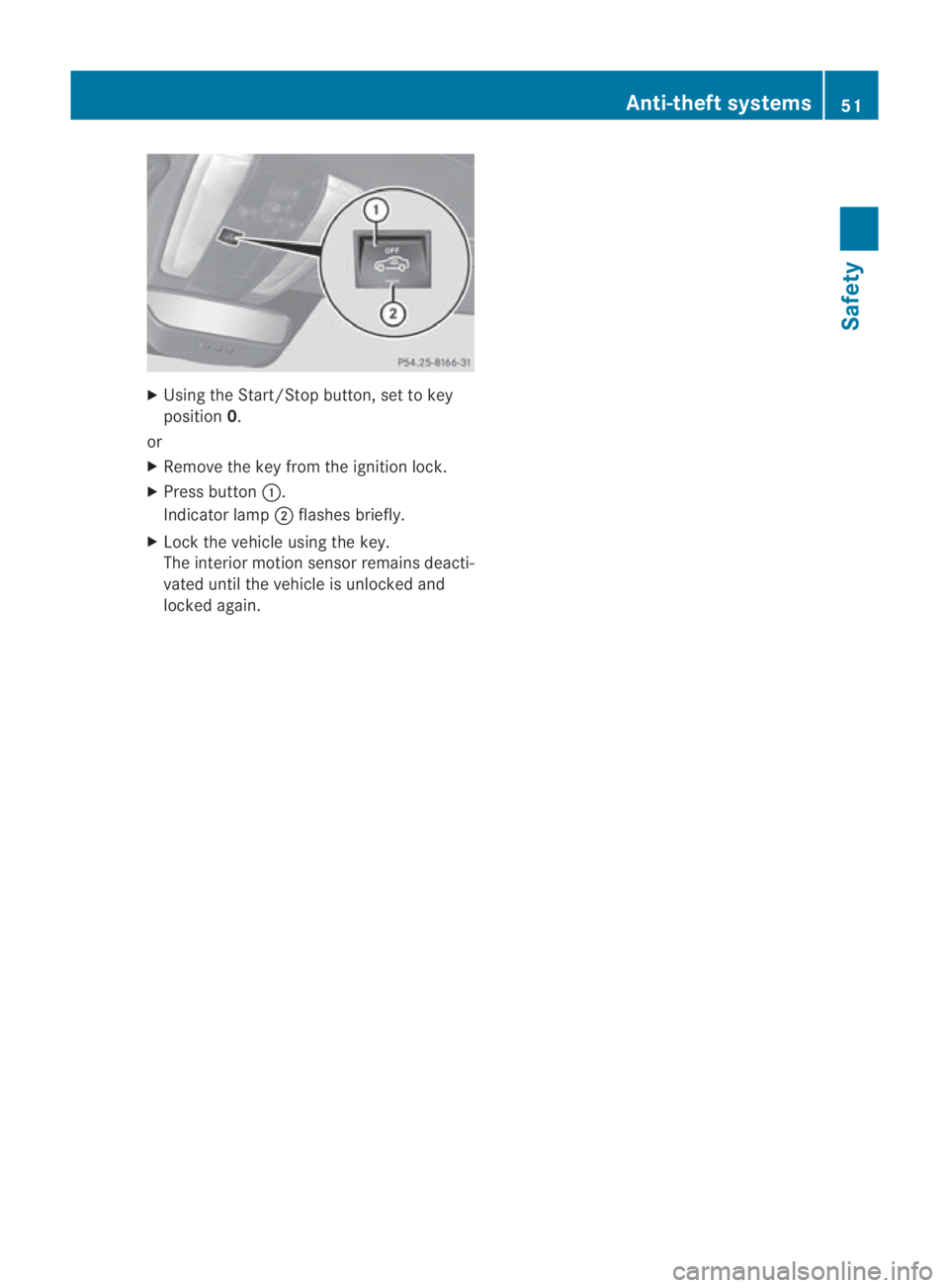
X
Using the Start/Stop button, set to key
position 0.
or
X Remove the key from the ignition lock.
X Press button 0001.
Indicator lamp 0002flashes briefly.
X Lock the vehicle using the key.
The interior motion sensor remains deacti-
vated until the vehicle is unlocked and
locked again. Anti-theft systems
51Safety
BA 197 ECE RE 2010/6a; 1; 2, en-GB
sabbaeu Version: 3.0.3.6 2010-05-07T14:19:43+02:00 - Seite 51 Z
Page 62 of 361
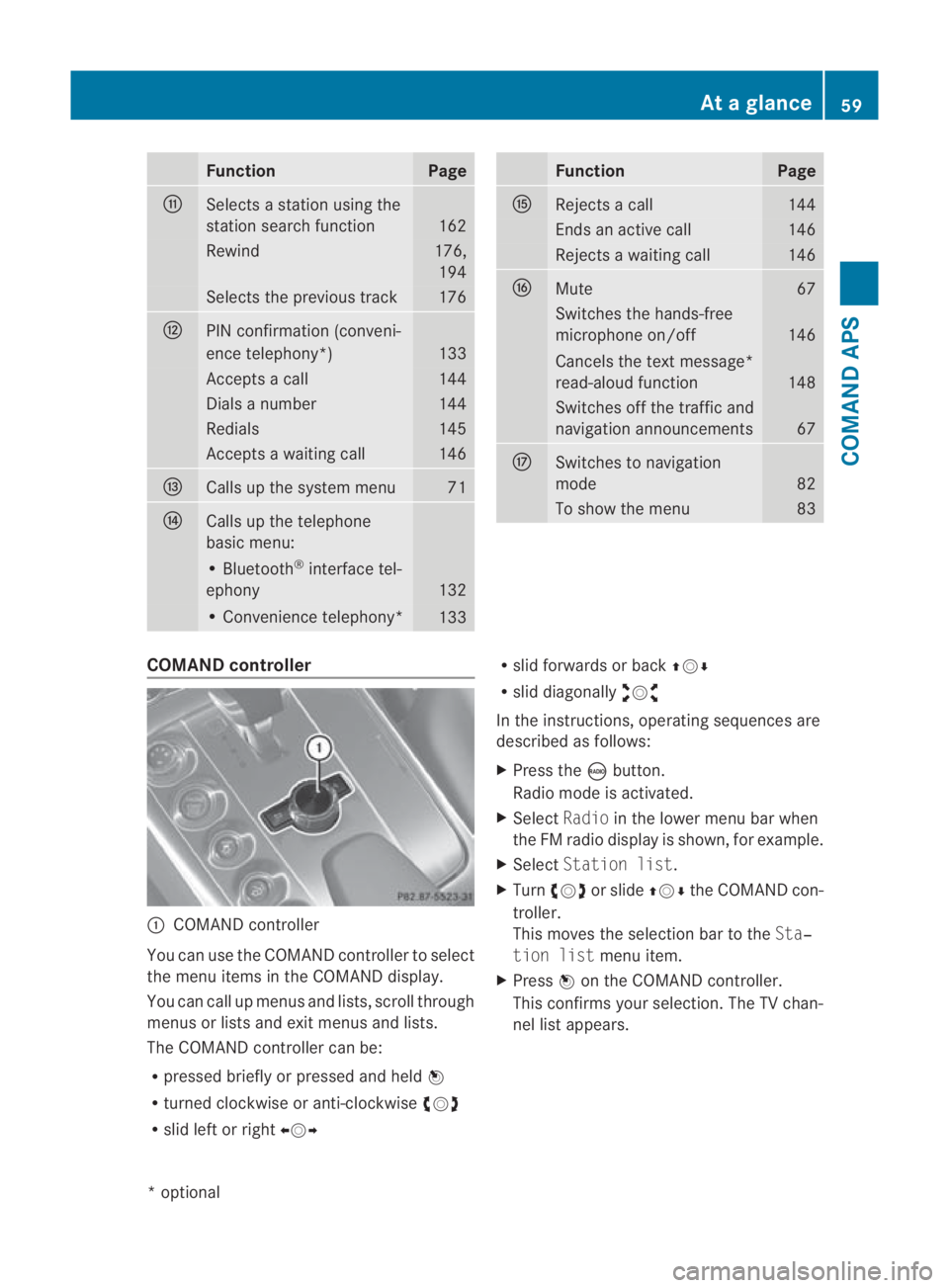
Function Page
000E
Selects a statio
nusing the
station search function 162
Rewind 176,
194 Selects the previous track 176
000F
PIN confirmation (conveni-
ence telephony*)
133
Accepts a call 144
Dials a number 144
Redials 145
Accepts a waiting call 146
0010
Calls up the system menu 71
0011
Calls up the telephone
basic menu:
• Bluetooth
®
interface tel-
ephony 132
• Convenience telephony*
133 Function Page
0016
Rejects a call 144
Ends an active call 146
Rejects a waiting call 146
0017
Mute 67
Switches the hands-free
microphone on/off
146
Cancels the text message*
read-aloud function
148
Switches off the traffic and
navigation announcements
67
0018
Switches to navigation
mode
82
To show the menu 83
COMAND controller
0001
COMAND controller
You can use the COMAND controller to select
the menu items in the COMAND display.
You can call up menus and lists, scroll through
menus or lists and exit menus and lists.
The COMAND controller can be:
R pressed briefly or pressed and held 0017
R turned clockwise or anti-clockwise 002800130029
R slid left or right 002B0013002C R
slid forwards or back 001F0013000D
R slid diagonally 002A00130027
In the instructions, operating sequences are
described as follows:
X Press the 0006button.
Radio mode is activated.
X Select Radioin the lower menu bar when
the FM radio display is shown, for example.
X Select Station list.
X Turn 002800130029 or slide 001F0013000Dthe COMAND con-
troller.
This moves the selection bar to the Sta‐
tion list menu item.
X Press 0017on the COMAND controller.
This confirms your selection. The TV chan-
nel list appears. At
ag lance
59COMAND APS
*optional
BA 197 ECE RE 2010/6a; 1; 2, en-GB
sabbaeu Version: 3.0.3.6 2010-05-07T14:19:43+02:00 - Seite 59 Z
Page 76 of 361
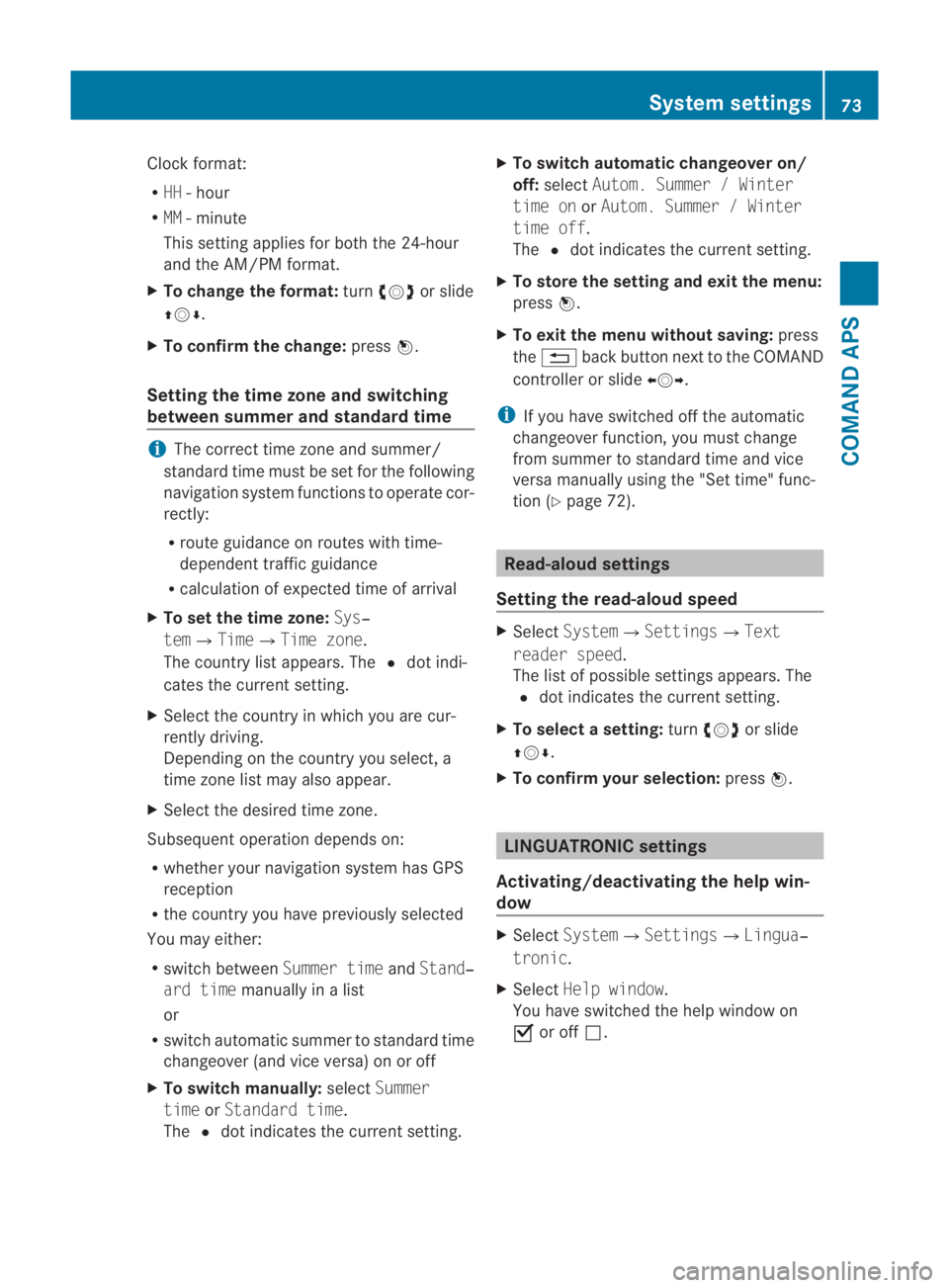
Clock format:
R
HH -hour
R MM - minute
This setting applies for both the 24-hour
and the AM/PM format.
X To change the format: turn002800130029 or slide
001F0013000D.
X To confirm the change: press0017.
Setting the time zone and switching
between summer and standard time i
The correct time zone and summer/
standard time must be set for the following
navigation system functions to operate cor-
rectly:
R route guidance on routes with time-
dependent traffic guidance
R calculation of expected time of arrival
X To set the time zone: Sys‐
tem0004Time0004Time zone.
The country list appears. The 0023dot indi-
cates the current setting.
X Select the country in which you are cur-
rently driving.
Depending on the country you select, a
time zone list may also appear.
X Select the desired time zone.
Subsequent operation depends on:
R whether your navigation system has GPS
reception
R the country you have previously selected
You may either:
R switch between Summer timeandStand‐
ard time manually in a list
or
R switch automatic summer to standard time
changeover (and vice versa) on or off
X To switch manually: selectSummer
time orStandard time.
The 0023dot indicates the current setting. X
To switch automatic changeover on/
off: select Autom. Summer / Winter
time on orAutom. Summer / Winter
time off.
The 0023dot indicates the current setting.
X To store the setting and exit the menu:
press 0017.
X To exit the menu without saving: press
the 0001 back button next to the COMAND
controller or slide 002B0013002C.
i If you have switched off the automatic
changeover function, you must change
from summer to standard time and vice
versa manually using the "Set time" func-
tion (Y page 72). Read-aloud settings
Setting the read-aloud speed X
Select System0004Settings0004Text
reader speed.
The list of possible settings appears. The
0023 dot indicates the current setting.
X To select asetting: turn002800130029 or slide
001F0013000D .
X To confir myour selection: press0017. LINGUATRONIC settings
Activating/deactivating the help win-
dow X
Select System 0004Settings 0004Lingua‐
tronic .
X Select Help window .
You have switched the help window on
0019 or off 0004. System settings
73COMAND APS
BA 197 ECE RE 2010/6a; 1; 2, en-GB
sabbaeuV ersion: 3.0.3.6
2010-05-07T14:19:43+02:00 - Seite 73 Z