ABS MERCEDES-BENZ SLS COUPE 2010 Owners Manual
[x] Cancel search | Manufacturer: MERCEDES-BENZ, Model Year: 2010, Model line: SLS COUPE, Model: MERCEDES-BENZ SLS COUPE 2010Pages: 361, PDF Size: 6.32 MB
Page 7 of 361
A
ABS (Anti-lock Braking System) .........46
Warning lamp ................................. 308
Accident
Notes ............................................. 313
Acoustic warning signal
see Warning tone
Active partition (US Bdevices only)
Selecting ........................................ 189
Active Service System PLUS
see ASSYS TPLUS service interval
display ........................................... 279
ADAPTIVE BRAKE ................................. 49
Adaptive brake lamps .........................46
Address book Calling up ....................................... 149
Changing an entry .......................... 154
Connecting acall........................... 154
Creating an entry ........................... 151
Deleting an entry ........................... 153
Detail sabout an entry ................... 153
Importing data ............................... 155
Menu overview .............................. 151
Searching for an entry ...................152
Selecting an entry ..........................151
Starting route guidance .................155
Voice entry .................................... 155
Address input menu
Calling up ........................................ .93
Airbag
Fron tpassenger kneebag ................39
Headbag .......................................... 40
Airbags
Activation ......................................... 35
Control unit ...................................... 35
Driver's ............................................ 38
Driver's knee airba g......................... 39
Front ................................................ 38
Front passenger ............................... 38
PASSENGER AIRBAG OFF warning
lamp .............................................. 307
Sidebag ............................................ 39
System ............................................. 37
Airc onditioning
Activating/deactivating .................253
Activating/deactivating air-recir-
culation mode ................................ 256Controlling automatically
...............253
Convenience opening/closing
(air-recirculatio nmode) ................. 256
Cooling with aird ehumidification..253
Demisting the windscreen .............255
Malfunction indicator lamp ............307
Misted-up windows ........................255
Rea rwindow heatin g..................... 256
Setting the aird istribution.............254
Setting the airflow .........................255
Setting the airv ents...................... 254
Setting the temperature ................254
THERMOTRONIC 2-zone auto-
matic climate control .....................252
Air-conditioning system
see Air conditioning
Air pressure
see Tyre pressure
Alphabetical track selection ............188
Alternative route ............................... 117
AMG Button ............................................ 225
Menu (on-board computer) ............241
RACETIMER (on-board computer) ..241
SETUP ............................................ 241
Anti-loc kBraking System
se eA BS ........................................... 46
Anti-theft alarm system
see ATA ............................................ 49
Anti-theft systems ............................... 49
Area Avoiding ........................................... 86
Ashtray ............................................... 259
ASSYST PLUS see ASSYST PLUS service interval
displa y........................................... 279
ASSYST PLUS service interval dis-
play ..................................................... 279
Calling up the date (on-board
computer) ...................................... 280
Display message ............................ 279
ATA (anti-theft alarm system) ............49
Switching off the alarm ....................49
Audio
On-board computer .......................235
Audio AUX mode ............................... 1894
Index BA 197 ECE RE 2010/6a; 1; 2, en-GB
sabbae uV ersion: 3.0.3.6
2010-05-07T14:19:43+02:00 - Seite 4
Page 10 of 361
Dashboard
Cleaning ........................................ .284
see Cockpit
see Instrument cluster
Dashboard lighting
see Instrument lighting ..................239
Date format
Setting ............................................. 72
Daytime driving lights ......................215
Display message ............................ 302
Switching on/off (on-board com-
puter) ............................................. 238
Delaye dswitch-off
Exterio rlighting (on-board com-
puter )............................................. 239
Interior lighting (on-board com-
puter) ............................................. 239
Delete button ....................................... 61
Deleting Call lists ......................................... 142
Destination
Deleting ................................. 126, 127
Entering from the destination
memory ......................................... 101
Entering from the list of last des-
tinations ......................................... 103
Entering using the map ..................103
Saving ............................................ 125
Destination entry
Specia ldestination ........................ 106
Destination information ...................118
Destination input ................................. 92
destination memory ..........................123
Destination memory Deleting an entry ........................... 126
My address .................................... 123
Storing adestination ..................... 125
Digital speedometer .........................233
Dipped-beam headlamps Display message ............................ 300
Symmetrical ................................... 279
Disc
CD/DVD ........................................ 167
MP3 ............................................... 166
Display
Adjusting the brightness ..................72
see Multifunctio ndisplay ............... 231Display design
Setting ............................................. 72
Display messages ............................. 289
ASSYST PLUS service interval dis-
pla y................................................ 279
Symbo lmessages .......................... 293
Text messages ............................... 291
Distance recorder
Total distance recorde r.................. 233
Trip meter ...................................... 233
Door
Display message .................... 294, 303
Emergency unlocking ..................... 322
Not unlocking the front-
passenger door .............................. 200
Opening (from the inside) ..............201
Unlocking all (factory setting) ........200
Door control panel
Overview .......................................... 32
Drinks holder
see Cuph older
Drive program .................................... 224
Manual .......................................... .229
Driver's airbag ..................................... 38
Driver's knee airbag ............................39
Driver's seat position ........................ 213
Driving abroad ................................... 279
Driving safety systems .......................45
ABS .................................................. 46
ADAPTIVE BRAKE ............................. 49
Adaptive brake lamps ......................46
BAS .................................................. 46
EBV .................................................. 49
ESP ®
................................................ 47
Driving systems ................................ 243
Cruise control ................................ 243
Parktroni c...................................... 248
Reversing camera ..........................250
Speedtronic ................................... 245
Driving tips
Braking .......................................... 277
Driving abroad ............................... 279
Driving on wet road s...................... 278
Fording .......................................... 278
Winter ............................................ 276
DTMF tones
Sending ......................................... 146 Index
7 BA 197 ECE RE 2010/6a; 1; 2, en-GB
sabbae uV ersion: 3.0.3.6
2010-05-07T14:19:43+02:00 - Seite 7
Page 20 of 361
Volume
Adjusting ......................................... 67
Phone call s...................................... 67
Traffi cannouncements ....................67 W
Warning and indicator lamps ABS (yellow) ................................... 308
ESP ®
........................................ 47, 308
ESP ®
OFF ....................................... 309
ESP ®
Sport .................................... 309
LIM (cruise control) ........................ 244
LIM (variable Speedtronic) .............246
Tyr ep ressure monitor ...................311
Warning tone ..................................... 312
Warning triangle ................................ 288
Washer fluid Display message ............................ 305
Washer fluid reservoir ..............270, 352
Filling capacity ............................... 352
Waveband
Switching (radio )............................ 160
Wearing seat belts ............................210
Wheel bolts Tightening torque ........................... 332
Wheel chock
Use ................................................ 329
Wheels
General notes ................................ 270
Interchanging ................................. 275
Windows
Cleaning ......................................... 283
see Side windows
Windscreen washe rfluid .................. 352
Topping up ..................................... 270
Windscreen washer system .....270, 352
Windscreen wipers ...........................217
Malfunction ................................... .317
Replacing the wiper blades ............325
Winte rdriving ............................ 275, 276
Winter tyres ....................................... 275
Limiting the speed (on-board com-
puter) ............................................. 248
Wiper blades
Cleaning ......................................... 283
Replacing ....................................... 325 Index
17 BA 197 ECE RE 2010/6a; 1; 2, en-GB
sabbae uV ersion: 3.0.3.6
2010-05-07T14:19:43+02:00 - Seite 17
Page 30 of 361
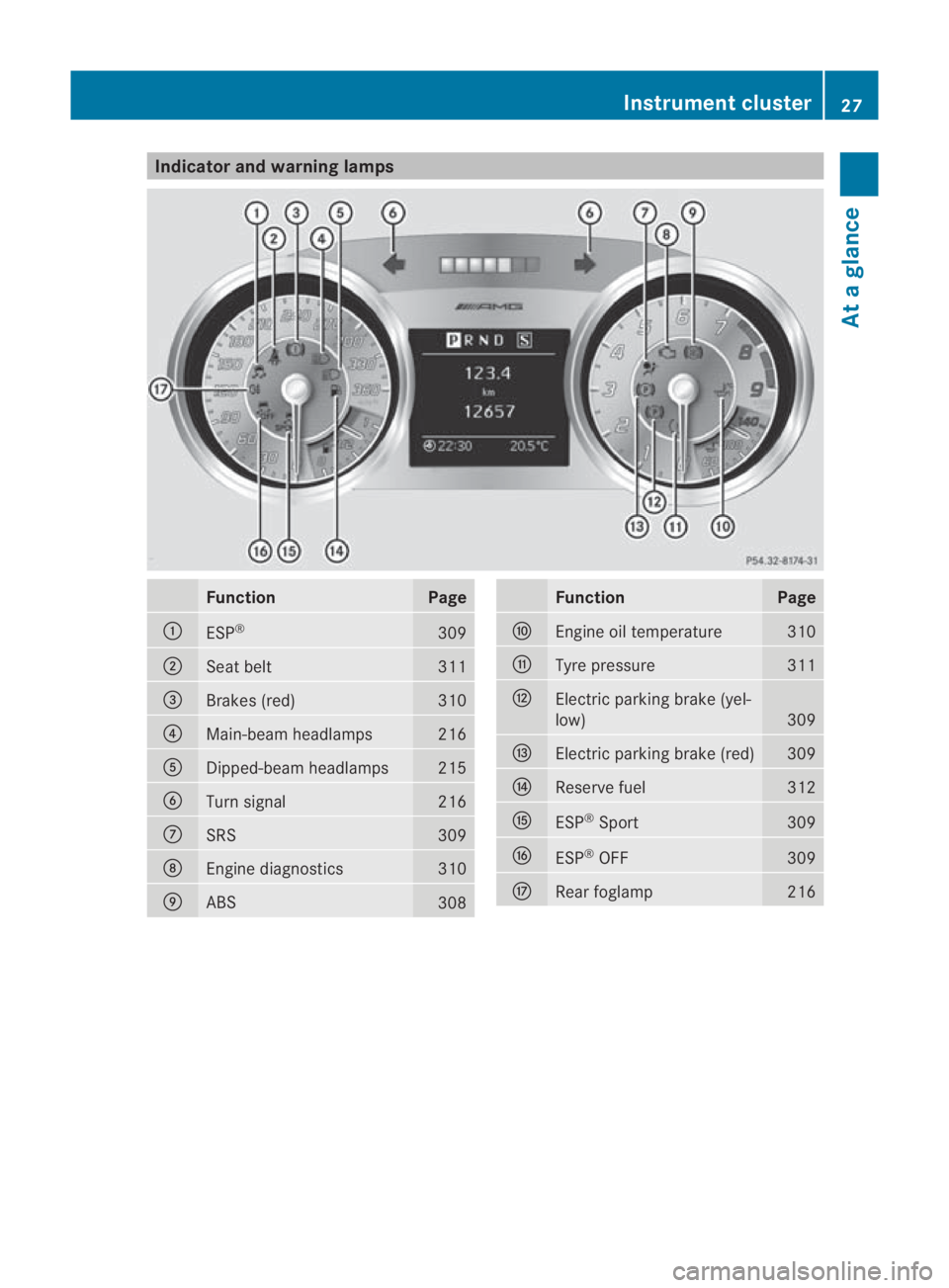
Indicator and warning lamps
Function Page
0001
ESP
® 309
0002
Seat belt 311
0015
Brakes (red) 310
0014
Main-beam headlamps 216
0012
Dipped-beam headlamps 215
0013
Turn signal 216
000A
SRS 309
000B
Engine diagnostics 310
000C
ABS
308 Function Page
000D
Engine oil temperature 310
000E
Tyre pressure 311
000F
Electric parking brake (yel-
low)
309
0010
Electric parking brak
e(red) 309
0011
Reserve fuel 312
0016
ESP
®
Sport 309
0017
ESP
®
OFF 309
0018
Rearf
oglamp 216Instrument cluster
27At a glance
BA 197 ECE RE 2010/6a; 1; 2, en-GB
sabbaeu Version: 3.0.3.6 2010-05-07T14:19:43+02:00 - Seite 27
Page 48 of 361
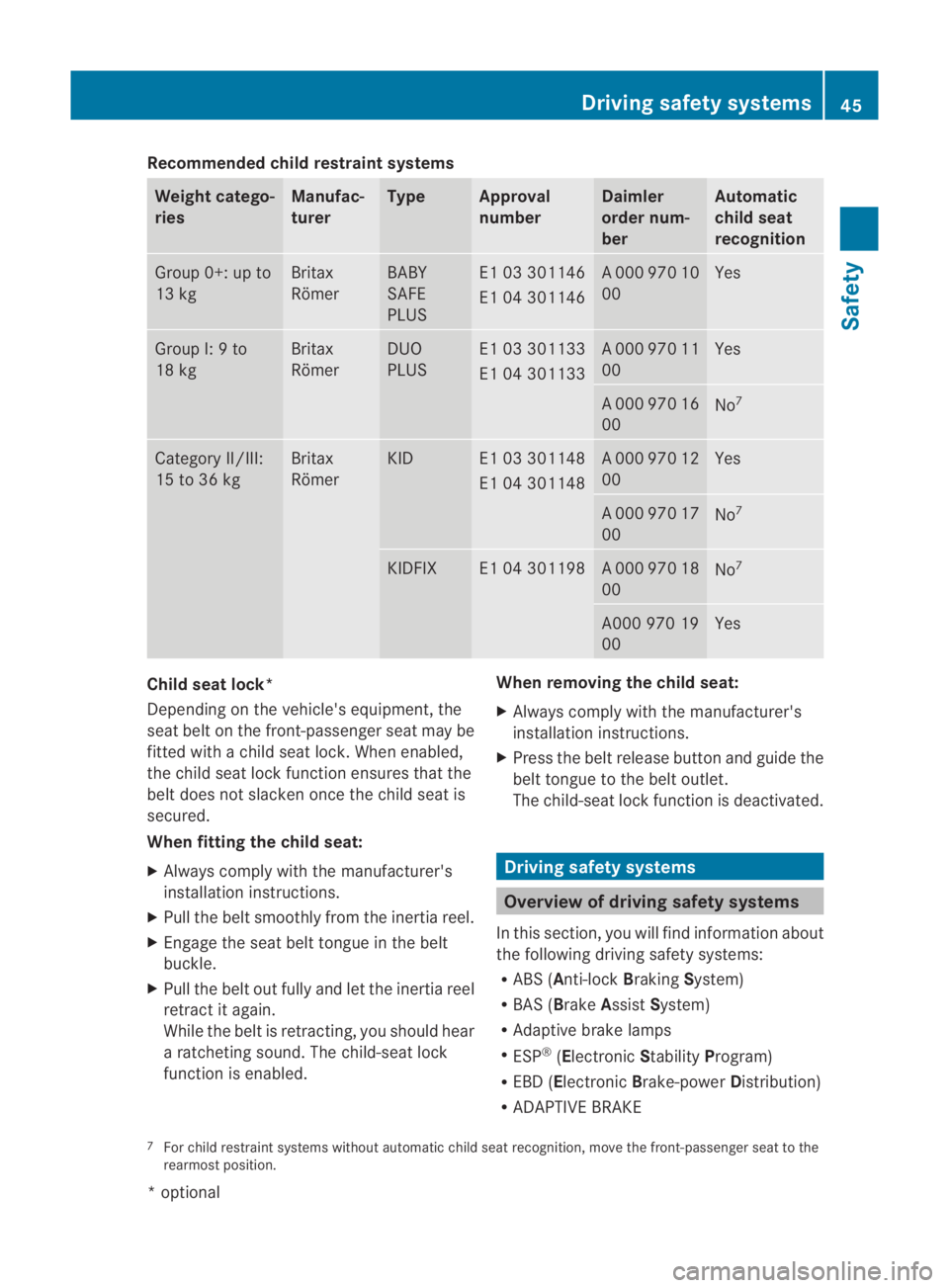
Recommended child restraint systems
Weight catego-
ries Manufac-
turer Type Approval
number Daimler
order num-
ber Automatic
child seat
recognition
Group 0+: up to
13 kg Britax
Römer BABY
SAFE
PLUS E1 03 301146
E1 04 301146 A 000 970 10
00 Yes
Group I: 9 to
18 kg Britax
Römer DUO
PLUS E1 03 301133
E1 04 301133 A 000 970 11
00 Yes
A 000 970 16
00
No
7 Category II/III:
15 to 36 kg Britax
Römer KID E1 03 301148
E1 04 301148 A 000 970 12
00 Yes
A 000 970 17
00
No
7 KIDFIX E1 04 301198 A 000 970 18
00
No
7 A000 970 19
00 Yes
Child seat lock*
Depending on the vehicle's equipment, the
sea
tbelt on the front-passenger seat may be
fitted with a child seat lock. When enabled,
the child seat lock function ensures that the
belt does not slacken oncet he child seat is
secured.
When fitting the child seat:
X Always comply with the manufacturer's
installation instructions.
X Pull the belt smoothly from the inertia reel.
X Engage the seat belt tongue in the belt
buckle.
X Pull the belt out fully and let the inertia reel
retract it again.
While the belt is retracting, you should hear
a ratcheting sound. The child-seat lock
function is enabled. When removing the child seat:
X
Always comply with the manufacturer's
installation instructions.
X Press the belt release button and guide the
belt tongue to the belt outlet.
The child-seat lock function is deactivated. Driving safety systems
Overview of driving safety systems
In this section, you will find information about
the following driving safety systems:
R ABS ( Anti-lock BrakingSystem)
R BAS ( Brake Assist System)
R Adaptive brake lamps
R ESP ®
(Electronic StabilityProgram)
R EBD ( Electronic Brake-power Distribution)
R ADAPTIVE BRAKE
7 For child restraint systems without automatic child seat recognition, move the front-passenger seat to the
rearmost position. Driving safety systems
45Safety
*optional
BA 197 ECE RE 2010/6a; 1; 2, en-GB
sabbaeu
Version: 3.0.3.6 2010-05-07T14:19:43+02:00 - Seite 45 Z
Page 49 of 361
i
In wintry driving conditions, always use
winter tyres (M+S tyres) and if necessary,
snow chains. Only in this way will the driv-
ing safety systems described in this section
work as effectively as possible. G
Risk of accident
The risk of an accident is significantly
increased by driving too fast. This is particu-
larly the case when cornering as well as on
wet or slippery roads or when driving too close
to the vehicle in front.
The driving safety systems described in this
section can neither reduce this risk nor over-
ride the laws of physics.
For this reason, always adapt yourd riving
style to the prevailing road and weather con-
ditions. Maintain sufficient distance from
other road users and objects on the road. ABS (Anti-lock Braking System)
ABS regulates brake pressure in such a way
that the wheels do not lock when you brake.
This allows you to continue steering the vehi-
cle when braking.
ABS works from a speed of about 8 km/h
upwards, regardless of road-surface condi-
tions. ABS works on slippery surfaces, even
when you only brake gently. G
Risk of accident
Do not depress the brake pedal several times
in quick succession (pumping) .Depress the
brake firmly and evenly. Pumping the brake
pedal reduces the braking effect.
Braking If ABS intervenes when braking, you will feel
a pulsing in the brake pedal.
X If ABS intervenes: continue to depress the
brake pedal with force until the braking sit-
uation is over.
X To make a full brake application:
depress the brake pedal with full force. G
Risk of accident
If ABS is faulty, the wheels could lock when
braking .This limits the steerability of the vehi-
cle when braking and the braking distance
may increase.
If ABS is deactivated due to a malfunction,
then BAS and ESP are also deactivated. There
is an increased risk of your vehicle skidding in
certain situations.
You should always adapt your driving style to
suit the prevailing road and weather condi-
tions. BAS (Brake Assist)
BAS operates in emergency braking situa-
tions. If you depress the brake pedal quickly,
BAS automatically boosts the braking force,
thus shortening the stopping distance.
X Keep the brake pedal firmly depressed until
the emergency braking situation is over.
ABS prevents the wheels from locking.
The brakes will function as usual once you
release the brake pedal. BAS is deactivated. G
Risk of accident
If BAS has malfunctioned, the braking system
remains available with full brake boosting
effect. However, braking force is not auto-
matically increased in emergency braking sit-
uations and the stopping distance may
increase. Adaptive brake lamps
i Adaptive brake lamps are only available in
certain countries.
If you brake sharply from a speed of more
than 50 km/h or if braking is assisted by BAS,
the brake lamps flash rapidly.Int his way,
traffic travelling behind you is warned in an
even more noticeable manner.
If you brake sharply from a speed of more
than 70 km/h to a standstill, the hazard warn-
ing lamps are activated automatically .Ifthe 46
Driving safety systemsSafety
BA 197 ECE RE 2010/6a; 1; 2, en-GB
sabbaeu
Version: 3.0.3.6 2010-05-07T14:19:43+02:00 - Seite 46
Page 164 of 361
X
Select the desired waveband.
You will hea rthe last station on the selec-
ted waveband.
Option 2
X Press the 0006function button repeatedly
until the desired waveband is selected.
i Repeatedly pressing the 0006function but-
ton switches between the FM, MW, SW and
LW wavebands in that order and then calls
up DAB radio mode*. Pressing the button
again brings you back to FM radio mode.
i In the MW, LW and SW wavebands,
COMAND shows the station frequency
instead of the station name.
Searching for an ensemble (DABr adio
mode*) An ensemble consists of multiple radio pro-
grammes. Every ensemble is transmitted in a
certai narea (national, regional or local) in the
same way as a traditional AM/FM radio sta-
tion.
X Select 001Bor001A in the DAB radio display.
COMAND searches upwards or downwards
for ensembles with adequate reception.
You will see a message to this effect. 001B
or 001A changes to 0020.
The stations of the next ensemble with ade-
quate receptio nare show ninthe DAB radio
display.
Cancelling asearch
X Select 0020.
You will hear the last statio nplayed in the
previous ensemble. The 0020icon changes
to 001B or001A. Automatic switching to an FM radio sta-
tion When receptio
ngets worse for a DABs tation,
COMAND automatically changes to the cor-
responding FM statio nunde rthe following
conditions:
R the FM station's frequency is available.
R the Station fix (Ypage 164) menu item
is switched off.
i If you want to use this function, do not
switch to FM radio.
If there is no reception, the display shows the
message No reception.
Selecting astation You can select stations fro
mthe station list
or by manually entering the frequency.
Selecting astation from the station list
i The statio nlist is only available in the FM
waveband and DAB radio mode*. It con-
tains all the stations that can currently be
received, and is sorted alphabetically. For
stations without a programme service, the
list shows the frequency instead of the
name.
X Turn 002800130029 or slide 002B0013002Cwhen the display/
selection window in the radio display is
selected.
or
X Press the 0001or0002 button.
The needle jumps to the left or right.
or
X In the radio display, select Radio0004Sta‐
tion list .
The station list appears. Audio
161COMAND APS
*optional
BA 197 ECE RE 2010/6a; 1; 2, en-GB
sabbaeu
Version: 3.0.3.6 2010-05-07T14:19:43+02:00 - Seite 161 Z
Page 246 of 361
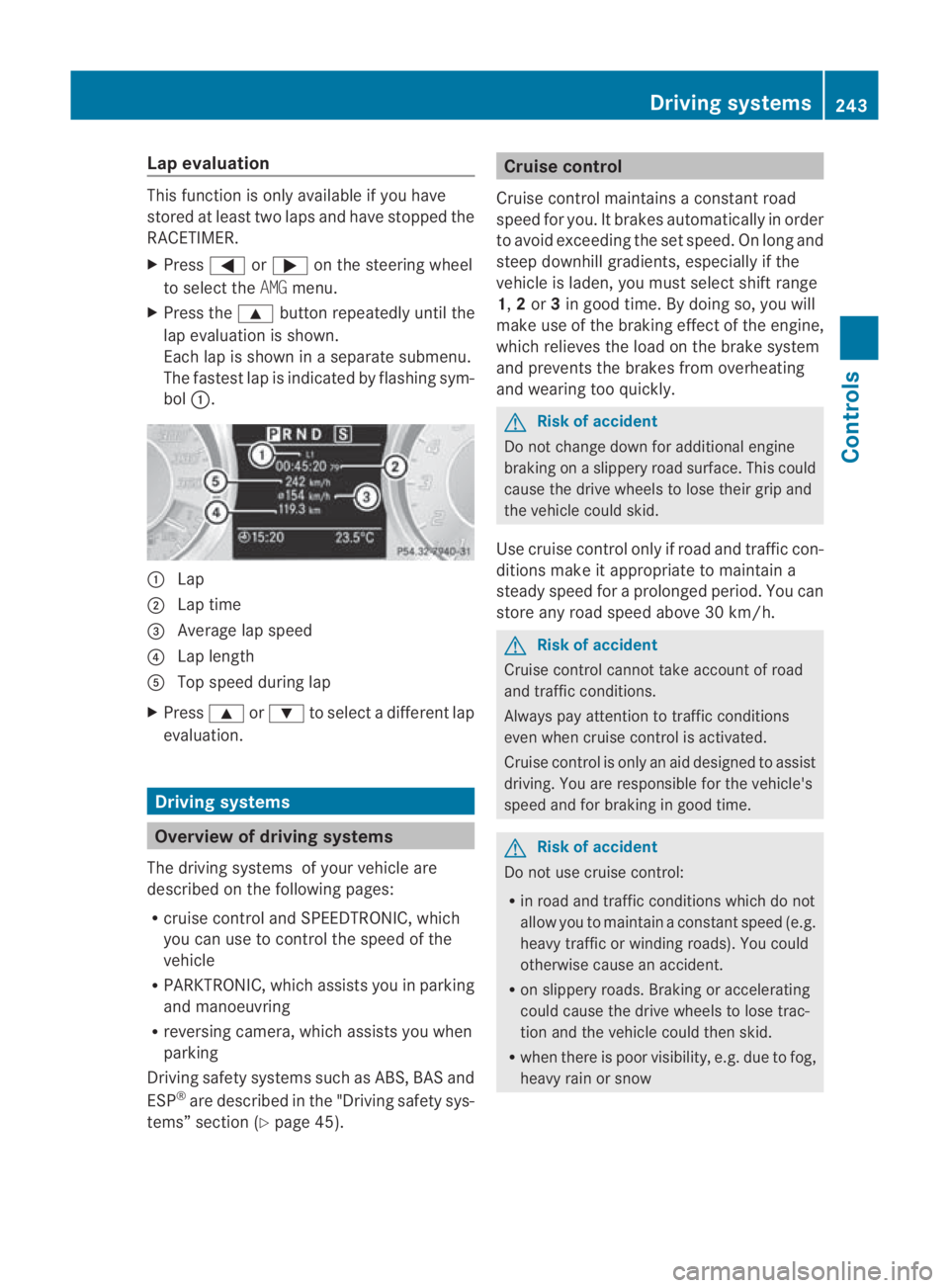
Lap evaluation
This function is only available if you have
stored at least two laps and have stopped the
RACETIMER.
X Press 0008or000E on the steering wheel
to selec tthe AMG menu.
X Press the 000Fbutton repeatedly until the
lap evaluation is shown.
Each lap is shown in a separate submenu.
The fastest lap is indicated by flashing sym-
bol 0001. 0001
Lap
0002 Lap time
0015 Average lap speed
0014 Lap length
0012 Top speed during lap
X Press 000For000C to select a different lap
evaluation. Driving systems
Overview of driving systems
The driving systems of your vehicle are
described on the following pages:
R cruise control and SPEEDTRONIC, which
you can use to control the speed of the
vehicle
R PARKTRONIC, which assists you in parking
and manoeuvring
R reversing camera, which assists you when
parking
Driving safety systems such as ABS, BAS and
ESP ®
are described in the "Driving safety sys-
tems” section (Y page 45). Cruise control
Cruise control maintains a constant road
speed for you. It brakes automatically in order
to avoid exceeding the set speed. On long and
steep downhill gradients, especially if the
vehicle is laden, you must select shift range
1, 2or 3in good time. By doing so, you will
make use of the braking effect of the engine,
which relieves the load on the brake system
and prevents the brakes from overheating
and wearing too quickly. G
Risk of accident
Do not change down for additional engine
braking on a slippery road surface. This could
cause the drive wheels to lose their grip and
the vehicle could skid.
Use cruise control only if road and traffic con-
ditions make it appropriate to maintain a
steady speed for a prolonged period. You can
store any road speed above 30 km/h. G
Risk of accident
Cruise control cannot take account of road
and traffic conditions.
Always pay attention to traffic conditions
even when cruise control is activated.
Cruise control is only an aid designed to assist
driving. You are responsible for the vehicle's
speed and for braking in good time. G
Risk of accident
Do not use cruise control:
R in road and traffic conditions which do not
allow you to maintain a constant speed (e.g.
heavy traffic or winding roads). You could
otherwise cause an accident.
R on slippery roads. Braking or accelerating
could cause the drive wheels to lose trac-
tion and the vehicle could then skid.
R when there is poor visibility, e.g. due to fog,
heavy rain or snow Driving systems
243Controls
BA 197 ECE RE 2010/6a; 1; 2, en-GB
sabbaeu Version: 3.0.3.6 2010-05-07T14:19:43+02:00 - Seite 243 Z
Page 274 of 361
wheels which have been approved by
Mercedes-Ben
zspecifically for your vehi-
cle. These tyres have been specially adap-
ted for use with the driving safety systems,
such as ABS or ESP ®
.Ify ou use other tyres
and wheels, Mercedes-Benz cannot accept
any responsibility for damage that may
result from this. Further information about
tyres, wheels and approved combinations
can be obtained from any Mercedes-Benz
Service Centre.
If you use tyres other than those tested and
recommended for Mercedes-Benz vehi-
cles, characteristics such as handling, vehi-
cle noise emissions and fuel consumption
may be adversely affected. In addition, the
wheels may come into contact with the
body or axle components when heavily loa-
ded or when driving with snow chains. This
could result in damage to the tyres or the
vehicle.
! Retreaded tyres are neither tested nor
recommended by Mercedes-Benz, since
previous damage cannot always be detec-
ted on retreaded tyres. As a result,
Mercedes-Benz cannot guarantee vehicle
safety if retreaded tyres are fitted. Do not
fit used tyres if you have no information
about their previous usage. G
Risk of accident
Tyres, wheels or accessories which have not
been approved by Mercedes-Benz for your
vehicle or are not used as they should be, can
impair driving safety. As a result, you could
cause an accident .Before purchasing and
using them, enquire about their suitability,
legal stipulations and factory recommenda-
tions at a Mercedes-Benz Service Centre.
Modification work on the brake system and
wheels is not permitted, nor is the use of
spacer plates or brake dust shields. This inva-
lidates the General Operating Permit for the
vehicle. Notes on selecting, fitting and replacing
tyres R
Only fit tyres and wheels of the same type
and make.
R Only fit tyres of the correct size onto the
wheels.
R After fitting new tyres, run them in at mod-
erate speeds for the first 100 km as they
only reach their full performance after this
distance.
R Fit new tyres on the front wheels first if
tyres of the same size are required on the
fron tand rea rwheels.
R Replace the tyres after six years at the lat-
est, regardless of wear. This also applies to
the collapsible emergency spare wheel* 17
.
R Do not drive with tyres which have too little
tread depth, as this significantly reduces
the traction on wet roads (aquaplaning).
! Store tyres that are not being used in a
cool, dry and preferably dark place. Protect
the tyres against oil, grease, petrol and die-
sel.
Notes on regularly inspecting wheels
and tyres R
Regularly check the wheels and tyres of
your vehicle for damage (e.g. cuts, punctu-
res, tears, bulges on tyres and deformation,
cracks or severe corrosion on wheels), at
least every 14 days, as well as after driving
off-road or on rough roads. Damaged
wheels can cause a loss of tyre pressure.
R Regularly check the tyre tread depth and
the condition of the tread across the whole
width of the tyre (Y page 272). If neces-
sary, turn the front wheels to full lock in
order to inspect the inner side of the tyre
surface.
R All wheels must have a valve cap to protect
the valve against dirt and moisture. Do not
fit anything onto the valve (such as tyre
pressure monitoring systems) other than
17 Only for certain countries. Tyres and wheels
271Operation
*optional
BA 197 ECE RE 2010/6a; 1; 2, en-GB
sabbaeu
Version: 3.0.3.6 2010-05-07T14:19:43+02:00 - Seite 271 Z
Page 278 of 361
short time. This is rectified after a few
minutes of driving, and the tyre pressures
are displayed for the correct positions.
Interchanging the wheels
G
Risk of accident
Interchange the front and rear wheels only if
they have the same dimensions: for example
size, offset, etc.
After every wheel interchange/change, have
the tightening torque checked at a qualified
specialist workshop that has the necessary
specialist knowledge and tools to carry out
the work required. Mercedes-Benz recom-
mends that you use a Mercedes-Benz Service
Centre for this purpose. In particular, work
relevant to safety or on safety-related sys-
tems must be carried out at a qualified spe-
cialist workshop.
The wheels could work loose if they are not
tightened to a torque of 130 Nm.
For safety reasons, Mercedes-Benz recom-
mends that you only use wheel bolts of the
correct size which have been approved for
Mercedes-Benz vehicles.
The wear patterns on the front and rear tyres
differ, depending on the operating conditions.
Interchange the wheels before a clear wear
pattern has formed on the tyres. Front tyres
typically wear more on the tyre shoulders and
the rear tyres in the centre.
On vehicles that have the same size front and
rear wheels, you can interchange the wheels
every 5000 km to 10,000 km depending on
the degree of tyre wear. Do not reverse the
direction of tyre rotation.
Cleant he contact surfaces of the wheel and
the brake disc thoroughly every time a wheel
is interchanged. Check the tyre pressure and
reactivate the tyre pressure monitor if neces-
sary.
! As your vehicle is fitted with a tyre pres-
sure monitor, electronic components are
located in the wheel. Tyre-fitting tools should not be applied in
the area of the valve, as this could damage
the electronic components.
Always have the wheels interchanged/
changed at a qualified specialist workshop,
e.g. a Mercedes-Benz Service Centre.
Winter operation
Please bear the following in mind
Have your vehicle winterproofed at a qualified
specialist workshop, e.g. at a Mercedes-Benz
Service Centre, at the onset of winter.
Observe the notes in the "Changing a wheel"
section (Y page 275). Winter tyres
Use winter tyres at temperatures below
+7 ˚C and in wintry road conditions. Only
winter tyres displaying the 0001snowflake
symbol in addition to the M+S marking pro-
vide optimum grip in wintry road conditions.
Only these tyres will allow the ABS and
ESP ®
driving safety systems to function opti-
mally in winter, as these tyres have been
designed specifically for driving on snow.
Use winter tyres of the same make and tread
on all wheels to maintain safe handling char-
acteristics. G
Risk of accident
Winter tyres with a tread depth of less than
4mmm ust be replace dimmediately. They are
no longer suitable for winter use and can no
longer provide sufficient grip. This could
cause you to lose control of yourv ehicle and
cause an accident.
Always observe the maximum permissible
speed specified for the winter tyres you have
fitted. If you fit winter tyres which have a
lower maximum permissible speed than that
of the vehicle, affix an appropriate warning
sign in the driver's field of vision. This can be Winter operation
275Operation
BA 197 ECE RE 2010/6a; 1; 2, en-GB
sabbaeu Version: 3.0.3.6 2010-05-07T14:19:43+02:00 - Seite 275 Z