buttons MERCEDES-BENZ SPRINTER 2006 User Guide
[x] Cancel search | Manufacturer: MERCEDES-BENZ, Model Year: 2006, Model line: SPRINTER, Model: MERCEDES-BENZ SPRINTER 2006Pages: 2305, PDF Size: 48.12 MB
Page 941 of 2305

The ECM continually monitors the fuel and emis-
sions system circuits and sensors to decide whether
the system is in good operating condition. The ECM
then sends the proper lamp-on or lamp-off messages
to the instrument cluster. If the instrument cluster
turns on the MIL after the bulb test, it may indicate
that a malfunction has occurred and that the fuel
and emissions systems may require service. For
proper diagnosis of the fuel and emissions systems,
the ECM, the CAN data bus, or the electronic mes-
sage inputs to the instrument cluster that control the
MIL, a diagnostic scan tool is required. Refer to the
appropriate diagnostic information.
MULTI - FUNCTION INDICA-
TOR
DESCRIPTION
A multi-function indicator is standard equipment
on all instrument clusters. The multi-function indica-
tor is located near the lower edge of the instrument
cluster, directly below the speedometer. The multi-
function indicator consists of a Liquid Crystal Dis-
play (LCD) unit and four push button-controlled
switches that are soldered onto the instrument clus-
ter electronic circuit board. The LCD is visible
through a large rectangular cutout in the instrument
cluster overlay, while the four switch push buttons
extend through a black plastic switch bezel located
on the cluster lens directly below the LCD. The four
multi-function indicator push buttons allow the vehi-
cle operator to configure and adjust several of the
display features. The buttons are labeled from left to
right: ªmiº (miles) or ªkmº (kilometers), an icon
depicting an analog clock face (clock), ª2º (minus),
and ª+º (plus).
The multi-function indicator LCD displays both
alpha-numeric characters and numerous icons to pro-
vide information to the vehicle operator. The indica-
tions of the multi-function indicator are not visible
when the LCD is not illuminated. When illuminated
the indications appear as dark characters and icons
silhouetted against an amber field. When the exterior
lighting is turned Off, the display is illuminated at
maximum brightness. When the exterior lighting is
turned On the display illumination level can be
adjusted in concert with the cluster general illumina-
tion lighting using the ª+º (plus) and ª2º (minus)
multi-function indicator push buttons. The multi-
function indicator LCD unit and push button
switches are serviced as a unit with the instrument
cluster.
OPERATION
The multi-function indicator has several display
capabilities including odometer, trip odometer, clock,engine oil level data, gear selector indicator
(PRNDL), certain diagnostic information and, on
vehicles so equipped, an optional Active Service SYS-
Tem (ASSYST) engine oil maintenance indicator and
an optional outside ambient temperature indicator.
The multi-function indicator is completely controlled
by the instrument cluster logic circuit, and that logic
will allow this indication to be viewed whenever the
multi-function indicator Liquid Crystal Display
(LCD) is activated. Therefore, the indicator remains
functional regardless of the ignition switch position.
With the ignition switch in the Off or Accessory posi-
tions and the key removed from the ignition lock cyl-
inder, the display is activated when the park lamps
are turned On or, for about thirty seconds after any
one of the multi-function indicator switch push but-
tons is depressed. Otherwise, the display unit is
active for about thirty seconds after the key is
inserted into the ignition lock cylinder, and inactive
about thirty seconds after the key is removed from
the ignition lock cylinder.
The multi-function indicator ªmiº (miles) or
ªkmº(kilometers) switch push button is used to con-
trol the odometer/trip odometer display modes. The
multi-function indicator clock switch push button is
used to control the clock/outside temperature display
modes. The multi-function indicator ª+º (plus) and
ª2º (minus) switch push buttons are used to adjust
the cluster general illumination dimming level, the
clock, and other cluster settings. See the owner's
manual in the vehicle glove box for more information
on the features, use, operation and setting proce-
dures for the various standard and optional multi-
function indicator displays.
Proper testing of the multi-function indicator LCD
unit, the CAN data bus and the electronic data bus
message inputs to the instrument cluster that control
some of the multi-function indicator functions
requires the use of a diagnostic scan tool. Refer to
the appropriate diagnostic information. Additional
details for the odometer/trip odometer, the clock, the
gear selector indicator, the ambient temperature indi-
cator and the ASSYST warning and reminder func-
tions of the multi-function indicator may be found
elsewhere in this service information.
ODOMETER
DESCRIPTION
An odometer and trip odometer are standard
equipment in all instrument clusters. The odometer
and trip odometer values are displayed on the left
side of the multi-function indicator Liquid Crystal
Display (LCD). The LCD is soldered onto the cluster
electronic circuit board and is visible through a win-
dow with a clear lens located near the lower edge of
8J - 22 INSTRUMENT CLUSTERVA
Page 942 of 2305

the instrument cluster, directly below the speedome-
ter. However, the odometer and trip odometer infor-
mation are not displayed simultaneously. The ªmiº
(miles) or ªkmº (kilometers) switch on the instrument
cluster circuit board toggles the display between
odometer and trip odometer modes by depressing the
switch push button that extends through the lower
edge of the cluster lens, directly below the multi-
function indicator LCD.
The odometer and trip odometer information is
stored in the instrument cluster memory. This infor-
mation can be increased when the proper inputs are
provided to the instrument cluster, but the informa-
tion cannot be decreased. The odometer can display
values up to 999,999 kilometers (999,999 miles). The
odometer latches at these values, and will not roll
over to zero. The trip odometer can display values up
to 999.9 kilometers (999.9 miles) before it rolls over
to zero. The odometer display does not have a deci-
mal point and will not show values less than a full
unit (kilometer or mile), while the trip odometer dis-
play does have a decimal point and will show tenths
of a unit (kilometer or mile). The unit of measure
(kilometers or miles) for the odometer and trip odom-
eter display is imprinted on the cluster overlay below
the left end of the LCD. The unit of measure for the
instrument cluster odometer/trip odometer is selected
at the time that it is manufactured, and cannot be
changed.
The indications of the odometer/trip odometer are
not visible when the LCD is not illuminated. When
illuminated the indications appear as dark charac-
ters silhouetted against an amber field. When the
exterior lighting is turned Off, the display is illumi-
nated at maximum brightness. When the exterior
lighting is turned On the display illumination level
can be adjusted in concert with the cluster general
illumination lighting using the plus and minus multi-
function indicator push buttons. The odometer has a
ªRental Carº mode, which will activate the multi-
function indicator LCD and illuminate the odometer
information for about thirty seconds after one of the
multi-function indicator push buttons is momentarily
depressed, or after the key is inserted into the igni-
tion switch lock cylinder with the ignition switch in
the Off position.
The odometer/trip odometer and the miles/kilome-
ters switch, and the miles/kilometers switch push
button are serviced as a unit with the instrument
cluster.
OPERATION
The odometer and trip odometer give an indication
to the vehicle operator of the distance the vehicle has
traveled. This indicator is controlled by the instru-
ment cluster circuitry based upon cluster program-
ming and electronic messages received by the cluster
from the Controller Anti-lock Brake (CAB) over theController Area Network (CAN) data bus. The odom-
eter and trip odometer information is displayed by
the multi-function indicator Liquid Crystal Display
(LCD). The LCD will display the odometer informa-
tion whenever it is activated, and will display the
last previously selected odometer or trip odometer
information when the ignition switch is turned to the
On position. The instrument cluster circuitry controls
the LCD and provides the following features:
²Odometer/Trip Odometer Display Toggling-
Actuating the multi-function indicator ªmiº (miles) or
ªkmº (kilometers) switch push button momentarily
with the LCD illuminated will toggle the display
between the odometer and trip odometer information.
Each time the LCD is illuminated with the ignition
switch in the On or Start positions, the display will
automatically return to the last mode previously
selected (odometer or trip odometer).
²Trip Odometer Reset- When the multi-func-
tion indicator ªmiº (miles) or ªkmº (kilometers) switch
push button is pressed and held for longer than
about two seconds, the trip odometer will be reset to
000.0 kilometers (miles). The LCD must be display-
ing the trip odometer information in order for the
trip odometer information to be reset.
The CAB continually monitors the vehicle speed
pulse information received from the four wheel speed
sensors, then sends the proper distance messages to
the instrument cluster. For proper diagnosis of the
wheel speed sensors, the CAB, the CAN data bus, or
the electronic message inputs to the instrument clus-
ter that control the odometer/trip odometer, a diag-
nostic scan tool is required. Refer to the appropriate
diagnostic information.
PARK BRAKE INDICATOR
DESCRIPTION
A park brake indicator is standard equipment on
all instrument clusters. The park brake indicator is
located near the lower edge of the instrument cluster,
to the left of the multi-function indicator display. The
park brake indicator consists of stencil-like cutout of
the word ªPARKº in the opaque layer of the instru-
ment cluster overlay. The dark outer layer of the
overlay prevents the indicator from being clearly vis-
ible when it is not illuminated. A red Light Emitting
Diode (LED) behind the cutout in the opaque layer of
the overlay causes the ªPARKº text to appear in red
through the translucent outer layer of the overlay
when the indicator is illuminated from behind by the
LED, which is soldered onto the instrument cluster
electronic circuit board. The park brake indicator is
serviced as a unit with the instrument cluster.
VAINSTRUMENT CLUSTER 8J - 23
Page 1042 of 2305
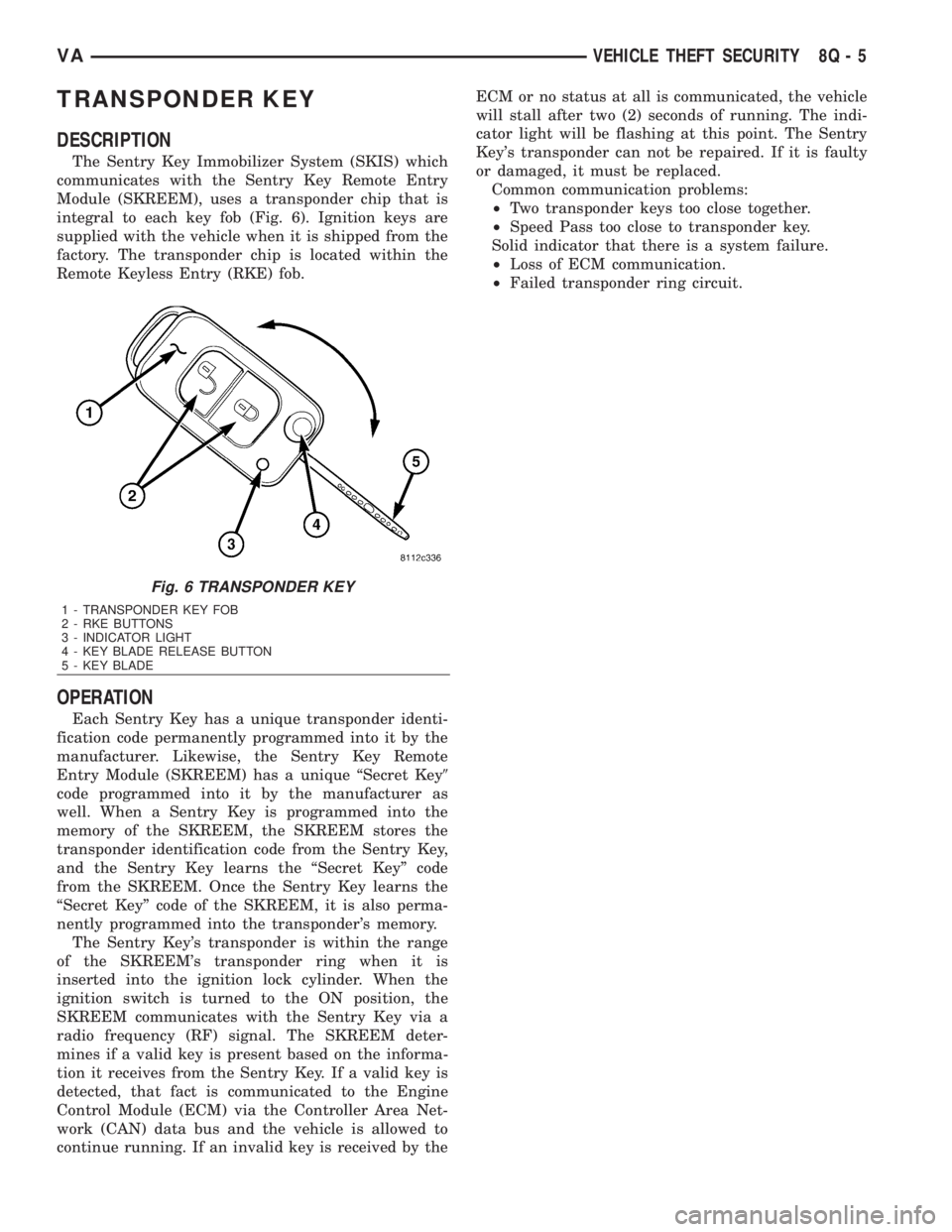
TRANSPONDER KEY
DESCRIPTION
The Sentry Key Immobilizer System (SKIS) which
communicates with the Sentry Key Remote Entry
Module (SKREEM), uses a transponder chip that is
integral to each key fob (Fig. 6). Ignition keys are
supplied with the vehicle when it is shipped from the
factory. The transponder chip is located within the
Remote Keyless Entry (RKE) fob.
OPERATION
Each Sentry Key has a unique transponder identi-
fication code permanently programmed into it by the
manufacturer. Likewise, the Sentry Key Remote
Entry Module (SKREEM) has a unique ªSecret Key9
code programmed into it by the manufacturer as
well. When a Sentry Key is programmed into the
memory of the SKREEM, the SKREEM stores the
transponder identification code from the Sentry Key,
and the Sentry Key learns the ªSecret Keyº code
from the SKREEM. Once the Sentry Key learns the
ªSecret Keyº code of the SKREEM, it is also perma-
nently programmed into the transponder's memory.
The Sentry Key's transponder is within the range
of the SKREEM's transponder ring when it is
inserted into the ignition lock cylinder. When the
ignition switch is turned to the ON position, the
SKREEM communicates with the Sentry Key via a
radio frequency (RF) signal. The SKREEM deter-
mines if a valid key is present based on the informa-
tion it receives from the Sentry Key. If a valid key is
detected, that fact is communicated to the Engine
Control Module (ECM) via the Controller Area Net-
work (CAN) data bus and the vehicle is allowed to
continue running. If an invalid key is received by theECM or no status at all is communicated, the vehicle
will stall after two (2) seconds of running. The indi-
cator light will be flashing at this point. The Sentry
Key's transponder can not be repaired. If it is faulty
or damaged, it must be replaced.
Common communication problems:
²Two transponder keys too close together.
²Speed Pass too close to transponder key.
Solid indicator that there is a system failure.
²Loss of ECM communication.
²Failed transponder ring circuit.
Fig. 6 TRANSPONDER KEY
1 - TRANSPONDER KEY FOB
2 - RKE BUTTONS
3 - INDICATOR LIGHT
4 - KEY BLADE RELEASE BUTTON
5 - KEY BLADE
VAVEHICLE THEFT SECURITY 8Q - 5