ignition MERCEDES-BENZ SPRINTER 2006 Service Manual
[x] Cancel search | Manufacturer: MERCEDES-BENZ, Model Year: 2006, Model line: SPRINTER, Model: MERCEDES-BENZ SPRINTER 2006Pages: 2305, PDF Size: 48.12 MB
Page 946 of 2305
TRACTION CONTROL MAL-
FUNCTION INDICATOR
DESCRIPTION
A traction control (ASR) malfunction indicator is
standard equipment on all instrument clusters. The
traction control malfunction indicator is located near
the lower edge of the instrument cluster, to the right
of the multi-function indicator display. The traction
control malfunction indicator consists of an icon that
graphically depicts a tire and two skid marks
imprinted within a rectangular cutout in the opaque
layer of the instrument cluster overlay. The dark
outer layer of the overlay prevents the indicator from
being clearly visible when it is not illuminated. An
amber Light Emitting Diode (LED) behind the cutout
in the opaque layer of the overlay causes the icon to
appear silhouetted against an amber field through
the translucent outer layer of the overlay when the
indicator is illuminated from behind by the LED,
which is soldered onto the instrument cluster elec-
tronic circuit board. The traction control malfunction
indicator is serviced as a unit with the instrument
cluster.
OPERATION
The traction control (ASR) malfunction indicator
gives the vehicle operator an indication when the
traction control system is faulty or inoperative. This
indicator is controlled by a transistor on the instru-
ment cluster circuit board based upon cluster pro-
gramming and electronic messages received by the
cluster from the Controller Antilock Brake (CAB)
over the Controller Area Network (CAN) data bus.
The traction control malfunction indicator Light
Emitting Diode (LED) is completely controlled by the
instrument cluster logic circuit, and that logic will
only allow this indicator to operate when the instru-
ment cluster detects that the ignition switch is in the
On position. Therefore, the LED will always be off
when the ignition switch is in any position except
On. The LED only illuminates when it is provided a
path to ground by the instrument cluster transistor.
The instrument cluster will turn on the traction con-
trol malfunction indicator for the following reasons:
²Bulb Test- Each time the ignition switch is
turned to the On position the traction control indica-
tor is illuminated as a bulb test until the engine is
started.
²Traction Control (ASR) Malfunction Indica-
tor Lamp-On Message- Each time the cluster
receives a traction control malfunction indicator
lamp-on message from the CAB, the indicator will be
illuminated. The indicator remains illuminated until
the cluster receives a lamp-off message from the
CAB, or until the ignition switch is turned to the Off
position, whichever occurs first.The CAB continually monitors the traction control
(ASR) system circuits and sensors to decide whether
the system is in good operating condition. The CAB
then sends the proper lamp-on or lamp-off messages
to the instrument cluster. If the CAB sends a
lamp-on message after the bulb test, it indicates that
the CAB has detected a system malfunction and that
the traction control (ASR) system has become inoper-
ative. The CAB will store a Diagnostic Trouble Code
(DTC) for any malfunction it detects. In addition, if
the traction control malfunction indicator is illumi-
nated, the CAB will deactivate an activated traction
control system and engine power output may be
reduced. See the owner's manual in the vehicle glove
box for more information on the features, use, activa-
tion and deactivation of the traction control (ASR)
system. For proper diagnosis of the traction control
system, the CAB, the CAN data bus, or the electronic
message inputs to the instrument cluster that control
the traction control malfunction indicator, a diagnos-
tic scan tool is required. Refer to the appropriate
diagnostic information.
TURN SIGNAL INDICATOR
DESCRIPTION
Two turn signal indicators, one right and one left,
are standard equipment on all instrument clusters.
The turn signal indicators are located near the upper
edge of the instrument cluster, one to each side of the
speedometer. Each turn signal indicator consists of a
arrow-shaped cutout of the International Control and
Display Symbol icon for ªTurn Warningº in the
opaque layer of the instrument cluster overlay. The
dark outer layer of the overlay prevents these icons
from being clearly visible when they are not illumi-
nated. A green Light Emitting Diode (LED) behind
each turn signal indicator cutout in the opaque layer
of the overlay causes the icon to appear in green
through the translucent outer layer of the overlay
when the indicator is illuminated from behind by the
LED, which is soldered onto the instrument cluster
electronic circuit board. The turn signal indicators
are serviced as a unit with the instrument cluster.
OPERATION
The turn signal indicators give an indication to the
vehicle operator that the turn signal (left or right
indicator flashing) or hazard warning (both left and
right indicators flashing) have been selected and are
operating. These indicators are controlled by transis-
tors on the instrument cluster electronic circuit board
based upon the cluster programming and a hard
wired input received by the cluster from the turn sig-
nal relay through the turn signal and hazard warn-
ing switch circuitry of the multi-function switch on
VAINSTRUMENT CLUSTER 8J - 27
Page 947 of 2305
the left and right turn signal circuits. Each turn sig-
nal indicator Light Emitting Diode (LED) is com-
pletely controlled by the instrument cluster logic
circuit, and that logic will allow this indicator to
operate whenever the instrument cluster receives a
battery current input on the fused B(+) circuit.
Therefore, each LED can be illuminated regardless of
the ignition switch position. The LED only illumi-
nates when it is provided a path to ground by the
instrument cluster transistor. The instrument cluster
will turn on the turn signal indicators for the follow-
ing reasons:
²Turn Signal Input- Each time the cluster
detects a turn signal input from the turn signal relay
through the closed turn signal switch circuitry of the
multi-function switch on the hard wired left or right
turn signal circuit, the requested turn signal lamps
and turn signal indicator will be flashed on and off,
and a contactless relay soldered onto the cluster elec-
tronic circuit board will produce a clicking sound to
emulate a conventional turn signal flasher. The turn
signals and the turn signal indicators continue to
flash on and off until the turn signal switch circuitry
of the multi-function switch is opened, or until the
ignition switch is turned to the Off position, which-
ever occurs first.
²Hazard Warning Input- Each time the cluster
detects a hazard warning input from the turn signal
relay through the closed hazard warning switch cir-
cuitry of the multi-function switch on the hard wired
left and right turn signal circuits, all of the turn sig-
nal lamps and both turn signal indicators will be
flashed on and off, and a contactless relay soldered
onto the cluster electronic circuit board will produce
a clicking sound to emulate a conventional hazard
warning flasher. The turn signals and the turn signal
indicators continue to flash on and off until the haz-
ard warning switch circuitry of the multi-function
switch is opened.
An electronic wipers, turn signals and engine start
control module located within the fuse block beneath
the steering column monitors the turn signal circuits
and controls the flash rate of the turn signal relay.
The instrument cluster continually monitors the
right and left turn signal circuits to determine the
proper turn signal and hazard warning indicator
operation, then flashes the proper turn signal indica-
tors and the contactless relay on and off accordingly.
The multi-function switch, the turn signal relay and
the left and right turn signal circuits to the instru-
ment cluster can be diagnosed using conventional
diagnostic tools and methods. For proper diagnosis of
the wipers, turn signals and engine start control
module within the fuse block or the instrument clus-
ter circuitry that controls the turn signal indicators
and the contactless relay, a diagnostic scan tool is
required. Refer to the appropriate diagnostic infor-
mation.WAIT - TO - START INDICATOR
DESCRIPTION
A wait-to-start indicator is standard equipment in
all instrument clusters. The wait-to-start indicator is
located near the lower edge of the instrument cluster,
to the right of the multi-function indicator display.
The wait-to-start indicator consists of the Interna-
tional Control and Display Symbol icon for ªDiesel
Preheatº imprinted within a rectangular cutout in
the opaque layer of the instrument cluster overlay.
The dark outer layer of the overlay prevents the indi-
cator from being clearly visible when it is not illumi-
nated. An amber Light Emitting Diode (LED) behind
the cutout in the opaque layer of the overlay causes
the icon to appear silhouetted against an amber field
through the translucent outer layer of the overlay
when the indicator is illuminated from behind by the
LED, which is soldered onto the instrument cluster
electronic circuit board. The wait-to-start indicator is
serviced as a unit with the instrument cluster.
OPERATION
The wait-to-start indicator gives an indication to
the vehicle operator when the diesel engine glow
plugs are energized in their pre-heat operating mode.
This indicator is controlled by a transistor on the
instrument cluster circuit board based upon cluster
programming and electronic messages received by
the cluster from the Engine Control Module (ECM)
over the Controller Area Network (CAN) data bus.
The wait-to-start indicator Light Emitting Diode
(LED) is completely controlled by the instrument
cluster logic circuit, and that logic will only allow
this indicator to operate when the instrument cluster
detects that the ignition switch is in the On position.
Therefore, the LED will always be off when the igni-
tion switch is in any position except On. The LED
only illuminates when it is provided a path to ground
by the instrument cluster transistor. The instrument
cluster will turn on the wait-to-start indicator for the
following reasons:
²Bulb Test- Each time the ignition switch is
turned to the On position the wait-to-start indicator
is illuminated for about two seconds as a bulb test.
²Wait-To-Start Lamp-On Message- Each time
the cluster receives a wait-to-start lamp-on message
from the ECM indicating that the diesel engine glow
plugs are energized in their pre-heat operating mode,
the wait-to-start indicator will be illuminated. The
indicator remains illuminated until the cluster
receives a wait-to-start lamp-off message indicating
that the pre-heat mode of the glow plugs has been
completed, until the ECM detects that the engine is
running, or until the ignition switch is turned to the
Off position, whichever occurs first.
8J - 28 INSTRUMENT CLUSTERVA
Page 948 of 2305

The ECM continually monitors the engine coolant
temperature sensor to determine when the glow
plugs need to be energized in their pre-heat operat-
ing mode. The ECM then sends the proper wait-to-
start lamp-on and lamp-off messages to the
instrument cluster. If the instrument cluster turns on
the indicator after the engine is started, it may indi-
cate that a malfunction has occurred and that the
engine glow control system requires service. The
ECM will store a Diagnostic Trouble Code (DTC) for
any malfunction it detects. For proper diagnosis of
the engine coolant temperature sensor, the engine
glow control system and circuits, the ECM, the CAN
data bus, or the electronic message inputs to the
instrument cluster that control the wait-to-start indi-
cator, a diagnostic scan tool is required. Refer to the
appropriate diagnostic information.
WASHER FLUID INDICATOR
DESCRIPTION
A washer fluid indicator is standard equipment on
all instrument clusters. However, this indicator is
only functional on vehicles equipped with an optional
washer fluid level switch integral to the washer
pump/motor unit on the washer reservoir. The
washer fluid indicator is located near the lower edge
of the instrument cluster, to the right of the multi-
function indicator display. The washer fluid indicator
consists of the International Control and Display
Symbol icon for ªWindshield Washer Fluidº imprinted
within a rectangular cutout in the opaque layer of
the instrument cluster overlay. The dark outer layer
of the overlay prevents the indicator from being
clearly visible when it is not illuminated. An amber
Light Emitting Diode (LED) behind the cutout in the
opaque layer of the overlay causes the icon to appear
silhouetted against an amber field through the trans-
lucent outer layer of the overlay when the indicator
is illuminated from behind by the LED, which is sol-
dered onto the instrument cluster electronic circuit
board. The washer fluid indicator is serviced as a
unit with the instrument cluster.
OPERATION
The washer fluid indicator gives an indication to
the vehicle operator that the fluid level in the washer
reservoir is low. This indicator is controlled by the
instrument cluster circuit board based upon cluster
programming and a hard wired input from the
optional washer fluid level switch that is integral to
the washer pump/motor unit. The washer fluid indi-
cator is completely controlled by the instrument clus-
ter logic circuit, and that logic will only allow this
indicator to operate when the instrument cluster
detects that the ignition switch is in the On position.
Therefore, the indicator will always be off when theignition switch is in any position except On. The indi-
cator only illuminates when it is switched to ground
by the instrument cluster circuitry. The instrument
cluster will turn on the washer fluid indicator for the
following reasons:
²Bulb Test- Each time the ignition switch is
turned to the On position the brake wear indicator is
illuminated by the instrument cluster for about two
seconds as a bulb test.
²Washer Fluid Level Switch Input- Each time
the cluster detects ground on the washer fluid switch
sense circuit (washer fluid level switch closed =
washer fluid level low) while the ignition switch is in
the On position, the washer fluid indicator is illumi-
nated. The indicator remains illuminated until the
washer fluid level switch input to the cluster is an
open circuit (washer fluid level switch open = washer
fluid level acceptable), or until the ignition switch is
turned to the Off position, whichever occurs first.
The instrument cluster continually monitors the
washer fluid level switch to determine the level of
the washer fluid. The instrument cluster logic applies
a delay strategy to this input to reduce the negative
effect that fluid sloshing within the reservoir can
have on reliable indicator operation. The washer
fluid level switch and circuit can be diagnosed using
conventional diagnostic tools and methods. For
proper diagnosis of the instrument cluster circuitry
that controls the washer fluid indicator, a diagnostic
scan tool is required. Refer to the appropriate diag-
nostic information.
WATER - IN - FUEL INDICATOR
DESCRIPTION
A water-in-fuel indicator is standard equipment in
all instrument clusters. The water-in-fuel indicator is
located near the lower edge of the instrument cluster,
to the left of the multi-function indicator display. The
water-in-fuel indicator consists of the International
Control and Display Symbol icon for ªWater In Fuelº
imprinted within a rectangular cutout in the opaque
layer of the instrument cluster overlay. The dark
outer layer of the overlay prevents the indicator from
being clearly visible when it is not illuminated. An
amber Light Emitting Diode (LED) behind the cutout
in the opaque layer of the overlay causes the icon to
appear silhouetted against an amber field through
the translucent outer layer of the overlay when the
indicator is illuminated from behind by the LED,
which is soldered onto the instrument cluster elec-
tronic circuit board. The water-in-fuel indicator is
serviced as a unit with the instrument cluster.
OPERATION
The water-in-fuel indicator gives an indication to
the vehicle operator when there is excessive water
VAINSTRUMENT CLUSTER 8J - 29
Page 949 of 2305
detected in the fuel filter. This indicator is controlled
by a transistor on the instrument cluster circuit
board based upon the cluster programming and elec-
tronic messages received by the cluster from the
Engine Control Module (ECM) over the Controller
Area Network (CAN) data bus. The water-in-fuel
indicator Light Emitting Diode (LED) is completely
controlled by the instrument cluster logic circuit, and
that logic will only allow this indicator to operate
when the instrument cluster detects that the ignition
switch is in the On position. Therefore, the LED will
always be off when the ignition switch is in any posi-
tion except On. The LED only illuminates when it is
provided a path to ground by the instrument cluster
transistor. The instrument cluster will turn on the
water-in-fuel indicator for the following reasons:
²Bulb Test- Each time the ignition switch is
turned to the On position the water-in-fuel indicator
is illuminated for about seven seconds as a bulb test.
²Water-In-Fuel Lamp-On Message- Each time
the cluster receives a water-in-fuel lamp-on message
from the ECM indicating that there is excessive
water in the fuel filter with the engine running, the
water-in-fuel indicator will be illuminated. The indi-
cator remains illuminated until the cluster receives a
water-in-fuel lamp-off message, or until the ignition
switch is turned to the Off position, whichever occurs
first.
The ECM continually monitors the water-in-fuel
sensor to determine whether there is excessive water
in the fuel filter. The ECM then sends the proper
water-in-fuel lamp-on and lamp-off messages to the
instrument cluster. If the water-in-fuel indicator
remains illuminated with the engine running, excess
water should be drained from the fuel filter. If the
indicator remains illuminated with the engine run-
ning after the water has been drained from the fuel
filter, it may indicate that a malfunction has
occurred in the water-in-fuel sensor or circuits. The
ECM will store a Diagnostic Trouble Code (DTC) for
any malfunction it detects. For proper diagnosis of
the water-in-fuel sensor and circuits, the ECM, the
CAN data bus, or the electronic message inputs to
the instrument cluster that control the water-in-fuel
indicator, a diagnostic scan tool is required. Refer to
the appropriate diagnostic information.
8J - 30 INSTRUMENT CLUSTERVA
Page 954 of 2305
TURN SIGNAL LAMPS
When the left (lighting) control stalk of the multi-
function switch is activated (Fig. 1), the turn signal
system illuminates the selected right or left turn sig-
nal indicator and the turn signal lamps begin to
flash. The turn signal lamps include a bulb integral
to each front lamp unit and each tail lamp unit, as
well as a repeater lamp bulb located on each front
fender above the front wheels. When the turn signal
system is activated, the turn signal switch circuitry
within the multi-function switch and the electronic
circuitry of the wipers, turn signals and engine start
control module within the fuse block will repeatedly
energize and de-energize the turn signal relay
located in the fuse block. The turn signal relay
switches battery current from a fused ignition switch
output fuse in the fuse block to the appropriate turn
signal indicator and turn signal lamps.
The ElectroMechanical Instrument Cluster (EMIC)
contactless relay will generate repetitive, audible
turn signal ªclickº sounds to emulate the sounds of a
conventional electro-mechanical turn signal flasher
at one of two rates to coincide with the flashing of
the turn signals. The slow rate emulates normal turn
signal operation, while the fast rate emulates ªbulb
outº turn signal operation.
SPECIFICATIONS - LAMPS / LIGHTING - EXTE-
RIOR
BULB SPECIFICATIONS
LAMP BULB
Backup P21W - 12V 21W
Brake & Rear Park P21/5W - 12V 21/5W
Center High Mounted
StopP21W - 12V 21W
Clearance W3W - 12V 3W
Front Fog H1 - 12V 55W
Front Position W5W - 12V 5W
Front Turn, Park & Side
Marker3457 NA - 12V 28/7.5W
Amber Glass
Low Beam Headlamp H7 - 12V 55W
High Beam Headlamp H1 - 12V 55W
License Plate C5W - 12V 5W
Rear Side Marker R5W - 12V 5W
Rear Turn P21W - 12V 21W
Side Repeater W5W - 12V 3W
BACKUP LAMP BULB
REMOVAL
(1) Disconnect and isolate the battery negative
cable.
(2) If the vehicle is so equipped, remove the trim
from the inside of the right or left rear corner pillar.
(3) From inside the vehicle, use hand pressure to
push the two latch tabs toward the center of the tail
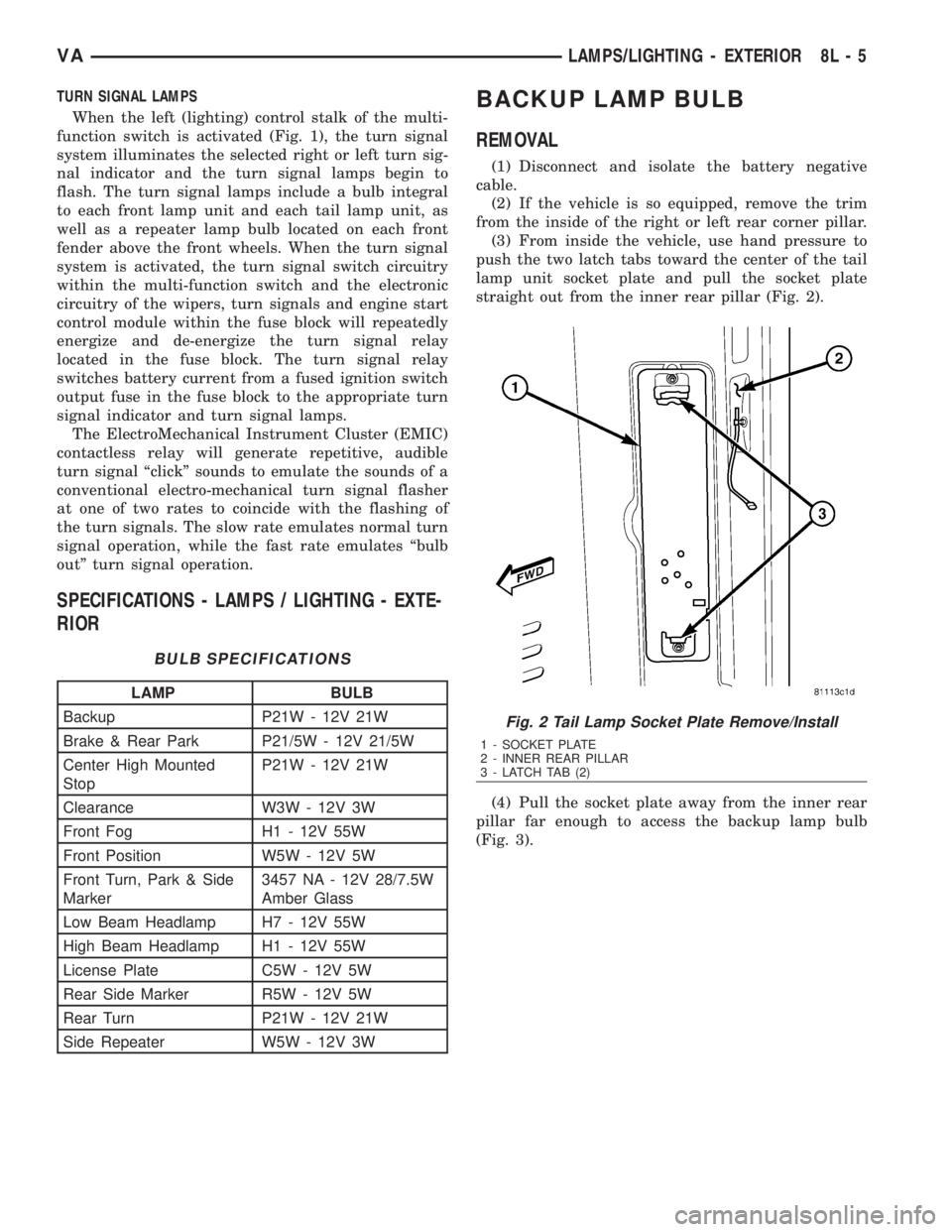
lamp unit socket plate and pull the socket plate
straight out from the inner rear pillar (Fig. 2).
(4) Pull the socket plate away from the inner rear
pillar far enough to access the backup lamp bulb
(Fig. 3).
Fig. 2 Tail Lamp Socket Plate Remove/Install
1 - SOCKET PLATE
2 - INNER REAR PILLAR
3 - LATCH TAB (2)
VALAMPS/LIGHTING - EXTERIOR 8L - 5
Page 988 of 2305
POWER MIRRORS
TABLE OF CONTENTS
page page
POWER MIRRORS
DESCRIPTION..........................3
POWER MIRROR SWITCH
DIAGNOSIS AND TESTING - POWER MIRROR
SWITCH.............................3REMOVAL.............................3
INSTALLATION..........................4
POWER MIRRORS
DESCRIPTION
The power operated outside rear view mirrors
allow the driver to adjust both outside mirrors elec-
trically from the driver side front seat position by
operating a switch on the driver side front door trim
panel. The power mirrors receive a non-switched bat-
tery feed through a fuse so that the system will
remain operational, regardless of the ignition switch
position.
POWER MIRROR SWITCH
DIAGNOSIS AND TESTING - POWER MIRROR
SWITCH
(1) Disconnect and isolate the battery negative
cable.
(2) Remove power mirror switch (Refer to 8 -
ELECTRICAL/POWER MIRRORS/POWER MIRROR
SWITCH - REMOVAL).
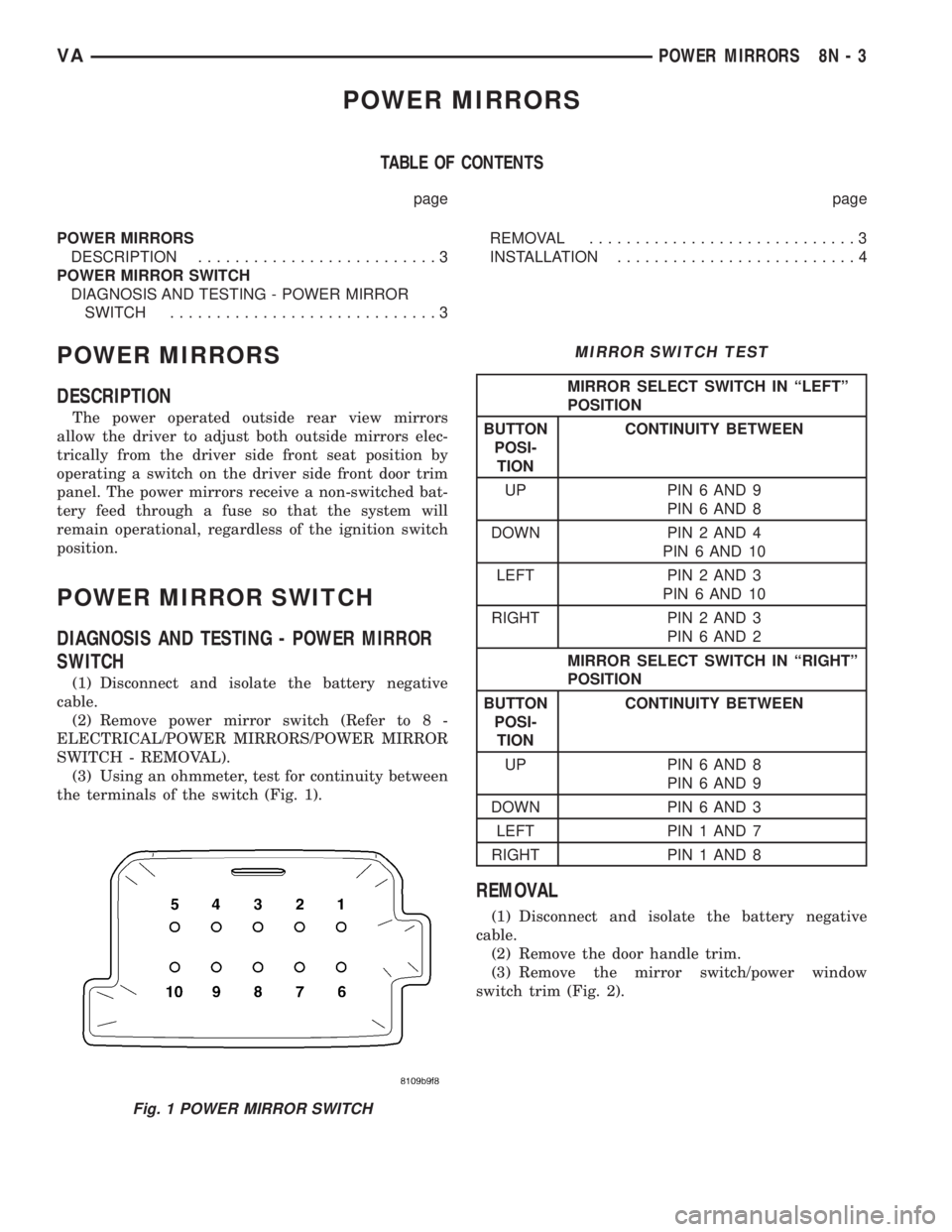
(3) Using an ohmmeter, test for continuity between
the terminals of the switch (Fig. 1).
MIRROR SWITCH TEST
MIRROR SELECT SWITCH IN ªLEFTº
POSITION
BUTTON
POSI-
TIONCONTINUITY BETWEEN
UP PIN 6 AND 9
PIN 6 AND 8
DOWN PIN 2 AND 4
PIN 6 AND 10
LEFT PIN 2 AND 3
PIN 6 AND 10
RIGHT PIN 2 AND 3
PIN 6 AND 2
MIRROR SELECT SWITCH IN ªRIGHTº
POSITION
BUTTON
POSI-
TIONCONTINUITY BETWEEN
UP PIN 6 AND 8
PIN 6 AND 9
DOWN PIN 6 AND 3
LEFT PIN 1 AND 7
RIGHT PIN 1 AND 8
REMOVAL
(1) Disconnect and isolate the battery negative
cable.
(2) Remove the door handle trim.
(3) Remove the mirror switch/power window
switch trim (Fig. 2).
Fig. 1 POWER MIRROR SWITCH
VAPOWER MIRRORS 8N - 3
Page 990 of 2305
POWER WINDOWS
TABLE OF CONTENTS
page page
POWER WINDOWS
DESCRIPTION..........................5
OPERATION............................5
WINDOW MOTOR
REMOVAL.............................5POWER WINDOW SWITCH
DIAGNOSIS AND TESTING - POWER
WINDOW SWITCH......................5
REMOVAL.............................5
INSTALLATION..........................6
POWER WINDOWS
DESCRIPTION
The power window system allows each of the door
windows to be raised and lowered electrically by
actuating a switch on each door panel. A master
switch on the drivers door allows the driver to raise
or lower each door window. The power window sys-
tem operates only when the ignition switch is in the
RUN or ACCESSORY position.
OPERATION
WINDOW SWITCH
The power window switches control the battery
and ground feeds to the power window motors. The
passenger door power window switches receive their
battery and ground feeds through the circuitry of the
drivers window switch.
WINDOW MOTOR
Window motors use permanent type magnets. The
B+ and ground applied at the motor terminal pins
will cause the motor to rotate in one direction.
Reversing current through the motor terminals will
cause the motor to rotate in the opposite direction.
Refer to the appropriate wiring information. The
wiring information includes wiring diagrams, proper
wire and connector repair procedures, details of wire
harness routing and retention, connector pin-out
information and location views for the various wire
harness connectors, splices and grounds.
WINDOW MOTOR
REMOVAL
The window motor is serviced with the window
regulator.
POWER WINDOW SWITCH
DIAGNOSIS AND TESTING - POWER WINDOW
SWITCH
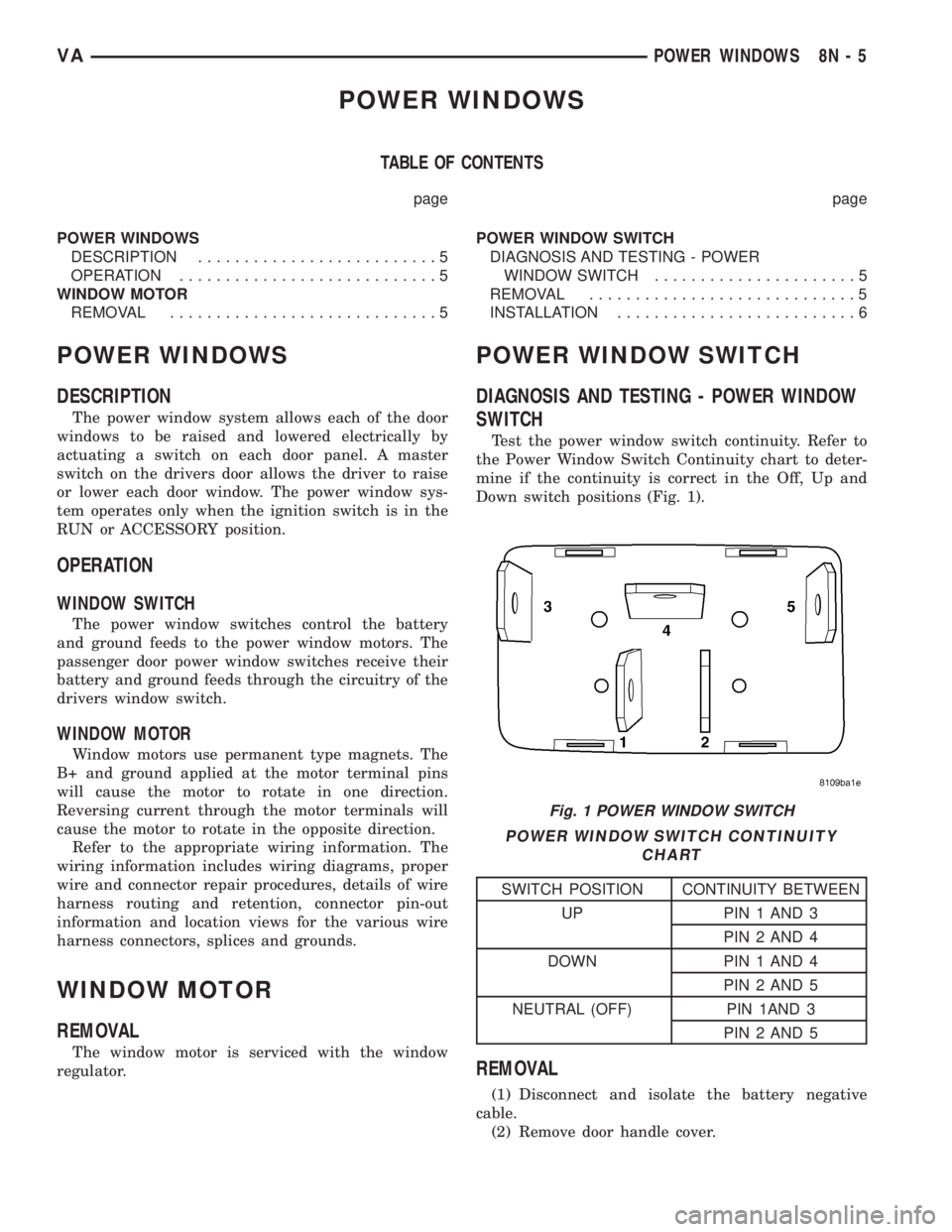
Test the power window switch continuity. Refer to
the Power Window Switch Continuity chart to deter-
mine if the continuity is correct in the Off, Up and
Down switch positions (Fig. 1).
POWER WINDOW SWITCH CONTINUITY
CHART
SWITCH POSITION CONTINUITY BETWEEN
UP PIN 1 AND 3
PIN 2 AND 4
DOWN PIN 1 AND 4
PIN 2 AND 5
NEUTRAL (OFF) PIN 1AND 3
PIN 2 AND 5
REMOVAL
(1) Disconnect and isolate the battery negative
cable.
(2) Remove door handle cover.
Fig. 1 POWER WINDOW SWITCH
VAPOWER WINDOWS 8N - 5
Page 995 of 2305
and to the supplemental restraint system compo-
nents through the use of a combination of soldered
splices, splice block connectors, and many different
types of wire harness terminal connectors and insu-
lators. Refer to the appropriate wiring information.
The wiring information includes wiring diagrams,
proper wire and connector repair procedures, further
details on wire harness routing and retention, as well
as pin-out and location views for the various wire
harness connectors, splices and grounds.
OPERATION
ACTIVE RESTRAINTS
The primary passenger restraints in this or any
other vehicle are the standard equipment factory-in-
stalled seat belts. Seat belts are referred to as an
active restraint because the vehicle occupants are
required to physically fasten and properly adjust
these restraints in order to benefit from them. See
the owner's manual in the vehicle glove box for more
information on the features, use and operation of all
of the factory-installed active restraints.
PASSIVE RESTRAINTS
The passive restraints are referred to as a supple-
mental restraint system because they were designed
and are intended to enhance the protection for the
occupants of the vehicleonlywhen used in conjunc-
tion with the seat belts. They are referred to as pas-
sive restraints because the vehicle occupants are not
required to do anything to make them operate; how-
ever, the vehicle occupants must be wearing their
seat belts in order to obtain the maximum safety
benefit from the factory-installed supplemental
restraint system.
The supplemental restraint system electrical cir-
cuits are continuously monitored and controlled by a
microprocessor and software contained within the
Airbag Control Module (ACM). An airbag indicator in
the ElectroMechanical Instrument Cluster (EMIC)
illuminates for about four seconds as a bulb test each
time the ignition switch is turned to the On or Start
positions. Following the bulb test, the airbag indica-
tor is turned on or off by the ACM to indicate the
status of the supplemental restraint system. If the
airbag indicator comes on either solid or flashing at
any time other than during the bulb test, it indicates
that there is a problem in the supplemental restraint
system electrical circuits. Such a problem may cause
airbags not to deploy when required, or to deploy
when not required.
Deployment of the supplemental restraints
depends upon the angle and severity of an impact.
Deployment is not based upon vehicle speed; rather,
deployment is based upon the rate of deceleration as
measured by the forces of gravity (G force) upon the
impact sensor(s). When an impact is severe enough,the microprocessor in the ACM signals the inflator of
the appropriate airbag units to deploy their airbag
cushions. The front seat belt tensioners are provided
with a deployment signal by the ACM in conjunction
with the driver and passenger airbags.
During a frontal vehicle impact, the knee blockers
work in concert with properly fastened and adjusted
seat belts to restrain both the driver and the front
seat passenger in the proper position for an airbag
deployment. The knee blockers also absorb and dis-
tribute the crash energy from the driver and the
front seat passenger to the structure of the instru-
ment panel. The seat belt tensioners remove the
slack from the front seat belts to provide further
assurance that the driver and front seat passenger
are properly positioned and restrained for an airbag
deployment.
Typically, the vehicle occupants recall more about
the events preceding and following a collision than
they do of an airbag deployment itself. This is
because the airbag deployment and deflation occur so
rapidly. In a typical 48 kilometer-per-hour (30 mile-
per-hour) barrier impact, from the moment of impact
until the airbags are fully inflated takes only a few
milliseconds. Within one to two seconds from the
moment of impact, the airbags are almost entirely
deflated. The times cited for these events are approx-
imations, which apply only to a barrier impact at the
given speed. Actual times will vary somewhat,
depending upon the vehicle speed, impact angle,
severity of the impact, and the type of collision.
When the ACM monitors a problem in any of the
airbag system circuits or components, including the
seat belt tensioners, it stores a fault code or Diagnos-
tic Trouble Code (DTC) in its memory circuit and
sends a hard wired output to the EMIC to turn on
the airbag indicator. If the EMIC detects a problem
in the airbag indicator or airbag indicator circuit, the
cluster will flash the seatbelt indicator on and off.
Proper testing of the supplemental restraint system
components as well as the retrieval or erasure of a
DTC from the ACM requires the use of a diagnostic
scan tool. Refer to the appropriate diagnostic infor-
mation.
See the owner's manual in the vehicle glove box for
more information on the features, use and operation
of all of the factory-installed passive restraints.
8O - 4 RESTRAINTSVA
Page 998 of 2305
(1) Begin the cleanup by using a vacuum cleaner
to remove any residual powder from the vehicle inte-
rior. Clean from outside the vehicle and work your
way inside, so that you avoid kneeling or sitting on a
non-cleaned area.
(2) Be certain to vacuum the heater and air condi-
tioning outlets as well (Fig. 4). Run the heater and
air conditioner blower on the lowest speed setting
and vacuum any powder expelled from the outlets.
CAUTION: All damaged, faulty, or non-deployed
supplemental restraints which are replaced on vehi-
cles are to be handled and disposed of properly. If
an airbag unit or seat belt tensioner unit is faulty or
damaged and non-deployed, refer to the Hazardous
Substance Control System for proper disposal. Be
certain to dispose of all non-deployed and deployed
supplemental restraints in a manner consistent with
state, provincial, local and federal regulations.
(3) Next, remove the deployed supplemental
restraints from the vehicle. Refer to the appropriate
service removal procedures.
(4) You may need to vacuum the interior of the
vehicle a second time to recover all of the powder.
STANDARD PROCEDURE - VERIFICATION TEST
The following procedure should be performed using
a diagnostic scan tool to verify proper supplemental
restraint system operation following the service or
replacement of any supplemental restraint system
component.
WARNING: To avoid personal injury or death, on
vehicles equipped with airbags, disable the supple-
mental restraint system before attempting any
steering wheel, steering column, airbag, seat belt
tensioner, impact sensor, or instrument panel com-
ponent diagnosis or service. Disconnect and isolate
the battery negative (ground) cable, then wait two
minutes for the system capacitor to dischargebefore performing further diagnosis or service. This
is the only sure way to disable the supplemental
restraint system. Failure to take the proper precau-
tions could result in accidental airbag deployment.
(1) During the following test, the battery negative
cable remains disconnected and isolated, as it was
during the supplemental restraint system component
removal and installation procedures.
(2) Be certain that the diagnostic scan tool con-
tains the latest version of the proper diagnostic soft-
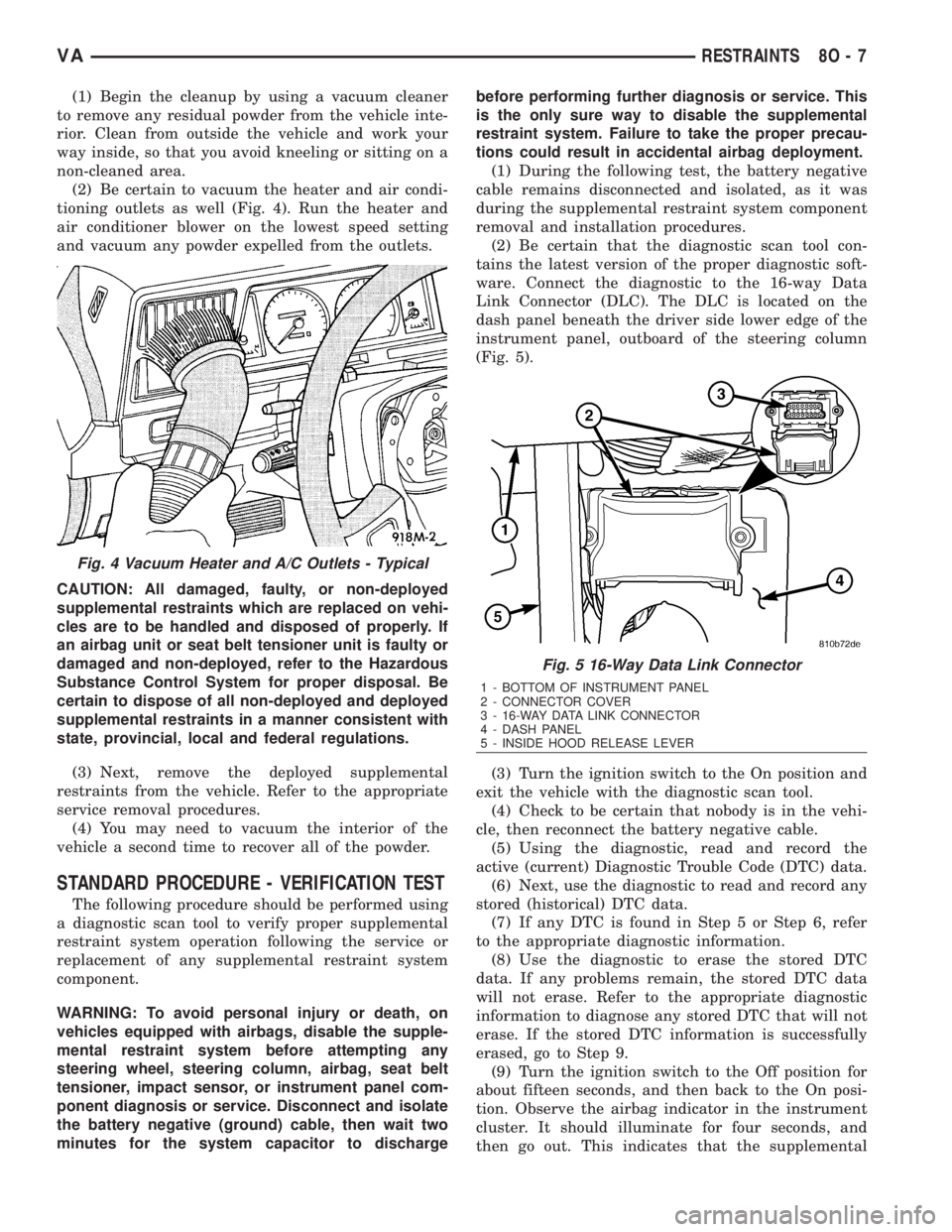
ware. Connect the diagnostic to the 16-way Data
Link Connector (DLC). The DLC is located on the
dash panel beneath the driver side lower edge of the
instrument panel, outboard of the steering column
(Fig. 5).
(3) Turn the ignition switch to the On position and
exit the vehicle with the diagnostic scan tool.
(4) Check to be certain that nobody is in the vehi-
cle, then reconnect the battery negative cable.
(5) Using the diagnostic, read and record the
active (current) Diagnostic Trouble Code (DTC) data.
(6) Next, use the diagnostic to read and record any
stored (historical) DTC data.
(7) If any DTC is found in Step 5 or Step 6, refer
to the appropriate diagnostic information.
(8) Use the diagnostic to erase the stored DTC
data. If any problems remain, the stored DTC data
will not erase. Refer to the appropriate diagnostic
information to diagnose any stored DTC that will not
erase. If the stored DTC information is successfully
erased, go to Step 9.
(9) Turn the ignition switch to the Off position for
about fifteen seconds, and then back to the On posi-
tion. Observe the airbag indicator in the instrument
cluster. It should illuminate for four seconds, and
then go out. This indicates that the supplemental
Fig. 4 Vacuum Heater and A/C Outlets - Typical
Fig. 5 16-Way Data Link Connector
1 - BOTTOM OF INSTRUMENT PANEL
2 - CONNECTOR COVER
3 - 16-WAY DATA LINK CONNECTOR
4 - DASH PANEL
5 - INSIDE HOOD RELEASE LEVER
VARESTRAINTS 8O - 7
Page 1000 of 2305
Communication Interface (SCI) data bus line for sup-
plemental restraint system programming or diagno-
sis and testing through the 16-way Data Link
Connector (DLC) located on the dash panel below the
driver side end of the instrument panel. A hard wired
output from the ACM is used for control of the airbag
indicator in the ElectroMechanical Instrument Clus-
ter (EMIC). (Refer to 8 - ELECTRICAL/INSTRU-
MENT CLUSTER/AIRBAG INDICATOR -
OPERATION).
The ACM microprocessor continuously monitors all
of the supplemental restraint system electrical cir-
cuits to determine the system readiness. If the ACM
detects a monitored system fault, it sets an appropri-
ate Diagnostic Trouble Code (DTC) and sends an out-
put to the EMIC to turn on the airbag indicator. The
ACM illuminates the indicator for about four seconds
each time the ignition switch is turned to the On
position as a bulb test. If the indicator remains illu-
minated for about ten seconds after the ignition
switch is turned to the On position, the ACM has
detected a non-critical fault that poses no danger to
the vehicle occupants. If the airbag indicator illumi-
nates solid (not flashing) while driving or stays on
longer than ten seconds following the bulb test, the
ACM has detected a critical fault that may cause the
airbags not to deploy when required or to deploy
when not required. An active fault only remains for
the duration of the fault, or in some cases, for the
duration of the current ignition switch cycle, while a
stored fault causes a DTC to be stored in memory by
the ACM.
The ACM receives battery current through a fused
ignition switch output circuit. The ACM receives
ground through a ground circuit and take out of the
vehicle wire harness. This take out has an eyelet ter-
minal connector secured by a nut to a ground stud on
the floor panel directly below the ACM within the
driver side seat riser. A case ground is also provided
for the ACM through a ground circuit and eyelet ter-
minal connector secured under the left rear ACM
mounting screw. These connections allow the ACM to
be operational whenever the ignition switch is in the
On position.
The ACM also contains an energy-storage capaci-
tor. When the ignition switch is in the On position,
this capacitor is continually being charged with
enough electrical energy to deploy the supplemental
restraint components for up to one second following a
battery disconnect or failure. The purpose of the
capacitor is to provide backup supplemental restraint
system protection in case there is a loss of battery
current supply to the ACM during an impact.
Two sensors are contained within the ACM, an
electronic impact sensor and a safing sensor. These
electronic sensors are accelerometers that sense the
rate of vehicle deceleration, which provide verifica-
tion of the direction and severity of an impact. Onmodels equipped with optional side curtain airbags,
the ACM also monitors inputs from two remote side
impact sensors located within the left and right front
door step wells to control deployment of the side cur-
tain airbag units.
The safing sensor is an electronic accelerometer
sensor within the ACM that provides an additional
logic input to the ACM microprocessor. The safing
sensor is used to verify the need for a supplemental
restraint deployment by detecting impact energy of a
lesser magnitude than that of the primary electronic
impact sensors, and must exceed a safing threshold
in order for the airbags to deploy. Vehicles equipped
with optional side curtain airbags feature a second
safing sensor within the ACM to provide confirma-
tion to the ACM microprocessor of side impact forces.
This second safing sensor is a bi-directional unit that
detects impact forces from either side of the vehicle.
Pre-programmed decision algorithms in the ACM
microprocessor determine when the deceleration rate
as signaled by the impact sensors and the safing sen-
sors indicate an impact that is severe enough to
require supplemental restraint system protection.
When the programmed conditions are met, the ACM
sends the proper electrical signals to deploy the front
airbags and seat belt tensioners and, if the vehicle is
so equipped, either side curtain airbag unit.
The ACM also provides a hard wired electrical
crash signal output following a supplemental
restraint deployment event. This output is used to
signal other electronic modules in the vehicle to pro-
vide their enhanced accident response features,
which include automatically disabling the engine
from running and unlocking all of the doors. How-
ever, these responses are each dependent upon the
circuits, components, and modules controlling these
features remaining intact from collateral damage
incurred during the vehicle impact.
A single ACM is used for all variations of the sup-
plemental restraint system available in this vehicle.
This ACM is programmable and in order to function
properly it must be programmed for the correct vehi-
cle supplemental restraint system equipment using
an initialization procedure. The initialization proce-
dure requires the use of a diagnostic scan tool. Refer
to the appropriate diagnostic information. The hard
wired inputs and outputs for the ACM may be diag-
nosed and tested using conventional diagnostic tools
and procedures. However, conventional diagnostic
methods will not prove conclusive in the diagnosis of
the ACM or the supplemental restraint system. The
most reliable, efficient, and accurate means to diag-
nose the ACM or the supplemental restraint system
requires the use of a diagnostic scan tool. Refer to
the appropriate diagnostic information.
VARESTRAINTS 8O - 9