battery MERCEDES-BENZ SPRINTER 2014 MY14 Operator’s Manual
[x] Cancel search | Manufacturer: MERCEDES-BENZ, Model Year: 2014, Model line: SPRINTER, Model: MERCEDES-BENZ SPRINTER 2014Pages: 338, PDF Size: 6.78 MB
Page 70 of 338
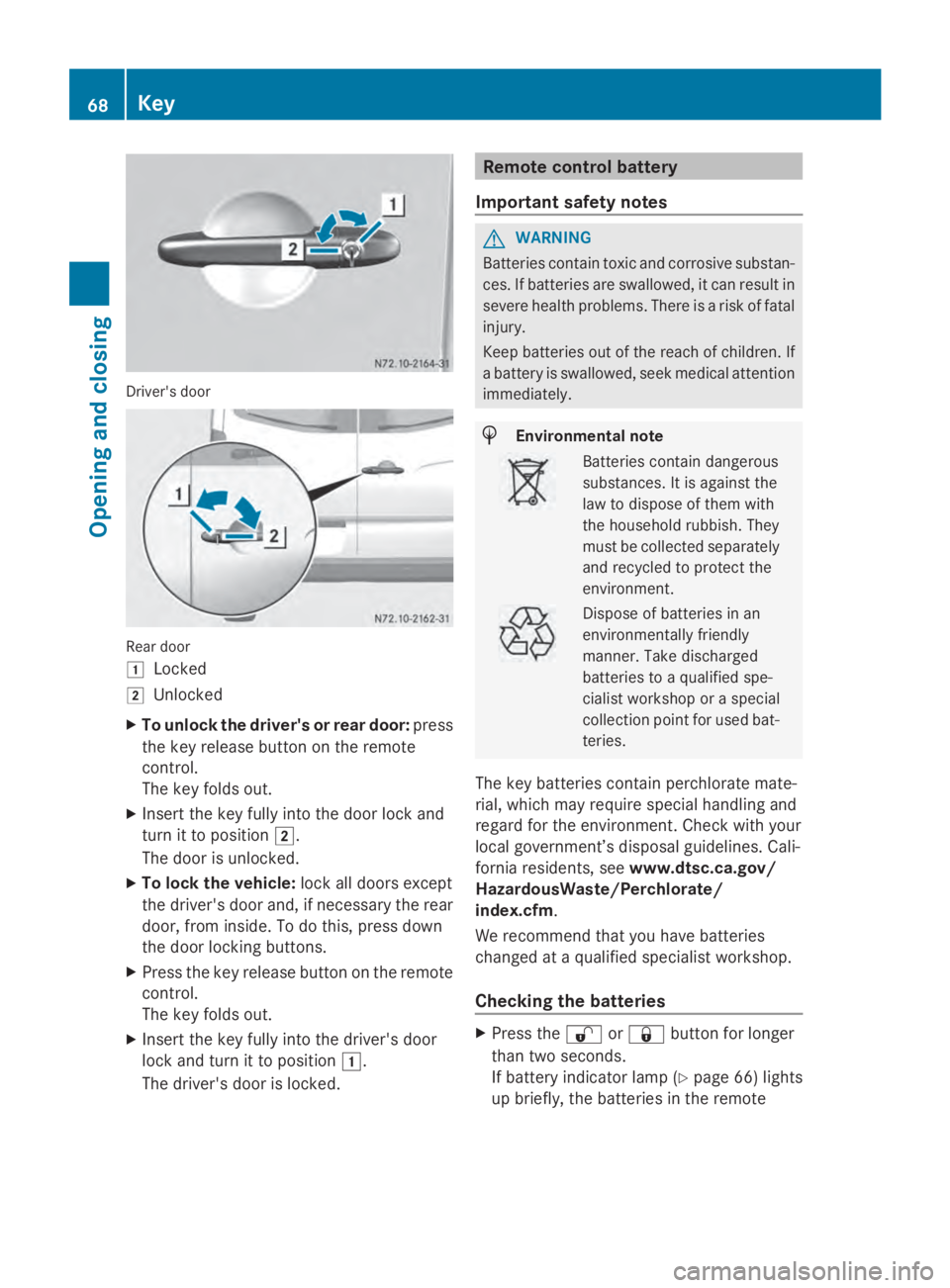
Driver's door
Rear door
0047
Locked
0048 Unlocked
X To unlock the driver's or rear door: press
the key release button on the remote
control.
The key folds out.
X Insert the key fully into the door lock and
turn it to position 0048.
The door is unlocked.
X To lock the vehicle: lock all doors except
the driver's door and, if necessary the rear
door, from inside. To do this, press down
the door locking buttons.
X Press the key release button on the remote
control.
The key folds out.
X Insert the key fully into the driver's door
lock and turn it to position 0047.
The driver's door is locked. Remote control battery
Important safety notes G
WARNING
Batteries contain toxic and corrosive substan-
ces. If batteries are swallowed, it can result in
severe health problems. There is a risk of fatal
injury.
Keep batteries out of the reach of children. If
a battery is swallowed, seek medical attention
immediately. H
Environmental note Batteries contain dangerous
substances. It is against the
law to dispose of them with
the household rubbish. They
must be collected separately
and recycled to protect the
environment.
Dispose of batteries in an
environmentally friendly
manner. Take discharged
batteries to a qualified spe-
cialist workshop or a special
collection point for used bat-
teries.
The key batteries contain perchlorate mate-
rial, which may require special handling and
regard for the environment. Check with your
local government’s disposal guidelines. Cali-
fornia residents, see www.dtsc.ca.gov/
HazardousWaste/Perchlorate/
index.cfm.
We recommend that you have batteries
changed at a qualified specialist workshop.
Checking the batteries X
Press the 0036or0037 button for longer
than two seconds.
If battery indicator lamp (Y page 66) lights
up briefly, the batteries in the remote 68
KeyOpening and closing
Page 71 of 338
control still have sufficient charge. Other-
wise, change the batteries immediately.
i If the remote control is checked within the
signal reception range of the vehicle, press-
ing the 0037or0036 button:
R lock or
R unlock the vehicle
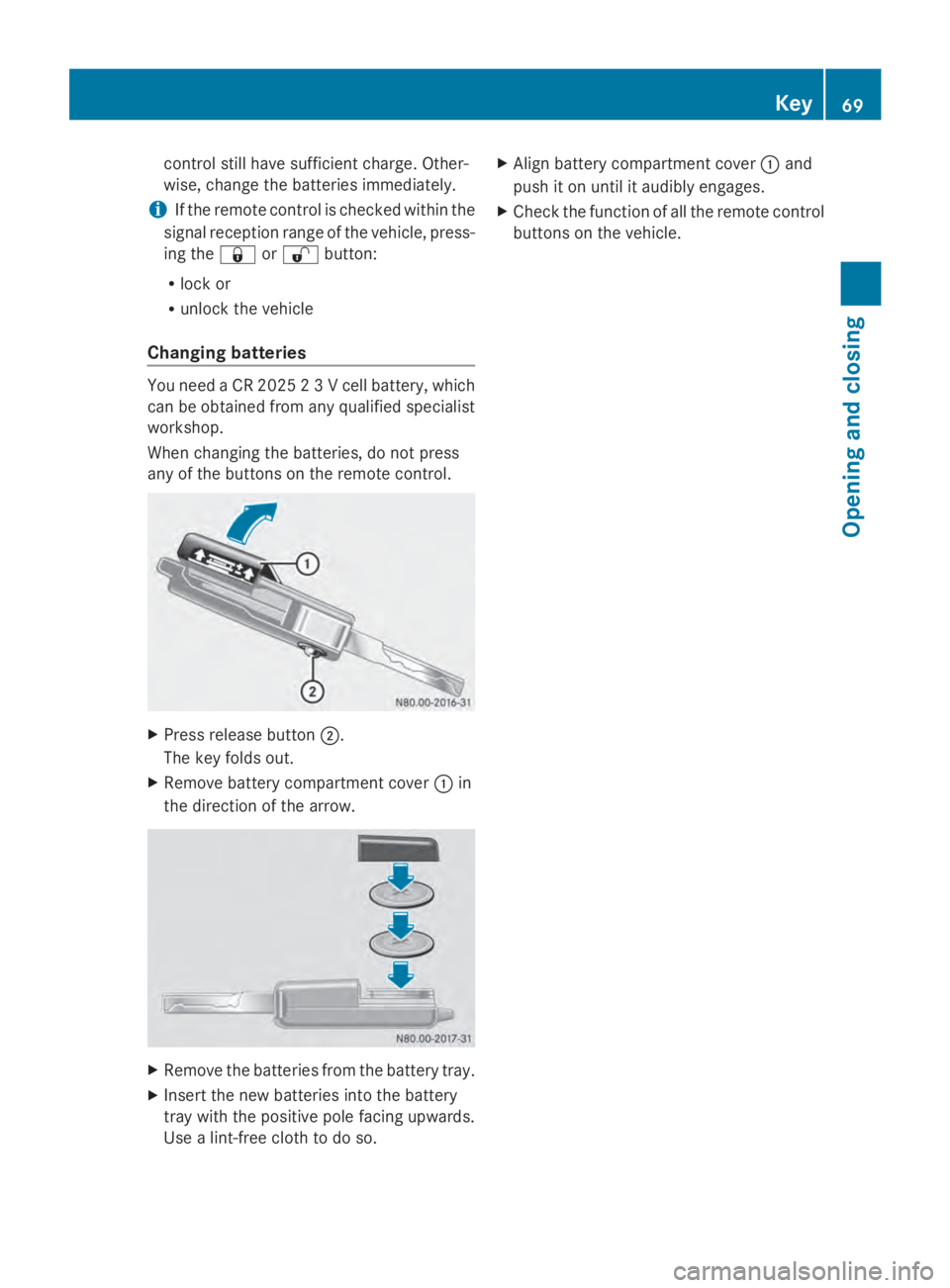
Changing batteries You need a CR 2025 2 3 V cell battery, which
can be obtained from any qualified specialist
workshop.
When changing the batteries, do not press
any of the buttons on the remote control. X
Press release button 0044.
The key folds out.
X Remove battery compartment cover 0043in
the direction of the arrow. X
Remove the batteries from the battery tray.
X Insert the new batteries into the battery
tray with the positive pole facing upwards.
Use a lint-free cloth to do so. X
Align battery compartment cover 0043and
push it on until it audibly engages.
X Check the function of all the remote control
buttons on the vehicle. Key
69Opening and closing Z
Page 72 of 338
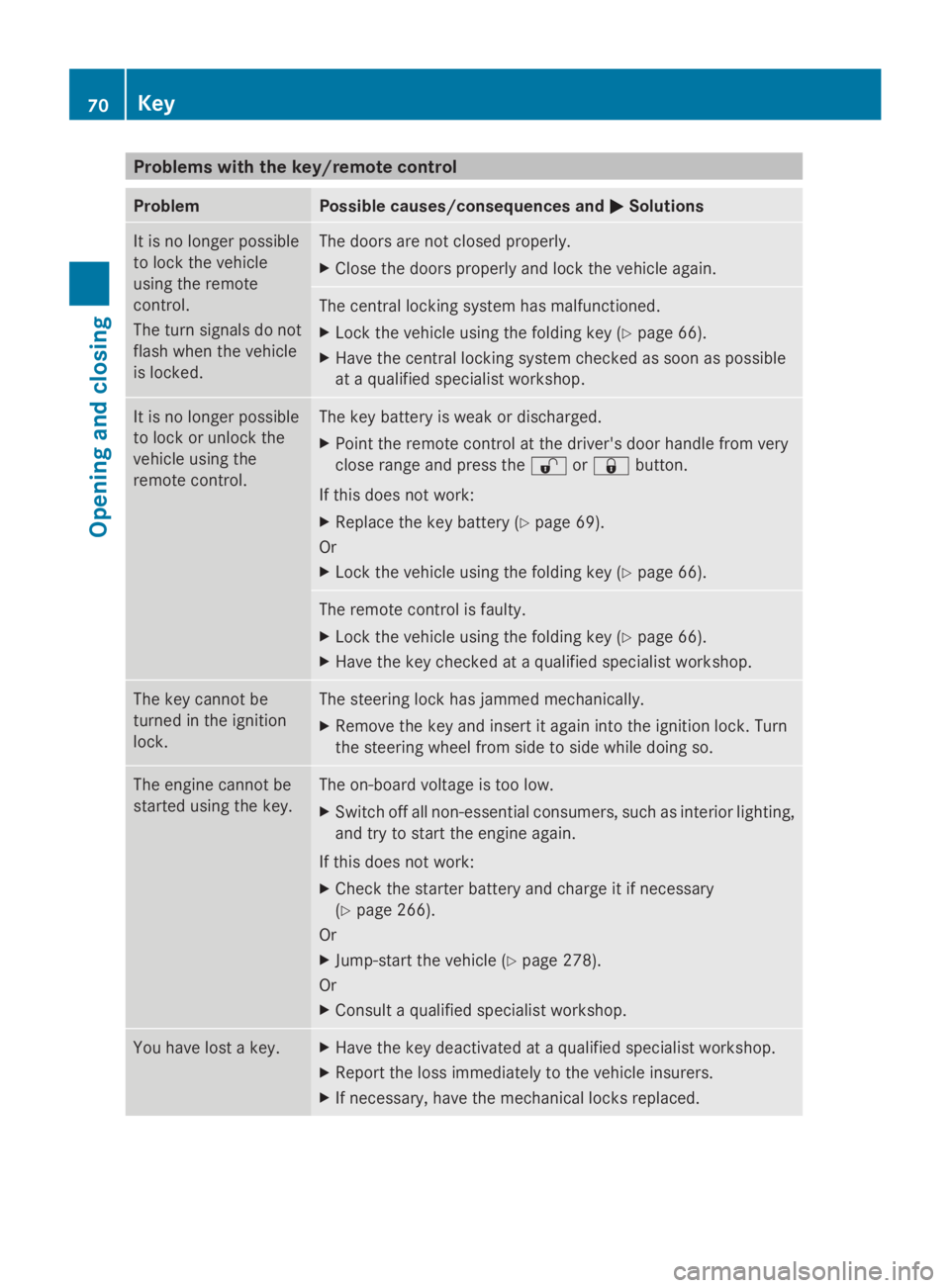
Problems with the key/remote control
Problem Possible causes/consequences and
0050
0050Solutions It is no longer possible
to lock the vehicle
using the remote
control.
The turn signals do not
flash when the vehicle
is locked. The doors are not closed properly.
X
Close the doors properly and lock the vehicle again. The central locking system has malfunctioned.
X
Lock the vehicle using the folding key (Y page 66).
X Have the central locking system checked as soon as possible
at a qualified specialist workshop. It is no longer possible
to lock or unlock the
vehicle using the
remote control. The key battery is weak or discharged.
X
Point the remote control at the driver's door handle from very
close range and press the 0036or0037 button.
If this does not work:
X Replace the key battery (Y page 69).
Or
X Lock the vehicle using the folding key (Y page 66). The remote control is faulty.
X
Lock the vehicle using the folding key (Y page 66).
X Have the key checked at a qualified specialist workshop. The key cannot be
turned in the ignition
lock. The steering lock has jammed mechanically.
X
Remove the key and insert it again into the ignition lock. Turn
the steering wheel from side to side while doing so. The engine cannot be
started using the key. The on-board voltage is too low.
X Switch off all non-essential consumers, such as interior lighting,
and try to start the engine again.
If this does not work:
X Check the starter battery and charge it if necessary
(Y page 266).
Or
X Jump-start the vehicle (Y page 278).
Or
X Consult a qualified specialist workshop. You have lost a key. X
Have the key deactivated at a qualified specialist workshop.
X Report the loss immediately to the vehicle insurers.
X If necessary, have the mechanical locks replaced. 70
KeyOpening and closing
Page 90 of 338
X
Make sure that the key is in position 1or
2 in the ignition lock.
X To switch on: press the0072button
repeatedly until the desired heating level
has been set.
X To switch off: press the0072button
repeatedly until all indicator lamps go out.
If the indicator lamps of the current heating
level in the 0072button flash, the seat heat-
ing has switched off automatically. In this
case, too many electrical consumers are
switched on or the battery charge is not suf-
ficient. The seat heating will automatically
switch back to the current heating level when
enough on-board voltage is available again. Steering wheel
G
WARNING
You could lose control of your vehicle if you
do the following while driving:
R adjust the driver's seat, head restraint,
steering wheel or mirrors
R fasten the seat belt
There is a risk of an accident.
Adjust the driver's seat, head restraint, steer-
ing wheel and mirror and fasten your seat belt
before starting the engine. G
WARNING
If the steering wheel is unlocked while the
vehicle is in motion, it could change position
unexpectedly. This could cause you to lose
control of the vehicle. There is a risk of an
accident.
Before starting off, make sure the steering
wheel is locked. Never unlock the steering
wheel while the vehicle is in motion. G
WARNING
Children could injure themselves if they
adjust the steering wheel. There is a risk of
injury. When leaving the vehicle, always take the
SmartKey with you and lock the vehicle. Never
leave children unsupervised in the vehicle.
The steering wheel can still be adjusted if the
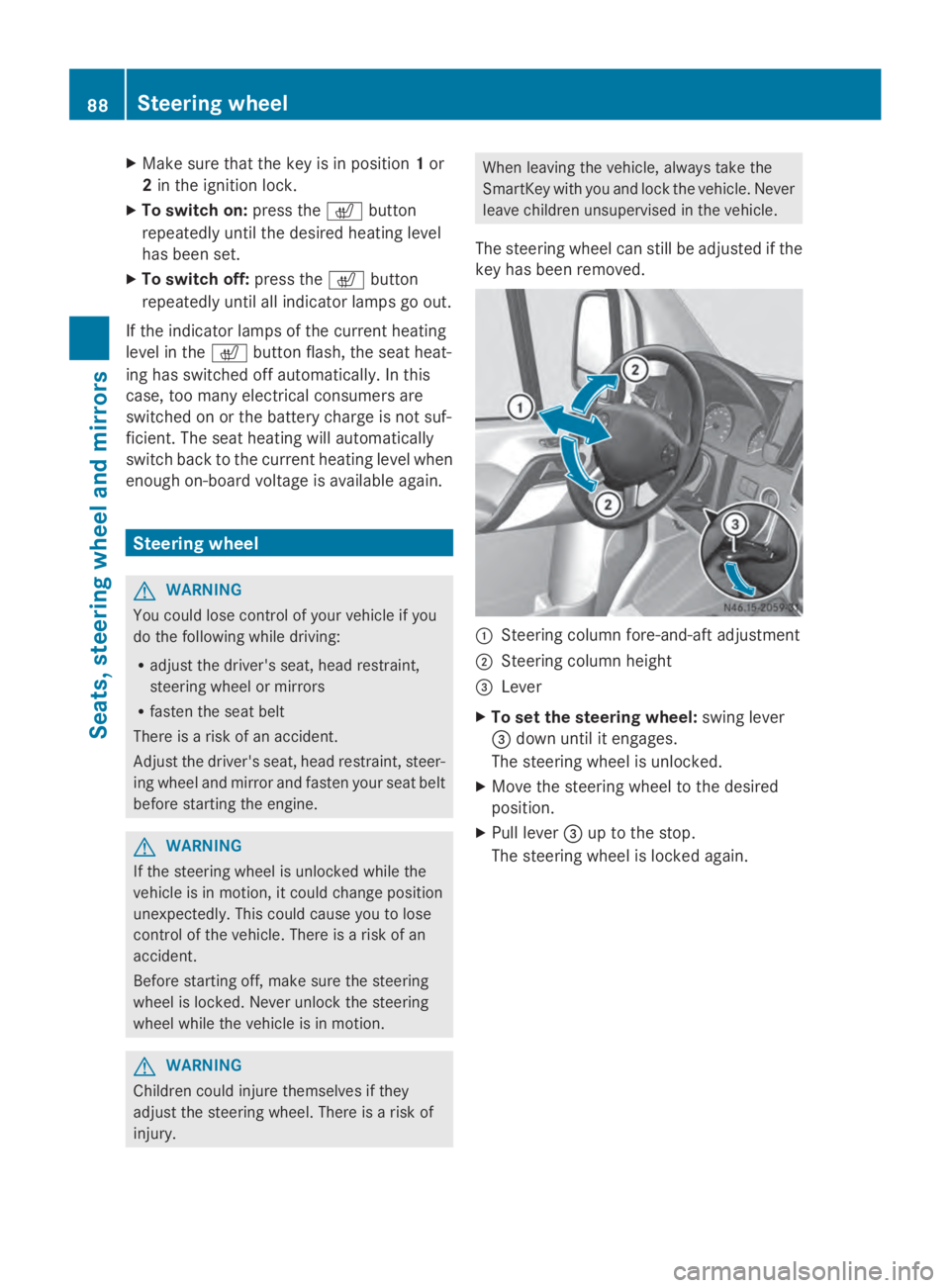
key has been removed. 0043
Steering column fore-and-aft adjustment
0044 Steering column height
0087 Lever
X To set the steering wheel: swing lever
0087 down until it engages.
The steering wheel is unlocked.
X Move the steering wheel to the desired
position.
X Pull lever 0087up to the stop.
The steering wheel is locked again. 88
Steering wheelSeats, steering wheel and mirrors
Page 102 of 338
Motion detector
G
WARNING
The motion detector sends the invisible infra-
red radiation emitted by LEDs (light emitting
diodes).
These LEDs are classified as class 1M lasers
and can damage the retina if you:
R look directly into the unfiltered laser beam
of the motion detector for an extended
period
R look directly into the laser beam of the
motion detector using optical instruments,
e.g. eyeglasses or a magnifying glass.
There is a risk of injury.
Never look directly into the motion detector.
The cargo compartment lighting is also
switched on by the motion detector in the
cargo compartment of Cargo Vans equipped
with this feature.
If the motion detector detects a movement in
the cargo compartment when the vehicle is
stationary, the cargo compartment lighting
switches on for approximately two minutes.
The cargo compartment lighting can be
switched on by the motion detector within
four seconds if:
R the rear interior light switch (Y page 99) is
set to automatic control.
R the vehicle is stationary, the parking brake
is applied and the brake pedal is not being
depressed
Or
R the selector lever is in position Pon vehi-
cles with automatic transmission and the
brake pedal is not being depressed and
R the vehicle has not been locked from the
outside using the key
The motion detector switches off automati-
cally if no change is detected in the vehicle
for several hours, e.g. if a door is opened, if
the ignition key is turned, etc. This prevents
the battery from becoming discharged. Changing bulbs
Important safety notes
G
DANGER
Xenon bulbs carry a high voltage. You can get
an electric shock if you remove the cover of
the Xenon bulb and touch the electrical con-
tacts. There is a risk of fatal injury.
Never touch the parts or the electrical con-
tacts of the Xenon bulb. Always have work on
the Xenon bulbs carried out at a qualified spe-
cialist workshop. G
WARNING
Bulbs, lamps and connectors can get very hot
when operating. If you change a bulb, you
could burn yourself on these components.
There is a risk of injury.
Allow these components to cool down before
changing a bulb.
! Make sure the bulbs are always securely
installed.
If your vehicle is equipped with Bi-Xenon
bulbs, you can recognize this by the following:
the cone of light from the Xenon bulbs moves
from the top to the bottom and back again
when you start the engine. For this to be
observed, the low-beam headlamps must be
switched on before starting the engine.
The bulbs and lamps are an essential compo-
nent of vehicle safety. You must therefore
make sure that these function correctly at all
times. Have the headlamp setting checked
regularly.
R Always switch off the vehicle's lighting sys-
tem before changing a bulb.
This will prevent a short circuit.
R Do not touch the glass tube of new bulbs
with your bare hands. Always use a clean,
lint-free cloth or only touch the base of the
bulb when installing.
Even minor contamination can burn into
the glass surface and reduce the service life
of the bulbs. 100
Changing bulbsLights and windshield wipers
Page 125 of 338
control system in the vehicle. The auxiliary
heating heats the air in the vehicle interior to
the temperature set.
If your vehicle is equipped with a hot-water
auxiliary heater, the auxiliary heating also
keeps the coolant warm. This way, the load
on the engine is minimized and fuel is saved.
The heater booster function (Y page 130) of
the auxiliary heating supports the climate
control system when the engine is running
and the outside temperature is low.
You can use the auxiliary heating at an out-
side temperature of up to 39 ‡ (4 †). At an
outside temperature above 39 ‡ (4 †) the
auxiliary heating system and the heater boos-
ter function switch off automatically. Heating time
The heating time operating the auxiliary heat-
ing when the vehicle is stationary without the
engine running depends on the outside tem-
perature. Outside tempera-
ture Heating time
Above 23 ‡ (
00F85 †) Approx. 20 minutes
23 ‡ (
00F85 †) to 5 ‡
(00F815 †) Approx. 40 minutes
Below 5 ‡ (00F815 †) Approx. 50 minutes
You can then switch on the auxiliary heating
again.
If you do not start the engine for a while, the
total duration of heating is limited to a maxi-
mum of 120 minutes to protect the starter
battery. Switching on the auxiliary heating is
then automatically disabled. You can, for
example, switch on the auxiliary heating with-
out the engine running if the outside temper-
ature is
00F85 ‡ (00F820 †) a maximum of two
times. If you try it again, the indicator lamps
in the 0084button (Y page 124) flash alter-
nately for approximately 2 minutes to signal switch-on interlock. The auxiliary heating can-
not be switched on without starting the
engine.
When the charge status of the starter battery
is sufficient again, the switch-on interlock will
be deactivated. To charge the starter battery,
let the engine run. The engine runtime
required to reach the necessary charge sta-
tus depends on the outside temperature.
Outside tempera-
ture Engine runtime
Above 32 ‡ (0 †) Approx. 10 minutes
32 ‡ (0 †) to 14 ‡
(00F810 †) Approx. 15 minutes
Below 14 ‡ (
00F810 †) Approx. 20 minutes
Before switching on
X Check the fuel level and top up if necessary.
The auxiliary heating is operated directly
using the vehicle's fuel. The tank must be
at least a quarter full to ensure that the
auxiliary heating functions.
X Switch on climate control (Y page 116).
X Set the temperature control to the desired
temperature (Y page 117).
X Set the air distribution as required
(Y page 117).
X Open the center (Y page 121) and side air
vents ( Ypage 121) and set them to the
middle position.
i The auxiliary heating automatically
switches to heater booster mode after the
engine is started. Operating the auxiliary heating system
123Climate control Z
Page 128 of 338
Signaling Meaning
Flashes red Auxiliary heating switched
off
Lights up
green Auxiliary heating switched
on
Flashes green Change operating duration
active
Flashes alter-
nately red and
green Remote control in syn-
chronizing mode
i
When the remote control battery is weak,
indicator lamp 0043flashes red rapidly.
Replace the remote control battery
(Y page 130).
You can find further information on the lamp
status in the "Problems with the auxiliary
heating" section (Y page 132).
Switching the remote control on/off The remote control switches to standby mode
after 10 seconds. Indicator lamp 0043goes out.
X To switch on: press and hold the 00D0
button until indicator lamp 0043lights up red.
If a connection between the remote control
and the receiver in the vehicle has been
established and indicator lamp 0043:
R flashes red, the auxiliary heating is
switched off.
R lights up green, the auxiliary heating is
switched on.
X To switch off: press and hold the 00D0
button until indicator lamp 0043goes out.
Switching the auxiliary heating on/off X
Switch on the remote control.
X To switch on: when indicator lamp 0043
flashes red, press the 0070button.
During data transmission, indicator
lamp 0043lights up red. When indicator lamp
0043lights up green, the
auxiliary heating is switched on.
X To switch off: when indicator lamp 0043
lights up green, press the 0070button.
During data transmission, indicator
lamp 0043lights up red.
When indicator lamp 0043flashes red, the
auxiliary heating is switched off.
Changing the operating duration X
Switch on the remote control.
X When indicator lamp 0043flashes red, press
00D0 and0070 simultaneously.
Indicator lamp 0043flashes green.
X Press the 00D0button repeatedly until the
desired operating duration is shown.
R 20 minutes
Indicator lamp 0043flashes green twice.
R 30 minutes
Indicator lamp 0043flashes green three
times.
R 40 minutes
Indicator lamp 0043flashes green four
times.
X Press the 0070button.
During data transmission, indicator
lamp 0043lights up red.
If indicator lamp 0043emits two long, green
flashes, the selected operating duration is
stored.
i If no adjustment is made, indicator
lamp 0043flashes six times and the remote
control goes into standby mode.
Synchronizing the remote control X
Press the 0084auxiliary heating button in
the control panel (Y page 124) for longer
than 10 seconds.
When you press and hold the 0084button,
the red indicator lamp lights up in the but-
ton. 126
Operating the auxiliary heating systemClimate control
Page 130 of 338
0087
Display panel for: time, heating level
and operating duration
00D5 Continuous operation mode active
00D1 Heating level set
0085 Selects options in program column 0043or
menu bar 0044(forwards)
Increases values
0083 Confirms a selection or setting
0084 Status bar
0084 Heating mode activated
006B Activates the timer
Cancels or ends settings in a menu
006C Selects options in program column 0043or
menu bar 0044(backwards)
Reduces values
Activating the timer The timer switches to standby mode after
10 seconds. The display goes off.
X Press and hold the 00D0button until the
menu bar appears in the display and the
time is shown.
Setting the day, time and operating
duration You must reset the day, time, and default
value for the operating duration:
R during initial operation
R after a voltage supply interruption (e.g. if
the battery has been disconnected)
R after a malfunction.
You can find further information on malfunc-
tions in the "Problems with the auxiliary heat-
ing" section (Y page 132).
X Press the 00CFor00DB button until the
0045 symbol in menu bar 0044flashes.
X Press the 0070button.
In program column 0043, the day selected
flashes.
X Press the 00CFor00DB button to set the
desired day. X
Press the 0070button.
The day selected is stored. The hour setting
of the clock flashes.
X In the same way, set the hour and subse-
quently the minutes, then confirm by press-
ing the 0070button.
The time is stored. Program column 0043dis-
appears and the operating duration
flashes.
i The operating duration set is the default
setting for immediate heating mode. You
can set the operating duration from 10 to
120 minute sor activate continuous opera-
tion.
X Using the 00CFor00DB button, set the
minute value or select the 00D5symbol for
continuous operation.
X Press the 0070button.
The operating duration is stored. The time
is shown.
Activating/deactivating immediate
heating mode X
To switch on: press the00CFor00DB but-
ton until the 0084symbol in the menu bar
flashes.
X Press the 0070button.
The operation duration flashes in the dis-
play.
i You can preset the default value that is
shown (Y page 128).
X Using the 00CFor00DB button, set the
minute value (10 – 120) or select the
00D5 symbol for continuous operation.
X Press the 0070button.
Immediate heating mode is activated. The
time and the 0084symbol appear.
X To switch off: press the00CFor00DB but-
ton until the 0084symbol flashes in the
menu bar, and then press the 0070button.
Immediate heating mode is deactivated.
The 0084 symbol disappears. 128
Operating the auxiliary heating systemClimate control
Page 131 of 338
The auxiliary heating operates for another
two minutes and then switches off auto-
matically.
i If you switch off the ignition while imme-
diate heating mode (operating duration
10– 120 minutes) is active, immediate
heating mode is also switched off. The aux-
iliary heating operates for another
two minutes and then switches off auto-
matically.
If you have set continuous operation as the
operating duration and you switch off the
ignition, the auxiliary heating switches off
automatically after about 15 minutes. If, in
the remaining time, the ignition is switched
on again, continuous operation of the aux-
iliary heating continues.
Setting the preselection time G
WARNING
The auxiliary heating must not be operated if
there are highly flammable substances
nearby or in enclosed spaces without an
extraction system. Make sure that the auxili-
ary heating is not switched on automatically
by the timer in such places. If this possibility
exists, deactivate the respective programmed
time.
You can set three preselection times using
the timer.
Observe that when setting the preselection
time, this does not correspond to the switch-
on time but to the switch-off or departure
time. The auxiliary heating system starts up
automatically and runs for the operating dura-
tion set prior to departure.
Example: For a planned departure time of
7:00 a.m., you should also set the preselec-
tion time to 7:00 a.m. If the operating dura-
tion is preset to 40 minutes, for example, the
auxiliary heating starts up at 6:20 a.m.
If an identical time (time and day) is set in the
preselection memory, only the last time set is
saved. After a malfunction or if the battery has been
disconnected, you must set the preselection
times again. You can find further information
on malfunctions in the "Problems with the
auxiliary heating" section ( Ypage 132).
X Press the 00CFor00DB button until the
0045 symbol in the menu bar flashes.
X Press the 0070button.
In the program column, the 0059preselec-
tion memory numbers appear. The selected
preselection memory flashes.
X Press the 00CFor00DB button to select the
desired preselection memory.
X Press the 0070button.
The preselection memory is selected. The
days are shown.
X Set the day and time as described in the
"Setting the day, time and operating dura-
tion" section (Y page 128).
The preselection time is stored. The pro-
gram column disappears. In the display
panel, the on
on message and the 0084sym-
bol appear.
X Press the 0070button.
The operating duration flashes.
X Press the 00CFor00DB button to set the
minute value (10 – 120).
X Press the 0070button.
The operating duration for the preselection
time is saved. The time and number of the
selected preselection memory are shown.
i The preselection memory that will be acti-
vated next is underlined. Additionally, the
day that is set appears.
Deactivating the preselection time X
Carry out the steps as described in the
"Setting the preselection time" section. Operating the auxiliary heating system
129Climate control Z
Page 132 of 338
If the
0084 symbol in the status bar is shown:
X Press the 00CFor00DB button until the
off
off message in the display panel is shown.
X Press the 0070button.
The preselection time is deactivated. The
time is shown.
Setting the heating level You can set the heating level to a range
between 10 and 30.
The heating level corresponds to a preselec-
tion temperature for the vehicle interior. This
is a guide value and may, depending on the
outside temperature, differ from the actual
vehicle interior temperature.
X Press the 00CFor00DB button until the
00D1 symbol in the menu bar flashes.
X Press the 0070button.
The heating level display flashes.
X Using the 00CFand00DB buttons, set the
desired heating level to a range between 10
and 30.
X Press the 0070button.
The heating level is set and the 0084sym-
bol appears. Switching the heater booster function
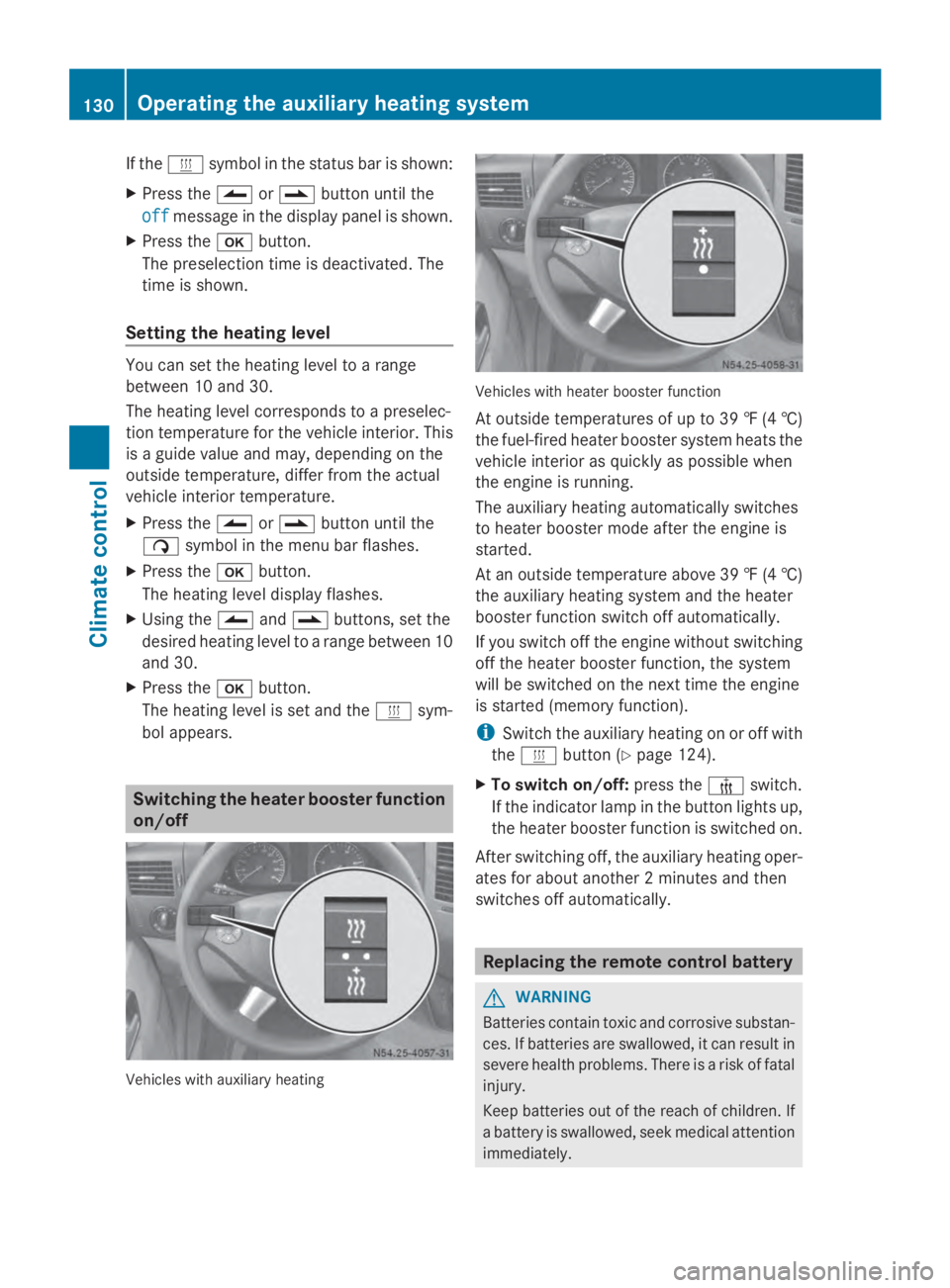
on/off Vehicles with auxiliary heating Vehicles with heater booster function
At outside temperatures of up to 39 ‡
(4†)
the fuel-fired heater booster system heats the
vehicle interior as quickly as possible when
the engine is running.
The auxiliary heating automatically switches
to heater booster mode after the engine is
started.
At an outside temperature above 39 ‡ (4†)
the auxiliary heating system and the heater
booster function switch off automatically.
If you switch off the engine without switching
off the heater booster function, the system
will be switched on the next time the engine
is started (memory function).
i Switch the auxiliary heating on or off with
the 0084 button (Y page 124).
X To switch on/off: press the006Aswitch.
If the indicator lamp in the button lights up,
the heater booster function is switched on.
After switching off, the auxiliary heating oper-
ates for about another 2 minutes and then
switches off automatically. Replacing the remote control battery
G
WARNING
Batteries contain toxic and corrosive substan-
ces. If batteries are swallowed, it can result in
severe health problems. There is a risk of fatal
injury.
Keep batteries out of the reach of children. If
a battery is swallowed, seek medical attention
immediately. 130
Operating the auxiliary heating systemClimate control