brakes MERCEDES-BENZ SPRINTER 2014 MY14 Operator’s Manual
[x] Cancel search | Manufacturer: MERCEDES-BENZ, Model Year: 2014, Model line: SPRINTER, Model: MERCEDES-BENZ SPRINTER 2014Pages: 338, PDF Size: 6.78 MB
Page 158 of 338
When you return from your journey, and as
close to the border as possible, you will need
to:
R remove the adhesive surfaces from your
halogen headlamps and clean the glass of
the headlamps if necessary
R have the Bi-Xenon headlamps reset to
asymmetrical low beam at a qualified spe-
cialist workshop Transport by rail
Transporting your vehicle by rail may be sub-
ject to certain restrictions or require special
measures to be taken in some countries due
to varying tunnel heights and loading stand-
ards.
You can obtain further information from any
authorized Sprinter dealer. Braking
Important safety notes G
WARNING
If you shift down on a slippery road surface in
an attempt to increase the engine's braking
effect, the drive wheels could lose their grip.
There is an increased danger of skidding and
accidents.
Do not shift down for additional engine brak-
ing on a slippery road surface.
Downhill gradients !
Depressing the brake pedal constantly
results in excessive and premature wear to
the brake pads.
On long and steep downhill gradients, you
should change down to shift range 0048or0047
in good time. This should be observed in par-
ticular when driving with a laden vehicle and
when towing a trailer. i
You must also change the shift range in
good time when cruise control is switched
on.
You thereby make use of the braking effect of
the engine and do not have to brake as often
to maintain the speed. This relieves the load
on the service brake and prevents the brakes
from overheating and wearing too quickly.
Heavy and light loads G
WARNING
If you rest your foot on the brake pedal while
driving, the braking system can overheat. This
increases the stopping distance and can even
cause the braking system to fail. There is a
risk of an accident.
Never use the brake pedal as a footrest. Never
depress the brake pedal and the accelerator
pedal at the same time.
! Depressing the brake pedal constantly
results in excessive and premature wear to
the brake pads.
If the brakes have been subjected to a heavy
load, do not stop the vehicle immediately.
Drive on for a short while. The brakes are
cooled down more quickly in the airflow.
Wet road surfaces If you have been driving for a long time in
heavy rain without braking, there may be a
delayed response when you first apply the
brakes. This may also occur after driving
through a car wash or deep water.
You must depress the brake pedal more
firmly. Maintain a longer distance to the vehi-
cle in front.
While paying attention to the traffic condi-
tions, you should brake the vehicle firmly
after driving on a wet road surface or through
a car wash. This heats the brake discs, so that
they dry more quickly, which protects them
against corrosion.156
Driving tipsDriving and parking
Page 159 of 338
Limited braking performance on salt-
treated roads When driving on salted roads, salt may start
to build up on the brake disks and brake pads.
This can increase braking distances consid-
erably.
Maintain a greater distance to the vehicle in
front.
To remove any build up of salt that may have
formed:
X Apply the brakes at the start of the journey,
occasionally during journey and at the end
of the journey. Make sure that you do not
endanger other road users when doing so.
Parking brake G
WARNING
If you must brake the vehicle with the parking
brake, the braking distance is considerably
longer and the wheels could lock. There is an
increased danger of skidding and accidents.
Only use the parking brake to brake the vehi-
cle when the service brake is faulty. Do not
apply the parking brake too firmly. If the
wheels lock, release the parking brake until
the wheels begin turning again.
When driving on wet roads or dirt-covered
surfaces, road salt and/or dirt may get into
the parking brake. This causes corrosion and
a reduction of braking force.
In order to prevent this, drive with the parking
brake lightly applied from time to time. When
doing so, drive for a distance of approximately
110 yds (100 m) at a maximum speed of
12 mph (20 km/h).
The brake lamps are not illuminated when you
brake the vehicle using the parking brake. Driving in wet conditions
Braking on wet road surfaces If you have been driving for a long time in
heavy rain without braking, there may be a
delayed response when you first apply the
brakes. This may also occur after driving
through a car wash or deep water.
You must depress the brake pedal more
firmly. Maintain a longer distance to the vehi-
cle in front.
While paying attention to the traffic condi-
tions, you should brake the vehicle firmly
after driving on a wet road surface or through
a car wash. This heats the brake discs, so that
they dry more quickly, which protects them
against corrosion.
Hydroplaning G
WARNING
There is a danger of hydroplaning occurring,
even if you are driving slowly and your tires
have sufficient tread depth, depending on the
depth of water on the road. There is a risk of
an accident.
For this reason, avoid tire ruts and brake care-
fully.
Therefore, in heavy rain or other conditions in
which hydroplaning can occur, drive as fol-
lows:
R reduce your speed
R avoid tire ruts
R apply the brakes with care
Driving on flooded roads !
Do not drive through flooded areas.
Check the depth of any water before driving
through it. Drive slowly through standing
water. Otherwise, water may enter the
vehicle interior or the engine compartment.
This can damage the electronic compo-
nents in the engine or the automatic trans-
mission. Water can also be drawn in by the Driving tips
157Driving and parking Z
Page 161 of 338
You can find further information on winter
tires and snow chains in the "Wheels and
tires" section (Y page 288). Driving off-road
Important safety notes G
WARNING
If you drive on a steep incline at an angle or
turn when driving on an incline, the vehicle
could slip sideways, tip and rollover. There is
a risk of an accident.
Always drive on a steep incline in the line of
fall (straight up or down) and do not turn the
vehicle. G
WARNING
When driving off-road, your body is subject to
forces from all directions, due to the uneven
surface. You could be thrown from your seat,
for instance. There is a risk of injury.
Always wear a seat belt, even when driving off-
road. G
WARNING
If you drive over obstacles or in ruts, the steer-
ing wheel may jerk out of your grip, causing
injury to your hands.
Always hold the steering wheel firmly with
both hands. When driving over obstacles, you
must expect steering forces to increase
briefly and suddenly. G
WARNING
Flammable material such as leaves, grass or
twigs may ignite if they come into contact with
hot parts of the exhaust system. There is a
risk of fire.
When driving off road or on unpaved roads,
check the vehicle's underside regularly. In
particular, remove parts of plants or other
flammable materials which have become
trapped. In the case of damage, contact a
qualified specialist workshop. !
When driving off-road or on unpaved sur-
faces, check the underside of the vehicle
and the wheels and tires at regular inter-
vals. In particular, remove any trapped for-
eign objects, e.g. stones and branches.
Such foreign objects may:
R damage the chassis, the fuel tank or the
brake system
R cause imbalances and thus vibrations
R be flung out when you continue driving
If there is any damage, inform a qualified
specialist workshop.
! If there are steep gradients while driving
off-road, a sufficient filling level in the DEF
tank must be ensured. Make sure for this
reason that there is a minimum fill level of
ten liters before driving off-road.
When driving off-road and on construction
sites, sand, mud and water mixed with oil, for
example, may get into the brakes. This may
lead to a reduction in braking performance or
total brake failure, also as a result of
increased wear. The braking characteristics
will vary depending on the material that has
got into the system. Clean the brakes after
driving off-road. If you then notice reduced
braking performance or hear scraping noises,
have the brake system checked at a qualified
specialist workshop. Adjust your driving style
to the changed braking characteristics.
Driving off-road or on construction sites
increases the possibility of vehicle damage
which may in turn lead to the failure of certain
assemblies and systems. Adapt your driving
style to the off-road driving conditions. Drive
carefully. Have any vehicle damage rectified
at a qualified specialist workshop as soon as
possible.
When driving on rough terrain, do not shift the
transmission into the neutral position. You
could lose control when attempting to brake
the vehicle with the service brake. If your
vehicle cannot manage an uphill slope, drive
back down the slope in reverse gear. Driving tips
159Driving and parking Z
Page 163 of 338
X
Clean the front and rear license plates.
X Clean the windshield, windows and exterior
mirrors.
X Clean the steps, door sills and grab han-
dles.
This increases safety of footing.
X Clean the wheels/tires, wheel housings
and the underbody of the vehicle with a
water jet.
This increases road grip, especially on wet
road surfaces.
X Check the wheels/tires and wheel hous-
ings for trapped foreign objects and
remove them.
Trapped foreign objects can damage the
wheels/tires and may be flung out from the
vehicle when you continue driving.
X Check the underbody for trapped branches
or other parts of plants and remove them.
Trapped branches or other parts of plants
increase the risk of fire and can cause dam-
age to fuel lines, brake hoses and the rub-
ber bellows of axle joints and drive shafts.
X Clean the brake disks, brake pads and axle
joints, particularly after operation in sand,
mud, grit/gravel, water or similarly dirty
conditions.
X Check the entire floor assembly, the tires,
wheels, bodywork structure, brakes, steer-
ing, chassis and exhaust system for any
damage.
X Check the service brake for operating
safety, e.g. carry out a brake test.
X If you notice strong vibrations after driving
off-road, check the wheels and drive train
for foreign objects again. Remove any for-
eign objects which can lead to imbalances
and thus cause vibrations. Driving systems
Cruise control
Important safety notes Observe the notes on braking in the "Driving
tips" section (Y
page 156).
If you fail to adapt your driving style or if you
are inattentive, cruise control can neither
reduce the risk of an accident nor override the
laws of physics. Cruise control cannot take
road, weather and traffic conditions into
account. Cruise control is only an aid. You are
responsible for the distance to the vehicle in
front, for vehicle speed and for braking in
good time.
Do not use cruise control:
R in traffic conditions that are unsuitable for
driving at a constant speed, e.g. in heavy
traffic, on winding roads or off-road
R on slippery roads. Braking or accelerating
may cause the drive wheels to lose traction
and the vehicle could then skid.
R when there is poor visibility, e.g. due to fog,
heavy rain or snow
If there is a change of drivers, make sure that
you inform the new driver about the set cruise
speed.
General notes Cruise control maintains the speed of the
vehicle for you.
Use cruise control if road and traffic condi-
tions make it appropriate to maintain a steady
speed for a prolonged period. You can set any
speed from 20 mph upwards in increments of
1 mph.
Use cruise control if road and traffic condi-
tions make it appropriate to maintain a steady
speed for a prolonged period. You can set any
speed from 20 mph upwards in increments of
1 mph.
i If you have set km/h as the unit for the
digital speedometer ( Ypage 192), you can Driving systems
161Driving and parking Z
Page 165 of 338
X
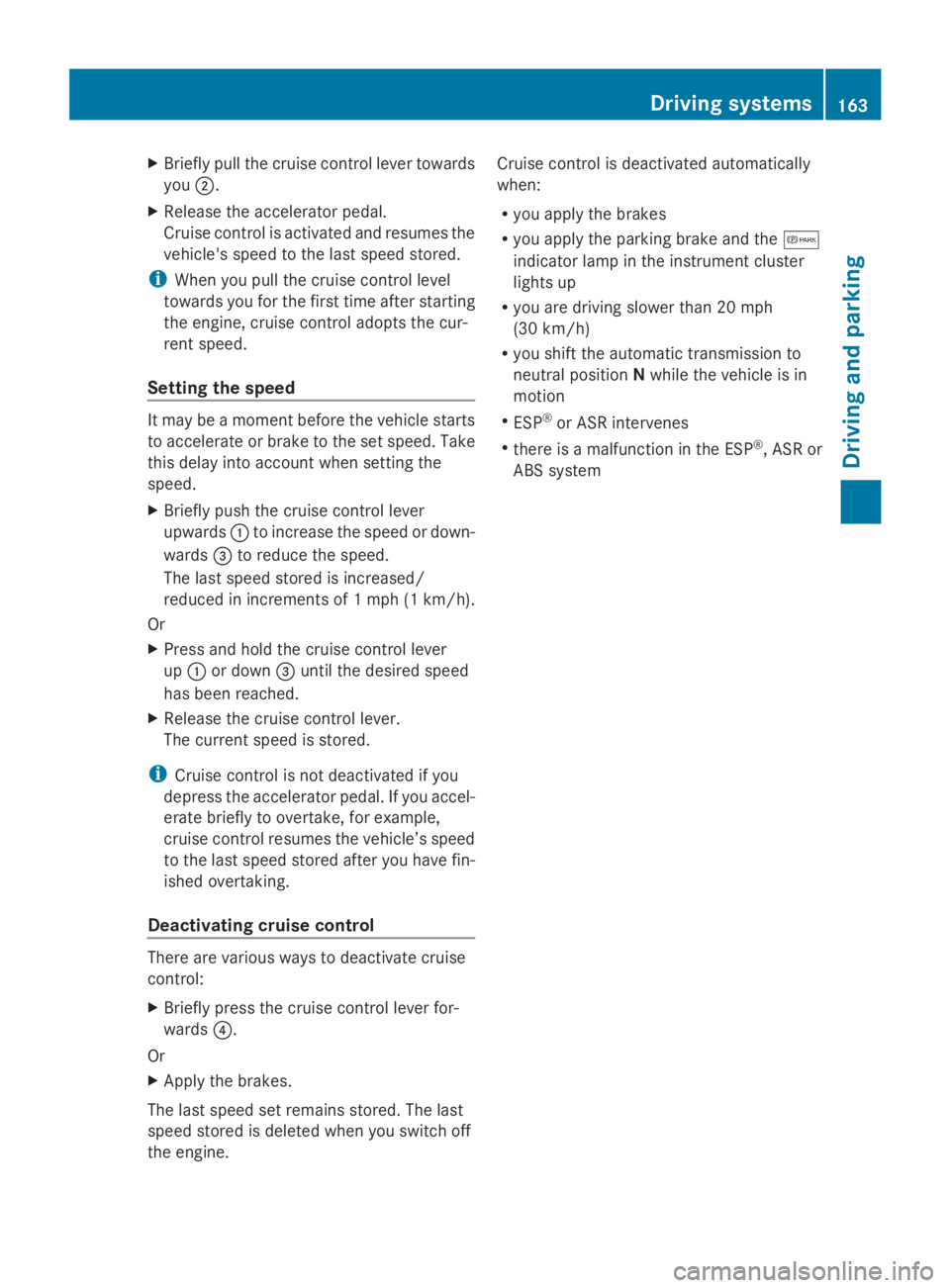
Briefly pull the cruise control lever towards
you 0044.
X Release the accelerator pedal.
Cruise control is activated and resumes the
vehicle's speed to the last speed stored.
i When you pull the cruise control level
towards you for the first time after starting
the engine, cruise control adopts the cur-
rent speed.
Setting the speed It may be a moment before the vehicle starts
to accelerate or brake to the set speed. Take
this delay into account when setting the
speed.
X Briefly push the cruise control lever
upwards 0043to increase the speed or down-
wards 0087to reduce the speed.
The last speed stored is increased/
reduced in increments of 1 mph (1 km/h).
Or
X Press and hold the cruise control lever
up 0043 or down 0087until the desired speed
has been reached.
X Release the cruise control lever.
The current speed is stored.
i Cruise control is not deactivated if you
depress the accelerator pedal. If you accel-
erate briefly to overtake, for example,
cruise control resumes the vehicle’s speed
to the last speed stored after you have fin-
ished overtaking.
Deactivating cruise control There are various ways to deactivate cruise
control:
X Briefly press the cruise control lever for-
wards 0085.
Or
X Apply the brakes.
The last speed set remains stored. The last
speed stored is deleted when you switch off
the engine. Cruise control is deactivated automatically
when:
R
you apply the brakes
R you apply the parking brake and the 0066
indicator lamp in the instrument cluster
lights up
R you are driving slower than 20 mph
(30 km/h)
R you shift the automatic transmission to
neutral position Nwhile the vehicle is in
motion
R ESP ®
or ASR intervenes
R there is a malfunction in the ESP ®
, ASR or
ABS system Driving systems
163Driving and parking Z
Page 170 of 338
ings are suppressed for a certain period of
time.
R you accelerate hard, e.g. kickdown.
R you brake hard.
R you steer actively, e.g. swerve to avoid an
obstacle or change lane quickly.
R you cut the corner on a sharp bend.
In order that you are warned only when nec-
essary and in good time if you cross the lane
marking, the system recognizes certain con-
ditions and warns you accordingly.
Lane Keeping Assist warns you earlier if:
R you approach the outer lane marking on a
bend.
R the road has very wide lanes, e.g. a high-
way.
R the system recognizes solid lane markings.
Warnings are given later if:
R the road has narrow lanes.
R you cut the corner on a bend. PARKTRONIC
Important safety notes PARKTRONIC is only an aid. It cannot replace
your own awareness of the immediate sur-
roundings. You are responsible for safe
maneuvering, parking and pulling away. When
maneuvering, parking and pulling away, make
sure that there are no persons, animals or
objects in the maneuvering area.
PARKTRONIC does not account for obstacles
that are:
R beneath its detection range, e.g. persons,
animals or objects
R above its detection range, e.g. overhanging
loads, overhangs or truck loading ramps
PARKTRONIC is an electronic parking aid with
ultrasonic sensors. It indicates the distance
between your vehicle and an object visually
and audibly.
Your vehicle features two separate sound
emitters with different frequencies for the warning tones. The warning ranges in front of
and behind the vehicle are indicated by dif-
ferent warning tones.
PARKTRONIC is activated automatically when
you:
R turn the key to position 2in the ignition lock
R release the parking brake and
R move the selector lever to D,Nor R.
PARKTRONIC is deactivated at speeds above
11 mph (18 km/h). PARKTRONIC is reacti-
vated at speeds below 10 mph (16 km/h).
PARKTRONIC monitors the area around your
vehicle with sensors in the front and rear
bumpers.
Range of the sensors !
Pay particular attention to obstacles
above or below the sensors when parking,
such as flower pots or trailer towbars.
PARKTRONIC does not recognize such
objects when they are in the immediate
vicinity of the vehicle. You could damage
the vehicle or objects.
PARKTRONIC can suffer interference from:
R ultrasonic sources such as a truck's
compressed-air brakes, an automatic car
wash or a pneumatic drill
R attachments to the vehicle, e.g. rear
mounted racks
R number plates (vehicle license plates)
that are not affixed flat against the
bumper
R dirty or icy sensors 168
Driving systemsDriving and parking
Page 177 of 338
safety. The notes on operation, care and
maintenance issued by the manufacturer
should be observed.
R The bumpers of your vehicle are not suita-
ble for installing detachable trailer cou-
plings.
R Do not install rented trailer couplings or
other detachable trailer couplings to the
bumpers.
R Minimize the risk of damage to the ball cou-
pling. If you do not require the ball coupling,
remove it from the ball coupling recess.
Weight information can be found in the “Per-
missible trailer and drawbar noseweights”
section (Y page 178).
i The height of the ball neck changes
according to the load on the vehicle. If this
is case, use a trailer with a height-adjust-
able trailer drawbar.
Driving tips The maximum permissible speed for vehicle/
trailer combination depends on the type of
trailer. Before setting off, check the vehicle
documents of the your trailer to find out the
permissible maximum speed. Observe the
legally prescribed maximum speed for vehi-
cle/trailer combinations in the relevant coun-
try, state or Canadian province.
When towing a trailer, your vehicle's handling
characteristics will be different in comparison
to when driving without a trailer and it will
consume more fuel.
On long, steep downhill slopes you must
select shift range 3,2or 1in good time.
i This also applies if cruise control is acti-
vated.
This enables you to utilize the engine's brak-
ing effect and you do not need to brake so
heavily to keep the correct speed. which pro-
tects the brake system and prevents the
brakes from overheating and wearing too
quickly. If you need to brake additionally, to
not depress the brake pedal constantly, but
periodically. Driving tips If the trailer begins to swing from side to side:
X
Do not accelerate.
X Do not counter-steer.
X Brake if necessary.
i You can reduce the risk of the trailer
swinging and rocking by retrofitting anti-
roll bars or trailer stability programs. More
information is available from your author-
ized Sprinter Dealer.
R Maintain a greater distance than you would
when driving without towing a trailer.
R Avoid sudden braking. Apply the brakes
gently at first to allow the trailer brake to
overrun. Then, increase the brake force
quickly.
R The figures for the gradient climbing capa-
bilities from a standstill refer to sea level.
When driving in mountainous areas, note
that the power output of the engine, and
with it its gradient climbing capability,
decrease with increasing altitude. Attaching and removing the ball cou-
pling
G
WARNING
If the ball coupling is not correctly installed
and secured, it could come loose while driving
and endanger other road users. There is a risk
of an accident and injury.
Install and secure the ball coupling as descri-
bed in the ball coupling manufacturer's instal-
lation instructions. Make sure that the ball
coupling is correctly installed and secured
before every journey. G
WARNING
If the ball coupling is not installed and secured
correctly the trailer may come loose. There is
a risk of an accident.
Install and secure the ball coupling as descri-
bed in the ball coupling installation instruc-
tions. Make sure that the ball coupling is Towing a trailer
175Driving and parking
Z
Page 178 of 338
installed and secured correctly before every
journey.
If your vehicle is equipped with a Sprinter
trailer tow hitch, you need a ball coupling that
is approved for the trailer tow hitch.
When mounting and removing the approved
ball coupling, observe the relevant informa-
tion in the operating instructions of the ball
coupling manufacturer.
If you cannot mount the ball coupling cor-
rectly, remove it. In this case, the ball cou-
pling may not be used for towing a trailer.
Notes on the permissible dimensions and
weights can also be found on the identifica-
tion plate of the trailer tow hitch. You can
obtain advice from a qualified specialist work-
shop. Coupling up a trailer
! Do not connect the trailer's brake system
(if featured) to the hydraulic brake system
of the towing vehicle, as the latter is equip-
ped with an anti-lock brake system. Doing
so will result in a loss of function of the
brake systems of both the vehicle and the
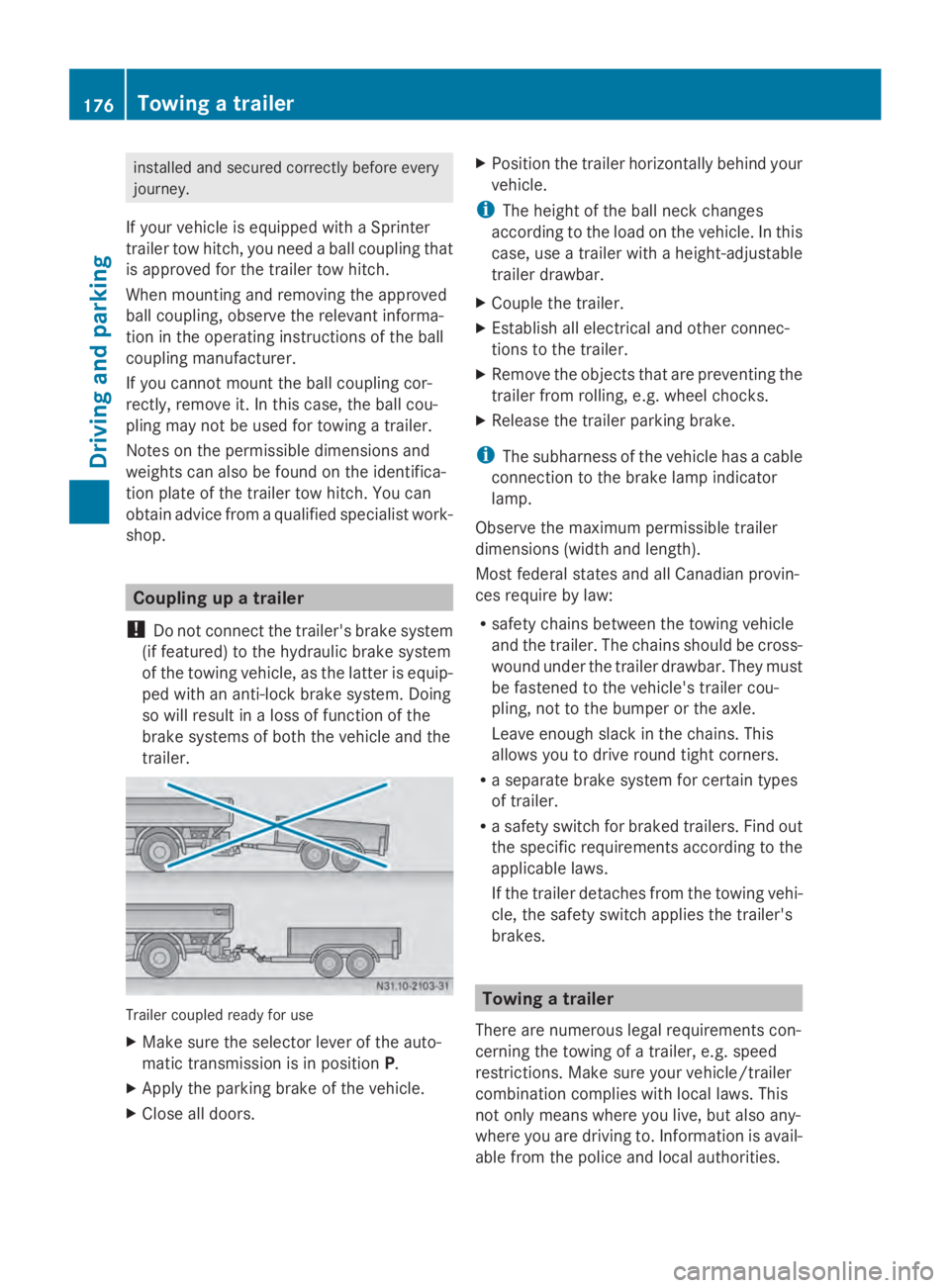
trailer. Trailer coupled ready for use
X
Make sure the selector lever of the auto-
matic transmission is in position P.
X Apply the parking brake of the vehicle.
X Close all doors. X
Position the trailer horizontally behind your
vehicle.
i The height of the ball neck changes
according to the load on the vehicle. In this
case, use a trailer with a height-adjustable
trailer drawbar.
X Couple the trailer.
X Establish all electrical and other connec-
tions to the trailer.
X Remove the objects that are preventing the
trailer from rolling, e.g. wheel chocks.
X Release the trailer parking brake.
i The subharness of the vehicle has a cable
connection to the brake lamp indicator
lamp.
Observe the maximum permissible trailer
dimensions (width and length).
Most federal states and all Canadian provin-
ces require by law:
R safety chains between the towing vehicle
and the trailer. The chains should be cross-
wound under the trailer drawbar. They must
be fastened to the vehicle's trailer cou-
pling, not to the bumper or the axle.
Leave enough slack in the chains. This
allows you to drive round tight corners.
R a separate brake system for certain types
of trailer.
R a safety switch for braked trailers. Find out
the specific requirements according to the
applicable laws.
If the trailer detaches from the towing vehi-
cle, the safety switch applies the trailer's
brakes. Towing a trailer
There are numerous legal requirements con-
cerning the towing of a trailer, e.g. speed
restrictions. Make sure your vehicle/trailer
combination complies with local laws. This
not only means where you live, but also any-
where you are driving to. Information is avail-
able from the police and local authorities. 176
Towing a trailerDriving and parking
Page 179 of 338
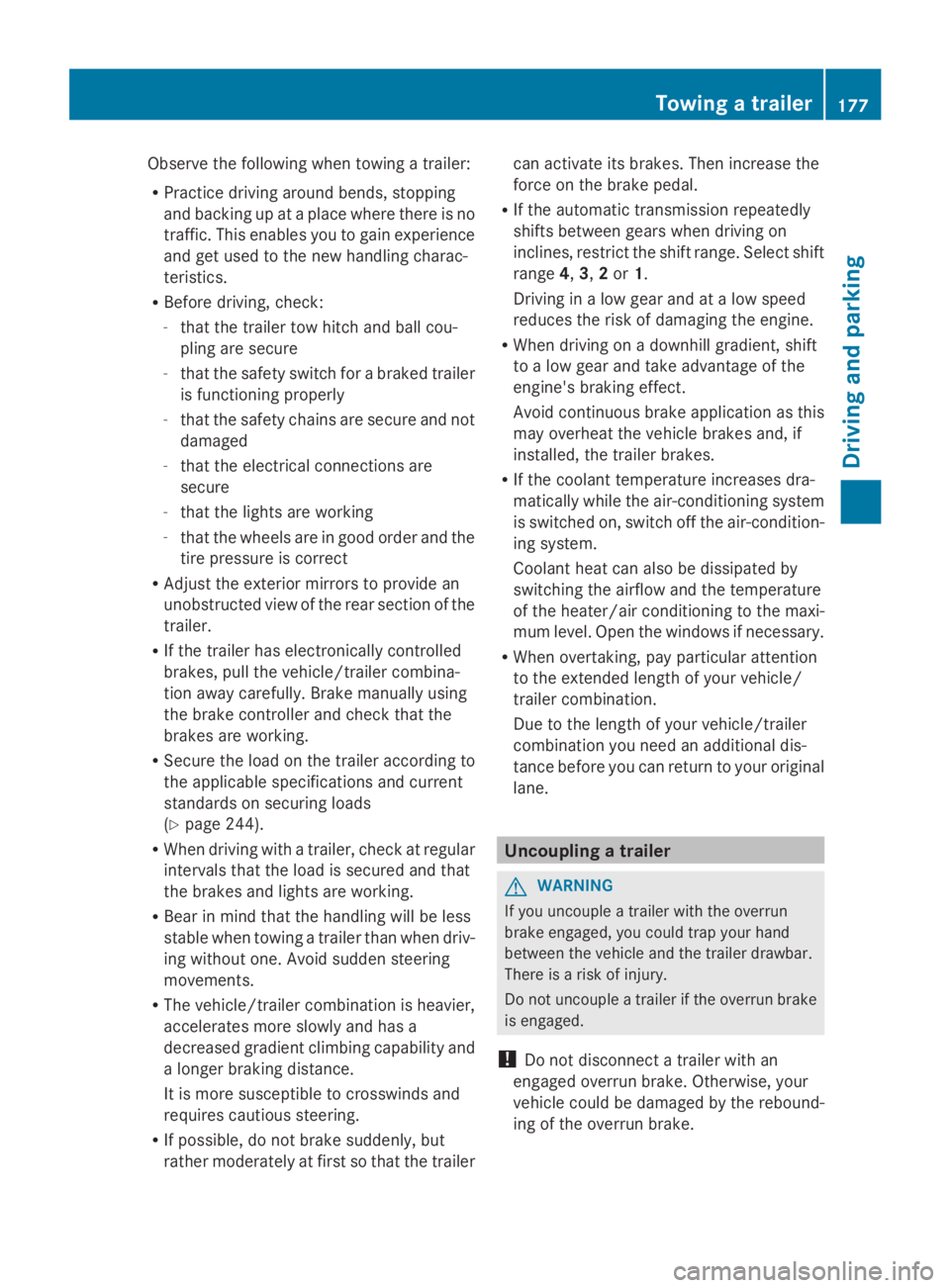
Observe the following when towing a trailer:
R Practice driving around bends, stopping
and backing up at a place where there is no
traffic. This enables you to gain experience
and get used to the new handling charac-
teristics.
R Before driving, check:
-that the trailer tow hitch and ball cou-
pling are secure
- that the safety switch for a braked trailer
is functioning properly
- that the safety chains are secure and not
damaged
- that the electrical connections are
secure
- that the lights are working
- that the wheels are in good order and the
tire pressure is correct
R Adjust the exterior mirrors to provide an
unobstructed view of the rear section of the
trailer.
R If the trailer has electronically controlled
brakes, pull the vehicle/trailer combina-
tion away carefully. Brake manually using
the brake controller and check that the
brakes are working.
R Secure the load on the trailer according to
the applicable specifications and current
standards on securing loads
(Y page 244).
R When driving with a trailer, check at regular
intervals that the load is secured and that
the brakes and lights are working.
R Bear in mind that the handling will be less
stable when towing a trailer than when driv-
ing without one. Avoid sudden steering
movements.
R The vehicle/trailer combination is heavier,
accelerates more slowly and has a
decreased gradient climbing capability and
a longer braking distance.
It is more susceptible to crosswinds and
requires cautious steering.
R If possible, do not brake suddenly, but
rather moderately at first so that the trailer can activate its brakes. Then increase the
force on the brake pedal.
R If the automatic transmission repeatedly
shifts between gears when driving on
inclines, restrict the shift range. Select shift
range 4,3,2or 1.
Driving in a low gear and at a low speed
reduces the risk of damaging the engine.
R When driving on a downhill gradient, shift
to a low gear and take advantage of the
engine's braking effect.
Avoid continuous brake application as this
may overheat the vehicle brakes and, if
installed, the trailer brakes.
R If the coolant temperature increases dra-
matically while the air-conditioning system
is switched on, switch off the air-condition-
ing system.
Coolant heat can also be dissipated by
switching the airflow and the temperature
of the heater/air conditioning to the maxi-
mum level. Open the windows if necessary.
R When overtaking, pay particular attention
to the extended length of your vehicle/
trailer combination.
Due to the length of your vehicle/trailer
combination you need an additional dis-
tance before you can return to your original
lane. Uncoupling a trailer
G
WARNING
If you uncouple a trailer with the overrun
brake engaged, you could trap your hand
between the vehicle and the trailer drawbar.
There is a risk of injury.
Do not uncouple a trailer if the overrun brake
is engaged.
! Do not disconnect a trailer with an
engaged overrun brake. Otherwise, your
vehicle could be damaged by the rebound-
ing of the overrun brake. Towing a trailer
177Driving and parking Z
Page 203 of 338
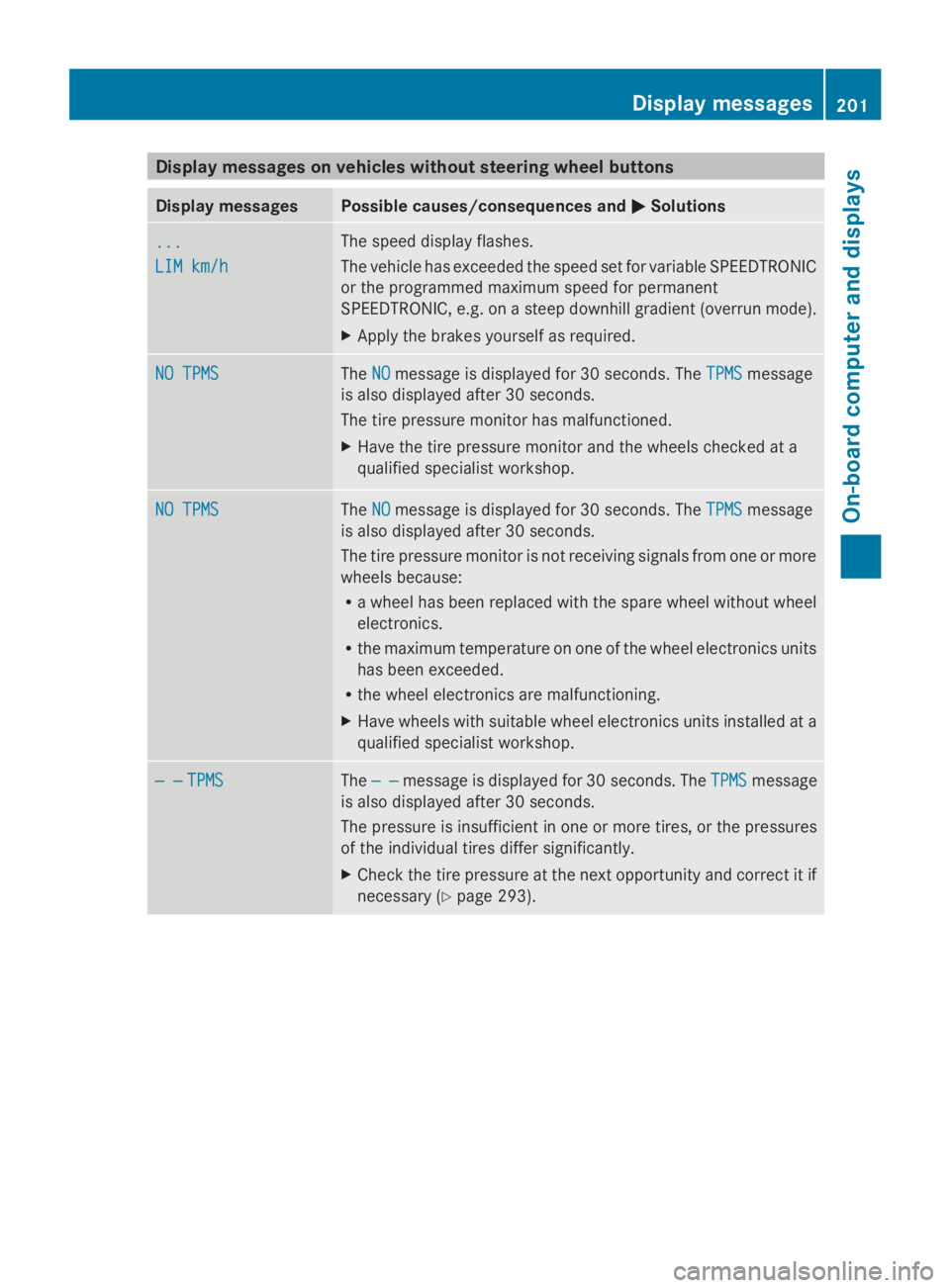
Display messages on vehicles without steering wheel buttons
Display messages Possible causes/consequences and
0050
0050Solutions ...
...
LIM km/h LIM km/h The speed display flashes.
The vehicle has exceeded the speed set for variable SPEEDTRONIC
or the programmed maximum speed for permanent
SPEEDTRONIC, e.g. on a steep downhill gradient (overrun mode).
X
Apply the brakes yourself as required. NO TPMS NO TPMS The
NO
NOmessage is displayed for 30 seconds. The TPMS
TPMSmessage
is also displayed after 30 seconds.
The tire pressure monitor has malfunctioned.
X Have the tire pressure monitor and the wheels checked at a
qualified specialist workshop. NO TPMS NO TPMS The
NO
NOmessage is displayed for 30 seconds. The TPMS
TPMSmessage
is also displayed after 30 seconds.
The tire pressure monitor is not receiving signals from one or more
wheels because:
R a wheel has been replaced with the spare wheel without wheel
electronics.
R the maximum temperature on one of the wheel electronics units
has been exceeded.
R the wheel electronics are malfunctioning.
X Have wheels with suitable wheel electronics units installed at a
qualified specialist workshop. — — — —
TPMS
TPMS The
— —
— — message is displayed for 30 seconds. The TPMS
TPMSmessage
is also displayed after 30 seconds.
The pressure is insufficient in one or more tires, or the pressures
of the individual tires differ significantly.
X Check the tire pressure at the next opportunity and correct it if
necessary (Y page 293). Display
messages
201On-board computer and displays Z