center console MERCEDES-BENZ SPRINTER 2014 MY14 Operator’s Manual
[x] Cancel search | Manufacturer: MERCEDES-BENZ, Model Year: 2014, Model line: SPRINTER, Model: MERCEDES-BENZ SPRINTER 2014Pages: 338, PDF Size: 6.78 MB
Page 236 of 338
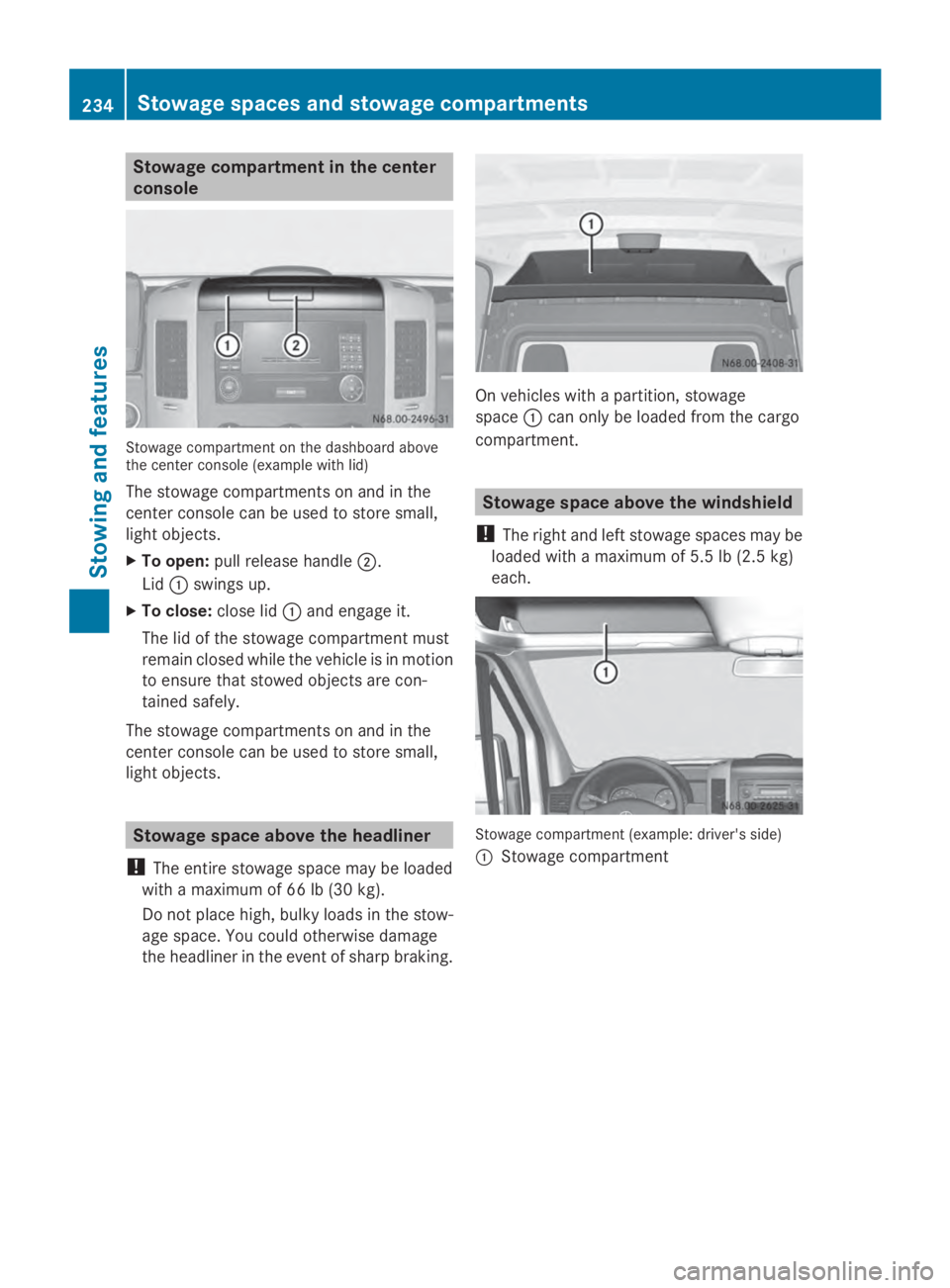
Stowage compartment in the center
console Stowage compartment on the dashboard above
the center console (example with lid)
The stowage compartments on and in the
center console can be used to store small,
light objects.
X To open: pull release handle 0044.
Lid 0043swings up.
X To close: close lid0043and engage it.
The lid of the stowage compartment must
remain closed while the vehicle is in motion
to ensure that stowed objects are con-
tained safely.
The stowage compartments on and in the
center console can be used to store small,
light objects. Stowage space above the headliner
! The entire stowage space may be loaded
with a maximum of 66 lb (30 kg).
Do not place high, bulky loads in the stow-
age space. You could otherwise damage
the headliner in the event of sharp braking. On vehicles with a partition, stowage
space
0043can only be loaded from the cargo
compartment. Stowage space above the windshield
! The right and left stowage spaces may be
loaded with a maximum of 5.5 lb (2.5 kg)
each. Stowage compartment (example: driver's side)
0043
Stowage compartment 234
Stowage spaces and stowage compartmentsStowing and features
Page 239 of 338
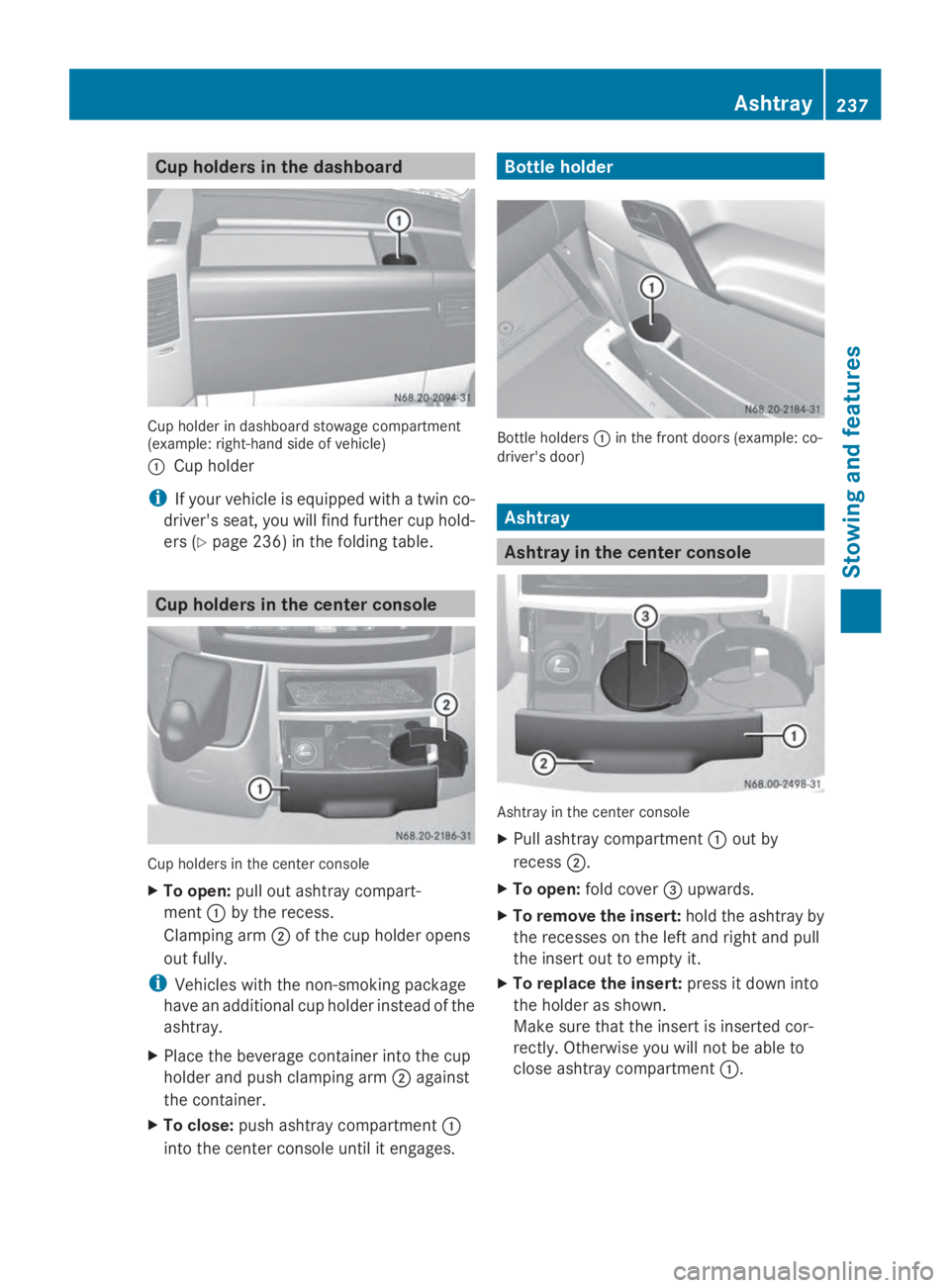
Cup holders in the dashboard
Cup holder in dashboard stowage compartment
(example: right-hand side of vehicle)
0043 Cup holder
i If your vehicle is equipped with a twin co-
driver's seat, you will find further cup hold-
ers (Y page 236) in the folding table. Cup holders in the center console
Cup holders in the center console
X
To open: pull out ashtray compart-
ment 0043by the recess.
Clamping arm 0044of the cup holder opens
out fully.
i Vehicles with the non-smoking package
have an additional cup holder instead of the
ashtray.
X Place the beverage container into the cup
holder and push clamping arm 0044against
the container.
X To close: push ashtray compartment 0043
into the center console until it engages. Bottle holder
Bottle holders
0043in the front doors (example: co-
driver's door) Ashtray
Ashtray in the center console
Ashtray in the center console
X
Pull ashtray compartment 0043out by
recess 0044.
X To open: fold cover 0087upwards.
X To remove the insert: hold the ashtray by
the recesses on the left and right and pull
the insert out to empty it.
X To replace the insert: press it down into
the holder as shown.
Make sure that the insert is inserted cor-
rectly. Otherwise you will not be able to
close ashtray compartment 0043. Ashtray
237Stowing and features Z
Page 240 of 338
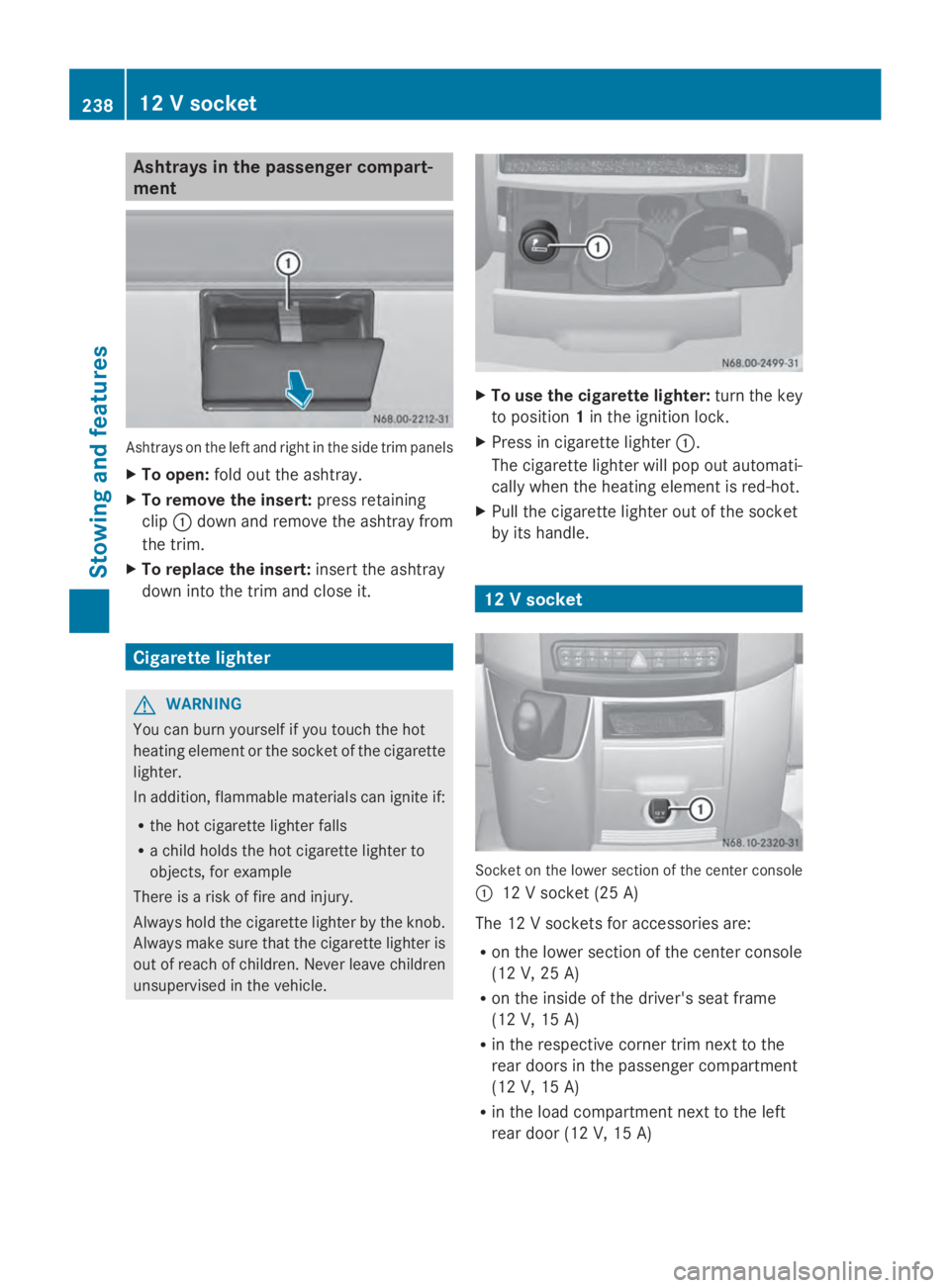
Ashtrays in the passenger compart-
ment Ashtrays on the left and right in the side trim panels
X To open: fold out the ashtray.
X To remove the insert: press retaining
clip 0043down and remove the ashtray from
the trim.
X To replace the insert: insert the ashtray
down into the trim and close it. Cigarette lighter
G
WARNING
You can burn yourself if you touch the hot
heating element or the socket of the cigarette
lighter.
In addition, flammable materials can ignite if:
R the hot cigarette lighter falls
R a child holds the hot cigarette lighter to
objects, for example
There is a risk of fire and injury.
Always hold the cigarette lighter by the knob.
Always make sure that the cigarette lighter is
out of reach of children. Never leave children
unsupervised in the vehicle. X
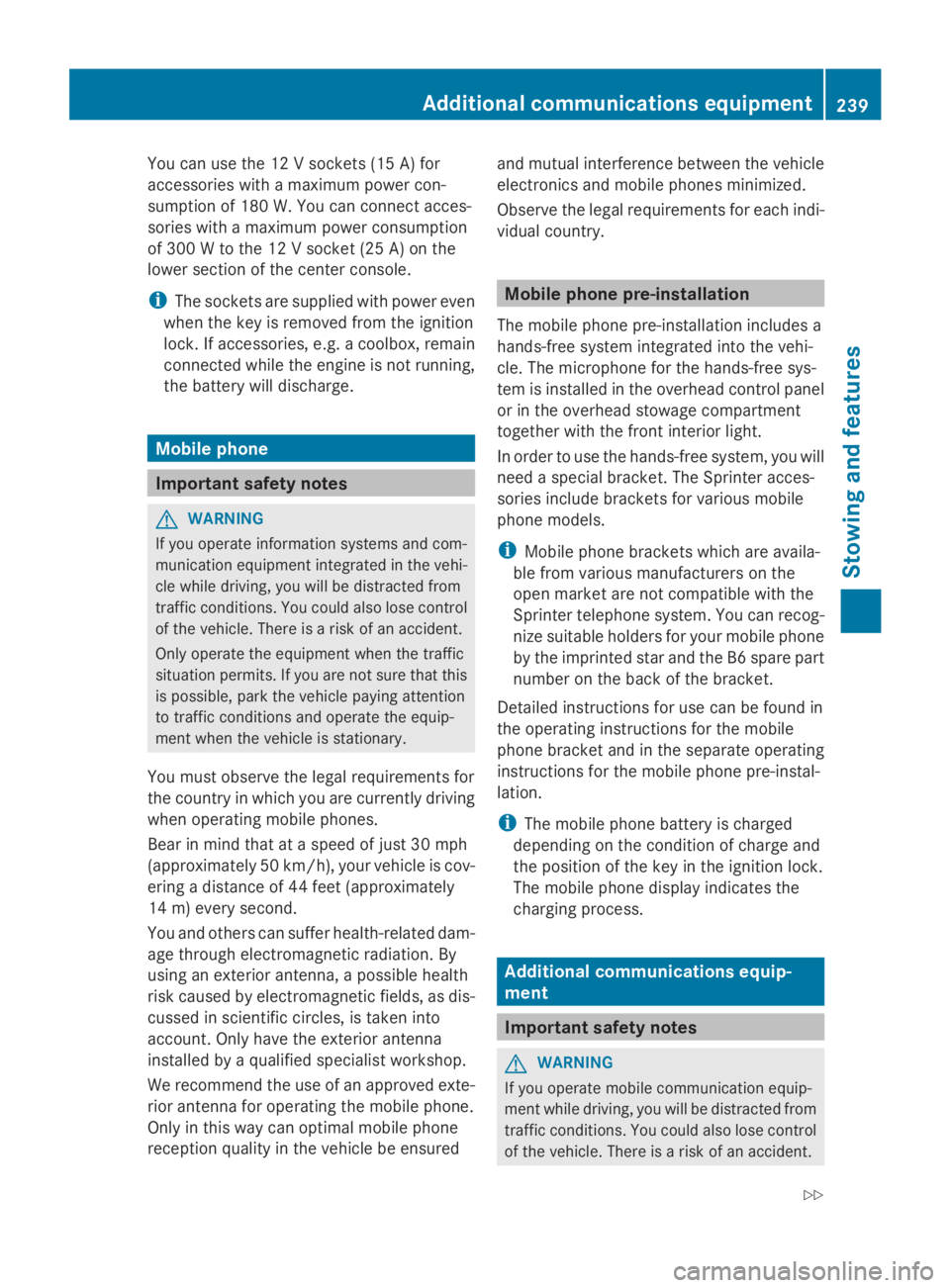
To use the cigarette lighter: turn the key
to position 1in the ignition lock.
X Press in cigarette lighter 0043.
The cigarette lighter will pop out automati-
cally when the heating element is red-hot.
X Pull the cigarette lighter out of the socket
by its handle. 12 V socket
Socket on the lower section of the center console
0043 12 V socket (25 A)
The 12 V sockets for accessories are:
R on the lower section of the center console
(12 V, 25 A)
R on the inside of the driver's seat frame
(12 V, 15 A)
R in the respective corner trim next to the
rear doors in the passenger compartment
(12 V, 15 A)
R in the load compartment next to the left
rear door (12 V, 15 A) 238
12 V socketStowing and featu
res
Page 241 of 338
You can use the 12 V sockets (15 A) for
accessories with a maximum power con-
sumption of 180 W. You can connect acces-
sories with a maximum power consumption
of 300 W to the 12 V socket (25 A) on the
lower section of the center console.
i The sockets are supplied with power even
when the key is removed from the ignition
lock. If accessories, e.g. a coolbox, remain
connected while the engine is not running,
the battery will discharge. Mobile phone
Important safety notes
G
WARNING
If you operate information systems and com-
munication equipment integrated in the vehi-
cle while driving, you will be distracted from
traffic conditions. You could also lose control
of the vehicle. There is a risk of an accident.
Only operate the equipment when the traffic
situation permits. If you are not sure that this
is possible, park the vehicle paying attention
to traffic conditions and operate the equip-
ment when the vehicle is stationary.
You must observe the legal requirements for
the country in which you are currently driving
when operating mobile phones.
Bear in mind that at a speed of just 30 mph
(approximately 50 km/h), your vehicle is cov-
ering a distance of 44 feet (approximately
14 m) every second.
You and others can suffer health-related dam-
age through electromagnetic radiation. By
using an exterior antenna, a possible health
risk caused by electromagnetic fields, as dis-
cussed in scientific circles, is taken into
account. Only have the exterior antenna
installed by a qualified specialist workshop.
We recommend the use of an approved exte-
rior antenna for operating the mobile phone.
Only in this way can optimal mobile phone
reception quality in the vehicle be ensured and mutual interference between the vehicle
electronics and mobile phones minimized.
Observe the legal requirements for each indi-
vidual country. Mobile phone pre-installation
The mobile phone pre-installation includes a
hands-free system integrated into the vehi-
cle. The microphone for the hands-free sys-
tem is installed in the overhead control panel
or in the overhead stowage compartment
together with the front interior light.
In order to use the hands-free system, you will
need a special bracket. The Sprinter acces-
sories include brackets for various mobile
phone models.
i Mobile phone brackets which are availa-
ble from various manufacturers on the
open market are not compatible with the
Sprinter telephone system. You can recog-
nize suitable holders for your mobile phone
by the imprinted star and the B6 spare part
number on the back of the bracket.
Detailed instructions for use can be found in
the operating instructions for the mobile
phone bracket and in the separate operating
instructions for the mobile phone pre-instal-
lation.
i The mobile phone battery is charged
depending on the condition of charge and
the position of the key in the ignition lock.
The mobile phone display indicates the
charging process. Additional communications equip-
ment
Important safety notes
G
WARNING
If you operate mobile communication equip-
ment while driving, you will be distracted from
traffic conditions. You could also lose control
of the vehicle. There is a risk of an accident. Additional communications equipment
239Stowing and features
Z
Page 320 of 338
Genuine Sprinter parts
! Air bags and Emergency Tensioning Devi-
ces, as well as control units and sensors for
these restraint systems, may be installed in
the following areas of your vehicle:
R doors
R door pillars
R door sills
R seats
R cockpit
R instrument cluster
R center console
Do not install accessories such as audio
systems in these areas. Do not carry out
repairs or welding. You could impair the
operating efficiency of the restraint sys-
tems.
Have aftermarket accessories installed at
a qualified specialist workshop. H
Environmental note
We supply reconditioned assemblies and
parts which are of the same quality as new
parts. The same New Vehicle Limited War-
ranty applies as for new parts.
We test genuine Sprinter parts, as well as
conversion parts and accessories that have
been specifically approved for the type of
vehicle, for:
R reliability
R safety
R suitability
Despite ongoing market research, we are
unable to assess other parts. If individual or
official approval is given, we assume no
responsibility for use in Sprinter vehicles.
In some countries, certain parts are only offi-
cially approved for installation or modification
if they comply with legal requirements. All
genuine Sprinter parts satisfy these require-
ments. Make sure that all parts are suitable
for your vehicle. All authorized Sprinter Dealers maintain a
supply of genuine Sprinter parts for required
service and repair work. Also, the strategi-
cally distributed parts delivery centers pro-
vide quick and reliable parts service.
Always specify the vehicle identification num-
ber (VIN) and engine number when ordering
genuine Sprinter parts (Y page 319). Vehicle electronics
Tampering with the engine electron-
ics
G
WARNING
Always have work on the engine electronics
and related components carried out at a quali-
fied specialist workshop. Otherwise, the vehi-
cle's operating safety could be affected.
! Only have engine electronics and the cor-
responding parts, such as control units,
sensors or connector leads, serviced in a
qualified specialist workshop. Otherwise,
the vehicle parts may wear more quickly.
This can lead to loss of the New Vehicle
Limited Warranty. Installing electrical or electronic
equipment
G
WARNING
You and others may damage your health due
to excessive electromagnetic radiation. By
using an external antenna, the possible health
risks of electromagnetic fields, which are
under discussion among the scientific com-
munity, should be largely prevented.
Therefore, only have the exterior antenna
installed at a qualified specialist workshop.
Electrical and electronic devices may have a
detrimental effect on both the comfort and
the operating safety of the vehicle. If equip-
ment of this kind is retrofitted, its electro- 318
Vehicle electronicsTechnical data