AUX MERCEDES-BENZ SPRINTER 2014 MY14 Operator’s Manual
[x] Cancel search | Manufacturer: MERCEDES-BENZ, Model Year: 2014, Model line: SPRINTER, Model: MERCEDES-BENZ SPRINTER 2014Pages: 338, PDF Size: 6.78 MB
Page 138 of 338
Useful information
This Operator's Manual describes all models
as well as standard and optional equipment
of your vehicle that were available at the time
of going to print. Country-specific variations
are possible. Note that your vehicle may not
be equipped with all of the described func-
tions. This also applies to systems and func-
tions relevant to safety.
Read the information on qualified specialist
workshops (Y page 26). Breaking-in notes
The first 1000 miles (1500 km)
New or replaced brake pads and brake disks
only reach their optimum braking effect after
a few hundred miles (a few
hundred kilometers). Until then, compensate
for this by applying greater force to the brake
pedal.
For the service life and economy of your vehi-
cle it is crucial that you break in the engine
with due care.
R Therefore, protect the engine for the first
1000 miles (1500 km) by driving at varying
vehicle and engine speeds.
R Avoid overstraining the vehicle and high
engine speeds during this period, e.g. driv-
ing at full throttle. Do not exceed 00C6of the
maximum speed for each gear.
R Do not change down a gear manually in
order to brake.
R Try to avoid depressing the accelerator
pedal beyond the point of resistance (kick-
down).
R The shift ranges 3,2or 1should only be
engaged when driving slowly, e.g. when
driving in mountainous terrain.
After 1000 miles (1500 km), you can increase
the engine speed gradually and accelerate
the vehicle to full speed. i
You should also observe these notes on
breaking-in if the engine or parts of the
drive train on your vehicle have been
replaced. Driving
Important safety notes
G
WARNING
If you switch off the ignition while driving,
safety-relevant functions are only available
with limitations, or not at all. This could affect,
for example, the power steering and the brake
boosting effect. You will require considerably
more effort to steer and brake. There is a risk
of an accident.
Do not switch off the ignition while driving. G
WARNING
If the parking brake has not been fully
released when driving, the parking brake can:
R overheat and cause a fire
R lose its hold function.
There is a risk of fire and an accident. Release
the parking brake fully before driving off. Battery isolating switch
Important safety notes !
Make sure that the key is in position 0in
the ignition lock and wait at least 20 sec-
onds before disconnecting or connecting
the battery isolating switch. You could oth-
erwise damage electrical system compo-
nents.
You can use the battery isolating switch to
disconnect the power supply to all your vehi-
cle's consumers. This will prevent uncontrol-
led battery discharge caused by off-load cur-
rent consumption.
If your vehicle is equipped with an auxiliary
battery in the engine compartment, you will
need to disconnect both batteries. Only then 136
DrivingDriving and parking
Page 150 of 338
i
The screwdriver from the vehicle tool kit
could function as the implement, for
instance (Y page 276). Refueling
Important safety notes
G
WARNING
Fuel is highly flammable. Improper handling
of fuel creates a risk of fire and explosion.
Avoid fire, open flames, smoking and creating
sparks under all circumstances. Switch off the
engine and, if applicable, the auxiliary heating
before refueling. G
WARNING
Fuel is poisonous and hazardous to health.
There is a risk of injury.
You must make sure that fuel does not come
into contact with your skin, eyes or clothing
and that it is not swallowed. Do not inhale fuel
vapors. Keep fuel away from children.
If you or others come into contact with fuel,
observe the following:
R Wash away fuel from skin immediately
using soap and water.
R If fuel comes into contact with your eyes,
immediately rinse them thoroughly with
clean water. Seek medical assistance with-
out delay.
R If fuel is swallowed, seek medical assis-
tance without delay. Do not induce vomit-
ing.
R Immediately change out of clothing which
has come into contact with fuel. G
WARNING
If you mix diesel fuel with gasoline, the flash
point is lower than that of pure diesel fuel.
When the engine is running, exhaust system
components could overheat without being
noticed. There is a risk of fire.
Never refuel with gasoline. Never mix gasoline
with diesel fuel. H
Environmental note
If fuels are handled improperly, they pose a
danger to persons and the environment. Do
not allow fuels to run into the sewage system,
the surface waters, the ground water or into
the ground.
! Do not use gasoline to refuel vehicles with
a diesel engine. Even small amounts of gas-
oline will cause damage to the fuel system
and engine.
! Do not switch on the ignition if you acci-
dentally refuel with the wrong fuel. Other-
wise, the fuel will enter the fuel lines. Notify
a qualified specialist workshop and have
the fuel tank and fuel lines drained com-
pletely.
! Overfilling the fuel tank could damage the
fuel system.
! Take care not to spill any fuel on painted
surfaces. You could otherwise damage the
paintwork.
! Filter the fuel before transferring it to the
vehicle if you are refueling the vehicle from
barrels or containers.
This will prevent malfunctions in the fuel
system due to contaminated fuel.
Further information on fuel and on fuel grades
can be found in the "Technical data" section
(Y page 321). Refueling procedure148
RefuelingDriving and parking
Page 151 of 338
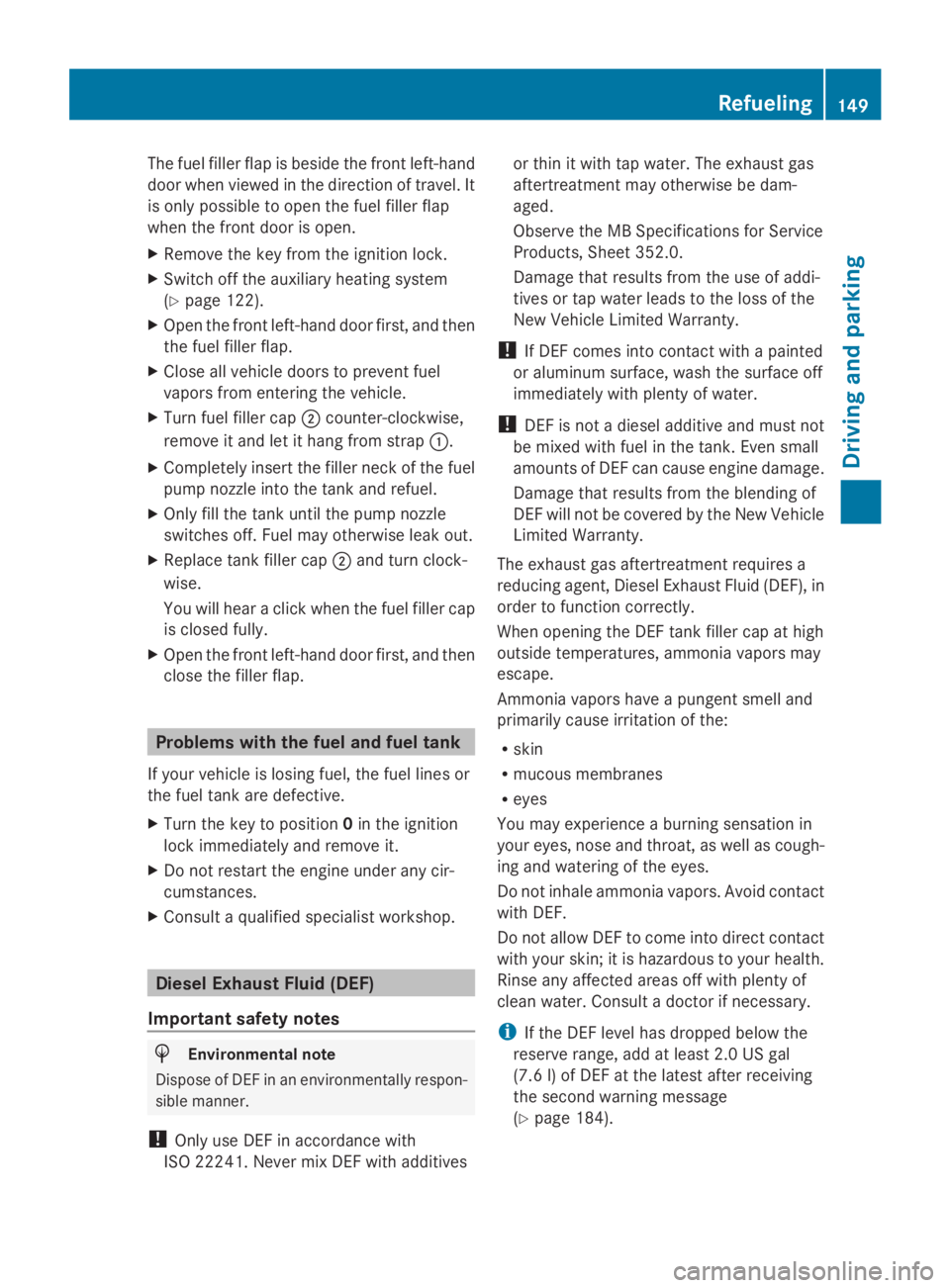
The fuel filler flap is beside the front left-hand
door when viewed in the direction of travel. It
is only possible to open the fuel filler flap
when the front door is open.
X Remove the key from the ignition lock.
X Switch off the auxiliary heating system
(Y page 122).
X Open the front left-hand door first, and then
the fuel filler flap.
X Close all vehicle doors to prevent fuel
vapors from entering the vehicle.
X Turn fuel filler cap 0044counter-clockwise,
remove it and let it hang from strap 0043.
X Completely insert the filler neck of the fuel
pump nozzle into the tank and refuel.
X Only fill the tank until the pump nozzle
switches off. Fuel may otherwise leak out.
X Replace tank filler cap 0044and turn clock-
wise.
You will hear a click when the fuel filler cap
is closed fully.
X Open the front left-hand door first, and then
close the filler flap. Problems with the fuel and fuel tank
If your vehicle is losing fuel, the fuel lines or
the fuel tank are defective.
X Turn the key to position 0in the ignition
lock immediately and remove it.
X Do not restart the engine under any cir-
cumstances.
X Consult a qualified specialist workshop. Diesel Exhaust Fluid (DEF)
Important safety notes H
Environmental note
Dispose of DEF in an environmentally respon-
sible manner.
! Only use DEF in accordance with
ISO 22241. Never mix DEF with additives or thin it with tap water. The exhaust gas
aftertreatment may otherwise be dam-
aged.
Observe the MB Specifications for Service
Products, Sheet 352.0.
Damage that results from the use of addi-
tives or tap water leads to the loss of the
New Vehicle Limited Warranty.
! If DEF comes into contact with a painted
or aluminum surface, wash the surface off
immediately with plenty of water.
! DEF is not a diesel additive and must not
be mixed with fuel in the tank. Even small
amounts of DEF can cause engine damage.
Damage that results from the blending of
DEF will not be covered by the New Vehicle
Limited Warranty.
The exhaust gas aftertreatment requires a
reducing agent, Diesel Exhaust Fluid (DEF), in
order to function correctly.
When opening the DEF tank filler cap at high
outside temperatures, ammonia vapors may
escape.
Ammonia vapors have a pungent smell and
primarily cause irritation of the:
R skin
R mucous membranes
R eyes
You may experience a burning sensation in
your eyes, nose and throat, as well as cough-
ing and watering of the eyes.
Do not inhale ammonia vapors. Avoid contact
with DEF.
Do not allow DEF to come into direct contact
with your skin; it is hazardous to your health.
Rinse any affected areas off with plenty of
clean water. Consult a doctor if necessary.
i If the DEF level has dropped below the
reserve range, add at least 2.0 US gal
(7.6 l) of DEF at the latest after receiving
the second warning message
(Y page 184). Refueling
149Driving and parking Z
Page 152 of 338
i
If you switch off the engine at a low out-
side temperature and add DEF, restart the
engine after refueling. If you leave the vehi-
cle parked without restarting the engine
and the DEF freezes in the DEF tank, the
on-board computer will only be able to reg-
ister the new fill level after a defrosting
period of up to 60 minutes. During this time
the engine may only be operated in neutral.
You will find further information on DEF in the
"Service products" section (Y page 321).
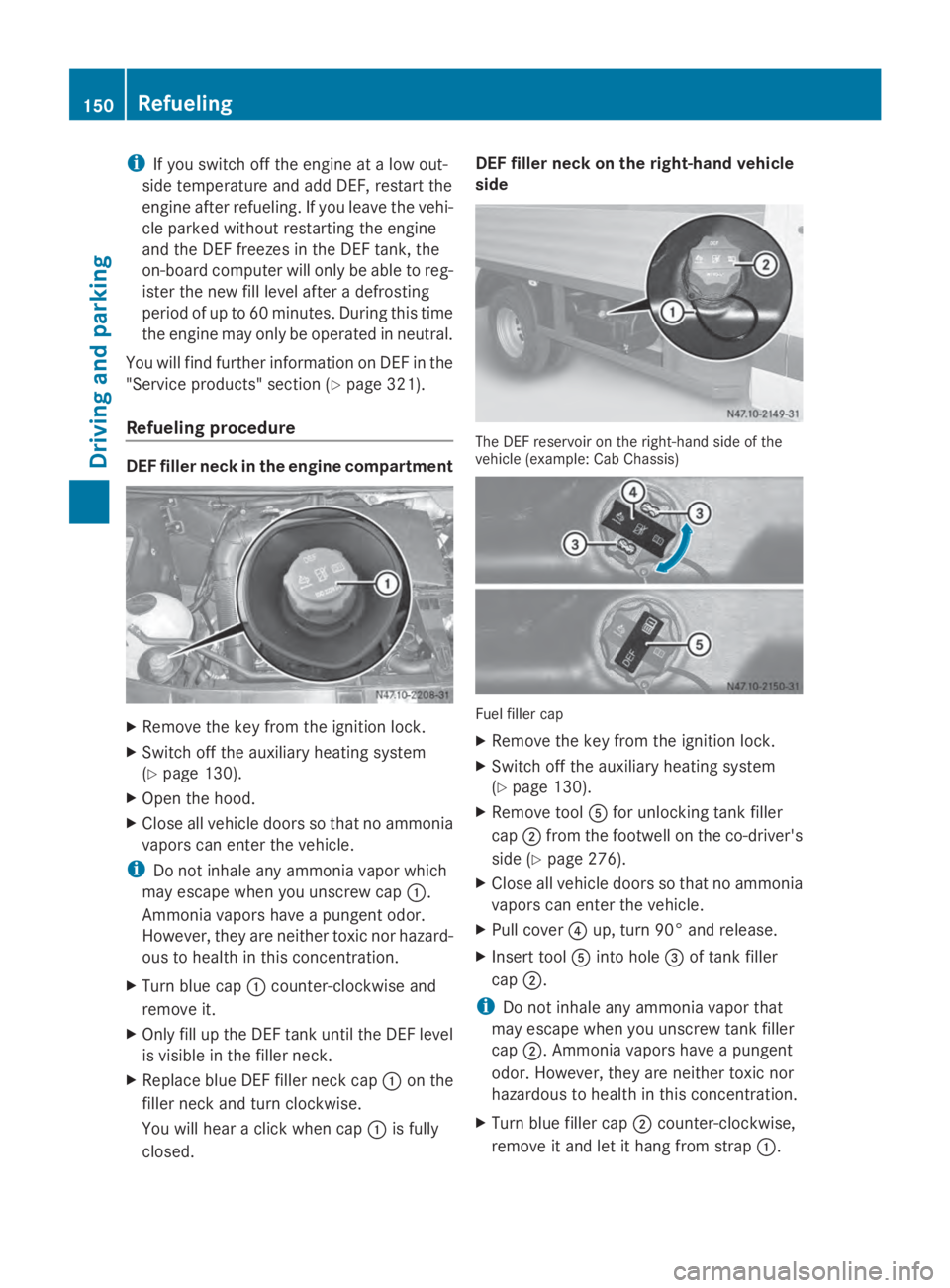
Refueling procedure DEF filler neck in the engine compartment
X
Remove the key from the ignition lock.
X Switch off the auxiliary heating system
(Y page 130).
X Open the hood.
X Close all vehicle doors so that no ammonia
vapors can enter the vehicle.
i Do not inhale any ammonia vapor which
may escape when you unscrew cap 0043.
Ammonia vapors have a pungent odor.
However, they are neither toxic nor hazard-
ous to health in this concentration.
X Turn blue cap 0043counter-clockwise and
remove it.
X Only fill up the DEF tank until the DEF level
is visible in the filler neck.
X Replace blue DEF filler neck cap 0043on the
filler neck and turn clockwise.
You will hear a click when cap 0043is fully
closed. DEF filler neck on the right-hand vehicle
side The DEF reservoir on the right-hand side of the
vehicle (example: Cab Chassis)
Fuel filler cap
X
Remove the key from the ignition lock.
X Switch off the auxiliary heating system
(Y page 130).
X Remove tool 0083for unlocking tank filler
cap 0044from the footwell on the co-driver's
side (Y page 276).
X Close all vehicle doors so that no ammonia
vapors can enter the vehicle.
X Pull cover 0085up, turn 90° and release.
X Insert tool 0083into hole 0087of tank filler
cap 0044.
i Do not inhale any ammonia vapor that
may escape when you unscrew tank filler
cap 0044. Ammonia vapors have a pungent
odor. However, they are neither toxic nor
hazardous to health in this concentration.
X Turn blue filler cap 0044counter-clockwise,
remove it and let it hang from strap 0043.150
RefuelingDriving and parking
Page 160 of 338
engine's air suction nozzles and this can
cause engine damage.
If you have to drive on stretches of road on
which water has collected, please bear in
mind that:
R the water level of standing water should not
be above the lower edge of the front
bumper
R do not drive faster than walking speed Driving in winter
General notes G
WARNING
If you shift down on a slippery road surface in
an attempt to increase the engine's braking
effect, the drive wheels could lose their grip.
There is an increased danger of skidding and
accidents.
Do not shift down for additional engine brak-
ing on a slippery road surface. G
DANGER
If the exhaust pipe is blocked or adequate
ventilation is not possible, poisonous gases
such as carbon monoxide (CO) may enter the
vehicle. This is the case, e.g. if the vehicle
becomes trapped in snow. There is a risk of
fatal injury.
If you leave the engine or the auxiliary heating
running, make sure the exhaust pipe and area
around the vehicle are clear of snow. To
ensure an adequate supply of fresh air, open
a window on the side of the vehicle that is not
facing into the wind.
Have your vehicle winterproofed at a qualified
specialist workshop in good time at the onset
of winter.
i Do not cover the radiator, e.g. with a win-
ter cover. The measurements of the on-
board diagnostic system may otherwise
return inaccurate values. Some of these values are legally prescribed and must
therefore always be exact.
Observe the notes in the "Winter operation"
section (Y page 288).
Driving with summer tires Observe the notes in the "Winter operation"
section (Y
page 288).
Slippery road surfaces G
WARNING
If you shift down on a slippery road surface in
an attempt to increase the engine's braking
effect, the drive wheels could lose their grip.
There is an increased danger of skidding and
accidents.
Do not shift down for additional engine brak-
ing on a slippery road surface. G
WARNING
The outside temperature indicator is not
designed to serve as an ice-warning device
and is therefore unsuitable for that purpose.
Indicated temperatures just above the freez-
ing point do not guarantee that the road sur-
face is free of ice. The road may still be icy,
especially in wooded areas or on bridges.
! Vehicles with automatic transmission
may roll only briefly in the neutral position
N. Prolonged rolling of the wheels, e.g.
when being towed, will result in transmis-
sion damage.
If the vehicle threatens to skid or cannot be
stopped when moving at low speed:
X Shift the transmission to neutral position
N.
X Try to maintain control of the vehicle using
corrective steering.
Drive particularly carefully on slippery roads.
Avoid sudden acceleration, steering and
braking maneuvers. Do not use cruise
control. 158
Driving tipsDriving and parking
Page 187 of 338
Using the
0074,0075,0079or0045 adjustment but-
tons, you can select the following functions:
R Calling up the service due date
(Y page 260)
R Checking the oil level (Y page 252)
R Checking the DEF supply (Y page 184)
R Preselecting/setting the auxiliary heating
switch-on time (Y page 124)
R Tire pressure monitor (Y page 293)
R Setting the time (Y page 185)
R Activating/deactivating Highbeam Assist
(Y page 194)
R Setting the daytime running lamps
(Y page 185)
Setting the time X
Turn the key to position 2in the ignition
lock.
X Press the 0079menu button repeatedly until
the hours figure flashes.
X Press the 0074or0075 button to set the hour.
X Press the 0045reset button.
The minute display flashes.
X Press the 0074or0075 button to set the minute.
i If you keep the 0074or0075 button pressed,
the value will change continuously.
Activating/deactivating Highbeam
Assist X
Turn the key to position 2in the ignition
lock.
X Press the 0079menu button repeatedly until
the 00CE indicator lamp flashes and the
on
on orOFF
OFF message appears in the display.
X Use the 0074or0075 button to switch High-
beam Assist on/off.
Switching the daytime running lamps
on/off If you switch the daytime running lights
ON ON,
the daytime running lights will automatically
light up when the engine is running. For safety reasons, it is only possible to
change this setting when the vehicle is sta-
tionary. The factory setting is
ON ONin countries
in which constant headlamp mode or daytime
running lights are mandatory.
X Turn the key to position 2in the ignition
lock.
X Press the 0079menu button repeatedly until
the 0058 indicator lamp flashes and the
on on orOFF
OFF message appears in the display.
X Press the 0074or0075 button to activate or
deactivate the daytime running lamps.
i USA only:
If you turn the light switch to 0060or
0058, the corresponding light switches on.
If you turn the light switch to 0058, the
daytime running lamps remain switched
on.
Canada only:
If you turn the light switch to 0058, the low-
beam headlamps switch on. If you turn the
light switch to 0060or0058, the daytime
running lamps remain switched on. On-board computer (vehicles without steering wheel buttons)
185On-board computer and displays Z
Page 192 of 338
Using the steering wheel buttons
X
Switch on the audio equipment (see the
separate operating instructions).
X Press the 0080or007F button repeatedly
until the station selected appears in the
display.
The type of search depends on the setting
of the radio station selection
(Y page 196): the nearest stored station
will be selected or the station search starts.
X Press the 0041or0068 button to select the
desired station.
i You can only store new stations on the
audio system itself. See the separate oper-
ating instructions.
You can also operate the audio equipment
in the same way as usual.
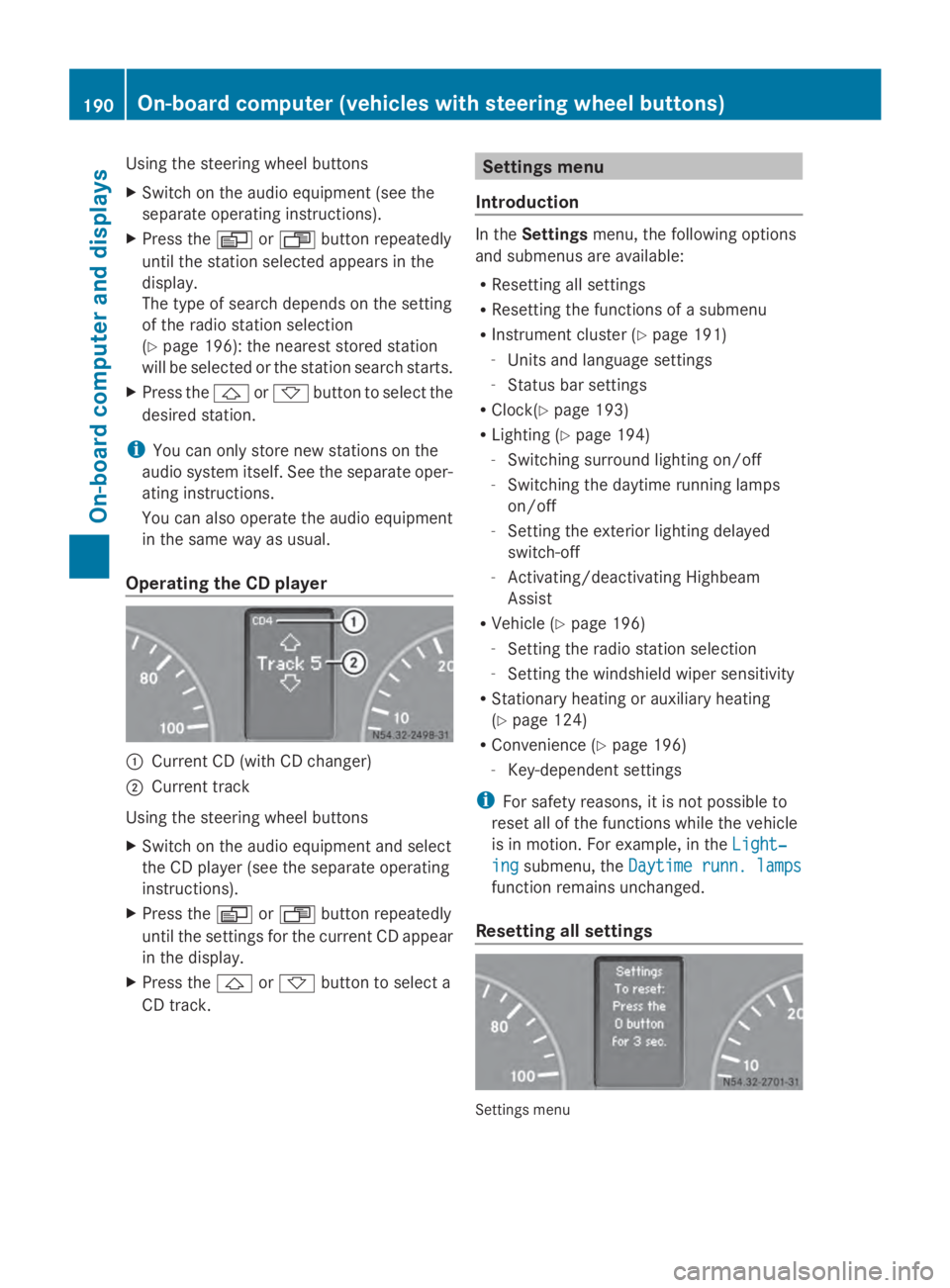
Operating the CD player 0043
Current CD (with CD changer)
0044 Current track
Using the steering wheel buttons
X Switch on the audio equipment and select
the CD player (see the separate operating
instructions).
X Press the 0080or007F button repeatedly
until the settings for the current CD appear
in the display.
X Press the 0041or0068 button to select a
CD track. Settings menu
Introduction In the
Settings menu, the following options
and submenus are available:
R Resetting all settings
R Resetting the functions of a submenu
R Instrument cluster (Y page 191)
- Units and language settings
- Status bar settings
R Clock(Y page 193)
R Lighting (Y page 194)
- Switching surround lighting on/off
- Switching the daytime running lamps
on/off
- Setting the exterior lighting delayed
switch-off
- Activating/deactivating Highbeam
Assist
R Vehicle (Y page 196)
- Setting the radio station selection
- Setting the windshield wiper sensitivity
R Stationary heating or auxiliary heating
(Y page 124)
R Convenience (Y page 196)
- Key-dependent settings
i For safety reasons, it is not possible to
reset all of the functions while the vehicle
is in motion. For example, in the Light‐ Light‐
ing
ing submenu, the Daytime runn. lamps
Daytime runn. lamps
function remains unchanged.
Resetting all settings Settings menu190
On-board computer (vehicles with steering wheel buttons)On-board computer and displays
Page 235 of 338
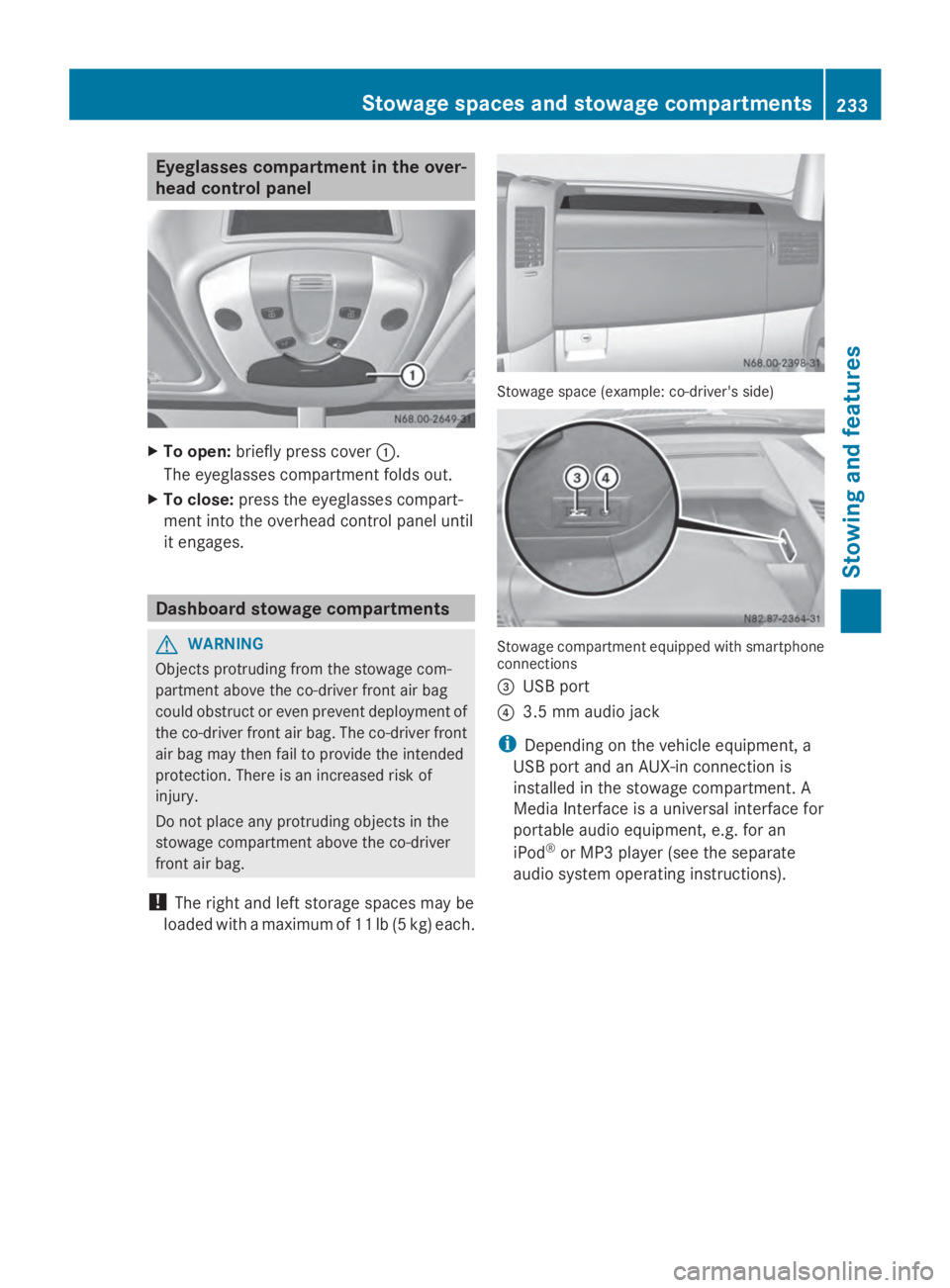
Eyeglasses compartment in the over-
head control panel X
To open: briefly press cover 0043.
The eyeglasses compartment folds out.
X To close: press the eyeglasses compart-
ment into the overhead control panel until
it engages. Dashboard stowage compartments
G
WARNING
Objects protruding from the stowage com-
partment above the co-driver front air bag
could obstruct or even prevent deployment of
the co-driver front air bag. The co-driver front
air bag may then fail to provide the intended
protection. There is an increased risk of
injury.
Do not place any protruding objects in the
stowage compartment above the co-driver
front air bag.
! The right and left storage spaces may be
loaded with a maximum of 11 lb (5 kg) each. Stowage space (example: co-driver's side)
Stowage compartment equipped with smartphone
connections
0087
USB port
0085 3.5 mm audio jack
i Depending on the vehicle equipment, a
USB port and an AUX-in connection is
installed in the stowage compartment. A
Media Interface is a universal interface for
portable audio equipment, e.g. for an
iPod ®
or MP3 player (see the separate
audio system operating instructions). Stowage spaces and stowage compartments
233Stowing and features Z
Page 259 of 338
Washer fluid
G
WARNING
Windshield washer concentrate is highly flam-
mable. If it comes into contact with hot engine
components or the exhaust system it could
ignite. There is a risk of fire and injury.
Make sure that no windshield washer con-
centrate is spilled next to the filler neck.
! Only use washer fluid that is suitable for
plastic lamp lenses, e.g. MB SummerFit or
MB WinterFit. Unsuitable washer fluid
could damage the plastic lenses of the
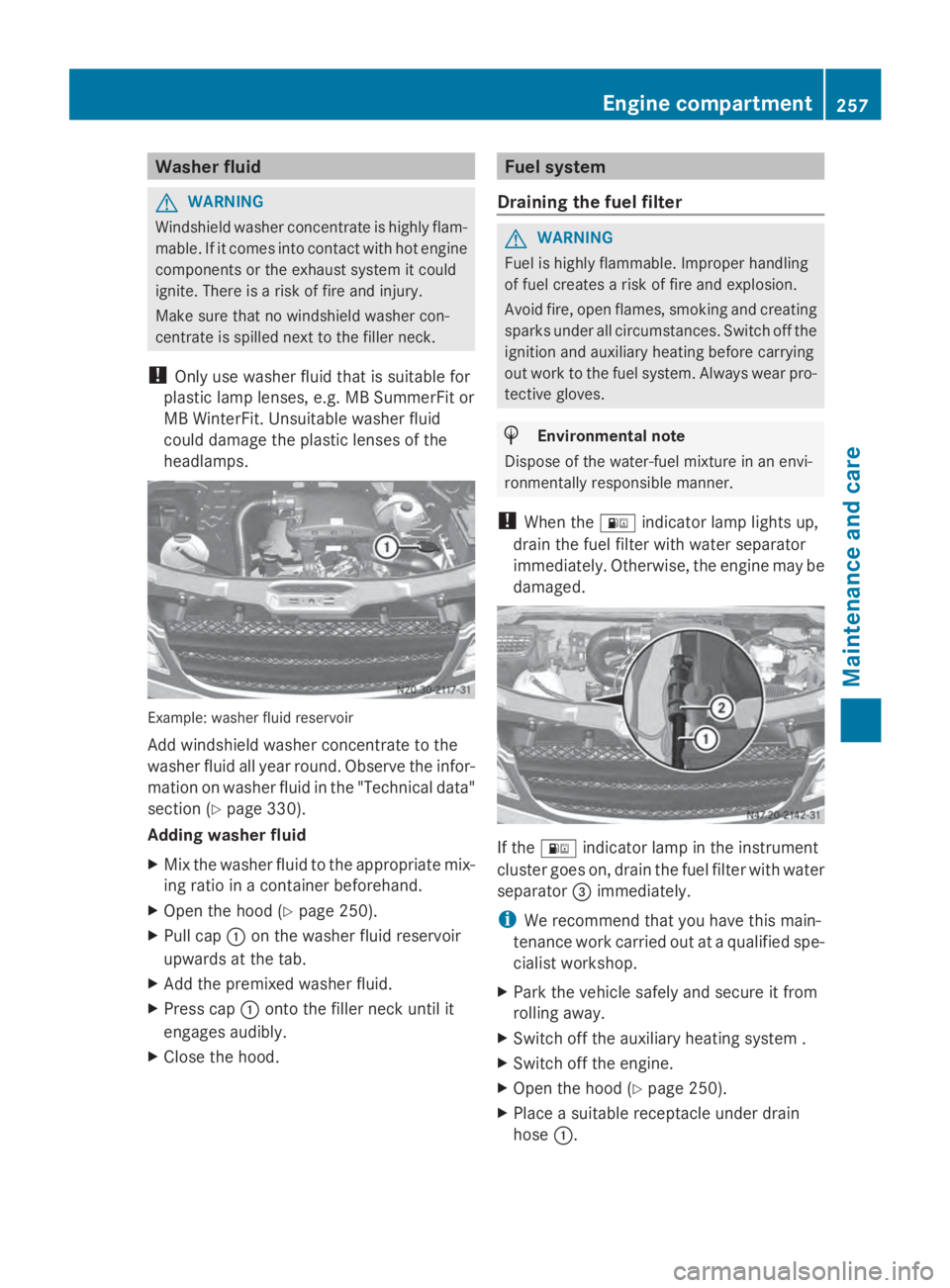
headlamps. Example: washer fluid reservoir
Add windshield washer concentrate to the
washer fluid all year round. Observe the infor-
mation on washer fluid in the "Technical data"
section (Y
page 330).
Adding washer fluid
X Mix the washer fluid to the appropriate mix-
ing ratio in a container beforehand.
X Open the hood (Y page 250).
X Pull cap 0043on the washer fluid reservoir
upwards at the tab.
X Add the premixed washer fluid.
X Press cap 0043onto the filler neck until it
engages audibly.
X Close the hood. Fuel system
Draining the fuel filter G
WARNING
Fuel is highly flammable. Improper handling
of fuel creates a risk of fire and explosion.
Avoid fire, open flames, smoking and creating
sparks under all circumstances. Switch off the
ignition and auxiliary heating before carrying
out work to the fuel system. Always wear pro-
tective gloves. H
Environmental note
Dispose of the water-fuel mixture in an envi-
ronmentally responsible manner.
! When the 00B8indicator lamp lights up,
drain the fuel filter with water separator
immediately. Otherwise, the engine may be
damaged. If the
00B8 indicator lamp in the instrument
cluster goes on, drain the fuel filter with water
separator 0087immediately.
i We recommend that you have this main-
tenance work carried out at a qualified spe-
cialist workshop.
X Park the vehicle safely and secure it from
rolling away.
X Switch off the auxiliary heating system .
X Switch off the engine.
X Open the hood (Y page 250).
X Place a suitable receptacle under drain
hose 0043. Engine compartment
257Maintenance and care Z
Page 263 of 338
cialist workshop or a special
collection point for used bat-
teries.
Observe the following notes:
R Have the condition of charge checked for
the batteries more frequently if you use the
vehicle mainly for short trips or if you leave
it parked for an extended period.
In order for the batteries to achieve their
maximum possible service life, they must
always be sufficiently charged.
R When replacing a battery, only use batter-
ies that are recommended for use in
Sprinter vehicles.
R Have the battery removed at a qualified
specialist workshop.
R If you intend to leave your vehicle parked
for a long period:
- consult a qualified specialist workshop
or
- switch off the electrical system using the
battery main switch (Y page 136).
i When you park the vehicle, remove the
key if you do not require any electrical con-
sumers. The vehicle will then use very little
energy, thus conserving battery power. Installation locations
Your vehicle may be equipped with three bat-
teries, depending on the equipment version:
R a starter battery in the battery case in the
driver's footwell
R additional battery in the engine compart-
ment
R auxiliary battery under the driver's seat Installing/removing the floor cover-
ing (starter battery)
G
WARNING
Objects in the driver's footwell can restrict the
pedal travel or obstruct a depressed pedal.
The operating and road safety of the vehicle
is jeopardized. There is a risk of an accident.
Make sure that all objects in the vehicle are
stowed correctly, and that they cannot enter
the driver's footwell. Install the floormats
securely and as specified in order to ensure
sufficient clearance for the pedals. Do not use
loose floormats and do not place floormats on
top of one another. X
Switch off all electrical consumers.
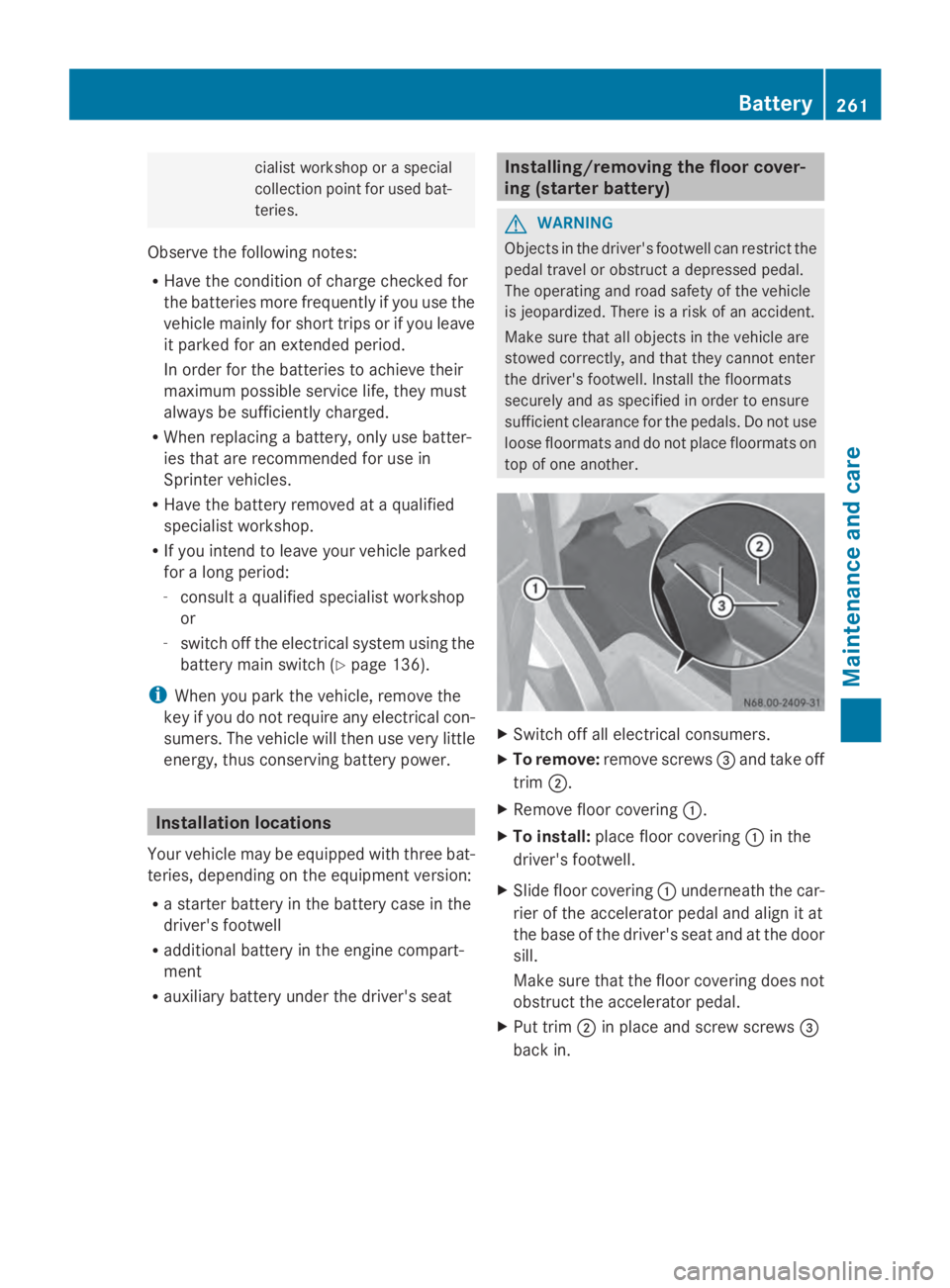
X To remove: remove screws 0087and take off
trim 0044.
X Remove floor covering 0043.
X To install: place floor covering 0043in the
driver's footwell.
X Slide floor covering 0043underneath the car-
rier of the accelerator pedal and align it at
the base of the driver's seat and at the door
sill.
Make sure that the floor covering does not
obstruct the accelerator pedal.
X Put trim 0044in place and screw screws 0087
back in. Battery
261Maintenance and care Z