ECO mode MERCEDES-BENZ SPRINTER 2014 MY14 Operator’s Manual
[x] Cancel search | Manufacturer: MERCEDES-BENZ, Model Year: 2014, Model line: SPRINTER, Model: MERCEDES-BENZ SPRINTER 2014Pages: 338, PDF Size: 6.78 MB
Page 184 of 338
Useful information
This Operator's Manual describes all models
as well as standard and optional equipment
of your vehicle that were available at the time
of going to print. Country-specific variations
are possible. Note that your vehicle may not
be equipped with all of the described func-
tions. This also applies to systems and func-
tions relevant to safety.
Read the information on qualified specialist
workshops (Y page 26). Important safety notes
G
WARNING
If you are driving and reach through the steer-
ing wheel to operate the adjustment knob,
you could lose control of the vehicle. There is
a risk of an accident and injury.
Only operate the adjustment knobs when the
vehicle is stationary. Do not reach through the
steering wheel when driving. G
WARNING
If you operate information systems and com-
munication equipment integrated in the vehi-
cle while driving, you will be distracted from
traffic conditions. You could also lose control
of the vehicle. There is a risk of an accident.
Only operate the equipment when the traffic
situation permits. If you are not sure that this
is possible, park the vehicle paying attention
to traffic conditions and operate the equip-
ment when the vehicle is stationary. G
WARNING
If the instrument cluster has failed or mal-
functioned, you may not recognize function
restrictions in systems relevant to safety. The
operating safety of your vehicle may be
impaired. There is a risk of an accident.
Drive on carefully. Have the vehicle checked
at a qualified specialist workshop immedi-
ately. If uncertainties regarding the operating safety
of the vehicle arise when continuing the jour-
ney, stop the vehicle, paying attention to road
and traffic conditions. Instrument cluster
Overview
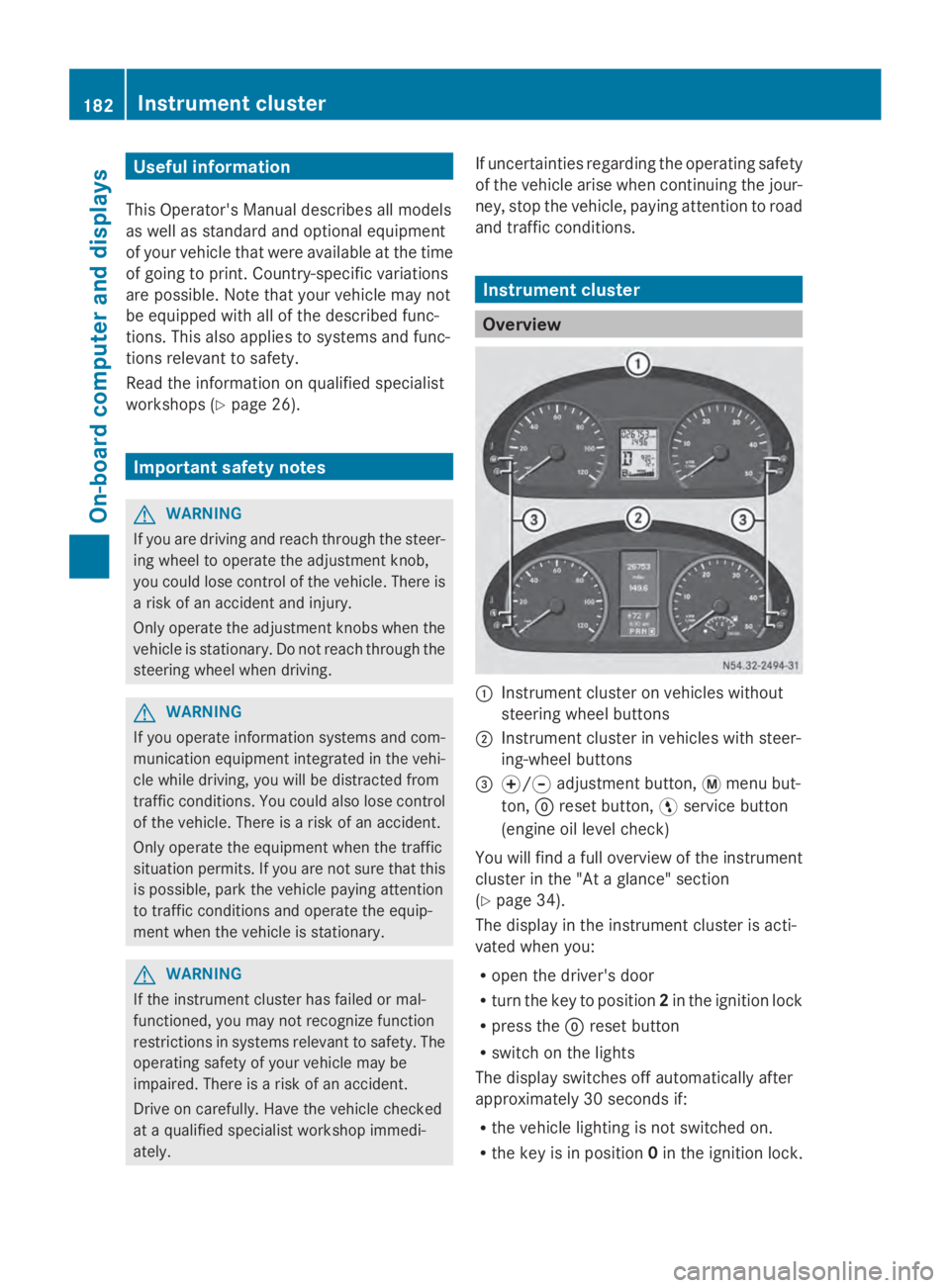
0043
Instrument cluster on vehicles without
steering wheel buttons
0044 Instrument cluster in vehicles with steer-
ing-wheel buttons
0087 0074/0075 adjustment button, 0079menu but-
ton, 0045reset button, 0098service button
(engine oil level check)
You will find a full overview of the instrument
cluster in the "At a glance" section
(Y page 34).
The display in the instrument cluster is acti-
vated when you:
R open the driver's door
R turn the key to position 2in the ignition lock
R press the 0045reset button
R switch on the lights
The display switches off automatically after
approximately 30 seconds if:
R the vehicle lighting is not switched on.
R the key is in position 0in the ignition lock. 182
Instrument clusterOn-board computer and displays
Page 203 of 338
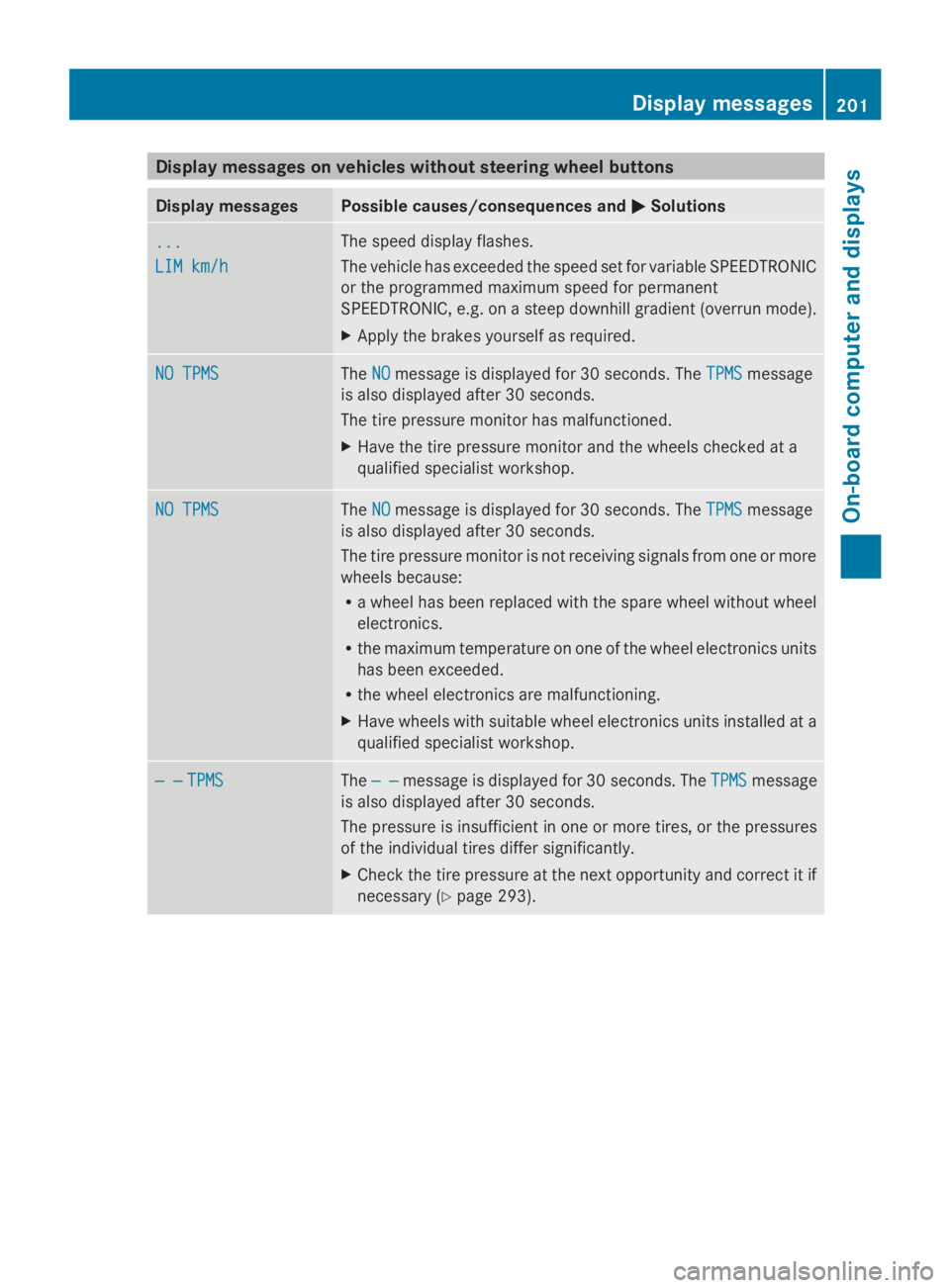
Display messages on vehicles without steering wheel buttons
Display messages Possible causes/consequences and
0050
0050Solutions ...
...
LIM km/h LIM km/h The speed display flashes.
The vehicle has exceeded the speed set for variable SPEEDTRONIC
or the programmed maximum speed for permanent
SPEEDTRONIC, e.g. on a steep downhill gradient (overrun mode).
X
Apply the brakes yourself as required. NO TPMS NO TPMS The
NO
NOmessage is displayed for 30 seconds. The TPMS
TPMSmessage
is also displayed after 30 seconds.
The tire pressure monitor has malfunctioned.
X Have the tire pressure monitor and the wheels checked at a
qualified specialist workshop. NO TPMS NO TPMS The
NO
NOmessage is displayed for 30 seconds. The TPMS
TPMSmessage
is also displayed after 30 seconds.
The tire pressure monitor is not receiving signals from one or more
wheels because:
R a wheel has been replaced with the spare wheel without wheel
electronics.
R the maximum temperature on one of the wheel electronics units
has been exceeded.
R the wheel electronics are malfunctioning.
X Have wheels with suitable wheel electronics units installed at a
qualified specialist workshop. — — — —
TPMS
TPMS The
— —
— — message is displayed for 30 seconds. The TPMS
TPMSmessage
is also displayed after 30 seconds.
The pressure is insufficient in one or more tires, or the pressures
of the individual tires differ significantly.
X Check the tire pressure at the next opportunity and correct it if
necessary (Y page 293). Display
messages
201On-board computer and displays Z
Page 205 of 338
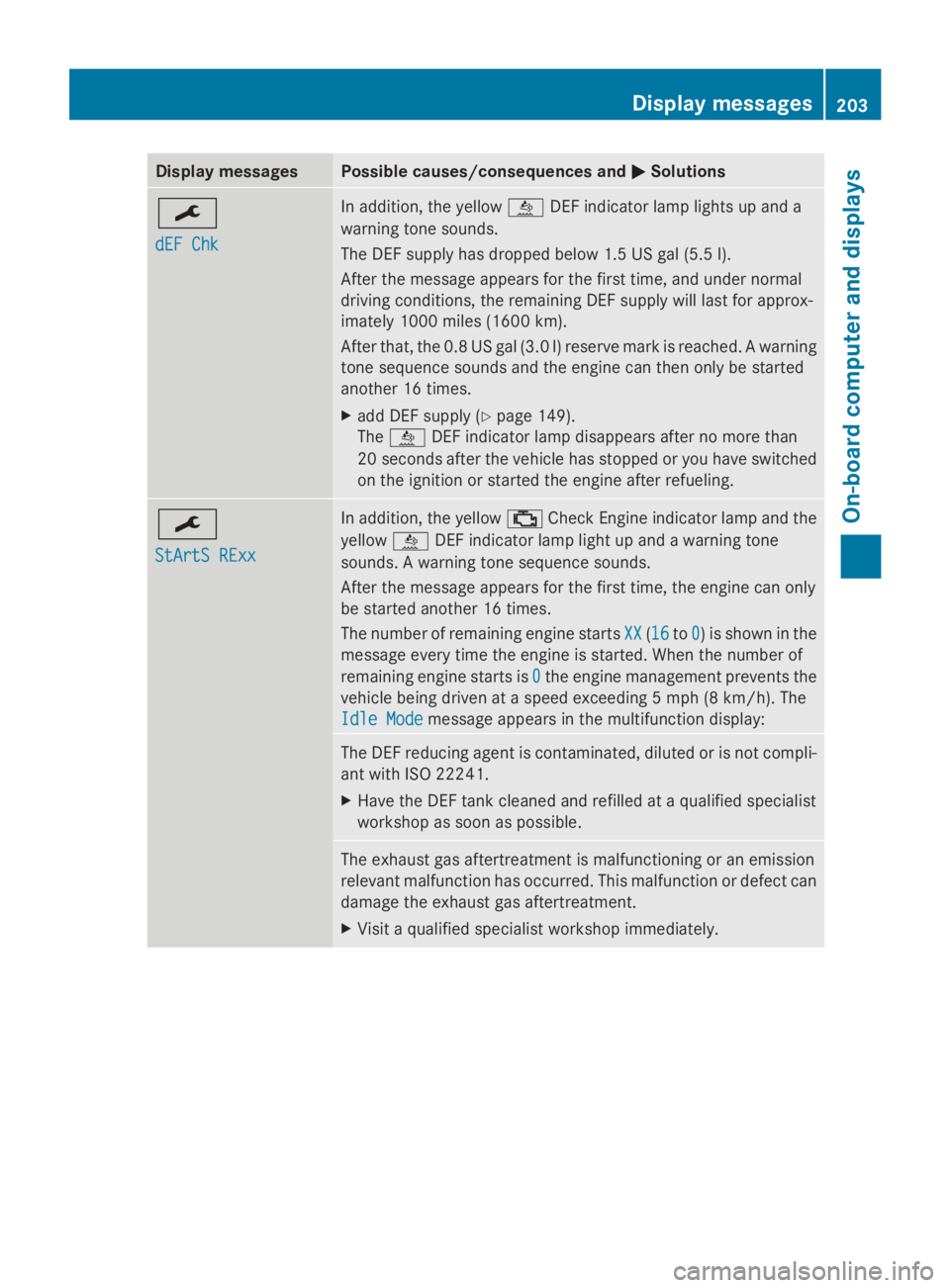
Display messages Possible causes/consequences and
0050
0050Solutions 0099
dEF Chk dEF Chk In addition, the yellow
00E2DEF indicator lamp lights up and a
warning tone sounds.
The DEF supply has dropped below 1.5 US gal (5.5 l).
After the message appears for the first time, and under normal
driving conditions, the remaining DEF supply will last for approx-
imately 1000 miles (1600 km).
After that, the 0.8 US gal (3.0 l) reserve mark is reached. A warning
tone sequence sounds and the engine can then only be started
another 16 times.
X add DEF supply (Y page 149).
The 00E2 DEF indicator lamp disappears after no more than
20 seconds after the vehicle has stopped or you have switched
on the ignition or started the engine after refueling. 0099
StArtS RExx StArtS RExx In addition, the yellow
00B9Check Engine indicator lamp and the
yellow 00E2DEF indicator lamp light up and a warning tone
sounds. A warning tone sequence sounds.
After the message appears for the first time, the engine can only
be started another 16 times.
The number of remaining engine starts XX XX(1616 to0
0) is shown in the
message every time the engine is started. When the number of
remaining engine starts is 0 0the engine management prevents the
vehicle being driven at a speed exceeding 5 mph (8 km/h). The
Idle Mode Idle Mode message appears in the multifunction display: The DEF reducing agent is contaminated, diluted or is not compli-
ant with ISO 22241.
X
Have the DEF tank cleaned and refilled at a qualified specialist
workshop as soon as possible. The exhaust gas aftertreatment is malfunctioning or an emission
relevant malfunction has occurred. This malfunction or defect can
damage the exhaust gas aftertreatment.
X
Visit a qualified specialist workshop immediately. Display
messages
203On-board computer and displays Z
Page 216 of 338
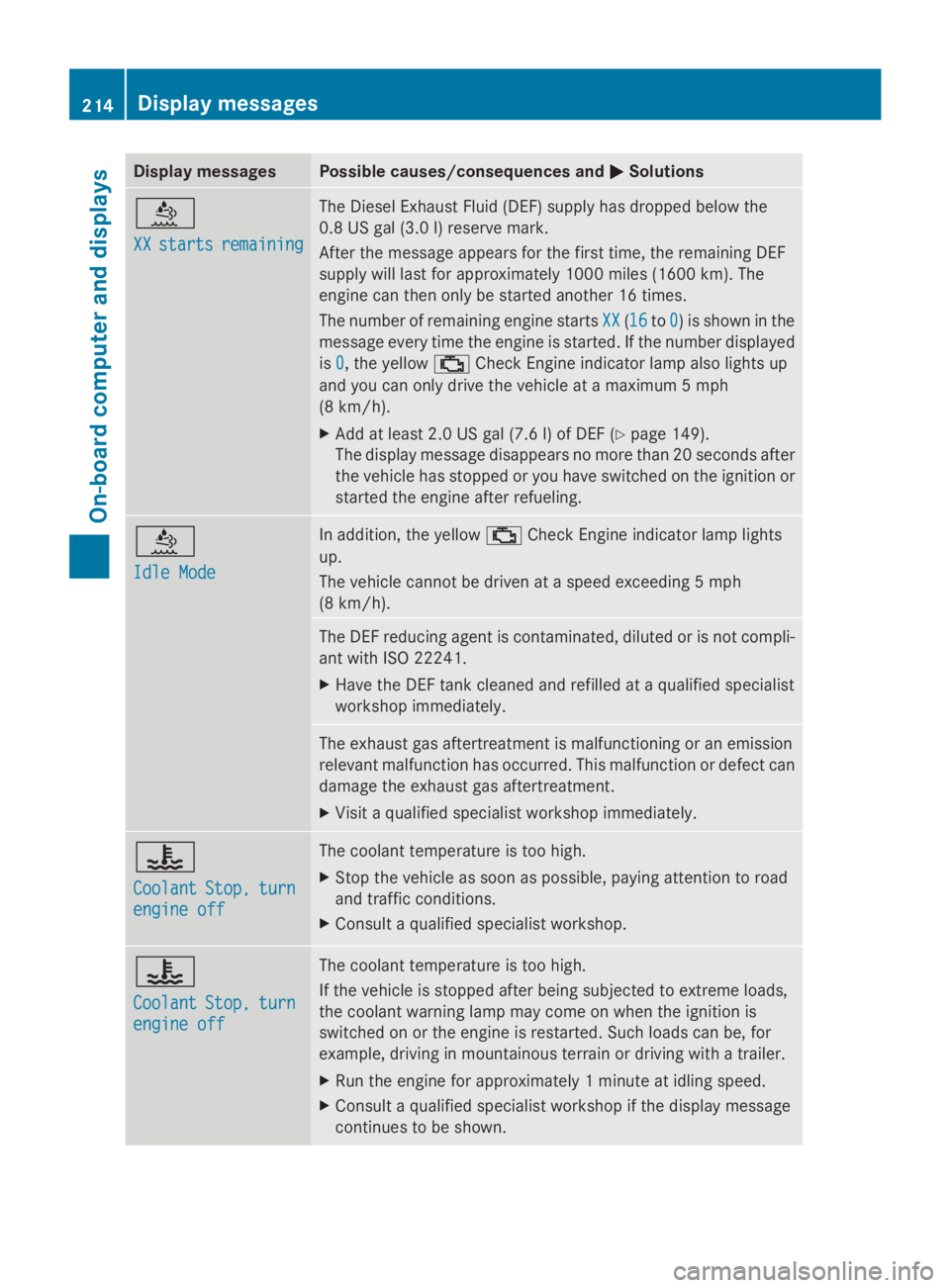
Display messages Possible causes/consequences and
0050
0050Solutions 00E2
XX XX
starts
starts remaining
remaining The Diesel Exhaust Fluid (DEF) supply has dropped below the
0.8 US gal (3.0 l) reserve mark.
After the message appears for the first time, the remaining DEF
supply will last for approximately 1000 miles (1600 km). The
engine can then only be started another 16 times.
The number of remaining engine starts
XX XX(1616 to0
0) is shown in the
message every time the engine is started. If the number displayed
is 0 0, the yellow 00B9Check Engine indicator lamp also lights up
and you can only drive the vehicle at a maximum 5 mph
(8 km/h).
X Add at least 2.0 US gal (7.6 l) of DEF (Y page 149).
The display message disappears no more than 20 seconds after
the vehicle has stopped or you have switched on the ignition or
started the engine after refueling. 00E2
Idle Mode Idle Mode In addition, the yellow
00B9Check Engine indicator lamp lights
up.
The vehicle cannot be driven at a speed exceeding 5 mph
(8 km/h). The DEF reducing agent is contaminated, diluted or is not compli-
ant with ISO 22241.
X
Have the DEF tank cleaned and refilled at a qualified specialist
workshop immediately. The exhaust gas aftertreatment is malfunctioning or an emission
relevant malfunction has occurred. This malfunction or defect can
damage the exhaust gas aftertreatment.
X
Visit a qualified specialist workshop immediately. 00AC
Coolant Coolant
Stop,
Stop,turn
turn
engine off
engine off The coolant temperature is too high.
X
Stop the vehicle as soon as possible, paying attention to road
and traffic conditions.
X Consult a qualified specialist workshop. 00AC
Coolant Coolant
Stop,
Stop,turn
turn
engine off
engine off The coolant temperature is too high.
If the vehicle is stopped after being subjected to extreme loads,
the coolant warning lamp may come on when the ignition is
switched on or the engine is restarted. Such loads can be, for
example, driving in mountainous terrain or driving with a trailer.
X
Run the engine for approximately 1 minute at idling speed.
X Consult a qualified specialist workshop if the display message
continues to be shown. 214
Display
messagesOn-board computer and displays
Page 241 of 338
You can use the 12 V sockets (15 A) for
accessories with a maximum power con-
sumption of 180 W. You can connect acces-
sories with a maximum power consumption
of 300 W to the 12 V socket (25 A) on the
lower section of the center console.
i The sockets are supplied with power even
when the key is removed from the ignition
lock. If accessories, e.g. a coolbox, remain
connected while the engine is not running,
the battery will discharge. Mobile phone
Important safety notes
G
WARNING
If you operate information systems and com-
munication equipment integrated in the vehi-
cle while driving, you will be distracted from
traffic conditions. You could also lose control
of the vehicle. There is a risk of an accident.
Only operate the equipment when the traffic
situation permits. If you are not sure that this
is possible, park the vehicle paying attention
to traffic conditions and operate the equip-
ment when the vehicle is stationary.
You must observe the legal requirements for
the country in which you are currently driving
when operating mobile phones.
Bear in mind that at a speed of just 30 mph
(approximately 50 km/h), your vehicle is cov-
ering a distance of 44 feet (approximately
14 m) every second.
You and others can suffer health-related dam-
age through electromagnetic radiation. By
using an exterior antenna, a possible health
risk caused by electromagnetic fields, as dis-
cussed in scientific circles, is taken into
account. Only have the exterior antenna
installed by a qualified specialist workshop.
We recommend the use of an approved exte-
rior antenna for operating the mobile phone.
Only in this way can optimal mobile phone
reception quality in the vehicle be ensured and mutual interference between the vehicle
electronics and mobile phones minimized.
Observe the legal requirements for each indi-
vidual country. Mobile phone pre-installation
The mobile phone pre-installation includes a
hands-free system integrated into the vehi-
cle. The microphone for the hands-free sys-
tem is installed in the overhead control panel
or in the overhead stowage compartment
together with the front interior light.
In order to use the hands-free system, you will
need a special bracket. The Sprinter acces-
sories include brackets for various mobile
phone models.
i Mobile phone brackets which are availa-
ble from various manufacturers on the
open market are not compatible with the
Sprinter telephone system. You can recog-
nize suitable holders for your mobile phone
by the imprinted star and the B6 spare part
number on the back of the bracket.
Detailed instructions for use can be found in
the operating instructions for the mobile
phone bracket and in the separate operating
instructions for the mobile phone pre-instal-
lation.
i The mobile phone battery is charged
depending on the condition of charge and
the position of the key in the ignition lock.
The mobile phone display indicates the
charging process. Additional communications equip-
ment
Important safety notes
G
WARNING
If you operate mobile communication equip-
ment while driving, you will be distracted from
traffic conditions. You could also lose control
of the vehicle. There is a risk of an accident. Additional communications equipment
239Stowing and features
Z
Page 252 of 338
Useful information
This Operator's Manual describes all models
as well as standard and optional equipment
of your vehicle that were available at the time
of going to print. Country-specific variations
are possible. Note that your vehicle may not
be equipped with all of the described func-
tions. This also applies to systems and func-
tions relevant to safety.
Read the information on qualified specialist
workshops (Y page 26). Engine compartment
Hood
Opening the hood G
WARNING
If the hood is unlatched, it may open up when
the vehicle is in motion and block your view.
There is a risk of an accident.
Never unlatch the hood while driving. G
WARNING
Opening the hood when the engine is over-
heated or when there is a fire in the engine
compartment could expose you to hot gases
or other service products. There is a risk of
injury.
Let an overheated engine cool down before
opening the hood. If there is a fire in the
engine compartment, keep the hood closed
and contact the fire department. G
WARNING
Certain components in the engine compart-
ment, such as the engine, radiator and parts
of the exhaust system, can become very hot.
Working in the engine compartment poses a
risk of injury.
Where possible, let the engine cool down and
touch only the components described in the
following. If you have to carry out work in the engine
compartment, only touch the following com-
ponents:
R
hood
R oil dipstick
R engine oil filler neck cap
R washer fluid reservoir cap G
WARNING
The engine compartment contains moving
components. Certain components, such as
the radiator fan, may continue to run or start
again suddenly when the ignition is off. There
is a risk of injury.
If you need to do any work inside the engine
compartment:
R switch off the ignition
R never reach into the area where there is a
risk of danger from moving components,
such as the fan rotation area
R remove jewelery and watches
R keep items of clothing and hair, for exam-
ple, away from moving parts G
WARNING
The fuel injection system operates with a high
voltage. If you touch the live components, you
could receive an electric shock. There is a risk
of injury.
Never touch components of the fuel injection
system when the ignition is switched on.
The live components of the fuel injection sys-
tem are, for example, the injectors.
! Make sure that the windshield wipers are
not folded away from the windshield. You
could otherwise damage the windshield
wipers or the hood. 250
Engine compartmentMaintenance and care
Page 288 of 338
Useful information
This Operator's Manual describes all models
as well as standard and optional equipment
of your vehicle that were available at the time
of going to print. Country-specific variations
are possible. Note that your vehicle may not
be equipped with all of the described func-
tions. This also applies to systems and func-
tions relevant to safety.
Read the information on qualified specialist
workshops (Y page 26). Important safety notes
G
Warning
A flat tire severely impairs the driving, steer-
ing and braking characteristics of the vehicle.
There is a risk of an accident.
do not drive with a flat tire. Immediately
replace the flat tire with your spare wheel, or
consult a qualified specialist workshop. G
WARNING
If wheels and tires of the wrong size are used,
the wheel brakes or suspension components
may be damaged. There is a risk of an acci-
dent.
Always replace wheels and tires with those
that fulfill the specifications of the original
part.
When replacing wheels, make sure to use the
correct:
R designation
R model
When replacing tires, make sure to use the
correct:
R designation
R manufacturer
R model
Accessories that are not approved for your
vehicle or are not being used correctly can
impair operating safety. Before purchasing and using non-approved
accessories, visit a qualified specialist work-
shop and inquire about:
R
suitability
R legal stipulations
R factory recommendations
Contact an authorized Sprinter dealer if you
require information on tested and recom-
mended wheels and tires for summer and
winter driving. Advice on purchasing and car-
ing for tires is also available there.
Information on tire and wheel dimensions and
types as well as the recommended tire pres-
sure for your vehicle can be found in the "Tire
pressure" section (Y page 297).
This data can also be found on the Tire and
Loading Information placard on the B-pillar.
Modifications to the brake system or wheels
are not permitted. The use of wheel spacers
or brake dust shields is not permitted. This
invalidates the general operating permit for
the vehicle.
i Further information on wheels and tires
can be obtained at any qualified specialist
workshop. Operation
Information for a journey
If the vehicle is heavily laden, check the tire
pressures, and correct them, if necessary.
While driving, pay attention to vibrations,
noises and unusual handling characteristics,
e.g. pulling to one side. This may indicate that
the wheels or tires are damaged. If you sus-
pect that a tire is defective, reduce your
speed immediately. Stop the vehicle as soon
as possible to check the wheels and tires for
damage. Hidden tire damage could also be
causing the unusual handling characteristics.
If you find no signs of damage, have the tires
and wheels checked at a qualified specialist
workshop. 286
OperationWheels and tires
Page 304 of 338
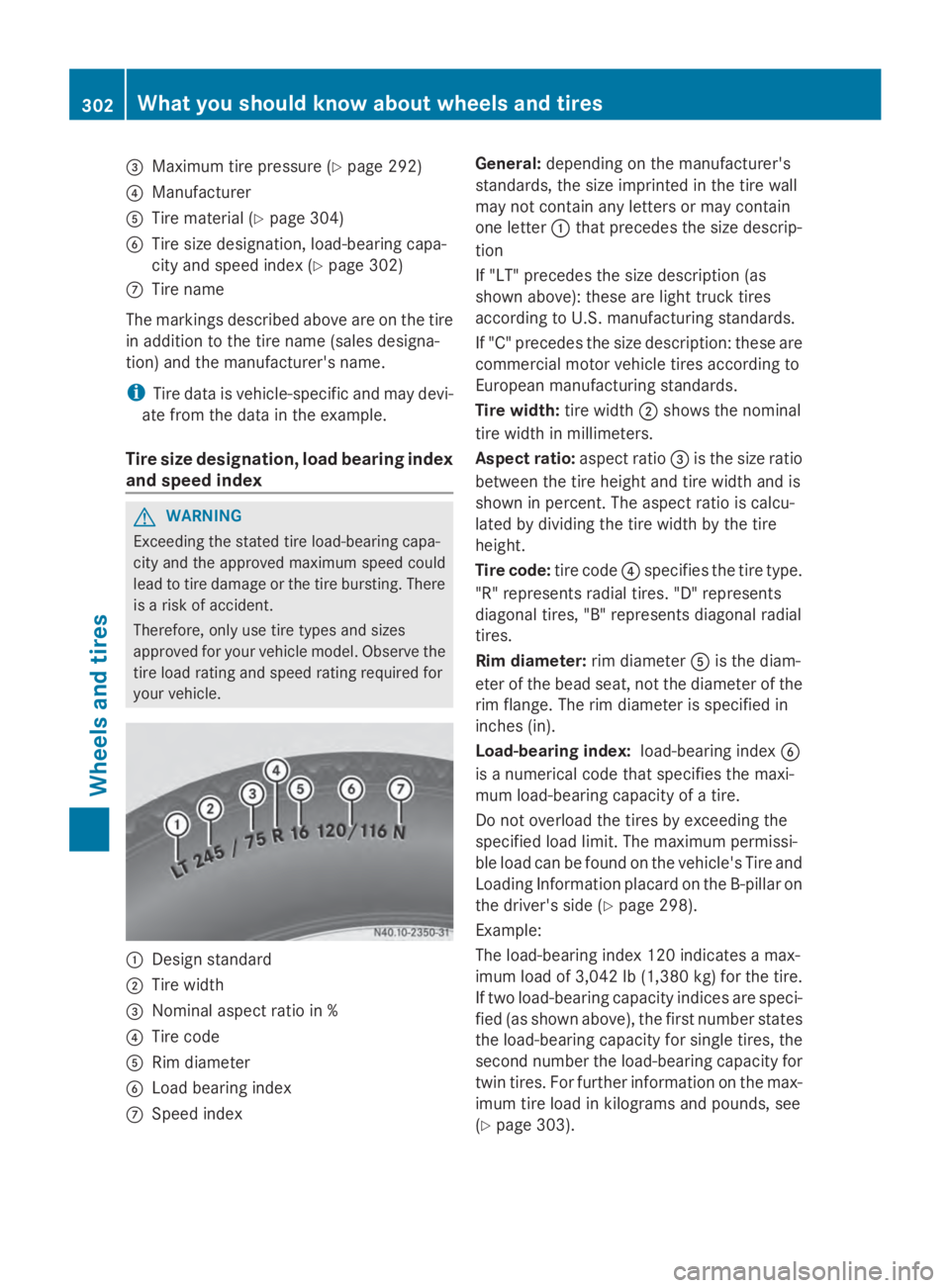
0087
Maximum tire pressure (Y page 292)
0085 Manufacturer
0083 Tire material (Y page 304)
0084 Tire size designation, load-bearing capa-
city and speed index (Y page 302)
006B Tire name
The markings described above are on the tire
in addition to the tire name (sales designa-
tion) and the manufacturer's name.
i Tire data is vehicle-specific and may devi-
ate from the data in the example.
Tire size designation, load bearing index
and speed index G
WARNING
Exceeding the stated tire load-bearing capa-
city and the approved maximum speed could
lead to tire damage or the tire bursting. There
is a risk of accident.
Therefore, only use tire types and sizes
approved for your vehicle model. Observe the
tire load rating and speed rating required for
your vehicle. 0043
Design standard
0044 Tire width
0087 Nominal aspect ratio in %
0085 Tire code
0083 Rim diameter
0084 Load bearing index
006B Speed index General:
depending on the manufacturer's
standards, the size imprinted in the tire wall
may not contain any letters or may contain
one letter 0043that precedes the size descrip-
tion
If "LT" precedes the size description (as
shown above): these are light truck tires
according to U.S. manufacturing standards.
If "C" precedes the size description: these are
commercial motor vehicle tires according to
European manufacturing standards.
Tire width: tire width0044shows the nominal
tire width in millimeters.
Aspect ratio: aspect ratio0087is the size ratio
between the tire height and tire width and is
shown in percent. The aspect ratio is calcu-
lated by dividing the tire width by the tire
height.
Tire code: tire code0085specifies the tire type.
"R" represents radial tires. "D" represents
diagonal tires, "B" represents diagonal radial
tires.
Rim diameter: rim diameter0083is the diam-
eter of the bead seat, not the diameter of the
rim flange. The rim diameter is specified in
inches (in).
Load-bearing index: load-bearing index0084
is a numerical code that specifies the maxi-
mum load-bearing capacity of a tire.
Do not overload the tires by exceeding the
specified load limit. The maximum permissi-
ble load can be found on the vehicle's Tire and
Loading Information placard on the B-pillar on
the driver's side (Y page 298).
Example:
The load-bearing index 120 indicates a max-
imum load of 3,042 lb (1,380 kg) for the tire.
If two load-bearing capacity indices are speci-
fied (as shown above), the first number states
the load-bearing capacity for single tires, the
second number the load-bearing capacity for
twin tires. For further information on the max-
imum tire load in kilograms and pounds, see
(Y page 303). 302
What you should know about wheels and tiresWheels and tires
Page 329 of 338
Miscibility of engine oils
!
Mixing oils reduces the benefits of using
high grade engine oils.
We recommend that you only add engine oil
of the same quality grade and SAE class as
used when the engine oil was last changed.
If, in exceptional cases, oil of the type in the
engine is not available, top up using another
approved mineral or synthetic engine oil.
If the quality grade is not available for diesel
engines, you may also add engine oils meet-
ing the requirements in MB Sheet Number
228.5, 229.3 or 229.5. The topping-up quan-
tity is then limited to a maximum of 1 qt (1 l).
Engine oils are differentiated according to:
R engine oil brand
R quality grade (sheet number)
R SAE class (viscosity)
Subsequently have the engine oil changed at
the earliest possible opportunity.
Interval for oil change The on-board computer automatically shows
the date for the next oil change as an event
message in the display.
Only by using engine oil with a particularly
high quality grade, e.g. according to Sheet
Number 228.51 of the Mercedes-Benz Spec-
ifications for Service Products, can the maxi-
mum interval for oil change be achieved.
We recommend having the oil changed at a
qualified specialist workshop.
Engine oil for diesel engines Product name/number
see the Maintenance Booklet
MB Sheet Number 228.51, 229.31, 229.51
Capacities
!
Do not add too much oil. adding too much
engine oil can result in damage to the
engine or to the catalytic converter. Have
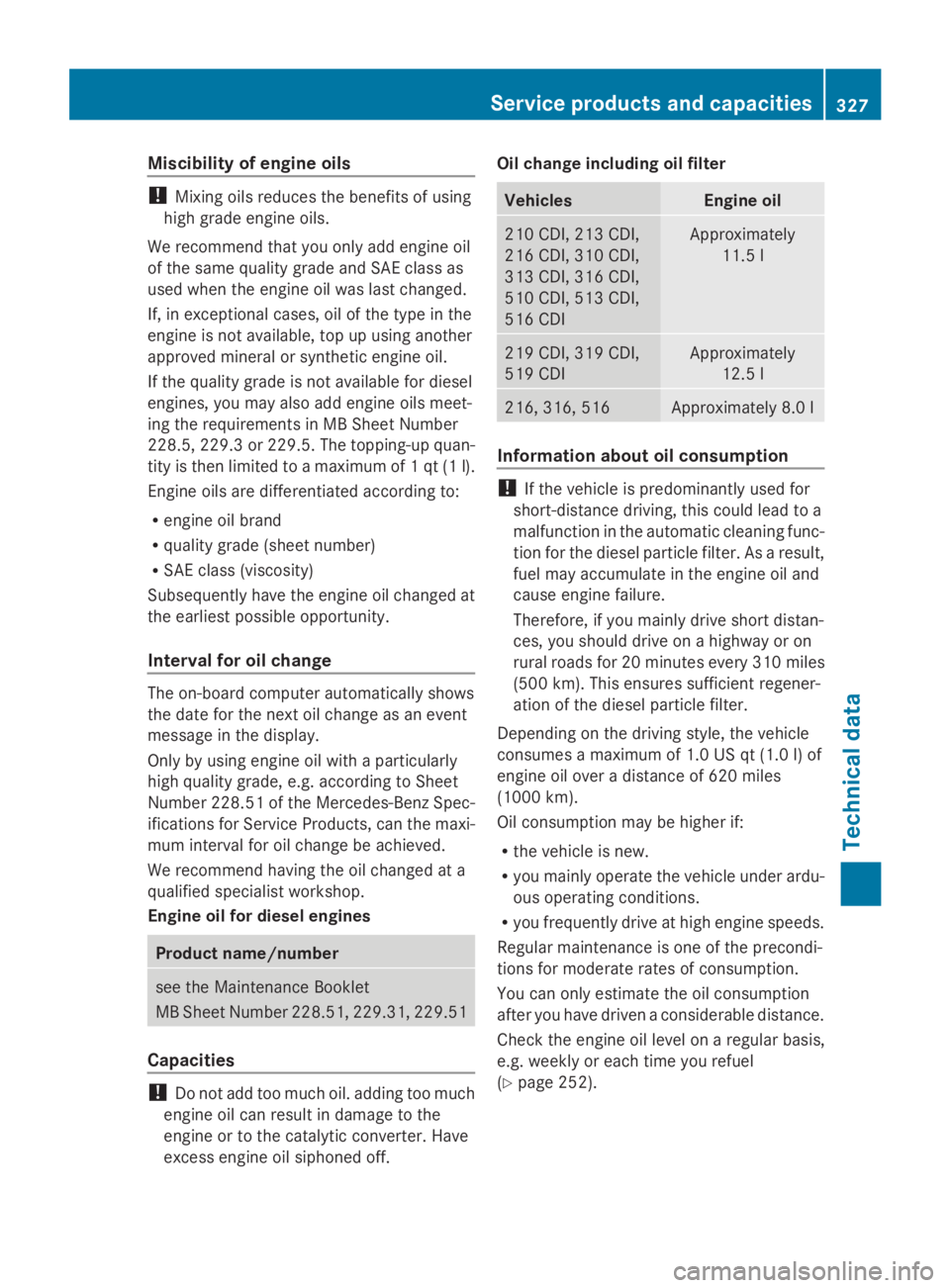
excess engine oil siphoned off. Oil change including oil filter Vehicles Engine oil
210 CDI, 213 CDI,
216 CDI, 310 CDI,
313 CDI, 316 CDI,
510 CDI, 513 CDI,
516 CDI Approximately
11.5 l 219 CDI, 319 CDI,
519 CDI Approximately
12.5 l 216, 316, 516 Approximately 8.0 l
Information about oil consumption
!
If the vehicle is predominantly used for
short-distance driving, this could lead to a
malfunction in the automatic cleaning func-
tion for the diesel particle filter. As a result,
fuel may accumulate in the engine oil and
cause engine failure.
Therefore, if you mainly drive short distan-
ces, you should drive on a highway or on
rural roads for 20 minutes every 310 miles
(500 km). This ensures sufficient regener-
ation of the diesel particle filter.
Depending on the driving style, the vehicle
consumes a maximum of 1.0 US qt (1.0 l)of
engine oil over a distance of 620 miles
(1000 km).
Oil consumption may be higher if:
R the vehicle is new.
R you mainly operate the vehicle under ardu-
ous operating conditions.
R you frequently drive at high engine speeds.
Regular maintenance is one of the precondi-
tions for moderate rates of consumption.
You can only estimate the oil consumption
after you have driven a considerable distance.
Check the engine oil level on a regular basis,
e.g. weekly or each time you refuel
(Y page 252). Service products and capacities
327Technical data Z