check engine light MERCEDES-BENZ SPRINTER 2014 MY14 Operator’s Manual
[x] Cancel search | Manufacturer: MERCEDES-BENZ, Model Year: 2014, Model line: SPRINTER, Model: MERCEDES-BENZ SPRINTER 2014Pages: 338, PDF Size: 6.78 MB
Page 179 of 338
Observe the following when towing a trailer:
R Practice driving around bends, stopping
and backing up at a place where there is no
traffic. This enables you to gain experience
and get used to the new handling charac-
teristics.
R Before driving, check:
-that the trailer tow hitch and ball cou-
pling are secure
- that the safety switch for a braked trailer
is functioning properly
- that the safety chains are secure and not
damaged
- that the electrical connections are
secure
- that the lights are working
- that the wheels are in good order and the
tire pressure is correct
R Adjust the exterior mirrors to provide an
unobstructed view of the rear section of the
trailer.
R If the trailer has electronically controlled
brakes, pull the vehicle/trailer combina-
tion away carefully. Brake manually using
the brake controller and check that the
brakes are working.
R Secure the load on the trailer according to
the applicable specifications and current
standards on securing loads
(Y page 244).
R When driving with a trailer, check at regular
intervals that the load is secured and that
the brakes and lights are working.
R Bear in mind that the handling will be less
stable when towing a trailer than when driv-
ing without one. Avoid sudden steering
movements.
R The vehicle/trailer combination is heavier,
accelerates more slowly and has a
decreased gradient climbing capability and
a longer braking distance.
It is more susceptible to crosswinds and
requires cautious steering.
R If possible, do not brake suddenly, but
rather moderately at first so that the trailer can activate its brakes. Then increase the
force on the brake pedal.
R If the automatic transmission repeatedly
shifts between gears when driving on
inclines, restrict the shift range. Select shift
range 4,3,2or 1.
Driving in a low gear and at a low speed
reduces the risk of damaging the engine.
R When driving on a downhill gradient, shift
to a low gear and take advantage of the
engine's braking effect.
Avoid continuous brake application as this
may overheat the vehicle brakes and, if
installed, the trailer brakes.
R If the coolant temperature increases dra-
matically while the air-conditioning system
is switched on, switch off the air-condition-
ing system.
Coolant heat can also be dissipated by
switching the airflow and the temperature
of the heater/air conditioning to the maxi-
mum level. Open the windows if necessary.
R When overtaking, pay particular attention
to the extended length of your vehicle/
trailer combination.
Due to the length of your vehicle/trailer
combination you need an additional dis-
tance before you can return to your original
lane. Uncoupling a trailer
G
WARNING
If you uncouple a trailer with the overrun
brake engaged, you could trap your hand
between the vehicle and the trailer drawbar.
There is a risk of injury.
Do not uncouple a trailer if the overrun brake
is engaged.
! Do not disconnect a trailer with an
engaged overrun brake. Otherwise, your
vehicle could be damaged by the rebound-
ing of the overrun brake. Towing a trailer
177Driving and parking Z
Page 184 of 338
Useful information
This Operator's Manual describes all models
as well as standard and optional equipment
of your vehicle that were available at the time
of going to print. Country-specific variations
are possible. Note that your vehicle may not
be equipped with all of the described func-
tions. This also applies to systems and func-
tions relevant to safety.
Read the information on qualified specialist
workshops (Y page 26). Important safety notes
G
WARNING
If you are driving and reach through the steer-
ing wheel to operate the adjustment knob,
you could lose control of the vehicle. There is
a risk of an accident and injury.
Only operate the adjustment knobs when the
vehicle is stationary. Do not reach through the
steering wheel when driving. G
WARNING
If you operate information systems and com-
munication equipment integrated in the vehi-
cle while driving, you will be distracted from
traffic conditions. You could also lose control
of the vehicle. There is a risk of an accident.
Only operate the equipment when the traffic
situation permits. If you are not sure that this
is possible, park the vehicle paying attention
to traffic conditions and operate the equip-
ment when the vehicle is stationary. G
WARNING
If the instrument cluster has failed or mal-
functioned, you may not recognize function
restrictions in systems relevant to safety. The
operating safety of your vehicle may be
impaired. There is a risk of an accident.
Drive on carefully. Have the vehicle checked
at a qualified specialist workshop immedi-
ately. If uncertainties regarding the operating safety
of the vehicle arise when continuing the jour-
ney, stop the vehicle, paying attention to road
and traffic conditions. Instrument cluster
Overview
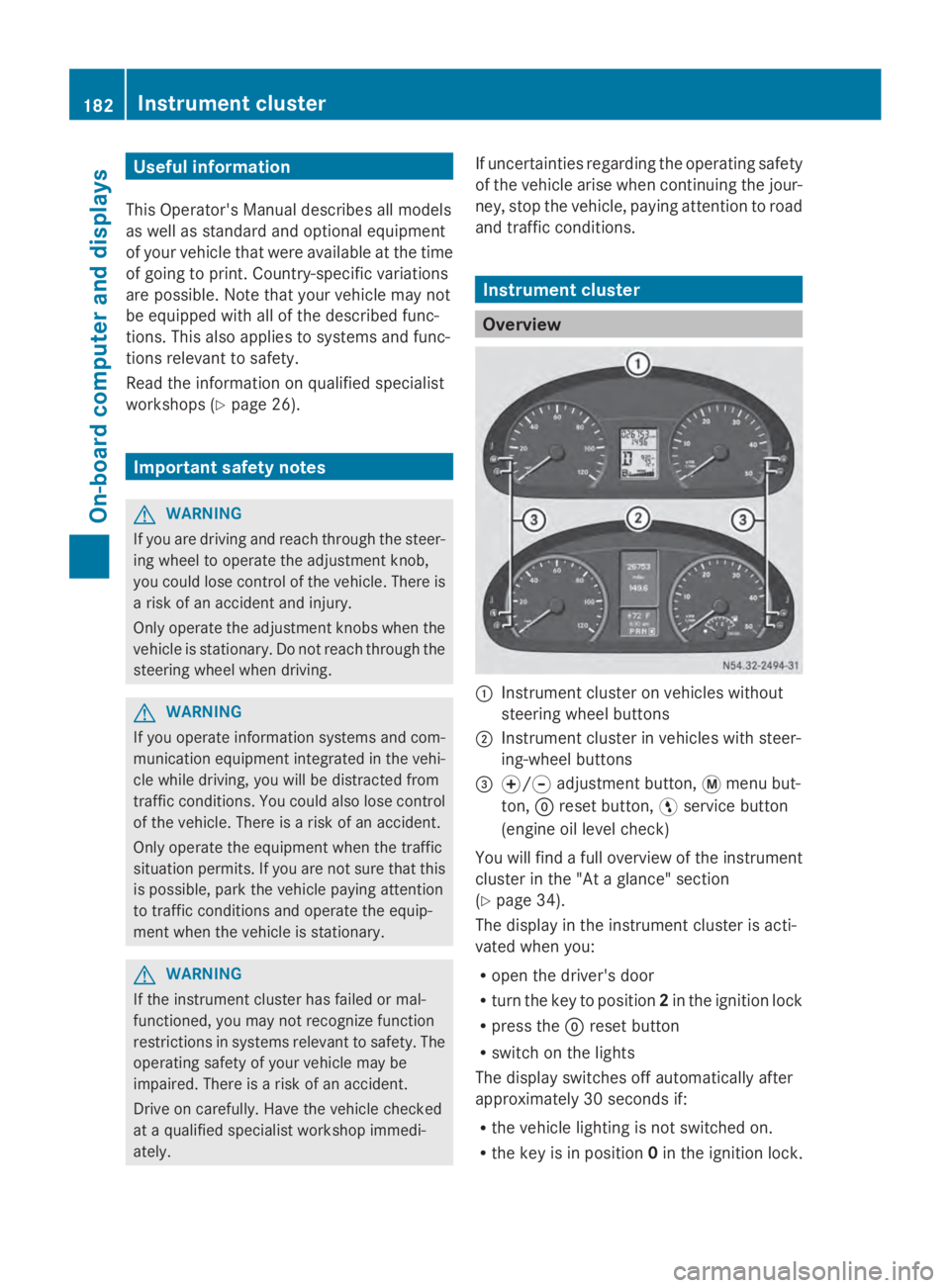
0043
Instrument cluster on vehicles without
steering wheel buttons
0044 Instrument cluster in vehicles with steer-
ing-wheel buttons
0087 0074/0075 adjustment button, 0079menu but-
ton, 0045reset button, 0098service button
(engine oil level check)
You will find a full overview of the instrument
cluster in the "At a glance" section
(Y page 34).
The display in the instrument cluster is acti-
vated when you:
R open the driver's door
R turn the key to position 2in the ignition lock
R press the 0045reset button
R switch on the lights
The display switches off automatically after
approximately 30 seconds if:
R the vehicle lighting is not switched on.
R the key is in position 0in the ignition lock. 182
Instrument clusterOn-board computer and displays
Page 186 of 338
DEF gauge
Vehicles without steering wheel but-
tons If the supply of DEF is less than 1.5 US gal
(5.5 l), the 00E2indicator lamp lights up and
the 0099 dEF Chk
dEF Chk display message appears.
If the supply of DEF falls below the reserve
range of 0.8 US gal (3.0 l), the 00E2indicator
lamp lights up and the 0099StArtS RExx
StArtS RExx
display message appears. In the display, xx
xx
corresponds to the number of possible
remaining engine starts (16 16to0
0).
Further information on DEF consumption can
be found in the "Service products and filling
capacity" section (Y page 324).
Vehicles with steering wheel buttons If the supply of DEF is less than 1.5 US gal
(5.5 l), the Check Diesel Exhaust Fluid
Check Diesel Exhaust Fluid
See
See Operator's
Operator's Manual
Manualmessage is shown
in the display.
If the supply of DEF falls below the reserve
range of 0.8 US gal (3.0 l), the 00E2xx
xx
starts remaining starts remaining message is displayed. In
the display, xx
xxcorresponds to the number of
possible remaining engine starts ( 16
16to0
0).
Further information on DEF consumption can
be found in the "Service products and filling
capacity" section (Y page 324).On-board computer (vehicles without
steering wheel buttons) Operating the on-board computer
General notes The on-board computer is activated as soon
as you turn the key to position 1in the ignition
lock.
The on-board computer shows vehicle infor-
mation and settings in the display. You can control the display and the settings
in the on-board computer using the adjust-
ment buttons on the instrument cluster.
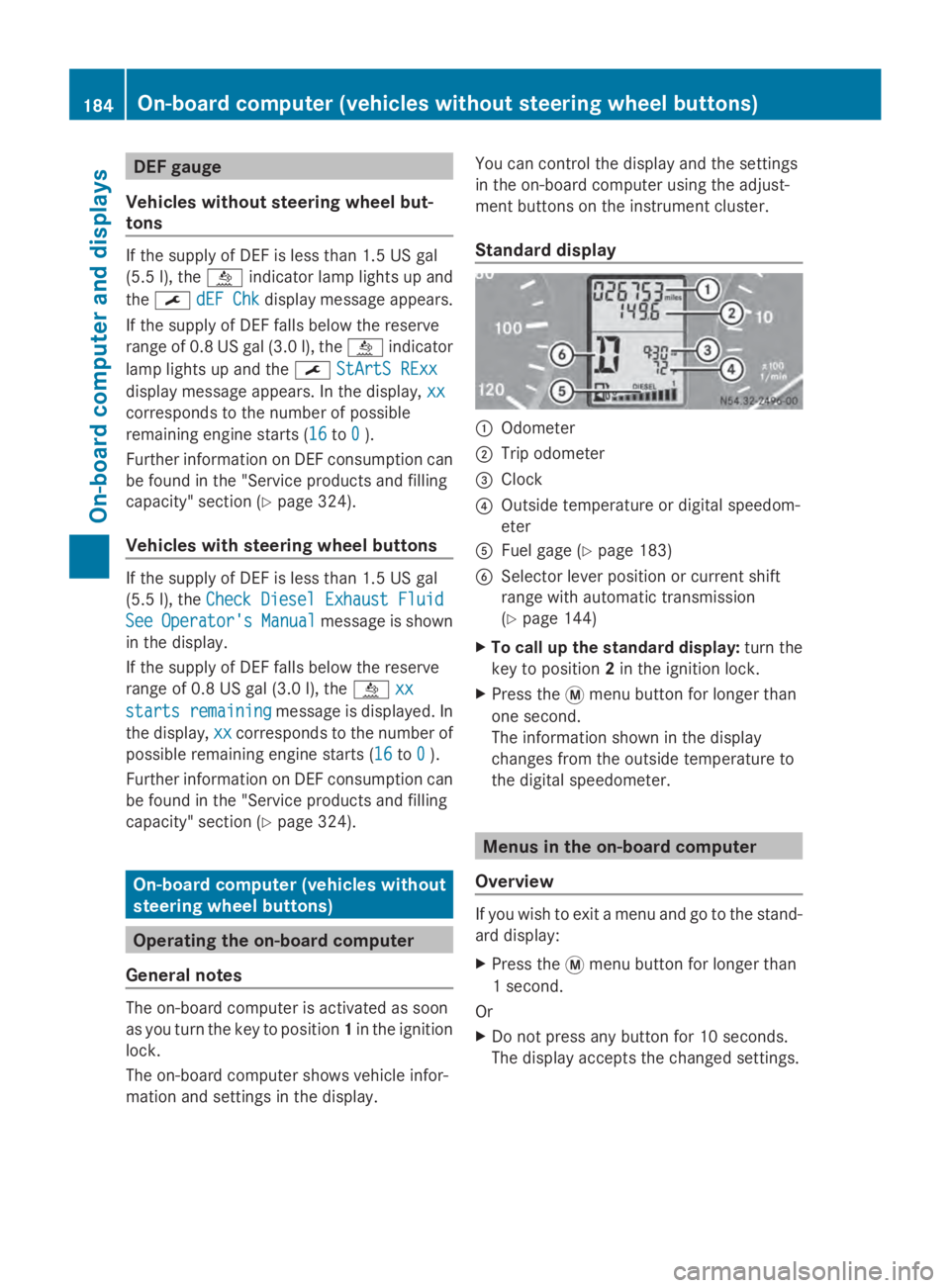
Standard display
0043
Odometer
0044 Trip odometer
0087 Clock
0085 Outside temperature or digital speedom-
eter
0083 Fuel gage (Y page 183)
0084 Selector lever position or current shift
range with automatic transmission
(Ypage 144)
X To call up the standard display: turn the
key to position 2in the ignition lock.
X Press the 0079menu button for longer than
one second.
The information shown in the display
changes from the outside temperature to
the digital speedometer. Menus in the on-board computer
Overview If you wish to exit a menu and go to the stand-
ard display:
X
Press the 0079menu button for longer than
1 second.
Or
X Do not press any button for 10 seconds.
The display accepts the changed settings. 184
On-boa
rdcompu ter (vehicles without steering wheel buttons)On-board computer and displays
Page 187 of 338
Using the
0074,0075,0079or0045 adjustment but-
tons, you can select the following functions:
R Calling up the service due date
(Y page 260)
R Checking the oil level (Y page 252)
R Checking the DEF supply (Y page 184)
R Preselecting/setting the auxiliary heating
switch-on time (Y page 124)
R Tire pressure monitor (Y page 293)
R Setting the time (Y page 185)
R Activating/deactivating Highbeam Assist
(Y page 194)
R Setting the daytime running lamps
(Y page 185)
Setting the time X
Turn the key to position 2in the ignition
lock.
X Press the 0079menu button repeatedly until
the hours figure flashes.
X Press the 0074or0075 button to set the hour.
X Press the 0045reset button.
The minute display flashes.
X Press the 0074or0075 button to set the minute.
i If you keep the 0074or0075 button pressed,
the value will change continuously.
Activating/deactivating Highbeam
Assist X
Turn the key to position 2in the ignition
lock.
X Press the 0079menu button repeatedly until
the 00CE indicator lamp flashes and the
on
on orOFF
OFF message appears in the display.
X Use the 0074or0075 button to switch High-
beam Assist on/off.
Switching the daytime running lamps
on/off If you switch the daytime running lights
ON ON,
the daytime running lights will automatically
light up when the engine is running. For safety reasons, it is only possible to
change this setting when the vehicle is sta-
tionary. The factory setting is
ON ONin countries
in which constant headlamp mode or daytime
running lights are mandatory.
X Turn the key to position 2in the ignition
lock.
X Press the 0079menu button repeatedly until
the 0058 indicator lamp flashes and the
on on orOFF
OFF message appears in the display.
X Press the 0074or0075 button to activate or
deactivate the daytime running lamps.
i USA only:
If you turn the light switch to 0060or
0058, the corresponding light switches on.
If you turn the light switch to 0058, the
daytime running lamps remain switched
on.
Canada only:
If you turn the light switch to 0058, the low-
beam headlamps switch on. If you turn the
light switch to 0060or0058, the daytime
running lamps remain switched on. On-board computer (vehicles without steering wheel buttons)
185On-board computer and displays Z
Page 204 of 338
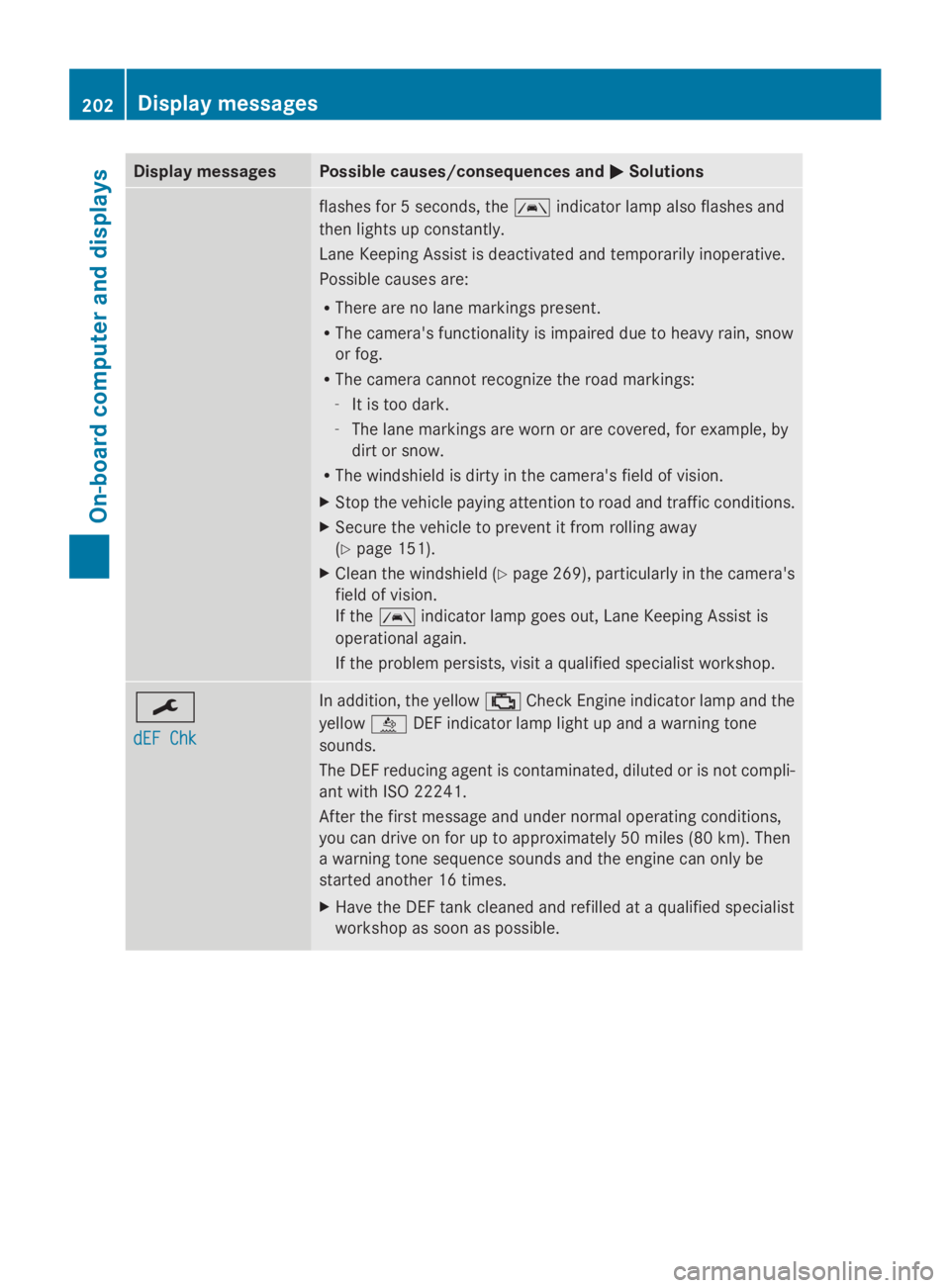
Display messages Possible causes/consequences and
0050
0050Solutions flashes for 5 seconds, the
00B0indicator lamp also flashes and
then lights up constantly.
Lane Keeping Assist is deactivated and temporarily inoperative.
Possible causes are:
R There are no lane markings present.
R The camera's functionality is impaired due to heavy rain, snow
or fog.
R The camera cannot recognize the road markings:
- It is too dark.
- The lane markings are worn or are covered, for example, by
dirt or snow.
R The windshield is dirty in the camera's field of vision.
X Stop the vehicle paying attention to road and traffic conditions.
X Secure the vehicle to prevent it from rolling away
(Y page 151).
X Clean the windshield (Y page 269), particularly in the camera's
field of vision.
If the 00B0 indicator lamp goes out, Lane Keeping Assist is
operational again.
If the problem persists, visit a qualified specialist workshop. 0099
dEF Chk dEF Chk In addition, the yellow
00B9Check Engine indicator lamp and the
yellow 00E2DEF indicator lamp light up and a warning tone
sounds.
The DEF reducing agent is contaminated, diluted or is not compli-
ant with ISO 22241.
After the first message and under normal operating conditions,
you can drive on for up to approximately 50 miles (80 km). Then
a warning tone sequence sounds and the engine can only be
started another 16 times.
X Have the DEF tank cleaned and refilled at a qualified specialist
workshop as soon as possible. 202
Display
messagesOn-board computer and displays
Page 205 of 338
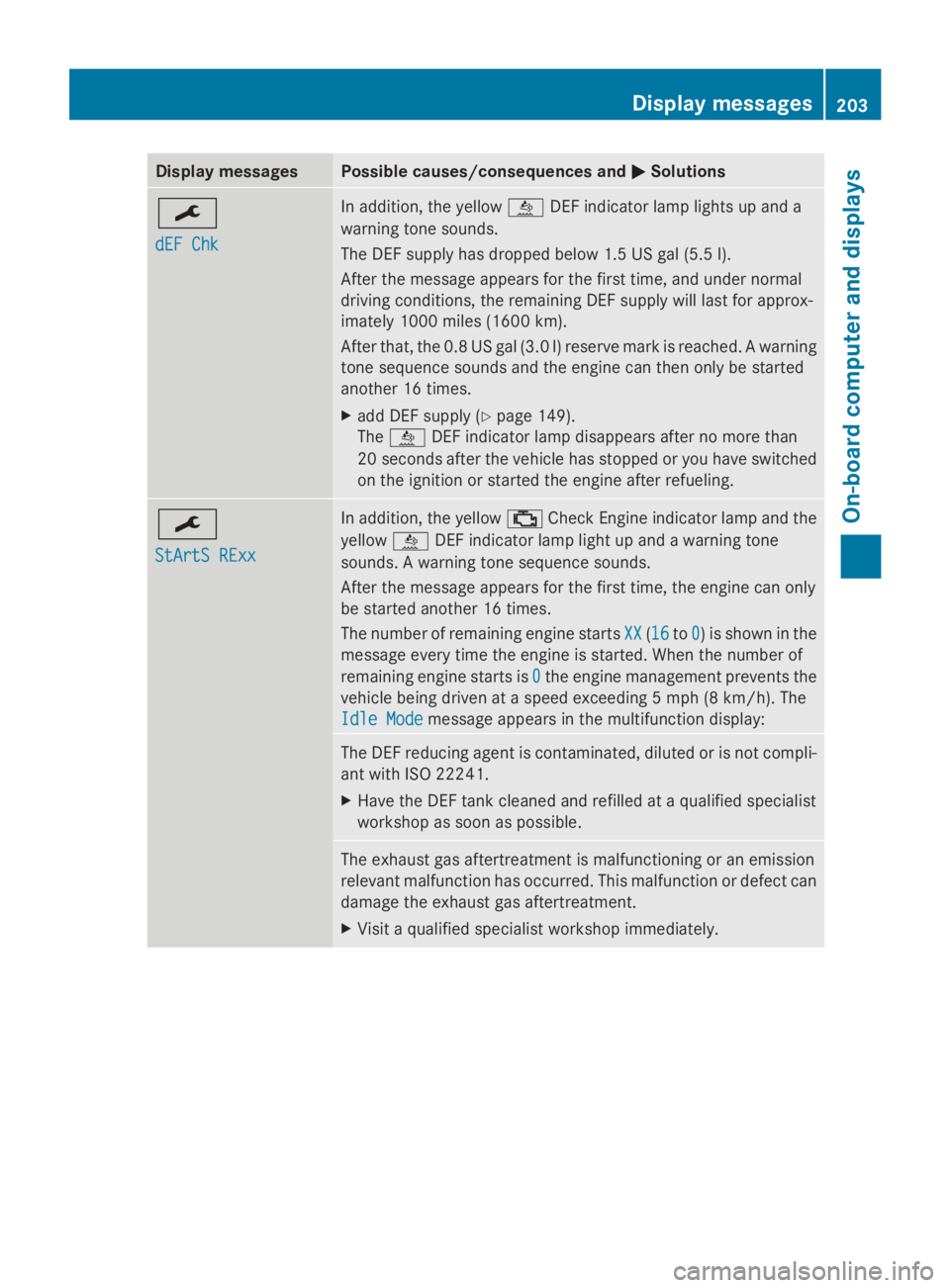
Display messages Possible causes/consequences and
0050
0050Solutions 0099
dEF Chk dEF Chk In addition, the yellow
00E2DEF indicator lamp lights up and a
warning tone sounds.
The DEF supply has dropped below 1.5 US gal (5.5 l).
After the message appears for the first time, and under normal
driving conditions, the remaining DEF supply will last for approx-
imately 1000 miles (1600 km).
After that, the 0.8 US gal (3.0 l) reserve mark is reached. A warning
tone sequence sounds and the engine can then only be started
another 16 times.
X add DEF supply (Y page 149).
The 00E2 DEF indicator lamp disappears after no more than
20 seconds after the vehicle has stopped or you have switched
on the ignition or started the engine after refueling. 0099
StArtS RExx StArtS RExx In addition, the yellow
00B9Check Engine indicator lamp and the
yellow 00E2DEF indicator lamp light up and a warning tone
sounds. A warning tone sequence sounds.
After the message appears for the first time, the engine can only
be started another 16 times.
The number of remaining engine starts XX XX(1616 to0
0) is shown in the
message every time the engine is started. When the number of
remaining engine starts is 0 0the engine management prevents the
vehicle being driven at a speed exceeding 5 mph (8 km/h). The
Idle Mode Idle Mode message appears in the multifunction display: The DEF reducing agent is contaminated, diluted or is not compli-
ant with ISO 22241.
X
Have the DEF tank cleaned and refilled at a qualified specialist
workshop as soon as possible. The exhaust gas aftertreatment is malfunctioning or an emission
relevant malfunction has occurred. This malfunction or defect can
damage the exhaust gas aftertreatment.
X
Visit a qualified specialist workshop immediately. Display
messages
203On-board computer and displays Z
Page 206 of 338
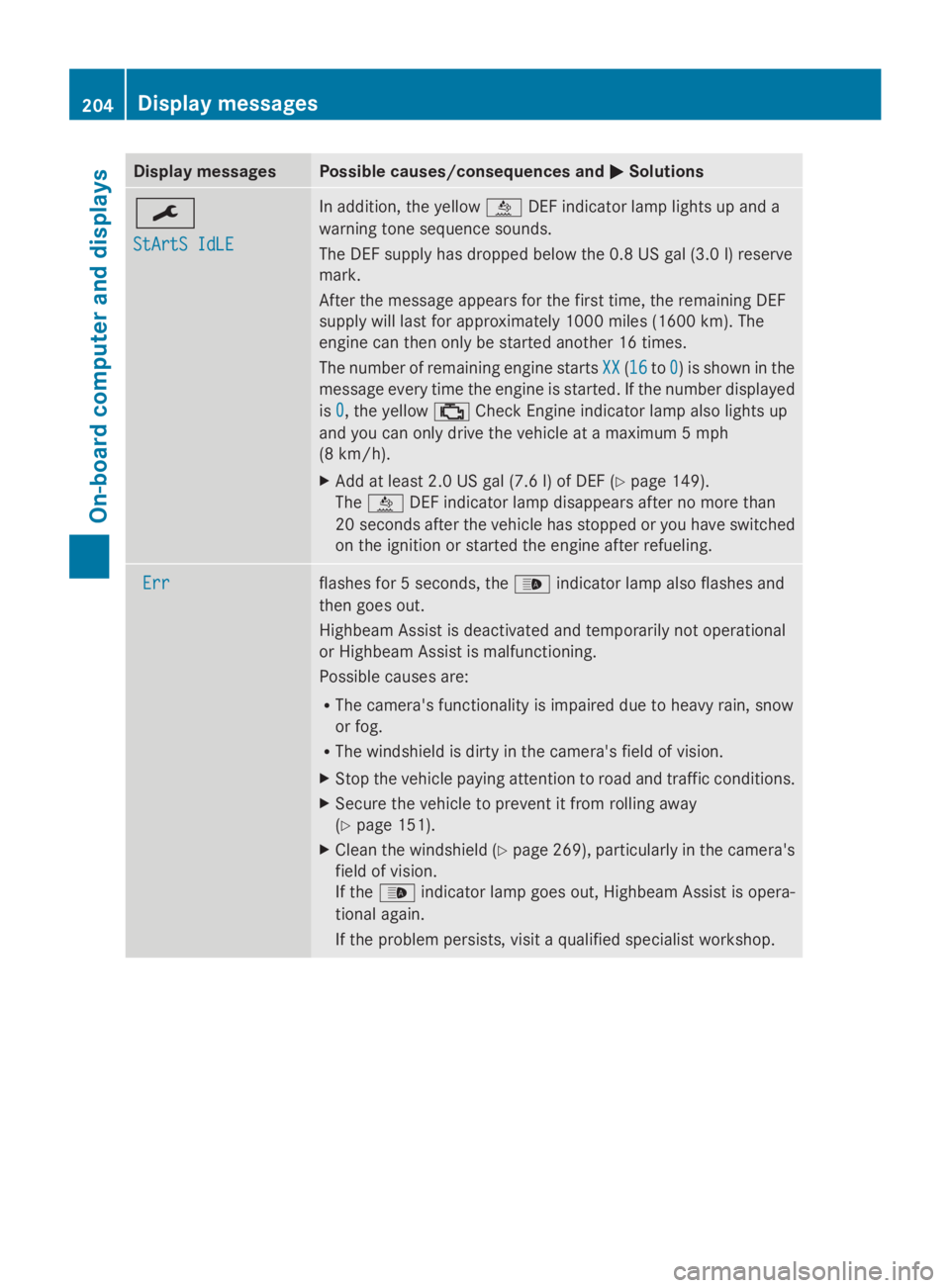
Display messages Possible causes/consequences and
0050
0050Solutions 0099
StArtS IdLE StArtS IdLE In addition, the yellow
00E2DEF indicator lamp lights up and a
warning tone sequence sounds.
The DEF supply has dropped below the 0.8 US gal (3.0 l) reserve
mark.
After the message appears for the first time, the remaining DEF
supply will last for approximately 1000 miles (1600 km). The
engine can then only be started another 16 times.
The number of remaining engine starts XX
XX (1616 to0 0) is shown in the
message every time the engine is started. If the number displayed
is 0 0, the yellow 00B9Check Engine indicator lamp also lights up
and you can only drive the vehicle at a maximum 5 mph
(8 km/h).
X Add at least 2.0 US gal (7.6 l) of DEF (Y page 149).
The 00E2 DEF indicator lamp disappears after no more than
20 seconds after the vehicle has stopped or you have switched
on the ignition or started the engine after refueling. Err Err flashes for 5 seconds, the
00CEindicator lamp also flashes and
then goes out.
Highbeam Assist is deactivated and temporarily not operational
or Highbeam Assist is malfunctioning.
Possible causes are:
R The camera's functionality is impaired due to heavy rain, snow
or fog.
R The windshield is dirty in the camera's field of vision.
X Stop the vehicle paying attention to road and traffic conditions.
X Secure the vehicle to prevent it from rolling away
(Y page 151).
X Clean the windshield (Y page 269), particularly in the camera's
field of vision.
If the 00CE indicator lamp goes out, Highbeam Assist is opera-
tional again.
If the problem persists, visit a qualified specialist workshop. 204
Display
messagesOn-board computer and displays
Page 215 of 338
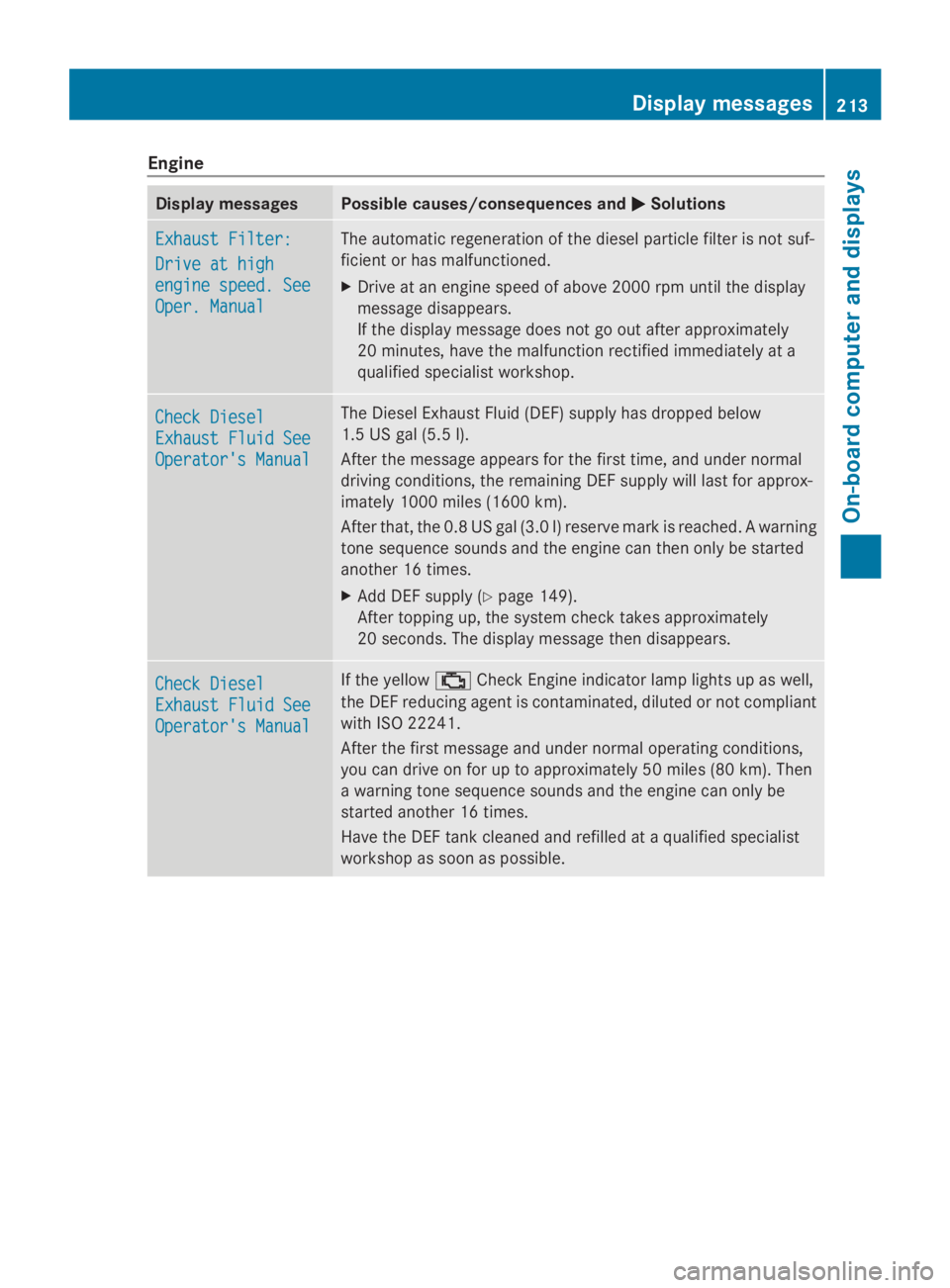
Engine
Display messages Possible causes/consequences and
0050
0050Solutions Exhaust Filter:
Exhaust Filter:
Drive at high Drive at high
engine speed. See engine speed. See
Oper. Manual Oper. Manual The automatic regeneration of the diesel particle filter is not suf-
ficient or has malfunctioned.
X
Drive at an engine speed of above 2000 rpm until the display
message disappears.
If the display message does not go out after approximately
20 minutes, have the malfunction rectified immediately at a
qualified specialist workshop. Check Diesel Check Diesel
Exhaust Fluid See Exhaust Fluid See
Operator's Manual Operator's Manual The Diesel Exhaust Fluid (DEF) supply has dropped below
1.5 US gal (5.5 l).
After the message appears for the first time, and under normal
driving conditions, the remaining DEF supply will last for approx-
imately 1000 miles (1600 km).
After that, the 0.8 US gal (3.0 l) reserve mark is reached. A warning
tone sequence sounds and the engine can then only be started
another 16 times.
X Add DEF supply (Y page 149).
After topping up, the system check takes approximately
20 seconds. The display message then disappears. Check Diesel Check Diesel
Exhaust Fluid See Exhaust Fluid See
Operator's Manual Operator's Manual If the yellow
00B9Check Engine indicator lamp lights up as well,
the DEF reducing agent is contaminated, diluted or not compliant
with ISO 22241.
After the first message and under normal operating conditions,
you can drive on for up to approximately 50 miles (80 km). Then
a warning tone sequence sounds and the engine can only be
started another 16 times.
Have the DEF tank cleaned and refilled at a qualified specialist
workshop as soon as possible. Display messages
213On-board computer and displays Z
Page 216 of 338
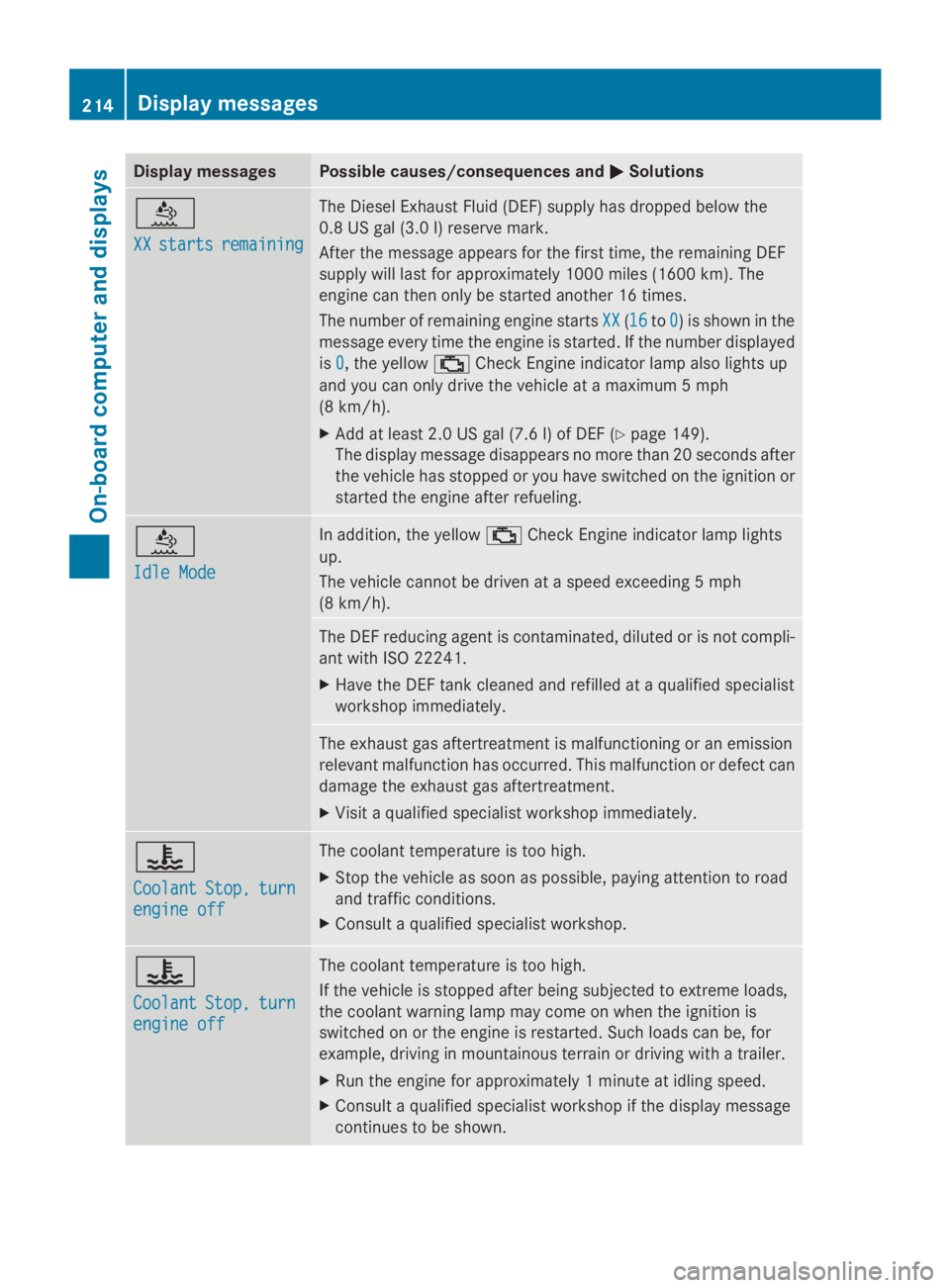
Display messages Possible causes/consequences and
0050
0050Solutions 00E2
XX XX
starts
starts remaining
remaining The Diesel Exhaust Fluid (DEF) supply has dropped below the
0.8 US gal (3.0 l) reserve mark.
After the message appears for the first time, the remaining DEF
supply will last for approximately 1000 miles (1600 km). The
engine can then only be started another 16 times.
The number of remaining engine starts
XX XX(1616 to0
0) is shown in the
message every time the engine is started. If the number displayed
is 0 0, the yellow 00B9Check Engine indicator lamp also lights up
and you can only drive the vehicle at a maximum 5 mph
(8 km/h).
X Add at least 2.0 US gal (7.6 l) of DEF (Y page 149).
The display message disappears no more than 20 seconds after
the vehicle has stopped or you have switched on the ignition or
started the engine after refueling. 00E2
Idle Mode Idle Mode In addition, the yellow
00B9Check Engine indicator lamp lights
up.
The vehicle cannot be driven at a speed exceeding 5 mph
(8 km/h). The DEF reducing agent is contaminated, diluted or is not compli-
ant with ISO 22241.
X
Have the DEF tank cleaned and refilled at a qualified specialist
workshop immediately. The exhaust gas aftertreatment is malfunctioning or an emission
relevant malfunction has occurred. This malfunction or defect can
damage the exhaust gas aftertreatment.
X
Visit a qualified specialist workshop immediately. 00AC
Coolant Coolant
Stop,
Stop,turn
turn
engine off
engine off The coolant temperature is too high.
X
Stop the vehicle as soon as possible, paying attention to road
and traffic conditions.
X Consult a qualified specialist workshop. 00AC
Coolant Coolant
Stop,
Stop,turn
turn
engine off
engine off The coolant temperature is too high.
If the vehicle is stopped after being subjected to extreme loads,
the coolant warning lamp may come on when the ignition is
switched on or the engine is restarted. Such loads can be, for
example, driving in mountainous terrain or driving with a trailer.
X
Run the engine for approximately 1 minute at idling speed.
X Consult a qualified specialist workshop if the display message
continues to be shown. 214
Display
messagesOn-board computer and displays
Page 227 of 338
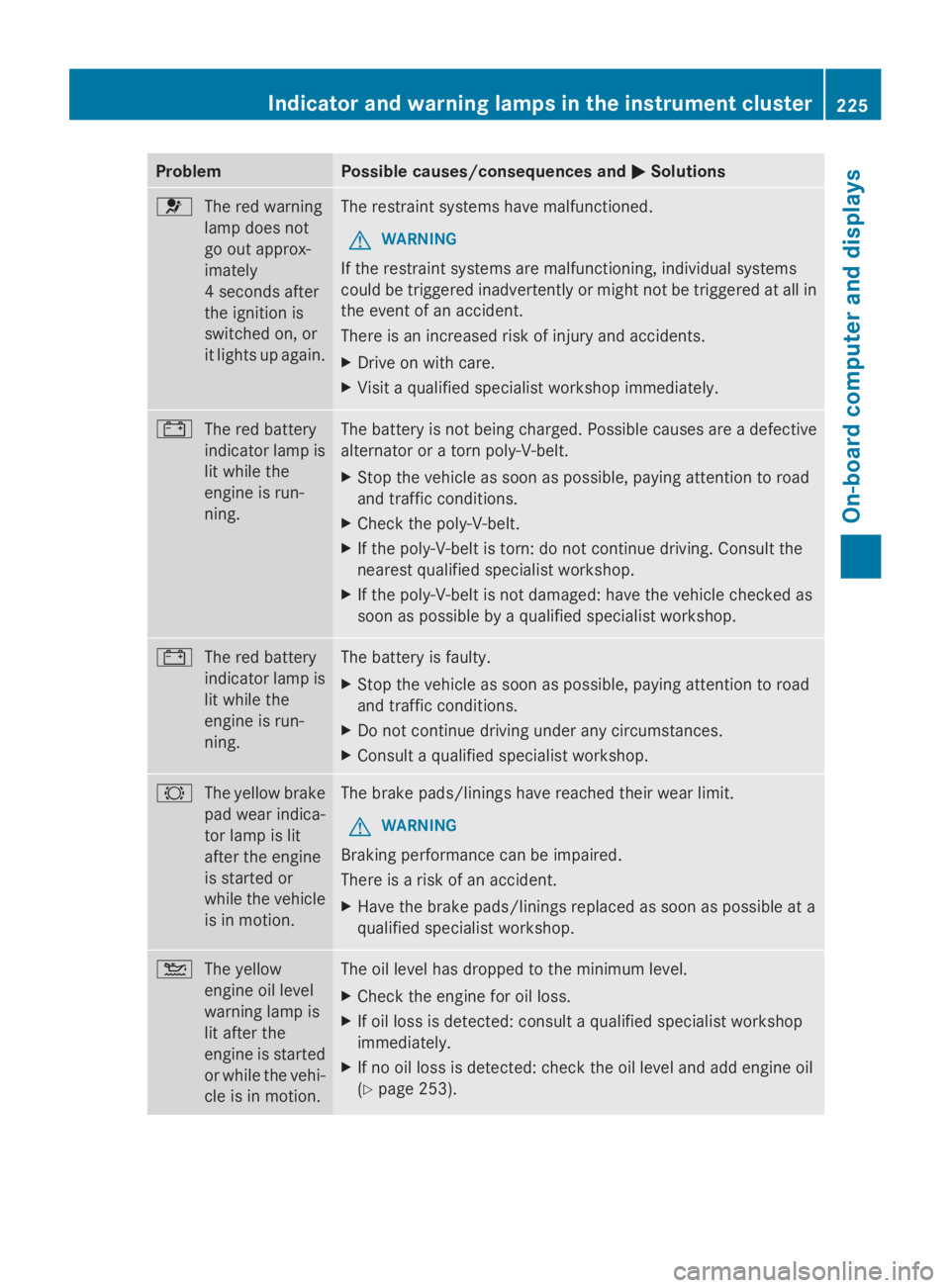
Problem Possible causes/consequences and
0050
0050Solutions 0075
The red warning
lamp does not
go out approx-
imately
4 seconds after
the ignition is
switched on, or
it lights up again. The restraint systems have malfunctioned.
G WARNING
If the restraint systems are malfunctioning, individual systems
could be triggered inadvertently or might not be triggered at all in
the event of an accident.
There is an increased risk of injury and accidents.
X Drive on with care.
X Visit a qualified specialist workshop immediately. 003D
The red battery
indicator lamp is
lit while the
engine is run-
ning. The battery is not being charged. Possible causes are a defective
alternator or a torn poly-V-belt.
X
Stop the vehicle as soon as possible, paying attention to road
and traffic conditions.
X Check the poly-V-belt.
X If the poly-V-belt is torn: do not continue driving. Consult the
nearest qualified specialist workshop.
X If the poly-V-belt is not damaged: have the vehicle checked as
soon as possible by a qualified specialist workshop. 003D
The red battery
indicator lamp is
lit while the
engine is run-
ning. The battery is faulty.
X
Stop the vehicle as soon as possible, paying attention to road
and traffic conditions.
X Do not continue driving under any circumstances.
X Consult a qualified specialist workshop. 0026
The yellow brake
pad wear indica-
tor lamp is lit
after the engine
is started or
while the vehicle
is in motion. The brake pads/linings have reached their wear limit.
G WARNING
Braking performance can be impaired.
There is a risk of an accident.
X Have the brake pads/linings replaced as soon as possible at a
qualified specialist workshop. 00B2
The yellow
engine oil level
warning lamp is
lit after the
engine is started
or while the vehi-
cle is in motion. The oil level has dropped to the minimum level.
X
Check the engine for oil loss.
X If oil loss is detected: consult a qualified specialist workshop
immediately.
X If no oil loss is detected: check the oil level and add engine oil
(Y page 253). Indicator and warning lamps in the instrument cluster
225On-board computer and displays Z