ECU MERCEDES-BENZ SPRINTER 2014 MY14 Operator’s Manual
[x] Cancel search | Manufacturer: MERCEDES-BENZ, Model Year: 2014, Model line: SPRINTER, Model: MERCEDES-BENZ SPRINTER 2014Pages: 338, PDF Size: 6.78 MB
Page 178 of 338
installed and secured correctly before every
journey.
If your vehicle is equipped with a Sprinter
trailer tow hitch, you need a ball coupling that
is approved for the trailer tow hitch.
When mounting and removing the approved
ball coupling, observe the relevant informa-
tion in the operating instructions of the ball
coupling manufacturer.
If you cannot mount the ball coupling cor-
rectly, remove it. In this case, the ball cou-
pling may not be used for towing a trailer.
Notes on the permissible dimensions and
weights can also be found on the identifica-
tion plate of the trailer tow hitch. You can
obtain advice from a qualified specialist work-
shop. Coupling up a trailer
! Do not connect the trailer's brake system
(if featured) to the hydraulic brake system
of the towing vehicle, as the latter is equip-
ped with an anti-lock brake system. Doing
so will result in a loss of function of the
brake systems of both the vehicle and the
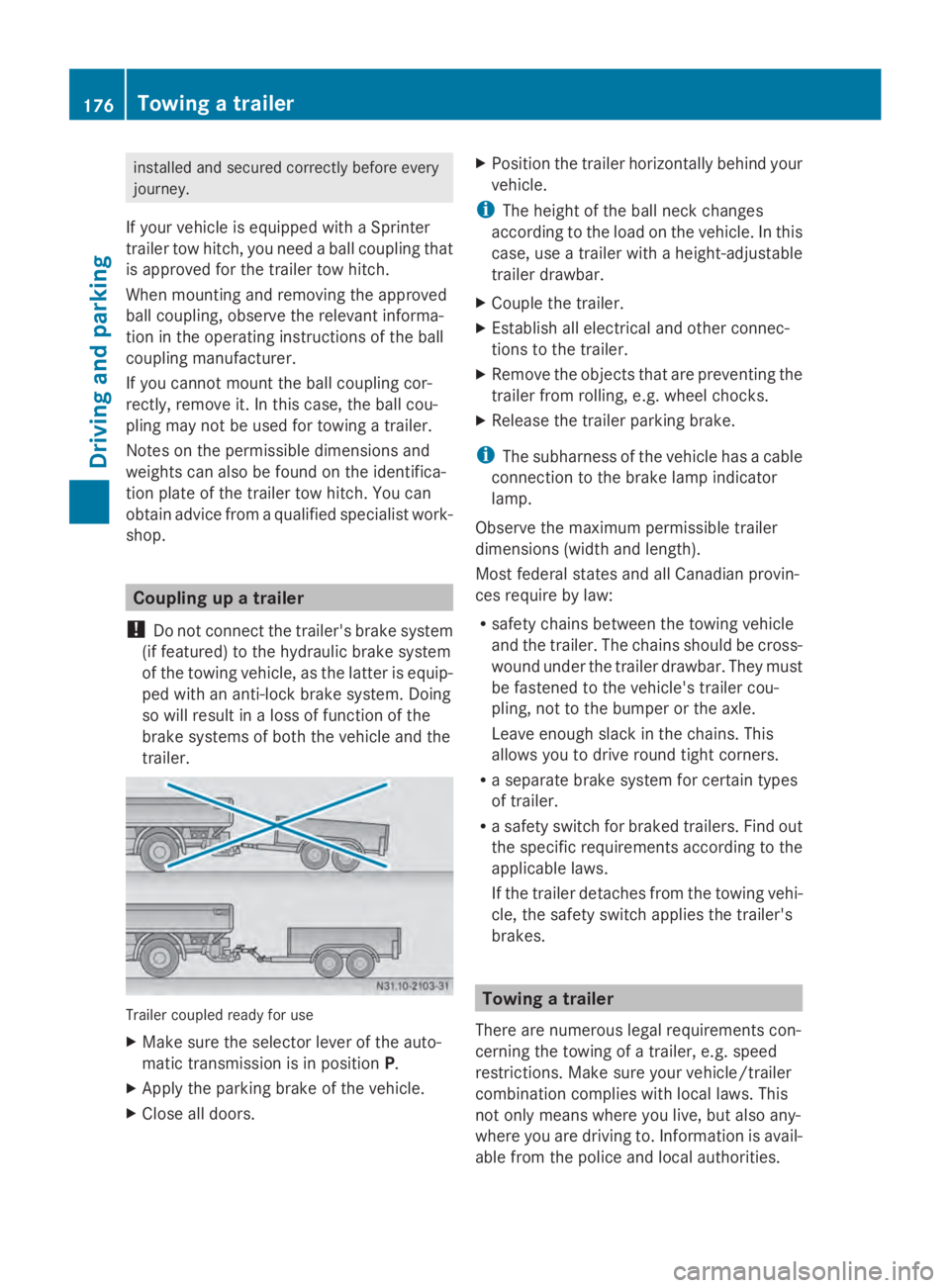
trailer. Trailer coupled ready for use
X
Make sure the selector lever of the auto-
matic transmission is in position P.
X Apply the parking brake of the vehicle.
X Close all doors. X
Position the trailer horizontally behind your
vehicle.
i The height of the ball neck changes
according to the load on the vehicle. In this
case, use a trailer with a height-adjustable
trailer drawbar.
X Couple the trailer.
X Establish all electrical and other connec-
tions to the trailer.
X Remove the objects that are preventing the
trailer from rolling, e.g. wheel chocks.
X Release the trailer parking brake.
i The subharness of the vehicle has a cable
connection to the brake lamp indicator
lamp.
Observe the maximum permissible trailer
dimensions (width and length).
Most federal states and all Canadian provin-
ces require by law:
R safety chains between the towing vehicle
and the trailer. The chains should be cross-
wound under the trailer drawbar. They must
be fastened to the vehicle's trailer cou-
pling, not to the bumper or the axle.
Leave enough slack in the chains. This
allows you to drive round tight corners.
R a separate brake system for certain types
of trailer.
R a safety switch for braked trailers. Find out
the specific requirements according to the
applicable laws.
If the trailer detaches from the towing vehi-
cle, the safety switch applies the trailer's
brakes. Towing a trailer
There are numerous legal requirements con-
cerning the towing of a trailer, e.g. speed
restrictions. Make sure your vehicle/trailer
combination complies with local laws. This
not only means where you live, but also any-
where you are driving to. Information is avail-
able from the police and local authorities. 176
Towing a trailerDriving and parking
Page 179 of 338
Observe the following when towing a trailer:
R Practice driving around bends, stopping
and backing up at a place where there is no
traffic. This enables you to gain experience
and get used to the new handling charac-
teristics.
R Before driving, check:
-that the trailer tow hitch and ball cou-
pling are secure
- that the safety switch for a braked trailer
is functioning properly
- that the safety chains are secure and not
damaged
- that the electrical connections are
secure
- that the lights are working
- that the wheels are in good order and the
tire pressure is correct
R Adjust the exterior mirrors to provide an
unobstructed view of the rear section of the
trailer.
R If the trailer has electronically controlled
brakes, pull the vehicle/trailer combina-
tion away carefully. Brake manually using
the brake controller and check that the
brakes are working.
R Secure the load on the trailer according to
the applicable specifications and current
standards on securing loads
(Y page 244).
R When driving with a trailer, check at regular
intervals that the load is secured and that
the brakes and lights are working.
R Bear in mind that the handling will be less
stable when towing a trailer than when driv-
ing without one. Avoid sudden steering
movements.
R The vehicle/trailer combination is heavier,
accelerates more slowly and has a
decreased gradient climbing capability and
a longer braking distance.
It is more susceptible to crosswinds and
requires cautious steering.
R If possible, do not brake suddenly, but
rather moderately at first so that the trailer can activate its brakes. Then increase the
force on the brake pedal.
R If the automatic transmission repeatedly
shifts between gears when driving on
inclines, restrict the shift range. Select shift
range 4,3,2or 1.
Driving in a low gear and at a low speed
reduces the risk of damaging the engine.
R When driving on a downhill gradient, shift
to a low gear and take advantage of the
engine's braking effect.
Avoid continuous brake application as this
may overheat the vehicle brakes and, if
installed, the trailer brakes.
R If the coolant temperature increases dra-
matically while the air-conditioning system
is switched on, switch off the air-condition-
ing system.
Coolant heat can also be dissipated by
switching the airflow and the temperature
of the heater/air conditioning to the maxi-
mum level. Open the windows if necessary.
R When overtaking, pay particular attention
to the extended length of your vehicle/
trailer combination.
Due to the length of your vehicle/trailer
combination you need an additional dis-
tance before you can return to your original
lane. Uncoupling a trailer
G
WARNING
If you uncouple a trailer with the overrun
brake engaged, you could trap your hand
between the vehicle and the trailer drawbar.
There is a risk of injury.
Do not uncouple a trailer if the overrun brake
is engaged.
! Do not disconnect a trailer with an
engaged overrun brake. Otherwise, your
vehicle could be damaged by the rebound-
ing of the overrun brake. Towing a trailer
177Driving and parking Z
Page 180 of 338
X
Make sure the selector lever of the auto-
matic transmission is in position P.
X Apply the parking brake of the vehicle.
X Close all doors.
X Apply the parking brake of the trailer.
X In addition, secure the trailer against rolling
away with a wheel chock or similar object.
X Remove the trailer cable and safety chains
and decouple the trailer. Permissible trailer loads and trailer
drawbar noseweights
Weight information !
On vehicles with a permissible gross vehi-
cle weight of 11030 lbs (5003 kg), the per-
missible gross combination weight is less
than the total of the permissible gross vehi-
cle weight and the permissible trailer load.
Exceeding the permissible gross combina-
tion weight can lead to damage to the driv-
etrain, to the transmission or to the trailer
tow hitch.
If the vehicle or the trailer is fully laden, the
relevant value for the permissible gross
vehicle weight or the permissible trailer
load is therefore lower. In this case, the
trailer or the vehicle may only be partially
loaded.
The gross trailer weight (GTW) is calculated
by adding the weight of the trailer to the
weight of the load and equipment.
The maximum gross vehicle weight is vehicle-
specific and equipment-dependent:
5,000 lbs (2,268 kg) or 7,500 lbs (3,402 kg).
The maximum permissible trailer drawbar
noseweight on the ball coupling is 500 lbs
(227 kg) or 750 lbs (340 kg). The actual nose-
weight may not exceed the value given on the
identification plates of the trailer tow hitch or
the trailer. If the values vary, the lowest value
always applies.
The gross combination weight rating (GCWR)
is calculated by adding the gross weight of the trailer to the gross vehicle weight including a
driver's weight of approximately 150 lbs
(68 kg). The permissible Gross Combination
Weight Rating is vehicle-specific and depends
on the equipment level.
When driving with a trailer, you should not
exceed the permitted Gross Combination
Weight Rating (GCWR).
The permissible values, which must not be
exceeded, can be found in your vehicle docu-
ments and on the trailer tow hitch type plates
for the trailer and the vehicle (Y page 319).
The basic values approved by the manufac-
turer can also be found in the "Technical data"
section (Y page 332). If the values vary, the
lowest value always applies.
Loading a trailer !
Utilize the maximum permissible nose-
weight as fully as possible. Do not allow the
weight to fall below the minimum permis-
sible noseweight, otherwise the trailer may
come loose.
R You must distribute the load on the vehicle
and trailer so that the permitted maximum
values for the gross vehicle weight (GVWR),
gross trailer weight (GTW) and gross com-
bined weight (GCWR) as well as permitted
gross axle loads (GAWR) and noseweight
(TWR) of your vehicle are not exceeded.
R Add the drawbar noseweight on the ball
coupling (TWR) to the rear axle load. This
will prevent you from exceeding the per-
missible gross axle weight (GAWR).
R Add the drawbar noseweight on the ball
coupling (TWR) to the vehicle payload. This
will prevent you from exceeding the per-
missible gross vehicle weight (GVWR).
Checking the vehicle and trailer weight R
Make sure the weights of the towing vehicle
and the trailer comply with the maximum
permissible values. Have the vehicle/
trailer combination weighed on a calibrated
weighbridge. The vehicle/trailer combina- 178
Towing a trailerDriving and parking
Page 204 of 338
Display messages Possible causes/consequences and
0050
0050Solutions flashes for 5 seconds, the
00B0indicator lamp also flashes and
then lights up constantly.
Lane Keeping Assist is deactivated and temporarily inoperative.
Possible causes are:
R There are no lane markings present.
R The camera's functionality is impaired due to heavy rain, snow
or fog.
R The camera cannot recognize the road markings:
- It is too dark.
- The lane markings are worn or are covered, for example, by
dirt or snow.
R The windshield is dirty in the camera's field of vision.
X Stop the vehicle paying attention to road and traffic conditions.
X Secure the vehicle to prevent it from rolling away
(Y page 151).
X Clean the windshield (Y page 269), particularly in the camera's
field of vision.
If the 00B0 indicator lamp goes out, Lane Keeping Assist is
operational again.
If the problem persists, visit a qualified specialist workshop. 0099
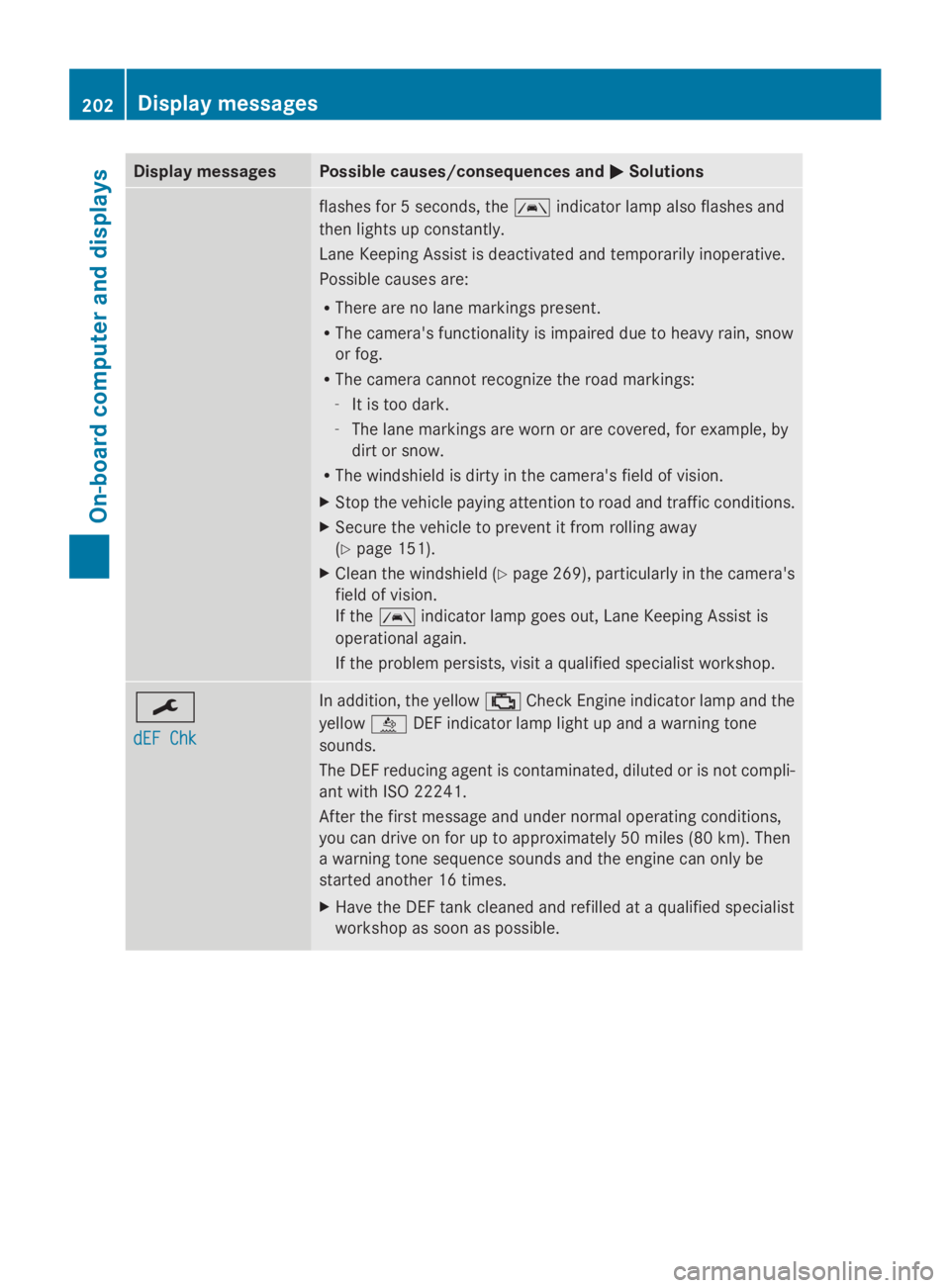
dEF Chk dEF Chk In addition, the yellow
00B9Check Engine indicator lamp and the
yellow 00E2DEF indicator lamp light up and a warning tone
sounds.
The DEF reducing agent is contaminated, diluted or is not compli-
ant with ISO 22241.
After the first message and under normal operating conditions,
you can drive on for up to approximately 50 miles (80 km). Then
a warning tone sequence sounds and the engine can only be
started another 16 times.
X Have the DEF tank cleaned and refilled at a qualified specialist
workshop as soon as possible. 202
Display
messagesOn-board computer and displays
Page 206 of 338
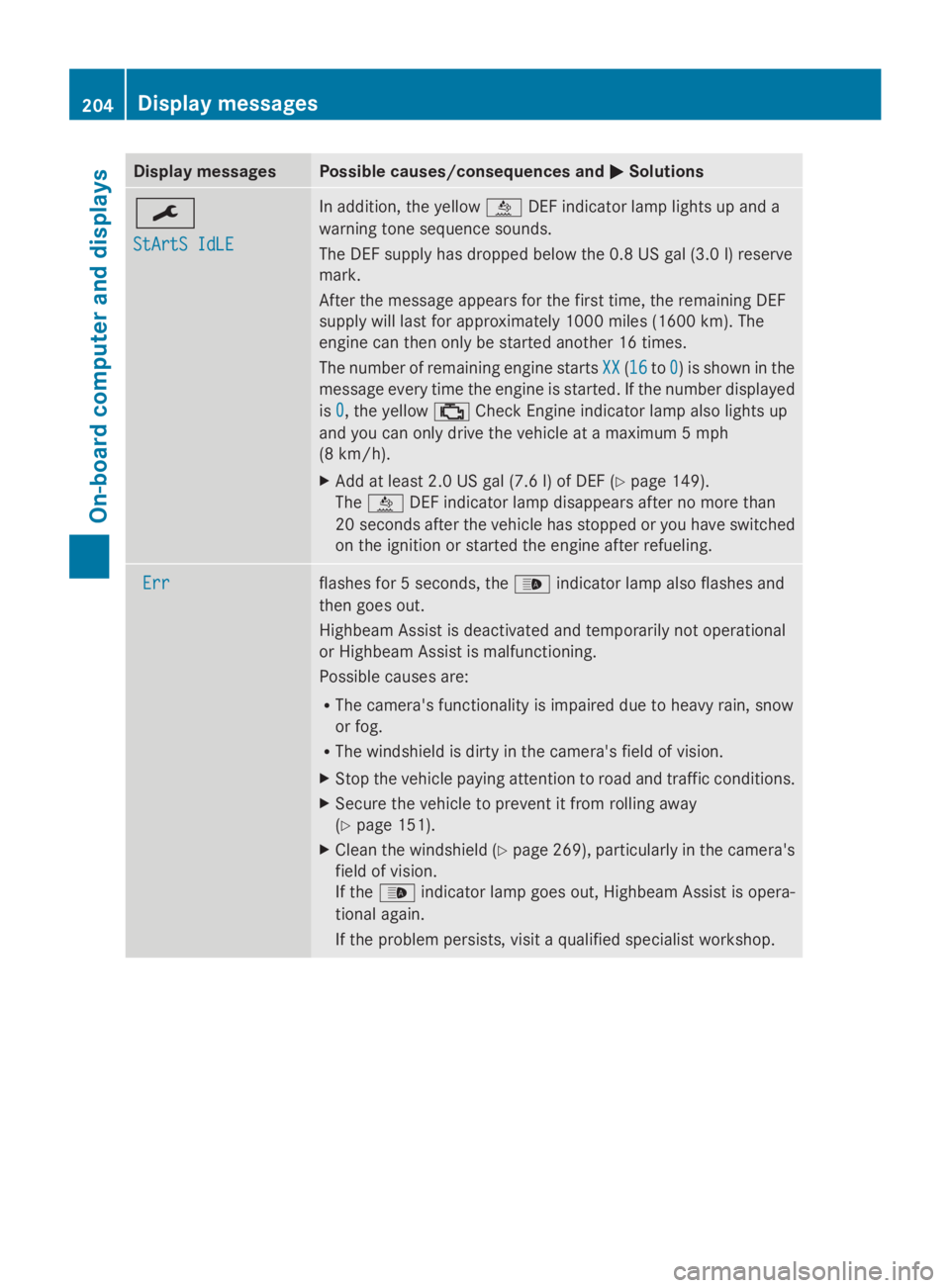
Display messages Possible causes/consequences and
0050
0050Solutions 0099
StArtS IdLE StArtS IdLE In addition, the yellow
00E2DEF indicator lamp lights up and a
warning tone sequence sounds.
The DEF supply has dropped below the 0.8 US gal (3.0 l) reserve
mark.
After the message appears for the first time, the remaining DEF
supply will last for approximately 1000 miles (1600 km). The
engine can then only be started another 16 times.
The number of remaining engine starts XX
XX (1616 to0 0) is shown in the
message every time the engine is started. If the number displayed
is 0 0, the yellow 00B9Check Engine indicator lamp also lights up
and you can only drive the vehicle at a maximum 5 mph
(8 km/h).
X Add at least 2.0 US gal (7.6 l) of DEF (Y page 149).
The 00E2 DEF indicator lamp disappears after no more than
20 seconds after the vehicle has stopped or you have switched
on the ignition or started the engine after refueling. Err Err flashes for 5 seconds, the
00CEindicator lamp also flashes and
then goes out.
Highbeam Assist is deactivated and temporarily not operational
or Highbeam Assist is malfunctioning.
Possible causes are:
R The camera's functionality is impaired due to heavy rain, snow
or fog.
R The windshield is dirty in the camera's field of vision.
X Stop the vehicle paying attention to road and traffic conditions.
X Secure the vehicle to prevent it from rolling away
(Y page 151).
X Clean the windshield (Y page 269), particularly in the camera's
field of vision.
If the 00CE indicator lamp goes out, Highbeam Assist is opera-
tional again.
If the problem persists, visit a qualified specialist workshop. 204
Display
messagesOn-board computer and displays
Page 214 of 338
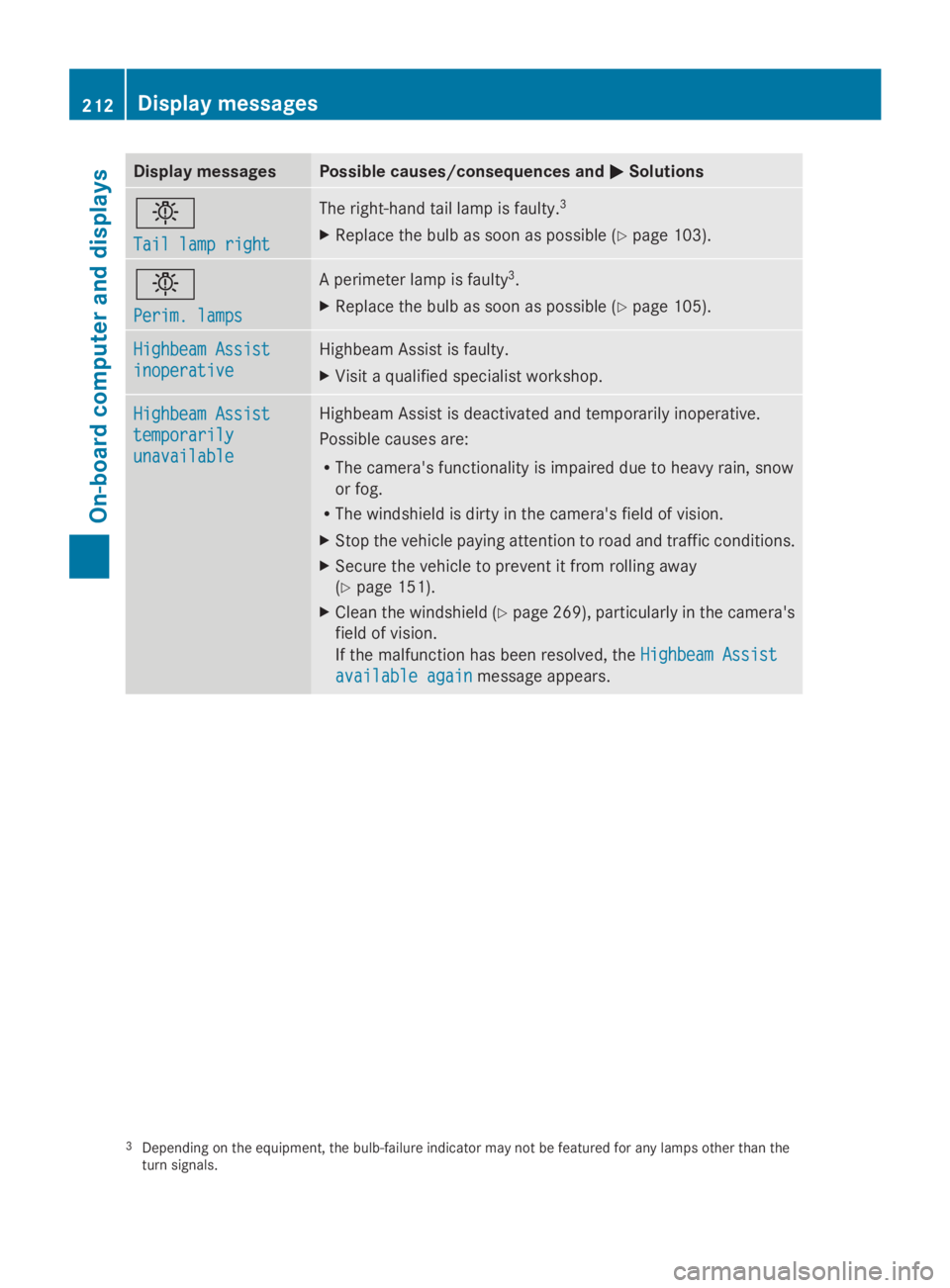
Display messages Possible causes/consequences and
0050
0050Solutions 0049
Tail lamp right Tail lamp right The right-hand tail lamp is faulty.
3
X Replace the bulb as soon as possible (Y page 103).0049
Perim. lamps Perim. lamps A perimeter lamp is faulty
3
.
X Replace the bulb as soon as possible (Y page 105).Highbeam Assist
Highbeam Assist
inoperative inoperative Highbeam Assist is faulty.
X
Visit a qualified specialist workshop. Highbeam Assist Highbeam Assist
temporarily temporarily
unavailable unavailable Highbeam Assist is deactivated and temporarily inoperative.
Possible causes are:
R
The camera's functionality is impaired due to heavy rain, snow
or fog.
R The windshield is dirty in the camera's field of vision.
X Stop the vehicle paying attention to road and traffic conditions.
X Secure the vehicle to prevent it from rolling away
(Y page 151).
X Clean the windshield (Y page 269), particularly in the camera's
field of vision.
If the malfunction has been resolved, the Highbeam Assist
Highbeam Assist
available again available again message appears.3
Depending on the equipment, the bulb-failure indicator may not be featured for any lamps other than the
turn signals. 212
Display
messagesOn-board computer and displays
Page 219 of 338
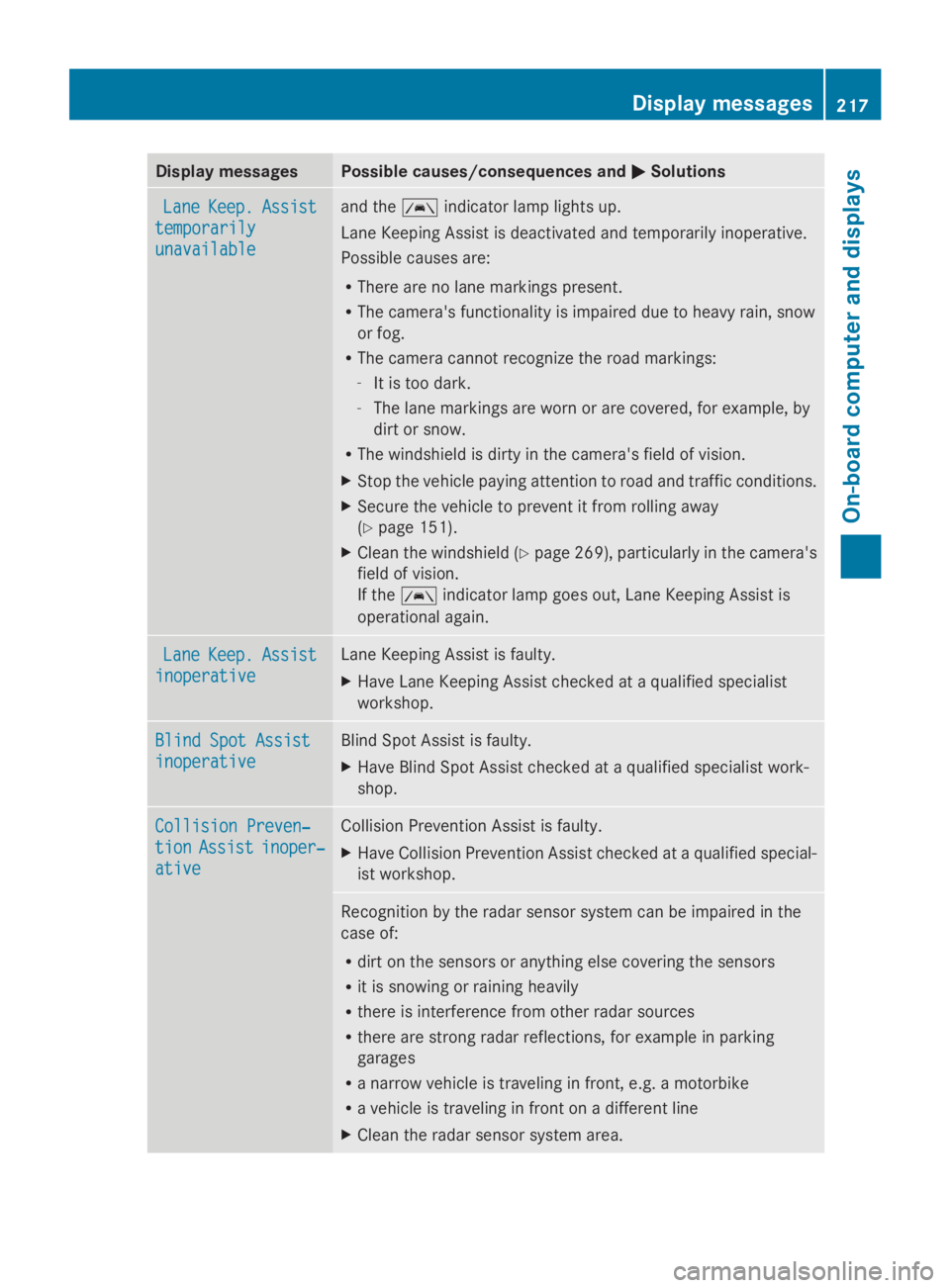
Display messages Possible causes/consequences and
0050
0050Solutions Lane
Lane
Keep.
Keep. Assist
Assist
temporarily
temporarily
unavailable unavailable and the
00B0indicator lamp lights up.
Lane Keeping Assist is deactivated and temporarily inoperative.
Possible causes are:
R There are no lane markings present.
R The camera's functionality is impaired due to heavy rain, snow
or fog.
R The camera cannot recognize the road markings:
-It is too dark.
- The lane markings are worn or are covered, for example, by
dirt or snow.
R The windshield is dirty in the camera's field of vision.
X Stop the vehicle paying attention to road and traffic conditions.
X Secure the vehicle to prevent it from rolling away
(Y page 151).
X Clean the windshield (Y page 269), particularly in the camera's
field of vision.
If the 00B0 indicator lamp goes out, Lane Keeping Assist is
operational again. Lane Lane
Keep.
Keep. Assist
Assist
inoperative
inoperative Lane Keeping Assist is faulty.
X
Have Lane Keeping Assist checked at a qualified specialist
workshop. Blind Spot Assist Blind Spot Assist
inoperative inoperative Blind Spot Assist is faulty.
X
Have Blind Spot Assist checked at a qualified specialist work-
shop. Collision Preven‐ Collision Preven‐
tion tion
Assist
Assist inoper‐
inoper‐
ative
ative Collision Prevention Assist is faulty.
X
Have Collision Prevention Assist checked at a qualified special-
ist workshop. Recognition by the radar sensor system can be impaired in the
case of:
R
dirt on the sensors or anything else covering the sensors
R it is snowing or raining heavily
R there is interference from other radar sources
R there are strong radar reflections, for example in parking
garages
R a narrow vehicle is traveling in front, e.g. a motorbike
R a vehicle is traveling in front on a different line
X Clean the radar sensor system area. Display
messages
217On-board computer and displays Z
Page 234 of 338
Useful information
This Operator's Manual describes all models
as well as standard and optional equipment
of your vehicle that were available at the time
of going to print. Country-specific variations
are possible. Note that your vehicle may not
be equipped with all of the described func-
tions. This also applies to systems and func-
tions relevant to safety.
Read the information on qualified specialist
workshops (Y page 26). Stowage spaces and stowage com-
partments Important safety notes
G
WARNING
If you do not correctly store objects in the
vehicle interior, they can slip or be flung
around, thus striking vehicle occupants.
There is a risk of injury, especially when brak-
ing or abruptly changing directions.
R Always store objects so that they cannot be
flung around in these or in similar situa-
tions.
R Always make sure that objects do not pro-
trude from stowage compartments, parcel
nets or stowage nets.
R Close lockable stowage compartments
while driving.
R Stow and secure objects that are heavy,
hard, pointy, sharp-edged, fragile or too
large in the trunk.
In addition, observe the information in the
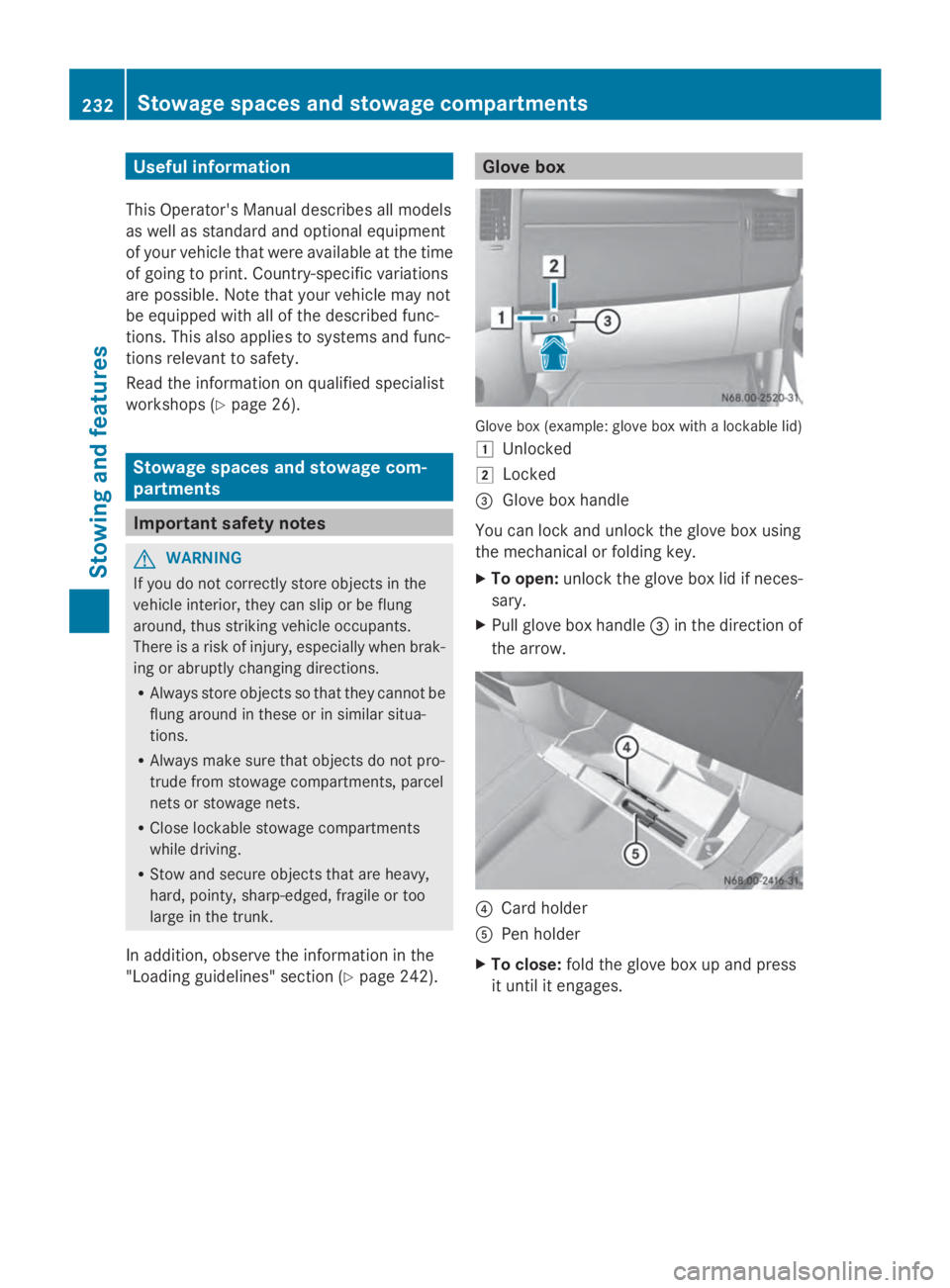
"Loading guidelines" section (Y page 242). Glove box
Glove box (example: glove box with a lockable lid)
0047
Unlocked
0048 Locked
0087 Glove box handle
You can lock and unlock the glove box using
the mechanical or folding key.
X To open: unlock the glove box lid if neces-
sary.
X Pull glove box handle 0087in the direction of
the arrow. 0085
Card holder
0083 Pen holder
X To close: fold the glove box up and press
it until it engages. 232
Stowage spaces and stowage compartmentsStowing and features
Page 237 of 338
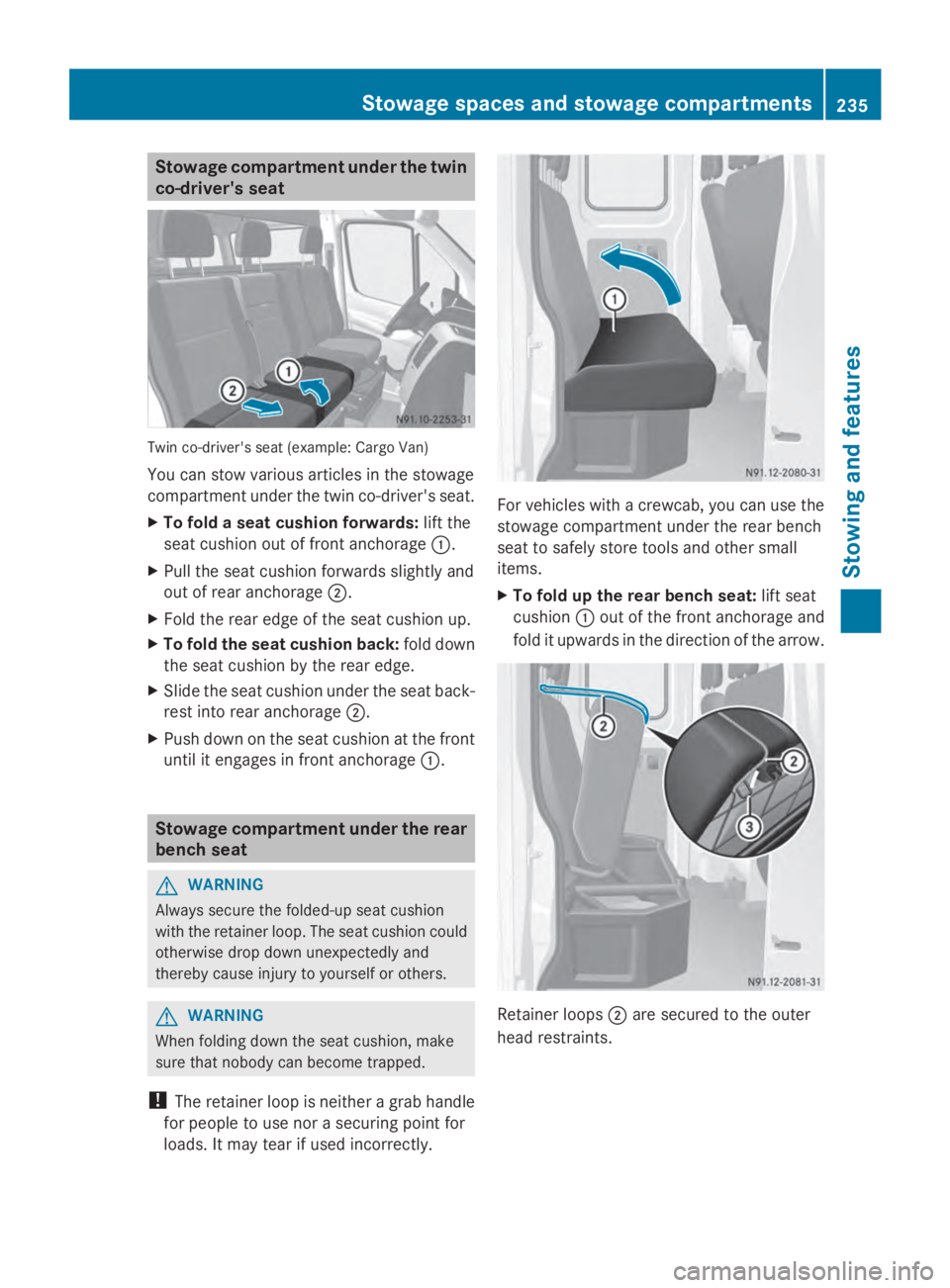
Stowage compartment under the twin
co-driver's seat Twin co-driver's seat (example: Cargo Van)
You can stow various articles in the stowage
compartment under the twin co-driver's seat.
X To fold a seat cushion forwards: lift the
seat cushion out of front anchorage 0043.
X Pull the seat cushion forwards slightly and
out of rear anchorage 0044.
X Fold the rear edge of the seat cushion up.
X To fold the seat cushion back: fold down
the seat cushion by the rear edge.
X Slide the seat cushion under the seat back-
rest into rear anchorage 0044.
X Push down on the seat cushion at the front
until it engages in front anchorage 0043.Stowage compartment under the rear
bench seat G
WARNING
Always secure the folded-up seat cushion
with the retainer loop. The seat cushion could
otherwise drop down unexpectedly and
thereby cause injury to yourself or others. G
WARNING
When folding down the seat cushion, make
sure that nobody can become trapped.
! The retainer loop is neither a grab handle
for people to use nor a securing point for
loads. It may tear if used incorrectly. For vehicles with a crewcab, you can use the
stowage compartment under the rear bench
seat to safely store tools and other small
items.
X
To fold up the rear bench seat: lift seat
cushion 0043out of the front anchorage and
fold it upwards in the direction of the arrow. Retainer loops
0044are secured to the outer
head restraints. Stowage spaces and stowage compartments
235Stowing and features Z
Page 238 of 338
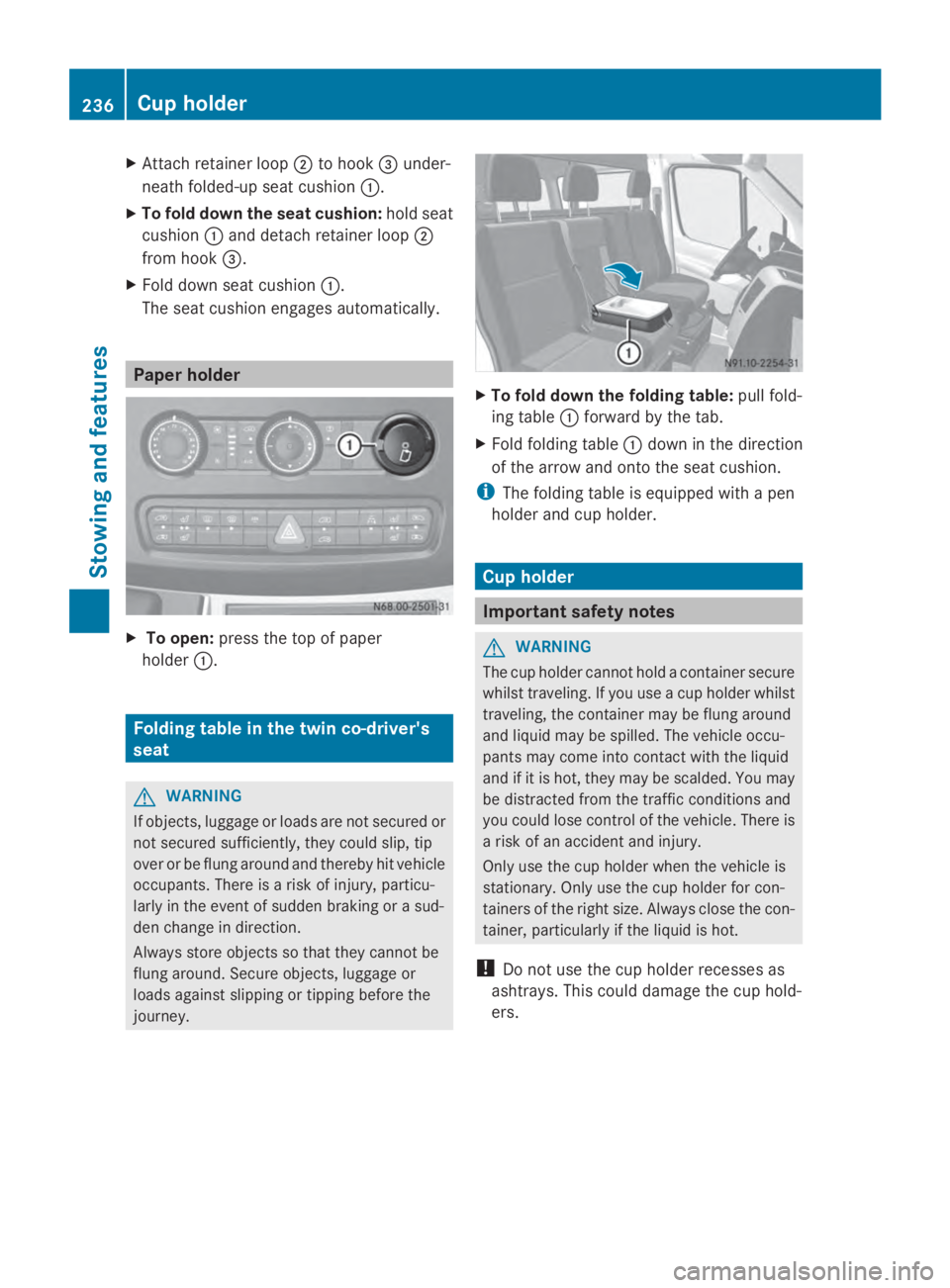
X
Attach retainer loop 0044to hook 0087under-
neath folded-up seat cushion 0043.
X To fold down the seat cushion: hold seat
cushion 0043and detach retainer loop 0044
from hook 0087.
X Fold down seat cushion 0043.
The seat cushion engages automatically. Paper holder
X
To open: press the top of paper
holder 0043. Folding table in the twin co-driver's
seat G
WARNING
If objects, luggage or loads are not secured or
not secured sufficiently, they could slip, tip
over or be flung around and thereby hit vehicle
occupants. There is a risk of injury, particu-
larly in the event of sudden braking or a sud-
den change in direction.
Always store objects so that they cannot be
flung around. Secure objects, luggage or
loads against slipping or tipping before the
journey. X
To fold down the folding table: pull fold-
ing table 0043forward by the tab.
X Fold folding table 0043down in the direction
of the arrow and onto the seat cushion.
i The folding table is equipped with a pen
holder and cup holder. Cup holder
Important safety notes
G
WARNING
The cup holder cannot hold a container secure
whilst traveling. If you use a cup holder whilst
traveling, the container may be flung around
and liquid may be spilled. The vehicle occu-
pants may come into contact with the liquid
and if it is hot, they may be scalded. You may
be distracted from the traffic conditions and
you could lose control of the vehicle. There is
a risk of an accident and injury.
Only use the cup holder when the vehicle is
stationary. Only use the cup holder for con-
tainers of the right size. Always close the con-
tainer, particularly if the liquid is hot.
! Do not use the cup holder recesses as
ashtrays. This could damage the cup hold-
ers. 236
Cup holderSto
wing an d features