brake light MERCEDES-BENZ SPRINTER 2014 MY14 Operator’s Manual
[x] Cancel search | Manufacturer: MERCEDES-BENZ, Model Year: 2014, Model line: SPRINTER, Model: MERCEDES-BENZ SPRINTER 2014Pages: 338, PDF Size: 6.78 MB
Page 174 of 338
The rear view camera is a visual parking aid.
Information on operation can be found in the
separate Audio 15 supplement.
The camera is in the middle of the roof above
the high-mounted brake lamp (Y page 271).
The rear view camera may show obstacles in
perspectival distortion, incorrectly or not at
all. The rear view camera cannot display all
objects located very near and/or under the
rear bumper. It does not warn you of a colli-
sion, persons or objects.
The area behind the vehicle is displayed in a
mirrored fashion, as in the rear-view mirror or
the exterior mirrors. The guide lines displayed
assist you in backing up.
The function of the rear view camera may be
partially or completely impaired in the follow-
ing circumstances:
R it is raining very heavily or snowing, or it is
foggy.
R the parking space is located in a very dark
place.
R the camera is exposed to very strong white
light. White stripes may appear on the dis-
play.
R the surrounding area is illuminated with flu-
orescent light. The display may flicker.
R if the temperature changes very quickly, for
example if you drive into a heated garage
in the winter.
R ambient temperatures are very high.
R the camera lens is dirty or obstructed.
R the rear of the vehicle is damaged. In this
case, have the position and setting
checked at a specialist workshop.
The rear view camera is switched on when
you engage reverse gear R.
You can find information on cleaning the cam-
era in the "Maintenance and care" section
(Y page 271). Working mode
ADR (working speed governor)
General notes When activated, ADR automatically increases
the engine speed to a preset speed or a speed
you have set.
i
After a cold start, the idling speed of the
engine is increased automatically. If the
preset working speed is lower than the
increased idling speed, the working speed
is only reached once the engine has com-
pleted the warm-up phase.
It is only possible to activate ADR with the
vehicle stationary and the parking brake
applied.
The selector lever of the automatic trans-
mission must be in position P.
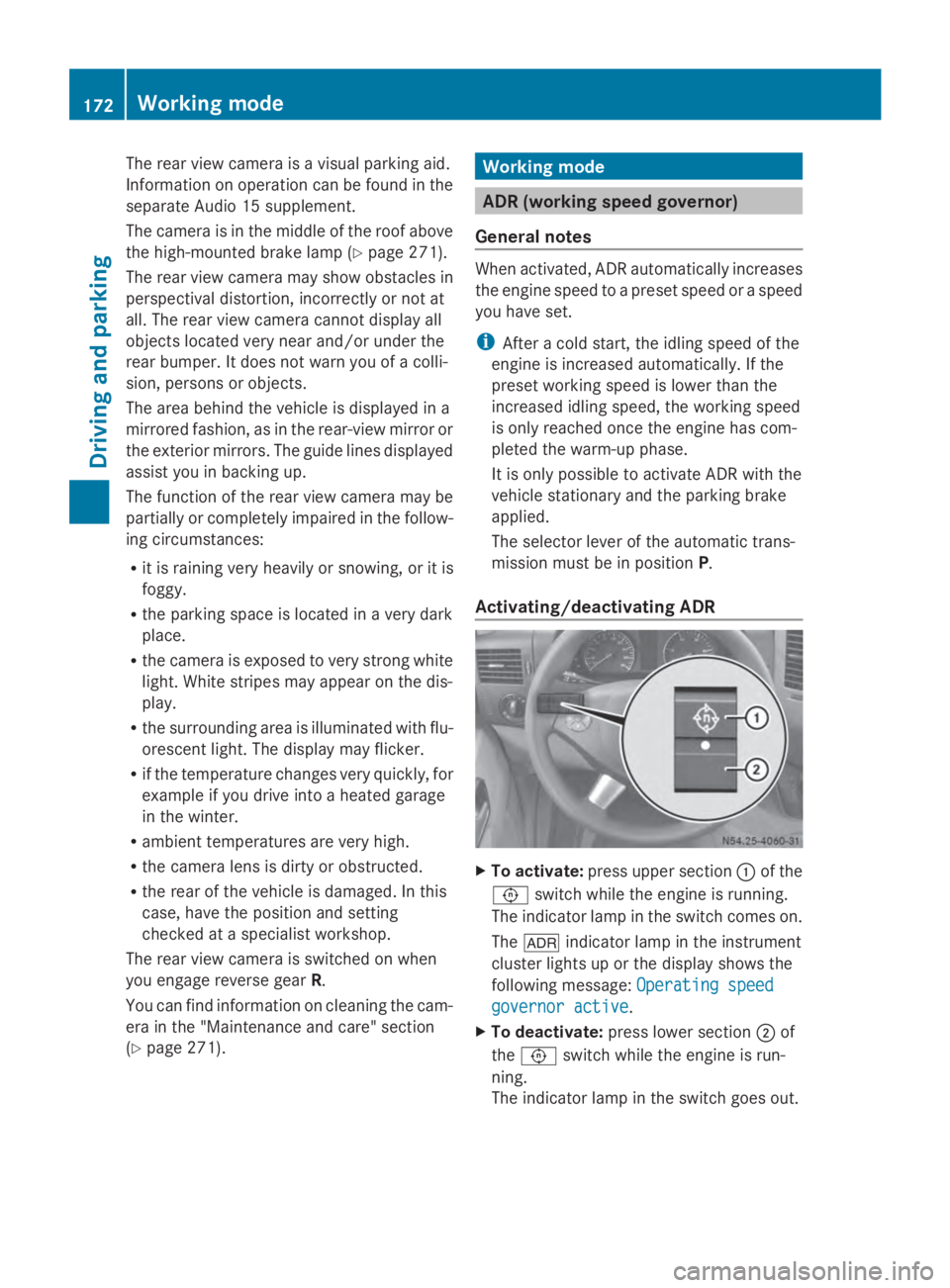
Activating/deactivating ADR X
To activate: press upper section 0043of the
0091 switch while the engine is running.
The indicator lamp in the switch comes on.
The 004E indicator lamp in the instrument
cluster lights up or the display shows the
following message: Operating speed Operating speed
governor active governor active.
X To deactivate: press lower section 0044of
the 0091 switch while the engine is run-
ning.
The indicator lamp in the switch goes out. 172
Working modeDriving and parking
Page 179 of 338
Observe the following when towing a trailer:
R Practice driving around bends, stopping
and backing up at a place where there is no
traffic. This enables you to gain experience
and get used to the new handling charac-
teristics.
R Before driving, check:
-that the trailer tow hitch and ball cou-
pling are secure
- that the safety switch for a braked trailer
is functioning properly
- that the safety chains are secure and not
damaged
- that the electrical connections are
secure
- that the lights are working
- that the wheels are in good order and the
tire pressure is correct
R Adjust the exterior mirrors to provide an
unobstructed view of the rear section of the
trailer.
R If the trailer has electronically controlled
brakes, pull the vehicle/trailer combina-
tion away carefully. Brake manually using
the brake controller and check that the
brakes are working.
R Secure the load on the trailer according to
the applicable specifications and current
standards on securing loads
(Y page 244).
R When driving with a trailer, check at regular
intervals that the load is secured and that
the brakes and lights are working.
R Bear in mind that the handling will be less
stable when towing a trailer than when driv-
ing without one. Avoid sudden steering
movements.
R The vehicle/trailer combination is heavier,
accelerates more slowly and has a
decreased gradient climbing capability and
a longer braking distance.
It is more susceptible to crosswinds and
requires cautious steering.
R If possible, do not brake suddenly, but
rather moderately at first so that the trailer can activate its brakes. Then increase the
force on the brake pedal.
R If the automatic transmission repeatedly
shifts between gears when driving on
inclines, restrict the shift range. Select shift
range 4,3,2or 1.
Driving in a low gear and at a low speed
reduces the risk of damaging the engine.
R When driving on a downhill gradient, shift
to a low gear and take advantage of the
engine's braking effect.
Avoid continuous brake application as this
may overheat the vehicle brakes and, if
installed, the trailer brakes.
R If the coolant temperature increases dra-
matically while the air-conditioning system
is switched on, switch off the air-condition-
ing system.
Coolant heat can also be dissipated by
switching the airflow and the temperature
of the heater/air conditioning to the maxi-
mum level. Open the windows if necessary.
R When overtaking, pay particular attention
to the extended length of your vehicle/
trailer combination.
Due to the length of your vehicle/trailer
combination you need an additional dis-
tance before you can return to your original
lane. Uncoupling a trailer
G
WARNING
If you uncouple a trailer with the overrun
brake engaged, you could trap your hand
between the vehicle and the trailer drawbar.
There is a risk of injury.
Do not uncouple a trailer if the overrun brake
is engaged.
! Do not disconnect a trailer with an
engaged overrun brake. Otherwise, your
vehicle could be damaged by the rebound-
ing of the overrun brake. Towing a trailer
177Driving and parking Z
Page 212 of 338
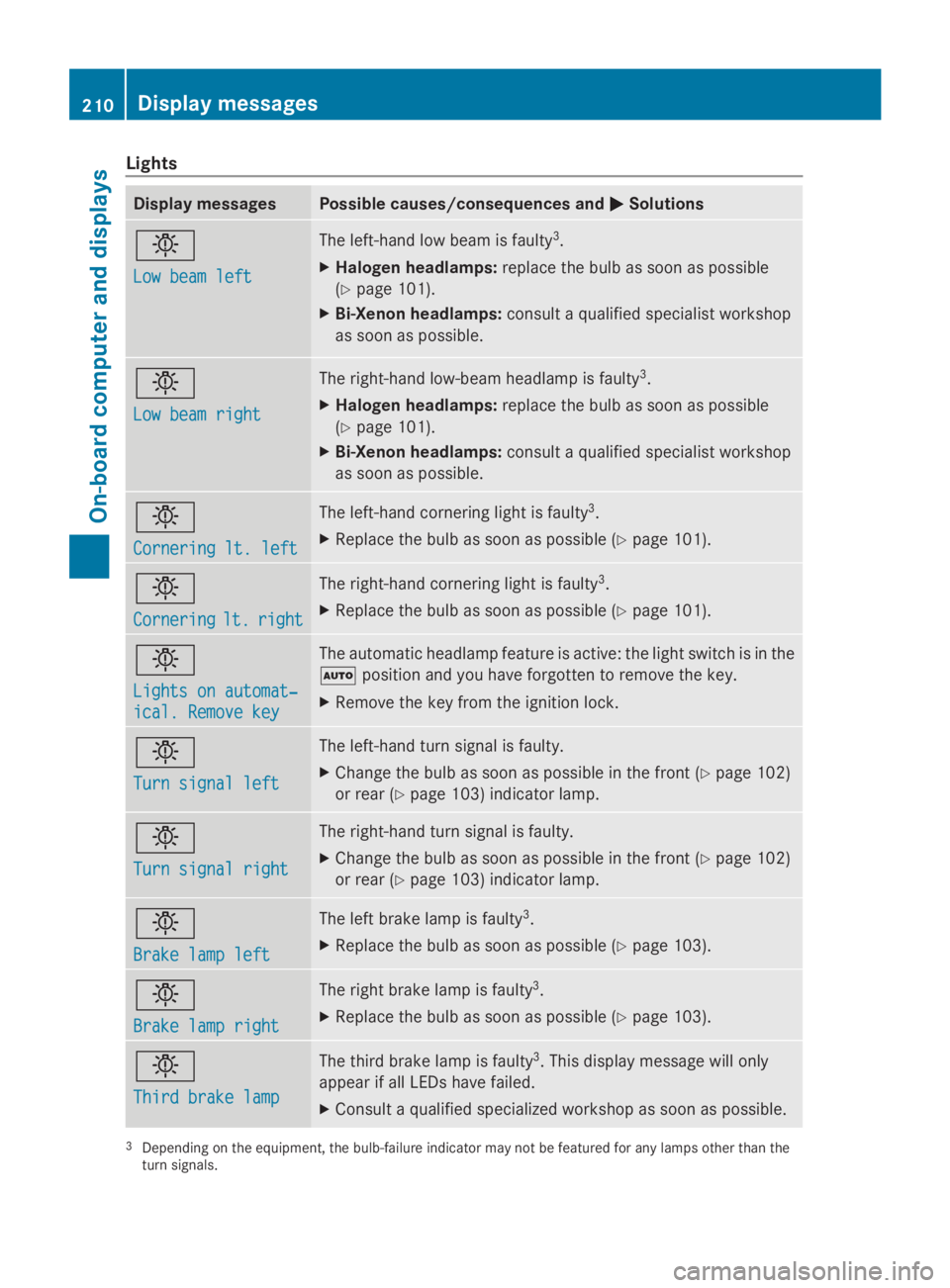
Lights
Display messages Possible causes/consequences and
0050
0050Solutions 0049
Low beam left Low beam left The left-hand low beam is faulty
3
.
X Halogen headlamps: replace the bulb as soon as possible
(Y page 101).
X Bi-Xenon headlamps: consult a qualified specialist workshop
as soon as possible. 0049
Low beam right Low beam right The right-hand low-beam headlamp is faulty
3
.
X Halogen headlamps: replace the bulb as soon as possible
(Y page 101).
X Bi-Xenon headlamps: consult a qualified specialist workshop
as soon as possible. 0049
Cornering lt. left Cornering lt. left The left-hand cornering light is faulty
3
.
X Replace the bulb as soon as possible (Y page 101).0049
Cornering Cornering
lt.
lt.right
right The right-hand cornering light is faulty
3
.
X Replace the bulb as soon as possible (Y page 101).0049
Lights on automat‐ Lights on automat‐
ical. Remove key ical. Remove key The automatic headlamp feature is active: the light switch is in the
0058
position and you have forgotten to remove the key.
X Remove the key from the ignition lock. 0049
Turn signal left Turn signal left The left-hand turn signal is faulty.
X
Change the bulb as soon as possible in the front ( Ypage 102)
or rear (Y page 103) indicator lamp. 0049
Turn signal right Turn signal right The right-hand turn signal is faulty.
X
Change the bulb as soon as possible in the front ( Ypage 102)
or rear (Y page 103) indicator lamp. 0049
Brake lamp left Brake lamp left The left brake lamp is faulty
3
.
X Replace the bulb as soon as possible (Y page 103).0049
Brake lamp right Brake lamp right The right brake lamp is faulty
3
.
X Replace the bulb as soon as possible (Y page 103).0049
Third brake lamp Third brake lamp The third brake lamp is faulty
3
. This display message will only
appear if all LEDs have failed.
X Consult a qualified specialized workshop as soon as possible. 3
Depending on the equipment, the bulb-failure indicator may not be featured for any lamps other than the
turn signals. 210
Display messagesOn-board computer and displays
Page 227 of 338
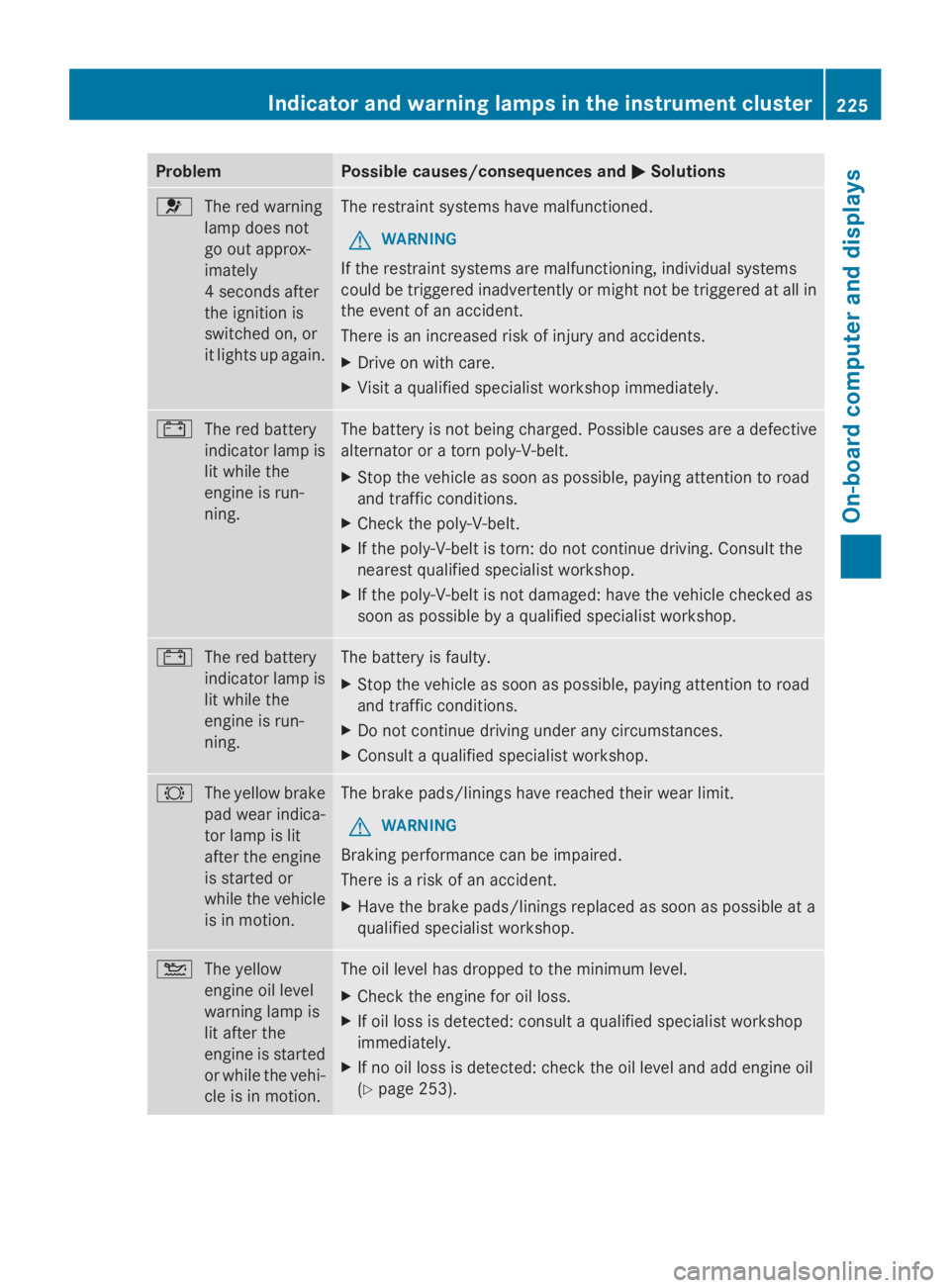
Problem Possible causes/consequences and
0050
0050Solutions 0075
The red warning
lamp does not
go out approx-
imately
4 seconds after
the ignition is
switched on, or
it lights up again. The restraint systems have malfunctioned.
G WARNING
If the restraint systems are malfunctioning, individual systems
could be triggered inadvertently or might not be triggered at all in
the event of an accident.
There is an increased risk of injury and accidents.
X Drive on with care.
X Visit a qualified specialist workshop immediately. 003D
The red battery
indicator lamp is
lit while the
engine is run-
ning. The battery is not being charged. Possible causes are a defective
alternator or a torn poly-V-belt.
X
Stop the vehicle as soon as possible, paying attention to road
and traffic conditions.
X Check the poly-V-belt.
X If the poly-V-belt is torn: do not continue driving. Consult the
nearest qualified specialist workshop.
X If the poly-V-belt is not damaged: have the vehicle checked as
soon as possible by a qualified specialist workshop. 003D
The red battery
indicator lamp is
lit while the
engine is run-
ning. The battery is faulty.
X
Stop the vehicle as soon as possible, paying attention to road
and traffic conditions.
X Do not continue driving under any circumstances.
X Consult a qualified specialist workshop. 0026
The yellow brake
pad wear indica-
tor lamp is lit
after the engine
is started or
while the vehicle
is in motion. The brake pads/linings have reached their wear limit.
G WARNING
Braking performance can be impaired.
There is a risk of an accident.
X Have the brake pads/linings replaced as soon as possible at a
qualified specialist workshop. 00B2
The yellow
engine oil level
warning lamp is
lit after the
engine is started
or while the vehi-
cle is in motion. The oil level has dropped to the minimum level.
X
Check the engine for oil loss.
X If oil loss is detected: consult a qualified specialist workshop
immediately.
X If no oil loss is detected: check the oil level and add engine oil
(Y page 253). Indicator and warning lamps in the instrument cluster
225On-board computer and displays Z
Page 270 of 338
!
Make sure that:
R the side windows and the roof are com-
pletely closed
R the climate control blower is switched off
R the windshield wiper switch is at position
0
The vehicle could otherwise be damaged.
You can wash the vehicle in an automatic car
wash from the very start.
Wash off excess dirt before cleaning the vehi-
cle in an automatic car wash.
After putting the vehicle through an auto-
matic car wash, wipe off wax from:
R the rear view camera lens (Y page 271)
R the windshield
R the windshield wiper blades
This will prevent smears and reduce wiping
noises caused by residue on the wind-
shield.
Washing by hand In some countries, washing by hand is only
allowed at specially equipped washing bays.
Observe the legal requirements for each indi-
vidual country.
X Do not use hot water and do not wash the
vehicle in direct sunlight.
X Use a soft car sponge.
X Use a mild cleaning agent, e.g. a car sham-
poo approved for use with Sprinter vehi-
cles.
X Thoroughly hose down the vehicle with a
gentle jet of water.
X Do not point the water jet directly towards
the air inlets.
X Use plenty of water and rinse out the
sponge frequently.
X Rinse the vehicle with clean water and dry
thoroughly with a chamois.
X Do not let the cleaning agents dry on the
paintwork. When using the vehicle in winter, remove all
traces of road salt deposits carefully and as
soon as possible.
High-pressure cleaning equipment G
WARNING
The water jet from a circular jet nozzle (dirt
blasters) can cause invisible exterior damage
to the tires or chassis components. Compo-
nents damaged in this way may fail unexpect-
edly. There is a risk of an accident.
Do not use power washers with circular jet
nozzles to clean the vehicle. Have damaged
tires or chassis components replaced imme-
diately.
! Under no circumstances use power wash-
ers in the vehicle interior. The pressurized
water and associated spray produced by
the power washer could cause extensive
damage to the vehicle.
! Observe the minimum distance to be
maintained between the nozzle of the
power washer and object to be cleaned, as
outlined below:
R approximately 2.2 ft(70 cm) when using
round-jet nozzles
R approximately 1 ft (30 cm) when using
25°flat-spray jets and dirt blasters
Keep the water jet moving while cleaning.
To avoid causing damage, do not point the
water jet directly at:
R door joints
R brake hoses
R electrical components
R electrical connections
R seals
R drive train, especially not at the inter-
mediate bearing of the propeller shaft
R rear view camera (camera lens and
microphone opening on the bottom)
Keep a minimum distance of
1.6 ft(50 cm). 268
CareMaintenance and care
Page 271 of 338

Cleaning the engine
!
Water must not enter intake or ventilation
openings. When cleaning with high pres-
sure water or steam cleaners, the spray
must not be aimed directly at electrical
components or the terminals of electrical
lines.
Preserve the engine after the engine has
been cleaned. Protect the belt drive system
from exposure to the preservative agent.
Also observe the information in the section
"Power washer" (Y page 268).
Cleaning the paintwork !
Do not affix:
R stickers
R films
R magnetic plates or similar items
to painted surfaces. You could otherwise
damage the paintwork.
Scratches, corrosive deposits, areas affected
by corrosion and damage caused by inade-
quate care cannot always be completely
repaired. In such cases, visit a qualified spe-
cialist workshop.
X Remove impurities immediately, where
possible, whilst avoiding rubbing too hard.
X Soak insect remains with insect remover
and rinse off the treated areas afterwards.
X Soak bird droppings with water and rinse
off the treated areas afterwards.
X Remove coolant, brake fluid, tree resin,
oils, fuels and greases by rubbing gently
with a cloth soaked in petroleum ether or
lighter fluid.
X Use tar remover to remove tar stains.
X Use silicone remover to remove wax.
Cleaning the windows G
WARNING
You could become trapped by the windshield
wipers if they start moving while cleaning the windshield or wiper blades. There is a risk of
injury.
Always switch off the windshield wipers and
the ignition before cleaning the windshield or
wiper blades.
! Do not fold the windshield wipers away
from the windshield unless the hood is
closed. Otherwise, you could damage the
hood.
! Hold the wiper arm securely when folding
back. The windshield could be damaged if
the wiper arm smacks against it suddenly.
! Do not use dry cloths, abrasive products,
solvents or cleaning agents containing sol-
vents to clean the inside of the windows.
Do not touch the insides of the windows
with hard objects, e.g. an ice scraper or
ring. There is otherwise a risk of damaging
the windows.
Before cleaning the windshield
X Turn the key to position 0in the ignition
lock or remove it.
X Fold the windshield wiper arms away from
the windshield until you feel them engage.
Before switching the ignition on again, fold
the windshield wipers back into position.
Cleaning the windows
X Clean the inside and outside of the win-
dows with a damp cloth and a cleaning
agent that is recommended and approved
for Sprinter vehicles. Exterior
Cleaning the wheels !
Do not use any acidic or alkaline cleaning
agents. They can cause corrosion on the
wheel bolts (wheel nuts) or the retainer
springs for the wheel-balancing weights.
! Do not park the vehicle for an extended
period straight after cleaning it, particularly
after having cleaned the wheels with wheel Care
269Maintenance and care Z
Page 272 of 338
cleaner. Wheel cleaners could cause
increased corrosion of the brake discs and
brake pads/linings. For this reason, you
should drive for a few minutes after clean-
ing. Braking heats the brake discs and the
brake pads/linings, thus drying them. The
vehicle can then be parked.
If you clean the wheels with a power washer,
observe the safety notes for the power
washer (Y page 268). You could otherwise
damage the tires.
Cleaning the wiper blades G
WARNING
You could become trapped by the windshield
wipers if they start moving while cleaning the
windshield or wiper blades. There is a risk of
injury.
Always switch off the windshield wipers and
the ignition before cleaning the windshield or
wiper blades.
! Do not fold the windshield wipers away
from the windshield unless the hood is
closed. Otherwise, you could damage the
hood.
! Do not pull the wiper blade. Otherwise,
the wiper blade could be damaged.
! Do not clean wiper blades too often and
do not rub them too hard. Otherwise, the
graphite coating could be damaged. This
could cause wiper noise.
! Hold the wiper arm securely when folding
back. The windshield could be damaged if
the wiper arm smacks against it suddenly.
X Turn the key to position 0in the ignition
lock or remove it.
X Fold the windshield wiper arms away from
the windshield until you feel them engage.
X Carefully clean the wiper blades with a
damp cloth.
X Fold back the wiper arms before switching
on the ignition. Cleaning the exterior lighting !
Only use cleaning agents or cleaning
cloths which are suitable for plastic light
lenses. Unsuitable cleaning agents or
cleaning cloths could scratch or damage
the plastic light lenses.
X Clean the plastic covers of the exterior
lighting with a damp sponge and a mild
cleaning agent, e.g. car shampoo for
Sprinter vehicles, or with cleaning cloths.
Cleaning the mirror turn signal !
Only use cleaning agents or cleaning
cloths that are suitable for plastic lenses.
Unsuitable cleaning agents or cleaning
cloths could scratch or damage the plastic
lenses of the mirror turn signals.
X Clean the plastic lenses of the mirror turn
signals in the exterior mirror housing using
a wet sponge and mild cleaning agent, e.g.
car shampoo or cleaning cloths.
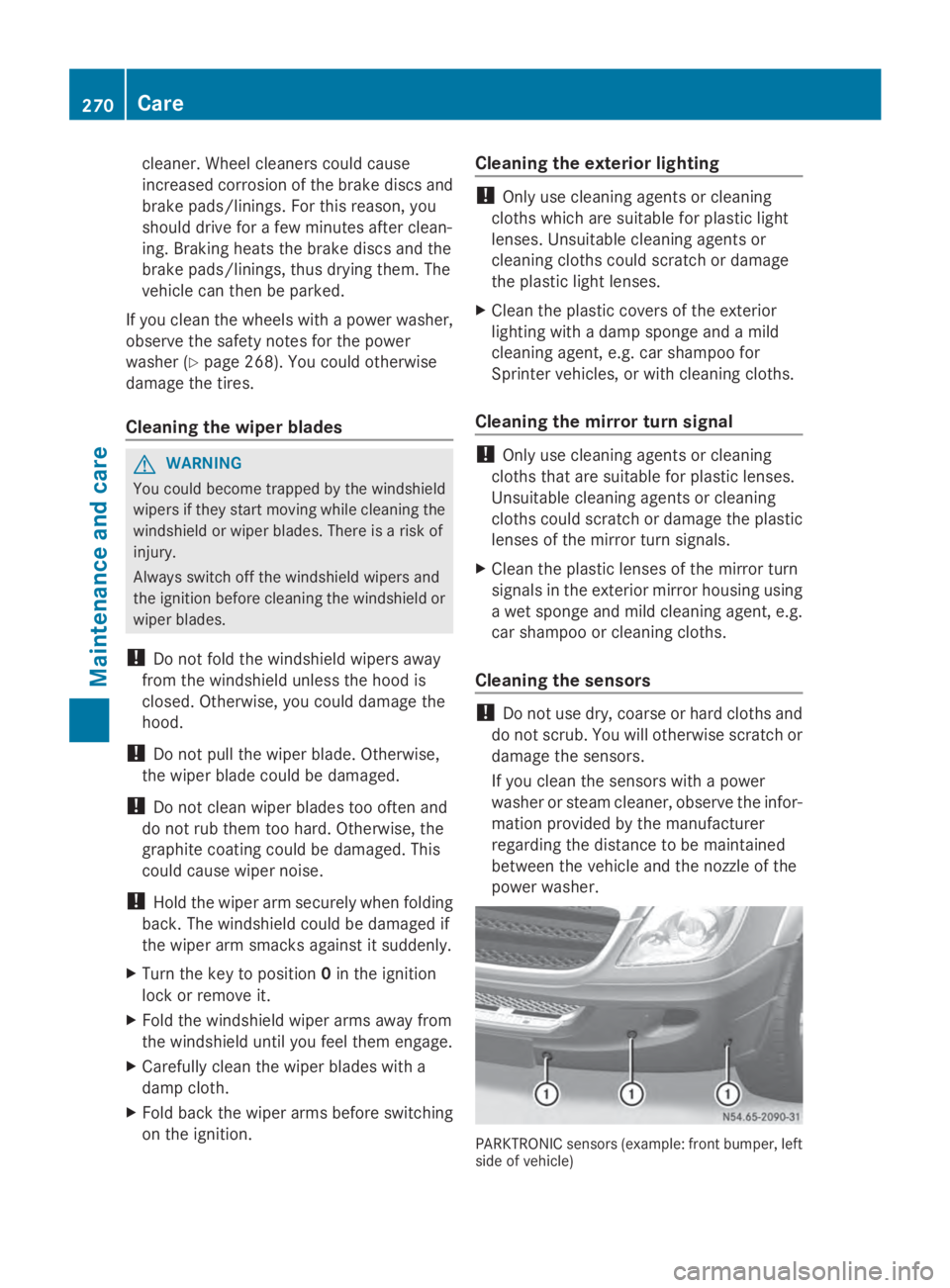
Cleaning the sensors !
Do not use dry, coarse or hard cloths and
do not scrub. You will otherwise scratch or
damage the sensors.
If you clean the sensors with a power
washer or steam cleaner, observe the infor-
mation provided by the manufacturer
regarding the distance to be maintained
between the vehicle and the nozzle of the
power washer. PARKTRONIC sensors (example: front bumper, left
side of vehicle)270
CareMaintenance and care
Page 296 of 338
notes on the recommended tire pressure
(Y
page 290).
The tire pressure monitor is not able to warn
you of a sudden loss of pressure, e.g. follow-
ing penetration by a foreign object. In this
event, brake the vehicle until it comes to a
standstill. Do not carry out any sudden steer-
ing maneuvers.
The tire pressure monitor has a yellow 0077
warning lamp in the instrument cluster for
indicating pressure loss/malfunctions (USA)
or pressure loss (Canada). Depending on how
the warning lamp flashes or lights up, an
underinflated tire or a malfunction in the tire
pressure monitor is displayed:
R if the 0077 warning lamp is lit continuously,
the tire pressure on one or more tires is
significantly too low. The tire pressure mon-
itor is not malfunctioning.
R USA only: if the 0077warning lamp flashes
for 60 seconds and then remains lit con-
stantly, the tire pressure monitor is mal-
functioning.
Only vehicles with steering wheel buttons: the
on-board computer displays information on
tire pressure. After a few minutes of driving,
the current tire pressure of each tire is shown
in the on-board computer.
USA only: if the tire pressure monitor is mal-
functioning, it may be more than 10 minutes
before the malfunction is shown. The 0077
tire pressure warning lamp flashes for
60 seconds and then remains lit. When the
malfunction has been rectified, the 0077tire
pressure warning lamp goes out after a few
minutes of driving.
The tire pressure values indicated by the on-
board computer may differ from those meas-
ured at a gas station with a pressure gauge.
The tire pressures shown by the on-board
computer refer to those measured at sea
level. At high altitudes, the tire pressure value
indicated by a pressure gauge are higher than
those shown by the on-board computer. In
this case, do not reduce the tire pressures. If radio transmitting equipment (e.g. wireless
headphones, two-way radios) is operated
inside the vehicle or in the vicinity of the vehi-
cle, this can interfere with the operation of
the tire pressure monitor.
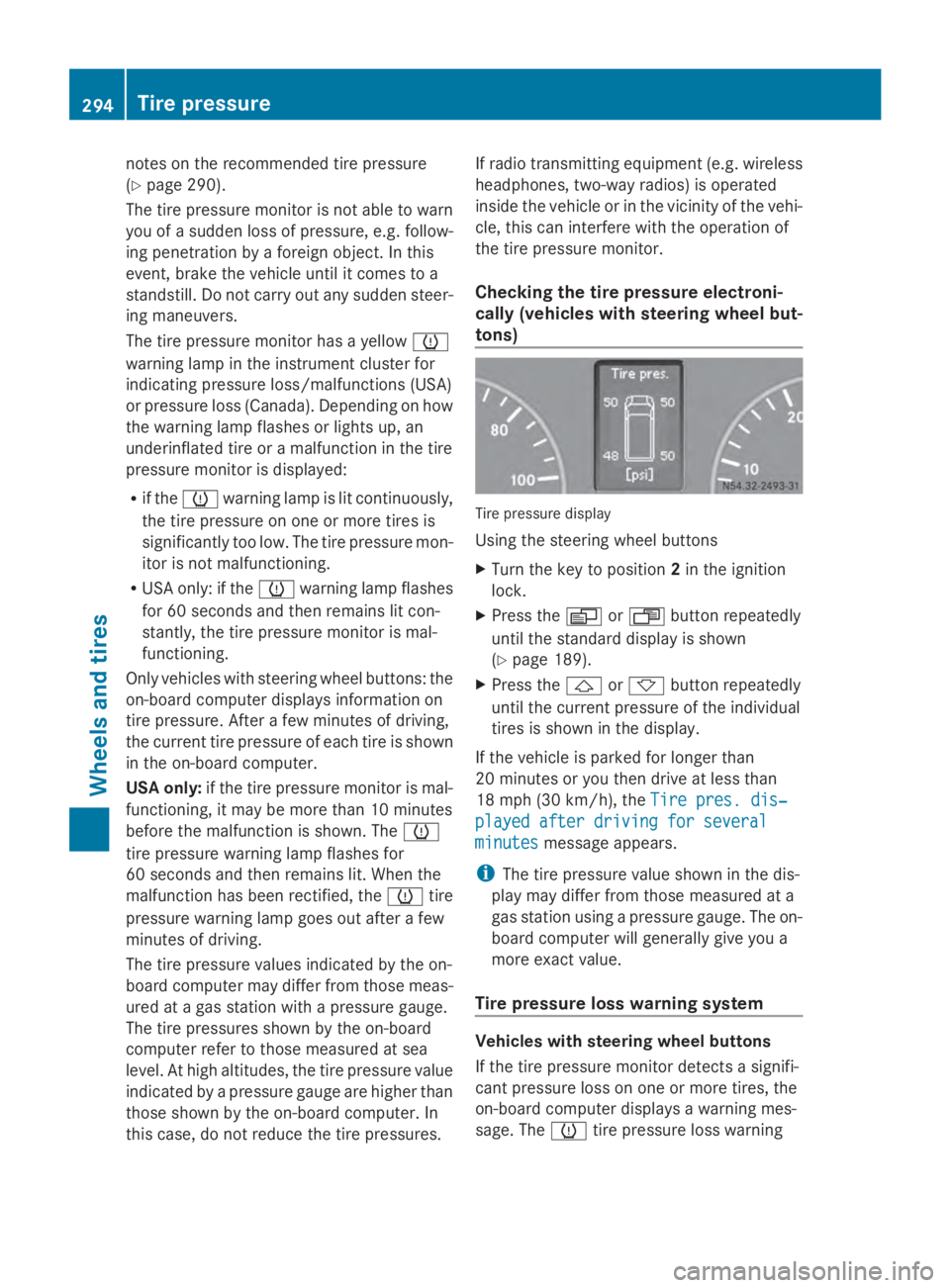
Checking the tire pressure electroni-
cally (vehicles with steering wheel but-
tons) Tire pressure display
Using the steering wheel buttons
X
Turn the key to position 2in the ignition
lock.
X Press the 0080or007F button repeatedly
until the standard display is shown
(Y page 189).
X Press the 0041or0068 button repeatedly
until the current pressure of the individual
tires is shown in the display.
If the vehicle is parked for longer than
20 minutes or you then drive at less than
18 mph (30 km/h), the Tire pres. dis‐
Tire pres. dis‐
played after driving for several played after driving for several
minutes minutes message appears.
i The tire pressure value shown in the dis-
play may differ from those measured at a
gas station using a pressure gauge. The on-
board computer will generally give you a
more exact value.
Tire pressure loss warning system Vehicles with steering wheel buttons
If the tire pressure monitor detects a signifi-
cant pressure loss on one or more tires, the
on-board computer displays a warning mes-
sage. The 0077tire pressure loss warning 294
Tire pressureWheels and tires
Page 308 of 338
is bar. 100 kilopascals (kPa) are the equiva-
lent of 1 bar.
Load index
In addition to the load bearing index, a load
index can be stamped onto the sidewall of the
tire. It specifies the load-bearing capacity of
the tire more precisely.
Curb weight
The weight of a vehicle with standard equip-
ment including the maximum filling capacity
of fuel, oil, and coolant. It also includes the
air-conditioning system and optional equip-
ment if these are installed on the vehicle, but
does not include passengers or luggage.
Maximum tire load
The maximum tire load in kilograms or
pounds is the maximum weight for which a
tire is approved.
Maximum permissible tire pressure
Maximum permissible tire pressure for one
tire.
Maximum load on one tire
Maximum load on one tire. This is calculated
by dividing the maximum axle load of one axle
by two.
PSI (Pounds per square inch)
Standard unit of measurement for tire pres-
sure.
Aspect ratio
Relationship between tire height and width in
percent.
Tire pressure
Pressure inside the tire applying an outward
force to every square inch of the tire's sur-
face. Tire pressure is specified in pounds per
square inch (psi), in kilopascal (kPa) or in bar.
Tire pressure should only be corrected when
the tires are cold. Cold tire pressure
The tires are cold:
R
if the vehicle has been parked for at least
three hours without direct sunlight on the
tires, and
R if the vehicle has not been driven further
than 1 mile (1.6 km)
Tire tread
The part of the tire that comes into contact
with the road.
Tire bead
The tire bead ensures that the tire sits
securely on the wheel. There are several steel
wires in the bead to prevent the tire from
coming loose from the wheel rim.
Sidewall
The part of the tire between the tread and the
tire bead.
Weight of optional extras
The combined weight of those optional extras
that weigh more than the replaced standard
parts and more than 2.3 kg (5 lbs). These
optional extras, such as high-performance
brakes, level control, a roof rack or a high-
performance battery, are not included in the
curb weight and the weight of the accesso-
ries.
TIN (Tire Identification Number)
A unique identification number which can be
used by a tire manufacturer to identify tires,
for example for a product recall, and thus
identify the purchasers. The TIN is composed
of the manufacturer identification code, tire
size, tire model code and manufacturing date.
Load bearing index
The load bearing index (also load index) is a
code that contains the maximum load bearing
capacity of a tire. 306
What you should know about wheels and tiresWheels and tires
Page 310 of 338
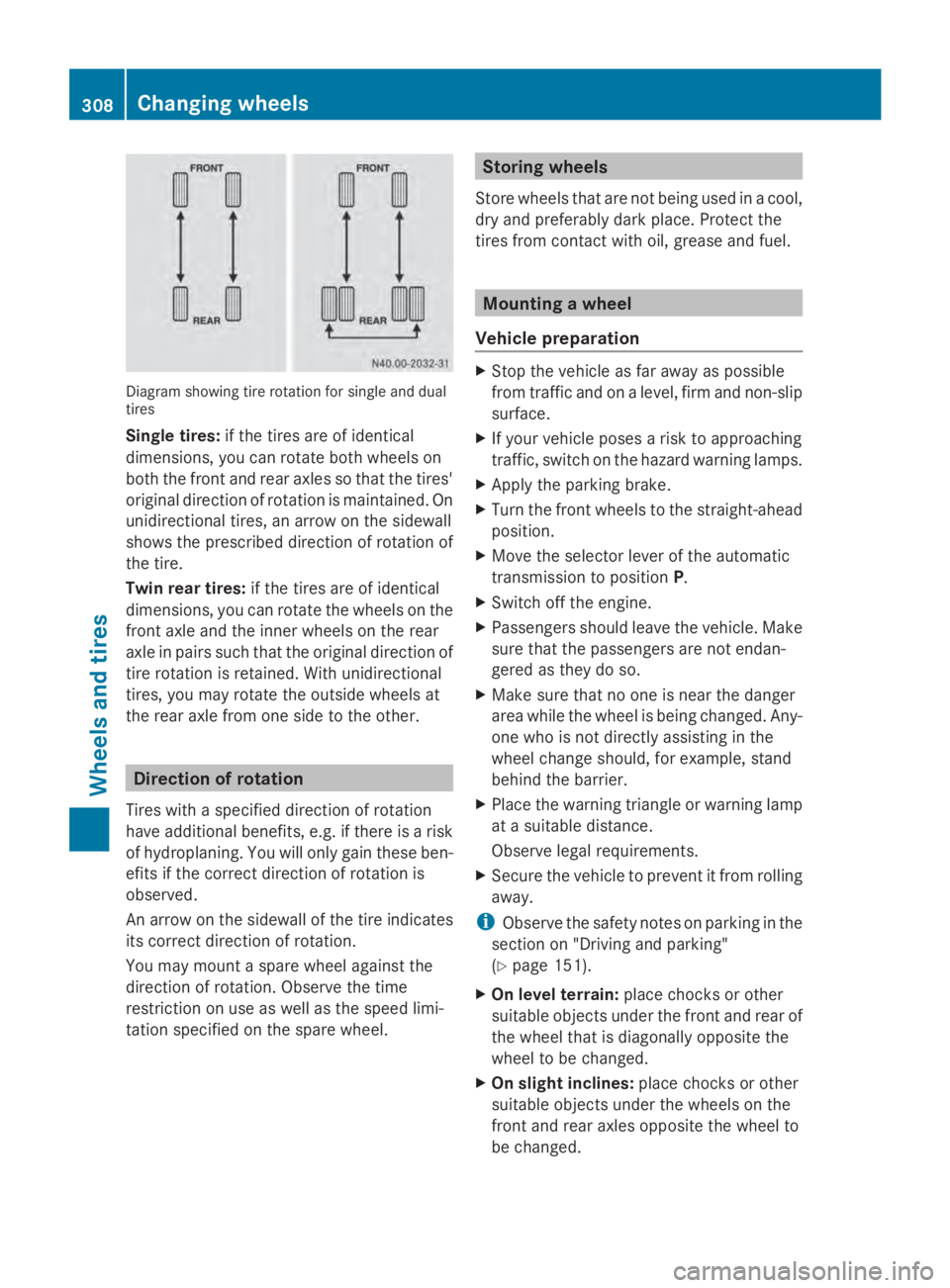
Diagram showing tire rotation for single and dual
tires
Single tires: if the tires are of identical
dimensions, you can rotate both wheels on
both the front and rear axles so that the tires'
original direction of rotation is maintained. On
unidirectional tires, an arrow on the sidewall
shows the prescribed direction of rotation of
the tire.
Twin rear tires: if the tires are of identical
dimensions, you can rotate the wheels on the
front axle and the inner wheels on the rear
axle in pairs such that the original direction of
tire rotation is retained. With unidirectional
tires, you may rotate the outside wheels at
the rear axle from one side to the other. Direction of rotation
Tires with a specified direction of rotation
have additional benefits, e.g. if there is a risk
of hydroplaning. You will only gain these ben-
efits if the correct direction of rotation is
observed.
An arrow on the sidewall of the tire indicates
its correct direction of rotation.
You may mount a spare wheel against the
direction of rotation. Observe the time
restriction on use as well as the speed limi-
tation specified on the spare wheel. Storing wheels
Store wheels that are not being used in a cool,
dry and preferably dark place. Protect the
tires from contact with oil, grease and fuel. Mounting a wheel
Vehicle preparation X
Stop the vehicle as far away as possible
from traffic and on a level, firm and non-slip
surface.
X If your vehicle poses a risk to approaching
traffic, switch on the hazard warning lamps.
X Apply the parking brake.
X Turn the front wheels to the straight-ahead
position.
X Move the selector lever of the automatic
transmission to position P.
X Switch off the engine.
X Passengers should leave the vehicle. Make
sure that the passengers are not endan-
gered as they do so.
X Make sure that no one is near the danger
area while the wheel is being changed. Any-
one who is not directly assisting in the
wheel change should, for example, stand
behind the barrier.
X Place the warning triangle or warning lamp
at a suitable distance.
Observe legal requirements.
X Secure the vehicle to prevent it from rolling
away.
i Observe the safety notes on parking in the
section on "Driving and parking"
(Y page 151).
X On level terrain: place chocks or other
suitable objects under the front and rear of
the wheel that is diagonally opposite the
wheel to be changed.
X On slight inclines: place chocks or other
suitable objects under the wheels on the
front and rear axles opposite the wheel to
be changed. 308
Changing wheelsWheels and tires