key MERCEDES-BENZ SPRINTER 2014 MY14 Operator’s Manual
[x] Cancel search | Manufacturer: MERCEDES-BENZ, Model Year: 2014, Model line: SPRINTER, Model: MERCEDES-BENZ SPRINTER 2014Pages: 338, PDF Size: 6.78 MB
Page 199 of 338
X
Press the 0063button to select the Key
Key
function.
The selection marker is on the current set-
ting.
X Press the 0081or0082 button to activate
or deactivate key dependency. Trip computer menu
General notes You can call up or reset statistical data for the
vehicle in the Trip computer menu.
i When you call up the trip computer again,
it displays the last function called up.
The units of the statistical information dis-
played are set permanently for each spe-
cific country, and are therefore independ-
ent of the units selected in the Settings
Settings
menu.
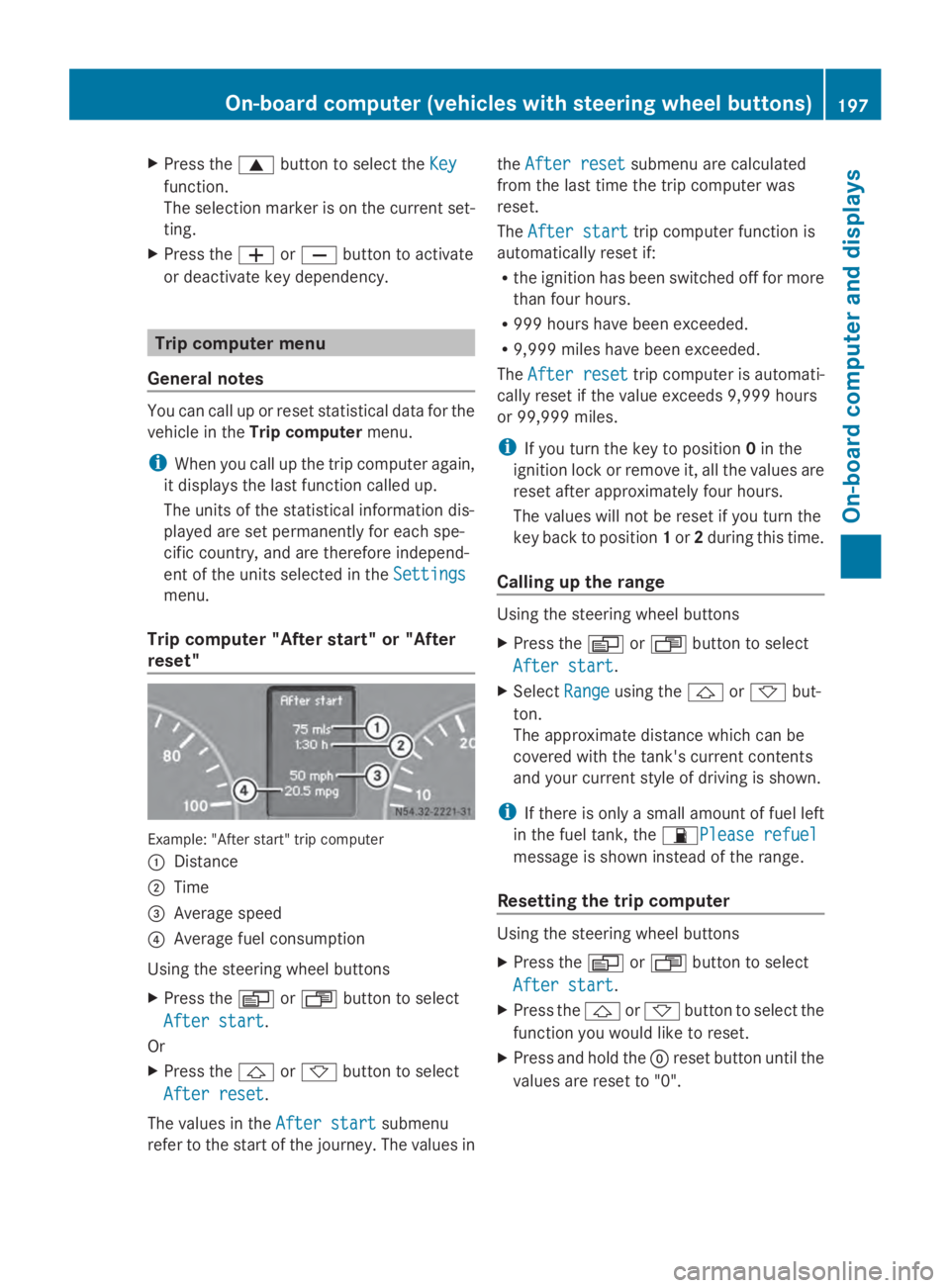
Trip computer "After start" or "After
reset" Example: "After start" trip computer
0043
Distance
0044 Time
0087 Average speed
0085 Average fuel consumption
Using the steering wheel buttons
X Press the 0080or007F button to select
After start
After start.
Or
X Press the 0041or0068 button to select
After reset After reset.
The values in the After start
After startsubmenu
refer to the start of the journey. The values in the
After reset
After reset submenu are calculated
from the last time the trip computer was
reset.
The After start After start trip computer function is
automatically reset if:
R the ignition has been switched off for more
than four hours.
R 999 hours have been exceeded.
R 9,999 miles have been exceeded.
The After reset
After reset trip computer is automati-
cally reset if the value exceeds 9,999 hours
or 99,999 miles.
i If you turn the key to position 0in the
ignition lock or remove it, all the values are
reset after approximately four hours.
The values will not be reset if you turn the
key back to position 1or 2during this time.
Calling up the range Using the steering wheel buttons
X
Press the 0080or007F button to select
After start After start.
X Select Range
Rangeusing the 0041or0068 but-
ton.
The approximate distance which can be
covered with the tank's current contents
and your current style of driving is shown.
i If there is only a small amount of fuel left
in the fuel tank, the 00B5Please refuelPlease refuel
message is shown instead of the range.
Resetting the trip computer Using the steering wheel buttons
X
Press the 0080or007F button to select
After start After start.
X Press the 0041or0068 button to select the
function you would like to reset.
X Press and hold the 0045reset button until the
values are reset to "0". On-board computer (vehicles with steering wheel buttons)
197On-board computer and displays Z
Page 201 of 338
X
Press the 0041or0068 button to select the
desired name.
Or
X To start rapid scrolling: press and hold
the 0041 or0068 button longer than 1 sec-
ond.
Rapid scrolling stops when you release the
button or reach the end of the list.
Using the steering wheel buttons
X To start dialing: press the0061button.
The on-board computer dials the corre-
sponding phone number.
When a connection is established, the
name of the other person and/or the call
duration appear in the display.
X To exit the telephone book: press the
0076 button.
Redialing The on-board computer saves the last names
or numbers dialed in the redial memory.
Using the steering wheel buttons
X Use the 0080or007F buttons to select the
TEL
TEL menu.
The display shows the mobile phone opera-
tional readiness symbol.
X Press the 0061button.
The display shows the most recently dialed
numbers or names in the redial memory.
X Press the 0041or0068 button to select the
desired name or number.
X To start dialing: press the0061button.
The on-board computer dials the corre-
sponding phone number.
When a connection is established, the
name of the other person and/or the call
duration appear in the display.
Or
X To exit the redial memory: press the
0076 button. Display messages
Notes on display messages
Important safety notes G
WARNING
No information will be displayed if either the
instrument cluster or the display is inopera-
tive.
As a result, you will not be able to see warning
and indicator lamps or information about the
driving conditions, such as speed or outside
temperature. Driving characteristics may be
impaired. Adjust your driving style and vehicle
speed accordingly.
Contact a qualified specialist workshop
immediately. G
WARNING
If service work is not carried out correctly, the
operating safety of your vehicle may be
affected. This could cause you to lose control
of your vehicle and cause an accident. More-
over, the safety systems may no longer be
able to protect you or others as they are
designed to do.
Always have service work carried out at a
qualified specialist workshop.
i If you turn the key to position 2in the
ignition, a display check is performed. All
warning/indicator lamps (except the turn
signal indicator lamps) and the display are
activated. Before starting the journey,
check that the warning and indicator lamps
are operating correctly.
Vehicles without steering wheel but-
tons Warnings, malfunctions or additional infor-
mation may also be shown in the display. The
following tables show all the display mes-
sages. A warning tone sounds with certain
display messages. Display messages
199On-board computer and displays Z
Page 212 of 338
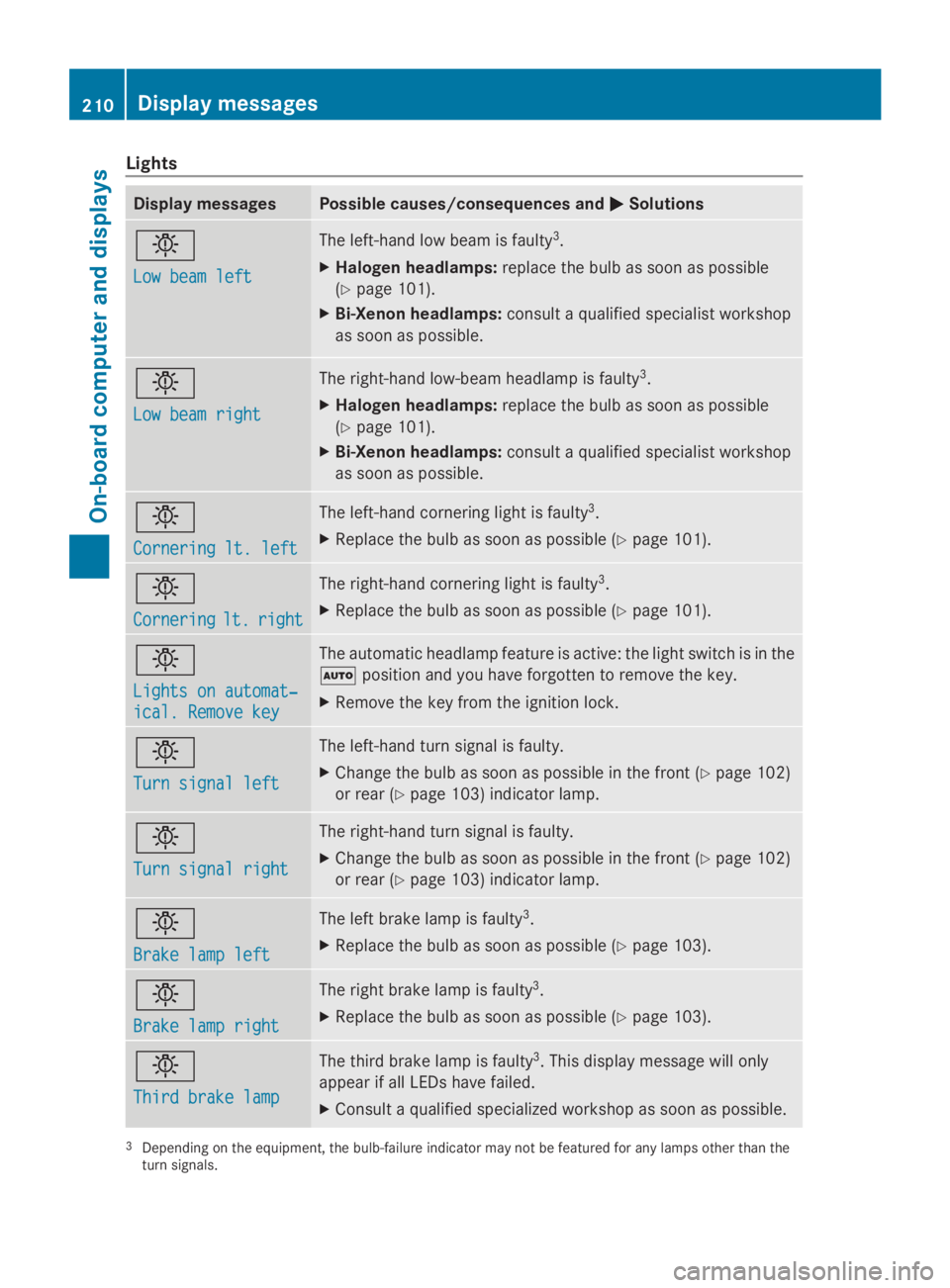
Lights
Display messages Possible causes/consequences and
0050
0050Solutions 0049
Low beam left Low beam left The left-hand low beam is faulty
3
.
X Halogen headlamps: replace the bulb as soon as possible
(Y page 101).
X Bi-Xenon headlamps: consult a qualified specialist workshop
as soon as possible. 0049
Low beam right Low beam right The right-hand low-beam headlamp is faulty
3
.
X Halogen headlamps: replace the bulb as soon as possible
(Y page 101).
X Bi-Xenon headlamps: consult a qualified specialist workshop
as soon as possible. 0049
Cornering lt. left Cornering lt. left The left-hand cornering light is faulty
3
.
X Replace the bulb as soon as possible (Y page 101).0049
Cornering Cornering
lt.
lt.right
right The right-hand cornering light is faulty
3
.
X Replace the bulb as soon as possible (Y page 101).0049
Lights on automat‐ Lights on automat‐
ical. Remove key ical. Remove key The automatic headlamp feature is active: the light switch is in the
0058
position and you have forgotten to remove the key.
X Remove the key from the ignition lock. 0049
Turn signal left Turn signal left The left-hand turn signal is faulty.
X
Change the bulb as soon as possible in the front ( Ypage 102)
or rear (Y page 103) indicator lamp. 0049
Turn signal right Turn signal right The right-hand turn signal is faulty.
X
Change the bulb as soon as possible in the front ( Ypage 102)
or rear (Y page 103) indicator lamp. 0049
Brake lamp left Brake lamp left The left brake lamp is faulty
3
.
X Replace the bulb as soon as possible (Y page 103).0049
Brake lamp right Brake lamp right The right brake lamp is faulty
3
.
X Replace the bulb as soon as possible (Y page 103).0049
Third brake lamp Third brake lamp The third brake lamp is faulty
3
. This display message will only
appear if all LEDs have failed.
X Consult a qualified specialized workshop as soon as possible. 3
Depending on the equipment, the bulb-failure indicator may not be featured for any lamps other than the
turn signals. 210
Display messagesOn-board computer and displays
Page 222 of 338
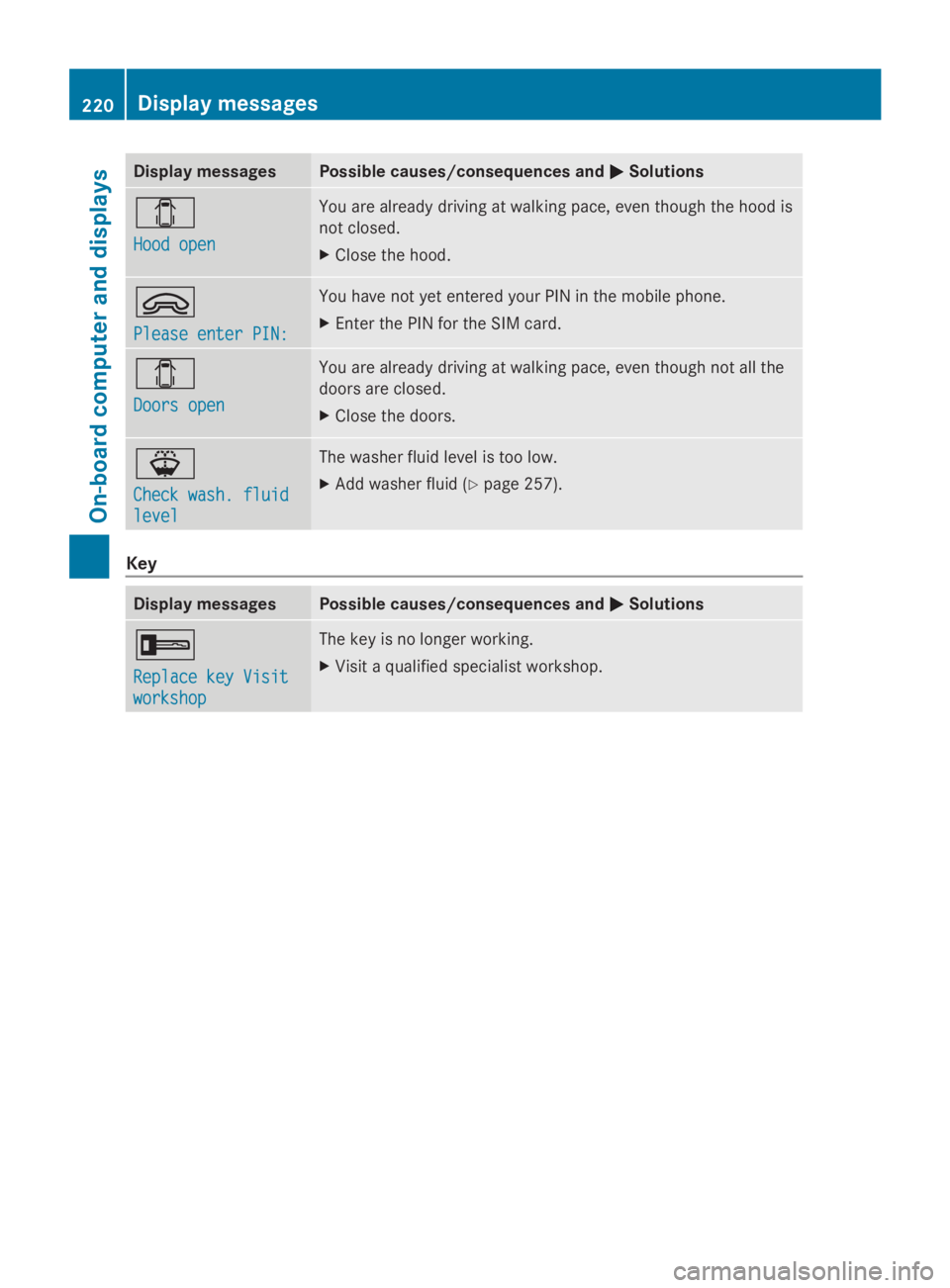
Display messages Possible causes/consequences and
0050
0050Solutions 003E
Hood open Hood open You are already driving at walking pace, even though the hood is
not closed.
X
Close the hood. 0064
Please enter PIN: Please enter PIN: You have not yet entered your PIN in the mobile phone.
X
Enter the PIN for the SIM card. 003E
Doors open Doors open You are already driving at walking pace, even though not all the
doors are closed.
X
Close the doors. 00B1
Check wash. fluid Check wash. fluid
level level The washer fluid level is too low.
X
Add washer fluid ( Ypage 257). Key
Display messages Possible causes/consequences and
0050 0050Solutions 0039
Replace key Visit Replace key Visit
workshop workshop The key is no longer working.
X
Visit a qualified specialist workshop. 220
Display
messagesOn-board computer and displays
Page 230 of 338
Problem Possible causes/consequences and
0050
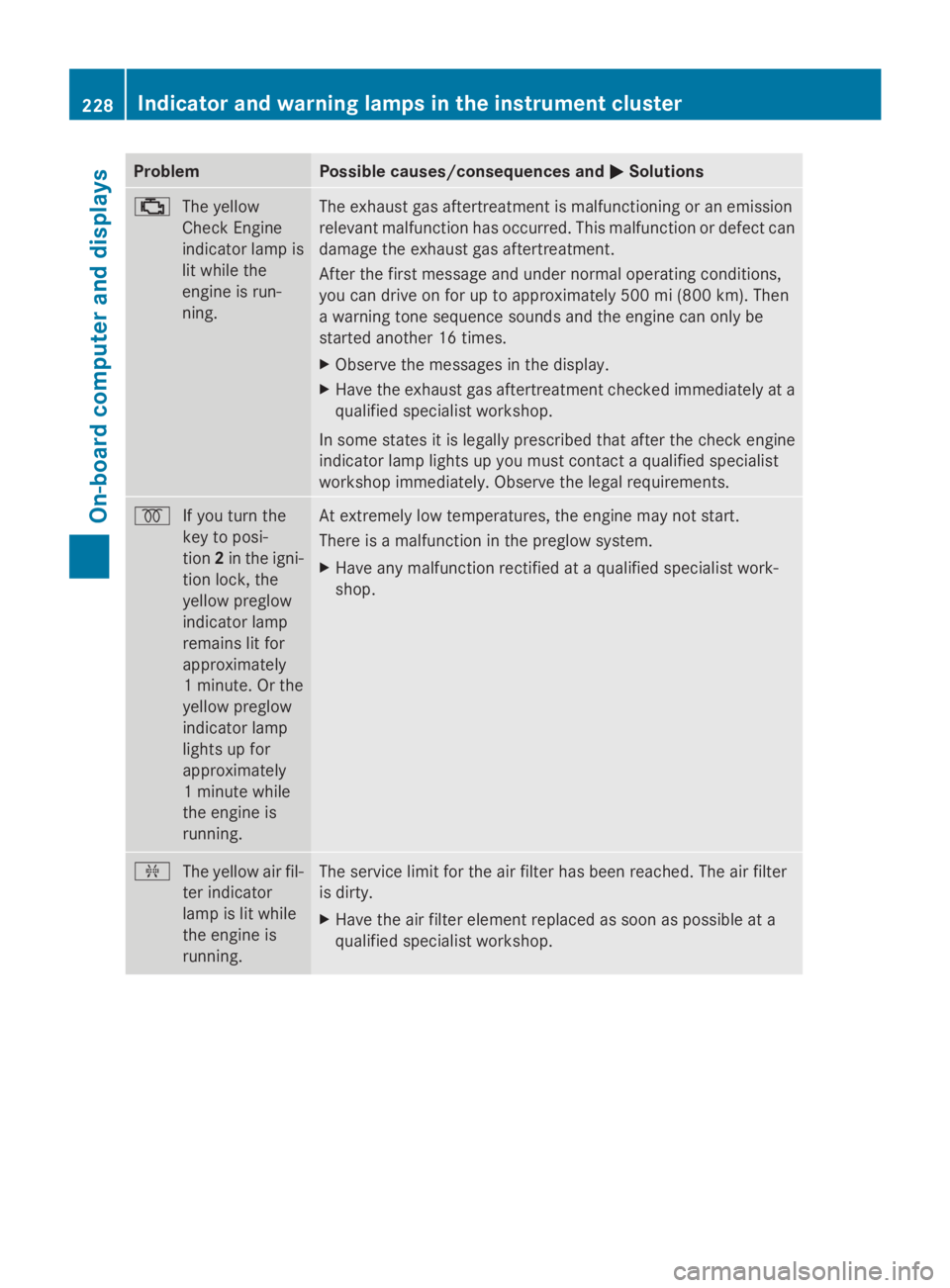
0050Solutions 00B9
The yellow
Check Engine
indicator lamp is
lit while the
engine is run-
ning. The exhaust gas aftertreatment is malfunctioning or an emission
relevant malfunction has occurred. This malfunction or defect can
damage the exhaust gas aftertreatment.
After the first message and under normal operating conditions,
you can drive on for up to approximately 500 mi (800 km). Then
a warning tone sequence sounds and the engine can only be
started another 16 times.
X
Observe the messages in the display.
X Have the exhaust gas aftertreatment checked immediately at a
qualified specialist workshop.
In some states it is legally prescribed that after the check engine
indicator lamp lights up you must contact a qualified specialist
workshop immediately. Observe the legal requirements. 0028
If you turn the
key to posi-
tion2in the igni-
tion lock, the
yellow preglow
indicator lamp
remains lit for
approximately
1 minute. Or the
yellow preglow
indicator lamp
lights up for
approximately
1 minute while
the engine is
running. At extremely low temperatures, the engine may not start.
There is a malfunction in the preglow system.
X
Have any malfunction rectified at a qualified specialist work-
shop. 009F
The yellow air fil-
ter indicator
lamp is lit while
the engine is
running. The service limit for the air filter has been reached. The air filter
is dirty.
X
Have the air filter element replaced as soon as possible at a
qualified specialist workshop. 228
Indicator and warning lamps in the instrument clusterOn-board computer and displays
Page 232 of 338
Problem Possible causes/consequences and
0050
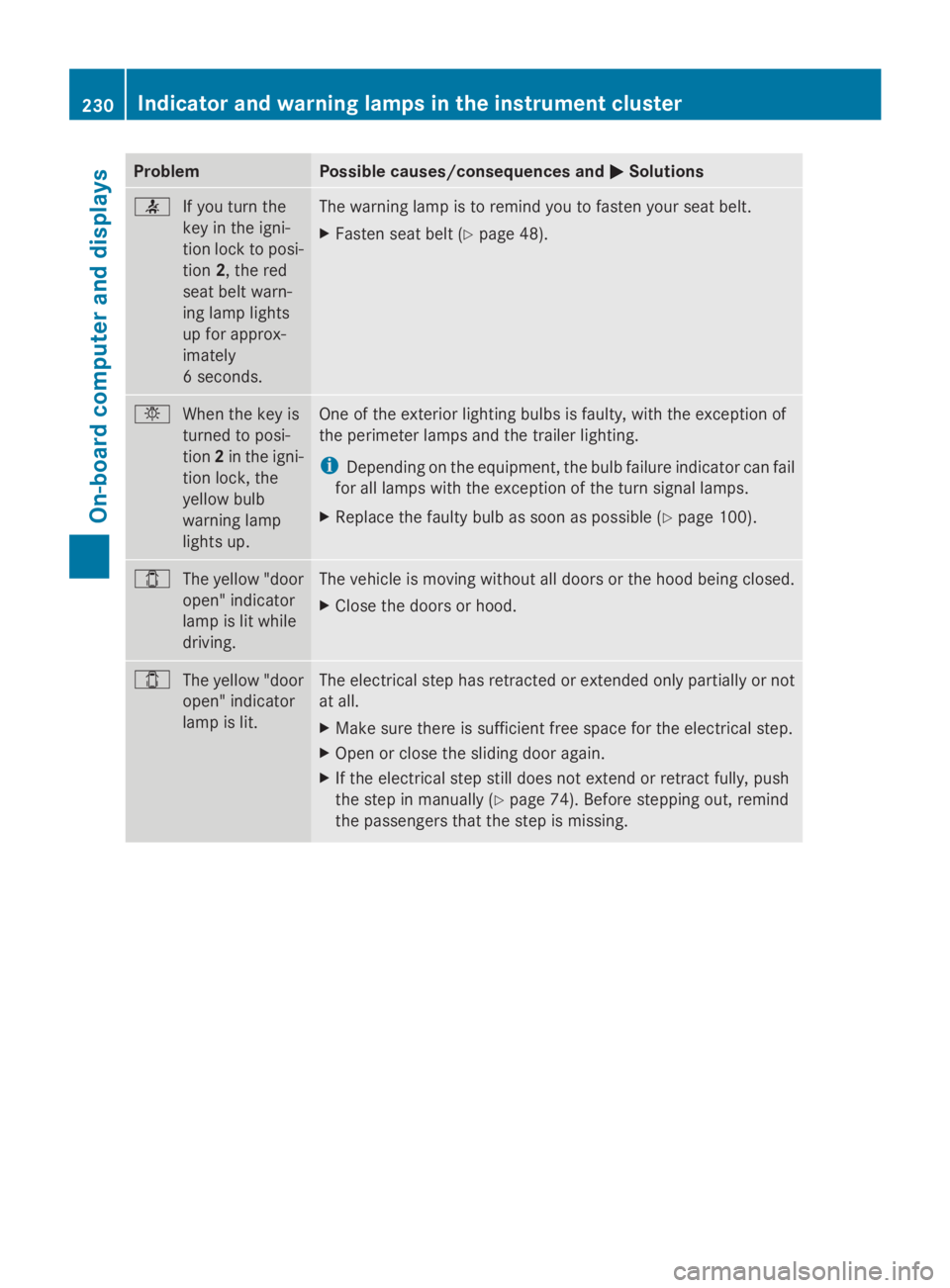
0050Solutions 0076
If you turn the
key in the igni-
tion lock to posi-
tion2, the red
seat belt warn-
ing lamp lights
up for approx-
imately
6 seconds. The warning lamp is to remind you to fasten your seat belt.
X
Fasten seat belt (Y page 48).0049
When the key is
turned to posi-
tion2in the igni-
tion lock, the
yellow bulb
warning lamp
lights up. One of the exterior lighting bulbs is faulty, with the exception of
the perimeter lamps and the trailer lighting.
i
Depending on the equipment, the bulb failure indicator can fail
for all lamps with the exception of the turn signal lamps.
X Replace the faulty bulb as soon as possible (Y page 100).003E
The yellow "door
open" indicator
lamp is lit while
driving. The vehicle is moving without all doors or the hood being closed.
X
Close the doors or hood. 003E
The yellow "door
open" indicator
lamp is lit. The electrical step has retracted or extended only partially or not
at all.
X
Make sure there is sufficient free space for the electrical step.
X Open or close the sliding door again.
X If the electrical step still does not extend or retract fully, push
the step in manually (Y page 74). Before stepping out, remind
the passengers that the step is missing. 230
Indicator and warning lamps in the instrument clusterOn-board computer and displays
Page 234 of 338
Useful information
This Operator's Manual describes all models
as well as standard and optional equipment
of your vehicle that were available at the time
of going to print. Country-specific variations
are possible. Note that your vehicle may not
be equipped with all of the described func-
tions. This also applies to systems and func-
tions relevant to safety.
Read the information on qualified specialist
workshops (Y page 26). Stowage spaces and stowage com-
partments Important safety notes
G
WARNING
If you do not correctly store objects in the
vehicle interior, they can slip or be flung
around, thus striking vehicle occupants.
There is a risk of injury, especially when brak-
ing or abruptly changing directions.
R Always store objects so that they cannot be
flung around in these or in similar situa-
tions.
R Always make sure that objects do not pro-
trude from stowage compartments, parcel
nets or stowage nets.
R Close lockable stowage compartments
while driving.
R Stow and secure objects that are heavy,
hard, pointy, sharp-edged, fragile or too
large in the trunk.
In addition, observe the information in the
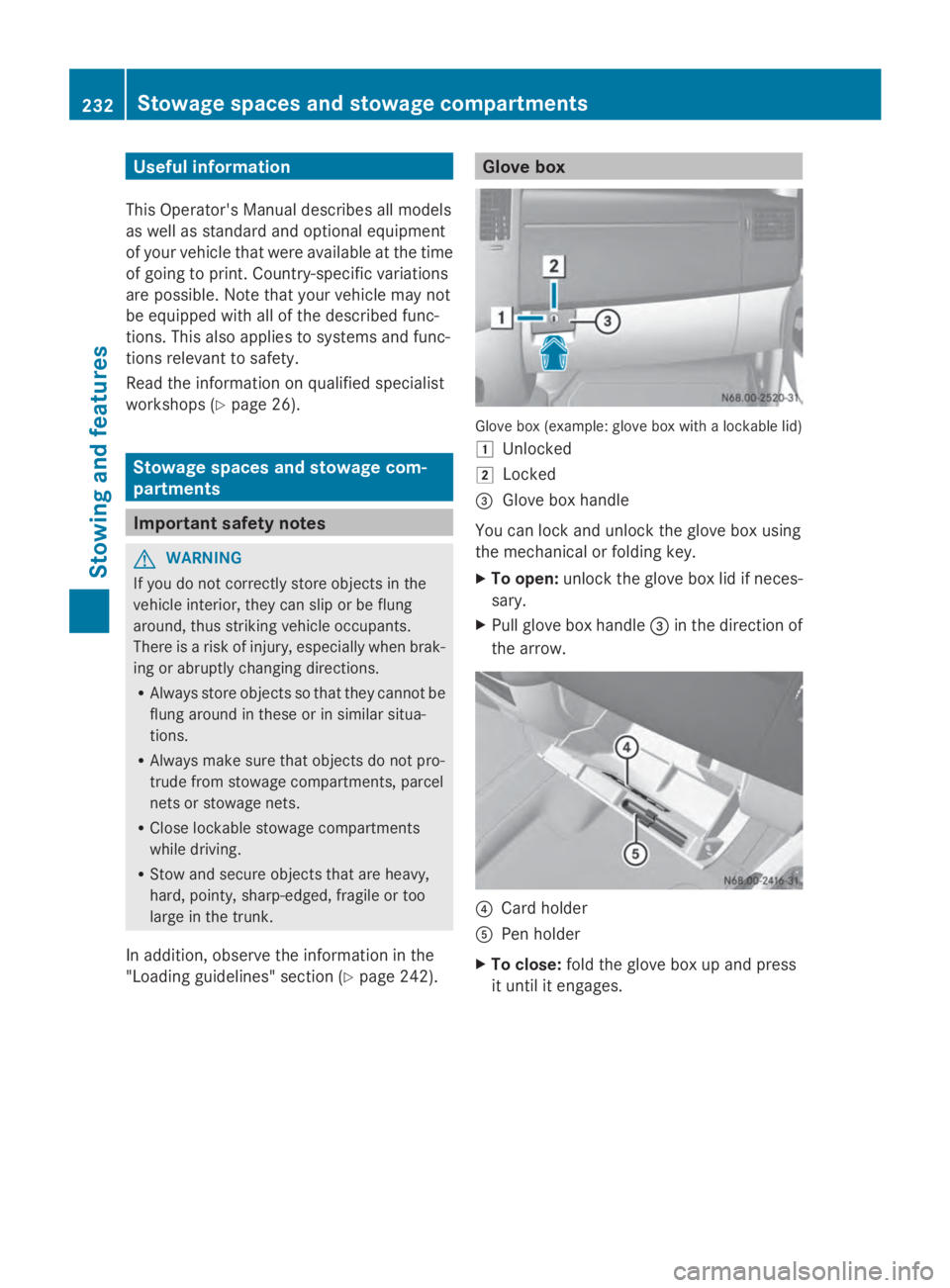
"Loading guidelines" section (Y page 242). Glove box
Glove box (example: glove box with a lockable lid)
0047
Unlocked
0048 Locked
0087 Glove box handle
You can lock and unlock the glove box using
the mechanical or folding key.
X To open: unlock the glove box lid if neces-
sary.
X Pull glove box handle 0087in the direction of
the arrow. 0085
Card holder
0083 Pen holder
X To close: fold the glove box up and press
it until it engages. 232
Stowage spaces and stowage compartmentsStowing and features
Page 240 of 338
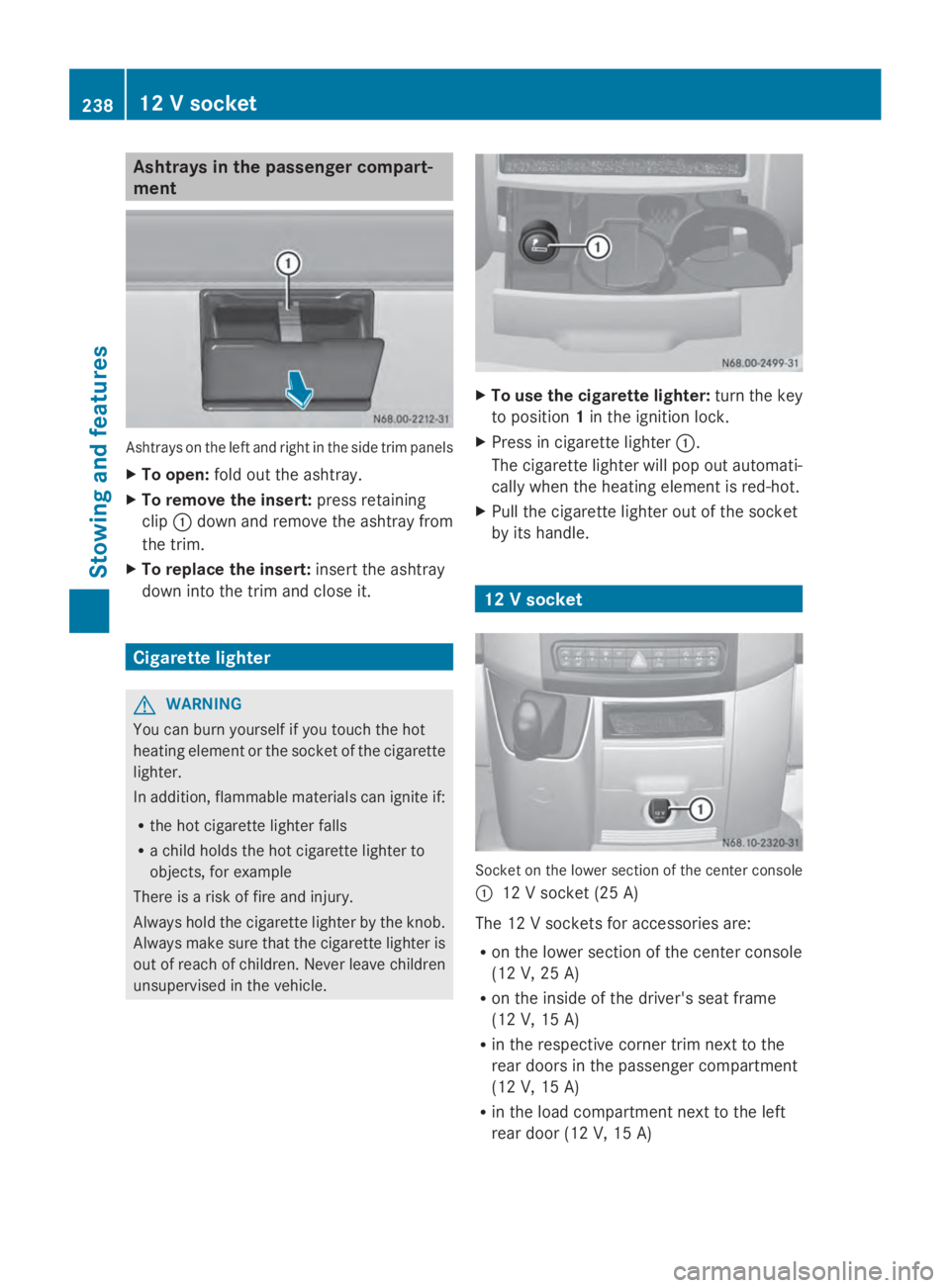
Ashtrays in the passenger compart-
ment Ashtrays on the left and right in the side trim panels
X To open: fold out the ashtray.
X To remove the insert: press retaining
clip 0043down and remove the ashtray from
the trim.
X To replace the insert: insert the ashtray
down into the trim and close it. Cigarette lighter
G
WARNING
You can burn yourself if you touch the hot
heating element or the socket of the cigarette
lighter.
In addition, flammable materials can ignite if:
R the hot cigarette lighter falls
R a child holds the hot cigarette lighter to
objects, for example
There is a risk of fire and injury.
Always hold the cigarette lighter by the knob.
Always make sure that the cigarette lighter is
out of reach of children. Never leave children
unsupervised in the vehicle. X
To use the cigarette lighter: turn the key
to position 1in the ignition lock.
X Press in cigarette lighter 0043.
The cigarette lighter will pop out automati-
cally when the heating element is red-hot.
X Pull the cigarette lighter out of the socket
by its handle. 12 V socket
Socket on the lower section of the center console
0043 12 V socket (25 A)
The 12 V sockets for accessories are:
R on the lower section of the center console
(12 V, 25 A)
R on the inside of the driver's seat frame
(12 V, 15 A)
R in the respective corner trim next to the
rear doors in the passenger compartment
(12 V, 15 A)
R in the load compartment next to the left
rear door (12 V, 15 A) 238
12 V socketStowing and featu
res
Page 241 of 338
You can use the 12 V sockets (15 A) for
accessories with a maximum power con-
sumption of 180 W. You can connect acces-
sories with a maximum power consumption
of 300 W to the 12 V socket (25 A) on the
lower section of the center console.
i The sockets are supplied with power even
when the key is removed from the ignition
lock. If accessories, e.g. a coolbox, remain
connected while the engine is not running,
the battery will discharge. Mobile phone
Important safety notes
G
WARNING
If you operate information systems and com-
munication equipment integrated in the vehi-
cle while driving, you will be distracted from
traffic conditions. You could also lose control
of the vehicle. There is a risk of an accident.
Only operate the equipment when the traffic
situation permits. If you are not sure that this
is possible, park the vehicle paying attention
to traffic conditions and operate the equip-
ment when the vehicle is stationary.
You must observe the legal requirements for
the country in which you are currently driving
when operating mobile phones.
Bear in mind that at a speed of just 30 mph
(approximately 50 km/h), your vehicle is cov-
ering a distance of 44 feet (approximately
14 m) every second.
You and others can suffer health-related dam-
age through electromagnetic radiation. By
using an exterior antenna, a possible health
risk caused by electromagnetic fields, as dis-
cussed in scientific circles, is taken into
account. Only have the exterior antenna
installed by a qualified specialist workshop.
We recommend the use of an approved exte-
rior antenna for operating the mobile phone.
Only in this way can optimal mobile phone
reception quality in the vehicle be ensured and mutual interference between the vehicle
electronics and mobile phones minimized.
Observe the legal requirements for each indi-
vidual country. Mobile phone pre-installation
The mobile phone pre-installation includes a
hands-free system integrated into the vehi-
cle. The microphone for the hands-free sys-
tem is installed in the overhead control panel
or in the overhead stowage compartment
together with the front interior light.
In order to use the hands-free system, you will
need a special bracket. The Sprinter acces-
sories include brackets for various mobile
phone models.
i Mobile phone brackets which are availa-
ble from various manufacturers on the
open market are not compatible with the
Sprinter telephone system. You can recog-
nize suitable holders for your mobile phone
by the imprinted star and the B6 spare part
number on the back of the bracket.
Detailed instructions for use can be found in
the operating instructions for the mobile
phone bracket and in the separate operating
instructions for the mobile phone pre-instal-
lation.
i The mobile phone battery is charged
depending on the condition of charge and
the position of the key in the ignition lock.
The mobile phone display indicates the
charging process. Additional communications equip-
ment
Important safety notes
G
WARNING
If you operate mobile communication equip-
ment while driving, you will be distracted from
traffic conditions. You could also lose control
of the vehicle. There is a risk of an accident. Additional communications equipment
239Stowing and features
Z
Page 254 of 338
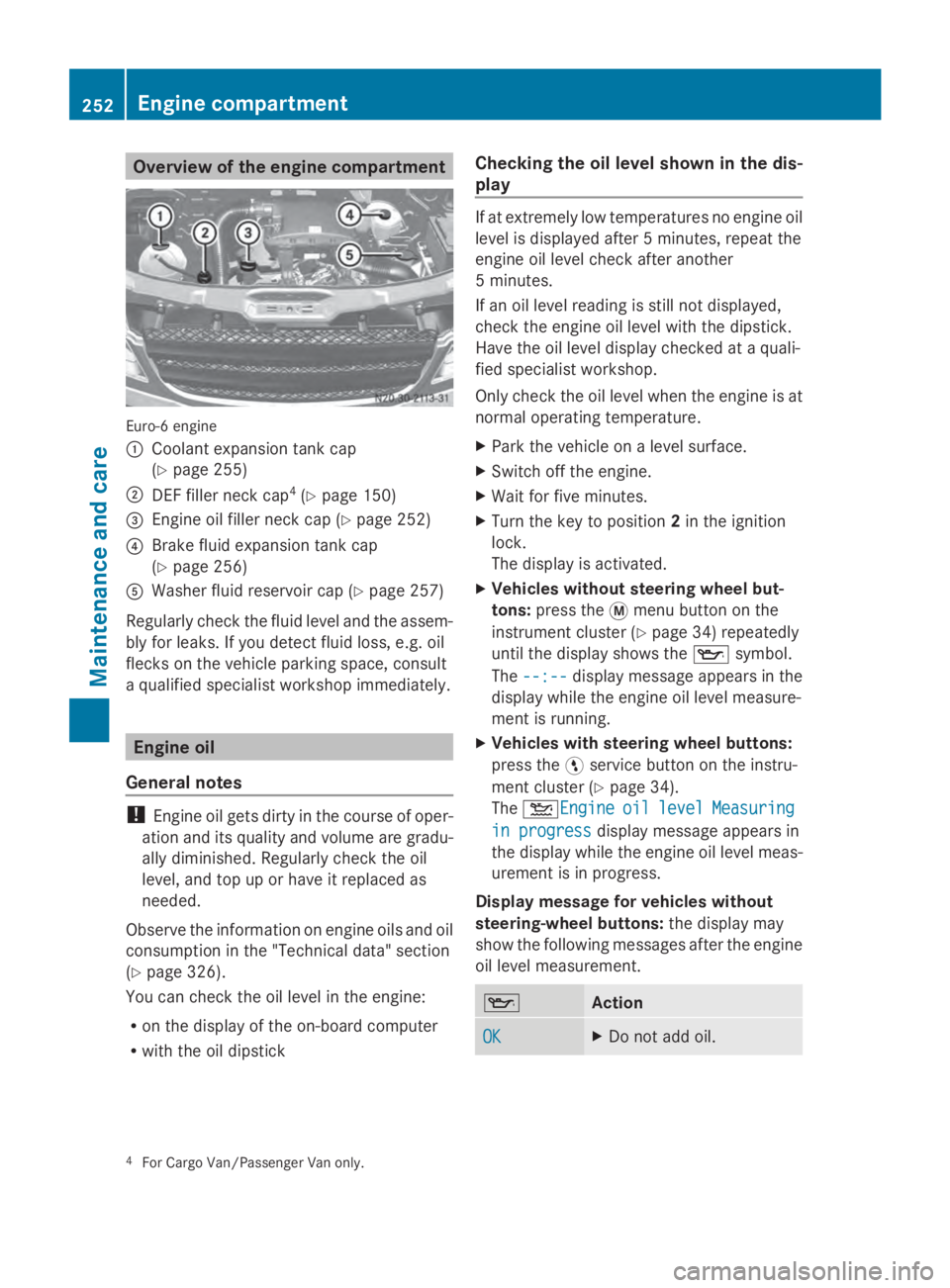
Overview of the engine compartment
Euro-6 engine
0043
Coolant expansion tank cap
(Ypage 255)
0044 DEF filler neck cap 4
(Y page 150)
0087 Engine oil filler neck cap (Y page 252)
0085 Brake fluid expansion tank cap
(Ypage 256)
0083 Washer fluid reservoir cap (Y page 257)
Regularly check the fluid level and the assem-
bly for leaks. If you detect fluid loss, e.g. oil
flecks on the vehicle parking space, consult
a qualified specialist workshop immediately. Engine oil
General notes !
Engine oil gets dirty in the course of oper-
ation and its quality and volume are gradu-
ally diminished. Regularly check the oil
level, and top up or have it replaced as
needed.
Observe the information on engine oils and oil
consumption in the "Technical data" section
(Y page 326).
You can check the oil level in the engine:
R on the display of the on-board computer
R with the oil dipstick Checking the oil level shown in the dis-
play If at extremely low temperatures no engine oil
level is displayed after 5 minutes, repeat the
engine oil level check after another
5 minutes.
If an oil level reading is still not displayed,
check the engine oil level with the dipstick.
Have the oil level display checked at a quali-
fied specialist workshop.
Only check the oil level when the engine is at
normal operating temperature.
X Park the vehicle on a level surface.
X Switch off the engine.
X Wait for five minutes.
X Turn the key to position 2in the ignition
lock.
The display is activated.
X Vehicles without steering wheel but-
tons: press the 0079menu button on the
instrument cluster (Y page 34) repeatedly
until the display shows the 00AFsymbol.
The --:-- --:-- display message appears in the
display while the engine oil level measure-
ment is running.
X Vehicles with steering wheel buttons:
press the 0098service button on the instru-
ment cluster (Y page 34).
The 00B2Engine Engine oil oillevel
level Measuring
Measuring
in progress
in progress display message appears in
the display while the engine oil level meas-
urement is in progress.
Display message for vehicles without
steering-wheel buttons: the display may
show the following messages after the engine
oil level measurement. 00AF
Action
OK OK X
Do not add oil. 4
For Cargo Van/Passenger Van only. 252
Engine compartmentMaintenance and care