warning MERCEDES-BENZ SPRINTER 2016 MY16 Operator’s Manual
[x] Cancel search | Manufacturer: MERCEDES-BENZ, Model Year: 2016, Model line: SPRINTER, Model: MERCEDES-BENZ SPRINTER 2016Pages: 290, PDF Size: 6.44 MB
Page 158 of 290
Install and secure the ball coupling as descri-
bed in the ball coupling manufacturer's instal-
lation instructions. Make sure that the ball
coupling is correctly installed and secured
before every journey.
GWARNING
When the vehicle/trailer combination begins
to lurch, you could lose control of it. The vehi- cle/trailer combination could even rollover.
There is a risk of an accident.
On no account should you attempt to
straighten up the vehicle/trailer combination
by increasing the speed. Reduce vehicle
speed and do not countersteer. Apply the
brake as necessary.
Always observe the operating instructions pro-
vided by the manufacturers of the trailer cou-
pling and the ball coupling.
Couple and decouple the trailer carefully. When backing up the towing vehicle, make sure
nobody is standing between the vehicle and the
trailer.
A trailer which is incorrectly coupled to the tow-
ing vehicle could break away. A correctly cou-
pled trailer must be positioned horizontally
behind the towing vehicle.
Ensure that the following weights are not excee-
ded:
Rthe permissible noseweight
Rthe permissible trailer load
Rthe permissible rear axle load of the towing
vehicle
Rthe permissible gross weight of both the tow-
ing vehicle and the trailer
Rthe permissible gross combination weight
The applicable permissible values that may not
be exceeded can be found:
Rin your vehicle documents
Ron the type plates for the trailer tow hitch
Ron the type plates for the trailer
Ron the vehicle identification plate
(Ypage 276).
Where the values differ, the lowest is valid.
You will find values approved by the manufac-
turer on the identification plates and those for
the towing vehicle in the "Permissible trailer loads and trailer drawbar noseweights" section
(
Ypage 159).
Your vehicle behaves differently with a trailer
than without one.
The vehicle/trailer combination:
Ris heavier
Ris restricted in its acceleration and gradient-
climbing capability
Rhas an increased braking distance
Ris more susceptible to strong crosswinds
Rrequires more sensitive steering
Rhas a larger turning circle
This may impair the handling characteristics.
When towing a trailer, always adjust your speed
to suit the road and w
eather conditions. Drive
carefully. Maintain a safe distance.
If you require any further explanation of the
information contained in the Operator's Manual,
please contact an authorized Sprinter dealer.
General notes
RObserve the legally prescribed maximum
speed for vehicle/trailer combinations in the
relevant country, state or Canadian province. Before setting off, check the vehicle docu-
ments of the your trailer to find out the per-
missible maximum speed.
This reduces the risk of accidents.
RInstall only an approved trailer coupling on
your vehicle. Only use a ball coupling that is
approved for your vehicle and Sprinter trailer
tow hitch. More information on the availabil-
ity, mounting and installation of the trailer
electrics is available at any qualified specialist
workshop.
RThe trailer coupling is one of the most impor-
tant vehicle parts with regard to road safety.
The notes on operation, care and mainte-
nance issued by the manufacturer should be
observed.
RThe bumpers of your vehicle are not suitable
for installing detachable trailer couplings.
RDo not attach rented trailer tow hitches or
other detachable trailer tow hitches to the
bumper.
RMinimize the risk of damage to the ball cou-
pling. If you do not require the ball coupling,
remove it from the ball coupling recess.
156Towing a trailer
Driving and parking
Page 161 of 290
Uncoupling a trailer
GWARNING
If you uncouple a trailer with the overrun
brake engaged, you could trap your hand
between the vehicle and the trailer drawbar.
There is a risk of injury.
Do not uncouple a trailer if the overrun brake
is engaged.
!Do not disconnect a trailer with an engaged
overrun brake. Otherwise, your vehicle could
be damaged by the rebounding of the overrun
brake.
XMake sure the selector lever of the automatic
transmission is in position P.
XApply the parking brake of the vehicle.
XClose all doors.
XApply the parking brake of the trailer.
XIn addition, secure the trailer against rolling
away with a wheel chock or similar object.
XRemove the trailer cable and safety chains
and decouple the trailer.
Permissible trailer loads and trailer
drawbar noseweights
Weight information
!On vehicles with a permissible gross vehicle
weight of 11030 lbs (5003 kg), the permissi-
ble gross combination weight is less than the total of the permissible gross vehicle weight
and the permissible trailer load. Exceeding
the permissible gross combination weight can
lead to damage to the drivetrain, to the trans-
mission or to the trailer tow hitch.
If the vehicle or the trailer is fully laden, the
relevant value for the permissible gross vehi-
cle weight or the permissible trailer load is
therefore lower. In this case, the trailer or the
vehicle may only be partially loaded.
The gross trailer weight (GTW) is calculated by
adding the weight of the trailer to the weight of
the load and equipment.
The maximum gross vehicle weight is vehicle-
specific and equipment-dependent: 5,000 lbs
(2,268 kg) or 7,500 lbs (3,402 kg).
The maximum permissible trailer drawbar nose- weight on the ball coupling is 500 lbs (227 kg) or 750 lbs (340 kg). The actual noseweight may not
exceed the value given on the identification
plates of the trailer tow hitch or the trailer. If the
values vary, the lowest value always applies.
The gross combination weight rating (GCWR) is
calculated by adding the gross weight of the
trailer to the gross vehicle weight including a
driver's weight of approximately 150 lbs (68 kg).
The permissible Gross Combination Weight Rat-
ing is vehicle-specific and depends on the equip-
ment level.
When driving with a trailer, you should not
exceed the permitted Gross Combination
Weight Rating (GCWR).
The permissible values, which must not be
exceeded, can be found in your vehicle docu-
ments and on the trailer tow hitch type plates for
the trailer and the vehicle (
Ypage 276). The
basic values approved by the manufacturer can
also be found in the "Technical data" section
(
Ypage 286). If the values vary, the lowest
value always applies.
Loading a trailer
!Utilize the maximum permissible nose-
weight as fully as possible. Do not allow the
weight to fall below the minimum permissible
noseweight, otherwise the trailer may come
loose.
RYou must distribute the load on the vehicle
and trailer so that the permitted maximum
values for the gross vehicle weight (GVWR),
gross trailer weight (GTW) and gross com-
bined weight (GCWR) as well as permitted
gross axle loads (GAWR) and noseweight
(TWR) of your vehicle are not exceeded.
RAdd the drawbar noseweight on the ball cou-
pling (TWR) to the rear axle load. This will pre-
vent you from exceeding the permissible
gross axle weight (GAWR).
RAdd the drawbar noseweight on the ball cou-
pling (TWR) to the vehicle payload. This will
prevent you from exceeding the permissible
gross vehicle weight (GVWR).
Checking the vehicle and trailer weight
RMake sure the weights of the towing vehicle
and the trailer comply with the maximum per-
missible values. Have the vehicle/trailer com-
bination weighed on a calibrated weigh-
bridge. The vehicle/trailer combination con-
sists of the towing vehicle including the driver,
Towing a trailer159
Driving and parking
Z
Page 163 of 290
Useful information
This Operator's Manual describes all models as
well as standard and optional equipment of your
vehicle that were available at the time of going
to print. Country-specific variations are possi-
ble. Note that your vehicle may not be equipped
with all of the described functions. This also
applies to systems and functions relevant to
safety.
Read the information on qualified specialist
workshops (
Ypage 26).
Important safety notes
GWARNING
If you are driving and reach through the steer- ing wheel to operate the adjustment knob,
you could lose control of the vehicle. There is
a risk of an accident and injury.
Only operate the adjustment knobs when thevehicle is stationary. Do not reach through the
steering wheel when driving.
GWARNING
If you operate information systems and com-
munication equipment integrated in the vehi-
cle while driving, you will be distracted from
traffic conditions. You could also lose control
of the vehicle. There is a risk of an accident.
Only operate the equipment when the traffic
situation permits. If you are not sure that this
is possible, park the vehicle paying attention
to traffic conditions and operate the equip-
ment when the vehicle is stationary.
GWARNING
If the instrument cluster has failed or mal-
functioned, you may not recognize function
restrictions in systems relevant to safety. The
operating safety of your vehicle may be
impaired. There is a risk of an accident.
Drive on carefully. Have the vehicle checked
at a qualified specialist workshop immedi-
ately. You must observe the legal requirements for the
country in which you are currently driving when
operating the on-board computer.
The on-board computer display only shows mes-
sages and warnings from certain systems. You
should therefore make sure your vehicle is oper-
ating safely at all times. If the operating safety of
your vehicle is impaired, stop the vehicle as
soon as possible, paying attention to road and
traffic conditions. Then consult a qualified spe-
cialist workshop.
Instrument cluster
Overview
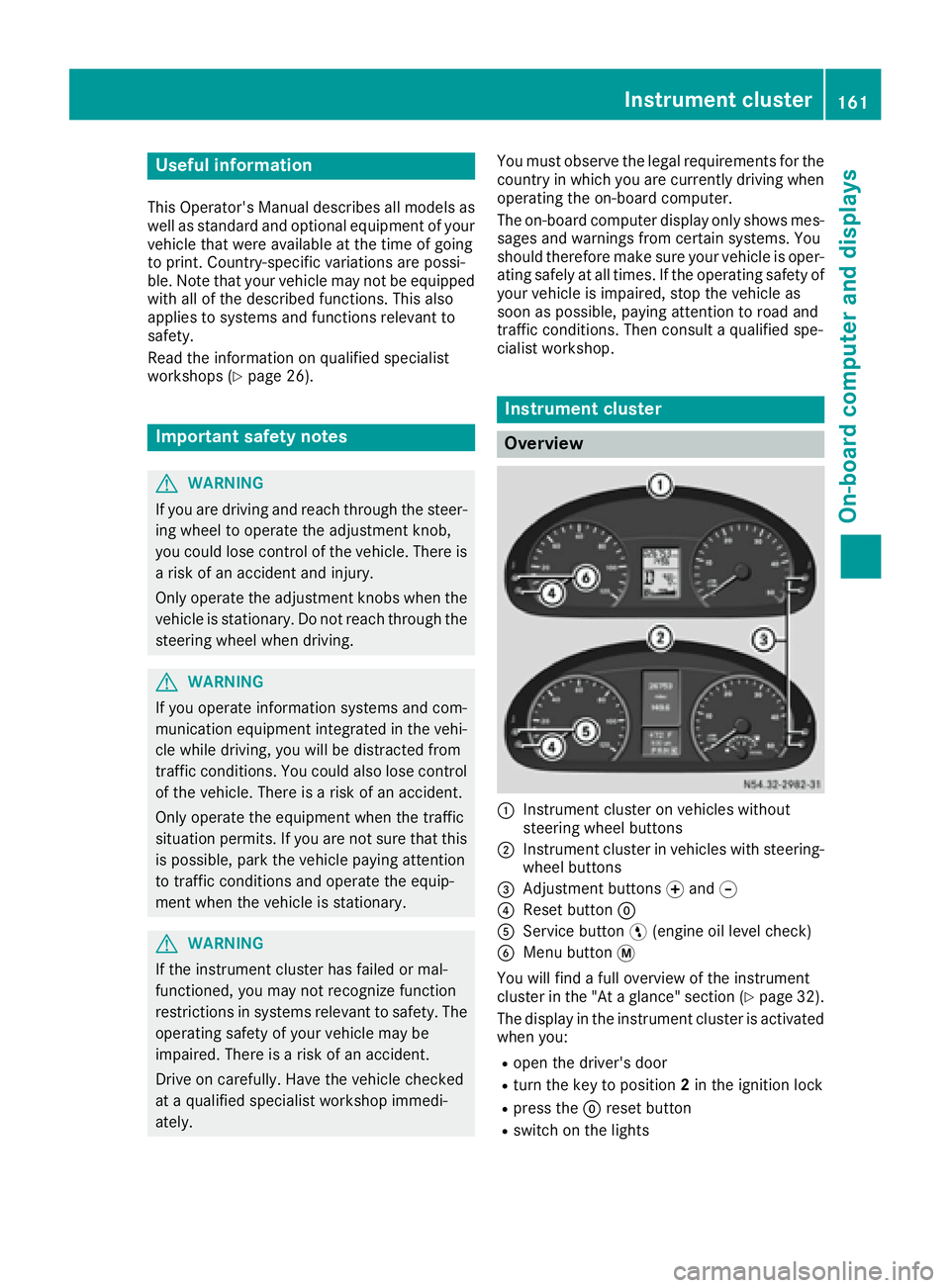
:Instrument cluster on vehicles without
steering wheel buttons
;Instrument cluster in vehicles with steering-
wheel buttons
=Adjustment buttons fand g
?Reset button 9
AService button Ë(engine oil level check)
BMenu button 4
You will find a full overview of the instrument
cluster in the "At a glance" section (
Ypage 32).
The display in the instrument cluster is activated when you:
Ropen the driver's door
Rturn the key to position 2in the ignition lock
Rpress the 9reset button
Rswitch on the lights
Instrument cluster161
On-board computer and displays
Z
Page 164 of 290
The display switches off automatically after
approximately 30 seconds if:
Rthe key is in position0in the ignition lock.
Rthe vehicle lighting is not switched on.
Instrument lighting
When the lights are switched on, you can adjust
the brightness of the instrument cluster lighting
using the fand gbuttons.
XTo brighten: press thefbutton.
XTo dim: press the gbutton.
iVehicles with automatic headlamp mode:
the instrument lighting also adapts to auto-
matic headlamp mode.
Tachometer
!
Do not drive in the overrevving range, as this
could damage the engine.
HEnvironmental note
Avoid driving at high engine speeds. This
unnecessarily increases the fuel consumption
of your vehicle and harms the environment as
a result of increased emissions.
The red band in the tachometer indicates the
engine's overrevving range.
To protect the engine, the fuel supply is inter-
rupted when the red band is reached.
Outside temperature
You should pay special attention to road condi-
tions when temperatures are around the freez-
ing point.
On vehicles without steering wheel buttons
(
Ypage 163) and on vehicles with steering
wheel buttons (Ypage 167), the outside tem-
perature display is in the display.
Changes in the outside temperature are dis-
played after a short delay.
Speedometer
The speed can also be shown in the display. You
can find information on the digital speedometer for vehicles without steering wheel buttons
under (
Ypage 163) and for vehicles with steer-
ing wheel buttons under (Ypage 167).
iIn some countries, a warning sounds when
the vehicle reaches the maximum speed limit,
e.g. at 75 mph (120 km/h).
Trip odometer
XTo reset: make sure that the display is show-
ing the trip odometer if you have a vehicle with
steering wheel buttons (
Ypage 167).
XPress and hold the 9reset button until the
trip odometer is reset to 0.0.
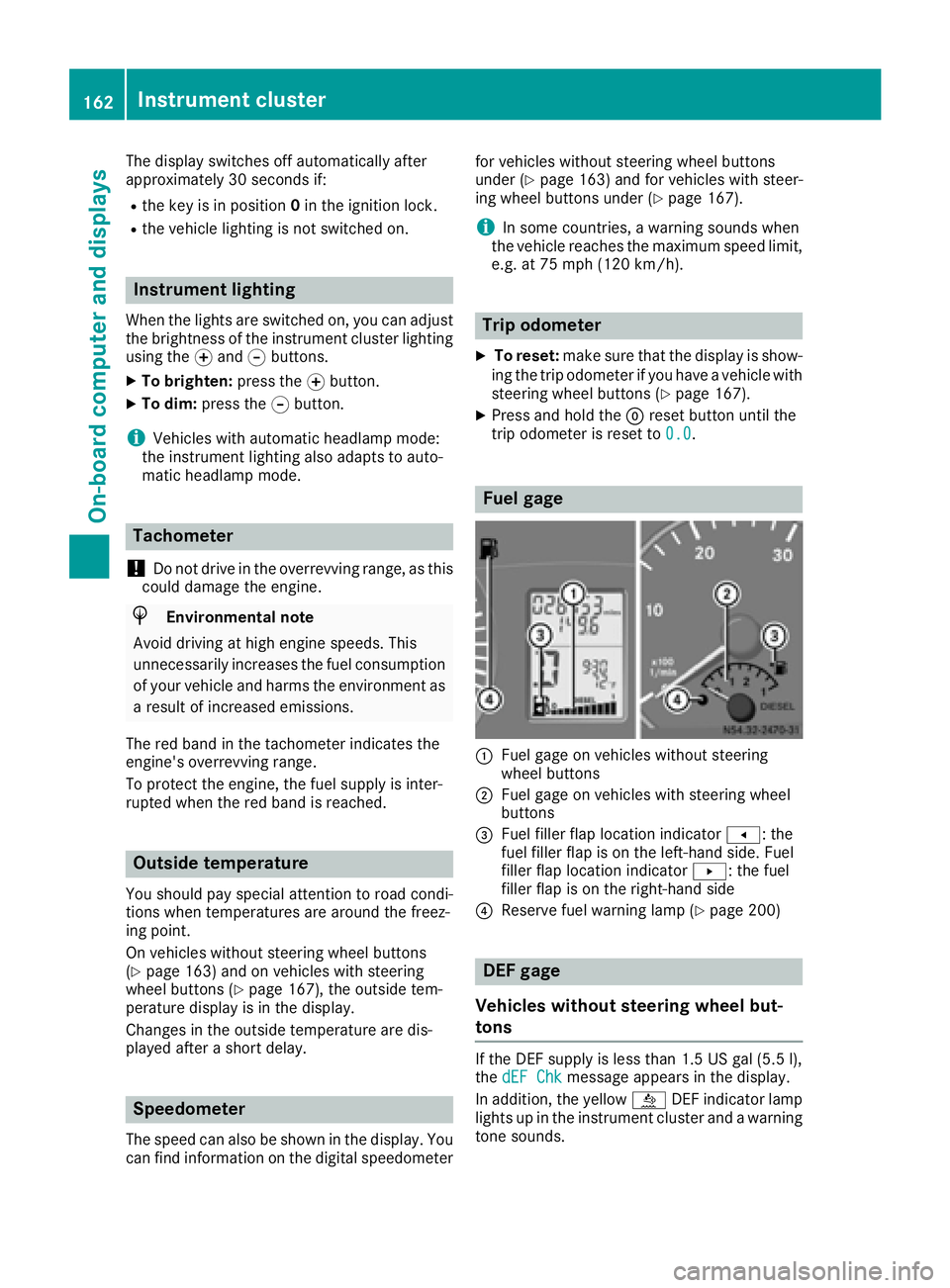
Fuel gage
:Fuel gage on vehicles without steering
wheel buttons
;Fuel gage on vehicles with steering wheel
buttons
=Fuel filler flap location indicator t: the
fuel filler flap is on the left-hand side. Fuel
filler flap location indicator u: the fuel
filler flap is on the right-hand side
?Reserve fuel warning lamp (Ypage 200)
DEF gage
Vehicles without steering wheel but-
tons
If the DEF supply is less than 1.5 US gal (5.5 l),
the dEF Chkmessage appears in the display.
In addition, the yellow åDEF indicator lamp
lights up in the instrument cluster and a warning
tone sounds.
162Instrument cluster
On-board computer and displays
Page 165 of 290
If the supply of DEF falls below the reserve range
of 0.8 US gal (3.0l), the StArtS RExxmessage
appears in the display. In addition, the yellow
å DEF indicator lamp lights up in the instru-
ment cluster and three warning tones sound.
In the display, xx
corresponds to the number of
possible remaining engine starts (16to 0).
When the display shows that the number of
remaining starts is 0
, theStArtSIdLEmessage
appears in the display and three warning tones
sound.
In addition, the yellow åDEF indicator lamp
and the ;Check Engine indicator lamp light
up in the instrument cluster and three warning
tones sound.
The engine management only allows speeds of
up to 5 mph (8 km/h).
Add at least 1.5 US gal (5.5 l) of DEF
(
Ypage 129).
The display message only disappears when the
vehicle is stationary, at the latest after
20 seconds as soon as you switch on the ignition or start the engine after refueling.
Vehicles with steering wheel buttons
If the supply of DEF is less than 1.5 US gal
(5.5 l), the Check Diesel Exhaust Fluid
see Operator's Manualmessage appears in
the display.
If the supply of DEF falls below the reserve range
of 0.8 US gal (3.0 l), the XX
startsremainingmessage is displayed.
Three short warning tones also sound.
In the display,xx
corresponds to the number of
possible remaining engine starts (16to 0).
When the display shows that the number of
remaining starts is 0
, theStArtSIdLEmessage
appears in the display.
The yellow ;Check Engine indicator lamp
also lights up and three short warning tones
sound.
The engine management only allows speeds of
up to 5 mph (8 km/h).
Add at least 1.5 US gal (5.5 l) of DEF
(
Ypage 129).
The display message only disappears when the
vehicle is stationary, at the latest after
20 seconds as soon as you switch on the ignition or start the engine after refueling.
On-board computer (vehicles without
steering wheel buttons)
Operating the on-board computer
General notes
The on-board computer is activated as soon as
you turn the key to position 1in the ignition lock.
The on-board computer shows vehicle informa-
tion and settings in the display.
You can control the display and the settings in
the on-board computer using the adjustment
buttons on the instrument cluster.
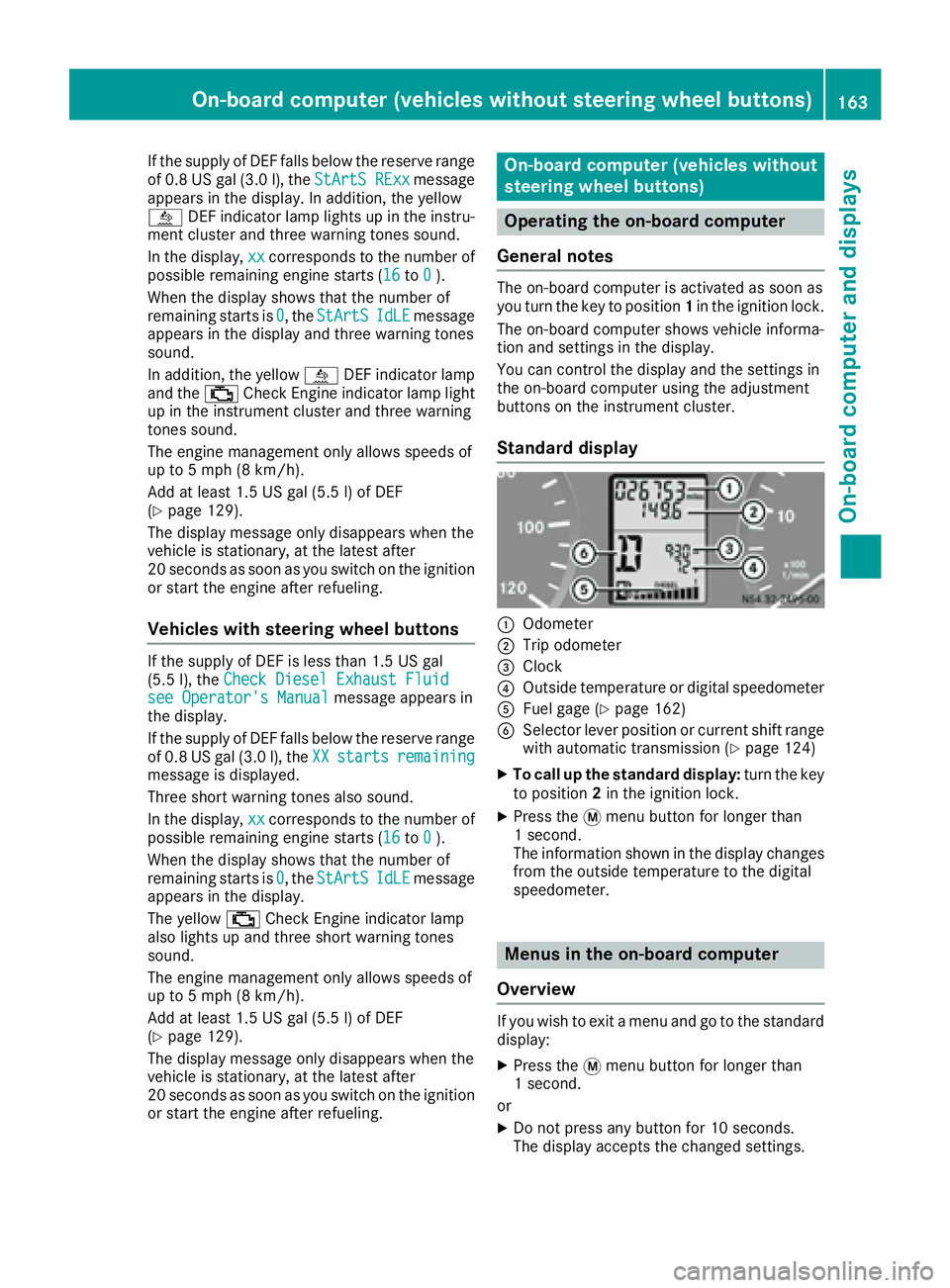
Standard display
:Odometer
;Trip odometer
=Clock
?Outside temperature or digital speedometer
AFuel gage (Ypage 162)
BSelector lever position or current shift range
with automatic transmission (Ypage 124)
XTo call up the standard display: turn the key
to position 2in the ignition lock.
XPress the 4menu button for longer than
1 second.
The information shown in the display changes
from the outside temperature to the digital
speedometer.
Menus in the on-board computer
Overview
If you wish to exit a menu and go to the standard display:
XPress the 4menu button for longer than
1 second.
or
XDo not press any button for 10 seconds.
The display accepts the changed settings.
On-board computer (vehicles without steering wheel buttons)163
On-board computer and displays
Z
Page 177 of 290
Telephone menu
Introduction
GWARNING
If you operate information systems and com-
munication equipment integrated in the vehi-
cle while driving, you will be distracted from
traffic conditions. You could also lose control
of the vehicle. There is a risk of an accident.
Only operate the equipment when the traffic
situation permits. If you are not sure that this
is possible, park the vehicle paying attention
to traffic conditions and operate the equip-
ment when the vehicle is stationary.
You must observe the legal requirements of the
country in which you are currently driving when
operating a mobile phone in the vehicle. If it is
permitted to operate a mobile phone while the
vehicle is in motion, only operate it when road
and traffic conditions permit.
If you have connected a mobile phone to the
Sprinter hands-free system, you can operate it
using the functions in the TEL
menu.
XSwitch on the mobile phone (see the separate
operating instructions).
XSwitch on the audio equipment (see the sep-
arate operating instructions).
XEstablish a Bluetooth®connection between
the mobile phone and the audio equipment
(see the separate operating instructions).
XPress the VorU button on the steering
wheel to select the TELmenu.
XWhenPlease enter PIN:appears in the
display, enter the PIN using the mobile phone
or audio equipment.
The mobile phone will search for a network.
The display remains blank during this time.
You will see the mobile phone operational
readiness display once the mobile phone has
found a network.
iYou can obtain further information about
suitable mobile phones and connecting
mobile phones via Bluetooth
®at any qualified
specialist workshop.
iIf the mobile phone operational readiness
symbol goes out, your vehicle is outside of the
transmission and reception range.
Accepting a call
XPress the 6button on the steering wheel
to accept an incoming call.
The display shows the call duration.
Rejecting or ending a call
XPress ~button on the steering wheel to
reject or end a call.
The caller then hears the engaged tone.
The display shows the mobile phone opera-
tional readiness symbol again.
Dialing a number from the phone book
You can enter new telephone numbers into the
phone book via the mobile phone (see the sep-
arate operating instructions). If your mobile
phone is able to receive calls, you can search for
and dial a number from the phone book.
Using the steering wheel buttons
XUse the VorU button to select the TELmenu.
The display shows the mobile phone opera-
tional readiness symbol.
XPress the9or: button to switch to
the phone book.
The on-board computer reads the phone book
stored on the SIM card or in the mobile phone.
This may take more than a minute.
When the message is no longer displayed,
reading has ended.
XPress the 9or: button to select the
desired name.
or
XTo start rapid scrolling: press and hold the
9 or: button longer than 1 second.
Rapid scrolling stops when you release the
button or reach the end of the list.
Using the steering wheel buttons
XTo start dialing: press the6button.
The on-board computer dials the correspond-
ing phone number.
When a connection is established, the name
of the other person and/or the call duration
appear in the display.
XTo exit the phone book: press the~but-
ton.
On-board computer (vehicles withsteering whee lbu ttons)175
On-board computer and displays
Z
Page 178 of 290
Redialing
The on-board computer saves the last names or
numbers dialed in the redial memory.
Using the steering wheel buttons
XUse theVorU button to select the TELmenu.
The display shows the mobile phone opera-
tional readiness symbol.
XPress the6button.
The display shows the most recently dialed
numbers or names in the redial memory.
XPress the 9or: button to select the
desired name or number.
XTo start dialing: press the6button.
The on-board computer dials the correspond-
ing phone number.
When a connection is established, the name
of the other person and/or the call duration
appear in the display.
or
XTo exit the redial memory: press the~
button.
Display messages
Notes on display messages
Important safety notes
GWARNING
No information will be displayed if either the
instrument cluster or the display is inopera-
tive.
As a result, you will not be able to see warning
and indicator lamps or information about the
driving conditions, such as speed or outside
temperature. Driving characteristics may be
impaired. Adjust your driving style and vehicle
speed accordingly.
Contact a qualified specialist workshop
immediately.
GWARNING
If service work is not carried out correctly, the operating safety of your vehicle may be affec-
ted. This could cause you to lose control of
your vehicle and cause an accident. More-
over, the safety systems may no longer be
able to protect you or others as they are
designed to do.
Always have service work carried out at a
qualified specialist workshop.
iIf you turn the key to position 2in the igni-
tion, a display check is performed. All warning
and indicator lamps (except the turn signal
indicator lamps) and the display are activa-
ted. Before starting the journey, check that
the warning and indicator lamps are operating
correctly.
Vehicles without steering wheel but-
tons
Warnings, malfunctions or additional informa-
tion may also be shown in the display. The fol-
lowing tables show all the display messages. A
warning tone sounds with certain display mes-
sages.
Vehicles with steering wheel buttons
The on-board computer shows warnings, mal-
functions or additional information in the dis-
play. A warning tone sounds with certain display
messages. Display messages of a high priority
are shown in red.
Please respond in accordance with the display
messages and follow the additional notes in this Operator's Manual.
You can hide low-priority display messages by
pressing the V,U,9or: button
on the steering wheel or the 9reset button.
You cannot hide display messages of the highest
priority. These messages will continue to be
shown in the display until their cause has been
eliminated.
The on-board computer stores certain display
messages in the message memory
(
Ypage 176).
Message memory
The on-board computer only records and shows
malfunctions and warnings from certain sys-
tems. Therefore, make sure that your vehicle is
safe to use. You could otherwise cause an acci-
dent by driving an unsafe vehicle.
176Display messages
On-board computer and displays
Page 180 of 290
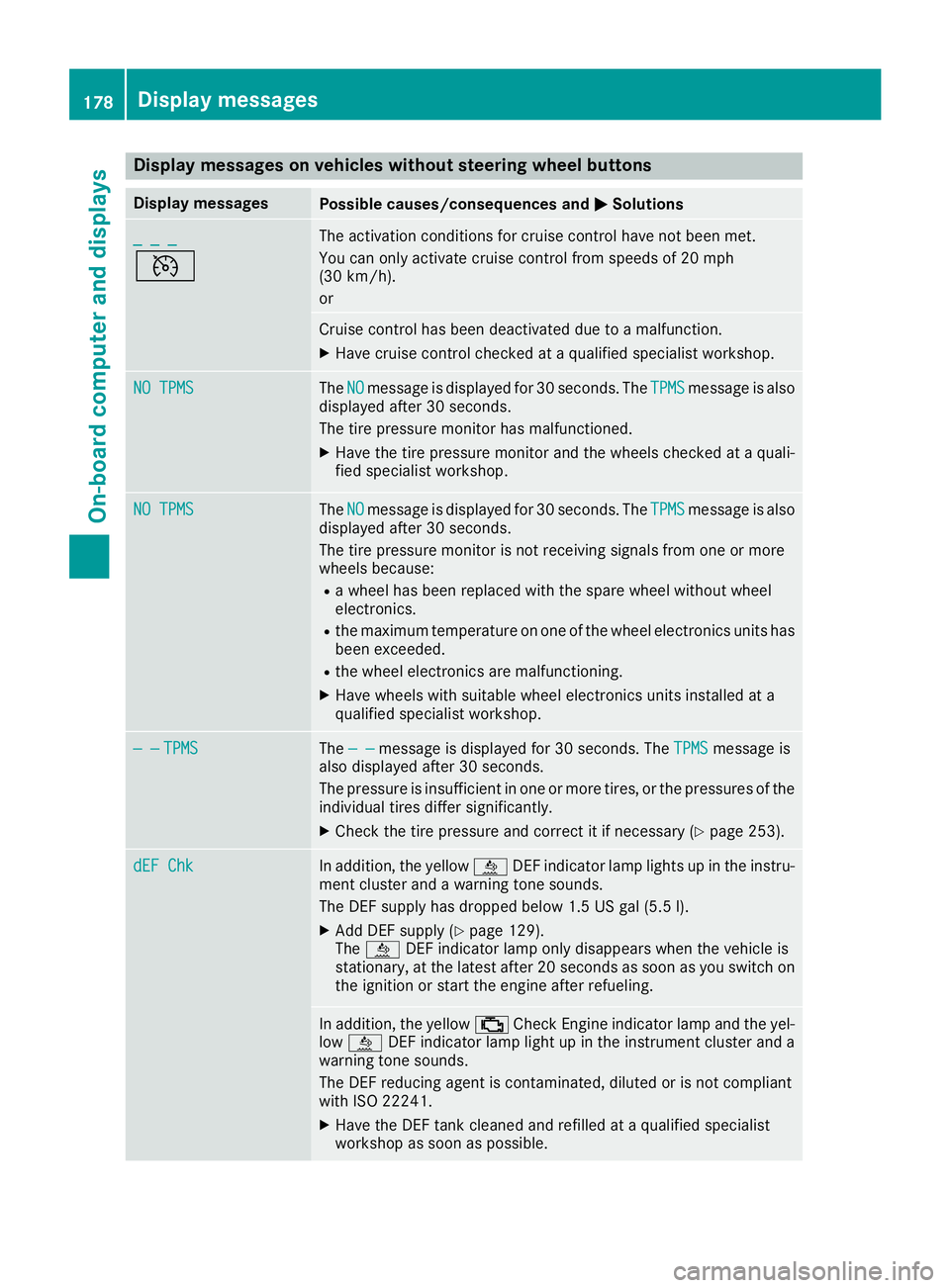
Display messages on vehicles withoutsteering wheel buttons
Display messagesPossible causes/consequences an dMSolutions
_ _ _
V
The activation condition sfo rcruise contro lhav eno tbee nmet .
You can only activat ecruise contro lfrom speeds of 20 mph
(30 km/h).
or
Cruise contro lhas bee ndeactivated due to amalfunction .
XHavecruise contro lchecke dat aqualified specialis tworkshop .
NO TPMSTheNOmessag eis displaye dfo r30 seconds. The TPMSmessag eis also
displaye dafter 30 seconds.
The tire pressure monito rhas malfunctioned.
XHav eth etire pressure monito rand th ewheels checke dat aquali-
fie dspecialis tworkshop .
NO TPMSTheNOmessag eis displaye dfo r30 seconds. The TPMSmessag eis also
displaye dafter 30 seconds.
The tire pressure monito ris no treceivin gsignal sfrom on eor more
wheels because :
Rawhee lhas bee nreplaced wit hth espar ewhee lwithout whee l
electronics.
Rth emaximum temperature on on eof th ewhee lelectronic sunits has
bee nexceeded.
Rth ewhee lelectronic sare malfunctioning.
XHav ewheels wit hsuitable whee lelectronic sunits installed at a
qualified specialis tworkshop .
— —TPMSThe — —messag eis displaye dfo r30 seconds. The TPMSmessag eis
also displaye dafter 30 seconds.
The pressure is insufficien tin on eor more tires ,or th epressures of th e
individual tires diffe rsignificantly.
XChec kth etire pressure and correc tit if necessary (Ypage 253).
dEF ChkIn addition,th eyello wå DEFindicator lamp lights up in th einstru-
men tcluster and awarnin gtone sounds.
The DE Fsupply has dropped belo w1.5US gal (5.5l).
XAdd DEF supply (Ypage 129).
The å DEF indicator lamp only disappears when the vehicle is
stationary, at the latest after 20 secondsa s soon as you switch on
the ignition or start the engine after refueling.
In addition, the yellow ;Check Engine indicator lamp and the yel-
low å DEF indicator lamp light up in the instrument cluster and a
warning tone sounds.
The DEF reducing agent is contaminated, diluted or is not compliant
with ISO 22241.
XHave the DEF tank cleaned and refilled at a qualified specialist
workshop as soon as possible.
178Display messages
On-board computer and displays
Page 181 of 290
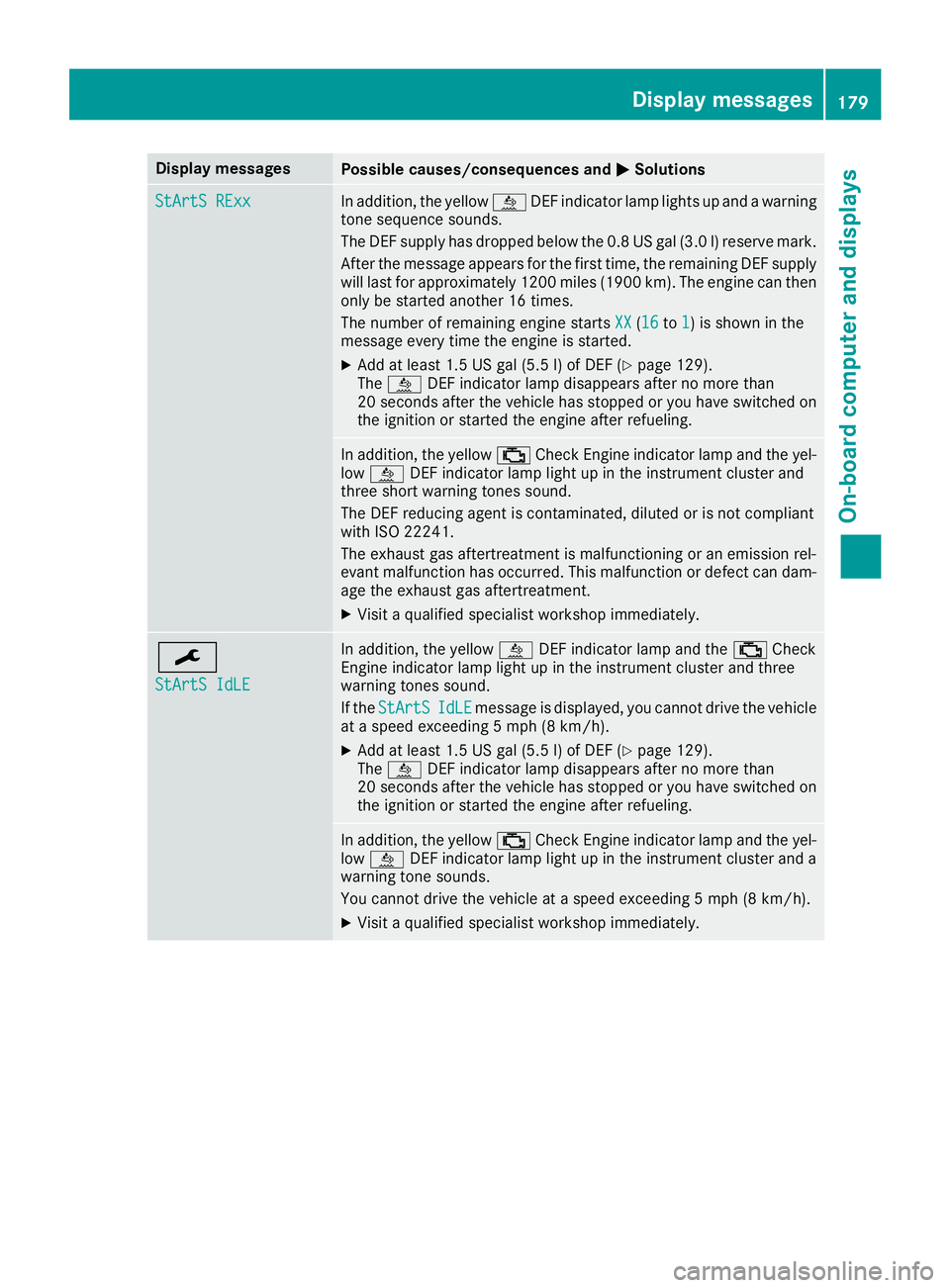
Display messagesPossible causes/consequences andMSolutions
StArtS RExxIn addition,th eyellow åDEFindicator lamp lights up and awarning
tone sequence sounds.
The DE Fsupply has dropped belo wthe0. 8US gal (3. 0l) reserv emark.
Afte rth emessage appear sfor th efirst time, th eremaining DE Fsupply
will last for approximately 1200 mile s(1900 km). The engin ecan then
only be started another 16 times .
The number of remaining engin estart sXX
(16to 1)is shown in th e
message every time th eengin eis started.
XAd dat least 1. 5US gal (5. 5l) of DE F (Ypage 129).
The å DEFindicator lamp disappear safter no mor ethan
20 seconds after th evehicl ehas stoppe dor you hav eswitched on
th eignition or started th eengin eafter refueling.
In addition ,th eyellow ;CheckEngin eindicator lamp and th eyel-
low å DEFindicator lamp ligh tup in th einstrumen tcluste rand
three short warning tone ssound.
The DE Freducin gagen tis contaminated, diluted or is no tcomplian t
wit hIS O 2224 1.
The exhaust gas aftertreatment is malfunctioning or an emission rel-
evant malfunction has occurred. This malfunction or defect can dam- age the exhaust gas aftertreatment.
XVisit a qualified specialist workshop immediately.
¯
StArtS IdLE
In addition, the yellow åDEF indicator lamp and the ;Check
Engine indicator lamp light up in the instrument cluster and three
warning tones sound.
If the StArtS
IdLEmessage is displayed, you cannot drive the vehicle
at a speed exceeding 5 mph (8 km/h).
XAdd at least 1.5 US gal (5.5 l) of DEF (Ypage 129).
The å DEF indicator lamp disappears after no more than
20 seconds after the vehicle has stopped or you have switched on the ignition or started the engine after refueling.
In addition, the yellow ;Check Engine indicator lamp and the yel-
low å DEF indicator lamp light up in the instrument cluster and a
warning tone sounds.
You cannot drive the vehicle at a speed exceeding 5 mph (8 km/h).
XVisit a qualified specialist workshop immediately.
Display messages179
On-board computer and displays
Z
Page 183 of 290
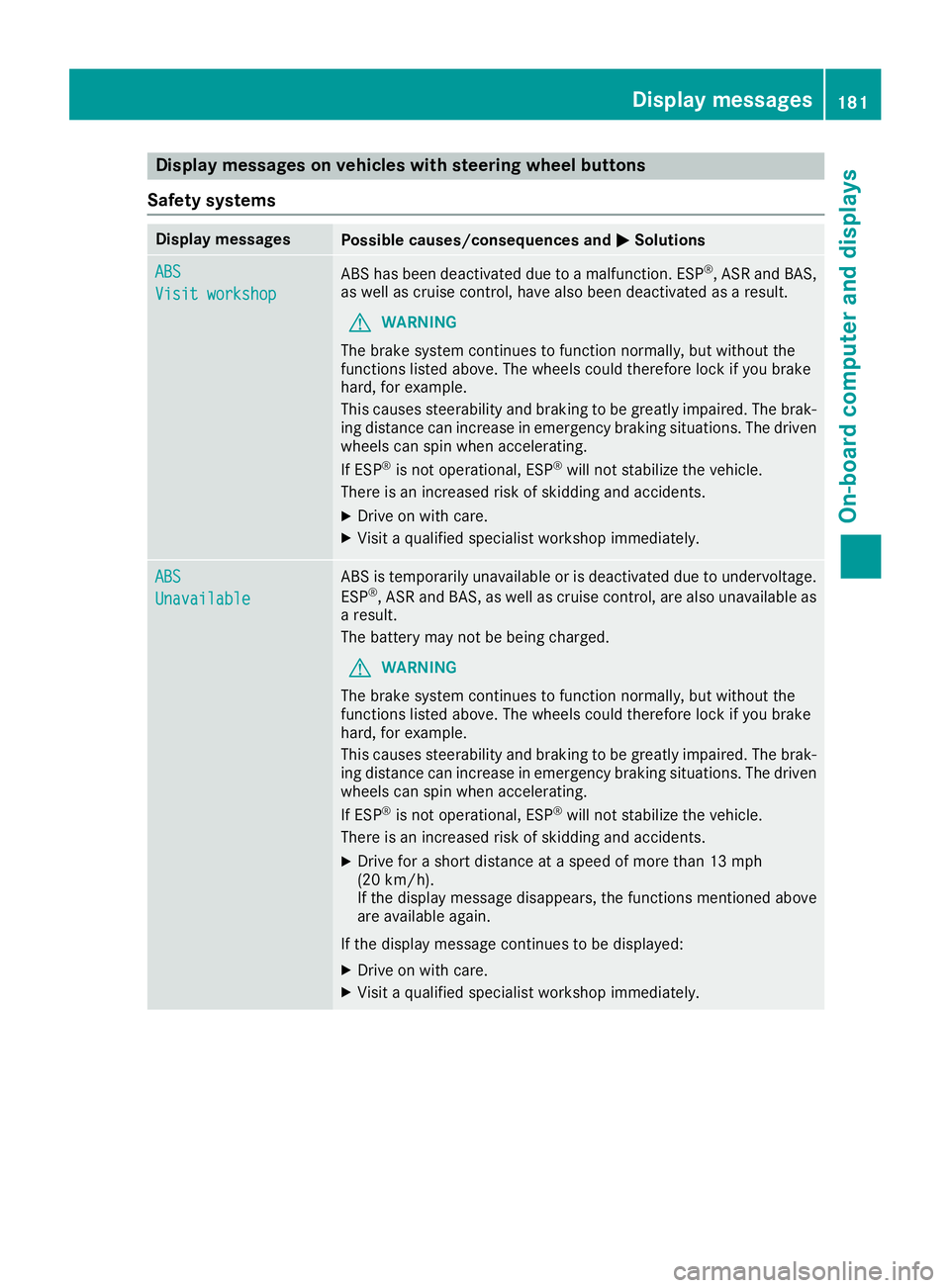
Display messages on vehicles withsteering wheel buttons
Safet ysystems
Display messagesPossible causes/consequences an dMSolutions
ABS
Visit workshop
AB Shas bee ndeactivated due to amalfunction .ES P®,AS Rand BAS,
as well as cruise control, hav ealso bee ndeactivated as aresult .
GWARNING
The brake syste mcontinues to function normally, but without th e
function slisted above. The wheels could therefore loc kif you brake
hard, fo rexample.
Thi scauses steerability and braking to be greatly impaired. The brak-
in gdistanc ecan increase in emergency braking situations. The driven
wheels can spi nwhen accelerating.
If ES P
®is no toperational, ES P®will notstabilize th evehicle.
There is an increase dris kof skidding and accidents .
XDrive on withcare.
XVisit aqualified specialis tworkshop immediately.
ABS
Unavailable
AB Sis temporarily unavailable or is deactivated due to undervoltage.
ES P®,AS Rand BAS, as well as cruise control, are also unavailable as
a result .
The battery may no tbe bein gcharged.
GWARNING
The brake syste mcontinues to function normally, but without th e
function slisted above. The wheels could therefore loc kif you brake
hard, fo rexample.
Thi scauses steerability and braking to be greatly impaired. The brak-
in gdistanc ecan increase in emergency braking situations. The driven
wheels can spi nwhen accelerating.
If ES P
®is no toperational, ES P®will notstabilize th evehicle.
There is an increase dris kof skidding and accidents .
XDrive for ashort distanc eat aspeed of more than 13 mph
(20 km/h).
If th edisplay messag edisappears ,th efunction smentioned abov e
are available again .
If th edisplay messag econtinues to be displayed:
XDrive on wit hcare.
XVisit aqualified specialis tworkshop immediately.
Display messages18 1
On-board computer and displays
Z