park assist MERCEDES-BENZ SPRINTER 2016 MY16 Operator’s Manual
[x] Cancel search | Manufacturer: MERCEDES-BENZ, Model Year: 2016, Model line: SPRINTER, Model: MERCEDES-BENZ SPRINTER 2016Pages: 290, PDF Size: 6.44 MB
Page 36 of 290
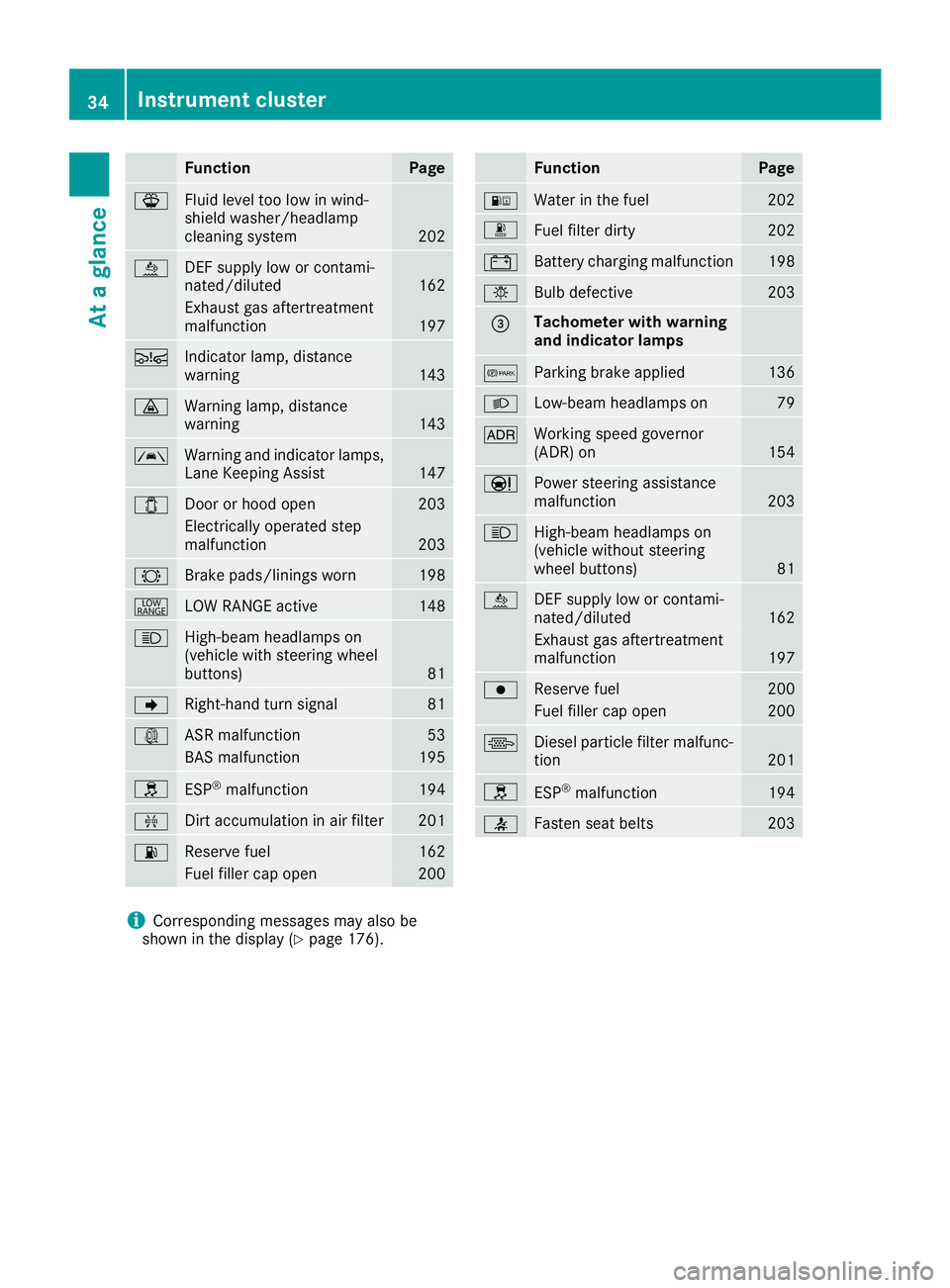
FunctionPage
¦Fluid level too low in wind-
shield washer/headlamp
cleaning system
202
åDEF supply low or contami-
nated/diluted162
Exhaust gas aftertreatment
malfunction197
ÄIndicator lamp, distance
warning143
·Warning lamp, distance
warning143
ÃWarning and indicator lamps,
Lane Keeping Assist147
1Door or hood open203
Electrically operated step
malfunction203
#Brake pads/linings worn198
+LOW RANGE active148
KHigh-beam headlamps on
(vehicle with steering wheel
buttons)
81
JRight-hand turn signal81
:ASR malfunction53
BAS malfunction195
hESP®malfunction194
ÈDirt accumulation in air filter201
6Reserve fuel162
Fuel filler cap open200
FunctionPage
:Water in the fuel202
mFuel filter dirty202
#Battery charging malfunction198
bBulb defective203
=Tachometer with warning
and indicator lamps
cParking brake applied136
LLow-beam headlamps on79
KWorking speed governor
(ADR) on154
ÐPower steering assistance
malfunction203
KHigh-beam headlamps on
(vehicle without steering
wheel buttons)
81
åDEF supply low or contami-
nated/diluted162
Exhaust gas aftertreatment
malfunction197
|Reserve fuel200
Fuel filler cap open200
\Diesel particle filter malfunc-
tion201
hESP®malfunction194
7Fasten seat belts203
iCorresponding messages may also be
shown in the display (Ypage 176).
34Instrument cluster
At a glance
Page 88 of 290
Changing bulbs
Important safety notes
GDANGER
Xenon bulbs carry a high voltage. You can get an electric shock if you remove the cover of
the Xenon bulb and touch the electrical con-
tacts. There is a risk of fatal injury.
Never touch the parts or the electrical con-
tacts of the Xenon bulb. Always have work on
the Xenon bulbs carried out at a qualified spe-
cialist workshop.
GWARNING
Bulbs, lamps and connectors can get very hot
when operating. If you change a bulb, you
could burn yourself on these components.
There is a risk of injury.
Allow these components to cool down before
changing a bulb.
!Make sure the bulbs are always securely
installed.
If your vehicle is equipped with Bi-Xenon bulbs,
you can recognize this by the following: the cone
of light from the Xenon bulbs moves from the
top to the bottom and back again when you start
the engine. For this to be observed, the low-
beam headlamps must be switched on before
starting the engine.
The bulbs and lamps are an essential compo-
nent of vehicle safety. You must therefore make
sure that these function correctly at all times.
Have the headlamp setting checked regularly.
RAlways switch off the vehicle's lighting sys-
tem before changing a bulb.
This will prevent a short circuit.
RDo not touch the glass tube of new bulbs with your bare hands. Always use a clean, lint-free
cloth or only touch the base of the bulb when
installing.
Even minor contamination can burn into the
glass surface and reduce the service life of the
bulbs.
RDo not use a bulb that has been dropped or
that has scratches on its glass tube.
The bulb could explode.
ROnly use bulbs in closed lamps which have
been designed for this purpose.
ROnly use spare bulbs of the same type and
with the prescribed voltage
RProtect the bulbs from moisture when in use.
If the new bulb still does not light up, consult a
qualified specialist workshop.
RHave the LEDs and bulbs of the following
lamps changed at a qualified specialist work-
shop:
-the additional turn signals in the exterior
mirrors
-the high-mounted brake lamp
-LED daytime running lamps (Bi-Xenon
headlamps)
-Bi-Xenon lamps (Bi-Xenon headlamps)
-front fog lamps
If you require assistance changing bulbs, con-
sult a qualified specialist workshop.
Front bulbs
Overview of bulb replacement – bulb
types
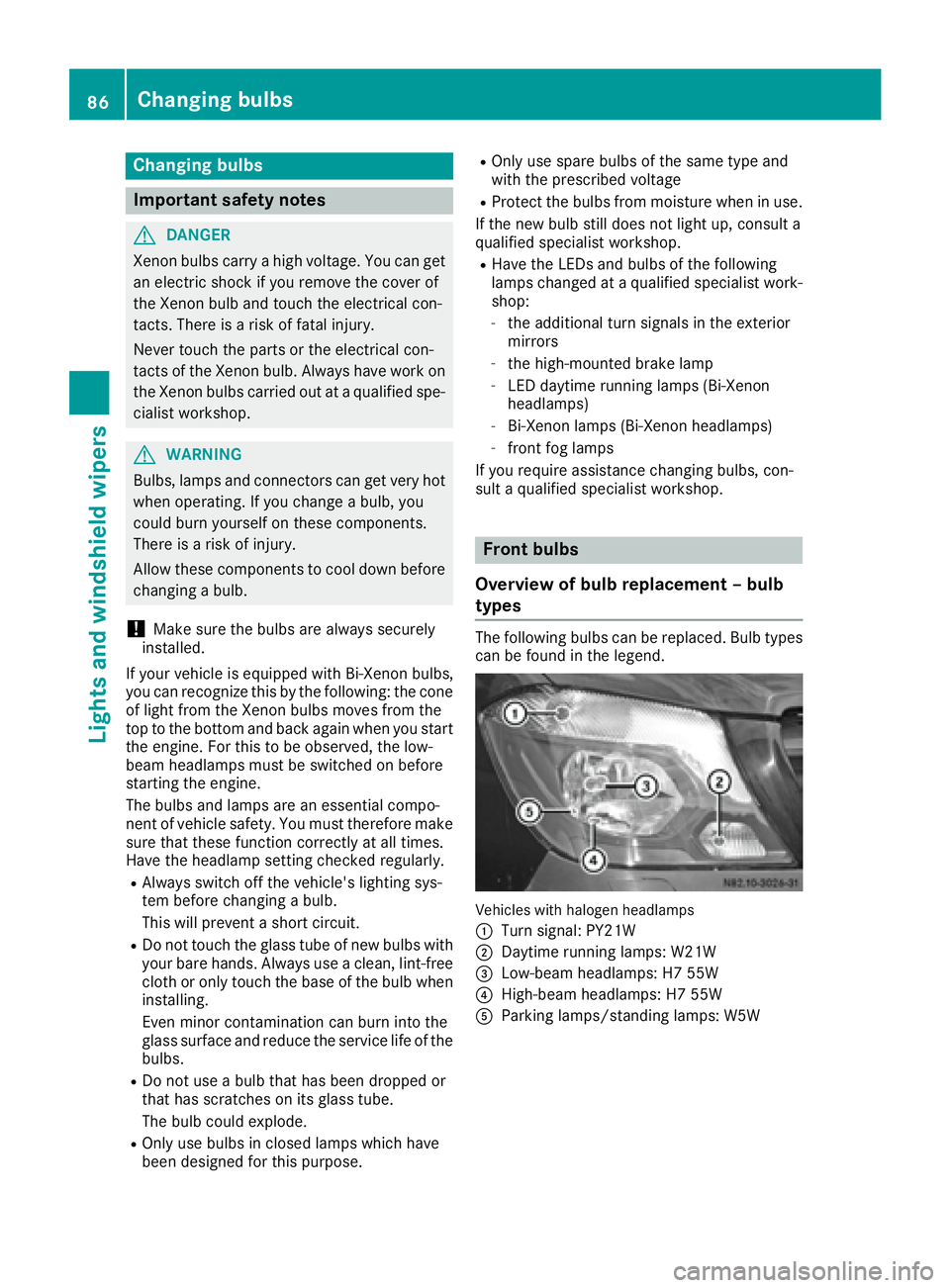
The following bulbs can be replaced. Bulb types can be found in the legend.
Vehicle swit hhalogen headlamps
:
Turn signal: PY21W
;Daytime running lamps: W21W
=Low-beam headlamps: H7 55W
?High-beam headlamps: H7 55W
AParking lamps/standing lamps: W5W
86Changing bulbs
Lights and windshield wipers
Page 122 of 290
On vehicles with a battery main switch, you must
first switch on the power supply (Ypage 118).
iTo unlock the steering, move the steering
wheel slightly while turning the key to position
1.
Preparing for a journey
Visual check of the vehicle exterior
XIn particular, check the following components
on the vehicle, and on the trailer as necessary:
Rlicense plates, vehicle lighting, turn signals,
brake lamps and wiper blades for dirt and
damage
Rtires and wheels for firm seating, correct
tire pressure and general condition
Rtrailer tow hitch for play and security
The trailer coupling is one of the most
important vehicle parts with regard to road
safety. The separate instructions issued by
the manufacturer pertaining to operation,
care and maintenance should be observed.
Rthat contour markings on attachments and
bodies are in good condition
XRectify any noticeable defects before com-
mencing the journey.
Checks in the vehicle
Emergency equipment and first-aid kit
XCheck the equipment to make sure that it is
accessible, complete and ready for use.
The first aid and breakdown assistance equip-
ment is in the front door stowage compartments
and behind the driver's seat.
Vehicle lighting
XTurn the key to position 2in the ignition lock.
XCheck the lighting system with the aid of a
second person.
XReplace defective bulbs (Ypage 86).
Before driving off
GWARNING
Objects in the driver's footwell may restrict
the clearance around the pedals or block a
depressed pedal. This jeopardizes the oper-
ating and road safety of the vehicle. There is a risk of an accident.
Stow all objects securely in the vehicle so that
they do not get into the driver's footwell.
When using floormats or carpets, make sure
that they are properly secured so that they do not slip or obstruct the pedals. Do not place
several floormats or carpets on top of one
another.
GWARNING
Unsuitable footwear can hinder correct usage of the pedals, e.g.:
Rshoes with thick soles
Rshoes with high heels
Rslippers
There is a risk of an accident.
Wear suitable footwear to ensure correct
usage of the pedals.
XSecure the load as per the loading guidelines
(Ypage 212).
XStow luggage items securely. Secure the load
as per the loading guidelines (Ypage 212).
XMake sure that the floormats and carpets are
properly secured so that they cannot slip and
obstruct the pedals.
XClose all doors.
Starting the engine
GWARNING
Combustion engines emit poisonous exhaust
gases such as carbon monoxide. Inhaling
these exhaust gases leads to poisoning. There
is a risk of fatal injury. Therefore never leave
the engine running in enclosed spaces with-
out sufficient ventilation.
!Do not depress the accelerator pedal when
starting the engine.
XBefore starting the engine, make sure that:
120Driving
Driving and parking
Page 124 of 290
Reverse warning device
GWARNING
Other road users may ignore or fail to hear the warning tone of the reverse warning feature.
There is a risk of injury if you fail to ensure that
the area in which you are maneuvering is
clear.
Make sure that there are no persons or
objects in the area in which you are maneu-
vering. It may be necessary to enlist the help
of a second person when maneuvering.
The reverse warning feature is a system
designed to assist you in ensuring the safety of
other road users.
A warning signal sounds to alert other road
users when reverse gear is engaged. The volume
of the warning tone can be reduced for night-
time driving.
XTo reduce the volume of the warning tone:
engage reverse gear twice in quick succes-
sion.
The warning tone is now quieter.
iThe warning tone sounds at a normal vol-
ume by default. The volume of the warning
tone has to be reduced each time you engage
reverse gear if necessary.
122Driving
Driving and parking
Page 130 of 290
and that it is not swallowed. Do not inhale fuelvapors. Keep fuel away from children.
If you or others come into contact with fuel,
observe the following:
RWash away fuel from skin immediately
using soap and water.
RIf fuel comes into contact with your eyes,
immediately rinse them thoroughly with
clean water. Seek medical assistance with-
out delay.
RIf fuel is swallowed, seek medical assis-
tance without delay. Do not induce vomit-
ing.
RImmediately change out of clothing which
has come into contact with fuel.
GWARNING
If you mix diesel fuel with gasoline, the flash
point is lower than that of pure diesel fuel.
When the engine is running, exhaust system
components could overheat without being
noticed. There is a risk of fire.
Never refuel with gasoline. Never mix gasoline with diesel fuel.
HEnvironmental note
If fuels are handled improperly, they pose a
danger to persons and the environment. Do
not allow fuels to run into the sewage system,
the surface waters, the ground water or into
the ground.
!Do not use gasoline to refuel vehicles with a
diesel engine. Even small amounts of gasoline
will cause damage to the fuel system and
engine.
!Do not switch on the ignition if you acciden-
tally refuel with the wrong fuel. Otherwise, the
fuel will enter the fuel lines. Notify a qualified
specialist workshop and have the fuel tank
and fuel lines drained completely.
!Overfilling the fuel tank could damage the
fuel system.
!Take care not to spill any fuel on painted
surfaces. You could otherwise damage the
paintwork.
!Filter the fuel before transferring it to the
vehicle if you are refueling the vehicle from
barrels or containers.
This will prevent malfunctions in the fuel sys-
tem due to contaminated fuel.
Further information on fuel and on fuel grades
can be found in the "Technical data" section
(
Ypage 277).
Refueling procedure
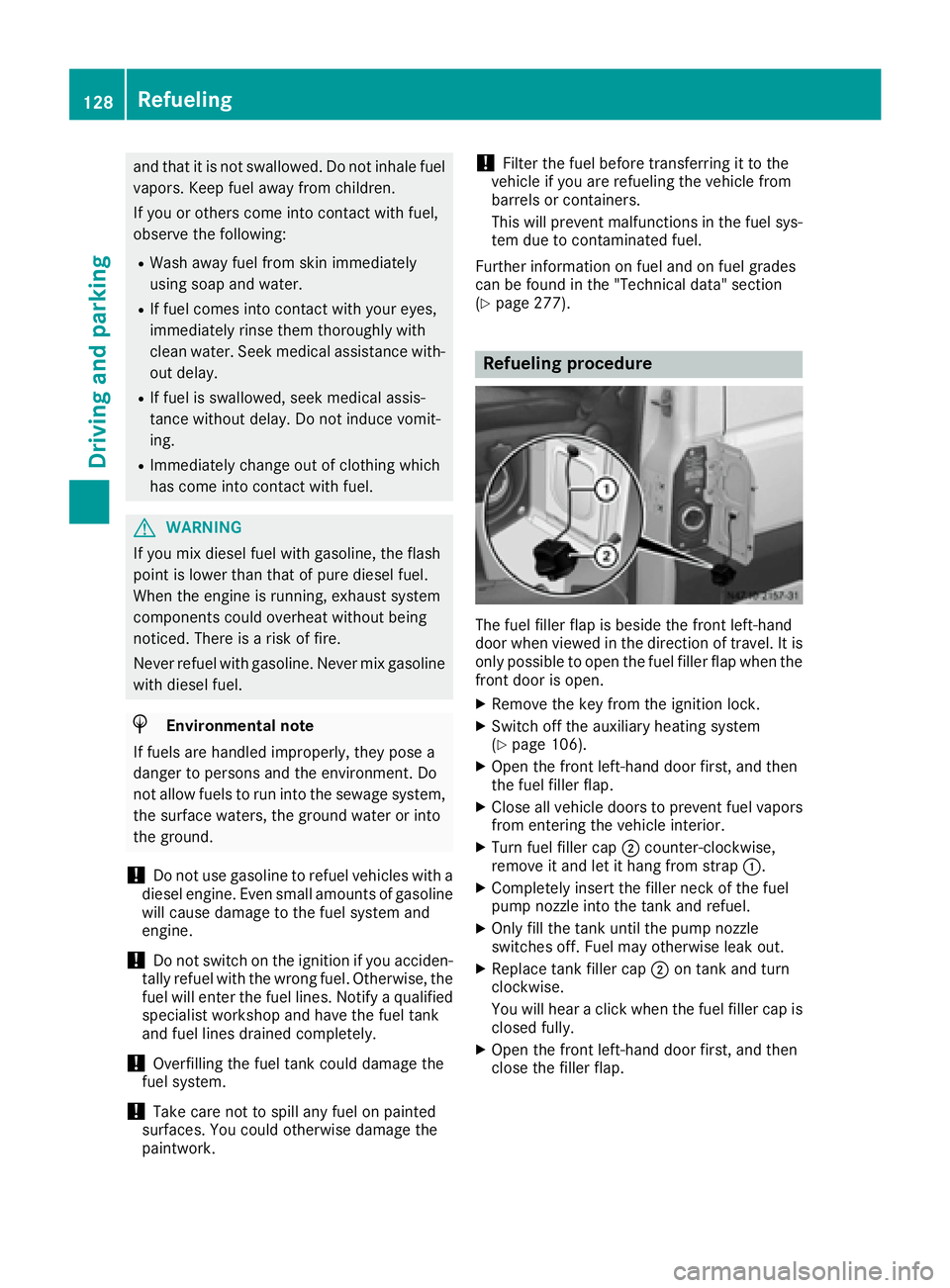
The fuel filler flap is beside the front left-hand
door when viewed in the direction of travel. It is
only possible to open the fuel filler flap when the front door is open.
XRemove the key from the ignition lock.
XSwitch off the auxiliary heating system
(Ypage 106).
XOpen the front left-hand door first, and then
the fuel filler flap.
XClose all vehicle doors to prevent fuel vaporsfrom entering the vehicle interior.
XTurn fuel filler cap ;counter-clockwise,
remove it and let it hang from strap :.
XCompletely insert the filler neck of the fuel
pump nozzle into the tank and refuel.
XOnly fill the tank until the pump nozzle
switches off. Fuel may otherwise leak out.
XReplace tank filler cap;on tank and turn
clockwise.
You will hear a click when the fuel filler cap is
closed fully.
XOpen the front left-hand door first, and then
close the filler flap.
128Refueling
Driving and parking
Page 144 of 290
Problems with cruise control
ProblemPossible causes/consequences andMSolutions
On vehicles with steering
wheel buttons, the
speed cannot be set
when cruise control is
activated.The display shows a high-priority message. Thus a change in speed is
not possible.
XProceed as instructed by the message in the display.
XDeactivate cruise control
COLLISION PREVENTION ASSIST
General notes
COLLISION PREVENTION ASSIST comprises the
distance warning function and adaptive Brake
Assist.
Distance warning function
Important safety notes
iNote the section on 'Important safety notes'
(Ypage 52).
GWARNING
The distance warning function does not react:
Rto people or animals
Rto oncoming vehicles
Rto crossing traffic
Rwhen cornering
Thus, the distance warning function cannot
provide a warning in all critical situations.
There is a risk of an accident.
Always pay careful attention to the traffic sit-
uation and be ready to brake.
GWARNING
The distance warning function cannot always
clearly identify objects and complex traffic
situations.
In such cases, the distance warning function
may:
Rgive an unnecessary warning
Rnot give a warning
There is a risk of an accident.
Always pay careful attention to the traffic sit- uation and do not rely solely on the distance
warning function.
Operation
The distance warning function can help you to
minimize the risk of a front-end collision with a
vehicle ahead or reduce the effects of such a
collision. If the distance warning function
detects that there is a risk of a collision, you will
be warned visually and acoustically. Without
your intervention, the distance warning function
cannot prevent a collision.
The distance warning function will issue a warn-
ing at speeds of around 20 mph (30 km/h) or
more if:
Ryou approach a vehicle ahead of you very
quickly. You will then hear an intermittent
warning tone and the red ·warning lamp
in the instrument cluster flashes.
XBrake immediately in order to increase the
distance from the vehicle in front.
or
XTake evasive action provided it is safe to do
so.
If you want the distance warning function to
assist you, the function must be activated and
operational.
Due to the nature of the system, particularly
complicated driving conditions may cause the
system to display an unnecessary warning.
With the help of the radar sensor system, the
distance warning function can detect obstacles
that are in the path of your vehicle for an exten-
ded period of time.
Up to a speed of around 45 mph (70 km/h), the
distance warning function can also react to sta-
tionary obstacles, such as stopped or parked
vehicles.
142Driving systems
Driving and parking
Page 145 of 290
If you approach an obstacle and the distance
warning function detects a risk of a collision, the
system will alert you both visually and acousti-
cally.
In particular, the detection of obstacles can be
impaired in the case of:
Rdirt on the sensors or anything else covering
the sensors
Rsnow or heavy rain
Rinterference from other radar sources
Rthere are strong radar reflections, for exam-
ple in parking garages
Ra narrow vehicle traveling in front, e.g. a
motorbike
Ra vehicle traveling in front on a different line
Following damage to the front end of the vehicle,
have the configuration and operation of the
radar sensor checked at a qualified specialist
workshop. This also applies to collisions at slow
speeds where there is no visible damage to the
front of the vehicle.
Activating/deactivating the distance
warning function
When you switch on the engine, the distance
warning function switches on after a few sec-
onds.
XTo deactivate: press theæbutton
(Ypage 35).
Vehicles without steering wheel buttons:
the Ä warning lamp in the instrument clus-
ter lights up and the OFF
message flashes. The
message then disappears and the Äindi-
cator lamp remains lit.
Vehicles with steering wheel buttons: the
Ä warning lamp in the instrument cluster
flashes and the Distance
warningsystemdeactivatedmessage appears .The mes-
sage then disappears and the Äwarning
lamp remains lit.
XTo activate: press theæbutton again
(Ypage 35).
Vehicles without steering wheel buttons:
the Ä warning lamp in the instrument clus-
ter lights up and the on
message flashes. The
message then disappears and the Äindi-
cator lamp goes out.
Vehicles with steering wheel buttons: the
Ä warning lamp in the instrument cluster
flashes and the Distance
warningsystemactivatedmessage appears in the multi- function display. The message then disap-
pears and the indicator lamp
Ägoes out.
Adaptive Brake Assist
iObserve the "Important safety notes" sec-
tion for driving safety systems (Ypage 52).
GWARNING
Adaptive Brake Assist cannot always clearly
identify objects and complex traffic situa-
tions.
In such cases, Adaptive Brake Assist can:
Rintervene unnecessarily
Rnot intervene
There is a risk of an accident.
Always pay careful attention to the traffic sit- uation and be ready to brake. Terminate the
intervention in a non-critical driving situation.
GWARNING
Adaptive Brake Assist does not react:
Rto people or animals
Rto oncoming vehicles
Rto crossing traffic
Rto stationary obstacles
Rwhen cornering
As a result, the Adaptive Brake Assist may not
intervene in all critical conditions. There is a
risk of an accident.
Always pay careful attention to the traffic sit- uation and be ready to brake.
Adaptive Brake Assist aids you when braking
during hazardous situations at speeds above
20 mph (30 km/h). With the help of Adaptive
Brake Assist, the distance warning signal can
detect obstacles that are in the path of your
vehicle for an extended period of time.
When you approach an obstacle and adaptive
Brake Assist detects that there is a risk of a col- lision, adaptive Brake Assist calculates the brak-
ing force necessary to avoid a collision. Should
you apply the brakes forcefully, adaptive Brake
Assist will automatically increase the braking
force to the calculated level.
Driving systems143
Driving and parking
Z
Page 146 of 290
XKeep the brake pedal depressed until the
emergency braking situation is over.
ABS prevents the wheels from locking.
The brakes function as usual again if:
Ryou release the brake pedal
Rthere is no longer any danger of a collision
Rno obstacle is detected in front of your vehicle
Adaptive Brake Assist is then deactivated.
Up to the maximum vehicle speed, adaptive
Brake Assist can react to moving obstacles that
have already been recognized as such at least
once over the period of observation. Adaptive
Brake Assist does not react to stationary obsta-
cles.
In particular, the detection of obstacles can be
impaired if:
Rdirt on the sensors or anything else covering
the sensors
Rsnow or heavy rain
Rinterference from other radar sources
Rthere are strong radar reflections, for exam-
ple in parking garages
Ra narrow vehicle traveling in front, e.g. a
motorbike
Ra vehicle traveling in front on a different line
If adaptive Brake Assist is not available due to a
malfunction in the radar sensor system, the full
brake boosting effect with the help of BAS
remains available.
Following damage to the front end of the vehicle,
have the configuration and operation of the
radar sensor checked at a qualified specialist
workshop. This also applies to collisions at slow
speeds where there is no visible damage to the
front of the vehicle.
Lane Tracking package
Blind Spot Assist
General notes
Blind Spot Assist uses a radar sensor system to
monitor the areas on both sides of your vehicle.
It supports you from speeds of approximately
20 mph (30 km/h). A warning display in the
exterior mirrors draws your attention to vehicles detected in the monitored area. If you then
switch on the corresponding turn signal to
change lane, you will also receive an optical and
audible collision warning. For this purpose, Blind Spot Assist uses sensors in the rear bumper and
behind the protective strips of the B-pillars.
Important safety notes
GWARNING
Blind Spot Assist does not react to:
Rvehicles overtaken too closely on the side,
placing them in the blind spot area
Rvehicles which approach with a large speed
differential and overtake your vehicle
As a result, Blind Spot Assist may not give
warnings in such situations. There is a risk of
an accident.
Always observe the traffic conditions care-
fully, and maintain a safe lateral distance.
Blind Spot Assist is only an aid. It may fail to
detect some vehicles and is no substitute for
attentive driving.
iUSA only:
This device has been approved by the FCC as
a "Vehicular Radar System". The radar sensor is intended for use in an automotive radar
system only. Removal, tampering, or altering
of the device will void any warranties, and is
not permitted by the FCC. Do not tamper with,
alter, or use in any non-approved way.
Any unauthorized modification to this device
could void the user’s authority to operate the
equipment.
Monitoring range of the sensors
In particular, the detection of obstacles can be
impaired in the case of:
Rdirt on the sensors or anything else covering
the sensors
Rpoor visibility, e.g. due to fog, heavy rain or
snow
Rnarrow and short vehicles, e.g. motorcycles
or bicycles
Rvery wide lanes
Rnarrow lanes
Rvehicles not driving in the middle of their lane
Rbarriers or other road boundaries
Vehicles in the monitoring range are then not
indicated.
144Driving systems
Driving and parking
Page 147 of 290
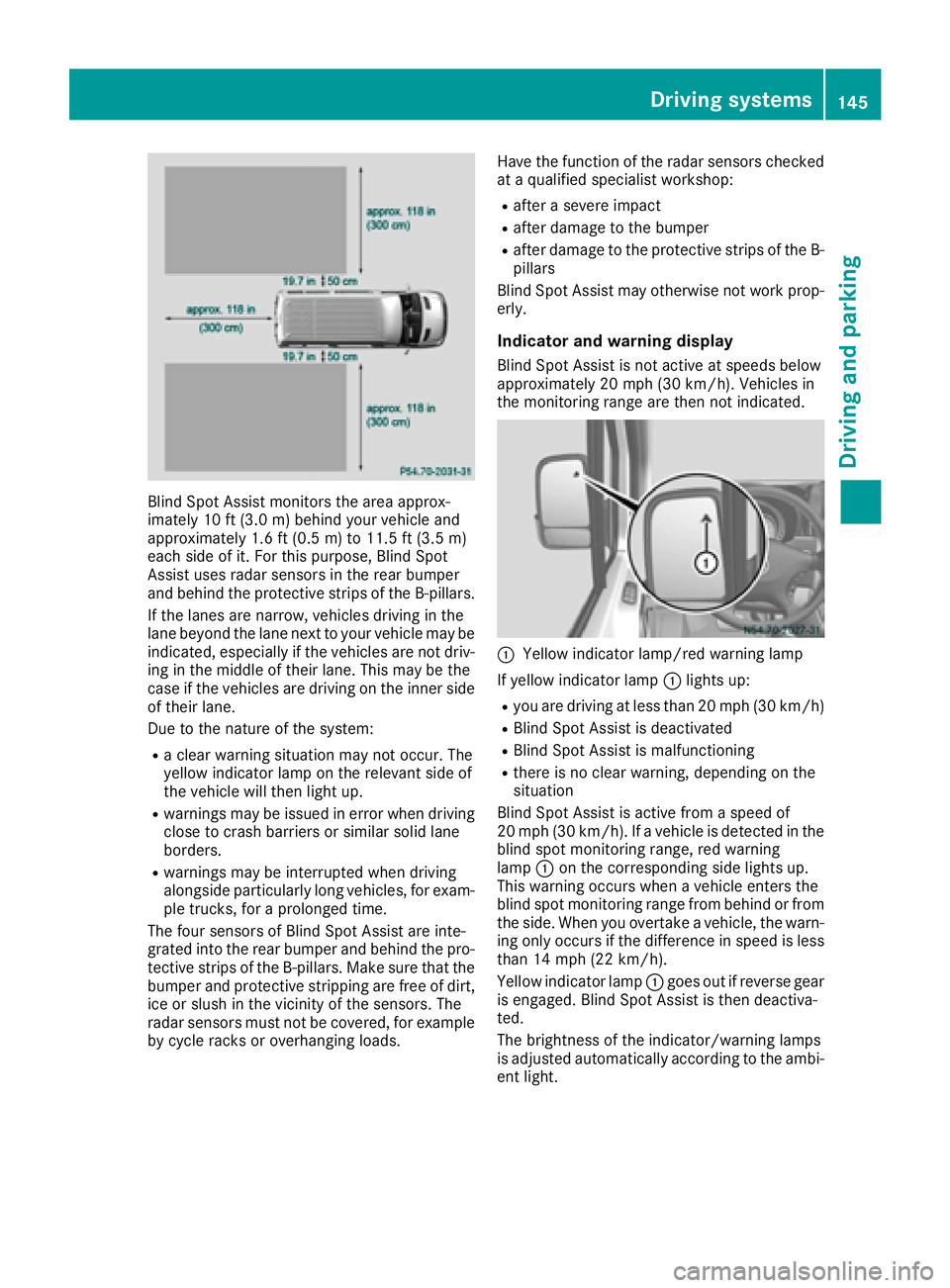
Blind Spot Assist monitors the area approx-
imately 10 ft (3.0m) behind your vehicle and
approximately 1.6 ft (0.5 m)to 11.5 ft (3.5 m)
ea ch side of it. For this purpose, Blind Spot
Assist uses radar sensors in the rear bumper
and behind the protective strips of the B-pillars.
If the lanes are narrow, vehicles driving in the
lane beyond the lane next to your vehicle may be
indicated, especially if the vehicles are not driv-
ing in the middle of their lane. This may be the
case if the vehicles are driving on the inner side
of their lane.
Due to the nature of the system:
Ra clear warning situation may not occur. The
yellow indicator lamp on the relevant side of
the vehicle will then light up.
Rwarnings may be issued in error when driving
close to crash barriers or similar solid lane
borders.
Rwarnings may be interrupted when driving
alongside particularly long vehicles, for exam-
ple trucks, for a prolonged time.
The four sensors of Blind Spot Assist are inte-
grated into the rear bumper and behind the pro-
tective strips of the B-pillars. Make sure that the
bumper and protective stripping are free of dirt,
ice or slush in the vicinity of the sensors. The
radar sensors must not be covered, for example
by cycle racks or overhanging loads. Have the function of the radar sensors checked
at a qualified specialist workshop:
Rafter a severe impact
Rafter damage to the bumper
Rafter damage to the protective strips of the B-
pillars
Blind Spot Assist may otherwise not work prop-
erly.
Indicator and warning display
Blind Spot Assist is not active at speeds below
approximately 20 mph (30 km/h). Vehicles in
the monitoring range are then not indicated.
:Yellow indicator lamp/red warning lamp
If yellow indicator lamp :lights up:
Ryou are driving at less than 20 mph (30 km/h)
RBlind Spot Assist is deactivated
RBlind Spot Assist is malfunctioning
Rthere is no clear warning, depending on the
situation
Blind Spot Assist is active from a speed of
20 mph (30 km/h). If a vehicle is detected in the
blind spot monitoring range, red warning
lamp :on the corresponding side lights up.
This warning occurs when a vehicle enters the
blind spot monitoring range from behind or from
the side. When you overtake a vehicle, the warn-
ing only occurs if the difference in speed is less
than 14 mph (22 km/h).
Yellow indicator lamp :goes out if reverse gear
is engaged. Blind Spot Assist is then deactiva-
ted.
The brightness of the indicator/warning lamps
is adjusted automatically according to the ambi- ent light.
Driving systems145
Driving and parking
Z
Page 148 of 290
Collision warning
If a vehicle is detected in the monitoring range of
Blind Spot Assist and you switch on the corre-
sponding turn signal, a double warning tone
sounds once. Red warning lamp:flashes. If
the turn signal remains on, detected vehicles
are indicated by the flashing of red warning
lamp :. There are no further warning tones.
Activating/deactivating Blind Spot Assist
iBlind Spot Assist is activated when you
switch on the ignition.
XTurn the key to position 2in the ignition lock.
Warning lamps :in the exterior mirrors light
up red for approximately 1.5 seconds and
then turn yellow.
XTo deactivate: press thekbutton in the
center console (Ypage 35).
The yellow indicator lamp in exterior mirror :
first flashes and then lights up continuously.
XTo activate: press thekbutton in the
center console again (Ypage 35).
The yellow indicator lamp in exterior mirror :
flashes initially. If you exceed 20 mph
(30 km/h) while driving, the yellow indicator
lamp in exterior mirror :goes out.
Towing a trailer
If you attach a trailer, make sure that you have
correctly established the electrical connection.
This can be accomplished by checking the trailer
lighting. Blind Spot Assist is deactivated as a
result. The indicator lamp in the exterior mirrors
lights up yellow.
On veh icles wit
h steering wheel buttons, the
Blind Spot Assist Deactivatedmessage
also appears in the display.
Lane Keeping Assist
General notes
Lane Keeping Assist monitors the area in front of
your vehicle by means of a camera at the top of
the windshield. Lane Keeping Assist detects
lane markings on the road and warns you before
you leave your lane unintentionally.
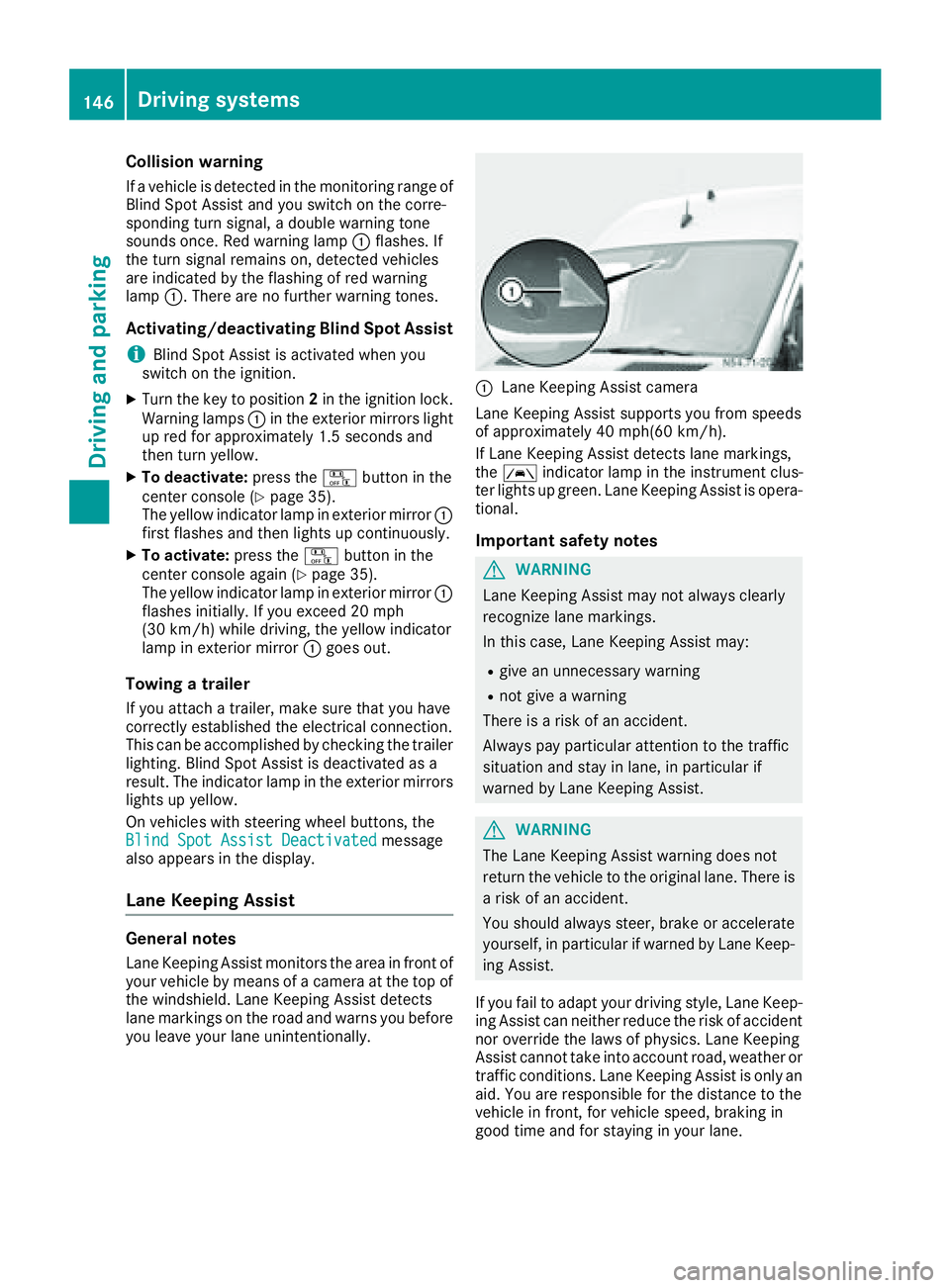
:Lane Keeping Assist camera
Lane Keeping Assist supports you from speeds
of approximately 40 mph(60 km/h).
If Lane Keeping Assist detects lane markings,
the à indicator lamp in the instrument clus-
ter lights up green. Lane Keeping Assist is opera-
tional.
Important safety notes
GWARNING
Lane Keeping Assist may not always clearly
recognize lane markings.
In this case, Lane Keeping Assist may:
Rgive an unnecessary warning
Rnot give a warning
There is a risk of an accident.
Always pay particular attention to the traffic
situation and stay in lane, in particular if
warned by Lane Keeping Assist.
GWARNING
The Lane Keeping Assist warning does not
return the vehicle to the original lane. There is
a risk of an accident.
You should always steer, brake or accelerate
yourself, in particular if warned by Lane Keep-
ing Assist.
If you fail to adapt your driving style, Lane Keep-
ing Assist can neither reduce the risk of accident
nor override the laws of physics. Lane Keeping
Assist cannot take into account road, weather or traffic conditions. Lane Keeping Assist is only an
aid. You are responsible for the distance to the
vehicle in front, for vehicle speed, braking in
good time and for staying in your lane.
146Driving systems
Driving and parking