sensor MERCEDES-BENZ SPRINTER 2016 MY16 Operator’s Manual
[x] Cancel search | Manufacturer: MERCEDES-BENZ, Model Year: 2016, Model line: SPRINTER, Model: MERCEDES-BENZ SPRINTER 2016Pages: 290, PDF Size: 6.44 MB
Page 46 of 290
must be such that the vehicle can be driven
safely.
RKeep hands on the outside of the steering
wheel rim. This allows the air bag to deploy
fully.
RAlways sit with your back against the seat
backrest when driving. Do not lean forward,
on the door or against the side window. Oth-
erwise, you are in the air bag deployment
area.
RAlways keep your feet in the footwell in front
of the seat. Do not, for example, place your
feet on the dashboard. Otherwise, your feet
are in the air bag deployment area.
RSuitable restraint systems must always be
used for persons under 5 ft (1.50m)in height.
The seat belt cannot be worn correctly by
persons who do not reach this height.
If children are also traveling in the vehicle,
please take note of the following points.
RAlways secure children younger than twelve
years of age and under 5 ft (1.50 m) tall in
suitable child restraint systems.
RChild restraint systems should preferably be
installed on the rear seats.
RIf you secure a child in a rearward-facing child
restraint system, always do so on a suitable
rear seat. The front-passenger front air bag
cannot be deactivated.
RBe sure to observe the instructions and safety
notes on "Children in the vehicle"
(
Ypage 47) and "Child restraint system on
the front-passenger seat" (Ypage 51) in
addition to the child restraint system manu-
facturer's installation instructions.
Objects in the passenger compartment
could prevent an air bag from functioning
properly. To prevent risks due to the required
air bag speed after deployment, ensure the fol-
lowing before starting the journey:
Rthere are no persons, animals or objects
between the vehicle occupants and an air
bag.
Rthere are no objects between the seat, door
and B-pillar.
Rno hard objects, e.g. coat hangers, hang on
the grab handles or coat hooks.
Rno accessories, such as cup holders, are
attached to the vehicle within the deployment area of an air bag, e.g. to doors or side win-
dows.
Rthere are no heavy, sharp or fragile objects in
the pockets of items of clothing. Such items
should be suitably stowed elsewhere.
GWARNING
If you modify the air bag cover or affix objects
such as stickers to it, the air bag can no longer
function correctly. There is an increased risk
of injury.
Never modify an air bag cover or affix objects
to it.
GWARNING
Sensors to control the air bags are located in
the doors. Modifications or work not per-
formed correctly to the doors or door panel-
ing, as well as damaged doors, can lead to the
function of the sensors being impaired. The air
bags might therefore not function properly
anymore. Consequently, the air bags cannot
protect vehicle occupants as they are
designed to do. There is an increased risk of
injury.
Never modify the doors or parts of the doors.
Always have work on the doors or door pan-
eling carried out at a qualified specialist work-
shop.
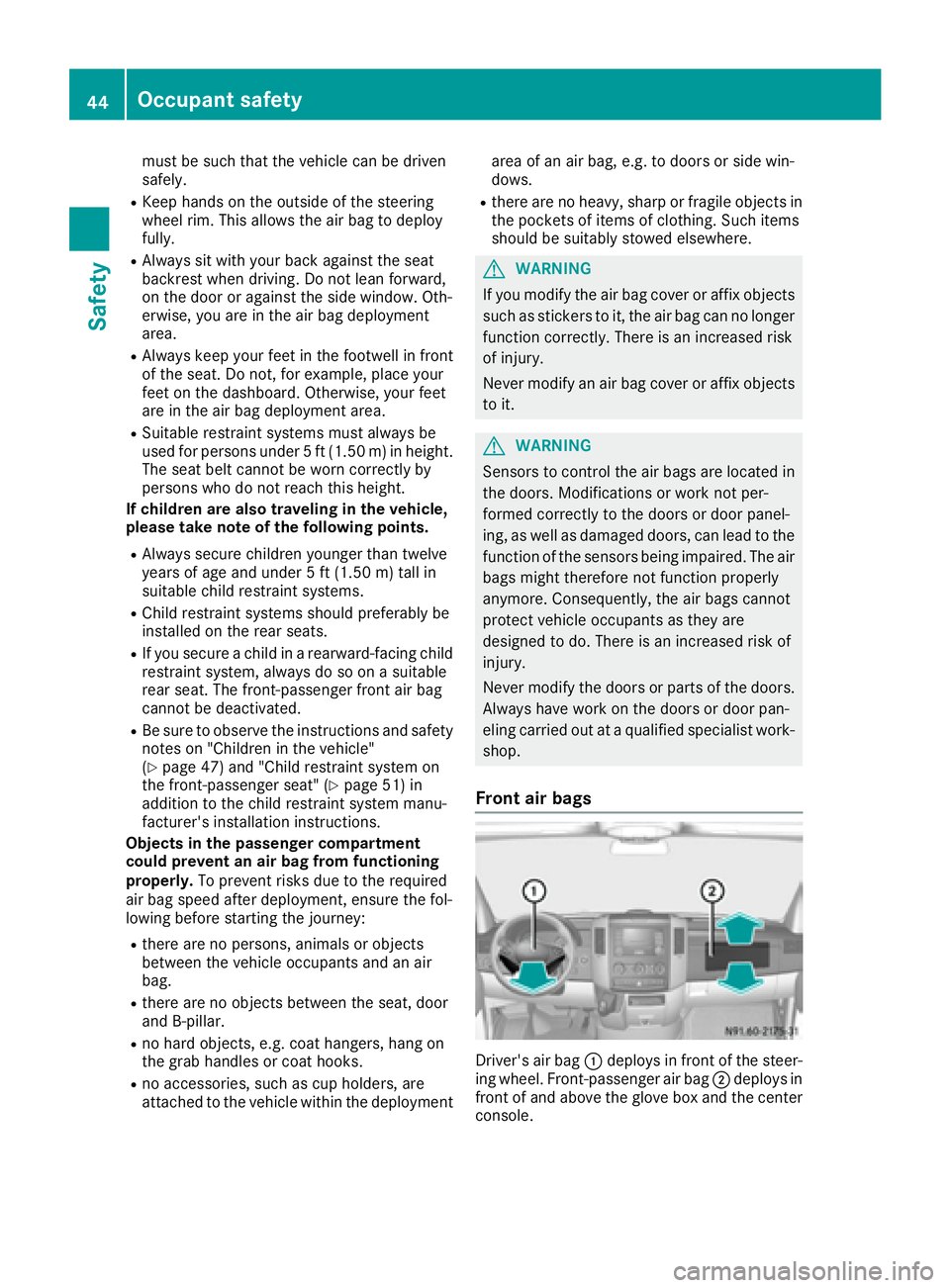
Front air bags
Driver's air bag :deploys in front of the steer-
ing wheel. Front-passenger air bag ;deploys in
front of and above the glove box and the center
console.
44Occupant safety
Safety
Page 59 of 290
If the alarm system is armed, a visual and audi-
ble alarm is triggered by the following:
RUnlocking the vehicle from inside
ROpening a door
ROpening the hood
iThe alarm is not switched off, even if you
immediately close the open door that has trig-
gered it, for example.
XTo stop the alarm: press the%button on
the remote control.
or
XInsert the key into the ignition lock.
The alarm stops.
Tow-away alarm
Operation
A visual and audible alarm is triggered if the
inclination of the vehicle changes when the tow- away alarm is armed. This can be the case if the
vehicle is raised on one side, for example.
Arming and disarming
The tow-away alarm is automatically armed
approximately 20 seconds after you lock the
vehicle.
The tow-away alarm is automatically deactiva-
ted when you unlock the vehicle.
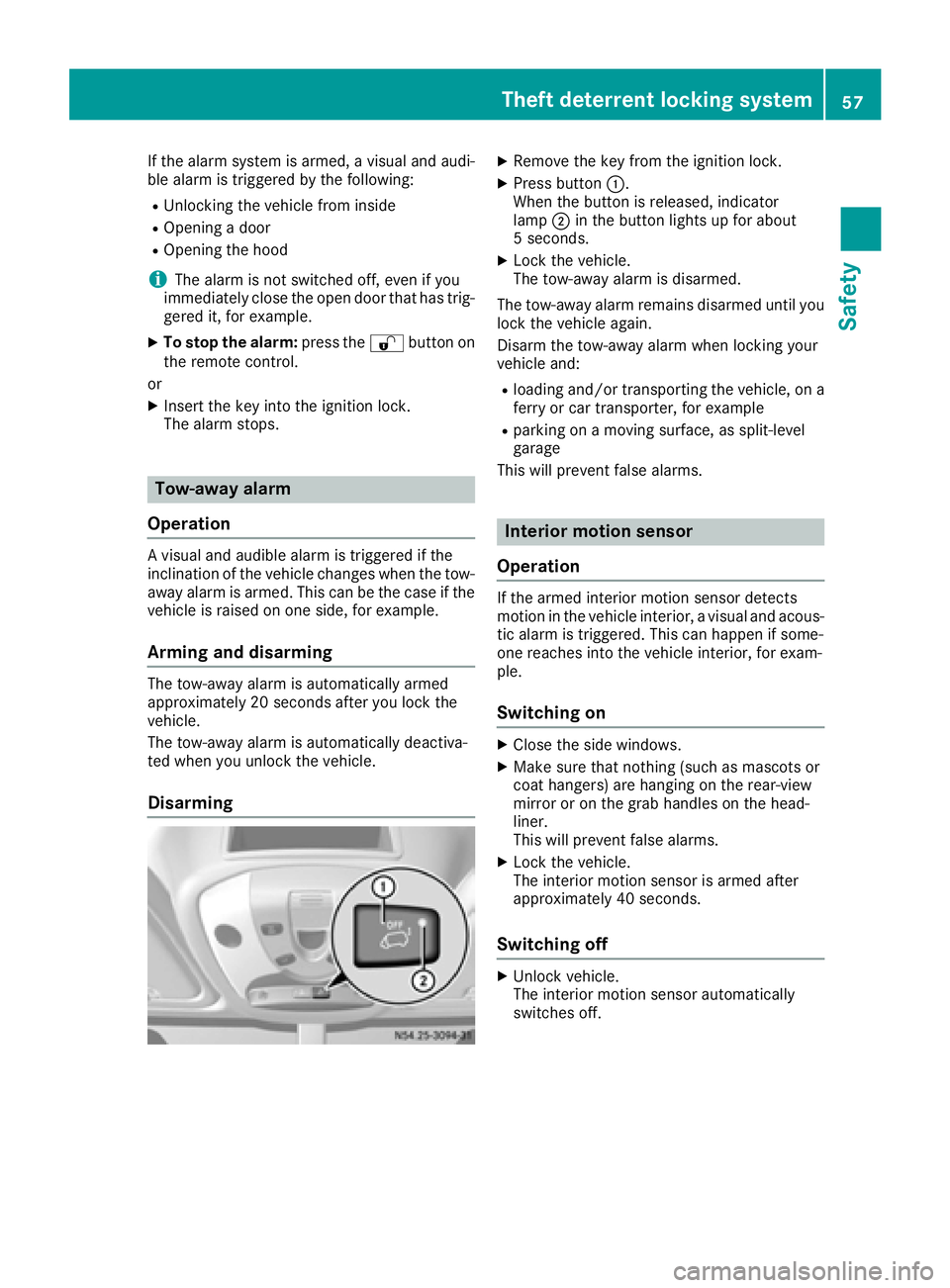
Disarming
XRemove the key from the ignition lock.
XPress button :.
When the button is released, indicator
lamp ;in the button lights up for about
5 seconds.
XLock the vehicle.
The tow-away alarm is disarmed.
The tow-away alarm remains disarmed until you
lock the vehicle again.
Disarm the tow-away alarm when locking your
vehicle and:
Rloading and/or transporting the vehicle, on a
ferry or car transporter, for example
Rparking on a moving surface, as split-level
garage
This will prevent false alarms.
Interior motion sensor
Operation
If the armed interior motion sensor detects
motion in the vehicle interior, a visual and acous-
tic alarm is triggered. This can happen if some-
one reaches into the vehicle interior, for exam-
ple.
Switching on
XClose the side windows.
XMake sure that nothing (such as mascots or
coat hangers) are hanging on the rear-view
mirror or on the grab handles on the head-
liner.
This will prevent false alarms.
XLock the vehicle.
The interior motion sensor is armed after
approximately 40 seconds.
Switching off
XUnlock vehicle.
The interior motion sensor automatically
switches off.
Theft deterrent locking system57
Safety
Z
Page 60 of 290
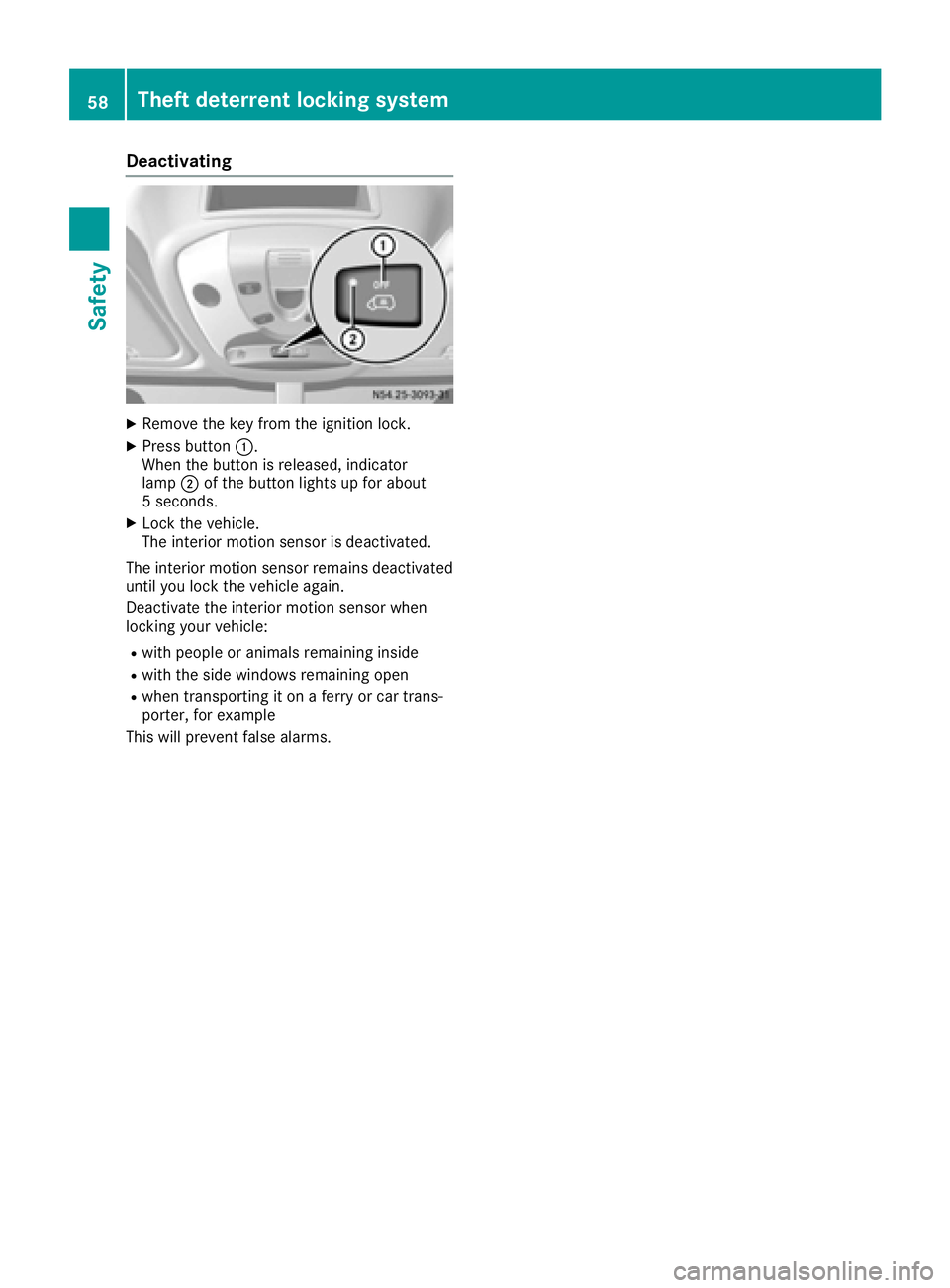
Deactivating
XRemoveth eke yfrom th eignition lock.
XPress butto n:.
Whe nth ebutto nis released, indicator
lamp ;of th ebutto nlights up fo rabout
5 seconds.
XLoc kth evehicle.
The interio rmotion sensor is deactivated.
The interio rmotion sensor remain sdeactivated
until you loc kth evehicle again .
Deactivat eth einterio rmotion sensor when
locking your vehicle:
Rwit hpeople or animals remainin ginsid e
Rwithth esid ewindows remainin gope n
Rwhen transporting it on aferr yor car trans -
porter, fo rexample
Thi swill preven tfalse alarms .
58Theft deterrent locking system
Safety
Page 82 of 290
The daytime running lamps function must be
activated using the on-board computer:
Rvehicles with steering wheel buttons
(Ypage 171)
Rvehicles without steering wheel buttons
(Ypage 164)
XTo switch on:turn the light switch to the
$ position.
The low-beam headlamps, parking lamps and
license plate lamp are switched on when the
engine is running. The Lindicator lamp in
the instrument cluster lights up.
iUSA only:
If you turn the light switch to the TorL
position, the parking lamps or low-beam
headlamps switch on. If you turn the light
switch to the Ãposition, the daytime run-
ning lamps remain switched on.
iCanada only:
If you turn the light switch to the Lposi-
tion, the low-beam headlamps are switched
on. If you turn the light switch to the Tor
à position, the daytime running lamps
remain switched on.
Automatic headlamp mode
GWARNING
When the light switch is set to Ã, the low-
beam headlamps may not be switched on
automatically if there is fog, snow or other
causes of poor visibility due to the weather
conditions such as spray. There is a risk of an
accident.
In such situations, turn the light switch to
L.
Automatic headlamp mode is only a driving aid.
You are responsible for the vehicle lighting at all
times.
Depending on ambient light, the rain and light
sensor automatically switches on the parking
lamps, low-beam headlamps and the license
plate lamp. This excludes weather-related
impairments to visibility, such as snow, fog or
spray.
If there is fog, snow or spray, turn the light
switch quickly from ÃtoL. You could
otherwise briefly interrupt operation of the
headlamps.
XTo switch on automatic headlamp mode:
turn the light switch to Ã.
Key in position 1in the ignition lock: the park-
ing lamps switch on or off automatically
depending on the ambient light.
When the engine is running: if you activate the
"daytime running lamps" function using the
on-board computer, the daytime running
lamps are switched on. The parking lamps and
low-beam headlamps also switch on or off
automatically, depending on the ambient
light.
When the low-beam headlamps are switched
on, the Lindicator lamp in the instrument
cluster lights up.
Fog lamps/rear fog lamp
GWARNING
If you suspect that driving conditions will be
foggy, turn the light switch to Lbefore you
start your journey. Your vehicle may other-
wise not be visible and you could endanger
yourself and others.
GWARNING
In low ambient lighting or foggy conditions,
only switch from position ÃtoL with
the vehicle at a standstill in a safe location.
Switching from ÃtoL will briefly
switch off the headlamps. Doing so while driv-
ing in low ambient lighting conditions may
result in an accident.
XTurn the ignition key to position 2in the igni-
tion lock or start the engine.
XTurn the light switch to LorT.
iIf your vehicle is only equipped with one rear
fog lamp, you must turn the light switch to
L.
iWhen the light switch is set to Ãyou
cannot switch on the front and rear foglamps.
XTo switch on the front fog lamps: pull the
light switch out to the first locking point.
The green Nindicator lamp on the light
switch lights up.
80Exterior lighting
Lights and windshield wipers
Page 85 of 290
Highbeam Assist
General notes
You can use this function to set the headlamps
to change between low beam and high beam
automatically. The system recognizes vehicles
with their lights on, either approaching from the
opposite direction or traveling in front of your
vehicle, and consequently switches the head-
lamps from high beam to low beam.
Once the system no longer detects any other
vehicles, it reactivates the high-beam head-
lamps.
The system's optical sensor is located behind
the windshield near the overhead control panel.
Important safety notes
GWARNING
Highbeam Assist does not recognize road
users:
Rwho have no lights, e.g. pedestrians
Rwho have poor lighting, e.g. cyclists
Rwhose lighting is blocked, e.g. by a barrier
In very rare cases, Highbeam Assist may fail to
recognize other road users who have lights, or
may recognize them too late. In this or similar situations, the automatic high-beam head-
lamps will not be deactivated or will be acti-
vated regardless. There is a risk of an acci-
dent.
Always carefully observe the traffic conditions
and switch off the high-beam headlamps in
good time.
Highbeam Assist cannot take into account road,
weather or traffic conditions. Highbeam Assist
is only an aid. You are responsible for adjusting
the vehicle's lighting to the prevailing light, vis-
ibility and traffic conditions.
In particular, the detection of obstacles can be
restricted if there is:
Rpoor visibility, e.g. due to fog, heavy rain or
snow
Rdirt on the sensors or anything else covering
the sensors
Activating/deactivating Highbeam
Assist
XTo activate: switch on the Highbeam Assist
function using the on-board computer
(
Ypage 171).
XTurn the light switch to the Ãposition.
XPress the combination switch beyond the
pressure point in the direction of arrow :
(
Ypage 81).
Highbeam Assist is active.
The _ or
indicator lamp in the
multifunction display lights up when it is dark
and the light sensor activates the low-beam
headlamps.
If you are driving at speeds above approx-
imately 22 mph (35 km/h) and no other road
users have been detected:
The high-beam headlamps are switched on
automatically. The Kindicator lamp in the
instrument cluster also lights up.
If you are driving at speeds below approx-
imately 19 mph (30 km/h), other road users
are recognized or the roads are adequately lit:
The high-beam headlamps are switched off
automatically. The Kindicator lamp in the
instrument cluster goes out. The _or
indicator lamp in the multifunction
display remains lit.
XTo deactivate: move the combination switch
back to its normal position or move the light
switch to another position.
The _ or
indicator lamp in the
multifunction display goes out.
Headlamps fogged up on the inside
The headlamps may fog up on the inside if there is high atmospheric humidity.
XSwitch on the low-beam headlamps and drive
off.
The level of moisture diminishes, depending
on the length of the journey and the weather
conditions (humidity and temperature).
If the level of moisture does not diminish:
XHave the headlamps checked at a qualified
specialist workshop.
Exterior lighting83
Lights and windshield wipers
Z
Page 95 of 290
XFold protective cover?back into place.
XAlign lamp housing :on the left-hand side
and engage.
iVehicles with LED lighting: if an LED is
faulty, consult a qualified specialist work-
shop.
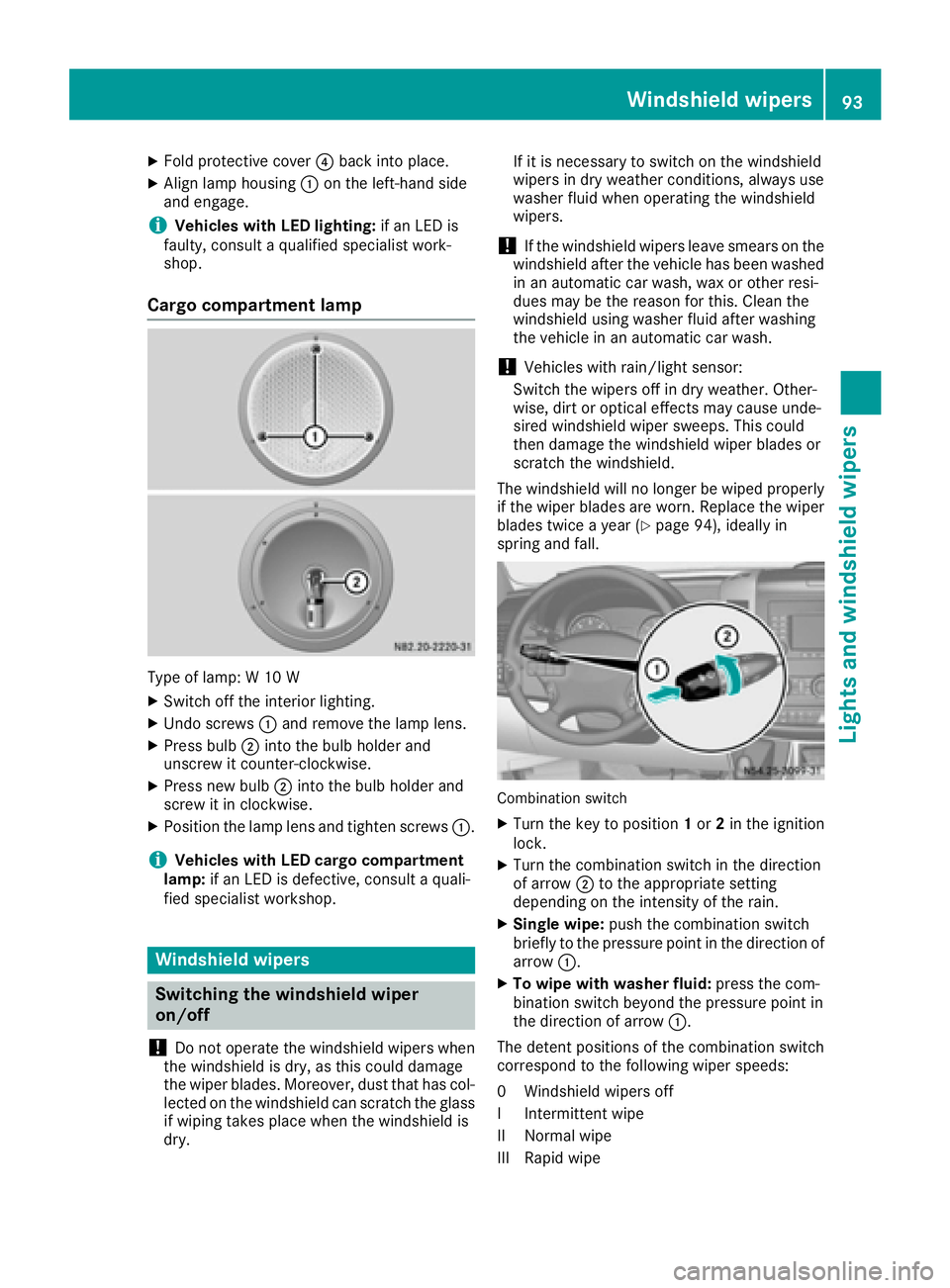
Cargo compartment lamp
Type of lamp: W 10 W
XSwitch off the interior lighting.
XUndo screws :and remove the lamp lens.
XPress bulb ;into the bulb holder and
unscrew it counter-clockwise.
XPress new bulb ;into the bulb holder and
screw it in clockwise.
XPosition the lamp lens and tighten screws :.
iVehicles with LED cargo compartment
lamp: if an LED is defective, consult a quali-
fied specialist workshop.
Windshield wipers
Switching the windshield wiper
on/off
!
Do not operate the windshield wipers when
the windshield is dry, as this could damage
the wiper blades. Moreover, dust that has col-
lected on the windshield can scratch the glass
if wiping takes place when the windshield is
dry. If it is necessary to switch on the windshield
wipers in dry weather conditions, always use
washer fluid when operating the windshield
wipers.
!If the windshield wipers leave smears on the
windshield after the vehicle has been washed
in an automatic car wash, wax or other resi-
dues may be the reason for this. Clean the
windshield using washer fluid after washing
the vehicle in an automatic car wash.
!Vehicles with rain/light sensor:
Switch the wipers off in dry weather. Other-
wise, dirt or optical effects may cause unde-
sired windshield wiper sweeps. This could
then damage the windshield wiper blades or
scratch the windshield.
The windshield will no longer be wiped properly
if the wiper blades are worn. Replace the wiper
blades twice a year (
Ypage 94), ideally in
spring and fall.
Combination switch
XTurn the key to position 1or 2in the ignition
lock.
XTurn the combination switch in the direction
of arrow ;to the appropriate setting
depending on the intensity of the rain.
XSingle wipe: push the combination switch
briefly to the pressure point in the direction of arrow :.
XTo wipe with washer fluid: press the com-
bination switch beyond the pressure point in
the direction of arrow :.
The detent positions of the combination switch
correspond to the following wiper speeds:
0W indshield wipers off
II ntermittent wipe
II Normal wipe
III Rapid wipe
Windshield wipers93
Lights and windshield wiper s
Z
Page 96 of 290
iCanada only:
If the wind shield wiper s areswitched on and
you stop the veh icle, the windshield wiper
speed isreduced. For example, ifyou have
selected level IIand stop the veh icle,wipin g
continues with intermittent wipe whilethe
veh icle is stationary. Ifintermittent wipe is
selected, the intervals become longer.
Vehicles with a rain and light sensor: you
can use level Ias the universal setting. The
rain and light sensor sets the appropriate wip-
ing frequency automatically, according to the
intensity of the rain. When you stop the veh i-
cle, leve lsIII and IIare swit ched down to
level Iautomatically.
The wind shield wiper will return to the original
level when you drive faster than 5 mph
(8 km/h).
You can adjust the sensitivit y of the rain and
light sensor using the on-board computer
(
Ypage 173).
In formation on checking the washer fluid level
can befound inthe "Maintenance and care"
section (
Ypage 224).
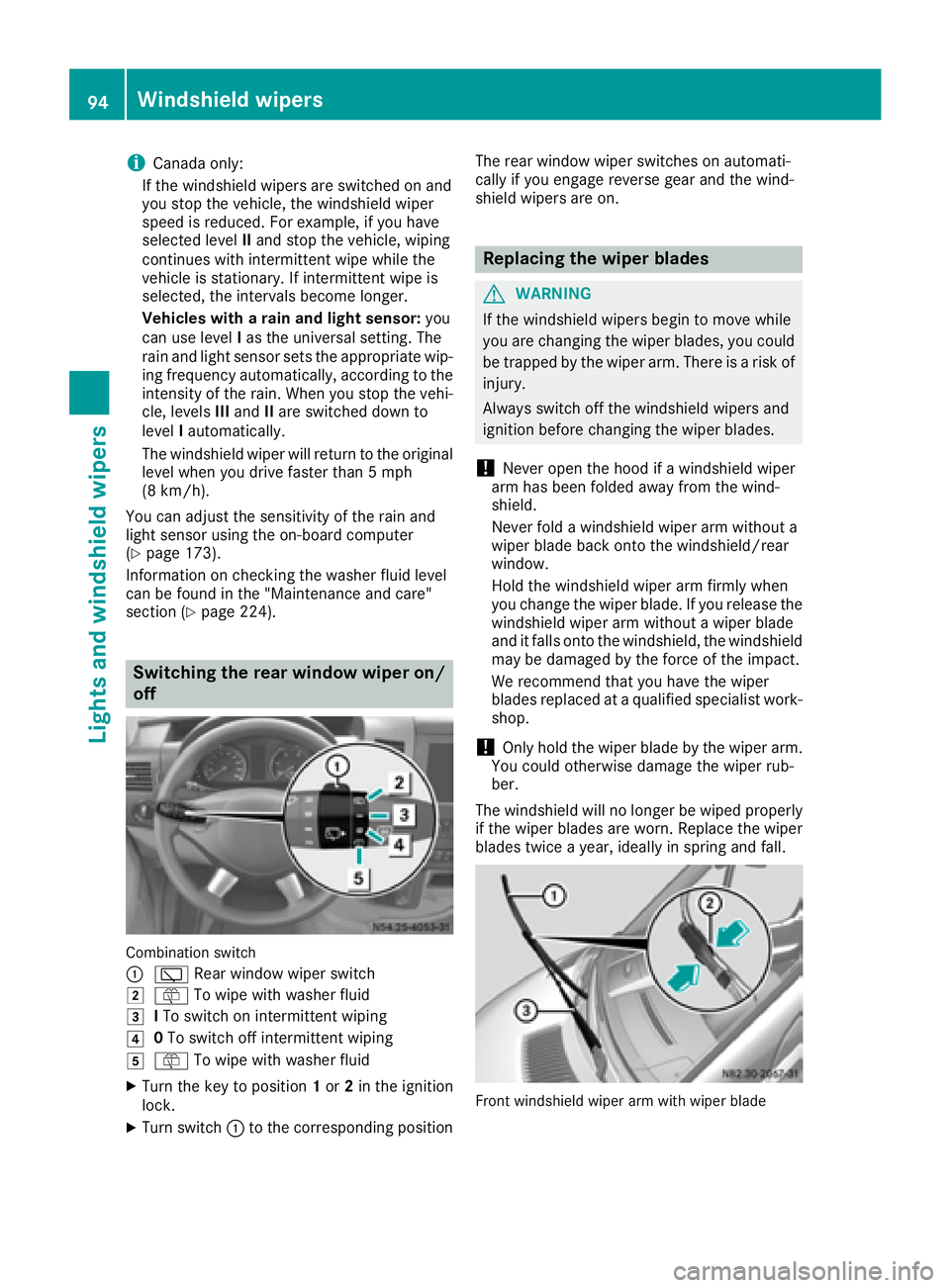
Switching the rear window wiper on/
off
Combination switch
:
è Rearwindowwiper swit ch
2ôTowipe wit h washer fluid
3ITo swit ch on intermittent wiping
40To swit ch off intermittent wiping
5ô Towipe wit h washer fluid
XTurn the key to position 1or 2in the ignition
lock.
XTurn switch: to the corresponding position The rear
window wiper switches on automati-
cally ifyou engage reverse gear and the wind-
shield wipers are on.
Replacing the wiper blades
GWARNING
If the wind shield wipers begin to move while
you are changing the wiperblades, you could
be trapped by the wiper arm. There is a risk of
injury.
Alwa ysswit ch off the windshield wipers and
ignition before changing the wiper blades.
!Never open the hood if a windshield wiper
arm has been folded away from the wind-
shield.
Never fold a windshield wiper armwithout a
wiper blade back onto the windshield/rear
window.
Hold the windshield wiper arm firmly when
you change the wiperblade. Ifyou release the
windshield wiper arm without a wiperblade
and it falls onto the windshield, the windshield
may bedamaged by the force of the impact.
We recommend that you have the wiper
blades replaced at a qualified specialist work-
shop.
!Only hold the wiper blade by the wiper arm.
You could otherwise damage the wiper rub-
ber.
The windshield will no longer be wiped properly
if the wiper blades are worn. Replace the wiper
blades twice a year, ideally in spring and fall.
Frontwindshield wiper arm wit hwiper blade
94Windshield wipers
Lights and windshield wipers
Page 144 of 290
Problems with cruise control
ProblemPossible causes/consequences andMSolutions
On vehicles with steering
wheel buttons, the
speed cannot be set
when cruise control is
activated.The display shows a high-priority message. Thus a change in speed is
not possible.
XProceed as instructed by the message in the display.
XDeactivate cruise control
COLLISION PREVENTION ASSIST
General notes
COLLISION PREVENTION ASSIST comprises the
distance warning function and adaptive Brake
Assist.
Distance warning function
Important safety notes
iNote the section on 'Important safety notes'
(Ypage 52).
GWARNING
The distance warning function does not react:
Rto people or animals
Rto oncoming vehicles
Rto crossing traffic
Rwhen cornering
Thus, the distance warning function cannot
provide a warning in all critical situations.
There is a risk of an accident.
Always pay careful attention to the traffic sit-
uation and be ready to brake.
GWARNING
The distance warning function cannot always
clearly identify objects and complex traffic
situations.
In such cases, the distance warning function
may:
Rgive an unnecessary warning
Rnot give a warning
There is a risk of an accident.
Always pay careful attention to the traffic sit- uation and do not rely solely on the distance
warning function.
Operation
The distance warning function can help you to
minimize the risk of a front-end collision with a
vehicle ahead or reduce the effects of such a
collision. If the distance warning function
detects that there is a risk of a collision, you will
be warned visually and acoustically. Without
your intervention, the distance warning function
cannot prevent a collision.
The distance warning function will issue a warn-
ing at speeds of around 20 mph (30 km/h) or
more if:
Ryou approach a vehicle ahead of you very
quickly. You will then hear an intermittent
warning tone and the red ·warning lamp
in the instrument cluster flashes.
XBrake immediately in order to increase the
distance from the vehicle in front.
or
XTake evasive action provided it is safe to do
so.
If you want the distance warning function to
assist you, the function must be activated and
operational.
Due to the nature of the system, particularly
complicated driving conditions may cause the
system to display an unnecessary warning.
With the help of the radar sensor system, the
distance warning function can detect obstacles
that are in the path of your vehicle for an exten-
ded period of time.
Up to a speed of around 45 mph (70 km/h), the
distance warning function can also react to sta-
tionary obstacles, such as stopped or parked
vehicles.
142Driving systems
Driving and parking
Page 145 of 290
If you approach an obstacle and the distance
warning function detects a risk of a collision, the
system will alert you both visually and acousti-
cally.
In particular, the detection of obstacles can be
impaired in the case of:
Rdirt on the sensors or anything else covering
the sensors
Rsnow or heavy rain
Rinterference from other radar sources
Rthere are strong radar reflections, for exam-
ple in parking garages
Ra narrow vehicle traveling in front, e.g. a
motorbike
Ra vehicle traveling in front on a different line
Following damage to the front end of the vehicle,
have the configuration and operation of the
radar sensor checked at a qualified specialist
workshop. This also applies to collisions at slow
speeds where there is no visible damage to the
front of the vehicle.
Activating/deactivating the distance
warning function
When you switch on the engine, the distance
warning function switches on after a few sec-
onds.
XTo deactivate: press theæbutton
(Ypage 35).
Vehicles without steering wheel buttons:
the Ä warning lamp in the instrument clus-
ter lights up and the OFF
message flashes. The
message then disappears and the Äindi-
cator lamp remains lit.
Vehicles with steering wheel buttons: the
Ä warning lamp in the instrument cluster
flashes and the Distance
warningsystemdeactivatedmessage appears .The mes-
sage then disappears and the Äwarning
lamp remains lit.
XTo activate: press theæbutton again
(Ypage 35).
Vehicles without steering wheel buttons:
the Ä warning lamp in the instrument clus-
ter lights up and the on
message flashes. The
message then disappears and the Äindi-
cator lamp goes out.
Vehicles with steering wheel buttons: the
Ä warning lamp in the instrument cluster
flashes and the Distance
warningsystemactivatedmessage appears in the multi- function display. The message then disap-
pears and the indicator lamp
Ägoes out.
Adaptive Brake Assist
iObserve the "Important safety notes" sec-
tion for driving safety systems (Ypage 52).
GWARNING
Adaptive Brake Assist cannot always clearly
identify objects and complex traffic situa-
tions.
In such cases, Adaptive Brake Assist can:
Rintervene unnecessarily
Rnot intervene
There is a risk of an accident.
Always pay careful attention to the traffic sit- uation and be ready to brake. Terminate the
intervention in a non-critical driving situation.
GWARNING
Adaptive Brake Assist does not react:
Rto people or animals
Rto oncoming vehicles
Rto crossing traffic
Rto stationary obstacles
Rwhen cornering
As a result, the Adaptive Brake Assist may not
intervene in all critical conditions. There is a
risk of an accident.
Always pay careful attention to the traffic sit- uation and be ready to brake.
Adaptive Brake Assist aids you when braking
during hazardous situations at speeds above
20 mph (30 km/h). With the help of Adaptive
Brake Assist, the distance warning signal can
detect obstacles that are in the path of your
vehicle for an extended period of time.
When you approach an obstacle and adaptive
Brake Assist detects that there is a risk of a col- lision, adaptive Brake Assist calculates the brak-
ing force necessary to avoid a collision. Should
you apply the brakes forcefully, adaptive Brake
Assist will automatically increase the braking
force to the calculated level.
Driving systems143
Driving and parking
Z
Page 146 of 290
XKeep the brake pedal depressed until the
emergency braking situation is over.
ABS prevents the wheels from locking.
The brakes function as usual again if:
Ryou release the brake pedal
Rthere is no longer any danger of a collision
Rno obstacle is detected in front of your vehicle
Adaptive Brake Assist is then deactivated.
Up to the maximum vehicle speed, adaptive
Brake Assist can react to moving obstacles that
have already been recognized as such at least
once over the period of observation. Adaptive
Brake Assist does not react to stationary obsta-
cles.
In particular, the detection of obstacles can be
impaired if:
Rdirt on the sensors or anything else covering
the sensors
Rsnow or heavy rain
Rinterference from other radar sources
Rthere are strong radar reflections, for exam-
ple in parking garages
Ra narrow vehicle traveling in front, e.g. a
motorbike
Ra vehicle traveling in front on a different line
If adaptive Brake Assist is not available due to a
malfunction in the radar sensor system, the full
brake boosting effect with the help of BAS
remains available.
Following damage to the front end of the vehicle,
have the configuration and operation of the
radar sensor checked at a qualified specialist
workshop. This also applies to collisions at slow
speeds where there is no visible damage to the
front of the vehicle.
Lane Tracking package
Blind Spot Assist
General notes
Blind Spot Assist uses a radar sensor system to
monitor the areas on both sides of your vehicle.
It supports you from speeds of approximately
20 mph (30 km/h). A warning display in the
exterior mirrors draws your attention to vehicles detected in the monitored area. If you then
switch on the corresponding turn signal to
change lane, you will also receive an optical and
audible collision warning. For this purpose, Blind Spot Assist uses sensors in the rear bumper and
behind the protective strips of the B-pillars.
Important safety notes
GWARNING
Blind Spot Assist does not react to:
Rvehicles overtaken too closely on the side,
placing them in the blind spot area
Rvehicles which approach with a large speed
differential and overtake your vehicle
As a result, Blind Spot Assist may not give
warnings in such situations. There is a risk of
an accident.
Always observe the traffic conditions care-
fully, and maintain a safe lateral distance.
Blind Spot Assist is only an aid. It may fail to
detect some vehicles and is no substitute for
attentive driving.
iUSA only:
This device has been approved by the FCC as
a "Vehicular Radar System". The radar sensor is intended for use in an automotive radar
system only. Removal, tampering, or altering
of the device will void any warranties, and is
not permitted by the FCC. Do not tamper with,
alter, or use in any non-approved way.
Any unauthorized modification to this device
could void the user’s authority to operate the
equipment.
Monitoring range of the sensors
In particular, the detection of obstacles can be
impaired in the case of:
Rdirt on the sensors or anything else covering
the sensors
Rpoor visibility, e.g. due to fog, heavy rain or
snow
Rnarrow and short vehicles, e.g. motorcycles
or bicycles
Rvery wide lanes
Rnarrow lanes
Rvehicles not driving in the middle of their lane
Rbarriers or other road boundaries
Vehicles in the monitoring range are then not
indicated.
144Driving systems
Driving and parking